

10 Best AI Operations Tools Reviewed in 2026

Best AI Operations Tools Shortlist


AI operations tools can help by automating routine processes and providing insights through data analysis. These tools can save you time and reduce errors, allowing you to focus on what truly matters—your team. I’ve tested and reviewed numerous options to bring you an unbiased list of top picks. You’ll find insights on each tool's AI capabilities, helping you make an informed decision.
Why Trust Our Software Reviews
Our team has been testing and reviewing software since 2012. As HR experts ourselves, we know how difficult—and important—it is to choose the right software.
For this guide, we evaluated tools using hands-on testing and independent research, scoring tools using our selection criteria. We also draw on insights from industry thought leaders and practicing HR experts.
Our reviews reflect our human editorial judgment, not a sales pitch.
Expert reviewers:
AI Operations Tools Comparison Table
This comparison table summarizes pricing details for my top AI operations tool selections:
| Tool | Best For | Trial Info | Price | ||
|---|---|---|---|---|---|
| 1 | Best for all-in-one HR and IT ops automation | Free demo available | From $8/user/month | Website | |
| 2 | Best for AI-driven global HR operations | Free demo available | From $5/employee/month | Website | |
| 3 | Best with AI-powered customizable workflows | Free plan available | From $9/user/month (billed annually) | Website | |
| 4 | Best for large enterprise solutions | Free demo available | Pricing upon request | Website | |
| 5 | Best for video interview analysis | Free demo available | Pricing upon request | Website | |
| 6 | Best for global HR management | 30-day free trial | Pricing upon request | Website | |
| 7 | Best for employee self-service | Free trial + free demo available | Pricing upon request | Website | |
| 8 | Best for small business payroll | Free demo + free plan available | From $49/month + $6/user/month | Website | |
| 9 | Best for continuous feedback | Free demo available | From $4/employee/month | Website | |
| 10 | Best for automating HR queries | Free demo available | Pricing upon request | Website |

Best AI Operations Tool Reviews
Below are my detailed summaries of the best AI operations tools that made it onto my shortlist. My reviews offer a detailed look at the key features, pros & cons, integrations, and ideal use cases of each tool to help you find the best one for you.

Best for all-in-one HR and IT ops automation
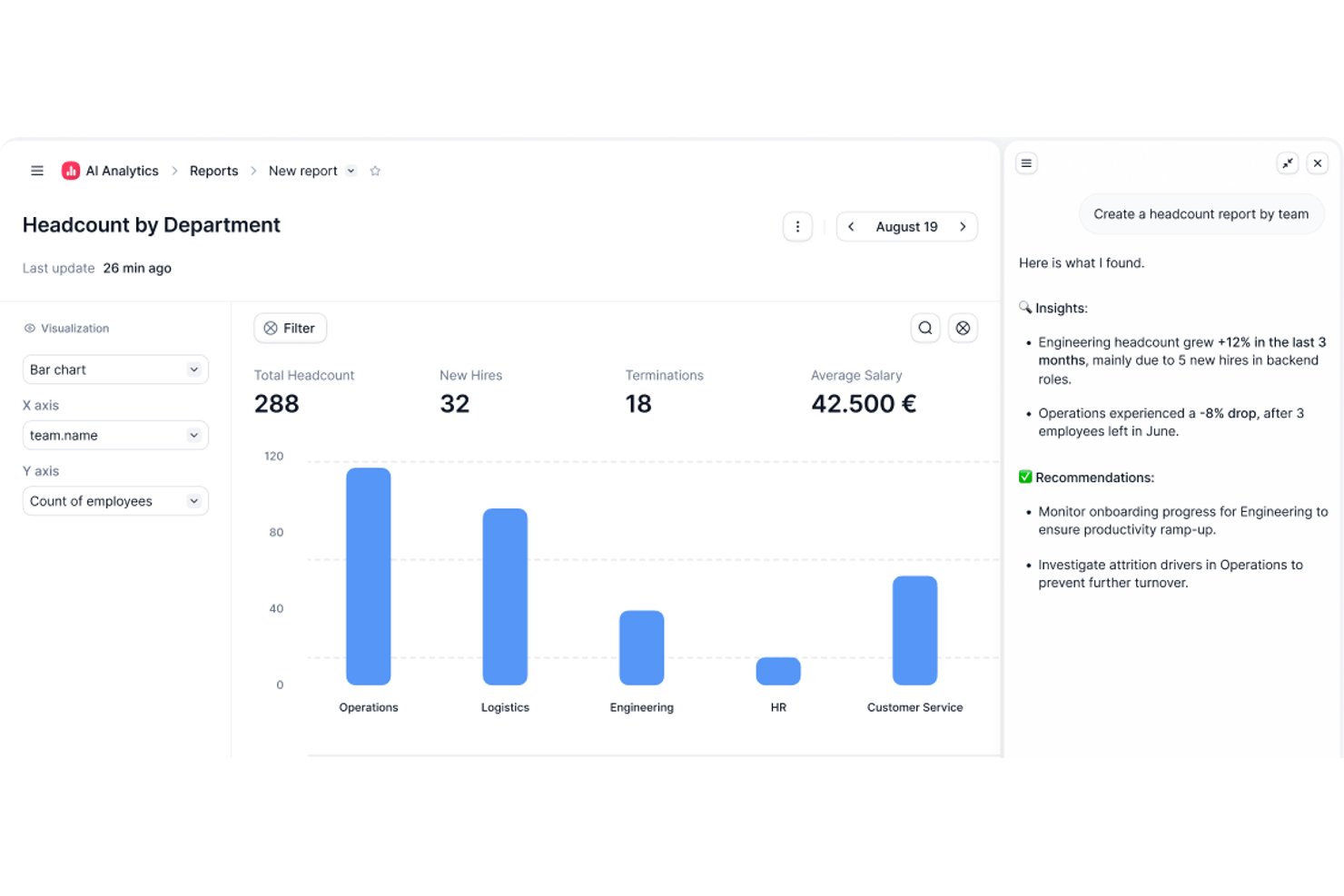
Factorial is an all-in-one HR and IT operations platform that combines payroll, time management, talent management, finance, and IT management with an embedded AI agent for workflow automation, document processing, and real-time reporting.
Who Is Factorial Best For?
Factorial fits SMB and mid-market HR teams that want a single platform to handle HR, payroll, time, talent, and IT management without juggling multiple tools.
Why I Picked Factorial
Factorial earns its spot on my shortlist because it's one of the few platforms that genuinely combines HR and IT operations in one place, with an embedded AI agent doing real work. Factorial One can generate a headcount report, draft a job description, or build an approval workflow from a single prompt. I also love that SaaS provisioning and deprovisioning tie directly to HR events, so when someone joins or leaves, access management happens automatically.
Factorial Key Features
- eNPS and pulse surveys: Tracks employee sentiment over time using Net Promoter Score dashboards and recurring team check-in surveys.
- 9-box talent grid: Maps employees by performance and potential to support succession planning and talent decisions.
- OCR expense management: Extracts data from uploaded receipts automatically, routing them through configurable multi-step approval workflows.
- Zero-touch device provisioning: Automatically assigns and configures equipment kits for new hires based on their role during onboarding.
Factorial Integrations
Factorial offers marketplace integrations, including Slack, Google Workspace, Microsoft Outlook, Okta, LinkedIn, Teamtailor, Recruitee, Workable, and Microsoft Power BI. It also provides an open REST API and Zapier connectivity for custom HR operations workflows.
Pros and Cons
Pros:
- Zero-touch device and SaaS provisioning
- AI agent automates workflows and document tasks
- Combines HR, IT, and finance operations
Cons:
- No native integration with major enterprise HRIS
- Predictive analytics capabilities are limited

Deel HR
Best for AI-driven global HR operations
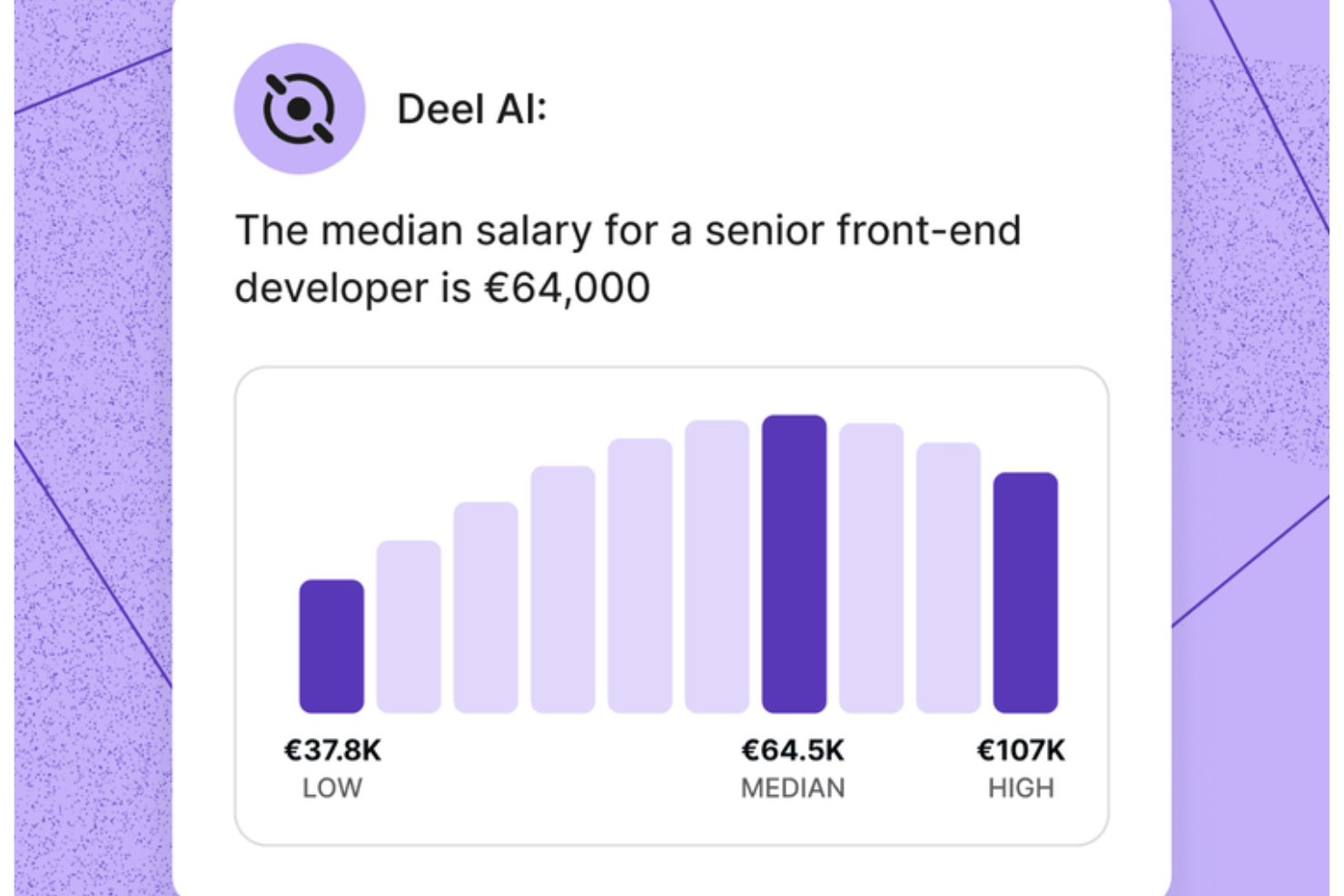
Deel offers a platform for managing global teams with ease. It caters to businesses looking to simplify complex HR operations, from onboarding to payroll, by offering a centralized solution that ensures compliance across 150+ countries. If you're dealing with the hassle of disconnected tools and want to enhance productivity while avoiding costly errors, Deel addresses these challenges head-on with its AI-powered capabilities.
Why I Picked Deel
I picked Deel because its AI is embedded directly into day-to-day HR and operations tasks, giving you context-rich insights exactly when you need them. The system recognizes where you are in the platform and surfaces summaries, key data points, or compliance considerations tied to what you’re viewing. I appreciate that Deel AI also answers operational questions — from payroll rules to policy details — using information sourced from HR and legal experts across 150+ countries.
Deel Key Features
In addition to its AI capabilities, I also found these features valuable for your team:
- Global Payroll Management: Automate payroll tasks across multiple countries, ensuring compliance with local regulations.
- Employer of Record (EOR) Services: Hire employees internationally without setting up local entities, reducing administrative burdens.
- Automated Invoicing: Streamline billing processes with automatic invoice generation and management.
- Time-off Management: Track and manage employee leave requests with ease, integrated directly into the platform.
Deel Integrations
Integrations include NetSuite, BambooHR, Slack, Google Workspace, Microsoft Teams, QuickBooks, SAP SuccessFactors, Greenhouse, Lever, and Rippling.
Pros and Cons
Pros:
- AI offers instant answers on local labor laws in 150+ countries
- Context-aware insights summarize HR pages as you view them
- Employees can self-serve HR questions without manager involvement
Cons:
- AI guidance may require human review for complex legal scenarios
- Heavy dependence on proprietary Knowledge Hub for accuracy
New Product Updates from Deel HR

Deel Expands Stablecoin Wallet to 80+ Countries
Deel expands its Stablecoin Wallet to 80+ countries with dollar-backed balances and optional rewards. This gives eligible contractors more ways to hold and manage earnings inside Deel. For more information, visit Deel’s official site.
 .
.
Best with AI-powered customizable workflows
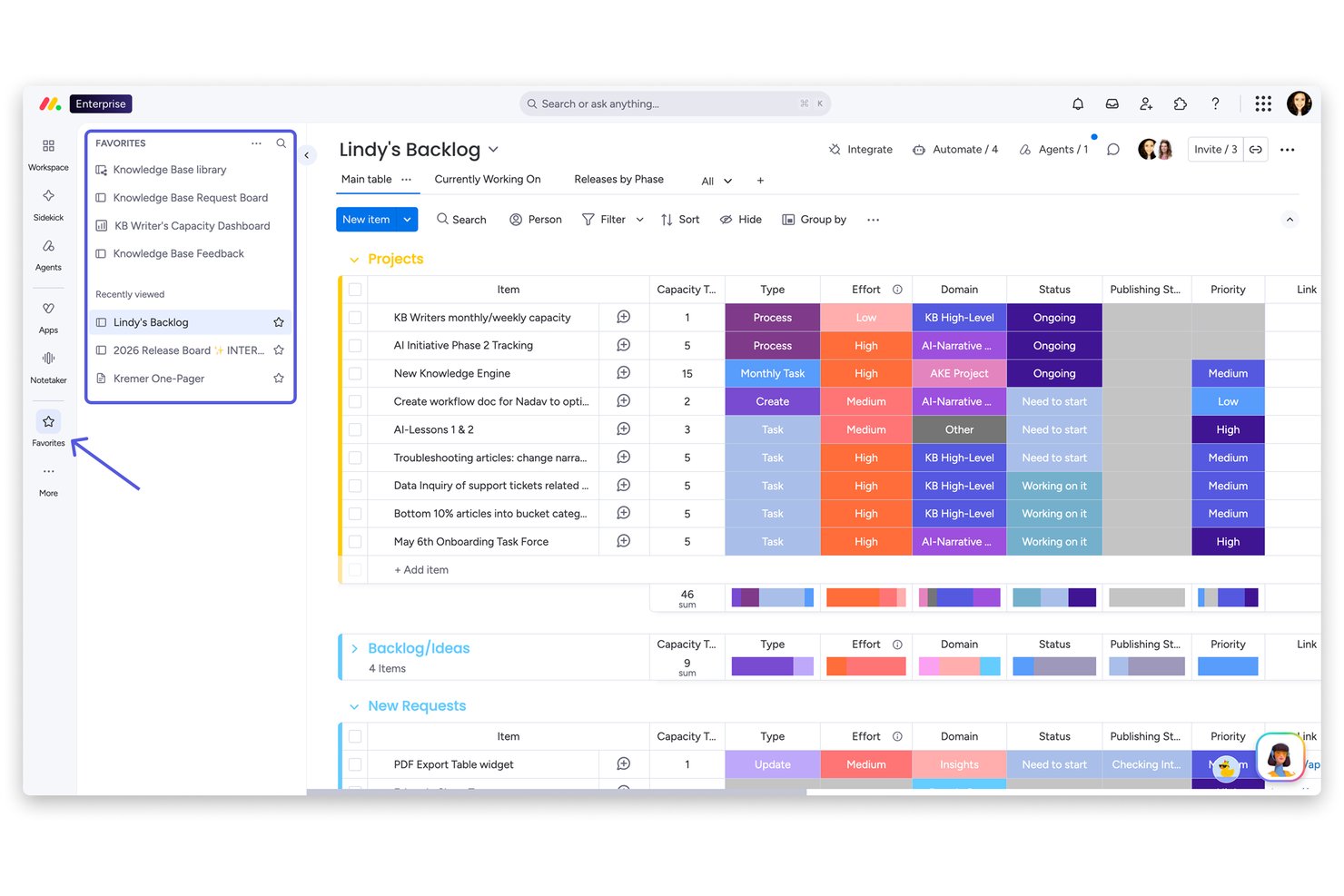
monday AI Workspace is an AI work management platform that combines workflow automation, project tracking, cross-functional collaboration, and AI-powered agents across work management, CRM, service, and dev products.
Who Is monday AI Workspace Best For?
It's a strong fit for cross-functional teams at small to midsize companies that need flexible, AI-assisted workflows without heavy technical setup.
Why I Picked monday AI Workspace
I picked monday AI Workspace as one of the best because its AI-powered workflow customization goes well beyond drag-and-drop boards. With monday magic, I can describe a workflow in plain language and instantly get a fully functional, best-practice board generated from a single prompt. monday agents then lets me deploy no-code AI specialists to handle recurring operational tasks autonomously, without manual intervention at each step.
monday AI Workspace Key Features
- AI-powered sidekick assistant: Offers contextual task suggestions and quick actions right inside your existing workflows.
- Automated board generation: Instantly builds full workflow boards from a single plain-language prompt using monday magic.
- Integration marketplace: Connects with over 200 third-party tools including Slack, Google Drive, Jira, and HubSpot CRM.
- Advanced dashboard views: Provides Gantt charts, Kanban boards, and calendar views for visualizing work progress and dependencies.
monday AI Workspace Integrations
monday AI Workspace offers over 200 native integrations, including Slack, Google Drive, Microsoft Outlook, Google Calendar, Jira, HubSpot CRM, Trello, Asana, and GitHub. It also supports Zapier and provides an API for custom integrations.
Pros and Cons
Pros:
- Automated board building saves setup time
- AI sidekick suggests actions and next steps
- Custom AI workflows generated from natural language
Cons:
- Lacks native HR document processing features
- No HR analytics or people insights tools
New Product Updates from monday AI Workspace
monday AI Workspace Adds Human Approval Routing
monday AI Workspace adds a human-in-the-loop approval block to AI Workflows, sending approval requests and routing workflow paths based on responses. For more information, visit monday AI Workspace's official site.
Best for large enterprise solutions

Oracle HCM Cloud is a comprehensive human capital management suite designed for large enterprises. It offers AI-driven solutions for talent management, workforce planning, and employee engagement, enhancing HR efficiency.
Why I picked Oracle HCM Cloud: Large enterprise solutions are its specialty, making it ideal for managing complex HR needs. The AI features provide predictive analytics for workforce planning and talent acquisition. Oracle HCM Cloud supports diverse compliance requirements, ensuring your organization meets global standards. In my experience, its scalability and depth of features make it a strong choice for large-scale operations.
Standout features & integrations:
Features include performance management tools to track employee progress and set goals. The learning management system offers training modules to enhance skills. The platform also provides compensation management to administer pay structures effectively.
Integrations include Microsoft Office 365, Salesforce, Google Workspace, Slack, Workday, ADP, SAP SuccessFactors, Kronos, NetSuite, and ServiceNow.
Pros and Cons
Pros:
- Scalable for large enterprises
- Supports diverse compliance requirements
- Predictive analytics for workforce planning
Cons:
- Requires training for full utilization
- Complex setup for smaller teams
HireVue
Best for video interview analysis

HireVue is a video interviewing platform designed for recruitment teams across various industries. It uses AI to analyze video interviews, providing insights into candidate suitability and streamlining the hiring process.
Why I picked HireVue: Video interview analysis is a key feature, helping you assess candidates efficiently. Its AI evaluates interview response transcripts and offers detailed insights. This aids in identifying top talent quickly and objectively. In my experience, these AI-driven assessments are invaluable for making informed hiring decisions.
Standout features & integrations:
Features include on-demand video interviews, which allow candidates to record responses at their convenience. Live interviews provide a real-time interaction option for more in-depth assessments. The platform also offers coding assessments to test technical skills effectively.
Integrations include Greenhouse, Workday, SAP SuccessFactors, Oracle, iCIMS, SmartRecruiters, Taleo, Cornerstone, PageUp, and ADP.
Pros and Cons
Pros:
- Coding assessments for technical roles
- On-demand video interviews for convenience
- AI analysis of interview response transcript
Cons:
- Algorithmic bias
- Impersonal candidate experience
Best for global HR management

SAP SuccessFactors is a cloud-based human capital management (HCM) solution designed for large enterprises. It helps with global HR management by offering AI-driven insights into workforce planning, talent management, and employee engagement.
Why I picked SAP SuccessFactors: Global HR management is its forte, making it suitable for enterprises with a worldwide presence. The AI features provide predictive analytics to anticipate workforce trends and needs. It supports diverse compliance requirements across different countries. In my experience, its ability to manage a large, global workforce efficiently is unmatched.
Standout features & integrations:
Features include performance management tools that help you track employee progress and set goals. Learning management systems offer training modules to enhance skills. The software also provides compensation management to administer pay structures effectively.
Integrations include Microsoft Office 365, Salesforce, Google Workspace, Slack, Workday, ADP, Oracle, Concur, ServiceNow, and Kronos.
Pros and Cons
Pros:
- Efficient for managing large global workforces
- Supports diverse compliance requirements
- Predictive analytics for workforce planning
Cons:
- Requires training for full utilization
- Complex setup for smaller teams


BambooHR is an HR software solution aimed at small to medium-sized businesses. It streamlines HR functions like hiring, onboarding, and performance management with AI-driven analytics.
Why I picked BambooHR: Employee self-service is central, letting your team access and update their information easily. The AI features help in analyzing employee data, offering insights into engagement and retention. BambooHR simplifies the onboarding process with automated workflows. In my experience, its focus on user-friendly interfaces makes it a favorite among HR teams.
Standout features & integrations:
Features include time tracking, which helps you manage employee hours efficiently. Performance management tools allow for regular feedback and goal setting. The software also offers reporting features to generate insights on workforce trends.
Integrations include QuickBooks, Gusto, Slack, Xero, NetSuite, Okta, Greenhouse, Indeed, Checkr, and Workable.
Pros and Cons
Pros:
- AI-driven analytics for employee insights
- Automated onboarding workflows
- User-friendly interface for employee self-service
Cons:
- Advanced features may require additional training
- Limited customization for large enterprises


Gusto is a payroll and HR management platform tailored for small businesses. It automates payroll, benefits, and compliance, offering AI-driven insights to simplify HR tasks.
Why I picked Gusto: Small business payroll is its primary focus, making it ideal for managing your team's paychecks effortlessly. The AI features help with compliance by automatically updating tax rates and filing. Gusto also provides personalized insights to optimize employee benefits. In my experience, its user-friendly interface and targeted features make it a great choice for small businesses.
Standout features & integrations:
Features include automated payroll processing, which ensures your team gets paid on time without manual intervention. Benefits management allows you to offer health insurance and retirement plans easily. The platform also offers compliance support to keep your business aligned with regulations.
Integrations include QuickBooks, Xero, FreshBooks, TSheets, When I Work, Homebase, Clover, Expensify, Deputy, and Shopify.
Pros and Cons
Pros:
- User-friendly interface for small businesses
- Offers personalized benefits insights
- Automates tax updates and filings
Cons:
- May require additional setup for benefits
- Limited advanced features for larger companies

Lattice is an HR platform focusing on employee performance and engagement for various industries. It offers AI-driven tools for performance management, career development, and analytics, enhancing HR operations and company culture.
Why I picked Lattice: Continuous feedback is a standout feature, helping you keep your team aligned with goals. The AI agent provides instant insights and support, saving time and improving managerial effectiveness. Lattice’s customizable solutions cater to different company sizes, making it versatile. In my experience, the focus on building strong company culture sets it apart.
Standout features & integrations:
Features include performance management, career development, and compensation strategies. These features help your team grow and align with company goals. The platform also offers analytics to track progress and insights into employee engagement.
Integrations include Slack, Microsoft Teams, Google Workspace, BambooHR, Workday, Okta, ADP, Namely, Personio, and Greenhouse.
Pros and Cons
Pros:
- Focus on building strong company culture
- AI agent for instant support
- Customizable for different industries
Cons:
- Limited mobile experience
- Modular pricing


Leena AI is an AI-powered virtual assistant designed for HR teams to automate routine queries. It enhances the employee experience by providing instant responses to HR-related questions and requests.
Why I picked Leena AI: Automating HR queries is its primary strength, reducing your team's workload. The AI assistant handles common employee questions, from leave balances to policy clarifications, with ease. This allows your HR staff to focus on more strategic tasks. In my experience, its ability to integrate with existing HR systems makes it a valuable addition to any HR team.
Standout features & integrations:
Features include a knowledge base that stores company policies and FAQs for quick access. The tool also offers onboarding assistance, helping new employees settle in smoothly. Additionally, it provides analytics on query trends to help you improve HR services.
Integrations include SAP, Workday, Oracle, ADP, BambooHR, Microsoft Teams, Slack, ServiceNow, Zendesk, and Freshdesk.
Pros and Cons
Pros:
- Centralized knowledge management
- Provides analytics on query trends
- Automates routine HR queries
Cons:
- Reporting and feature limitations
- Data quality dependency
Other AI Operations Tools
Here are some additional AI operations tools options that didn’t make it onto my shortlist, but are still worth checking out:
- beam.ai
For predictive analytics
- Folks HR
For user-friendly interface
- Paycor
For payroll and tax filing
- Greenhouse
For structured hiring processes
- ClearCo
For talent management solutions
- Workday
For financial and HR integration
- Mitratech
For legal compliance management
- Eightfold AI
For talent acquisition insights
- Deel Payroll
For international payroll solutions
- monday.com
For project management flexibility
- Rippling
For integrating HR and IT functions
- Workable
For recruitment automation
- HrFlow.ai
For AI-driven talent analytics


How I Evaluate AI Operations Tools
Every tool on this list needs to deliver real AI value—not just slap a chatbot on a dashboard and call it intelligent. I split my evaluation into two layers: the core functionality a tool must have to qualify, and the differentiating factors that separate good options from great ones for HR teams.
Core Functionality (Table Stakes For This List)
When I'm selecting tools for my list, I rank each one on a scale from 0 (does not offer the functionality) to 5 (excels in this area) for each core functionality listed below. Then, I calculate the tool's total score into a percentage. Each tool needs to achieve a minimum total score of 65% to be considered for inclusion.
- AI Workflow Automation: I look for tools that can automate multi-step HR processes—like triggering onboarding tasks, routing approvals, and updating records—using AI logic rather than static rules.
- Predictive People Analytics: The tool should apply ML models to forecast workforce outcomes like attrition risk or headcount needs, not just display historical dashboards.
- Conversational AI Interface: I evaluate whether the AI assistant can handle real employee requests, such as checking leave balances or submitting IT tickets, beyond scripted FAQ responses.
- Intelligent Document Processing: Tools should use AI to extract and classify data from HR documents like offer letters, contracts, and compliance forms without manual tagging.
- HR System Integrations: I check for native connectors with major HRIS and payroll platforms like Workday, ADP, and BambooHR, plus open API access for custom builds.
- AI-Driven Recommendations: The tool should surface actionable next steps for HR practitioners, such as flagging at-risk employees or suggesting engagement interventions based on live data.
Once I have a list of tools that meet the criteria, I consider what sets each platform apart.
Differentiating Factors (What Sets Vendors Apart)
Here's how I compare and contrast different vendors:
Standout Features
Bias detection controls matter a lot here. When AI influences hiring shortlists or promotion decisions, I look for built-in fairness auditing that flags potential bias before it reaches candidates. A skills intelligence engine is another differentiator I value—tools that map employee competencies, identify gaps, and suggest internal mobility paths give HR teams a real edge in retention. I also check whether the platform offers a no-code AI builder so HR practitioners can spin up custom workflows without filing engineering tickets.
Beyond Features
AI transparency is a big one for me. I check whether the vendor documents how its models make decisions, especially when those decisions touch hiring or performance reviews. Compliance also weighs heavily—I look for certifications like SOC 2 Type II and clear data privacy policies that align with GDPR and other regional frameworks. Implementation timelines matter too. Tools that ship with prebuilt HR use case templates tend to get teams live in weeks, while platforms requiring heavy custom configuration can stall adoption for months.
How to Choose AI Operations Tool
It’s easy to get bogged down in long feature lists and complex pricing structures. To help you stay focused as you work through your unique software selection process, here’s a checklist of factors to keep in mind:
| Factor | What to Consider |
|---|---|
| Scalability | Can the tool grow with your business? Look for solutions that accommodate increasing users and data without a drop in performance. Consider your 3-5 year growth plan. |
| Integrations | Does it integrate with your existing systems? Check for compatibility with your current software stack to avoid workflow disruptions. |
| Customizability | How flexible is the tool? Ensure you can tailor it to fit your specific processes and needs without excessive effort or cost. |
| Ease of use | Is the tool user-friendly? Evaluate the interface and navigation to ensure your team can adopt it quickly without extensive training. |
| Implementation and onboarding | How smooth is the transition? Look for comprehensive onboarding support, training resources, and a clear implementation timeline to minimize downtime. |
| Cost | Does it fit your budget? Compare pricing plans, hidden fees, and long-term costs. Check if the pricing aligns with the value it offers your organization. |
| Security safeguards | Are your data protected? Verify that the tool complies with industry security standards and offers robust data protection features. |
| Support availability | What support does the vendor offer? Consider the availability of customer support, response times, and the variety of support channels provided. |
What Are AI Operations Tools?
AI operations tools are software solutions designed to automate and enhance business operations using artificial intelligence. These tools are typically used by IT professionals, data analysts, and operations managers to improve efficiency and decision-making. Predictive analytics, data-driven insights, and automated workflows help with optimizing processes, reducing manual errors, and providing actionable intelligence. Overall, these tools offer significant value by transforming how businesses operate through intelligent automation and analytics.
Features
When selecting AI operations tools, keep an eye out for the following key features:
- Predictive analytics: Uses AI algorithms to forecast trends and outcomes, helping you make informed decisions.
- Automated workflows: Streamlines repetitive tasks, saving time and reducing human error.
- Data-driven insights: Analyzes large datasets to provide actionable intelligence and improve business strategies.
- Customizable dashboards: Lets you visualize data in a user-friendly format tailored to your needs.
- Real-time data processing: Ensures you can make timely decisions based on the most current information.
- Scenario modeling: Allows you to evaluate potential outcomes of different strategies for better planning.
- AI-driven recommendations: Offers suggestions based on data analysis to enhance decision-making.
- Integration capabilities: Seamlessly connects with existing systems to maintain workflow continuity.
- Security safeguards: Protects sensitive data with advanced security measures and compliance standards.
Benefits
Implementing AI operations tools provides several benefits for your team and your business. Here are a few you can look forward to:
- Enhanced decision-making: Predictive analytics and data-driven insights help you make more informed choices.
- Increased efficiency: Automated workflows save time by handling repetitive tasks and minimizing errors.
- Improved planning: Scenario modeling lets you evaluate different strategies and anticipate potential outcomes.
- Better resource allocation: AI-driven recommendations guide you in optimizing resource use and prioritizing tasks.
- Real-time responsiveness: Real-time data processing ensures you’re acting on the latest information.
- Greater flexibility: Integration capabilities allow the tool to work smoothly with your existing systems.
- Data security: Security safeguards protect sensitive information and ensure compliance with industry standards.
Costs & Pricing
Selecting AI operations tools requires an understanding of the various pricing models and plans available. Costs vary based on features, team size, add-ons, and more. The table below summarizes common plans, their average prices, and typical features included in AI operations tools solutions:
Plan Comparison Table for AI Operations Tools
| Plan Type | Average Price | Common Features |
|---|---|---|
| Free Plan | $0 | Basic analytics, limited integrations, and community support. |
| Personal Plan | $10-$20/user/month | Advanced analytics, customizable dashboards, and email support. |
| Business Plan | $25-$50/user/month | Predictive analytics, real-time data processing, and phone support. |
| Enterprise Plan | $60-$100/user/month | Full integration capabilities, dedicated account manager, and enhanced security. |
AI Operations Tools FAQs
Here are some answers to common questions about AI operations tools:
How do AI operations tools integrate with existing systems?
Yes, most AI operations tools offer integration capabilities with existing systems. You should verify the compatibility with your current software stack to ensure smooth integration. Look for tools that provide APIs or pre-built connectors for popular platforms like Salesforce, SAP, or Microsoft Dynamics. This helps in maintaining workflow continuity and avoids unnecessary disruptions. I recommend testing these integrations during a trial period to see how well they fit with your current processes.
Can AI operations tools improve decision-making?
Yes, AI operations tools can enhance decision-making by providing data-driven insights and predictive analytics. These tools analyze large datasets to identify trends and patterns, enabling you to make informed decisions. For example, predictive analytics can forecast sales trends, helping your team plan inventory accordingly. Ensure the tool you choose offers analytics features that align with your business goals.
Are AI operations tools scalable for growing businesses?
Yes, many AI operations tools are designed to scale with your business. They accommodate increasing users, data, and complexity as your organization grows. When evaluating options, consider tools that offer flexible pricing plans and can handle larger datasets without performance issues. Check if the vendor provides support for scaling and see if they have case studies of businesses similar to yours that have successfully scaled using their tool.
What security measures do AI operations tools provide?
AI operations tools typically offer various security measures to protect your data. Look for tools that comply with industry standards like ISO 27001 or GDPR. They should provide encryption, user access controls, and regular security audits. Verify if the vendor has a dedicated team for security updates and incident response. It’s crucial to ensure your data is safe, especially if you’re handling sensitive information.
How can I evaluate the ROI of AI operations tools?
To evaluate the ROI of AI operations tools, compare the cost savings and efficiency gains against the investment. Consider time saved through automation, improved decision-making, and error reduction. Factor in indirect benefits like enhanced employee productivity and customer satisfaction. Use metrics like time to value or cost per outcome to quantify the ROI. Gathering feedback from your team on the tool’s impact can also provide insights into its effectiveness.