

10 Best Attendance Tracking Software Reviewed for 2026

10 Best Attendance Tracking Software List


The best attendance tracking software will help you accurately track hours worked, manage absences and leave, and streamline payroll—while offering different strengths in automation, usability, and compliance to match your organization’s needs.
Depending on your team size, scheduling complexity, or the level of reporting and oversight you need, certain platforms may offer better clarity, flexibility, or long-term scalability.
Drawing on my hands-on experience using dozens of attendance tracking systems across teams of all sizes, I’ve reviewed and compared the top options available today. In this guide, you’ll find standout tools with essential features, practical use cases, and straightforward pricing—so you can confidently select the attendance tracking software that fits your workforce and workflow.
Why Trust Our Software Recommendations
Our team has been testing and reviewing software since 2012. As HR experts ourselves, we know how difficult—and important—it is to choose the right software.
For this guide, we evaluated tools using hands-on testing and independent research, scoring tools using our selection criteria. We also draw on insights from industry thought leaders and practicing HR experts.
Our reviews reflect our human editorial judgment, not a sales pitch.
Expert reviewers:
Best Attendance Tracking Software Solutions Comparison Chart
This comparison chart summarizes basic details about each of my top attendance tracking software selections. You can view pricing details and the availability of free trials or demos side-by-side to help you find the best system for your budget and business needs.
| Tool | Best For | Trial Info | Price | ||
|---|---|---|---|---|---|
| 1 | Best for integrated payroll and HR support | Not available | From $599/employee/month | Website | |
| 2 | Best for GPS-based attendance tracking | 14-day free trial | From $29/month (billed annually) | Website | |
| 3 | Best attendance tracking software for advanced analytics to help reduce absenteeism | Free demo available | From $8/user/month | Website | |
| 4 | Best free attendance tracking software | Free plan available | From $2/user/month (billed annually) | Website | |
| 5 | Best attendance tracking software for hourly employees and teams | Free plan available | From $30/location/month + payroll add-on | Website | |
| 6 | Best for managing time-off requests | 14-day free trial + free demo available | From $4.99/user/month + $19/month base fee (billed annually) | Website | |
| 7 | Best for in-depth attendance reports | 15-day free trial + free demo available | From $299/month (billed annually) | Website | |
| 8 | Best for tracking offline activities alongside work hours | 14-day free trial + free demo available | From $6.42/user/month (billed annually) | Website | |
| 9 | Best for integrated HR attendance tracking | 14-day free trial | Pricing upon request | Website | |
| 10 | Best for clock-in/clock-out functionality | Free 21-day trial + free demo available | From $2.93/user/month (billed annually) | Website |


Best Attendance Tracking Software Reviews
Here’s a brief description of each attendance solution’s best use case and noteworthy features. I’ve also included screenshots to give you a snapshot of their user interface too:

Best for integrated payroll and HR support
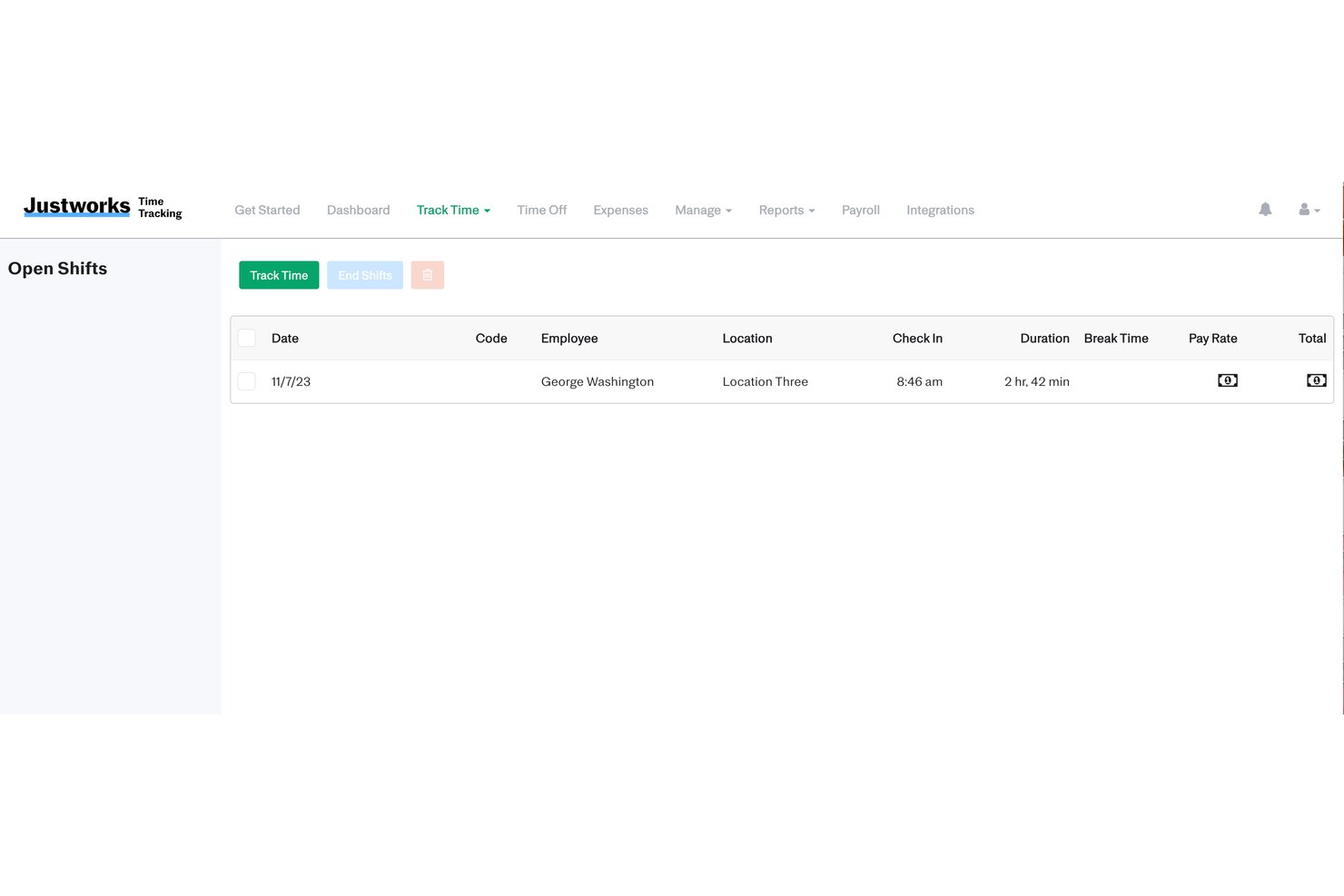
Justworks is an all-in-one HR, payroll, and attendance tracking platform designed for teams that want to manage schedules, time off, compliance, and pay within a single software environment.
Who Is Justworks Best For?
Small and mid-sized companies in the US seeking an integrated HR, payroll, and attendance tracking solution.
Why I Picked Justworks
I picked Justworks as one of the best because I use its built-in time tracking to sync work hours and PTO directly with payroll, and I can access HR support right from the dashboard for tricky compliance questions.
Justworks Key Features
- Employee self-service portal: Staff can clock in and out, view schedules, and access pay details from one place.
- Automated overtime calculation: The system calculates overtime based on configured company policies and labor laws.
- Customizable PTO accruals: Set custom time-off policies and automate accruals for vacation, sick leave, and other absence types.
- Audit-ready attendance records: Maintain secure, exportable logs of attendance data to support internal audits or legal compliance.
Justworks Integrations
Justworks offers 20+ integrations, including QuickBooks, Xero, NetSuite, Sage Intacct, Greenhouse, JazzHR, Lever, 15Five, Leapsome, Carta, Brex, and Vanta.
Pros and Cons
Pros:
- Access to HR and compliance advisors
- Sends proactive meal and break alerts
- Enforces location-bound clock-ins via geofencing
Cons:
- Reporting options are less customizable
- Requires paid add-on for time tracking

Best for GPS-based attendance tracking
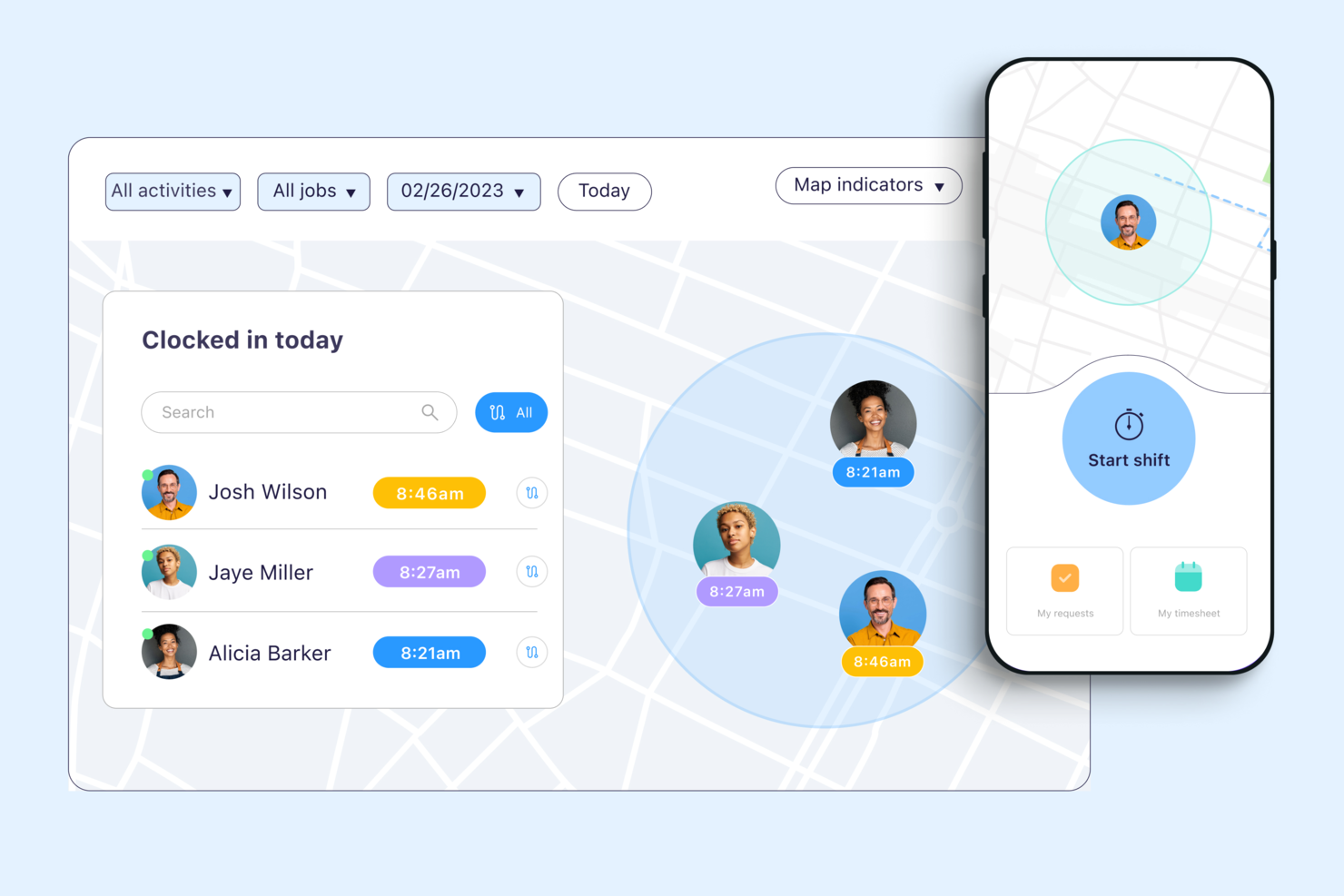
Connecteam is a mobile-first attendance tracking platform designed for businesses with deskless teams who need to manage time tracking, scheduling, and team communication in one place.
Who Is Connecteam Best For?
Connecteam is a great fit for small to mid-sized businesses in field-based industries like construction, retail, and hospitality that need to manage hourly or shift-based workers.
Why I Picked Connecteam
Connecteam earns its spot on my shortlist because of how well it handles GPS-based attendance tracking and absences for teams that work across multiple job sites. I like that managers can set up geofenced clock-in zones, so employees can only punch in when they're physically on location—no buddy punching or manual corrections needed. Additionally, Connecteam's built-in chat lets me message individuals or entire shift groups directly within the same app, which keeps attendance-related communication in one place rather than scattered across texts and emails.
Connecteam Key Features
- Drag-and-drop shift scheduling: Build and publish employee schedules visually, with the ability to assign shifts based on role, location, or availability.
- Digital timesheets: Automatically generate timesheets from clock-in and clock-out data, which managers can review and approve before payroll.
- Time off management: Employees can submit time off requests directly in the app, and managers can approve or deny them with a single tap.
- Task management: Assign tasks to individual employees or teams with due dates, checklists, and status tracking built in.
Connecteam Integrations
Integrations include QuickBooks, Gusto, Xero, ADP, Wix, Lightspeed, PrismHR, Square, BambooHR, and Accu-Time Systems.
Pros and Cons
Pros:
- Automatic clock-out upon site departure
- Kiosk mode supports photo attachments
- Geofences restrict off-site clock-ins
Cons:
- No offline time tracking functionality
- Lacks native payroll processing features
New Product Updates from Connecteam

Connecteam Expands Break and Timesheet Controls
Connecteam adds flexible break thresholds, personalized policies, auto-end options, a centralized exceptions report, and improved timesheet issue visibility to help teams manage breaks and timesheets more effectively. For more information, visit Connecteam’s official site.
 .
.
Best attendance tracking software for advanced analytics to help reduce absenteeism
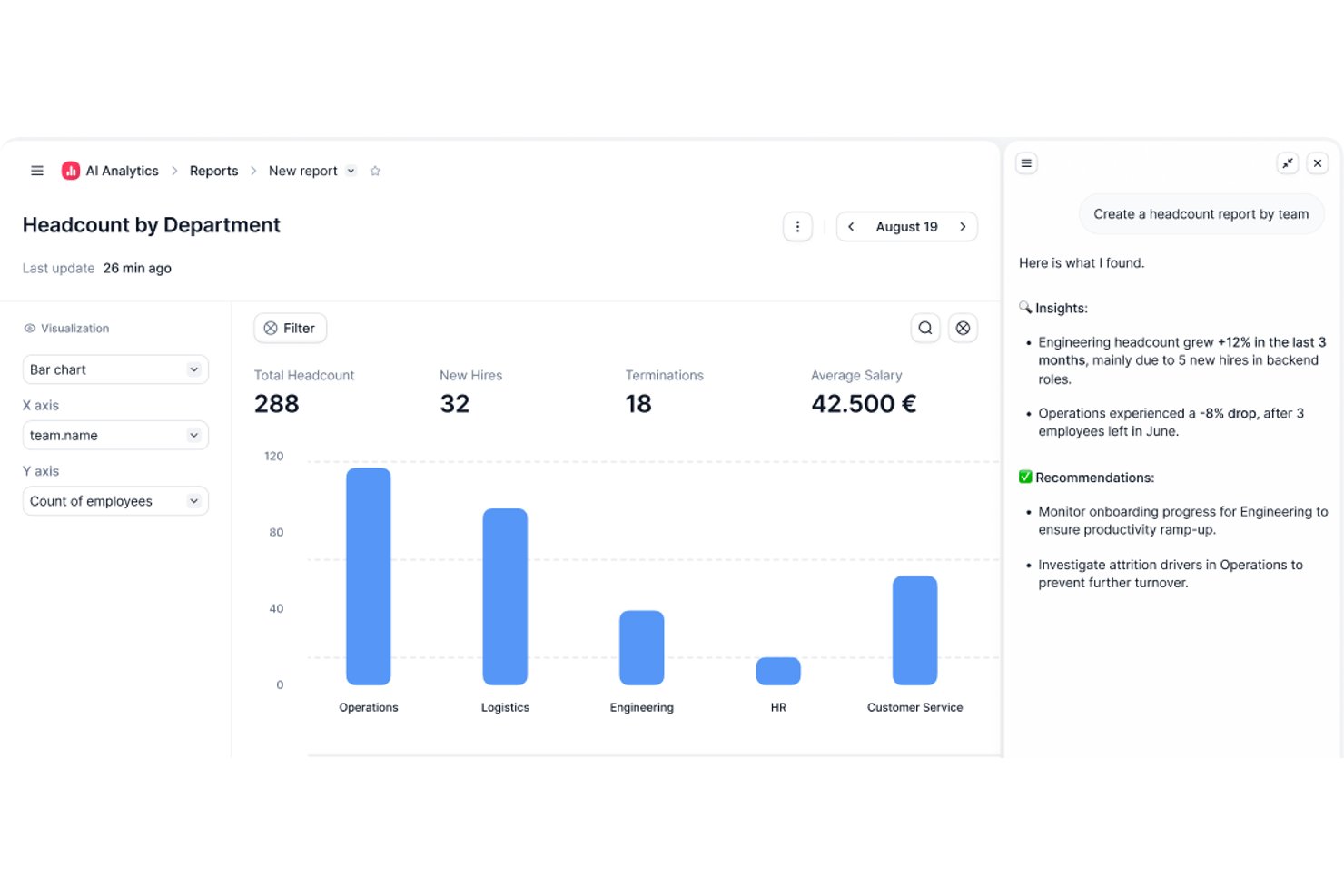
Factorial stands out for organizations that want to dig deeper into attendance patterns and reduce absenteeism. Its advanced analytics help HR teams and managers spot trends, identify problem areas, and make data-driven decisions about workforce attendance.
Who Is Factorial Best For?
HR teams in small to mid-sized businesses that require detailed attendance data to inform workforce planning. It’s suited to organizations looking to use analytics to monitor patterns and address absenteeism.
Why I Picked Factorial
What drew me to Factorial is its focus on advanced analytics for attendance tracking. The platform offers detailed dashboards and reporting tools that help you monitor absenteeism trends and spot recurring issues across teams or departments. You can use the software to generate reports to help you assess your team’s performance and track project profitability. Factorial lets you break down attendance data by time period, location, or employee group. For HR teams that want to move from reactive to proactive attendance management, Factorial’s analytics-driven approach is a strong fit.
Factorial Key Features
Some other features that make Factorial useful for attendance tracking include:
- Mobile clock-in and clock-out: Employees can record their attendance directly from their smartphones.
- Customizable time-off policies: Set up and manage different leave types and approval workflows.
- Automated reminders: The system sends notifications to remind employees to clock in or out.
- Document management: Store and organize employee attendance records and related documents in one place.
Factorial Integrations
Integrations include Google Workspace, Indeed, LinkedIn, Okta, Payflow, Sage HR, Slack, Zapier, and many others.
Pros and Cons
Pros:
- Generates comprehensive legal compliance reports
- Automates custom document approval workflows
- Identifies specific absenteeism trend patterns
Cons:
- Steep learning curve for analytics
- No native built-in payroll processing

Best free attendance tracking software

Vacation Tracker helps teams and small businesses manage attendance, leave requests, and time off directly within Slack, Microsoft Teams, or Google Workspace, so teams can track absences and keep everyone in sync.
Who Is Vacation Tracker Best For?
Vacation Tracker is a great fit for small to mid-sized teams that already run their day-to-day work in Slack, Microsoft Teams, or Google Workspace.
Why I Picked Vacation Tracker
I've included Vacation Tracker in my top picks because it offers a genuinely usable free plan that covers the core attendance tracking needs most small teams have. On the free tier, you get leave tracking, a shared absence calendar, and basic approval workflows without hitting a paywall. I also like that the free plan isn't a stripped-down demo—it lets teams track different leave types and set up department-level visibility from day one. That kind of out-of-the-box functionality, at no cost, is rare in this category.
Vacation Tracker Key Features
- Accrual automation: Automatically calculates and updates PTO balances based on your configured accrual rules, removing the need for manual tracking.
- Hourly leave tracking: Tracks time off in hourly increments rather than full days, giving teams with flexible schedules more precise attendance records.
- Carryover (brought forward) rules: Automatically applies your rollover policies at the end of each period so unused leave balances carry forward without manual adjustments.
- Customizable leave types: Lets you create and configure multiple leave categories—such as sick leave, remote work, or unpaid leave—with individual rules per type.
Vacation Tracker Integrations
Integrations include Slack, Microsoft Teams, and Google Workspace.
Pros and Cons
Pros:
- Syncs with external company calendars
- Automates PTO accrual calculations
- Free plan supports unlimited users
Cons:
- No mobile application available
- Lacks hourly shift tracking features

Homebase
Best attendance tracking software for hourly employees and teams
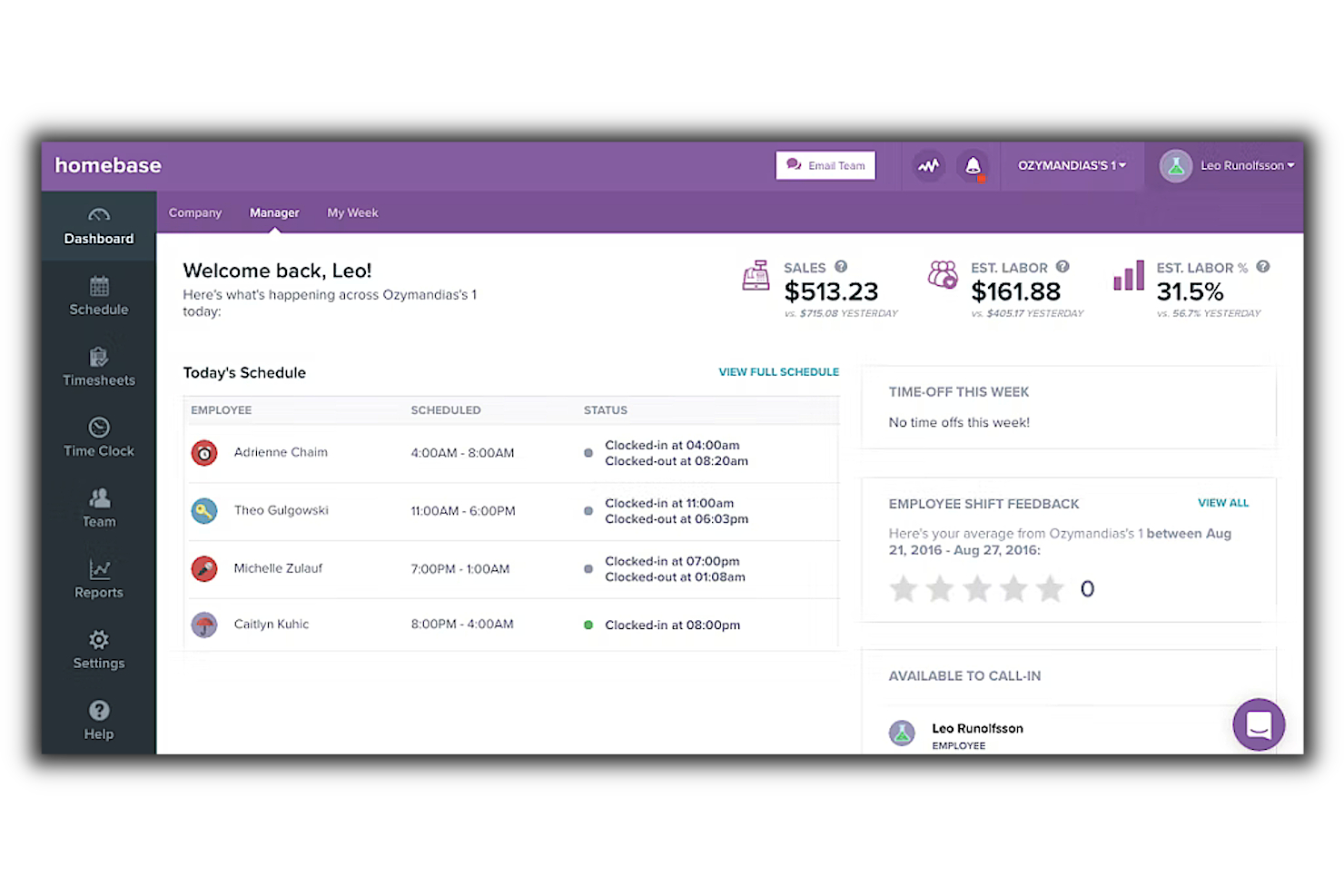
Homebase is a cloud-based solution to manage employee schedules, timesheets, labor costs, and payroll. The scheduling and timesheets feature helps users track employee attendance.
Why I picked Homebase: This software caters specifically to businesses that employ hourly teams, such as retail, home and repair, restaurants, healthcare, and professional service providers. The platform is responsive on any device, be it a computer, smartphone, or tablet, so employees can easily clock in and out regardless of work location or equipment.
Templates and auto-scheduling help users create employee schedules quickly, taking into account employee availability and time off. Employees can cover, trade, and claim shifts in the platform, prompting managers to approve these requests and keep schedules up-to-date when changes happen.
Homebase Standout Features & Integrations:
Features include overtime alerts, automated scheduling, shift trading and claiming, time-off management, labor cost tracking and optimization, timesheets, and payroll with tips and compute wages, total hours, paid and unpaid breaks, and overtime.
Integrations include ADP, Clover, Google, Lightspeed, Payanywhere, Paychex, Quickbooks, Shopify, Square, Toast, Upserve, Vend, and Wells Fargo.
The basic version of Homebase is free, but the paid version starts at $20 per month, paid annually.
Best for managing time-off requests
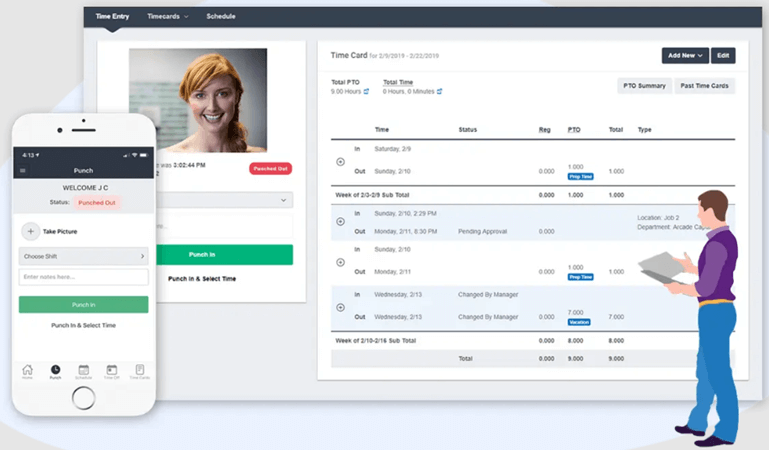
Buddy Punch is a cloud-based attendance tracking platform designed for businesses that need simple, flexible tools to manage employee time, scheduling, and absences across on-site, remote, or hybrid teams.
Who Is Buddy Punch Best For?
Buddy Punch is a strong fit for small to mid-sized businesses that need a straightforward way to track attendance and manage employee time without a steep learning curve.
Why I Picked Buddy Punch
I picked Buddy Punch as one of the best because of how well it handles time-off requests from submission to approval. Employees can submit requests directly through the app, and managers get instant notifications to approve or deny them—all without digging through emails or spreadsheets. I also like that approved time off automatically syncs with the schedule, so there are no gaps or double-bookings to sort out manually. The built-in PTO accrual tracking means my team always knows exactly how much time they have available before submitting a request.
Buddy Punch Key Features
- GPS tracking: Verify employee locations at clock-in and clock-out using GPS coordinates or geofencing boundaries.
- Facial recognition clock-in: Employees clock in using facial recognition to prevent buddy punching.
- Drag-and-drop scheduling: Build and adjust employee schedules visually by dragging shifts into place on a calendar.
- Overtime alerts: Set custom overtime thresholds and receive automatic alerts when employees are approaching or exceeding limits.
Buddy Punch Integrations
Integrations include QuickBooks Online, QuickBooks Desktop, ADP Workforce Now, Gusto, Paychex, Paycor, Paylocity, Workday, Rippling, and Justworks.
Pros and Cons
Pros:
- GPS and geofencing reduce off-site punch-in issues
- PTO requests route directly to managers for fast approval
- Flexible punch-in methods support varied work environments
Cons:
- Custom integrations depend on external Zapier subscription
- No built-in scheduling compared to some competitors

Best for in-depth attendance reports
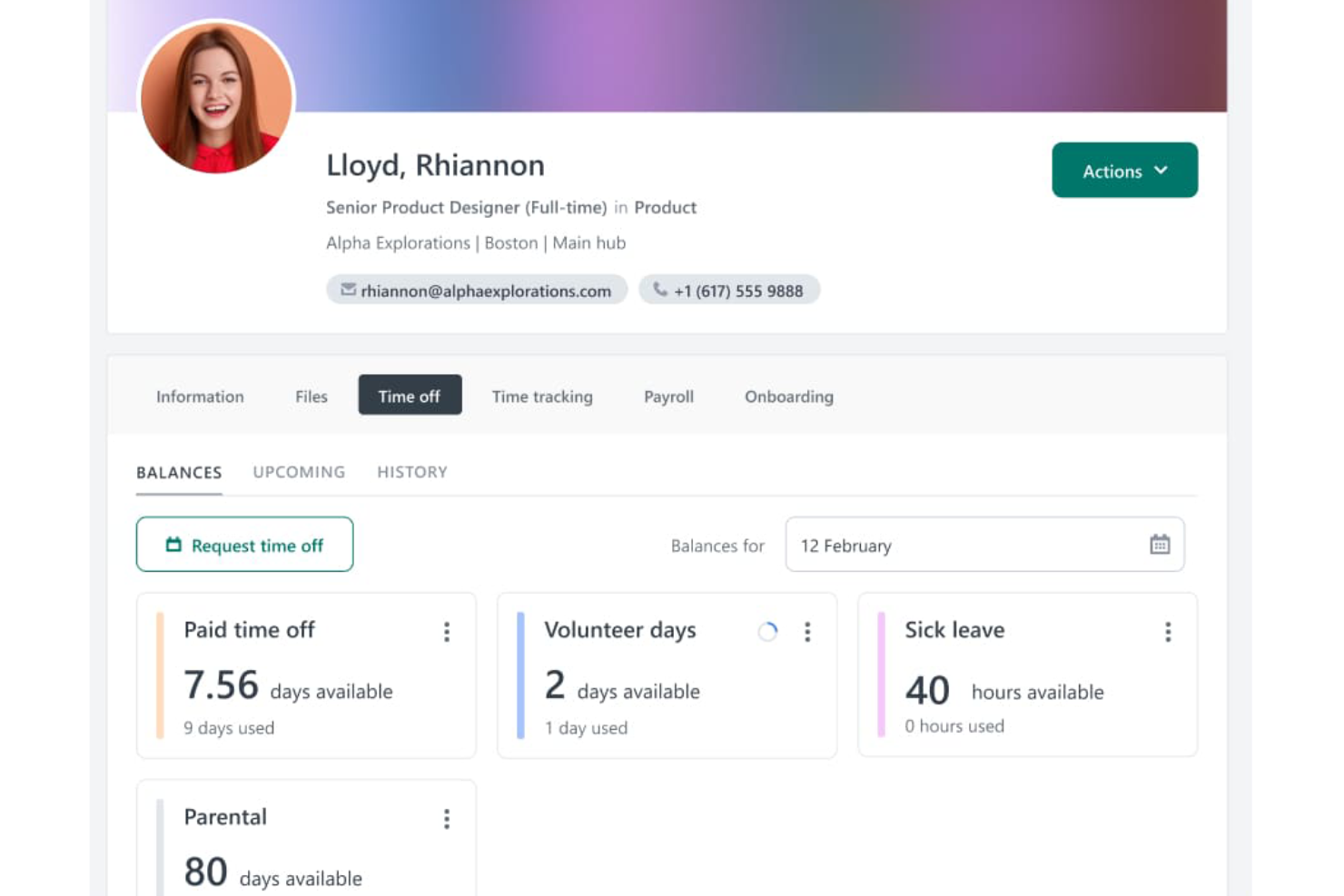
Workable HR gives HR teams and business leaders a centralized platform to track attendance, manage employee schedules, and handle time-off requests, helping organizations maintain accurate records and improve workforce oversight.
Who Is Workable HR Best For?
Workable HR is a strong fit for small to mid-sized businesses that need an all-in-one HR platform to manage both hiring and employee attendance in one place.
Why I Picked Workable HR
Workable HR earns its spot on my shortlist because of how much detail it surfaces in its attendance reports. I like that you can break down attendance data by department, location, or individual employee, which makes it easy to spot patterns like chronic lateness or excessive unplanned absences. My team also uses the time-off tracking features to cross-reference approved leave against actual attendance records, so discrepancies don't slip through. That reporting depth makes it particularly useful for HR teams that need more than a basic headcount view.
Workable HR Key Features
- Clock-in/clock-out with geolocation: Record employee work hours with location-specific clock-in and clock-out tools via the Workable mobile app.
- Shift management: View and manage employee schedules, work locations, and hours from a single Work Calendar.
- Custom time-off policies: Configure multiple time-off policies with accrual cycles, approval workflows, and balance tracking for different employee types or locations.
- One-click payroll reporting: Generate custom payroll reports across multiple pay cycles and export them directly to payroll providers.
Workable HR Integrations
Integrations include ADP, Xero, BambooHR, Greenhouse, Lever, Namely, Rippling, Sapling, and Zenefits.
Pros and Cons
Pros:
- Centralizes core HR data
- Supports custom work schedules
- Simplifies payroll report generation
Cons:
- Steep pricing for add-ons
- No kiosk or biometric clock-in options

DeskTime
Best for tracking offline activities alongside work hours

DeskTime is an automatic time tracking and attendance platform that logs work hours, tracks app and URL usage, manages employee absences, and handles shift scheduling.
Built for teams that need automatic time logging, DeskTime is an attendance tracking tool that covers clock-in/out monitoring, absence management, shift scheduling, and project time tracking.
DeskTime combines automatic attendance tracking with productivity monitoring, giving you visibility into work hours, app and URL usage, offline time, employee schedules, and absence records.
Who Is DeskTime Best For?
DeskTime is a good fit for small to mid-sized teams that need straightforward, automatic attendance and time tracking without a complex setup.
Why I Picked DeskTime
I've included DeskTime in my top picks because of how well it handles offline time alongside computer-tracked hours. Most attendance tools only capture what happens on screen, but DeskTime's manual time tracking lets employees log time spent in meetings, on calls, or at off-site locations. You can mark those entries as productive, unproductive, or neutral, so they feed into the same productivity calculation that applies to tracked computer activity. That means your attendance and performance data stay complete, even when work happens away from a desk.
DeskTime Key Features
- Absence calendar: Log and manage employee leave types, including vacation, sick days, and custom absence categories, in a shared team view.
- Shift scheduling: Set expected work hours for employees and compare scheduled time against actual clock-in and clock-out data.
- Idle time detection: Automatically flags periods of inactivity so attendance records reflect actual working time, not just logged-in time.
- IP location tracking: Identifies whether employees are clocking in from approved office locations or working remotely.
DeskTime Integrations
DeskTime offers a small set of native integrations, including Google Calendar, Outlook Calendar, Trello, GitLab, Asana, and Jira, and it connects with Zapier. An API is also available for custom integrations.
Pros and Cons
Pros:
- Tracks remote and office employee locations
- Categorizes apps as productive or unproductive
- Automatic tracking starts when computer turns on
Cons:
- Sometimes fails to log offline desk work
- Mobile app has limited tracking features

Sloneek
Best for integrated HR attendance tracking

Sloneek is an HR platform designed for organizations that want to manage attendance, absences, and work hours while connecting these records with broader HR processes and documentation.
Who Is Sloneek Best For?
Sloneek is a good fit for small to mid-sized businesses that want attendance tracking built into a wider HR system rather than managed as a standalone tool.
Why I Picked Sloneek
Sloneek earns its spot on my shortlist because attendance tracking isn't siloed from the rest of HR—it's woven directly into the same platform where you manage employee records, absences, and payroll prep. I like that the attendance module automatically syncs with absence data, so when someone submits a leave request and it gets approved, that's immediately reflected in their attendance calendar without any manual reconciliation. The monthly lock feature is another thing I find genuinely useful: once a manager closes out the month, attendance records are frozen and ready for payroll processing, which cuts down on last-minute disputes and corrections. Additionally, GPS geolocation and optional facial recognition at the attendance terminal give you flexible clock-in options whether your team is office-based, shift-based, or remote.
Sloneek Key Features
- Absence management: Track and approve employee absences with a configurable calendar view, attachment support, and detailed reporting.
- Team attendance calendar: View the full team's arrivals, departures, and attendance status in a shared calendar layout.
- Mobile attendance tracking: Employees can clock in and out, manage absences, and view their attendance records directly from the Sloneek mobile app.
- Payroll reporting: Generate supporting documents for payroll based on attendance, absences, and hours worked, with direct accountant access to reports.
Sloneek Integrations
Integrations include Google Workspace, Microsoft 365, Slack, Asana, Trello, Jira, Zapier, Okta, Personio, and an API for custom integrations.
Pros and Cons
Pros:
- Useful analytics help identify absenteeism patterns early
- Custom leave policies help maintain consistency across teams
- Attendance calendar offers clear weekly and monthly visibility
Cons:
- Limited native payroll integrations may require manual export
- No built-in GPS or geolocation tracking for field teams

Agendrix
Best for clock-in/clock-out functionality

Agendrix is a scheduling and attendance tracking platform for businesses that manage hourly teams, helping managers simplify shift planning, monitor attendance, and handle time-off requests in one place.
Who Is Agendrix Best For?
Agendrix is a strong fit for managers in retail, hospitality, and healthcare who oversee shift-based teams and need reliable tools for tracking when employees start and end their workday.
Why I Picked Agendrix
Agendrix is on my shortlist because of its robust clock-in/clock-out functionality. I like that employees can punch in through multiple methods—a tablet kiosk, the mobile app, a landline, or a biometric reader—so you're not locked into a single method. Clocked hours feed directly into timesheets automatically, so my team doesn't have to reconcile punch data against scheduled shifts at the end of each pay period. Agendrix also supports geolocated punching, so when employees clock in from the mobile app, you can verify they're on-site.
Agendrix Key Features
- Absence and leave management: Employees can submit time-off requests directly in the app, and managers can approve or deny them from the same interface.
- Real-time schedule visibility: View who is clocked in, late, or absent at any given moment from a live attendance dashboard.
- Automated timesheet generation: Scheduled and actual hours are compiled into timesheets automatically, ready for payroll export.
- Shift replacement tools: Managers can post open shifts and employees can claim them, reducing the back-and-forth of finding last-minute coverage.
Agendrix Integrations
Integrations include ADP Workforce Now, Ceridian, and Sage; an API supports custom integrations.
Pros and Cons
Pros:
- Supports landline-based punch clocks
- Calculates shift premiums automatically
- Proactive scheduling conflict detection
Cons:
- Limited third-party payroll integrations
- Inflexible recurring shift editing
Other Attendance Tracking Software
Here are a few more worthwhile options that didn’t make the best attendance tracking software list:
- When I Work
For flexible time clocks
- Clockify
For multi-app time tracking
- Jibble
For facial recognition attendance tracking
- ClockShark
Attendance tracking software for field-based employees or services
- edays
For customizable absence types
- Ubeya
Workforce management for the event industry
- Deltek Replicon Time
Global time & attendance, schedules, labor compliance & pay
- Sage HR
For attendance tracking with a full-feature human resources management platform
- Arcoro
For construction companies
- ExakTime
For tracking attendance of field teams
- Google Meet Attendance Tracker
For monitoring Google Meet attendance
- Nowsta
Attendance tracking software for organizations with event-based staffing needs
- Synerion
Attendance tracking software for automating compliance tracking
- Rippling
Attendance tracking software with selfie check-in capabilities for field employees or remote workers
- Deel HR
Attendance tracking within a global employee management system


Related HR Software Reviews
If you still haven't found what you're looking for here, check out these other related tools that we've tested and evaluated:
- HR Software
- Payroll Software
- Recruiting Software
- Employer of Record Services
- Applicant Tracking Systems
- Workforce Management Software
How I Evaluate Attendance Tracking Software
I evaluate attendance tools in two layers: core must-haves like timesheet automation and clock-in methods, and the differentiators that set the right fit apart for hourly or distributed teams.
Core Functionality (Table Stakes For This List)
When I'm selecting tools for my list, I rank each one on a scale from 0 (does not offer the functionality) to 5 (excels in this area) for each core functionality listed below. Then, I calculate the tool's total score into a percentage. Each tool needs to achieve a minimum total score of 65% to be considered for inclusion.
- Time Clock Capture Methods: I check whether a tool supports multiple punch-in options like web, mobile, kiosk, or biometric so field crews and office staff can clock in wherever they work.
- Attendance Records & Timesheets: Each tool should auto-generate timesheets with edit and approval workflows, so managers aren't manually reconciling hours at the end of every pay period.
- Leave & PTO Management: I look for built-in request and approval flows, accrual tracking, and policy configuration that let HR teams handle vacation, sick days, and custom leave types in one place.
- Absence & Tardiness Tracking: The platform should flag late arrivals, early departures, and no-shows automatically rather than relying on managers to spot patterns in raw timesheet data.
- Payroll & HR Integrations: I evaluate whether attendance data syncs with payroll providers and HRIS platforms so teams avoid re-entering hours or exporting CSV files every pay cycle.
- Attendance Reporting & Analytics: Reports should go beyond raw data exports and offer dashboards that surface trends like recurring Monday absences or overtime spikes across departments.
Once I have a list of tools that meet the criteria, I consider what sets each platform apart.
Differentiating Factors (What Sets Vendors Apart)
Here's how I compare and contrast different vendors:
Standout Features
Geofencing and GPS tracking matter most for teams with field or multi-site workers. I look for tools that restrict clock-ins to approved job sites so managers don't have to verify locations manually. Biometric verification is another key differentiator, especially in shift-heavy environments where buddy punching is a real concern. I also evaluate whether a platform offers automated compliance alerts that flag overtime risks or missed breaks before they become violations.
Beyond Features
I evaluate how well a platform fits specific workforce types. A tool built for salaried office teams won't serve a retail chain with rotating hourly shifts the same way. Compliance and data security also weigh heavily—I check for audit trails and certifications like SOC 2 that give HR teams confidence in their recordkeeping. Pricing transparency matters too. I look at whether costs scale predictably per employee and whether hardware like biometric scanners or kiosks adds unexpected expenses as teams grow.
How to Choose Attendance Tracking Software
Attendance tracking software can help you accurately monitor your employee's time off and spot any trends in absenteeism rates. To help you figure out which attendance-tracking software best fits your needs, you need to pinpoint your key users and document their specific challenges first.
As you work through your own unique software selection process, keep the following points in mind:
- What problem are you trying to solve - Start by identifying the challenges you're trying to overcome. This will help you clarify the features and functionality the attendance tracking software needs to provide.
- Who will need to use it - To evaluate cost and requirements, consider who will be using the software and how many licenses you'll need. For attendance tracking software, you'll likely want to limit admin access to your HR administrators, with a separate level of access for your managers and employees. Once that's clear, it's also useful to rank the needs of your different users to identify the key priorities for your power users, managers, and employees, to ensure they're all met.
- What other tools it needs to work with - Clarify what tools you're replacing, what tools are staying, and the tools you'll need to integrate with, such as HR management systems, payroll software, performance management systems, and communication tools like Slack and Microsoft Teams. You'll need to decide if the tools will need to integrate together, or alternatively, if you can replace multiple tools with an all-in-one workforce management platform.
- What outcomes are important - Review the capabilities you want to gain or improve, and how you will be measuring success. For example, you may want to eliminate a manual reconciliation process between your current attendance and payroll systems, or simply digitize a paper or Excel-based attendance tracking process. You could compare software features until you’re blue in the face but if you aren’t thinking about the outcomes you want to achieve, you could waste a lot of valuable time.
- How it would work within your organization - Consider the software selection alongside your existing workflows and systems. Evaluate what's working well, and the areas that are causing issues that need to be addressed.
Remember every business is different — don’t assume that an attendance tracking software system will work for your organization just because it's popular.
Trends in Attendance Tracking Software
Attendance management tools have become more sophisticated and feature-rich, driven by the need to adapt to change workplace dynamics coupled with a desire to integrate new technological advances into their user experience. Here are several developing trends that are currently shaping the future of employee attendance management:
- Mobile Accessibility and Geofencing: The rapid evolution of mobile apps with geofencing capabilities highlights the demand for flexibility in attendance tracking. These features enable businesses to manage remote or field-based employees more effectively, ensuring accurate attendance data while providing employees with the convenience of mobile access.
- Wearable Device Integration: Attendance tracking systems are increasingly compatible with wearable devices, allowing for more flexible and accurate tracking of employee presence, especially in dynamic or non-traditional work settings.
- Facial Recognition and Biometric Features: The adoption of facial recognition and biometric data for attendance tracking is among the most novel trends. This technology offers a highly accurate, contactless method of recording attendance, reducing the risk of time theft and buddy punching.
- AI-Powered Anomaly Detection: Some attendance tracking systems now feature AI-driven anomaly detection, which identifies unusual attendance patterns and alerts managers. This functionality is particularly useful for preempting potential issues, such as burnout or unauthorized overtime.
These trends highlight several advanced technologies that set new standards for efficiency, accuracy, and advanced data analysis in the modern workplace.
What is Attendance Tracking Software?
Attendance tracking software is a digital tool used by businesses to record and manage employee attendance. It automates the process of tracking work hours, absences, and leaves, helping in accurate payroll processing and ensuring adherence to work schedules and policies.
Key features include time clock integration for precise time recording, absence and leave management for tracking employee time off, schedule creation for organizing work shifts, real-time attendance monitoring, reporting and analytics tools, mobile compatibility for remote access, and integration with payroll systems.
Sometimes attendance tracking software is a standalone program, and other times you can find the same features within a larger software suite, such as an all-in-one HR management system (HRIS, HCM, HRMS), or a payroll management system. You can also monitor attendance using mobile time & attendance tracking apps as well.
Features of Attendance Tracking Software
When selecting attendance tracking software, keep an eye out for the following key features:
- Real-time tracking: Attendance software records employee check-ins and check-outs instantly—whether through mobile apps, kiosks, or desktop devices. Real-time visibility ensures accurate work hour records and supports smooth, timely payroll processing.
- Absence & leave management: Built-in tools make requesting, approving, and tracking time off simple. Managers can review leave reasons and identify absenteeism trends, helping prevent staffing issues and improving workforce planning.
- Employee scheduling: Many attendance systems include scheduling capabilities so managers can create, assign, and adjust shifts. Accurate scheduling helps prevent understaffing, coverage gaps, and unexpected labor shortages.
- Customizable policies: Flexible attendance systems allow businesses to customize rules around overtime, breaks, late arrivals, and attendance penalties. Tailored policies ensure the software reflects your internal standards and complies with local labor laws.
- Compliance monitoring: Attendance tools help ensure employee schedules align with labor regulations, industry-specific hour limits, and service-level agreements. This reduces compliance risks and maintains operational consistency.
- Employee self-service: A self-service portal lets employees view attendance records, check schedules, request time off, and update personal information—cutting down on repetitive HR administrative tasks.
- Alerts & notifications: Automated alerts flag late arrivals, missed punches, unplanned absences, or potential policy violations. Managers receive timely updates to address issues before they impact operations.
- Mobile compatibility: Mobile-friendly attendance systems allow employees to clock in and out from any location, making them ideal for hybrid teams, remote staff, and field workers.
- GPS tracking + geofencing (optional): These tools verify that employees are within authorized work locations when clocking in. This helps prevent time theft and ensures attendance data is accurate.
- Biometric tracking (optional): Technologies such as fingerprint or facial recognition eliminate buddy punching and ensure that all attendance records are secure, authentic, and tamper-proof.
Common Attendance Tracking Software AI Features
Many attendance tracking platforms now include AI to improve accuracy, compliance, and automation, for example:
- AI-driven anomaly detection: AI identifies unusual attendance patterns—such as repeated tardiness, irregular hours, or missed punches—and alerts managers early.
- Predictive absence insights: AI analyzes historical attendance data to forecast absenteeism trends, peak leave periods, and scheduling risks, helping managers plan proactively.
- Automated scheduling optimization: AI builds or adjusts schedules based on employee availability, work history, performance, and compliance rules to minimize conflicts and labor shortages.
- Fraud prevention algorithms: AI monitors biometric, GPS, and clock-in data to detect suspicious activity such as spoofed locations, shared credentials, or attempted buddy punching.
- Smart compliance monitoring: AI continually checks attendance activity against overtime rules, break requirements, and labor regulations—alerting you to potential compliance violations.
- Natural language support tools: AI assistants help employees check schedules, request time off, or view attendance history using simple conversational commands.
- AI-powered analytics: AI enhances reporting dashboards with deeper insights, identifying productivity bottlenecks, attendance correlations, and workforce trends managers might otherwise miss.
- Automated workflow reminders: AI triggers reminders for timesheet approvals, schedule updates, missing punches, or policy confirmations—keeping processes running smoothly.
Common Attendance Tracking Software AI Features
Many modern attendance systems incorporate AI features to improve accuracy, efficiency, and compliance, for example:
- AI-powered anomaly detection: AI identifies unusual behavior such as repeated tardiness, missing punches, inconsistent hours, or unexpected location activity, helping managers intervene early.
- Predictive attendance insights: AI analyzes historical attendance patterns to predict high-risk periods for absenteeism, forecast overtime trends, and help optimize scheduling.
- Smart scheduling automation: AI builds or adjusts shift schedules based on employee availability, skill sets, compliance rules, and projected workloads, reducing manual scheduling time.
- AI-driven fraud prevention: With AI monitoring biometric patterns, GPS data, and clock-in behavior, the system can detect suspicious activity—like potential buddy punching, spoofed locations, or device misuse.
- Automated time classification: AI can automatically classify hours as regular, overtime, premium, or holiday pay based on local regulations and custom company policies.
- Natural language employee assistance: AI chatbots help employees check schedules, request time off, update availability, or resolve attendance questions instantly without HR intervention.
- Compliance alerts: AI continuously monitors labor law changes, work-time thresholds, and break requirements, alerting employers to potential violations before they occur.
- AI-enhanced reporting: AI summarizes attendance analytics, highlights trends, and provides actionable recommendations to improve workforce productivity and reduce absenteeism.pports fair labor practices, and contributes to the overall productivity of the workforce.
Benefits of Attendance Tracking Software
Attendance tracking software is a modern tool that helps businesses monitor employee presence, manage leaves, and ensure compliance with labor laws. By digitizing these processes, you can achieve much greater operational efficiency and eliminate the possibility of errors.
By investing in the best attendance-tracking software for your specific needs, you can expect to gain the following benefits:
- Enhanced Accuracy: By automating the attendance tracking process, businesses can ensure that employee hours are recorded accurately, reducing the likelihood of manual errors that can lead to payroll discrepancies and disputes. Plus, connecting with cloud HR platforms can simplify attendance management by integrating it right into payroll/performance tools.
- Increased Productivity: Automating the tracking of employee attendance frees up HR and management teams to focus on more strategic tasks, thereby increasing overall productivity within your organization.
- Improved Compliance: Attendance tracking software can be configured to monitor compliance with various labor laws, regulatory requirements, and organizational policies. This helps businesses avoid legal penalties and maintain a fair workplace.
- Better Data-Driven Decision-Making: With comprehensive analytics and reporting capabilities, these systems offer insights into attendance patterns, trends, and anomalies. This helps managers identify issues like chronic absenteeism or understaffing so they can address them proactively, leading to better workforce management and planning.
- More Empowered Employees: Most attendance tracking systems include a self-service portal where employees can check their attendance records, request time off, or report absences. This empowers employees by giving them direct access to their attendance information, increasing data transparency.
As you can see, attendance tracking software offers multiple benefits that extend beyond mere record-keeping. For organizations looking to optimize their workforce management and operational efficiency, investing in a robust attendance tracking solution is a strategic move that can yield significant returns.
Costs & Pricing for Attendance Tracking Software
Sometimes it all comes down to cost. That's why it's important to get a realistic understanding of your budget before you spend too much time digging into attendance management software.
Attendance tracking software typically offers a range of plans to accommodate the diverse needs and sizes of organizations, from startups to large enterprises. For business owners running small teams, you may be able to get away with using a freemium plan. However, paid plans will always give you a better return on your investment, if you can afford one.
Below, I've broken down the common plan options, including a free option for those with basic needs, to help you navigate your choices with greater clarity.
Plan Comparison Table for Attendance Tracking Software
| Plan Type | Average Price | Common Features |
|---|---|---|
| Free | $0 | Basic attendance tracking, limited reports, and access for a limited number of users |
| Basic | $10 - $20 per user/month | Enhanced attendance tracking, real-time reporting, support for multiple locations, and email support |
| Standard | $20 - $40 per user/month | All Basic features plus scheduling, time-off management, mobile access, and phone support |
| Premium | $40 - $60 per user/month | All Standard features plus advanced analytics, API access, personalized onboarding, and 24/7 support |
Choosing the right software plan requires balancing your organization's specific needs with your budget. Before you commit to signing a contract, try to get your hands on a free trial first. This will give you a first-hand experience of how the software works before you implement it for the rest of your workforce.
People Also Ask
Here are some answers to frequently asked questions you may have about attendance tracking software and how it works:
Why is attendance tracking important?
According to the U.S. Bureau of Labor Statistics, around 3% of an employer’s workforce is absent on any given day. This means that companies often operate below their optimum capacity and miss out on growth opportunities because they don’t have enough human resources.
Absences can be because of myriad different reasons, from health issues, personal problems, stress, or scheduled vacation time. With the help of attendance tracking software, companies can monitor employee attendance and keep better track of expected vs unexpected time off.
What aspects of employee attendance should I be monitoring?
The key aspects of employee attendance monitoring you’ll want to capture are:
- Any type of work absence (i.e., vacation, sick leave, bereavement leave, family responsibility leave, etc.)
- Recurring absence patterns (i.e., flags that highlight patterns such as an employee that calls in sick every Monday)
- Employee start and stop times, especially for hourly workers, or for firms that charge out billable hours
- Compliance requirements, such as limits to the number of consecutive hours an employee can work, or the number of consecutive days in a row an employee can work
Is attendance tracking software different than time tracking software?
On the surface, attendance tracking and time tracking are different. The former, in its purest sense, tracks whether or not employees show up for work on a daily basis, whereas the latter tracks the exact hours (and sometimes the exact tasks) that they work on. However, you will find that most software systems have integrated these features together into comprehensive “time & attendance-tracking modules” that accomplish both purposes within the same interface.
Depending on the complexity of your business structure and work tasks, you may not need a complicated attendance tracking software solution. If you only need to track working days versus any type of leave, then something simple and cost-effective will likely do the trick. However, for most businesses, you’ll likely want something with a bit more depth to it. More advanced features that are blended between attendance and time tracking software include detailed task tracking, billable versus non-billable hours, and advanced clocking in/out features (e.g., biometric, selfie, GPS, or geofencing).
Why is mobile accessibility important for attendance tracking software?
Often, employees are not office-based. Instead, they may work remotely, in a factory, in the field, or in mobile service-oriented positions. That’s why it’s important to consider attendance tracking software that includes mobile apps, or at least mobile-friendly features.
The software systems in this list offer mobile apps that work for Android and iOS (Mac) devices, with cloud-based desktop versions available too. Some also offer advanced features, such as kiosk modes (great for warehouses and other on-site locations), clocking-in via facial recognition or selfie, or GPS & geofencing attendance tracking capabilities.
Can attendance tracking software help with labor law compliance?
Absolutely, attendance tracking software can be a real ally in ensuring labor law compliance. It keeps precise records of work hours, overtime, leaves, and absences, making it easier to adhere to regulations regarding minimum wage, overtime pay, and mandatory breaks.
By automating the tracking and reporting, it reduces the risk of human error and non-compliance. Plus, it often comes with features that alert you to potential compliance issues before they become problematic. It’s like having a vigilant compliance officer embedded in your software, always keeping an eye on the clock and the calendar for you.
How do these software handle different time zones for global teams?
Some attendance tracking tools are specifically designed for global and distributed teams. Most of these solutions come equipped with features to manage different time zones more effectively. They allow employees to clock in and out according to their local time zones, while simultaneously enabling managers to view and manage these records from a central location, in a unified time zone if needed.
This flexibility ensures accurate tracking of work hours across continents and helps in coordinating team schedules, deadlines, and meetings more effectively. It’s like having a universal clock that keeps everyone synchronized, no matter where they are in the world.
What are the options for employee self-service in these systems?
In attendance tracking software, employee self-service options are pretty useful as they help alleviate the load for administrators and HR staff. Employees can typically conduct tasks through the self-service portals, like:
- Clock in and out
- Request time off
- View their schedules
- Check their leave balances
It’s like having the power of the HR department in your pocket. This autonomy not only empowers employees but also reduces the administrative load on HR teams, making everything more efficient. Plus, it keeps everyone in the loop and ensures transparency across the board.
Other Workforce Management Software Reviews
Of course, there's more than just attendance to worry about when it comes to top-notch workforce management. Here are some other types of related software to help you manage your employees with ease:
- Workforce Management Software
- Leave Management Software for Tracking PTO
- Employee Shift Scheduling Software
- Time Tracking Software for Clocking Work Hours
- Time Tracking Apps for Remote & Hybrid Teams
- Team Communication Apps for Hybrid Teams
- Employee Communication Software
What’s Next:
If you're in the process of researching attendance tracking software, connect with a SoftwareSelect advisor for free recommendations.
You fill out a form and have a quick chat where they get into the specifics of your needs. Then you'll get a shortlist of software to review. They'll even support you through the entire buying process, including price negotiations.