

Full service payroll software automatically processes payroll, handles tax filings, integrates benefits, and manages compliance for employers. If you’re searching for ways to simplify and de-stress payroll, you want tools that meet your HR team’s specific needs—not just generic payroll processing. Here, you’ll find HR-focused recommendations, practical evaluation tips, and a rundown of what sets leading payroll software apart so you can confidently choose the right fit.
Why Trust Our Software Recommendations
6,700+
Reviews
20
Industry experts
16+
Evaluation factors
14
Years
Our team has been testing and reviewing software since 2012. As HR experts ourselves, we know how difficult—and important—it is to choose the right software.
For this guide, we evaluated tools using hands-on testing and independent research, scoring tools using our selection criteria. We also draw on insights from industry thought leaders and practicing HR experts.
Our reviews reflect our human editorial judgment, not a sales pitch.
Expert reviewers:
- Phil GrayCOO
 Kim BehnkeHR Tech Editor & Analyst
 Josh BarkerPeople Ops Manager

Full Service Payroll Software Comparison Table
This comparison table summarizes pricing details for my top full service payroll software selections.
| Tool | Best For | Trial Info | Price | ||
|---|---|---|---|---|---|
| 1 | Best for mixed US and global workforces | Free demo available | Pricing upon request | Website | |
| 2 | Best for unified payroll and device management | Free demo available | Pricing upon request | Website | |
| 3 | Best for unified payroll and benefits integration | Free demo available | From $49/month | Website | |
| 4 | Best for mobile self-service and engagement tools | Free demo available | Pricing upon request | Website | |
| 5 | Best for scalable payroll with HR advisory support | Free demo available | Pricing upon request | Website | |
| 6 | Best for hourly teams and tip reporting | Free demo available | From $35/month + $6/person/month | Website | |
| 7 | Best for household payroll needs | Not available | From $20/month | Website | |
| 8 | Best for automated compliance and PEO services | 3 months free | From $50/month base + $8/user/month | Website | |
| 9 | Best for data-driven pay insights and analytics | Free demo available | From $99/month | Website | |
| 10 | Best for QuickBooks accounting integration | Not available | From $50 + $7/employee | Website |


Full Service Payroll Software Reviews
Below are my detailed summaries of the best full service payroll software that made it onto my shortlist. My reviews offer a detailed look at the features, best use cases, and integrations of each software to help you find the best one for you.
 Best for mixed US and global workforces
- Free demo available
- Pricing upon request
Visit WebsiteCustomer Rating:4.9/5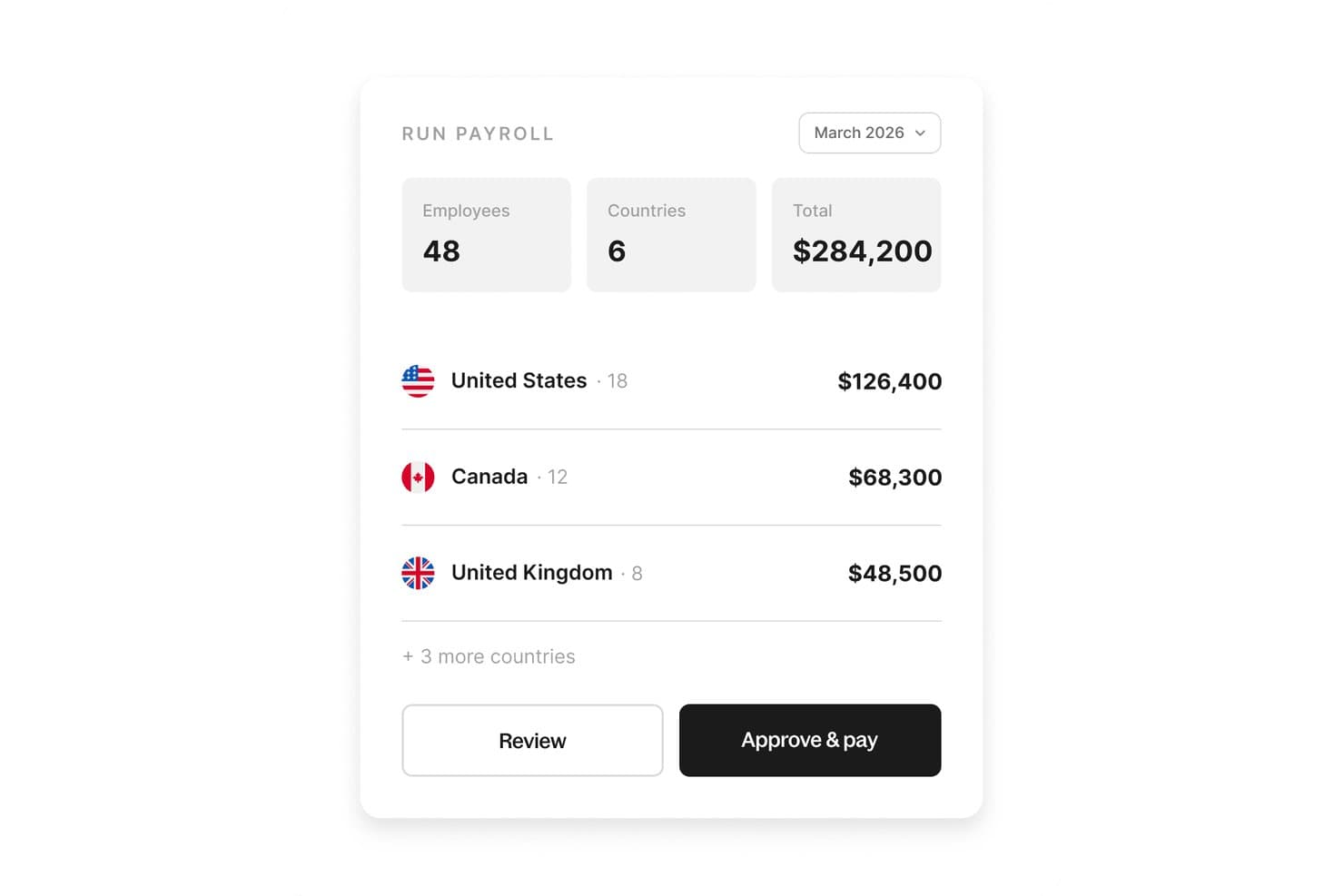
Deel Payroll lets you review and run payroll for multiple countries from a single view. Deel Payroll is a full-service payroll platform that automates payroll runs, tax filing and remittance, and multi-state compliance for both employees and contractors. It supports US and global workforces from a single system.
Who Is Deel Payroll Best For?
Deel Payroll is a good fit for companies managing a mix of domestic and international workers, especially remote-first teams paying employees and contractors across multiple countries.
Why I Picked Deel Payroll
I picked Deel Payroll because it handles US payroll across all 50 states and global payroll in 150+ countries in one system, which makes it a strong option for mixed US and global workforces. You can pay W-2 employees, 1099 contractors, and international workers without switching platforms or reconciling data across tools. Its built-in Compliance Hub also runs checks before each payroll approval, so jurisdiction-specific issues get flagged before they turn into filing errors.
Deel Payroll Key Features
Deel Payroll also gives you flexibility in how payroll gets done and how your people get paid.
- Dual delivery model: Choose self-serve payroll for simple setups or a fully managed option with a dedicated Deel Payroll Manager.
- Contractor payouts: Pay contractors in 120+ currencies through 15+ payout methods, including bank transfer, PayPal, and Wise.
- Benefits administration: Manage health, dental, vision, 401(k), and HSA benefits directly within the payroll platform.
- Employee self-service portal: Employees can view pay stubs, download W-2s, and update withholding and direct deposit details on web or mobile.
Deel Payroll Integrations
Integrations include Workday, SAP SuccessFactors, QuickBooks Online, Xero, NetSuite, Sage Intacct, BambooHR, HiBob, UKG, and Personio.
Pros and Cons
Pros:
- No additional charge for off-cycle payroll
- Offers both self-serve and managed payroll
- Manages US and international payroll together
Cons:
- No native time tracking included
- No tax penalty liability guarantee
Learn more about Deel Payroll: Best for unified payroll and device management
- Free demo available
- Pricing upon request
Visit WebsiteCustomer Rating:4.9/5
Rippling manages multi-country payroll runs from a single dashboard. Rippling is a full-service payroll platform that combines automated payroll runs, tax filing, benefits administration, time tracking, and IT device management for W-2 employees and 1099 contractors across all 50 U.S. states and 90+ countries.
Who Is Rippling Best For?
Rippling is a strong fit for mid-market companies that need HR, payroll, and IT management handled in one platform rather than across separate tools.
Why I Picked Rippling
Rippling earns its spot as one of the best on my shortlist because no other full-service payroll platform natively bundles device management into the same workflow. When I onboard a new hire in Rippling, I can provision their laptop and configure their payroll simultaneously from a single dashboard. I also love the pay run comparison tool, which lets me review changes in gross pay, taxes, and deductions side by side before approving each cycle.
Rippling Key Services
- Automated tax filing and remittance: Calculates and files federal, state, and local payroll taxes with accuracy guarantees.
- Multi-state and global payroll: Runs payroll for employees and contractors in all 50 U.S. states and over 90 countries.
- Employee self-service portal: Lets employees access pay stubs, tax forms, and update personal details independently.
- Benefits administration integration: Syncs benefits enrollments, deductions, and qualifying life events directly with payroll.
Rippling Integrations
Rippling offers over 650 native integrations, including QuickBooks Online, Xero, NetSuite, Slack, Microsoft Teams, Google Workspace, Okta, BambooHR, and Greenhouse. An API is available for custom integrations.
Pros and Cons
Pros:
- Syncs payroll automatically with core HR data changes
- Runs payroll across 90+ countries natively
- Integrates direct garnishment payouts on employer's behalf
Cons:
- Requires manual setup for complex custom GL mapping
- Restricts advanced workflow automation to higher software tiers
 Best for unified payroll and benefits integration
- Free demo available
- From $49/month
Visit WebsiteCustomer Rating:4.6/5
Gusto lets users review employee hours, earnings, and PTO in one payroll run. Gusto is a full-service payroll platform for small and mid-sized businesses that handles automated payroll runs, tax filing and remittance, benefits administration, and HR management in one unified system.
Who Is Gusto Best For?
Gusto is a natural fit for small businesses and startups with fewer than 50 employees that need payroll, benefits, and HR handled in one place without a dedicated HR team.
Why I Picked Gusto
Gusto earns its spot on my shortlist because payroll and benefits enrollment genuinely live in the same system, not bolted together as an afterthought. When I onboard a new hire, I set up health insurance, 401(k), and workers' comp alongside direct deposit in a single flow. Gusto's AutoPilot™ also handles recurring payroll automatically, including tax filings across all 50 states, with no manual steps required after the initial setup.
Gusto Key Services
- Mobile payroll app: Run payroll, add new hires, and handle team management directly from your smartphone.
- Unlimited payroll runs: Process as many payrolls as you need each month without extra charges or restrictions.
- Automatic year-end forms: Generate and distribute W-2 and 1099 forms for all employees and contractors automatically.
- Accounting software integrations: Sync payroll data with QuickBooks, Xero, FreshBooks, and other popular platforms.
Gusto Integrations
Gusto offers native integrations with QuickBooks, Xero, FreshBooks, Clover, Trainual, 7shifts, Homebase, TSheets, Deputy, and more. An API is also available for custom integrations.
Pros and Cons
Pros:
- Files taxes across all 50 states
- Built-in benefits enrollment for new hires
- AutoPilot runs payroll without manual intervention
Cons:
- Payroll reports lack granular filtering options
- Support response times can be slow
 Best for mobile self-service and engagement tools
- Free demo available
- Pricing upon request
Visit WebsiteCustomer Rating:4.3/5
Paylocity's dashboard gives employees a snapshot of time off and pay. Paylocity is a cloud-based HCM platform that runs full-cycle payroll, automated multi-state tax filing and remittance, benefits administration, time tracking, and contractor payments on a single unified employee record.
Who Is Paylocity Best For?
Paylocity suits mid-market HR and payroll teams in the US managing multi-state workforces with a mix of salaried, hourly, and contract workers.
Why I Picked Paylocity
I picked Paylocity as one of the best because its mobile self-service goes further than most payroll tools. Employees can update direct deposit details, request time off, and clock in via the mobile app, and On Demand Pay lets them access earned wages before their scheduled pay date. Ignite AI handles employee questions about paychecks and policies directly in the platform, reducing the repeat inquiries my team fields every pay period.
Paylocity Key Services
- Payroll readiness dashboard: Runs over 40 automated audits to catch pay or tax errors before every payroll run.
- General ledger mapping: Lets you configure and map payroll data directly to your accounting software.
- Automatic multi-state tax setup: Assigns the correct tax withholding and filings based on each employee's work location.
- Native expense management: Captures, tracks, and reconciles expenses using AI-powered receipt scanning within the same platform.
Paylocity Integrations
Paylocity offers native integrations with QuickBooks, NetSuite, Sage Intacct, ADP, Blue Marble, When I Work, AXOMO, and Microsoft 365. An API is available for custom integrations.
Pros and Cons
Pros:
- Payroll readiness audits catch errors before processing
- Ignite AI handles employee paycheck inquiries automatically
- On Demand Pay available without employer setup fees
Cons:
- Requires paid add-on licensing for integrated time tracking
- Restricts full applicant tracking capabilities on lower pricing tiers
 Best for scalable payroll with HR advisory support
- Free demo available
- Pricing upon request
Visit WebsiteCustomer Rating:4.2/5
Paychex Flex centralizes payroll, HR, and workforce data in one dashboard. Paychex Flex is a cloud-based payroll and HR platform that handles automated payroll runs, tax filing and remittance, multi-state compliance, benefits administration, and time tracking across a tiered set of plans built for businesses of varying sizes.
Who Is Paychex Flex Best For?
Paychex Flex is a strong fit for small to mid-sized businesses that expect to grow and need payroll infrastructure that scales alongside their headcount and HR complexity.
Why I Picked Paychex Flex
I picked Paychex Flex as one of the best because its tiered plan structure genuinely scales with a business, from the Select plan through to a full HR PEO model. What I especially appreciate is the HR Pro tier, which pairs Taxpay® automated tax filing with access to dedicated HR advisors. I also like Paychex Pre-check℠, which lets employees review their paycheck before it's processed and flag errors before payday.
Paychex Flex Key Services
- Automated multi-state payroll: Calculates and processes payroll for employees in all 50 states with jurisdiction-specific tax handling.
- On-demand pay capability: Lets employees access earned wages before payday directly through the Flex platform.
- General ledger integration: Syncs payroll data with accounting systems like QuickBooks and Xero for accurate financial recordkeeping.
- Mobile employee self-service: Provides a mobile app for employees to access pay stubs, tax forms, and manage direct deposit details.
Paychex Flex Integrations
Paychex Flex offers native integrations with QuickBooks, Indeed, Stripe, Clover, BambooHR, and Employee Navigator. An API is available for custom integrations.
Pros and Cons
Pros:
- Automates federal, state, and local payroll taxes
- HR advisors included on upper-tier plans
- Tiered plans scale with business growth
Cons:
- Restricts advanced analytics to upper plan tiers
- Incurs additional costs for extra payroll runs
Learn more about Paychex Flex: Best for hourly teams and tip reporting
- Free demo available
- From $35/month + $6/person/month
Visit WebsiteCustomer Rating:4.2/5
Square Payroll lets users review and confirm payroll withdrawals before processing. Square Payroll is a full-service payroll platform that handles automated payroll runs, tax filing and remittance, contractor payments, and benefits administration, with native integration into the Square POS ecosystem for tip and timecard imports.
Who Is Square Payroll Best For?
Square Payroll is a natural fit for small businesses in restaurants, retail, and services that already run on Square's POS and need payroll to match.
Why I Picked Square Payroll
Square Payroll earns its spot on my shortlist because of how it handles tip and timecard data for hourly workers. When you run Square POS, tips flow directly into payroll without any manual entry, and the automatic tip import plus multiple pay rate support makes running payroll for tipped staff genuinely straightforward. Auto payroll with multistate tax filing means I can schedule runs and let Square handle the compliance side without ongoing manual intervention.
Square Payroll Key Services
- Digital W-2 and 1099 distribution: Send tax forms to employees and contractors electronically, with optional mailed forms for an added fee.
- Square Team App for employees: Allow staff to access digital pay stubs, manage direct deposit details, and clock in or out via mobile devices.
- Native QuickBooks Online integration: Sync payroll data automatically to your accounting software for accurate financial reporting.
- Automated compliance alerts: Receive timely notifications about new-hire reporting, federal and state tax obligations, and multiple tax jurisdiction requirements.
Square Payroll Integrations
Square Payroll offers native integrations with QuickBooks Online, Square POS, and Square Timecards. An API is available for custom integrations.
Pros and Cons
Pros:
- Auto-syncs clocked hours directly from Square POS
- Files taxes across multiple states automatically
- Supports tip pooling and multiple pay rates
Cons:
- Lacks native HR tools and dedicated support
- Restricted strictly to US-based employer tax filings
Learn more about Square Payroll:

SurePayroll's dashboard lets users manage and start payroll runs easily. SurePayroll is a full service payroll platform built for small businesses and household employers that handles automated payroll runs, federal and state tax filing, direct deposit, and 1099 contractor payments in one system.
Who Is SurePayroll Best For?
SurePayroll is a natural fit for families and small business owners managing payroll for household employees like nannies, caregivers, or domestic staff.
Why I Picked SurePayroll
I picked SurePayroll as one of the best because its dedicated household payroll plan is built specifically for families paying nannies or caregivers. It handles Schedule H preparation, household-specific tax filing, and state tax ID registration, which most general-purpose payroll platforms don't touch. I also like that it covers both W-2 household employees and 1099 contractors within the same system.
SurePayroll Key Services
- Unlimited payroll runs: Run payroll as often as needed for no additional fee.
- Tax penalty guarantee: SurePayroll covers any penalties that result from payroll tax filing errors made on their end.
- Mobile payroll app: Manage payroll, view reports, and approve pay runs from iOS or Android devices.
- Accounting software integration: Sync payroll data directly with QuickBooks, Xero, Sage 50, and other accounting platforms.
SurePayroll Integrations
SurePayroll offers native integrations with QuickBooks, Xero, Sage 50, and LessAccounting.
Pros and Cons
Pros:
- Provides dedicated features for household employee management
- Tax penalty protection included on all plans
- Dedicated household payroll plan available
Cons:
- Excludes tax filing on base self-service tier
- Incurs extra annual base fee for W2s
Learn more about SurePayroll: Best for automated compliance and PEO services
- 3 months free
- From $50/month base + $8/user/month

Justworks lets employees view pay stubs and YTD earnings in one place. Justworks Payroll is a PEO-backed payroll platform that handles automated payroll runs, federal and state tax filing, W-2 and 1099 processing, contractor payments, and native benefits administration for US businesses.
Who Is Justworks Payroll Best For?
It's a strong fit for small to midsize US companies that want PEO-grade compliance and benefits access without building out a large internal HR function.
Why I Picked Justworks Payroll
I picked Justworks Payroll as one of the best because its certified PEO status does something most payroll tools don't: it co-employs workers, shifting direct tax liability to Justworks. In practice, that means my team's 940s, 941s, W-2s, and 1099s are filed and remitted across 2,000+ jurisdictions at no extra charge. I also like that state unemployment insurance administration is handled natively, which typically requires a separate vendor relationship.
Justworks Payroll Key Services
- Mobile app for employees: Lets team members view pay stubs, update direct deposit info, and access year-end tax forms on the go.
- Integrated time tracking add-on: Syncs hourly and salaried employee hours directly into payroll calculations.
- Native benefits administration: Offers built-in enrollment and deduction syncing for health, dental, vision, HSA, and 401(k) plans.
- Customizable payroll schedules: Supports weekly, biweekly, or semimonthly pay frequencies to fit almost any pay policy.
Justworks Payroll Integrations
Justworks Payroll offers native integrations with QuickBooks, Xero, NetSuite, and Sage Intacct.
Pros and Cons
Pros:
- Covers 2,000+ tax jurisdictions automatically
- Benefits enrollment built natively into payroll
- PEO co-employment shifts tax liability to Justworks
Cons:
- Excludes group health insurance access on standalone payroll tier
- No support for international employee payments
Learn more about Justworks Payroll: Best for data-driven pay insights and analytics
- Free demo available
- From $99/month
Visit WebsiteCustomer Rating:4.3/5
Paycor lets users manage employee payroll entries and earnings in one view. Paycor is a full-service HCM platform that handles automated payroll, federal and state tax filing, benefits administration, time tracking, and workforce analytics across all 50 states.
Who Is Paycor Best For?
Paycor is a strong fit for mid-sized organizations with 50 to 1,000 employees that need a unified HR and payroll system without managing multiple point solutions.
Why I Picked Paycor
I picked Paycor as one of the best because its analytics capabilities go well beyond what most full-service payroll platforms offer. The Paycor Analytics module includes compensation benchmarking and D&I metrics alongside pre-built dashboards that surface pay equity gaps and turnover risks in real time. I also find the AI-powered predictive analytics genuinely useful: the system flags resignation risk before it becomes a pattern, which is something I rarely see built directly into a payroll platform.
Paycor Key Services
- OnDemand Pay: Employees can access earned wages between paydays through the mobile app.
- Federal and state tax filing: Paycor automatically calculates, files, and remits payroll taxes to government agencies.
- Mobile self-service portal: Staff can view paystubs, tax forms, schedules, and manage personal information from any device.
- Integrated time tracking: Built-in tools capture employee hours and sync them directly into payroll runs.
Paycor Integrations
Paycor offers native integrations with QuickBooks, NetSuite, Sage, Deputy, and more. An API is available for custom integrations.
Pros and Cons
Pros:
- Employees access earned wages between paydays
- Automates full wage garnishment deductions
- Built-in pay equity analytics dashboard
Cons:
- Limits automated job posting distributions on entry-level plans
- Charges separate processing fees for wage garnishment
 Best for QuickBooks accounting integration
- Not available
- From $50 + $7/employee
Visit WebsiteCustomer Rating:4.4/5
QuickBooks Payroll tracks employee pay schedules and total payroll costs. QuickBooks Payroll is a full-service payroll platform that handles automated payroll runs, federal and state tax filing, direct deposit, 1099 contractor payments, and benefits administration within the QuickBooks ecosystem.
Who Is QuickBooks Payroll Best For?
It's a natural fit for small to midsize businesses that already run their accounting in QuickBooks Online and want payroll in the same system.
Why I Picked QuickBooks Payroll
I've included QuickBooks Payroll in my top picks because the sync between payroll and QuickBooks Online accounting is genuinely tight. Every payroll run posts directly as categorized journal entries, which eliminates manual re-entry between systems entirely. I also rate the Tax Penalty Protection highly: Intuit covers up to $25,000 in penalties if a filing error occurs on their end, which gives me real confidence in the tax compliance side of the platform.
QuickBooks Payroll Key Services
- Auto payroll and recurring schedules: Run payroll automatically on custom weekly, bi-weekly, or monthly cycles with minimal input.
- Multi-state payroll support: Process payroll and handle tax filings for employees working across different U.S. states.
- Employee self-service portal: Employees can access pay stubs, W-2s, 1099s, and update direct deposit info via the Workforce app.
- Integrated time tracking: Capture hours worked using a built-in time tracker that syncs directly with payroll calculations.
QuickBooks Payroll Integrations
QuickBooks Payroll offers native integrations with QuickBooks Online, QuickBooks Time, Allstate Health Solutions, Vestwell 401(k), NEXT Insurance, and Mineral. An API is available for custom integrations.
Pros and Cons
Pros:
- Provides self-service employee tax form access
- AutoPilot runs payroll without manual input
- Tax Penalty Protection up to $25,000
Cons:
- Charges per-payment fees for international contractor pay
- Requires tier upgrades for built-in time-tracking
Learn more about QuickBooks Payroll:
Other Full Service Payroll Software
Here are some additional full service payroll software options that didn’t make it onto my shortlist, but are still worth checking out:
- 11RUN Powered by ADP®Best for complex multi-state tax compliance
- 12OnPayBest for small businesses with clear pricing
- 13Patriot PayrollBest for fast payroll setup and ease of use
- 14TriNetBest for payroll with industry-specific compliance
- 15NamelyBest for mid-sized businesses
- 16PaycomBest for employee-driven payroll workflows
- 17Wave PayrollBest for freelancers and very small teams
- 18Homebase PayrollBest for restaurant and hourly staff scheduling
- 19Roll by ADPBest for mobile-first payroll processing via chat
- 20Insperity HRCoreBest for dedicated account manager support
How I Evaluate Full-Service Payroll Software
I split my evaluation into three parts, weighting core tasks most: calculate and pay wages, and file and remit payroll taxes. Next, I look for differentiators such as a tax penalty guarantee. Finally, I consider onboarding, support access, and pricing clarity beyond the feature set.
Core Functionality (Table Stakes For This List)
When I'm selecting tools for my list, I score each one on a scale from 0 (does not offer the functionality) to 5 (excels in this area) for each core functionality listed below. I then convert the total into a percentage to help assess each tool's overall fit, with extra weight on any functionalities I’ve deemed essential.
- Automated Tax Filing (Essential): I assess whether the platform calculates, files, and remits federal, state, and local payroll taxes, including for employees across jurisdictions.
- Payroll Processing (Essential): I check gross-to-net calculations for hourly and salaried staff, varied pay schedules and types, and payment options such as direct deposit or checks.
- Compliance Updates: I look for automatic updates to tax, wage, and labor rules, plus alerts that help HR teams respond to changes affecting payroll.
- New Hire Reporting: I evaluate whether the system reports new hires and rehires to the appropriate agencies, including when employees work in different locations.
- Benefits Deductions: I check how health, retirement, and garnishment deductions enter payroll and whether changes to benefit elections update deduction amounts.
- Year-End Tax Forms: I look for W-2 and 1099 generation and distribution, and check whether the platform supports corrections for employees and contractors.
Once I have a list of tools that meet the criteria, I consider what sets each platform apart.
Differentiating Factors (What Sets Vendors Apart)
Here's how I compare and contrast different vendors:
Standout Features
I look for a tax penalty guarantee, where the vendor covers IRS or state penalties caused by filing errors—this shifts real financial risk off your team. I also evaluate AutoPilot payroll, which lets salaried runs process on schedule without manual approval each cycle. For teams with international contractors, I check whether the platform pays in local currencies alongside domestic workers.
Beyond Features
I check whether live onboarding support and data migration assistance are included, since switching providers mid-year without help risks tax reporting gaps. Pricing structure matters just as much—base fees plus per-employee charges and add-ons for multi-state filing or benefits administration can shift costs fast as headcount grows. I also evaluate support access, because payroll errors are time-sensitive and some vendors limit phone or chat availability to higher-tier plans.
How to Choose a Full Service Payroll Software
Choosing the right full service payroll software comes down to which payroll, compliance, and support challenges are most urgent for your team and how different vendors address those needs:
| If your priority is... | Look for... |
|---|---|
| If your priority is...Eliminating payroll tax risk | Look for...Contracts with penalty protection for tax filing errors |
| If your priority is...Supporting distributed, multi-state teams | Look for...Automated compliance with rapidly updated tax rates |
| If your priority is...Employee self-service and autonomy | Look for...Mobile-accessible, full-service employee portals |
| If your priority is...Integrating benefits with payroll | Look for...Native benefit deductions and managed broker workflows |
| If your priority is...Fast payroll for last-minute adjustments | Look for...Same-day or next-day direct deposit options |
How to Vet Your Shortlist
- Ask for a written tax compliance guarantee: Review the policy and confirm it covers all jurisdictions and year-end filings.
- Request a live demonstration of a multi-state payroll run: Watch how jurisdiction-specific taxes are calculated and paid in-platform.
- File a ticket for historical data migration: Document the response time and what portion of migration the vendor actually handles.
- Run a payroll trial using both W-2 and 1099 payees: Ensure the system truly supports both with automated remittance and filings.
- Decide between guaranteed vendor liability vs. lower ongoing costs: Tier-one vendors accept more risk, but you may pay more—decide which matters most for your organization.
What Are Full Service Payroll Software?
Full service payroll software are platforms that automate payroll processing, handle all payroll tax filings and remittances, and integrate benefits and compliance tasks for employers. These systems support payments for both employees and contractors, provide employee self-service portals for pay stubs and tax documents, and manage multi-state payroll complexities—helping HR teams stay compliant and efficient across regions.
Features of Full Service Payroll Software
When selecting full service payroll software, keep an eye out for the following key features:
- Automated payroll runs: Set recurring pay schedules and automate payroll calculations, with direct deposit or check disbursement on each cycle.
- Tax filing and remittance: The platform calculates, files, and pays federal, state, and local payroll taxes, with automatic tax filing reducing compliance risk.
- Multi-state payroll support: Run payroll across multiple states or jurisdictions, with up-to-date tax rates, reciprocity rules, and local compliance built in.
- Employee self-service portal: Staff can access pay stubs, download tax forms, and update direct deposit details through their own secure login.
- Support for W-2 and 1099 payments: Pay both employees and contractors in one system, with automated tax forms and remittance.
- Benefits administration integration: Sync health insurance, 401(k), and workers’ compensation insurance with payroll so deductions and contributions are automatic and accurate.
- Same-day or next-day direct deposit: Offer accelerated pay runs to address last-minute changes or urgent cash flow needs for employees.
- Mobile accessibility: Enable employees and admins to run payroll, access pay information, and manage tasks from anywhere using a mobile device or app.
- Time-tracking integrations: Connect directly to time-tracking tools to automatically import hourly data for payroll calculations.
- Payroll reporting and analytics: Access detailed payroll reports, tax summaries, and labor cost analytics to support audits, planning, and compliance reviews.
Benefits of Full Service Payroll Software
Implementing full service payroll software provides several benefits for your team and your business. Here are a few you can look forward to:
- Reduced payroll errors: Automated calculations and tax filing minimize manual mistakes and reduce costly compliance risks.
- Time savings: Automating pay runs, filing, and remittance gives HR teams time back for higher-impact work.
- Multi-state compliance: Built-in tax updates and local jurisdiction handling keep you compliant when paying workers across regions.
- Streamlined contractor management: Pay both W-2 employees and 1099 contractors in one unified system, with automated forms and filings.
- Improved employee experience: Employee self-service portals give your team instant access to pay stubs, tax documents, and payment updates.
- Integrated benefits administration: Sync deductions for health insurance, 401(k), or other perks directly with every payroll run.
- Faster payment options: Same-day or next-day direct deposit increases flexibility and helps you handle last-minute payroll changes.
Costs and Pricing of Full Service Payroll Software
Selecting full service payroll software requires an understanding of the various pricing models and plans available. Costs vary based on features, team size, add-ons, and more. The table below summarizes common plans, their average prices, and typical features included in full service payroll software solutions:
Plan Comparison Table for Full Service Payroll Software
| Plan Type | Average Price | Common Features |
|---|---|---|
| Plan TypeFree Plan | Average Price$0 | Common FeaturesBasic payroll calculations, limited employee count, essential reports, and simple direct deposit. |
| Plan TypePersonal Plan | Average Price$5-$15/user/month | Common FeaturesAutomated tax calculations, single-state payroll, employee self-service, and standard customer support. |
| Plan TypeBusiness Plan | Average Price$20-$40/user/month | Common FeaturesMulti-state payroll support, benefits integration, time-tracking integration, and year-end tax form filing. |
| Plan TypeEnterprise Plan | Average Price$40-$70/user/month | Common FeaturesAdvanced compliance tools, custom integrations, dedicated account manager, white-glove onboarding, and SLAs. |
Full Service Payroll Software FAQs
Here are some answers to common questions about full service payroll software:
How does full service payroll software handle tax compliance?
Full service payroll software automatically calculates, files, and remits federal, state, and local payroll taxes for you. This includes year-end filing of W-2 and 1099 forms, greatly reducing your risk of missed deadlines or errors.
Can these platforms support both employees and contractors?
Yes, most full service payroll software supports both W-2 employees and 1099 contractors. You can process payroll, pay both types of staff, and generate the right tax documents from one system.
What kind of support should I expect from a full service payroll vendor?
You should expect access to live chat, phone, and email support—often with extended hours around payroll deadlines. Some vendors also assign a dedicated account manager or payroll specialist, especially for larger teams.
Is it possible to switch payroll software mid-year?
Yes, you can switch payroll providers at any time during the year. Most vendors will help migrate your company data, employee details, and historical pay records to ensure a smooth transition.
Will employees have access to their own payroll documents?
Yes, employees typically get a secure self-service portal. Here, they can download pay stubs, access tax forms, and update personal or direct deposit information without HR assistance.