OKR yazılımı; uyumlu hedefler belirlemenize, ölçülebilir sonuçları takip etmenize ve gerçek zamanlı panolar ile otomatik güncellemeler sayesinde ekibinizin sorumluluk bilincini korumanıza olanak tanır. Doğru araç, OKR sürecinize netlik kazandırarak önceliklerin görünür kalmasını ve ekiplerin ivme kaybetmemesini sağlar.
Onlarca OKR platformunu bizzat uygulayıp test ettiğim için hedefleri kolayca yönetmenize, benimsenmeyi artırmanıza ve ekibiniz genelinde sonuçlar elde etmenize yardımcı olacak en iyi seçenekleri sizin için inceleyeceğim.
Why Trust Our Software Recommendations
6,700+
Reviews
20
Industry experts
16+
Evaluation factors
14
Years
Our team has been testing and reviewing software since 2012. As HR experts ourselves, we know how difficult—and important—it is to choose the right software.
For this guide, we evaluated tools using hands-on testing and independent research, scoring tools using our selection criteria. We also draw on insights from industry thought leaders and practicing HR experts.
Our reviews reflect our human editorial judgment, not a sales pitch.
Expert reviewers:
- Phil GrayCOO
 Kim BehnkeHR Tech Editor & Analyst
 Josh BarkerPeople Ops Manager

OKR Yazılımları Karşılaştırma Tablosu
Bu karşılaştırma tablosu, en iyi OKR yazılımı seçimlerim için fiyatlandırma ayrıntılarını özetlemektedir:
Sorted by: Default
| Tool | Starting Price | Website | |
|---|---|---|---|
Best with advanced analytics tools | 4.8 out of 5 | $5/user/month Free demo available | Website |
Best for regular check-ins | 4.7 out of 5 | $7/user/month Free plan + 30-day free trial + free demo available | Website |
Best with AI-powered workflow automation | 4.6 out of 5 | $9/user/month Free plan + 14-day trial available | Book Demo |
Best with AI-powered skill and career pathing | 4.3 out of 5 | $2/user/month Free demo available | Website |
Best for AI-assisted goal setting | 4.6 out of 5 | $5/user/month 14-days free trial + demo available | Website |
Best as an AI for business | 4.4 out of 5 | $8/user/month Free trial + Free demo available | Website |
Best for tracking OKRs and KPIs together | Not rated | $0.09/user/month Free trial and demo available | Website |
Best for continuous performance feedback | 4.3 out of 5 | $3/user/month 30-day free trial | Website |
Best for growing teams implementing OKRs | Not rated | $129/month 14-day free trial | Website |
Best for strategy-to-OKR alignment visualization | Not rated | €15/user/month Free plan + free trial + free demo available | Website |


En İyi OKR Yazılımı İncelemeleri
İşte en iyi 10 listeme giren en iyi OKR yazılımlarına ilişkin ayrıntılı özetlerim ve onları neden seçtiğime dair notlarım. Her inceleme her sistemin temel özelliklerine, artılarına ve eksilerine, entegrasyonlarına ve ideal kullanım alanlarına ayrıntılı bir bakış sunarak sizin için en iyi OKR aracını bulmanıza yardımcı olur.
 Best with advanced analytics tools
- Free demo available
- From $5/user/month
Visit WebsiteCustomer Rating:4.8/5
Deel Engage allows you to collect feedback, review performance, create OKRs, and develop pathways in one place. Deel Engage is ideal for companies that want to connect OKRs, career development, and performance insights in one place. It’s especially useful for HR teams with distributed workforces that need a clear, consistent way to measure skills, progress, and outcomes across regions.
Why I Picked Deel Engage
I picked Deel Engage because its analytics tools—Radar charts, 9-box grids, and skills matrices—let you see strengths, development needs, and performance trends without relying on gut feel or external dashboards.
These insights link directly to OKRs and performance reviews, helping you measure progress continuously, not just at review cycles. I also like that competency-based career paths give employees a transparent view of what’s expected as they grow. If your team needs OKRs backed by measurable, skills-based data, Deel Engage is a strong choice.
Deel Engage Key Features
Here are some standout features worth highlighting:
- Radar & Skills Analytics: Visualize team strengths, gaps, and progress against defined objectives.
- Career Path & Competency Frameworks: Show employees required skills and role expectations with clear, structured benchmarks.
- 9-Box Talent Mapping: Identify high-potential team members and assess both performance and future potential.
- Built-In Feedback Tools: Run 360° reviews, check-ins, and pulse surveys to gather meaningful employee insights.
Deel Engage Integrations
Integrations include Deel HR, Slack, Workday, BambooHR, Personio, HiBob, SAP SuccessFactors, Okta, and Google Workspace.
Pros and Cons
Pros:
- 360-degree feedback collection
- Integrated learning management system
- Comprehensive performance analytics
Cons:
- Could have more customization options
- Potential learning curve for new users
 Best for regular check-ins
- Free plan + 30-day free trial + free demo available
- From $7/user/month (billed annually)
Visit WebsiteCustomer Rating:4.7/5
Teamflect team goals dashboard showing overall progress, with individual performance cards highlighting goal status and progress tracking across team members. For organizations seeking to enhance their performance management processes, Teamflect offers a compelling solution integrated seamlessly with Microsoft Teams. Designed for businesses of all sizes, Teamflect appeals especially to HR professionals and team leaders who aim to align goals and drive engagement. By addressing challenges like fragmented communication and inconsistent performance tracking, Teamflect provides a centralized platform to streamline objectives and enhance productivity.
Why I Picked Teamflect
I picked Teamflect for its unique integration with Microsoft Teams, which facilitates the seamless alignment of team objectives through cascading OKRs, ensuring every team member is on the same page. The continuous feedback mechanism provides a dynamic way to monitor progress and make real-time adjustments, which is crucial for maintaining momentum towards achieving goals. Additionally, the automated performance reviews help alleviate the administrative burden, allowing HR professionals to focus more on strategic initiatives.
Teamflect Key Features
In addition to its standout integration capabilities, Teamflect offers several other features that enhance its functionality as an OKR software:
- 1-on-1 Meeting Tools: Facilitates regular check-ins between managers and employees to discuss progress and address any concerns.
- Engagement Surveys: Collects employee feedback to gauge morale and identify areas for improvement.
- Rewards and Recognition: Provides a platform for acknowledging employee achievements, fostering a positive work environment.
- Individual Development Plans: Supports personalized career growth by setting and tracking development goals.
- Cascading OKRs: Supports cascading goals connecting company, team, and individual objectives.
- Performance Reviews: Built-in performance review templates with OKR alignment and feedback components.
Teamflect Integrations
Integrations include Microsoft Teams, Microsoft 365, Azure Active Directory (Entra ID), Outlook, Power BI, and over 200 HRIS platforms.
Pros and Cons
Pros:
- Built-in feedback and reviews
- Strong cascading OKR alignment support
- Native Microsoft Teams OKR management
Cons:
- Feature-rich interface may overwhelm some users
- Microsoft Teams dependency required
Learn more about Teamflect: Best with AI-powered workflow automation
- Free plan + 14-day trial available
- From $9/user/month (billed annually)
Visit WebsiteCustomer Rating:4.6/5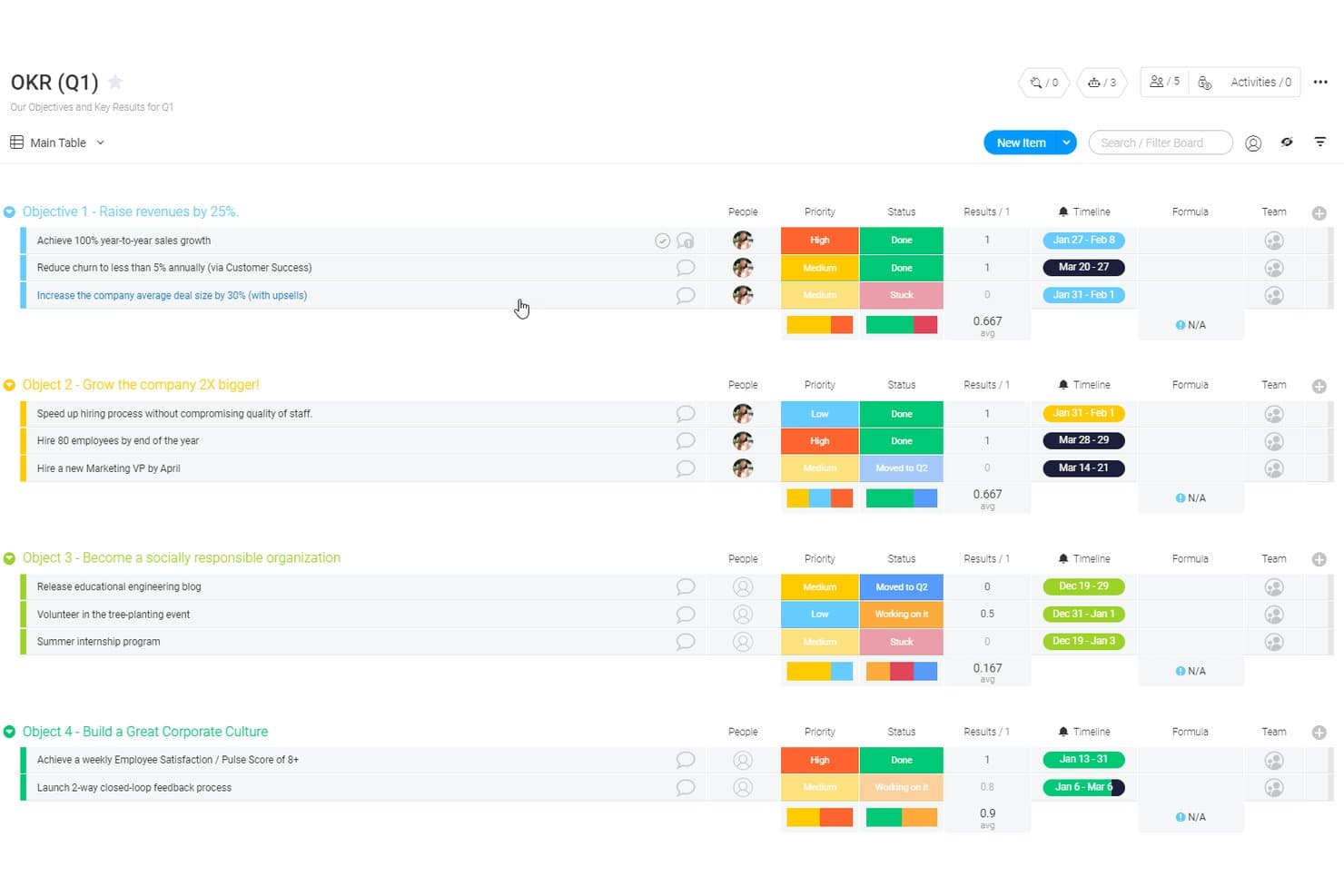
monday AI Workspace offers a structured OKR board template displaying objectives, key results, priorities, statuses, timelines, and progress tracking across four company goals. monday AI Workspace is a customizable work management platform that lets teams define OKRs, cascade goals across organizational levels, and track progress through visual dashboards and AI-powered workflow automation.
Who Is monday AI Workspace Best For?
It's a strong fit for cross-functional teams at mid-size to large companies that want OKR tracking built into their existing work management workflows.
Why I Picked monday AI Workspace
I picked monday AI Workspace as one of the best because its AI workflow builder genuinely reduces the manual overhead that makes OKR tracking fall apart. I use the AI Sidekick to get context-aware updates on goal progress without digging through boards, and AI Columns automatically surface status changes across key results. That combination keeps OKR cycles moving without relying on people to manually report upward.
monday AI Workspace Key Features
- Customizable OKR templates: Build and modify OKR boards to fit unique team structures and processes.
- Visual dashboards: Track goal status, timelines, and dependencies using colorful, interactive views.
- Native collaboration tools: Assign owners, share workdocs, and comment directly within OKR boards.
- Automation recipes: Automate routine updates, reminders, or notifications without coding.
monday AI Workspace Integrations
monday AI Workspace offers hundreds of native integrations through its built-in integrations and marketplace, including Slack, Salesforce, HubSpot, Google Workspace, Microsoft Teams, Zoom, and Jira. It also supports Zapier and provides an API for custom integrations.
Pros and Cons
Pros:
- Strong visual dashboards for goal visibility
- Highly customizable goal-tracking boards
- AI automates OKR progress updates
Cons:
- Dedicated OKR features require significant setup
- Not purpose-built for OKR methodology
Learn more about monday AI Workspace: Best with AI-powered skill and career pathing
- Free demo available
- From $2/user/month (billed annually)
Visit WebsiteCustomer Rating:4.3/5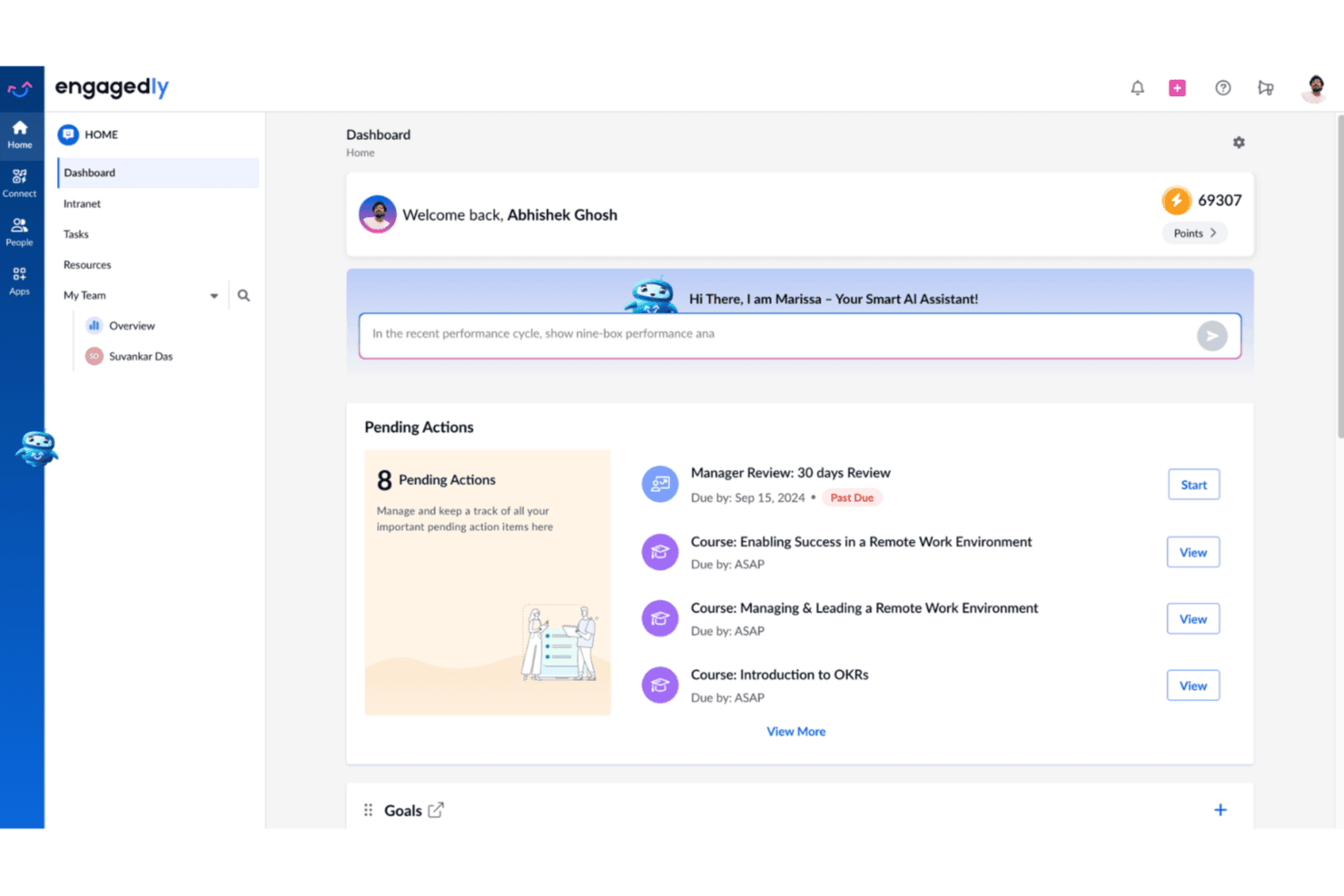
Engagedly's dashboard displays pending actions, AI assistant, and employee points in a centralized home view. Engagedly is a talent management platform that combines OKRs and goal-setting with performance reviews, 360-degree feedback, learning, employee engagement, and AI-powered career development tools.
Who Is Engagedly Best For?
Engagedly suits mid-market to enterprise HR teams that want OKRs connected to performance, learning, and talent development in one platform.
Why I Picked Engagedly
Engagedly earns its spot on my shortlist because it goes further than most OKR tools by tying objectives directly to skill development and career growth. I love how Marissa, its AI assistant, can analyze a goal and surface the specific skills an employee needs to achieve it. From there, the Skill Gap Analysis and Career Paths modules create a personalized development roadmap, so goals drive real growth conversations rather than sitting on a dashboard untouched.
Engagedly Key Features
- Goals 2.0 module: Set up cascading OKRs and link them across teams and projects.
- 360-degree feedback: Launch multi-rater feedback cycles with customizable templates and workflows.
- Gamified recognition: Award badges and points for performance achievements directly inside the platform.
- Integrated meeting tools: Schedule one-on-ones, pull in goals or discussion points, and add private or public notes.
Engagedly Integrations
Engagedly offers native integrations with BambooHR, Okta, OneLogin, Microsoft Teams, Jira, Gmail, Google Sheets, and LinkedIn Learning. An API is available for custom integrations.
Pros and Cons
Pros:
- Highly configurable OKR and goal workflows
- AI assists OKR generation
- Supports 17 languages
Cons:
- Analytics dashboards can be slow to load
- Advanced features require higher-tier plans
Learn more about Engagedly: Best for AI-assisted goal setting
- 14-days free trial + demo available
- From $5/user/month
Visit WebsiteCustomer Rating:4.6/5
Tability's comprehensive dashboard view provides insight into various OKRs and their statuses. Tability's AI tools help you draft objectives, key results, and action plans quickly, making it especially useful for teams that struggle with wording, structure, or figuring out what “good” OKRs should look like.
Why I Picked Tability
I picked Tability because it uses AI in a practical way by helping you define meaningful goals instead of leaving you with vague or untrackable OKRs. The AI goal editor suggests specific, measurable key results based on your prompt, which reduces guesswork and ensures consistency across teams.
I also like that you can generate action plans directly from your OKRs, giving your team clear next steps rather than abstract targets. Tability’s alignment view helps you see how goals connect across departments, which is helpful when AI-generated goals need context or validation. And since weekly check-ins are built in, your team is guided to update progress regularly so AI suggestions stay tied to real-world results.
Tability Key Features
Here are some standout features worth highlighting:
- AI Goal Editor: Creates draft OKRs from your prompt to speed up planning.
- AI Action Plan Suggestions: Recommends initiatives tied to each key result to help teams move from goals to execution.
- Strategy Map: Shows how goals link across teams to improve alignment.
- Presentation-Ready Reports: Turns updates into shareable summaries for reviews or leadership meetings.
Tability Integrations
Integrations include Slack, Microsoft Teams, Jira, Asana, Trello, ClickUp, Confluence, Azure AD, Okta, Notion, and HubSpot.
Pros and Cons
Pros:
- AI-powered goal suggestions
- Good progress tracking features
- Can adapt to different goal frameworks
Cons:
- Navigation could be smoother
- Not ideal for those who require complex goal management
Learn more about Tability: Best as an AI for business
- Free trial + Free demo available
- From $8/user/month
Visit WebsiteCustomer Rating:4.4/5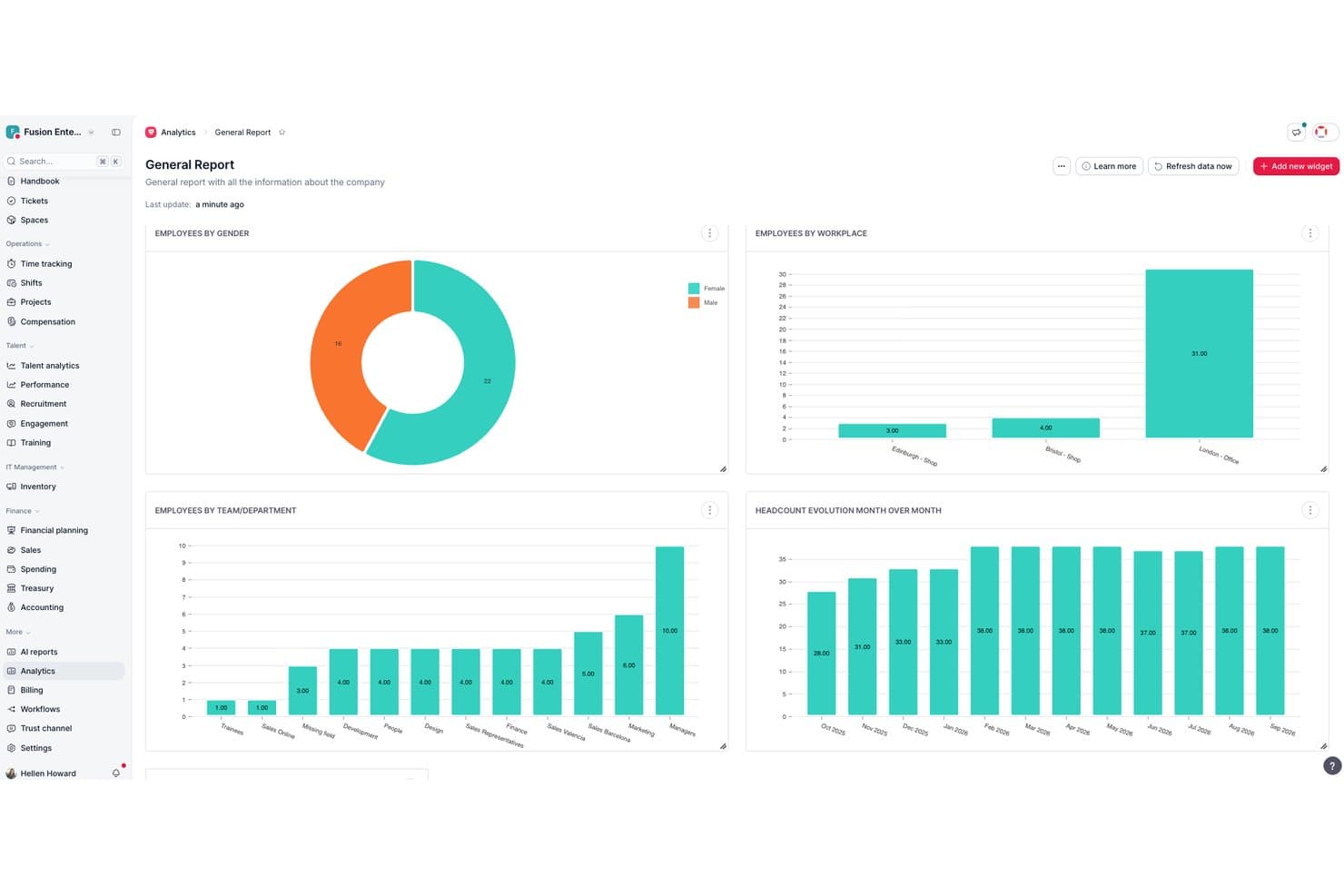
Factorial surfaces workforce analytics through visual HR dashboards. Factorial is an all-in-one HR platform that brings goal-setting and OKR tracking into the same system as performance reviews, engagement surveys, 1:1 meetings, and AI-assisted reporting.
Who Is Factorial Best For?
Factorial suits HR teams and people operations managers who want goal-setting and performance tools built into the same system they use for daily HR work.
Why I Picked Factorial
I've included Factorial in my top picks because its AI for business positioning goes beyond a catchy label—the platform's AI actively handles the day-to-day operations that slow HR teams down, from generating reports to answering employee policy questions. I especially like how goal progress surfaces directly inside performance review panels, so managers can see key result completion alongside review scores without switching tools. The cascading parent and sub-goal structure with automatic roll-up also keeps company-wide OKR alignment visible without manual consolidation.
Factorial Key Features
- Weighted key results: Assign individual weights to each key result so goal progress reflects the relative importance of each contribution.
- Negative goal logic: Track goals where a lower value signals success, such as reducing churn, absenteeism, or delivery time.
- Period-based targets: Break a single goal into milestone targets across quarters or half-years instead of measuring only a final end result.
- Goals visibility controls: Set each goal's audience to an individual, team, manager, or the whole company using built-in visibility settings.
Factorial Integrations
Factorial documents hundreds of integrations, including Microsoft Teams, Slack, Microsoft Power BI, Google Workspace, Outlook, and monday.com. It also offers a public API and Zapier for custom connectivity.
Pros and Cons
Pros:
- Review panels show live goal progress
- Parent goals automatically roll up progress
- AI-assisted HR reporting supports goal oversight
Cons:
- No dedicated OKR health dashboard
- Manual updates limit ongoing progress tracking
 Best for tracking OKRs and KPIs together
- Free trial and demo available
- From $0.09/user/month

Oboard OKR Software can link objectives, key results, and roadmaps across teams so you can track progress and alignment in one view. Oboard OKR software is available as a standalone web app and also offers integrated apps for Jira, monday.com, and Salesforce. A key strength of Oboard is its interconnected ecosystem. For example, if product and engineering work in Jira, marketing in monday.com, and sales in Salesforce — they can collaborate in the same Oboard workspace. All the success metrics are synced, and teams are aligned across different platforms.
Why I Picked Oboard
I picked Oboard because it lets you manage OKRs and KPIs in the same environment where your team already plans, ships, and reviews work. You can link objectives to any Jira epic, issue, or project, so progress updates stay accurate without manual tracking.
Oboard also stands out for its simplicity and ease of use. Unlike some tools that require lengthy onboarding processes, you can set up Oboard and start tracking your first metrics in a day. Training your team to manage them is also very simple. There are also numerous customizations available, so you can benefit from the advanced settings once you're ready.
Oboard Key Features
Oboard offers plenty of useful features, enabling you to configure your goals in a way that perfectly aligns with your organization's unique structure and processes. Here’s what you can expect:
- Strategy Maps: Get a bird’s eye view of all your OKRs and KPIs, as well as tasks that inform them.
- Metric Weights: Assign different levels of importance to your various objectives.
- OKR Roadmaps: Visualize your strategic goals alongside related initiatives over time and identify potential bottlenecks.
- Customizable Dashboards: Create personalized views of your priority goals with dedicated KPI and OKR modules.
Oboard Integrations
Integrations include Jira, monday.com, Salesforce, and Confluence.
Pros and Cons
Pros:
- Can be used across multiple ecosystems (Atlassian, monday.com, Salesforce) or independently.
- Deep Jira integration links OKRs and KPIs to Epics, Issues, and Projects.
- Strategy maps easily visualize alignment between departments.
Cons:
- No mobile app.
- Only supports 7 languages.
Learn more about Oboard OKR Software: Best for continuous performance feedback
- 30-day free trial
- From $3/user/month (billed annually)
Visit WebsiteCustomer Rating:4.3/5
Track and align team objectives within the Small Improvements OKR dashboard. Small Improvements is a performance management tool that connects goals, feedback, and engagement in one place. As an OKR platform, it turns objectives into action through continuous check-ins, pulse surveys, and 1:1 meetings—helping teams stay aligned and focused on growth.
Why I picked Small Improvements: I picked Small Improvements because it combines OKR tracking with continuous feedback and recognition features that keep teams motivated. You can set measurable goals, collect 360-degree feedback, and conduct regular check-ins to maintain visibility into progress. I also like how it blends performance reviews and real-time engagement tools—helping you spot early trends in morale or productivity before they impact results.
For HR teams aiming to build a feedback-driven OKR culture, this platform makes it easy to maintain alignment and accountability throughout the year.
Small Improvements standout features and integrations:
Features include 1:1 meeting scheduling, pulse surveys to track engagement, and praise tools to recognize contributions. You can set team and individual objectives, link them to broader company goals, and analyze performance data using built-in reports.
Integrations include popular HR systems and communication tools such as Personio, Slack, BambooHR, and ADP, ensuring seamless data flow across your performance and HR ecosystem.
Pros and Cons
Pros:
- Strong goal-tracking and visibility tools
- Encourages peer praise and feedback
- Facilitates 1:1 meeting agendas
Cons:
- Requires some training to master
- May feel complex for small teams
Learn more about Small Improvements:
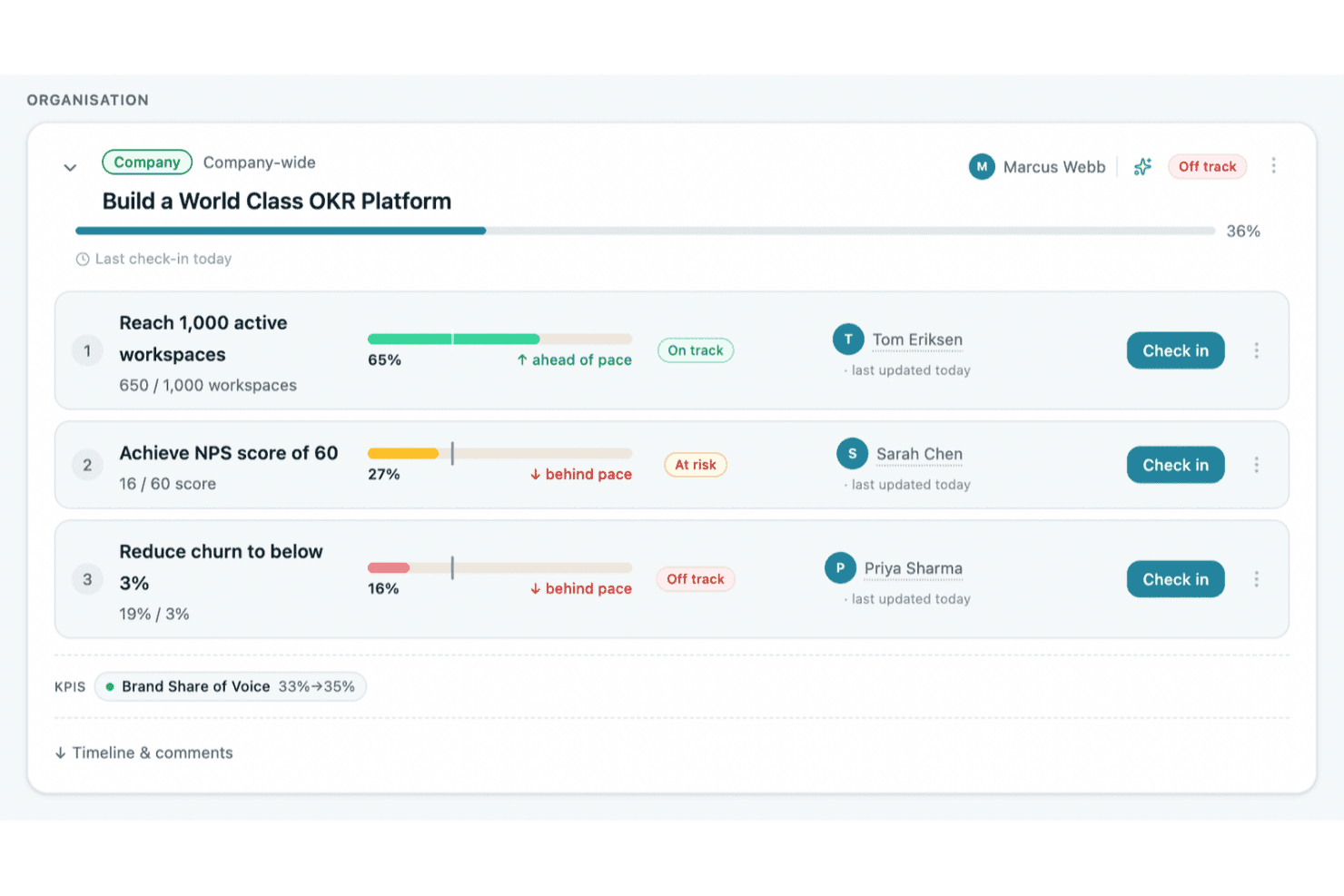
OKRs Tool tracks OKR progress with status indicators and check-in prompts. OKRs Tool is an OKR software platform built for growing organizations that combines objective and key result setting, multi-level cascading, AI-assisted goal drafting, automated check-ins, and progress tracking across teams and cycles.
Who Is OKRs Tool Best For?
OKRs Tool is a strong fit for operators and business leaders at growing companies who want to implement OKRs without the complexity of enterprise software.
Why I Picked OKRs Tool
I picked OKRs Tool as one of the best because it's purpose-built for growing teams that want real OKR structure without enterprise-scale complexity. I love how the Alignment Map makes it immediately visible when a team's goals have drifted from company priorities, and the AI OKR Analysis flags weak key results and suggests rewrites before a cycle even begins. Plans start from $129/month (flat fee), covering the whole organization rather than charging per seat.
OKRs Tool Key Features
- Automated check-ins: Weekly reminders prompt team members to update key results, with progress rolling up through the OKR hierarchy automatically.
- KPI tracking: Track organization-level KPIs against targets, assign owners, and link each KPI to the goals it supports.
- OKR Vault: Browse and reuse an archive of past OKRs across cycles to carry forward, clone, or adapt goals.
- Cycle retrospectives: Guided close-of-cycle questions surface AI-suggested continue, stop, and start actions for the next period.
OKRs Tool Integrations
OKRs Tool offers 10 documented integrations, including Slack, Microsoft Teams, Google Workspace, Jira, Asana, Linear, ClickUp, and Notion, plus REST API and webhooks. Paid plans support the REST API for custom integrations.
Pros and Cons
Pros:
- Dashboards make cross-team progress easy to scan
- Visual maps connect team goals to priorities
- AI suggestions help teams write clearer OKRs
Cons:
- Role granularity may frustrate larger teams
- Reporting offers limited flexibility for summaries
Learn more about OKRs Tool: Best for strategy-to-OKR alignment visualization
- Free plan + free trial + free demo available
- From €15/user/month (billed annually)
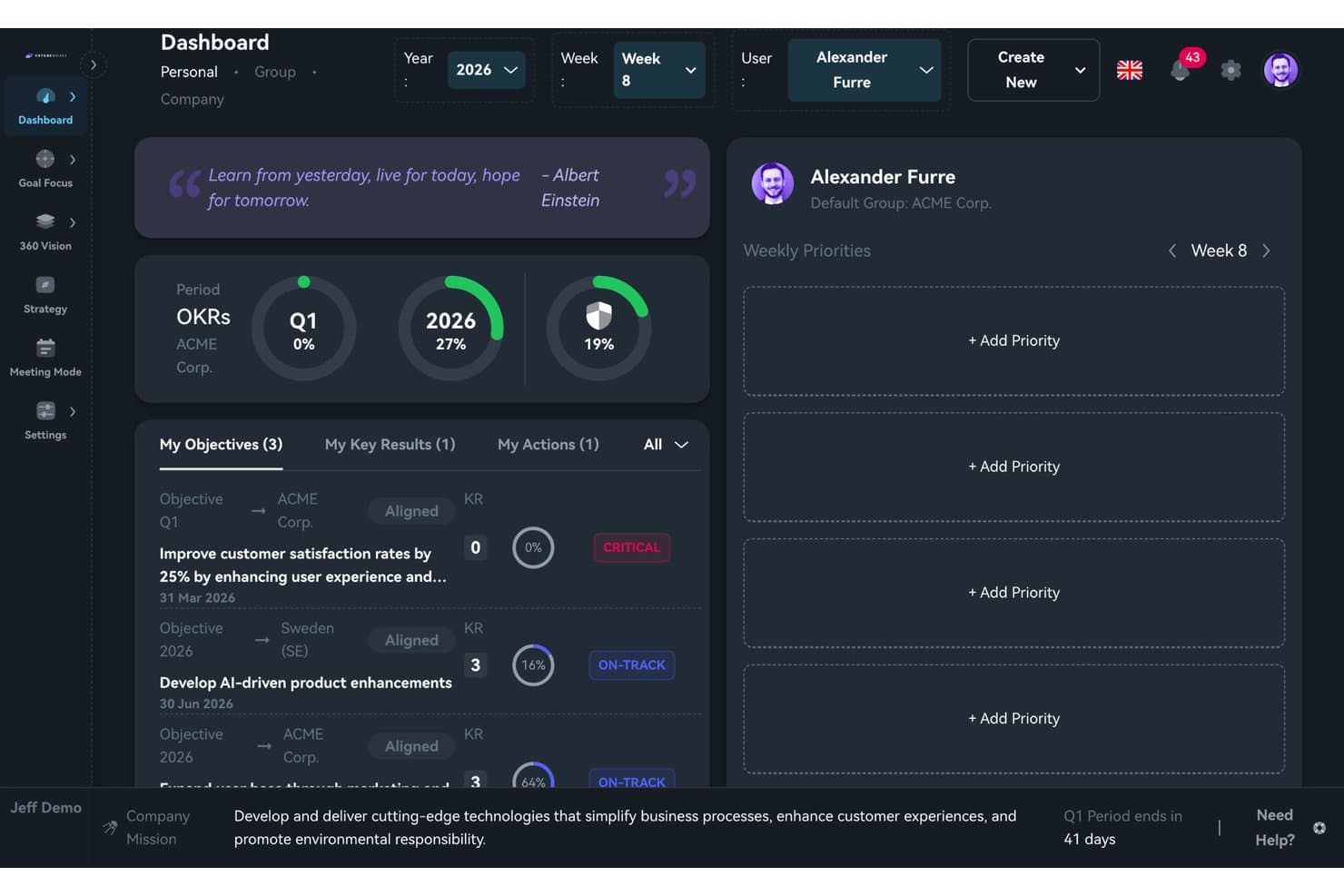
FutureWorks offers personal OKR progress with weekly priorities on one dashboard. FutureWorks is an OKR management platform that combines multi-level goal cascading, strategy alignment visualization, and structured meeting facilitation with AI-assisted OKR drafting.
Who Is FutureWorks Best For?
FutureWorks is a strong fit for leadership teams and strategy owners who need to connect company-level objectives to team and individual goals in one clear view.
Why I Picked FutureWorks
FutureWorks earns its spot on my shortlist because the 360 Vision feature solves a problem most OKR tools handle poorly: showing exactly where alignment breaks down. I can toggle between aligned and unaligned views across the full company-to-individual hierarchy, with color-coded status badges that make gaps obvious at a glance. The AI Context Engine is also genuinely useful, converting existing strategy documents (PDFs, Word files, decks) into structured OKRs rather than making you start from scratch.
FutureWorks Key Features
- Meeting Mode with live agendas: Run time-boxed weekly check-ins using pre-built agenda templates that pull real OKR status and action points right into the meeting.
- Personal dashboard and progress rings: Give every user a dashboard with visual progress rings showing quarter, year, and all-time OKR completion.
- Task sync with Jira, GitHub, and Microsoft Planner: Link and sync tasks to Key Results across Jira, GitHub, and Microsoft Planner, updating OKR progress automatically as tasks close.
- Mobile app for iOS and Android: Let users check in and update OKR progress directly from their mobile device, supporting on-the-go updates.
FutureWorks Integrations
FutureWorks offers native integrations with Jira, GitHub, Microsoft Planner, Azure DevOps, Microsoft Teams, and Google Workspace. It also provides SCIM 2.0 provisioning, supports SSO with Microsoft and Google, and offers webhooks and a REST API for custom integrations.
Pros and Cons
Pros:
- Meeting Mode brings OKR check-ins into timed agendas
- AI converts existing strategy docs into OKRs
- 360 Vision makes alignment gaps instantly visible
Cons:
- Limited brand recognition outside Nordic markets
- No dedicated continuous feedback or 1:1 module
Learn more about FutureWorks:
Diğer OKR Yazılımları
İşte en iyi OKR yazılımları için hazırladığım en iyi 10 kısa listeye giremeyen, ancak yine de daha yakından incelenmeye değer birkaç seçenek:
- 11ThriveSparrowBest for flexible OKR cycles
- 12PerformYardBest for integrated goals and performance
- 13Profit.coBest for an intuitive user experience
- 14LatticeBes OKR progress tracking integrations
- 15Quantive ResultsBest for creating cross-team alignment
- 16WorkleapBest for goal setting and employee engagement
- 17InspireBest AI-powered holistic OKR solution
- 18PeopleGoalBest employee-led OKRs
- 19SynergitaBest for continuous performance management
- 20WorkBoardBest for cross-company objective alignment
- 21WeekdoneBest for weekly planning tools
- 22YaguaraBest for e-retailers
- 23HuminosBest for remote employees
- 24KazooBest for peer-to-peer feedback
- 25HeartpaceBest for individual goal-setting
- 26Unlock:OKRBest for OKR coaching
- 27Simple OKRBest for work culture research
- 28Ally.ioBest for OKR collaboration
- 29LeapsomeBest for performance-oriented companies
- 30Peoplebox.aiBest with automated goal tracking and reviews
- 31Effy AIBest for fast OKR rollout
- 32Mitratech PerformBest tools within a performance management system
- 33PrimalogikBest for tracking goals with ease and precision
- 34PaycorBest for OKR compensation management
- 35BetterworksBest for enterprise goal alignment
- 36TopicflowBest for customizable goal-setting frameworks
- 3715FiveBest OKR software for cross team collaboration, and keeping OKRs top of mind
- 38Teamwork.comBest OKRs for professional services
- 39PerdooBest free OKR software
- 40HirebookBest OKR management software for customer support services
İlgili İK Yazılımı İncelemeleri
Aradığınızı burada hâlâ bulamadıysanız test edip değerlendirdiğimiz diğer ilgili araçlara göz atın:
- İK yazılımı
- Bordro yazılımı
- İşe alım yazılımı
- Kayıtlı İşveren hizmetleri
- Aday takip sistemleri
- İşgücü yönetimi yazılımı
How I Evaluate OKR Software
I split my evaluation into two layers: baseline capabilities a tool must have—like goal cascading and check-ins—and the differentiators that distinguish the best options for HR teams.
Core Functionality (Table Stakes For This List)
When I'm selecting tools for my list, I rank each one on a scale from 0 (does not offer the functionality) to 5 (excels in this area) for each core functionality listed below. Then, I calculate the tool's total score into a percentage. Each tool needs to achieve a minimum total score of 65% to be considered for inclusion.
- Objective & Key Result Creation: I evaluate whether you can define objectives with multiple key result types—like percentages, milestones, or numeric targets—rather than just basic text fields.
- Goal Alignment & Cascading: Connecting a team-level OKR to a company objective should be visual and intuitive, so I check for alignment trees or hierarchy maps.
- Progress Tracking & Check-ins: I look for structured check-in workflows with reminders and confidence scoring, not just a manual slider to update completion percentage.
- OKR Dashboards & Reporting: HR leaders need a quick read on goal health across departments, so dashboards should offer filtering by team, time period, and status.
- Performance Management Integration: I check whether OKRs feed into review cycles and 1:1 agendas, since tools like Lattice and 15Five tie goals directly into performance conversations.
- HRIS & Collaboration Integrations: The tool should connect to your HRIS for employee data sync and to platforms like Slack or Microsoft Teams for in-context updates and nudges.
Once I have a list of tools that meet the criteria, I consider what sets each platform apart.
Differentiating Factors (What Sets Vendors Apart)
Here's how I compare and contrast different vendors:
Standout Features
AI-powered OKR coaching is a big differentiator. Tools like Betterworks and Quantive offer AI suggestions that help managers write stronger key results. I also look for built-in 1:1 meeting workspaces where talking points link directly to OKRs, keeping conversations focused on goal progress. Engagement surveys round out the picture—platforms that correlate pulse survey data with OKR completion give HR leaders a clearer read on whether goals are driving motivation or burnout.
Beyond Features
OKR adoption often stalls without proper rollout support, so I evaluate whether vendors provide onboarding coaches, pre-built templates, and change management resources for HR teams. Tech stack fit matters just as much—I check for native HRIS connections with platforms like Workday or BambooHR, since manual data entry defeats the purpose. Security is another priority because OKR tools hold sensitive performance data. I look for SOC 2 Type II compliance and role-based access controls that let HR restrict visibility by department or level.
OKR Yazılımı Nasıl Seçilir?
Bugün piyasadaki en iyi OKR yazılımlarından bazı örnekleri sundum; artık sıra sizde.
İşe, yazılımı ekibinizin hedefleri gerçekte nasıl belirlediği, takip ettiği ve gözden geçirdiğiyle eşleştirerek başlayın. Bu; şirket genelindeki OKR'leri, ekip hedeflerini, bireysel hedefleri, ilerleme güncellemelerini veya performans uyumunu kapsayabilir. Ardından entegrasyonlar, raporlama, görünürlük, kullanım kolaylığı, ölçeklenebilirlik ve yazılımın mevcut hedef belirleme sürecinize ne ölçüde uyduğu gibi faktörleri karşılaştırın.
Seçeneklerinizi özel ihtiyaçlarınıza göre daraltmak için aşağıdaki aracımızı deneyin.
Daha ayrıntılı bir yönlendirme için OKR yazılımının nasıl seçileceğine ilişkin rehberimize göz atın.
OKR Yazılımı Nedir?
OKR yazılımı, bireylerin, ekiplerin ve kuruluşların Amaçları ve Temel Sonuçları (OKR'ler) belirlemesine, izlemesine ve yönetmesine yardımcı olmak üzere tasarlanmış dijital bir araçtır. OKR'ler, çalışmaları stratejik önceliklerle uyumlu hâle getirmek için kullanılan popüler bir hedef belirleme çerçevesidir.
Yazılım, iddialı amaçları tanımlamak ve bunları ölçülebilir temel sonuçlarla ilişkilendirmek için merkezi bir platform sunarak kuruluş genelinde netliği, uyumu ve hesap verebilirliği teşvik eder.
Şirketinizin tüm seviyeleri için bir çevrimiçi hedef izleme aracı gibidir.
OKR Yazılımının Özellikleri
OKR yazılımı, şirket genelindeki hedeflerinizi belirlemenize, izlemenize ve gerçekleştirmenize yardımcı olmak üzere tasarlanmıştır. OKR yönetim yazılımını kullanmak, farklı ekipler arasındaki şirket geneli amaçların uyumlu hâle getirilmesine yardımcı olarak herkesin ortak hedeflere ulaşmak için aynı yönde ilerlemesini sağlar.
Şirketinizin başarısını güvence altına almak için OKR yazılımında aramanız gereken en önemli özellikler şunlardır:
- Amaç belirleme ve izleme: Net, ölçülebilir amaçlar ve temel sonuçlar belirleyin, ardından ilerlemeyi gerçek zamanlı olarak izleyin. Bu, büyük hedefleri yönetilebilir hedeflere ayırmanıza ve bitiş çizgisine ne kadar yaklaştığınızı gerçekten görmenize yardımcı olur.
- Hedef uyumu: Bireysel, ekip ve şirket geneli hedefleri birbirine bağlayarak herkesin aynı yönde ilerlemesini sağlayın. Bu özellik, tüm çabaların büyük resmi desteklemesini sağlar ve "Bunu neden tekrar yapıyoruz?" anlarının yaşanmasını önler.
- İlerleme görselleştirme: Görsel panolar, grafikler ve zaman çizelgeleri hedeflerinizde tam olarak hangi noktada olduğunuzu gösterir. Elektronik tabloları incelemek yerine anında netlik elde edersiniz; bunu tüm kuruluşunuz için bir ilerleme çubuğu gibi düşünebilirsiniz.
- İş birliği araçları: Herkesin senkronize kalması için OKR'leri birlikte paylaşın, yorum yapın ve güncelleyin. Bu araçlar akran geri bildirimini ve ekip çalışmasını teşvik eder, iletişim kanallarını açık tutar (kimin neden sorumlu olduğu konusundaki belirsizlikler artık sona erer).
- Kontrol ve güncelleme hatırlatıcıları: İlerlemenizi düzenli olarak güncellemeniz için dostça hatırlatmalar alın. Bu, herkesin katılımını sürdürür ve hedeflerin sessizce tozlanıp unutulmasını önler.
- Performans analitiği ve raporlama: Eğilimleri, darboğazları ve başarıları gösteren ayrıntılı raporları inceleyin. Bu içgörüler, stratejileri kolayca geliştirmenizi, büyük başarıları kutlamanızı veya bir hedef tepe olmaktan çok Everest Dağı'na benzediğinde rotayı değiştirmenizi sağlar.
- Entegrasyon özellikleri: OKR yazılımınızı proje yönetimi uygulamaları veya iletişim platformları gibi hâlihazırda kullandığınız diğer araçlara bağlayın. Böylece daha az manuel veri girişi yapar ve genel olarak daha akıcı iş akışlarına sahip olursunuz.
- Özelleştirilebilir şablonlar: Amaç şablonlarını şirketinizin tarzına ve ihtiyaçlarına uyacak şekilde kullanın ve düzenleyin. Doğuştan hedef yazarı değilseniz bu şablonlar OKR sürecini sizin için başlatır; sıfırdan başlamanız gerekmez.
- İzin ve gizlilik denetimleri: Hassas bilgileri korumak ve güven oluşturmak için belirli OKR'leri kimlerin görüntüleyebileceğine veya düzenleyebileceğine karar verin. Bu özellik, ekibiniz için en uygun seçeneğe bağlı olarak erişimi açmanıza veya kısıtlamanıza olanak tanır.
Yaygın OKR Yazılımı Yapay Zekâ Özellikleri
Yukarıda listelenen standart OKR yazılımı özelliklerinin yanı sıra bu çözümlerin çoğu aşağıdakiler gibi özelliklerle yapay zekâyı da kullanmaya başlıyor:
- Otomatik hedef önerileri: Geçmiş performansa ve şirket önceliklerine dayalı yeni amaçlar için akıllı öneriler alın. Bu özellik, beyin fırtınası için harcadığınız zamanı azaltır ve gözden kaçırmış olabileceğiniz hedefleri ortaya çıkarır.
- Yapay zekâ destekli ilerleme tahmini: Yapay zekânın güncelleme modellerinizi analiz etmesine ve amaçlarınıza ulaşma veya ulaşamama olasılığınızı söylemesine izin verin. Bu, ekibinizin ilerlemesi için duman ve aynalar olmadan kristal küreye sahip olmak gibidir.
- Güncellemelerde duygu analizi: Yapay zekâ, ekip üyelerinin güncellemelerindeki tonu değerlendirmeye yardımcı olarak tükenmişliği veya belirsizliği erkenden fark eder. Yalnızca neler olduğunu değil, çalışanlarınızın bu konuda ne hissettiğini de bilirsiniz.
- Otomatik kontrol özetleri: Her ekibin OKR durumunun yapay zekâ tarafından oluşturulmuş kısa özetlerini alarak saniyeler içinde bilgi sahibi olun. Artık her yorumu okumanıza gerek yok; yalnızca önemli bilgiler, hemen karşınızda.
- Engeller için öngörücü analitik: Hedeflerinize ulaşmada karşılaşabileceğiniz engelleri büyük aksaklıklara dönüşmeden önce fark edin. Yapay zekâ verilerinizi tarar ve hâlâ yeniden yönlenmek için zaman varken sorunları işaretler.
OKR Yazılımının Faydaları
OKR yazılımı, kuruluşların hedef belirleme ve izleme süreçlerini optimize etmelerine, ekipler arasındaki uyumu geliştirmelerine ve operasyonel başarıyı artırmalarına yardımcı olmak üzere tasarlanmıştır.
İhtiyaçlarınıza en uygun OKR yazılımını seçerek aşağıdaki faydaları elde etmeyi bekleyebilirsiniz:
- Gelişmiş Hedef Uyumu ve Şeffaflık: OKR yazılımı, kuruluştaki herkesin şirketin stratejik hedeflerini ve bunlara ulaşmadaki rolünü anlamasını sağlar. Bu açıklık, amaç ve yön duygusunu güçlendirerek çalışanlar arasında bağlılığın ve üretkenliğin artmasına katkıda bulunur.
- Geliştirilmiş Odaklanma ve Önceliklendirme: OKR yazılımı, hedefleri ve temel sonuçları açıkça tanımlayarak ekiplerin ve bireylerin en önemli görevlere odaklanmasına yardımcı olur. Bu önceliklendirme, kaynakların verimli bir şekilde tahsis edilmesini sağlayarak işletme için daha iyi sonuçlar elde edilmesini destekler.
- Daha İyi İletişim ve İş Birliği: OKR yazılımı, hedefler, ilerleme, zorluklar ve engeller hakkında sürekli görüşmeler yapılmasını sağlayan bir platform sunar. Bu, kuruluşun farklı seviyeleri arasındaki iş birliğini güçlendirir, departmanlar arasındaki kopuklukları ortadan kaldırır ve ekip çalışması ile ortak başarı kültürünü teşvik eder.
- Gerçek Zamanlı İlerleme Takibi: Hedeflere yönelik ilerlemeyi gerçek zamanlı olarak izleyebilmek, hızlı ayarlamalar yapılmasına olanak tanır ve herkesin elde edilen başarılar veya dikkat edilmesi gereken alanlar hakkında bilgi sahibi olmasını sağlar. Bu anlık geri bildirim döngüsü, ivmeyi korumak ve sürekli iyileştirmeyi güvence altına almak için kritik öneme sahiptir.
- Veriye Dayalı Karar Alma: Kapsamlı analiz ve raporlama özellikleri sayesinde OKR yazılımı, performans eğilimleri ve iyileştirme alanları hakkında değerli içgörüler sunar. Bu veriye dayalı yaklaşım; bilinçli karar alma, stratejik planlama ve stratejinin uygulanmasını destekleyerek çabaları işletme hedefleriyle uyumlu hale getirir.
Kuruluşlar, OKR yazılımının gücünden yararlanarak operasyonel verimliliklerini artırabilir, yüksek performans kültürünü teşvik edebilir ve giderek daha rekabetçi hale gelen iş ortamında sürdürülebilir büyümeyi destekleyebilir.
OKR Yazılımı için Maliyetler ve Fiyatlandırma
OKR yazılımı fiyatlandırmasını değerlendirirken, şirketiniz için elde ettiğiniz değeri göz önünde bulundurmanız önemlidir. Küçük bir işletme veya girişim işletiyorsanız, küçük ekip hedeflerini takip etmek için ücretsiz bir sürümle yetinebilirsiniz. Ancak ücretsiz bir plan, aylık ücretli bir teklif ile aynı yeteneklere sahip olmayacaktır.
Bir yazılım alıcısı olarak, mevcut plan çeşitlerini ve özellikler, destek ile fiyatlar arasındaki farkları anlamanız önemlidir.
OKR Yazılımı için Plan Karşılaştırma Tablosu
| Plan Türü | Ortalama Fiyat | Yaygın Özellikler | En Uygun Olduğu Yer |
|---|---|---|---|
| Plan TürüÜcretsiz | Ortalama Fiyat$0 | Yaygın ÖzelliklerTemel OKR takibi, sınırlı kullanıcı sayısı, topluluk desteğine erişim | En Uygun Olduğu YerHerhangi bir mali taahhütte bulunmadan OKR'leri denemek isteyen girişimler ve küçük ekipler |
| Plan TürüTemel | Ortalama Fiyat$5-10 kullanıcı başına/ay | Yaygın ÖzelliklerGelişmiş OKR takibi, sınırsız OKR, temel raporlama ve e-posta desteği | En Uygun Olduğu YerBütçeyi aşmadan daha güçlü takip ve raporlama özelliklerine ihtiyaç duyan küçük ve orta ölçekli işletmeler |
| Plan TürüProfesyonel | Ortalama Fiyat$10-20 kullanıcı başına/ay | Yaygın ÖzelliklerTüm Temel özellikler ile gelişmiş raporlama, entegrasyon özellikleri ve öncelikli e-posta desteği | En Uygun Olduğu YerAyrıntılı analizlere ve mevcut araçlarla sorunsuz entegrasyona ihtiyaç duyan orta ve büyük ölçekli işletmeler |
| Plan TürüKurumsal | Ortalama FiyatÖzel fiyatlandırma | Yaygın ÖzelliklerTüm Profesyonel özellikler ile özel entegrasyonlar, özel hesap yöneticisi, 7/24 destek ve gelişmiş güvenlik özellikleri | En Uygun Olduğu YerKarmaşık ihtiyaçlara ve üst düzey özelleştirme, özel destek ve en üst düzey güvenlik talebine sahip büyük işletmeler |
Gerekli özelliklerin düzeyine göre OKR yazılımı planlarının ve fiyatlandırma ayrıntılarının dökümü.
Bir OKR yazılımı planını değerlendirirken ekibinizin büyüklüğünü, hedeflerinizin karmaşıklığını ve ihtiyaç duyacağınızı öngördüğünüz destek düzeyini değerlendirmek çok önemlidir. Her plan, küçük girişimlerden büyük işletmelere kadar farklı kuruluş ihtiyaçlarına hitap edecek şekilde tasarlanmıştır.
Başlangıçta ücretsiz veya temel bir planla başlamak istemeniz anlaşılabilir olsa da, daha gelişmiş bir planı en başından tercih etmek istemenizin birkaç nedeni vardır:
- Öncelikli Destek ve Eğitim: Ücretsiz veya temel bir planı geliştirmek için tartışmasız en yaygın neden, bu planların sunduğu müşteri desteğinin yetersiz olmasıdır. Daha gelişmiş bir plana geçerek ekibinizin sorunları hızla çözmesine ve yazılımın özelliklerinden tam olarak yararlanmasına yardımcı olacak premium destek ve eğitim kaynaklarına erişim kazanırsınız. OKR araçlarının başlangıçta kurulumu biraz karmaşık olabildiğinden, bence bunun için biraz daha fazla ödeme yapmak kesinlikle buna değer.
- Özelleştirilebilir OKR Çerçeveleri: Temel planlar, OKR çerçevelerini işletmenizin özel ihtiyaçlarına göre özelleştirme konusunda genellikle esneklik sunmaz. Planınızı yükselterek OKR yazılımını benzersiz iş modelinize ve stratejik hedeflerinize uyacak şekilde düzenleme olanağı kazanırsınız.
- Gelişmiş Hedef Uyumlandırma Özellikleri: Şirketinizin hedefleri geliştikçe uyumu korumak için gelişmiş uyumlandırma ve görselleştirme araçlarına ihtiyacınız olacaktır. Bunlar ücretsiz veya temel planlarda genellikle bulunmadığından, bu gelişmiş özelliğin kilidini açmak için daha üst bir plana geçmeniz gerekir.
- Otomatik İlerleme Güncellemeleri: Ücretsiz veya temel planlar genellikle zaman alabilen ya da kolayca gözden kaçabilen manuel güncellemeler gerektirir. Daha yüksek fiyatlı planlar, otomatik ilerleme takibi ve güncellemeleri sunarak zamandan tasarruf etmenizi ve hata olasılığını azaltmanızı sağlar.
- Diğer Araçlarla Entegrasyon: Ücretsiz veya temel planların çoğu entegrasyon olanağı sunmaz; bu da daha kapsamlı bir planı tercih etmek istemenizin yaygın nedenlerinden bir diğeridir. OKR yönetimi yazılımınızı diğer önemli sistemlerle (proje yönetimi ve kurum içi iletişim araçları da dahil) entegre ederek iş akışlarınızı ve veri senkronizasyonunuzu iyileştirirsiniz.
Sonuç olarak, mevcut ihtiyaçlarınızı karşılamak ve karşılaştığınız zorlukları bütçenizi aşmadan çözmek için ihtiyaç duyduğunuz özellikleri sunan bir planı güvence altına almanız önemlidir.
OKR Yazılımı: Sıkça Sorulan Sorular
OKR yazılımının ne olduğunu ve kuruluşunuza nasıl yardımcı olabileceğini hâlâ anlamaya mı çalışıyorsunuz? Sıkça sorulan soruların bu yanıtları başlamak için harika bir yer:
OKR yazılımınızın yatırım getirisini nasıl ölçebilirsiniz?
Bir yazılımın yatırım getirisini değerlendirmek zor olabilir, ancak yeni bir aracın çıktısını nicel olarak ölçmek istemeniz anlaşılır bir durumdur. Herhangi bir şeyin yatırım getirisini ölçmek, o şeyin toplam değerini maliyetine bölmek anlamına gelir. Öyleyse soru şu hâle gelir: Yazılımın değerini nasıl ölçersiniz? Bu hesaplamaya dâhil edebileceğiniz birkaç faktör şunlardır:
- Çalışanların ortak hedefler etrafındaki uyum düzeyi.
- Her departmanın yol haritasının genel OKR’larınızla ne ölçüde örtüştüğü.
- Hedefleri şirketin farklı seviyelerinde tamamlanana kadar takip edebilme beceriniz.
- Genel OKR yönetimi: OKR’ları belirlemekten, izlemekten ve raporlamaktan kimin sorumlu olduğu açık mı?
- Örneğin OKR’ları etkileşimli panolar üzerinden takip edebilme olanağı sayesinde otomasyonla kazanılan zaman.
Sonuç olarak, OKR yönetimi yazılımınızdan elde ettiğiniz değeri tanımlamak size düşer. Yatırım yapmadan önce bu konuyu değerlendirmeye değer; başarı tanımınız, en başta bir yazılım çözümü kullanma hedeflerinizle doğrudan ilişkilidir. Bu nedenle, görmeyi beklediğiniz sonuçlar için ölçülebilir bir çerçeveye sahip olduğunuzdan emin olun.
OKR yazılımı için ortalama kurulum süresi nedir?
OKR yazılımı için ortalama kurulum süresi; aracın karmaşıklığına, kuruluşunuzun büyüklüğüne ve amaçlarınızla temel sonuçlarınızın ne kadar ayrıntılı olduğuna bağlı olarak değişebilir. Bazı sistemler, özellikle önceden oluşturulmuş şablonlar sunuyorsa, birkaç saat veya gün içinde başlamanızı sağlayan hızlı kurulum seçenekleri sunar.
Daha karmaşık uygulamalarda, özellikle çok sayıda entegrasyona sahip büyük kuruluşlarda kurulum haftalar, hatta aylar sürebilir. Bu süreç yalnızca teknik kurulumu değil, aynı zamanda ekibinizi uyumlu hâle getirmeyi, kullanıcıları eğitmeyi ve OKR’larınızın iyi tanımlanıp mevcut iş akışlarıyla entegre edilmesini sağlamayı da içerir .
OKR konusunda en iyi uygulamaları daha iyi anlamak için ilham almak üzere en iyi OKR odaklı podcast’ler listemize göz atın.
Sektöre özel OKR yazılımı seçenekleri var mı?
Çoğu OKR yazılımı çeşitli sektörlerde esnek ve uyarlanabilir olacak şekilde tasarlansa da bazı çözümler teknoloji, sağlık veya üretim gibi belirli sektörlere yönelik özellikler sunar. Bu özel araçlar, sektöre özgü şablonlar veya ilgili alanda yaygın olarak kullanılan yazılımlarla entegrasyonlar içerebilir.
Bununla birlikte, OKR’ların geniş kapsamlı uygulanabilirliği sayesinde, genel amaçlı OKR yazılımları bile amaçlar ve temel sonuçlar sektöre özgü hedeflerle uyumlu hâle getirilerek sektörler genelinde etkili bir şekilde kullanılabilir.
OKR yazılımı şirketleri ne düzeyde müşteri desteği sağlar?
OKR yazılımı için müşteri desteği düzeyi; bilgi tabanları ve topluluk forumları gibi self servis kaynaklardan e-posta, sohbet veya telefon yoluyla kişiselleştirilmiş yardıma kadar değişir.
Bazı sağlayıcılar, örneğin PerformYard, özellikle üst düzey planlarda özel hesap yöneticileri veya sertifikalı OKR koçlarına erişim sunar. Desteğin kullanılabilirliği değişebilir; bazı hizmetler 7/24 destek sağlarken diğerlerinin çalışma saatleri daha sınırlı olabilir.
Ekibinizin OKR’ları belirleme ve takip etme konusundaki en iyi uygulamalarla ilgili eğitimi de dâhil olmak üzere, yazılımı başarıyla uygulamak ve kullanmak için ihtiyaç duyacağınız destek düzeyini değerlendirmeniz önemlidir
OKR yazılımı aşağıdan yukarıya ve çift yönlü hedef belirlemeyi nasıl destekler?
OKR yazılımı, çalışanların yalnızca yukarıdan aşağıya gelen talimatları almak yerine hedef belirleme sürecine aktif olarak katkıda bulunmasını sağlayarak aşağıdan yukarıya ve çift yönlü hedef belirlemeyi destekler.
Bu yaklaşımla çalışanlar, daha geniş şirket hedefleriyle uyumlu kendi amaçlarını belirleme konusunda güçlendirilir; bu da sahiplenme ve sorumluluk duygusunu geliştirir. Bu şeffaflık, bireysel katkıların görünür olmasını ve çalışanların çalışmalarının şirketin başarısını nasıl desteklediğini anlamasını sağlayarak daha yüksek katılım düzeylerini teşvik eder.
OKR yazılımı, çift yönlü hedef belirlemeyi kolaylaştırarak çalışanlarla liderlik arasında sürekli bir geri bildirim döngüsü oluşturur. Bu kesintisiz iletişim, herkesin uyum içinde kalmasını sağlarken hedeflerin değişen önceliklere göre esnek ve uyarlanabilir olmasına yardımcı olur.
Çalışanlar görüşlerine katkıda bulunup amaçlarını uyarladıkça şirketler, daha bağlı bir iş gücünün yanı sıra ortak hedeflere ulaşmak için daha net bir yol elde eder.
İlgili Yazılım İncelemeleri
Ekibinizin üyelerini motive etmek için başka bir tür yazılım mı arıyorsunuz? Hazırladığım diğer en iyi 10 listesi, başlamak için iyi bir yer:
- Hibrit Ekipler için Verimlilik Takip Yazılımı
- Ekipler için Çevrim İçi İş Birliği Araçları
- İleriye Dönük Planlama için Stratejik Planlama Yazılımı
- Kurumsal Sağlık Uygulamaları