

Rippling Review: Pros, Cons, Features & Pricing



Rippling is a workforce management software for small to enterprise businesses that centralizes everything you need to manage your HR operations. Ideal for diverse and global teams, you can manage employee profiles, onboarding, scheduling, learning management, and more, all through one platform. What makes Rippling stand out is its highly modular approach, combined with its robust workflow automation. This means that you can access modules beyond HR (like IT management and Spend management) and build automations across department functions, so you can focus your energy on more pressing or strategic tasks.
In this article, you'll learn about Rippling's features, pros and cons, best and worst use cases, and pricing. Discover how it can align with your goals and enhance your HR strategies.
Rippling Evaluation Summary
- From $8/user/month
- Free demo available
Why Trust Our Software Recommendations
Our team has been testing and reviewing software since 2012. As HR experts ourselves, we know how difficult—and important—it is to choose the right software.
For this guide, we evaluated tools using hands-on testing and independent research, scoring tools using our selection criteria. We also draw on insights from industry thought leaders and practicing HR experts.
Our reviews reflect our human editorial judgment, not a sales pitch.
Expert reviewers:
Rippling Overview
Rippling is a great option for companies of all sizes, from small to large, because it's intuitive and can scale as you grow. For example, if you're just looking to start with managing HR functions, Rippling has a comprehensive HCM that can centralize and automate the entire employee lifecycle, from headcount planning, recruiting, and onboarding, to benefits administration, compliance management, and payroll. As you grow, Rippling provides add-on modules, like IT and Spend, allowing you to manage more aspects of your business. If you expand globally, for instance, you can handle device provisioning and deprovisioning, manage business spending, and hire employees around the world through Rippling EOR.
pros
-
Automates simple and complex tasks across departments with an intuitive Workflow Studio.
-
The platform is highly scalable with add-on modules, making it ideal for growing businesses.
-
Tons of integration options (650+), so that all your systems can be connected and centralized in one platform.
cons
-
Custom reporting and workflows may not be included with base modules.
-
May be overly comprehensive for simpler operations with limited HR tasks or few employees.
-
While modular, costs can add up quickly as you activate more capabilities.
Is Rippling Right For Your Needs?
Who Would be a Good Fit for Rippling?
Rippling is a great fit for businesses of all sizes and industries, including those operating locally and globally. It’s ideal for teams that want to automate repetitive tasks and reduce administrative overhead. If your company values intuitive interfaces and scalability, Rippling can help your team manage everything from payroll to device management.
-
Tech Companies
Rippling's automation and integration capabilities suit the fast-paced, tech-driven environment your company thrives in.
-
Small to Large Enterprises
The platform scales well for small, medium, and large enterprises, handling growing operations, from simple to complex, across multiple geographies.
-
HR Departments
Rippling centralizes and automates HR functions, like onboarding, benefits administration, learning and development, time and attendance tracking, and recruiting.
-
Remote Teams
If your team works remotely, Rippling's cloud-based access keeps everyone connected and informed. With the IT add-on, you can even manage remote devices (e.g., automate device management, provisioning, and identity and access management).
-
Finance Departments
Rippling provides a full, in-house Finance suite with spend management, travel, bill pay and corporate cards. It also integrates payroll with other financial systems, streamlining financial workflows.
-
Global Enterprises
If your business spans multiple regions, Rippling's extensive reporting tools, global payroll, global hiring (EOR), and contractor management help manage diverse teams effectively.
Who Would be a Bad Fit for Rippling?
Rippling might not suit your business if you aren't interested in automating your workflow or if your operations are so simple that you don't need a ton of integration between moving parts. If you work in a highly-regulated industry and require specialized tools for HR management, Rippling might also not be a great fit.
-
Simple HR Needs
Though Rippling is easy to use and modular, if you don't require all the bells and whistles of a comprehensive HCM, you might find the platform too feature-rich for your needs.
-
Non-Integrated Workflow Companies
If your workflows don't benefit from integration across HR, IT, and Spend (or across separate tools, for that matter), Rippling may not add value.
-
Highly Regulated Industries
Some highly regulated industries, like government, may require very specific tools for workforce and business management.
-
Low Automation Companies
Rippling is built around the idea of automation, so if your company doesn't plan to leverage this in your workflows, it won't be a good fit.
-
Short-Term Use Cases
Short-term use cases, like events and volunteer coordination, won't benefit from Rippling's comprehensive workforce features.
How We Test & Score Our Tools
We’ve spent years building, refining, and improving our software testing and scoring system. The rubric is designed to capture the nuances of software selection and what makes a tool effective, focusing on critical aspects of the decision-making process.
Below, you can see exactly how our testing and scoring works across seven criteria. It allows us to provide an unbiased evaluation of the software based on core functionality, standout features, ease of use, onboarding, customer support, integrations, customer reviews, and value for money.
Core Functionality (25% of final score)
The starting point of our evaluation is always the core functionality of the tool. Does it have the basic features and functions that a user would expect to see? Are any of those core features locked to higher-tiered pricing plans? At its core, we expect a tool to stand up against the baseline capabilities of its competitors.
Standout Features (25% of final score)
Next, we evaluate uncommon standout features that go above and beyond the core functionality typically found in tools of its kind. A high score reflects specialized or unique features that make the product faster, more efficient, or offer additional value to the user.
We also evaluate how easy it is to integrate with other tools typically found in the tech stack to expand the functionality and utility of the software. Tools offering plentiful native integrations, 3rd party connections, and API access to build custom integrations score best.
Ease of Use (10% of final score)
We consider how quick and easy it is to execute the tasks defined in the core functionality using the tool. High scoring software is well designed, intuitive to use, offers mobile apps, provides templates, and makes relatively complex tasks seem simple.
Onboarding (10% of final score)
We know how important rapid team adoption is for a new platform, so we evaluate how easy it is to learn and use a tool with minimal training. We evaluate how quickly a team member can get set up and start using the tool with no experience. High scoring solutions indicate little or no support is required.
Customer Support (10% of final score)
We review how quick and easy it is to get unstuck and find help by phone, live chat, or knowledge base. Tools and companies that provide real-time support score best, while chatbots score worst.
Customer Reviews (10% of final score)
Beyond our own testing and evaluation, we consider the net promoter score from current and past customers. We review their likelihood, given the option, to choose the tool again for the core functionality. A high scoring software reflects a high net promoter score from current or past customers.
Value for Money (10% of final score)
Lastly, in consideration of all the other criteria, we review the average price of entry level plans against the core features and consider the value of the other evaluation criteria. Software that delivers more, for less, will score higher.
Core Features
Payroll Management
Rippling automates payroll processing, ensuring accuracy and compliance with tax regulations. It streamlines payments across multiple states and countries, saving your team time.
Benefits Administration
Manage employee benefits in one place, from health insurance to retirement plans. You have the option to use Rippling as your broker, join their PEO, or bring your own broker. No matter the choice, it can all be managed centrally from the platform. Employee deductions and company contributions are automatically calculated and pushed into payroll without manual upload processes from your end.
Time & Attendance
Create time and attendance policies, compliant with local laws and tailored to specific employee scenarios. You can enable time tracking via smartphone, kiosk, web clock, or self-reporting, and manage settings for geolocation tracking. Approvals are also customizable, with alerts built in to remind managers to review timecards in a timely manner. Time tracking is integrated directly with payroll immediately after timecards are approved.
Employee Onboarding
Rippling automates onboarding tasks, from document signing to training schedules. New hires get set up quickly, reducing your administrative burden. Bulk onboarding and background checks are also available with Rippling.
Reporting
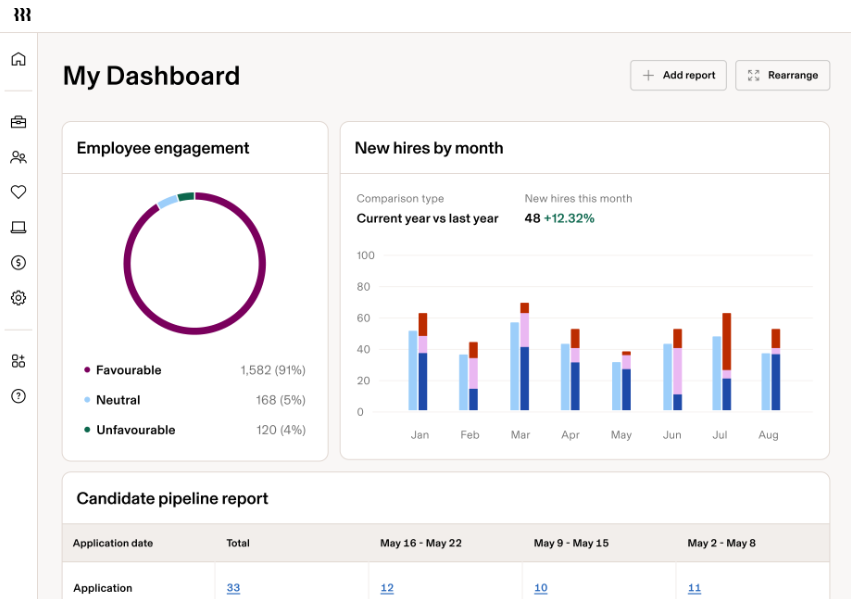
Generate detailed reports across departments using Rippling's reporting recipes (over 500 templates pre-built, with the option to customize them to your needs). If you want to start from scratch, joined reporting is available to bring together data from as many modules at once, helping you make informed decisions with all pieces of the puzzle infront of you at once.
Compliance 360
Ensure compliance with all employees automatically, covering everything from local laws, overtime violations, meal break violations, and minimum wage violations. Rippling also provides recommended actions to resolve the compliance issue.
Employee Self-Service
Allows employees to update personal info, making HR management more efficient. Unique in its ease and range of accessible data.
Org Charts & Employee Profiles
You can access employee profiles directly from the org chart and customize each profile with specific attributes. These attributes can then be used throughout the system to enforce policies and execute other automated workflows. The org chart is also dynamic, so any time you make a change within the company, it updates automatically.

Standout Features
Workflow Studio
An intuitive workflow builder that lets you automate virtually any process across departments. Think automations for pushing alerts, assigning training courses, making payments, creating calendar events, and more.
IT Management
Manage company devices remotely, ensuring security and compliance. Unique among HR platforms, Rippling offers this IT add-on module to let your team monitor and control access from anywhere.
Spend Management
An add-on module that lets you manage company-wide spending, like day-to-day and travel expenses. You can create automations for expense approvals and policy enforcement, make sure your bills are paid on time, and issue corporate cards for more controlled spending.
Global Payroll
Rippling supports international payroll processing, making its global reach a differentiator in the HR software market.
Rippling Recruiting
A full-service applicant tracking system (ATS) that lets you customize recruitment processes, access all recruitment analytics, schedule interviews (through calendar integrations), and manage the entire end-to-end recruitment pipeline. AI candidate summaries are also built into the system.
Learning Management System
Build personalized learning and development programs based on your organization's needs. Includes a custom course builder, the Rippling catalog, which includes key localized compliance courses, the ability to upload a SCORM file, or the option to purchase courses from their partner, Go1.

Ease of Use
Rippling impresses with its intuitive interface, making it user-friendly even for less tech-savvy teams. Users appreciate the straightforward navigation and clean design, which simplify complex tasks like payroll and benefits management. The platform’s ease of use is enhanced by its comprehensive onboarding guides and responsive support. Compared to other employee management software, Rippling stands out for its ability to integrate multiple HR functions seamlessly, reducing the learning curve and allowing your team to focus on strategic initiatives quickly.

Onboarding
Rippling offers a streamlined onboarding experience, ensuring new users quickly get up to speed. The platform provides detailed tutorials and guides, which help your team understand its functionalities efficiently. Users benefit from the automated setup, which reduces manual tasks and accelerates time to value. While some might need to take some time getting familiar with the platform, the available support and resources, including responsive customer service, assist in overcoming any initial challenges. Overall, this guidance makes Rippling a solid choice for smooth onboarding.

Customer Support
Rippling offers multiple support channels, including live chat, Zoom, help center tickets, and email. Their support is also known to be fast (averaging less than 30 seconds for response times). They offer dedicated account managers and tons of self-service resources to cover everything from initial implementation to ongoing questions.

Integrations
Rippling offers 650+ integration options, including Slack, Zoom, Microsoft Teams, Asana, Jira, Salesforce, Hubspot, PayPal, Google Workspace, 1Password, GitHub, and Datadog.

Value for Money
Rippling's pricing is modular, which makes it a great choice if you're only looking for a comprehensive HR suite or need to scale to manage IT and finance tasks centrally. This gives you strong value for money as you only pay for what you need at any stage of your business growth. That said, with its per-user pricing, costs can rise as you add headcount and more modules. They also have a per-month base fee to be aware of. For exact costs tailored to your needs, you'll need to request a free quote. Their modules are broken down by the following use cases, with individual products working alone or in tandem with each other, depending on what you need:
- HR: Adds advanced HR tools like performance management and employee engagement.
- Payroll: Lets you automate and run payroll within minutes. Also provides options for global payroll and contractor payments.
- IT: Offers device management, app provisioning, and single sign-on.
- Finance: Covers expense management, bill pay, and corporate cards.
- Global: Lets you pay and hire employees around the globe.

New Product Updates from Rippling

Rippling Expands Automated Compliance With AI Workflows
Rippling updates Automated Compliance with reusable compliance libraries, automated evidence collection, AI-assisted remediation, and built-in audit and trust tools. It currently supports frameworks including SOC 2, ISO 27001, and HIPAA, with additional frameworks planned for later release. Highlights include:
- Multi-Framework Support: Manage multiple compliance programs, including SOC 2, ISO 27001, and HIPAA.
- Reusable Libraries: Reuse policies, controls, evidence monitors, risks, and vendors across frameworks.
- Automated Evidence Collection: Collect evidence from connected Rippling and third-party systems.
- AI-Assisted Remediation: Identify missing evidence, outdated policies, and incomplete monitors and suggest remediation steps.
- Audit Portal: Manage auditor requests and supporting evidence in a dedicated workspace.
- Trust Centers: Publish approved compliance documentation for customers and prospects.
- AI Answer Banks: Use approved compliance context to help respond to security questionnaires.
Visit Rippling’s official site for more details.
 for more details.
Rippling Expands Preferred Carrier Program Integrations
Rippling adds Principal, Beam Benefits, and Sun Life to its Preferred Carrier Program, bringing the total to six participating carriers. The program supports deeper technology integration, operations coordination, service alignment, and product collaboration between Rippling and benefits carriers. Highlights include:
- Principal Integration: Adds Principal to Rippling’s Preferred Carrier Program for benefits administration.
- Beam Benefits Integration: Connects Beam Benefits through Rippling’s preferred carrier framework.
- Sun Life Integration: Adds Sun Life as a supported Preferred Carrier.
- Carrier Data Integration: Supports more connected benefits data flows between Rippling and participating carriers.
- Operations Coordination: Helps coordinate implementation, renewals, and service issues across Rippling and carriers.
Visit Rippling’s official site for more details.

Rippling AI Adds Plugins, Skills, and Automations
Rippling AI adds plugins for approved third-party MCP connections, skills for reusable natural-language instructions, and automations for scheduled or event-based AI workflows. Each capability follows Rippling permissions so employees only access the data and actions they’re allowed to use. Highlights include:
- Plugins: Connect Rippling AI to approved third-party systems and take permitted actions across business tools.
- Skills: Package repeatable instructions, rules, files, and approved actions into reusable AI workflows.
- Automations: Run AI prompts on schedules or triggers from Rippling, email, Slack, or third-party systems.
- Workforce-Aware Access: Apply role, team, reporting line, policies, and permissions automatically as employees change roles.
- Natural-Language Workflow Setup: Describe a process in plain language and let Rippling AI generate the steps, prompts, and triggers.
Visit Rippling’s official site for more details.

Rippling Introduces Agentic IT Helpdesk
Rippling launches Helpdesk to resolve routine IT requests using employee, policy, app, and device context. It can troubleshoot issues, take supported actions, route approvals, and escalate unresolved requests with context attached. Highlights include:
- Automated Ticket Resolution: Resolves routine requests such as app access, password resets, device lockouts, and replacements.
- Contextual Troubleshooting: Uses employee, device, policy, and app data to determine the next action.
- Approval Routing: Sends actions for approval when required by company policy.
- IT Actions: Supports actions across Rippling IT, including device replacement workflows.
- Contextual Escalation: Escalates unresolved requests with troubleshooting and employee context included.
- Activity Logs: Records requests, actions, resolutions, and escalations for visibility.
Visit Rippling’s official site for more details.
Rippling Adds AI-Powered Procurement Platform
Rippling adds Procurement with specialized AI agents for purchase intake, contract review, vendor security, purchasing, and renewals, alongside automated approvals and real-time spend visibility. The platform connects procurement with HR, IT, and finance data to help teams manage purchases, identify waste, and maintain control throughout the buying process. Highlights include:
- AI Procurement Agents: Automates purchase intake, contract review, vendor security checks, purchasing, and renewal management.
- Automated Approvals: Routes purchase requests based on criteria such as department, seniority, risk level, and vendor type.
- Spend Visibility: Connects cards, bills, expenses, and contracts with the employees and departments behind each purchase.
- Spend Controls: Flags duplicate vendors, invoice mismatches, upcoming renewals, and other potential unnecessary costs.
- Custom AI Agents: Lets teams build and customize agents around their own procurement processes.
Visit Rippling’s official site for more details.

Rippling Adds AI Spend Console for AI Cost Governance
Rippling adds AI Spend Console with team-level spend breakdowns, business metric comparisons, natural-language analysis, and controls for approved model access. The console helps organizations track AI usage by role, team, or department, evaluate whether spend is driving value, and manage access to approved LLMs. Highlights include:
- AI Spend Visibility: Breaks down AI costs by teams, roles, and departments to show what is driving spend.
- Business Outcome Analysis: Connects AI spend with metrics such as performance ratings and pull request volume.
- Permissioned Dashboards: Generates dashboards across connected data while respecting existing Rippling permissions.
- Natural-Language Analysis: Lets users ask follow-up questions and drill into AI usage and spend without SQL.
- Model Access Controls: Supports policies for approved LLM access and routing based on employee attributes.
Visit Rippling’s official site for more details.
Rippling Specs
- 2-Factor Authentication
- 360 Degree Feedback
- API
- Application Tracking
- Attendance Tracking
- Batch Permissions & Access
- Compliance Tracking
- Dashboard
- Data Export
- Data Import
- Data Visualization
- Employee Database
- Employee Engagement
- Employee Incentive Management
- Employee Onboarding
- Employee Training
- Expense Tracking
- External Integrations
- Feedback Management
- Multi-User
- Notifications
- Payroll
- Performance Appraisal
- Scheduling
- Time Management
- Timesheets
- Travel Management
- Vacation & Absence Calendar
Rippling FAQs
How does Rippling handle data security and compliance?
Can I customize Rippling for my business needs?
How does Rippling support remote work?
What kind of training does Rippling provide for new users?
How does Rippling improve HR efficiency?
Can Rippling scale with my growing business?
What support options are available if I encounter issues?
How does Rippling handle employee data privacy?
Rippling Company Overview & History
Rippling is headquartered in San Francisco, California, and employs a growing team dedicated to streamlining HR, IT, and finance operations. Known for its innovative work culture, Rippling has gained attention for integrating multiple business functions into a single platform. Notable clients include tech startups and mid-sized enterprises that benefit from its comprehensive automation capabilities.
Major Milestones
- 2016: Rippling was founded by Parker Conrad, aiming to transform HR management.
- 2018: Official product launch, introducing an integrated platform for HR, IT, and finance.
- 2020: Raised significant funding in a Series B round, boosting its market presence.
- 2021: Expanded its product offerings, enhancing automation and analytics capabilities.
- 2023: The company doubled its ARR to $350 million, maintaining a 100% year-over-year growth rate.
- 2025: Global reach expanded through Rippling EOR.
What's Next?
To remain up to date on all the latest in people management, subscribe to our newsletter for leaders and managers. You'll receive insights and offerings tailored to leaders and HR professionals straight to your inbox.