

Le 10 migliori alternative a Envoy per la gestione dei visitatori nel 2026

Elenco delle migliori alternative a Envoy


Le migliori alternative a Envoy offrono una gestione flessibile dei visitatori, una semplice prenotazione degli spazi e strumenti adatti alle esigenze specifiche del tuo ambiente di lavoro. Se stai cercando alternative a Envoy, probabilmente cerchi soluzioni che gestiscano check-in, prenotazioni delle sale e conformità, senza le limitazioni che hai riscontrato con Envoy. In questa guida troverai piattaforme per la gestione dell'ambiente di lavoro che ti aiutano a gestire visitatori, scrivanie e spazi per riunioni, così puoi supportare il tuo team e mantenere il tuo ufficio sempre operativo.
Che cos'è Envoy?
Envoy è una piattaforma per la gestione dell'ambiente di lavoro che aiuta le aziende a gestire il check-in dei visitatori, la prenotazione delle scrivanie e la prenotazione delle sale riunioni. È progettata per semplificare le operazioni della reception, migliorare la sicurezza e supportare gli ambienti di lavoro ibridi. Grazie a funzionalità come il check-in digitale, la stampa dei badge e gli strumenti per la conformità, Envoy offre un modo centralizzato per gestire chi entra nel tuo ambiente di lavoro e come vengono utilizzati i tuoi spazi.
Riepilogo delle migliori alternative a Envoy
Questa tabella comparativa riassume i dettagli dei prezzi delle mie migliori alternative a Envoy, per aiutarti a trovare quella più adatta al tuo budget e alle esigenze della tua azienda.
| Tool | Best For | Trial Info | Price | ||
|---|---|---|---|---|---|
| 1 | Ideale per la registrazione dei visitatori in inglese e francese | Piano gratuito + demo gratuita disponibile | Da $500/mese | Website | |
| 2 | Ideale per un avvio rapido e il supporto alla migrazione | Demo gratuita disponibile | Prezzi su richiesta | Website | |
| 3 | Ideale per la pianificazione del personale in chiave mobile-first | Prova gratuita di 7 giorni + demo gratuita disponibile | Da $1.79/utente/mese (fatturazione annuale) | Website | |
| 4 | Ideale per il monitoraggio dell'impronta di carbonio | Demo gratuita disponibile | Da $99/sede/mese | Website | |
| 5 | Ideale per l'integrazione dei display delle sale riunioni | Prova gratuita di 30 giorni disponibile | Prezzo su richiesta | Website | |
| 6 | Ideale per la coordinazione delle prenotazioni delle scrivanie tramite Slack | Prova gratuita + demo gratuita disponibile | A partire da $2.50/utente/mese (fatturazione annuale) | Website | |
| 7 | Ideale per le analisi sull'utilizzo degli spazi di lavoro | Demo gratuita disponibile | Prezzi su richiesta | Website | |
| 8 | Ideale per planimetrie interattive | Demo gratuita disponibile | Prezzi su richiesta | Website | |
| 9 | Ideale per la stampa personalizzata di badge per i visitatori | Prova gratuita di 15 giorni disponibile | Da $630/sede/anno | Website | |
| 10 | Ideale per gestire team distribuiti | Demo gratuita disponibile | A partire da $2.50/utente/mese | Website |

Perché fidarsi delle nostre recensioni sui software
Il nostro team testa e recensisce software dal 2012. In quanto esperti HR noi stessi, sappiamo quanto sia difficile — e importante — scegliere il software giusto.
Per questa guida, abbiamo valutato gli strumenti attraverso test pratici e ricerche indipendenti, assegnando un punteggio agli strumenti in base ai nostri criteri di selezione. Ci basiamo inoltre sulle competenze di leader di pensiero del settore e di professionisti HR attivi.
Le nostre recensioni riflettono il nostro giudizio editoriale umano, non un discorso di vendita.
Revisori esperti:
Recensioni delle alternative a Envoy
Di seguito trovi i miei riepiloghi dettagliati delle alternative a Envoy incluse nel mio elenco. Le mie recensioni offrono uno sguardo approfondito sulle funzionalità, sui migliori casi d’uso e sulle integrazioni di ogni piattaforma, per aiutarti a trovare quella più adatta a te.
elia
Ideale per la registrazione dei visitatori in inglese e francese

elia è una piattaforma di gestione operativa per ambienti di lavoro ibridi che integra la gestione dei visitatori, la prenotazione delle postazioni, la programmazione delle sale riunioni e il monitoraggio dell’occupazione in un unico sistema—così la reception, le risorse umane e i team delle strutture condividono un'unica fonte di verità.
Per chi è ideale elia?
elia è particolarmente adatta per organizzazioni di medie e grandi dimensioni che gestiscono spazi di lavoro ibridi dove i team delle strutture, delle risorse umane e dell’IT necessitano di visibilità condivisa sulle operazioni d’ufficio.
Perché elia è una valida alternativa a Envoy
Ho selezionato elia tra le opzioni migliori perché il suo chiosco supporta nativamente le lingue inglese e francese, consentendo così ai visitatori internazionali di registrarsi in autonomia senza necessità di assistenza alla reception per superare le barriere linguistiche. Apprezzo che il supporto multilingue sia integrato direttamente nel flusso di check-in, e non aggiunto successivamente come un ripensamento.
Funzionalità principali di elia
- Pre-registrazione: Invia agli ospiti un invito personalizzato in anticipo, così arrivano già con un codice QR pronto da scansionare, riducendo i tempi di attesa nell’atrio.
- Firma di NDA e documenti: Incorpora la presa visione di documenti o la firma di NDA direttamente nel flusso di check-in, prima che il visitatore acceda ai tuoi spazi.
- Stampa di badge per visitatori: Stampa automaticamente un badge al check-in, offrendo al personale di sicurezza una rapida identificazione visiva degli ospiti.
- Registro visite audit-ready: Accedi a un registro cronologico di tutte le presenze con esportazione CSV per controlli di conformità o verifiche di sicurezza.
Integrazioni di elia
elia offre integrazioni native con Microsoft 365, Google Workspace, Slack e strumenti specifici all’interno di questi ecosistemi, tra cui Google Calendar, Microsoft Teams e Microsoft Outlook.
Pros and Cons
Pros:
- Integra hardware nativo per il posto di lavoro
- Include il tracciamento per i primi soccorritori in caso d’emergenza
- Unisce moduli di gestione visitatori e prenotazione delle postazioni
Cons:
- Le statistiche sull’occupazione possono risultare imprecise
- Le opzioni di modifica profilo amministratore sono limitate
Ideale per un avvio rapido e il supporto alla migrazione
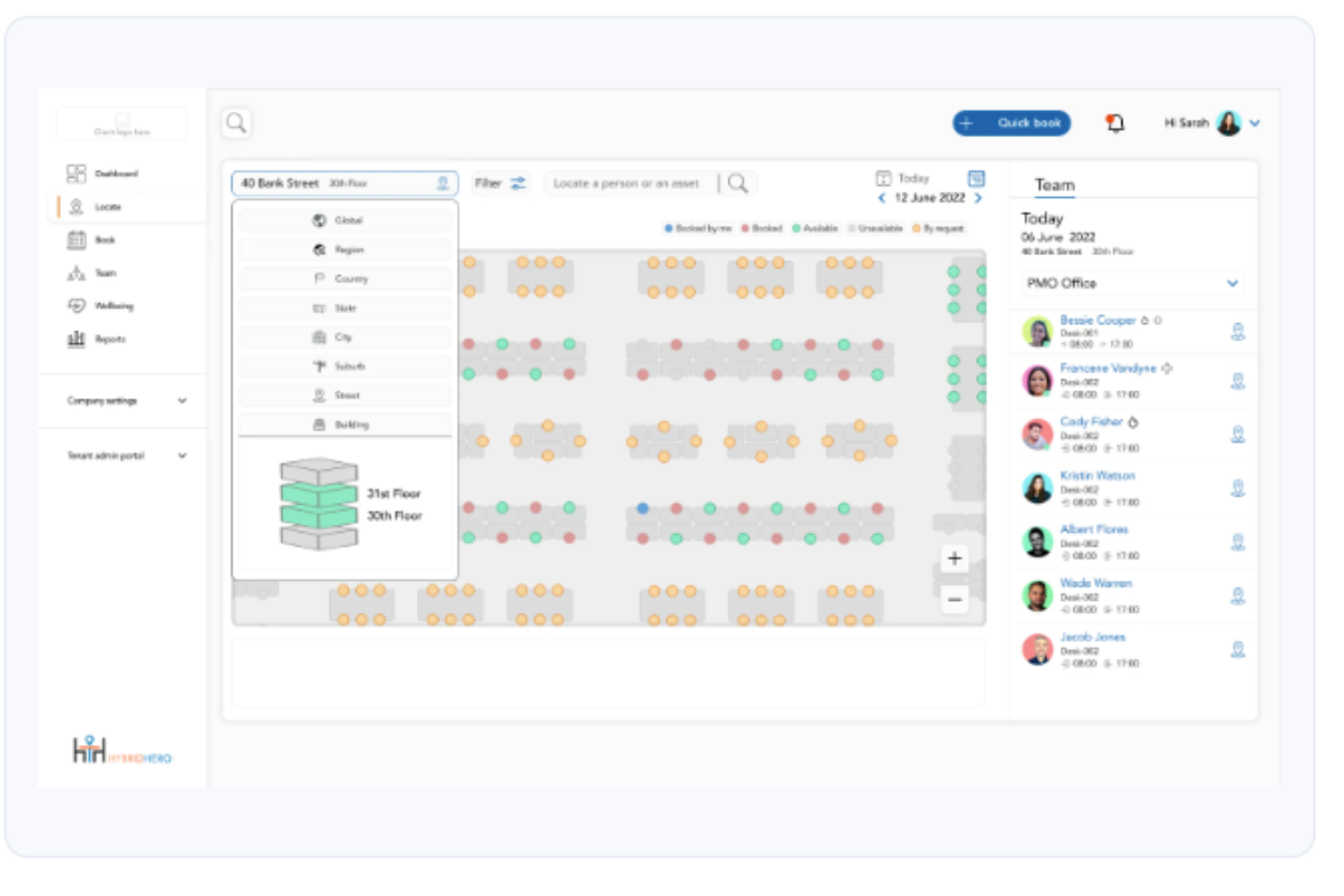
Hybrid Hero è una piattaforma per la gestione del luogo di lavoro che aiuta i team delle risorse umane e delle strutture a coordinare la prenotazione delle scrivanie, la prenotazione delle sale, la registrazione dei visitatori e la pianificazione del lavoro ibrido in una o più sedi.
Per chi è più adatto Hybrid Hero?
Hybrid Hero è adatto alle organizzazioni del mercato medio e alle aziende che gestiscono sedi distribuite, in particolare quelle operanti in settori regolamentati come finanza, energia o edilizia.
Perché Hybrid Hero è una valida alternativa a Envoy
Ho incluso Hybrid Hero tra le mie scelte migliori perché il suo Programma di transizione è uno dei percorsi di migrazione più strutturati che abbia visto in questo settore. Include una chiamata di valutazione di 15 minuti, un piano di migrazione di una pagina e una tempistica di migrazione garantita di 30 giorni. Questo tipo di passaggio strutturato consente ai team che abbandonano Envoy di superare rapidamente gli ostacoli dell'implementazione e di iniziare effettivamente a prenotare le scrivanie e a registrare i visitatori già dal primo giorno.
Funzionalità principali di Hybrid Hero
- Creazione interattiva delle planimetrie: Mappa rapidamente gli spazi di lavoro e gestisci le scrivanie assegnate e non assegnate per qualsiasi configurazione dell'ufficio.
- Prenotazione con linguaggio naturale basata sull'intelligenza artificiale: Prenota scrivanie o sale utilizzando semplici richieste in linguaggio naturale direttamente nell'app.
- Ricerca basata sui servizi: Filtra gli spazi di lavoro in base a caratteristiche come doppi monitor, scrivanie in piedi o zone silenziose prima di effettuare una prenotazione.
- Registrazione e rilascio automatici delle scrivanie: I codici QR consentono una rapida registrazione in sede e liberano automaticamente le scrivanie non utilizzate.
Integrazioni di Hybrid Hero
Hybrid Hero offre integrazioni native con Microsoft 365, Google Workspace, Slack, Azure Active Directory, Okta e SAML SSO. È disponibile un'API per le integrazioni personalizzate.
Pros and Cons
Pros:
- Il Programma di transizione strutturato semplifica la migrazione da Envoy
- La prenotazione con linguaggio naturale basata sull'AI accelera le prenotazioni
- Il filtraggio basato sui servizi restringe rapidamente la ricerca delle scrivanie
Cons:
- Le funzionalità di gestione dei visitatori sono meno avanzate rispetto alla prenotazione delle scrivanie
- La scarsità di recensioni pubbliche degli utenti rende più difficile la valutazione

Ideale per la pianificazione del personale in chiave mobile-first

WorkInSync è una piattaforma di gestione del luogo di lavoro progettata per team che danno priorità alla pianificazione flessibile e all'accesso da mobile. È una soluzione ideale per le organizzazioni che desiderano coordinare il lavoro ibrido, gestire la prenotazione delle postazioni e migliorare i tragitti dei dipendenti da un'unica app.
Per chi è più indicato WorkInSync?
Team HR e responsabili delle strutture in organizzazioni ibride o distribuite che necessitano di strumenti mobile-first per la pianificazione del personale e il coordinamento degli spazi di lavoro.
Perché WorkInSync è una valida alternativa a Envoy
Ho scelto WorkInSync perché la sua app mobile mette il controllo delle prenotazioni direttamente nelle mani dei dipendenti. Dall'app, i dipendenti possono verificare la disponibilità delle postazioni in tempo reale, prenotare uno spazio di lavoro e confermare la loro presenza in ufficio ancora prima di uscire di casa. Apprezzo la funzione delle aree di team, che consente ai manager di raggruppare i membri nello stesso settore del piano, così quando le persone vengono in ufficio si siedono vicino ai colleghi con cui devono collaborare. In pratica, significa che il mio team non prenota semplicemente una postazione a caso—si coordinano per esserci con un obiettivo preciso, cosa che il modello visitor-first di Envoy non valorizza allo stesso modo.
Funzionalità principali di WorkInSync
- Prenotazione del parcheggio: I dipendenti riservano i posti auto tramite mobile o web prima di arrivare; gli amministratori possono impostare regole per le zone, destinare spazi a specifici tipi di veicoli e monitorare l'occupazione in tempo reale.
- Gestione dei visitatori: Gli host invitano gli ospiti tramite l'app, i visitatori ricevono un codice QR per l'ingresso senza contatto e gli admin hanno una panoramica live di tutti i visitatori previsti e già registrati per la giornata.
- Dashboard analitica del luogo di lavoro: Gli admin accedono a report in tempo reale sull'utilizzo di postazioni, sale riunioni e parcheggi per monitorare le presenze e prendere decisioni strategiche sulla gestione degli spazi.
- Modulo per la gestione dei pasti: I dipendenti registrano in anticipo le loro ordinazioni per la mensa, fornendo al team delle strutture visibilità immediata sulla domanda e sui dati di consumo per ridurre gli sprechi alimentari.
Integrazioni di WorkInSync
WorkInSync offre integrazioni native con Microsoft Teams, Google Workspace, Slack, Okta e Active Directory, oltre a un'API per integrazioni personalizzate.
Pros and Cons
Pros:
- L'app mobile supporta tutte le funzionalità di pianificazione
- Prenotazione di postazione e parcheggio su un'unica piattaforma
- Occupazione ufficio e analisi in tempo reale
Cons:
- Personalizzazione limitata dei flussi di lavoro per i visitatori
- Nessuna opzione di hardware per chioschi fornita
YAROOMS
Ideale per il monitoraggio dell'impronta di carbonio
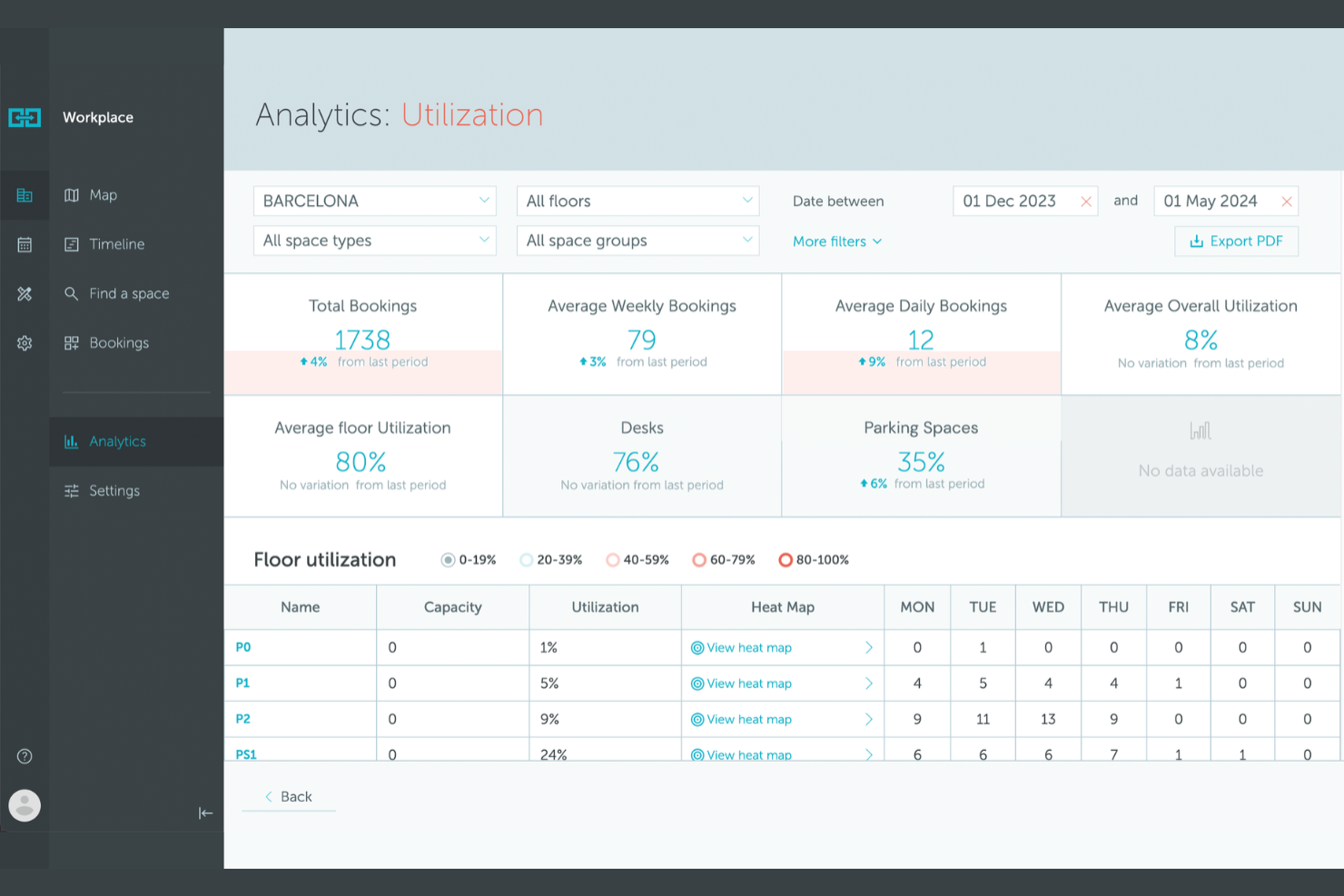
YAROOMS è una piattaforma di gestione degli spazi di lavoro progettata per le organizzazioni che desiderano coordinare le prenotazioni delle sale, le riserve delle scrivanie e le politiche di lavoro ibrido. È adatta per le aziende che vogliono centralizzare la pianificazione e ottimizzare l'utilizzo degli spazi in più sedi.
Per chi è ideale YAROOMS?
Responsabili delle strutture e referenti per la sostenibilità in organizzazioni di medie e grandi dimensioni che intendono monitorare e ridurre l'impronta di carbonio del loro ambiente di lavoro.
Perché YAROOMS è una buona alternativa a Envoy
Il monitoraggio dell'impronta di carbonio è ciò che distingue YAROOMS dalla maggior parte delle alternative a Envoy, ed è il principale motivo per cui lo consiglierei alle organizzazioni orientate alla sostenibilità. YAROOMS controlla le emissioni di CO2 di Scope 2 e Scope 3 derivanti dall'uso delle attrezzature d'ufficio, dagli spostamenti dei dipendenti e dal lavoro da remoto, fornendo ai responsabili delle strutture dati reali su cui agire. Apprezzo anche il fatto che questo sia integrato con la prenotazione di scrivanie e sale, la pianificazione del lavoro ibrido e la gestione dei visitatori in un'unica piattaforma. Per i team che hanno bisogno di riportare l'impatto ambientale oltre che gestire lo spazio ogni giorno, questa combinazione è difficile da trovare altrove.
Funzionalità principali di YAROOMS
- Mappe interattive degli spazi: Consulta la disponibilità in tempo reale di scrivanie e sale su planimetrie visive con funzione di orientamento integrata per trovare colleghi e muoverti in ufficio.
- Pianificazione del lavoro ibrido: Imposta lo stato di lavoro, coordina le presenze in ufficio tra i team e vedi chi sarà presente in un determinato giorno.
- Sistema di gestione dei visitatori: Pre-registrazione ospiti, invio di notifiche automatiche all'arrivo e gestione dell'intero processo di accoglienza.
- Assistente AI Yarvis: Prenota spazi, trova colleghi e gestisci gli orari tramite comandi in linguaggio naturale direttamente in Microsoft Teams o via email.
Integrazioni YAROOMS
YAROOMS offre integrazioni native con Microsoft 365, Google Workspace, Okta e Azure Active Directory, e fornisce una API per integrazioni personalizzate.
Pros and Cons
Pros:
- Traccia i dati sulle emissioni Scope 2 e Scope 3
- Offre mappe interattive per la prenotazione
- Gestione visitatori con pre-registrazione
Cons:
- Mancano integrazioni avanzate per il controllo accessi
- Nessuna richiesta di catering o servizi integrata

Joan
Ideale per l'integrazione dei display delle sale riunioni
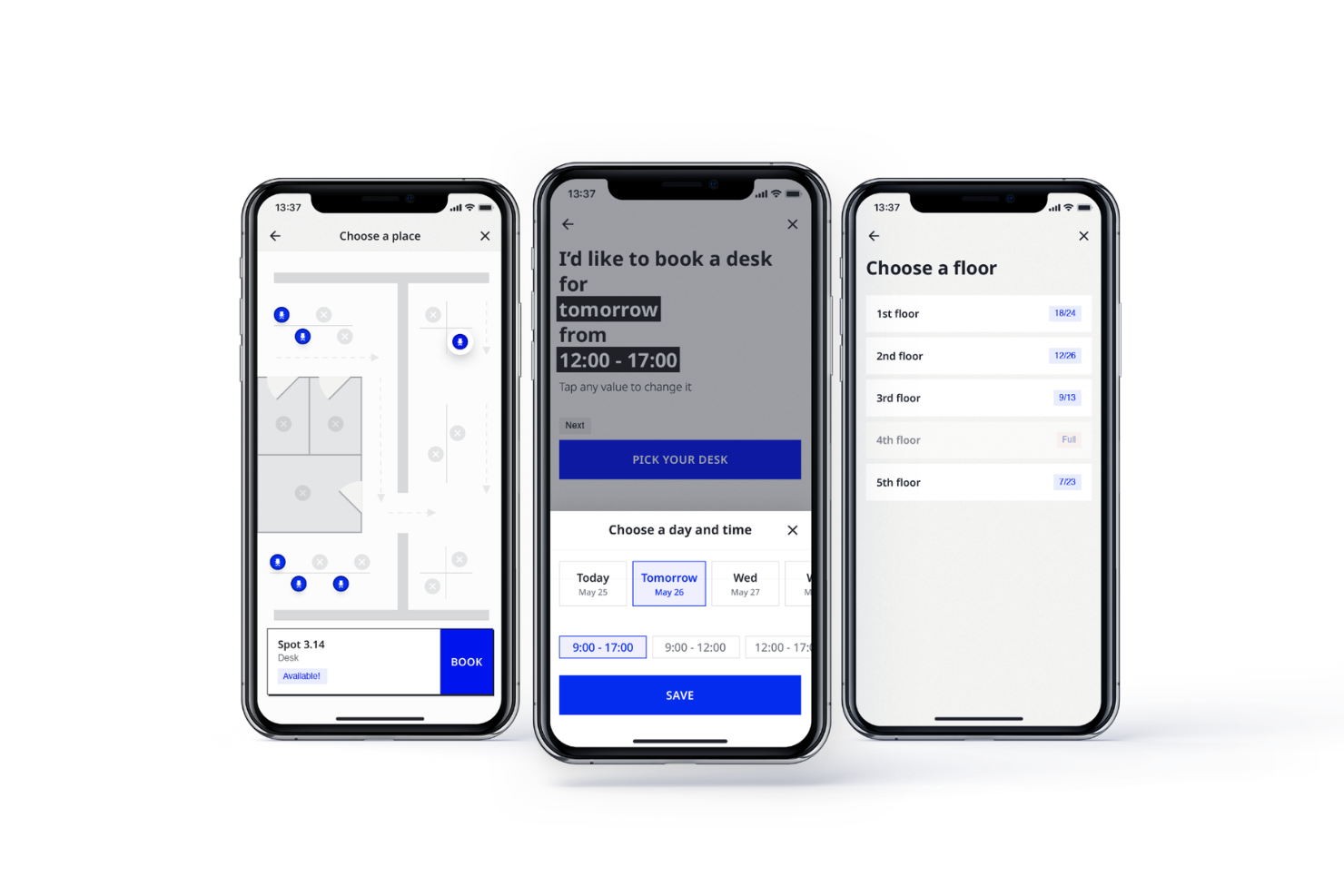
Joan è una piattaforma di gestione degli ambienti di lavoro progettata per le organizzazioni che devono coordinare la prenotazione delle sale riunioni e visualizzare in tempo reale la disponibilità delle stanze. È particolarmente adatta per responsabili d'ufficio e team IT che desiderano ridurre i conflitti di programmazione e ottimizzare l'utilizzo degli spazi condivisi.
A chi è più adatto Joan?
Responsabili d'ufficio e team IT in organizzazioni di medie e grandi dimensioni che necessitano di soluzioni dedicate per la visualizzazione delle sale riunioni.
Perché Joan è una valida alternativa a Envoy
L'integrazione dei display delle sale riunioni è dove, secondo me, Joan si distingue davvero. I pianificatori ePaper proprietari di Joan si montano senza cavi direttamente all'esterno delle sale riunioni e si sincronizzano in tempo reale con Google Calendar, Outlook e Microsoft Teams, così lo stato delle stanze è sempre accurato a colpo d'occhio. Apprezzo anche la funzione di prevenzione delle riunioni fantasma, che libera automaticamente le sale quando nessuno fa il check-in, riducendo lo spreco di spazio. Per i team che gestiscono più sale, le impostazioni per dispositivo permettono di configurare ogni display in modo indipendente, utile soprattutto quando occorre gestire stanze con regole di prenotazione o capienze differenti.
Funzionalità principali di Joan
- Prenotazione delle postazioni con vista planimetria: Carica la planimetria dell'ufficio e consenti ai dipendenti di esplorare e prenotare le postazioni visivamente, filtrando per servizi come scrivanie regolabili o monitor.
- Analisi dell'ambiente lavorativo: Traccia occupazione delle sale, utilizzo delle postazioni, frequenza delle prenotazioni e orari di punta da un'unica dashboard amministrativa.
- Regole di prenotazione per dipartimento: Assegna postazioni a specifici dipartimenti e imposta limiti di occupazione affinché solo le persone designate possano prenotare certi spazi.
- Monitoraggio qualità dell'aria interna: Traccia temperatura e umidità in tutto l'ufficio direttamente dalla piattaforma Joan.
Integrazioni di Joan
Joan offre integrazioni native con Google Workspace, Microsoft 365, Microsoft Teams, Slack, Zoom e Cisco Webex, e mette a disposizione un'API per integrazioni personalizzate.
Pros and Cons
Pros:
- I display ePaper wireless non richiedono cavi di alimentazione
- La prevenzione delle riunioni fantasma libera automaticamente le sale
- Offre sensori per il monitoraggio della qualità dell'aria interna
Cons:
- Nessuna gestione visitatori o funzionalità di check-in
- Acquisto hardware necessario per la piena funzionalità

Officely
Ideale per la coordinazione delle prenotazioni delle scrivanie tramite Slack
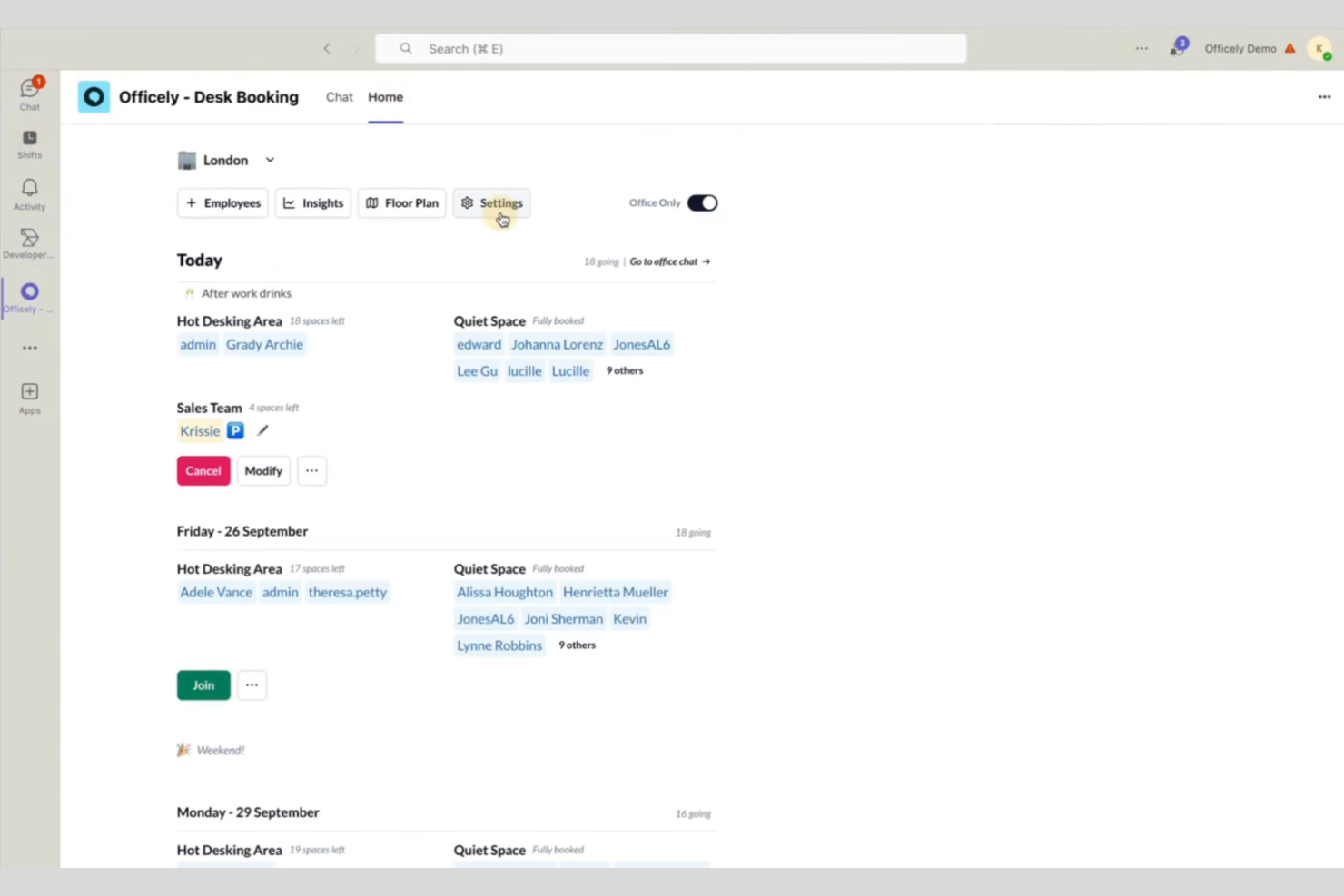
Officely è uno strumento tutto-in-uno per la prenotazione delle scrivanie e la coordinazione dell'ufficio, integrato direttamente in Slack, che rende semplice per i team ibridi gestire le prenotazioni degli spazi di lavoro. È una soluzione ideale per le aziende che desiderano coordinare la presenza in ufficio senza componenti aggiuntivi.
Per chi è Officely?
Team basati su Slack che lavorano in modalità ibrida o flessibile e necessitano di un coordinamento semplice per la prenotazione di scrivanie e uffici.
Perché Officely è una valida alternativa a Envoy
Ho scelto Officely perché gestisce la prenotazione delle scrivanie interamente all'interno di Slack, il che significa che il mio team non deve aprire un'app separata per riservare uno spazio di lavoro. La funzione di 'quartiere' permette ai team di raggruppare le scrivanie per reparto, così tutti possono vedere dove siedono i colleghi e prenotare postazioni vicine. Mi piace anche la visibilità della presenza in ufficio, che mostra direttamente in Slack chi prevede di essere presente in una determinata giornata, facilitando la collaborazione in presenza senza ulteriori scambi di messaggi.
Funzionalità principali di Officely
- Monitoraggio della conformità alle policy ibride: Confronta la presenza reale in ufficio con la tua policy di lavoro ibrido e identifica automaticamente dove ci sono discrepanze.
- Prenotazione sale riunioni: Prenota sale riunioni direttamente in Slack o Microsoft Teams, con disponibilità in tempo reale per evitare doppie prenotazioni.
- Prenotazione di parcheggi e risorse: Consenti ai dipendenti di prenotare parcheggi, pranzi e altre risorse dell'ufficio insieme alla loro scrivania.
- Messaggio giornaliero dell'ufficio: Invia automaticamente un messaggio a un canale Slack o Microsoft Teams per mostrare chi sarà in ufficio ogni giorno.
Integrazioni di Officely
Officely offre integrazioni native con Google Calendar, Microsoft Outlook e Slack, e mette a disposizione un'API per integrazioni personalizzate.
Pros and Cons
Pros:
- Completamente integrato con Slack e Microsoft Teams
- Prenotazione scrivanie e gestione presenze in un'unica piattaforma
- Notifiche automatiche quotidiane sulla presenza in ufficio
Cons:
- Opzioni limitate per analisi e reportistica
- La prenotazione delle sale riunioni è disponibile solo nei piani a pagamento

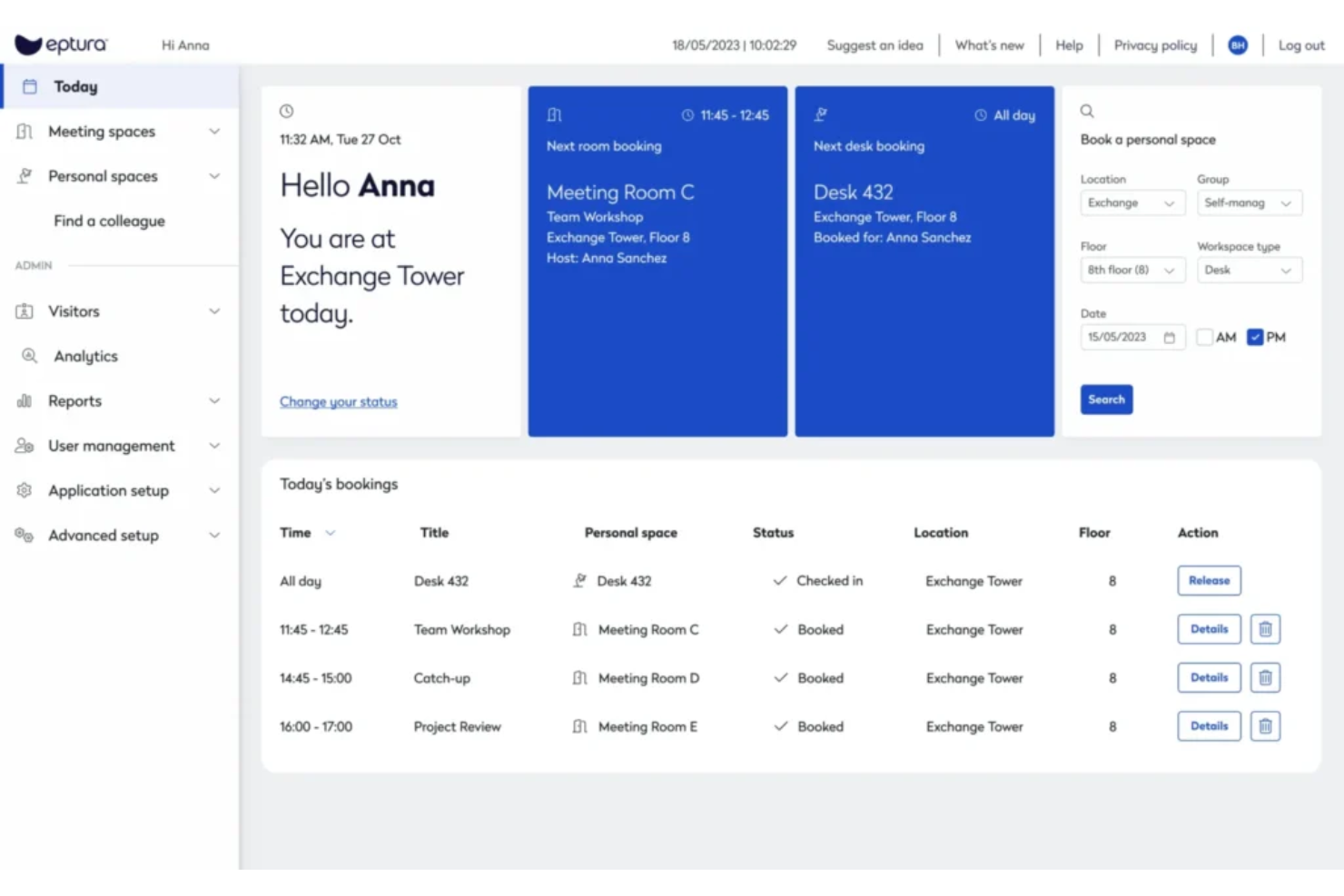
Eptura è una piattaforma di gestione degli spazi di lavoro progettata per le organizzazioni che vogliono ottimizzare spazi, risorse ed esperienza degli utenti. I facility manager e i team responsabili degli spazi la utilizzano per coordinare la prenotazione delle scrivanie, gestire i visitatori e ottenere approfondimenti utili sull'utilizzo degli uffici.
A chi è più indicato Eptura?
Facility manager e responsabili degli spazi di lavoro in grandi organizzazioni che necessitano di analisi avanzate per ottimizzare l'utilizzo degli uffici e delle risorse.
Perché Eptura è una valida alternativa a Envoy
Ciò che mi colpisce di Eptura per quanto riguarda l'analisi degli spazi di lavoro è il modo in cui combina i dati dei sensori con quelli delle prenotazioni per offrire una visione completa di come vengono effettivamente utilizzati gli spazi. La funzione di monitoraggio dell'utilizzo tiene traccia dei picchi e delle tendenze di frequenza in tutta la piantina, così puoi vedere non solo quali scrivanie sono prenotate, ma anche quali vengono effettivamente utilizzate dai dipendenti. Utilizzo anche la dashboard per la pianificazione immobiliare per monitorare i costi e le scadenze dei contratti insieme ai dati di occupazione, il che aiuta a giustificare le decisioni sugli spazi davanti alla leadership con dati concreti. In pratica, questo significa che il mio team può presentarsi a una revisione del portafoglio con evidenze di utilizzo effettivo invece che solo con delle stime.
Caratteristiche principali di Eptura
- Pianificazione delle sale riunioni: Prenota e gestisci le sale riunioni in tutto l'ufficio, con visibilità su disponibilità e capienza.
- Gestione dei trasferimenti: Pianifica ed esegui i trasferimenti dei dipendenti dall'assegnazione delle postazioni agli spostamenti di reparto.
- Wayfinding: Aiuta dipendenti e visitatori a orientarsi in ufficio utilizzando mappe interattive e strumenti di orientamento.
- Aree di team e collaborazione: Definisci e gestisci zone di team o spazi condivisi per supportare il lavoro di gruppo e la flessibilità delle postazioni.
Integrazioni di Eptura
Le integrazioni native includono Slack, Jira, Power BI, Dropbox, Google Drive e Zoom. È disponibile un'API per integrazioni personalizzate.
Pros and Cons
Pros:
- Aggiornamenti in tempo reale sulla disponibilità di scrivanie e sale
- Gestione dei visitatori con opzioni di pre-registrazione
- Workflow personalizzabili per i servizi di riunione
Cons:
- Occasionali problemi di sincronizzazione con le integrazioni di calendario
- Meno integrazioni native

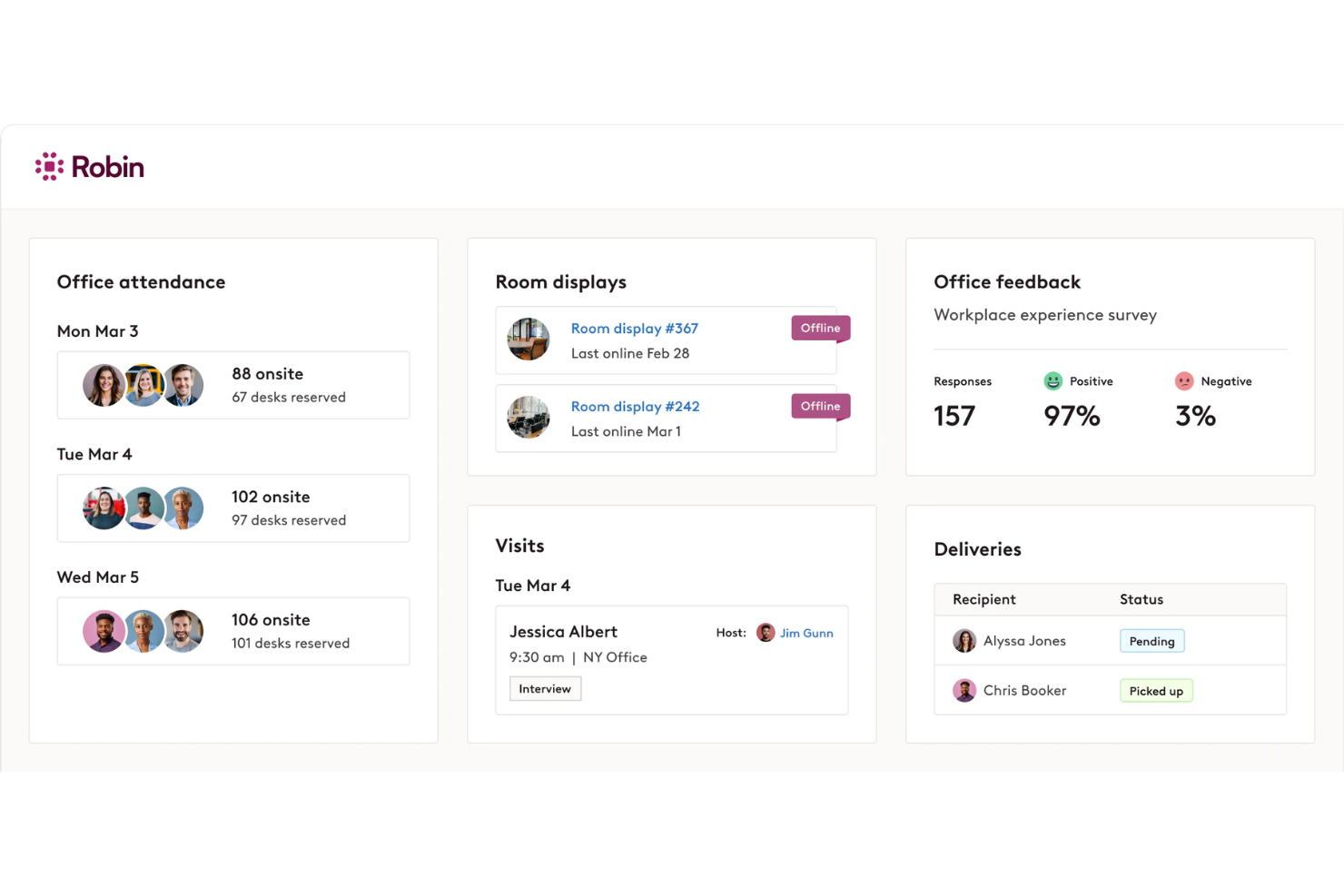
Robin è una piattaforma di gestione degli spazi di lavoro progettata per i team che desiderano semplificare la prenotazione delle scrivanie, la programmazione delle sale riunioni e il coordinamento dell'ufficio. Se hai bisogno di un modo flessibile per gestire spazi di lavoro ibridi e mantenere l'ufficio organizzato, Robin ti offre gli strumenti per farlo.
A chi è più adatto Robin?
Responsabili d'ufficio e team operativi di aziende di medie e grandi dimensioni che devono coordinare spazi flessibili e visualizzare le planimetrie aziendali.
Perché Robin è una valida alternativa a Envoy
Le planimetrie interattive sono ciò che distingue Robin secondo me. L'editor di mappe consente agli amministratori di disegnare, aggiornare e pubblicare le planimetrie dell'ufficio man mano che l'ambiente di lavoro evolve, e i dipendenti possono cliccare direttamente sulla planimetria per vedere quali scrivanie sono disponibili e prenotarne una in tempo reale. Trovo la funzione di orientamento particolarmente utile per gli uffici più grandi: dipendenti e visitatori possono raggiungere una scrivania, una sala o un punto d'interesse specifico senza dover chiedere indicazioni a nessuno. In pratica, significa che i nuovi assunti e i colleghi in visita possono orientarsi fin dal primo giorno senza bisogno di assistenza, cosa che il modello di Envoy orientato principalmente ai visitatori non affronta in modo così approfondito.
Funzionalità principali di Robin
- Gestione dei visitatori: Pre-registrazione degli ospiti, gestione dei check-in e accesso ai log delle visite da un'unica dashboard.
- Politiche per il lavoro in presenza: Imposta e comunica politiche di lavoro ibrido e consenti ai dipendenti di monitorare la propria presenza in ufficio.
- Servizi per le riunioni: Crea flussi di lavoro personalizzabili per richieste di catering, allestimento delle sale e supporto AV collegato alle prenotazioni delle sale riunioni.
- Analisi degli spazi di lavoro: Genera report personalizzati per tracciare l'utilizzo degli spazi e monitorare le tendenze di occupazione nel tuo ufficio.
Integrazioni di Robin
Robin offre integrazioni native con Google Workspace, Microsoft 365, Slack, Zoom, Okta e Azure Active Directory. È disponibile un'API per integrazioni personalizzate.
Pros and Cons
Pros:
- Planimetrie interattive per prenotazioni visive
- Aggiornamenti in tempo reale sulla disponibilità di scrivanie e sale
- Supporto flessibile per politiche di lavoro ibrido
Cons:
- I prezzi non sono elencati in modo trasparente online
- Nessun hardware integrato per chioschi di check-in

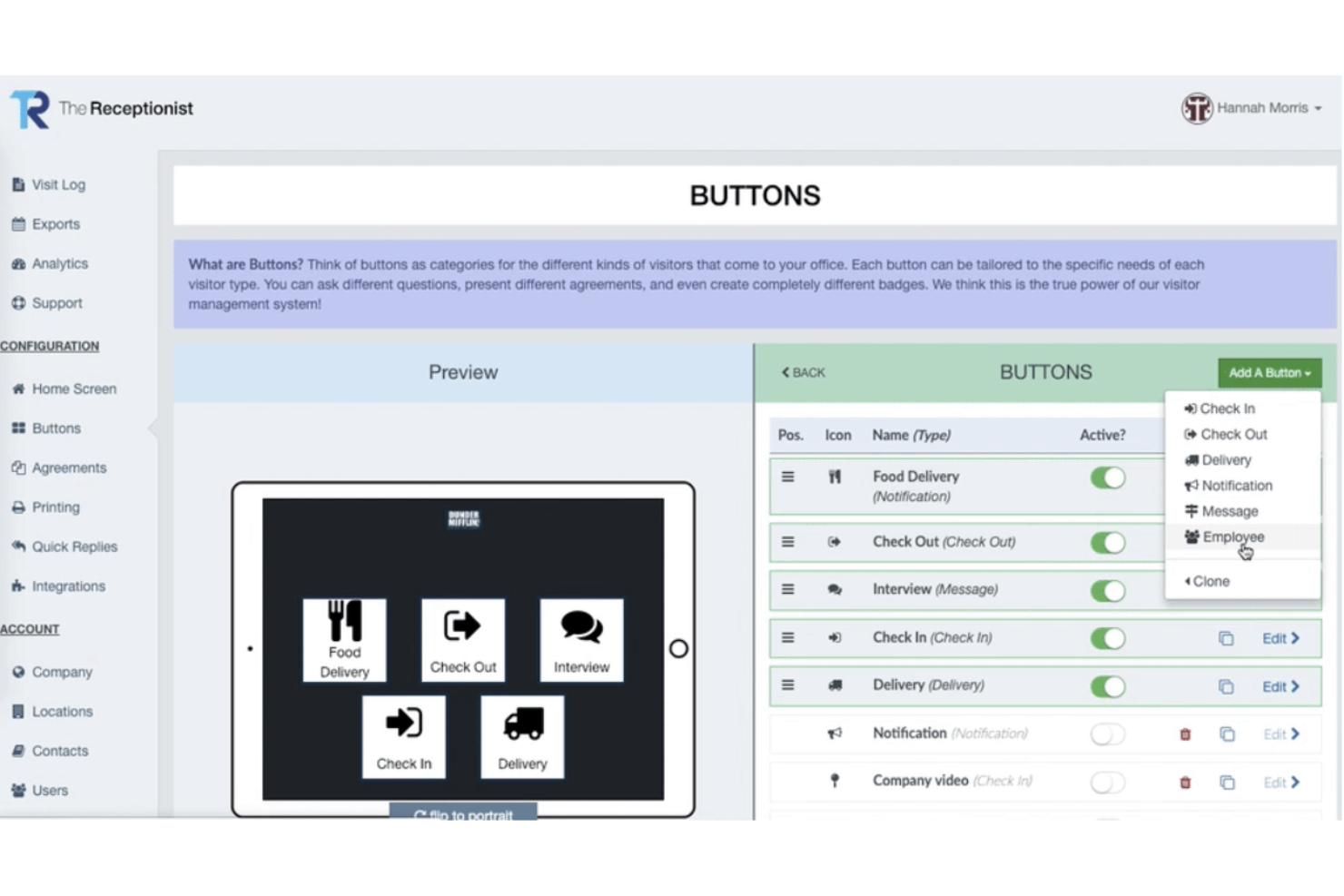
The Receptionist è un sistema di gestione dei visitatori pensato per uffici, spazi di coworking e cliniche che desiderano automatizzare l'accoglienza degli ospiti e le notifiche. È una scelta valida per i team che vogliono migliorare le operazioni di reception e la tracciabilità dei visitatori.
A chi è più adatto The Receptionist?
I team di accoglienza e gli office manager di servizi professionali, strutture sanitarie e spazi di coworking che hanno bisogno di un check-in ospiti sicuro, personalizzato e della stampa di badge.
Perché The Receptionist è una valida alternativa a Envoy
La stampa dei badge è spesso una funzione secondaria per molti strumenti di gestione ospiti—con The Receptionist non è così. Apprezzo che il designer di badge permetta di controllare in dettaglio cosa viene stampato: foto del visitatore, nome dell'host, scopo della visita, orario di scadenza e logo personalizzato, tutto configurabile per tipologia di visitatore. Questo livello di controllo è importante laddove un badge per i fornitori debba essere diverso, anche visivamente, rispetto a quello di un cliente. Inoltre, posso utilizzare il flusso di check-in basato su pulsanti per indirizzare ogni tipologia di visitatore su percorsi diversi, così il badge emesso rispecchia sempre il contesto della visita.
Funzionalità principali di The Receptionist
- Flussi di check-in personalizzati: Crea procedure di accoglienza dedicate per ogni tipologia di ospite, come corrieri, clienti o fornitori, raccogliendo dati specifici per ciascuno.
- Check-in tramite QR code e contactless: Permetti ai visitatori di registrarsi senza toccare l’iPad, semplicemente scansionando un QR code dal proprio telefono.
- Lista emergenze ed evacuazione: Visualizza in tempo reale chi è presente in sede per garantire evacuazioni rapide e sicure.
- Notifiche di pre-registrazione visitatori: Avvisa automaticamente il referente quando un ospite atteso effettua il check-in, via email, SMS, Slack o Microsoft Teams.
Integrazioni di The Receptionist
The Receptionist offre integrazioni native con Slack, Microsoft Teams, Google Workspace e Active Directory, oltre a un'API per personalizzazioni.
Pros and Cons
Pros:
- Badge personalizzabili con logo e foto
- Notifiche istantanee all’host tramite Slack o Teams
- Flussi di check-in multipli per tipologie di ospite
Cons:
- Manca l'integrazione nativa con Salesforce
- Richiede hardware iPad per il check-in


Gable è una piattaforma di gestione degli spazi di lavoro progettata per aziende con team distribuiti o ibridi che hanno bisogno di coordinare l'accesso agli uffici e spazi di lavoro flessibili. Aiuta i responsabili HR e delle operazioni a centralizzare le prenotazioni degli spazi, gestire i budget e supportare la collaborazione dei dipendenti in diverse sedi.
A Chi Si Rivolge Gable?
Team HR e operativi di aziende distribuite o ibride che gestiscono l'accesso agli spazi di lavoro e i budget in più sedi.
Perché Gable è una Buona Alternativa a Envoy
Gable adotta un approccio diverso rispetto alla maggior parte degli strumenti per l'ambiente di lavoro in questa lista: è costruito specificamente per i team che non lavorano tutti dallo stesso ufficio. La rete di spazi di lavoro su richiesta è ciò che lo distingue per i team distribuiti: i dipendenti possono prenotare desk temporanei, uffici privati o sale riunioni in oltre 20.000 spazi di coworking in più di 900 città in tutto il mondo, cosa che Envoy semplicemente non offre. Trovo inoltre le funzioni di geo-fencing e controllo dei budget davvero utili per mantenere le prenotazioni distribuite conformi alle policy: gli amministratori possono limitare la spesa per dipartimento o restringere le città dove i dipendenti possono prenotare. In pratica, questo significa che un'azienda remote-first può offrire ai dipendenti vere opzioni di lavoro in presenza senza sottoscrivere nuovi contratti di affitto.
Funzionalità Principali di Gable
- Gestione visitatori: accogli gli ospiti con check-in autonomo tramite iPad kiosk o codice QR, stampa badge, firma NDA e notifiche di arrivo.
- Organizzazione eventi: crea, promuovi e monitora eventi in sede o fuori sede, inclusa la prenotazione della location, il tracciamento RSVPs e la raccolta di feedback dai partecipanti.
- Analisi dell'utilizzo degli uffici: accedi ai dati su prenotazioni, spazi e presenze per supportare decisioni immobiliari e la pianificazione di politiche ibride.
- Geo-fencing e controllo permessi: imposta restrizioni di prenotazione e flussi di approvazione basati sulla posizione per gestire dove e come i dipendenti possono prenotare uno spazio di lavoro.
Integrazioni di Gable
Gable offre integrazioni native con Slack, Google Workspace e Okta, e mette a disposizione un'API per integrazioni personalizzate.
Pros and Cons
Pros:
- Permette di gestire le prenotazioni degli spazi di lavoro distribuiti
- Offre controlli di budget per la spesa degli spazi di lavoro
- Centralizza l'analisi dell'utilizzo degli spazi di lavoro
Cons:
- Manca la prenotazione delle sale riunioni per gli uffici privati
- Il pannello di analisi è basico e poco approfondito
Altre alternative a Envoy
Ecco alcune alternative aggiuntive a Envoy che non sono state incluse nel mio elenco, ma che vale comunque la pena prendere in considerazione:
- OfficeSpace
Ideale per la gestione personalizzabile degli spazi
- Visitly
Ideale per la gestione dei visitatori su più sedi
- Sign In Solutions
Ideale per lo screening dei visitatori guidato dalla conformità
- SwipedOn
Ideale per il check-in dei visitatori tramite QR code
- Archie
Ideale per l'automazione degli spazi di coworking


Come valuto le alternative a Envoy
Divido ogni valutazione in due livelli: le funzionalità di base, come la registrazione dei visitatori e la prenotazione delle scrivanie, che uno strumento deve necessariamente offrire, e gli elementi distintivi che differenziano una piattaforma dall'altra.
Funzionalità fondamentali (requisiti essenziali per questo elenco)
Quando seleziono gli strumenti da includere nel mio elenco, assegno a ciascuno un punteggio su una scala da 0 (non offre la funzionalità) a 5 (eccelle in quest'area) per ogni funzionalità fondamentale elencata di seguito. Poi calcolo il punteggio totale dello strumento come percentuale. Ogni strumento deve raggiungere un punteggio totale minimo del 65% per essere preso in considerazione.
- Gestione dei visitatori: valuto se uno strumento gestisce l'intero ciclo di vita dei visitatori — preregistrazione, registrazione all'arrivo, avvisi ai responsabili e stampa dei badge — in sedi singole e multiple.
- Registrazione e pianificazione dei dipendenti: i team che adottano modelli ibridi devono consentire ai dipendenti di indicare quando saranno in sede, quindi cerco funzionalità di coordinamento degli orari e monitoraggio delle presenze.
- Prenotazione di scrivanie e sale: verifico come ogni strumento gestisce le prenotazioni degli spazi di lavoro, tramite mappe interattive, integrazioni con i calendari o una semplice prenotazione basata su elenchi.
- Conformità in materia di salute e sicurezza: considero questionari di screening, raccolta degli NDA, controlli delle liste di controllo e scansione dei documenti d'identità, soprattutto per i team che operano in settori regolamentati.
- Analisi del luogo di lavoro: i buoni strumenti per il luogo di lavoro mostrano nei dashboard le tendenze relative all'occupazione e i dati sulle prenotazioni, quindi valuto quali dati comunica ogni piattaforma e quanto siano accessibili queste informazioni.
- Integrazioni con HR e con il luogo di lavoro: valuto come ogni strumento si collega ai sistemi già utilizzati dai team HR, dalle piattaforme HRIS e dai provider SSO a Slack, Teams e all'hardware per il controllo degli accessi.
Una volta ottenuto un elenco di strumenti che soddisfano questi criteri, considero ciò che distingue ogni piattaforma.
Fattori distintivi (ciò che differenzia i fornitori)
Ecco come confronto i diversi fornitori:
Caratteristiche di spicco
Le planimetrie interattive fanno davvero la differenza: i dipendenti possono vedere chi si trova in ufficio e dove sono disponibili le scrivanie prima di prenotare, riducendo così la confusione negli ambienti di lavoro ibridi. Valuto anche gli strumenti per l'evacuazione d'emergenza, poiché il conteggio delle persone in tempo reale e le funzioni di appello sono importanti quando si è responsabili della sicurezza in sede. Per le organizzazioni con uffici in più città, la gestione di più sedi con criteri specifici per ciascuna sede e report centralizzati rappresenta un importante elemento distintivo.
Oltre le funzionalità
Gli standard di conformità e sicurezza hanno un peso concreto in questo ambito: verifico la presenza di certificazioni come SOC 2 Type II e la conformità al GDPR, soprattutto quando i dati dei visitatori includono informazioni personali identificative. Anche la struttura dei prezzi è importante, poiché alcuni fornitori applicano un costo per sede, mentre altri fatturano per dipendente; inoltre, i piani modulari consentono ai team HR di evitare di pagare per funzionalità di cui non hanno bisogno. Valuto anche quanto il supporto all'implementazione copra la configurazione dell'hardware, come i chioschi iPad e le stampanti per badge, che possono rallentare il lancio se l'attività viene lasciata interamente al team IT interno.
Perché cercare un'alternativa a Envoy?
Sebbene Envoy sia una buona soluzione per la gestione dell'ambiente di lavoro, ci sono diversi motivi per cui alcuni utenti cercano soluzioni alternative. Potresti cercare un'alternativa a Envoy perché…
- Hai bisogno di funzionalità più avanzate per la prenotazione delle scrivanie
- Il tuo team si affida a una pianificazione pensata prima di tutto per dispositivi mobili
- Vuoi una gestione integrata dei parcheggi
- Hai bisogno di analisi e report più approfonditi
- La tua organizzazione necessita di una tutela della privacy dei dati incentrata sul GDPR
- Hai bisogno di opzioni più ampie per l'integrazione dell'hardware
Se ti riconosci in una di queste situazioni, sei nel posto giusto. Il mio elenco include diverse soluzioni per la gestione dell'ambiente di lavoro più adatte ai team che affrontano queste difficoltà con Envoy e cercano soluzioni alternative.
Funzionalità principali di Envoy
Ecco alcune delle funzionalità principali di Envoy, per aiutarti a confrontare ciò che offrono le soluzioni alternative:
- Gestione della registrazione dei visitatori: automatizza la registrazione degli ospiti, la stampa dei badge e le notifiche per i responsabili, migliorando il processo di check-in con funzionalità di sicurezza.
- Prenotazione delle scrivanie: consente ai dipendenti di prenotare le scrivanie in anticipo o in mobilità, supportando la disposizione flessibile delle postazioni e le modalità di lavoro ibride.
- Pianificazione delle sale: permette agli utenti di prenotare le sale riunioni, visualizzare la disponibilità e gestire le prenotazioni da dispositivi web o mobili.
- Gestione delle consegne: tiene traccia dei pacchi in arrivo, avvisa i destinatari e registra le consegne per garantire un ritiro sicuro e ridurre il carico di lavoro della reception.
- Controlli di salute e sicurezza: offre questionari sanitari personalizzabili e procedure di check-in senza contatto per supportare i protocolli di sicurezza sul luogo di lavoro.
- Registrazione dei dipendenti: consente al personale di registrare l'ingresso e l'uscita dall'ufficio, fornendo dati sull'occupazione in tempo reale e registri delle presenze.
- Analisi degli spazi: fornisce informazioni sull'utilizzo dell'ambiente di lavoro, sulle tendenze relative ai visitatori e sui modelli di occupazione per orientare le decisioni di pianificazione degli spazi.
- Integrazioni: si collega a strumenti come Slack, Microsoft Teams, Google Workspace e sistemi di controllo degli accessi per supportare i tuoi flussi di lavoro.
- App mobile: offre a dipendenti e amministratori l'accesso in mobilità alle prenotazioni, al check-in e alle notifiche.
- Integrazione con il controllo degli accessi: sincronizza i sistemi di badge e l'hardware delle porte per automatizzare l'ingresso sicuro di dipendenti e visitatori.