

I 10 migliori software per la gestione dei freelancer nel 2026

La Migliore Lista di Software per la Gestione dei Freelancer


Il software per la gestione dei freelancer è un sistema digitale per organizzare, pagare e collaborare con i lavoratori a contratto su larga scala. Se stai affrontando l’onboarding dei collaboratori, pagamenti transfrontalieri o complicazioni relative alla conformità, hai bisogno di strumenti pensati per la complessità del lavoro su progetto e on demand. In questa guida ti aiuterò a confrontare rapidamente i migliori software per la gestione dei freelancer, così potrai individuare la soluzione giusta per il tuo ecosistema HR e dedicarti maggiormente al supporto delle persone e dei progetti.
Perché fidarsi delle nostre recensioni sui software
Il nostro team testa e recensisce software dal 2012. In quanto esperti HR noi stessi, sappiamo quanto sia difficile — e importante — scegliere il software giusto.
Per questa guida, abbiamo valutato gli strumenti attraverso test pratici e ricerche indipendenti, assegnando un punteggio agli strumenti in base ai nostri criteri di selezione. Ci basiamo inoltre sulle competenze di leader di pensiero del settore e di professionisti HR attivi.
Le nostre recensioni riflettono il nostro giudizio editoriale umano, non un discorso di vendita.
Revisori esperti:
Riepilogo Migliori Software per la Gestione dei Freelancer
Questa tabella di confronto riassume i dettagli sui prezzi delle mie scelte top di software per la gestione dei freelancer così da aiutarti a trovare quella migliore per il tuo budget e le esigenze della tua azienda.
| Tool | Best For | Trial Info | Price | ||
|---|---|---|---|---|---|
| 1 | Best for scaling global contractor teams | Free demo available | Pricing upon request | Website | |
| 2 | Best for rapid talent onboarding | Free demo available | Pricing upon request | Website | |
| 3 | Best for centralized invoicing and payments | Free demo available | Pricing upon request | Website | |
| 4 | Best for centralized HR and compliance insights | Free demo available | From $5/user/month | Website | |
| 5 | Best for end-to-end compliance management | Free plan available | Pricing upon request | Website | |
| 6 | Best for streamlined cross-border payouts | Free demo available | From $599/employee/month | Website | |
| 7 | Best for sourcing pre-vetted creative experts | Free plan available | From $129/month | Website | |
| 8 | Best for access to diverse freelance talent pools | Free plan available | From 5% service fee/contract | Website | |
| 9 | Best for workflow automation with freelancers | Free demo available | Pricing upon request | Website | |
| 10 | Best for managing large contingent workforces | Free demo available | Pricing upon request | Website |


Recensioni Migliori Software per la Gestione dei Freelancer
Di seguito trovi i miei riassunti dettagliati dei migliori software per la gestione dei freelancer che sono entrati nella mia shortlist. Le mie recensioni offrono uno sguardo approfondito a funzionalità, prezzi e ai migliori casi d’uso di ciascuna piattaforma, così da aiutarti a trovare quella giusta per te.

Best for scaling global contractor teams
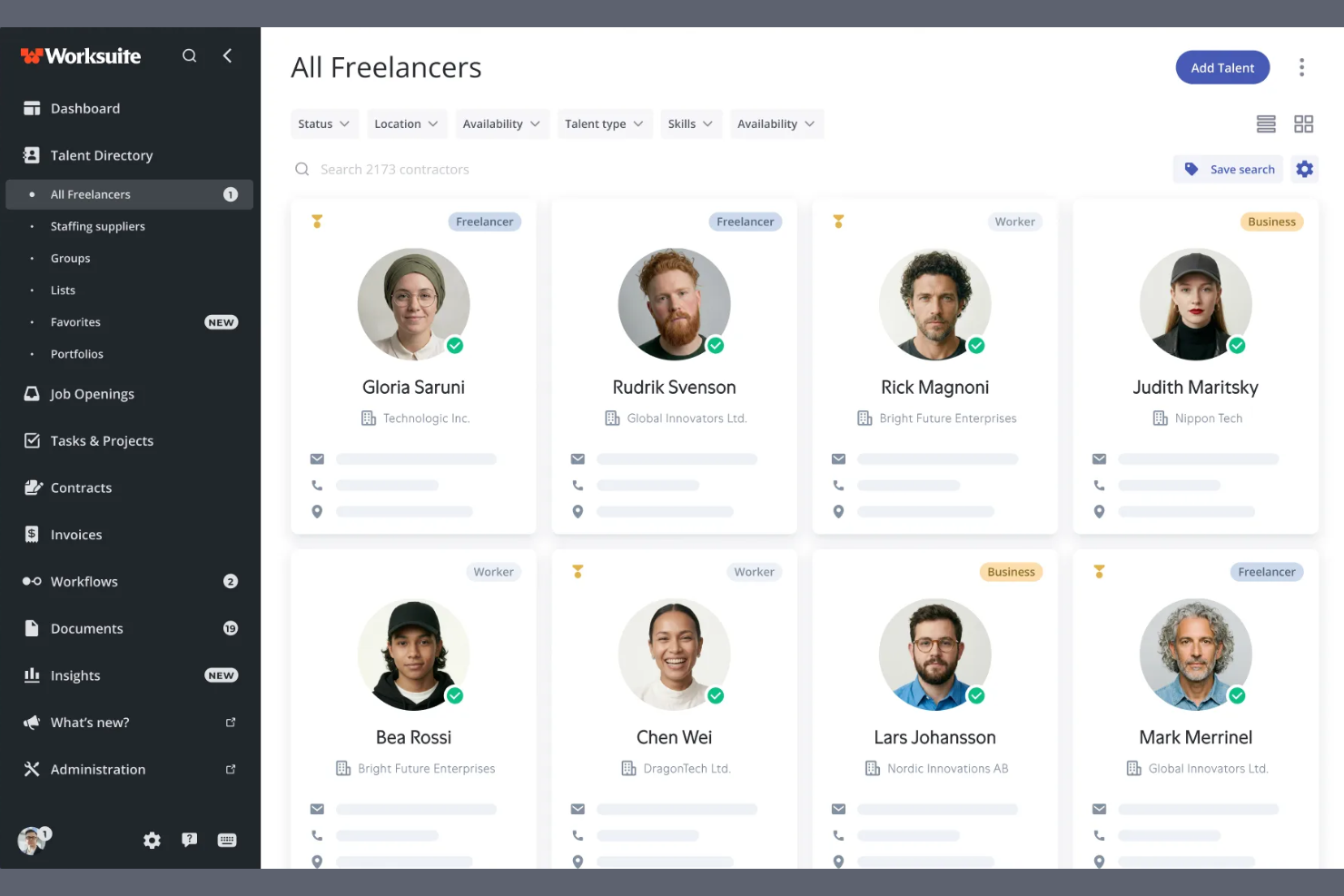
Worksuite is a contractor management platform built for enterprise-scale contingent workforce programs, covering onboarding, compliance, contract lifecycle management, global payments, and direct talent sourcing across multiple entities and regions.
Who Is Worksuite Best For?
Worksuite is a strong fit for enterprise HR and procurement teams managing large, distributed contractor networks across multiple countries or business entities.
Why I Picked Worksuite
Worksuite earns its spot on my shortlist because of how it handles the complexity that actually breaks other platforms at scale. I specifically like its configurable entity-level onboarding workflows, which let you set distinct rules, compliance checkpoints, and approval chains per brand, region, or legal entity without rebuilding everything from scratch each time. The built-in classification engine and Agent of Record (AOR) integration stand out to me, because worker misclassification risk is baked into compliance from day one rather than managed separately. Add payments across 190+ countries with consolidated invoicing, and you've got a system that genuinely holds up when your contractor program spans multiple regions.
Worksuite Key Features
- Private talent pool builder: Create and manage curated, searchable pools of your own vetted contractors to reduce reliance on external marketplaces.
- Workflow builder: Configure custom review, approval, and compliance gate sequences tailored to your organization's structure rather than working around a fixed template.
- Contract lifecycle management: Handle contract creation, negotiation, e-signatures, renewal triggers, and expiry alerts all within the same platform.
- Business intelligence dashboard: Track contractor spend, headcount, compliance status, and time-to-onboard across every entity and region in real time.
Worksuite Integrations
Integrations include NetSuite, QuickBooks, Xero, Salesforce, HubSpot, monday.com, Airtable, Google Workspace, Slack, and Asana.
Pros and Cons
Pros:
- Payments across 190+ countries and currencies
- Supports multi-brand and multi-entity structures
- Risk mitigation engine included
Cons:
- Requires a heavy implementation phase
- Delayed capital release cycle

Worksome
Best for rapid talent onboarding
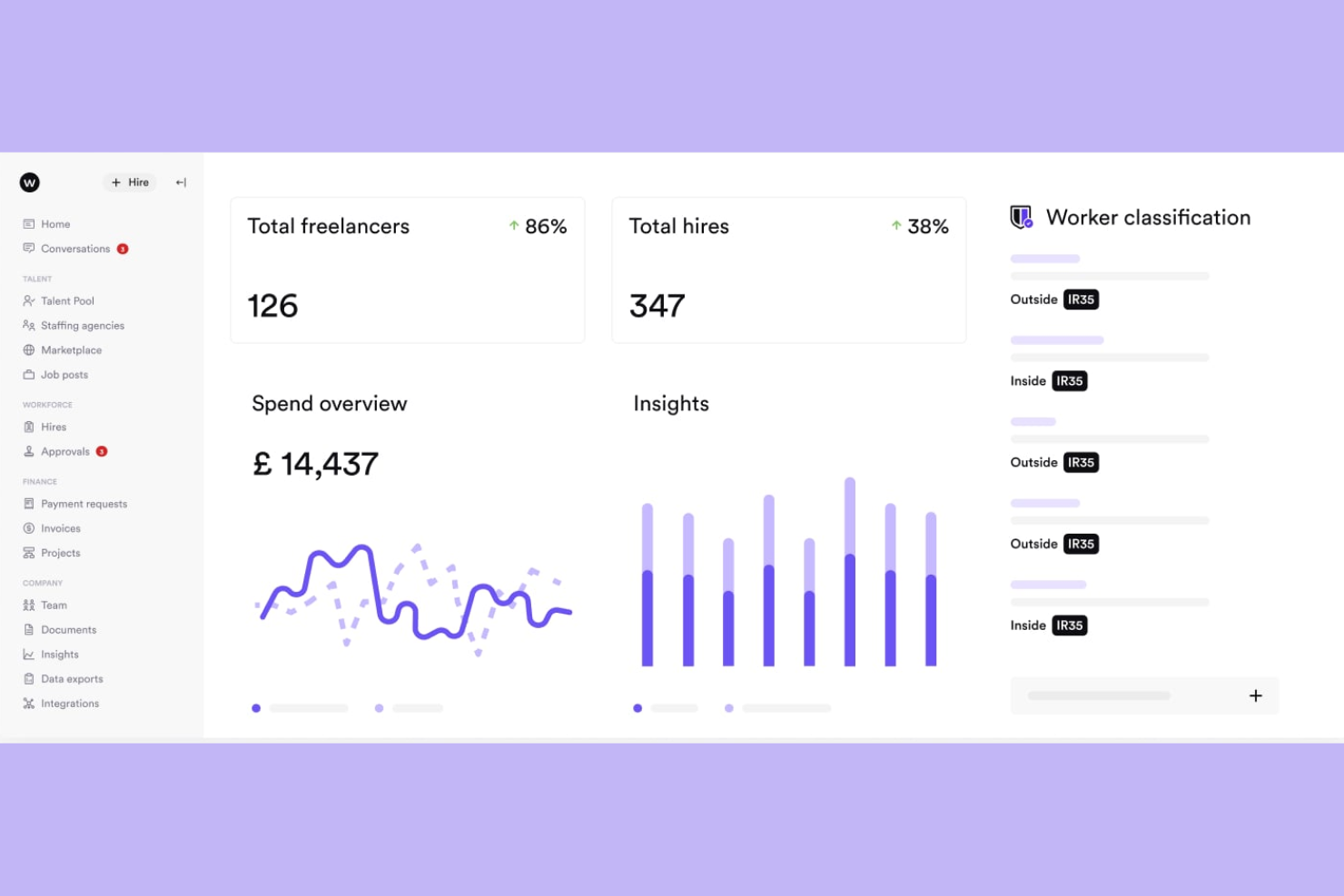
Worksome is a freelancer management system that brings sourcing, compliance classification, contract generation, and global payments into a single automated workflow.
Who Is Worksome Best For?
Worksome is a strong fit for mid-size to enterprise companies that engage contract talent at high volume and need to move from hire decision to active engagement quickly.
Why I Picked Worksome
I've included Worksome in my top picks because its instant onboarding feature genuinely earns that label. When you hire a contractor, Worksome's AI generates compliant contracts across every timezone in minutes, moving a new engagement from "contract sent" to "work started" faster than any other tool I've seen in this space. I also like the AI-powered project-to-talent mapping, which matches open roles against your existing talent ecosystem before you ever post externally.
Worksome Key Features
- Global payments in 150+ countries: Pay contractors across borders, with automatic currency optimization, consolidated invoicing, and built-in tax verification.
- Prepay and factoring: Guarantee contractor payouts within a set timeframe while your organization pays Worksome on a deferred schedule of 30 to 60 days.
- AI job description assistant: Generate polished job descriptions from a brief role summary, with one-click editing and auto-fill for skills and experience fields.
- Worksome Intelligence insights: Access AI-driven commentary on hiring trends, spend breakdowns, and workforce performance data across your entire external talent program.
Worksome Integrations
Integrations include SAP SuccessFactors, Sage, Workday, Xero, NetSuite, QuickBooks, Asana, monday.com, Trello, and Google Docs.
Pros and Cons
Pros:
- Dedicated case manager assigned per account
- Supports multi-currency contractor invoicing
- Built-in worker classification and AOR coverage
Cons:
- Complex initial configuration flow
- Extended treasury disbursement window

Best for centralized invoicing and payments
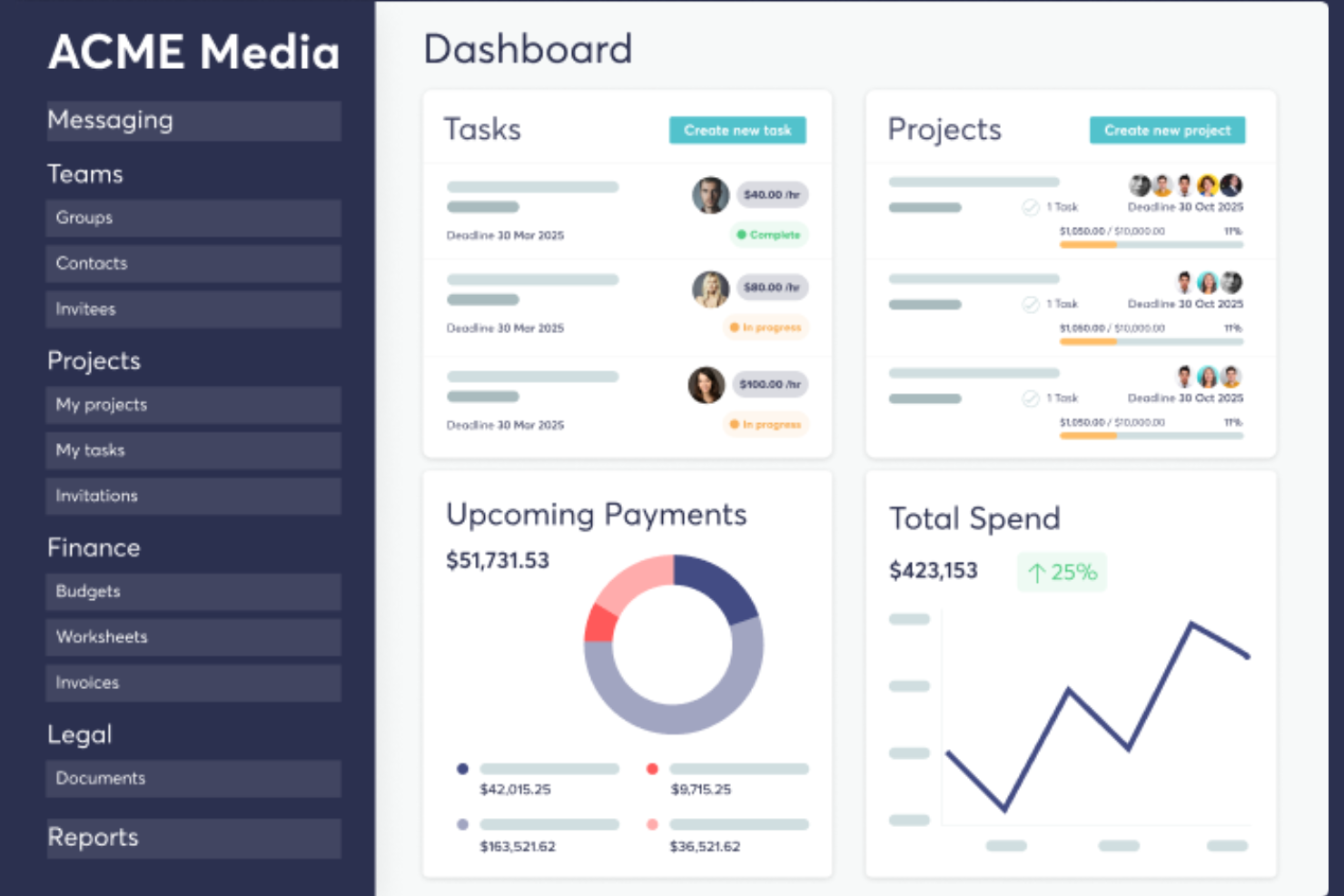
TalentDesk.io is a freelancer and vendor management platform that handles onboarding, project and task tracking, global payments, and compliance for companies managing external workforces.
Who Is TalentDesk.io Best For?
TalentDesk.io is a strong fit for operations and finance teams at small to mid-sized companies that regularly work with large pools of freelancers, contractors, or vendors across multiple countries.
Why I Picked TalentDesk.io
TalentDesk.io earns its spot on my shortlist because of how well it handles the invoicing chaos that comes with managing a large freelancer pool. Instead of collecting and reconciling dozens of individual invoices, I get one consolidated invoice that covers all freelancer payments across 190+ countries and 55+ currencies. I also like that you can set spend caps at the task level, so budgets don't slip before anyone notices. The parent/child organization setup is a nice touch, too, letting separate entities each get their own consolidated invoice.
TalentDesk.io Key Features
- Customizable onboarding templates: Build contractor onboarding flows that capture the specific documents, tax forms, and information your team needs from day one.
- Searchable talent directory: Filter your freelancer roster by skills, location, rate, and availability to find the right person for a task without digging through emails.
- Agent of Record (AOR) service: TalentDesk signs contracts on your behalf and handles AML and KYC verification checks for global contractors.
- 1099 filing and tax form collection: Collect W-9 and W-8BEN forms during onboarding and file 1099s directly from the platform.
TalentDesk.io Integrations
Integrations include Google Sheets, Airtable, Slack, Typeform, HubSpot, Jira, Microsoft Outlook, and Gmail.
Pros and Cons
Pros:
- Responsive and hands-on customer success team
- One-step worksheet approval for batch payments
- Consolidated invoicing across multiple currencies
Cons:
- Limited mobile feature
- Locked purchase order status

Deel HR
Best for centralized HR and compliance insights
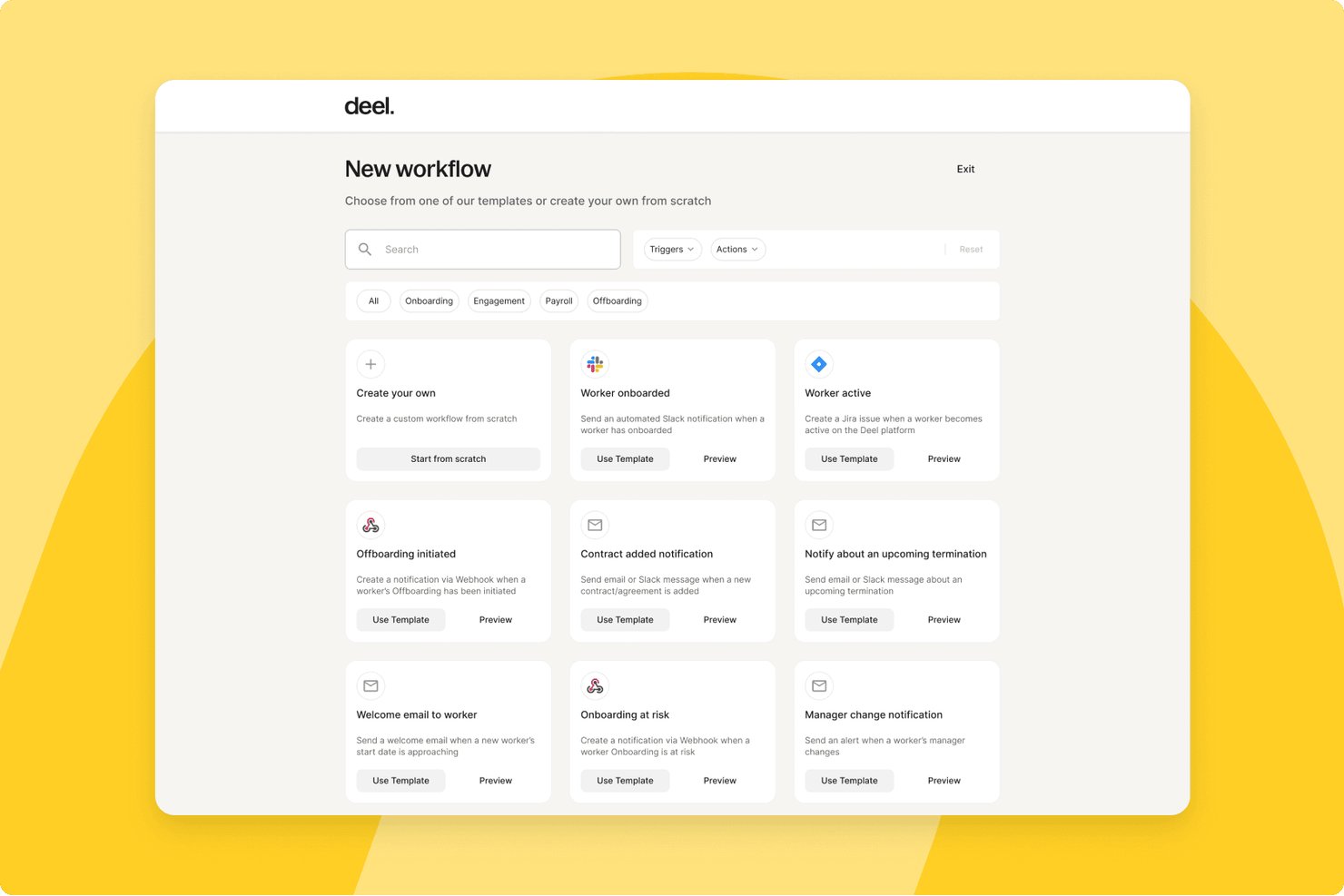
Deel HR is a global workforce management platform that handles contractor onboarding, compliance, multi-currency payments, tax documentation, and contract management for teams working with freelancers and independent contractors across 150+ countries.
Who Is Deel HR Best For?
HR operations teams at mid-size to enterprise companies that regularly engage contractors across multiple countries will get the most from Deel HR.
Why I Picked Deel HR
Deel HR earns its spot on my shortlist because of how it handles compliance visibility across a global contractor roster. I love that contracts automatically update when local laws change, so my team isn't manually tracking regulatory shifts across dozens of jurisdictions. The misclassification safeguards built into contractor onboarding give me a real safety net when engaging workers in countries with complex classification rules.
Deel HR Key Features
- Automated invoicing and global mass payouts: Generate, approve, and pay contractor invoices in 120+ currencies with batch payments.
- Freelancer profile database: Maintain searchable contractor records with custom fields, engagement history, and rate tracking.
- Integrated tax document collection: Automatically collect W-9, W-8BEN, 1099, and international equivalents from contractors.
- Document management and e-signature: Generate, sign, and store contracts, NDAs, and SOWs in a secure digital archive.
Deel HR Integrations
Deel HR offers integrations with QuickBooks, Xero, BambooHR, Expensify, NetSuite, Sage Intacct, Greenhouse, Workday, SAP, and ADP, among others available through its app store. It also connects with Zapier and provides an API for custom integrations.
Pros and Cons
Pros:
- Jurisdiction-specific contract templates built in
- Automated tax document collection across jurisdictions
- Strong global contractor compliance coverage
Cons:
- Support response times can be slow
- Limited project and deliverables tracking features
New Product Updates from Deel HR

Deel Expands Stablecoin Wallet to 80+ Countries
Deel expands its Stablecoin Wallet to 80+ countries with dollar-backed balances and optional rewards. This gives eligible contractors more ways to hold and manage earnings inside Deel. For more information, visit Deel’s official site.
 .
.
YunoJuno
Best for end-to-end compliance management
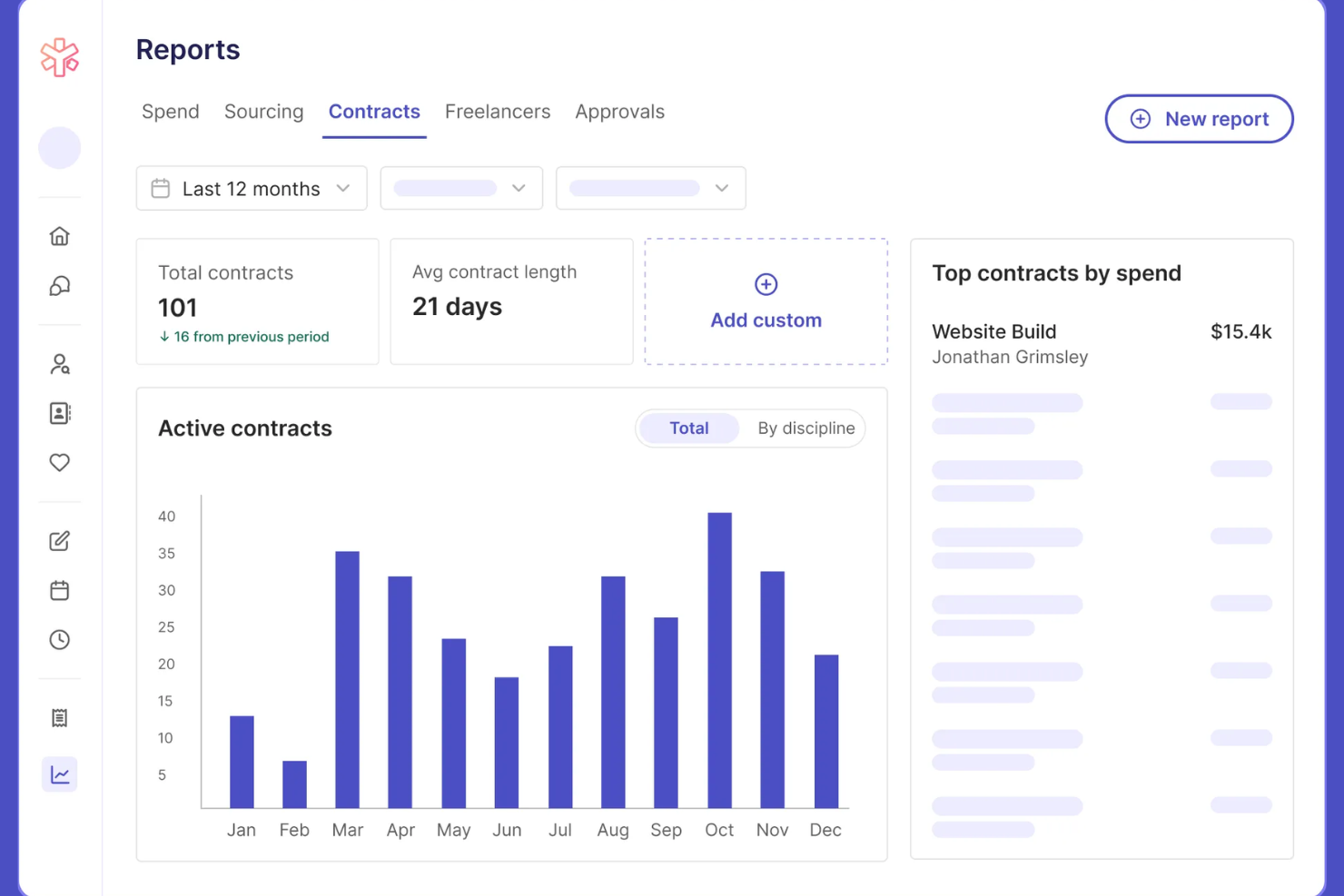
YunoJuno is a freelancer management system that covers the full contractor lifecycle, including sourcing, onboarding, contract management, global compliance checks, and payments across 165+ countries.
Who Is YunoJuno Best For?
YunoJuno is a strong fit for mid-size to enterprise companies that regularly hire contractors across multiple countries and need to manage classification risk and compliance at scale.
Why I Picked YunoJuno
YunoJuno earns its spot on my shortlist because no other tool I've used handles end-to-end compliance management as thoroughly. I particularly like the misclassification indemnification coverage, which protects your business from legal fees, taxes, and penalties tied to contractor classification errors. The platform also runs instant worker classification across 165+ countries and keeps a full audit trail of every classification decision, which I find invaluable when managing contractors across multiple jurisdictions.
YunoJuno Key Features
- Auto-generated contract templates: Generate contracts from project details like rate, dates, and contract type, with NDAs and client policies added automatically.
- Background and right-to-work checks: Run KYC, AML, ID, and right-to-work screening via built-in integrations with Amiqus and Veremark before contracts are issued.
- Real-time spend dashboards: View and filter contractor spend by team, department, project, location, or PO from a single reporting dashboard.
- SOW management: Standardize statements of work and track project milestones directly within the platform.
YunoJuno Integrations
Integrations include Salesforce, Sage, Workday, Xero, Notion, Slack, monday.com, QuickBooks, ADP Workforce Now, and Asana.
Pros and Cons
Pros:
- Automated contracts tailored by role and location
- Built-in human-assisted freelancer sourcing support
- Includes misclassification indemnification coverage
Cons:
- Requires manual applicant vetting
- Targeted freelance pool focus

Remote
Best for streamlined cross-border payouts
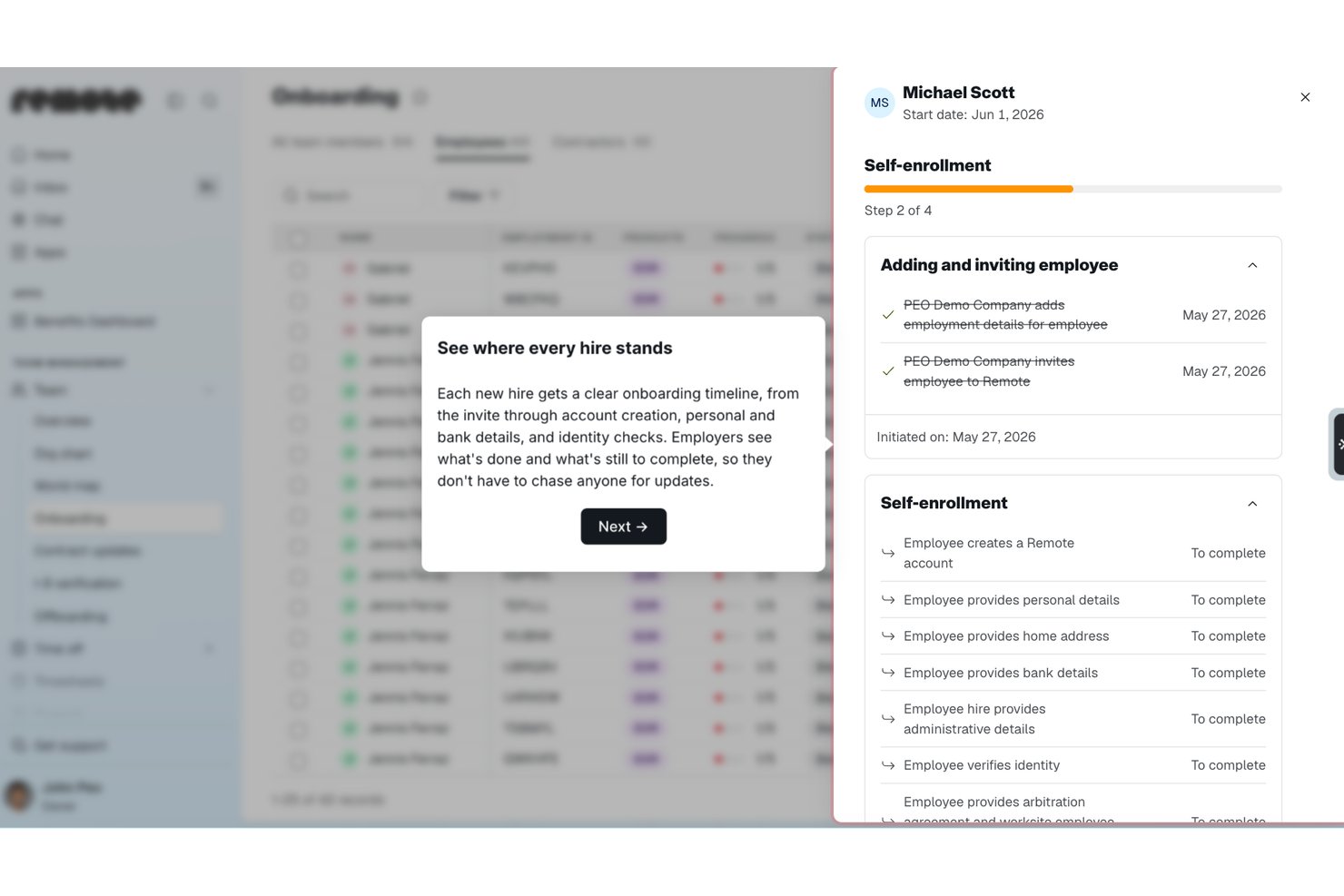
Remote is a global HR and contractor management platform that handles international hiring, contractor onboarding, payroll, and compliance across 200+ countries from a single system.
Who Is Remote Best For?
Remote is a strong fit for globally distributed companies that need to pay contractors and employees across multiple countries without setting up local entities.
Why I Picked Remote
I picked Remote as one of the best because of how it handles payouts for distributed contractor teams. You can pay contractors in 70+ currencies, including stablecoins and virtual wallets, from a single platform. I also like the bulk invoicing, recurring payments, and employer-initiated invoice features, which cut down manual back-and-forth considerably. The auto-detection of inactive contractors means you're only ever billed for people who are actually working, which keeps costs honest.
Remote Key Features
- Localized contractor agreements: Generate contracts tailored to local labour laws in 170+ countries, with options to create, edit, and sign directly in the platform.
- Misclassification risk detection: Built-in AI-powered tools flag potential misclassification risks, with optional indemnity coverage up to $100,000 per contractor through the Contractor Management Plus plan.
- Smart contractor onboarding: Automate the collection of documentation and bring contractors up to speed without manual back-and-forth.
- Remote Watchtower: A team of on-the-ground international experts monitors labour law changes globally and keeps your contracts and processes current.
Remote Integrations
Integrations include BambooHR, HiBob, Personio, Workday, Greenhouse, QuickBooks, Xero, NetSuite, Slack, and Vanta.
Pros and Cons
Pros:
- AI-powered contractor misclassification risk detection
- Owns legal entities in 180+ countries
- Built-in IP and invention rights protection
Cons:
- Extended support ticket resolution
- No built-in talent sourcing or vetting


Fiverr Pro is a curated freelancer marketplace that connects businesses with hand-vetted professionals across creative, technical, and business disciplines for project-based hiring.
Who Is Fiverr Pro Best For?
Fiverr Pro is a strong fit for marketing teams and creative directors at small to mid-sized businesses who need on-demand access to skilled freelancers for design, copy, or video work.
Why I Picked Fiverr Pro
I've included Fiverr Pro in my top picks because of how seriously it takes talent vetting. Every freelancer is reviewed by domain experts before being accepted, and that bar stays high throughout their time on the platform. When I need a specialist, I can use the talent sourcing service, where Fiverr Pro's team interviews and vets candidates and delivers a shortlist with recommendations. I also like the custom vetting option, which lets me layer in my own screening criteria before making a hire.
Fiverr Pro Key Features
- Shared freelancer network: Save and revisit your team's preferred freelancers across projects, making it easy to rehire known talent.
- Purchase approval permissions: Set custom approval rules so team members can hire within defined spend limits.
- AI-assisted project brief generator: Generate a project brief with AI to receive a curated shortlist of matching freelancer offers.
- Legal document management: Upload, send, and collect e-signatures on NDAs and contracts directly within the platform.
Fiverr Pro Integrations
Integrations include WordPress, Shopify, PrestaShop, Adobe Commerce, Wix, WooCommerce, Magento, Drupal, Webflow, and Squarespace.
Pros and Cons
Pros:
- Built-in NDA and contract e-signatures
- Dedicated project managers coordinate complex work
- Freelancers vetted by domain experts before acceptance
Cons:
- Requires manual data entry
- Limited specialized search parameters


Upwork is a freelance marketplace where businesses post jobs, search a global talent pool, manage contracts, track billable hours, and process payments through a single platform.
Who Is Upwork Best For?
Upwork is a strong fit for small to mid-sized businesses and startups that need on-demand access to freelance talent across a wide range of skills and project types.
Why I Picked Upwork
I picked Upwork as one of the best options because no other freelancer management platform gives you access to a talent pool this broad across so many skill categories. What I find especially useful is the AI-assisted talent matching, which surfaces relevant candidates based on your job post without requiring manual searching. I also like the Project Catalogue feature, where freelancers list predefined scopes of work at set prices, so you can hire for a specific task without writing a full job post.
Upwork Key Features
- Built-in time tracker: Freelancers log hours directly in the platform, with optional screenshot capture for hourly contracts.
- Escrow-based milestone payments: Funds are held in escrow and released only after you approve a milestone or deliverable.
- Talent badges and work history: Freelancer profiles display verified job success scores, past client reviews, and earnings history.
- Saved talent lists: Organize and revisit vetted freelancers in curated lists for faster hiring on repeat or future projects.
Upwork Integrations
Upwork offers enterprise-level integrations with ATS, HRIS, and spend management systems, along with VMS partnerships with SAP Fieldglass and Flextrack. An API is available for custom integrations, and Upwork connects with Zapier.
Pros and Cons
Pros:
- Freelancer profiles show verified job success scores
- Escrow payments protect both sides of the contracts
- Covers 8,000+ skill categories across freelance roles
Cons:
- Inconsistent mediation resolution time
- No built-in vetting before freelancers can apply


WorkMarket is an independent contractor management system built by ADP that handles onboarding, verification, work assignment management, compliance support, and payments for 1099 workers and freelancers.
Who Is WorkMarket Best For?
WorkMarket is a strong fit for large enterprises that manage high volumes of field-based or project-based 1099 contractors across multiple locations.
Why I Picked WorkMarket
WorkMarket earns its spot on my shortlist because of how far it takes workflow automation across the full contractor lifecycle. I particularly like its custom automation rules engine, where you can define business-specific triggers and logic to move work orders, assignments, and payments through your pipeline without manual hand-offs. In practice, that means my team can generate a ticket in an external CRM, pass it directly into WorkMarket for contractor assignment, and route completed work data back to our accounting system automatically. That end-to-end automation, built around your own business rules, is what sets WorkMarket apart.
WorkMarket Key Features
- Labour Clouds: Organize contractors into groups by skill set, geography, or certification so you can quickly find and deploy the right worker for a given job.
- Assignment templates: Build reusable templates for recurring work orders to reduce setup time and maintain consistency across high-volume assignments.
- Contractor mobile app: Workers can check in and out, upload deliverables, communicate via SMS, and submit work for approval directly from a mobile device.
- Electronic 1099-NEC filing: WorkMarket prepares and files 1099-NEC forms with the IRS and applicable state agencies on your behalf at year-end.
WorkMarket Integrations
Integrations include AutoTask, ConnectWise, and Salesforce.
Pros and Cons
Pros:
- Flexible pay by milestone, project, or hour
- Bulk work order publishing to large groups
- AI-powered freelancer recommendations by skill
Cons:
- Mobile app lacks key web features
- 30-day waiting period for payouts


Beeline is a vendor management system (VMS) built for managing contingent and external workforces, covering contractor sourcing, supplier management, compliance, time and expense tracking, and independent contractor engagement.
Who Is Beeline Best For?
Beeline is a strong fit for large enterprises and procurement teams that manage high volumes of contingent workers, staffing suppliers, and extended workforce programs.
Why I Picked Beeline
Beeline earns its spot on my shortlist because no other tool in this space is built as exclusively for large, complex contingent workforce programs as this one. What stands out to me is the SOW management module, which covers the full lifecycle from sourcing through to invoicing, so you can track outsourced project work the same way you track individual contractors. I also like the global localization capabilities, which handle fiscal, legal, cultural, and language differences across countries without requiring custom workarounds. With $68B+ in annual spend under management and 6.1M assignments created annually, this is a platform built for serious scale.
Beeline Key Features
- Supplier performance analytics: Track and compare supplier rates, performance data, and spend across your entire contingent labour program in real time.
- Automated approval workflows: Move requisitions through hiring steps with simplified, click-reduced workflows and built-in automated approvals.
- Audit trail and classification safeguards: Enforce contract policies, multi-tier supplier rules, and compliance checks with a complete audit trail for every worker engagement.
- Direct sourcing module: Source and engage contingent talent directly, bypassing traditional staffing suppliers where appropriate.
Beeline Integrations
Beeline has completed over 2,000 integrations across HR, finance, sourcing, and IT systems, connecting with platforms like Workday, SAP, Oracle, Coupa, Kronos, and Okta. It offers 300+ RESTful APIs through its Developer Portal, along with plug-and-play connectors, data feeds, and iPaaS support for custom configurations.
Pros and Cons
Pros:
- Multi-vendor requisition and submission tracking
- Automates onboarding, time tracking, and invoicing
- Supports large, global contingent workforce programs
Cons:
- Managed configuration change requests
- Steep learning curve for analytics tools
Altri Software per la Gestione dei Freelancer
Ecco alcune opzioni di software per la gestione dei freelancer che non sono entrate nella mia shortlist, ma che meritano comunque di essere considerate:
- Multiplier
For multi-country payroll in one platform
- Hubstaff
For integrated time tracking and productivity
- WorkMotion
For automated employment status transitions
- Avature
For customizable talent acquisition workflows
- Field Nation
For managing onsite project-based work
- WorkGenius
For AI-powered talent matching


Criteri di Selezione per il Software di Gestione Freelancer
Nella selezione dei migliori software per la gestione dei freelancer da includere in questa lista, ho considerato i bisogni tipici degli acquirenti e i loro punti critici come la semplificazione dei processi di assunzione di collaboratori esterni e il mantenimento della conformità alle normative sui contratti. Ho inoltre utilizzato il seguente framework per dare struttura e imparzialità alla mia valutazione:
Funzionalità di Base (25% del punteggio totale)
Per essere considerata in questa lista, ogni soluzione doveva soddisfare questi casi d’uso comuni:
- Pubblicazione di nuovi progetti o incarichi ai freelancer
- Archiviazione e gestione dei profili e dei dati dei freelancer
- Monitoraggio dell’avanzamento dei progetti e delle consegne
- Onboarding e offboarding efficienti dei freelancer
- Gestione e tracciamento di fatture e pagamenti dei freelancer
Funzionalità Distintive Aggiuntive (25% del punteggio totale)
Per restringere ulteriormente il campo, ho cercato anche funzionalità uniche come:
- Verifiche automatiche di conformità per collaboratori internazionali
- Raccomandazioni di freelancer guidate dall’IA
- Flussi di approvazione personalizzati per i pagamenti
- Integrazioni con strumenti di gestione progetti di terze parti
- Funzionalità di comunicazione e collaborazione interne all’app
Usabilità (10% del punteggio totale)
Per valutare l’usabilità di ciascun sistema, ho preso in considerazione i seguenti aspetti:
- Dashboard ben ordinata e layout organizzato
- Navigazione agevole tra i vari moduli
- Design responsivo per mobile e desktop
- Fasi semplici per la pubblicazione di nuovi lavori
- Feedback chiaro al completamento delle azioni
Onboarding (10% del punteggio totale)
Per valutare l’esperienza di onboarding su ogni piattaforma, ho considerato i seguenti aspetti:
- Video di formazione on-demand o documentazione
- Tutorial guidati passo dopo passo sul prodotto
- Template predefiniti per flussi di lavoro e documenti
- Strumenti di migrazione automatizzati o assistenti di importazione
- Accesso a chat dal vivo o specialisti per l'onboarding
Assistenza clienti (10% del punteggio totale)
Per valutare i servizi di assistenza clienti di ciascun fornitore di software, ho considerato quanto segue:
- Disponibilità di supporto tramite chat in tempo reale
- Accesso a una knowledge base dettagliata
- Tempi di risposta rapidi ai ticket di supporto
- Contatti di supporto dedicati per i clienti
- Opzioni di assistenza telefonica o via email
Rapporto qualità-prezzo (10% del punteggio totale)
Per valutare il rapporto qualità-prezzo di ciascuna piattaforma, ho considerato:
- Prezzi equi in base a freelancer attivi o progetti
- Nessun costo aggiuntivo o di configurazione inaspettato
- Piani tariffari a livelli con funzionalità pertinenti
- Sconti per abbonamenti annuali o grandi team
- Fatturazione trasparente e semplice da comprendere
Recensioni dei clienti (10% del punteggio totale)
Per comprendere la soddisfazione generale dei clienti, ho preso in considerazione i seguenti aspetti leggendo le recensioni degli utenti:
- Punteggi elevati per la facilità di gestione dei freelancer
- Segnalazioni di pagamenti affidabili e puntuali
- Feedback sull'affidabilità e sulla continuità della piattaforma
- Esperienze positive degli utenti con i team di supporto
- Raccomandazioni o tassi di fidelizzazione da parte di clienti abituali
Come scegliere un software di gestione dei freelancer
È facile perdersi tra lunghe liste di funzionalità e strutture di prezzo complesse. Per aiutarti a rimanere concentrato durante il tuo processo di selezione software, ecco una checklist di fattori da tenere a mente:
| Fattore | Cosa considerare |
| Scalabilità | La soluzione può gestire il volume attuale di freelancer e la crescita prevista? Valuta se sarà necessario aggiungere centinaia di utenti in futuro o espandersi in nuove business unit. |
| Integrazioni | Lo strumento si collega con HRIS, gestione paghe, gestione progetti o sistemi di fatturazione? Valuta possibili silos di dati o lavoro duplicato se le integrazioni non sono presenti. |
| Personalizzazione | È possibile adattare workflow, template documentali o catene di approvazione alle tue esigenze? Attenzione a formati rigidi o costi nascosti per il supporto alla personalizzazione. |
| Facilità d’uso | Il tuo team e i freelancer adotteranno rapidamente il software? Cerca un’interfaccia chiara, con minime necessità di formazione e dal design intuitivo invece di una dashboard accattivante. |
| Implementazione e onboarding | Quanto tempo richiede l’avviamento completo di team e freelancer? Chiedi supporto per la migrazione, ambienti sandbox e risorse disponibili per la gestione del cambiamento. |
| Costo | Valuta i livelli di prezzo per utenti attivi, commissioni sulle transazioni o componenti extra nascoste. Assicurati che la piattaforma sia sostenibile per il tuo budget attuale e futuro senza spese impreviste. |
| Tutela della sicurezza | La piattaforma soddisfa i requisiti aziendali in tema di privacy dei dati, crittografia e controllo degli accessi? Chiedi documentazione che confermi la conformità agli standard di settore. |
| Requisiti di compliance | Gestisce classificazione del lavoro locale, firma digitale e documentazione fiscale per tutte le regioni in cui assumi? Verifica che gli strumenti corrispondano al tuo rischio normativo. |
Cosa sono i software di gestione dei freelancer?
I software di gestione dei freelancer sono piattaforme digitali che aiutano le aziende a organizzare, integrare, gestire e pagare lavoratori indipendenti o freelance. Questi strumenti centralizzano incarichi di progetto, contratti, documentazione di compliance, comunicazioni e pagamenti in un unico luogo. Facilitando il monitoraggio delle performance dei freelancer e la gestione delle attività amministrative, aiutano i professionisti HR a ridurre lo sforzo manuale e i rischi di non conformità quando lavorano con una forza lavoro esterna.
Caratteristiche dei software di gestione dei freelancer
Quando selezioni un software per la gestione dei freelancer, tieni d’occhio le seguenti funzionalità chiave:
- Database dei freelancer: Conserva profili, dettagli di contatto, contratti e storico dei lavori di ogni freelancer in una directory sicura e ricercabile che puoi facilmente aggiornare e consultare.
- Monitoraggio di progetti e incarichi: Assegna compiti o progetti ai freelancer, imposta le scadenze, monitora i progressi e apporta modifiche in base alle esigenze del progetto.
- Flussi di onboarding: Guida i nuovi freelancer attraverso passaggi digitalizzati standardizzati di onboarding, inclusa la raccolta di documenti, i controlli dei precedenti e la firma dei contratti.
- Pagamenti automatizzati: Gestisci la fatturazione, le approvazioni e i pagamenti automatici in modo che i freelancer siano pagati correttamente e puntualmente attraverso metodi di pagamento preferiti.
- Gestione dei documenti: Archivia, condividi e aggiorna contratti, NDA, documenti fiscali e altra documentazione importante, facilitandone l’accesso e il monitoraggio in base ai cambiamenti delle normative.
- Monitoraggio della conformità: Tieni traccia e garantisci la corretta classificazione dei lavoratori, l’osservanza delle leggi locali sul lavoro e la raccolta dei moduli fiscali per ridurre i rischi di errata classificazione.
- Gestione di ore e spese: Consenti ai freelancer di registrare le ore e inviare le spese per i progetti, offrendo ai responsabili una maggiore chiarezza sul lavoro effettivamente svolto.
- Reportistica e analytics: Genera report standard e personalizzati su spese, stato progetto, produttività e conformità per supportare il processo decisionale e gli audit interni.
- Strumenti di collaborazione: Condividi file, invia aggiornamenti e comunica direttamente con i freelancer all'interno della piattaforma per mantenere tutti allineati e i progetti organizzati.
Caratteristiche AI comuni nei software di gestione dei freelancer
Oltre alle funzionalità standard elencate sopra, molti di questi software stanno integrando l’AI con funzioni come:
- Matching di talento guidato dall’AI: Il sistema analizza automaticamente le esigenze dei progetti e i profili dei freelancer per raccomandare il candidato più adatto a ogni incarico, riducendo la selezione manuale e risparmiando tempo prezioso.
- Raccomandazioni smart sulle tariffe: L’AI valuta i dati di mercato e le tendenze storiche sulle assunzioni per suggerire tariffe eque e competitive per ruoli o competenze specifiche, aiutando sia i committenti sia i freelancer nelle decisioni.
- Previsioni progettuali predittive: Il software utilizza metriche storiche di performance per stimare le tempistiche dei progetti, segnalare carenze di risorse e prevedere rischi di consegna prima che emergano problemi.
- Verifiche di conformità automatizzate: L’AI monitora i cambiamenti nelle leggi locali sul lavoro e le normative legate allo status dei collaboratori, segnalando potenziali criticità o suggerendo azioni per restare in regola quando coinvolgi nuovi freelancer.
- Chatbot a linguaggio naturale: Interfacce di chat alimentate da AI rispondono alle domande dei freelancer, guidano gli utenti durante l’onboarding o i flussi di pagamento e forniscono supporto automatico 24/7.
Benefici del software di gestione dei freelancer
L’implementazione di un software di gestione dei freelancer offre numerosi benefici al tuo team e al tuo business. Ecco alcuni vantaggi a cui puoi puntare:
- Supervisione centralizzata: Gestisci dati, contratti e comunicazioni dei freelancer in un’unica piattaforma per accesso facilitato e maggiore controllo.
- Onboarding efficiente: Flussi digitali automatizzati aiutano i nuovi freelancer a inviare documenti, accettare contratti e iniziare rapidamente.
- Pagamenti accurati e puntuali: Funzionalità integrate di fatturazione e pagamento assicurano che i collaboratori siano remunerati in base a milestone o ore tracciate con meno intervento manuale.
- Rischio di non conformità ridotto: Strumenti integrati di compliance monitorano lo status dei lavoratori, gestiscono la documentazione e segnalano eventuali problemi di classificazione o regolamentazione.
- Processi scalabili: Flussi organizzati per pubblicare progetti, gestire incarichi ed elaborare pagamenti semplificano la crescita della forza lavoro freelance secondo le necessità aziendali.
- Collaborazione migliorata: Messaggistica in-app e condivisione di documenti aiutano il tuo team e i freelancer a restare coordinati per l’intera durata dei progetti.
- Insight azionabili: Dashboard e report personalizzati forniscono dati su performance dei freelancer, tendenze sui costi e stato dei progetti—aiutando le risorse umane a prendere decisioni più informate.
Costi e prezzi dei software di gestione dei freelancer
La scelta di un software di gestione dei freelancer richiede la comprensione dei diversi modelli e piani di prezzo disponibili. I costi variano in base a funzionalità, dimensioni del team, componenti aggiuntivi e altro ancora. La tabella sottostante riassume i piani più comuni, i prezzi medi e le caratteristiche tipiche incluse nelle soluzioni di gestione dei freelancer:
Tabella comparativa dei piani dei software di gestione dei freelancer
| Tipo di piano | Prezzo medio | Funzionalità comuni |
| Piano gratuito | $0 | Profili base dei freelancer, pubblicazione semplice di progetti, gestione contratti limitata e reportistica di base. |
| Piano personale | $10-$25/utente/mese | Funzionalità directory ampliate, strumenti di onboarding limitati, gestione base dei pagamenti e supporto via email. |
| Piano business | $25-$60/utente/mese | Flussi di onboarding avanzati, automazione contrattuale, integrazione dei pagamenti, monitoraggio della conformità e messaggistica in-app. |
| Piano enterprise | $60-$150/utente/mese | Flussi di lavoro personalizzati, accesso API, analisi avanzate, strumenti di conformità internazionale, supporto premium e gestione account dedicata. |
Domande frequenti sul software di gestione dei freelancer
Ecco alcune risposte alle domande comuni sul software di gestione dei freelancer:
Devo utilizzare un software di gestione dei freelancer se assumo solo pochi collaboratori?
No, il software di gestione dei freelancer è davvero utile soprattutto per le aziende che gestiscono molti freelancer o progetti complessi. Se hai solo pochi collaboratori, fogli di calcolo o processi manuali possono essere sufficienti. Quando la forza lavoro freelance cresce, strumenti specializzati aiutano le piccole imprese a gestire meglio il lavoro e ad assumere freelancer in modo più efficiente.
In che modo il software di gestione dei freelancer aiuta nell'elaborazione dei pagamenti?
Queste piattaforme automatizzano fatturazione e pagamenti, calcolando gli importi secondo i contratti, i milestone o le ore lavorate. Supportano vari metodi e valute di pagamento, riducendo la gestione manuale e garantendo pagamenti accurati e puntuali ai freelancer. Aiutano anche a strutturare i processi di outsourcing, garantendo il rispetto dei contratti dei freelancer e facilitando i pagamenti affidabili su diversi progetti e collaboratori.
Cosa dovrei considerare in termini di sicurezza?
Scegli software con crittografia, controlli di accesso basati sui ruoli, log di audit e valutazioni di sicurezza regolari da parte di terzi. Assicurati che la piattaforma rispetti gli standard di settore e ti permetta di gestire i permessi sia per gli utenti interni sia per i freelancer esterni, soprattutto quando utilizzi strumenti di comunicazione condivisi in ambienti di lavoro remoto distribuiti.
Il software di gestione dei freelancer può integrarsi con gli altri strumenti HR che uso?
Sì, molte soluzioni si integrano con sistemi HRIS, paghe, tracciamento progetti, archiviazione documenti e piattaforme più ampie di gestione della forza lavoro. È importante verificare la disponibilità di connettori specifici o opzioni API prima di scegliere una piattaforma, soprattutto se dipendi da determinati strumenti per coordinare i team, gestire algoritmi interni di assegnazione dei compiti o supportare workflow strutturati di sviluppo e produzione software.
È difficile l'onboarding dei freelancer tramite queste piattaforme?
No, la maggior parte delle piattaforme semplifica l’onboarding grazie a processi strutturati, workflow digitali, firme elettroniche e checklist per contratti e documenti richiesti ai freelancer. Questo aiuta sia i team HR sia i lavoratori autonomi a iniziare più rapidamente, con meno solleciti manuali. Inoltre migliora il coordinamento per ruoli in web design, graphic design e altri incarichi da remoto, garantendo fin dal primo giorno una comunicazione più fluida e aspettative più chiare.