

I 10 migliori software PEO recensiti nel 2026

10 Elenco dei migliori software PEO


I migliori software PEO aiutano le piccole e medie imprese a gestire attività delle risorse umane come buste paga, benefit e conformità, riducendo gli oneri amministrativi e i rischi legali.
Quando ricopri diversi ruoli senza un team completo dedicato alle risorse umane, è facile lasciarsi sopraffare da leggi sul lavoro complesse, benefit costosi e processi manuali che rallentano il lavoro. Un PEO agisce come co-datore di lavoro, offrendo accesso a benefit migliori, supporto esperto per la conformità e operazioni HR più efficienti.
Dall'automazione delle buste paga e delle dichiarazioni fiscali alla gestione dell'inserimento dei dipendenti, dell'amministrazione dei benefit e della gestione dei rischi, queste soluzioni fanno risparmiare tempo e garantiscono maggiore tranquillità.
Dopo aver valutato 20 delle principali piattaforme PEO, ho selezionato le migliori opzioni: intuitive, scalabili e progettate per supportare la tua azienda durante la crescita.
Perché fidarsi delle nostre recensioni sui software
Il nostro team testa e recensisce software dal 2012. In quanto esperti HR noi stessi, sappiamo quanto sia difficile — e importante — scegliere il software giusto.
Per questa guida, abbiamo valutato gli strumenti attraverso test pratici e ricerche indipendenti, assegnando un punteggio agli strumenti in base ai nostri criteri di selezione. Ci basiamo inoltre sulle competenze di leader di pensiero del settore e di professionisti HR attivi.
Le nostre recensioni riflettono il nostro giudizio editoriale umano, non un discorso di vendita.
Revisori esperti:
Tabella comparativa dei software PEO
| Tool | Best For | Trial Info | Price | ||
|---|---|---|---|---|---|
| 1 | Ideale per le piccole imprese | Demo gratuita disponibile | Da $8/dipendente/mese + $50/mese di costo base | Website | |
| 2 | Ideale per la gestione delle operazioni PEO globali | Demo gratuita disponibile | Da $599/dipendente/mese | Website | |
| 3 | Ideale per soluzioni HR specifiche per settore | Demo gratuita disponibile | Prezzi su richiesta | Website | |
| 4 | Miglior PEO diretto | Demo gratuita disponibile | Da $599/dipendente/mese | Website | |
| 5 | Ideale per la gestione globale delle paghe | Demo gratuita disponibile | Da $29/contrattista/mese a $499/dipendente EOR/mese | Website | |
| 6 | Ideale per soluzioni HR avanzate | Non disponibile | Prezzo su richiesta | Website | |
| 7 | Ideale per attrarre talenti | Prezzo su richiesta | Website | ||
| 8 | Ideale per benefit Fortune-500 a prezzi accessibili | Demo gratuita disponibile | Prezzo su richiesta | Website | |
| 9 | Ideale per assunzioni veloci | Not available | Prezzo su richiesta | Website | |
| 10 | Ideale per aziende in crescita | Prezzo su richiesta | Website |

Recensioni dei migliori software PEO
Questa sezione fornisce un’analisi approfondita e una panoramica di ciascun software PEO. Esaminerò i pro e i contro di ogni strumento, le sue funzionalità e i casi d’uso migliori.

Ideale per le piccole imprese

Justworks offre una piattaforma centrale per gestire paghe, benefit, strumenti HR e supporto alla conformità tramite il suo servizio di organizzazione professionale dei datori di lavoro (PEO), pensato per piccole e medie imprese che vogliono ridurre il carico amministrativo. Con questo software PEO, tu e il tuo team potete delegare i principali processi di HR e paghe a un partner che si occupa delle dichiarazioni fiscali, dell’accesso ai benefit e dell’amministrazione dei dipendenti per conto vostro, permettendovi di concentrarvi maggiormente sulla crescita e meno sulla burocrazia.
Perché ho scelto Justworks
Ho scelto Justworks perché combina i principali servizi di PEO – gestione paghe, amministrazione dei benefit e supporto alla conformità – sotto un unico ombrello che si adatta alle reali esigenze degli acquirenti di piccole imprese. Troverai un’elaborazione delle paghe che gestisce dichiarazioni fiscali e retribuzioni dei dipendenti in più stati, supportando una retribuzione accurata e alleggerendo il carico di lavoro interno.
L’accesso integrato ai benefit significa che il tuo team può usufruire di piani sanitari, dentistici e oculistici competitivi e di alta qualità senza dover negoziare separatamente con i fornitori. Inoltre, l’assistenza nella conformità ti aiuta a rimanere allineato alle normative federali e locali, offrendoti sicurezza in diversi stati man mano che la tua azienda cresce.
Funzionalità principali di Justworks
Oltre al servizio PEO di base che ha motivato la mia scelta, Justworks offre anche una serie di strumenti aggiuntivi che supportano le operazioni HR e aziendali.
- Assistenza 24/7: Fornisce supporto continuativo per rispondere a qualsiasi domanda o problema relativo alle risorse umane.
- Monitoraggio delle presenze: Strumenti integrati per controllare le ore di lavoro dei dipendenti e gestire le presenze.
- Consulenza e strumenti HR: Accesso a consulenze esperte in ambito HR e risorse per aiutare nella gestione del personale.
- Portale self-service per i dipendenti: Permette ai dipendenti di accedere autonomamente alle informazioni su paghe e benefit, riducendo il carico amministrativo sui team HR.
Integrazioni di Justworks
Le integrazioni includono QuickBooks, NetSuite, Xero, Sage Intacct, Greenhouse Recruiting, JazzHR, Lever, 15Five, Culture Amp e Brex.
Pros and Cons
Pros:
- L’elaborazione paghe gestisce le dichiarazioni fiscali in più stati in modo efficiente.
- Supporto esperto accessibile come organizzazione professionale dei datori di lavoro.
- Gli strumenti HR centralizzano i dati dei dipendenti e le attività amministrative.
Cons:
- La copertura globale è disponibile solo come componente aggiuntivo a pagamento.
- Alcuni amministratori vorrebbero maggiore flessibilità rispetto alle impostazioni predefinite della piattaforma.
Ideale per la gestione delle operazioni PEO globali
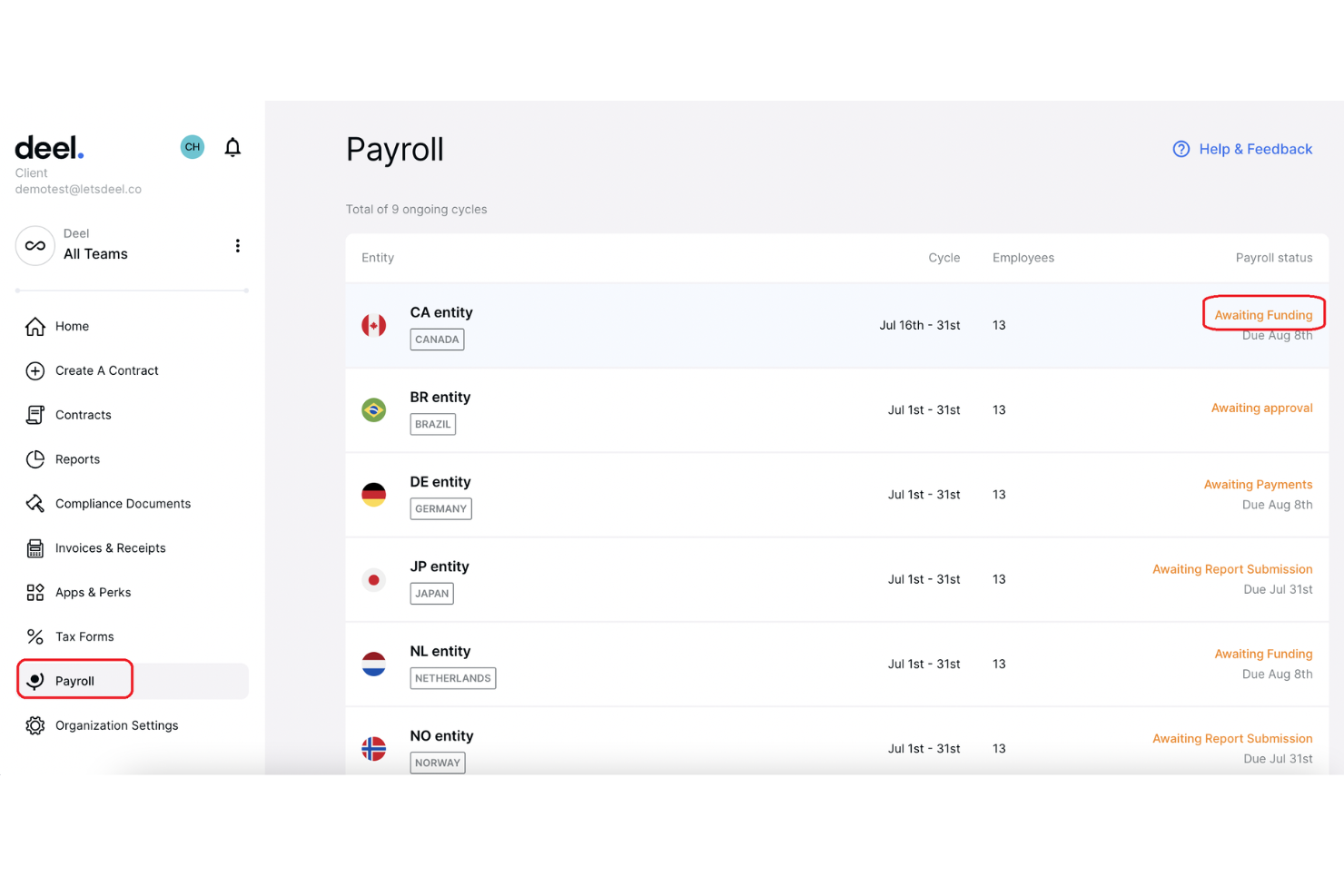
Deel è una piattaforma globale per la gestione del personale pensata per aiutare le aziende ad assumere, integrare e gestire dipendenti e collaboratori in diversi paesi. Offre soluzioni per la gestione delle buste paga, la conformità normativa e le risorse umane.
Perché ho scelto Deel: Deel consente di assumere dipendenti a tempo pieno a livello globale senza la necessità di creare filiali locali. Questo servizio garantisce la conformità alle leggi e normative locali sul lavoro, riducendo il carico amministrativo e i rischi legali associati all'assunzione internazionale. Un'altra caratteristica di rilievo è la capacità di gestire le buste paga a livello globale. Permette di pagare dipendenti e collaboratori nella loro valuta locale tramite vari metodi di pagamento, tra cui bonifici bancari, portafogli digitali e anche criptovalute.
Funzionalità e integrazioni principali:
Le funzionalità includono calcolo automatico delle imposte, gestione delle spese, monitoraggio delle assenze, gestione dell'equity, amministrazione dei benefit localizzati, archiviazione dei documenti per la conformità, protezione contro la riclassificazione dei collaboratori, ordinazione e gestione delle attrezzature, analisi HR e reportistica.
Le integrazioni includono Brex, Google Workspace, Hubstaff, JIRA, Slack, QuickBooks, Xero, BambooHR, NetSuite, Workday, Greenhouse e Okta.
Pros and Cons
Pros:
- Forte attenzione alla conformità
- Soluzioni di pagamento complete in più valute
- Opzioni per la gestione dei collaboratori
Cons:
- Opzioni di personalizzazione limitate
- La configurazione iniziale può richiedere tempo
TriNet
Ideale per soluzioni HR specifiche per settore

TriNet offre soluzioni HR complete su misura per diversi settori. Personalizza i suoi servizi per rispondere alle esigenze e alle sfide di vari ambiti industriali.
Perché ho scelto TriNet: Ho scelto TriNet per la sua capacità di offrire soluzioni HR specifiche per settore, che lo distingue dagli altri software PEO. La combinazione tra tecnologia e competenza personalizzata di TriNet soddisfa i requisiti specializzati di diversi mercati.
Funzionalità principali e integrazioni:
Le funzionalità includono una soluzione di gestione paghe online semplice, software HR per la gestione di tempi e benefit, e linee guida sulle migliori pratiche relative a normative e conformità lavorative complesse. TriNet offre inoltre opzioni complete per i benefit e un supporto HR pluripremiato.
Le integrazioni comprendono Assembly, Bob, ChartHop, Compt, Greenhouse, Hyperproof, Lattice, Sage Intacct e QuickBooks
Pros and Cons
Pros:
- Soluzioni specifiche per settore
- Supporto HR completo
- Competenza pluripremiata
Cons:
- Opzioni di personalizzazione limitate
- Può risultare costoso per le piccole imprese
Miglior PEO diretto
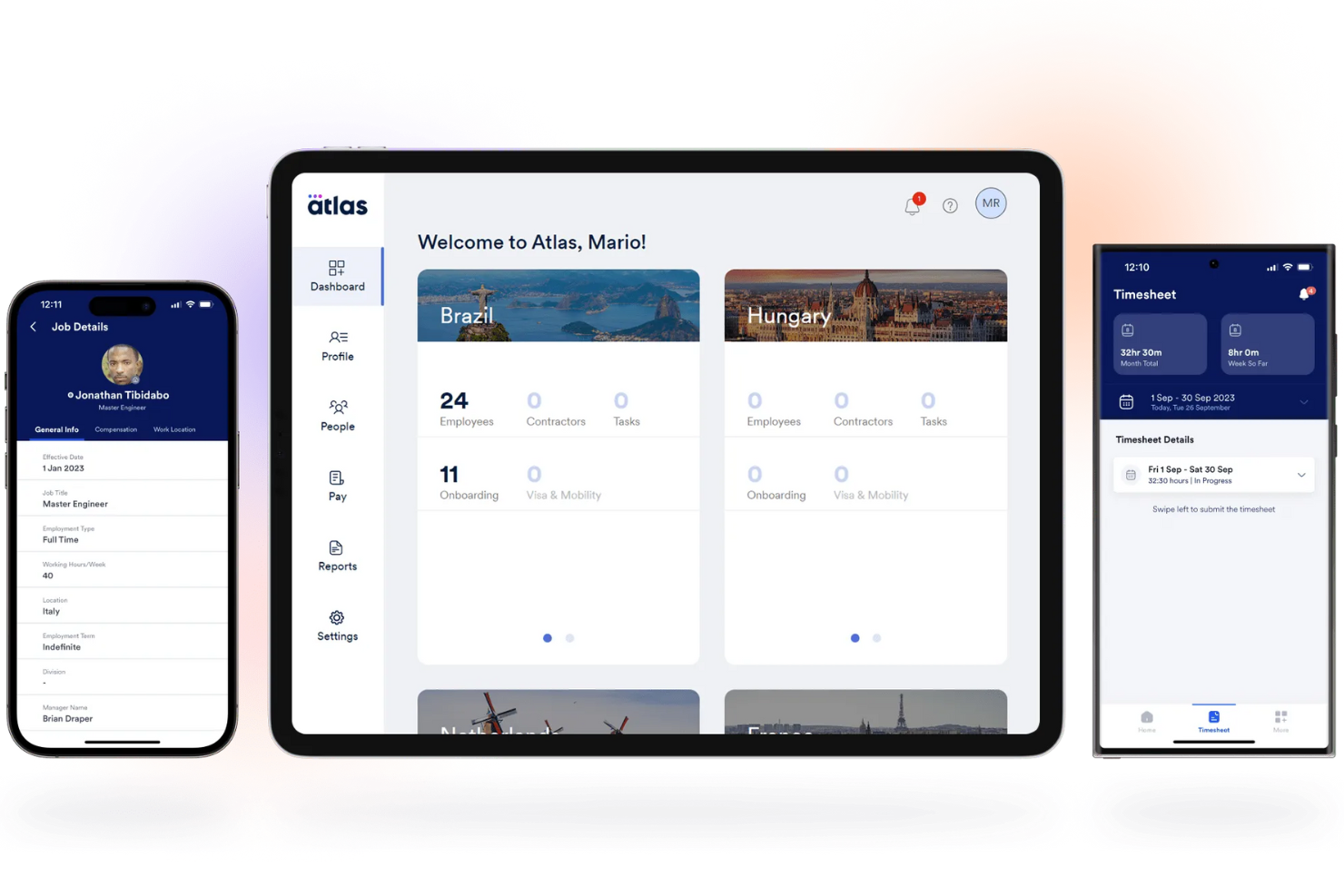
Atlas HXM è una piattaforma globale di risorse umane che aiuta le aziende a espandersi a livello internazionale gestendo assunzioni, paghe e conformità in diversi paesi. In qualità di Employer of Record (EOR) e Professional Employer Organization (PEO), consente alle aziende di assumere e gestire dipendenti in tutto il mondo senza la necessità di creare entità legali proprie.
Perché ho scelto Atlas HXM: Uno dei motivi per scegliere Atlas HXM come PEO è il suo approccio diretto alla gestione del capitale umano. A differenza dei PEO indiretti che si affidano a terze parti, Atlas possiede entità locali in oltre 160 paesi e gestisce direttamente tutte le attività HR. Questo modello diretto garantisce qualità e conformità costanti in varie regioni, coprendo aspetti come orario di lavoro, congedo parentale, malattia e cessazione del rapporto di lavoro.
Funzionalità principali & integrazioni:
Le funzionalità includono gestione del database dei dipendenti, gestione di orari, presenze e assenze, accesso dei dipendenti a documentazione, moduli, buste paga e benefit, gestione delle prestazioni e people analytics.
Le integrazioni includono un'API per integrazioni personalizzate.
Pros and Cons
Pros:
- Garantisce la conformità alle normative sul lavoro locali
- Fornisce l'elaborazione automatizzata delle paghe
- Offre analisi avanzate e reportistica in tempo reale
Cons:
- La piattaforma potrebbe offrire maggiori possibilità di personalizzazione
- L'app mobile è meno completa rispetto alla versione desktop

Ideale per la gestione globale delle paghe
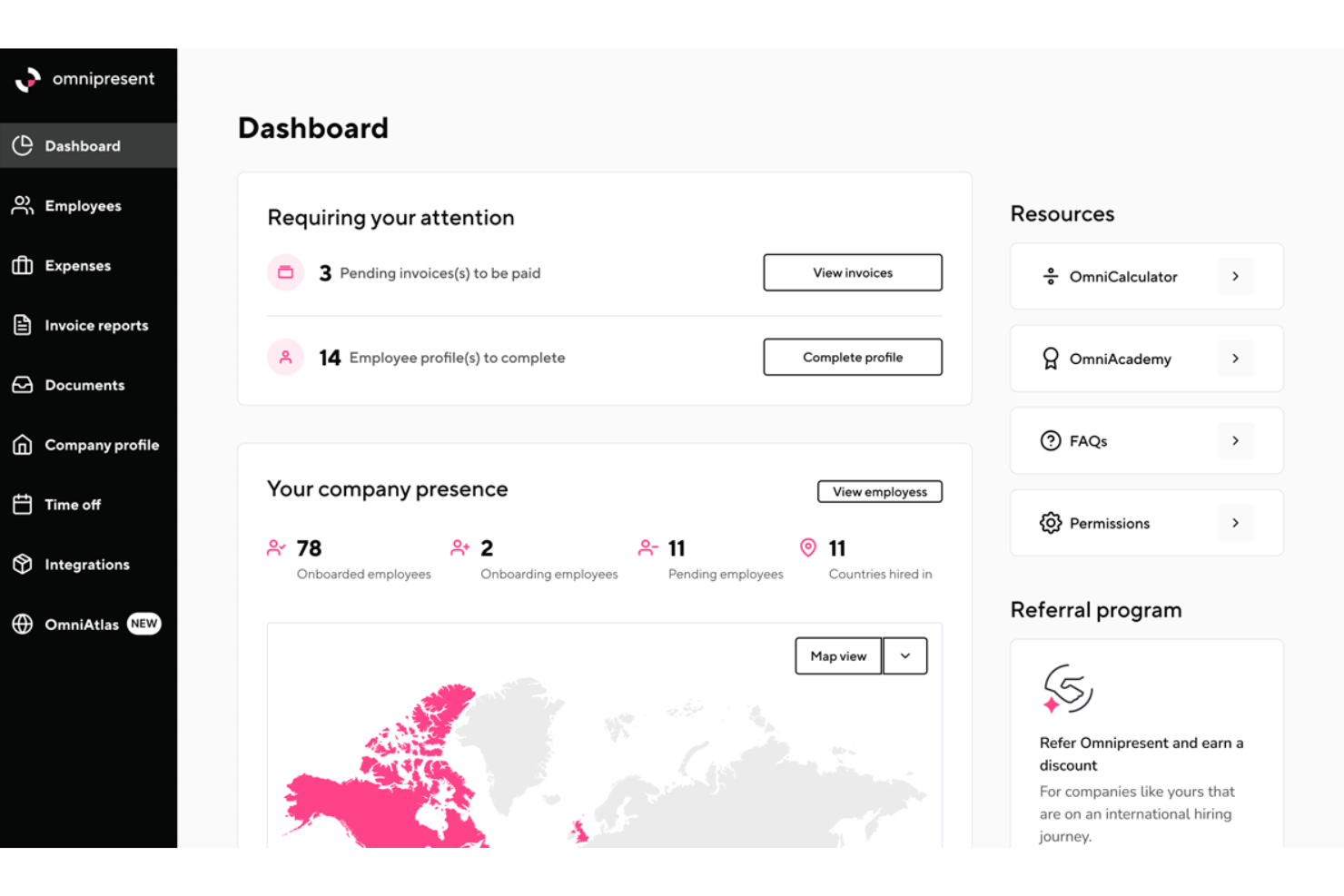
Omnipresent è una piattaforma globale per la gestione dell'occupazione che aiuta le aziende ad assumere e gestire team internazionali senza la necessità di creare entità locali. Gestendo attività amministrative complesse come paghe, benefit e conformità, Omnipresent ti permette di concentrarti sul tuo core business.
Perché ho scelto Omnipresent: Si occupano dei contratti di lavoro, garantendo il rispetto delle leggi locali sul lavoro, così non devi preoccuparti delle complessità legali. Ciò significa che puoi integrare rapidamente e con fiducia i dipendenti nei nuovi paesi. Un'altra caratteristica fondamentale è la gestione globale delle buste paga. Omnipresent si occupa dell'elaborazione delle paghe in più di 150 paesi, assicurando che i membri del tuo team siano pagati in modo accurato e puntuale, ovunque si trovino.
Funzionalità principali & integrazioni:
Le funzionalità includono conformità globale all'occupazione, gestione fiscale internazionale, amministrazione di benefit locali, portale self-service per i dipendenti, servizi di consulenza HR, gestione dei contratti di lavoro, supporto per visti e immigrazione, strumenti di coordinamento dei fusi orari, supporto multilingue, misure di sicurezza dei dati e report personalizzabili.
Le integrazioni includono i sistemi HRIS più diffusi.
Pros and Cons
Pros:
- Solida competenza locale nelle normative sull'occupazione
- Gestisce la conformità fiscale in diversi paesi
- Gestione semplice delle paghe per team globali da un'unica piattaforma
Cons:
- Il supporto in alcune regioni può risultare insufficiente
- Flessibilità limitata nella personalizzazione di alcuni pacchetti di benefit
Ideale per soluzioni HR avanzate

Insperity offre soluzioni HR complete su misura per aziende di tutte le dimensioni. Si distingue grazie alla sua tecnologia avanzata che supporta un'ampia gamma di funzioni HR.
Perché ho scelto Insperity: Ho scelto Insperity per le sue soluzioni HR ad alta tecnologia. Insperity si distingue poiché fornisce consulenza HR personalizzata e strumenti che semplificano i processi HR. Credo che Insperity sia particolarmente efficace per le aziende che cercano un approccio alla gestione delle risorse umane guidato dalla tecnologia.
Funzionalità e integrazioni principali:
Funzionalità includono gestione dei benefit per i dipendenti, gestione automatizzata delle buste paga e delle attività HR, strumenti per la conformità normativa e tecnologia per la gestione della forza lavoro. Insperity offre anche consulenza HR personalizzata e supporto da parte di un team dedicato di servizi HR.
Integrazioni includono ADP, Oracle, Sage e QuickBooks.
Pros and Cons
Pros:
- Soluzioni HR complete
- Tecnologia avanzata
- Servizi scalabili
Cons:
- Flessibilità di personalizzazione limitata
- Può risultare complesso per le piccole imprese

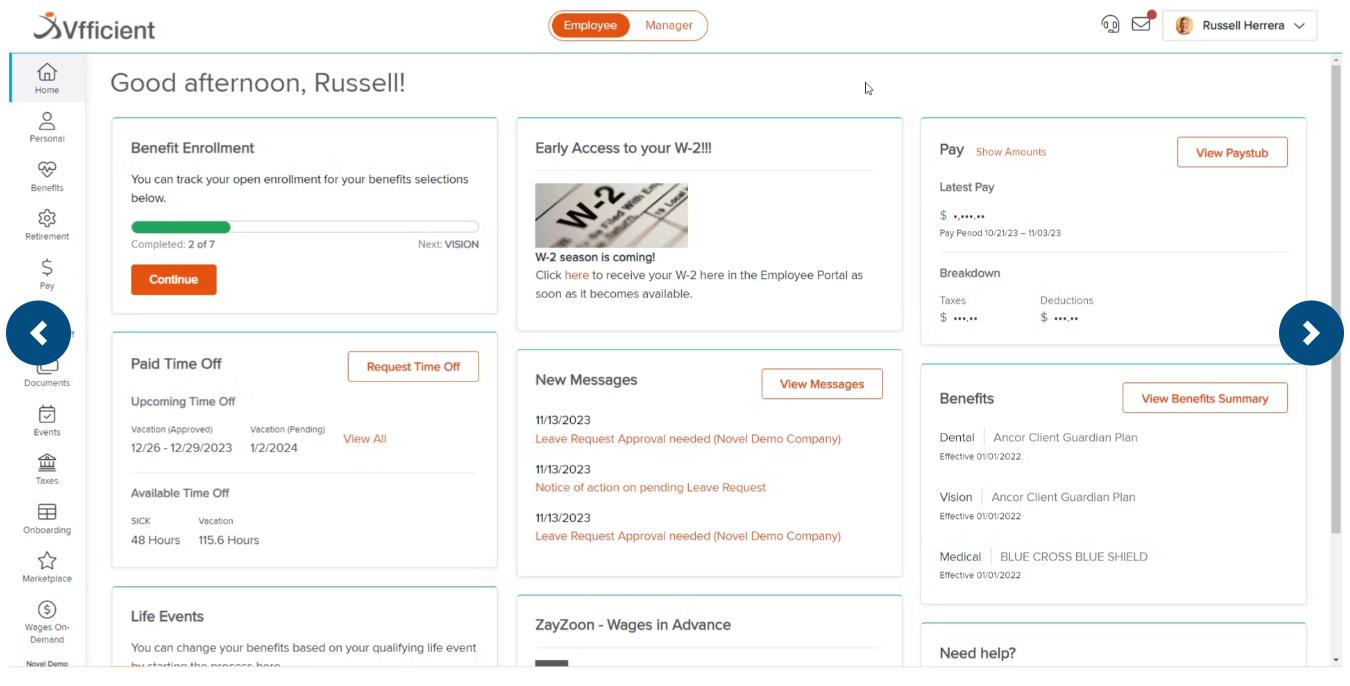
VensureHR offre una suite completa di servizi HR, tra cui amministrazione paghe, benefit, conformità e soluzioni di recruiting. Si distingue perché la sua gamma di servizi può essere adattata alle esigenze di ogni azienda.
Perché ho scelto VensureHR: Ho scelto VensureHR per questa lista per la sua capacità di offrire soluzioni aziendali personalizzabili e scalabili, caratteristica che lo differenzia da altri software PEO. La flessibilità di VensureHR nel creare soluzioni su misura per le specifiche necessità aziendali garantisce che imprese di ogni dimensione possano beneficiare dei suoi servizi. VensureHR offre un'ampia gamma di servizi che possono essere adattati alle esigenze di qualsiasi azienda.
Caratteristiche principali e integrazioni:
Le funzionalità includono servizi HR, amministrazione delle paghe, benefit per i dipendenti, gestione del rischio e della conformità. Offre anche soluzioni di recruiting progettate per una rapida scalabilità.
Le integrazioni includono Namely, Prism HR, Papaya Global, Solvo Global e KPMG Spark.
Pros and Cons
Pros:
- Soluzioni personalizzabili
- Servizi scalabili
- Supporto HR completo
Cons:
- Flessibilità di personalizzazione limitata
- Il sistema potrebbe essere più intuitivo


CoAdvantage PEO offre servizi completi di gestione delle risorse umane, compresi elaborazione paghe, benefit, conformità e relazioni con i dipendenti. Si distingue per l'accesso a benefit in stile Fortune-500 a tariffe accessibili, risultando una scelta valida per piccole e medie imprese.
Perché ho scelto CoAdvantage PEO: Ho inserito CoAdvantage PEO nella lista perché offre benefit in stile Fortune-500 a tariffe accessibili, un vantaggio per le piccole e medie imprese. I servizi HR dell'azienda, compresi paghe, benefit e conformità, la rendono un partner affidabile per le aziende che desiderano semplificare le operazioni HR e concentrarsi sulla crescita.
Caratteristiche e integrazioni principali:
Caratteristiche includono accesso a benefit in stile Fortune-500 e gestione completa delle paghe. Sono inclusi anche gestione dei rischi, servizi di conformità e tecnologia HR avanzata per attività HR sicure ed efficienti.
Integrazioni includono QuickBooks, ADP, Gusto, Paychex, BambooHR, Zenefits, Workday, SAP SuccessFactors, Namely e Kronos.
Pros and Cons
Pros:
- Servizi HR completi
- Accesso a benefit in stile Fortune-500
- Tecnologia HR avanzata
Cons:
- Tempi di risposta lenti sui problemi
- Potrebbe essere richiesto un numero minimo di dipendenti


Global PEO Services è noto per l'assunzione internazionale rapida senza la necessità di creare entità legali. Questo consente alle aziende di assumere dipendenti rapidamente e in modo conforme in oltre 170 paesi senza dover costituire filiali locali.
Perché ho scelto Global PEO Services: Ho scelto Global PEO Services per la sua capacità di assumere rapidamente candidati a livello globale. Questo strumento si distingue per le sue funzionalità di gestione HR, payroll, tasse e conformità, che sono fondamentali per le aziende che vogliono espandersi a livello internazionale. La sua piattaforma tecnologica, Mihi, offre anche la gestione di orari, presenze e benefit.
Funzionalità e integrazioni principali:
Funzionalità includono supporto HR completo dalla selezione al pensionamento. Include anche contratti di lavoro conformi alla legge, approvvigionamento dei benefit e una soluzione SaaS per la gestione di orari, presenze e benefit. La piattaforma assicura inoltre la conformità con le normative locali e offre supporto globale per mobilità e immigrazione.
Integrazioni includono BambooHR, Workable, ADP, Paychex e QuickBooks.
Pros and Cons
Pros:
- Supporto HR completo
- Gestione della conformità globale
- Piattaforma tecnologica proprietaria
Cons:
- Processo di onboarding complesso
- Personalizzazione limitata

Infiniti HR fornisce soluzioni complete di Organizzazione Professionale dei Datori di Lavoro (PEO), inclusi servizi di gestione delle risorse umane, paghe e benefit. Sfrutta il potere d'acquisto su larga scala per ridurre i costi e migliorare l'offerta di servizi.
Perché ho scelto Infiniti HR: Ho scelto Infiniti HR per la sua capacità di offrire alle piccole imprese i vantaggi normalmente riservati alle grandi aziende. Questo strumento si distingue per la sua suite completa di servizi, che include gestione delle risorse umane, paghe e benefit, tutti progettati per ridurre la responsabilità del datore di lavoro e stabilizzare i costi del lavoro. Ritengo che Infiniti HR sia ideale per le piccole imprese in crescita perché consente loro di accedere a servizi di alta qualità e a pacchetti di benefit competitivi che altrimenti sarebbero inaccessibili.
Funzionalità e integrazioni principali:
Le funzionalità includono una suite completa di servizi HR, gestione delle paghe e amministrazione dei benefit. Infiniti HR offre anche gestione HR specifica per stato, supporto HR on-demand e accesso a piani sanitari, dentistici, oculistici, d'invalidità, vita e 401k di livello Fortune 500.
Le integrazioni includono QuickBooks, Sage 50 Accounting, Slack, Google Drive e Dropbox.
Pros and Cons
Pros:
- Supporto HR on-demand
- Gestione HR specifica per stato
- Benefit di livello Fortune 500
Cons:
- Curva di apprendimento per i nuovi utenti
- Capacità di reportistica limitata
Altri software PEO
Di seguito è riportato un elenco di altri software PEO che ho selezionato, ma che non sono entrati nella lista dei migliori. Vale comunque la pena dare loro un’occhiata!
- XcelHR
Ideale per ambienti normativi complessi
- Zempleo
Ideale per aziende con personale eterogeneo
- Rippling
Ideale per fornire approfondimenti utili
- Native Teams
Ideale per assumere globalmente a costi contenuti
- Worksuite
Ideale per grandi team di freelance


Recensioni correlate sui software HR
Se non hai ancora trovato ciò che cerchi, dai un'occhiata a questi altri strumenti correlati che abbiamo testato e valutato.
- Software per le buste paga
- Software per il recruiting
- Servizi di datore di lavoro registrato
- Sistemi di tracciamento dei candidati
- Software per la gestione della forza lavoro
- Sistemi di gestione dell'apprendimento
Come Valuto i Software PEO
Valuto i software PEO su due livelli: la base che ogni fornitore deve soddisfare—status CPEO, struttura di co-impiego, gestione delle paghe e benefit—e i fattori distintivi che fanno emergere la soluzione più adatta.
Funzionalità di Base (Requisiti Minimi per Questa Lista)
Quando seleziono gli strumenti per la mia lista, valuto ciascuno su una scala da 0 (la funzionalità non è offerta) a 5 (eccelle in quest'area) per ogni funzionalità di base elencata di seguito. Poi calcolo il punteggio totale dello strumento in percentuale. Ogni strumento deve raggiungere un punteggio minimo totale del 65% per poter essere incluso.
- Struttura di Co-Impiego: Verifico se il fornitore opera con un vero modello di co-impiego, con responsabilità condivise tra datori di lavoro, condivisione FEIN e status di PEO certificato IRS (CPEO) o accreditamento ESAC.
- Gestione Paghe & Amministrazione Fiscale: Elaborazione delle paghe multi-stato, invio automatico delle tasse tramite il codice fiscale del PEO, e generazione dei moduli di fine anno sono elementi che valuto qui, soprattutto per team distribuiti.
- Accesso ai Benefit per i Dipendenti: Analizzo la completezza del piano benefit principale—sanità, odontoiatria, oculistica, piano pensione e opzioni accessorie—e se la capacità contrattuale aggregata offre varietà di piani anche ai piccoli team.
- Consulenza in Conformità HR: Verifico se il fornitore offre aggiornamenti normativi specifici per ogni stato, creazione di manuali aziendali e accesso a consulenti, fattori essenziali per team distribuiti in più giurisdizioni.
- Copertura per Infortuni sul Lavoro: Valuto se il PEO sponsorizza una polizza generale per infortuni sul lavoro includendo gestione dei sinistri, risorse per la sicurezza e valutazione dei rischi nel pacchetto.
- Strumenti per tutto il Ciclo di Vita dei Dipendenti: Dall’onboarding con raccolta documenti tramite firma elettronica fino all’uscita e ai portali self-service, verifico quanto bene la piattaforma gestisce le attività HR quotidiane.
Una volta che ho una lista di strumenti che soddisfano i criteri, considero ciò che distingue ogni piattaforma.
Fattori Distintivi (Cosa Rende Diversi i Fornitori)
Ecco come confronto e metto a confronto i diversi fornitori:
Funzionalità Esclusive
Un consulente HR dedicato che conosce la tua azienda cambia l’esperienza. Al posto di un servizio clienti generico, hai una persona in grado di guidarti in una risoluzione delicata di un rapporto di lavoro o nell'elaborazione di una nuova politica di congedo. Valuto anche se un PEO supporta assunzioni internazionali tramite EOR o gestione paghe globale, aspetto importante per i team che vogliono espandersi oltre il proprio paese. L'assistenza per i crediti d'imposta in R&S è un altro fattore che cerco, perché molte startup perdono crediti legati alle paghe senza una guida esperta.
Oltre le Funzionalità
La struttura dei prezzi è molto importante nei PEO. Valuto se i fornitori addebitano un costo per dipendente al mese o come percentuale delle paghe, dato che il modello giusto dipende dal numero dei collaboratori e dalla retribuzione media. L’implementazione è un altro aspetto che guardo da vicino: passare a un nuovo PEO a metà anno può interrompere iscrizione ai benefit e dichiarazioni fiscali, quindi verifico se il fornitore mette a disposizione un team dedicato di migrazione. Considero anche quanto ciascun PEO si integri con strumenti come QuickBooks o Xero, perché il flusso semplificato dei dati tra paghe e contabilità fa risparmiare ore a fine mese.
Come scegliere un software PEO
Mentre affronti il tuo processo personalizzato di selezione del software, tieni presenti i seguenti aspetti.
| Fattore | Cosa considerare |
|---|---|
| Servizi offerti | Verifica se il PEO fornisce elaborazione delle buste paga, amministrazione dei benefit, supporto alla conformità, gestione dei rischi e consulenza HR, tutto in un'unica soluzione. |
| Competenza in materia di conformità | Cerca competenze in materia di leggi sul lavoro federali, statali e locali, soprattutto se operi in più stati o in settori altamente regolamentati. |
| Opzioni di benefit | Valuta la qualità, la varietà e il rapporto qualità-prezzo dei benefit a cui il PEO può dare accesso, inclusi assicurazione sanitaria, piani pensionistici e vantaggi aggiuntivi. |
| Piattaforma tecnologica | Assicurati che il software sia intuitivo, ottimizzato per i dispositivi mobili e integrabile con gli strumenti che già utilizzi (ad esempio, sistemi contabili, ATS o sistemi di rilevazione delle presenze). |
| Modello di prezzi | Comprendi come sono strutturate le tariffe: per dipendente, a tariffa fissa o come percentuale del monte salari, e assicurati che siano in linea con il tuo budget. |
| Scalabilità | Considera se il PEO può crescere insieme alla tua azienda, supportare team da remoto e adattarsi alla tua espansione in nuovi stati o Paesi. |
| Livello di supporto | Cerca l'accesso a specialisti HR o responsabili dell'account dedicati, oltre a un'assistenza clienti reattiva e supporto durante l'onboarding. |
| Reputazione e certificazioni | Verifica che il PEO sia accreditato (ad esempio, ESAC o certificato dall'IRS) e abbia una solida esperienza con aziende simili alla tua. |
| Esperienza dei dipendenti | Scegli una soluzione che offra ai dipendenti un semplice accesso self-service per l'onboarding, l'iscrizione ai benefit e la consultazione delle buste paga o dei moduli fiscali. |
| Sicurezza dei dati e conformità | Assicurati che la piattaforma utilizzi la crittografia, offra un'archiviazione sicura dei dati e rispetti le normative sulla privacy dei dati per proteggere le informazioni sensibili dei dipendenti. |


Tendenze nei software PEO
Il software PEO sta cambiando in modo significativo, trasformando il modo in cui le aziende gestiscono le risorse umane e le buste paga.
Con l'avanzare della tecnologia, è essenziale rimanere informati sugli ultimi sviluppi. Ecco alcune tendenze chiave da monitorare attentamente, che potrebbero avere un impatto sulla tua organizzazione:
- Piattaforme HR tutto-in-uno: i PEO moderni offrono piattaforme unificate che combinano elaborazione delle buste paga, benefit, inserimento, rilevazione delle presenze e gestione delle prestazioni, riducendo al minimo la necessità di strumenti aggiuntivi.
- Analisi e automazione basate sull'AI: l'AI contribuisce ad automatizzare gli avvisi di conformità, i controlli degli errori nelle buste paga e le analisi dei dipendenti, facendo risparmiare tempo e riducendo i rischi.
- Portali per i dipendenti con funzionalità autonome: cruscotti intuitivi consentono ai dipendenti di accedere alle buste paga, richiedere permessi, iscriversi ai benefit e aggiornare le proprie informazioni senza il supporto delle risorse umane.
- Progettazione ottimizzata per i dispositivi mobili: le piattaforme PEO diventano sempre più adatte all'uso da mobile per supportare i team da remoto e ibridi che gestiscono le attività HR in mobilità.
- Cruscotti e report personalizzabili: oggi i datori di lavoro ottengono analisi più mirate, come tassi di ricambio del personale, andamento dell'organico e costo per assunzione, direttamente dalla piattaforma.
- Monitoraggio della conformità integrato: il software PEO include sempre più spesso il monitoraggio della conformità in tempo reale per aspetti come leggi sul lavoro, requisiti salariali e classificazione dei dipendenti.
- Funzionalità per la forza lavoro globale: alcuni PEO stanno ampliando i propri servizi con soluzioni in stile EOR, supportando le assunzioni internazionali e la conformità attraverso lo stesso stack tecnologico.
- Integrazione con altri strumenti: i collegamenti perfettamente integrati con software di contabilità (come QuickBooks), Slack, ATS e strumenti per la gestione delle prestazioni stanno diventando uno standard.
- Focus sull'esperienza dei dipendenti: l'esperienza utente sta migliorando: aspettati inserimenti più fluidi, cruscotti personalizzati per i benefit e sondaggi periodici per mantenere i team coinvolti.
Che cos'è il software PEO?
Il software PEO è una piattaforma utilizzata dalle Organizzazioni professionali dei datori di lavoro (PEO) per fornire servizi HR esternalizzati a piccole e medie imprese. Combina la tecnologia con il supporto al co-impiego, gestendo attività come l'elaborazione delle buste paga, la presentazione delle dichiarazioni fiscali, l'amministrazione dei benefit, la conformità e la gestione dei rischi.
Collaborando con una PEO, le aziende possono accedere a benefit migliori e a una consulenza HR qualificata senza dover creare un team HR interno completo. Il software semplifica questi processi, offrendo sia ai datori di lavoro sia ai dipendenti un modo semplice per gestire le attività HR in un unico sistema centralizzato.
Funzionalità del software PEO
Quando si sceglie un software PEO, è essenziale riconoscere le funzionalità principali che consentiranno di gestire le attività HR in modo più efficiente. Ecco le funzionalità più importanti da ricercare.
- Gestione delle buste paga e delle imposte: automatizza l'elaborazione delle buste paga, i depositi diretti e la presentazione delle dichiarazioni fiscali a tutti i livelli. Aiuta a evitare errori e a garantire la conformità ai requisiti dell'IRS e dei singoli stati.
- Amministrazione dei benefit: gestisce l'iscrizione dei dipendenti ai piani sanitari, dentistici, oculistici e pensionistici. I dipendenti possono selezionare autonomamente i benefit e gestire direttamente le modifiche nel sistema.
- Portale autonomo per i dipendenti: consente ai dipendenti di visualizzare le buste paga, aggiornare le informazioni personali, richiedere permessi PTO e accedere alle politiche aziendali. Riduce il tempo dedicato alle attività amministrative HR e aumenta la trasparenza.
- Strumenti per la conformità HR: invia avvisi sulle modifiche alla legislazione del lavoro, aiuta a gestire le politiche e archivia documenti importanti come manuali e accordi firmati. Riduce il rischio legale per l'azienda.
- Monitoraggio dell'orario e delle presenze: consente ai dipendenti di registrare entrate e uscite, annotare le ore lavorate e inviare richieste di assenza. I dati si sincronizzano con il sistema paghe per calcolare con precisione le retribuzioni.
- Inserimento e uscita dei dipendenti: semplifica le assunzioni con lettere di offerta digitali, liste di controllo delle attività e firma e raccolta dei documenti. Supporta inoltre un'uscita ordinata con liste di controllo di fine rapporto e strumenti per la conformità.
- Report e cruscotti: offre dati in tempo reale su buste paga, ricambio del personale, organico e utilizzo dei benefit. Aiuta i responsabili a prendere decisioni HR e finanziarie più consapevoli.
- Accesso da dispositivi mobili: dipendenti e amministratori possono accedere agli strumenti ovunque tramite app mobili o portali ottimizzati per dispositivi mobili. È utile per i team da remoto o per i lavoratori sul campo.
- Integrazioni: si collega a strumenti di terze parti come software di contabilità, piattaforme ATS o Slack. Molti offrono API aperte per flussi di lavoro personalizzati e automazioni.
Vantaggi del software PEO
Sfruttando il software PEO, le aziende possono esternalizzare attività HR complesse e concentrarsi sulle proprie attività principali. Di seguito sono riportati cinque vantaggi del software PEO per utenti e organizzazioni.
- Processi HR semplificati: il software PEO automatizza e semplifica attività HR come l'elaborazione delle buste paga, l'amministrazione dei benefit e la gestione della conformità, riducendo il carico amministrativo.
- Accesso a benefit competitivi: riunendo i dipendenti di più aziende, le PEO possono offrire pacchetti di benefit di alta qualità a tariffe competitive, simili a quelli disponibili per le grandi aziende.
- Conformità e gestione dei rischi: il software PEO aiuta le aziende a rispettare le normative federali e statali sul lavoro in continua evoluzione, riducendo il rischio di sanzioni costose e problemi legali.
- Risparmio sui costi: esternalizzare le funzioni HR a una PEO può portare a risparmi significativi riducendo la necessità di personale HR interno e minimizzando gli errori nell'amministrazione delle buste paga e dei benefit.
- Migliore esperienza dei dipendenti: il software PEO offre ai dipendenti l'accesso a benefit migliori e a servizi HR semplificati, migliorando la soddisfazione complessiva sul lavoro e i tassi di fidelizzazione.
Il software PEO è uno strumento prezioso per aziende di qualsiasi dimensione e offre una serie di vantaggi che possono contribuire a semplificare le operazioni, ridurre i costi e migliorare la soddisfazione dei dipendenti.
Costi e prezzi del software PEO
Questa sezione fornisce una stima dei piani e dei costi medi del software PEO. I dati si basano sugli standard del settore e sui modelli di prezzo più comuni.
Tabella di confronto dei piani del software PEO
| Tipo di piano | Prezzo medio | Funzionalità comuni |
| Piano gratuito | $0 | Strumenti HR di base, gestione limitata dei dipendenti e reportistica di base |
| Piano personale | $40 - $80 al mese | Elaborazione delle buste paga, amministrazione di base dei benefit e supporto alla conformità |
| Piano aziendale | $80 - $160 al mese | Gestione avanzata delle buste paga, gestione completa dei benefit, self-service per i dipendenti e strumenti per la conformità |
| Piano per grandi imprese | $160 - $250 al mese | Soluzione HR completa, analisi avanzate, supporto dedicato e integrazioni personalizzate |
Domande frequenti sul software PEO
Ecco alcune risposte alle domande frequenti che potresti avere sul software PEO e sul suo funzionamento.
In che modo il software PEO è diverso dal normale software per le risorse umane?
Il software PEO viene offerto nell’ambito di un rapporto di co-datorialità, in cui il PEO diventa il datore di lavoro ufficiale ai fini fiscali e dei benefit. A differenza del software per le risorse umane autonomo, include l’accesso a piani di benefit, supporto per la conformità e competenze in materia di risorse umane, oltre agli strumenti per la gestione delle buste paga e delle attività amministrative. Il normale software per le risorse umane è solo uno strumento, mentre un PEO combina software e servizi professionali.
In che modo il software PEO aiuta a gestire la conformità?
Il software PEO aiuta a gestire la conformità fornendo strumenti e risorse per garantire che la tua azienda rispetti le leggi e le normative sul lavoro. Ciò include l’invio automatizzato delle dichiarazioni fiscali, la generazione di report sulla conformità e il monitoraggio delle modifiche normative. Il software può anche offrire indicazioni sulle migliori pratiche per le politiche e le procedure relative alle risorse umane, aiutandoti a evitare problemi legali. Inoltre, alcuni software PEO includono l’accesso a esperti legali in grado di fornire consulenza e supporto su questioni complesse di conformità.
Il software PEO può gestire le buste paga e la conformità a livello internazionale?
Sì, alcune soluzioni software PEO sono progettate per gestire le buste paga e la conformità a livello internazionale. Queste soluzioni offrono funzionalità come l’elaborazione delle buste paga in più valute, la conformità alle leggi locali sul lavoro e la gestione dei benefit per i dipendenti internazionali. Forniscono inoltre strumenti per gestire i dati della forza lavoro globale e garantire la conformità alle normative internazionali, come il GDPR. Quando scegli un software PEO per le attività internazionali, cerca fornitori con una solida esperienza nella gestione globale delle buste paga e della conformità.
In che modo il software PEO si integra con gli altri strumenti aziendali?
Il software PEO offre in genere funzionalità di integrazione con vari strumenti aziendali, come software di contabilità, sistemi CRM e strumenti per la gestione dei progetti. Queste integrazioni consentono il trasferimento e la sincronizzazione senza interruzioni dei dati tra i sistemi, riducendo la necessità di inserire manualmente i dati e minimizzando gli errori. Ad esempio, l’integrazione del software PEO con un software di contabilità può semplificare l’elaborazione delle buste paga e la reportistica finanziaria. Quando valuti un software PEO, verifica le integrazioni disponibili e assicurati che siano compatibili con gli strumenti che utilizzi attualmente.
Quali sono i potenziali svantaggi dell'utilizzo di un software PEO?
Sebbene il software PEO offra numerosi vantaggi, è necessario considerare anche alcuni potenziali svantaggi.
- Costo: I servizi PEO possono essere costosi, soprattutto per le piccole imprese con budget limitati. È importante valutare i costi rispetto ai vantaggi e assicurarsi che il software offra un buon rapporto qualità-prezzo. (Consulta i servizi PEO per le piccole imprese per alcune opzioni convenienti.)
- Perdita di controllo: L’esternalizzazione delle attività relative alle risorse umane a un PEO può comportare la perdita del controllo diretto su alcune funzioni HR. Le aziende devono assicurarsi di sentirsi a proprio agio con questo accordo e mantenere una comunicazione chiara con il fornitore PEO.
- Complessità: Il rapporto tra un’azienda e un PEO può essere complesso e richiedere tempo per comprendere appieno i termini e le condizioni dell’accordo di servizio.
- Dipendenza dal fornitore: Affidarsi a un fornitore PEO per importanti funzioni relative alle risorse umane significa che eventuali problemi del fornitore, come interruzioni del servizio o modifiche dei termini, possono influire sulle attività aziendali.
Come posso valutare l'assistenza clienti offerta dai fornitori di software PEO?
Quando valuti l’assistenza clienti di un software, considera i seguenti fattori.
- Disponibilità: Verifica se l’assistenza clienti è disponibile 24 ore su 24, 7 giorni su 7, oppure in orari specifici. Assicurati che gli orari di assistenza siano in linea con le esigenze della tua azienda.
- Canali di assistenza: Cerca diversi canali di assistenza, come telefono, e-mail, chat dal vivo e risorse online (ad es. base di conoscenze, domande frequenti, tutorial).
- Tempi di risposta: Informati sul tempo medio di risposta alle richieste di assistenza e sull’eventuale presenza di garanzie per un supporto tempestivo.
- Competenza: Assicurati che il team di assistenza disponga delle competenze necessarie per affrontare questioni complesse relative alle risorse umane e alla conformità.
- Recensioni dei clienti: Leggi recensioni e testimonianze di altri utenti per valutare le loro esperienze con l’assistenza clienti del fornitore.
Quali vantaggi offre il software PEO nella gestione fiscale?
Il software PEO include in genere sistemi integrati di gestione fiscale che automatizzano la presentazione delle dichiarazioni fiscali federali, statali e locali, riducendo al contempo i tempi di elaborazione delle buste paga. Questi sistemi forniscono inoltre report di controllo e un monitoraggio continuo della conformità per ridurre al minimo i rischi e le sanzioni legati alle imposte. Consolidando la gestione fiscale in un’unica piattaforma, le soluzioni PEO aiutano le aziende a evitare errori costosi e a rimanere aggiornate sulle normative fiscali in costante evoluzione nelle diverse giurisdizioni, un aspetto particolarmente prezioso per le aziende con dipendenti in più stati.