I 10 migliori software HCM: recensioni e confronto nel 2026

10 Elenco dei migliori software HCM


I migliori software HCM (Human Capital Management) riuniscono tutte le esigenze delle risorse umane — assunzioni, inserimento, gestione delle paghe, prestazioni e cessazione del rapporto di lavoro — in un unico posto. Centralizzando tutto, puoi ridurre il lavoro amministrativo, garantire la conformità e ottenere le informazioni utili necessarie per prendere decisioni migliori sulla tua forza lavoro.
Invece di affidarti a strumenti e fogli di calcolo scollegati, il software HCM giusto dovrebbe automatizzare le attività ripetitive, mantenere accurati i tuoi dati e offrirti analisi in tempo reale che migliorino sia l'esperienza dei dipendenti sia i risultati aziendali.
Ho trascorso anni a testare e implementare piattaforme HCM per aziende di tutte le dimensioni e ho raccolto le migliori opzioni, facili da usare, scalabili e progettate per sostenere produttività e crescita. In questa guida troverai i migliori software HCM del 2026, in linea con il tuo budget, le dimensioni del team e i tuoi obiettivi.
Perché fidarsi delle nostre recensioni sui software
Il nostro team testa e recensisce software dal 2012. In quanto esperti HR noi stessi, sappiamo quanto sia difficile — e importante — scegliere il software giusto.
Per questa guida, abbiamo valutato gli strumenti attraverso test pratici e ricerche indipendenti, assegnando un punteggio agli strumenti in base ai nostri criteri di selezione. Ci basiamo inoltre sulle competenze di leader di pensiero del settore e di professionisti HR attivi.
Le nostre recensioni riflettono il nostro giudizio editoriale umano, non un discorso di vendita.
Revisori esperti:
Tabella comparativa dei software HCM
Questa tabella comparativa riassume i dettagli dei prezzi delle mie migliori selezioni di software HCM.
| Tool | Best For | Trial Info | Price | ||
|---|---|---|---|---|---|
| 1 | Ideale per l'inserimento dei dati payroll guidato dai dipendenti | Prezzo su richiesta | Website | ||
| 2 | Ideale per gestire team globali | Demo gratuita disponibile | Da $5/dipendente/mese | Website | |
| 3 | Ideale per l'automazione delle paghe | Prova gratuita disponibile | Da $99/mese + $5/dipendente/mese | Website | |
| 4 | Ideale per HR, paghe e integrazioni in un’unica soluzione | Demo gratuita disponibile | Prezzo su richiesta | Website | |
| 5 | Ideale per la gestione delle retribuzioni | Demo gratuita disponibile | Prezzi su richiesta | Website | |
| 6 | Ideale per assistenza clienti 24/7 | Demo gratuita disponibile | A partire da $8/dipendente/mese + quota base di $50/mese | Website | |
| 7 | Ideale per il supporto ai dipendenti a ore | Demo gratuita disponibile | Da $49/mese + $6/mese per persona | Website | |
| 8 | Ideale per l'accessibilità da mobile | Versione di prova gratuita disponibile | Da $125/mese (fatturato annualmente) | Website | |
| 9 | Ideale per onboarding personalizzato | Demo gratuita disponibile | A partire da $8/dipendente/mese | Website | |
| 10 | Ideale per il coinvolgimento dei dipendenti | Prova gratuita di 14 giorni + demo gratuita disponibile | Da $4/utente/mese | Website |


Recensione dei migliori software HCM
Di seguito trovi i miei riepiloghi dettagliati dei migliori software HCM inclusi nel mio elenco. Le mie recensioni offrono un’analisi approfondita delle funzionalità principali, dei pro e dei contro, delle integrazioni e dei casi d’uso ideali di ogni strumento, per aiutarti a trovare quello più adatto a te.

Paycom
Ideale per l'inserimento dei dati payroll guidato dai dipendenti
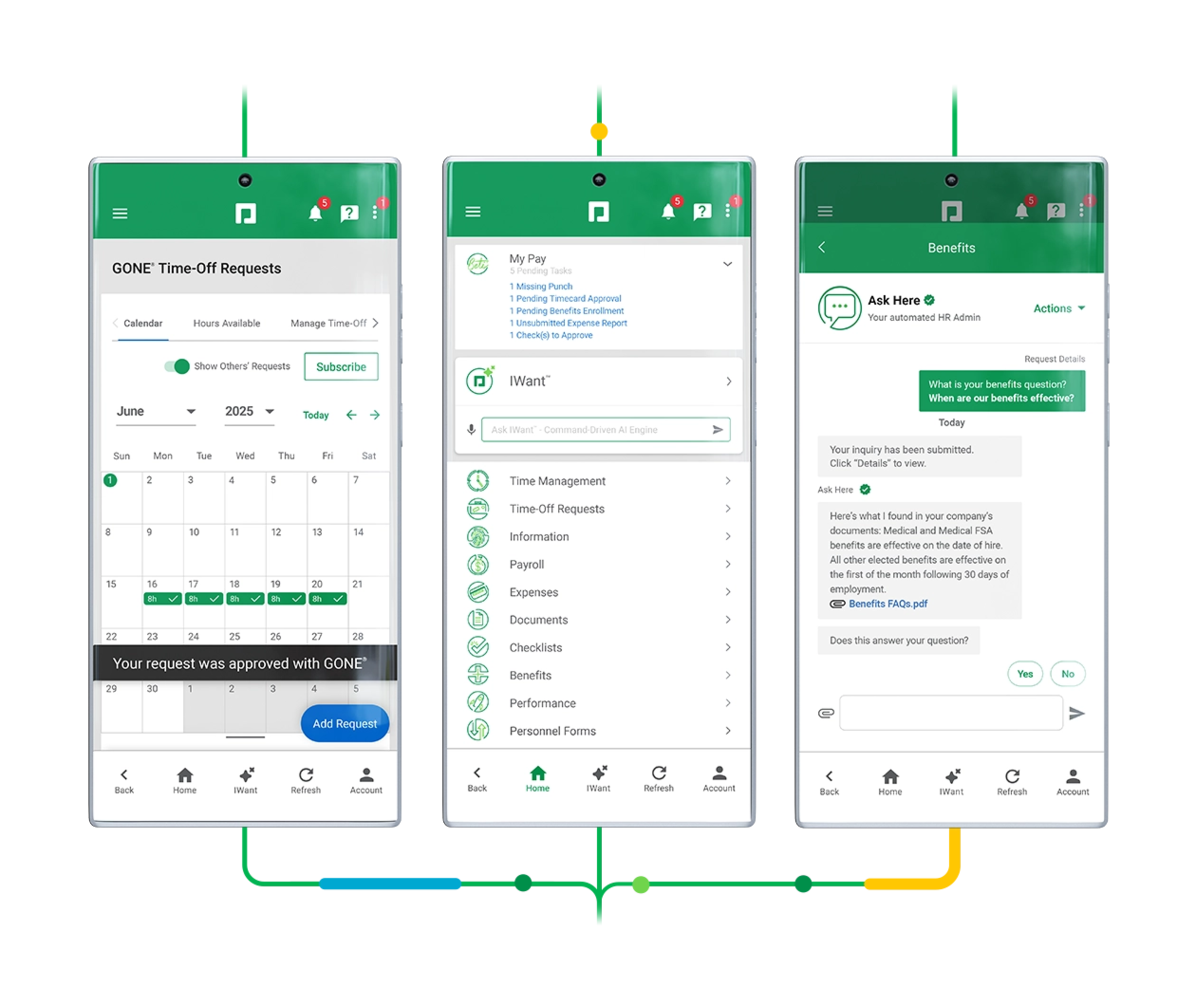
Paycom è una piattaforma HCM a database unico che copre buste paga, gestione HR, acquisizione e gestione dei talenti, oltre al monitoraggio di tempi e presenze, tutto in un unico sistema unificato.
Per Chi è Paycom?
Paycom è particolarmente adatto per organizzazioni statunitensi di medie e grandi dimensioni che desiderano una piattaforma unica per gestire buste paga, HR e dati sulla forza lavoro senza dover gestire più sistemi scollegati.
Perché Ho Scelto Paycom
Ho scelto Paycom tra i migliori perché rivoluziona il modello tradizionale di elaborazione delle buste paga. Il vero punto di forza è Beti, lo strumento di payroll guidato dai dipendenti di Paycom, che permette ai dipendenti di inserire, revisionare e approvare i propri dati prima dell'invio. In pratica, questo significa che il mio team individua gli errori alla fonte, invece di scoprirli dopo. Apprezzo anche il fatto che Beti guida i dipendenti attraverso una checklist delle attività in sospeso, assicurando che nulla venga trascurato prima della chiusura del ciclo paghe.
Funzionalità Principali di Paycom
- Gestione dei benefit: I dipendenti si iscrivono e aggiornano autonomamente i propri benefit direttamente sulla piattaforma, riducendo lo scambio di informazioni con l'HR.
- Recruiting: Pubblica offerte, traccia i candidati e gestisci il processo di assunzione dallo stesso sistema dedicato anche a buste paga e HR.
- Valutazioni delle performance: Conduci cicli di valutazione personalizzabili con auto-valutazione, valutazione del manager e monitoraggio degli obiettivi integrati.
- GONE: Approvazione o rifiuto automatico delle richieste di ferie in base a regole prestabilite, eliminando la necessità di una revisione manuale da parte dei manager.
Integrazioni di Paycom
Paycom non offre API pubbliche per integrazioni dirette. La piattaforma si basa su un'architettura a database unico, il che significa che la maggior parte delle funzioni HR, payroll e gestione dei talenti sono nativamente interne, senza dipendere da collegamenti di terze parti. Lo strumento GL Concierge associa i dati delle buste paga al tuo libro mastro generale per l'esportazione verso sistemi di contabilità. Per i team che necessitano di collegare Paycom a strumenti esterni, servizi middleware di terze parti come Finch e Merge offrono connessioni API unificate.
Pros and Cons
Pros:
- Database unico che elimina la duplicazione dei dati
- I dipendenti revisionano e approvano le proprie buste paga
- Specialista di supporto dedicato assegnato per ogni account
Cons:
- Integrazioni con terze parti limitate per scelta progettuale
- Creare report personalizzati può risultare difficile

Deel HR
Ideale per gestire team globali
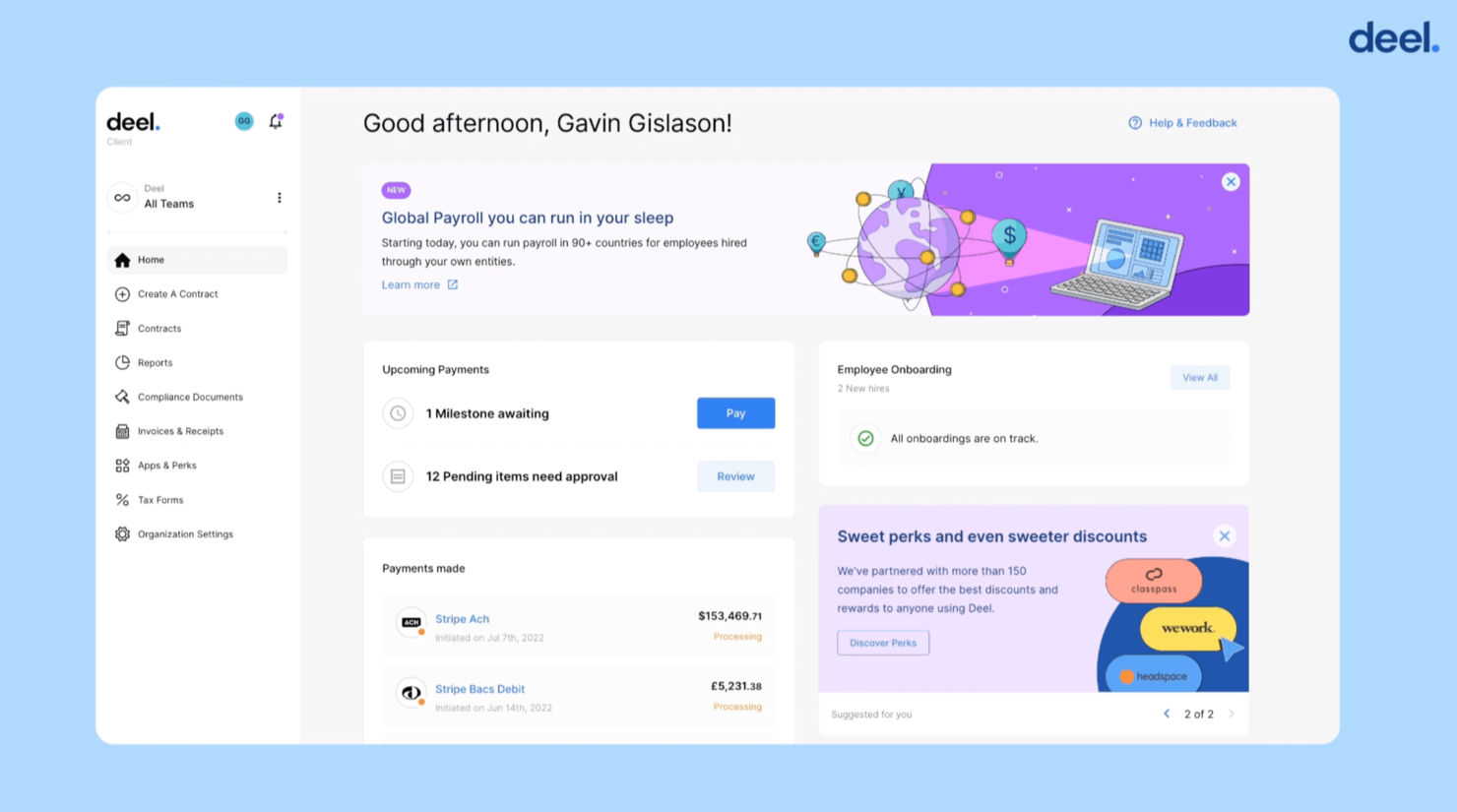
Deel è una soluzione ideale per le aziende che assumono o gestiscono talenti in diversi paesi. Offre buste paga, conformità, contratti e benefit in un'unica piattaforma, semplificando il supporto a un team distribuito senza dover gestire fornitori locali o normative specifiche.
Perché ho scelto Deel
Ho scelto Deel perché offre un modo chiaro per gestire l'occupazione internazionale senza la necessità di competenze legali o di payroll interne per ogni paese.
Si possono assumere dipendenti a tempo pieno o collaboratori mentre Deel si occupa di contratti localizzati, tasse e benefit previsti dalla legge. Il suo motore per le buste paga conforme ai singoli paesi ti aiuta a pagare accuratamente in oltre 150 paesi, e il tuo team dispone di strumenti per ferie, spese e aggiornamenti in autonomia.
Mi piace anche che i manager possano visualizzare i costi del personale in un'unica dashboard, facilitando la pianificazione della forza lavoro globale. Per le organizzazioni in crescita internazionale, Deel riduce significativamente la burocrazia mantenendo la conformità.
Caratteristiche principali di Deel
Ecco alcune funzionalità da evidenziare:
- Conformità delle buste paga locali: Garantisce che ogni ciclo di paga rispetti le norme fiscali e del lavoro di ogni paese supportato.
- Centro di gestione collaboratori: Permette di creare, firmare e gestire accordi con collaboratori con fatturazione automatica.
- Gestione globale dei benefit: Offre assicurazioni e benefit specifici per paese a cui il team può aderire direttamente.
- Portale self-service per i dipendenti: Consente al personale di accedere alle buste paga, aggiornare i dati personali e gestire ferie e permessi.
Integrazioni di Deel
Le integrazioni includono BambooHR, Hibob, Workday, Netsuite, QuickBooks, Xero, Greenhouse, Ashby, Expensify e Workable.
Pros and Cons
Pros:
- Supporta assunzioni conformi in oltre 150 paesi
- Offre pacchetti di benefit localizzati per dipendenti internazionali
- Permette la creazione di contratti in piattaforma con firma elettronica
- Alcune funzioni avanzate di HR richiedono componenti aggiuntivi
Cons:
- La personalizzazione dei report è piuttosto limitata
New Product Updates from Deel HR

Deel Expands Stablecoin Wallet to 80+ Countries
Deel expands its Stablecoin Wallet to 80+ countries with dollar-backed balances and optional rewards. This gives eligible contractors more ways to hold and manage earnings inside Deel. For more information, visit Deel’s official site.
 .
.
Paycor
Ideale per l'automazione delle paghe
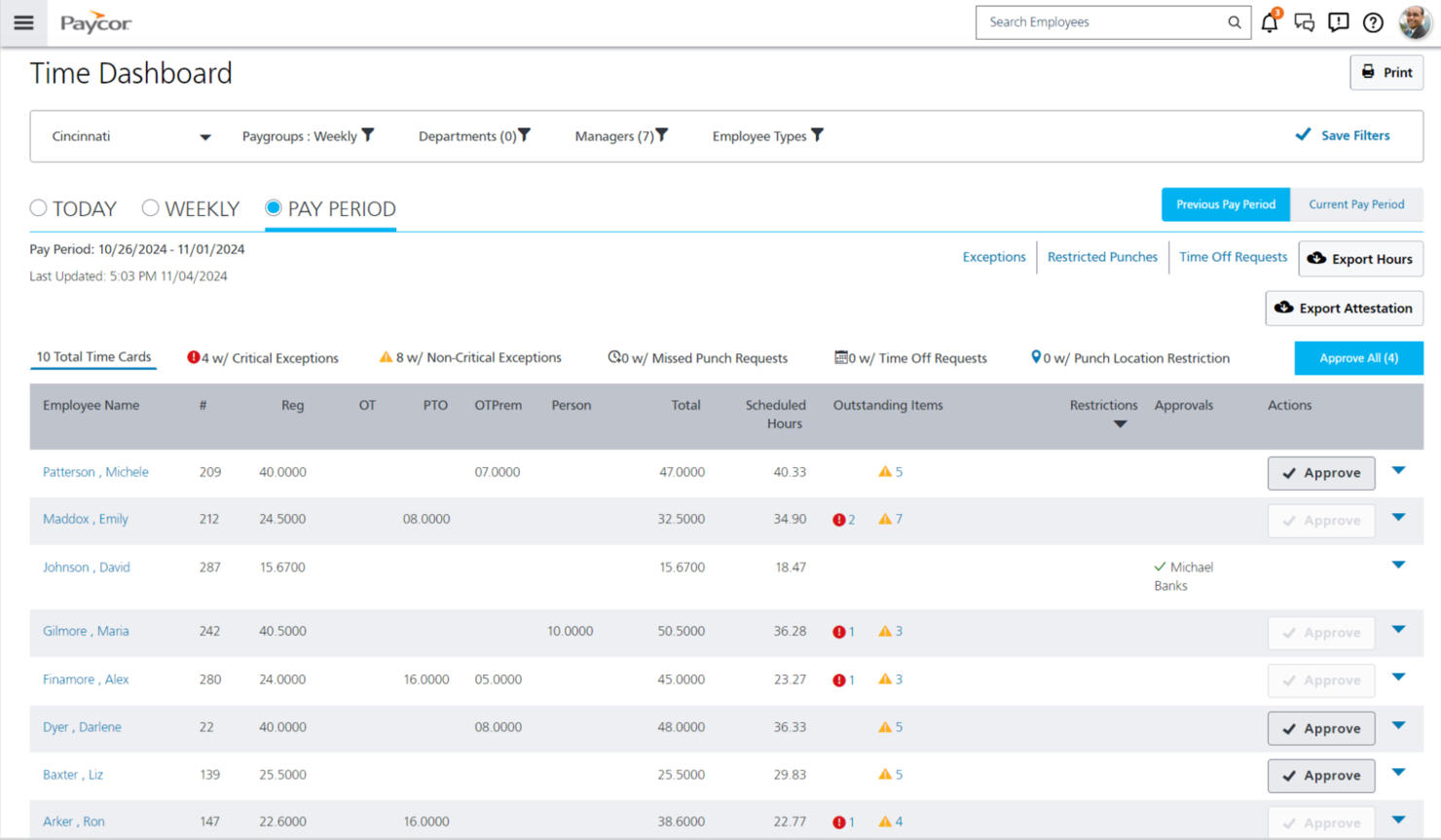
Paycor è pensato per le piccole e medie imprese che desiderano automatizzare le paghe e ridurre al minimo l'amministrazione manuale delle attività HR. È particolarmente utile per le organizzazioni che gestiscono forza lavoro oraria o team distribuiti su più sedi e che necessitano di gestione accurata di orari, stipendi e tasse senza affidarsi ai fogli di calcolo o componenti aggiuntivi.
Perché ho scelto Paycor
Ho scelto Paycor perché aiuta ad automatizzare le paghe dall'inizio alla fine, così il tuo team può gestire cicli di pagamento accurati senza inseguire i dati mancanti. Ottieni elaborazioni guidate delle buste paga, calcoli automatici delle tasse e controlli integrati degli errori per ridurre i rischi di non conformità.
Mi piace anche il fatto che i responsabili possano approvare gli orari, rivedere le eccezioni e finalizzare i pagamenti in un unico luogo, riducendo così i passaggi superflui. Inoltre, per i team che si affidano ai dati del personale, le analisi di Paycor aiutano a individuare rapidamente trend sugli straordinari o variazioni nei costi del lavoro.
Caratteristiche principali di Paycor
Ecco alcune funzionalità di spicco da evidenziare:
- Griglia di pagamento predittiva: Segnala anomalie di stipendio in modo che tu possa risolvere i problemi prima di elaborare le paghe.
- Dichiarazione fiscale automatizzata: Calcola, trattiene e versa le tasse federali, statali e locali per tuo conto.
- Portale self-service per i dipendenti: Consente ai dipendenti di aggiornare i dati personali, accedere alle buste paga e gestire i documenti.
- Rilevazione presenze e orari: Sincronizza ore, pause e ferie direttamente nelle paghe per calcoli precisi.
Integrazioni di Paycor
Le integrazioni includono QuickBooks, Xero, Indeed, ZipRecruiter, PrismHR, Checkr, Newton, Salesforce, Okta e Microsoft Teams.
Pros and Cons
Pros:
- Dichiarazione fiscale automatizzata
- Strumenti predittivi per rilevare errori sulle paghe in anticipo
- Forte sincronizzazione della rilevazione orari per forza lavoro oraria
Cons:
- Supporto limitato per paghe internazionali
- Richiede occasionalmente aggiornamenti software

Ideale per HR, paghe e integrazioni in un’unica soluzione
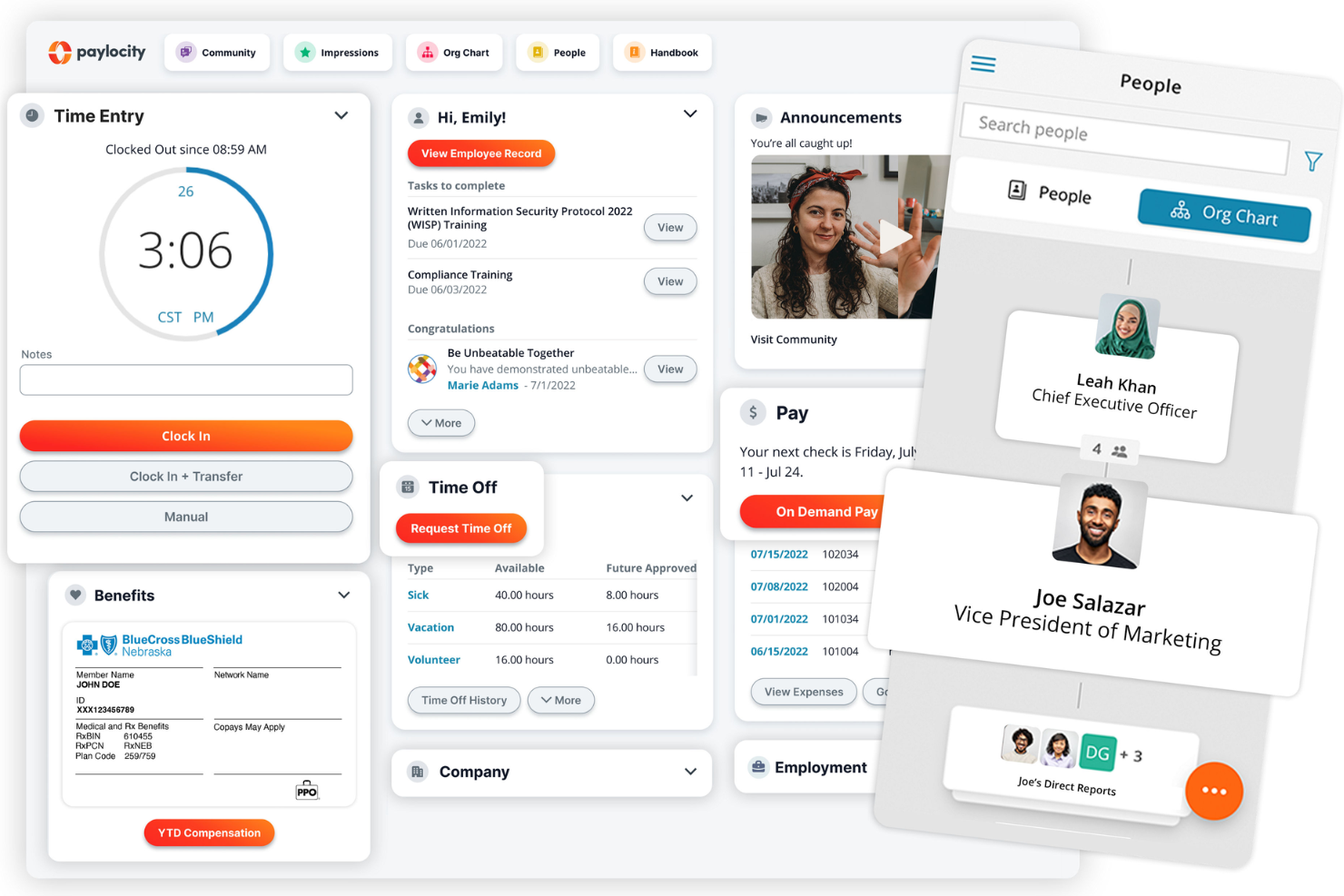
Paylocity è pensato per le aziende di medie dimensioni che desiderano strumenti per la gestione delle risorse umane, paghe e coinvolgimento dei dipendenti in un'unica soluzione. È ideale per i team che necessitano di una gestione affidabile delle paghe, oltre a funzionalità integrate per gestire dati del personale, feedback e attività quotidiane della forza lavoro senza dover utilizzare più sistemi.
Perché ho scelto Paylocity
Ho scelto Paylocity perché offre al tuo team paghe, amministrazione delle risorse umane e strumenti per il coinvolgimento dei dipendenti su un'unica piattaforma, riducendo lo sforzo necessario per gestire l’intero ciclo di vita dei dipendenti. Il suo motore paghe include la gestione delle dichiarazioni fiscali e dei controlli di conformità, aiutandoti a elaborare le retribuzioni con precisione senza aggiungere lavoro manuale extra.
Hai anche funzioni HR per onboarding, performance e benefit, così che i dati dei dipendenti restano coerenti in ogni fase. Quello che apprezzo di più è il solido ecosistema di integrazioni—oltre 400 connessioni preconfigurate—che consente di collegare facilmente Paylocity agli strumenti già utilizzati dal tuo team. Questo lo rende una buona soluzione per le aziende che vogliono che HR e paghe si integrino perfettamente con il proprio stack tecnologico più ampio.
Funzionalità principali di Paylocity
Ecco alcune funzionalità importanti da evidenziare:
- Portale self-service per i dipendenti: Permette allo staff di aggiornare i propri dati, consultare i cedolini e richiedere permessi direttamente.
- Strumenti di riconoscimento e feedback: Incentiva il riconoscimento tra colleghi e sondaggi rapidi per valutare il morale.
- Gestione dei benefit: Aiuta il tuo team a gestire iscrizioni, idoneità e comunicazioni da un’unica dashboard.
- Analisi e reportistica: Offre approfondimenti su trend delle risorse umane, attività di payroll e metriche HR.
Integrazioni di Paylocity
Le integrazioni includono Salesforce, Google Workspace, Greenhouse, Slack, Box, Dropbox, HubSpot, ClearCompany, Microsoft Dynamics 365 e Zoho People.
Pros and Cons
Pros:
- La conformità integrata riduce gli errori legati alle paghe
- Le funzionalità self-service riducono le richieste HR di routine
- Gli strumenti di riconoscimento aiutano a rafforzare una cultura di team positiva
Cons:
- Alcune funzionalità avanzate di analisi richiedono piani di livello superiore
- L’impostazione dei benefit può richiedere assistenza dal fornitore
New Product Updates from Paylocity

Paylocity Expands Expense and Purchase Request Tools
Paylocity adds connected personal cards, smarter expense categorization, and a streamlined purchase request experience. This reduces manual entry and helps finance teams manage expenses and approvals more efficiently. For more information, visit Paylocity’s official site.
 .
.
HiBob
Ideale per la gestione delle retribuzioni
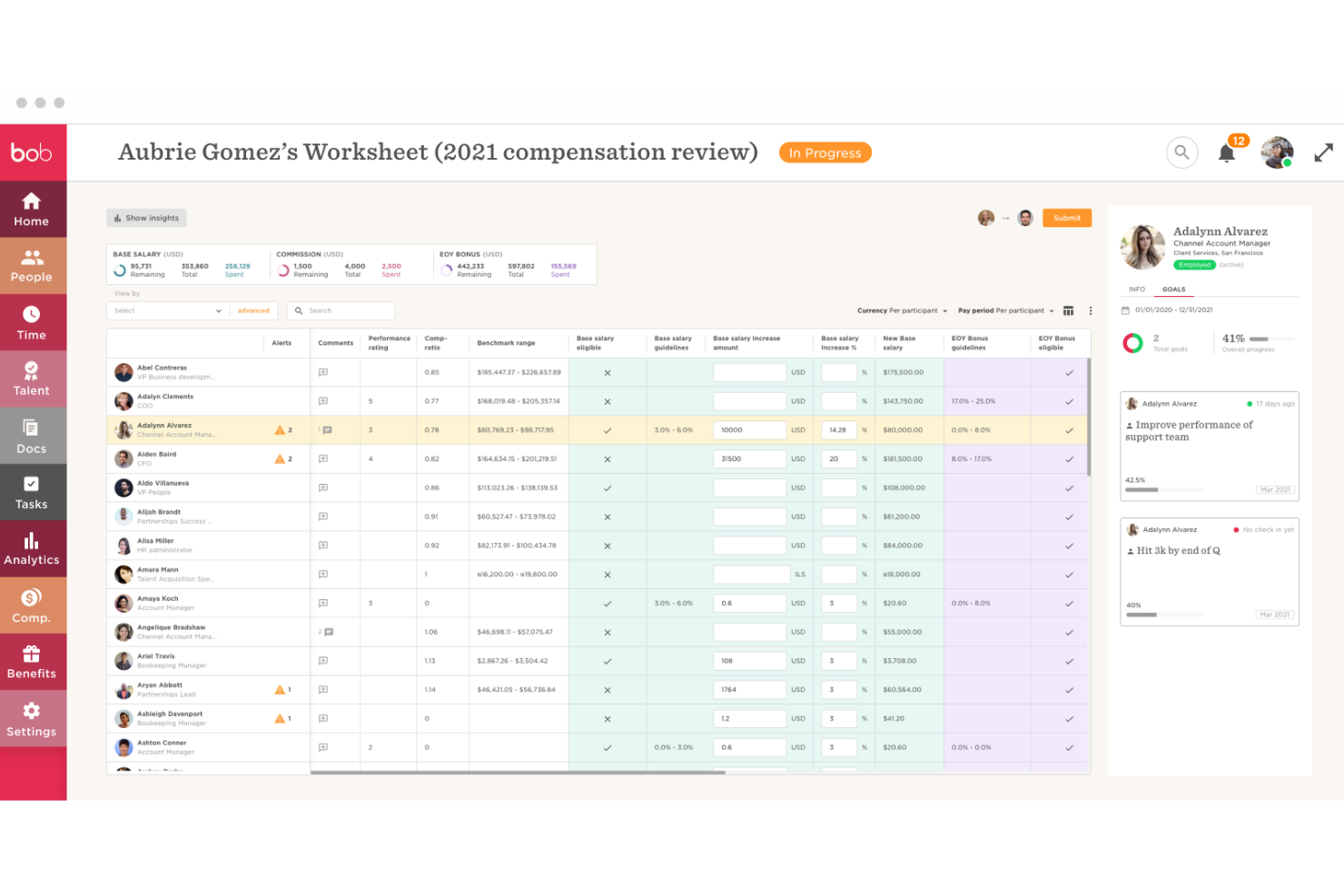
HiBob è progettato per organizzazioni di medie e grandi dimensioni, sia nazionali che globali, che necessitano di chiarezza e controllo sui cicli retributivi. Centralizza le revisioni salariali, i bonus e le decisioni sull’equità, consentendo al tuo team HR di gestire processi equi e coerenti su larga scala.
Perché ho scelto HiBob
Ho scelto HiBob perché offre un modo strutturato per gestire le decisioni retributive senza affidarsi a fogli di calcolo o al monitoraggio manuale. I suoi cicli retributivi consentono di definire budget, stabilire linee guida per i manager e rivedere le modifiche in un unico luogo, aiutandoti a garantire equità tra team e regioni.
Apprezzo anche le sue analisi del personale, che forniscono informazioni in tempo reale su organico, fidelizzazione e prestazioni, così puoi prendere decisioni retributive informate. Per i team che gestiscono più sedi o una crescita rapida, i cruscotti di HiBob mantengono i dati retributivi organizzati e facili da verificare.
Funzionalità principali di HiBob
Ecco alcune funzionalità di rilievo:
- Cicli retributivi: Crea flussi di lavoro strutturati per le revisioni di stipendi, bonus ed equità.
- Linee guida per i manager: Stabilisci intervalli e regole chiari affinché i manager propongano modifiche conformi alle politiche.
- Monitoraggio del budget: Controlla la spesa in tempo reale per rimanere in linea con gli obiettivi retributivi.
- Registri di audit: Conserva un registro dettagliato di decisioni, commenti e approvazioni ai fini della conformità.
Integrazioni di HiBob
Le integrazioni includono ADP, Microsoft Entra ID, TriNet, Deel, Jobvite, Jobylon, Kamsa, Microsoft Teams, G Suite, Go1, Jira Service Desk e NetSuite.
Pros and Cons
Pros:
- Flussi di lavoro solidi per i cicli retributivi dei team distribuiti
- Le linee guida integrate per i manager riducono le decisioni salariali incoerenti
- Il monitoraggio del budget in tempo reale supporta una pianificazione retributiva basata sui dati
Cons:
- Nella maggior parte delle regioni non è disponibile un modulo paghe nativo
- Gli strumenti per l’equità potrebbero essere limitati per programmi azionari complessi

Ideale per assistenza clienti 24/7
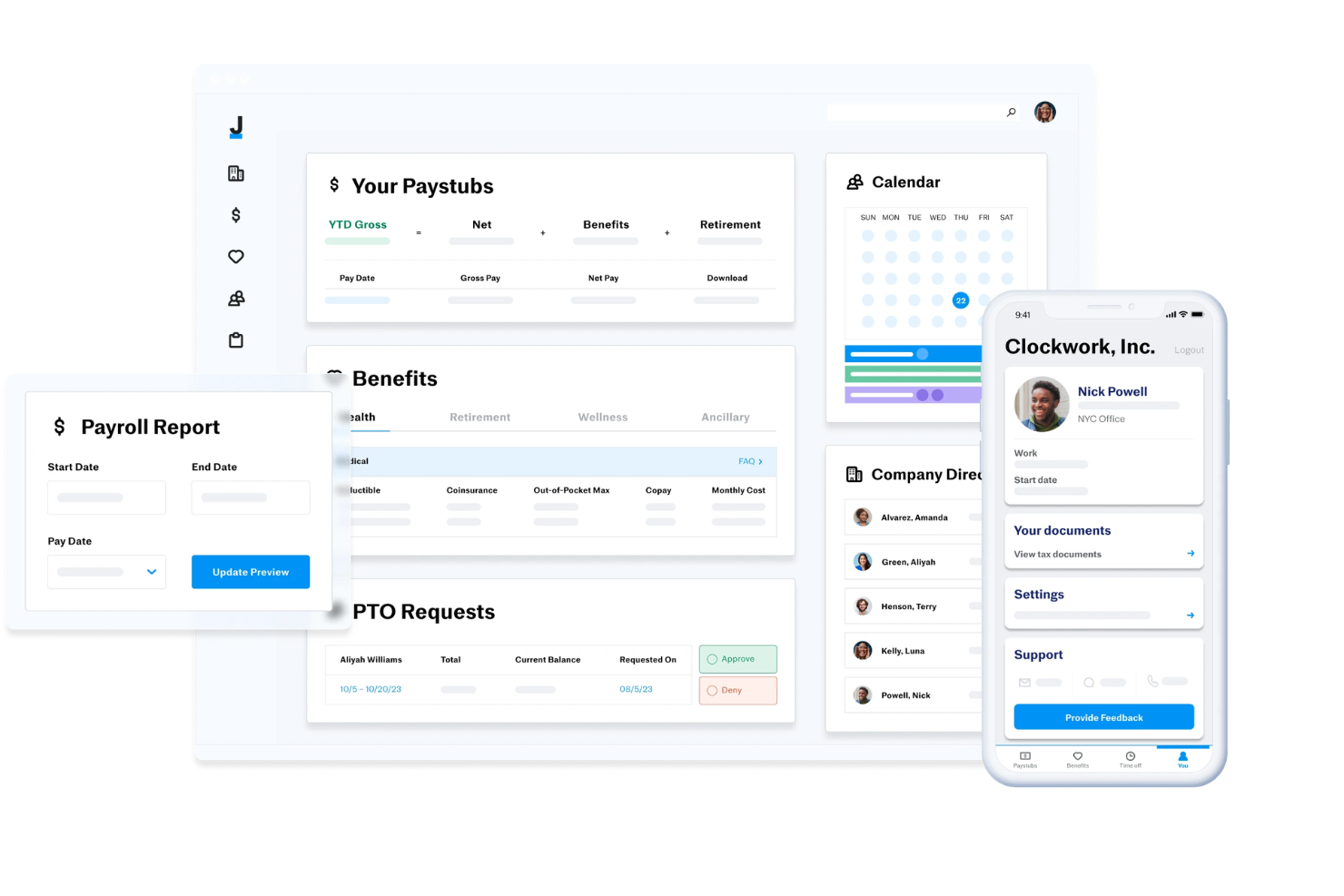
Justworks è una piattaforma HCM basata su cloud che unisce gestione delle paghe, amministrazione dei benefit, supporto alla conformità e strumenti HR, offrendo anche servizi PEO integrati destinati a piccole e medie imprese.
Per chi è ideale Justworks?
Justworks è indicato per piccole imprese e startup che desiderano una piattaforma unica per paghe, benefit e conformità HR.
Perché ho scelto Justworks
Justworks merita il suo posto nella mia lista dei migliori perché posso contattare il loro team di assistenza in qualsiasi momento, giorno e notte, tramite telefono, email, chat o Slack. Mi affido ai loro consulenti HR per avere indicazioni su domande relative alla conformità e aggiornamenti delle policy. Il mio team ottiene risposte rapide riguardo a paghe, benefit e onboarding ogni volta che ne abbiamo bisogno.
Servizi principali di Justworks
- Integrazione con il rilevamento delle presenze: Traccia le ore lavorate dai dipendenti e sincronizza i dati direttamente con il sistema paghe.
- Archivio documenti: Conserva e gestisci i documenti HR in sicurezza all'interno della piattaforma.
- Report personalizzati: Genera report dettagliati su paghe, benefit e dati dei dipendenti.
- Portale self-service per dipendenti: Consenti ai dipendenti di accedere online a cedolini, benefit e informazioni personali.
Integrazioni con Justworks
Le integrazioni native non sono chiaramente documentate. Lo strumento supporta integrazioni via API per collegamenti personalizzati.
Pros and Cons
Pros:
- Gestione automatica delle dichiarazioni e versamenti delle tasse sulle paghe
- Accesso a piani assicurativi sanitari per grandi gruppi
- Flussi di onboarding semplici per i nuovi assunti
Cons:
- Le funzionalità di reportistica sono meno personalizzabili rispetto ai concorrenti
- Il modello PEO potrebbe non essere adatto a organizzazioni più grandi

Gusto
Ideale per il supporto ai dipendenti a ore
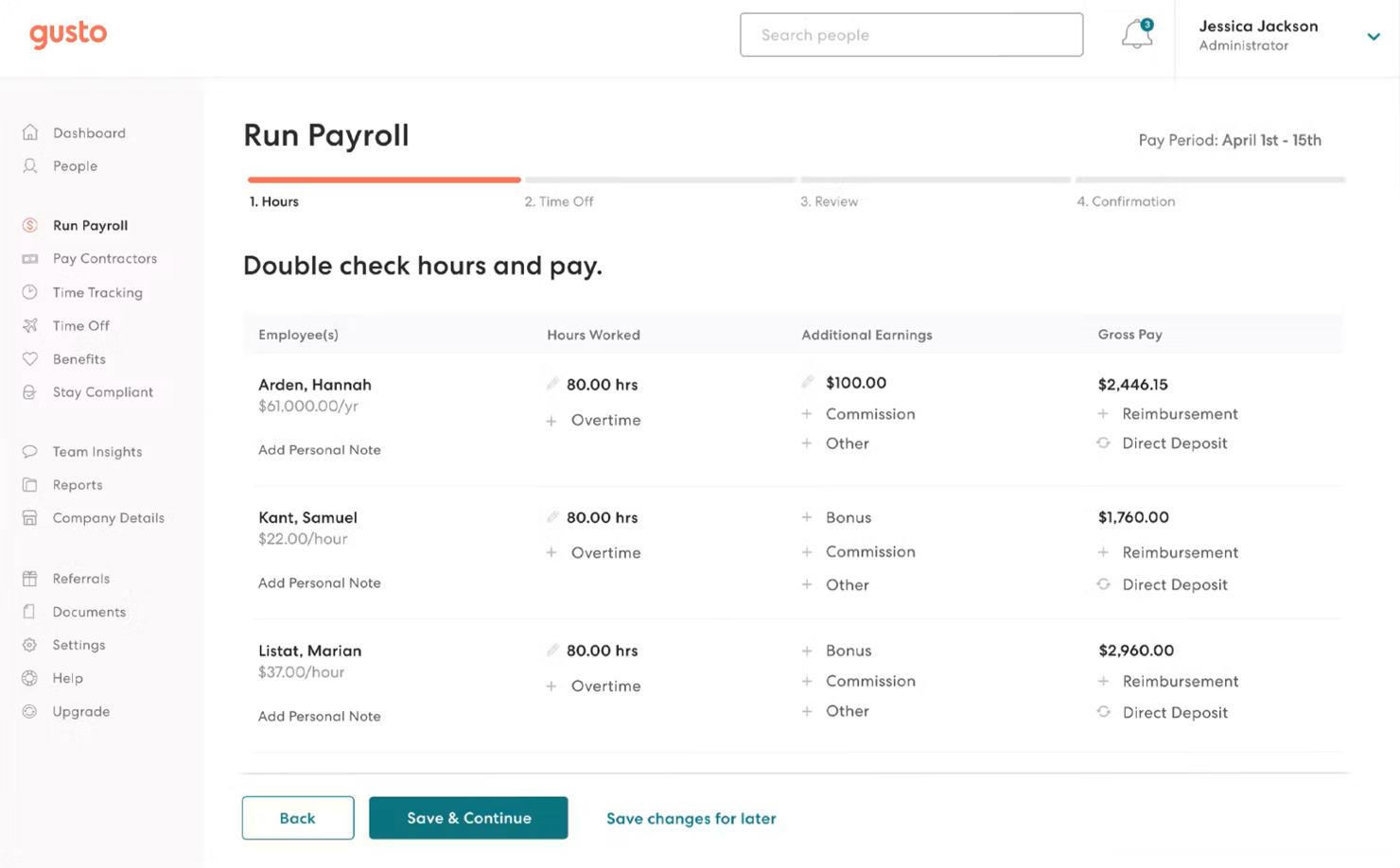
Gusto è una piattaforma moderna di gestione paghe, benefit e risorse umane creata specificamente per le piccole imprese, con strumenti potenti che la rendono particolarmente adatta per aziende che impiegano lavoratori a ore o a turni. Semplifica le buste paga, automatizza la conformità normativa e rende facile la gestione dei benefit dei dipendenti, tutto all'interno di un'interfaccia pulita e di facile utilizzo.
Perché ho scelto Gusto:
Gusto si distingue per le sue capacità integrate di gestione delle buste paga e del monitoraggio delle ore, rendendolo una delle scelte migliori per le aziende con dipendenti a ore. La piattaforma sincronizza automaticamente i dati sulle ore lavorate dai sistemi di pianificazione e presenze integrati, garantendo calcoli accurati del salario—inclusi straordinari, ferie retribuite (PTO) e pause specifiche per ogni stato. Questo riduce al minimo gli errori e fa risparmiare ore di lavoro manuale ad ogni periodo di paga.
Il processo automatizzato di gestione delle buste paga assicura che i dipendenti—a ore o con stipendio fisso—ricevano la loro paga correttamente e puntualmente, tramite bonifico diretto, assegno o carta paga. Gusto si occupa inoltre delle dichiarazioni fiscali a livello federale, statale e locale, garantendo la conformità per tutte le buste paga.
Oltre alla gestione delle buste paga, Gusto semplifica anche l'amministrazione dei benefit con gestione integrata di assicurazione sanitaria, piani 401(k) e copertura infortuni sul lavoro.
Il design intuitivo del sistema, unito ad automazioni e integrazioni, lo rende ideale per quelle aziende che necessitano di una soluzione affidabile per le buste paga senza disporre di un reparto HR completo.
Funzionalità e integrazioni di Gusto:
Le funzionalità includono buste paga automatizzate, monitoraggio delle retribuzioni a ore e a tempo, amministrazione di assicurazione sanitaria e 401(k), e dichiarazioni fiscali automatizzate per tutti i 50 stati. Gli strumenti di supporto alla conformità aiutano le aziende a restare aggiornate sulle normative salariali e del lavoro in evoluzione, mentre le politiche personalizzate per il PTO e il monitoraggio delle assenze migliorano trasparenza ed equità per il personale a ore.
Gusto offre anche strumenti per l'onboarding, modelli di lettere di offerta e la firma elettronica dei documenti per integrare rapidamente e senza carta nuovi dipendenti a ore. I team HR possono inoltre utilizzare strumenti di reportistica per monitorare spese salariali, costi del lavoro e trend dei dipendenti nel tempo.
Integrazioni includono QuickBooks, Xero, FreshBooks, Clover, TSheets, When I Work, Deputy, Trainual, Expensify e Zapier, permettendo collegamenti fluidi con i principali software per contabilità, rilevazione presenze e gestione del personale.
Pros and Cons
Pros:
- Eccellente per lavoratori a ore e a turni
- Buste paga automatiche e precise con dichiarazione fiscale in tempo reale
- Interfaccia intuitiva con forti integrazioni per il monitoraggio delle ore
Cons:
- La disponibilità dei benefit varia a seconda dello stato
- Supporto limitato per paghe internazionali
New Product Updates from Gusto
Gusto Adds Solo Advisory Tools and Mobile Money Features
Gusto adds Solo S-Corp Advisory Tools and Gusto Money on Mobile for tax guidance, invoicing, and bill payments. These updates help accountants advise solopreneurs and let users manage business finances from their phones. For more information, visit Gusto’s official site.

factoHR
Ideale per l'accessibilità da mobile
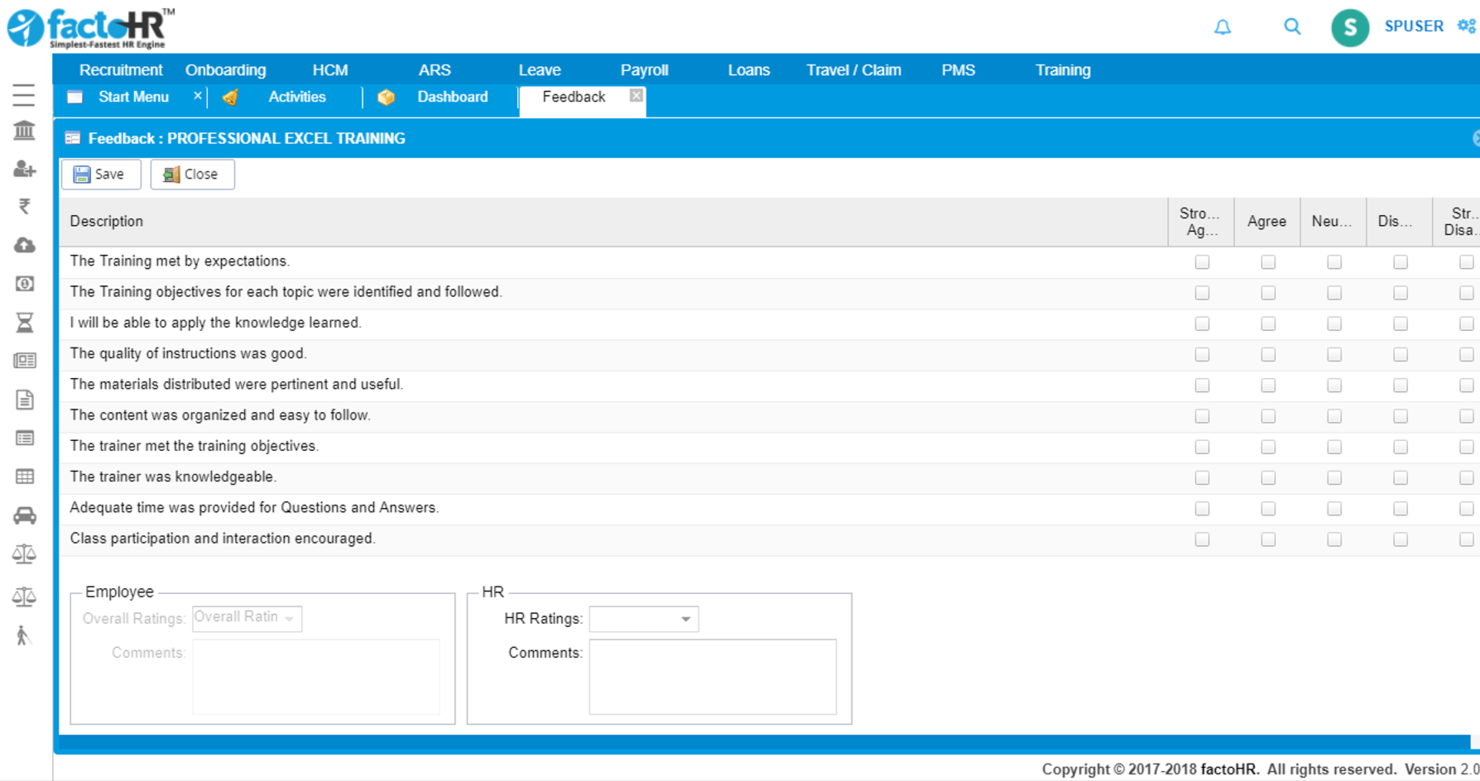
FactoHR è progettato per offrire alle piccole e medie imprese un accesso mobile affidabile alle attività quotidiane delle risorse umane. Aiuta il tuo team a monitorare le presenze, gestire le buste paga e accedere ai documenti essenziali da qualsiasi dispositivo, rendendolo una scelta pratica per le organizzazioni con dipendenti remoti o spesso in movimento.
Perché ho scelto FactoHR
Ho scelto FactoHR perché permette al tuo team di gestire le principali attività HR direttamente dal telefono, un valore aggiunto soprattutto per aziende con personale distribuito o operativo sul campo.
La sua app mobile consente la rilevazione accurata delle presenze, così ottieni dati affidabili anche quando i dipendenti lavorano fuori sede. Puoi inoltre consultare informazioni sulle retribuzioni e i dati dei dipendenti anche in mobilità, facilitando ai manager decisioni rapide senza dover aspettare di essere alla scrivania.
Apprezzo anche che includa strumenti per la gestione delle assenze e delle performance, consentendo di tenere processi essenziali in un unico luogo.
Funzionalità principali di FactoHR
Ecco alcune funzionalità di spicco da evidenziare:
- Sistema di Gestione delle Assenze: gestisce le richieste di ferie e le approvazioni tramite una dashboard centralizzata.
- Strumenti di gestione delle performance: supportano la definizione degli obiettivi e il monitoraggio dei progressi dei singoli dipendenti.
- Automazione delle buste paga: elabora gli stipendi in modo accurato e puntuale ogni mese.
- Self-service per i dipendenti: consente ai dipendenti di aggiornare il profilo, visualizzare le buste paga e gestire autonomamente i propri dati personali.
Integrazioni di FactoHR
Le integrazioni includono QuickBooks, Tally, SAP, Oracle, Microsoft Dynamics, FreshBooks, Xero, Zoho, BambooHR e Slack.
Pros and Cons
Pros:
- L'app mobile supporta una registrazione delle presenze accurata
- Gli strumenti self-service riducono le richieste all'amministrazione
- Il monitoraggio delle performance aiuta i manager a seguire gli obiettivi
Cons:
- Funzionalità di reportistica di base
- Complessità nella configurazione iniziale

Eddy
Ideale per onboarding personalizzato
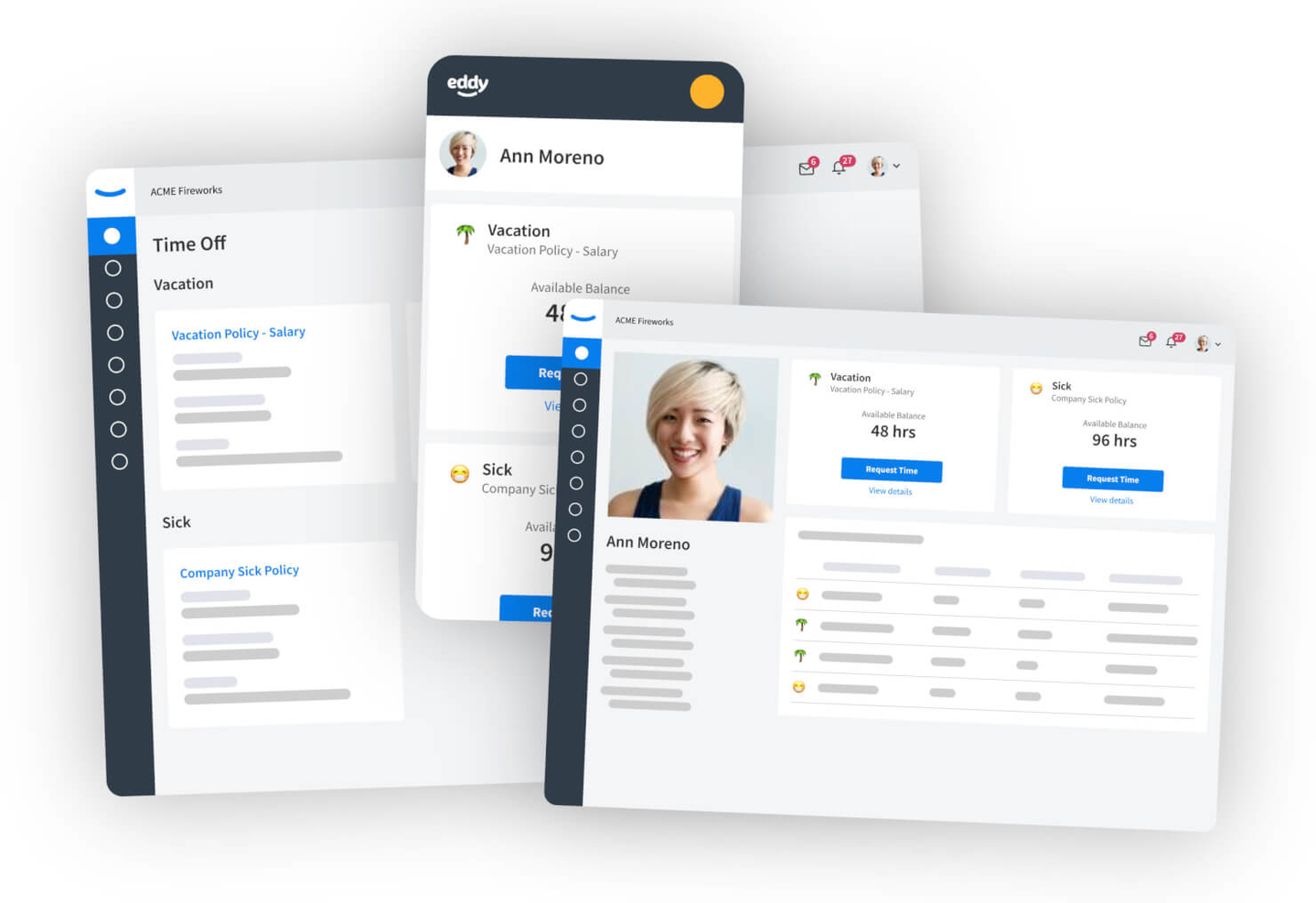
Eddy è una suite HR tutto-in-uno creata per le aziende locali che semplifica i processi HR più noiosi e migliora l'esperienza dei dipendenti. Con Eddy, le aziende possono assumere, inserire, gestire e pagare i dipendenti con un unico software facile da usare, che ha guadagnato popolarità grazie al suo focus sul supporto alle aziende con lavoratori senza postazione fissa e all'assistenza clienti molto apprezzata.
Perché ho scelto Eddy: Il loro processo di onboarding semplice ma solido rende la transizione da candidato a nuovo assunto facile da gestire. Puoi comunicare facilmente ai nuovi assunti tutte le informazioni importanti come data di inizio, retribuzione iniziale, chi sarà il loro responsabile e cosa dovranno indossare il primo giorno di lavoro. Puoi anche creare 'Pacchetti per Nuovi Assunti' personalizzabili che includono un'agenda dell'onboarding e tutti gli altri documenti necessari da firmare, completabili facilmente anche da dispositivi mobili.
Tutti i documenti possono essere firmati elettronicamente, inoltre puoi assegnare specifiche date di scadenza alla documentazione e ai compiti; gli amministratori aziendali riceveranno aggiornamenti sui progressi del nuovo assunto. L'onboarding di Eddy aiuta anche il tuo team a restare coordinato assegnando compiti interni per garantire che il nuovo assunto abbia una scrivania, un laptop o altri elementi essenziali necessari.
Funzionalità principali e integrazioni di Eddy:
Una funzione centrale di Eddy è la gestione delle persone: gli utenti possono accedere alla directory aziendale e archiviare documenti importanti dei dipendenti, aggiungere note sulle performance, e monitorare formazione e certificazioni nei profili dei dipendenti. È anche possibile creare politiche personalizzate per le ferie retribuite (PTO) e approvare o rifiutare richieste; utilizzare lo strumento di rilevazione oraria, che consente ai dipendenti di timbrare entrata e uscita; e gestire la paga attraverso il sistema integrato di Eddy, che offre supporto per più periodi di paga e per la preparazione, il deposito e la distribuzione dei W-2 di fine anno.
Altre funzionalità chiave includono la gestione degli annunci di lavoro, il tracciamento dei candidati in ingresso e un sistema di tracciamento dei candidati (ATS) completo.
Le integrazioni sono disponibili con Indeed, Glassdoor e SynergySuite.

eXo Platform
Ideale per il coinvolgimento dei dipendenti
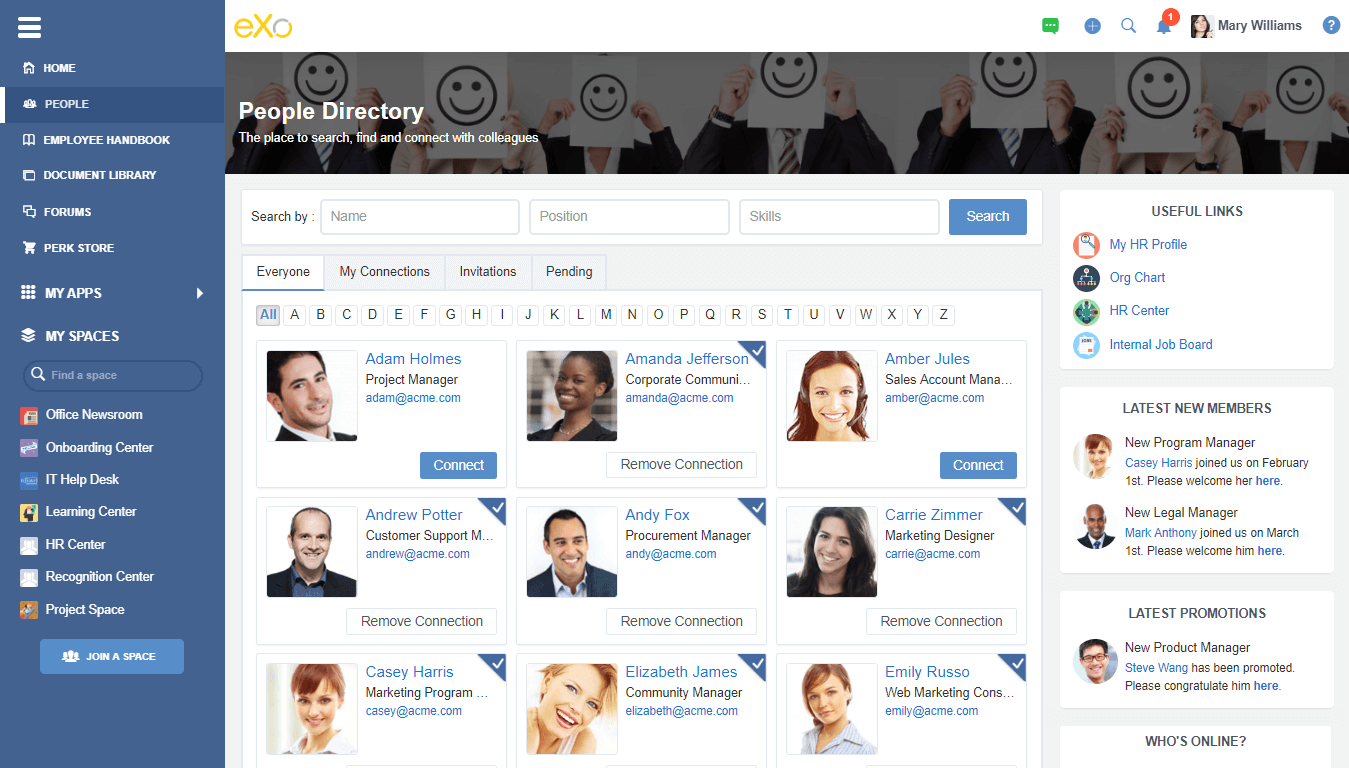
eXo Platform è una soluzione per il luogo di lavoro digitale tutto-in-uno che ti aiuta a connettere, allineare e coinvolgere i tuoi team attorno a un'unica interfaccia. È progettato per soddisfare le esigenze di aziende di ogni dimensione e settore che desiderano migliorare la comunicazione aziendale e tra colleghi, aumentare la collaborazione e gestire la conoscenza aziendale.
Perché ho scelto eXo Platform: Il loro software offre un ricco set di funzionalità per migliorare l'esperienza lavorativa, incluse funzionalità di social networking aziendale come i profili utente, i flussi di attività e altro ancora. Gli utenti possono navigare facilmente attraverso la piattaforma e interagire con i colleghi tramite un'applicazione di chat integrata e la possibilità di mettere mi piace, commentare e condividere vari contenuti. Offrono anche componenti aggiuntivi integrati come eXo Wallet, gamification, apprezzamenti, chat e altro ancora.
Funzionalità e integrazioni principali di eXo Platform:
Le funzionalità includono gruppi collaborativi dove gli utenti possono comunicare, collaborare su progetti e trovare facilmente ciò che cercano. Inoltre, il loro sistema include anche funzionalità di gestione dei documenti che consentono agli utenti di condividere contenuti facilmente tramite drag-and-drop, organizzare i contenuti in ricche librerie di documenti e condividere informazioni con un clic nel flusso di attività o nell'applicazione di chat.
Le integrazioni sono disponibili con applicazioni di terze parti tra cui Salesforce, Microsoft Office e Google Suite.
Altri software HCM
Ecco alcune opzioni aggiuntive di software HCM che non sono entrate nel mio elenco, ma che vale comunque la pena prendere in considerazione:
- Oracle HCM Cloud
Ideale per settori sensibili alla sicurezza
- Workday
Ideale per grandi aziende
- UZIO
Ideale per la gestione dei benefit dei dipendenti
- Odoo (HR module)
Ideale per la flessibilità open-source
- Namely
Ideale per focus su HR e cultura aziendale
- Sage People
Ideale per analisi avanzate delle persone
- ADP
Ideale per la gestione delle paghe in più stati
- Arcoro
Ideale per aziende del settore edile
- PrimePay
Ideale per organizzazioni di piccole e medie dimensioni
- SAP SuccessFactors
Ideale per le loro integrazioni scalabili
- SyncHR
Ideale per la personalizzazione dei processi HR
- Cezanne HR
Ideale per la conformità globale
- Zoho People
Ideale per il monitoraggio della forza lavoro da remoto
- PeopleGuru
Ideale per organizzazioni di medie dimensioni negli Stati Uniti
- Rippling
La miglior soluzione HCM tutto-in-uno
- Mitratech Perform
Ideale per una gestione delle performance personalizzabile
- Factorial
Ideale per i mercati europei
- ADP Workforce Now
Ideale per l’integrazione con altri sistemi HR


Come valuto i software HCM
Valuto le piattaforme HCM su due livelli: i requisiti di base come anagrafica del personale, gestione paghe, e talent management, e i fattori differenzianti che determinano la scelta giusta in base alla complessità della tua organizzazione.
Funzionalità di base (Requisiti minimi per questo elenco)
Quando seleziono i tool per la mia lista, valuto ciascuno su una scala da 0 (non offre la funzionalità) a 5 (eccelle in questa area) per ogni funzionalità di base elencata di seguito. Calcolo quindi il punteggio totale dello strumento in percentuale. Ogni tool deve raggiungere un punteggio minimo totale del 75% per essere preso in considerazione.
- Anagrafica HR e archivio dipendenti: Controllo se la piattaforma funge da vero sistema di record con organigrammi, gestione delle posizioni, storico dei ruoli e campi di compliance — non semplicemente una lista di contatti evoluta.
- Gestione paghe: Che sia nativa o integrata, valuto l’efficacia nella gestione delle detrazioni fiscali, degli accrediti diretti e delle regole multi-giurisdizionali senza dover ricorrere a interventi manuali.
- Talent acquisition e onboarding: Dalla creazione della richiesta fino alle attività del primo giorno, cerco un flusso di selezione integrato che non costringa i recruiter a utilizzare sistemi separati.
- Gestione dei talenti: Considero come la piattaforma supporta i cicli di valutazione delle performance, il monitoraggio degli obiettivi, la pianificazione della successione e dell’apprendimento — strumenti che aiutano i manager a valorizzare le persone, non solo a valutarle.
- Gestione benefit e compensi: Processi di iscrizione ai benefit, collegamenti con i carrier e cicli di pianificazione retributiva sono tutti elementi rilevanti. Valuto se i team HR possono gestire l’intero ciclo benefit senza ricorrere ai fogli di calcolo.
- Presenze, turni e gestione della forza lavoro: Pianificazione, rilevazione presenze, gestione delle assenze e regole di compliance lavorativa sono fondamentali, specialmente per organizzazioni con addetti su turni o lavoratori a ore.
Una volta che ho una lista di tool che soddisfano questi criteri, considero ciò che rende unica ogni piattaforma.
Fattori differenzianti (Cosa distingue i fornitori)
Ecco come confronto i diversi fornitori:
Caratteristiche distintive
Le analisi delle persone integrate rappresentano un importante elemento distintivo. Valuto se una piattaforma offre insight predittivi come la valutazione del rischio di abbandono, invece dei soli report preimpostati. Le raccomandazioni basate su IA sono fondamentali, in particolare per il matching delle competenze e la mobilità interna. Le piattaforme con ontologia dinamica delle competenze aiutano gli HR a individuare gap di reskilling e abbinare i dipendenti a ruoli vacanti o progetti interni. Analizzo anche i tool per l’esperienza dipendenti, poiché portali self-service e sondaggi rapidi influenzano il modo in cui la forza lavoro interagisce ogni giorno con l’HR.
Oltre le funzionalità
L’ecosistema di integrazione è una delle prime cose che valuto. Una piattaforma HCM deve integrarsi con ERP, strumenti finanziari e sistemi di gestione delle identità — in caso contrario, il team si troverà a sincronizzare manualmente i dati tra sistemi. La scalabilità è altrettanto fondamentale. Analizzo se il fornitore supporta strutture multi-ente, permessi basati sui ruoli e configurazioni per workforce globali scalabili nel tempo. Compliance e sicurezza sono infine elementi imprescindibili. Certificazioni come SOC 2 Type II e opzioni di residenza dei dati mi dicono che il fornitore prende seriamente la protezione dei dati dei dipendenti: un requisito di base per i team HR che gestiscono informazioni sensibili.
Come scegliere un software HCM
È facile perdersi in lunghi elenchi di funzionalità e strutture tariffarie complesse. Per aiutarti a mantenere la concentrazione mentre affronti il tuo processo di selezione del software, unico nel suo genere, ecco un elenco dei fattori da tenere a mente:
| Fattore | Cosa considerare |
|---|---|
| Scalabilità | Il software crescerà insieme alla tua azienda? Valuta se è in grado di gestire ulteriori dipendenti e sedi senza aumenti significativi dei costi o problemi di prestazioni. |
| Integrazioni | Funziona con i tuoi sistemi esistenti? Verifica la compatibilità con gli strumenti HR, i sistemi per la gestione delle paghe e gli altri software che il tuo team utilizza quotidianamente. |
| Personalizzazione | Puoi adattare il software alle tue esigenze? Cerca opzioni per modificare i flussi di lavoro e i report in base ai tuoi processi. |
| Facilità d'uso | È intuitivo per il tuo team? Dai priorità a interfacce intuitive che richiedano una formazione minima, riducendo la curva di apprendimento. |
| Implementazione e inserimento | Quanto tempo richiederà la configurazione? Valuta il tempo e le risorse necessari per una transizione fluida, inclusi la formazione disponibile e il supporto offerto dal fornitore. |
| Costo | Rientra nel tuo budget? Confronta i piani tariffari, i costi nascosti e le spese a lungo termine. Considera il valore rispetto alle tue esigenze HR. |
| Misure di sicurezza | I tuoi dati sono protetti? Assicurati che il software soddisfi gli standard del settore per la protezione dei dati e offra funzionalità come la crittografia e aggiornamenti regolari. |
Che cos'è un software HCM?
Il software HCM è uno strumento digitale completo per gestire tutti gli aspetti delle risorse umane durante l'intero ciclo di vita dei dipendenti. Le funzionalità includono il reclutamento e l'inserimento, la gestione delle buste paga, l'amministrazione dei benefit, la valutazione delle prestazioni, la gestione dei talenti, il monitoraggio delle ore lavorate e delle presenze e l'analisi delle risorse umane.
Lo scopo del software HCM è gestire e ottimizzare efficacemente tutte le funzioni delle risorse umane in un unico luogo, migliorando la produttività e il coinvolgimento della forza lavoro.
L’HRIS si concentra sui processi HR fondamentali, come le buste paga e i dati dei dipendenti, mentre l’HCM aggiunge elementi strategici come la gestione dei talenti e delle prestazioni.
Funzionalità
Quando scegli un software HCM, presta attenzione alle seguenti funzionalità chiave:
- Gestione dei dati dei dipendenti: archivia, organizza e aggiorna in modo efficiente tutti i dati dei dipendenti in un'unica base di dati accessibile. Questo semplifica ogni attività, dall'inserimento ai cambiamenti di ruolo, assicurandoti di avere sempre le informazioni giuste a portata di mano.
- Elaborazione delle buste paga: automatizza ogni aspetto della retribuzione dei dipendenti, inclusi stipendi, bonus e ritenute fiscali. In questo modo il giorno dello stipendio sarà privo di problemi sia per te sia per il tuo team.
- Monitoraggio delle ore lavorate e delle presenze: registra le ore dei dipendenti, gestisci i turni e monitora le assenze in un unico luogo. Puoi individuare facilmente le tendenze, prevenire gli errori e risparmiare tempo nei calcoli manuali.
- Amministrazione dei benefit: semplifica il processo di iscrizione, aggiornamento e gestione dei benefit dei dipendenti. I dipendenti possono visualizzare e modificare facilmente le proprie opzioni, mentre tu trascorri meno tempo immerso nelle pratiche burocratiche.
- Acquisizione dei talenti e inserimento: gestisci l'intero ciclo di assunzione, dalla pubblicazione degli annunci al monitoraggio dei candidati e a un inserimento senza intoppi. In questo modo i nuovi assunti possono diventare operativi fin da subito, senza sommergerti di attività amministrative.
- Gestione delle prestazioni: definisci gli obiettivi, conduci le valutazioni e monitora lo sviluppo dei dipendenti. In questo modo tutti rimangono aggiornati e le valutazioni delle prestazioni fanno un salto di qualità.
- Formazione e sviluppo: centralizza i programmi di formazione e monitora i progressi, rendendo più semplice guidare la crescita dei dipendenti e individuare rapidamente le lacune nelle competenze.
- Analisi e reportistica della forza lavoro: genera report significativi sulle tendenze della forza lavoro, sulla diversità, sul ricambio del personale e molto altro. Utilizza questi dati per prendere decisioni HR intelligenti e tempestive, capaci di produrre risultati concreti.
- Portali autonomi: consenti ai dipendenti di aggiornare le proprie informazioni, gestire i benefit e accedere ai documenti HR in qualsiasi momento. Questo lascia al tuo team HR più tempo per le attività davvero importanti.
- Gestione della conformità: tieniti al passo con le leggi sul lavoro e le normative di settore in continua evoluzione. Avvisi e controlli automatizzati aiutano a evitare errori costosi e verifiche ispettive.
Funzionalità comuni dell'IA nei software HCM
Oltre alle funzionalità standard dei software HCM elencate sopra, molte di queste soluzioni integrano l'IA con funzionalità come:
- Raccomandazioni personalizzate per la formazione: analizza le competenze e gli obiettivi dei dipendenti per suggerire i contenuti formativi più adatti, così il tuo team continua a imparare in modo realmente utile per ciascuno.
- Selezione automatizzata dei curriculum: filtra e classifica istantaneamente i candidati in base a competenze ed esperienza, risparmiando ore di selezione manuale e aiutandoti a trovare rapidamente i talenti migliori.
- Analisi predittiva del ricambio del personale: utilizza modelli di apprendimento automatico per individuare i dipendenti a rischio prima che se ne vadano, dandoti l'opportunità di intervenire e trattenere le persone migliori.
- Valutazioni delle prestazioni basate sull'IA: analizza riscontri, obiettivi e dati sulla produttività per fornire informazioni imparziali sulle prestazioni. Questo ti aiuta a offrire supporto e sviluppo mirati.
- Assistenti HR basati su programmi conversazionali: consenti ai dipendenti di ricevere risposte immediate alle domande HR, richiedere permessi o aggiornare le informazioni personali utilizzando un programma conversazionale basato sull'IA, senza dover ascoltare musichette d'attesa.
Tendenze dei software HCM per 2026
La gestione del capitale umano è molto diversa da quella di 5 anni fa... o persino di 2 anni fa, se è per questo. E le priorità e gli obiettivi dei dipartimenti HR continueranno a evolversi man mano che andiamo avanti. Ciò che trovo davvero interessante è il modo in cui le soluzioni software HR cercano di stare al passo con questi cambiamenti, offrendo funzionalità, caratteristiche e strutture nuove e innovative per affrontare le sfide principali man mano che si presentano.
Ecco alcune delle tendenze che sto osservando nelle soluzioni HCM e che prevedo di vedere sempre più spesso in futuro:
Acquisizione di talenti basata sull'IA
L'intelligenza artificiale (AI) nei software per l'acquisizione di talenti sta rivoluzionando il processo di assunzione. Gli algoritmi di intelligenza artificiale possono:
- Esaminare i curriculum
- Prevedere il successo dei candidati
- Contribuire a ridurre i pregiudizi inconsci nelle assunzioni
Sfruttando l'intelligenza artificiale, le aziende possono individuare e attrarre più efficacemente i candidati giusti, affrontando la sfida cruciale di trovare i migliori talenti. Questa tendenza è significativa per i responsabili delle risorse umane e gli specialisti del recruiting, che si impegnano costantemente a migliorare le proprie strategie di acquisizione dei talenti.
Strumenti per il benessere e il coinvolgimento dei dipendenti
Prendersi cura dei dipendenti è fondamentale per affrontare i problemi di fidelizzazione e rendimento, promuovendo una cultura del lavoro solidale e coinvolgente. Per questo motivo, le piattaforme per il benessere dei dipendenti stanno guadagnando popolarità, soprattutto negli ambienti di lavoro ibridi e da remoto.
Queste piattaforme offrono strumenti per il supporto alla salute mentale, sondaggi sul coinvolgimento e monitoraggio del benessere. Molti sistemi HCM stanno iniziando a offrire tali strumenti direttamente all'interno del software oppure integrazioni con i principali fornitori, per mantenere i sistemi connessi.
Analisi avanzate
Gli strumenti di analisi avanzata nei software HCM aiutano a monitorare ogni tipo di metrica relativa alla forza lavoro. È possibile tenere traccia di metriche fondamentali relative al personale, come:
- Livelli di coinvolgimento dei dipendenti
- Allineamento alla strategia aziendale
- Tempo dedicato alle varie attività
In misura sempre maggiore, è inoltre possibile fare riferimenti incrociati tra questi tipi di metriche e filtrare diversi segmenti di dipendenti. Questo è molto utile per individuare le differenze nelle forze lavoro ibride, tra team o reparti e tra specifici gruppi demografici di dipendenti.
Seguire l'evoluzione delle tendenze emergenti nel software per le risorse umane non solo aiuta a sfruttare le tecnologie più recenti, ma consente anche di essere all'avanguardia. Più strumenti efficaci hai per gestire la tua forza lavoro, maggiore sarà la tua capacità di offrire un'esperienza eccezionale ai dipendenti, capace di stimolare prestazioni elevate, coinvolgimento, sviluppo dei talenti e fidelizzazione del personale.
Vantaggi
Il software HCM offre numerosi vantaggi sia agli utenti sia alle organizzazioni, rendendolo un investimento prezioso per qualsiasi azienda che desideri migliorare le proprie funzioni relative alle risorse umane. Ecco alcuni dei vantaggi che puoi aspettarti implementando un sistema HCM nella tua organizzazione:
- Gestione dei dati migliorata: Un sistema HCM offre un database unico e sicuro per tutti i dati dei dipendenti, semplificando la gestione, l'aggiornamento e il recupero delle informazioni e garantendo la conformità alle normative sulla protezione dei dati.
- Maggiore efficienza: Automatizzando le attività di routine, una soluzione HCM riduce significativamente il tempo e lo sforzo necessari per gestire i dati dei dipendenti, elaborare le buste paga e svolgere altre attività relative alle risorse umane, consentendo ai professionisti delle risorse umane di concentrarsi su attività più strategiche.
- Risparmio sui costi: Automatizzando le funzioni delle risorse umane e migliorando l'allocazione delle risorse, un sistema HCM può ridurre significativamente i costi amministrativi e la necessità di interventi manuali, portando a notevoli risparmi finanziari nel tempo.
- Report completi: Grazie alle funzionalità avanzate di analisi e reportistica, i sistemi HCM aiutano le organizzazioni a monitorare le principali metriche relative alle risorse umane, individuare le tendenze e migliorare il processo decisionale sulla base di dati in tempo reale.
- Comunicazione migliorata: Attraverso portali self-service e l'accesso da dispositivi mobili, i sistemi HCM consentono ai dipendenti di gestire autonomamente le proprie informazioni personali, richiedere permessi e accedere a documenti importanti. Questa facilità di accesso favorisce una cultura lavorativa più trasparente e comunicativa.
Come puoi vedere, l'adozione di una soluzione HCM può ottimizzare le funzioni di gestione delle risorse umane, offrendo una combinazione di efficienza operativa, visione strategica e convenienza economica per aiutarti a rimanere competitivo nel tuo settore.
Costi e prezzi
Il software HCM offre diversi piani tariffari per soddisfare le esigenze eterogenee delle aziende, dalle startup alle grandi imprese. Comprendere queste opzioni può aiutarti a selezionare quella più adatta alle tue esigenze, rimanendo nel rispetto del tuo budget.
Tabella di confronto dei piani per il software HCM
| Piano | Prezzo medio al mese | Quota base media al mese | Funzionalità comuni |
|---|---|---|---|
| Piano gratuito | $0 | $0 | Gestione di base dei dati dei dipendenti, strumenti di reclutamento limitati e reportistica di base |
| Piano base | $5 a $10 per utente/mese | $25 a $75 | Gestione dei dati dei dipendenti, elaborazione delle buste paga, strumenti di reclutamento e inserimento |
| Piano professionale | $10 a $20 per utente/mese | $100 a $250 | Strumenti avanzati di gestione delle prestazioni, apprendimento e sviluppo, gestione delle retribuzioni e analisi |
| Piano aziendale | $20+ per utente/mese | $250+ | Strumenti completi per la pianificazione della forza lavoro, analisi avanzate, dashboard personalizzabili, integrazione con app di terze parti e assistenza dedicata |
La scelta del piano software HCM più adatto dipende dalle dimensioni della tua organizzazione, dal budget e dalle specifiche esigenze delle risorse umane. Valuta le funzionalità e i costi di ogni piano in base alle tue esigenze specifiche per trovare la soluzione più adatta alla tua azienda.
Domande frequenti sul software HCM
Ecco alcune risposte alle domande frequenti sul software HCM:
Qual è la differenza tra un HRIS, un HCM e un HRMS?
I sistemi HCM sono più avanzati dei sistemi informativi per le risorse umane (\u003ca href=\u0022https://peoplemanagingpeople.com/tools/hris-human-resources-information-system/\u0022\u003esistemi HRIS\u003c/a\u003e) perché generalmente pongono l’accento su un approccio strategico alla gestione dei dipendenti, mentre i sistemi HRIS solitamente offrono meno strumenti strategici.
\u003c!– wp:paragraph –\u003e
\u003c!– /wp:paragraph –\u003e \u003c!– wp:paragraph –\u003e
La principale differenza tra HCM e HRM è che i sistemi HCM sono più focalizzati sulla gestione dei dipendenti. Ciò include le prestazioni dei dipendenti, l’inserimento, l’analisi, il controllo delle posizioni e la gestione delle assenze, oltre ad altri servizi HR.
\u003c!– /wp:paragraph –\u003e \u003c!– wp:paragraph –\u003e
HRM\u003ca href=\u0022https://peoplemanagingpeople.com/tools/hrms-human-resources-management-system/\u0022\u003e\u003c/a\u003e include tutti i software HRIS e i sistemi HCM, ma si concentra soprattutto sui processi HR come l’elaborazione delle buste paga e la gestione delle retribuzioni, l’amministrazione dei\u003ca href=\u0022https://peoplemanagingpeople.com/tools/benefits-administration-software/\u0022\u003ebenefit,\u003c/a\u003e e la gestione del tempo e del lavoro.
\u003c!– /wp:paragraph –\u003e \u003c!– wp:paragraph –\u003e
In definitiva, però, non importa davvero se si utilizza un sistema HCM, HRM o HRIS, purché soddisfi tutte le esigenze aziendali.
Quali sono alcune difficoltà comuni nell'implementazione del software HCM e come si possono superare?
L’implementazione del software HCM può essere complessa a causa di fattori come la resistenza al cambiamento, i problemi di migrazione dei dati e le difficoltà di integrazione. Dipendenti e manager potrebbero avere difficoltà ad adattarsi ai nuovi processi, soprattutto se il software introduce cambiamenti significativi nei flussi di lavoro. Anche la migrazione dei dati dai sistemi precedenti può richiedere molto tempo ed essere soggetta a errori, mentre garantire un’integrazione fluida con strumenti esistenti come i sistemi per l’elaborazione delle buste paga o la selezione del personale può richiedere un’attenta pianificazione.
Per superare queste difficoltà, concentratevi su una comunicazione chiara e sulla formazione, così da aiutare il team a comprendere i vantaggi del nuovo software. Iniziate coinvolgendo fin da subito le principali parti interessate nel processo decisionale, per favorire il consenso e la collaborazione. Collaborate strettamente con il fornitore del software per creare un piano di implementazione solido che includa test approfonditi, una migrazione dei dati graduale e supporto tecnico. Inoltre, date priorità alle piattaforme con interfacce intuitive e solide capacità di integrazione, così da ridurre al minimo le interruzioni e preparare l’organizzazione al successo.
Per alcuni suggerimenti, leggete la nostra \u003ca href=\u0022https://peoplemanagingpeople.com/hr-operations/hr-software-implementation/\u0022\u003eguida completa all’implementazione del software HR\u003c/a\u003e. Include anche una pratica\u003cstrong\u003e lista di controllo per l’implementazione\u003c/strong\u003e!
In che modo il software HCM può migliorare il percorso o l'esperienza dei dipendenti?
Il software HCM migliora il percorso dei dipendenti creando un’esperienza fluida e personalizzata, dalla selezione del personale al pensionamento. Semplifica i flussi di lavoro HR, offre ai dipendenti strumenti autonomi e centralizza le attività essenziali, per garantire che ogni fase del percorso sia agevole ed efficiente.
Ecco alcuni dei principali modi in cui il software HCM migliora l’esperienza dei dipendenti:
\u003cul\u003e
\t\u003cli\u003e\u003cstrong\u003eInserimento semplificato:\u003c/strong\u003e rende fluido l’inizio di un nuovo ruolo grazie alla documentazione automatizzata e a processi chiari.\u003c/li\u003e
\t\u003cli\u003e\u003cstrong\u003eStrumenti autonomi:\u003c/strong\u003e consentono ai dipendenti di gestire autonomamente i propri dati, benefit e orari.\u003c/li\u003e
\t\u003cli\u003e\u003cstrong\u003eMonitoraggio degli obiettivi e feedback:\u003c/strong\u003e migliora la trasparenza grazie al monitoraggio delle prestazioni e al feedback in tempo reale.\u003c/li\u003e
\t\u003cli\u003e\u003cstrong\u003eProgrammi di riconoscimento:\u003c/strong\u003e aumenta il morale con strumenti per celebrare i risultati dei dipendenti.\u003c/li\u003e
\t\u003cli\u003e\u003cstrong\u003eAnalisi avanzate:\u003c/strong\u003e aiutano i team HR ad affrontare proattivamente i problemi e a migliorare la soddisfazione dei dipendenti.\u003c/li\u003e
\u003c/ul\u003e
Grazie a queste funzionalità, il software HCM non solo supporta i dipendenti, ma aiuta anche i team HR a promuovere il coinvolgimento e la fidelizzazione.