

5 Workplace Management Use Cases You Will Master with deskbird


Managing a hybrid office without the right tools is like trying to coordinate a team dinner over a group chat with 50 people—everyone has different availability, nobody knows who's actually coming, and someone always ends up double-booked. The chaos isn't inevitable, though. It's just a sign that your systems haven't caught up with how work actually happens now.
Learn why deskbird is built to solve the core challenges of hybrid workplace management.
 why deskbird is built to solve the core challenges of hybrid workplace management.
Workplace management software changes the equation entirely. In this guide, we'll walk through five core use cases that deskbird helps you master—from streamlined desk booking to data-driven space optimization—so your hybrid office runs smoothly for employees and leadership alike.
What is workplace management software?
Workplace management software is a platform that brings scheduling, space booking, and office coordination into one place. With tools like deskbird, companies can manage hybrid schedules, book desks, and track how office space is actually being used—all without juggling multiple systems. The whole point? Give employees clarity on where their colleagues will be, while giving leadership real data to make smarter decisions about their spaces.
Think of it as the control center for a hybrid office. Instead of guessing who's coming in tomorrow or wondering why the third floor always feels empty, you have actual visibility into what's happening.
- Centralized scheduling: Coordinates who works where and when, so teams can plan their in-office days together.
- Space booking: Lets employees reserve desks, meeting rooms, parking spots, and other shared resources in a few clicks.
- Analytics and visibility: Shows real-time data on attendance and space utilization, replacing assumptions with facts.
Without this kind of software, hybrid work gets messy fast. Teams struggle to coordinate, facilities managers fly blind, and companies end up paying for space that sits empty most of the week.
Use case 1: Office space optimization and cost reduction
This is where analytics translate into action. The insights gathered from workplace management software help companies right-size their real estate and reduce operational waste.
Right-sizing your real estate footprint
Real estate is typically one of the largest expenses for any organization. Yet many companies pay for space that sits empty most of the week.
By understanding actual office usage patterns, you can make data-driven decisions about whether to downsize, reconfigure, or expand. Some organizations have reduced their office footprint significantly after seeing how their space was actually being used.
Curious what your ideal office size looks like? Try deskbird’s office space calculator to estimate your real estate needs based on utilization and attendance data.
Smarter cleaning and service scheduling
Occupancy data allows facilities teams to schedule cleaning and other services only for areas that were actually used. If the fourth floor had zero visitors on Tuesday, there's no reason to clean it that night.
This approach reduces costs while maintaining a clean, welcoming environment in the spaces employees actually use.
Reducing waste across facilities and catering
Knowing attendance numbers in advance helps prevent over-ordering food for catering and avoids paying for unnecessary services. If you're expecting 50 people on Wednesday but only 20 show up, that's wasted food and money.
Accurate attendance forecasting—based on actual booking data—eliminates this guesswork and directly reduces operational costs.
Use case 2: Streamlined desk and room booking

Booking a workspace shouldn't feel like solving a puzzle. Yet in plenty of offices, employees waste time hunting for available desks, accidentally double-book meeting rooms, or show up to find their reserved spot already taken. A well-designed booking system fixes all of that.
Hot desking and flexible desk reservations
Hot desking is a system where employees reserve any available desk for the day rather than having a permanent assigned seat. It's become the go-to approach for hybrid offices because it maximizes flexibility while cutting down on wasted space.
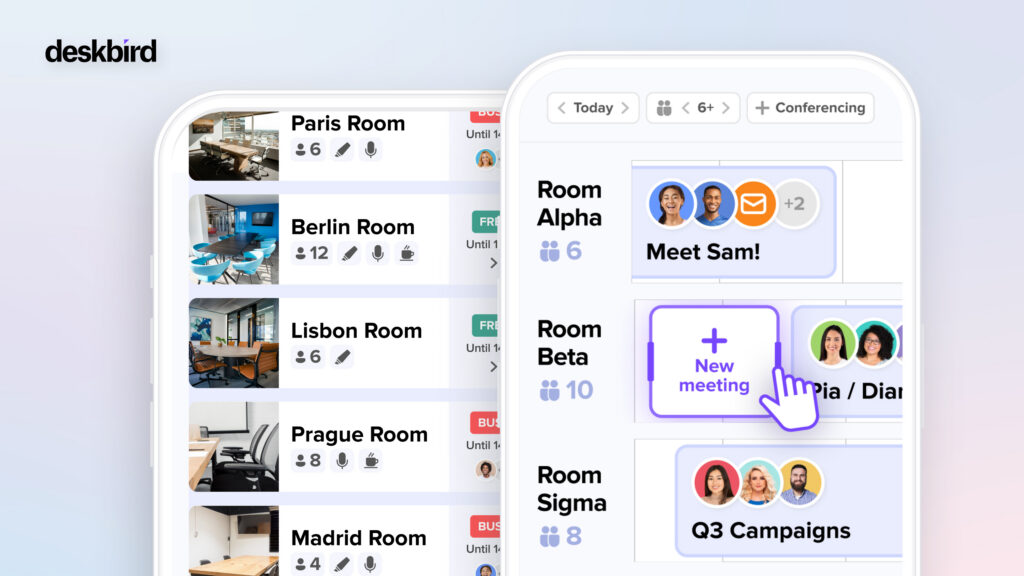
With deskbird, booking a desk takes just a few clicks—directly from MS Teams, Slack, Outlook, or Google Calendar. No separate app to open, no clunky interface to navigate. The system shows real-time availability, so you know exactly what's open before you commit.
Meeting room and parking spot booking
The same booking logic extends to meeting rooms and parking spots. Instead of managing separate systems for each resource, employees handle everything through one platform.
This eliminates the classic frustration of showing up for a meeting only to find the room already occupied. And for employees who drive to the office, securing parking ahead of time removes one more barrier to coming in.
Interactive floor plans for finding spaces and colleagues
Visual, interactive floor plans let employees see availability at a glance. You can zoom into specific floors, check which desks are free, and even spot where your teammates are sitting that day.
For larger offices or companies with multiple locations, this feature is especially useful. Rather than wandering around looking for your team, you can plan your day before you even leave home.
| Bookable Resource | What Employees Can Do |
| Desks | Reserve flexible or assigned workstations |
| Meeting rooms | Book collaboration spaces for team sessions |
| Parking spots | Secure on-site parking ahead of arrival |
Use case 3: Hybrid work scheduling and team coordination
One of the trickiest parts of hybrid work isn't the technology—it's the coordination. When half your team works from home on any given day, how do you know when to come in? And how do managers make sure teams actually overlap for collaboration?
Weekly office attendance planning
Employees can set their hybrid work schedules in advance, typically for the week ahead. This creates visibility across the organization, so everyone knows who's planning to be in the office and when.
The benefit goes both ways. Employees can align their in-office days with teammates they want to collaborate with. Managers get a clear picture of team attendance without sending endless Slack messages asking "Who's coming in tomorrow?"
Calendar sync with Outlook, Google, and MS Teams
Nobody wants to manage their schedule in multiple places. That's why deskbird integrates directly with the tools employees already use—Outlook, Google Calendar, MS Teams, and Slack.
When you book a desk or schedule an office day, it automatically appears in your calendar. Your colleagues can see your availability without switching apps. This kind of deep integration is what separates a tool people actually use from one that gets abandoned after the first week.
Real-time colleague visibility
Ever commuted to the office only to find your entire team working from home? Real-time colleague visibility solves this by showing you exactly who's planning to be in on any given day.
When you can see that three people from your project team are coming in on Thursday, you're more likely to join them. And that's when the best in-person work tends to happen—spontaneous conversations, quick problem-solving, the stuff that's hard to replicate over video calls.
Use case 4: Workplace analytics for data-driven decisions
You can't optimize what you can't measure. Workplace analytics transform gut feelings into concrete data, helping leaders make smarter decisions about office space and hybrid policies.
Space utilization and occupancy insights
Analytics reveal which desks, rooms, and areas are used most frequently—and which often sit empty. This information is invaluable for facilities teams trying to optimize office layouts.
Maybe your open collaboration spaces are always packed while individual focus pods go unused. Or perhaps one floor consistently runs at high capacity while another barely gets any traffic. Insights like these guide decisions about reconfiguring space to match how employees actually work.
Attendance tracking with automatic check-ins
Automatic check-ins capture real attendance data without adding extra steps for employees. When someone connects to the office WiFi or books a desk, the system registers their presence.
This provides an accurate picture of who's actually using the office versus who just booked a space and didn't show up. The difference matters when you're trying to understand true occupancy patterns.
Custom reports for leadership and facilities
Different stakeholders want different information. HR might want to see attendance trends by department. Facilities wants occupancy data by floor. Leadership wants the big picture on space utilization across all locations.
Custom reports ensure each department gets the relevant insights for their decisions. The data is already there—it's just a matter of presenting it in the right format for the right audience.
Use case 5: Employee engagement and a thriving office culture
Hybrid work only succeeds when employees actually want to come to the office. If the office feels like an empty, soulless space, people will stay home. This use case focuses on turning your workplace into a destination worth visiting.
Office events that bring teams together
The office becomes more appealing when there's something happening. Teams can use workplace management platforms to plan and promote in-office events—from casual team lunches to structured workshops and training sessions.
Events give people a reason to come in beyond just "because it's Tuesday." They create moments of connection that are difficult to replicate over video calls.
Social features and announcements
A social feed and announcement features keep employees informed about what's happening at the office. Maybe there's a birthday celebration on the third floor, or the company is hosting a guest speaker next week.
This kind of visibility fosters a sense of community even when people aren't physically present every day. Employees feel connected to the workplace culture rather than isolated in their home offices.
Hybrid policies employees actually embrace
Clear, transparent hybrid policies reduce friction and confusion. When employees understand exactly what's expected—whether that's two days in the office per week or specific team collaboration days—they can plan accordingly.
The key is communicating policies directly through the platform employees already use for scheduling. No more digging through HR documents or asking managers for clarification.
Why deskbird is the platform for mastering hybrid workplace management
deskbird brings all five use cases together in one intuitive platform. The combination of seamless booking, deep integrations with tools like MS Teams and Slack, and powerful analytics gives organizations everything they need to run a successful hybrid office.
Built and hosted in Europe with strong privacy and security standards, deskbird serves organizations from 25 to 10,000+ employees across multiple languages worldwide. Whether you're just starting your hybrid journey or optimizing an established program, the platform scales with your needs.
👉 Ready to see how deskbird can transform your workplace? Book a demo to experience the platform in action.
FAQs about workplace management with deskbird
How do I get started with deskbird?
Teams can request a demo to see the platform in action and typically get onboarded within days. deskbird's support team guides you through setup, from uploading floor plans to configuring booking rules.
What integrations does deskbird support?
deskbird integrates with MS Teams, Slack, Outlook, and Google Calendar for seamless scheduling. Additional integrations are available for HRIS systems and access control, allowing the platform to fit into your existing tech stack.
Is deskbird suitable for small teams or only large enterprises?
deskbird serves organizations of all sizes, from small teams of 25 employees to global enterprises with 10,000+ people. The platform scales with your needs, so you're not paying for features you don't use.
How does deskbird protect employee data and privacy?
deskbird is built and hosted in Europe and adheres to GDPR and strong privacy standards. Employee data is protected with enterprise-grade security, and administrators have granular control over what information is visible to whom.
Can I customize booking rules and hybrid policies in deskbird?
Yes, administrators can configure custom booking rules, access restrictions, and hybrid work policies to match their company's specific requirements. You can set minimum in-office days, require manager approvals, or restrict certain resources to specific teams.