

10 Best Skills Management Software in 2026

10 Best Skills Management Software Shortlist


Skills management software helps you track, analyze, and develop your workforce’s capabilities. If you’re searching for the best skills management software, you’re probably facing challenges like skill gaps, misaligned talent, or uncertainty about who has what expertise on your team. The right platform can give you a real-time view of skills, support smarter decisions about hiring and development, and help you keep up as roles and business needs change. In this guide, I’ll break down top-rated tools to help you find the skills management solution that matches your HR priorities and drives results in 2026.
Why Trust Our Software Recommendations
Our team has been testing and reviewing software since 2012. As HR experts ourselves, we know how difficult—and important—it is to choose the right software.
For this guide, we evaluated tools using hands-on testing and independent research, scoring tools using our selection criteria. We also draw on insights from industry thought leaders and practicing HR experts.
Our reviews reflect our human editorial judgment, not a sales pitch.
Expert reviewers:
Comparison Table: Skills Management Software
This comparison table summarizes pricing details for my top skills management software selections.
| Tool | Best For | Trial Info | Price | ||
|---|---|---|---|---|---|
| 1 | Best for predicting leadership potential from data | Free demo available | Pricing upon request | Website | |
| 2 | Best for AI-driven career pathing | Free demo available | Pricing upon request | Website | |
| 3 | Best for large-scale skills assessments | 7-day free trial + free demo available | Pricing upon request | Website | |
| 4 | Best built-in content libraries | 45-day free trial + free demo available | From $20/month | Website | |
| 5 | Best for integrated learning and skill tracking | Free demo available | From $15,000 (billed annually) | Website | |
| 6 | Best for visualizing team capacity | Free plan + free trial + free demo available | From $5.5/user/month | Website | |
| 7 | Best for talent redeployment in large enterprises | Free demo available | Pricing upon request | Website | |
| 8 | Best for internal skills matching | Free demo available | Pricing upon request | Website | |
| 9 | Best for customizable skills frameworks | Free plan + free demo available | From $2.25/user/month (billed annually) | Website | |
| 10 | Best for compliance-driven industries | Free demo available | Pricing upon request | Website |
Skills Management Software Reviews
Below are my detailed summaries of the best skills management software that made it onto my shortlist. My reviews offer a detailed look at the features, use cases, and integrations of each platform to help you find the best one for you.

Best for predicting leadership potential from data
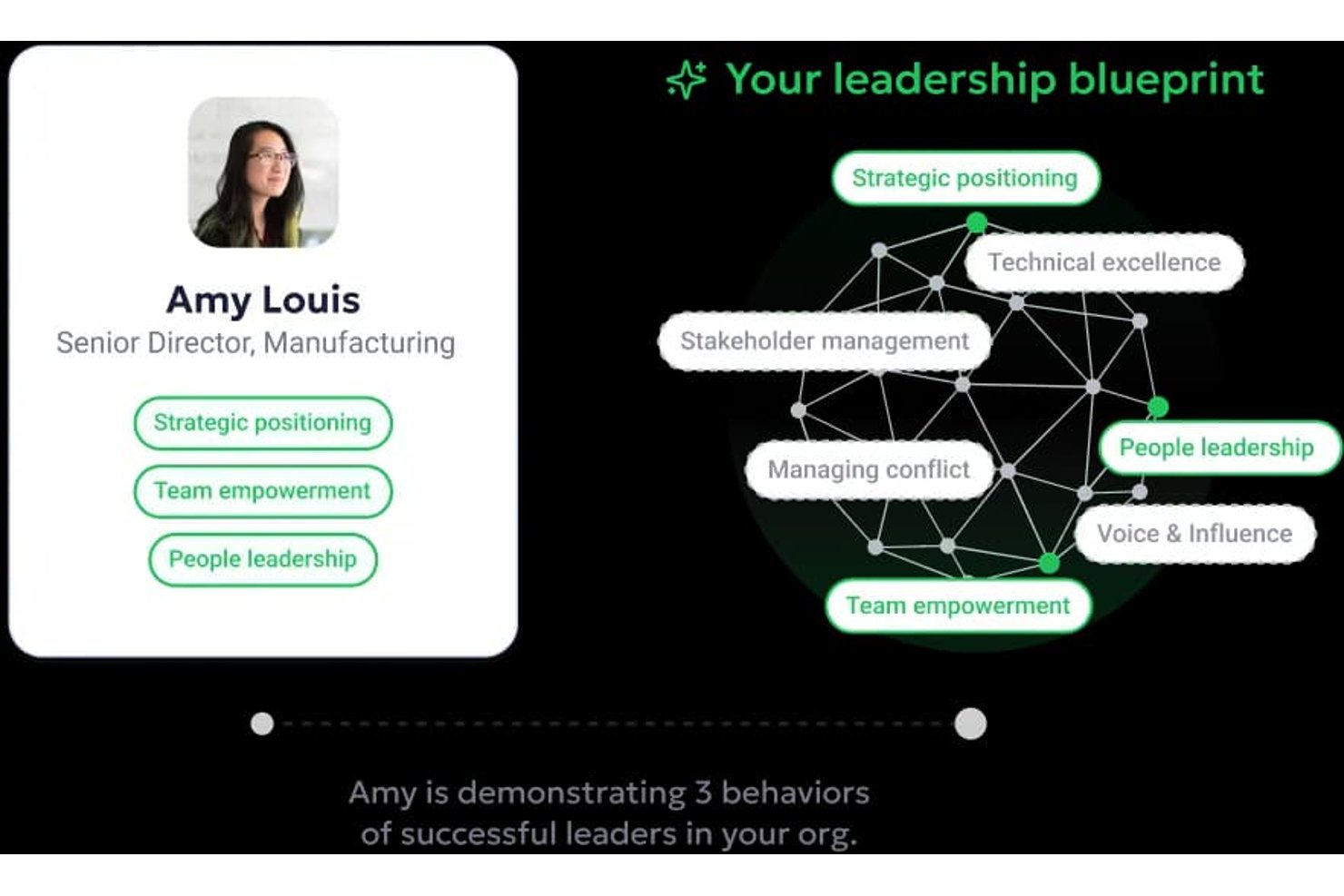
Workhuman Future Leaders is an AI-powered succession planning tool that analyzes peer recognition data to identify high-potential employees and predict future leadership candidates years before promotion.
Who Is Workhuman Future Leaders Best For?
It's a strong fit for enterprise HR and talent management teams that already use Workhuman's recognition platform and want to build a more proactive leadership pipeline.
Why I Picked Workhuman Future Leaders
I picked Workhuman Future Leaders because no other skills management tool surfaces leadership competencies the way it does. Its Ascend™ AI engine analyzes peer recognition patterns, cross-functional contributions, and behavioral consistency to flag VP-level potential up to five years before promotion. The self-learning models recalibrate in real time as leadership roles shift, so the predictions stay accurate without manual model maintenance.
Workhuman Future Leaders Key Features
- Workhuman iQ analytics: Delivers real-time insights and visualizations from recognition and feedback data.
- Enterprise HRIS integrations: Integrates with platforms like Workday, Microsoft Teams, and Slack for data sync and workflow embedding.
- Recognition-driven succession planning: Supports ongoing succession management using peer-to-peer recognition signals.
- Admin program management hub: Provides centralized controls for configuring recognition, rewards, and reporting features.
Workhuman Future Leaders Integrations
Workhuman Future Leaders offers native integrations with Microsoft Teams, Slack, Outlook, Workday, and Yammer. An open API is available for custom integrations.
Pros and Cons
Pros:
- AI recalibrates succession predictions in real time
- Recognition data reveals organic leadership behaviors
- Predicts leadership potential years before promotion
Cons:
- Requires existing Workhuman recognition platform adoption
- No structured skills taxonomy or gap analysis

Nestor
Best for AI-driven career pathing
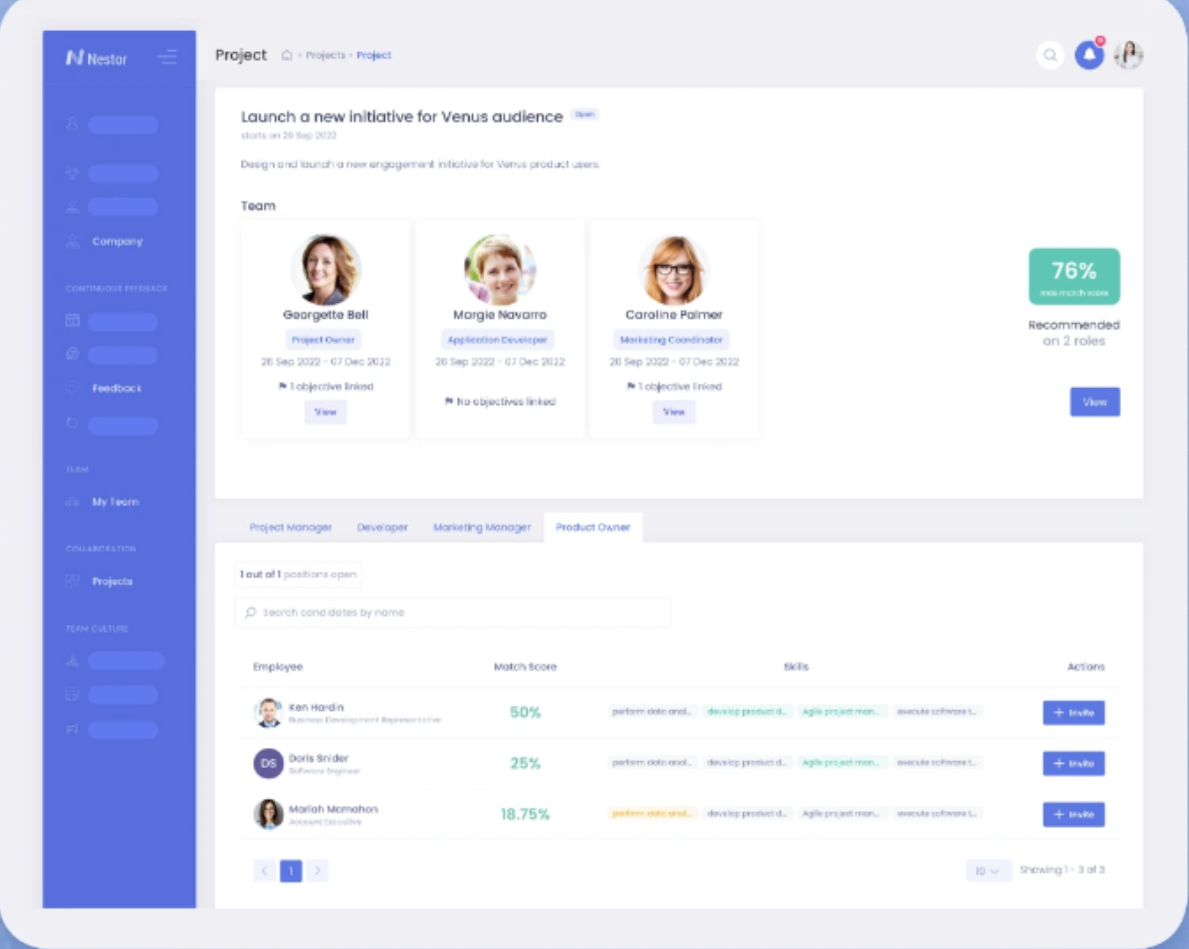
Nestor is a skills management platform designed for HR teams that offers skills assessments, real-time skills mapping, AI-powered talent profiles, and internal mobility tools.
Who Is Nestor Best For?
HR and talent leaders in mid-size or large organizations who want AI-driven career paths and skill mapping for workforce planning.
Why I Picked Nestor
I picked Nestor because I get built-in AI-driven career pathing, personalized skill gap analysis, and real-time skills mapping for every employee profile. I can use its AI to surface internal job opportunities based on current and projected skillsets. I like that Nestor pulls together talent profiles and upskilling prompts right inside the platform so my team can actually deliver relevant growth paths.
Nestor Key Features
- Skills taxonomy management: Build and customize a library of organizational skills and competencies.
- 360-degree feedback collection: Gather skills assessments from managers, peers, and self-evaluations.
- Performance calibration tools: Align employee skills data with performance criteria and benchmarks.
- Customizable dashboards: Visualize workforce skills insights and trends in a single view.
Nestor Integrations
Integrations include ADP, BambooHR, Workday, PayFit, Lucca, Paychex, Okta, ChartHop, and Ceridian.
Pros and Cons
Pros:
- Suggests learning based on real-time gaps
- Aligns individual goals with company OKRs
- Offers interactive skill mapping dashboards
Cons:
- Smaller library of technical assessments
- No API integration to HRIS platforms

iMocha
Best for large-scale skills assessments
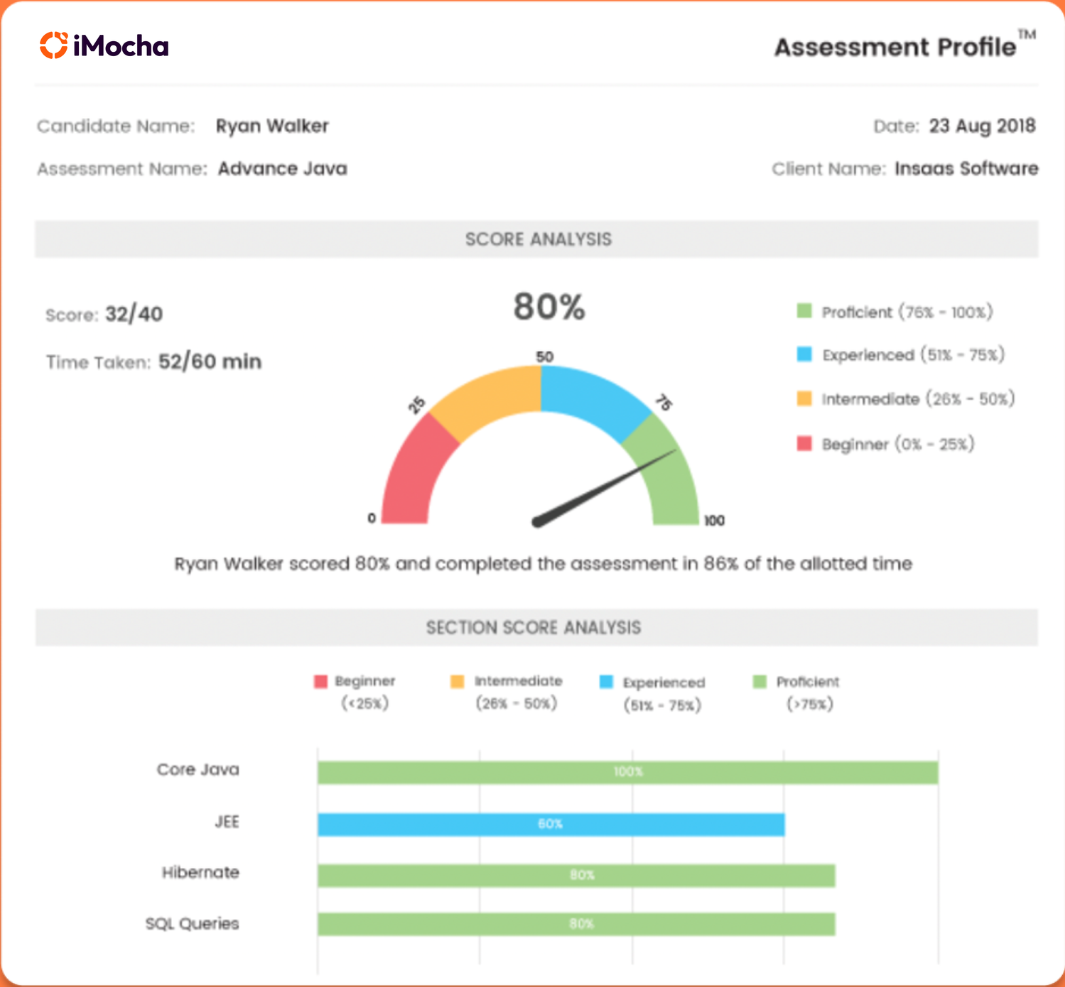
iMocha is an AI-driven skills intelligence platform for HR and talent teams that offers pre-built assessments, customizable test creation, skills analytics, and automated evaluation workflows.
Who Is iMocha Best For?
HR and talent acquisition teams at large enterprises that need to assess skills at scale across various job roles and geographies.
Why I Picked iMocha
I picked iMocha as one of the best because I can deliver high-volume, job-role specific assessments that scale automatically for multiple business units. I use its massive skill library and customizable test builder to target exactly the skills I care about. For large rollouts, my team relies on automated proctoring and analytics to keep our results reliable and actionable.
iMocha Key Features
- AI-powered question generation: Create assessment questions automatically using artificial intelligence.
- Skill benchmarking dashboard: Compare skill levels across teams or departments in real time.
- Role-based assessment access: Control who can view, assign, or edit assessments by user role.
- Integration with video interview platforms: Connect assessments to video interview tools for combined evaluation.
iMocha Integrations
Integrations include SAP SuccessFactors, Workday HCM, iCIMS, Greenhouse, Zoho Recruit, Workable, BambooHR, Lever, Freshteam, and Oracle.
Pros and Cons
Pros:
- Multi-language assessments available
- Live coding tests available
- Advanced proctoring for remote assessments
Cons:
- Basic internal talent marketplace
- Limited focus for long-term career pathing

Best built-in content libraries
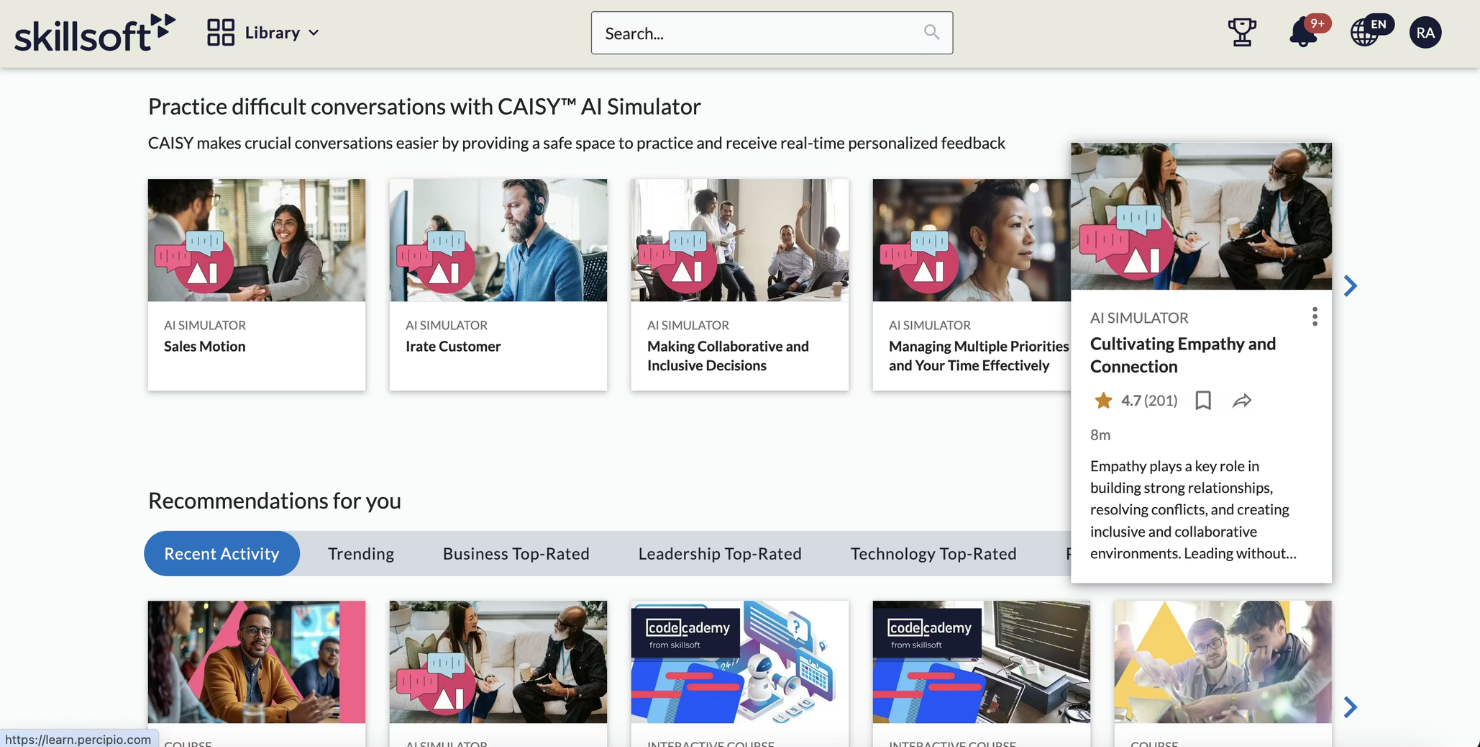
Skillsoft is a cloud-based skills management platform offering structured learning modules, certification tracks, and expansive digital content libraries for workforce development and training.
Who Is Skillsoft Best For?
Learning and development teams at mid-size to enterprise organizations are seeking ready-made skills content for workforce upskilling.
Why I Picked Skillsoft
I picked Skillsoft as one of the best because I get instant access to a vast content library for digital, leadership, and compliance skills. I use its prebuilt learning paths to map content directly to organizational skill frameworks. My team can assign targeted learning modules for every job role without building resources from scratch.
Skillsoft Key Features
- Skill benchmarking dashboard: Compare workforce skills progress in real time.
- Integration with HRIS platforms: Connect learning data with existing HR systems.
- Automated content recommendations: Deliver personalized course suggestions based on skill gaps.
- Assessments and quizzes: Evaluate learner progress through built-in testing tools.
Skillsoft Integrations
Integrations include Microsoft, Workday, SAP SuccessFactors, Cornerstone OnDemand, Oracle, SumTotal, Saba, Degreed, 360Learning, and Moodle.
Pros and Cons
Pros:
- Mobile-friendly course delivery
- Built-in professional certifications library
- Extensive library of prebuilt learning modules
Cons:
- Limited advanced analytics
- Less support for field assessments
Bridge
Best for integrated learning and skill tracking
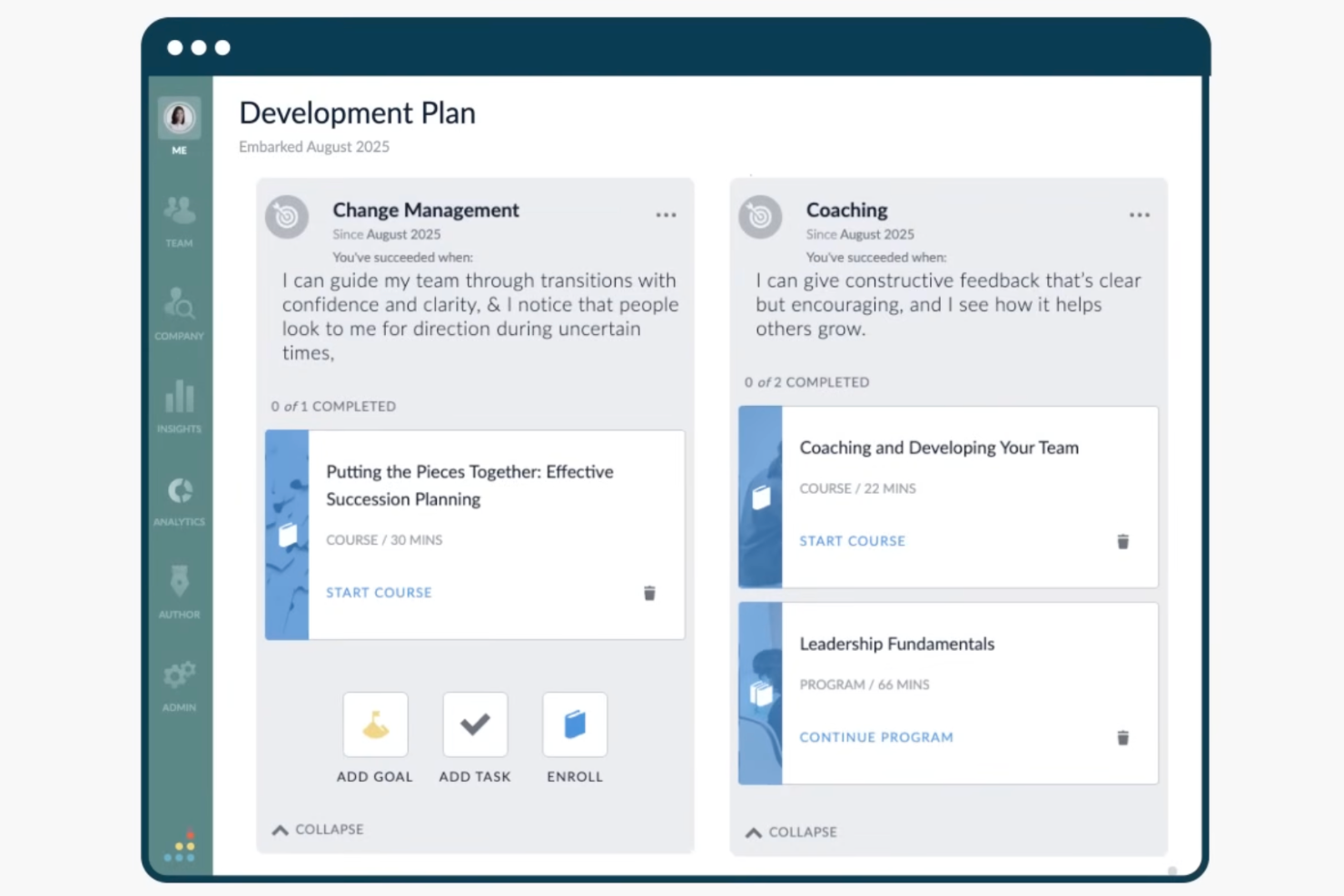
Bridge is a skills management platform that pairs AI-driven skills tracking with learning, performance, and feedback tools built for HR teams and people managers.
Who Is Bridge Best For?
Bridge is a good fit for mid to large-sized organizations where HR teams need to connect employee skill development to learning, performance, and career growth in one place.
Why I Picked Bridge
I've included Bridge in my top picks because of how tightly it connects learning content to actual skill data. When I browse courses in Bridge, each one is already tagged to specific skills from a library of 30,000+ skills built on Lightcast data, so completing a course automatically updates an employee's skill profile. I also like that Bridge uses AI to surface personalized course recommendations based on identified skill gaps, which means employees aren't just browsing a catalog—they're being directed toward learning that closes real deficiencies on their skills profile.
Bridge Key Features
- Skills gap analysis: View a dashboard-level breakdown of skill gaps across teams or the entire organization, filtered by role or department.
- Career pathing: Employees can explore role-based career paths mapped to the skills they currently hold and the skills needed for target positions.
- Individual development plans: Managers and employees can build structured development plans that tie specific learning goals to identified skill needs.
- Skills communities: Connect employees with shared skills or learning interests into peer groups to support informal mentorship and knowledge sharing.
Bridge Integrations
Bridge offers native integrations across content providers, HRIS platforms, SSO tools, and video management systems, including LinkedIn Learning, OpenSesame, BambooHR, Slack, Dropbox, Google Calendar, Credly, Shopify, Kaltura, and Panopto. It's also available on Zapier. An open API and webhooks are available for custom integrations, and Bridge supports LTI for launching third-party content within the platform.
Pros and Cons
Pros:
- Feedback ties directly to skill profiles
- AI-driven skills mapping for job titles
- LMS and skills tools live on one platform
Cons:
- Limited built-in content creation tools
- Reporting features lack depth and flexibility
Best for visualizing team capacity

MuchSkills is a skills management platform that focuses on visual skill mapping, employee profiles, capacity planning, and organization-wide skills data tracking for teams and enterprises.
Who Is MuchSkills Best For?
HR and team leaders in growing companies who need visual skills mapping and transparent capacity planning.
Why I Picked MuchSkills
MuchSkills earns its spot on my shortlist because I see how visually mapping team skills and capacity uncovers strengths and gaps right away. I use its interactive skill visualization to create clear, dynamic skill matrices for project planning and staffing. With timeline-based capacity tracking, I can plan workloads and allocate resources with real data. I also appreciate the custom skill categories that let my team organize each department’s expertise distinctly.
MuchSkills Key Features
- Skill endorsement and rating: Team members can endorse and rate each other's skills for accuracy.
- Role-based skill mapping: Assign specific skillsets to job roles across your organization.
- Org chart integration: Visualize team structures along with individual skill profiles.
- Custom reporting: Generate on-demand reports for skill distribution and team composition.
MuchSkills Integrations
Integrations include Salesforce, Power BI, Jira, Dayforce, Personio, Okta, SAP, Workday, Zoho Projects, and BambooHR.
Pros and Cons
Pros:
- Clear visualization of team capacity
- Highlight over-concentrated skills
- Built-in certification tracking
Cons:
- Limited formats for reporting exports
- No built-in video-based assessment
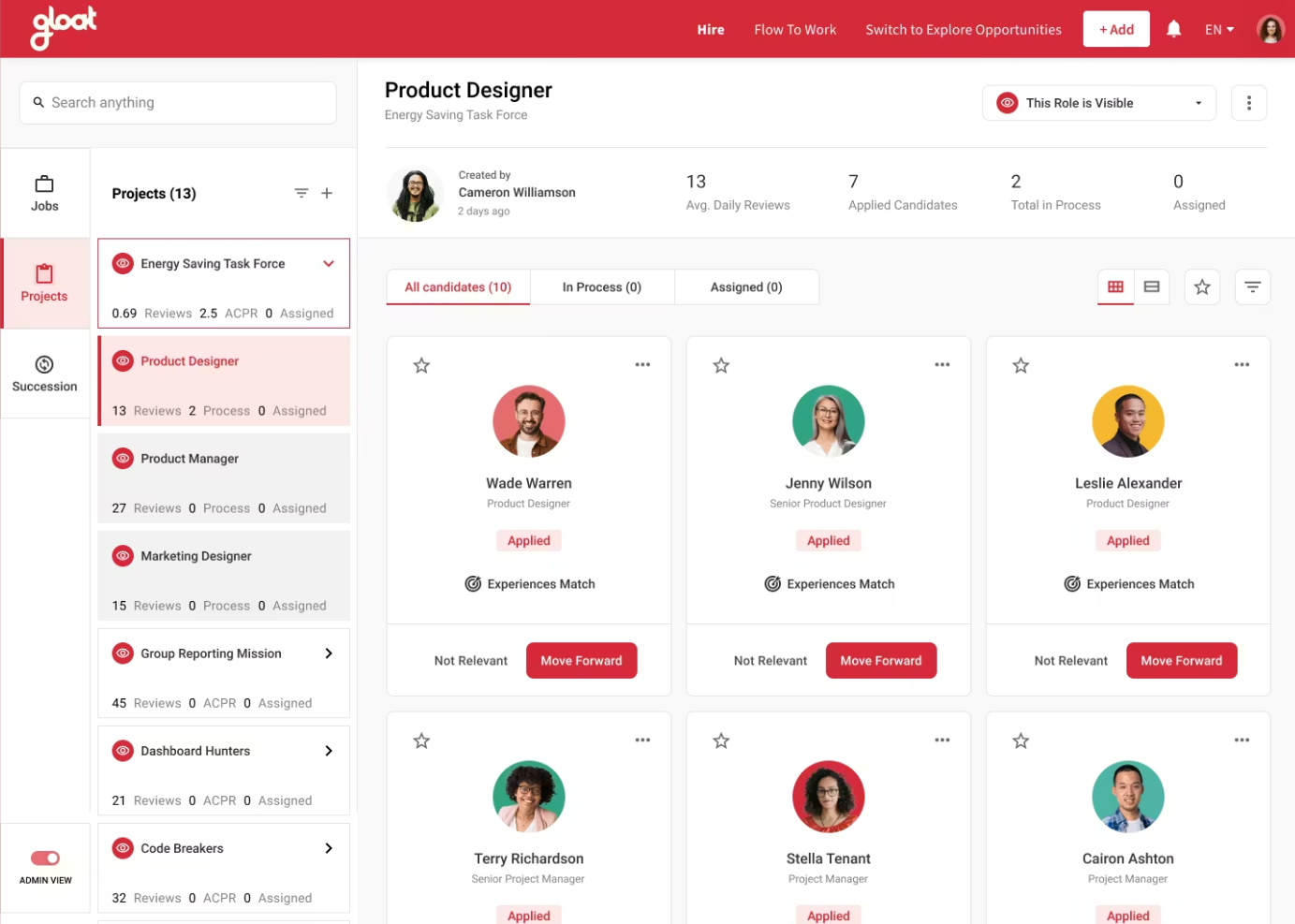
Gloat is an AI-powered talent marketplace platform for large organizations that combines employee skills mapping, role matching, internal mobility workflows, and workforce analytics.
Who Is Gloat Best For?
Global enterprise HR teams need large-scale internal talent redeployment and workforce agility.
Why I Picked Gloat
I picked Gloat as one of the best because I can manage large-scale talent redeployment using its AI-driven matching engine, which connects employees to projects and roles based on real skills data. My team relies on its internal talent marketplace to identify hidden capabilities, efficiently reassign talent, and ensure workforce agility without external hiring. I find that its detailed analytics help visualize talent distribution across our organization during major transitions.
Gloat Key Features
- Skills inventory management: Track and catalogue employee skills in real time across the organization.
- AI-driven skills mapping: Automatically map workforce skills to current and future organizational needs.
- Personalized development recommendations: Suggest targeted upskilling or reskilling paths for employees based on skill gaps.
- Configurable organizational hierarchies: Mirror complex business structures for more accurate skill and talent reporting.
Gloat Integrations
Integrations include Microsoft Teams, Microsoft Copilot, SAP SuccessFactors, Workday, and Oracle HCM.
Pros and Cons
Pros:
- Offers built-in skills taxonomy builder
- Customizable talent marketplace workflows
- AI-driven skill and role recommendations
Cons:
- Requires large historical datasets for AI accuracy
- Implementation can be complex

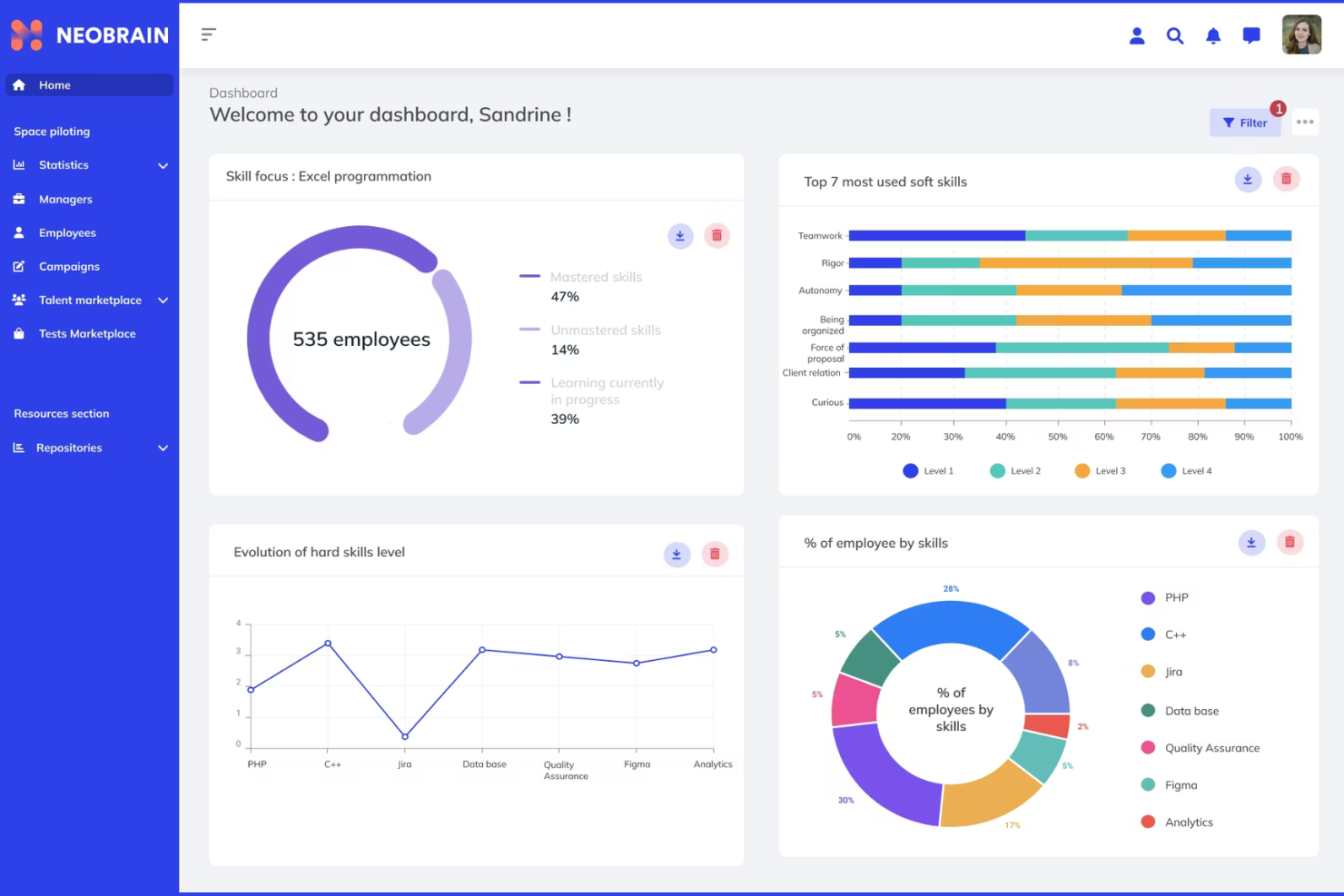
Neobrain is an AI-powered talent marketplace and skills management platform that facilitates internal mobility by centralizing project opportunities and career paths. It focuses on converting individual competencies into performance through dynamic mapping and predictive workforce planning.
Who Is Neobrain Best For?
Large enterprises and HR teams who prioritize talent retention and want to create an internal labour market where employees are matched to new opportunities based on their potential rather than just their current job title.
Why I Picked Neobrain
I selected Neobrain as the top choice for internal skills matching because of its AI-driven skills intelligence. Unlike traditional tools that rely on manual updates, Neobrain uses adaptive AI to create a living skills inventory. I found its ability to perform semantic analysis on CVs and professional paths particularly effective for revealing hidden talents that employees might not have formally declared.
Neobrain Key Features
- AI-powered internal talent marketplace: Instantly matches employee profiles to open roles and career paths based on real-time competency gaps
- Automated skills gap identification: The platform automatically detects strengths and weaknesses across your workforce.
- Integrated learning recommendations: Suggests tailored training content to address identified skill gaps.
- Customizable reporting dashboards: Let you view key metrics and workforce insights by department, location, or skill cluster.
Neobrain Integrations
Integrations include 360Learning, ADP France, Cegid Talentsoft, CentralTest, Cornerstone OnDemand, Lucca, Oracle Cloud HCM, SAP SuccessFactors, SmartRecruiters, and Workday.
Pros and Cons
Pros:
- Uses AI semantic analysis for skills discovery
- Built-in capacity tracking
- Peer skill endorsement for validation
Cons:
- Basic automated alerts
- Limited role-based permissions

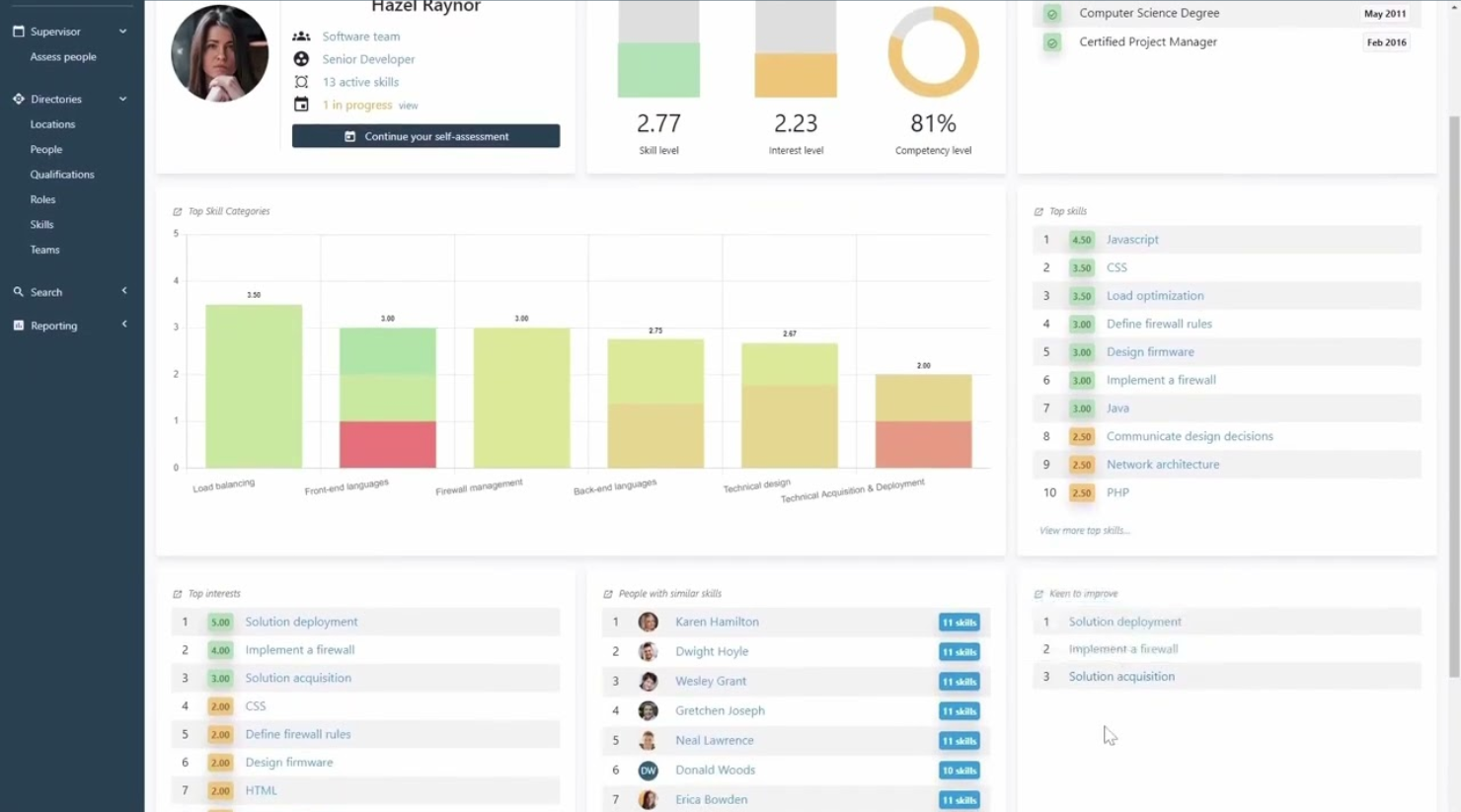
Skills Base is a configurable skills management platform for building, mapping, and assessing employee skills, roles, and competencies with flexible organizational frameworks and custom ratings.
Who Is Skills Base Best For?
HR teams and people leaders at medium to large organizations who need flexible control over skills frameworks and assessments.
Why I Picked Skills Base
I picked Skills Base because I like the way it lets me design skills matrices with custom hierarchies, assessment types, and ratings for each role or team. My team uses its competency mapping to reflect changing business structures, and the bulk upload and framework cloning features make re-orgs much easier. I think you'll get the most value from it when you want granular control over every detail in your skills taxonomy.
Skills Base Key Features
- Skill gap analysis: Compare required versus current skill levels across teams or roles.
- Competency dashboards: Visualize organization-wide skill and competency data in real time.
- User self-assessment tools: Let employees evaluate and update their own skills profiles.
- Multiple language support: Use the platform in several different languages for global teams.
Skills Base Integrations
Integrations include Workday, along with API connections to HR, LMS, CRM, and BI tools.
Pros and Cons
Pros:
- Self-assessment and manager review
- Compare team capabilities using heatmaps
- Monitor assessment completion risks with AI alerts
Cons:
- Advanced analytics requires a higher-tier plan
- Limited integration options
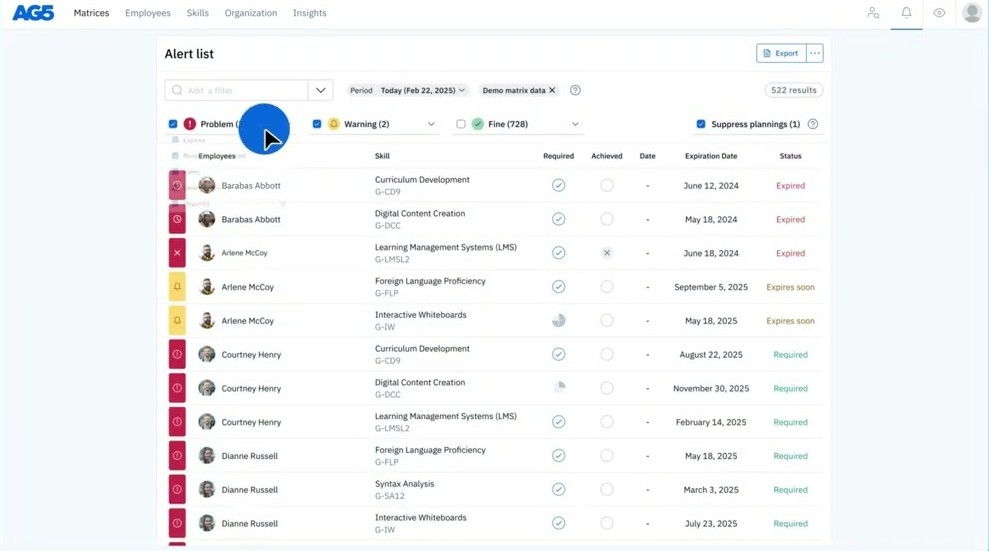
AG5 is a configurable skills management platform that gives you control over skills matrices, qualification tracking, compliance records, and workforce capability mapping in one place.
Who Is AG5 Best For?
Compliance officers and HR teams in regulated industries need centralized skills and certification tracking.
Why I Picked AG5
I picked AG5 as one of the best because it lets me map and maintain detailed skills and qualification profiles across teams. I like being able to set automated certificate expiry alerts and quickly generate audit-ready reports. My team uses the API to sync real-time skills data directly with HR systems.
AG5 Key Features
- Drag-and-drop skills matrices: Build and update visual skills matrices for teams and departments in real time.
- Role-based access controls: Set and manage user permissions by role, site, or team.
- Competency gap analysis: Identify and report on missing skills at the employee, team, or organizational level.
- Multilingual support: Access the platform in multiple languages to support diverse and global workforces.
AG5 Integrations
Integrations include Workday, SAP SuccessFactors, Cornerstone, ADP Workforce Now, BambooHR, Moodle, Power BI, UKG, and Microsoft Entra ID.
Pros and Cons
Pros:
- Imports HR data from HCM systems
- Automate certification renewal alerts
- Handles complex compliance audits
Cons:
- Requires manual initial data mapping
- Lacks built-in report customization options
Other Skills Management Software
Here are some additional skills management software options that didn’t make it onto my shortlist, but are still worth checking out:
- SkillsDB
For built-in succession planning
- Kahuna
For frontline skills tracking
- Workday
For unified skills and workforce data
- Cornerstone OnDemand
For enterprise skills reporting
- Fuel50
For expert-driven skills tracking
- SAP SuccessFactors
For integrating with enterprise HR systems
- 365Talents
For AI-driven skills discovery
- Cinode
For consultancy and project-based firms
- Avilar
For competency-based skills frameworks
- agyleOS
For DEI and bias-free skills tracking


How I Evaluate Skills Management Software
I split my evaluation into baseline criteria—like skills taxonomy depth and gap analysis—and differentiators like AI inference and workforce planning that separate great tools from adequate ones.
Core Functionality (Table Stakes For This List)
When I'm selecting tools for my list, I rank each one on a scale from 0 (does not offer the functionality) to 5 (excels in this area) for each core functionality listed below. Then, I calculate the tool's total score into a percentage. Each tool needs to achieve a minimum total score of 65% to be considered for inclusion.
- Skills Taxonomy or Ontology: I evaluate whether the platform offers a pre-built, customizable skills library or requires your team to build one from scratch—and how well it adapts as new roles emerge.
- Skills Assessment & Proficiency Tracking: Each tool should let you capture proficiency levels through multiple methods, like self-assessments, manager ratings, or peer endorsements, rather than simple yes/no skill tags.
- Skills Gap Analysis: I look for the ability to surface gaps at the individual, team, and org level—for example, spotting a shortage of cloud architecture skills before a planned infrastructure migration.
- Employee Skill Profiles: Strong platforms maintain dynamic profiles that pull in certifications, project history, and learning completions, giving managers a real-time view of each person's capabilities.
- Career Pathing & Development Recommendations: I check whether the tool connects skill data to suggested next roles or learning content, so employees can see a clear route from their current position to a target role.
- Internal Talent Matching: The platform should match people to open roles, gig assignments, or mentorships based on their skill profiles—similar to how Fuel50 and Gloat surface internal opportunities through marketplace models.
Once I have a list of tools that meet the criteria, I consider what sets each platform apart.
Differentiating Factors (What Sets Vendors Apart)
Here's how I compare and contrast different vendors:
Standout Features
AI skills inference is a major differentiator—platforms that detect capabilities from project work, completed trainings, and collaboration tools give you far richer data than self-reporting alone. I also look at whether a tool offers an internal talent marketplace where employees can browse gigs, mentorships, and stretch assignments matched to their profiles. Strategic workforce planning matters for teams preparing for organizational shifts, where scenario modeling can reveal future skill shortages before they become hiring emergencies.
Beyond Features
HR tech stack integrations are one of the first things I check. Skills data is only useful when it flows between your HRIS, LMS, and performance tools—otherwise you're maintaining siloed records. I also evaluate implementation and change management support, since getting employees to actually complete their skill profiles is one of the biggest adoption hurdles. Data privacy matters here too, especially when platforms use AI to infer skills from employee activity, where transparent governance and compliance certifications build trust.
How to Choose Skills Management Software
It’s easy to get bogged down in long feature lists and complex pricing structures. To help you stay focused as you work through your unique software selection process, here’s a checklist of factors to keep in mind:
| Factor | What to Consider |
|---|---|
| Scalability | Will the platform adapt to your organization’s growth, evolving structures, or larger user numbers? |
| Integrations | Can you connect the software with your HCM, LMS, or HRIS platforms for unified processes and data? |
| Customizability | Does it allow you to reflect your organization’s specific roles, skill taxonomies, and workflows? |
| Ease of use | Will end users (employees, managers, admins) quickly adapt and engage without extensive training? |
| Implementation and onboarding | What resources are needed to launch—timeline, internal team involvement, and external support? |
| Cost | Are ongoing fees, user-based pricing, and included support clear and aligned with your budget goals? |
| Security safeguards | How does the tool manage sensitive skills and employee data, and does it meet your compliance needs? |
| Support availability | Is help accessible through your preferred channels and time zones, especially during critical updates? |
What Is Skills Management Software?
Skills management software is a digital platform that helps organizations track, assess, and develop employee skills aligned with business needs. It centralizes skills data, maps competencies to roles, identifies gaps, and supports targeted learning or development activities. HR teams use it to build skill inventories, plan upskilling, and ensure workforce capabilities match evolving organizational goals.
Features of Skills Management Software
When selecting skills management software, keep an eye out for the following key features:
- Skills inventory: Catalogue and organize employee skills data in one place for easy searching, grouping, and reporting.
- Competency mapping: Match skills to job roles, organizational frameworks, or career pathways for more precise development planning.
- Skill gap analysis: Compare current workforce skills to target proficiencies and highlight where additional development is needed.
- Learning assignment: Assign courses, training, or development activities to address identified skills gaps or required competencies.
- Progress tracking: Monitor employee progress as they work towards learning goals or competency requirements.
- Self-assessment tools: Enable employees to rate their own proficiency or interests, supporting a collaborative approach to skill development.
- Manager or peer endorsements: Facilitate 360-degree feedback by allowing managers or colleagues to validate skills or provide input.
- Reporting and analytics: Provide dashboards and downloadable reports that visualize skills data, development trends, and organizational readiness.
- Certification management: Track attainment and renewal status for professional certifications or required training programs.
- Integration capabilities: Connect with HRIS, LMS, or performance management tools to synchronize data and centralize your skills ecosystem.
Common Skills Management Software AI Features
Beyond the standard skills management software features listed above, many of these solutions are incorporating AI with features like:
- Automated skill detection: Analyze resumes, profiles, and activity data to identify new or emerging skills employees may have, then add them automatically to skills inventories.
- AI-driven skill gap analysis: Use machine learning algorithms to compare workforce data and forecast future skill gaps based on role changes or industry trends.
- Personalized learning recommendations: Generate customized learning paths and content suggestions based on each employee's skill profile, goals, and recent activities.
- Predictive workforce planning: Model talent needs and mobility scenarios using AI, helping HR teams plan hiring, upskilling, or succession strategies.
- AI-powered career pathing: Suggest tailored career development opportunities or potential next roles based on employee skills, aspirations, and organizational needs.
Benefits of Skills Management Software
Implementing skills management software provides several benefits for your team and your business. Here are a few you can look forward to:
- Centralized skills visibility: Gain a clear, searchable overview of workforce skills and gaps using centralized inventories and competency maps.
- More targeted development: Assign training and learning paths that address specific skills gaps, backed by analytics and self-assessments.
- Faster upskilling and reskilling: Speed up employee development by matching learning resources and opportunities to real-time skills needs and job roles.
- Smarter workforce planning: Use reporting, analytics, and predictive AI to support data-driven decisions about hiring, mobility, and succession planning.
- Consistent compliance tracking: Monitor certifications, safety training, or required skills to ensure your team stays up to date with regulatory and business standards.
- Increased employee engagement: Encourage ownership of growth with self-assessment, endorsement tools, and personalized career recommendations.
- Better alignment with business goals: Link skills management to organizational priorities by spotlighting gaps that affect company performance and future success.
Costs & Pricing of Skills Management Software
Selecting skills management software requires an understanding of the various pricing models and plans available. Costs vary based on features, team size, add-ons, and more. The table below summarizes common plans, their average prices, and typical features included in skills management software solutions:
Plan Comparison Table for Skills Management Software
| Plan Type | Average Price | Common Features |
|---|---|---|
| Free Plan | $0 | Basic skills tracking, limited user seats, core reporting, and simple self-assessment tools. |
| Personal Plan | $5–$15/user/month | Individual skills inventories, progress tracking, self-guided learning, and basic analytics. |
| Business Plan | $10–$30/user/month | Team-wide skills mapping, manager dashboards, integration options, compliance tracking, and expanded reporting. |
| Enterprise Plan | $30–$60/user/month | Customizable workflows, advanced analytics, dedicated support, bulk onboarding tools, and advanced security features. |
Skills Management Software FAQs
Here are some answers to common questions about skills management software:
How can skills management software improve workforce planning?
Skills management software gives you real-time visibility into what employee skills your team has and where the specific skill gaps are. This allows human resources to improve the process of deciding who’s ready for new roles, plan for future staffing based on business needs, and target upskilling where it matters most. By identifying competency levels across the organization, you can optimize your decision-making to ensure you always have the right people in the right positions.
Is it hard to implement skills management software with existing HR tools?
No, most skills management platform options are built to integrate with an existing learning management system, HRIS, and similar functions. Still, you should check for direct integrations or an available API and plan for data syncing to avoid the manual effort of a traditional spreadsheet or Excel file. If you need more flexibility in how those systems connect, open-source skills management software can give you greater control over customization, though it may require more technical support.
What types of organizations need skills management software the most?
Organizations with fast-changing needs, large or distributed teams, or strict compliance requirements get a competitive advantage from these tools. They’re especially valuable for talent management in regulated industries, tech-driven companies, or any business focused on a skills-based approach to growth. Whether managing frontline workers or corporate teams, these tools help align workforce skills with long-term strategy.
Can employees use skills management software for self-guided development?
Yes, many platforms let employees perform skills assessments, explore suggested career paths, and track progress toward their personal development plans. This puts more control in employees’ hands, supporting skill development and personalized, continuous growth through clear competency management.
Will using skills management software help with compliance or certification tracking?
Yes, these tools allow you to track certifications, licenses, and required skills, send reminders about expirations, and centralize documentation to make audits and compliance reporting easier.