

I 10 migliori software per directory dei dipendenti recensiti nel 2026

Elenco dei migliori software per directory dei dipendenti


Gestire le informazioni sul team può diventare difficile man mano che l'azienda cresce. I fogli di calcolo e gli elenchi di contatti obsoleti rendono più difficile trovare la persona giusta o comprendere la struttura del team. Il software per directory dei dipendenti risolve questo problema centralizzando profili, dettagli professionali e linee gerarchiche in un'unica posizione, offrendo a tutti un accesso rapido a informazioni accurate.
In questa guida ho esaminato una serie di strumenti per directory dei dipendenti per aiutarti a confrontare le opzioni con sicurezza. Ogni strumento è stato valutato in base alla facilità d'uso, alle funzionalità principali, alle integrazioni e ai prezzi, così puoi individuare la soluzione più adatta alle dimensioni, alla struttura e alle esigenze di comunicazione del tuo team. Di seguito troverai un'analisi delle soluzioni migliori per aiutarti a prendere una decisione chiara e consapevole.
Perché fidarsi delle nostre recensioni sui software
Il nostro team testa e recensisce software dal 2012. In quanto esperti HR noi stessi, sappiamo quanto sia difficile — e importante — scegliere il software giusto.
Per questa guida, abbiamo valutato gli strumenti attraverso test pratici e ricerche indipendenti, assegnando un punteggio agli strumenti in base ai nostri criteri di selezione. Ci basiamo inoltre sulle competenze di leader di pensiero del settore e di professionisti HR attivi.
Le nostre recensioni riflettono il nostro giudizio editoriale umano, non un discorso di vendita.
Revisori esperti:
Tabella comparativa dei software per directory dei dipendenti
Questa tabella comparativa riassume i dettagli sui prezzi delle mie migliori selezioni di software per directory dei dipendenti:
| Tool | Best For | Trial Info | Price | ||
|---|---|---|---|---|---|
| 1 | Ideale per directory della forza lavoro globale | Demo gratuita disponibile | A partire da $5/dipendente/mese | Website | |
| 2 | Ideale per strutture organizzative complesse | Prova gratuita di 14 giorni | A partire da $349/mese | Website | |
| 3 | Ideale per organigrammi dinamici e profili dettagliati | Prova gratuita disponibile | Da $1.50/utente/mese | Website | |
| 4 | Ideale per le funzioni HR principali | Prova gratuita di 21 giorni | Da $1,20/utente/mese + $71/mese di tariffa base | Website | |
| 5 | Ideale per intranet sociali | Demo gratuita disponibile | Prezzi su richiesta | Website | |
| 6 | Ideale per piccole imprese | Demo gratuita disponibile | Da $4/utente/mese + $50/mese | Website | |
| 7 | Ideale per organigrammi visuali | Prova gratuita di 14 giorni | A partire da $5/utente/mese (minimo 25 utenti) | Website | |
| 8 | Ideale per soluzioni aziendali | Demo gratuita disponibile | Prezzo su richiesta | Website | |
| 9 | Ideale per interfaccia intuitiva | Demo gratuita disponibile + prova gratuita di 14 giorni | Da $4/utente/mese (fatturazione annuale) | Website | |
| 10 | Ideale per i luoghi di lavoro digitali | Demo gratuita disponibile | Prezzi su richiesta | Website |
Recensioni dei migliori software per directory dei dipendenti
Di seguito trovi i miei riepiloghi dettagliati dei migliori software per directory dei dipendenti presenti nel mio elenco. Le mie recensioni offrono un’analisi approfondita delle funzionalità principali, dei pro \u0026 contro, delle integrazioni e dei casi d’uso ideali per ogni strumento, aiutandoti a trovare quello più adatto alle tue esigenze.

Deel HR
Ideale per directory della forza lavoro globale

Deel offre una soluzione pratica per le aziende alla ricerca di un software di directory dei dipendenti, in particolare per quelle che gestiscono team distribuiti o internazionali. Supporta organizzazioni di varie dimensioni che necessitano di un modo centralizzato per gestire le informazioni dei dipendenti rispettando le leggi sul lavoro locali. Combinando funzioni HR essenziali come l'onboarding e la gestione globale delle buste paga, Deel ti aiuta a mantenere una directory dei dipendenti accurata e aggiornata in più regioni.
Perché ho scelto Deel
Ho scelto Deel perché va oltre le funzionalità di base di una directory, supportando le esigenze operative di gestione di una forza lavoro globale. Se assumi all'estero, puoi utilizzare Deel per effettuare l'onboarding dei dipendenti in oltre 150 paesi, mantenendo documentazione e registri conformi ai requisiti locali. Le sue capacità di gestione delle buste paga a livello globale permettono inoltre di gestire più valute e regolamenti fiscali, supportando una maggiore accuratezza dei dati dei dipendenti e la conformità alle norme. Questo lo rende particolarmente utile se la tua directory deve riflettere dati complessi relativi a una forza lavoro internazionale.
Caratteristiche principali di Deel
Oltre al solido onboarding e alla gestione delle buste paga, ho trovato altre funzionalità che migliorano l'efficacia di Deel come software di directory dei dipendenti:
- Monitoraggio della conformità: Deel garantisce che il tuo team sia conforme alle leggi sul lavoro locali, riducendo il rischio di problemi legali.
- Gestione dei contratti: Crea e gestisci facilmente i contratti in diverse giurisdizioni, assicurandoti che tutti gli accordi siano aggiornati e conformi.
- Gestione delle spese: Snellisci la gestione delle spese dei dipendenti con strumenti integrati di tracciamento e reportistica.
- Visualizzazione della struttura organizzativa: Visualizza la gerarchia della tua azienda e la struttura dei team, facilitando la comunicazione e la gestione.
Integrazioni di Deel
Le integrazioni includono Slack, QuickBooks, Xero, BambooHR, Greenhouse, Workday, Lever, Gusto, Okta e Microsoft Teams.
Pros and Cons
Pros:
- Buste paga globali in 150 paesi
- Gestione integrata di conformità e contratti
- Si integra con i principali sistemi HR
Cons:
- Le funzionalità di reportistica non offrono filtri avanzati
- Opzioni limitate di personalizzazione della directory
New Product Updates from Deel HR

Deel Expands Stablecoin Wallet to 80+ Countries
Deel expands its Stablecoin Wallet to 80+ countries with dollar-backed balances and optional rewards. This gives eligible contractors more ways to hold and manage earnings inside Deel. For more information, visit Deel’s official site.
 .
.
Ideale per strutture organizzative complesse
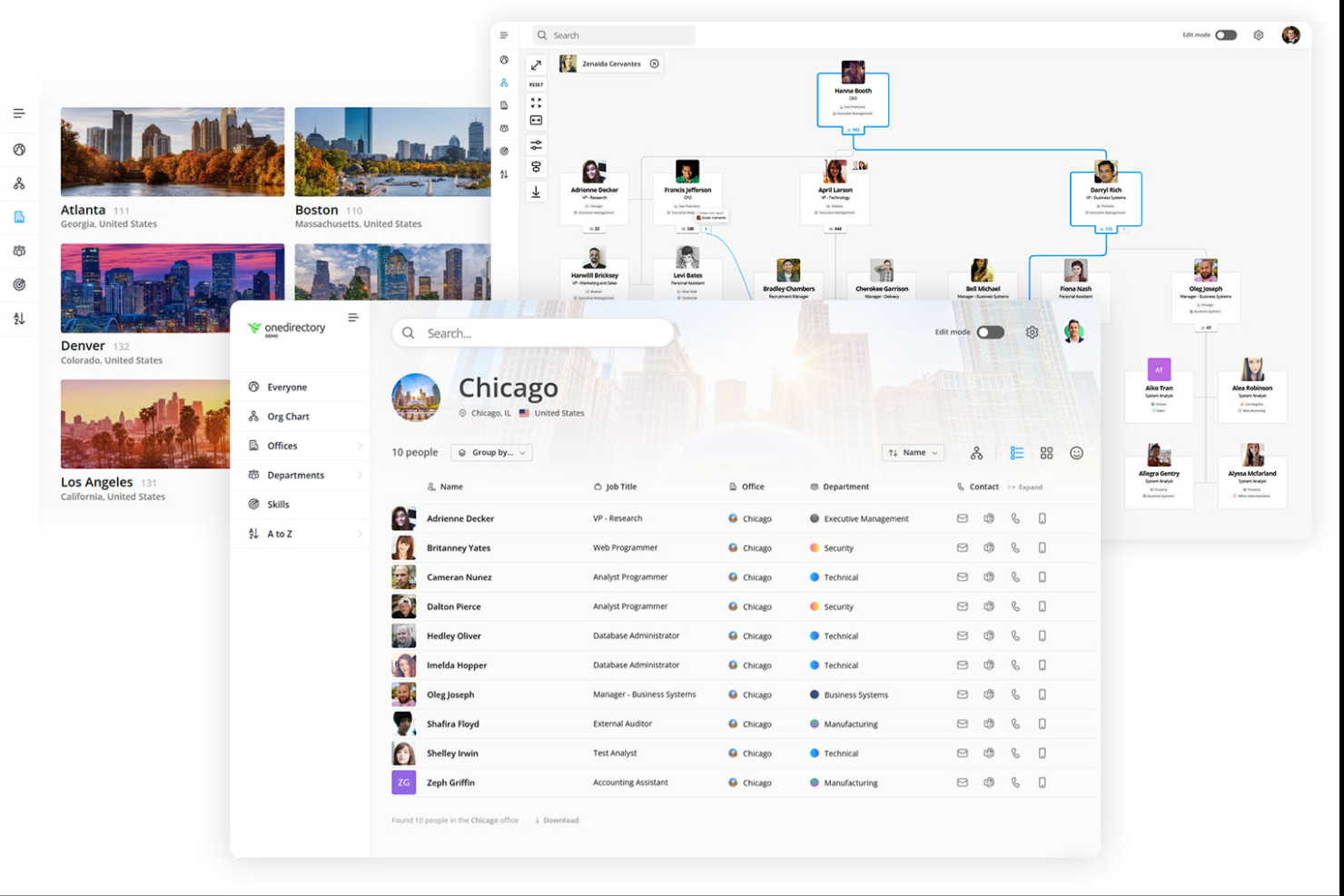
OneDirectory è un software per la rubrica dei dipendenti e l'organigramma aziendale progettato per le aziende che utilizzano Microsoft 365. Aiuta i team a migliorare la comunicazione e l'efficienza organizzativa fornendo una piattaforma centralizzata per le informazioni sui dipendenti.
Perché ho scelto OneDirectory: È progettato per organizzazioni che utilizzano Microsoft 365, prelevando i dati dei dipendenti direttamente da Microsoft Entra ID per creare una directory centralizzata, aggiornata automaticamente. La piattaforma supporta organizzazioni con più sedi, divisioni e strutture di reporting, aiutando i dipendenti a comprendere come team e reparti si integrano tra loro. I suoi organigrammi interattivi supportano unità organizzative personalizzate, relazioni di reporting a linea tratteggiata e strutture di reporting per assistenti, mentre la sincronizzazione automatizzata mantiene aggiornati i profili dei dipendenti e le linee di reporting senza necessità di manutenzione manuale. Questa combinazione di mappatura organizzativa avanzata e integrazione nativa con Microsoft la rende particolarmente adatta ad ambienti organizzativi complessi.
Funzionalità e integrazioni principali:
Funzionalità includono: elenchi interattivi dei dipendenti, profili consultabili, organigrammi automatizzati, pagine dedicate a uffici e reparti, unità organizzative personalizzate, relazioni di reporting a linea tratteggiata e per assistenti, ricerca rapida e aggiornamenti automatici da Microsoft 365 e Microsoft Entra ID.
Integrazioni includono Microsoft 365.
Pros and Cons
Pros:
- Integrazione semplice con Microsoft 365
- Organigrammi interattivi
- Aggiornamenti automatici dei dati
Cons:
- Limitato all'ecosistema Microsoft
- La configurazione richiede un po' di supporto IT
Sift
Ideale per organigrammi dinamici e profili dettagliati
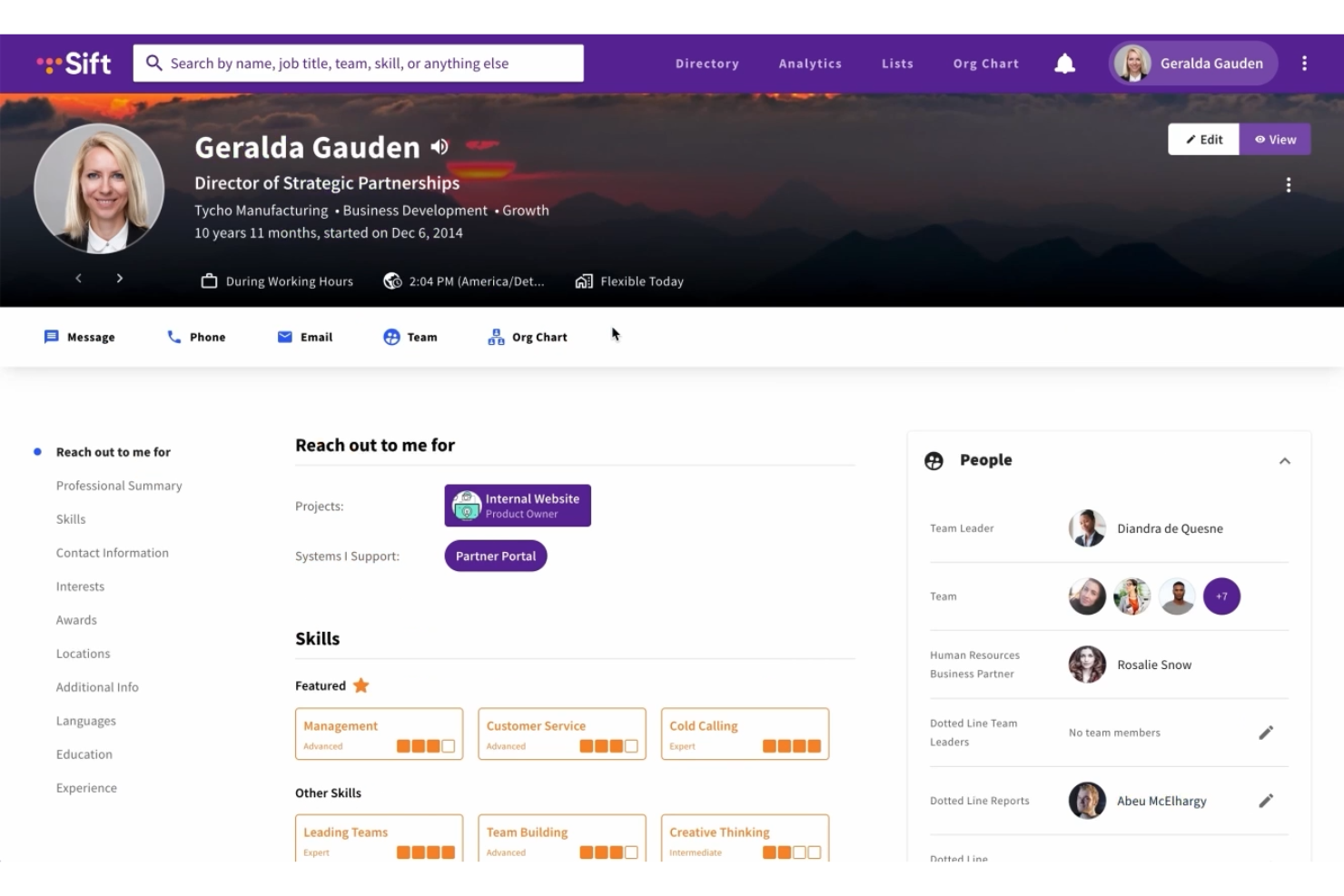
Sift potenzia la tua organizzazione facilitando le connessioni e migliorando la trasparenza grazie al suo intuitivo software di directory dei dipendenti. È ideale per le aziende che vogliono promuovere collaborazione e visibilità tra i team, rendendo più facile trovare i colleghi e accedere alle informazioni essenziali. Sift affronta sfide come la necessità di una comunicazione migliore e una maggiore comprensione dell'organizzazione, garantendo che il tuo team rimanga connesso e informato.
Perché ho scelto Sift
Ho scelto Sift perché il suo organigramma dinamico e i profili dettagliati dei dipendenti lo rendono una scelta eccellente se cerchi un software per la directory dei dipendenti. L'organigramma consente al tuo team di visualizzare la struttura aziendale, mentre i profili offrono approfondimenti sulle competenze e sugli interessi dei colleghi, favorendo una collaborazione più efficace. Inoltre, l'integrazione di Sift con Microsoft Teams garantisce che queste funzionalità siano accessibili direttamente dagli strumenti già utilizzati dal tuo team, rispondendo così all'esigenza di una comunicazione aziendale efficiente.
Caratteristiche principali di Sift
Inoltre, Sift offre diverse altre funzioni che ne aumentano il valore come soluzione di directory dei dipendenti.
- Capacità di ricerca avanzate: questa funzione consente di trovare colleghi in base a vari criteri, facilitando la connessione con le persone giuste nella tua organizzazione.
- Pagine personalizzabili: crea pagine per ricercare e archiviare conoscenze, che si tratti di progetti o di risorse aziendali.
- Analisi dei dati: Sift offre capacità analitiche che ti aiutano a visualizzare competenze, ruoli e dipartimenti, migliorando la trasparenza aziendale.
- Accessibilità mobile: con l'accesso tramite web, desktop e dispositivi mobili, Sift assicura che il tuo team possa restare connesso ovunque si trovi.
Integrazioni di Sift
Le integrazioni includono Microsoft Teams, Azure Active Directory e SharePoint; inoltre è disponibile il supporto API per integrazioni personalizzate.
Pros and Cons
Pros:
- Gli organigrammi dinamici si aggiornano automaticamente con le modifiche organizzative
- Funzione di ricerca rapida e potente che migliora la connettività
- Profili dipendente ricchi e personalizzabili supportano la collaborazione
Cons:
- L'app mobile non è disponibile in tutti i piani.
- Opzioni di integrazione native limitate.
Ideale per le funzioni HR principali
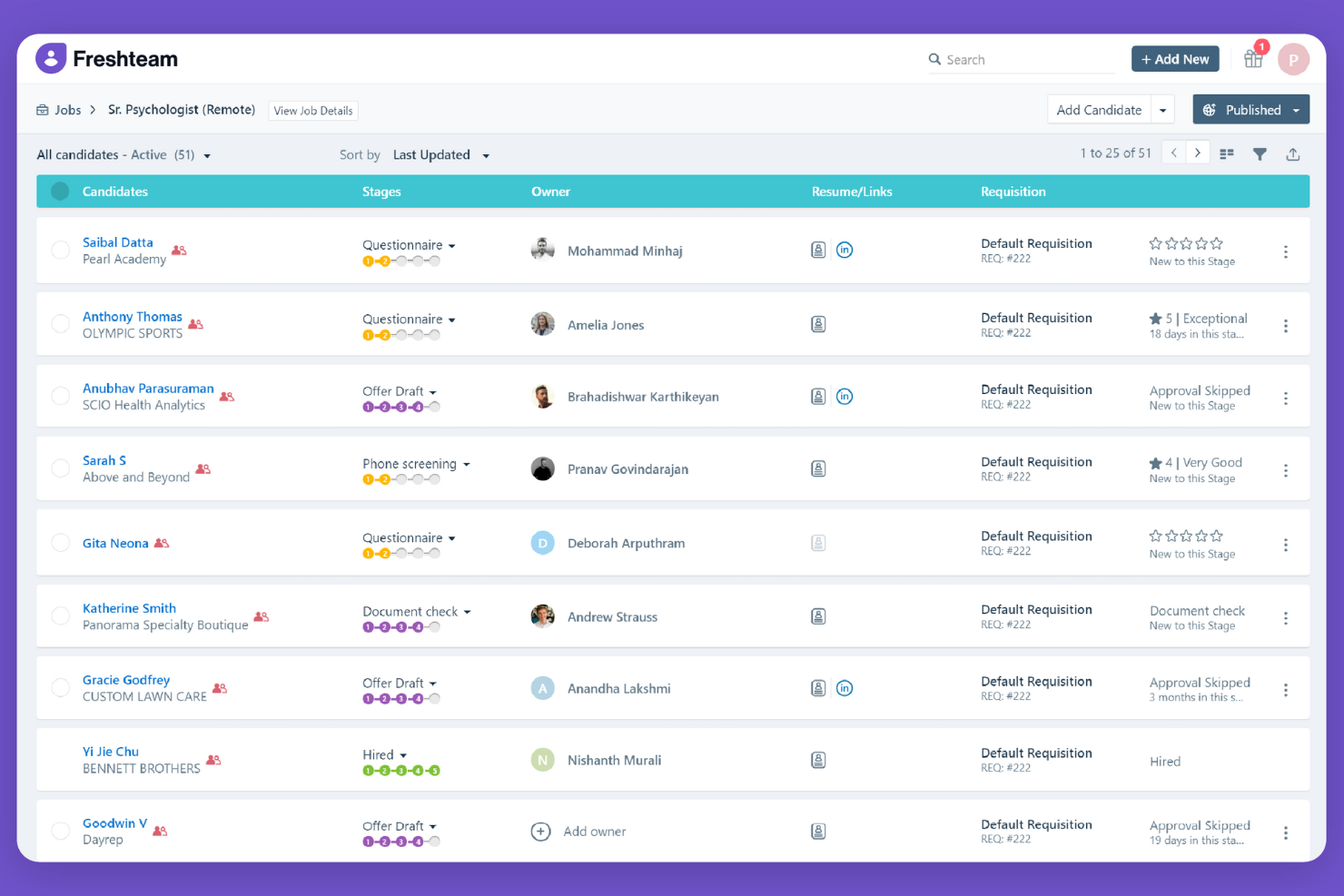
Freshteam è una soluzione software HR per i team di assunzione, che offre strumenti per il reclutamento, l'onboarding e la gestione delle informazioni dei dipendenti. Aiuta le aziende a semplificare i processi di assunzione e a gestire i dati dei dipendenti in modo efficiente.
Perché ho scelto Freshteam: Pur essendo principalmente una piattaforma di onboarding e tracciamento delle candidature, include un database di informazioni sui dipendenti che funziona come una directory leggera. Una volta assunti, i profili dei dipendenti memorizzano dettagli essenziali come ruolo, dipartimento, responsabile di riferimento e informazioni di contatto. Questo rende Freshteam utile per i team più piccoli che vogliono integrare assunzioni e directory dei dipendenti in un unico posto invece che su più strumenti.
Caratteristiche e integrazioni principali:
Funzionalità includono monitoraggio delle candidature, gestione delle offerte di lavoro e strumenti di onboarding. È anche possibile gestire dati dei dipendenti e richieste di ferie in un'unica piattaforma. La piattaforma offre una visualizzazione centralizzata del flusso di assunzione, migliorando la visibilità e il controllo.
Integrazioni includono G Suite, Office 365, Slack, Zoom, LinkedIn, Indeed, Glassdoor, ZipRecruiter e Facebook.
Pros and Cons
Pros:
- Strumenti di reclutamento efficaci
- Maggiore visibilità sul flusso di assunzione
- Supporta la gestione delle assenze
Cons:
- Opzioni di personalizzazione limitate
- Funzionalità di reportistica basilari

Simpplr
Ideale per intranet sociali
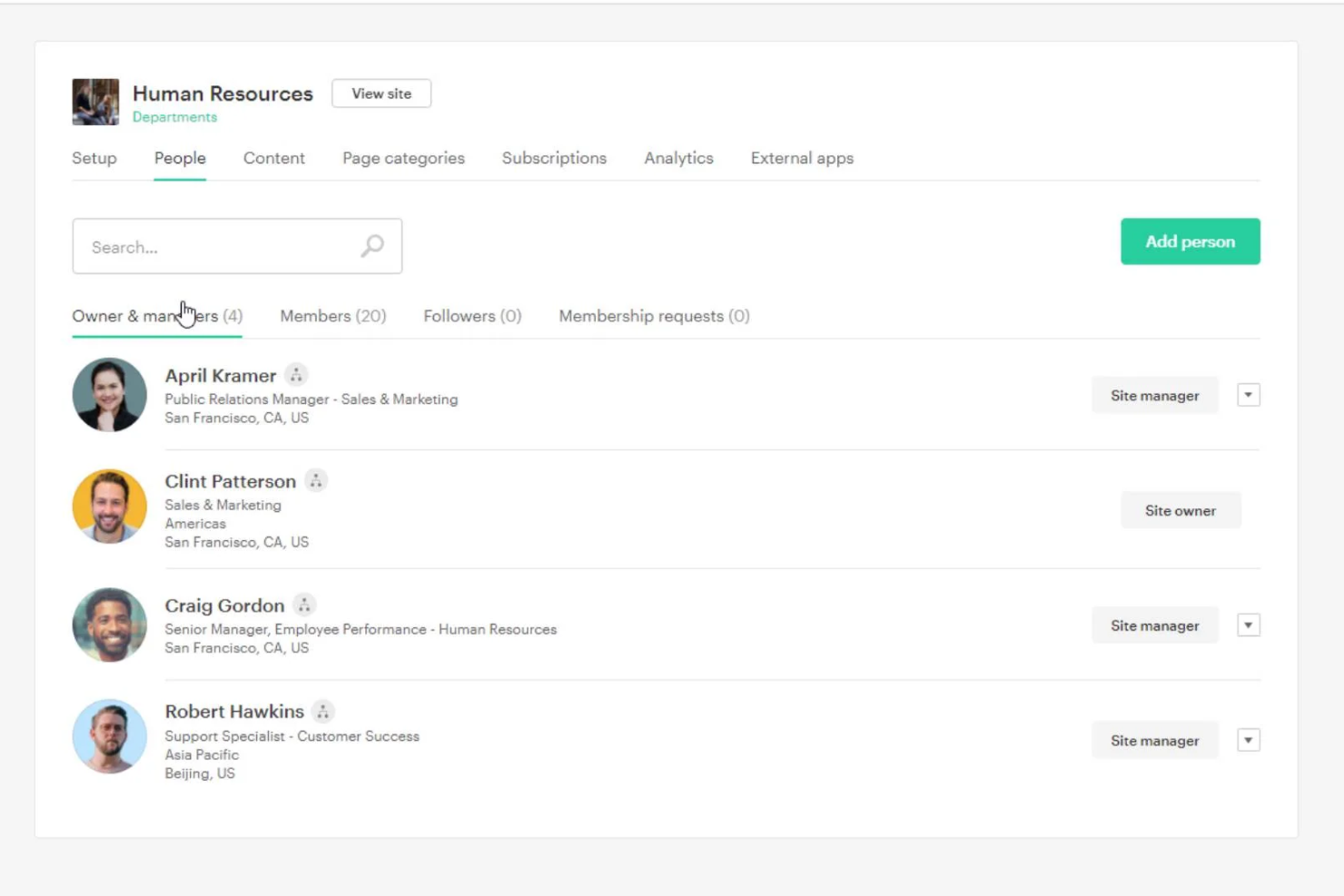
Simpplr è una piattaforma intranet moderna progettata per migliorare il coinvolgimento dei dipendenti e la comunicazione all'interno delle organizzazioni. È pensata per le aziende che desiderano connettere la propria forza lavoro e semplificare le comunicazioni interne attraverso un'interfaccia intuitiva.
Perché ho scelto Simpplr: La sua intranet sociale include una directory dei dipendenti ben strutturata che facilita la ricerca delle persone e offre visibilità sulla struttura del team. I dipendenti possono visualizzare ruoli, linee di riporto e le informazioni di base dei profili, aiutando i team a rimanere connessi tra diverse funzioni. Simpplr integra inoltre le informazioni della directory nelle sue funzionalità di contenuto e collaborazione, rendendolo prezioso per le organizzazioni che desiderano combinare la ricerca delle persone con una più ampia esperienza intranet.
Funzionalità e integrazioni principali:
Funzionalità comprendono pubblicazione di contenuti, esperienze utente personalizzate e feed social. È anche possibile creare e gestire eventi per mantenere il team coinvolto. La piattaforma supporta analisi dettagliate per aiutarti a misurare il livello di coinvolgimento.
Integrazioni includono Salesforce, Microsoft Office 365, Google Workspace, Slack, Zoom, SharePoint, Microsoft Teams, Okta, Workday e ServiceNow.
Pros and Cons
Pros:
- Migliora la connettività tra dipendenti
- Supporta funzionalità social
- Pubblicazione di contenuti semplice
Cons:
- Complessità nella configurazione iniziale
- Accesso offline limitato

Eddy
Ideale per piccole imprese
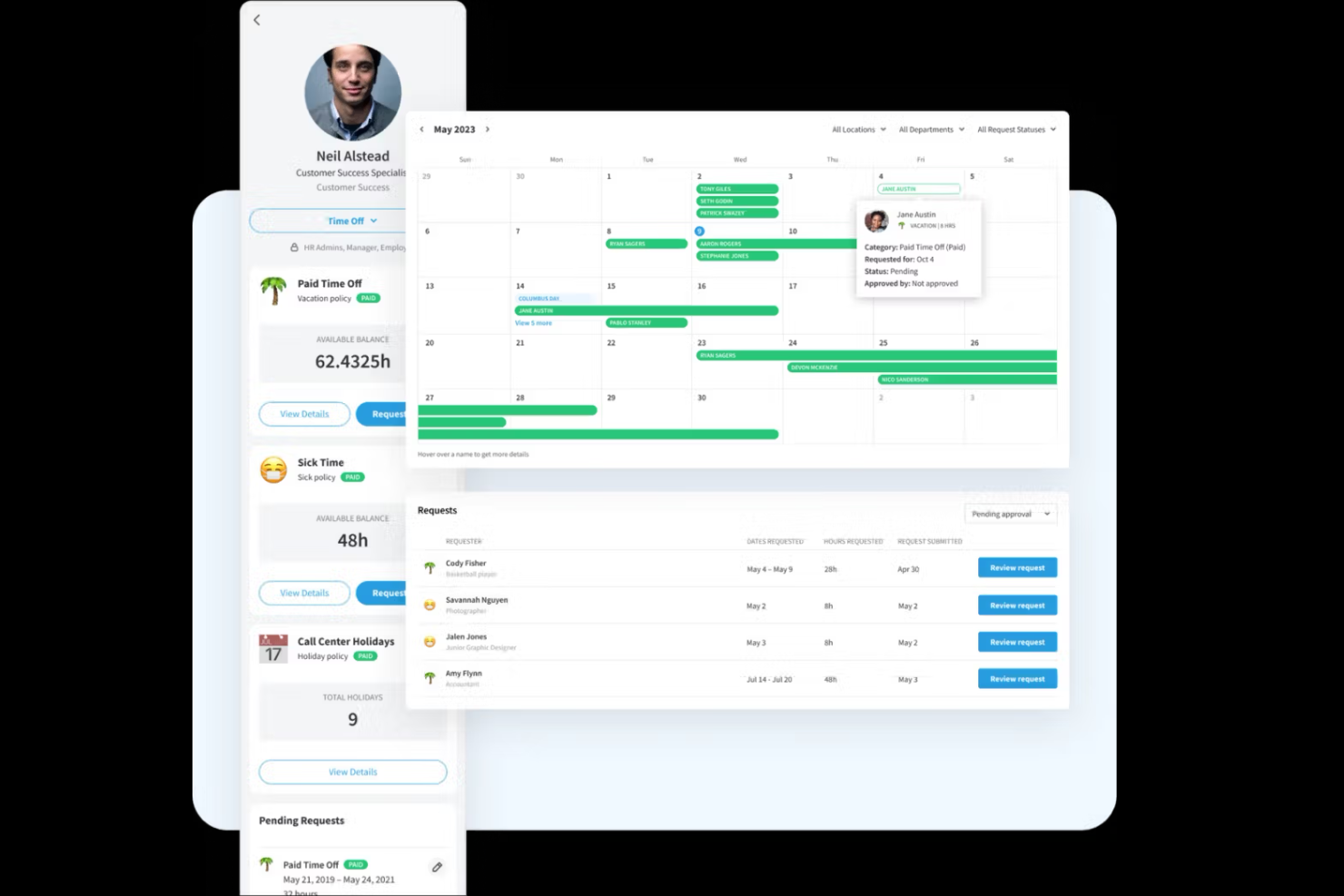
Eddy è una piattaforma software per le risorse umane progettata specificamente per le piccole imprese, offrendo soluzioni per l'assunzione, l'onboarding e la gestione dei dipendenti. Semplifica le attività HR grazie a un'interfaccia facile da usare e strumenti essenziali per la gestione di una forza lavoro ridotta.
Perché ho scelto Eddy: Offre una directory dei dipendenti intuitiva, pensata per le piccole aziende. I profili consolidano dettagli essenziali come ruoli lavorativi, documenti e informazioni di contatto, rendendo più semplice per i piccoli team tenere organizzati i registri dei dipendenti. Sebbene Eddy sia un sistema HR, la sua interfaccia pulita e la directory centralizzata lo rendono un'opzione pratica per le aziende che desiderano un database delle persone leggero e facile da usare.
Caratteristiche salienti & integrazioni:
Le funzionalità includono tracciamento dei candidati, onboarding dei dipendenti e rilevazione delle presenze. È inoltre possibile gestire l'archiviazione dei documenti e creare workflow personalizzati. La piattaforma offre una directory centralizzata dei dipendenti per un accesso facile alle informazioni.
Integrazioni includono QuickBooks, Gusto, Slack, Google Workspace, Microsoft Teams e Zapier.
Pros and Cons
Pros:
- Processo di onboarding efficiente
- Directory dei dipendenti centralizzata
- Interfaccia semplice per i nuovi utenti
Cons:
- Non ideale per esigenze HR complesse
- Strumenti di reportistica di base

Ideale per organigrammi visuali
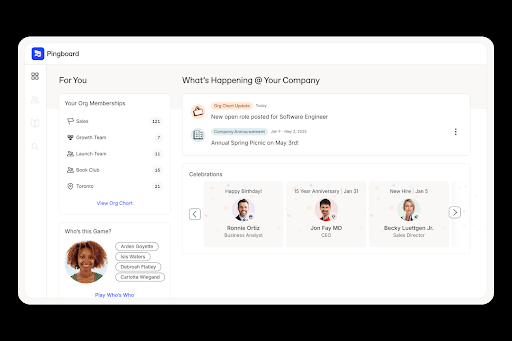
Pingboard è una soluzione cloud per l'elenco dei dipendenti e per la creazione di organigrammi, pensata per team remoti e distribuiti. Migliora la visibilità e la connessione tra i membri del team fornendo organigrammi dinamici e profili dei dipendenti.
Perché ho scelto Pingboard: Consente di creare organigrammi e profili dipendenti dinamici, rendendolo particolarmente adatto ai team che necessitano di una visibilità chiara sulle gerarchie. I suoi strumenti di directory mettono in evidenza ruolo, competenze e dettagli di contatto in un formato facilmente navigabile dai dipendenti. Pingboard include inoltre calendari condivisi e semplici funzioni di coinvolgimento, che aggiungono contesto senza risultare troppo invasivi. Questa combinazione lo rende una scelta pratica per le organizzazioni che cercano uno strumento di directory piuttosto che una suite HR completa.
Funzionalità distintive e integrazioni:
Le funzionalità includono organigrammi dinamici, profili personalizzati dei dipendenti e un calendario aziendale. È anche possibile pianificare le risorse con organigrammi privati e coinvolgere i dipendenti tramite sondaggi e feedback.
Integrazioni con BambooHR, G Suite, Okta, Microsoft Azure, Slack, ADP, Workday, Namely e OneLogin.
Pros and Cons
Pros:
- Calendario aziendale
- Sondaggi coinvolgenti per i dipendenti
- Organigrammi privati
Cons:
- Opzioni di personalizzazione limitate
- Funzionalità di reportistica limitate

Workday
Ideale per soluzioni aziendali
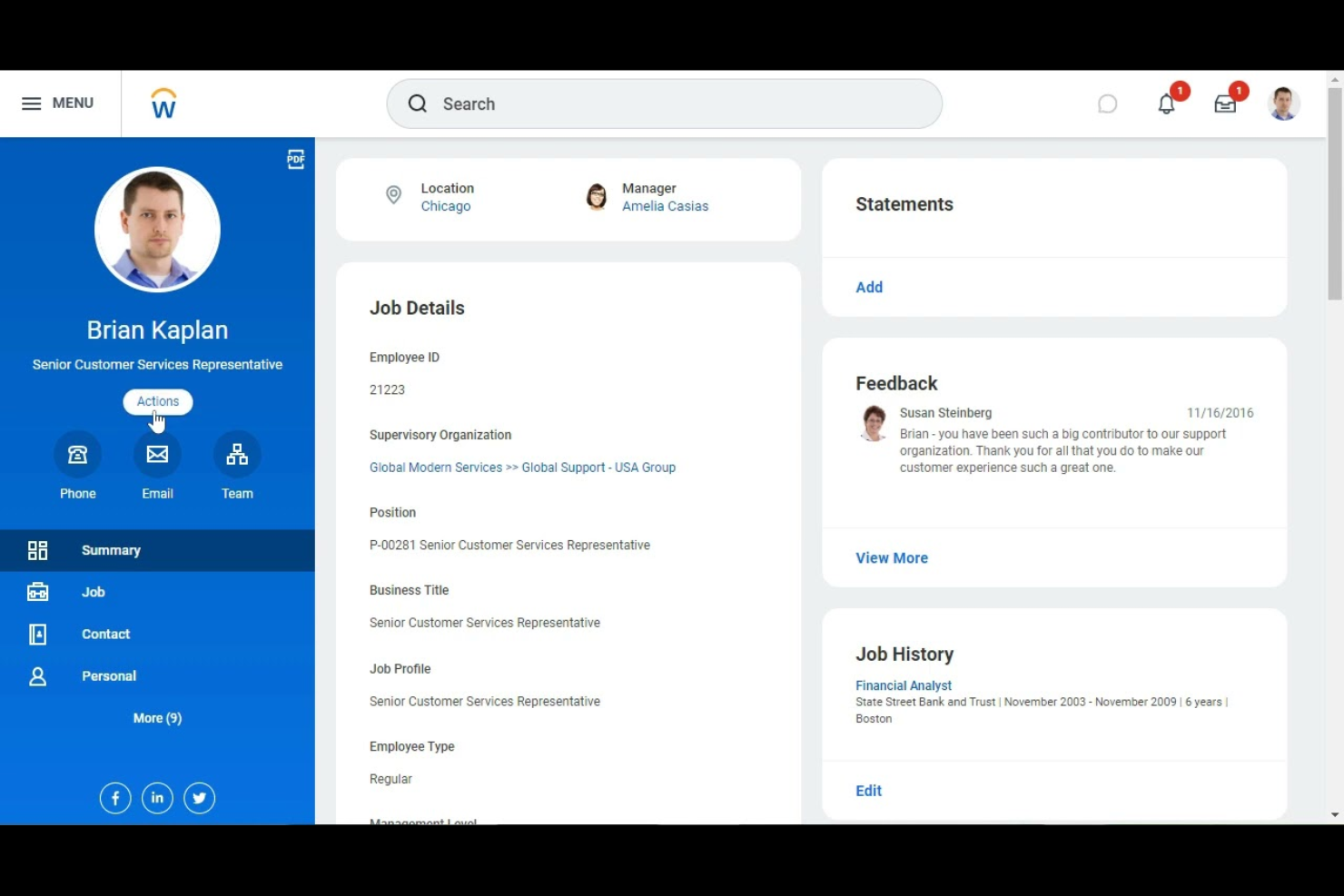
Workday è un software di gestione del capitale umano a livello aziendale progettato per le grandi organizzazioni. Offre strumenti per la gestione delle finanze, delle risorse umane e della pianificazione, aiutando le aziende a semplificare le loro operazioni e a prendere decisioni basate sui dati.
Perché ho scelto Workday: La sua directory dei dipendenti fa parte di un sistema più ampio pensato per organizzazioni di grandi dimensioni che necessitano di visibilità sui ruoli lavorativi, le relazioni gerarchiche e i dati sulla forza lavoro. Le grandi aziende beneficiano dei registri unificati dei dipendenti di Workday, che compaiono in tutti i suoi moduli HR, paghe e finanza. La sua directory si collega ad analisi, dati relativi al talento e strumenti di pianificazione organizzativa, rendendolo una scelta adatta per le imprese che richiedono più di una semplice ricerca di dipendenti.
Funzionalità e integrazioni principali:
Le funzionalità includono analisi in tempo reale, dashboard personalizzabili e strumenti di gestione finanziaria. È possibile anche gestire l'acquisizione e lo sviluppo dei talenti all'interno della piattaforma. La sua scalabilità supporta efficacemente le aziende in crescita.
Le integrazioni includono Salesforce, Microsoft Azure, ServiceNow, Okta, Slack, Google Workspace, ADP, SAP, NetSuite e Coupa.
Pros and Cons
Pros:
- Scalabile per grandi aziende
- Strumenti finanziari avanzati
- Funzionalità per la gestione dei talenti
Cons:
- Richiede formazione approfondita
- Ripida curva di apprendimento

Ideale per interfaccia intuitiva

PeopleHR è un software HR basato sul cloud progettato per piccole e medie imprese, che offre strumenti per la gestione dei dati dei dipendenti, il reclutamento e la valutazione delle performance. Semplifica i processi HR, rendendo più semplice la gestione efficace della forza lavoro.
Perché ho scelto PeopleHR: offre una directory dei dipendenti facilmente consultabile per le piccole e medie imprese. Le pagine profilo mostrano dettagli sul lavoro, linee gerarchiche, documenti e dati sulle performance, fornendo ai team una visione chiara delle informazioni sui dipendenti in un’interfaccia semplice. PeopleHR è ideale per le organizzazioni che desiderano un sistema HR intuitivo, con una directory strettamente integrata alle attività quotidiane delle risorse umane.
Caratteristiche principali & integrazioni:
Le funzionalità includono monitoraggio delle performance, gestione del reclutamento e amministrazione dei dati dei dipendenti. Puoi inoltre beneficiare di flussi di lavoro automatizzati per risparmiare tempo sulle attività ripetitive. La piattaforma offre analisi per aiutarti a prendere decisioni HR informate.
Le integrazioni includono Microsoft Office 365, Google Workspace, Slack, LinkedIn, Indeed, ZipRecruiter, Xero, QuickBooks, Sage e Dropbox.
Pros and Cons
Pros:
- Strumenti di reclutamento efficaci
- Flussi di lavoro automatizzati
- Fornisce analisi utili
Cons:
- Opzioni di personalizzazione limitate
- Funzionalità di reportistica di base

Ideale per i luoghi di lavoro digitali
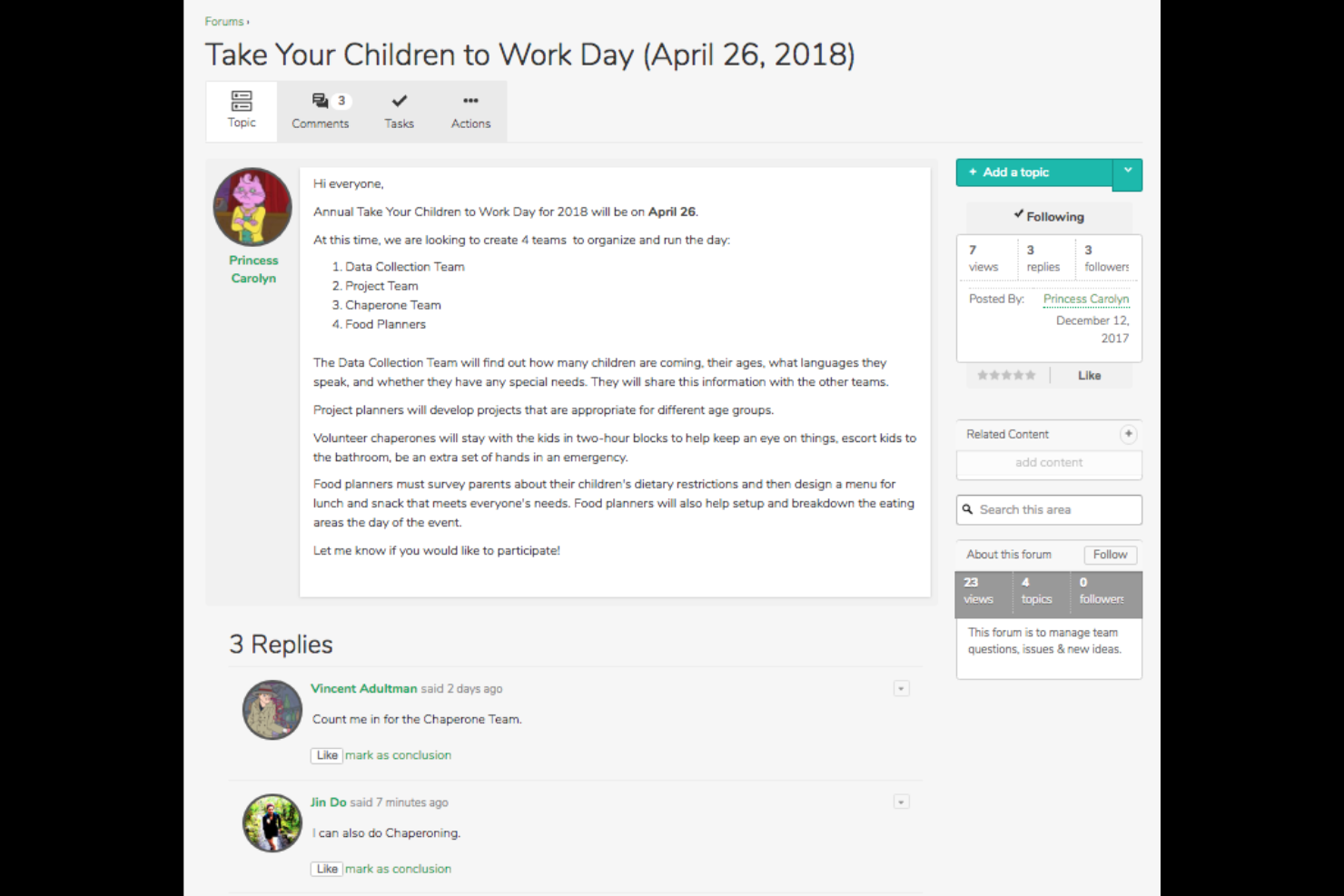
Igloo Software è una piattaforma per il luogo di lavoro digitale progettata per aiutare le organizzazioni a migliorare la collaborazione e la comunicazione tra i team remoti. Fornisce strumenti per la gestione dei documenti, la collaborazione tra i team e la comunicazione interna, migliorando l'efficienza complessiva del luogo di lavoro.
Perché ho scelto Igloo Software: include una directory all'interno della sua piattaforma per il luogo di lavoro digitale, che consente ai team di accedere ai profili dei dipendenti, alle competenze e alle informazioni di contatto in un unico luogo. La directory è collegata agli spazi di collaborazione, agli hub informativi e agli archivi di documenti, aiutando i dipendenti a identificare rapidamente gli esperti in materia o a trovare colleghi che lavorano a progetti correlati. Questo rende Igloo un'opzione valida per i team remoti o ibridi che stanno creando un ambiente di conoscenza centralizzato.
Caratteristiche e integrazioni distintive:
Le caratteristiche includono la gestione dei documenti, gli spazi di collaborazione tra i team e la creazione di basi di conoscenza. Puoi anche utilizzare la piattaforma per facilitare la comunicazione interna tramite dashboard personalizzabili. Supporta la gestione dei progetti con funzionalità di monitoraggio delle attività.
Le integrazioni includono Microsoft Office 365, Google Workspace, Slack, Zoom, Salesforce, SharePoint, Dropbox, Box, OneDrive e Zendesk.
Pros and Cons
Pros:
- Migliora la collaborazione digitale
- Supporta la gestione dei documenti
- Creazione di basi di conoscenza
Cons:
- Complessità nella configurazione iniziale
- Strumenti di analisi di base
Altri software per directory dei dipendenti
Ecco alcune opzioni aggiuntive di software per directory dei dipendenti che non sono entrate nel mio elenco, ma che vale comunque la pena prendere in considerazione:
- Namely
Ideale per aziende di medie dimensioni
- Zoho People
Ideale per flussi di lavoro personalizzati
- GlideApps
Ideale per creare rubriche mobili personalizzate
- GoProfiles
Ideale per branding personalizzato
- HR365
Ideale per utenti Office 365
- Staffbase
Ideale per la comunicazione interna
- Connecteam
Ideale per lavoratori senza postazione fissa


Come Valuto il Software di Directory Dipendenti
Divido la mia valutazione in due livelli: i requisiti di base che ogni strumento deve rispettare—come profili ricercabili, sincronizzazione con l’HRIS e organigrammi dinamici—e i fattori che distinguono le migliori opzioni.
Funzionalità di Base (Requisiti Fondamentali per Questa Lista)
Quando seleziono gli strumenti per la mia lista, valuto ciascuno su una scala da 0 (la funzionalità non è presente) a 5 (eccelle in questa area) per ogni funzionalità di base elencata di seguito. Poi calcolo il punteggio totale dello strumento in percentuale. Ogni strumento deve raggiungere un punteggio minimo totale del 65% per poter essere incluso.
- Profili Dipendenti Ricercabili: Verifico se è possibile cercare sfruttando più attributi contemporaneamente—trovando ad esempio tutti i product designer in un determinato ufficio che parlano mandarino.
- Organigramma Dinamico: L’organigramma dovrebbe aggiornarsi in automatico quando cambiano le linee di riporto; cerco anche una navigazione interattiva che consenta di esplorare la gerarchia cliccando.
- Integrazioni con HRIS e Sistemi di Identità: Valuto la sincronizzazione nativa con i principali sistemi come Workday, BambooHR e Azure AD affinché i dati dei dipendenti siano sempre aggiornati senza caricamenti manuali di file CSV.
- Campi Profilo Personalizzati: I team necessitano di campi oltre le informazioni di base—tag delle competenze, pronomi, orari di lavoro ibridi, certificazioni—quindi cerco tipologie di campi flessibili e schemi definiti dagli amministratori.
- Permessi Basati sui Ruoli e Privacy: Controllo quanto siano granulari i controlli di accesso, ad esempio se sia possibile nascondere i numeri di telefono personali a tutti i dipendenti tranne che ai responsabili diretti.
- Modifica Self-Service del Profilo: I dipendenti dovrebbero poter aggiornare i propri dati personali entro certi limiti, e verifico la presenza di workflow di approvazione che indirizzano le modifiche all’amministratore corretto.
Dopo aver individuato gli strumenti che soddisfano i criteri, passo a ciò che li distingue.
Fattori Differenzianti (Cosa Distingue i Fornitori)
Ecco come confronto e metto a confronto diversi fornitori:
Funzionalità di Spicco
Cerco la scoperta di competenze e specializzazioni, che aiuta HR e manager a trovare candidati interni per progetti o posizioni aperte sulla base di certificazioni, lingue o esperienza pregressa. Anche l’integrazione con strumenti di collaborazione è importante: i profili della directory visibili direttamente in Slack o Microsoft Teams incentivano davvero l’utilizzo da parte dei dipendenti, evitando di dover passare a un’app separata. Per le organizzazioni distribuite, valuto inoltre supporto multi-entità e globale, inclusi controlli di privacy localizzati e profili multilingue.
Oltre le Funzionalità
La sicurezza dei dati e la conformità sono elementi fondamentali perché le directory contengono dati personali sensibili: verifico la certificazione SOC 2 Type II, il supporto SSO/SAML e la configurabilità della residenza dei dati. Anche l’implementazione e il time-to-value hanno peso; una directory che richiede mesi per essere avviata perde slancio. Valuto la rapidità con cui un fornitore riesce a sincronizzare i dati HRIS e mettere online una directory funzionante. Infine, analizzo il costo totale di gestione, inclusa la necessità di passaggio a un piano superiore per accedere alle API o alle integrazioni premium.
Come scegliere il software per directory dei dipendenti
È facile perdersi in lunghi elenchi di funzionalità e strutture tariffarie complesse. Per aiutarti a rimanere concentrato mentre affronti il tuo specifico processo di scelta del software, ecco un elenco di fattori da tenere a mente:
| Fattore | Cosa considerare |
|---|---|
| Scalabilità | Il software può crescere insieme al tuo team? Cerca soluzioni in grado di gestire un aumento degli utenti e dei dati senza problemi di prestazioni. Considera i piani di espansione futuri. |
| Integrazioni | Si integra con i sistemi che utilizzi attualmente? Assicurati che sia compatibile con gli strumenti HR, per le paghe e di comunicazione esistenti per evitare silos di dati. |
| Personalizzazione | Puoi adattare il software alle tue esigenze? Cerca opzioni per personalizzare i campi e i layout in base ai requisiti specifici del tuo team. |
| Facilità d'uso | È intuitivo per il tuo team? Prova l'interfaccia e la navigazione per assicurarti che non rallenti le attività quotidiane o richieda una formazione approfondita. |
| Implementazione e onboarding | Con quale rapidità puoi iniziare? Verifica la disponibilità di risorse come video di formazione e tour del prodotto che facilitino la transizione e riducano i tempi di inattività. |
| Costo | Rientra nel tuo budget? Confronta i piani tariffari e considera eventuali costi nascosti. Cerca prezzi trasparenti e valuta il valore offerto a ogni livello. |
| Misure di sicurezza | Come protegge i tuoi dati? Verifica gli standard di crittografia, i controlli di accesso e la conformità alle normative sulla protezione dei dati per mantenere al sicuro le informazioni sensibili. |
| Disponibilità dell'assistenza | Quale assistenza viene offerta? Verifica la disponibilità di opzioni di supporto 24/7 e la qualità di risorse come domande frequenti e chat dal vivo per aiutare il tuo team quando necessario. |
Che cos'è il software per directory dei dipendenti?
Il software per directory dei dipendenti è uno strumento per organizzare e gestire le informazioni sui dipendenti all'interno di un'organizzazione. I professionisti delle risorse umane, i responsabili e i leader dei team utilizzano generalmente questi strumenti per migliorare la comunicazione e l'accesso ai dati dei dipendenti. Le funzionalità di ricerca, i grafici organizzativi e i profili personalizzabili aiutano a mantenere registri accurati e a promuovere i legami all'interno del team. Nel complesso, questi strumenti migliorano l'efficienza sul posto di lavoro fornendo un facile accesso alle informazioni essenziali sui dipendenti.
Funzionalità
Ecco le funzionalità principali che qualsiasi ottimo software per directory dei dipendenti dovrebbe offrire:
- Funzionalità di ricerca: consentono agli utenti di trovare le informazioni sui dipendenti, migliorando l'efficienza e la comunicazione.
- Grafici organizzativi: forniscono una rappresentazione visiva della gerarchia aziendale, aiutando i team a comprendere le linee gerarchiche e la struttura.
- Profili personalizzabili: consentono di personalizzare le informazioni sui dipendenti, permettendo ai team di adattare i profili alle esigenze specifiche.
- Opzioni di integrazione: si collegano agli strumenti esistenti per le risorse umane e la comunicazione, garantendo un flusso di dati uniforme ed evitando i silos informativi.
- Accessibilità da dispositivi mobili: offre accesso ai dati dei dipendenti ovunque ci si trovi, risultando comoda per i lavoratori da remoto e sul campo.
- Sicurezza dei dati: protegge le informazioni sensibili sui dipendenti con crittografia e controlli degli accessi, garantendo la conformità alle normative sulla protezione dei dati.
- Analisi e reportistica: fornisce informazioni utili sui dati dei dipendenti per aiutare i team delle risorse umane a prendere decisioni informate.
- Supporto per l'inserimento: facilita una configurazione semplice con risorse come video formativi e tour del prodotto, riducendo i tempi di inattività durante l'implementazione.
- Strumenti per il coinvolgimento dei dipendenti: include funzionalità come il riconoscimento tra colleghi e i feed social per migliorare il morale e la connessione del team.
Vantaggi
L'implementazione di un software per directory dei dipendenti offre numerosi vantaggi al team e all'azienda. Eccone alcuni che potrete aspettarvi:
- Comunicazione migliorata: aiuta i dipendenti a entrare più rapidamente in contatto con i colleghi giusti, riducendo i ritardi causati da responsabilità poco chiare o elenchi di contatti obsoleti.
- Organizzazione ottimizzata: offre ai team una comprensione più chiara di come i reparti si integrano tra loro, aiutando i dipendenti a comprendere ruoli, relazioni e percorsi di collaborazione all'interno dell'azienda.
- Maggiore efficienza: riduce il tempo dedicato alla ricerca di persone o informazioni centralizzando i dettagli chiave in un unico luogo, minimizzando le comunicazioni ripetute e le richieste duplicate.
- Pratiche di protezione dei dati più solide: aiutano i team a mantenere un controllo coerente sulle informazioni dei dipendenti centralizzandole in un unico sistema, riducendo il rischio di registri dispersi o obsoleti.
- Maggiore coinvolgimento dei dipendenti: aiuta le persone a sentirsi più connesse ai colleghi rendendo più facilmente individuabili i profili, gli interessi e i dettagli del team.
- Migliore processo decisionale: offre ai responsabili una visibilità più rapida sulla struttura del team e sulle esigenze di personale, aiutandoli a prendere decisioni più informate su carichi di lavoro, assunzioni e mobilità interna.
- Migliore esperienza di lavoro da remoto: garantisce che i dipendenti sappiano sempre chi contattare e come sono strutturati i team, consentendo una collaborazione più fluida tra sedi diverse.
Costi e prezzi
La scelta di un software per directory dei dipendenti richiede la comprensione dei vari modelli e piani tariffari disponibili. I costi variano in base alle funzionalità, alle dimensioni del team, ai componenti aggiuntivi e ad altri fattori. La tabella seguente riassume i piani più comuni, i relativi prezzi medi e le funzionalità tipicamente incluse nelle soluzioni software per directory dei dipendenti:
Tabella comparativa dei piani per il software per directory dei dipendenti
| Tipo di piano | Prezzo medio | Funzionalità comuni |
|---|---|---|
| Piano gratuito | $0 | Funzionalità di ricerca di base, profili limitati e assistenza minima. |
| Piano personale | $5-$12 per utente/mese | Ricerca avanzata, profili personalizzabili e reportistica di base. |
| Piano aziendale | $12-$40 per utente/mese | Grafici organizzativi, accesso da dispositivi mobili e opzioni di integrazione. |
| Piano aziendale avanzato | $40-$100+/per utente/mese | Analisi avanzate, strumenti per il coinvolgimento dei dipendenti e assistenza premium. |
Domande frequenti
Ecco alcune risposte alle domande comuni sul software per la directory dei dipendenti:
Qual è lo scopo principale del software per la directory dei dipendenti?
Lo scopo principale è organizzare e gestire le informazioni sui dipendenti in un sistema centralizzato, proprio come una moderna directory aziendale o del personale. Questo facilita l’accesso ai dati di contatto, alle informazioni sul ruolo lavorativo e alla struttura organizzativa. Inoltre, contribuisce a promuovere una cultura aziendale più chiara, rendendo più semplice comprendere come i membri del team si inseriscono nell’organizzazione. Una potente funzionalità di ricerca aiuta a trovare i colleghi per nome, numero di telefono, competenze o persino dettagli del profilo utente. Alcuni strumenti mostrano anche informazioni utili di contesto, come i compleanni o le date degli anniversari lavorativi. Nel complesso, migliora la comunicazione e la collaborazione, facilitando la ricerca dei colleghi e la consultazione di un organigramma interattivo quando necessario.
Come posso garantire la sicurezza dei dati con il software per la directory dei dipendenti?
Garantire la sicurezza dei dati significa verificare gli standard di crittografia e i controlli di accesso del software, soprattutto se si utilizza un’app per la directory dei dipendenti che archivia informazioni sensibili. Cerca soluzioni conformi alle normative sulla protezione dei dati, come il GDPR. Dovresti inoltre verificare se il sistema offre autorizzazioni utente per controllare chi può accedere alle informazioni sensibili nella directory del personale. Aggiornare regolarmente le password, attivare le notifiche di sicurezza e svolgere audit di sicurezza può proteggere ulteriormente i tuoi dati.
Il software per la directory dei dipendenti può integrarsi con i sistemi HR esistenti?
Sì, la maggior parte delle soluzioni software per le directory aziendali offre opzioni di integrazione con i sistemi HR esistenti. Questo garantisce un flusso di dati uniforme ed elimina la necessità di inserire i dati più volte. Molte piattaforme si collegano ai sistemi paghe, agli strumenti di comunicazione e ai sistemi HR principali per mantenere sincronizzati i nuovi assunti e gli aggiornamenti dei profili in un ambiente tutto-in-uno. Prima dell’acquisto, verifica che il software si integri con gli strumenti già utilizzati dalla tua organizzazione, così da garantire un’esperienza coerente per i dipendenti.
Cosa devo considerare quando eseguo la migrazione a un nuovo software per la directory dei dipendenti?
Considera la semplicità della migrazione dei dati, il supporto durante la transizione e le risorse per la formazione. Cerca sistemi che offrano strumenti di importazione per i record esistenti. Guide passo passo, video formativi e tour del prodotto aiutano il tuo team ad adattarsi rapidamente. È inoltre utile verificare se la piattaforma è in grado di mantenere i campi personalizzati, come i dettagli del profilo nell’app per la directory dei dipendenti o altri dati importanti per i tuoi team.