

10 Best AI Compliance Tools Reviewed in 2026

10 Best AI Compliance Tools Shortlist


Keeping up with compliance requirements is tougher than ever. Regulations shift, documentation piles up, and even small gaps can create big risks. Many teams spend more time tracking rules than actually applying them. AI compliance tools help ease that pressure by monitoring requirements, flagging issues, and supporting consistent oversight across your workflows.
From what I’ve seen in testing these platforms, the right tool can significantly improve how you manage compliance. They help organize information, reduce manual checks, and give you clearer visibility into potential risks. I’ve reviewed a range of solutions to give you an honest, practical look at what works and why.
In this article, you’ll find my top picks, along with their standout features, advantages, and limitations. Whether your team is building a new compliance process or refining an existing one, you’ll find options that can support your goals.
Why Trust Our Software Reviews
Our team has been testing and reviewing software since 2012. As HR experts ourselves, we know how difficult—and important—it is to choose the right software.
For this guide, we evaluated tools using hands-on testing and independent research, scoring tools using our selection criteria. We also draw on insights from industry thought leaders and practicing HR experts.
Our reviews reflect our human editorial judgment, not a sales pitch.
Expert reviewers:
AI Compliance Tools Comparison Table
This comparison table summarizes pricing details for my top AI compliance tool selections:
| Tool | Best For | Trial Info | Price | ||
|---|---|---|---|---|---|
| 1 | Best for enterprise compliance visibility | Free demo available | Pricing upon request | Website | |
| 2 | Best for global compliance insights | Free demo available | From $49/contractor/month | Website | |
| 3 | Best for integrated compliance dashboards | Free demo available | Pricing upon request | Website | |
| 4 | Best for SOC 2 compliance | Free demo + free trial available | Pricing upon request | Website | |
| 5 | Best for customizable workflows | Free demo available | Pricing upon request | Website | |
| 6 | Best for privacy management | Free demo available | Pricing upon request | Website | |
| 7 | Best for AI-driven background checks | Free demo available | From $29.99/report | Website | |
| 8 | Best for startup compliance | Free demo available | Pricing upon request | Website | |
| 9 | Best for fast compliance audits | Not available | Pricing upon request | Website | |
| 10 | Best for continuous monitoring | Free demo available | Pricing upon request | Website |
Best AI Compliance Tool Reviews
Below are my detailed summaries of the best AI compliance tools that made it onto my shortlist. My reviews offer a detailed look at the key features, pros & cons, integrations, and ideal use cases of each tool to help you find the best one for you.
Best for enterprise compliance visibility
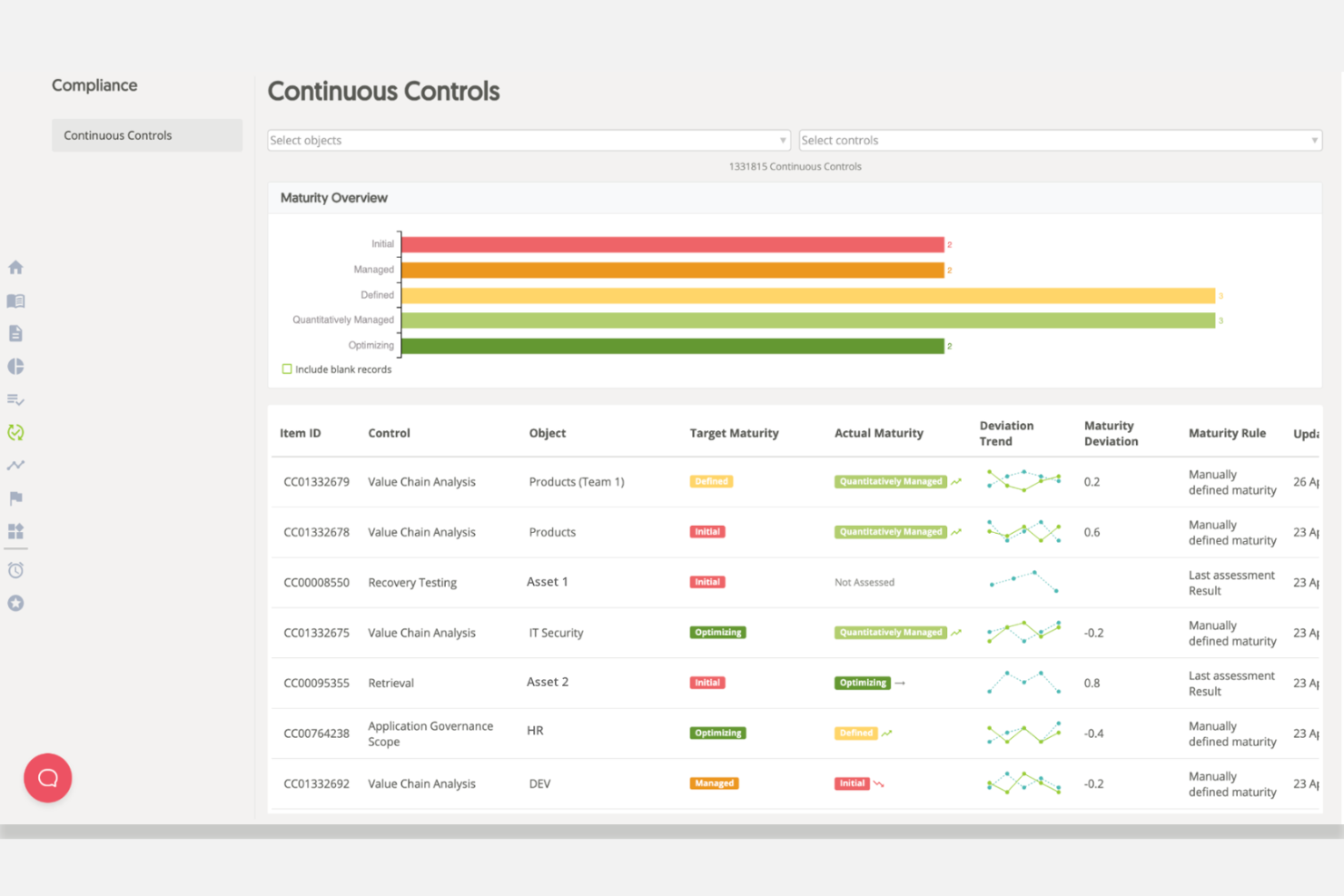
Mitratech Alyne made my list because of its focus on enterprise compliance visibility. I recommend it for compliance leaders who need continuous monitoring and risk assessments across complex, distributed environments. What stands out in my experience is Alyne’s real-time control frameworks and clear dashboards, which let teams identify compliance gaps before they grow. I especially like the out-of-the-box mapping to key global regulations.
Alyne’s Best For
- Enterprises managing global compliance and risk frameworks
- Compliance teams needing real-time visibility and control mapping
Alyne’s Not Great For
- Small businesses with straightforward compliance needs
- Teams seeking highly customizable, niche compliance workflows
What sets Alyne apart
Alyne is structured around real-time compliance monitoring rather than manual audits or periodic reviews. Unlike tools like ServiceNow or RSA Archer, it expects you to engage with live dashboards that flag issues as they emerge and map controls directly to regulations. In practice, this is good for organizations that want to identify and remediate gaps before they become risks. Alyne works best when you need proactive oversight rather than simple documentation.
Tradeoffs with Alyne
Alyne optimizes for standardization across large and complex organizations, making it a stronger fit for teams operating within well-defined compliance frameworks.
Pros and Cons
Pros:
- Pre-built templates speed up assessments and control reviews
- Real-time dashboards show risks and compliance status
- Multi-language support helps global compliance teams
Cons:
- Some standard mappings need manual review
- Certain workflows can feel less responsive
Best for global compliance insights
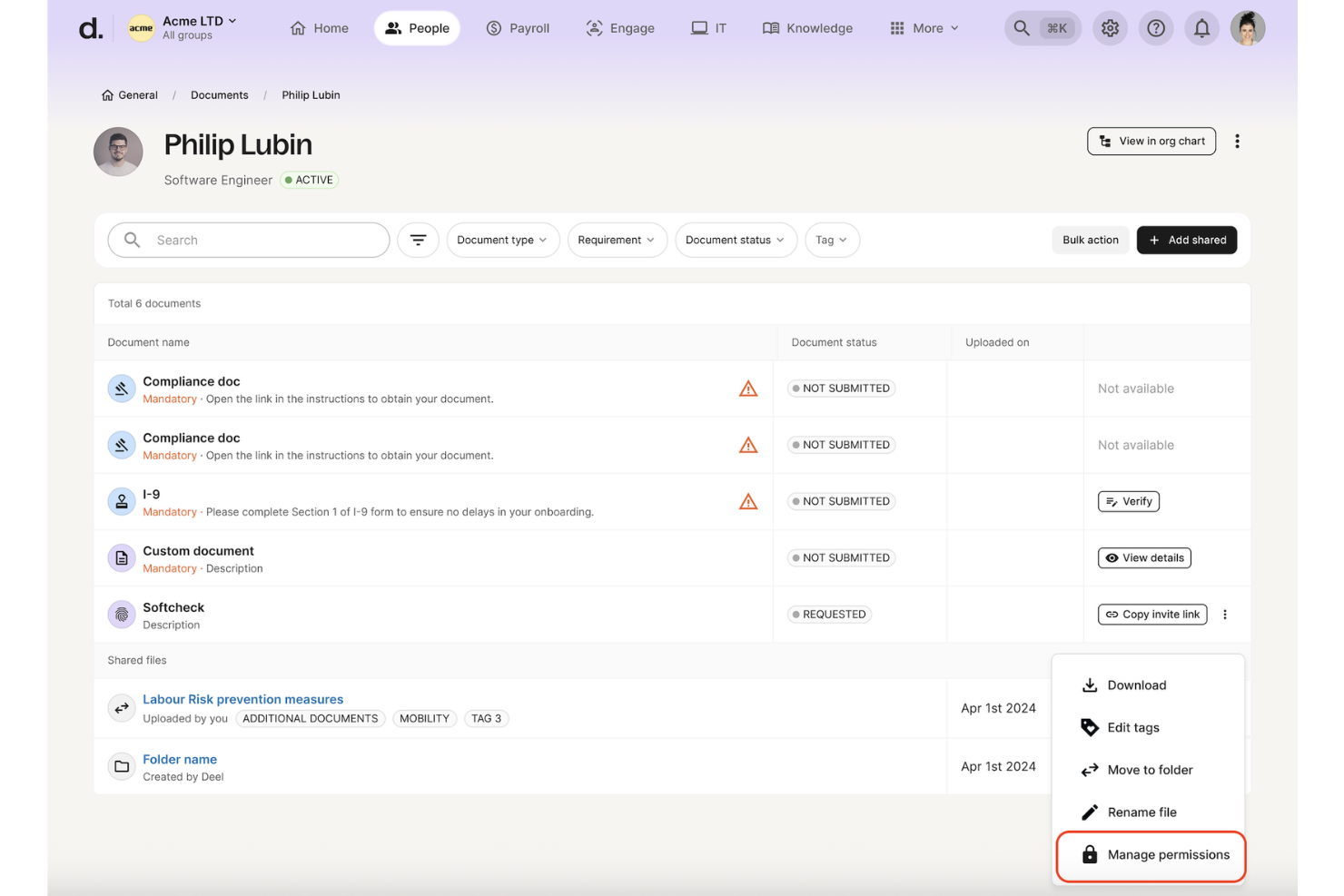
Deel HR is on my shortlist because it gives teams real clarity around global employment compliance. I recommend it when you need concrete, country-specific guidance on hiring, contracts, and policies as markets or headcounts expand. What sets Deel HR apart for me is its rules engine that auto-detects local requirements and risks as soon as you enter a new country. I like seeing clear compliance alerts and recommendations built into each hiring workflow.
Deel HR’s Best For
- HR, legal, and ops teams hiring across many countries
- Organizations seeking specific, automated compliance checks for global hiring
Deel HR’s Not Great For
- Teams with operations in just one country
- Companies needing deep workflow automation beyond compliance
What sets Deel HR apart
Deel HR stands out by building compliance guidance directly into every stage of the employee lifecycle. Instead of treating compliance as a separate checklist, it works best when you want requirements surfaced automatically as you expand in new countries.
Compared to something like Rippling or traditional HR suites, Deel HR expects you to manage compliance inside the same system where you handle contracts and onboarding. I find that you can visualize global compliance status at a glance without toggling between policy trackers and external tools.
Tradeoffs with Deel HR
Deel HR optimizes for compliance transparency and country-specific automation, but you give up flexibility in designing fully custom HR workflows or task routing. If your operations rely on tailored processes, you might find the structure limiting.
Pros and Cons
Pros:
- Employees can self-serve compliance-related questions without HR involvement
- AI gives instant guidance on local compliance rules across 150+ countries
- Context-aware AI highlights compliance details on HR pages in real time
Cons:
- Accuracy depends on complete and up-to-date employee and policy data
- Complex regulatory scenarios may still require human legal review

Best for integrated compliance dashboards
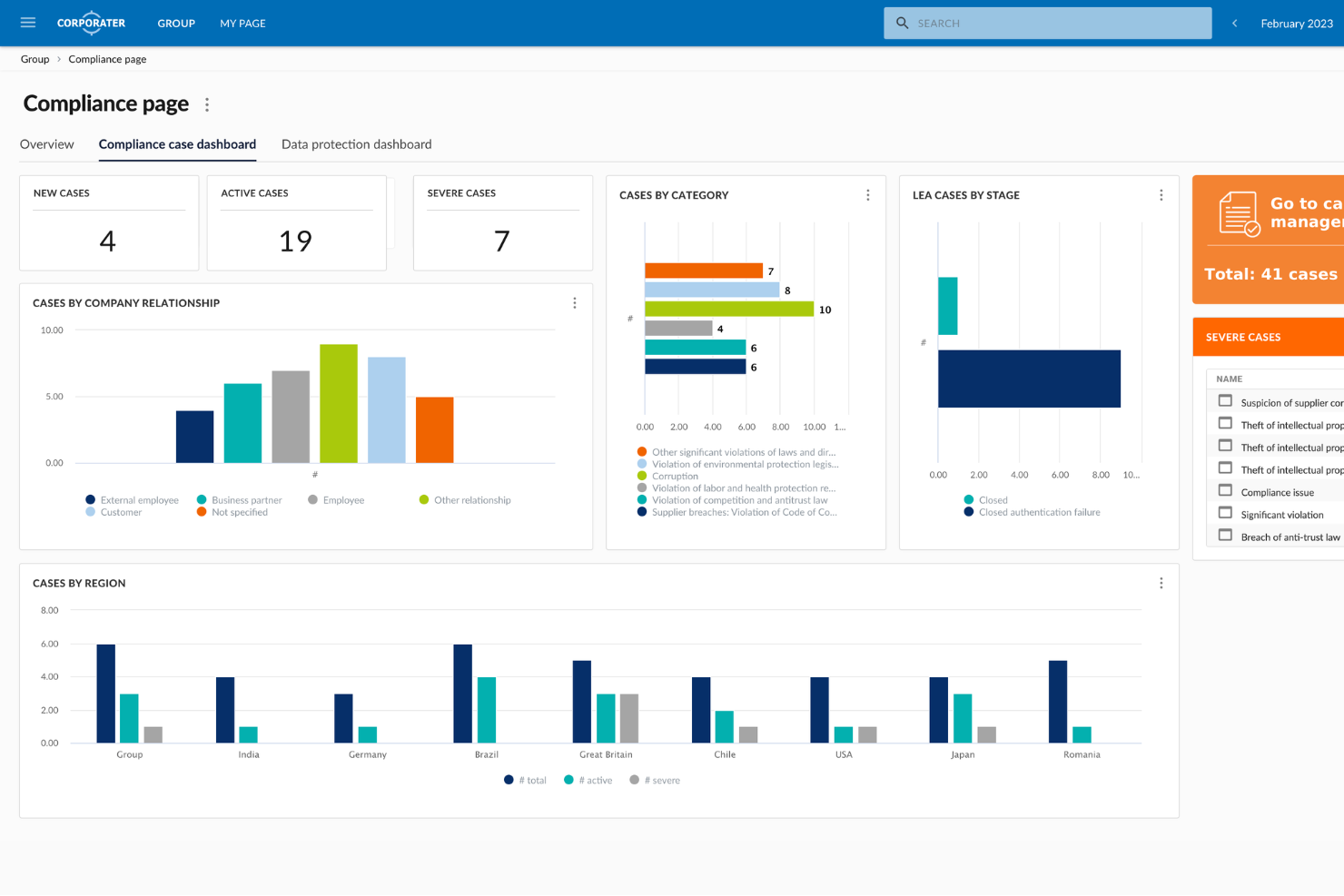
Corporater is an enterprise compliance management platform designed for organizations that need to automate policy controls, manage regulatory obligations, and monitor third-party risk within a single configurable system.
Who Is Corporater Best For?
Corporater is a strong fit for mid-to-large enterprises that need a centralized platform to manage compliance, risk, and governance across complex organizational structures.
Why I Picked Corporater
I've included Corporater in my top picks because its role-based compliance dashboards give different stakeholders a view that's actually relevant to them. A board member sees a high-level risk and compliance overview, while a compliance officer can drill down into individual KPIs, control statuses, and threshold breaches on the same platform. I also like that dashboards pull data automatically through Corporater's built-in ETL engine, so you're not manually consolidating spreadsheets before every reporting cycle. The KPI heat maps, trend arrows, and traffic light indicators make it straightforward to spot compliance gaps at a glance.
Corporater Key Features
- Policy management module: Create, distribute, and track policy acknowledgments across your organization with version control and audit trails.
- Regulatory obligation mapping: Link regulatory requirements directly to internal controls and processes to maintain a traceable compliance register.
- Third-party risk assessments: Run vendor due diligence questionnaires and score supplier risk profiles from within the platform.
- Audit management: Plan, execute, and document internal audits with structured workflows that connect findings to corrective action tasks.
Corporater Integrations
Corporater securely integrates aggregated RegTech and cybersecurity data into a centralized governance and compliance framework.
Pros and Cons
Pros:
- Multi-level user access control granularity
- Supports regulatory mapping to frameworks
- Customizable third-party risk scoring models
Cons:
- Reporting setup can be complex for admins
Best for SOC 2 compliance

Secureframe is on this list because it automates SOC 2 compliance in a way I haven’t seen from other AI-based compliance solutions. When I’ve set it up for teams, the pre-built policy templates and real-time risk monitoring make ongoing audit prep a steady, trackable process.
What I appreciate is how Secureframe manages evidence collection automatically and gives you a clean dashboard for tracking each requirement. This is where I think you get reliable clarity when SOC 2 is the immediate compliance goal.
Secureframe’s Best For
- Organizations pursuing SOC 2 or similar audits with strict evidence controls
- Teams that want automated, AI-driven compliance monitoring
Secureframe’s Not Great For
- Businesses needing flexible, custom compliance frameworks
- Small teams that only require basic data privacy tracking
What sets Secureframe apart
Secureframe builds compliance workflows around automation. Instead of relying on constant manual oversight like Drata or relying on static checklists, you get ongoing risk monitoring and evidence management throughout the year. In practice, I see organizations benefit from clear mapping between what the auditors want to see and what’s being tracked behind the scenes by Secureframe.
This works best if you want compliance to feel less like a project and more like an ongoing part of operations.
Tradeoffs with Secureframe
Secureframe optimizes for automated, structured compliance but limits custom control. If you want to adapt the framework or add edge-case processes, the system can feel too rigid.
Pros and Cons
Pros:
- Real-time compliance alerts
- Automated evidence collection
- Focused on SOC 2 compliance
Cons:
- Requires some technical knowledge
- Initial setup can be complex

Best for customizable workflows

LogicGate earns a spot here because of how much you can adapt its workflow engine to fit highly specific compliance needs. When I've set up risk and compliance processes in LogicGate, I find it's easy to tailor tasks, forms, and reviews for complex regulatory frameworks and fast-changing AI risk profiles.
What I appreciate most is how granular you can get with process configurations and automated controls. This is especially helpful for teams that need to manage overlapping compliance programs.
LogicGate’s Best For
- Risk and compliance teams creating custom regulatory workflows
- Organizations needing tailored automation for complex AI compliance
LogicGate’s Not Great For
- Small groups wanting plug-and-play compliance templates
- Teams that need simple or out-of-the-box solutions
What sets LogicGate apart
LogicGate is designed for teams who expect to model and manage compliance the way they actually work, rather than struggling to fit into someone else’s template. When I use LogicGate, I see organizations mapping out granular workflows that reflect their internal risk logic and approval chains, not just ticking off generic tasks. Unlike platforms like Jira, which you may need to wrangle into a compliance program, LogicGate lets you build processes with risk and audit in mind from the beginning.
Tradeoffs with LogicGate
LogicGate optimizes for flexibility in building out custom workflows, but this can slow down onboarding for those who want a plug-and-play compliance setup.
Pros and Cons
Pros:
- Supports complex compliance needs
- Drag-and-drop process design
- Highly customizable workflows
Cons:
- Requires training for customization
- Initial setup can be time-consuming
OneTrust
Best for privacy management

OneTrust earns a spot on my shortlist because of how seriously it handles privacy management at scale. When regulations or audits come up, I see teams using OneTrust’s automated data mapping and AI-powered assessment features to pinpoint risk across complex data flows.
What I appreciate is how it breaks down ongoing monitoring and incident response. If you need robust support for regulatory compliance—especially around AI and emerging privacy laws—it’s the first place I look.
OneTrust's Best For
- Enterprises managing privacy, consent, and regulatory AI compliance
- Legal and IT teams handling audits or complex data flows
OneTrust's Not Great For
- Small organizations with basic, manual compliance needs
- Teams that want lightweight, out-of-the-box AI risk tools
What sets OneTrust apart
OneTrust treats privacy management as a comprehensive, unified process and expects you to operationalize compliance centrally. Unlike simpler AI compliance add-ons or tracking tools, it works from the assumption that your organization manages sensitive data and regulatory obligations across multiple systems. You get workflows and dashboards that are ready for audit and incident response, instead of just checklists and policy templates.
Tradeoffs with OneTrust
OneTrust optimizes for centralization and formal processes, so you trade away speed and ease of setup for smaller needs. If your use case is lightweight or doesn’t need ongoing monitoring, it’s more system than you’ll actually use.
Pros and Cons
Pros:
- Automated compliance processes
- Wide privacy and AI tooling
- Extensive regulatory support
Cons:
- Requires training to use effectively
- Complex initial setup

Checkr
Best for AI-driven background checks
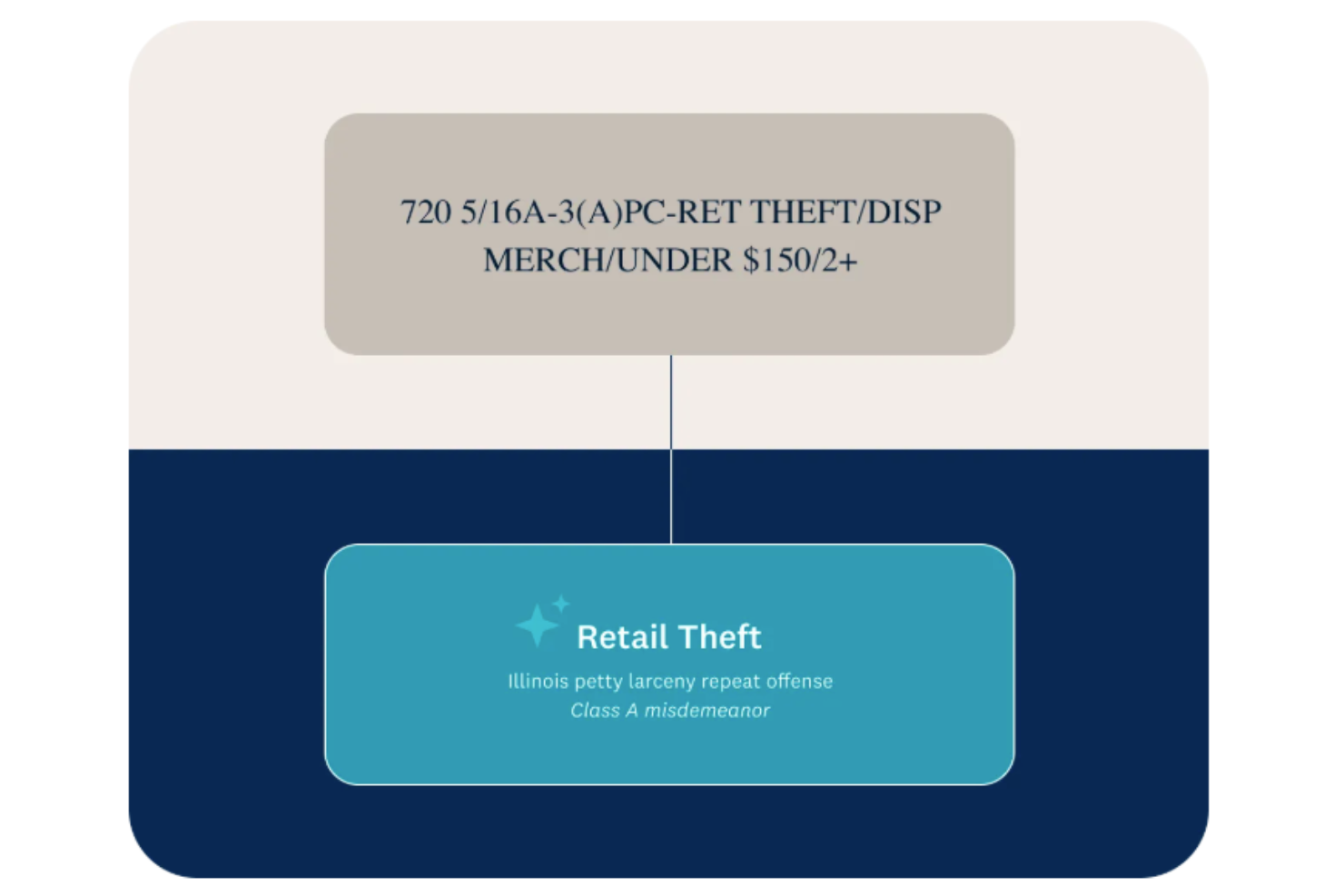
Checkr lands on this list because it automates the most time-consuming parts of background checks with AI, flagging compliance issues, disparities, and risk indicators at scale. This is a must when you’re hiring across multiple jurisdictions or need ongoing monitoring. What I really appreciate is how Checkr pulls in real-time data, so you aren’t stuck acting on out-of-date information.
Checkr’s Best For
- High-volume hiring needing automated compliance and background checks
- HR and risk teams balancing multiple jurisdictions or locations
Checkr’s Not Great For
- Small organizations with occasional, manual hiring needs
- Teams needing reference or credential checks only
What sets Checkr apart
Checkr organizes hiring compliance around automated background checks and real-time flags. Unlike platforms like Sterling that stick to a more manual process, Checkr leans hard into machine-driven review. I notice this approach works well when you want compliance issues to come up early and to get rid of bottlenecks that slow down high-volume hiring.
I’ve seen HR teams benefit most when they need to review applicants quickly across different states or countries.
Tradeoffs with Checkr
Checkr optimizes for speed and automation in background checks, but you lose the granular manual control some teams want when dealing with more sensitive or highly customized screens.
Pros and Cons
Pros:
- Automates adverse action notifications to save time
- Integrates well with most HR and ATS tools for full hiring workflow functionality
- Acheived ISO 42001 AI Governance Certification, highlighting responsible AI use
Cons:
- Less flexible than competitors for complex, non-standard background checks
- Occasional inaccuracies in background check reports
New Product Updates from Checkr
Checkr Adds Post-Hire Drug & Alcohol Clearinghouse Screening
Checkr adds post-hire limited-query support to its Drug & Alcohol Clearinghouse screening, alongside existing pre-hire full queries. The update helps employers manage recurring FMCSA screening requirements for employed CDL drivers within the same platform. For more information, visit Checkr’s official site.
 .
.
Sprinto
Best for startup compliance

Sprinto makes my shortlist because it removes so much guesswork from startup compliance and security frameworks. What stands out for me is how Sprinto automates ongoing monitoring, policy documentation, and audit readiness, right from early growth through scaling. Teams trying to prepare for SOC 2 or ISO 27001 without losing momentum tend to get a lot of value here.
I like how quickly you can set up continuous controls and map requirements to evidence, which is rare in entry-level compliance tools.
Sprinto’s Best For
- Startups building SOC 2 or ISO 27001 compliance from scratch
- Founders who want compliance automation and audit readiness early
Sprinto’s Not Great For
- Mature enterprises with deeply custom compliance processes
- Organizations that need non-standard, industry-specific certifications
What sets Sprinto apart
Sprinto is designed for startups that want to automate compliance processes early, rather than cobbling together manual policies like you would in Google Workspace or Excel. It expects you to treat compliance as an ongoing, integrated part of your growth, not just a one-time checklist. Unlike generic GRC tools, Sprinto is focused specifically on making regulatory frameworks manageable, even if you don’t have a dedicated compliance hire.
Tradeoffs with Sprinto
Sprinto optimizes for startups standardizing compliance, but this focus means established teams with unusual workflows or edge-case requirements will run into limitations.
Pros and Cons
Pros:
- Automated policy creation
- Quick compliance setup
- Tailored for startup needs
Cons:
- Can require technical knowledge
- Limited customization options


Vanta lands on my list because it speeds up the compliance audit process by automating evidence collection and mapping controls to frameworks like SOC 2 and ISO 27001. If you need to get audit-ready with minimal manual overhead, I find Vanta stands out for how it auto-monitors your systems and highlights issues in real time.
What I like is how quickly you can respond to auditor requests using Vanta’s centralized dashboard, so teams can reduce time spent tracking policy and control status.
Vanta’s Best For
- Fast-tracking SOC 2, ISO 27001, and similar audits
- Tech companies automating evidence collection for compliance
Vanta’s Not Great For
- Teams seeking custom, less-common compliance frameworks
- Organizations needing deep policy management features
What sets Vanta apart
Vanta is designed for people who want to move fast through compliance without having to map every control by hand. It automates evidence collection and monitoring, so you spend less time pulling documents and more time fixing real issues. Unlike manually managed GRC tools or Google Sheets tracking, Vanta expects you to work inside its system and let it surface risks for you.
This works great when your priority is audit readiness and you need to handle frameworks like SOC 2, not endlessly customize your compliance program.
Tradeoffs with Vanta
Vanta optimizes for standard frameworks and fast setup, but you give up custom policy management and advanced tailoring. Complex compliance scenarios or highly unique controls become harder to manage as a result.
Pros and Cons
Pros:
- Real-time monitoring capabilities
- Automated evidence collection
- Quick setup process
Cons:
- Can be overwhelming for small teams
- Limited customization options

Drata earns a spot here because it is built for organizations that need real-time insight into their compliance status, especially with ongoing regulatory shifts. I recommend Drata when you want active, automated monitoring of data flows and security controls, rather than periodic manual reviews.
What stands out to me is the continuous evidence collection and risk assessment features, which help you spot potential issues instantly and reduce audit preparation time. When testing Drata's features, I liked how clear the platform makes audit readiness at any moment, especially when demonstrating GDPR and AI regulation compliance for stakeholders.
Drata’s Best For
- Companies needing real-time, automated compliance monitoring
- Organizations working with complex regulatory frameworks like GDPR or AI laws
Drata’s Not Great For
- Small startups with basic, static compliance needs
- Teams looking for industry-specific compliance frameworks outside standard data privacy
What sets Drata apart
Drata expects organizations to adopt a monitoring-first mindset, rather than cycle through static audits like you do with tools built mainly for checklists or spreadsheets. It pushes you to integrate control tracking directly into live workflows, drawing a closer parallel to continuous monitoring platforms rather than legacy compliance trackers. Unlike Vanta or Secureframe, Drata leans harder into automated, always-on risk visibility, so you can keep tabs on your compliance status without pulling manual reports.
Tradeoffs with Drata
Drata optimizes for real-time compliance monitoring, but that means more setup and ongoing management of integrations. If your compliance posture rarely changes or you want a basic point-in-time check, this extra complexity often isn’t worth it.
Pros and Cons
Pros:
- Supports multiple frameworks
- Automated evidence collection
- Real-time compliance insights
Cons:
- Some learning curve involved
- Requires initial setup time
Other AI Compliance Tools
Here are some additional AI compliance tools options that didn’t make it onto my shortlist, but are still worth checking out:
- Diligent
For board governance
- AuditBoard
For risk management
- Centraleyes
For real-time insights
- Compliance.ai
For financial services
- Xapien
For automated research
- Regology (Reggi)
For regulatory updates
- ComplyAdvantage
For anti-money laundering detection
- Onfido
For identity verification


How I Evaluate AI Compliance Tools
I look for tools where AI surfaces bias risks, flags regulatory gaps, and generates audit-ready reports—not static checklists requiring manual work. From there, I split my evaluation into core functionality every tool must deliver and differentiating factors that separate the best fit from the rest.
Core Functionality (Table Stakes For This List)
When I'm selecting tools for my list, I rank each one on a scale from 0 (does not offer the functionality) to 5 (excels in this area) for each core functionality listed below. Then, I calculate the tool's total score into a percentage. Each tool needs to achieve a minimum total score of 55% to be considered for inclusion.
- AI Bias Auditing: I evaluate whether the tool can automatically test HR AI models for adverse impact across protected classes—like flagging disparate rejection rates in resume screening.
- Regulatory Mapping: Each tool should map AI usage to relevant HR regulations (EU AI Act, NYC LL 144, EEOC guidelines) and surface compliance gaps as rules change.
- AI Risk Assessment: I look for structured risk scoring that classifies HR AI systems by tier, so teams can prioritize audits for high-risk tools like hiring algorithms.
- Audit Trail & Documentation: Auto-generated logs, model cards, and impact assessments matter here—I check whether the output is regulator-ready or just a basic activity feed.
- AI Model Monitoring: Ongoing drift and fairness monitoring for deployed models is key. I look at whether tools alert teams when a promotion or screening model degrades over time.
- Vendor & Policy Governance: I check whether the tool inventories third-party HR AI vendors and enforces internal usage policies, especially for teams managing multiple AI-powered ATS or HRIS tools.
Once I have a list of tools that meet this criteria, I consider what sets each platform apart.
Differentiating Factors (What Sets Vendors Apart)
Here's how I compare and contrast different vendors:
Standout Features
Adverse impact simulation is a major differentiator—I look for tools that let HR teams model how changes to screening criteria affect fairness outcomes before going live. Candidate notification automation also matters, since manually tracking disclosure requirements across jurisdictions is a compliance risk in itself. I value explainable AI dashboards that translate model logic into plain language, making it easier to field questions from regulators or internal stakeholders during an audit.
Beyond Features
HRIS and ATS integrations are one of the first things I check—a tool that connects to Workday, Greenhouse, or SAP SuccessFactors can pull decision data directly instead of requiring manual uploads. Data security posture is equally important, since these platforms handle sensitive candidate and employee information; I look for SOC 2 Type II and ISO 27001 certifications at a minimum. I also evaluate regulatory advisory support, because teams often need expert guidance when preparing for their first bias audit or responding to a regulator inquiry.
How to Choose AI Compliance Tools
It’s easy to get bogged down in long feature lists and complex pricing structures. To help you stay focused as you work through your unique software selection process, here’s a checklist of factors to keep in mind:
| Factor | What to Consider |
| Scalability | Will the tool grow with your business? Check if it supports your future expansion plans and can handle increased data volume and complexity as your company scales. |
| Integrations | Does it connect with your current systems? Ensure the tool integrates with existing software like HR, finance, or CRM systems to avoid data silos and duplicate work. |
| Customizability | Can you tailor it to your needs? Look for tools that allow you to customize workflows, reports, and dashboards to fit your specific compliance processes and business requirements. |
| Ease of use | Is it user-friendly? Evaluate the interface to see if it’s intuitive and easy for your team to navigate without extensive training or technical expertise. |
| Implementation and onboarding | How quickly can you get started? Consider the time and resources required to implement the tool and train your team, including available support like tutorials and documentation. |
| Cost | Does it fit your budget? Compare the pricing plans and ensure the tool offers value for money, considering both the initial investment and ongoing expenses. |
| Security safeguards | How does it protect your data? Verify the tool's security measures, like encryption, access controls, and compliance with data protection regulations, to safeguard sensitive information. |
| Compliance requirements | Does it meet your regulatory needs? Ensure the tool supports the specific compliance frameworks and standards relevant to your industry and geographic location. |
What Are AI Compliance Tools?
AI compliance tools are software solutions designed to help organizations manage and adhere to regulatory requirements using artificial intelligence. These tools are typically used by compliance officers, legal teams, and risk management professionals to automate and simplify compliance processes. Automated alerts, real-time tracking, and regulatory change management features help with staying updated on compliance requirements and mitigating risks. Overall, these tools provide businesses with the ability to efficiently manage compliance and reduce the risk of non-compliance.
Features of AI Compliance Tools
When selecting AI compliance tools, keep an eye out for the following key features:
- Automated alerts: Notifies your team of regulatory changes in real-time, helping you stay compliant and avoid penalties.
- Regulatory change tracking: Monitors and updates you on new and evolving regulations, ensuring you remain informed and compliant.
- Risk assessment tools: Identify and evaluate potential compliance risks, allowing you to mitigate them proactively.
- Customizable workflows: Lets you tailor compliance processes to streamline your organization’s specific needs and requirements.
- Real-time tracking: Provides up-to-date insights into your compliance status, enabling quick decision-making and action.
- Compliance task management: Organizes and tracks compliance-related tasks, improving efficiency and accountability.
- Secure document sharing: Facilitates safe and compliant sharing of sensitive information among stakeholders.
- Audit trail and reporting: Maintains detailed records of compliance activities, supporting transparency and accountability.
Benefits of AI Compliance Tools
Implementing AI compliance tools provides several benefits for your team and your business. Here are a few you can look forward to:
- Reduced risk: Automated alerts and risk assessment tools help identify and mitigate compliance risks early on.
- Time savings: Real-time tracking and automated processes free up your team to focus on other important tasks.
- Improved accuracy: Automated regulatory change tracking ensures that you always have the most current compliance information.
- Improved efficiency: Customizable workflows and compliance task management simplify processes and boost productivity.
- Increased transparency: Audit trail and reporting features provide clear records of compliance activities, supporting accountability.
- Better decision-making: Real-time insights and analytics enable quick, informed decisions to maintain compliance.
- Secure information sharing: Secure document sharing protects sensitive data while ensuring compliance with data protection regulations.
Costs and Pricing of AI Compliance Tools
Selecting AI compliance tools requires an understanding of the various pricing models and plans available. Costs vary based on features, team size, add-ons, and more. The table below summarizes common plans, their average prices, and typical features included in AI compliance tools solutions:
Plan Comparison Table for AI Compliance Tools
| Plan Type | Average Price | Common Features |
| Free Plan | $0 | Basic compliance tracking, limited reporting, and community support. |
| Personal Plan | $200-$1250/user/month | Automated alerts, basic risk assessment, and standard compliance templates. |
| Business Plan | $450-$3000/user/month | Customizable workflows, advanced reporting, and integration with third-party applications. |
| Enterprise Plan | $2000-$5000/user/month | Full regulatory change tracking, dedicated customer support, and all-inclusive compliance analytics. |
AI Compliance Tools FAQs
Here are some answers to common questions about AI compliance tools:
Do AI compliance tools require technical expertise to use?
No, many AI compliance tools are designed for ease of use and don’t require extensive technical expertise. However, some tools may have advanced features that need basic technical knowledge. Look for solutions with user-friendly interfaces, tutorials, and support resources to help your team get started. The right tool will balance functionality with accessibility, ensuring your team can use it effectively without a steep learning curve.
How do AI compliance tools stay updated with regulations?
AI compliance tools typically use automated updates to stay current within regulatory frameworks. They monitor changes in cybersecurity and industry laws and regulations, ensuring the system reflects the latest requirements and there are no compliance issues. This automation saves you time and reduces the risk of non-compliance, as well as preventing a potential vulnerability. When selecting a tool, inquire about its update frequency and methods to ensure it keeps you informed on regulatory changes.
How do I evaluate whether an AI compliance tool fits my organization’s risk profile?
Start by reviewing whether the tool supports mapping and classifying your AI systems by risk level. Look for options that let you document models, datasets, and intended uses in line with your internal governance policies. It’s also important to confirm that the tool aligns with frameworks relevant to your industry, such as healthcare or government work, like the EU AI Act or NIST AI RMF. You’ll get the best results when the tool complements your existing workflows rather than forcing major process changes to fit the regulatory landscape.
How do you assess whether an AI compliance tool supports continuous model monitoring?
You’ll want to check if the tool can track your AI system’s behaviour over time, flagging drift, bias, or anomalous outcomes. The right tool for your team will offer dashboards or alerts that link back to specific models and data pipelines. Ask whether the tool allows you to define thresholds and metrics for each model and integrate with your existing telemetry.
What are the key data-quality requirements you should check before relying on an AI compliance tool?
Your team must ensure that the datasets feeding into your AI systems are accurate, labelled appropriately, and representative of real-world use. An AI compliance tool may alert you to data issues, but it won’t fix bad input. Validate that the tool allows you to link back to training data, see lineage, and catch anomalies.
How do AI compliance tools handle reporting and documentation?
An AI compliance tool typically includes automated reporting features that generate summaries, audit trails, and compliance evidence. These reports help your team demonstrate accountability and readiness during reviews or audits. You can usually customize the format and frequency of reports to match your internal compliance schedule. This function saves time and ensures your documentation stays consistent and complete.