
17 Best AI HRIS Reviewed in 2026

10 Best AI HRIS Shortlist
Here's my pick of the 10 best software from the 17 tools reviewed.


The best AI-powered HRIS platforms combine traditional HR management functions—like payroll, recruitment, and employee engagement—with intelligent automation and predictive analytics, helping you save time and make smarter decisions.
Manual processes and fragmented systems can slow down HR teams and create costly errors. An AI-driven HRIS streamlines these tasks by automating workflows, analyzing workforce trends, and even predicting future needs—so you can shift from reactive administration to proactive people strategy.
Drawing on years of testing and reviewing HR software, I’ve curated the top AI HRIS solutions that are intuitive, scalable, and built to boost both efficiency and employee experience.
In this guide, you’ll find platforms that reduce admin, enhance decision-making, and give you actionable insights into the health and performance of your workforce.
Why Trust Our Software Reviews
Best AI HRIS Summary
This comparison chart summarizes pricing details for my top AI HRIS selections to help you find the best one for your budget and business needs.
| Tool | Best For | Trial Info | Price | ||
|---|---|---|---|---|---|
| 1 | Best for complex, multi-country scenarios | Free demo available | From $5/employee/month | Website | |
| 2 | Best for AI-driven workforce planning | Free demo + free plan available | From $8/user/month | Website | |
| 3 | Best for AI-powered HR automation | Free demo available | Pricing upon request | Website | |
| 4 | Best for AI-driven performance management | 14-day free trial | Pricing upon request | Website | |
| 5 | Best for performance reviews | Free 14-day trial | From $199/month (billed annually) | Website | |
| 6 | Best for startups | 14-day free trial | Pricing upon request | Website | |
| 7 | Best for finance integration | Free demo available | Pricing upon request | Website | |
| 8 | Best for payroll processing | Free demo available | Pricing upon request | Website | |
| 9 | Best for talent management | Free trial + free demo available | From $18/month | Website | |
| 10 | Best for workforce management | Free demo available | Pricing upon request | Website |
-

Checkr
Visit WebsiteThis is an aggregated rating for this tool including ratings from Crozdesk users and ratings from other sites.4.5 -
Kudoboard
Visit WebsiteThis is an aggregated rating for this tool including ratings from Crozdesk users and ratings from other sites.4.8 -
Native Teams
Visit WebsiteThis is an aggregated rating for this tool including ratings from Crozdesk users and ratings from other sites.4.9





Best AI HRIS Review
Below are my detailed summaries of the best AI HRIS that made it onto my shortlist. My reviews offer a detailed look at the key features, pros & cons, integrations, and ideal use cases of each tool to help you find the best one for you.


Deel HRIS is an AI-powered human resources information system that helps you manage your global team from one place. It brings together HR, payroll, and IT functions so you can automate admin work like onboarding, compliance, and document management.
Why I picked Deel: I picked Deel because it uses AI and automation to make HR management more intelligent and proactive. You can trigger workflows based on real-time employee data—like start dates or promotions—so you never miss key HR events. Deel’s workflow automation goes beyond task reminders by adapting to complex, multi-country scenarios with built-in compliance checks. You also get AI-driven labor law insights and reporting that turn workforce data into actionable guidance.
Standout features & integrations:
Features include automation workflows that let you create pre-built or custom processes for onboarding, compliance, and policy tracking. You can also use people analytics to access dashboards that show global costs, headcount, and diversity data, helping you make data-driven HR decisions.
Integrations include QuickBooks, BambooHR, NetSuite, Gusto, ADP Workforce Now, SAP SuccessFactors, Slack, Google Workspace, Hubstaff, Time Doctor, Ravio, and PinPoint.
Pros and Cons
Pros:
- Centralized data makes auditing simple
- Strong global compliance and labor law coverage
- Automates complex HR workflows efficiently
Cons:
- Limited customization for smaller teams
- Pricing can rise with added modules
New Product Updates from Deel HR

Deel HR Introduces AI-Powered ATS for Hiring
Deel HR introduces an AI-powered ATS built into its platform. This update enhances hiring efficiency by automating sourcing, screening, and workflows across the recruitment process. For more information, visit Deel HR’s official site.
 .
.
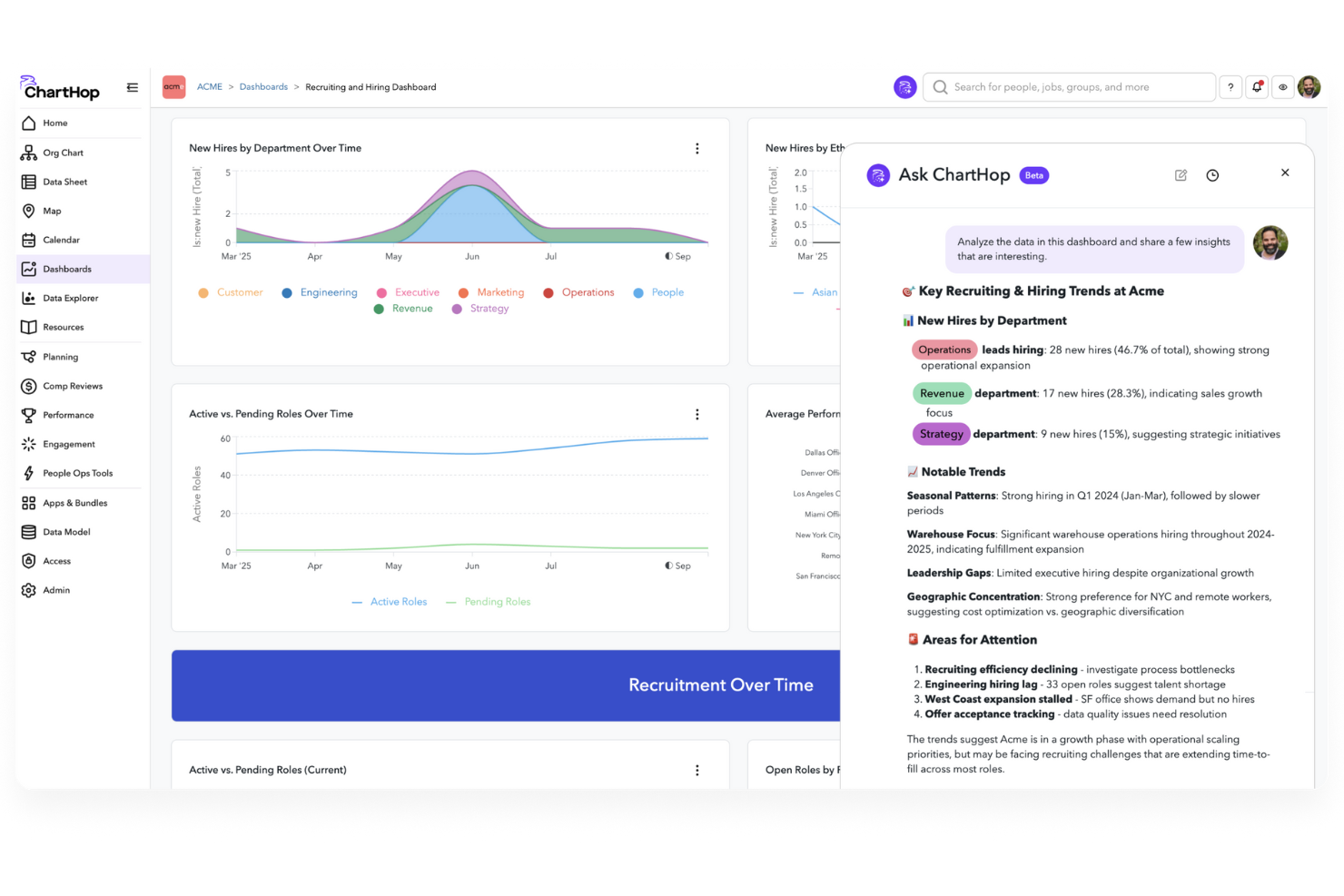
ChartHop introduces a fresh way for people leaders and HR teams to manage their workforce by bringing together your org-chart visuals, compensation planning, and people analytics under one roof. If you’re leading a growing company that wants HR software with built-in AI support for interpreting your employee, hiring and business data, ChartHop could be a strong fit for your team.
Why I Picked ChartHop
I picked ChartHop because its AI-enabled HRIS module delivers natural-language “Ask ChartHop” queries and scenario-planning tools that directly support workforce planning and decision making. With the built-in conversational insights feature (Ask ChartHop) you and your team can ask questions like how hiring impacts budget or where engagement correlates with retention. The scenario planning feature lets you model headcount or budget changes in minutes, giving your team a clearer view of “what happens if we add X roles” or “what if we reduce Y cost centre.” These features align well with HR teams that need to connect people ops with business outcomes rather than just handle administrative tracking.
ChartHop Key Features
In addition to the features highlighted above, you’ll find several other capabilities worth noting:
- Org Charts: Provides dynamic visualizations of your company's structure, aiding in understanding and decision-making.
- Employee Profiles: Offers detailed profiles to enhance connectivity and communication within your team.
- Geographic Maps: Tracks employee locations, providing insights for remote work and office planning.
- Unified Company Calendar: Centralizes important dates and events, ensuring your team stays informed and organized.
ChartHop Integrations
Integrations include ADP, AlphaStaff, Ashby, BambooHR, Carta, Dayforce, Deel, Factorial, Greenhouse, and Gusto.
Pros and Cons
Pros:
- Strong integration capabilities with various HRIS systems.
- Advanced planning tools for headcount and restructuring flexibility.
- Dynamic org charting supports real-time structural visualization.
Cons:
- The breadth of configurable options can result in complexity and a steeper learning curve for admins.
- Lengthy implementation process requiring significant resources.


Paylocity is a cloud-based human resource information system (HRIS) that combines payroll, HR, and workforce management into one intelligent platform. Designed for mid-sized to large organizations, it leverages AI to automate routine HR tasks, enhance decision-making, and deliver personalized employee experiences.
Why I picked Paylocity: I picked Paylocity for its powerful AI automation that streamlines payroll, expense reporting, and other repetitive HR processes, giving you more time to focus on people and strategy. Its predictive analytics surface actionable workforce insights, helping you identify trends and make data-driven decisions faster. I also like how Paylocity enhances employee experiences through personalized benefits recommendations and self-service tools, which can boost engagement and satisfaction. For teams managing complex HR operations, Paylocity’s centralized dashboard and AI-enhanced insights make it an invaluable, forward-looking HRIS solution.
Standout features & integrations:
Features include AI-powered automation for payroll and expense reporting, predictive workforce analytics for informed decision-making, and intelligent scheduling to improve workforce planning. The platform also supports mobile access and collaboration, allowing HR professionals and employees to stay connected anywhere.
Integrations include Google Workspace, Greenhouse, Guardian Life, Guideline, HealthEquity, Homebase, Salesforce, Slack, Smartsheet, Workable, Zoom, and Zendesk.
Pros and Cons
Pros:
- Easy-to-use, mobile-friendly interface
- Delivers predictive analytics and insights
- Automates payroll and HR workflows
Cons:
- Pricing may stretch small budgets
- Advanced setup can take time


Sloneek is an AI-powered HRIS designed to simplify and enhance workforce management. It unifies core HR functions like performance tracking, recruitment, payroll, and time management into one intuitive platform. With built-in automation and analytics, Sloneek helps HR teams manage employee data, engagement, and compliance more intelligently.
Why I picked Sloneek: I picked Sloneek for its AI-enhanced performance management tools that help you assess, develop, and retain top talent. Features like 360 degree feedback, KPI and OKR tracking, and competency evaluations provide a clear picture of your team’s performance. You can also use its people analytics to uncover trends, identify skill gaps, and make data-driven HR decisions. Combined with tools for time tracking, onboarding, and engagement, Sloneek delivers an end-to-end solution for modern HR operations.
Standout features & integrations:
Features include AI surveys for employee feedback, automated workflows for attendance and document management, and digital tools for whistleblowing and compliance. Its “Sloneek Intelligence” engine provides intelligent recommendations that help HR leaders act on insights quickly.
Integrations include Google Calendar, Jira, Google Workspace, Microsoft Active Directory, Slack, Dropbox, Microsoft Teams, Zoom, Asana, Trello, and Zapier.
Pros and Cons
Pros:
- Strong employee engagement features
- AI-powered analytics and automation
- Comprehensive performance management tools
Cons:
- Limited public user review data
- Pricing available upon request

Leapsome is a people enablement platform designed for organizations focused on enhancing employee performance and engagement. It delivers solutions for performance management, employee engagement, and learning, making it suitable for companies aiming to foster a culture of continuous improvement.
Why I picked Leapsome: Leapsome integrates AI across performance management, learning, and engagement to create a continuous cycle of improvement.
Its AI-powered feedback and review tools surface patterns in employee performance, helping leaders spot strengths and growth opportunities. With personalized learning paths and intelligent goal alignment, Leapsome ensures teams stay productive, engaged, and future-ready.
Standout features & integrations:
Features include AI-driven performance reviews with customizable cycles and 360-degree feedback, making evaluations more data-informed and fair. Its intelligent goal-setting and tracking tools align employee efforts with company objectives, while AI-powered engagement surveys reveal morale trends and recommend focus areas. The learning module uses AI to create personalized development plans, addressing skill gaps and fostering continuous growth.
Integrations include Slack, Microsoft Teams, Google Workspace, BambooHR, Personio, Okta, Workday, Greenhouse, LinkedIn, and Microsoft Outlook.
Pros and Cons
Pros:
- Flexible feedback options
- Effective goal tracking
- Customizable review cycles
Cons:
- Requires ongoing user training
- Initial setup complexity
New Product Updates from Leapsome

Leapsome Adds ADP Workforce Now Integration
Leapsome introduces ADP Workforce Now integration for payroll data synchronization. This update helps organizations keep employee data aligned between HR and payroll systems while reducing manual data transfers. For more information, visit Leapsome’s official site.
 .
.

Personio is an all-in-one HR software tailored for small to medium-sized businesses and startups. It encompasses key HR functions such as recruitment, employee management, and payroll, providing a comprehensive solution for managing HR tasks efficiently.
Why I picked Personio: Personio brings AI-driven automation to the core HR needs of small and medium-sized businesses. Its all-in-one platform covers recruitment, payroll, and employee management, while AI streamlines workflows and reduces manual effort.
With its intuitive design and intelligent features, Personio helps startups and growing companies manage HR tasks efficiently, so leaders can focus more on strategy and people.
Standout features & integrations:
Features include AI to automate recruitment processes, from screening candidates to managing hiring pipelines. Its AI-powered payroll ensures accuracy, compliance, and timely salary payments. Performance tracking tools surface insights into employee growth, while intelligent document management makes organizing and retrieving HR files simple.
Integrations include Slack, Microsoft Teams, Google Workspace, LinkedIn, Indeed, DATEV, Xing, Personio API, DocuSign, and OneDrive.
Pros and Cons
Pros:
- Supports document management
- Effective performance tracking
- Comprehensive HR functionalities
Cons:
- Setup can be time-consuming
- Limited advanced analytics


Workday is an enterprise software platform designed for medium to large enterprises. It provides solutions for HR, finance, planning, legal, and industry operations, making it suitable for diverse sectors like healthcare and financial services.
Why I picked Workday: Workday integrates AI deeply into its finance and HR functions to streamline decision-making and operational efficiency. Its AI models power forecasting, anomaly detection, and intelligent automation, making complex financial and workforce processes more accurate and less time-consuming.
Standout features & integrations:
Features include AI-driven financial management that identifies spending patterns, predicts risks, and automates compliance tasks. In workforce planning, AI models forecast talent gaps, optimize headcount, and suggest resource alignment with business goals. Its talent management tools use AI to recommend personalized development paths, match employees with opportunities, and surface skills insights across the organization.
Integrations include Salesforce, Microsoft Office 365, Slack, Google Workspace, ServiceNow, LinkedIn, Adobe Sign, DocuSign, Okta, and Workday Adaptive Planning.
Pros and Cons
Pros:
- Industry-specific solutions
- Talent management capabilities
- Comprehensive workforce planning
Cons:
- Limited customization options
- Complex implementation process


ADP is a comprehensive human capital management solution designed for businesses of all sizes, focusing on payroll, HR, and talent management. It provides tools to manage payroll, benefits, and compliance, making it a versatile solution for various HR needs.
Why I picked ADP: ADP uses AI to bring intelligence and automation to payroll, compliance, and workforce management. Its AI-powered payroll processing ensures accuracy across jurisdictions, while automated tax filing minimizes compliance risks.
By embedding AI into payroll and HR operations, ADP helps organizations save time, reduce errors, and make more informed workforce decisions.
Standout features & integrations:
Features include AI-driven workforce analytics that deliver actionable insights into labor trends, costs, and productivity. Its intelligent compliance management tools automatically adapt to changing regulations and alert HR teams to potential risks. Payroll is enhanced with AI anomaly detection to flag errors before they occur, while benefits administration is streamlined through automated workflows. Talent management tools also use AI to recommend personalized development and retention strategies.
Integrations include QuickBooks, Xero, Wave, Sage, Microsoft Dynamics, Oracle, Salesforce, Workday, BambooHR, and SAP.
Pros and Cons
Pros:
- Supports talent management
- Strong analytics capabilities
- Automated tax filing
Cons:
- Some features need improvement
- Requires user training

SAP SuccessFactors is a cloud-based human capital management suite designed for businesses of all sizes. It offers solutions for core HR, talent management, and workforce analytics, supporting organizations in managing their entire employee lifecycle.
Why I picked SAP SuccessFactors: SAP SuccessFactors integrates AI into every stage of talent management, from recruiting and onboarding to performance and career development. Its AI-driven insights make it easier for HR leaders to attract the right talent, support growth, and retain high performers.
With continuous performance tracking and personalized development paths, SuccessFactors helps organizations proactively manage their workforce while aligning people strategies with business outcomes.
Standout features & integrations:
Features include AI-powered workforce analytics that surface actionable insights from HR data, enabling smarter decisions across hiring, compensation, and development. Its intelligent recruiting tools use AI to screen candidates and recommend top matches, while learning management employs AI to personalize training and career paths. Further, succession planning is enhanced with AI to identify future leaders and mitigate risks.
Integrations include SAP ERP, SAP Ariba, SAP Concur, Microsoft Office 365, LinkedIn, Salesforce, Google Workspace, Workday, ADP, and SuccessFactors Learning.
Pros and Cons
Pros:
- Detailed workforce analytics
- Comprehensive learning management
- Effective performance tracking
Cons:
- Requires ongoing support
- High learning curve

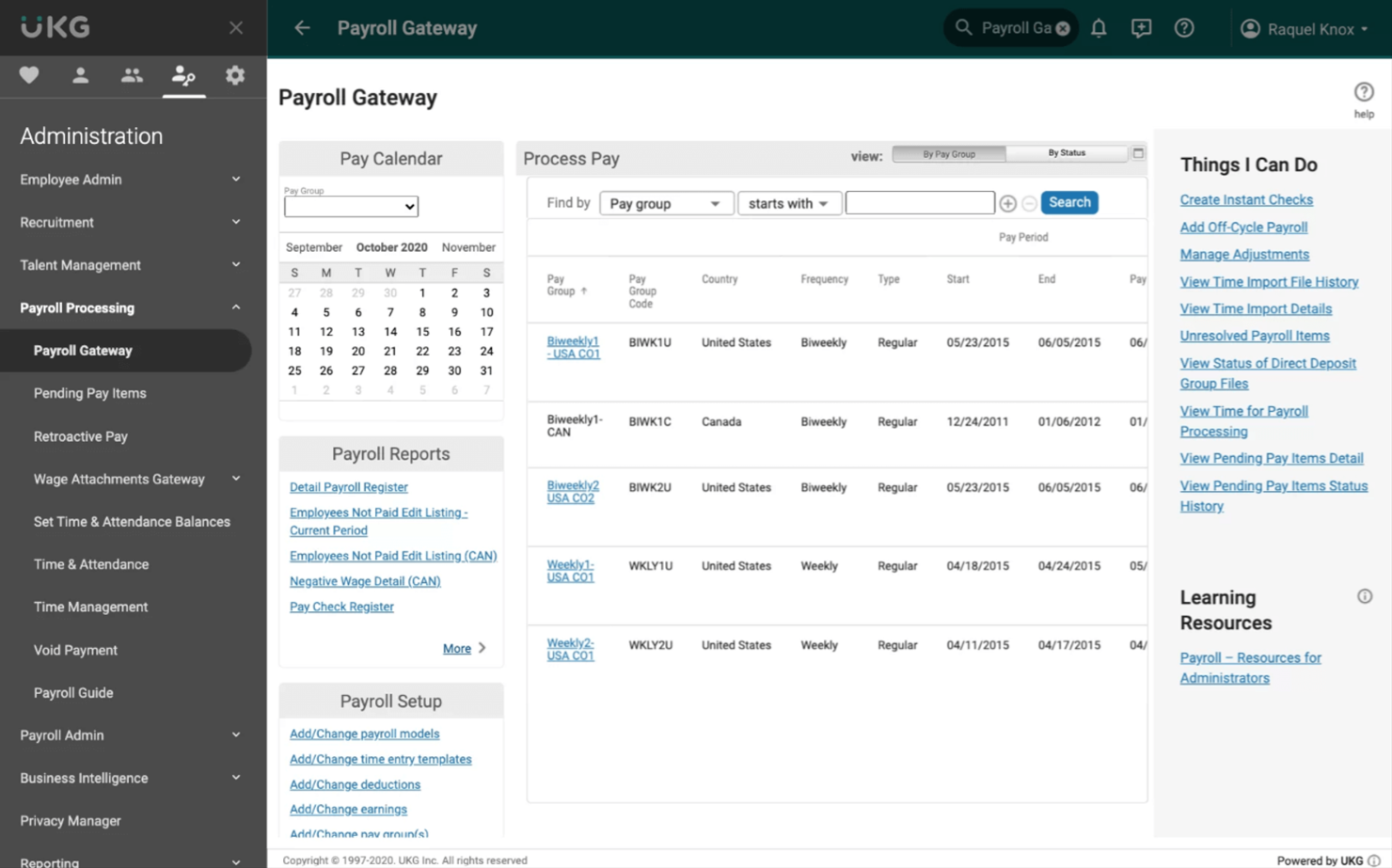
UKG is a comprehensive human capital management solution designed for businesses of all sizes. It offers workforce management, payroll, and talent management functionalities, helping organizations efficiently manage their HR needs.
Why I picked UKG: UKG embeds AI across workforce management and HR processes to optimize scheduling, payroll, and talent management. Its intelligent automation streamlines complex tasks like compliance, time tracking, and workforce planning, reducing administrative burden while improving accuracy. With AI insights guiding decision-making, UKG helps organizations create more efficient operations and better employee experiences.
Standout features & integrations:
Features include AI-powered workforce analytics that surface patterns in performance, scheduling, and labor costs to inform smarter decisions. Its payroll system uses AI to enhance accuracy and flag anomalies, while compliance management tools automatically adapt to changing regulations. Talent management is supported by AI-driven development recommendations and retention insights, and engagement features, powered by intelligent sentiment analysis, help leaders boost morale and productivity.
Integrations include SAP, Oracle, Microsoft Dynamics, Salesforce, ADP, Workday, Kronos, QuickBooks, Ceridian, and SuccessFactors.
Pros and Cons
Pros:
- Helps with compliance management
- Comprehensive payroll management
- Effective time and attendance tracking
Cons:
- High learning curve for beginners
- Complex setup process
Other AI HRIS
Here are some additional AI HRIS options that didn’t make it onto my shortlist, but are still worth checking out:
- Oracle Cloud HCM
For global enterprises
- BambooHR
For user-friendly interface
- Gusto
For small businesses
- Lattice AI
For employee engagement
- Sense
For recruitment automation
- Cezanne
For mid-sized businesses
- Humaans
For rapid HR setup


AI HRIS Selection Criteria
When selecting the best AI HRIS to include in this list, I considered common buyer needs and pain points like managing workforce analytics and improving employee engagement. I also used the following framework to keep my evaluation structured and fair:
Core Functionality (25% of total score)
To be considered for inclusion in this list, each solution had to fulfill these common use cases:
- Manage employee records
- Track time and attendance
- Process payroll
- Handle benefits administration
- Support performance management
Additional Standout Features (25% of total score)
To help further narrow down the competition, I also looked for unique features, such as:
- Customizable workflows
- Advanced analytics and reporting
- AI-driven recruitment tools
- Employee self-service portals
- Mobile app accessibility
Usability (10% of total score)
To get a sense of the usability of each system, I considered the following:
- Intuitive interface design
- Ease of navigation
- Minimal training required
- Responsive design for mobile use
- User feedback mechanisms
Onboarding (10% of total score)
To evaluate the onboarding experience for each platform, I considered the following:
- Availability of training videos
- Access to interactive product tours
- Use of onboarding templates
- Availability of chatbots for assistance
- Regular webinars for new users
Customer Support (10% of total score)
To assess each software provider’s customer support services, I considered the following:
- 24/7 support availability
- Access to a dedicated support team
- Availability of live chat support
- Comprehensive knowledge base
- Customer feedback loops
Value For Money (10% of total score)
To evaluate the value for money of each platform, I considered the following:
- Competitive pricing models
- Transparent fee structures
- Discounts for annual billing
- Features offered at each price tier
- Scalability for growing businesses
Customer Reviews (10% of total score)
To get a sense of overall customer satisfaction, I considered the following when reading customer reviews:
- Consistency of positive feedback
- Commonly cited pain points
- Frequency of updates and improvements
- Responsiveness to customer feedback
- Overall satisfaction ratings
How to Choose AI HRIS
It’s easy to get bogged down in long feature lists and complex pricing structures. To help you stay focused as you work through your unique software selection process, here’s a checklist of factors to keep in mind:
| Factor | What to Consider |
|---|---|
| Scalability | Can the software grow with your company? Consider whether it can handle more employees as your team expands. Look for options that support different company sizes. |
| Integrations | Does it work well with your existing tools? Check for compatibility with key software like payroll, accounting, and communication platforms. |
| Customizability | Can you tailor it to fit your processes? Evaluate if you can adjust workflows and reports to match your HR needs without excessive complexity. |
| Ease of use | Is it user-friendly for your team? Ensure the interface is intuitive and requires minimal training to get started. |
| Implementation and onboarding | How quickly can you get up and running? Consider the setup time, available resources for training, and any support during the transition. |
| Cost | Does the pricing align with your budget? Compare the cost against the features offered and check for hidden fees or long-term contracts. |
| Security safeguards | Does it protect employee data? Ensure it has encryption, access controls, and complies with data protection regulations. |
| Support availability | Is help readily available when needed? Look for 24/7 support options and assess the quality of customer service provided. |
What Is AI HRIS?
AI HRIS is a digital tool that uses artificial intelligence to manage human resources information systems. HR professionals, managers, and recruiters generally use these tools to improve efficiency and decision-making.
Time tracking, payroll processing, and employee engagement features help with managing workforce data and supporting HR tasks. Overall, these tools simplify HR processes and enhance productivity.
Features of AI HRIS
When selecting AI HRIS, keep an eye out for the following key features:
- Time tracking: Automates the recording of employee hours, making payroll processing more accurate and efficient.
- Payroll processing: Simplifies salary calculations and tax filings, ensuring timely and accurate payments.
- Employee engagement: Provides tools for feedback and communication to enhance morale and productivity.
- Recruitment management: Streamlines hiring processes with candidate tracking and automated communication.
- Performance management: Tracks and evaluates employee performance to support development and goal-setting.
- Customizable workflows: Allow tailoring of HR processes to fit specific business needs and preferences.
- Advanced analytics: Offers insights into workforce data to inform strategic HR decisions.
- Compliance management: Ensures adherence to legal requirements with built-in regulatory tools.
- Benefits administration: Manages employee benefits, making enrollment and tracking straightforward.
- Employee self-service: Empowers employees to manage their own information and tasks, reducing HR workload.
Benefits of AI HRIS
Implementing AI HRIS provides several benefits for your team and your business. Here are a few you can look forward to:
- Improved efficiency: Automates repetitive tasks like payroll and time tracking, freeing up your team for more strategic activities.
- Enhanced decision-making: Advanced analytics offer insights into workforce trends, helping you make informed HR decisions.
- Better compliance: Built-in compliance tools ensure your company meets legal requirements, reducing the risk of penalties.
- Increased employee engagement: Feedback and communication features boost morale and productivity within your team.
- Streamlined recruitment: Recruitment management tools simplify hiring processes, making it easier to attract and retain talent.
- Cost savings: Reduces the need for manual processes, saving time and resources in HR operations.
- Flexibility and scalability: Customizable workflows adapt to your business needs, supporting growth and change.
Costs and Pricing
Selecting AI HRIS requires an understanding of the various pricing models and plans available. Costs vary based on features, team size, add-ons, and more. The table below summarizes common plans, their average prices, and typical features included in AI HRIS solutions:
Plan Comparison Table
| Plan Type | Average Price | Common Features |
|---|---|---|
| Free Plan | $0 | Basic time tracking, basic reporting, and limited user support. |
| Personal Plan | $5-$25/user/month | Advanced time tracking, payroll processing, and employee self-service. |
| Business Plan | $30-$50/user/month | Recruitment management, performance management, and benefits administration. |
| Enterprise Plan | $55-$100/user/month | Customizable workflows, advanced analytics, and compliance management tools. |
AI HRIS FAQs
Here are some answers to common questions about AI HRIS:
What is the role of AI in HRIS?
AI in HRIS helps analyze large volumes of data quickly and accurately. It gives HR professionals insights from employee records, performance metrics, and feedback surveys. This capability supports informed decision-making and strategic planning, making HR processes more efficient.
What are the limitations of AI in HR?
AI in HR can face issues like bias in algorithms, as AI tools learn from historical data that may contain human biases. This can lead to biased outcomes, affecting hiring and evaluations. It’s crucial to monitor and adjust AI systems to minimize these risks and ensure fairness.
How can AI HRIS improve recruitment processes?
AI HRIS can automate repetitive tasks in recruitment, such as screening resumes and scheduling interviews. It can also provide predictive analytics to identify the best candidates based on past hiring data. This speeds up the recruitment process and improves the quality of hires.
How does AI HRIS enhance employee engagement?
AI HRIS uses data-driven insights to personalize employee experiences, offering targeted development opportunities and feedback. It can also automate routine tasks, freeing up time for HR to focus on engagement initiatives. This leads to a more motivated and satisfied workforce.
Can AI HRIS help with compliance management?
Yes, AI HRIS can help with compliance by automating monitoring and reporting tasks. It tracks changes in regulations and ensures your company adheres to legal requirements. This reduces the risk of non-compliance penalties and keeps your HR practices up to date.
What should I consider when implementing AI HRIS?
When implementing AI HRIS, evaluate your current HR processes and identify areas for improvement. Consider the scalability of the solution, its integration capabilities with existing systems, and the level of support provided. Also, assess the training required to ensure a smooth transition.
What’s Next:
If you're in the process of researching AI HRIS, connect with a SoftwareSelect advisor for free recommendations.
You fill out a form and have a quick chat where they get into the specifics of your needs. Then you'll get a shortlist of software to review. They'll even support you through the entire buying process, including price negotiations.