
14 Best Construction Workforce Management Software Reviewed in 2026

Best Construction Workforce Management Software Shortlist
Here’s my shortlist of the best construction workforce management software:


If you’re searching for the best construction workforce management software, you’re likely juggling shifting project timelines, compliance requirements, and a mobile workforce that’s tough to coordinate. It's a lot to handle.
In my experience, construction workforce management software can make a big difference to construction companies. These solutions use automation to reduce manual work, improve labor management, and give business owners better data for day-to-day decision-making. I've reviewed various solutions to find the best options for your needs.
In this article, I'll share my top picks for construction workforce management software, focusing on features that solve real-world challenges. I'll guide you through the pros and cons of each, helping you find the right fit for your team. Let's make managing your workforce in your construction business a bit easier.
Why Trust Our Software Reviews
Best Construction Workforce Management Software Summary
This comparison chart summarizes pricing details for my top construction workforce management software selections to help you find the best one for your budget and business needs.
| Tool | Best For | Trial Info | Price | ||
|---|---|---|---|---|---|
| 1 | Best for scheduling simplicity | 14-day free trial + free demo available | From $2.50/user/month | Website | |
| 2 | Best for GPS tracking | 14-day free trial | From $4/user/month | Website | |
| 3 | Best for mobile time tracking | Free demo available | From $9/employee/month + $50/month base fee | Website | |
| 4 | Best for design collaboration | Free demo available | From $29/user/month (billed annually) | Website | |
| 5 | Best for construction management | Free demo available | Pricing upon request | Website | |
| 6 | Best for time tracking accuracy | 14-day free trial + free demo available | From $6/user/month (billed annually) | Website | |
| 7 | Best for daily reporting | Free demo available | Pricing upon request | Website | |
| 8 | Best for small businesses | Free live demo | From $4/employee/month | Website | |
| 9 | Best for project visualization | 30-day free trial | From $9.99/user/month | Website | |
| 10 | Best for compliance tracking | Free demo available | Pricing upon request | Website |
-

Checkr
Visit WebsiteThis is an aggregated rating for this tool including ratings from Crozdesk users and ratings from other sites.4.5 -
Kudoboard
Visit WebsiteThis is an aggregated rating for this tool including ratings from Crozdesk users and ratings from other sites.4.8 -
Native Teams
Visit WebsiteThis is an aggregated rating for this tool including ratings from Crozdesk users and ratings from other sites.4.9





Best Construction Workforce Management Software Review
Below are my detailed summaries of the best construction workforce management software that made it onto my shortlist. My reviews offer a detailed look at the key features, pros and cons, integrations, and ideal use cases of each tool to help you find the best one for your construction business.

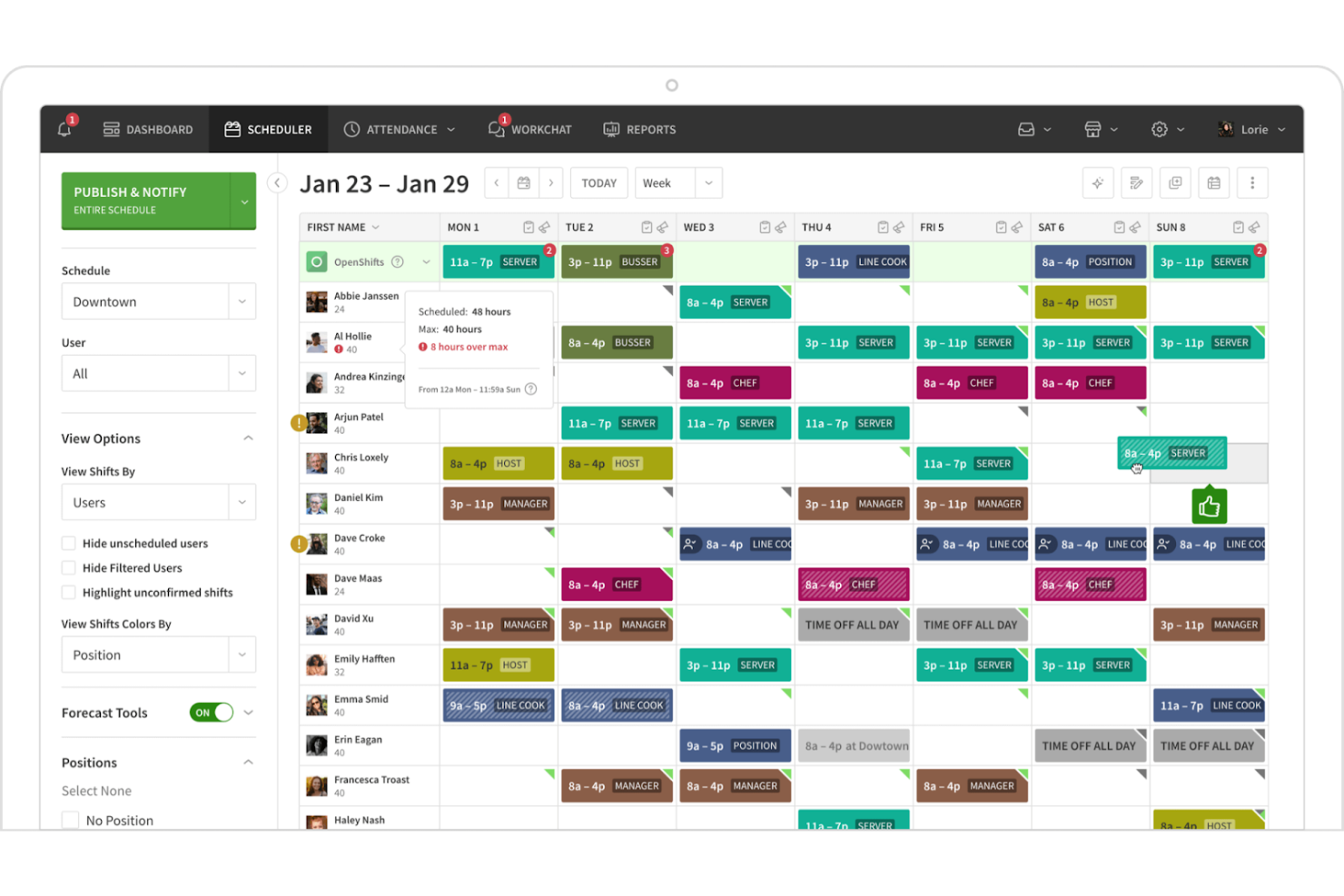
When I Work is a scheduling and time tracking software aimed at small- to medium-sized businesses. It helps managers create schedules, track time, and communicate with their teams efficiently.
Why I picked When I Work: When I Work simplifies scheduling with its intuitive drag-and-drop interface, making it easy for your team to manage shifts. Automated notifications keep everyone informed of schedule changes. The app also provides a time clock feature for employees to clock in and out directly from their mobile devices. These features make scheduling straightforward and help maintain clear communication.
Standout Features and Integrations:
Features include shift swapping capabilities, allowing your team to manage their schedules flexibly. The app's messaging feature facilitates easy communication between team members. When I Work also offers reporting tools to analyze labor costs and optimize workforce management.
Integrations include QuickBooks, ADP Workforce Now, Gusto, Square, Paychex, Zapier, and more.
Pros and Cons
Pros:
- Automated notifications
- Intuitive scheduling interface
- Easy shift swapping
Cons:
- Custom field configurability limitations
- Limited advanced features

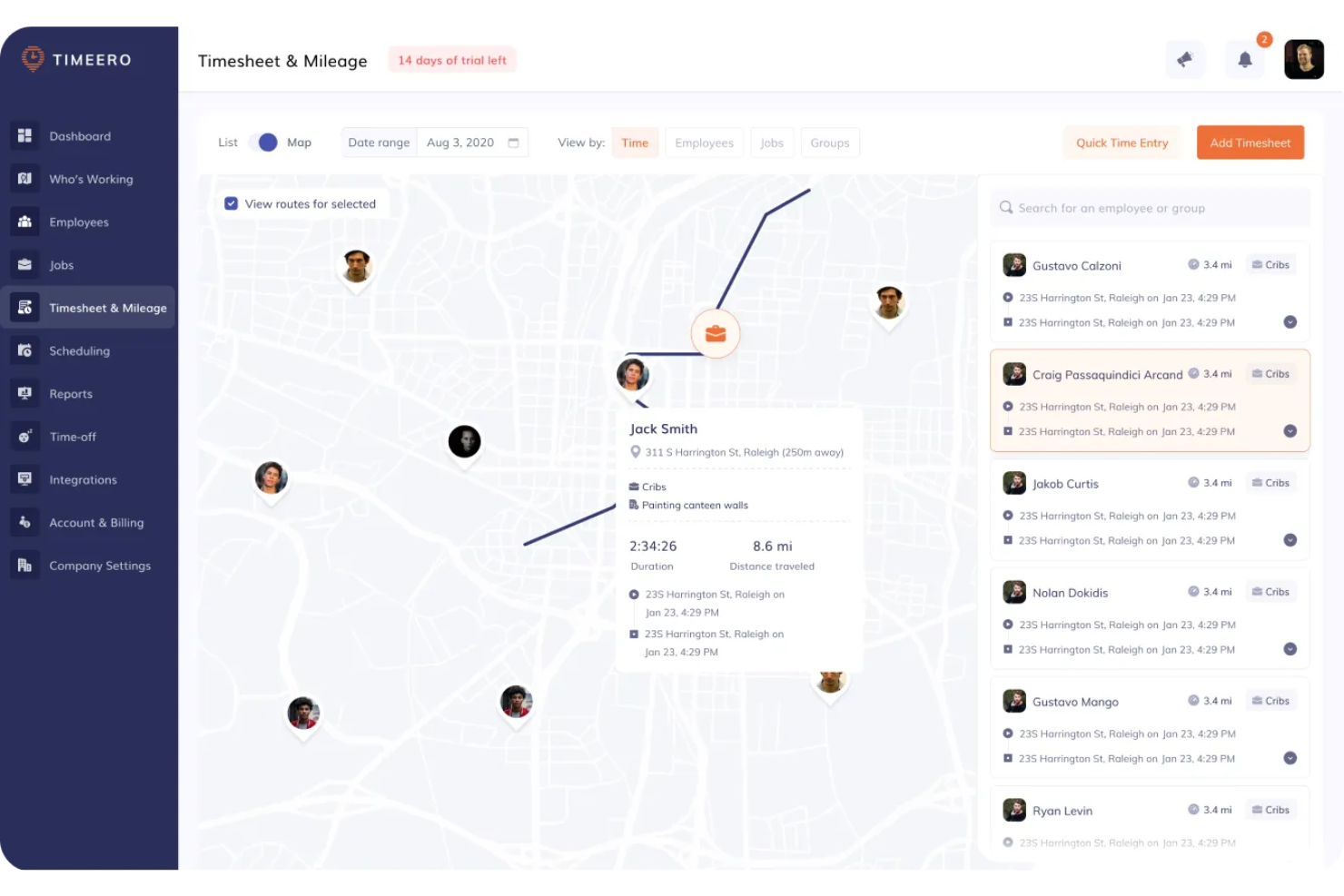
Timeero is a time tracking software tailored for mobile teams, focusing on accurate GPS tracking and time management. It helps businesses monitor employee locations and manage work hours efficiently.
Why I picked Timeero: Timeero offers real-time GPS tracking, ensuring your team is where they need to be. The software's geofencing capabilities alert you when employees enter or leave designated areas. Its mileage tracking feature helps manage expenses by recording travel distances automatically. These functionalities make Timeero a reliable choice for businesses that require precise location tracking.
Standout Features and Integrations:
Features include an offline mode that allows your team to log time without internet access, ensuring consistent tracking. The software offers customizable reports to analyze workforce data and make informed decisions. Timeero also provides a user-friendly interface that simplifies navigation and operation.
Integrations include QuickBooks, Xero, ADP, Gusto, Paychex, Paylocity, Zapier, Rippling, and more.
Pros and Cons
Pros:
- Offline time logging
- Automatic mileage tracking
- Geofencing alerts
Cons:
- Requires consistent internet for full features
- Mobile app glitches sometimes

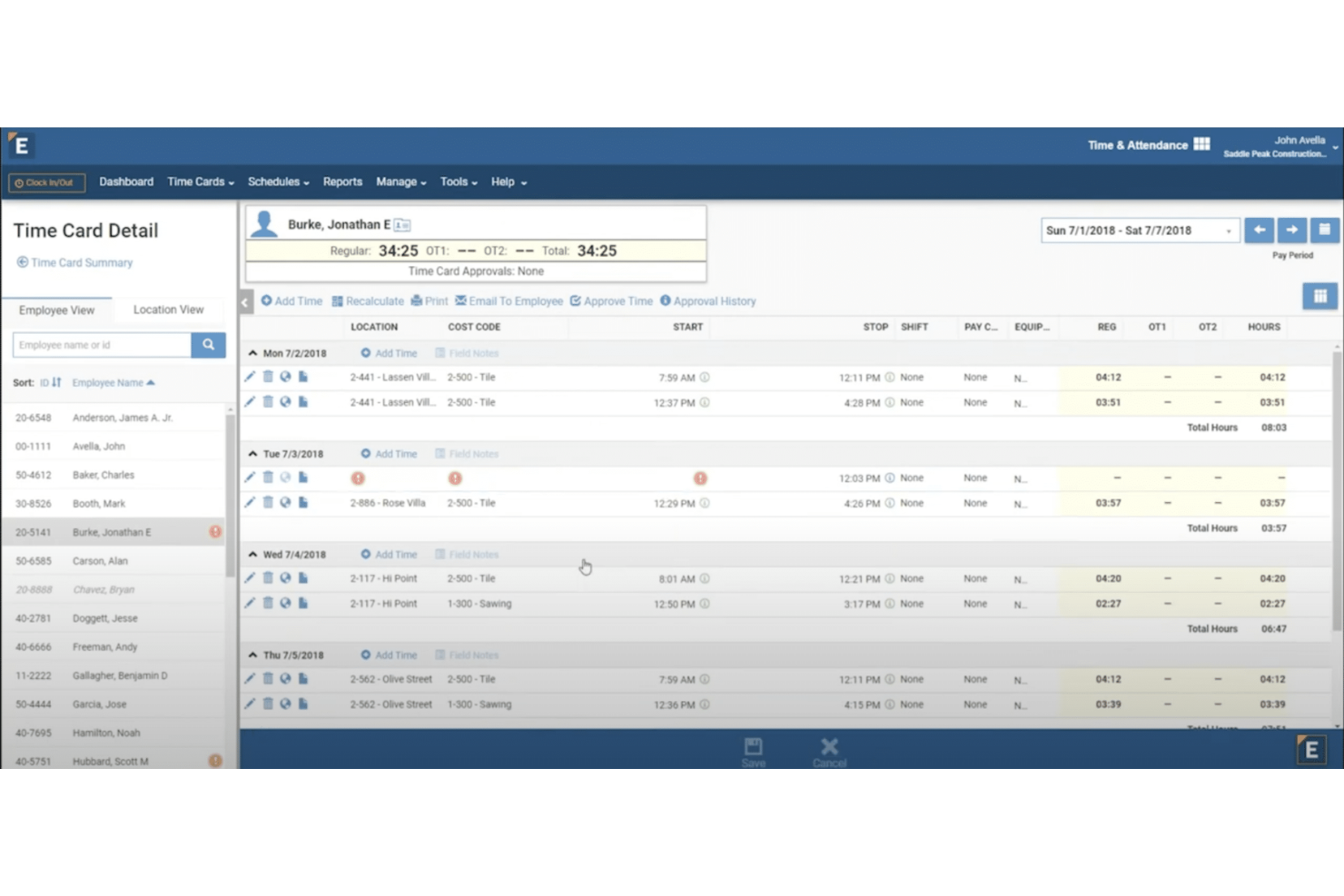
ExakTime is a time tracking software tailored for the construction and field service industries. It helps managers accurately track employee hours and manage payroll.
Why I picked ExakTime: ExakTime offers mobile time tracking, which allows your team to clock in and out from anywhere. GPS tracking verifies your crew's location, which is important for remote job sites. The software's digital time cards eliminate paperwork, simplifying payroll processing for human resources. ExakTime's focus on mobile time tracking makes it a practical tool for managing a dispersed workforce.
Standout Features and Integrations:
Features include geofencing to ensure employees clock in at the right location, photo ID capture for added security, and field notes to record job site information. These features help you maintain accurate records and improve security. ExakTime also offers reporting tools to analyze workforce data.
Integrations include QuickBooks, Sage 100 Contractor, ADP, Procore, Viewpoint, Foundation, Acumatica, Construction Payroll, and more.
Pros and Cons
Pros:
- Effective geofencing capabilities
- GPS location verification
- Accurate mobile time tracking
Cons:
- Occasional technical glitches can disrupt field workflows
- Interface can present a steep learning curve
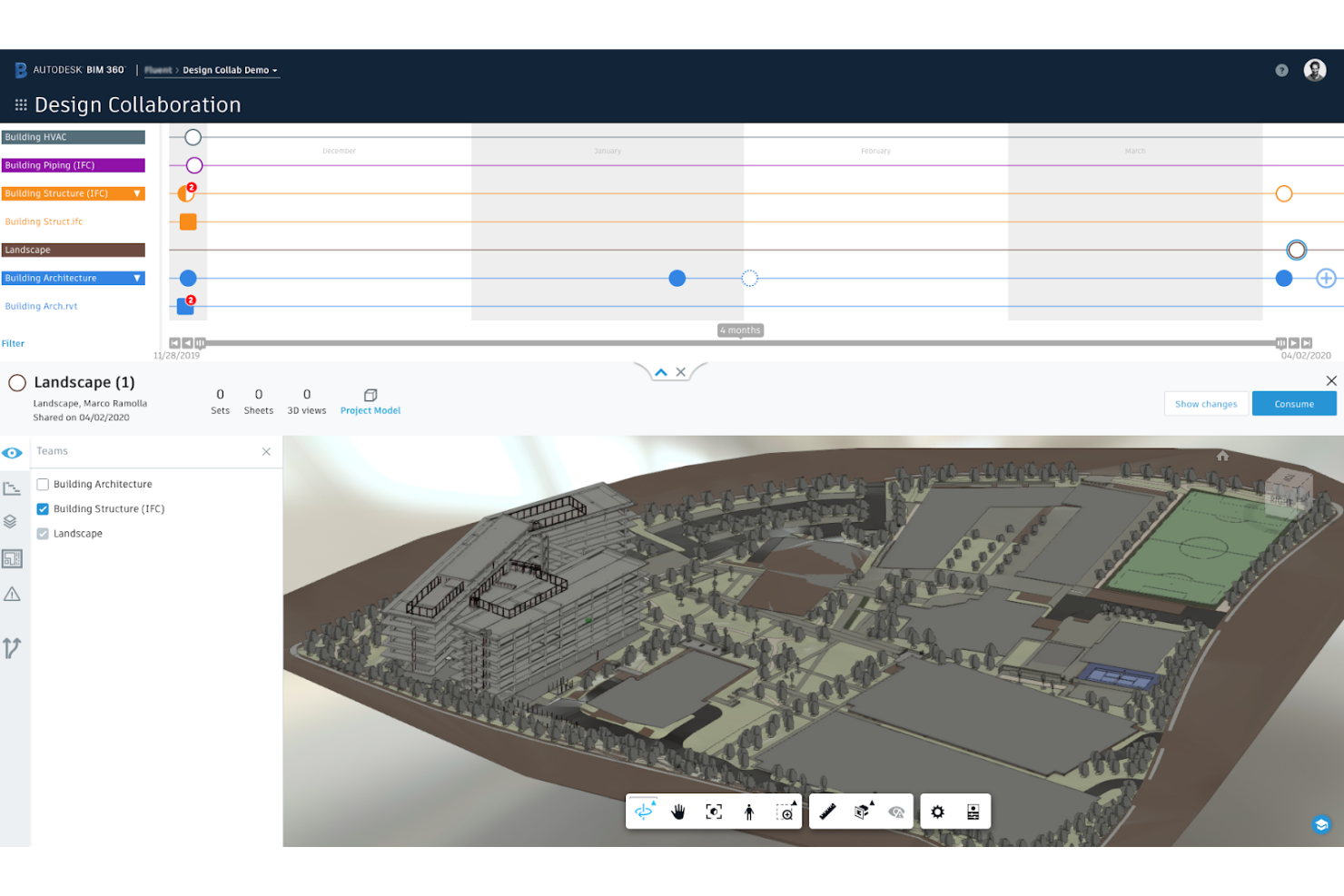
Autodesk Construction Cloud is a construction management software designed for architects, engineers, and project managers. It facilitates design collaboration and project coordination, helping teams manage workflows and improve communication.
Why I picked Autodesk Construction Cloud: Autodesk Construction Cloud excels in design collaboration, offering tools that connect your team across different disciplines. Its cloud-based platform allows for real-time collaboration, ensuring everyone has access to the latest project data. The software's document management system keeps all files organized and accessible. This focus on design collaboration makes it a great choice for complex projects that require close coordination.
Standout Features and Integrations:
Features include clash detection to identify design conflicts early, a centralized dashboard for project tracking, and risk management tools to anticipate and mitigate potential issues. These features help you maintain project quality and reduce errors. Autodesk Construction Cloud also provides mobile access, enabling you to stay connected on the go.
Integrations include Revit, AutoCAD, Box, Egnyte, and more.
Pros and Cons
Pros:
- Effective clash detection
- Complete document management
- Strong design collaboration tools
Cons:
- Higher cost for small teams
- Steeper learning curve for non-technical users

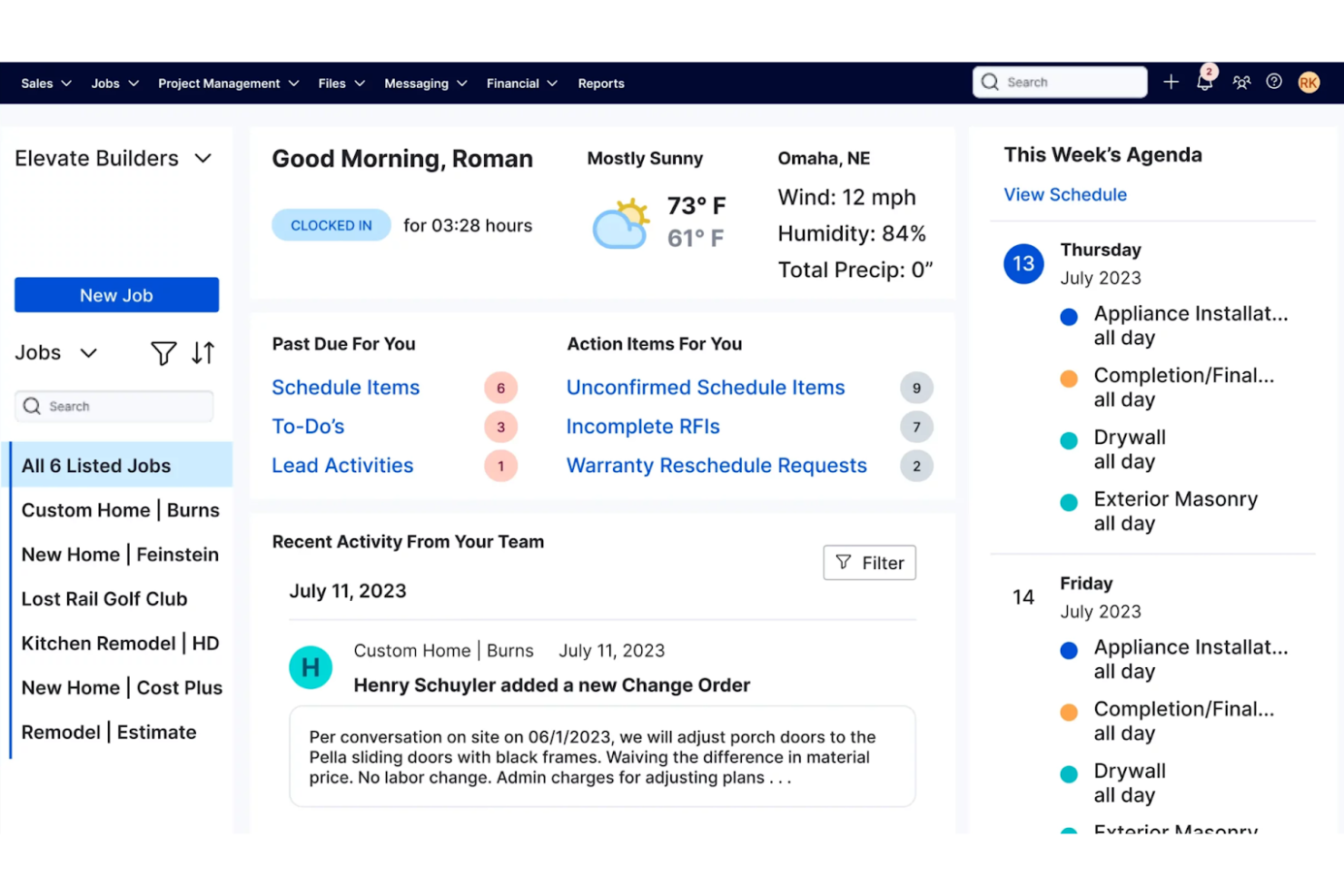
Buildertrend is a construction management software designed for contractors and home builders. It helps manage projects, optimize communication, and track job progress.
Why I picked Buildertrend: Buildertrend offers a full-spectrum suite of tools for managing construction projects efficiently. Its scheduling feature keeps your team on track, reducing delays and miscommunications. The daily logs allow you to document progress and issues in real time. These features make Buildertrend a suitable choice for managing complex construction operations.
Standout Features and Integrations:
Features include client communication tools that facilitate transparency and updates, a document management system to keep all your files organized, and budgeting tools to track expenses accurately. These features help you manage projects smoothly and maintain financial control. Buildertrend also offers a mobile app for on-the-go access to project information.
Integrations include QuickBooks, Xero, Gusto, Pro Xtra, Salesforce, HubSpot, Pipedrive, and more.
Pros and Cons
Pros:
- Strong client communication
- Effective scheduling tools
- Extensive project management
Cons:
- Mobile app can be slow to load
- No built-in bid tracking
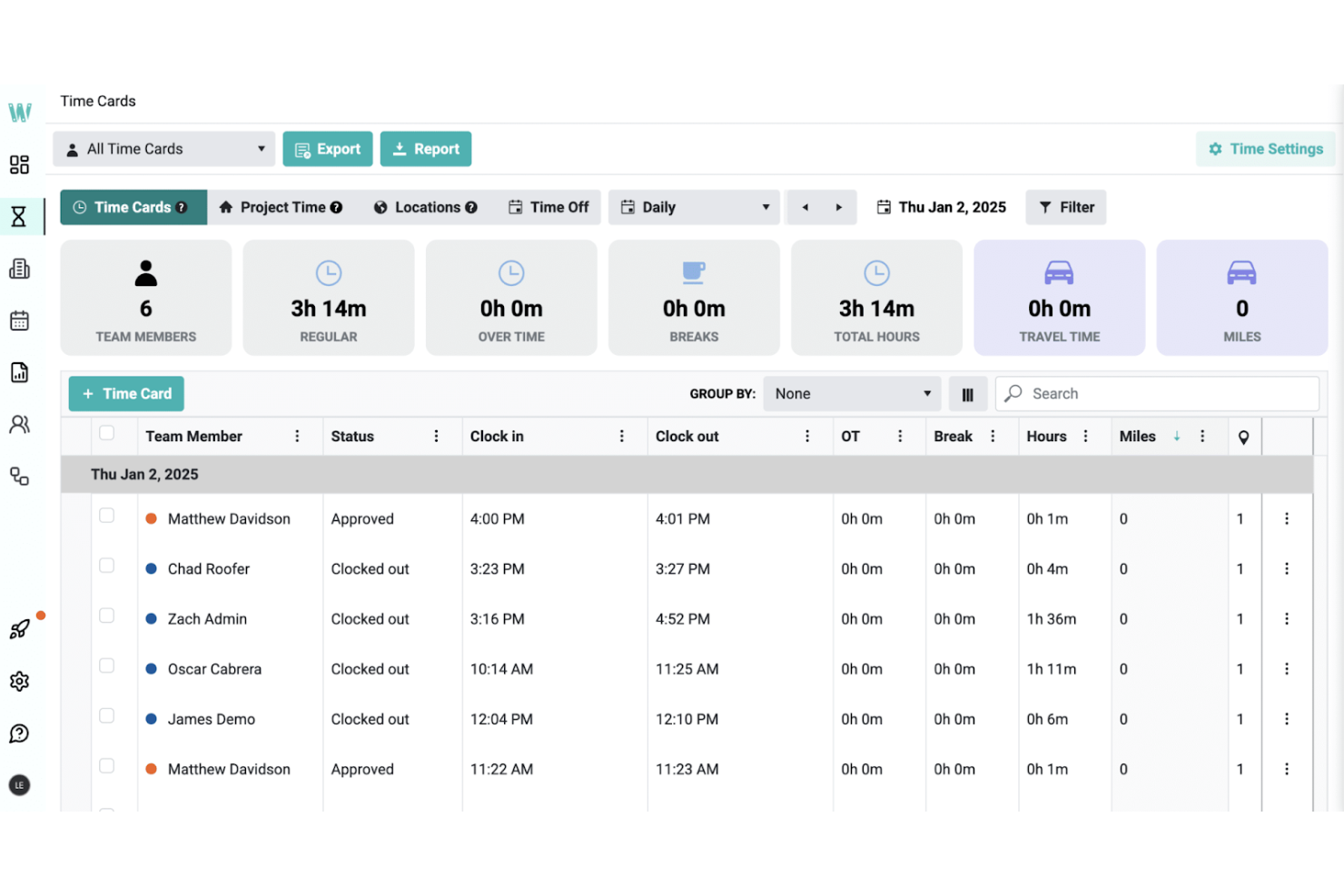
Workyard is a construction workforce management software tailored for contractors and project managers. It focuses on time tracking, job management, and expense management to improve operational efficiency.
Why I picked Workyard: Workyard provides GPS-verified time tracking for precise time entries, which is necessary for accurate payroll processing. Automated clock-in/out features minimize manual errors, while compliance tools help keep your team aligned with labor laws. Real-time project tracking offers insights into job progress, helping you manage resources properly. Workyard's focus on accuracy in time tracking makes it a reliable choice for your team.
Standout Features and Integrations:
Features include a digital team calendar for assigning work, real-time location tracking for monitoring team movements, and tools for adding notes and checklists to tasks. These features help you manage your team efficiently and reduce administrative burdens. Workyard also provides a digital tool called Smart Forms to replace paper workflows, saving you time and effort.
Integrations include QuickBooks, ADP Run, Gusto, Microsoft Excel, Sage, Paychex, Paylocity, and more.
Pros and Cons
Pros:
- Compliance with labor laws
- Easy integration with payroll
- Automated clock-in/out
Cons:
- Initial setup can be time-consuming
- Limited customization options
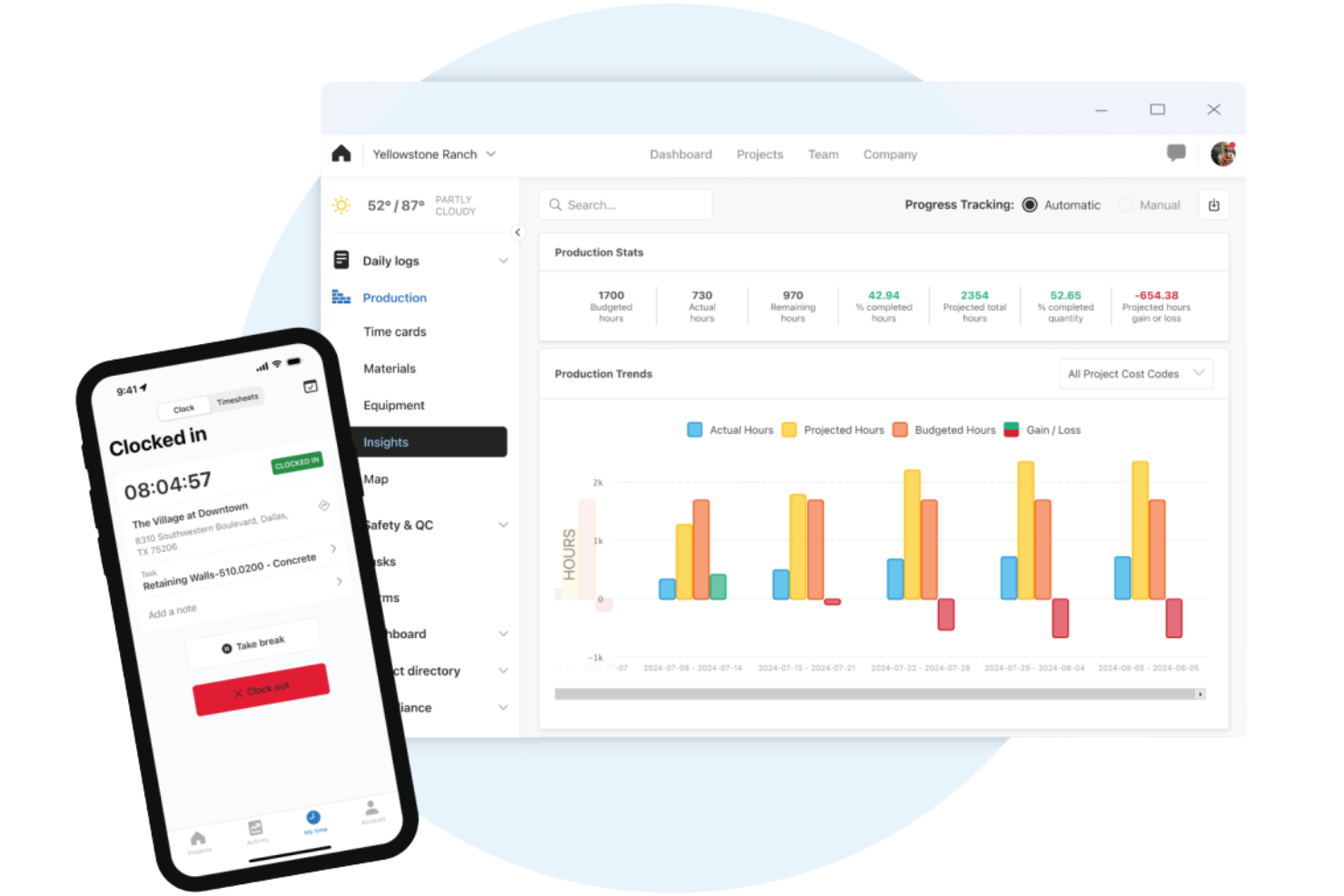
Raken is a construction management software designed for field and project managers. It specializes in daily reporting, time tracking, and photo documentation to support project oversight.
Why I picked Raken: Raken's daily reporting feature allows your team to quickly log activities and progress. Simplified time tracking through timesheets keeps payroll management accurate. Photo documentation captures site conditions, providing visual records of project stages. These features make Raken a strong choice for maintaining detailed and organized project records.
Standout Features and Integrations:
Features include real-time project insights to update you on progress, safety management tools to ensure compliance, and customizable report templates. These features help you stay organized and maintain safety standards. Raken also offers offline access, allowing you to work without an internet connection.
Integrations include Procore, Autodesk Construction Cloud, Box, TrueLook, OneDrive, Google Drive, Dropbox, Sage 300, QuickBooks, and more.
Pros and Cons
Pros:
- Extensive photo documentation
- Accurate field documentation
- Efficient daily reporting
Cons:
- Not ideal for small projects
- Mobile app is less reliable than the web version
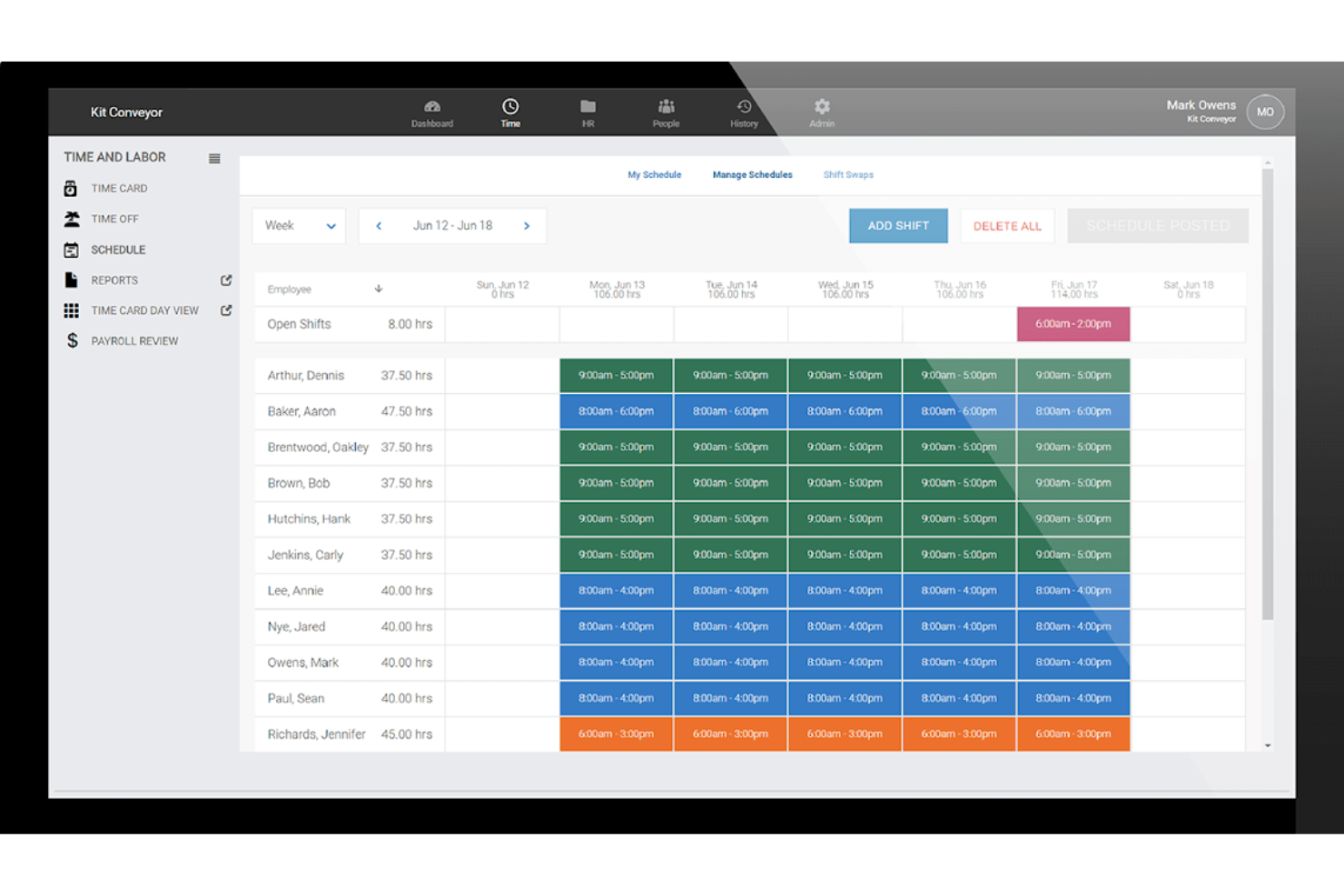
WorkforceHub is a workforce management software designed for small businesses. It helps simplify HR tasks, manage employee schedules, and track time and attendance.
Why I picked WorkforceHub: WorkforceHub offers a user-friendly interface that simplifies HR management for small teams. It includes features such as automated scheduling, which saves time and reduces errors. The software also provides compliance tools to help you meet labor regulations. These functionalities make it a great fit for small businesses looking to boost their HR operations.
Standout Features and Integrations:
Features include an intuitive dashboard to manage employee data, time-off tracking to handle leave requests, and reporting tools to gain insights into workforce trends. These features help you optimize your HR processes and make informed decisions. WorkforceHub also offers employee self-service portals for quick access to personal information.
Integrations include QuickBooks, Gusto, Indeed, Tapcheck, BambooHR, and more.
Pros and Cons
Pros:
- Employee self-service portals
- Automated labor code tracking
- Simple HR management
Cons:
- Not ideal for large enterprises
- Lacks equipment tracking

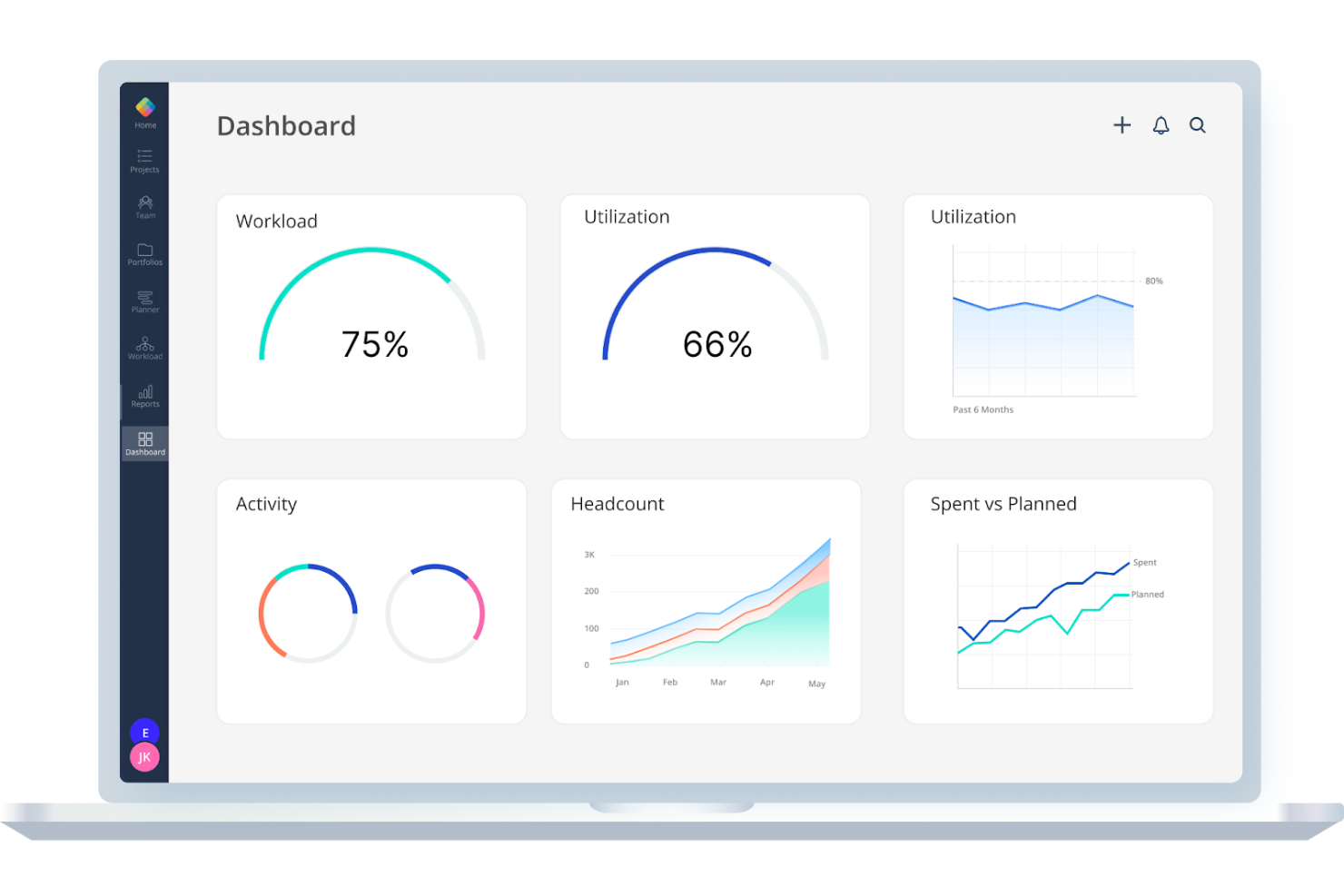
Mosaic is a project management software aimed at construction teams looking to improve their project visualization and resource planning. It helps managers allocate resources effectively and track project progress with ease.
Why I picked Mosaic: Mosaic offers a visual dashboard that gives your team a clear view of project timelines and resource allocation. Its intuitive interface allows for easy drag-and-drop scheduling, simplifying planning. The software's forecasting capabilities help you predict resource needs, ensuring projects stay on track. Mosaic's emphasis on visual project management makes it ideal for teams looking to improve oversight.
Standout Features and Integrations:
Features include automated resource allocation to optimize team usage, project timeline views that provide a clear understanding of progress, and budgeting tools to manage costs efficiently. These features help you plan and execute projects more effectively. Mosaic also offers detailed reporting to keep stakeholders informed.
Integrations include Asana, Jira, Google Calendar, Outlook, Moneybird, and more.
Pros and Cons
Pros:
- Accurate resource forecasting
- Easy drag-and-drop scheduling
- Visual project dashboards
Cons:
- Feature rollout can feel slow
- Complex projects can be harder to navigate
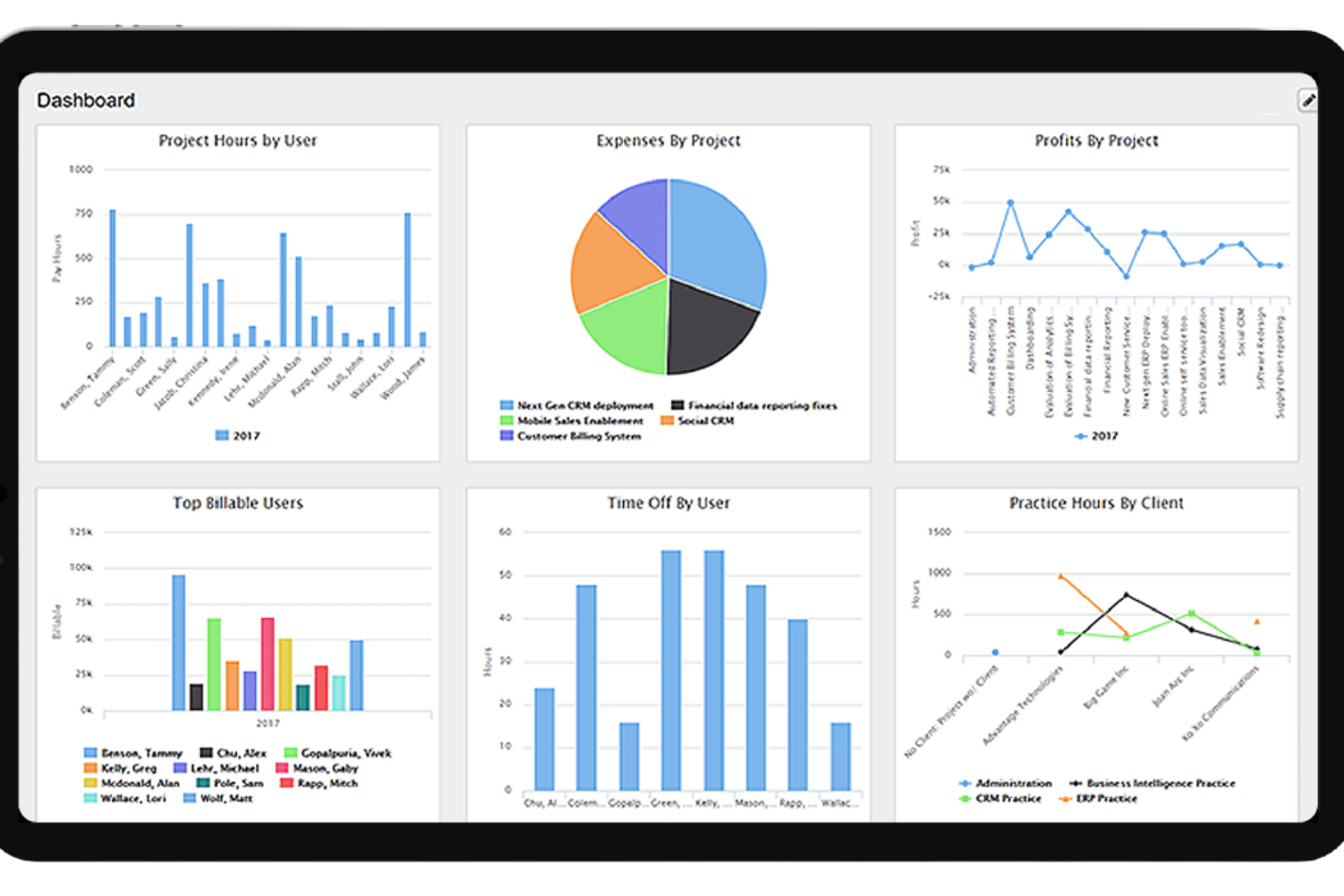
Replicon is a time and attendance tracking software designed for businesses of all sizes. It focuses on ensuring compliance with labor laws and improving payroll accuracy.
Why I picked Replicon: Replicon offers a range of tools for compliance tracking, which help your team adhere to labor regulations. Its real-time data reporting features ensure you have up-to-date information for audits. The software's time off management system simplifies tracking employee leave and absences. These capabilities make Replicon a reliable choice for maintaining compliance and accurate payroll.
Standout Features and Integrations:
Features include project time tracking to allocate hours accurately, a mobile app for on-the-go access, and customizable dashboards to view key metrics. These features help you manage your workforce efficiently and make informed decisions. Replicon also provides advanced analytics to understand workforce trends.
Integrations include QuickBooks, Jira, SAP, Xero, BambooHR, and more.
Pros and Cons
Pros:
- Effective time off management
- Real-time reporting
- Complete global compliance library
Cons:
- Complex compliance rules require admin time
- No built-in tool for materials tracking
Other Construction Workforce Management Software
Here are some additional construction workforce management software options that didn’t make it onto my shortlist, but are still worth checking out:
- Bridgit
For resource planning
- RIVET
For team communication
- Contractor Foreman
For budget management
- JobTread
For job costing


Construction Workforce Management Software Selection Criteria
When selecting the best construction workforce management software to include in this list, I considered common buyer needs and pain points like project scheduling accuracy and compliance with safety regulations. I also used the following framework to keep my evaluation structured and fair:
Core Functionality (25% of total score)
To be considered for inclusion in this list, each solution had to fulfill these common use cases:
- Track employee time and attendance
- Manage project schedules
- Monitor job site progress
- Facilitate team communication
- Ensure compliance with safety regulations
Additional Standout Features (25% of total score)
To help further narrow down the competition, I also looked for unique features, such as:
- Advanced GPS tracking
- Customizable reporting tools
- Integration with accounting software
- Real-time project updates
- Automated compliance alerts
Usability (10% of total score)
To get a sense of the usability of each system, I considered the following:
- Intuitive interface design
- Ease of navigation
- Minimal learning curve
- Availability of mobile access
- Customization options
Onboarding (10% of total score)
To evaluate the onboarding experience for each platform, I considered the following:
- Availability of training videos
- Interactive product tours
- Access to templates and guides
- Supportive chatbots and webinars
- Ease of data migration
Customer Support (10% of total score)
To assess each software provider's customer support services, I considered the following:
- 24/7 support availability
- Multiple contact options
- Responsive service
- Access to a knowledge base
- Personalized support services
Value for Money (10% of total score)
To evaluate the value for money of each platform, I considered the following:
- Competitive pricing
- Flexible subscription plans
- Features included in the base price
- Discounts for annual billing
- Return on investment potential
Customer Reviews (10% of total score)
To get a sense of overall customer satisfaction, I considered the following when reading customer reviews:
- Overall satisfaction rating
- Feedback on ease of use
- Comments on customer support
- User-reported issues
- Testimonials on feature effectiveness
How To Choose Construction Workforce Management Software
It's easy to get bogged down in long feature lists and complex pricing structures. To help you stay focused as you work through your unique software selection process, here's a checklist of factors to keep in mind:
| Factor | What To Consider |
|---|---|
| Scalability | Can the software grow with your team? Check if it supports more users and projects as your business expands. Look for flexible plans that accommodate growth. |
| Integrations | Does it work with your current tools? Ensure it connects with accounting, project management, and HR systems to optimize workflows and avoid data silos. |
| Customizability | Can you tailor it to fit your needs? Look for options to customize fields, dashboards, and reports to match your specific workflows and business processes. |
| Ease of use | Is it user-friendly for everyone? Consider the learning curve for new users. A simple interface can reduce training time and improve adoption across your team. |
| Implementation and onboarding | How quickly can you get started? Evaluate the support and resources offered during setup. Look for training materials and dedicated onboarding assistance. |
| Cost | Does it fit your budget? Compare pricing plans, including hidden fees. Assess the value you get for the price and consider long-term ROI. |
| Security safeguards | Are your data and operations secure? Check for encryption, access controls, and compliance with industry standards to protect sensitive information. |
| Support availability | Will you get help when you need it? Look for 24/7 support options, response times, and access to a knowledge base or community forums for troubleshooting. |
What Is Construction Workforce Management Software?
Construction workforce management software is a tool designed to support labor management by helping manage and organize construction teams and projects. It's typically used by project managers, site supervisors, and HR professionals to track labor hours, schedules, and compliance. Features like time tracking, scheduling, and compliance support efficient project management and ensure smooth operations. Overall, these tools help increase productivity and profitability and reduce administrative burdens for construction teams.
Features
When selecting construction workforce management software, it's important to focus on features that support effective labor management and day-to-day operations on-site. Keep an eye out for the following key features:
- Time tracking: Accurately records employee hours, helping manage payroll and monitor productivity.
- Scheduling: Allows managers to create and adjust work schedules, ensuring optimal workforce allocation.
- GPS tracking: Provides real-time location data to verify employee presence on job sites.
- Compliance management: Ensures adherence to labor laws and safety regulations, reducing legal risks.
- Mobile access: Enables workers to access schedules and clock in/out from their mobile devices for convenience.
- Project management: Offers tools to plan, execute, and track project progress, improving oversight.
- Reporting tools: Generate detailed reports for insights into workforce performance and project costs.
- Geofencing: Sets virtual boundaries to ensure employees clock in/out at the correct locations.
- Document management: Organizes project documents and files, making them more accessible for team members.
Benefits
Implementing construction workforce management software provides several benefits for your team and your construction business. Here are a few you can look forward to:
- Increased productivity: Efficient scheduling and time tracking help optimize workforce allocation and reduce downtime.
- Cost savings: Accurate time tracking and reporting tools provide actionable insights to help manage labor costs and identify areas for savings.
- Improved compliance: Built-in compliance management features help ensure adherence to safety regulations and labor laws for both in-house staffing and subcontractors, reducing legal risks.
- Better communication: Mobile access and communication tools keep your team connected and informed, minimizing miscommunications.
- More project oversight: Project management features provide real-time insights into project progress, helping you make informed decisions.
- Simplified document management: Organizing documents and files in one place makes them accessible and reduces administrative burdens.
Costs and Pricing
Selecting construction workforce management software requires an understanding of how the industry bills for field labor versus office staff. Most providers use a SaaS model, but the structure varies:
- Per-user/per-employee: You pay a monthly fee for every person tracked. This is common for time-tracking apps like Workyard or Timeero.
- Base fee + per-user: Many platforms charge a flat monthly "platform fee" plus a smaller fee per head.
- Project-based: Larger enterprise tools may charge based on your annual construction volume (ACV) rather than individual seats.
Plan Comparison Table for Construction Workforce Management Software
| Plan Tier | Typical Price Range | Common Features |
|---|---|---|
| Entry-Level | $2 - $8/user/month | Mobile clock-in/out, GPS timestamps, and basic scheduling. |
| Mid-Tier | $10 - $25/user/month | Geofencing, job costing, daily logs, and payroll integrations. |
| Enterprise | $50+/user/month (or custom) | Resource forecasting, BIM integration, custom API access, and dedicated support. |
Construction Workforce Management Software FAQs
Here are some answers to common questions about construction workforce management software:
What is the typical implementation time for construction workforce management software?
Implementation time varies, but it typically ranges from a few weeks to a couple of months. It depends on factors like the complexity of your existing systems, the size of your team, and the level of customization needed. To speed up the process, ensure you have a dedicated project manager and clear communication with the software provider. Having a clear plan and timeline can help you manage expectations and ensure a smooth rollout.
How do I ensure data security with construction workforce management software?
Most software providers prioritize security, but it’s essential to verify. Look for features like encryption, two-factor authentication, and regular security updates. Ask the vendor about their compliance with industry standards and any certifications they hold. Ensuring your team follows best practices, like strong password policies, also helps protect your data.
Can construction workforce management software integrate with other tools?
Yes, many solutions offer integrations with popular tools such as accounting software and project management platforms. Check if the software you’re considering supports the specific tools your team uses. Integrations can improve your workflow by reducing manual data entry and ensuring information flows between systems without error.
Is mobile access important for construction workforce management software?
Yes, mobile access is important because it allows field workers to clock in, view assignments, and communicate from job sites. This supports real-time updates and helps keep your entire team connected, regardless of location.
What's Next:
If you're in the process of researching construction workforce management software, connect with a SoftwareSelect advisor for free recommendations.
You fill out a form and have a quick chat where they get into the specifics of your needs. Then you'll get a shortlist of software to review. They'll even support you through the entire buying process, including price negotiations.