
10 Best Open-Source Employee Monitoring Software in 2026

Open-Source Employee Monitoring Software Shortlist
Here's my pick of the 10 best software from the 10 tools reviewed.


Open-source employee monitoring software gives your team access to tools for tracking work hours, activities, and productivity, all with source code you can review and adapt. Finding open-source solutions for employee monitoring and productivity is a difficult search. Most enterprise-grade monitoring tools are proprietary because they require high-security maintenance and constant updates to bypass OS privacy restrictions.
However, this list will help you compare leading open-source solutions, understand their unique features, and choose the right fit for your organization’s needs.
Why Trust Our Software Reviews
Best Open Source Employee Monitoring Software Summary
This comparison chart summarizes pricing details for my top open source employee monitoring software selections to help you find the best one for your budget and business needs.
| Tool | Best For | Trial Info | Price | ||
|---|---|---|---|---|---|
| 1 | Best for cross-platform activity tracking | Free to use | Forever free | Website | |
| 2 | EmpMonitor dashboard shows an employee activity report. | 15-day free trial | From $9/user/month (billed annually) | Website | |
| 3 | Best for multi-user time tracking setups | Free plan available | Pricing upon request | Website | |
| 4 | Best for tracking project-based work hours | 14-day free trial available | From $5.49/month (billed annually) | Website | |
| 5 | Best with code editor integration | Free trial + free plan available | From $9/user/month | Website | |
| 6 | Best for self-hosted data control | Free plan available | Pricing upon request | Website | |
| 7 | Best for real-time screen viewing | Not available | From €250/year | Website | |
| 8 | Best for remote team management | Free trial + free-forever plan available | From $99 (one-time payment) | Website | |
| 9 | Best for privacy-focused monitoring | Free trial + free plan available | From $1/employee/month | Website | |
| 10 | Best for unified payroll and HR | 30-day free trial | From $50/month | Website |
-

Checkr
Visit WebsiteThis is an aggregated rating for this tool including ratings from Crozdesk users and ratings from other sites.4.5 -
Kudoboard
Visit WebsiteThis is an aggregated rating for this tool including ratings from Crozdesk users and ratings from other sites.4.8 -
Native Teams
Visit WebsiteThis is an aggregated rating for this tool including ratings from Crozdesk users and ratings from other sites.4.9





Open-Source Employee Monitoring Software Reviews
Below are my detailed summaries of the open-source employee monitoring software that made it onto my shortlist. My reviews offer a detailed look at the features, best use cases, and integrations of each software to help you find the best one for you.

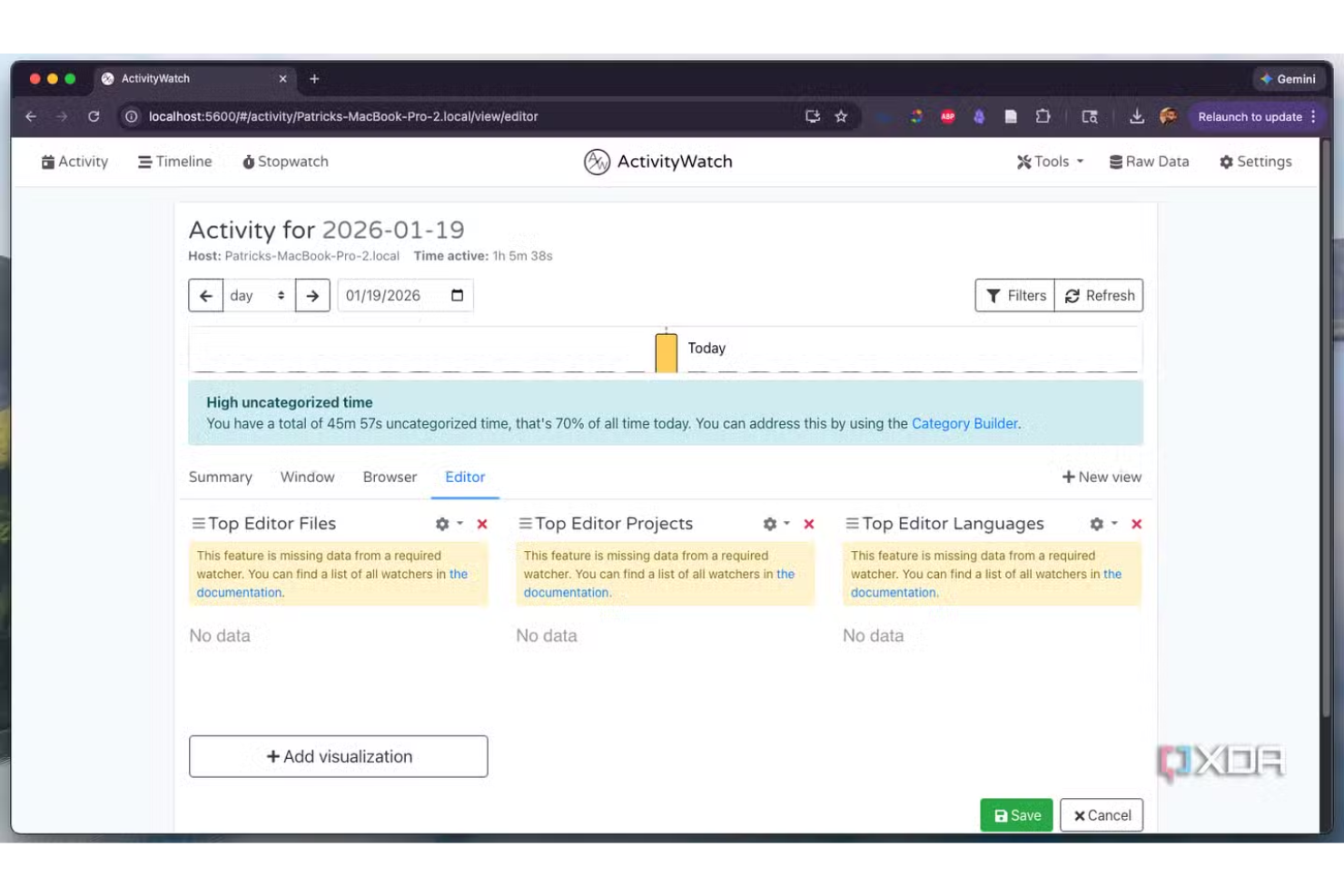
ActivityWatch is an open-source activity tracking tool built for teams and individuals who need detailed, cross-platform insights into computer usage. It appeals to organizations that want transparent, customizable monitoring without vendor lock-in or privacy trade-offs. If you’re looking for a solution that works across Windows, macOS, and Linux, ActivityWatch helps you track work habits and productivity with full data ownership.
Who Is ActivityWatch Best For?
ActivityWatch suits teams and individuals who need open-source, cross-platform activity tracking across Windows, macOS, and Linux environments.
Why I Picked ActivityWatch
I picked ActivityWatch because it’s one of the few open-source tools that truly delivers cross-platform activity tracking without compromise. The software runs natively on Windows, macOS, and Linux, so you can monitor mixed-device teams without juggling multiple solutions. I also appreciate that ActivityWatch gives users full control over their data, protecting against data leaks. For organizations that value transparency and flexibility in employee monitoring, these features make ActivityWatch a strong fit.
ActivityWatch Key Features
Some other features in ActivityWatch that stand out for open-source employee monitoring include:
- Modular watcher system: You can enable or disable specific modules to track different types of activity, such as app usage or web browsing.
- Timeline visualization: The dashboard displays a visual timeline of activities, making it easy to review work patterns and time allocation.
- Tagging and categorization: Users can tag and categorize activities for more granular reporting and analysis.
- Exportable data: Activity logs can be exported in multiple formats, supporting further analysis or compliance needs.
ActivityWatch Integrations
Integrations are not publicly available.
Pros and Cons
Pros:
- Modular watchers for flexible activity tracking
- Local data storage for privacy control
- Works on Windows, macOS, and Linux
Cons:
- Lacks a central dashboard for multiple users
- No built-in remote deployment tools

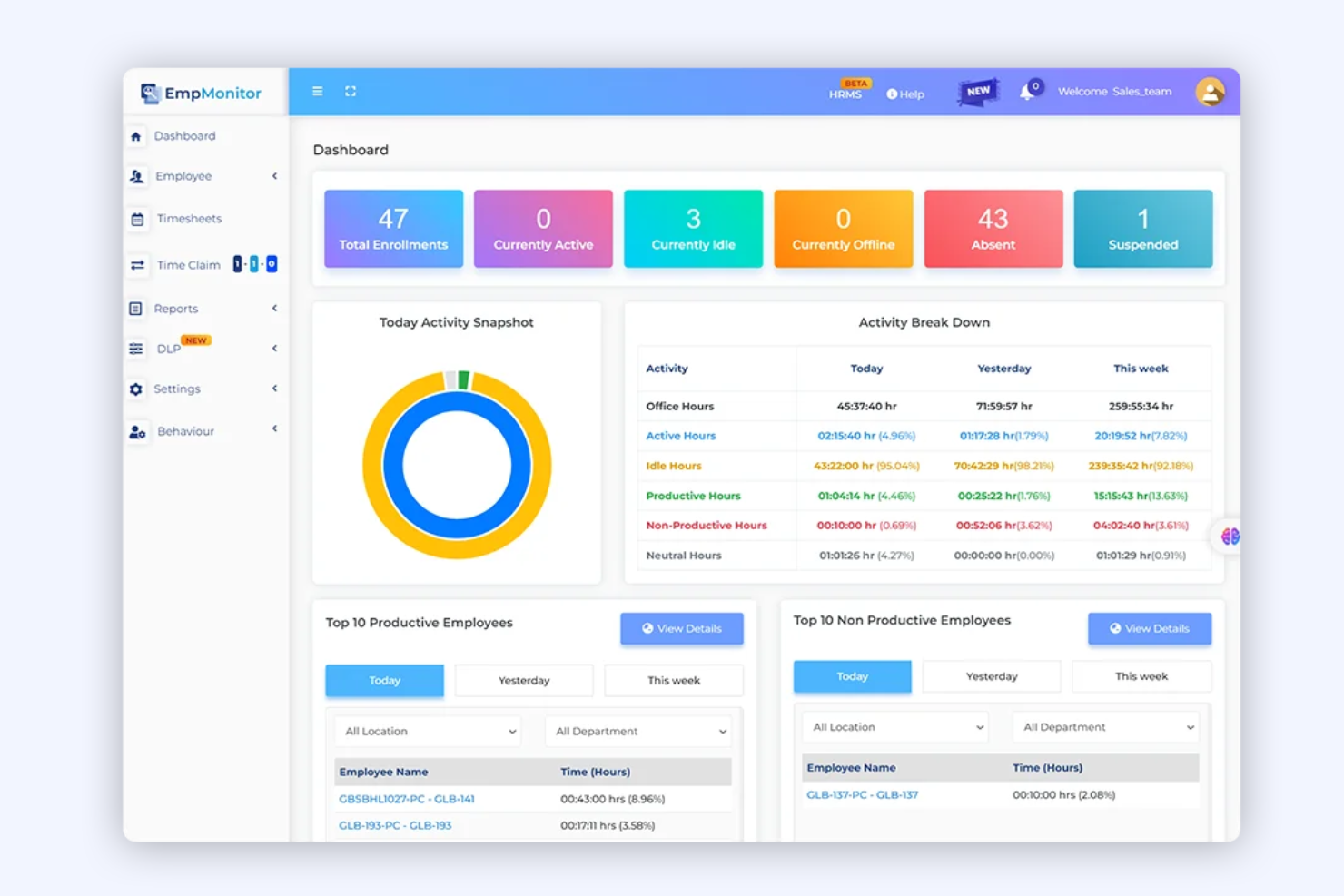
EmpMonitor is a monitoring platform designed for organizations that need detailed oversight of employee activity and behavior. It’s especially useful for IT, finance, and compliance-focused teams that want to track user actions, application usage, and data access. If you’re looking for a solution that helps you identify risky behavior and maintain visibility across distributed teams, EmpMonitor is worth considering.
Who Is EmpMonitor Best For?
EmpMonitor is a strong choice for IT and security teams in mid-sized to large organizations that need to monitor user activity for compliance and insider threat detection.
Why I Picked EmpMonitor
What drew me to EmpMonitor is its focus on insider threat detection, which is a growing concern for organizations handling sensitive data. The platform offers real-time user activity monitoring and detailed behavior analytics, making it easier to spot suspicious actions before they escalate. I also like that EmpMonitor provides automated alerts for policy violations and tracks file transfers, USB usage, and application activity. These features make it a strong fit for teams that need to proactively identify and respond to internal security risks.
EmpMonitor Key Features
Some other features in EmpMonitor that may interest you include:
- Keystroke logging: Captures and records all keystrokes made on monitored devices for detailed activity analysis.
- Screenshot capture: Takes periodic screenshots of user desktops to provide visual records of activity.
- Productivity analysis: Tracks time spent on applications and websites to help assess employee productivity patterns.
- Remote device management: Allows administrators to monitor and manage endpoints from a centralized dashboard, even for distributed teams.
EmpMonitor Integrations
Native integrations are not currently listed.
Pros and Cons
Pros:
- Detailed productivity and idle time reports
- Automated alerts for suspicious behavior
- Real-time monitoring of user activity logs
Cons:
- No native integrations with HR platforms
- Limited mobile monitoring features

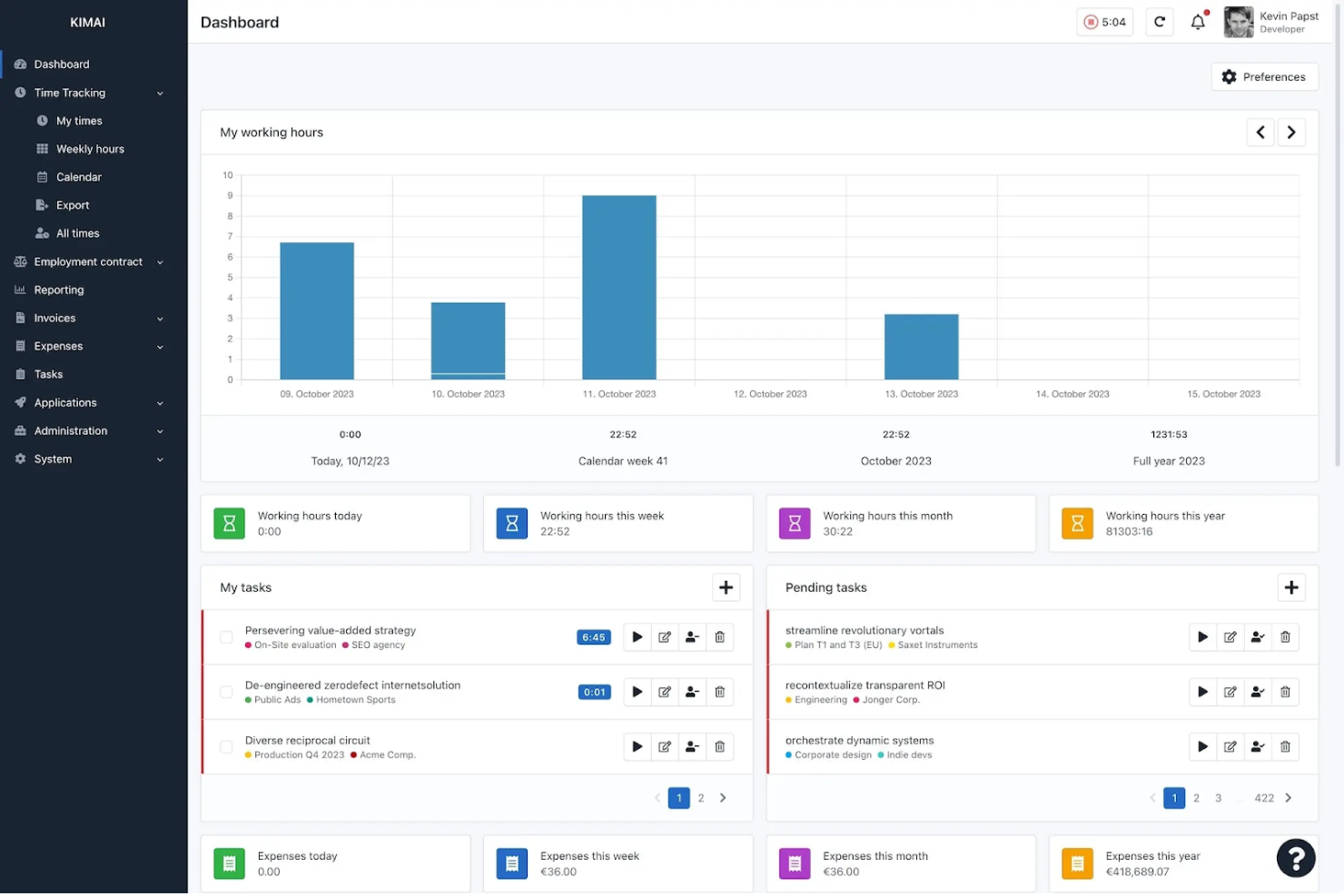
Kimai is an open-source time tracking software designed for teams that need to manage multiple users and projects. It’s a strong fit for consultancies, agencies, and organizations with complex time tracking needs across departments or clients. Kimai helps you centralize time data, making it easier to monitor productivity and allocate resources accurately.
Who Is Kimai Best For?
Kimai suits organizations and teams that need to track time for multiple users across various projects or clients.
Why I Picked Kimai
I picked Kimai because it’s built to handle multi-user time tracking setups, which is a common challenge for teams managing several projects or clients at once. The platform lets you assign users to different projects, track their hours individually, and generate detailed reports for each user or team. I also like that Kimai supports granular role-based permissions, so you can control who sees or edits time data. These tracking features make it a strong choice for organizations that need to monitor employee activity and project time in a flexible, open-source environment.
Kimai Key Features
Some other features in Kimai that are useful for open-source employee monitoring include:
- Timesheet exports: Export timesheet data in multiple formats for payroll or compliance needs.
- Absence tracking: Record and manage employee leave and absences within the platform.
- Tagging system: Add tags to time entries for easier filtering and reporting.
- API access: Connect Kimai to other systems or build custom integrations using its API.
Kimai Integrations
Kimai offers native integrations with CodeTimer Mobile, Kimai Mobile (Android), Kimai Mobile (iOS), Timai, CodeTimer Desktop, Eon Timer, and more.
Pros and Cons
Pros:
- Offers a plugin system for custom monitoring features
- Supports granular user permissions for audit trails
- Tracks time with detailed, exportable activity logs
Cons:
- No real-time user activity dashboards available
- Lacks built-in screenshot or keystroke capture
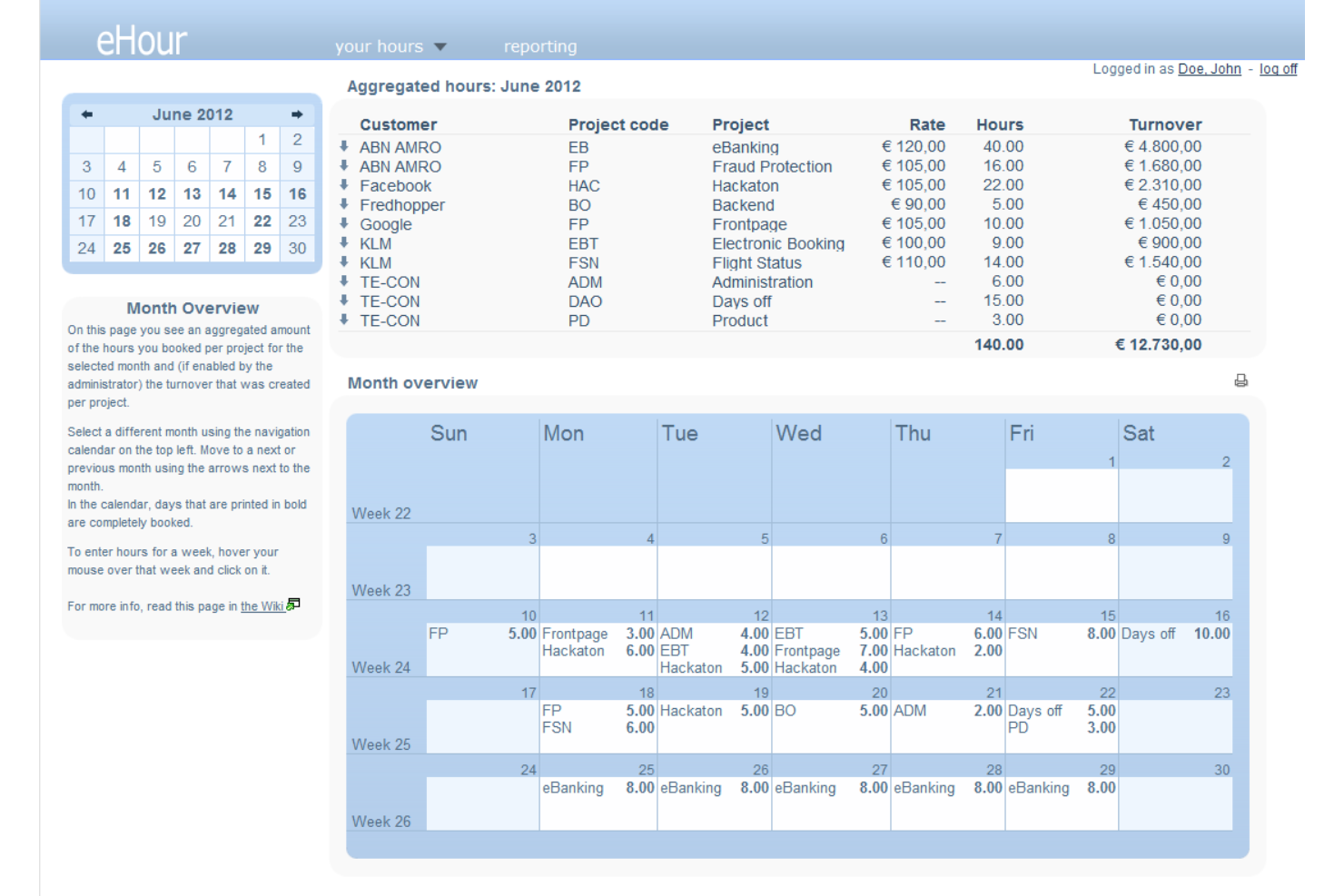
If your team manages multiple projects and needs precise work hour tracking, eHour offers a flexible, open-source solution. It’s designed for organizations that bill by project or need detailed reporting for client work. eHour helps you monitor project-based time allocation and supports transparent, accurate invoicing.
Who Is eHour Best For?
Project managers and consultancies that need to track billable hours across multiple client projects will find eHour especially useful.
Why I Picked eHour
I chose eHour because it’s purpose-built for tracking project-based work hours, which is a common need for teams managing multiple clients or deliverables. The tool lets you assign employees to specific projects and track their time with detailed granularity, making it easy to generate accurate reports for billing or internal analysis. I appreciate that eHour supports customizable project structures and roles, so you can adapt it to different workflows or client arrangements. Its open-source nature also means you can tailor the platform to fit unique project tracking requirements.
eHour Key Features
Some other features in eHour that stand out for employee monitoring include:
- Absence management: Track employee leave and absences alongside project hours for a complete view of availability.
- Overtime tracking: Monitor and record overtime hours to support compliance and compensation processes.
- Custom reporting: Build and export detailed reports based on projects, users, or time periods for audits or client transparency.
- User permissions: Set granular access controls for different roles, ensuring sensitive data is only visible to authorized users.
eHour Integrations
Integrations include Jortt, Jira, Power BI, and more.
Pros and Cons
Pros:
- Allows flexible approval workflows for timesheets
- Supports multiple users and projects
- Tracks time by project, client, and task
Cons:
- Lacks automated attendance or login monitoring
- No built-in user activity or idle tracking
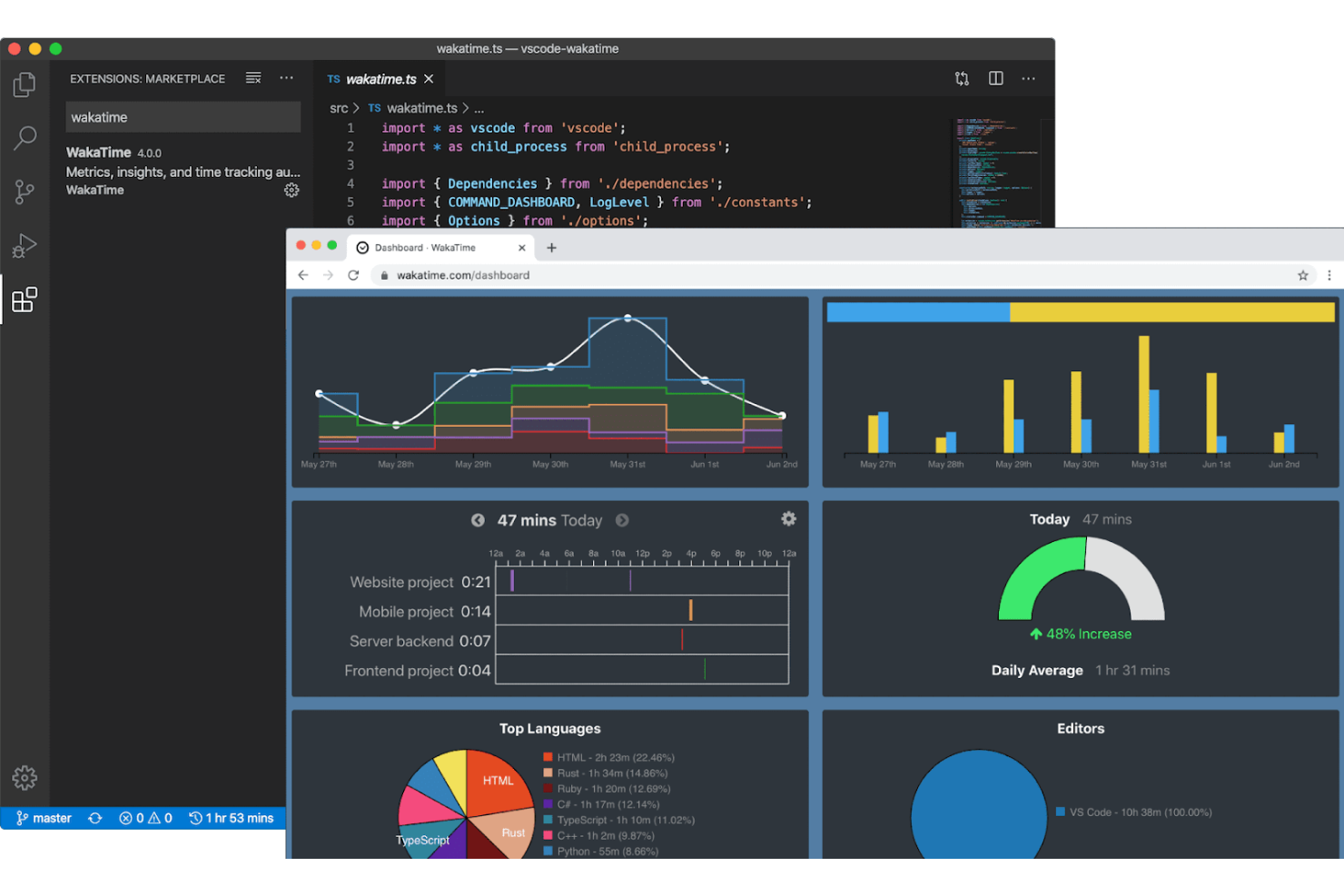
WakaTime offers open-source time tracking that integrates directly with popular code editors and IDEs. It’s a strong fit for engineering teams and technical leads who want to monitor coding activity without disrupting developer workflows. If you need detailed insights into programming time and project focus, WakaTime brings that visibility right into your development environment.
Who Is WakaTime Best For?
WakaTime suits software development teams and technical professionals who want automatic coding activity tracking within their preferred code editors.
Why I Picked WakaTime
I picked WakaTime because it’s one of the only open-source monitoring tools that integrates directly with code editors and IDEs, making it uniquely valuable for tracking developer productivity. WakaTime automatically logs coding time, file activity, and project focus without requiring manual input from users. This approach gives engineering managers and team leads a clear, real-time view of how coding hours are spent across projects. For organizations that want to monitor technical work without disrupting developer workflows, WakaTime’s plugin-based model stands out.
WakaTime Key Features
Some other features in WakaTime that support employee monitoring for technical teams include:
- Open-source client: Users can review, modify, or self-host the core time tracking client for added transparency and control.
- Detailed dashboard: View daily, weekly, and monthly coding stats broken down by project, language, and editor.
- Team activity summaries: Aggregate and compare coding activity across multiple users in a shared workspace.
- Plugin support for dozens of editors: Install plugins for Visual Studio Code, JetBrains IDEs, Sublime Text, Atom, and many other development environments.
WakaTime Integrations
Integrations include Visual Studio Code, JetBrains IDEs, Sublime Text, Atom, Vim, Emacs, Eclipse, NetBeans, Xcode, and more.
Pros and Cons
Pros:
- Minimal impact on developer workflow
- Supports dozens of popular code editors
- Tracks coding time automatically in editors
Cons:
- Lacks screenshot or screen recording features
- No monitoring for non-coding activities
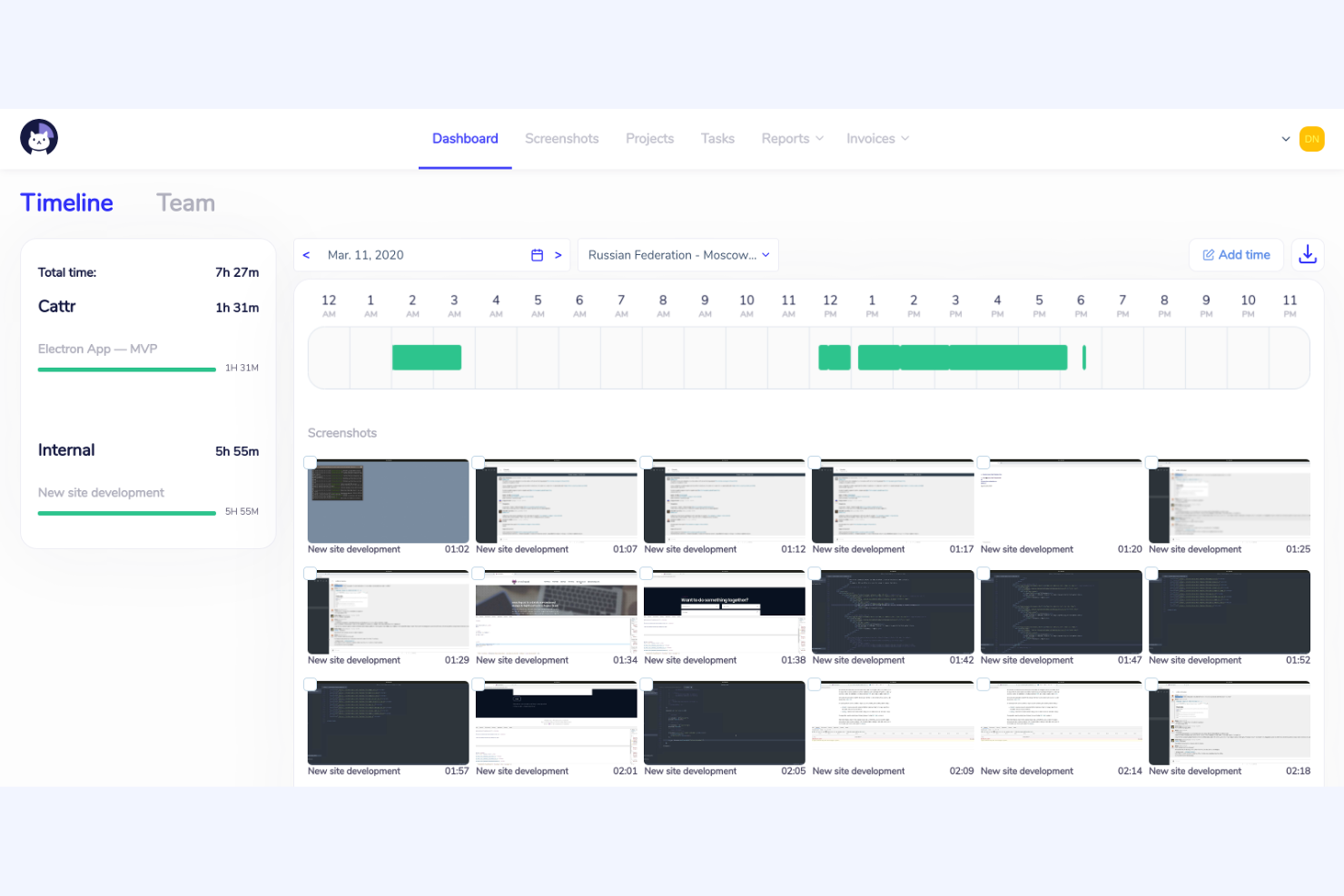
Cattr is an open-source employee monitoring platform designed for organizations that want full control over their data and deployment. It’s a strong fit for IT teams, agencies, and privacy-conscious businesses that need to track work hours and activity without relying on third-party cloud services. If you’re looking for a solution that you can host and customize to fit your own infrastructure, Cattr is worth considering.
Who Is Cattr Best For?
Cattr is a strong choice for IT teams and privacy-focused organizations that need a self-hosted, open-source employee monitoring solution.
Why I Picked Cattr
Cattr is built specifically for the on-premises/self-hosted community. While other tools offer cloud versions, Cattr’s primary identity is giving the user complete ownership of the monitoring data on their own hardware, ensuring privacy and compliance that proprietary cloud tools can't match
The open-source nature of Cattr also means you can audit the code and customize the tool to fit your organization’s unique needs. For teams that want to avoid third-party cloud storage and keep sensitive information in-house, Cattr offers a level of transparency and control that’s hard to match.
Cattr Key Features
Some other features in Cattr that may interest you include:
- Automated time tracking: Tracks work hours and activity automatically without manual input from users.
- Screenshot capture: Periodically takes screenshots to provide visual records of user activity.
- Project and task management: Lets you assign projects and tasks to users and track time spent on each.
- Multi-platform support: Offers desktop apps for Windows, macOS, and Linux to cover a wide range of devices.
Cattr Integrations
Native integrations are not currently listed. An API is available for custom integrations.
Pros and Cons
Pros:
- Active community for support and development
- Offers detailed activity and time reports
- Supports unlimited users without extra fees
Cons:
- Interface updates can lag behind competitors
- No built-in payroll or invoicing features

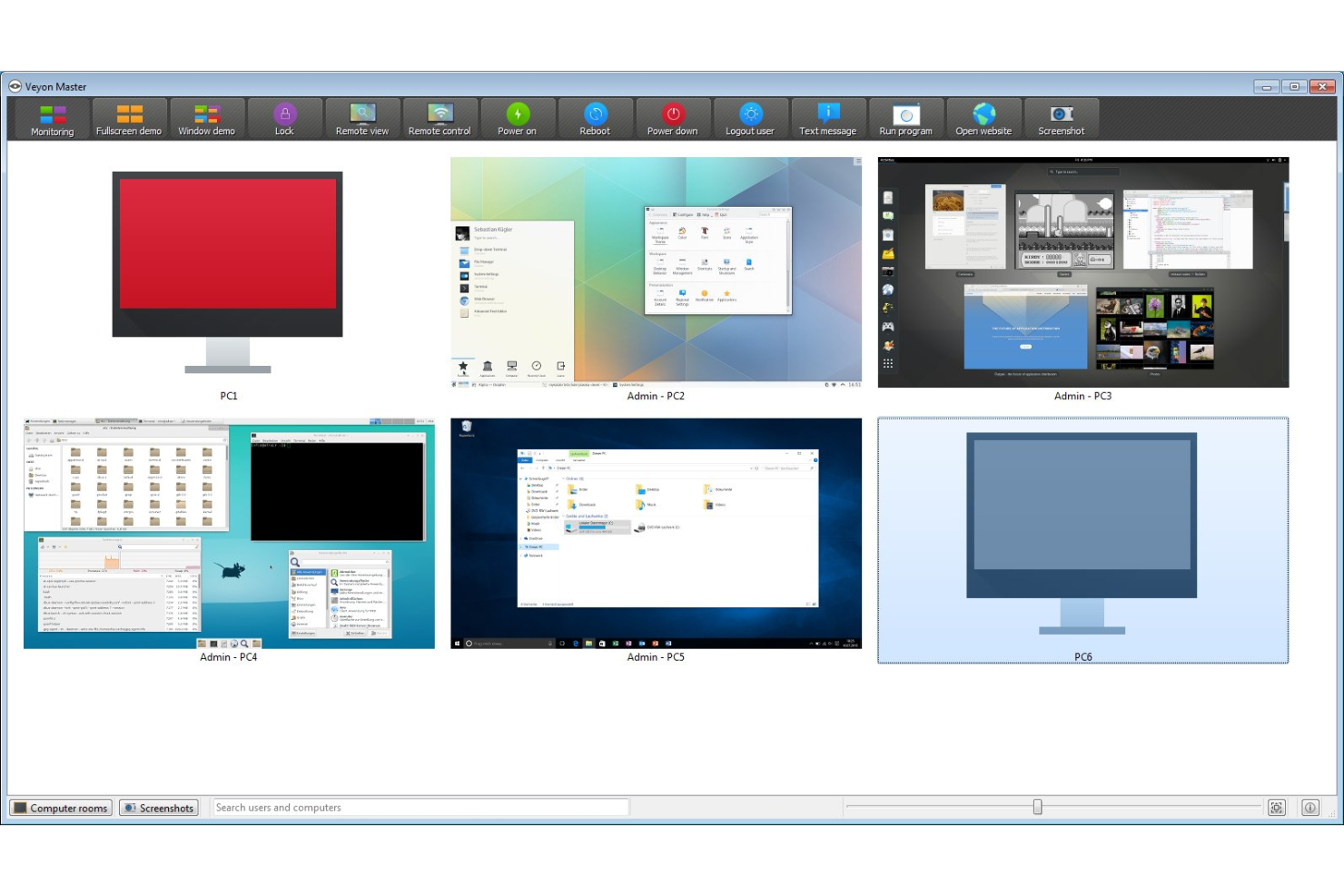
Veyon is an open-source platform designed for organizations that need to monitor and manage multiple employee computers from a central location. It’s especially useful for IT administrators, educators, and managers who want to observe user activity and provide remote support. If you’re looking for a solution that enables live oversight and centralized control in a networked environment, Veyon offers features tailored to those needs.
Who Is Veyon Best For?
Veyon is a strong fit for IT administrators and educators who need centralized, real-time oversight of multiple computers in networked environments.
Why I Picked Veyon
What drew me to Veyon is its ability to provide real-time screen viewing across multiple computers, which is essential for transparent employee monitoring in open-source environments. While primarily built for classrooms, Veyon can easily be deployed in a corporate structure, as well.
The live monitoring feature lets you instantly see what’s happening on any connected workstation, making it easy to spot issues or provide immediate support. I also appreciate that Veyon allows you to take screenshots and broadcast your own screen to others, which is especially useful for training or troubleshooting. These capabilities make Veyon a practical choice for organizations that need direct, real-time visibility into user activity.
Veyon Key Features
Some other features in Veyon that may interest you include:
- User session management: Remotely log off, restart, or shut down user sessions from the central dashboard.
- Access control: Set granular permissions to restrict or allow specific actions for different users or groups.
- Remote command execution: Run scripts or commands on multiple computers simultaneously for maintenance or updates.
- Location-based grouping: Organize monitored devices by physical or logical locations for easier management and oversight.
Veyon Integrations
Integration includes Microsoft Entra ID.
Pros and Cons
Pros:
- Broadcast mode for live demonstrations or training
- Controls for remote session management
- Real-time monitoring of multiple user screens
Cons:
- Limited reporting and export options
- No built-in activity or workforce analytics

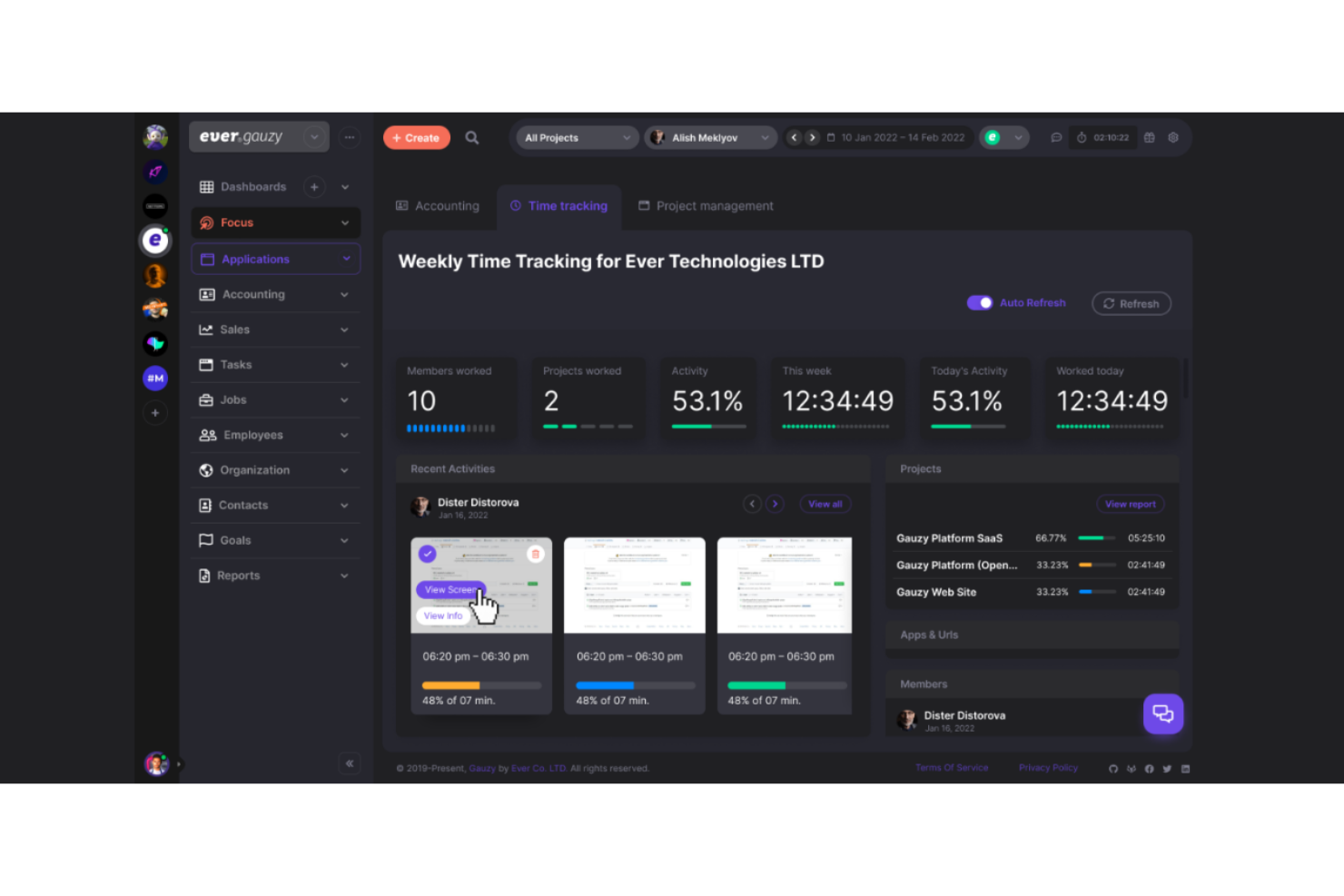
If you’re looking for open-source employee monitoring software with a strong focus on remote team management, Ever Gauzy Platform is worth a look. It’s designed for distributed teams that need to track productivity, manage projects, and handle HR tasks in one place. The platform stands out for its blend of time tracking, invoicing, and other advanced features.
Who Is Ever Gauzy Platform Best For?
Ever Gauzy Platform suits distributed companies and remote teams that need integrated monitoring, HR, and project management features in a single open-source platform.
Why I Picked Ever Gauzy Platform
What stands out to me about Ever Gauzy Platform is how it brings together employee time monitoring and remote team management in one open-source platform. I picked it because it goes beyond basic time tracking by including features like project and task management, invoicing, and HR modules for leave and payroll. These capabilities make it especially useful for organizations with distributed teams that need to coordinate work, monitor productivity, and handle HR processes remotely. The ability to manage so many aspects of remote work from a single dashboard is a real differentiator in the open-source space.
Ever Gauzy Platform Key Features
In addition to its remote team management focus, I also found several other features that support employee monitoring and oversight:
- Activity screenshots: The platform can capture periodic screenshots of employee desktops to provide visual records of work activity.
- Manual time entry: Users can log time manually for tasks that aren’t tracked automatically, supporting flexible work scenarios.
- Role-based permissions: Admins can assign granular access levels to users, ensuring sensitive data is only visible to the right people.
- Desktop and web apps: Employees can track time and activities from both desktop and browser-based applications for greater accessibility.
Ever Gauzy Platform Integrations
Native integrations are not currently listed.
Pros and Cons
Pros:
- Allows granular role-based access controls
- Supports multi-tenant and multi-organizations
- Offers built-in HR and payroll modules
Cons:
- Community support is still relatively small
- No built-in keystroke or app usage tracking
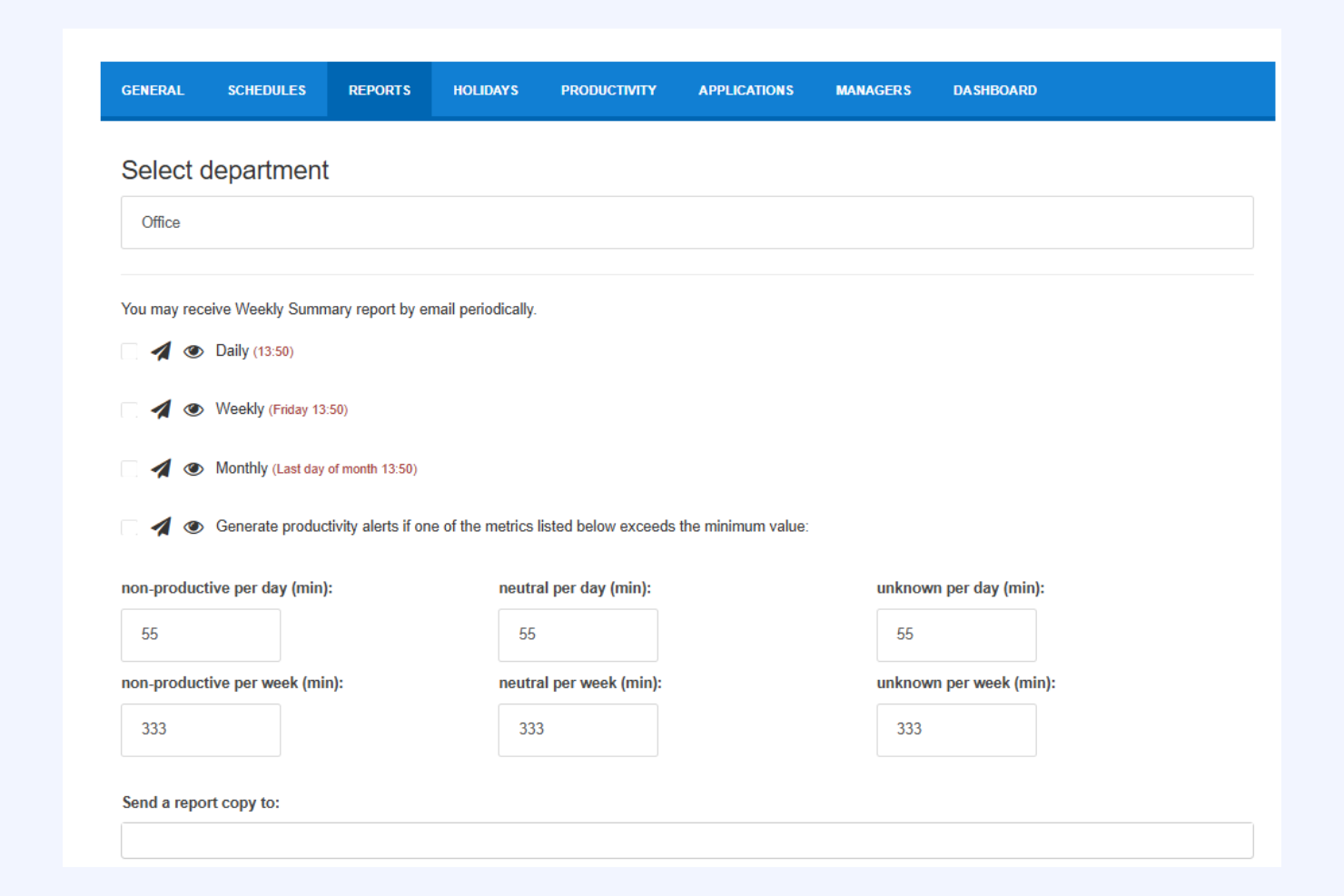
StaffCounter offers privacy-focused employee monitoring for organizations that want oversight without intrusive surveillance. It appeals to businesses and teams that need to balance productivity tracking with respect for user privacy. If you’re looking for monitoring software that emphasizes transparency and data protection, StaffCounter is designed with those priorities in mind.
Who Is StaffCounter Best For?
StaffCounter fits small to mid-sized businesses and organizations that need employee monitoring with strong privacy protections and transparent data handling.
Why I Picked StaffCounter
I chose StaffCounter because it puts privacy at the center of employee monitoring, which is a rare focus in this space. The tool offers features like anonymized data collection and customizable monitoring levels, so organizations can track productivity without overstepping boundaries. I also appreciate that StaffCounter provides clear audit trails and lets users see exactly what data is being collected. For teams that want to monitor work activity while respecting employee privacy, these features make StaffCounter a strong option.
StaffCounter Key Features
Some other features in StaffCounter that support privacy-focused monitoring include:
- Offline monitoring: StaffCounter can track activity even when the device is not connected to the internet, syncing data once a connection is restored.
- Encrypted data storage: All collected monitoring data is stored using encryption to help protect sensitive information.
- Automatic screenshots: The tool can capture periodic screenshots based on customizable intervals for additional context.
- Mobile device monitoring: StaffCounter offers monitoring capabilities for Android devices, extending oversight beyond desktops and laptops.
StaffCounter Integrations
Native integrations are not publicly listed.
Pros and Cons
Pros:
- Supports offline monitoring and data sync
- Provides encrypted data storage for security
- Offers anonymized monitoring for compliance
Cons:
- Lacks built-in alerts or anomaly detection
- No mobile device monitoring features available

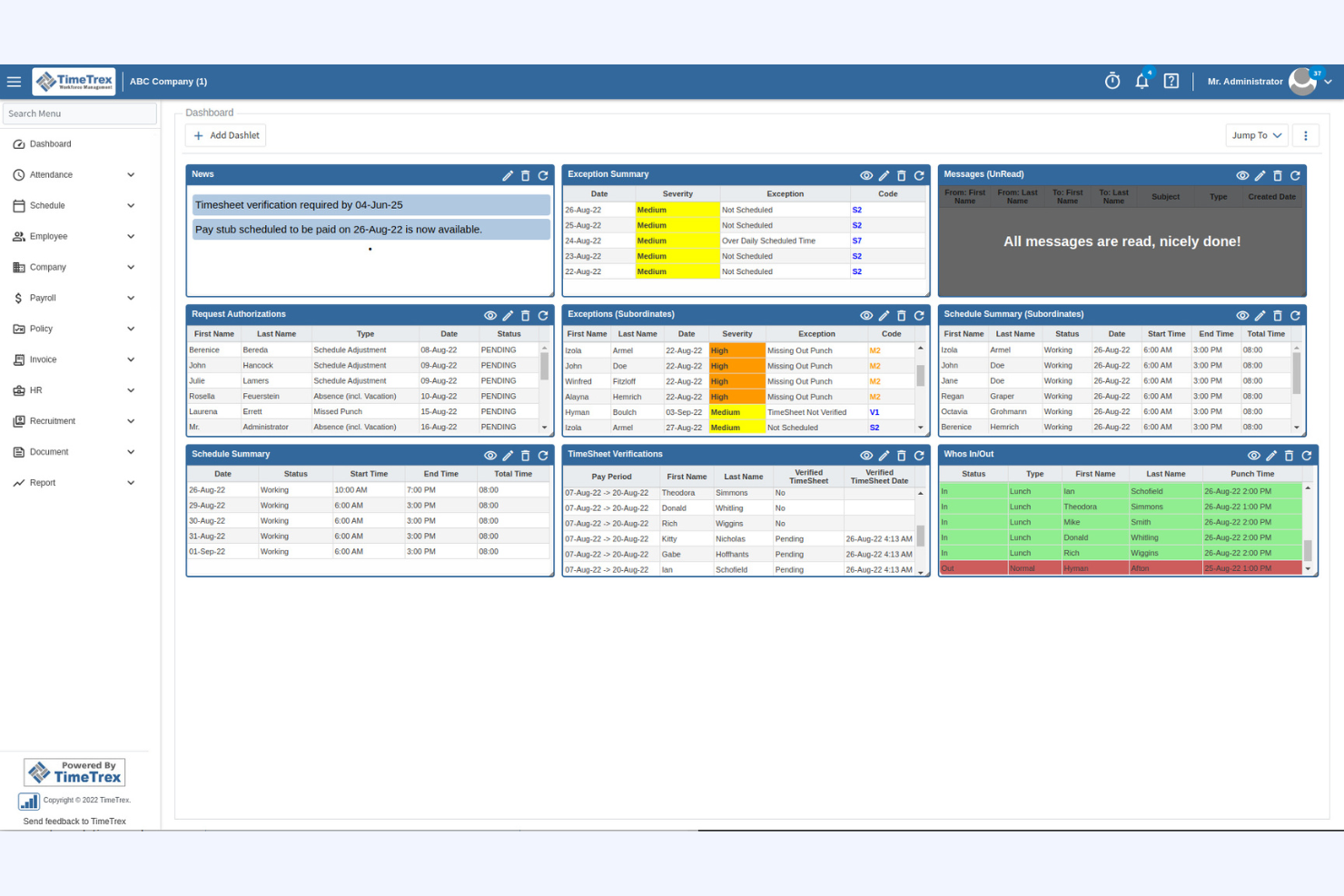

TimeTrex is an open-source platform that combines employee monitoring with HR and payroll management. This software suits organizations that want to track attendance, manage schedules, and handle payroll in one place. TimeTrex can help HR teams and business owners reduce manual processes and optimize oversight across workforce operations.
Who Is TimeTrex Best For?
TimeTrex is a good fit for small to mid-sized businesses that need integrated employee monitoring, scheduling, and payroll management in a single open-source solution.
Why I Picked TimeTrex
I chose TimeTrex because it stands out for organizations that want to unify employee monitoring with payroll and HR processes. Its open-source platform lets you track employee attendance, monitor employee work hours, and directly connect this data to payroll calculations. While TimeTrex doesn’t monitor screen activity, it includes other monitoring features like scheduling, time-off management, and compliance tracking. This combination makes it especially useful for teams that need both oversight and integrated workforce management without relying on multiple tools.
TimeTrex Key Features
Some other features in TimeTrex that may interest you include:
- Biometric time clock integration: Connects with biometric devices to verify employee work time and prevent buddy punching.
- Geolocation tracking: Records the physical location of employees when they clock in or out, supporting remote employees and field teams.
- Customizable reporting: Lets you generate detailed reports on attendance, overtime, and compliance for audits or internal reviews.
- Role-based access controls: Allows you to set permissions and restrict access to sensitive HR and payroll data based on user roles.
TimeTrex Integrations
Integrations include ADP, QuickBooks, Sage, Paychex, Surepay, Ceridian, Meditech, Insync, Millennium, and more.
Pros and Cons
Pros:
- Detailed audit trails for compliance needs
- Biometric and geolocation time tracking options
- Payroll, HR, and monitoring in one platform
Cons:
- Outdated user experience
- Lacks user activity monitoring features
Open-Source Employee Monitoring Software Selection Criteria
When selecting the best employee monitoring software that’s also open source, I considered common buyer needs and pain points like balancing privacy with oversight and ensuring compatibility with existing systems. I also used the following framework to keep my evaluation structured and fair:
Core Functionality (25% of total score)
To be considered for inclusion in this list, each solution had to fulfill these common use cases:
- Track employee attendance and time
- Monitor user activity levels and logins
- Generate reports on productivity
- Manage user permissions and access
- Store and organize HR documents
Additional Standout Features (25% of total score)
To help further narrow down the competition, I also looked for unique features, such as:
- Real-time activity monitoring
- Automated alerts for suspicious behavior
- Built-in payroll integration
- Custom workflow automation
- Advanced audit trails
Usability (10% of total score)
To get a sense of the usability of each system, I considered the following:
- Simple and intuitive dashboard design
- Clear navigation and menu structure
- Minimal steps to complete common tasks
- Responsive interface on desktop and mobile
- Accessibility for users with different needs
Onboarding (10% of total score)
To evaluate the onboarding experience for each platform, I considered the following:
- Availability of step-by-step setup guides
- Access to training videos and tutorials
- Pre-built templates for common workflows
- Interactive product tours or walkthroughs
- Support for data migration from other tools
Customer Support (10% of total score)
To assess each software provider’s customer support services, I considered the following:
- Availability of live chat or helpdesk
- Access to community forums or user groups
- Timeliness of support responses
- Quality of documentation and FAQs
- Availability of onboarding webinars
Value For Money (10% of total score)
To evaluate the value for money of each platform, I considered the following:
- Transparent and predictable pricing
- Free version or open-source options
- Features included at each price tier
- Flexibility for scaling up or down
- No hidden fees or surprise charges
Customer Reviews (10% of total score)
To get a sense of overall customer satisfaction, I considered the following when reading customer reviews:
- Positive feedback on reliability and uptime
- Reports of helpful and responsive support
- Comments on ease of setup and use
- User satisfaction with monitoring features
- Feedback on integration with other tools
How to Choose Open-Source Employee Monitoring Software
It’s easy to get bogged down in long feature lists and complex pricing structures. To help you stay focused as you work through your unique software selection process, here’s a checklist of factors to keep in mind:
| Factor | What to Consider |
|---|---|
| Scalability | Will the software handle your current and future headcount? Check for user limits and multi-site support. |
| Integrations | Does it connect natively to your HR, payroll, or IT systems? List your must-have integrations before shortlisting. |
| Customizability | Can you adapt workflows, permissions, and reports to your policies? Consider if you need code-level access or admin controls. |
| Ease of use | Will your HR team and managers adopt it quickly? Look for clear navigation, minimal training needs, and accessible interfaces. |
| Implementation and onboarding | How much time and technical skill does setup require? Ask about migration tools, documentation, and vendor or community support. |
| Cost | What are the true costs, including hosting, support, and upgrades? Compare open-source licensing terms and any paid add-ons. |
| Security safeguards | Does the tool offer encryption, audit logs, and access controls? Evaluate how it protects sensitive employee data and supports compliance. |
| Support availability | What support channels exist—community, vendor, or third-party? Consider your team’s comfort with self-service vs. needing direct help. |
What Is Open-Source Employee Monitoring Software?
Open-source employee monitoring software is software that tracks employee activity, attendance, and productivity, with its source code freely available for anyone to use, modify, or distribute. These tools help HR teams and managers oversee workforce operations while allowing organizations to customize features, workflows, and security settings to fit their unique needs and compliance requirements.
Features
When selecting open-source employee monitoring software, keep an eye out for the following key features:
- Time tracking: Records when employees start and end their work, capturing hours worked for payroll, compliance, and productivity monitoring.
- Activity logging: Monitors user actions on devices or within applications, providing a detailed record of tasks, websites visited, and software usage.
- Attendance management: Tracks presence, absences, and leave requests, helping HR teams manage schedules and ensure accurate attendance records.
- Role-based access controls: Allows administrators to set permissions for different users, protecting sensitive data and ensuring only authorized access.
- Automated reporting: Generates customizable reports on employee activity, attendance, and productivity, supporting data-driven HR decisions.
- Audit trails: Maintains a secure log of changes and actions within the system, supporting compliance and internal investigations.
- Custom workflow automation: Enables organizations to design and automate HR processes like onboarding, approvals, and notifications.
- Document management: Stores and organizes HR documents such as contracts, policies, and employee performance reviews in a centralized location.
- Integration capabilities: Connects with other HR, payroll, or IT systems to synchronize employee data and streamline operations.
Benefits
Implementing an open-source employee monitoring system provides several benefits for your team members and your business. Here are a few you can look forward to:
- Customizability: Tailor workflows, permissions, and reports to match your organization’s unique policies and compliance needs.
- Cost savings: Avoid expensive licensing fees and reduce the total cost of ownership by leveraging freely available source code.
- Transparency: Review and audit the software’s codebase to ensure it meets your security, privacy, and operational standards.
- Integration flexibility: Connect with your existing HR, payroll, or IT systems to create a unified and efficient workflow.
- Community support: Access a global community for troubleshooting, feature enhancements, and ongoing improvements.
- Enhanced data control: Maintain ownership and control over sensitive employee data by hosting the software on your own infrastructure.
- Scalability: Adapt the solution as your organization grows, adding new users or features without restrictive vendor limitations.
Costs and Pricing
Selecting open-source employee monitoring software requires an understanding of the various pricing models and plans available. Costs vary based on features, team size, add-ons, and more. The table below summarizes common plans, their average prices, and typical features included in open-source employee monitoring software solutions:
Plan Comparison Table for Open-Source Employee Monitoring Software
| Plan Type | Average Price | Common Features |
|---|---|---|
| Free Plan | $0 | Basic time tracking, attendance management, limited reporting, and community support. |
| Business Plan | $1–$50/user/month | All personal features, advanced reporting, workflow automation, role-based access controls, and audit trails. |
| Enterprise Plan | $25–$149/user/month | All business features, custom integrations, enhanced security, priority support, and compliance tools. |
Open-Source Employee Monitoring Software FAQs
Here are some answers to common questions about open-source employee monitoring software:
How secure is open-source employee monitoring software?
Security depends on how the software is configured and maintained. Open-source tools let you review and modify the code, but you must ensure regular updates, strong access controls, and secure hosting to protect sensitive employee data.
Can open-source employee monitoring software integrate with existing HR systems?
Yes, many open-source employee monitoring tools offer integration capabilities. You can often connect them to HR, payroll, or IT systems using APIs or plugins, but some integrations may require technical setup or custom development.
What technical skills are needed to implement open-source employee monitoring software?
You’ll typically need basic IT skills for installation, configuration, and ongoing maintenance. More advanced customizations or integrations may require knowledge of databases, scripting, or server management.
Are there any hidden costs with open-source employee monitoring software?
While the software itself is usually free, you may incur costs for hosting, support, premium add-ons, or hiring technical staff for setup and maintenance. Always review the total cost of ownership before committing.
How do updates and support work for open-source employee monitoring software?
Updates are usually released by the community or project maintainers. Support often comes from user forums, documentation, or paid third-party providers. You’re responsible for applying updates and troubleshooting issues unless you purchase support services.
What’s Next:
If you're in the process of researching open-source employee monitoring software, connect with a SoftwareSelect advisor for free recommendations.
You fill out a form and have a quick chat where they get into the specifics of your needs. Then you'll get a shortlist of software to review. They'll even support you through the entire buying process, including price negotiations.