

10 Top Manufacturing Workforce Management Software in 2026

Manufacturing Workforce Management Software Shortlist


Manufacturing workforce management software helps your business schedule shifts, track labor, and manage compliance across factory teams. If you’re searching for ways to handle complex staffing, union rules, or real-time labor data, the right platform can make a measurable difference. This list will help you compare top solutions, understand which features matter most for manufacturing environments, and choose software that fits your plant’s unique needs.
Why Trust Our Software Recommendations
Our team has been testing and reviewing software since 2012. As HR experts ourselves, we know how difficult—and important—it is to choose the right software.
For this guide, we evaluated tools using hands-on testing and independent research, scoring tools using our selection criteria. We also draw on insights from industry thought leaders and practicing HR experts.
Our reviews reflect our human editorial judgment, not a sales pitch.
Expert reviewers:
Manufacturing Workforce Management Software Comparison Table
This comparison table summarizes pricing details for my top manufacturing workforce management software selections:
| Tool | Best For | Trial Info | Price | ||
|---|---|---|---|---|---|
| 1 | Best for workforce analytics dashboards | Free demo available | Pricing upon request | Website | |
| 2 | Best with open-source on-site deployment | 30-day free trial + free demo available | From $50/user/month | Website | |
| 3 | Best for advanced labor forecasting in large plants | Free demo available | Pricing upon request | Website | |
| 4 | Best for real-time compliance monitoring | Free demo available | Pricing upon request | Website | |
| 5 | Best for integration with payroll and benefits | Free demo available | Pricing upon request | Website | |
| 6 | Best for configurable time and attendance tracking | Free demo available | Pricing upon request | Website | |
| 7 | Best for complex shift scheduling needs | Free demo available | Pricing upon request | Website | |
| 8 | Best for AI-driven workforce insights | Free demo available | Pricing upon request | Website | |
| 9 | Best for project-based time tracking | Free demo available | Pricing upon request | Website | |
| 10 | Best for automated union rule management | Free demo available | Pricing upon request | Website |
Manufacturing Workforce Management Software Reviews
Below are my detailed summaries of the best manufacturing workforce management software that made it onto my shortlist. My reviews offer a detailed look at the features, best use cases, and integrations of each platform to help you find the best one for you.

Best for workforce analytics dashboards
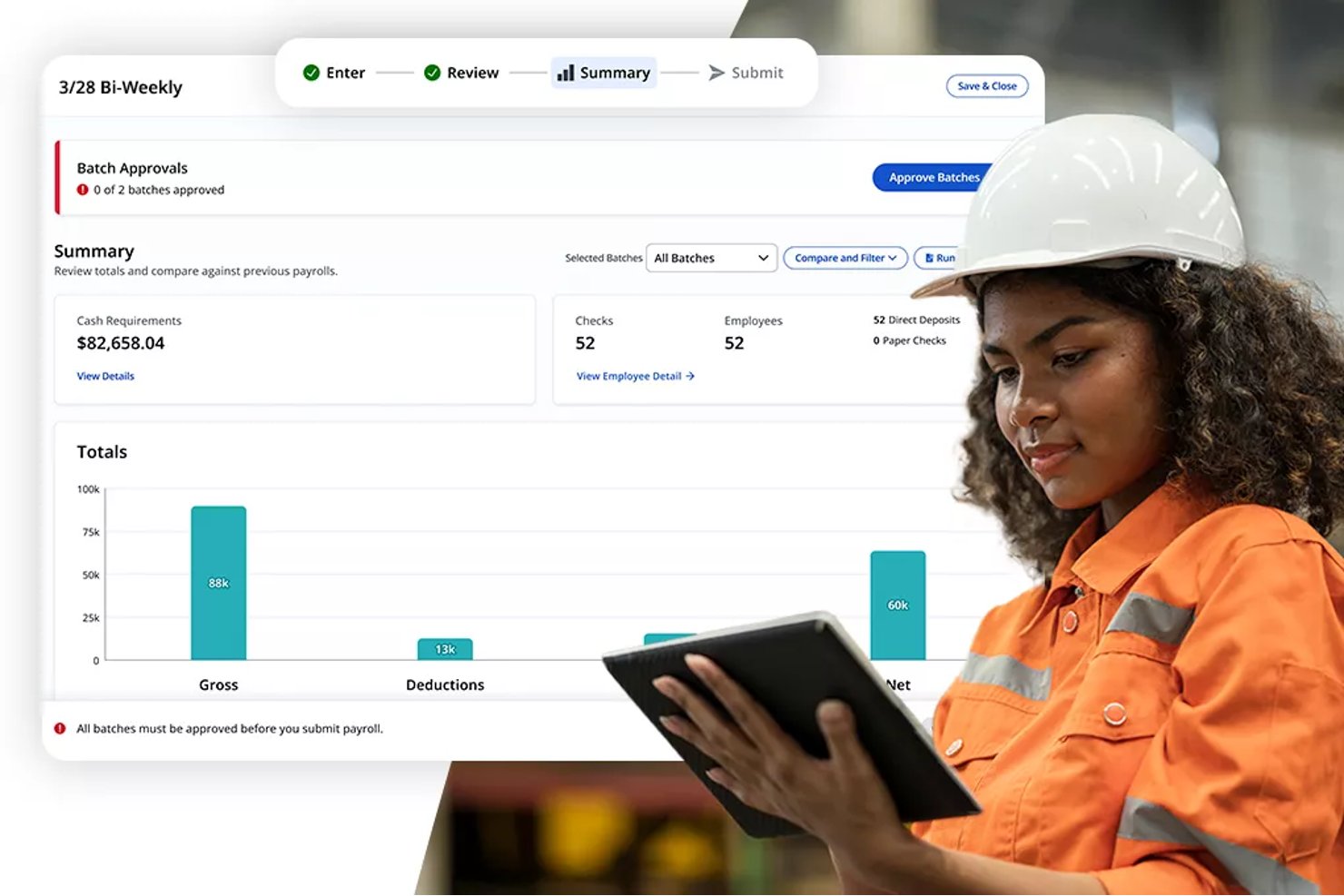
Paylocity is a cloud-based HCM platform that combines payroll, time and attendance, shift scheduling, workforce analytics, and employee experience tools for hourly and multi-location workforces.
Who Is Paylocity Best For?
Paylocity is a strong fit for mid-sized manufacturing companies (50–1,000+ employees) where HR teams need unified payroll, scheduling, and workforce analytics in one platform.
Why I Picked Paylocity
Paylocity earns its spot on my shortlist because of how its workforce analytics dashboards unify HR and payroll data into one real-time view. I particularly like the ExecView dashboards, which let me monitor labor costs, overtime trends, and attendance patterns across multiple plant locations at once. The predictive analytics feature also stands out: I can use current and historical workforce data to model future staffing scenarios before production schedules change.
Paylocity Key Features
- Mobile time collection: Employees can clock in and out using a mobile app, web, kiosk, or physical time clocks.
- Shift claim and swap functionality: Workers can easily claim available shifts or swap with peers through self-service tools.
- Geofencing for clock-in: Location-based controls restrict clock-ins to approved worksite zones to prevent offsite punching.
- Integrated learning management: The platform includes a built-in LMS offering skill tracking and certification management for manufacturing staff.
Paylocity Integrations
Native integrations are not clearly documented. Paylocity offers an API for custom integrations.
Pros and Cons
Pros:
- Predictive analytics supports proactive shift planning
- Tracks certifications and skill expiration automatically
- Workforce analytics spans multiple plant locations
Cons:
- Reporting customization can be limited for manufacturers
- Shop floor kiosk setup requires additional configuration
New Product Updates from Paylocity

Paylocity Expands Expense and Purchase Request Tools
Paylocity adds connected personal cards, smarter expense categorization, and a streamlined purchase request experience. This reduces manual entry and helps finance teams manage expenses and approvals more efficiently. For more information, visit Paylocity’s official site.
 .
.
TimeTrex
Best with open-source on-site deployment
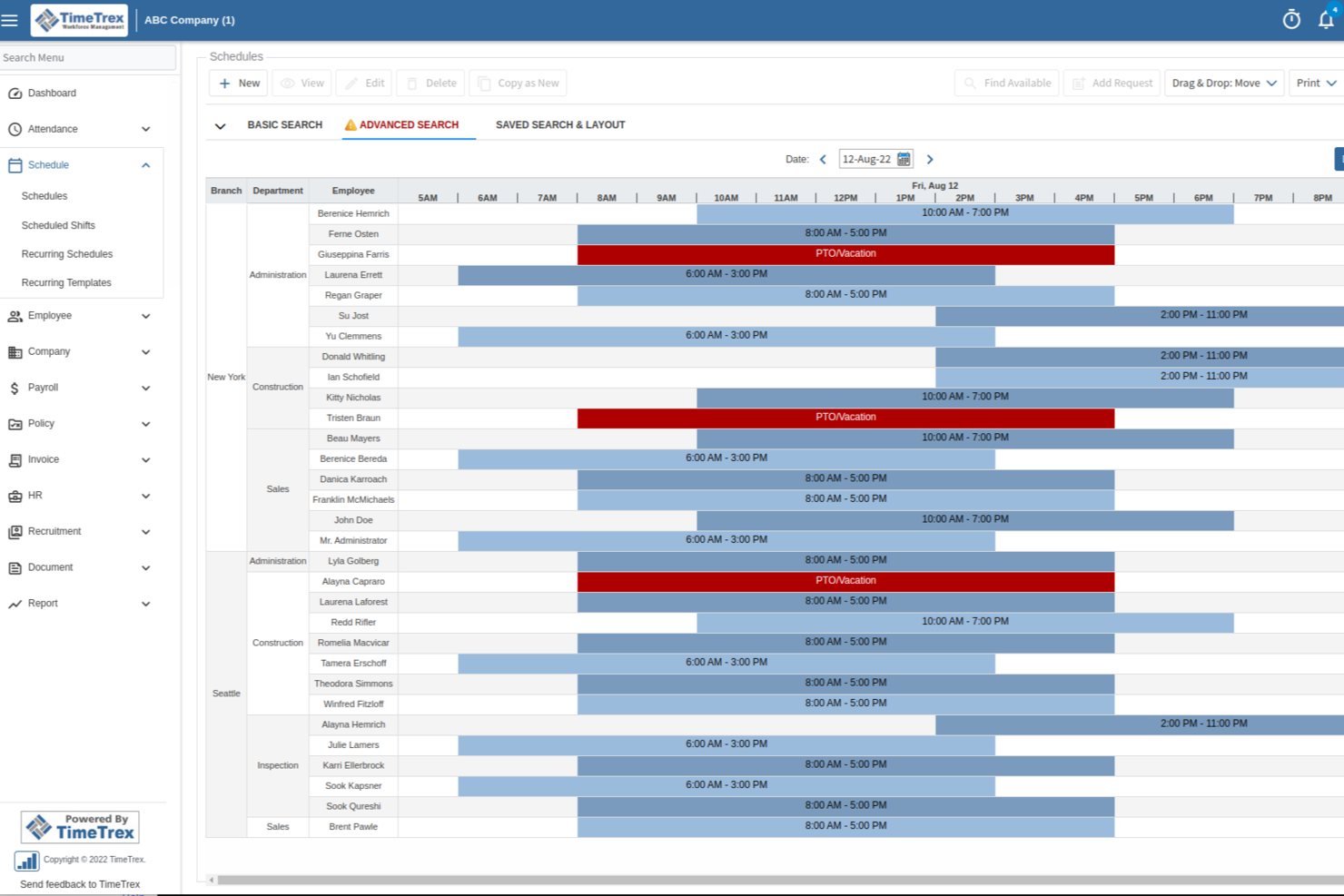
TimeTrex is a workforce management platform for manufacturing teams that brings together time and attendance tracking, employee scheduling, payroll, job costing, and compliance tools in one system.
Who Is TimeTrex Best For?
TimeTrex is a good fit for manufacturing companies that need a unified system to manage workforce scheduling, payroll, and compliance across multiple locations.
Why I Picked TimeTrex
I picked TimeTrex as one of the best because I can deploy it on-site using its open-source edition, which is rare for workforce management software. My team is able to customize the platform to fit our manufacturing workflows and integrate with our existing on-premise systems. I like that we can control our data and security policies without relying on a third-party cloud provider.
TimeTrex Key Features
- Time and attendance tracking: Capture employee hours using biometric, web, or mobile clock-in options.
- Automated scheduling: Build and manage complex shift schedules for manufacturing teams.
- Job costing: Track labor costs by job, project, or department in real time.
- Payroll processing: Calculate wages, deductions, and taxes for hourly and salaried staff.
TimeTrex Integrations
TimeTrex offers native integrations with QuickBooks, ADP, Paychex, Ceridian, and Sage for payroll processing. An API is available for custom integrations with HR, payroll, and accounting systems.
Pros and Cons
Pros:
- Automated overtime and shift differential calculations
- Biometric time clock hardware compatibility
- Multi-country payroll compliance features included
Cons:
- Reporting customization options are somewhat restricted
- Interface feels dated compared to competitors
New Product Updates from TimeTrex
TimeTrex Adds Quick Punch App With Offline and QR Support
TimeTrex adds a new Quick Punch app, offline punching, QR code scanning, punch images, configurable messages, and punch warnings or lockouts to improve employee clock-ins across browsers and local computers. For more information, visit TimeTrex’s official site.
 .
.
UKG Pro
Best for advanced labor forecasting in large plants

UKG Pro offers a workforce management platform designed for manufacturers with complex labor needs. It’s a strong fit for large plants or enterprises that need to coordinate staffing, compliance, and labor costs across multiple locations. The software helps HR and operations teams handle dynamic scheduling, time tracking, and workforce analytics in demanding production environments.
Who Is UKG Pro Best For?
UKG Pro is a good fit for large manufacturing enterprises that need to manage complex labor operations across multiple facilities.
Why I Picked UKG Pro
I picked UKG Pro because its advanced labor forecasting tools address the unique challenges of large-scale manufacturing environments. The platform uses predictive analytics to help managers anticipate staffing needs based on production demand, seasonality, and historical trends. I also appreciate its ability to automate complex scheduling and overtime management, which is essential for plants with fluctuating workloads. These features make it easier for manufacturers to control labor costs and maintain productivity across multiple shifts and locations.
UKG Pro Key Features
Some other features that manufacturing teams may find useful include:
- Mobile workforce management: Supervisors and employees can access schedules, request time off, and approve changes from any device.
- Automated compliance tracking: The system monitors labor laws and union agreements to help reduce compliance risks.
- Real-time attendance monitoring: Managers can view attendance data as it happens, making it easier to address absenteeism or late arrivals.
- Employee self-service portal: Workers can view pay stubs, update personal information, and manage their own schedules online.
UKG Pro Integrations
Integrations include ADP, SAP SuccessFactors, Oracle, Workday, Microsoft Teams, Salesforce, QuickBooks, Ceridian, Infor, and ServiceNow.
Pros and Cons
Pros:
- Automated compliance with labor and union rules
- Real-time attendance and shift monitoring tools
- Offers advanced labor forecasting
Cons:
- Limited flexibility for small manufacturers
- Implementation can be lengthy for large plants

Dayforce
Best for real-time compliance monitoring
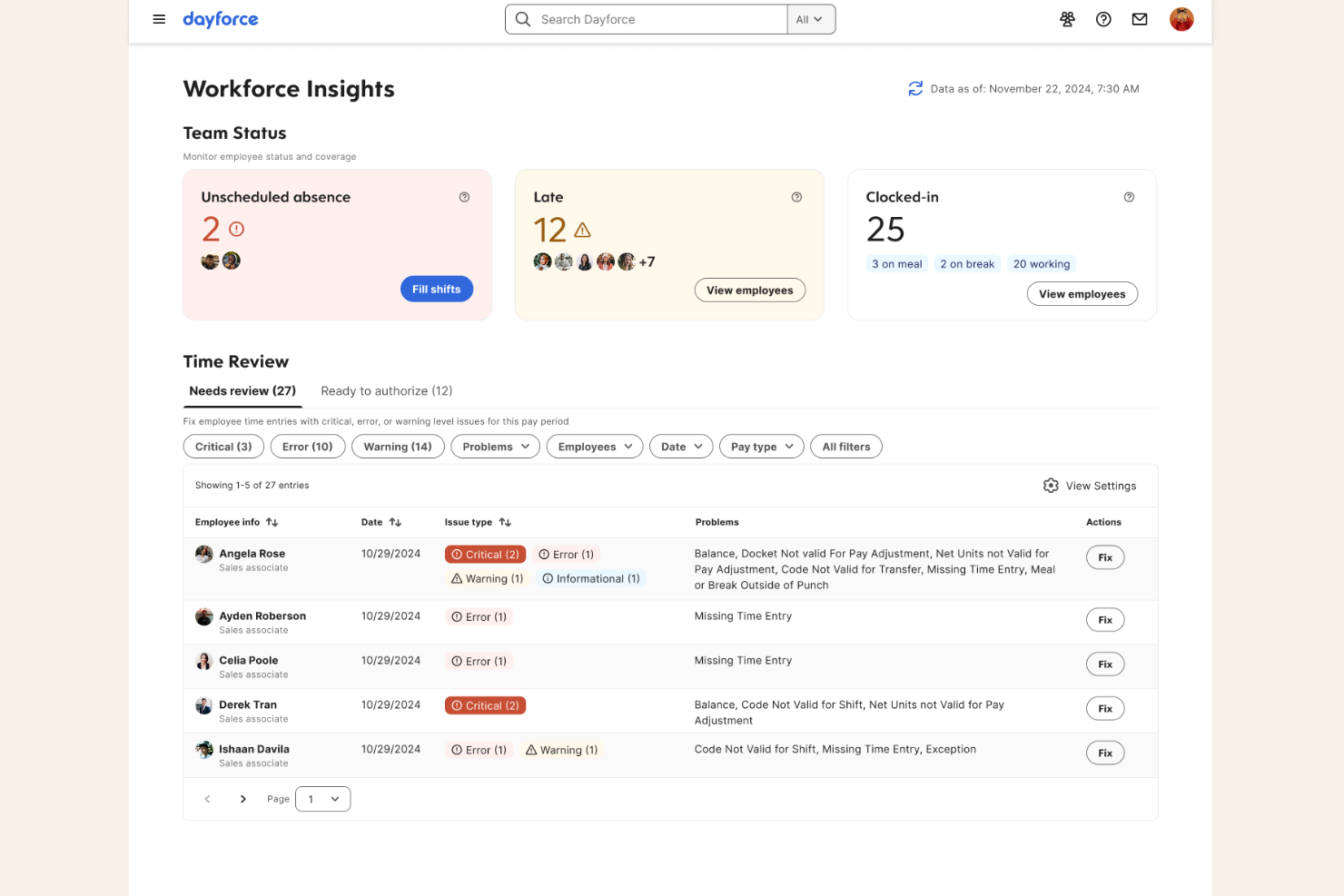
Dayforce is a workforce management platform designed for manufacturers that need to manage complex labor requirements and compliance. It’s well-suited for HR and operations leaders in large-scale or multi-site manufacturing environments. The platform helps address challenges like labor tracking, scheduling, and regulatory requirements across diverse workforces.
Who Is Dayforce Best For?
Dayforce is a strong choice for large manufacturing organizations that need to manage compliance and workforce operations across multiple locations.
Why I Picked Dayforce
What drew me to Dayforce for manufacturing workforce management is its strong focus on real-time compliance monitoring. The platform continuously tracks labor regulations, overtime rules, and break requirements as schedules are created and shifts are worked, helping manufacturers avoid costly compliance errors. I also appreciate that Dayforce automatically updates compliance rules based on changing local, state, or federal laws, which is especially important for organizations operating in multiple regions. These features make it a reliable choice for manufacturers who need to stay ahead of complex and evolving workforce regulations.
Dayforce Key Features
In addition to its compliance monitoring capabilities, Dayforce offers several other features that support manufacturing workforce management:
- Automated scheduling tools: The platform generates optimized shift schedules based on labor demand, employee skills, and availability.
- Mobile self-service app: Employees can view schedules, request time off, and swap shifts directly from their mobile devices.
- Payroll processing integration: Payroll is automatically calculated and processed using real-time attendance and scheduling data.
- Labor cost analytics: Managers can access dashboards and reports to monitor labor costs and productivity across different sites or departments.
Dayforce Integrations
Integrations include Microsoft, SAP, Oracle, Workday, ADP, UKG, Salesforce, Docusign, Cornerstone OnDemand, and ServiceNow.
Pros and Cons
Pros:
- Wallet Runs what-if scenarios for benefit costs
- Offers on-demand pay via Dayforce
- Calculates payroll in real-time continuously
Cons:
- System performance lags during peak cycles
- Lacks AI-driven candidate matching features

ADP
Best for integration with payroll and benefits

ADP offers workforce management solutions tailored for manufacturers who need to coordinate HR, time tracking, and compliance across multiple locations. The platform is a good fit for HR teams and plant managers looking to centralize employee data and automate routine workforce processes. Manufacturers often turn to ADP to help manage complex scheduling, labor law compliance, and workforce reporting needs.
Who Is ADP Best For?
ADP is a strong choice for mid-sized to large manufacturers that need integrated HR, payroll, and workforce management across multiple sites.
Why I Picked ADP
I picked ADP because it offers native integration between workforce management, payroll, and benefits administration, which is a top priority for many manufacturers. This integration means you can automate pay calculations, deductions, and benefits enrollment directly from time and attendance data, reducing manual entry and errors. I also appreciate that ADP supports compliance with wage and hour laws by linking scheduling and payroll, which is especially important for manufacturers with hourly and shift-based workforces. These features help HR teams and plant managers keep payroll accurate and benefits up to date without juggling multiple disconnected systems.
ADP Key Features
Some other features that make ADP useful for manufacturing workforce management include:
- Automated shift scheduling: Create, assign, and adjust employee shifts based on production needs and labor availability.
- Mobile time tracking: Allow employees to clock in and out or request time off from their mobile devices.
- Labor analytics dashboard: Access real-time insights into labor costs, overtime, and workforce trends.
- Incident and safety tracking: Record workplace incidents and monitor safety compliance directly within the platform.
ADP Integrations
Integrations include QuickBooks, Xero, Sage, Workday, SAP, Oracle, ZipRecruiter, HealthEquity, WEX, and ClockShark.
Pros and Cons
Pros:
- Provides compliance tools for labor regulations
- Supports union and non-union workforce rules
- Integrates payroll, HR, and benefits
Cons:
- Interface can feel outdated to some teams
- Advanced HR features require paid add-ons

Infor
Best for configurable time and attendance tracking
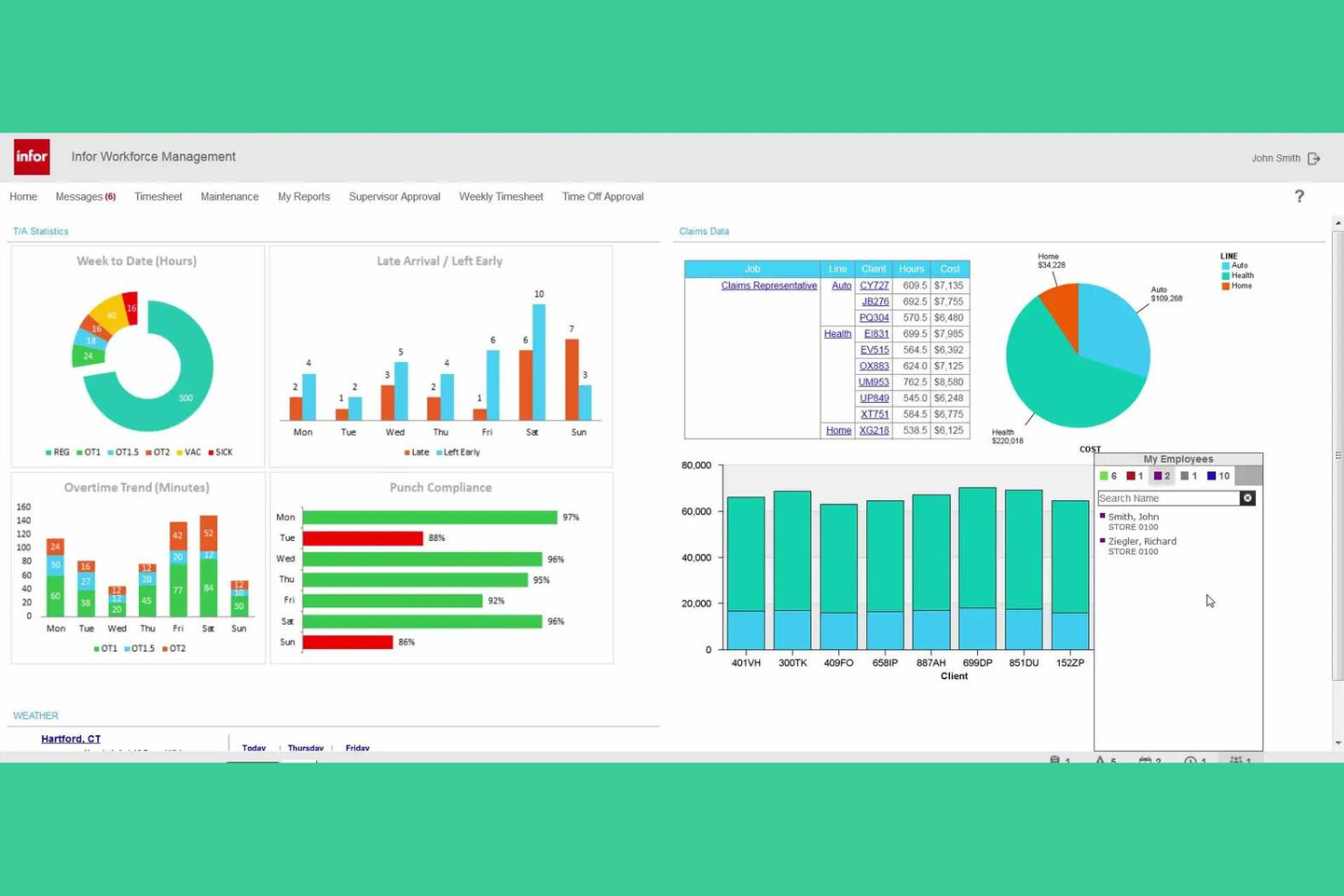
Manufacturers looking for a workforce management platform with deep configurability often consider Infor. The system is designed for organizations that need to manage complex time, attendance, and labor tracking requirements across multiple locations. It appeals to HR and operations leaders who want to tailor workforce processes to fit unique compliance and scheduling needs.
Who Is Infor Best For?
Infor is a strong choice for large manufacturers and multi-site enterprises that need highly configurable time and attendance tracking.
Why I Picked Infor
I picked Infor because it offers a high level of configurability for time and attendance tracking, which is essential for manufacturers with complex labor environments. The platform lets you define custom pay rules, attendance policies, and shift patterns to match union agreements or site-specific requirements. I also like that Infor supports detailed exception tracking and automated time capture from a variety of devices, which helps reduce manual errors. These features make it a strong fit for manufacturers who need to adapt workforce management processes to their unique operational realities.
Infor Key Features
Some other features that make Infor useful for manufacturing workforce management include:
- Labor forecasting and scheduling: Generate demand-driven schedules based on historical data, production needs, and labor availability.
- Absence management tools: Track, approve, and report on employee absences with configurable workflows.
- Mobile workforce access: Enable employees and managers to view schedules, request time off, and approve changes from mobile devices.
- Compliance monitoring dashboard: Monitor labor law compliance and receive alerts for potential violations in real time.
Infor Integrations
Integrations include ADP, Oracle, SAP, Workday, Kronos, PeopleSoft, Infor CloudSuite, Microsoft Dynamics 365, Ceridian, and UKG.
Pros and Cons
Pros:
- Supports complex global labor law configurations
- Automates zero-to-gross pay rule validation
- Forecasts production volume using machine learning
Cons:
- Mobile functionality lacks full desktop parity
- Steeper learning curve for system administrators
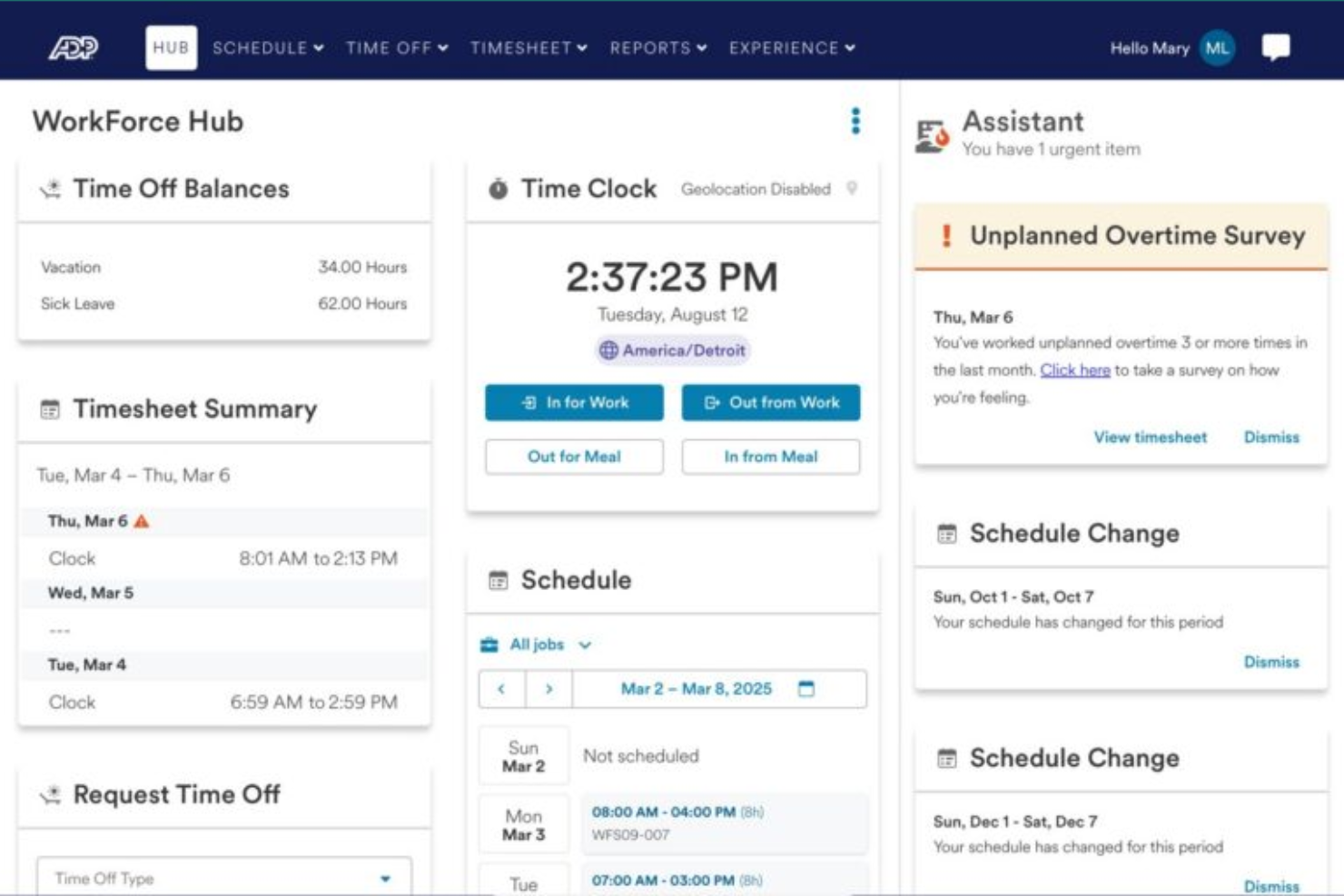
ADP WorkForce Suite offers a workforce management platform designed for manufacturers with demanding scheduling and compliance needs. It’s a strong option for operations leaders and HR teams in large plants or multi-site facilities. The software helps address challenges like shift coverage, labor law compliance, and real-time workforce visibility.
Who Is ADP WorkForce Suite Best For?
ADP WorkForce Suite is a good fit for large manufacturing organizations that need to manage complex, multi-site shift scheduling and compliance.
Why I Picked ADP WorkForce Suite
What stands out about ADP WorkForce Suite is its ability to handle highly complex shift scheduling scenarios that are common in manufacturing environments. I picked this tool because it supports dynamic scheduling rules, including rotating shifts, split shifts, and union-specific agreements, which are often difficult to manage manually. The platform also offers real-time visibility into shift coverage and labor allocation, helping managers quickly respond to last-minute changes or production demands. These capabilities make it especially valuable for manufacturers with large workforces and intricate scheduling requirements.
ADP WorkForce Suite Key Features
Some other features that manufacturing teams may find useful include:
- Automated time and attendance tracking: The system captures employee hours and attendance data in real time for accurate payroll and compliance.
- Mobile workforce access: Employees and supervisors can view schedules, request changes, and approve time off from any device.
- Labor law and union compliance monitoring: Built-in compliance tools help ensure schedules and pay practices align with local labor laws and union agreements.
- Analytics and reporting dashboard: Managers can access workforce analytics and generate reports to support operational decisions.
ADP WorkForce Suite Integrations
Integrations include ADP, SAP, Oracle, Workday, Microsoft, Kronos, Infor, Ceridian, NGA Human Resources, and Cornerstone OnDemand.
Pros and Cons
Pros:
- Automates fatigue management
- Supports multi-site manufacturing operations
- Handles union and labor law compliance rules
Cons:
- Non-intuitive organizational chart navigation
- Requires separate profiles for different employers
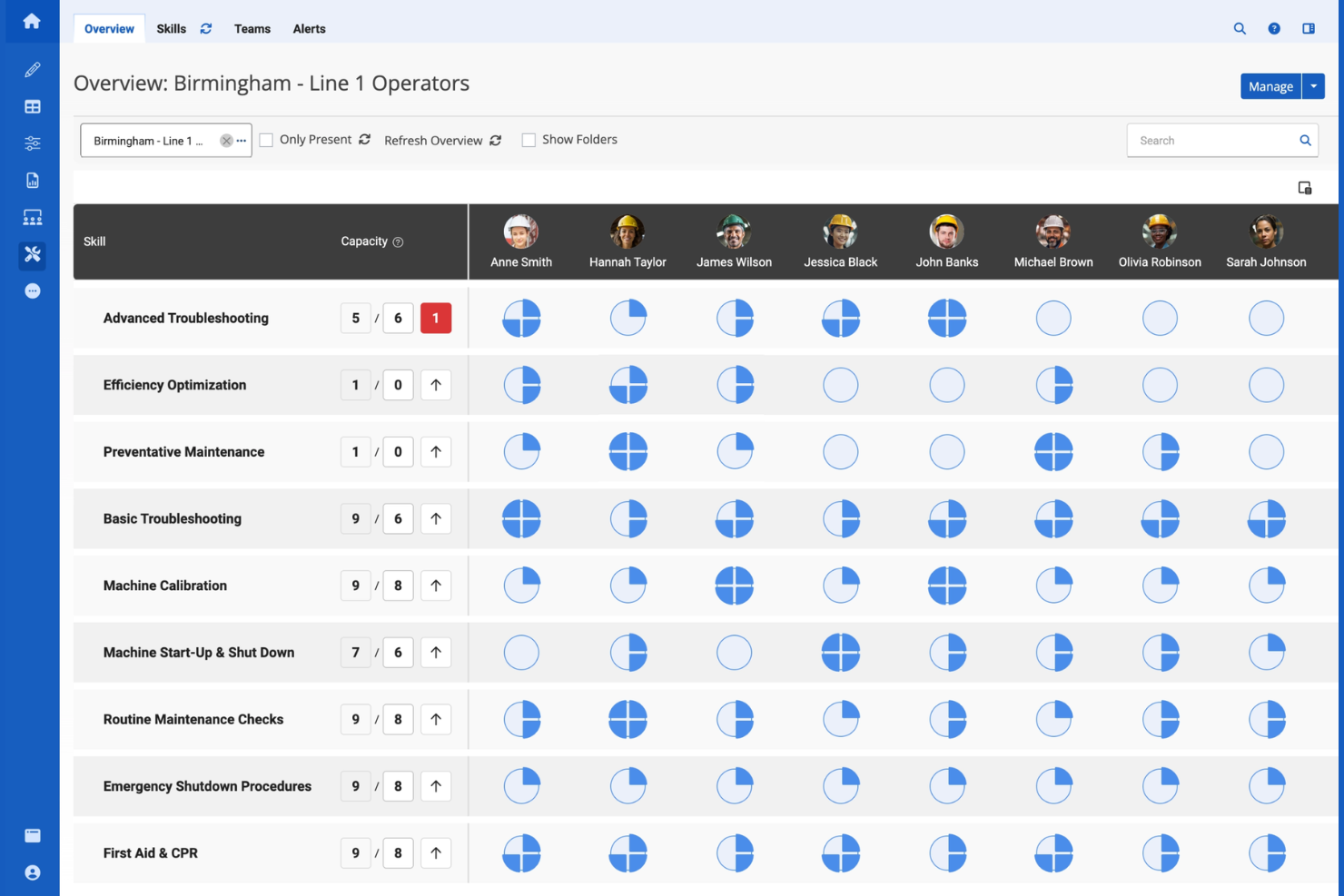
Augmentir offers manufacturing teams a modern approach to workforce management by combining digital workflows with real-time operational data. It’s designed for manufacturers who want to optimize frontline productivity and address skills gaps using connected worker technology. This platform helps leaders identify process bottlenecks and support continuous improvement across their operations.
Who Is Augmentir Best For?
Augmentir is a strong fit for manufacturing organizations that want to leverage AI to optimize frontline workforce performance and skills development.
Why I Picked Augmentir
What drew me to Augmentir for manufacturing workforce management is its focus on AI-driven workforce insights. The platform uses AI to analyze worker performance and recommend targeted training or support, which helps manufacturers address skills gaps and improve productivity on the shop floor. I also appreciate how Augmentir’s connected worker tools capture real-time data from frontline activities, giving leaders actionable insights into process bottlenecks and workforce trends. This approach makes it easier for manufacturers to make data-backed decisions about workforce development and operational improvements.
Augmentir Key Features
Some other features manufacturing teams may find useful include:
- Digital work instructions: Create and deliver step-by-step digital guides to frontline workers for consistent task execution.
- Remote collaboration tools: Enable real-time support and troubleshooting through video calls and chat with subject matter experts.
- Automated skills tracking: Monitor and update worker skill profiles based on completed tasks and certifications.
- Integration with IoT devices: Connect to sensors and machines on the shop floor to collect operational data and trigger workflows.
Augmentir Integrations
Integrations include SAP, Oracle, IBM Maximo, Infor, Microsoft Dynamics 365, Salesforce, Cornerstone OnDemand, Saba, SuccessFactors, and Workday.
Pros and Cons
Pros:
- Automated skills tracking for compliance audits
- Real-time data from connected worker tools
- AI recommends targeted training for workers
Cons:
- Integration challenges with older plant machinery
- Requires significant effort to digitize existing SOPs
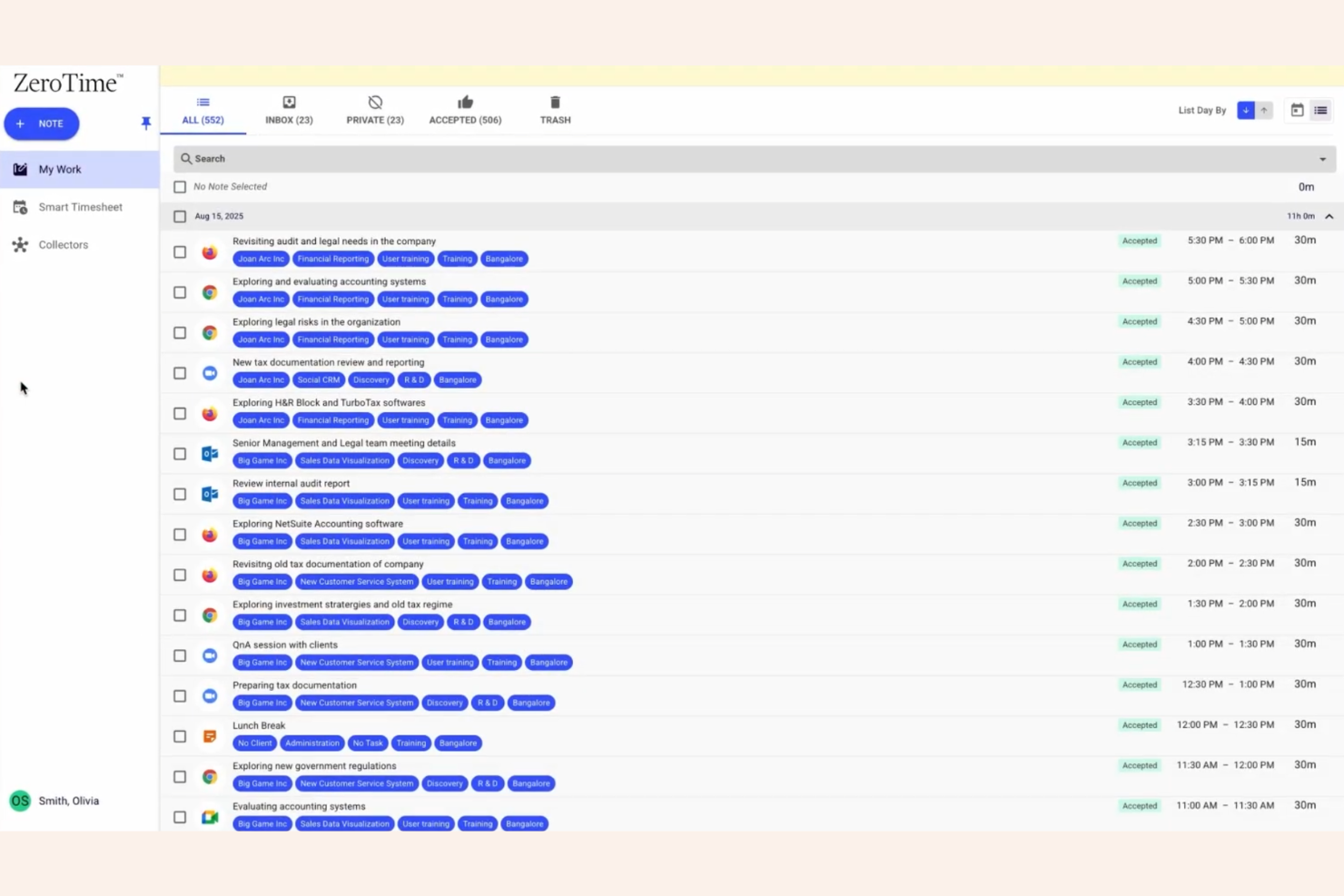
Replicon offers a time tracking platform designed for organizations that need to manage labor costs and project hours with precision. It’s especially useful for manufacturers and project-driven teams who need to allocate time and resources across multiple jobs or production lines. The system helps leaders gain visibility into workforce utilization and project progress, supporting better planning and compliance.
Who Is Replicon Best For?
Replicon is a strong fit for manufacturing companies and project-based organizations that need detailed time tracking and labor cost management across multiple jobs or production lines.
Why I Picked Replicon
What stands out about Replicon for manufacturing workforce management is its focus on project-based time tracking. Manufacturers often need to track labor hours and costs by job, shift, or production line, and Replicon’s platform is built to handle these requirements with detailed project and task-level tracking. I appreciate how it allows managers to allocate time directly to specific projects, making it easier to monitor progress and control costs in real time. This level of granularity supports better resource planning and helps manufacturers stay on top of compliance and labor regulations.
Replicon Key Features
Some other features manufacturing teams may find useful include:
- Mobile timesheet entry: Workers can submit hours and project updates directly from their mobile devices on the shop floor.
- Automated overtime calculations: The system applies complex overtime rules to ensure accurate payroll and compliance.
- Real-time analytics dashboards: Managers can view workforce data and project metrics in customizable dashboards.
- Multi-location support: Replicon tracks time and labor across multiple plants or facilities within a single platform.
Replicon Integrations
Integrations include SAP, Oracle, ADP, QuickBooks, Xero, Sage, Microsoft Dynamics 365, Salesforce, Jira, and Tableau.
Pros and Cons
Pros:
- Supports touchless facial recognition kiosks
- Supports complex overtime and labor rules
- Tracks time by project, job, or shift
Cons:
- Functionality split across multiple paid modules
- No built-in scheduling or shift planning
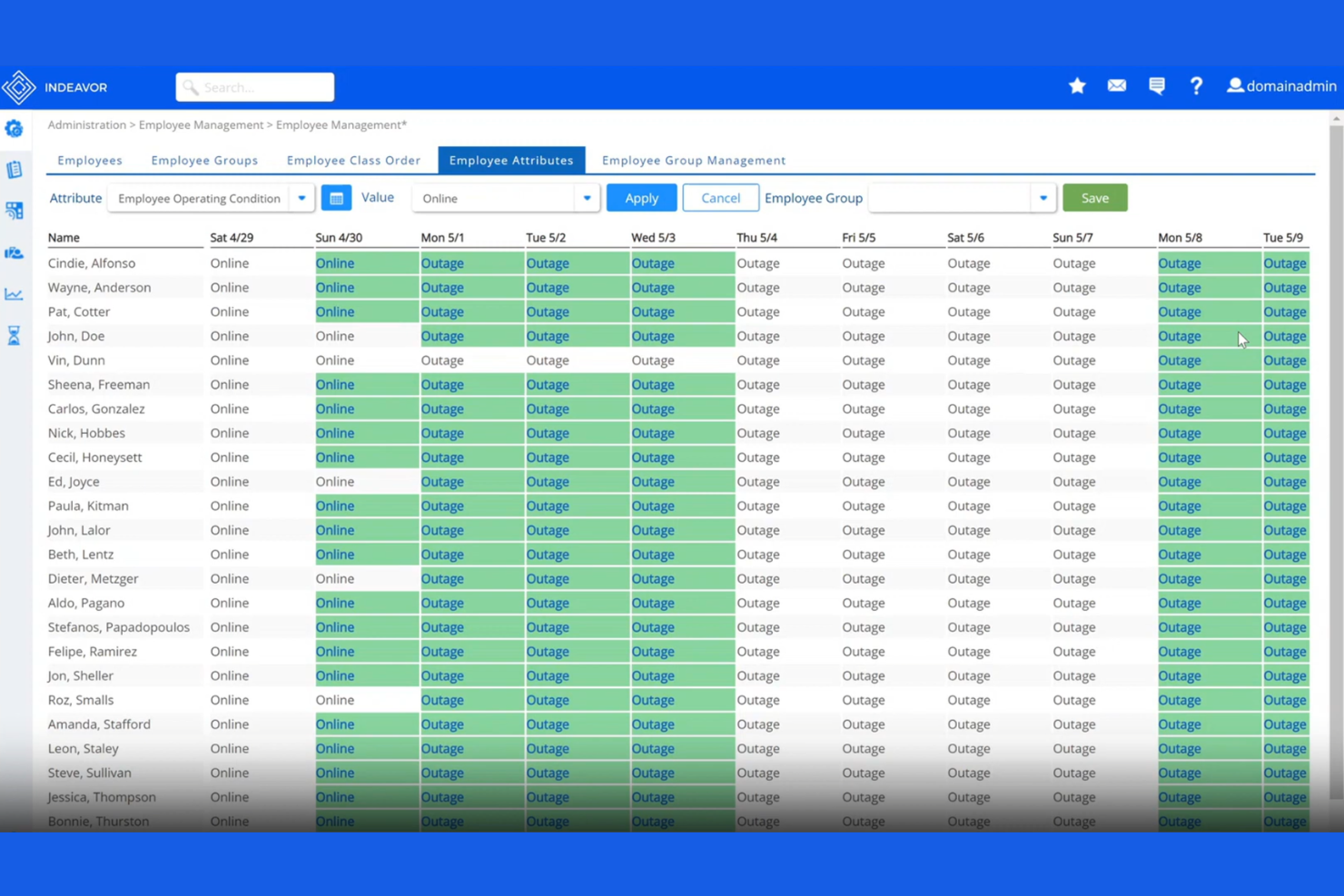
Indeavor is a workforce management platform designed for manufacturers with complex scheduling and labor compliance needs. It’s especially useful for organizations that need to coordinate large, shift-based teams while managing intricate labor agreements. Manufacturing leaders turn to Indeavor to help reduce manual scheduling errors and improve workforce visibility across multiple sites.
Who Is Indeavor Best For?
Indeavor is a strong fit for large manufacturing organizations that need to automate complex union rule management across multiple facilities.
Why I Picked Indeavor
What stands out about Indeavor for manufacturing workforce management is its deep automation of union rule management. The platform allows you to configure complex union agreements, seniority rules, and overtime policies directly into the scheduling engine, so you don’t have to manually track or interpret these requirements. I appreciate that Indeavor automatically applies these rules when generating schedules and filling shifts, which helps reduce compliance risks and grievances. This level of automation is especially valuable for manufacturers with multiple unions or frequently changing labor agreements.
Indeavor Key Features
Some other features that make Indeavor useful for manufacturing workforce management include:
- Automated shift bidding: Employees can view and bid on available shifts directly through the platform, supporting fair and transparent scheduling.
- Mobile self-service portal: Workers can access schedules, request time off, and swap shifts from their mobile devices.
- Fatigue management tools: The system tracks hours and rest periods to help prevent scheduling patterns that could lead to worker fatigue.
- Real-time labor analytics: Managers can monitor workforce metrics and trends across multiple sites with customizable dashboards.
Indeavor Integrations
Integrations include SAP, Oracle, Workday, UKG, ADP, Kronos, Infor, Microsoft Dynamics, Ceridian, and PeopleSoft.
Pros and Cons
Pros:
- Automates forced overtime and seniority rules
- Filters schedules by employee certification levels
- Matches labor to live production demand
Cons:
- Minimum contract requirement of three years
- Lacks native full-service payroll processing
Other Manufacturing Workforce Management Software
Here are some additional manufacturing workforce management software options that didn’t make it onto my shortlist, but are still worth checking out:
- Connecteam
For mobile-first frontline workforce tools
- TimeClock Plus
For hardware-compatible time collection
- Rippling
With unified HR and IT management
- Jibble
For facial recognition clock-ins
- SafetyCulture
For integrated safety inspections


How I Evaluate Manufacturing Workforce Management Software
I look at these tools on two levels: baseline capabilities that qualify a vendor, and differentiators that show whether it's built for rotating shifts and union rules, not just desk workers.
Core Functionality (Table Stakes For This List)
When I'm selecting tools for my list, I rank each one on a scale from 0 (does not offer the functionality) to 5 (excels in this area) for each core functionality listed below. Then, I calculate the tool's total score into a percentage. Each tool needs to achieve a minimum total score of 55% to be considered for inclusion.
- Shift Scheduling: I evaluate how well each tool handles rotating patterns, multi-line assignments, and shift swaps—the kind of complexity you see in 24/7 production environments.
- Time & Attendance Tracking: Shop floor workers rarely sit at desks, so I look for support for badge readers, biometric devices, and kiosks alongside real-time visibility into who's clocked in.
- Labor Demand Forecasting: I check whether a tool can project staffing needs based on production schedules and output targets, not just repeat last week's headcount.
- Labor Law & Union Compliance: Overtime caps, mandatory rest periods, and collective bargaining rules vary widely, so each tool's rule engine and alerting capabilities get close attention.
- Skills & Certification Tracking: Manufacturing roles often require specific machine certifications or safety credentials, and I look for expiration alerts and the ability to match qualified workers to eligible roles.
- Absence & Leave Management: I evaluate whether the platform can handle real-time call-offs and suggest qualified replacements before a line goes short-staffed during a shift.
Once I have a list of tools that meet the criteria, I consider what sets each platform apart.
Differentiating Factors (What Sets Vendors Apart)
Here's how I compare and contrast different vendors:
Standout Features
I look at whether a platform connects directly to ERP and MES systems so production schedules can drive staffing decisions in real time. Labor cost analytics matter too—I want to see spend broken down by line, shift, or work order, not just totals. Multi-plant management is a big differentiator for larger operations where each facility has its own union rules and shift structures but still needs centralized oversight. A purpose-built mobile app for the shop floor also gets attention, since supervisors need to handle swaps and call-offs away from a desk.
Beyond Features
Implementation experience matters a lot in this space. I check whether a vendor offers onboarding resources designed for hourly, non-desktop workers—not just admin training for HR. Total cost of ownership is another factor I weigh carefully, since a platform priced per employee can get expensive fast with a large hourly workforce, especially once you add kiosks and badge readers. Deployment flexibility also comes into play; some plants have limited connectivity, so I evaluate whether the platform supports offline functionality or hybrid hosting.
How to Choose Manufacturing Workforce Management Software
It’s easy to get bogged down in long feature lists and complex pricing structures. To help you stay focused as you work through your unique software selection process, here’s a checklist of factors to keep in mind:
| Factor | What to Consider |
|---|---|
| Scalability | Will the software handle your workforce size as you grow, including multiple sites or locations? |
| Integrations | Does it connect natively with your payroll, ERP, or HR systems to avoid manual data entry? |
| Customizability | Can you tailor workflows, reports, and rules to match your plant’s unique processes and policies? |
| Ease of use | Will frontline supervisors and shop floor staff adopt it quickly, or will training be a barrier? |
| Implementation and onboarding | How long will it take to get up and running, and what resources or support will you need internally? |
| Cost | Are all costs clear up front, including setup, licenses, and support, or are there hidden fees? |
| Security safeguards | Does the vendor offer strong data protection, user access controls, and compliance with regulations? |
| Compliance requirements | Can the system adapt to changing labor laws, union rules, or industry-specific mandates? |
What Is Manufacturing Workforce Management Software?
Manufacturing workforce management software is a digital system that helps manufacturers track, schedule, and manage their employees’ time, attendance, and labor costs. These tools support shift planning, overtime calculations, compliance with labor regulations, and real-time visibility into workforce operations. By centralizing workforce data, manufacturers can improve productivity, reduce manual errors, and ensure accurate payroll and reporting across multiple teams or locations.
Features of Manufacturing Workforce Management Software
When selecting manufacturing workforce management software, keep an eye out for the following key features:
- Time and attendance tracking: Captures when employees clock in and out, records breaks, and logs hours worked for accurate payroll and compliance.
- Shift scheduling: Allows managers to assign shifts, manage rotations, and fill gaps, helping ensure adequate coverage across all production lines.
- Overtime and labor rule automation: Applies complex overtime, union, or local labor rules automatically to reduce manual calculations and compliance risks.
- Mobile access: Enables workers and supervisors to view schedules, submit time entries, and approve requests directly from mobile devices on the shop floor.
- Payroll integration: Connects workforce data directly to payroll systems, reducing errors and speeding up payroll processing.
- Real-time analytics and reporting: Provides dashboards and reports on labor costs, attendance trends, and productivity for data-driven decision-making.
- Multi-location support: Manages workforce operations across several plants or sites within a single platform, centralizing data and oversight.
- Compliance management: Tracks regulatory requirements, certifications, and audit trails to help meet industry and legal standards.
- Employee self-service: Lets employees request time off, swap shifts, and view schedules without supervisor intervention, improving transparency and engagement.
Benefits of Manufacturing Workforce Management Software
Implementing manufacturing workforce management software provides several benefits for your team and your business. Here are a few you can look forward to:
- Accurate labor cost tracking: Automated time and attendance tracking ensures you capture true labor costs by job, shift, or project.
- Improved compliance: Built-in labor rule automation and audit trails help you stay aligned with regulatory and union requirements.
- Faster payroll processing: Direct payroll integration and error reduction speed up payroll cycles and minimize manual corrections.
- Greater workforce visibility: Real-time analytics and reporting give managers insight into attendance, productivity, and labor trends across locations.
- Simplified scheduling: Shift scheduling tools make it easier to assign, adjust, and communicate shifts, reducing coverage gaps and overtime.
- Enhanced employee engagement: Employee self-service features empower staff to manage their schedules and requests, increasing transparency and satisfaction.
- Scalable operations: Multi-location support and customizable workflows allow your workforce management processes to grow with your business.
Costs and Pricing of Manufacturing Workforce Management Software
Selecting manufacturing workforce management software requires an understanding of the various pricing models and plans available. Costs vary based on features, team size, add-ons, and more. The table below summarizes common plans, their average prices, and typical features included in manufacturing workforce management software solutions:
Plan Comparison Table for Manufacturing Workforce Management Software
| Plan Type | Average Price | Common Features |
|---|---|---|
| Free Plan | $0 | Basic time tracking, limited scheduling, and simple reporting. |
| Personal Plan | $5-$15/user/month | Time and attendance tracking, mobile access, and basic shift scheduling. |
| Business Plan | $15-$30/user/month | Advanced scheduling, overtime rule automation, payroll integration, analytics, and multi-location support. |
| Enterprise Plan | $30-$50/user/month | Custom workflows, compliance management, dedicated support, advanced integrations, and audit trails. |
Manufacturing Workforce Management Software FAQs
Here are some answers to common questions about manufacturing workforce management software:
How does manufacturing workforce management software help with compliance?
Manufacturing workforce management software helps with compliance by automating labor rule enforcement, tracking certifications, and maintaining audit trails. Within the complex manufacturing industry, this reduces the risk of violations related to overtime, union agreements, and industry regulations, making it easier to pass audits and avoid costly penalties.
Additionally, by moving away from manual spreadsheets, companies ensure that every hour worked is accounted for according to local and federal laws.
Can manufacturing workforce management software integrate with payroll and ERP systems?
Yes, most manufacturing workforce management software can integrate with payroll and ERP systems. These integrations reduce manual data entry, minimize errors, and ensure that time, attendance, and labor cost data flow between platforms. When combined with a broader human capital management (or HCM) strategy, these integrations provide a holistic view of the supply chain and the labor force required to keep it moving.
What should I consider when choosing a solution for multiple locations?
When managing multiple locations, look for a cloud-based solution with centralized dashboards, multi-site support, and customizable rules for each site. This ensures consistent processes, accurate reporting, and the flexibility to address unique needs at each facility. The WFM (workforce management) tools allow managers to maintain optimal staffing levels across different regions while identifying operational inefficiencies in real-time.
Is mobile access important for manufacturing workforce management?
Yes, mobile access is important because it allows supervisors and employees to clock in, view schedules, and manage time-off requests directly from the shop floor. Modern scheduling software that offers mobile functionality improves the employee experience by enabling instant notifications for schedule changes or available shift swaps. This level of transparency and flexibility is a key driver for employee retention in a competitive labor market.
How long does it take to implement manufacturing workforce management software?
Implementation timelines vary, but most solutions can be set up in a few weeks to a few months. Factors include the complexity of your workflows, the number of integrations, and the level of support provided by the vendor. Effective workforce planning during the rollout phase—including training for employee scheduling—and careful data migration can help speed up the process and ensure long-term success.