
15 Best EPM Software of 2026 for Financial Forecasting

10 Best Enterprise Performance Management Software List
Here's my pick of the 10 best software from the 15 tools reviewed.


The best EPM software helps you streamline strategic planning, automate performance tracking, and replace scattered spreadsheets with a single source of truth.
When budgets, forecasts, and performance data live in disconnected systems, decision-making slows down and visibility suffers. The right enterprise performance management platform brings financial planning, operational goals, and reporting together in one place—so leaders can make faster, more confident decisions.
Drawing on my experience evaluating dozens of business and HR platforms, I’ve curated a list of the best EPM software available today. In this guide, you’ll find solutions that reduce manual reporting, improve real-time insight, and help organizations plan, monitor, and optimize performance at scale.
What is EPM Software?
EPM software is enterprise performance management software that helps organizations plan, budget, forecast, and analyze business performance in a unified platform. It’s commonly used by finance, operations, and executive teams to align financial strategy with business goals.
By centralizing key processes, EPM software replaces error-prone spreadsheets and fragmented tools—helping leaders improve accuracy, reduce manual work, and make better, faster decisions with real-time data.
Why Trust Our Software Reviews
-

Checkr
Visit WebsiteThis is an aggregated rating for this tool including ratings from Crozdesk users and ratings from other sites.4.5 -
Kudoboard
Visit WebsiteThis is an aggregated rating for this tool including ratings from Crozdesk users and ratings from other sites.4.8 -
Native Teams
Visit WebsiteThis is an aggregated rating for this tool including ratings from Crozdesk users and ratings from other sites.4.9





Overviews of the 10 Best EPM Software
Here’s a brief description of each of the EPM solutions on my list. I’ve explained what each system does best, and included screenshots to showcase some of the key features.


Vena is best suited for mid-sized to enterprise finance teams that rely heavily on Excel but need more structure around financial forecasting and planning. It combines familiar spreadsheet-based workflows with centralized controls, making it easier to manage budgets, forecasts, and approvals without adding administrative overhead. If your team wants to scale forecasting processes without abandoning Excel, Vena is a strong fit.
Why I Picked Vena
I picked Vena because it reduces the manual admin work that usually slows down financial forecasting. You can automate recurring planning and forecasting workflows using Excel-based templates that feed into a centralized system, so your team spends less time chasing files and more time analyzing results.
Built-in workflow automation routes tasks, approvals, and submissions automatically, which helps prevent missed deadlines during forecast cycles, and I also like that Vena enforces version control behind the scenes, ensuring everyone works from the same data without requiring finance to manage file cleanup manually. For finance teams that live in Excel, this approach removes friction without forcing a major process overhaul.
Vena Key Features
Here are some key features worth highlighting:
- Workflow Automation: Automates task assignments, approvals, and reminders across budgeting and forecasting cycles.
- Centralized Version Control: Maintains a single source of truth while letting teams work in Excel.
- Workforce Planning Models: Connects headcount, compensation, and hiring plans directly to forecasts.
- Capital and Revenue Planning: Links operational drivers to financial projections for more accurate forecasting.
Vena Integrations
Integrations include Microsoft Excel, Microsoft 365, Microsoft Teams, Power BI, Workday, ADP, Salesforce, NetSuite, and Single Sign-On (SSO) providers.
Pros and Cons
Pros:
- Automates finance workflows
- Offers centralized version control
- Has a wide variety of financial templates
Cons:
- Not available for Mac users
- Limited training support
New Product Updates from Vena
Vena Integrates Six New Microsoft Data Connectors
Vena launches six new Microsoft Fabric data integrations, including a unique Dynamics 365 F&O connector, to tackle FP&A data fragmentation and enhance real-time financial and operational data access. For more information, visit Vena's official site.
 .
.

Jedox is best suited for mid-sized to enterprise finance teams that need advanced planning and forecasting built directly on familiar spreadsheet workflows.
Why I Picked Jedox
I picked Jedox because it lets you build advanced financial forecasts without forcing your team to abandon Excel. You can connect live data models directly to Excel using its native add-in, so forecasts stay accurate while still feeling familiar.
Its AI-assisted forecasting helps you generate predictive scenarios based on historical trends, which is especially useful when planning across multiple business units, and I also like that Jedox centralizes planning data across finance, sales, and operations, reducing version-control issues during forecasting cycles. For teams managing complex, multi-dimensional forecasts, Jedox offers flexibility that simpler tools can’t match.
Jedox Key Features
Here are some key features worth highlighting:
- Excel-Based Planning Add-In: Build and update forecasts directly in Excel with live, centralized data.
- AI-Assisted Forecasting: Generate predictive forecasts using machine learning based on historical data.
- Multi-Dimensional Data Modeling: Model scenarios across departments, regions, and time periods.
- Workflow-Driven Planning Cycles: Coordinate budget approvals and forecast submissions with structured workflows.
Jedox Integrations
Integrations include Microsoft Excel, Microsoft Power BI, SAP (including SAP S/4HANA), Salesforce, Microsoft Dynamics 365, Oracle databases, Google Sheets, Microsoft SQL Server, and Snowflake.
Pros and Cons
Pros:
- Handles complex, multi-entity financial models well
- AI forecasting supports scenario and predictive planning
- You can connect Excel files to their database natively
Cons:
- The help documentation is hard to navigate
- Predictive analyses may load slowly since all data is stored in memory


OneStream XF is built for large, complex organizations—especially manufacturers—that need tight control over financial forecasting, planning, and reporting in one platform.
Why I Picked OneStream XF
I picked OneStream XF because it gives manufacturing-focused finance teams deeper forecasting control without relying on disconnected tools. You can build driver-based forecasts using operational inputs like production volumes, cost centers, and plant-level data, which helps align financial forecasts with real operational activity.
Its unified data model ensures your forecasts, actuals, and consolidations all come from the same source, reducing reconciliation work at month-end. I also like that you can drill from high-level forecasts down to individual entities, plants, or product lines, which is especially useful for identifying margin or cost variances. For manufacturers managing complexity across geographies and business units, this level of visibility is hard to match.
OneStream XF Key Features
Here are some key features worth highlighting:
- Unified Financial Platform: Combines forecasting, budgeting, consolidation, and reporting in a single data model.
- Driver-Based Forecasting: Build forecasts using operational drivers like volumes, rates, and cost structures.
- Multi-Dimensional Analysis: Analyze forecasts by entity, product, plant, geography, or customer.
- Marketplace Solutions: Extend forecasting and reporting capabilities with pre-built finance and operational apps.
OneStream XF Integrations
Integrations include SAP, Oracle ERP, Microsoft Dynamics, Workday, NetSuite, Salesforce, SQL Server, Snowflake, and Active Directory.
Pros and Cons
Pros:
- Deep drill-down analysis across plants, products, and regions
- Single data model reduces reconciliation
- Strong forecasting for manufacturing and multi-entity organizations
Cons:
- Their standard documentation could be more detailed
- Dashboard comes across as a bit busy


Workday Adaptive Planning helps finance and operations teams replace error-prone spreadsheets with a planning platform built for real-time budgeting, rolling forecasting, and collaborative financial modeling.
Why I Picked Workday Adaptive Planning
I picked Workday Adaptive Planning because it gives your finance team the tools to build driver-based forecasts and budgets with actuals flowing in from systems you already use, so you spend less time reconciling spreadsheets and more time analysing performance.
Its scenario analysis lets you test assumptions and see impacts instantly, which helps when you’re managing workforce, revenue, or cost plans across multiple business units. The built-in collaboration features mean your team can work on plans at the same time without version control headaches.
I also like that dashboards and reports update in real time, letting you cut monthly close cycles and give leaders timely insights. Plus, with customizable models and flexible budgeting approaches, it adapts to how your organisation plans rather than forcing you into a rigid structure.
Workday Adaptive Planning Key Features
Here are some key features worth highlighting:
- Driver-Based Planning: Build budgets and forecasts linked to key operational metrics like headcount or sales volume.
- Scenario Analysis: Compare “what-if” cases to assess financial impacts before decisions are made.
- Real-Time Reporting: Interactive dashboards and reports that reflect up-to-date data.
- Workforce Planning: Plan headcount, compensation costs, and staffing scenarios within the same platform.
Workday Adaptive Planning Integrations
Integrations include Microsoft Excel, Microsoft 365, Salesforce Sales Cloud, Dynamics 365, Oracle NetSuite, Sage Intacct, SAP ERP, and more via its integration framework.
Pros and Cons
Pros:
- Formulae creation is accessible and intuitive
- Excellent scenario analysis and change comparison tools
- Flexible dimensions, attributes, and timeframes for planning
- Easy to create and share various reports
Cons:
- No way to preserve previous forecasts if actuals are restated/adjusted
- No corporate consolidation (multiple organizations/HQ partners in one group)
- There aren’t any web reports within the dashboards


Epicor ERP business intelligence and analytics boasts real-time, in-context data made accessible to customers, vendors, and inventory managers.
Their fully integrated retail management system comes with built-in best practices, data-driven customer loyalty guidance, competitor price comparisons, and other performance solutions.
Be sure to take advantage of their robust employee scheduling features and document management tools.
Epicor costs from $175/user/month and offers a free demo.
Pros and Cons
Pros:
- Top-notch database search feature (called Enterprise Search)
- Good quality dashboard and reports capabilities
- Highly customizable with a new REST API implemented in 2019
- Good supply chain management (SCM) functions
Cons:
- The order release process is not as user-friendly as it could be
- Somewhat cumbersome to implement and upgrade
- Additional integration with financial and HR applications welcomed

Best for enterprise project portfolio management

Planview Enterprise One is a comprehensive enterprise project portfolio management (PPM) system with a sleek, modern take on reporting and analytics modules that make visualizations endlessly accessible and digestible.
Tap into their solutions for strategic planning, program management, road mapping, investment prioritization, and financial planning.
Planview’s PPM-oriented strengths include excellent stakeholder engagement features and trade-off analysis for shifting priority navigation.
Pricing details for Planview are available upon request. They also offer a free 30-day trial.
Pros and Cons
Pros:
- Strong investment and capacity planning capabilities
- Easy to configure data entry screens with drop-down lists and unique fields
- Very affordable per-user/per-month cost
- KPI analytics tiles are clear and customizable
Cons:
- Can’t chart resource availability based off of the project scope dates
- Timesheets would benefit from more user-friendliness
- Forecasting for teams vs resources features are a work in progress

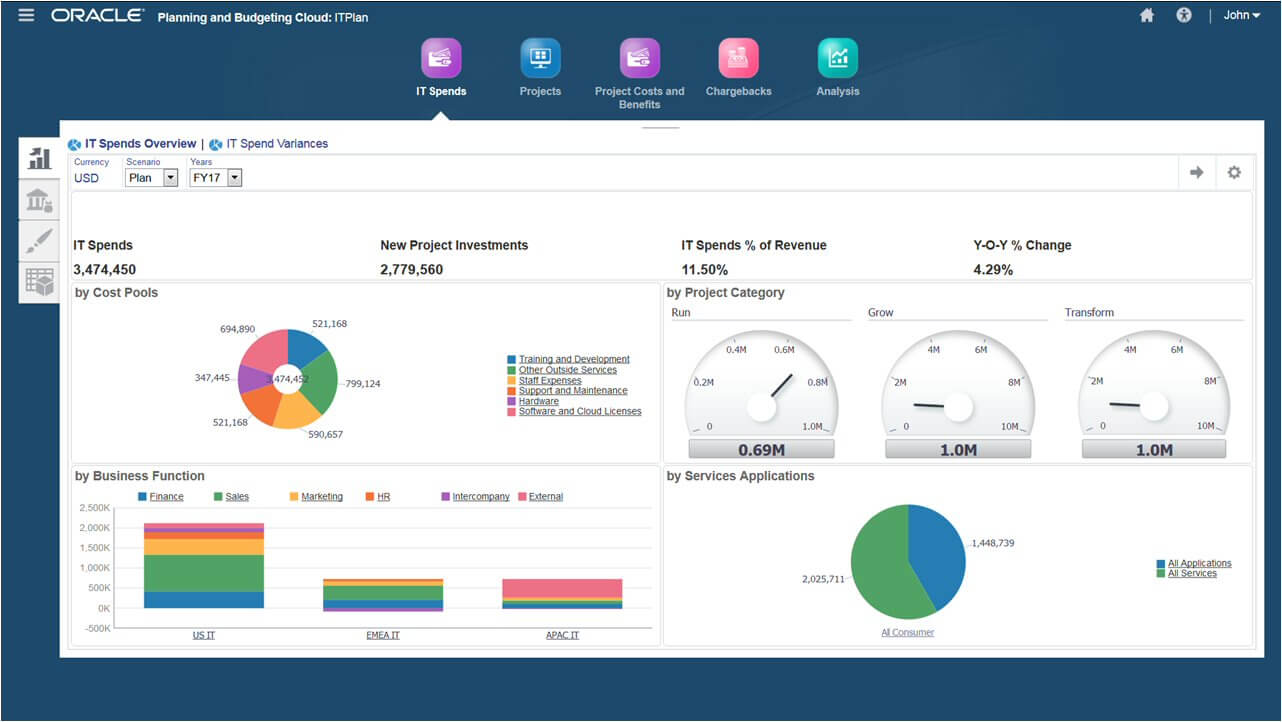
Oracle EPM Cloud helps you model and plan all aspects of corporate human resources, finance targets, sales departments, and your supply chain.
They are recognized as a leader in cloud financial close solutions thanks in part to their built-in global reporting requirement standards, automatic cash flow, and balance sheet calculations, and intelligent process automation (IPA).
Oracle offers smart insights and personalized recommendations using their comprehensive AI.
Oracle Cloud EPM costs from $1000/user/month and offers a 30-day free trial.
Pros and Cons
Pros:
- Good automated cash flow reporting and multi GAAP (generally accepted accounting principles) reporting
- Offers best practice configuration built right in
- Easily automate reconciliation processes
- Automating of XBRL (a.k.a. bar codes for reporting) tagging and taxonomies
Cons:
- Highest functionality requires additional Oracle Fusion apps such as Hyperion
- Smartview interface is a bit cumbersome
- Lacks some robust process automation (RPA)


Infor Dynamic Enterprise Performance Management (Infor d/EPM) merges intelligent business tools and financial planning capabilities to help you assess current and potential activities.
Their user-friendly modeling tool empowers managers to create, test, and deploy scenarios with machine learning insights, recommendations, and predictive analytics.
You’ll find yourself able to easily manage work-in-progress delivery costs, timelines, and project execution.
Infor d/EPM has enterprise pricing upon request and offers a free demo.
Pros and Cons
Pros:
- Unlimited versioning for what-if scenario planning
- Compelling AI-based predictive analytics
- Powerful and user-friendly modeling tool
- Unifies planning P&L, balance sheet, and cash flow
Cons:
- Time-consuming initial implementation and set-up
- Reports need some manual intervention for them to look presentation-worthy
- UI often incorporates too much text on each screen


IgniteTech’s EPM Live is a Microsoft SharePoint integrated enterprise work management solution designed to enhance your ability to track and manage all projects and associated costs.
EPM Live users can hone in on specific EPM processes, or access other IgniteTech modules which are also included in their EPM Live subscription.
You can also access all Ignite products under an Ignite Unlimited plan, which cover six key areas: customer experience management, digital engagement, sales and marketing enablement, functional process automation, information technology acceleration, and communications & remote engagement.
EPM Live costs from $6/user/month and offers a free 30-day trial. Enterprise plan pricing is available upon request.
Pros and Cons
Pros:
- Easy, native integration with any Microsoft program
- Fantastic cost and resource management features
- Built-in social collaboration tools assist team performance
- Comes with 70 ready-to-use functional extension modules
Cons:
- Requires MS SharePoint software at an additional cost
- Excessive clicks required for small things like closing a project or service request
- Minimum pricing plan is not suitable for large enterprises


Axiom Software by Syntellis (formerly Axiom EPM) is a sophisticated, flexible enterprise performance management solution used by companies to model scenarios, analyze financial results, and optimize organizational decision-making.
Their software supports strategic planning, budgeting, and forecasting, reporting and analytics, profitability, and cost management for complex data estates. Their cost management module boasts clear, evidence-based costing algorithms as well as profitability trends across business lines.
Their EPM system is well-suited for financial institutions, higher education, and complex healthcare organizations. They are currently used by companies like Atrium Health, Trinity Health, BankUnited, Byline Bank, and several US universities and colleges.
Axiom EPM has enterprise pricing upon request and offers a free demo.
Pros and Cons
Pros:
- Spreadsheet-style database is intuitive for anyone who has used Excel or Sheets
- Premium consulting package includes unique reports for any data set
- Myriad customization and possibilities for reporting templates
- Easy to set-up and adjust user security for data access
Cons:
- Interface is not as engaging and modern as some competitors
- Uses paid FTE (full time equivalent) metrics for reports rather than productive FTEs
- Can be challenging to drill-down to a single or specific charge
Best EPM Software: Pricing Comparison Chart
This comparison chart summarizes basic details about each of my top EPM software selections. You can view pricing details and the availability of free trials or demos side-by-side to help you find the best software for your budget and business needs.
| Tool | Best For | Trial Info | Price | ||
|---|---|---|---|---|---|
| 1 | Best for automating administrative tasks | Free demo available | Pricing upon request | Website | |
| 2 | Best for AI-supported planning and forecasting | Free demo available | Pricing upon request | Website | |
| 3 | Best EPM software for manufacturing operations | Not available | Pricing upon request | Website | |
| 4 | Best versioning and scenario analysis | 30-day free trial + free demo available | Pricing upon request | Website | |
| 5 | Best EPM software for retail analytics | Free demo available | Pricing upon request | Website | |
| 6 | Best for enterprise project portfolio management | 30-day free trial | Pricing upon request | Website | |
| 7 | Best for financial close solutions | 30-day free trial | From $1000/month | Website | |
| 8 | Best user-friendly modeling tool | Free demo available | Pricing upon request | Website | |
| 9 | Best for Microsoft SharePoint integration | 30-day free trial | From $6/user/month | Website | |
| 10 | Best EPM software for finance teams | Free demo available | Price upon request | Website |
Other Enterprise Performance Management Software
Here are a few more EPM solutions that didn’t make the top list:
- Anaplan
EPM software for supply and demand planning
- Planful
For rolling forecasts
- SAP Analytics Cloud
For first-party feature scalability
- IBM Planning Analytics
For change management planning
- Insight Software
For first-party feature scalability


Selection Criteria for Enterprise Performance Management Software
Wondering what features I'm looking for when selecting the best EPM software for this list? Here’s a summary of my evaluation criteria:
- User Interface (UI): The best EPM tools have broad features that organize busy, complex data well. The user interface should be tidy, readable at a glance, and provide drilled-down details with minimal clicks and menuing. Bonus points for maintaining a crisp, colorful, modern UI.
- Usability: Training staff on an EPM system is a huge undertaking so usability scorecards focus on the availability of detail-oriented training solutions, real-time customer support features, predictive help documentation (webinars, FAQ, forum, tutorial videos), and ongoing educational initiatives (particularly as software updates come and go).
- Software Integrations: EPM deals a lot with financial planning and analysis, plus financial reporting, so the software should be able to connect with other commonly used financial applications such as Salesforce, QuickBooks, Microsoft Excel, and CRM data sources.
- Value for Price: Dealing with an enterprise and its stakeholders means you'll need a robust, easily-scalable, and fairly priced tool. Is the EPM pricing structure easily adaptable to the needs of your growing and changing enterprise?
EPM Software: Key Features
When selecting enterprise performance management software, keep an eye out for the following key features:
- Integrated financial planning: Connect budgets, forecasts, and financial models into one seamless platform, so you can make informed decisions quickly. This lets you see the big picture and adjust plans in real-time as things change.
- Performance dashboards: Access real-time visualizations and key performance indicators (KPIs) in a centralized dashboard. This helps you track progress, spot trends, and share insights with your team—without needing to dig through spreadsheets.
- Strategic goal alignment: Make sure every department and team is moving in the same direction by aligning their activities with your organization’s biggest goals. This keeps everyone focused and accountable, from the C-suite to project leads.
- Scenario modeling: Test “what-if” scenarios to see how different changes—like market shifts or budget tweaks—could impact outcomes. You’ll feel more confident about your next move because you’ve already seen what might happen.
- Consolidation and reporting: Streamline the process of gathering data from various business units and countries. Generate consistent, accurate reports faster, which makes closing the books a lot less stressful at quarter’s end.
- Workflow automation: Automate repetitive tasks like approvals, notifications, or data collection. This keeps everyone on track and saves you from those dreaded manual errors.
- Role-based access control: Control who sees what, ensuring sensitive information is only accessible to authorized users. You can easily change permissions as teams evolve or as new projects pop up.
- Audit trails: Keep detailed records of changes, decisions, and approvals. This not only helps with compliance, but it also saves the day when you need to trace back who updated the forecast or why an adjustment was made.
Common Enterprise Performance Management Software AI Features
Beyond the standard enterprise performance management software features listed above, many of these solutions are incorporating AI with features like:
- Predictive analytics: Use AI to forecast future performance by identifying trends and patterns in your data. This means you can anticipate challenges and opportunities before they actually land on your desk.
- Automated anomaly detection: Let AI flag unusual spikes or dips in your KPIs automatically. You’ll catch potential issues—like unexpected costs or revenue gaps—before they spiral out of control.
- Natural language processing for reporting: Generate executive summaries or custom reports with just a few prompts. AI transforms data into plain language, so everyone can understand the story behind the numbers.
- Intelligent recommendations: Get proactive suggestions for improving processes, reallocating resources, or adjusting strategies. AI sifts through data faster than any analyst—serving up insights you might otherwise miss.
- Data cleansing and enrichment: Use AI to tidy up messy data and fill in missing details. Cleaner, more reliable numbers mean more confident decisions for everyone involved.
Frequently Asked Questions
Why should you use EPM software?
Enterprise performance management (EPM) software is crucial for high-level business process management (BPM). If you aren't using EPM software yet, you may want to consider using it for your organization.
Ask yourself: Are your strategic business processes grounded in accurate and timely enterprise performance data? How can you ensure your organization is maximizing data to support high-level decision-making?
EPM software addresses high-level processes such as financial forecasting and e-commerce reporting. Many also offer insights into supply chain effectiveness, strategy creation, and implementation.
What is the difference between ERP and EPM software?
Simply put, enterprise resource planning (ERP) software addresses operational processes within a corporation. ERP systems focus primarily on transactional data, and are more likely to address:
- A/R (accounts receivable)
- A/P (accounts payable)
- budgetary management
- cash management
- financial reporting (actual vs. budget variance)
- income statements
In contrast, EPM software aims to streamline business management processes within a corporation. EPM systems focus primarily on managerial data, and are more likely to address:
- analytics and modeling of "what if" scenarios
- advanced managerial insight into business performance
- complex budget maintenance
- complex enterprise planning
- decision-making based on financial and operational results
- in-depth analysis of detailed operational plans
Since EPM and ERP solutions do have a lot in common, much of the software on this list touches a bit on both. However, the best EPM systems remained the strongest focus.
Which EPM Software Have You Used?
Time for the audience to weigh in. Are you currently using any corporate performance management (CPM) tools that you want to boast about? What's your best business performance management tip? Is there a SaaS financial planning tool that you would add to this list if you could? Sound off in the comments.
Other Resources
Are you looking for software to help you track more granular, transactional data? If so, I recommend you take a look at our list of the best ERP systems too.
If you're interested in ERP systems, but on a tight budget, we've got you covered there too. Take a look at our list of the best ERP systems for small businesses on a budget.
What’s Next:
If you're in the process of researching epm software, connect with a SoftwareSelect advisor for free recommendations.
You fill out a form and have a quick chat where they get into the specifics of your needs. Then you'll get a shortlist of software to review. They'll even support you through the entire buying process, including price negotiations.