


Insightful Review 2026: Pros, Cons, Features & Pricing



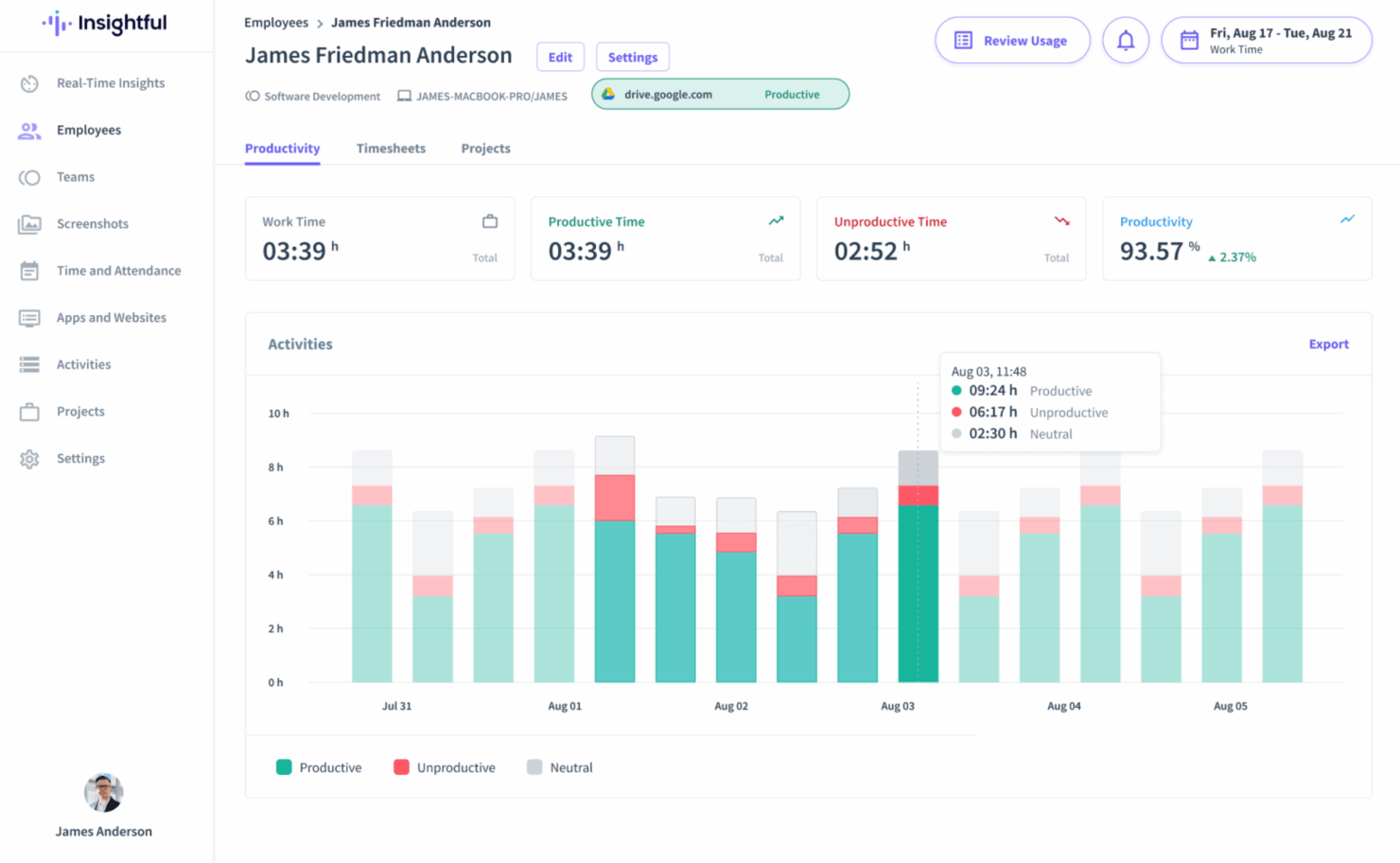
Insightful distinguishes itself in the employee monitoring space through an intuitive interface, smooth onboarding, and powerful productivity analytics. It’s especially beneficial for remote and IT-heavy environments. While it lacks deep integration breadth and traditional project management tools, its usability and strong support make it a compelling choice for companies focused on efficiency.
Insightful Evaluation Summary
- From $8/user/month (billed annually)
- Free demo + 7-day free trial available
Why Trust Our Software Recommendations
Our team has been testing and reviewing software since 2012. As HR experts ourselves, we know how difficult—and important—it is to choose the right software.
For this guide, we evaluated tools using hands-on testing and independent research, scoring tools using our selection criteria. We also draw on insights from industry thought leaders and practicing HR experts.
Our reviews reflect our human editorial judgment, not a sales pitch.
Expert reviewers:
Insightful Overview
Insightful is a productivity and employee monitoring platform designed to help businesses understand how work gets done across distributed teams. It’s particularly useful for remote-first organizations, IT departments, and project managers who need detailed visibility into workflows, time allocation, and team efficiency. The tool supports data-driven decisions while promoting accountability and performance improvement.
This review covers Insightful’s features, pros and cons, use cases, and pricing to help you determine if it fits your organization’s needs.
pros
-
Seamless onboarding with helpful guides and responsive assistance.
-
Intuitive UI that scales easily to manage dozens of users without becoming complex.
-
Actionable reporting for productivity insights across sales, operations, and project teams.
cons
-
Some features may feel excessive for very small teams or solo practitioners.
-
Doesn’t show real-time screen activity without manual setup.
-
Reporting tools can feel limited for deeper analysis.
-

Insightful
Visit WebsiteThis rating combines scores from multiple user review sites to reflect overall customer sentiment about the product.4.8 -
Intelogos
Visit WebsiteThis rating combines scores from multiple user review sites to reflect overall customer sentiment about the product.4.8 -
ActivTrak
Visit WebsiteThis rating combines scores from multiple user review sites to reflect overall customer sentiment about the product.4.5




How We Test & Score Our Tools
We’ve spent years building, refining, and improving our software testing and scoring system. The rubric is designed to capture the nuances of software selection and what makes a tool effective, focusing on critical aspects of the decision-making process.
Below, you can see exactly how our testing and scoring works across seven criteria. It allows us to provide an unbiased evaluation of the software based on core functionality, standout features, ease of use, onboarding, customer support, integrations, customer reviews, and value for money.
Core Functionality (25% of final score)
The starting point of our evaluation is always the core functionality of the tool. Does it have the basic features and functions that a user would expect to see? Are any of those core features locked to higher-tiered pricing plans? At its core, we expect a tool to stand up against the baseline capabilities of its competitors.
Standout Features (25% of final score)
Next, we evaluate uncommon standout features that go above and beyond the core functionality typically found in tools of its kind. A high score reflects specialized or unique features that make the product faster, more efficient, or offer additional value to the user.
We also evaluate how easy it is to integrate with other tools typically found in the tech stack to expand the functionality and utility of the software. Tools offering plentiful native integrations, 3rd party connections, and API access to build custom integrations score best.
Ease of Use (10% of final score)
We consider how quick and easy it is to execute the tasks defined in the core functionality using the tool. High scoring software is well designed, intuitive to use, offers mobile apps, provides templates, and makes relatively complex tasks seem simple.
Onboarding (10% of final score)
We know how important rapid team adoption is for a new platform, so we evaluate how easy it is to learn and use a tool with minimal training. We evaluate how quickly a team member can get set up and start using the tool with no experience. High scoring solutions indicate little or no support is required.
Customer Support (10% of final score)
We review how quick and easy it is to get unstuck and find help by phone, live chat, or knowledge base. Tools and companies that provide real-time support score best, while chatbots score worst.
Customer Reviews (10% of final score)
Beyond our own testing and evaluation, we consider the net promoter score from current and past customers. We review their likelihood, given the option, to choose the tool again for the core functionality. A high scoring software reflects a high net promoter score from current or past customers.
Value for Money (10% of final score)
Lastly, in consideration of all the other criteria, we review the average price of entry level plans against the core features and consider the value of the other evaluation criteria. Software that delivers more, for less, will score higher.
New Product Updates from Insightful
Insightful Expands MCP and HRIS Integrations
Insightful MCP Server now lets authorized users query live workforce data from ChatGPT and Copilot Studio using OAuth. HRIS integrations can also sync manager access from reporting hierarchies and keep permissions updated as structures change. Highlights include:
- ChatGPT Connection: Connects ChatGPT to live Insightful data through OAuth.
- Copilot Studio Connection: Adds OAuth access for Microsoft Copilot Studio.
- Read-Only MCP Access: Keeps AI queries within existing Insightful permissions.
- Manager Scope Sync: Aligns manager access with HRIS reporting hierarchies.
- Automatic Permission Updates: Adjusts manager access as organizational structures change.
- HRIS Beta: Manager scope syncing is currently available in Beta.
Visit Insightful’s official site for more details.
 for more details.
Insightful API Adds Alert Management
Insightful has expanded its API capabilities to include alert management, making it easier to automate and centrally administer alerting workflows. This helps teams integrate Insightful alerts into existing tools and reduce manual setup. Highlights include:
- Alert Creation: Creates new alerts through the API.
- Alert Updates: Changes existing alert configurations programmatically.
- Activation Controls: Activates or deactivates alerts through API calls.
- Alert Deletion: Removes alerts without using the UI.
- Permission Controls: Limits actions based on token access and user roles.
Visit Insightful’s official site for more details.
Insightful Redesigns Tracking Settings With Shared Controls
Insightful now centralizes shared tracking settings, employee assignments, and tracking actions in one redesigned experience. Admins can also assign employees during setup and review each setting’s scope more easily. Highlights include:
- Shared Tracking Settings: Centralizes reusable tracking configurations in one place.
- All Tab: Lists every shared tracking setting and its assigned scope.
- Employees Tab: Shows active employees alongside their applied tracking setting.
- Guided Setup: Walks admins through creating settings and assigning employees.
- Manage Actions: Groups employee tracking actions under a single Manage button.
- Team Inheritance: Lets employees inherit their team’s tracking setting when moved.
Visit Insightful’s official site for more details.
Insightful Brings Work Intelligence to AI Assistants
Insightful MCP Server lets Work Intelligence users access saved reports and run discovery conversations from AI assistants such as Claude. Users can start analyses, check progress, answer clarifying questions, and ask follow-ups from the same assistant. Highlights include:
- Saved Reports: Lets users list and read saved Work Intelligence reports.
- Discovery Conversations: Runs Work Intelligence analysis directly from a connected AI assistant.
- Progress Tracking: Lets users check the status of an active analysis.
- Follow-Up Questions: Supports clarifications and continued analysis within the conversation.
- Early Access: Available to organizations with Work Intelligence enabled.
Visit Insightful’s official site for more details.
Integrations
Insightful.io supports a broad range of integrations to streamline HR and productivity workflows. For HR teams, integrations include BambooHR, HiBob, and Gusto, helping sync employee data and automate time tracking. For project management, it connects with tools like Jira, Asana, Trello, and ClickUp to align tracked time with tasks and deliverables. Additional integrations with Slack, Okta, and BigQuery support communication, identity management, and advanced reporting needs.
Insightful Specs
- API
- Batch Permissions & Access
- Behavioral Tracking
- Big Data
- Competency Assessment
- Compliance Tracking
- Dashboard
- Data Export
- Data Import
- Data Visualization
- Database
- Employee Database
- Employee Engagement
- Employee Onboarding
- External Integrations
- Feedback Management
- Multi-User
- Notifications
- Password & Access Management
- Performance Appraisal
- Site Access Management
- Social-Media Integration
- Workflow Management
Alternatives to Insightful




Partner Spotlight: Stories From Insightful

Can This Tool Solve HR’s Biggest Remote Work Challenges?


How Mercor Uses Insightful.io Save $100,000s While Managing Remote Talent
How Caduceus Health Cut Staff Turnover and Increased Engagement by 30% with Insightful.io