



iSpring LMS vs. Absorb LMS: Comparison & Expert Reviews For 2026


When your current learning management system starts slowing down training or making things harder for your team than they should be, it’s normal to look for platforms that feel easier to manage and better suited to your growth.
As you start exploring alternatives, iSpring and Absorb often come up as two of the most reliable options. If you’re trying to figure out which one fits your goals, I’ve broken down their key differences so you can make a more confident choice.
iSpring LMS vs. Absorb: An Overview
iSpring LMS


Absorb


Why Trust Our Software Recommendations
Our team has been testing and reviewing software since 2012. As HR experts ourselves, we know how difficult—and important—it is to choose the right software.
For this guide, we evaluated tools using hands-on testing and independent research, scoring tools using our selection criteria. We also draw on insights from industry thought leaders and practicing HR experts.
Our reviews reflect our human editorial judgment, not a sales pitch.
Expert reviewers:
iSpring LMS vs. Absorb Pricing Comparison
| iSpring LMS | Absorb | |
|---|---|---|
| Free Trial | Free trial available | Free demo available |
| Pricing | From $6.91/user/month (billed annually) | Pricing upon request |
iSpring LMS vs. Absorb LMS Hidden Costs
iSpring LMS uses a transparent per-user subscription model. You get access to the iSpring Suite (for course authoring) for free when you purchase a subscription for iSpring LMS, allowing you to access full capabilities for learning management.
Absorb LMS uses a custom, quote-based pricing model built around the number of learners and required features. Hidden costs typically come from add-ons like advanced analytics, e-commerce, HRIS/CRM integrations, and implementation work, which can increase the total price depending on how complex your training setup becomes.
iSpring LMS vs. Absorb Feature Comparison
iSpring LMS has a rich set of features for creating personalized training programs and granular reporting. It supports full-cycle training, from assessment and development to results. It’s easy to setup and also supports mobile learning, making it ideal for a range of use cases and industries, whether you’re at a desk or on the go.
Absorb LMS is designed for larger or growing organizations that need strong reporting, automation, and detailed learner management. It includes advanced analytics, smart enrollment rules, branded portals, and broad integration support that make it easier to handle complex training programs across different groups.
| iSpring LMS | Absorb | |
|---|---|---|
| API | ||
| Class Management | ||
| Comparative Reporting | ||
| Corporate/Business | ||
| Dashboards | ||
| Data Export | ||
| Data Import | ||
| Data Visualization | ||
| Document Comparison | ||
| Employee Training | ||
| External Integrations | ||
| Feedback Management | ||
| Gamification | ||
| Gradebook | ||
| Mobile App | ||
| Multi-User | ||
| Notifications | ||
| Personal Learning | ||
| Report & Compliance | ||
| Report Cards | ||
| SCORM | ||
| Scheduling | ||
| Student Registration | ||
| Video Courses |
iSpring LMS vs. Absorb LMS Integrations
| Integration | iSpring LMS | Absorb LMS |
| Microsoft Teams | ✅ | ✅ |
| Zoom | ✅ | ✅ |
| Salesforce | ✅ | ✅ |
| Google Workspace | ✅ | ✅ |
| Slack | ❌ | ✅ |
| HubSpot | ❌ | ✅ |
| BambooHR | ✅ | ❌ |
| Microsoft Outlook | ✅ | ✅ |
| API | ✅ | ✅ |
| Zapier | ❌ | ❌ |
These integrations help you run smoother training workflows. iSpring LMS gives you easy connections to tools like BambooHR and Outlook, which make user management and communication simpler.
Absorb LMS supports options like Slack and HubSpot, which can help you keep teams updated and align training with your sales or support activity. Both platforms also offer API access, so you can build custom connections when your setup needs something more tailored.
iSpring LMS vs. Absorb LMS Security, Compliance & Reliability
| Factor | iSpring LMS | Absorb LMS |
| Data Privacy | iSpring uses SSL/TLS for data in transit and encrypts stored data to protect sensitive information. Follows GDPR requirements. | Follows GDPR requirements and uses controlled access to protect personal data. |
| Encryption | Keeps information safe through SSL/TLS protection during transfer. | Details on encryption standards are not publicly disclosed and must be obtained directly from the vendor. |
| Uptime Reliability | Uses secure hosting and 24/7 monitoring to keep the platform running. | Stable under heavy load, with case studies showing portals handling over 170,000 concurrent users without going down. |
| Regulatory Compliance | Aligns with eLearning standards such as SCORM and AICC to ensure compatibility across training content. | Absorb LMS complies with SCORM, AICC, and xAPI standards for content integration. |
Both platforms offer solid security foundations but differ in transparency and focus. iSpring provides clear details on data handling, encryption, and content standards, while Absorb emphasizes regulated compliance and proven stability at scale, though it discloses less about its technical encryption.
iSpring LMS vs. Absorb LMS Ease of Use
| Factor | iSpring LMS | Absorb LMS |
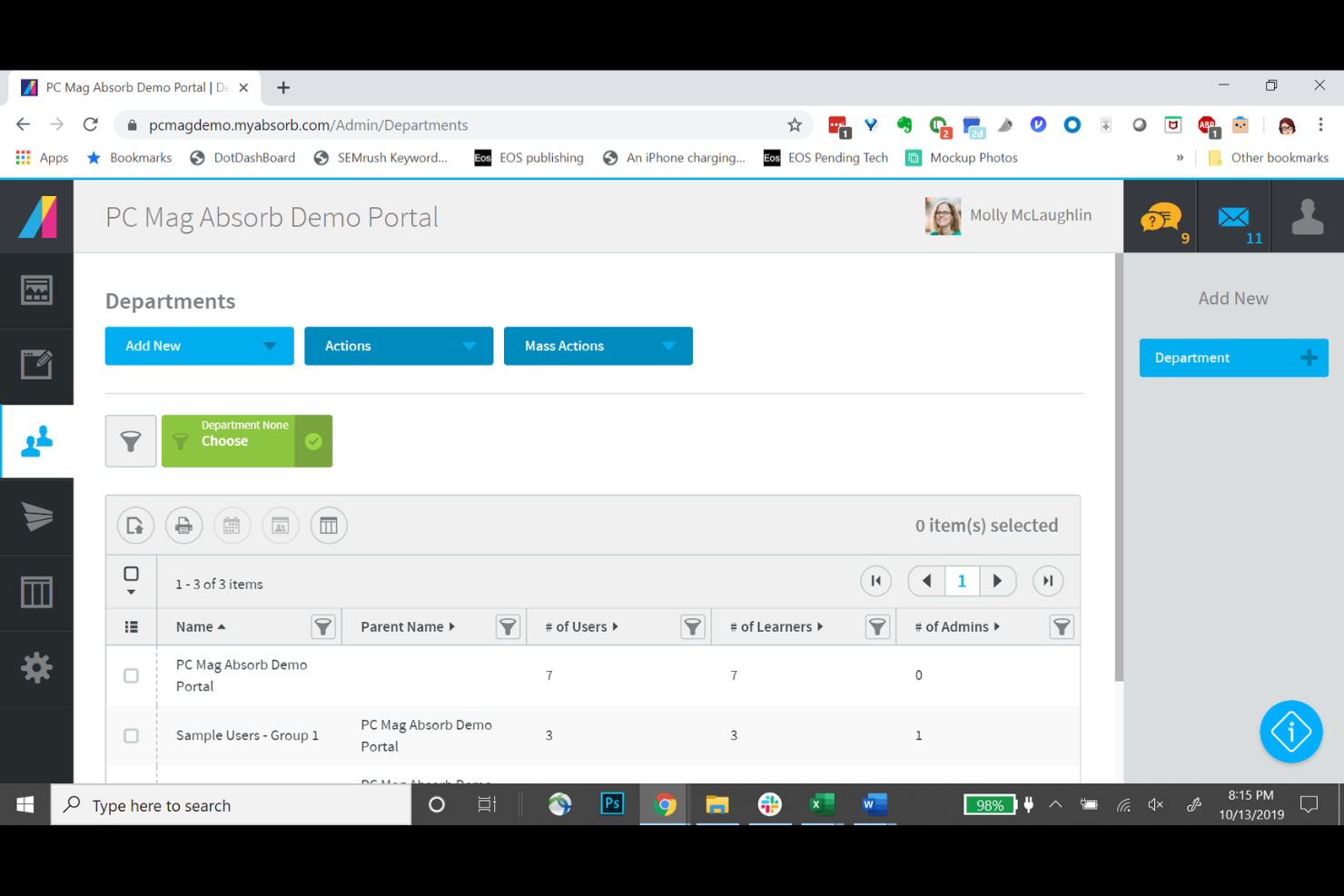
| User Interface | Clean, simple interface designed for easy navigation. | Modern, customizable dashboard with flexible layout options. |
| Onboarding Experience | Offers guided setup, quick-start steps, and clear tutorials for new users. Onboarding plans can also be tailored for specific roles with dedicated mentors and an opportunity to compare employees and training stats. | Offers guided onboarding with walkthroughs and role-based learning paths. |
| Setup | iSpring LMS has a quick setup process with minimal technical requirements. On-premise installation is also available. | Absorb LMS requires a more detailed setup but offers extensive configuration options. |
| Support | Offers responsive 24/7 support with live chat and a detailed knowledge base. | Provides 24/7 support and a large resource library for troubleshooting. |
iSpring keeps things simple with an easy interface, quick setup, and guided onboarding, making it ideal for teams that want to get started fast. Absorb offers a more customizable experience with flexible dashboards and deeper configuration options, though advanced analytics can come at an additional price, and the initial setup can take more time.
iSpring LMS vs Absorb: Pros & Cons
iSpring LMS
- The interface is very easy for both admins and learners to use.
- Customer support is exceptionally responsive and helpful.
- Course creation is smooth with built-in AI microlearning course creation and the iSpring Suite.
- Limited integrations compared to larger or more modern LMS platforms.
- Customization options are minimal.
- Reporting is basic compared to data-rich LMS competitors.
Absorb
- You get a clean, intuitive learner UI that boosts completion.
- You can brand learner dashboards and tailor experiences for each audience.
- You can automate enrollments and reminders to cut admin time.
- Admin paths can feel click-heavy and take time to learn.
- Reporting can lack the depth you need for ad hoc questions.
- You may hit occasional bugs or mobile hiccups that slow your team.
Best Use Cases for iSpring LMS and Absorb
iSpring LMS
- Manufacturing Well-suited for manufacturing organizations that need to deliver standardized training across roles, shifts, and locations. iSpring LMS supports safety training, SOPs, equipment operation basics, and compliance programs.
- Sales and Product Training Teams Great for delivering consistent sales onboarding and product training for internal teams and external audiences.
- Healthcare Training Ideal for basic compliance modules, skill refreshers, and standardized internal training programs in healthcare environments. iSpring LMS supports consistent content delivery while making it easy to track completion for audits and regulatory requirements.
- Tech Companies Great for tech companies requiring on-premise installation, especially those with strict security, data privacy, or compliance requirements. iSpring LMS allows organizations to keep full control over their infrastructure.
- Consulting Firms Consulting firms can easily invite their clients to iSpring LMS, making it simple to deliver training, documentation, or enablement programs as part of an engagement.
- Government Agencies Government agencies can benefit from iSpring LMS’s on-premise installation, which supports tighter data control, regulatory compliance, and internal security policies.
Absorb
- Customer Education You can sell courses and run branded portals for clients, so your team grows adoption without mixing internal training.
- Partner Enablement You can set up separate partner portals and assign content by audience to control access and track readiness.
- Compliance Programs You can automate enrollments and reminders by role and location, so you hit deadlines and reduce manual follow-up.
- Franchise Networks You can spin up tenant sites with unique branding and content, so each location trains to its own needs.
- Multi-Unit Enterprises You can manage separate portals for business units while keeping admin oversight and shared standards.
- Member Organizations You can offer member training in a branded portal and use audience rules to tailor content by membership tier.
Who Should Use iSpring LMS, and Who Should Use Absorb LMS?
iSpring is great if you're looking for a simple LMS that’s quick to set up, easy to navigate, and ideal for teams that want fast onboarding without heavy configuration.
But if you need deeper customization, flexible dashboards, or more advanced onboarding and support, then Absorb is the better fit. In the end, it’s best to weigh your priorities before making a choice.
Differences Between iSpring LMS and Absorb
| iSpring LMS | Absorb | |
|---|---|---|
| Course Creation | Includes strong built-in authoring tools that allow teams to create interactive, slide-based, and multimedia courses without relying on external software. | Emphasizes content delivery and tracking rather than authoring, working best for teams that already use external tools or imported SCORM packages. |
| Customization | Offers basic branding options but fewer layout or workflow controls than enterprise LMS platforms. | Supports deeper customization with configurable dashboards, permissions, workflows, and automated rules to match complex training structures. |
| Pricing Model | Uses a subscription plan with predictable tiers based on user count, making budgeting more straightforward for smaller teams. | Uses a quote-based model that adjusts to organization size and feature requirements, offering flexibility for complex deployments. |
| User Interface | Provides a simple and intuitive interface that helps new users navigate the platform quickly. | Includes a customizable dashboard where layouts and views can be tailored to different roles or training needs. |
| Visit iSpring LMSOpens new window | Read Absorb ReviewOpens new window |
Similarities Between iSpring LMS and Absorb
| Accessibility | Both platforms offer mobile-friendly access, allowing learners to complete training from multiple devices and locations. |
|---|---|
| Compliance Standards | Both platforms support SCORM for course compatibility, enabling organizations to import and deliver standardized learning content. |
| Integration Options | Both systems integrate with major workplace tools like Microsoft Teams and Zoom, allowing organizations to support live training and communication flows. |
| Reporting | Each LMS includes reporting tools that track learner progress, course completion, and training performance, helping teams measure effectiveness. |
| Security | Both solutions follow GDPR requirements and use secure data-handling practices to protect learner information. |
| Visit iSpring LMSOpens new window Read Absorb ReviewOpens new window | |