

monday.com Review: Pros, Cons, Features & Pricing


monday.com is a flexible workforce management software that helps you coordinate scheduling, workloads, and day-to-day team operations in one place. It works best for HR professionals supporting fast-moving teams, like staffing groups managing shift work, people ops teams juggling onboarding and scheduling, or managers who need a clear view of capacity. Its value comes from giving you a simple, visual way to keep your team aligned, reduce manual work, and stay ahead of bottlenecks.
monday.com Evaluation Summary
- From $9/seat/month (billed annually)
- Free plan available
Why Trust Our Software Reviews
monday.com Overview
In my opinion, monday.com gives you a strong mix of flexibility, speed, and clarity for workforce management, especially if you’re handling shifting workloads across multiple teams. When I compare it to other tools, it stands out with its visual boards and automations that actually reduce daily admin instead of adding more steps. It does fall short if you need extremely advanced scheduling or deep HR-specific modules, but for most teams it’s easy to judge it as a reliable, scalable choice. If you want something that adapts to how your team works—and not the other way around—it’s a solid pick.
pros
-
You can automate routine steps so your daily work runs with fewer manual updates.
-
You get clear visibility into workloads, timelines, and task owners across your team.
-
You can set up workflows fast with simple boards, columns, and drag-and-drop tools.
cons
-
You may run into limits when handling advanced workforce needs like detailed labor rules.
-
You’ll need time to build and maintain boards if your team manages complex processes.
-
You may find the flexible setup overwhelming if you want strict, structured workflows.
Is monday.com Right For Your Needs?
Who Would be a Good Fit for monday.com?
monday.com works well for teams that need a flexible workforce management software to organize people, schedules, and daily operations in one place. It’s especially helpful if you run cross-team work, handle shifting priorities, or manage a mix of employees and contractors because its boards and automations adapt quickly. You’ll get the most value if you want clear visibility into workloads and need a simple way to standardize processes across your team.
-
Small Businesses
You get an easy, visual way to coordinate people and tasks without needing technical setup or heavy processes.
-
Agencies
It makes it simple to balance workloads, track client deliverables, and keep your team from being overloaded.
-
Project Managers
Timelines, owners, and status boards give you clear visibility into progress so your team always knows what’s next.
-
Retail Staff Scheduling
Drag-and-drop scheduling and real-time updates make it easy to plan shifts and avoid coverage gaps.
-
Operations Teams
You can map processes, set automations, and keep everyone aligned without messy manual steps.
-
HR Teams
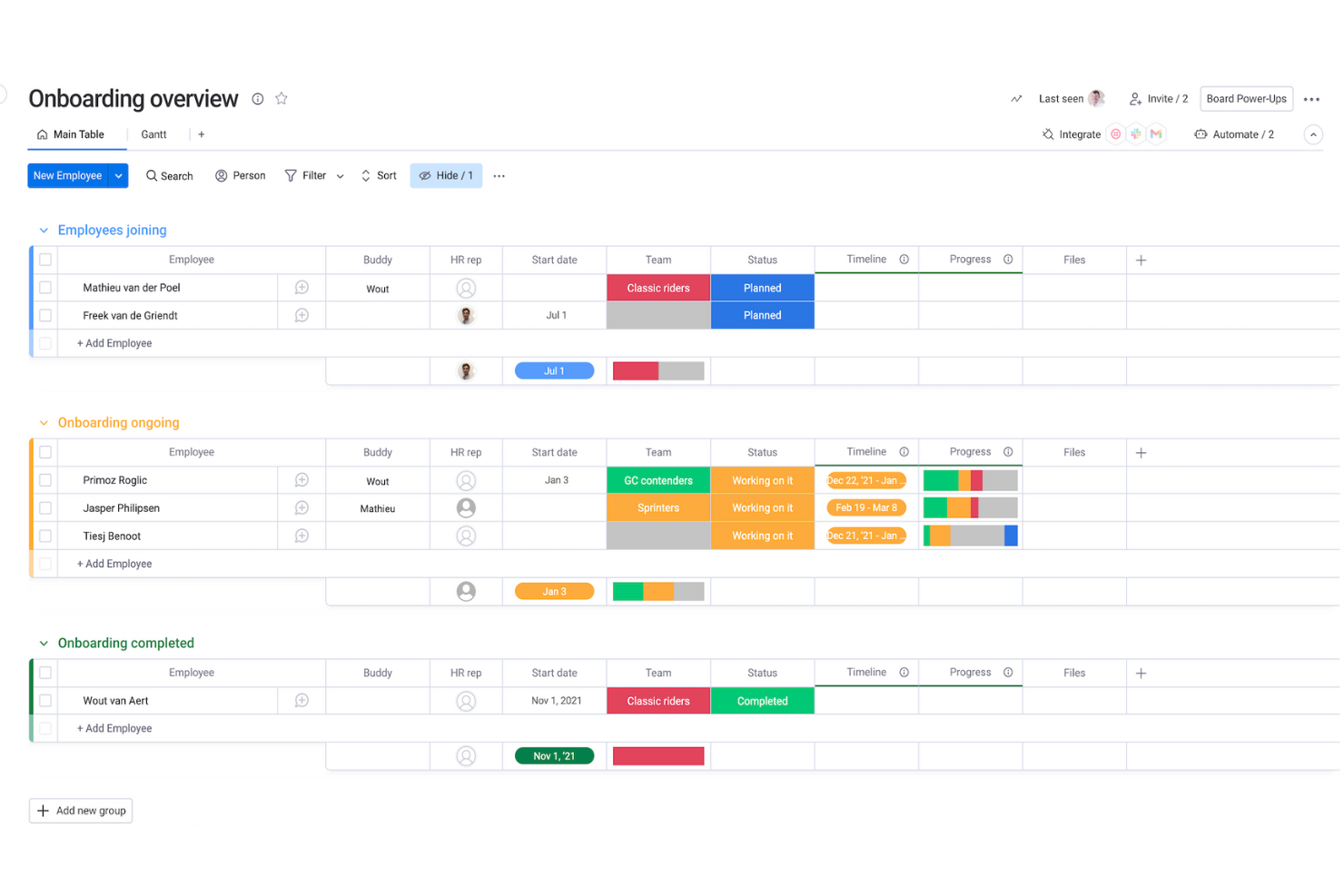
It helps you track onboarding, schedules, and employee requests with customizable boards that match your workflows.
Who Would be a Bad Fit for monday.com?
monday.com isn’t ideal if your work requires deep, specialized workforce systems like advanced payroll, complex compliance tracking, or industry-specific labor rules. You may struggle if you need highly rigid reporting standards because monday.com is built to be flexible rather than strict. It also won’t be a strong match if your team prefers traditional, spreadsheet-style tools and doesn’t want to maintain visual boards.
-
Heavy Payroll
It doesn’t offer the complex calculations and regulation-specific rules you’d need for payroll-driven teams.
-
Manufacturing Plants
Highly detailed labor tracking and machine-level scheduling aren’t built into its core workflows.
-
Large Call Centers
It lacks the deep forecasting and real-time staffing tools these environments depend on.
-
Healthcare Staffing
Strict compliance, credentialing, and shift-swap rules require more specialized systems than monday.com provides.
-
Unionized Labor
Complex contract rules and auto-enforced scheduling policies aren’t supported natively.
-
Finance Departments
If you need rigid audit-ready structures, monday.com’s flexible boards may feel too loose for your requirements.
How We Test & Score Our Tools
We’ve spent years building, refining, and improving our software testing and scoring system. The rubric is designed to capture the nuances of software selection and what makes a tool effective, focusing on critical aspects of the decision-making process.
Below, you can see exactly how our testing and scoring works across seven criteria. It allows us to provide an unbiased evaluation of the software based on core functionality, standout features, ease of use, onboarding, customer support, integrations, customer reviews, and value for money.
Core Functionality (25% of final score)
The starting point of our evaluation is always the core functionality of the tool. Does it have the basic features and functions that a user would expect to see? Are any of those core features locked to higher-tiered pricing plans? At its core, we expect a tool to stand up against the baseline capabilities of its competitors.
Standout Features (25% of final score)
Next, we evaluate uncommon standout features that go above and beyond the core functionality typically found in tools of its kind. A high score reflects specialized or unique features that make the product faster, more efficient, or offer additional value to the user.
We also evaluate how easy it is to integrate with other tools typically found in the tech stack to expand the functionality and utility of the software. Tools offering plentiful native integrations, 3rd party connections, and API access to build custom integrations score best.
Ease of Use (10% of final score)
We consider how quick and easy it is to execute the tasks defined in the core functionality using the tool. High scoring software is well designed, intuitive to use, offers mobile apps, provides templates, and makes relatively complex tasks seem simple.
Onboarding (10% of final score)
We know how important rapid team adoption is for a new platform, so we evaluate how easy it is to learn and use a tool with minimal training. We evaluate how quickly a team member can get set up and start using the tool with no experience. High scoring solutions indicate little or no support is required.
Customer Support (10% of final score)
We review how quick and easy it is to get unstuck and find help by phone, live chat, or knowledge base. Tools and companies that provide real-time support score best, while chatbots score worst.
Customer Reviews (10% of final score)
Beyond our own testing and evaluation, we consider the net promoter score from current and past customers. We review their likelihood, given the option, to choose the tool again for the core functionality. A high scoring software reflects a high net promoter score from current or past customers.
Value for Money (10% of final score)
Lastly, in consideration of all the other criteria, we review the average price of entry level plans against the core features and consider the value of the other evaluation criteria. Software that delivers more, for less, will score higher.
New Product Updates from monday.com

monday.com Enhances Governance With AI Spend and Activity Logs
monday.com introduces AI governance with per-user limits and scheduled cleaning activity logs to improve administrative control and oversight. These updates enhance cost management and auditability by providing clearer visibility into AI usage and system activity. Here are the details of the update:
 introduces AI governance with per-user limits and scheduled cleaning activity logs to improve administrative control and oversight. These updates enhance cost management and auditability by providing clearer visibility into AI usage and system activity. Here are the details of the update:
- AI Spend Governance: Allows admins to set per-user AI credit limits with usage monitoring and threshold alerts to control costs.
- Scheduled Activity Logs: Tracks and exports actions like board deletions or archiving to support governance and compliance.
Visit monday.com’s official site for more details.

monday.com Adds Microsoft Teams Messaging In Workflows
monday.com introduces Microsoft Teams messaging in workflows, enabling users to notify specific individuals without leaving the platform. This improves workflow efficiency and keeps stakeholders aligned by reducing the need to switch tools. Here are the details of the update:
- Direct Messaging from Workflows: Users can now send personalized messages to individual Microsoft Teams members directly from monday.com workflows.
- Improved Tool Integration: By integrating messaging, users can maintain communication within the workflow.
- Seamless Stakeholder Alignment: This functionality helps keep all relevant parties in the loop.
Visit monday.com's official site for more details.
monday.com Sidekick Generates Marketing Images
monday.com introduces marketing image generation through monday sidekick, allowing users to create visuals directly within the platform. This improves efficiency by reducing reliance on external design tools and speeding up content creation. Here are the details of the update:
- Image Quality Enhancement: The tool enables users to generate high-quality marketing images, thereby significantly enhancing the impact of marketing campaigns.
- Efficiency in Image Creation: By using monday sidekick, the process of creating marketing images becomes more efficient, saving time for marketing professionals.
Visit monday.com's official site for more details.
monday.com Enhances Managed Templates for Scale and Consistency
monday.com enhances Managed Templates by increasing the instance limit to 1,000 and enabling automatic board view sync across all instances. These updates improve scalability and ensure consistency by keeping structures aligned without manual updates. Highlights include:
- Expanded Instance Limit: Supports up to 1,000 instances per managed template, improving scalability across projects.
- Board View Sync: Automatically syncs board views across all template instances, ensuring consistent structure and visibility.
Visit monday.com’s official site for more details.

monday.com Adds Time Range Support to Calendar Widget
monday.com introduces time range support in the Calendar Widget to display tasks and events across start and end dates. This update improves scheduling accuracy by providing a clearer view of timelines and overlapping activities. Highlights include:
- Time Range Support: Displays events across start and end dates for more accurate scheduling.
- Enhanced Timeline Visibility: Shows task durations instead of single-day entries.
- Flexible Date Mapping: Allows users to connect separate start and end date columns for visualization.
Visit monday.com’s official site for more details.

monday.com Introduces WorkCanvas for AI-Powered Collaboration
monday.com introduces WorkCanvas to enable visual collaboration through an AI-powered canvas for planning and idea organization. This update improves team workflows by centralizing collaboration, reducing fragmentation, and supporting more dynamic project planning. Highlights include:
- AI-Powered Canvas: Enables teams to brainstorm, plan, and organize ideas in a visual workspace.
- Real-Time Collaboration: Allows multiple users to work together on canvases simultaneously.
- Flexible Visual Planning: Supports organizing tasks, workflows, and concepts in a freeform layout.
- Centralized Workspace: Keeps collaboration within monday.com to reduce reliance on external tools.
Visit monday.com’s official site for more details.
monday.com Launches MCP Framework for AI Agents
monday.com launches its MCP server, agent toolkit, and Dynamic API tools to support AI-powered workflow automation. These updates allow agents to query data, create items, and execute actions securely within monday.com. Highlights include:
- MCP Server: Connect AI agents directly to monday.com’s API.
- Hosted MCP: Secure OAuth-based access with workspace controls.
- Dynamic API Tools: Enable advanced GraphQL queries and automation.
Visit monday.com’s official site for more details.

monday.com Introduces AI Blocks for Workflow Automation
monday.com has released an exciting new feature that opens up AI Blocks to all its users. This update allows users to integrate artificial intelligence into their workflows seamlessly, resulting in greater efficiency and smarter work processes. Here are the details of the update:
- AI Blocks Accessibility: Now available for every user, ensuring everyone can benefit from AI enhancements.
- Ready-Made AI Actions: Pre-designed AI actions are integrated easily, speeding up workflow and decision-making processes.
- Enhanced Workflow Productivity: Users can expect more efficient task management and improved productivity outcomes.
Visit monday.com's official site for more details.

monday.coms Project Setup with Batch Dependencies
monday.com has introduced an update that significantly enhances project setup through batch dependencies, streamlining the process of dependency mapping to save valuable time.
This improvement allows users to create complex sequential workflows across multiple tasks with just a single click, adding tremendous efficiency to project management. Some important aspects that were part of this update include:
- Batch Dependencies: Instantly apply dependencies to multiple tasks, transforming hours of work into a one-click solution.
- Complex Workflow Building: Facilitate the construction of complicated task workflows, simplifying delegation and execution.
Visit monday.com's official site for more details.
monday.com Integrates AI Agents and Apps
monday.com adds MCP support to allow AI agents and apps to read and act on monday.com data within supported AI tools. These updates improve automation, simplify task handling, and unlock new ways to generate insights without manual board management. Here are details of the update:
- Connection of AI Agents and Apps: This feature lets you easily connect your AI agents and apps to your monday.com account.
- Management of Boards and Tasks: Connected AI agents can dynamically manage and assign tasks across boards, increasing operational efficiency.
- Insights Generation: By integrating AI, users can generate deeper insights from their data, supporting strategic decision-making.
Visit monday.com's official site for more details.
monday.com Specs
- API
- Batch Permissions & Access
- Budgeting
- Calendar Management
- Collaboration Support
- Contact Management
- Contact Sharing
- Customer Management
- Dashboard
- Dashboards
- Data Export
- Data Import
- Data Visualization
- Dependency Tracking
- Document Sharing
- Expense Tracking
- External Integrations
- File Sharing
- Gantt Charts
- Kanban Boards
- Multi-User
- Notifications
- Project Management
- Resource Management
- Scheduling
- Task Scheduling/Tracking
- Third-Party Plugins/Add-Ons
- Time Management
- Travel Management
- Workflow Management
monday.com FAQs
Can monday.com support complex HR workflows as my team grows?
How well does monday.com handle sensitive employee data?
Can my team collaborate in real time on HR tasks and updates?
Will monday.com help me keep track of workloads across multiple departments?
Can monday.com support hiring and applicant tracking needs?
Does monday.com support documentation for HR audits or compliance?
Can monday.com help me streamline onboarding for new hires?
Will monday.com work for HR teams that manage remote or hybrid employees?
monday.com Company Overview & History
monday.com Ltd. is a publicly traded software company headquartered in Tel Aviv, Israel, and has grown to more than 2,500 employees while supporting thousands of teams globally. It began as daPulse in 2012 and changed its name to monday.com in 2017, and now serves clients including over 60% of the Fortune 500. The company went public on Nasdaq in June 2021 and reported revenue of around $730 million in 2023.
monday.com Major Milestones
- 2012: Incorporated as daPulse Labs Ltd. in Israel.
- 2017: Rebranded to monday.com.
- 2019: Raised $150 million in Series D at a valuation of $1.9 billion.
- 2021: Completed an IPO on Nasdaq under ticker MNDY.
- 2023: Achieved positive free cash flow of $212.7 million.
- 2024: Reported revenue of roughly $729.7 million for fiscal year.
What's Next?
To remain up to date on all the latest in people management, subscribe to our newsletter for leaders and managers. You'll receive insights and offerings tailored to leaders and HR professionals straight to your inbox.