Tanda Review: Pros, Cons, Features and Pricing Explained



Tanda is a workforce management software built for businesses managing shift-based teams who need scheduling, time tracking, and labor cost oversight in one place. It's a strong fit for retail, hospitality, and healthcare operations with hourly workforces spread across multiple locations. I'd consider Tanda over Deputy if real-time wage tracking and labor cost visibility are your priorities. Tanda goes deeper on the cost side while keeping the scheduling experience just as accessible.
Tanda Evaluation Summary
- Pricing upon request
- Free demo available
Why Trust Our Software Reviews
We’ve been testing and reviewing HR software systems since 2019. As HR experts ourselves, we know how critical and difficult it is to make the right decision when selecting software.
We invest in deep research to help our audience make better software purchasing decisions. We’ve tested more than 2,000 tools for different HR management use cases and written over 1,000 comprehensive software reviews. Learn how we stay transparent & our software review methodology.
Tanda Overview
In my opinion, Tanda is strongest when employee retention is closely tied to financial wellness and benefits. Its matched savings, personalized benefits, engagement tools, and retention insights give employers a focused way to address financial stress and improve engagement, though its narrower scope means it won’t replace broader payroll, scheduling, or workforce management tools. I think it’s a good fit for employers with hourly or essential-worker populations that want more targeted retention support without adding a full HR platform.
pros
-
Personalized benefits and matched savings directly support employee financial wellness
-
Retention insights help employers identify engagement and turnover risks
-
Focused feature set is well suited to hourly and essential-worker retention programs
cons
-
No native payroll, scheduling, or time and attendance tools
-
Limited public information about integrations and technical security controls
-
Narrower functionality than full workforce management or HR platforms
-

Justworks
Visit WebsiteThis rating combines scores from multiple user review sites to reflect overall customer sentiment about the product.4.6 -
HiBob
Visit WebsiteThis rating combines scores from multiple user review sites to reflect overall customer sentiment about the product.4.5 -
Homebase
Visit WebsiteThis rating combines scores from multiple user review sites to reflect overall customer sentiment about the product.4.2




How We Test & Score Our Tools
We’ve spent years building, refining, and improving our software testing and scoring system. The rubric is designed to capture the nuances of software selection and what makes a tool effective, focusing on critical aspects of the decision-making process.
Below, you can see exactly how our testing and scoring works across seven criteria. It allows us to provide an unbiased evaluation of the software based on core functionality, standout features, ease of use, onboarding, customer support, integrations, customer reviews, and value for money.
Core Functionality (25% of final score)
The starting point of our evaluation is always the core functionality of the tool. Does it have the basic features and functions that a user would expect to see? Are any of those core features locked to higher-tiered pricing plans? At its core, we expect a tool to stand up against the baseline capabilities of its competitors.
Standout Features (25% of final score)
Next, we evaluate uncommon standout features that go above and beyond the core functionality typically found in tools of its kind. A high score reflects specialized or unique features that make the product faster, more efficient, or offer additional value to the user.
We also evaluate how easy it is to integrate with other tools typically found in the tech stack to expand the functionality and utility of the software. Tools offering plentiful native integrations, 3rd party connections, and API access to build custom integrations score best.
Ease of Use (10% of final score)
We consider how quick and easy it is to execute the tasks defined in the core functionality using the tool. High scoring software is well designed, intuitive to use, offers mobile apps, provides templates, and makes relatively complex tasks seem simple.
Onboarding (10% of final score)
We know how important rapid team adoption is for a new platform, so we evaluate how easy it is to learn and use a tool with minimal training. We evaluate how quickly a team member can get set up and start using the tool with no experience. High scoring solutions indicate little or no support is required.
Customer Support (10% of final score)
We review how quick and easy it is to get unstuck and find help by phone, live chat, or knowledge base. Tools and companies that provide real-time support score best, while chatbots score worst.
Customer Reviews (10% of final score)
Beyond our own testing and evaluation, we consider the net promoter score from current and past customers. We review their likelihood, given the option, to choose the tool again for the core functionality. A high scoring software reflects a high net promoter score from current or past customers.
Value for Money (10% of final score)
Lastly, in consideration of all the other criteria, we review the average price of entry level plans against the core features and consider the value of the other evaluation criteria. Software that delivers more, for less, will score higher.
Core Features
Matched Savings Goals
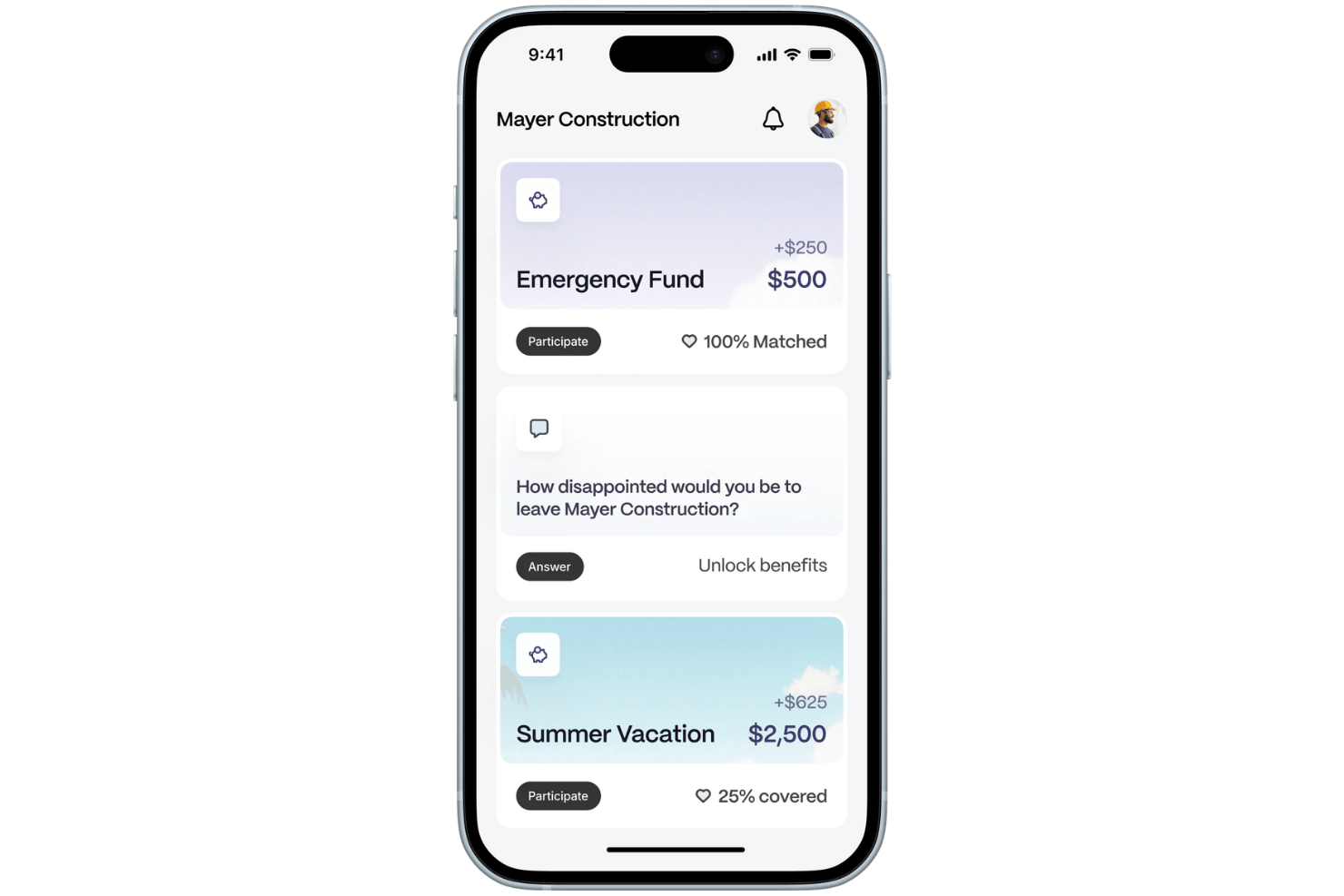
Employees can set savings goals for expenses such as emergency funds, certifications, or major purchases, while employers contribute matching funds. This gives employers a more targeted way to support financial wellness and encourage retention.
Personalized Benefits
Tanda helps employers tailor financial wellness benefits around employee needs instead of relying only on standard one-size-fits-all programs. The goal is to make benefits more relevant and improve engagement and retention.
Retention Tracking and Forecasting
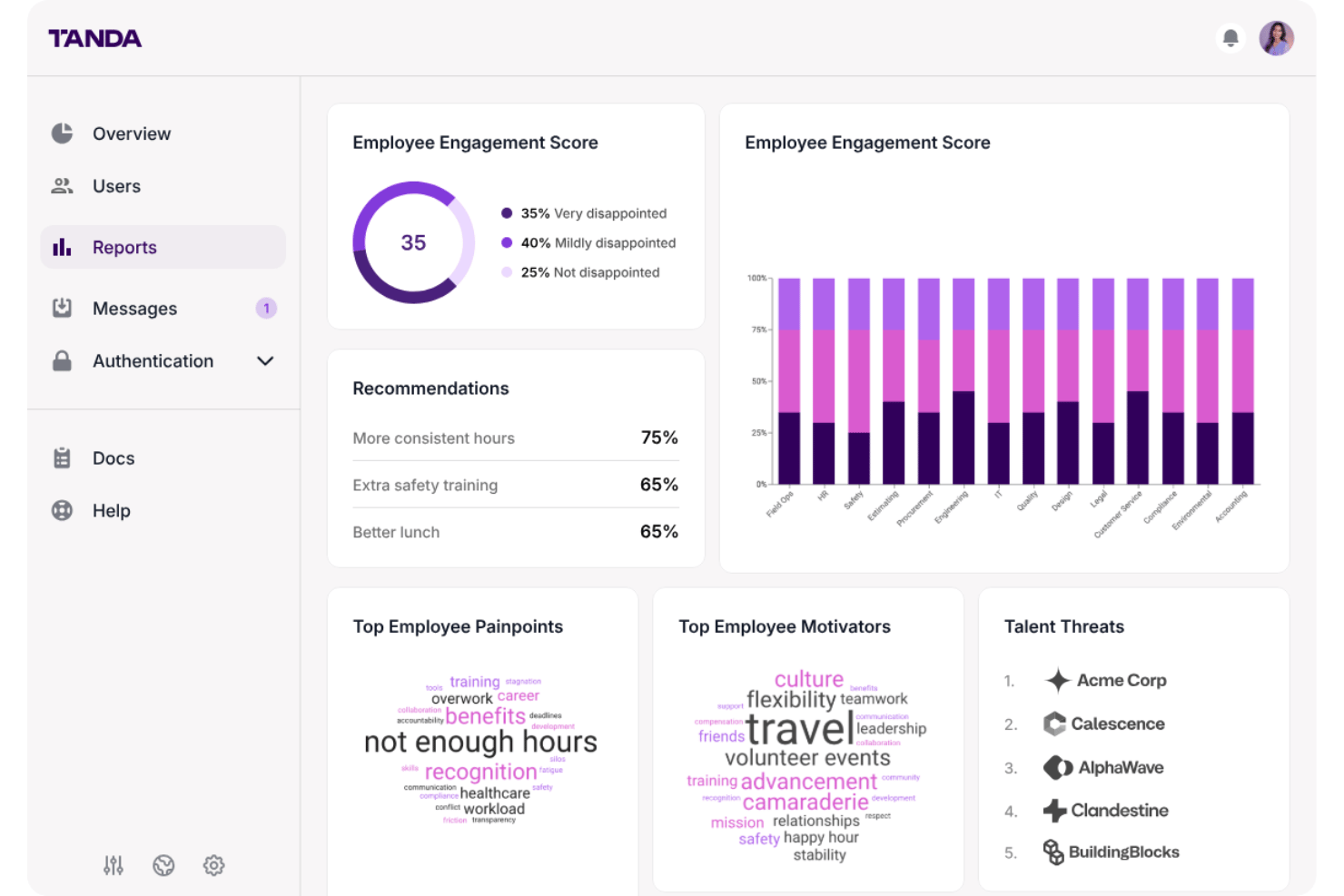
Tanda provides retention insights and forecasting tools to help employers understand workforce trends and identify where turnover risk may be increasing. Enterprise features also include custom ROI and impact reporting.
Employee Engagement Tools
Tanda supports engagement through features such as surveys, peer recognition, and incentives designed to keep employees more connected to their teams and employers.
Compensation Insights
Employers can use Tanda’s data and analytics to assess how compensation and benefits are being deployed and where adjustments may have a greater impact on retention and satisfaction.
Financial Wellness Tools
Tanda gives employees tools to work toward financial goals while helping employers address financial stress, which the company positions as a major contributor to employee turnover.
Ease of Use
Tanda’s ease of use comes from its focused employee experience rather than a broad set of workforce administration tools. Employees can access savings goals, matched benefits, financial wellness features, and engagement tools through a relatively narrow product experience. I think that focused scope should make Tanda easier to approach than a full workforce management suite, although organizations that need payroll, scheduling, time tracking, or compliance tools will still need separate systems.
Integrations
Tanda’s publicly documented integrations are focused on the financial services that support its employee savings and financial wellness features, including Plaid and Dwolla. The company does not publicly document a broader payroll, accounting, or automation integration ecosystem on its current website.
Tanda Specs
- 2-Factor Authentication
- 360 Degree Feedback
- API
- Application Tracking
- Attendance Tracking
- Batch Permissions & Access
- Budgeting
- Calendar Management
- Dashboard
- Data Export
- Data Import
- Data Visualization
- Employee Database
- Employee Engagement
- Employee Incentive Management
- Employee Onboarding
- Expense Tracking
- External Integrations
- Feedback Management
- Forecasting
- Multi-User
- Notifications
- Onboarding
- Payroll
- Project Management
- Scheduling
- Time Management
- Timesheets
- Travel Management
- Vacation & Absence Calendar