
30 Best Time Tracking Software For Companies In 2026

Best Time Tracking Software Shortlist
Here’s some of the best time tracking tools on the market:


Employee time tracking software improves the present and future of project management. Let me elaborate. Currently, you are working with your team on a project. As part of your monitoring phase, you are keeping track of activities, your plan, and hopefully the hours being invested in each activity.
Knowing where your team is investing their time is informing your client conversations over budget spending, your talks with the team over time allocation, and even resource scheduling conversations with other DPMs wanting your resources.
Once this project is done, you will surely embark on another adventure and the cycle restarts. The time you and your team tracked will now inform future estimates for project activities and overall more accurate price and time-related conversations with the client.
Therefore, using time tracking tools is an essential part of a DPMs toolbox. Whether that is a best-of-breed or an all-in-one solution is up to you.
How We Picked The Best Time Tracking Software
I evaluated and compared the most popular time tracking software on the market, both for its reviews and user interface. Then I weighed factors that make software a good option for project management, such as the ones that follow.
- User Interface: The software needs to have a nice UI and be easy to use. A good interface will make it easier for your employees to clock in their work time. In contrast, a bad UI will deter them from it.
- Online time tracking variety: I look at all the ways in which a team can track accurate time. This could mean importing Excel timesheets, using a time clock or creating templates.
- Integrations: I looked at how you can expand the software's functionality. On the one hand, maybe some of these time tracking tools can be embedded into your existing tools. On the other hand, maybe the software can integrate other tools that enable invoicing like Quickbooks and Xero.
- Pricing: Your time tracking app should be a cheap addition to your current tech stack, especially if you are part of a small business. Therefore, I’ll point out the price and if there are available free versions or free trials.
Table of Contents
Why Trust Our Software Reviews
Best Time Tracking Software Summary
Here is a convenient list with all the highlights you need from what we covered above.
| Tool | Best For | Trial Info | Price | ||
|---|---|---|---|---|---|
| 1 | Best for intelligent time tracking | Free trial + demo available | From $6/user/month | Website | |
| 2 | Best for remote team monitoring | Free 7-day trial | From $6.40/seat/month (billed annually) | Website | |
| 3 | Best for detailed time tracking | Free 14-day trial available + free demo available | From $19.90/user/month (billed annually) | Website | |
| 4 | Best GPS time tracking for mobile teams | Free plan + free demo available | From $29/month | Website | |
| 5 | Best for project time tracking | Free plan available | From $9/seat/month (billed annually) | Website | |
| 6 | Best for customizable timesheets | Free demo available | From $12/user/month (billed annually) | Website | |
| 7 | Best for customizable dashboards | Free 30-day trial | From $9.99/user/month | Website | |
| 8 | Best for full lifecycle time tracking | Free demo available | Pricing upon request | Website | |
| 9 | Best for tracking time with resource scheduling | Free 30-day trial available | From $4.16/user/month | Website | |
| 10 | Best time clock for GPS and image tracking | Free demo + free 14-day trial available | From $4.49/user/month | Website |


-

Checkr
Visit WebsiteThis is an aggregated rating for this tool including ratings from Crozdesk users and ratings from other sites.4.5 -
Kudoboard
Visit WebsiteThis is an aggregated rating for this tool including ratings from Crozdesk users and ratings from other sites.4.8 -
Native Teams
Visit WebsiteThis is an aggregated rating for this tool including ratings from Crozdesk users and ratings from other sites.4.9





Best Time Tracking Software Overviews
Here’s a brief overview of each tool.

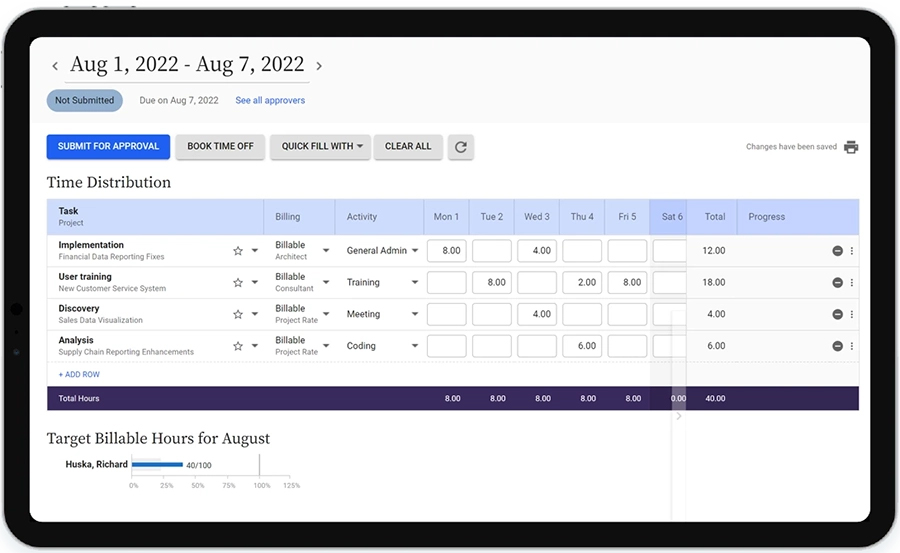
Replicon Time Tracking by Deltek is a cloud-based time tracking platform built for companies that need accurate project time capture, automated timesheets, and real-time insights to manage workforce productivity and billing across multiple teams and locations.
Who Is Replicon Time Tracking Best For?
Replicon Time Tracking is a strong fit for mid-size to enterprise companies in project-driven industries like professional services, consulting, and IT that need precise time tracking across distributed teams.
Why I Picked Replicon Time Tracking
Replicon Time Tracking earns its spot on my shortlist because of ZeroTime™, its AI-powered time capture feature that automatically pulls time data from 100+ work apps—think Jira, Outlook, and Salesforce—and pre-populates timesheets without anyone having to log hours manually. I like that this directly addresses one of the most common gaps in project time tracking: the hours that simply never get recorded. I also use the estimated vs. actual cost comparison to monitor project budgets in real time instead of discovering overruns later.
Replicon Time Tracking Key Features
- Global labor compliance tracking: Monitor compliance with labor laws across 145+ jurisdictions in 75+ countries, including DCAA, FAR, and NIST controls.
- CloudClock time capture: Record time and attendance via a dedicated hardware clock device and via web and mobile for distributed or shift-based teams.
- Global leave management: Track PTO, time-off requests, and approvals in a single module that accounts for jurisdiction-specific leave rules.
- Custom reports and dashboards: Build tailored reports and connect directly to Tableau and Power BI for deeper project and workforce data analysis.
Replicon Time Tracking Integrations
Integrations include Jira, Salesforce, QuickBooks, SAP, Oracle, ADP, Microsoft Dynamics 365, and Slack.
Pros and Cons
Pros:
- Real-time compliance updates
- The mobile app allows employees to clock in/out on the go
- Ability to tailor the system to various country-specific labor laws
Cons:
- Interface is outdated compared to other solutions
- Creating custom reports can be complex
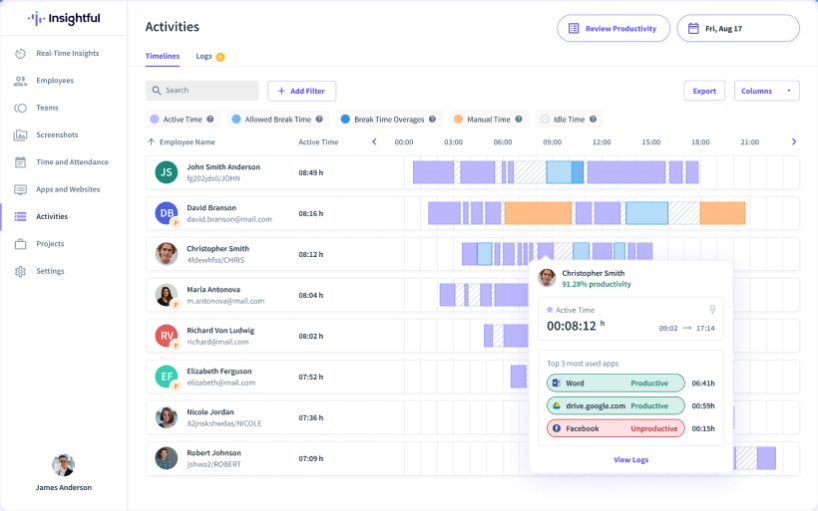
Insightful is a time tracking and productivity analytics platform built for companies managing distributed teams, helping businesses monitor work hours, analyze app usage, and optimize workflows across remote and hybrid environments.
Who Is Insightful Best For?
Insightful is a strong fit for mid-sized to enterprise companies with remote or hybrid workforces that need visibility into how distributed teams spend their time.
Why I Picked Insightful
I picked Insightful as one of the best because of how well it handles the specific visibility gap that comes with managing remote teams. When my team is distributed across locations, I rely on the real-time activity dashboard to see who's focused, who's idle, and where work is actually moving—without sending a single status-check message. That kind of passive, always-on visibility is what makes it genuinely useful for remote monitoring. I also like the location insights feature, which segments productivity data by where employees are working, so I can see whether output differs between home and office and adjust work policies accordingly. The automatic time mapping captures time against tasks and apps in the background, so I'm not chasing down timesheets or relying on self-reported hours to understand how the day was spent.
Insightful Key Features
- Attendance tracking: Monitor clock-in and clock-out times across your entire team from a single dashboard.
- Project time tracking: Assign tracked time directly to specific projects and tasks to see where hours are being allocated.
- Screenshots: Capture periodic screenshots of employee screens to provide visual context alongside activity data.
- Productivity benchmarking: Set productivity thresholds for individual roles and compare actual performance against those baselines over time.
Insightful Integrations
Integrations include Jira, Trello, Asana, Aha, ClickUp, Zoho BugTracker, Azure DevOps, Basecamp, Bitbucket, and GitHub.
Pros and Cons
Pros:
- Tracks time spent on tasks and projects without manual input
- Enables continuous oversight of employee activities
- Provides in-depth workforce data analysis
Cons:
- Detailed productivity tracking may raise concerns about privacy
- No mobile app for on-the-go or field-based employees

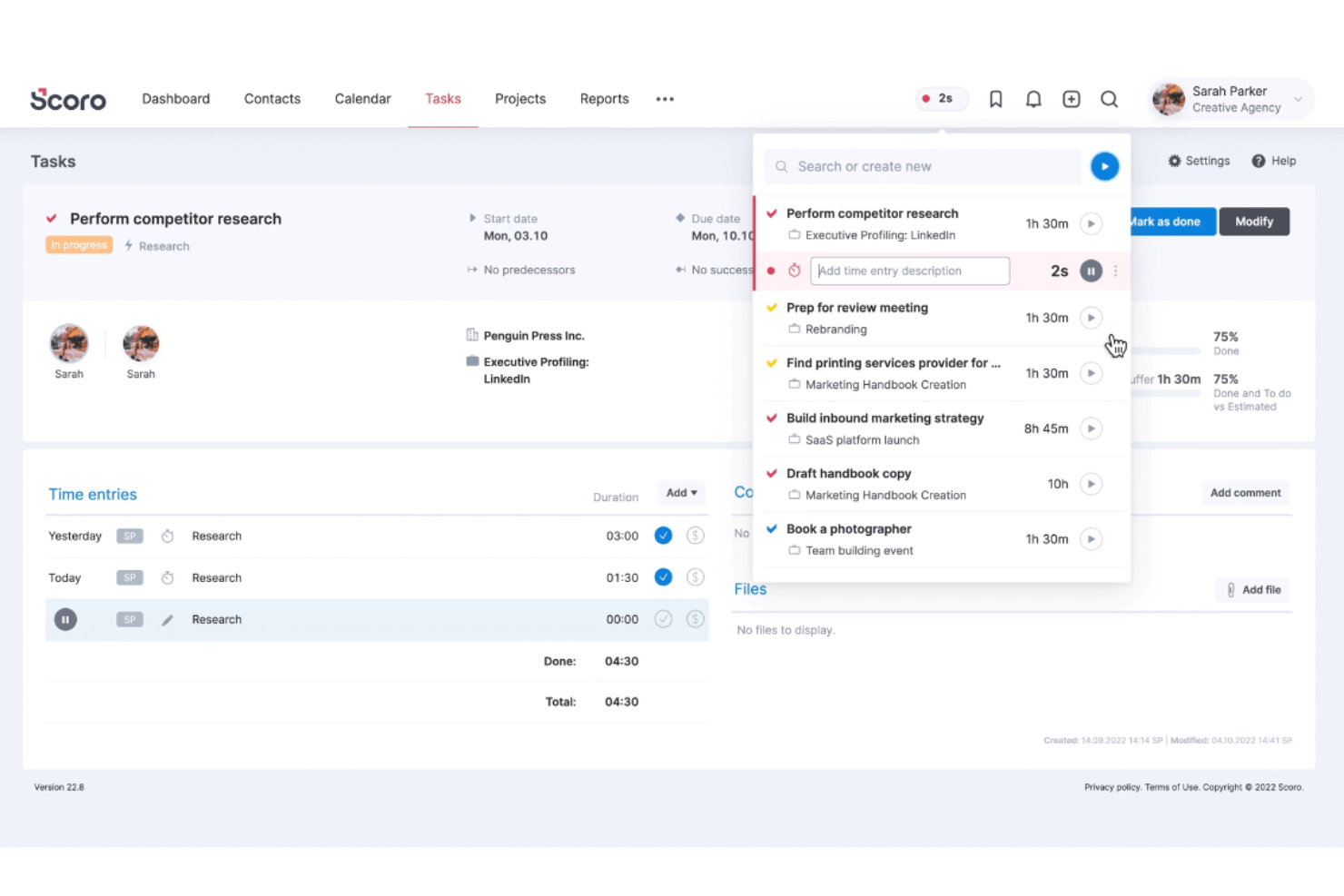
Scoro is a work management platform designed for professional services teams and agencies who need to track time, manage projects, and connect time data directly to billing and reporting.
Who Is Scoro Best For?
Scoro is a strong fit for professional services firms—like consultancies, agencies, and IT service providers—that need to connect time tracking to project budgets and client billing.
Why Scoro Stands Out
Scoro captures detailed time data and puts it to use in reporting. Teams can log hours in three ways: using a real-time timer, logging retrospectively in a timesheet, or letting the calendar auto-populate work reports from scheduled events. The timesheet prefill feature pulls from each person's to-do list so there's no guesswork about what to log. That time data then feeds into billable vs. non-billable reporting, so you can see exactly where hours are going across clients, projects, and activities—and use that insight to improve billing accuracy.
Scoro Key Features
- Project budget tracking: Monitor budgets in real time against logged hours and expenses to keep projects financially on track.
- Invoicing from time entries: Convert tracked time directly into client invoices without manual data re-entry.
- Utilization reporting: View team-wide utilization rates to identify over- and under-allocated resources across active projects.
- Task and milestone management: Organize work into tasks and milestones with assignees, deadlines, and dependencies.
Scoro Integrations
Integrations include Google Calendar, Microsoft 365, Xero, QuickBooks, Zapier, Dropbox, Slack, HubSpot, and Exact.
Pros and Cons
Pros:
- Robust reporting and analytics
- Effective time tracking capabilities
- Comprehensive project management features
Cons:
- Mobile app has limited features
- Certain time tracking features limited to higher-tier plans
New Product Updates from Scoro

Scoro Introduces Subtasks for More Granular Work Planning
Scoro introduces subtasks and improved price list deletion warnings, enabling teams to break down work into smaller units for detailed planning while protecting pricing data from accidental changes. For more information, visit Scoro’s official site.

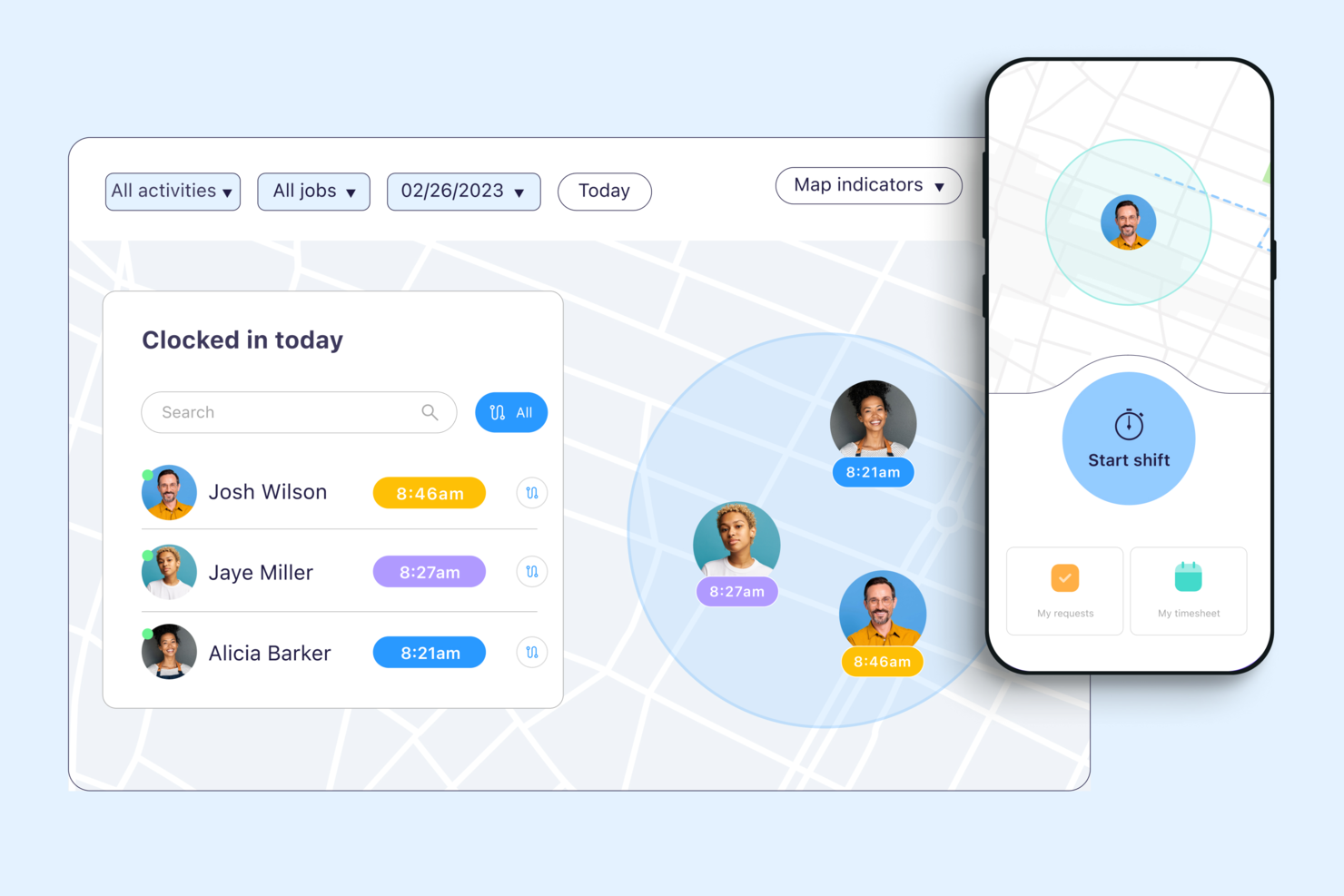
Connecteam is a workforce management platform for companies with deskless or mobile employees who need reliable time tracking, scheduling, and team communication in one place.
Who Is Connecteam Best For?
Connecteam is a great fit for small to mid-sized businesses in field-based industries like construction, retail, and hospitality that manage hourly or shift-based workers.
Why I Picked Connecteam
I picked Connecteam as one of the best because of how well its GPS time tracking features hold up in real field conditions. I particularly like the breadcrumbs feature, which logs an employee's location trail throughout their entire shift—not just at clock-in. That means if you're managing a crew spread across multiple job sites, you can see exactly where each person was and when, without relying on self-reporting. The geofencing feature takes it further by automatically clocking employees out when they leave a designated job site radius, which cuts down on time theft without requiring any manual intervention from managers.
Connecteam Key Features
- Timesheet management: Review, edit, and approve employee timesheets directly in the app before exporting to payroll.
- Job scheduling: Build and assign shifts to specific employees or teams, with visibility into availability and conflicts.
- Overtime tracking: Set custom overtime rules so the system automatically flags hours that exceed defined thresholds.
- Kiosk mode: Let employees clock in and out from a shared device using a PIN, useful for fixed job sites without individual smartphones.
Connecteam Integrations
Integrations include QuickBooks, Gusto, Xero, ADP, Wix, Lightspeed, PrismHR, Square, and BambooHR.
Pros and Cons
Pros:
- Can set specific rules for breaks, overtime, and pay rates
- Ability to track employee locations and set geofenced areas
- Variety of clock-in methods, including mobile app, kiosk, and NFC badges
Cons:
- Setting user roles and permissions can be unintuitive
- Push notifications are sometimes delayed

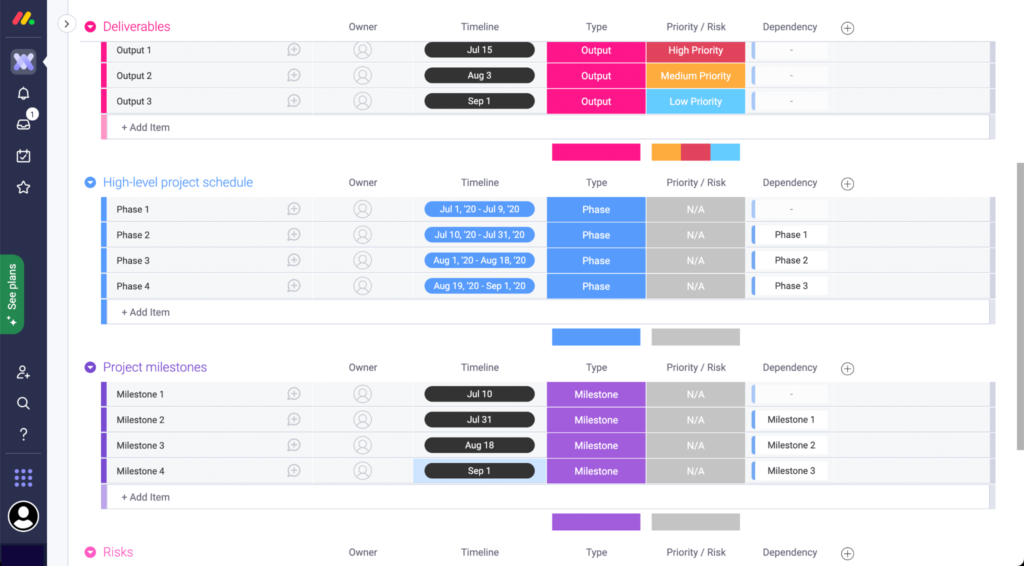
monday.com gives project-driven teams a flexible platform to track time spent on tasks, manage workloads, and visualize project progress, making it a strong choice for companies that need to monitor hours across multiple projects and departments.
Who Is monday.com Best For?
monday.com is a good fit for mid-sized to large teams in tech, marketing, and professional services that need to track time across multiple projects and workstreams in one place.
Why I Picked monday.com
I picked monday.com as one of the best for project time tracking because of how tightly its time tracking is woven into the actual project board. There's no separate app to open—time tracking columns sit right alongside status, assignee, and date columns, so every logged hour is instantly tied to a task, owner, and deadline. I also like the Workload View, which uses live time data to show who's over capacity across projects, so I can rebalance assignments before someone's timeline slips. On top of that, AI Blocks can automatically categorize time entries by project type or urgency, which cuts down on the manual cleanup that usually bogs down end-of-sprint reporting.
monday.com Key Features
- Gantt chart view: Visualize task timelines, dependencies, and project milestones on an interactive drag-and-drop chart.
- Custom dashboards: Build real-time dashboards that pull time, budget, and progress data from multiple boards into one view.
- Automations: Set rule-based triggers to notify team members, update statuses, or reassign tasks when conditions are met.
- Time estimate columns: Assign estimated hours to individual tasks so teams can compare planned vs. actual time spent.
monday.com Integrations
Integrations include Salesforce, QuickBooks, HubSpot, Zendesk, Active Directory, GitHub, GitLab, Slack, Gmail, and Microsoft Teams.
Pros and Cons
Pros:
- Gives you the option to export time tracking data
- Integrates time tracking with workload visibility
- Customizable dashboards for better project visibility
Cons:
- Platform may be too simple for more complex time management needs
- Lacks advanced time tracking, like automated timesheets
New Product Updates from monday.com

monday.com Enhances Governance With AI Spend and Activity Logs
monday.com introduces AI governance with user limits and scheduled cleaning activity logs. These updates help teams control AI usage costs and maintain better visibility into system actions for compliance. For more information, visit monday.com’s official site.

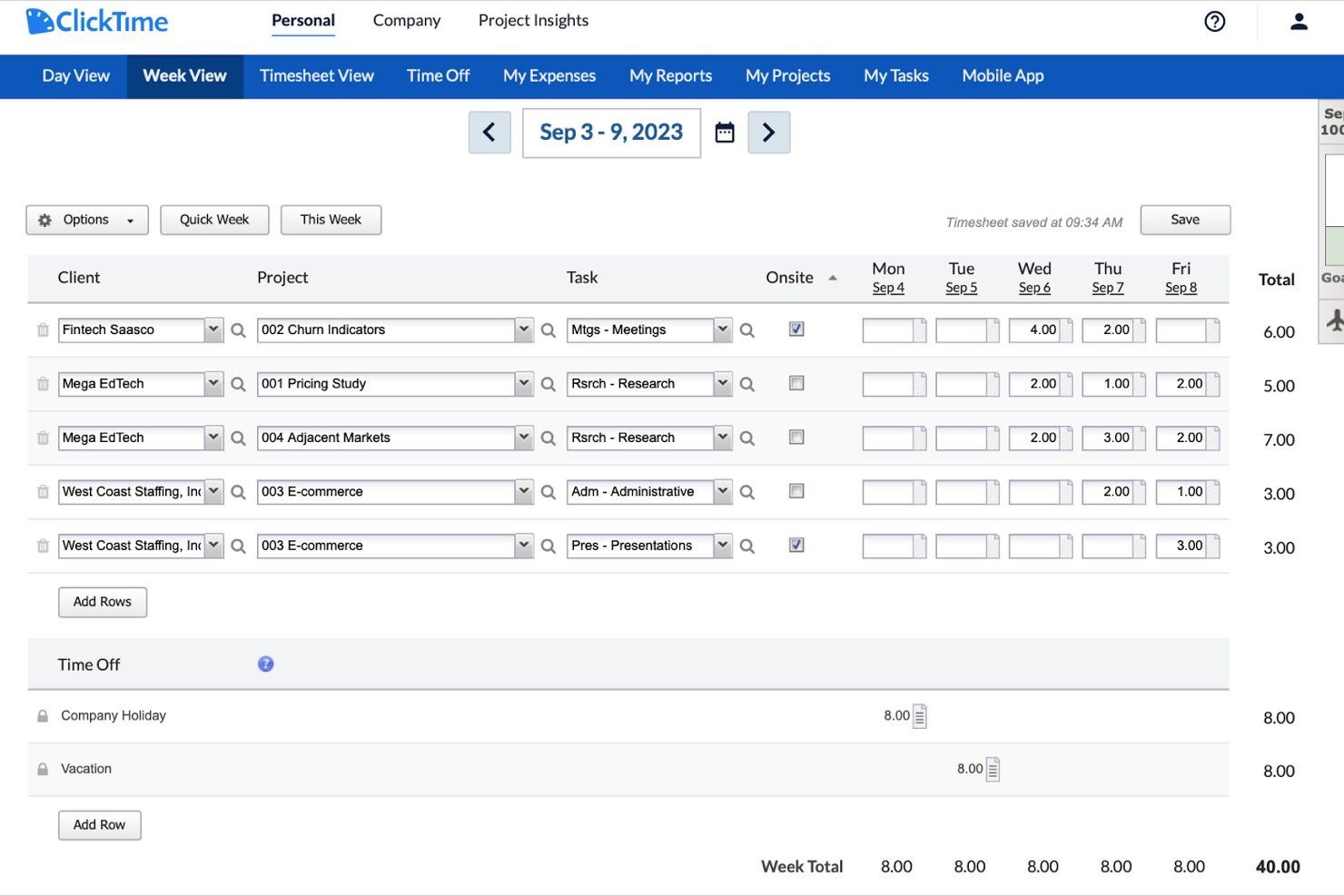
ClickTime lets project managers and operations teams track employee hours, manage project budgets, and analyze workforce data with flexible reporting and approval workflows tailored for companies that need detailed oversight of time and costs.
Who Is ClickTime Best For?
ClickTime suits mid-sized professional services firms like consulting, marketing, and nonprofit organizations that require structured time tracking with manager-level oversight and approval controls.
Why I Picked ClickTime
ClickTime is on my shortlist because it gives you extensive control over timesheet structure. I like that you can build custom fields, set up task-level tracking, and configure approval workflows to match how your team actually works—not just a generic template. My team uses ClickTime's timesheet templates to standardize how hours get logged across different projects and departments, which cuts down on inconsistent entries. The built-in budget tracking also ties logged hours directly to project costs, so I can see in real time whether a project is on track financially.
ClickTime Key Features
- Resource planning: View team capacity and availability to allocate hours across projects before work begins.
- Expense tracking: Log and categorize project-related expenses alongside time entries for a full cost picture.
- Real-time dashboards: Monitor hours logged, project progress, and utilization rates across your entire team at a glance.
- PTO and leave management: Track employee time off requests and balances directly within the platform.
ClickTime Integrations
Integrations include ADP WorkforceNow, Azure Entra, Bamboo HR, Github, Google Calendar, Google SSO, Hibob, Jira, and Microsoft Outlook Calendar.
Pros and Cons
Pros:
- Mobile app for on-the-go time entry
- Built-in project budget tracking and alerts
- Customizable timesheet fields for unique workflows
Cons:
- Approval workflows can be slow to update
- No built-in GPS or location tracking

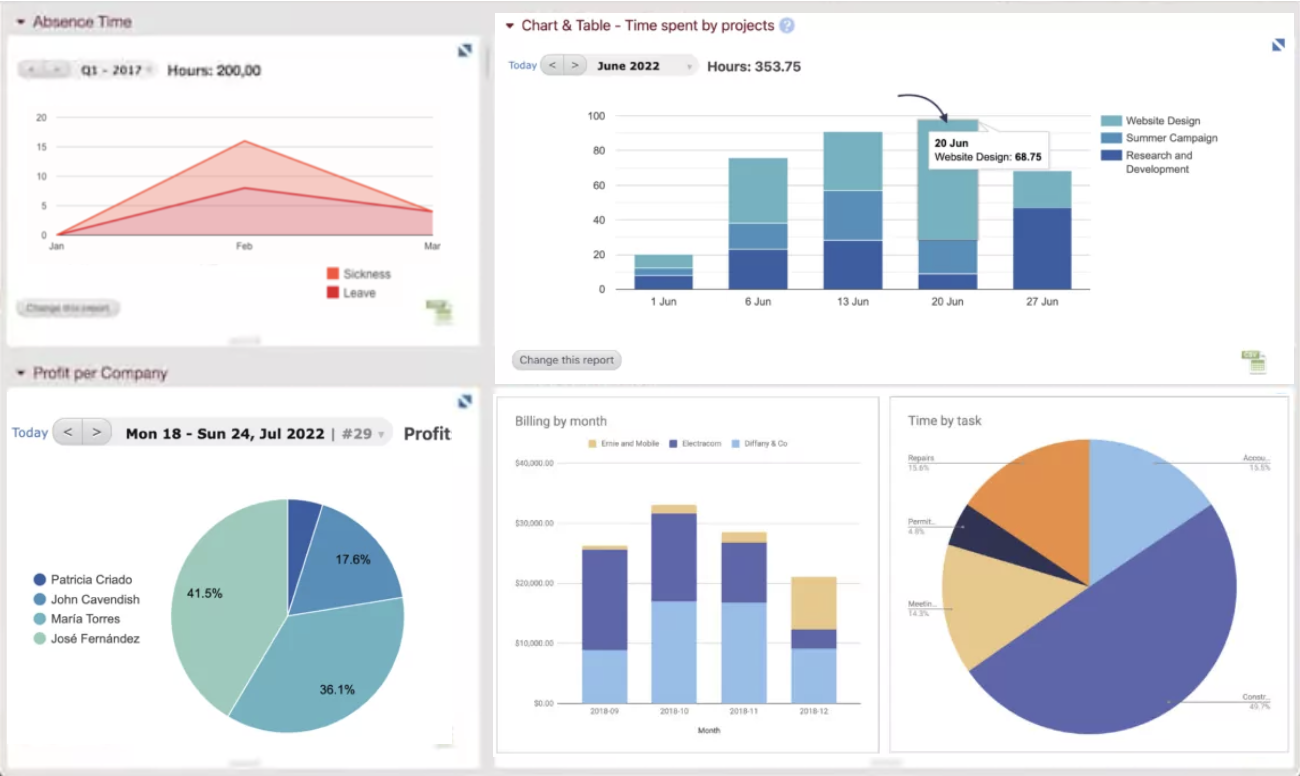
Beebole is a time tracking platform designed for companies that need to monitor project hours, manage team productivity, and generate detailed reports to support billing and resource planning.
Who Is Beebole Best For?
Beebole is a strong fit for mid-sized companies and professional services teams that need flexible time tracking with detailed reporting across projects and departments.
Why I Picked Beebole
Beebole earns its spot on my shortlist because of how much control it gives you over your reporting dashboards. I like that you can save custom reports directly to your dashboard, so when I need a real-time view of project hours, billing status, or budget variance, it's already on the dashboard. The KPI dashboard builder lets you surface exactly the metrics that matter to your team, whether that's tracking profitability across 50 client projects or monitoring overtime by department. Exporting those same reports to Excel or Google Sheets keeps the data available outside the tool.
Beebole Key Features
- Timesheet approval workflow: Managers can review, approve, or reject submitted timesheets directly within the platform before they're locked for payroll or billing.
- Project budget tracking: Set hour or cost budgets per project and monitor spending in real time as your team logs time.
- Absence and leave management: Track vacation, sick days, and other leave types alongside work hours in a single view.
- Mobile time tracking: Log hours from any device using Beebole's mobile app, with offline support for teams working in the field.
Beebole Integrations
Integrations include ADP, Airtable, Asana, BambooHR, FreshBooks, Google Calendar, and QuickBooks Online.
Pros and Cons
Pros:
- Integrated PTO tracking feature
- You can set different billing rates for clients, projects, and team members
- Ability to track time across various projects and tasks
Cons:
- Approval reminders can’t be customized by time zone
- Custom reports require formula knowledge

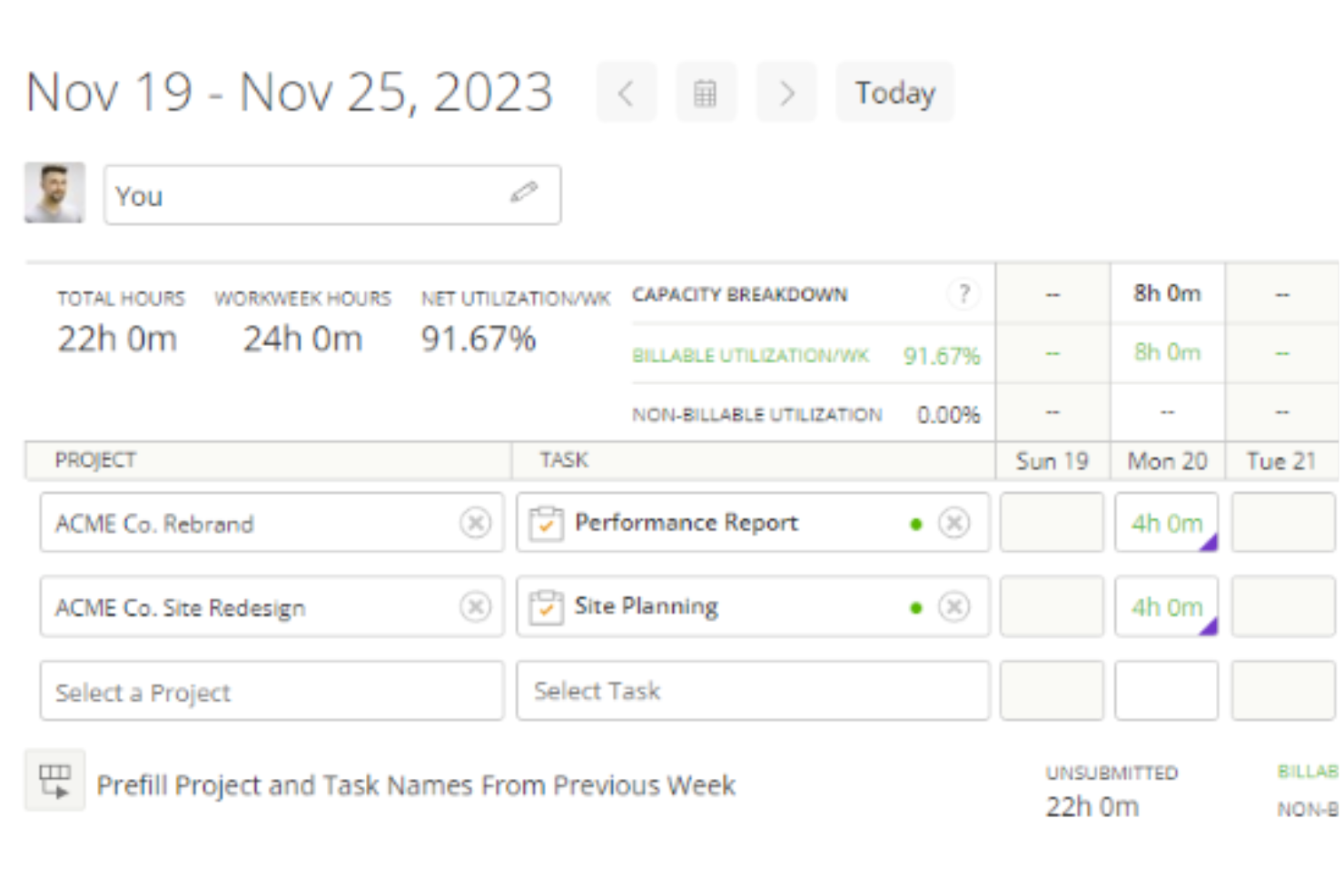
Kantata is a project and resource management platform for professional services teams who need to track time, manage projects, and optimize resources across complex client engagements.
Who Is Kantata Best For?
Kantata is a strong fit for mid-to-large professional services firms—such as consulting, marketing, and IT services companies—that need to manage time and resources across multiple client projects simultaneously.
Why I Picked Kantata
I picked Kantata as one of the best because it's one of the few time tracking tools that connects time data to every other stage of project delivery—from initial scoping through to invoicing. What I love about it is that time and expense tracking isn't a standalone module; it feeds directly into financial management, so my team can see in real time how logged hours are affecting project margins and budget burn. Kantata also has built-in timesheet workflows with automation that takes the friction out of period close—something finance teams on multi-project engagements will really appreciate. On top of that, the business intelligence layer surfaces utilization and fee data across the portfolio, so time tracking becomes an input to actual strategic decisions, not just a compliance exercise.
Kantata Key Features
- Resource management: Assign and adjust team capacity across projects using visual resource planning tools that reflect real-time availability.
- Project forecasting: Model projected costs and timelines against actuals to keep client engagements on track before issues arise.
- Role-based permissions: Control who can view, enter, or approve project data with configurable access settings across teams.
- Client and project dashboards: Monitor project health, milestones, and delivery status from a centralized view across your entire portfolio.
Kantata Integrations
Integrations include Salesforce, NetSuite, Jira, Slack, HubSpot, QuickBooks, Xero, BambooHR, Google Drive, and Microsoft Teams.
Pros and Cons
Pros:
- Admins can enforce rules like required notes or task associations
- Time entries can be reviewed and approved before invoicing
- Users can log time via timers, timesheets, or directly on tasks
Cons:
- Certain time tracking fields may not be fully customizable
- Configuring who can track and approve time may be intricate
New Product Updates from Kantata
Kantata Integrates E-Invoicing With Avalara
Kantata introduces integrated e-invoicing through its partnership with Avalara, enabling compliant, automated invoicing across regions. For more information, visit Kantata's official site.
 .
.
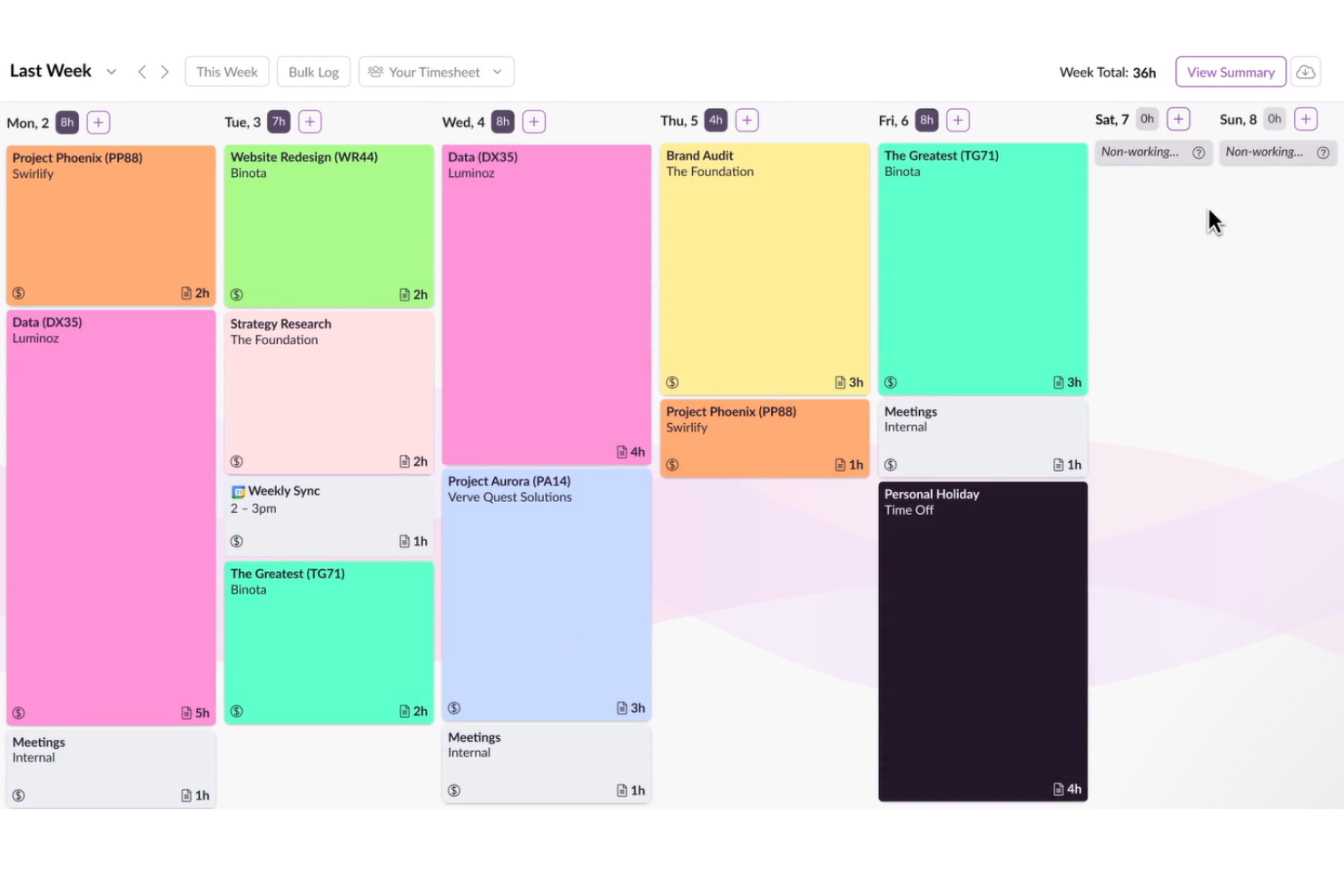
Resource Guru gives project managers and teams a way to track time while managing resource allocation, helping businesses coordinate schedules, monitor workloads, and optimize team availability in one platform.
Who Is Resource Guru Best For?
Resource Guru is a strong fit for agencies, consultancies, and professional services teams that need to track time alongside staff scheduling and capacity planning.
Why I Picked Resource Guru
Resource Guru earns its spot on my shortlist because it's one of the few time tracking tools that connects scheduled hours directly to timesheet entries. When my team books work on the schedule, those entries auto-populate in each person's timesheet—so logging time takes one click instead of starting from scratch every week. I also like the forecast vs. actuals comparison, which lets me see where estimated hours diverged from real time spent across projects and clients. That kind of visibility is genuinely useful when I'm trying to improve future planning, not just report on what already happened.
Resource Guru Key Features
- Leave and vacation management: Track team leave, public holidays, and absences directly on the resource schedule to keep availability accurate.
- Utilization reporting: View billable vs. non-billable time and team utilization rates across projects, clients, or departments.
- Clash management: Get automatic alerts when a resource is double-booked or over-allocated during scheduling.
- Project time budgets: Set hour budgets per project and monitor logged time against those limits in real time.
Resource Guru Integrations
Integrations include Outlook Calendar, Google Calendar, Jira, and Asana.
Pros and Cons
Pros:
- Straightforward timesheet approval process
- Ability to log an entire week's work with a single click
- Timesheets are automatically populated from schedules
Cons:
- Time entries are not dynamically linked to schedule changes
- Lacks a real-time time tracker
New Product Updates from Resource Guru

Resource Guru Launches Asana Integration
Resource Guru now integrates with Asana to enhance task scheduling by providing insights into availability and skills. For more information, visit Resource Guru's official site.
 .
.
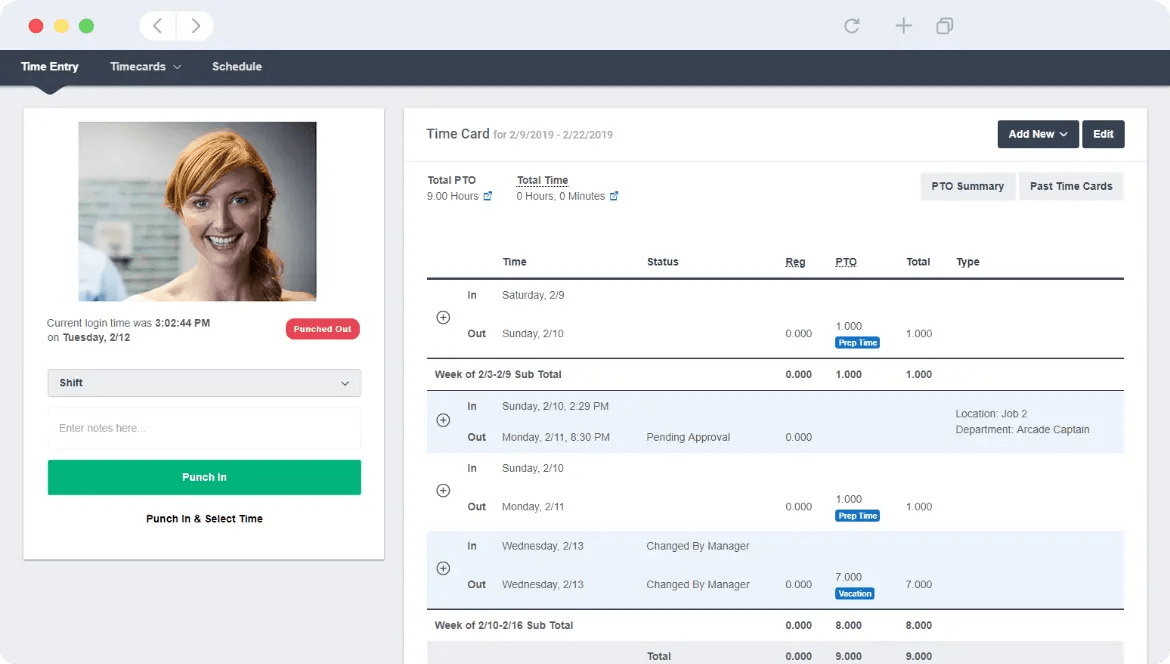
Buddy Punch is a time tracking platform designed for companies that need to monitor employee hours, manage attendance, and simplify payroll, especially for teams working across multiple locations or in the field.
Who Is Buddy Punch Best For?
Buddy Punch is a good fit for small to mid-sized businesses in industries like construction, retail, and healthcare, where managing hourly workers across multiple job sites is a daily reality.
Why I Picked Buddy Punch
I picked Buddy Punch as one of the best because it layers GPS and image verification directly into the clock-in process. When an employee punches in, Buddy Punch captures their GPS coordinates and can require a selfie photo at the same moment. That lets my team cross-reference location data and a timestamped photo on the same timecard, which is useful when managing field workers across multiple job sites. Additionally, geofencing lets me block punches entirely if someone isn't physically within a defined boundary around a worksite, eliminating reliance on the honor system.
Buddy Punch Key Features
- Drag-and-drop scheduling: Build and publish employee schedules using a visual calendar interface with shift assignment and availability management.
- PTO tracking: Employees can submit time-off requests directly in the platform, and managers can approve or deny them from the same dashboard.
- Automatic overtime alerts: Buddy Punch flags employees who are approaching or have exceeded overtime thresholds before payroll is processed.
- Payroll reporting: Export detailed timesheets in formats compatible with major payroll providers to simplify pay period processing.
Buddy Punch Integrations
Integrations include QuickBooks Online, QuickBooks Desktop, ADP Workforce Now, Gusto, Paychex, Paylocity, Paycor, Rippling, Workday, and Justworks.
Pros and Cons
Pros:
- Offers various exportable reports
- Managers receive notifications for late arrivals or missed shifts
- Versatile clock-in options
Cons:
- Limited language support other than English
- Advanced GPS tracking features are paid add-ons
Other time tracking software:
Check out the list below for additional time tracking software tools we selected but couldn’t make the best 10.
- actiTIME
For small teams and businesses
- Homebase
For reducing time theft
- Monitask
For distributed teams
- Agendrix
For versatile clock-in methods
- TimeCamp
For automatic time tracking
- Toggl Track
For its workload balancing
- Traqq
For a feature-rich free version
- TMetric
For 7-day activity tracking storage
- My Hours
For small teams and freelancers
- Factorial
For integrating timesheets with payroll
- Harvest
For actionable insights
- ProjectManager
For real-time time monitoring
- FunctionFox
For creative teams and agencies
- Ravetree
For tracking expenses alongside time
- ExakTime
For teams of field employees
- Bill4time
For reporting features
- eResource Scheduler
For scheduling with time tracking
- Actually
Simple time tracking for companies working with projects
- Deel HR
For keeping payroll in sync
- ClickUp
For its billable time tag


Time Tracking Software FAQs
Find the answers to common questions about this topic.
What is the best time tracking software?
What does time tracking software do?
What is the benefit of time tracking software?
Which features should I look for when selecting time tracking software?
Time tracking software – why is it important?
Are timesheets important?
What's Next?
If you're in the process of researching time tracking softwares, connect with a SoftwareSelect advisor for free recommendations.
You fill out a form and have a quick chat where they get into the specifics of your needs. Then you'll get a shortlist of software to review. They'll even support you through the entire buying process, including price negotiations.