

En iyi çevrim içi bordro yazılımı, maaş ödemelerini, vergileri ve uyumluluğu yönetmenin karmaşıklığını ortadan kaldırır; böylece ekibinize her seferinde doğru ve zamanında ödeme yapabilirsiniz.
Bordroyu manuel olarak yönetmek hatalara, uyumluluk sorunlarına ve memnuniyetsiz çalışanlara yol açabilir. Doğru yazılım hesaplamaları otomatikleştirir, doğru vergi kesintilerini sağlar ve sürekli değişen düzenlemelere uyum sağlayarak her ödeme döneminde saatlerce süren idari çalışmadan tasarruf etmenizi sağlar.
Bordro sistemlerini test etme ve uygulama konusunda yıllara dayanan uygulamalı deneyimim sayesinde güvenilir, ölçeklenebilir ve kullanımı kolay en iyi çevrim içi bordro araçlarını belirledim. Bu rehberde bordro yönetimini kolaylaştıran, uyumluluk riskini azaltan ve gerçekleştirdiğiniz her ödemede güven duymanızı sağlayan çözümleri bulacaksınız.
Why Trust Our Software Recommendations
6,700+
Reviews
20
Industry experts
16+
Evaluation factors
14
Years
Our team has been testing and reviewing software since 2012. As HR experts ourselves, we know how difficult—and important—it is to choose the right software.
For this guide, we evaluated tools using hands-on testing and independent research, scoring tools using our selection criteria. We also draw on insights from industry thought leaders and practicing HR experts.
Our reviews reflect our human editorial judgment, not a sales pitch.
Expert reviewers:
- Phil GrayCOO
 Kim BehnkeHR Tech Editor & Analyst
 Josh BarkerPeople Ops Manager

Çevrim İçi Bordro Yazılımları Karşılaştırma Tablosu
Bu karşılaştırma tablosu, en iyi çevrim içi bordro yazılımı seçimlerimin fiyatlandırma ayrıntılarını özetlemektedir:
Score legend (out of 5)
- Excellent4.5–5
- Good4–4.4
- Average3–3.9
- Below average2–2.9
- Poor1–1.9
Sorted by: Default
| Tool | Starting Price | Website | |||||||
|---|---|---|---|---|---|---|---|---|---|
Best for straightforward online payroll runs | 4.0 out of 5 | 3 | 4 | 4 | 4 | 4 | 5 | Pricing upon request Free demo available | Book Demo |
Best for online payroll in multiple currencies | 3.7 out of 5 | 4 | 4 | 4 | 4 | 3 | 3 | $29/user/month Free demo available | Website |
Best for flexible local-to-global payroll | Not rated | Not rated | 2 | 2 | Not rated | Not rated | Not rated | $19/contractor/month Not available | Book Demo |
Best for unlimited payroll runs | 4.2 out of 5 | 4 | 4 | 4 | 4 | 4 | 5 | $49/month Free trial + free demo available | Book Demo |
Best for multi-currency global payments | Not rated | 2 | Not rated | 3 | Not rated | 2 | 2 | $199/user/month Free plan + free demo available | Website |
Best for payroll and compliance integration | 3.3 out of 5 | 2 | 4 | 4 | 3 | 4 | 3 | $79/user/month Free demo available | Book Demo |
Best with expense tracking | 3.7 out of 5 | 3 | 4 | 4 | 4 | 4 | 3 | Pricing upon request Free demo available | Website |
Best for managing payroll & scheduling | 3.7 out of 5 | 4 | 3 | 4 | 3 | 4 | 4 | $99/month Free plan + 30-day free trial + free demo available | Website |
Best for automated payroll processing | 4.0 out of 5 | 4 | 5 | 4 | 4 | 4 | 3 | Pricing upon request Free demo available | Website |
Best for small businesses | 4.0 out of 5 | 4 | 5 | 4 | 4 | 4 | 3 | $49/month + $6/user/month 30-day free trial available | Website |


En İyi Çevrim İçi Bordro Yazılımı İncelemeleri
Burada en iyi çevrim içi bordro yazılımı için en iyi 10 seçimimin kısa açıklamalarını bulacaksınız. Her sistemin en uygun kullanım alanını, dikkat çeken özelliklerini ve artılarını & eksilerini açıkladım; ayrıca kullanıcı arayüzlerini göstermek için bir ekran görüntüsü de ekledim.
Ayrıca, değerlendirebileceğiniz daha fazla bordro sistemi isterseniz aşağıda 10 ek bonus seçenek de bulunmaktadır.
 Best for straightforward online payroll runs
- Free demo available
- Pricing upon request
Visit WebsiteCustomer Rating:4.3/5
Paycom's award-wining Beti payroll feature Paycom is a cloud-based payroll and HR platform best known for its streamlined process for straightforward payroll runs. It centralizes payroll, tax filing, time & attendance, and employee self-service in a single system—ideal for businesses that want to simplify payroll processing without juggling multiple tools.
Why I picked Paycom: Paycom is designed to make payroll processing as efficient and error-free as possible. With its feature called Beti®, the employee-managed payroll experience, employees can review and correct their own payroll inputs before submission, reducing administrative burden and improving accuracy.
The platform automates tax calculations and filings, direct deposits, and ensures compliance across jurisdictions—making it a solid choice for organizations that just need reliable, consistent payroll runs rather than a highly complex HR suite.
Paycom Standout Features & Integrations:
Features include automated payroll entries, tax payment and filing automation, direct deposit and wage garnishment support, and a single-database architecture that ensures payroll data is consistent and official across the system.
Employees benefit from self-service access to their pay stubs, tax forms, and time & attendance through mobile/desktop portals. Managers and payroll admins have real-time dashboards showing payroll status, GL export tools, and error-checking workflows.
Integrations are not available.
Pros and Cons
Pros:
- Single-database system reduces data duplication and errors
- Strong tax-filing automation and multi-jurisdiction compliance support
- Streamlines payroll runs with automation and employee-self service
Cons:
- Integrations outside core payroll/accounting may require additional setup or support
- Reporting and customization may be less flexible than some specialized HR systems
 Best for online payroll in multiple currencies
- Free demo available
- From $29/user/month
Visit WebsiteCustomer Rating:4.9/5
Deel breaks down your workforce expenses by country. Deel is built for companies that need to hire and pay global employees or contractors without setting up local entities or managing multiple in-country payroll providers.
Why I Picked Deel
I picked Deel because it handles fully managed payroll across 90+ countries—so you don’t have to coordinate with local accountants, tax firms, or government offices.
Your team can run payroll, manage filings, and issue compliant contracts directly from one dashboard, with Deel taking on the heavy compliance lift and acting as the legal employer where needed. I also like that Deel gives you market-specific salary benchmarks and localized insights, which help you make fair and competitive compensation decisions in every region.
Its onboarding tools let you activate new hires or contractors in over 150 countries without extra setup, and the combination of 24/7 support and built-in guidance makes it a strong fit for teams expanding into new markets for the first time.
Deel Key Features
Here are some key features worth highlighting:
- Automated Multi-Country Payroll: Calculates pay, taxes, and filings across supported countries with Deel handling local compliance.
- Global Workforce Reporting: Breaks down payroll costs by country to support budgeting and cross-market planning.
- Contractor Management Tools: Offers fixed, milestone, or usage-based payment setups with integrated payout methods.
- Security Controls: Includes two-factor authentication and role-based permissions to safeguard sensitive payroll data.
Deel Integrations
Integrations include BambooHR, Greenhouse, HiBob, Workday, Ashby, Lever, NetSuite, QuickBooks, Slack, and Xero.
Pros and Cons
Pros:
- Offers detailed global payroll reporting for cost visibility
- Provides market-specific salary benchmarks for global teams
- Handles managed payroll and compliance across 90+ countries
Cons:
- The contract templates could be simplified
- Limited invoice customization
Learn more about Deel Payroll: Best for flexible local-to-global payroll
- Not available
- From $19/contractor/month
Visit WebsiteCustomer Rating:4.5/5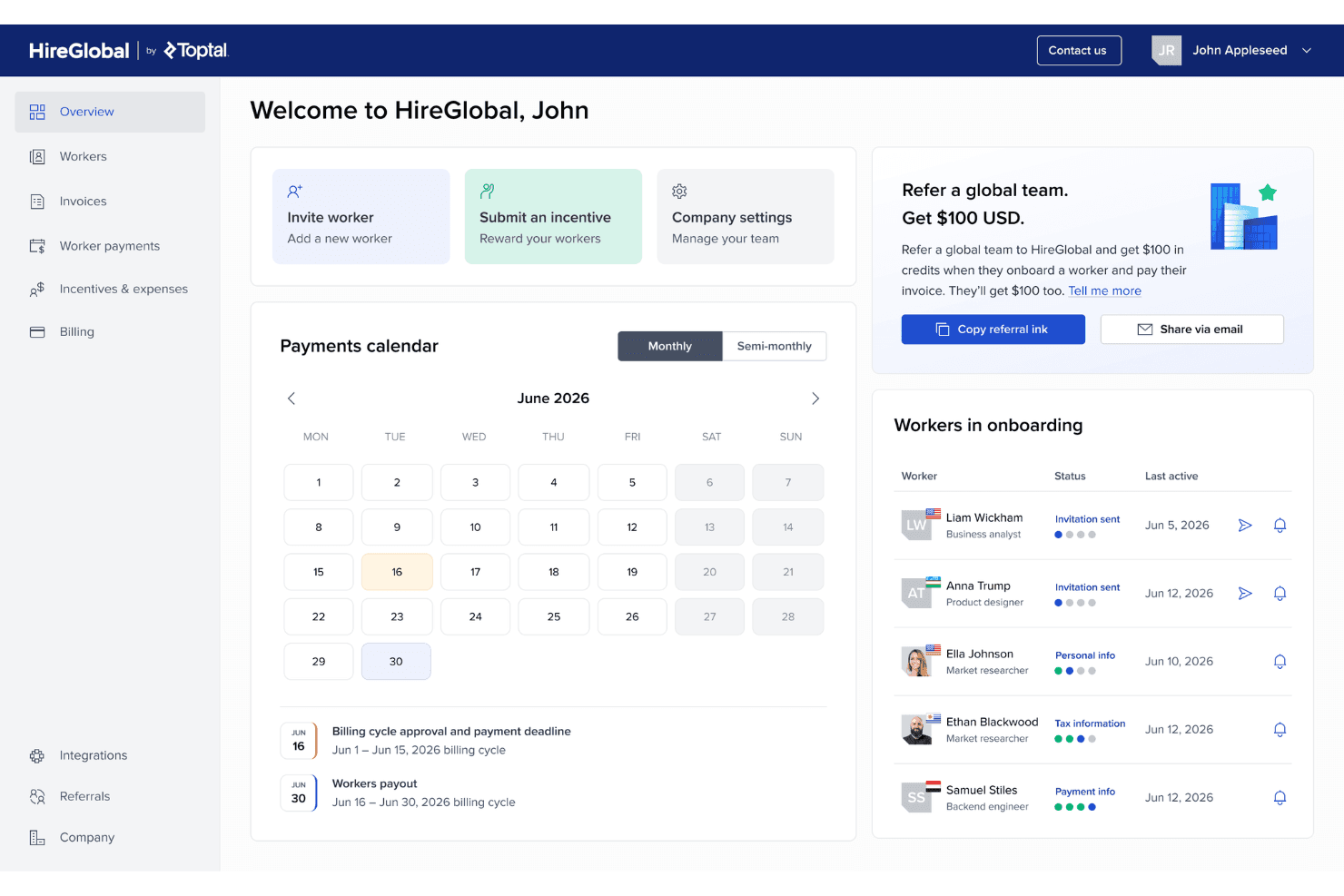
HireGlobal shows an overview dashboard with a payments calendar and onboarding list. HireGlobal is a global payroll and workforce management platform that handles contractor payments, employer of record employment, and compliance across 180+ countries through a single consolidated system.
Who Is HireGlobal Best For?
HireGlobal is a strong fit for companies managing workers across multiple countries who need one platform to handle contractor payments, EOR employment, and local compliance without juggling separate tools per region.
Why I Picked HireGlobal
I've included HireGlobal in my top picks because it's one of the few payroll platforms built to flex between contractor management, Agent of Record, and full EOR within a single agreement—so you're not locked into one model for every worker. I particularly like the Virtual EOR setup, which gives you AOR-style flexibility paired with $1 million indemnification per worker and a 40-person in-house legal team backing every contract. That kind of coverage is genuinely useful when you're managing workers across multiple legal environments where classification risk varies.
HireGlobal Key Features
- Multi-currency global payments: Pay workers in 50+ currencies across 180+ countries from a single platform without currency markups.
- Consolidated single-invoice billing: Approve all worker payments in one cycle and receive one invoice, regardless of how many countries your team spans.
- Worker self-service onboarding portal: Workers join the platform, verify documents, and set their preferred payment withdrawal method independently.
- SOC 2-compliant data security: The platform meets all five SOC 2 Trust Service Criteria, with layered encryption and an optional full data isolation tier.
HireGlobal Integrations
HireGlobal doesn't have any native integrations documented for accounting, HR, benefits, or time tracking. It operates as an all-in-one platform, with consolidated single-invoice billing rather than named connectors or a documented public API.
Pros and Cons
Pros:
- Offers $1 million indemnification per worker
- Supports multiple currencies and payment methods
- Manages payroll and compliance in 180+ countries
Cons:
- No general ledger or time tracking integrations
- Lacks public detail on US tax filings
Learn more about HireGlobal: Best for unlimited payroll runs
- Free trial + free demo available
- From $49/month
Visit WebsiteCustomer Rating:4.6/5
Gusto provides an easy-to-read payroll dashboard that lets you confirm payments, review tax breakdowns, and track employee hours, time off, and benefits—all in one place. Gusto is built for small and midsize businesses that want payroll they can run as often as needed without paying extra fees. Its unlimited payroll runs make it a great fit for teams with variable schedules, bonuses, or frequent adjustments, while still giving you automated tax filing and a simple experience for employees and contractors.
Why I Picked Gusto
I picked Gusto because it gives you unlimited payroll runs at no additional cost, which is especially useful if your team needs off-cycle, bonus, or last-minute payments. It automatically calculates deductions and files federal, state, and local payroll taxes, removing the manual work most small teams struggle with.
I also like that you can pay both W-2 employees and 1099 contractors in the same workflow, and workers get lifetime access to paystubs and tax forms, so you spend less time handling record requests. For small teams without dedicated payroll staff, these built-in safeguards help reduce errors, missed deadlines, and back-and-forth admin work.
Gusto Key Features
Here are some key features worth highlighting:
- Multiple Pay Schedules: Set different pay cycles for full-time, part-time, or contractor groups.
- Next-Day or Same-Day Payroll: Useful for urgent off-cycle payments and last-minute changes.
- Employee Self-Service Portal: Lets your team access pay history, tax forms, and personal details anytime.
- Integrated Time Tracking: Syncs hours and time off directly into payroll for accurate payouts.
Gusto Integrations
Integrations include QuickBooks Desktop, QuickBooks Online, FreshBooks, Xero, Sage Intacct, Shopify, Hubstaff, Expensify, Greenhouse, Lattice, Zoom, and Slack.
Pros and Cons
Pros:
- Pays employees and files taxes automatically
- Handles contractors and 1099s with ease
- Unlimited payroll runs allow off-cycle payments
Cons:
- Larger businesses may have challenges scaling Gusto's services
- Some users feel that the reporting features could be more robust
 Best for multi-currency global payments
- Free plan + free demo available
- From $199/user/month
Visit WebsiteCustomer Rating:4.5/5
Remofirst includes dashboards that provide insights into team distribution, expenses, and other key metrics. Remofirst is a global employment services platform that enables businesses to hire and manage remote teams internationally.
Why I picked Remofirst: Remofirst provides an employer of record (EOR) service, which allows companies to legally employ staff in over 170 countries without establishing a local entity, thus handling payroll, taxes, and benefits on their behalf. This service is particularly beneficial for online payroll software, as it simplifies the complexities associated with international payroll compliance and tax regulations.
Additionally, Remofirst manages international contractors, ensuring that contract creation, payment processing, and compliance with local laws are streamlined. Furthermore, Remofirst's workforce management capabilities integrate with online payroll systems to maintain accurate employee records and streamline administrative processes.
Remofirst Standout Features and Integrations
Features include invoice management, benefits management, onboarding and offboarding, time and attendance tracking, garnishment processing, RemoHealth health insurance, and an employee cost calculator.
Integrations include ADP.
Pros and Cons
Pros:
- Includes personalized customer support
- Offers visa and immigration services
- Provides good value for money
Cons:
- Limited integrations
- May not support all international currencies
 Best for payroll and compliance integration
- Free demo available
- From $79/user/month
Visit WebsiteCustomer Rating:4.6/5
Justworks integrates payroll processing and compliance support in a cloud-based system. For small to medium-sized businesses looking to simplify payroll and HR tasks, Justworks offers a practical option. It combines payroll tools with HR support to help manage compliance requirements and handle payroll and tax filings. Justworks may be well-suited for teams looking to reduce admin work and spend more time running the business.
Why I Picked Justworks
I picked Justworks for its unique ability to integrate payroll processing with compliance assistance, which is crucial for businesses navigating complex labor laws. Its user-friendly payroll system ensures accurate and timely salary disbursements, thus relieving administrative burdens. Additionally, Justworks' comprehensive benefits administration supports employee satisfaction and retention, making it an attractive choice for companies prioritizing employee welfare.
Justworks Key Features
In addition to its payroll and compliance capabilities, Justworks offers:
- Automated Tax Filing: It automatically calculates and files payroll taxes, ensuring compliance with IRS regulations.
- Direct Deposit: This feature allows for the seamless transfer of salaries directly into employees' bank accounts.
- Employee Self-Service Portal: Employees can access their pay stubs, tax forms, and benefits information online, reducing administrative tasks for HR.
- PTO Management: Justworks includes tools for managing paid time off, enabling employees to request leave and managers to approve it efficiently.
Justworks Integrations
Integrations include QuickBooks, Xero, BambooHR, JazzHR, Guideline, and Mineral. An API is also available for custom integrations.
Pros and Cons
Pros:
- Automated payroll tax filings
- Centralizes payroll, HR, and health insurance administration
- Fast responses from support team for payroll questions
Cons:
- Feature depth may feel light for larger, highly regulated companies
- Limited customization for workflows, approvals, and complex org structures
Learn more about Justworks:

Paylocity enables you to approve time cards with ease. Paylocity is a good fit for mid-sized businesses that need payroll software with built-in expense tracking and reimbursement tools. It helps your team manage payroll, taxes, and employee payments while keeping all expenses organized in one place.
Why I Picked Paylocity
I picked Paylocity because it gives you accurate payroll runs while reducing the manual work around expense tracking. You can capture expenses through mobile uploads, categorize them automatically, and reimburse employees directly through payroll.
I also like that you can customize reports and accruals, which helps if your team needs precise visibility into labor costs, and the platform handles all payroll tax filing—state and local. Plus, its on-demand pay feature lets employees access wages early without disrupting your payroll cycle.
Paylocity Key Features
Here are some additional features worth highlighting:
- Garnishment Management: Handles garnishment calculations and payments so your team doesn’t have to manage them manually.
- Global Payroll Support: Helps you manage multi-country payroll from a single platform.
- Time & Attendance Tracking: Syncs hours and shifts directly into payroll for accurate calculations.
- On-Demand Payments: Gives employees access to earned wages between paydays.
Paylocity Integrations
Integrations include 7Shifts, Clover, Expensify, Microsoft Dynamics 365, Oracle NetSuite, QuickBooks Online, Sage, Square, and Xero.
Pros and Cons
Pros:
- Mobile app lets employees manage expenses
- Custom payroll reports help track labor costs
- Modular build, so you can customize the solution to your needs
Cons:
- UX can feel clunky at times
- There are multiple modules, so configuring your solution can feel overwhelming
 Best for managing payroll & scheduling
- Free plan + 30-day free trial + free demo available
- From $99/month (billed annually)
Visit WebsiteCustomer Rating:4.2/5
Homebase lets you create employee schedules and manage shifts from desktop or mobile. Homebase is a payroll platform designed around the needs of hourly workers, pairing full-service payroll with integrated time clocks, shift scheduling, team messaging, and hiring tools.
Who Is Homebase Best For?
Homebase is a natural fit for small businesses in retail, food service, and hospitality that run on hourly schedules and need payroll connected to their time tracking.
Why I Picked Homebase
I've included Homebase in my top picks because it's one of the few payroll tools where scheduling and payroll aren't just side-by-side features—they're genuinely connected. When you build a schedule, labor costs update in real time as you add shifts, so you can spot overtime before you publish. Then, when the week wraps up, approved timesheets convert directly into payroll runs, with no re-entry required. I particularly like that the AI scheduling assistant factors in availability and roles so that what gets scheduled actually reflects what gets paid.
Homebase Key Features
- Full-service payroll: Files federal, state, and local taxes automatically, including year-end W-2 and 1099 forms.
- Next-day direct deposit: Funds reach employee accounts the next business day after payroll is run.
- Tip management: Tracks and calculates tips per employee and rolls them into payroll calculations.
- Mobile time clock: Lets employees clock in and out from a phone, tablet, or POS device, with optional GPS verification.
Homebase Integrations
Homebase offers native integrations with payroll providers and POS systems, including Square, Clover, Toast, Shopify, Lightspeed, GoDaddy, Gusto, QuickBooks, ADP, and Paychex. Homebase also offers a read-only API key for retrieving data from the system. Zapier support is not clearly documented.
Pros and Cons
Pros:
- Free plan available for one location
- Built-in team messaging with read receipts
- Timesheets convert directly into payroll wages
Cons:
- GPS clock-in can be overly strict
- Payroll is a paid add-on only
 Best for automated payroll processing
- Free demo available
- Pricing upon request
Visit WebsiteCustomer Rating:4.1/5
RUN by ADP's main dashboard provides an overview of payroll tasks and quick navigation to essential features. RUN Powered by ADP is built for small businesses that want payroll done accurately with minimal manual work. It handles core payroll tasks while giving you access to HR guidance, compliance tools, and built-in tax support—all in one place.
Why I Picked RUN Powered by ADP
I picked RUN by ADP because it handles payroll taxes for you, calculating and filing them automatically so you don’t have to track deadlines or rule changes. Your team also gets step-by-step hiring and onboarding tools, which help new employees get set up quickly.
I like that RUN provides proactive compliance alerts and real-time updates on tax and labor laws, giving small businesses peace of mind without needing an in-house specialist. You also get access to HR experts when you need guidance on policies or employee issues. For teams that want reliable payroll with strong compliance oversight, this combination is hard to beat.
RUN Powered by ADP Key Features
Here are some key features worth highlighting:
- Employee Self-Service Portal: Lets employees view pay stubs, update info, and access tax forms without admin help.
- Time & Attendance Sync: Pulls approved hours directly into payroll to reduce data entry and errors.
- Garnishment Payment Services: Manages wage garnishments and ensures correct and timely disbursements.
- Workers’ Compensation Management: Calculates premiums and supports pay-as-you-go plans to avoid large upfront costs.
RUN Powered by ADP Integrations
Integrations include QuickBooks, Wave, Xero, ClockShark, JazzHR, SmartRecruiters, 7Shifts, Wex, and Absorb LMS.
Pros and Cons
Pros:
- Good payroll and tax automation
- Robust mobile app
- Customizable, in-depth reporting options
Cons:
- Most HR functions are only available on higher-tier plans
- Setup can be complex
Learn more about RUN Powered by ADP®: 10Best for small businesses
OnPay
- 30-day free trial available
- From $49/month + $6/user/month
Visit WebsiteCustomer Rating:5/5
OnPay helps small businesses stay on top of their pay runs with scheduling and automation. OnPay is built for small businesses that want payroll and basic HR tools in one place without dealing with unnecessary complexity. It’s especially useful if you manage hourly teams or mixed worker types and need a system that helps you stay compliant while keeping pay runs predictable.
Why I Picked OnPay
I picked OnPay because it gives your team a clear, guided setup that walks you through each step of payroll, tax handling, and employee onboarding. You can adjust pay rates, manage hours, and update tax settings with helpful prompts so nothing gets missed.
I also like that OnPay alerts you when holidays may affect processing times or when automated payrolls need approval, helping you avoid late paychecks. Its built-in notifications make day-to-day tasks—like signing HR documents or reviewing pending items—easy to stay on top of.
OnPay Key Features
Here are some key features worth highlighting:
- Employee Self-Service: Workers can access pay stubs, update personal details, and complete onboarding forms on their own.
- Benefits Management: Connect payroll with health, dental, and retirement plans so deductions stay accurate.
- PTO Tracking: Set accrual rules and approve requests while ensuring balances stay updated automatically.
- Direct Messaging: Send reminders or documents to employees directly within the platform.
OnPay Integrations
Integrations include QuickBooks Online, QuickBooks Time, Xero, When I Work, Deputy, Mineral, Guideline, Vestwell, and PosterElite.
Pros and Cons
Pros:
- Employee self-service reduces admin follow-up
- Alerts help you prevent late payroll approvals
- Strong tax-filing accuracy for small businesses
Cons:
- No mobile app for full payroll processing
- Reports could be easier to customize
Diğer Çevrim İçi Bordro Yazılımları
İşte en iyi çevrim içi bordro yazılımları listesine giremeyen birkaç değerli seçenek daha:
- 11Paychex FlexBest for startups
- 12TimeTrex Best for handling complex pay structures
- 13Patriot PayrollBest for paying independent contractors
- 14RipplingBest for payroll synced with HR data
- 15DayforceBest for mid-market HR and pay consolidation
- 16Keka HRBest for payroll across states and entities
- 17QuickBooks PayrollBest for payroll inside QuickBooks accounting
- 18Square PayrollBest for Square POS shift-and-tip workflows
- 19Sage PayrollBest for reconciling payroll in Sage Accounting
- 20PayworksBest for accountants managing client payroll
İlgili İK Yazılımı İncelemeleri
Aradığınızı hâlâ burada bulamadıysanız test edip değerlendirdiğimiz şu diğer ilgili araçlara göz atın:
- İK Yazılımı
- Bordro Yazılımı
- İşe Alım Yazılımı
- Kayıtlı İşveren Hizmetleri
- Aday Takip Sistemleri
- İşgücü Yönetimi Yazılımı
How I Evaluate Online Payroll Software
I split my evaluation into three parts, giving the most weight to core needs: calculate wages and deductions, pay employees, and file and remit payroll taxes. Next, I consider differentiators such as same-day pay. Finally, I weigh onboarding support, responsive help, and transparent pricing.
Core Functionality (Table Stakes For This List)
When I'm selecting tools for my list, I score each one on a scale from 0 (does not offer the functionality) to 5 (excels in this area) for each core functionality listed below. I then convert the total into a percentage to help assess each tool's overall fit, with extra weight on any functionalities I’ve deemed essential.
- Automated Pay Processing (Essential): I look for recurring pay runs that handle wages and deductions accurately, including hourly shifts, multiple pay rates, and off-cycle payments.
- Tax Filing & Compliance (Essential): I evaluate whether the platform calculates, files, and remits payroll taxes across relevant jurisdictions, and flags issues that need attention.
- Employee Self-Service: Employees should be able to find current and past pay stubs, tax documents, and update payroll details without routing routine requests through HR.
- Direct Deposit & Payments: I check for reliable bank payments, clear deposit timing, and options such as splitting wages across accounts.
- Payroll Reporting: I look for useful earnings and tax liability reports, filters for reviewing payroll by employee or period, and practical export options.
- Multi-Jurisdiction Support: I assess how the tool handles employees working across locations, including jurisdiction-specific tax calculations and payroll setup.
Once I have a list of tools that meet the criteria, I consider what sets each platform apart.
Differentiating Factors (What Sets Vendors Apart)
Here's how I compare and contrast different vendors:
Standout Features
I look for same-day or on-demand pay options, since delayed deposits are a real source of employee frustration. AutoPilot-style payroll is another differentiator—platforms like Gusto let you set recurring runs that process without manual approval, which saves time when your salaried headcount is stable. I also evaluate whether a provider backs its tax filings with a penalty guarantee, covering costs if their calculations cause errors.
Beyond Features
I evaluate how transparent a vendor's pricing stays as headcount grows, since per-employee costs and hidden fees for off-cycle runs or year-end forms can shift your total spend fast. Implementation support matters just as much—migrating payroll data mid-year without a dedicated onboarding specialist raises the risk of misfiled taxes. I also check whether a provider keeps up with changing wage laws automatically, which reduces the compliance tracking load on your team.
Çevrim İçi Bordro Yazılımı Nasıl Seçilir?
Çevrim içi bordro yazılımı, bordro süreçlerinizi herhangi bir bilgisayar veya cihazdan verimli bir şekilde yönetmenize yardımcı olabilir. Hangi çevrim içi bordro yazılımının ihtiyaçlarınıza en uygun olduğunu belirlemenize yardımcı olmak için öncelikle temel kullanıcılarınızı belirlemeniz ve onların karşılaştığı özel zorlukları belgelemeniz gerekir.
Kendi bordro yazılımı seçim süreciniz üzerinde çalışırken aşağıdaki noktaları göz önünde bulundurun:
- Hangi sorunu çözmeye çalışıyorsunuz - Öncelikle üstesinden gelmeye çalıştığınız zorlukları belirleyin. Bu, bordro yazılımının sunması gereken temel özellikleri ve işlevleri netleştirmenize yardımcı olur.
- Kimlerin kullanması gerekecek - Maliyeti ve gereksinimleri değerlendirmek için yazılımı kimlerin kullanacağını ve kaç lisansa ihtiyaç duyacağınızı göz önünde bulundurun. Erişimin yalnızca İK uzmanlarınız, belirli muhasebe çalışanlarınız veya erişim gerektiren tüm departmanlar için mi olacağını değerlendirmeniz gerekir. Bu netleştikten sonra, bordro yazılımını yoğun olarak kullanan çalışanlarınızın ihtiyaçlarının karşılandığından emin olmak ve temel önceliklerinizi belirlemek için farklı kullanıcılarınızın ihtiyaçlarını önem sırasına koymanız da faydalı olacaktır.
- Hangi diğer araçlarla birlikte çalışması gerekiyor - Hangi araçların yerine geçeceğinizi, hangi araçları kullanmaya devam edeceğinizi ve muhasebe, zaman takibi veya İK yazılımı gibi hangi araçlarla entegrasyon kurmanız gerektiğini netleştirin. Araçların birbiriyle entegre olması mı gerektiğine yoksa birden fazla aracı tek bir entegre bordro yazılımıyla değiştirip değiştiremeyeceğinize mi karar vermeniz gerekir.
- Hangi sonuçlar önemli - Elde etmek veya geliştirmek istediğiniz yetenekleri ve başarıyı nasıl ölçeceğinizi gözden geçirin. Örneğin çalışanlarınıza isteğe bağlı ödeme gibi daha esnek ödeme seçenekleri sunmak isteyebilirsiniz. bordro yazılımı özelliklerini durmaksızın karşılaştırabilirsiniz; ancak elde etmek istediğiniz sonuçları düşünmüyorsanız değerli zamanınızın çoğunu boşa harcarsınız.
- Kuruluşunuz içinde nasıl çalışacak - Yazılım seçimini mevcut iş akışlarınız ve sistemlerinizle birlikte değerlendirin. Neyin iyi çalıştığını ve ele alınması gereken sorunlu alanları belirleyin.
Zorluk, bordro hesaplamalarının kendisinde değil, her ülkenin düzenlemelerine uyumlu kalmaktadır. Özellikle vergi ve sosyal güvenlik oranları ülkeler arasında değiştiğinde, sisteminizin verileri kurallardan ayırdığından emin olmanız gerekir.
Her işletmenin farklı olduğunu unutmayın — sırf popüler diye bir bordro sisteminin kuruluşunuz için de işe yarayacağını varsaymayın. Bordro çalıştırılmadan önce doğruluğu sağlayan ve hataları düzelten, böylece çalışanlarınızın bordro için harcadığı zamanı azaltmasına yardımcı olan bir çözüme ihtiyacınız var.
Vergi Yönetimi ve Uyumluluk İzleme
Vergi yönetimi, uzaktan çalışanlara dayanan şirketler için zor olabilir. En güncel yasal değişikliklerle sürekli güncel olan ve vergi hesaplama ile vergi beyannamesi verme süreçlerini kolaylaştıran araçları seçtim. Diğer önemli uyumluluk izleme özellikleri şunlardır:
- Federal, eyalet ve yerel yasalara uygun fazla mesai ücreti hesaplama kuralları
- Olası yanlış sınıflandırmaları ve cezaları önlemek için çalışan sınıflandırma araçları
- Yargı bölgenizin yasal gerekliliklerine uygun izin hakkı birikimi takibi
Kullanım Kolaylığı
Bordro çalıştırmak karmaşık olabilir. Puantajları kontrol etme, masraf iadelerini hesaplama ve çalışan ücretlerini güncelleme süreci de her ay çok zaman alabilir. Paychex ve benzer rakipleri gibi kullanımı kolay ve bu süreçte zamandan tasarruf etmenize yardımcı olan bordro çözümlerini seçtim.
Daha fazla küçük işletmenin idari işleri kolaylaştırmak için bordro ve İK sistemlerinden yararlandığını görüyoruz. Çoğu işletme sahibi, zamanını İK idaresine değil, temel görevlerine odaklamak istiyor.
Özelleştirme
Hiçbir iki şirket aynı değildir. Bu nedenle kazanç türleri, ödeme takvimleri, masraflar ve kesintiler gibi kendinize özgü işletme gereksinimlerinize ve bordro ihtiyaçlarınıza göre özelleştirebileceğiniz çözümleri seçtim.
Yazılım Entegrasyonları
Bordro çözümünüzü muhasebe yazılımı, insan kaynakları bilgi sistemleri (HRIS), İK yönetim araçları, yan hak yönetimi platformları ve benzeri günlük olarak kullandığınız diğer uygulamalarla entegre etmek çok önemlidir. Çok çeşitli yerel entegrasyonlar veya bağlanabileceğiniz açık API'ler sunan platformları seçtim.
Çevrim İçi Bordro Yazılımı Nedir?
Çevrim içi bordro yazılımı, kuruluşunuzun bordro sürecini otomatikleştirmenizi ve basitleştirmenizi sağlayan bulut tabanlı bir çözümdür. İşletme sahiplerinin ve İK profesyonellerinin çalışan ücretlerini yönetmesine yardımcı olurken bordro görevlerini, kesintileri, yan hakları, ücretli izinleri ve vergi kesintilerini takip etmelerini sağlar. "Çevrim içi" olması, yalnızca her yerden Wi-Fi üzerinden tarayıcı veya uygulama erişimi sunan ve tüm kullanıcılar için verileri aynı anda gerçek zamanlı olarak güncelleyen bir bordro yazılımı olduğu anlamına gelir.
Çevrim İçi Bordro Yazılımının Temel Özellikleri
Çevrim içi bordro yazılımı seçerken aşağıdaki temel özelliklere dikkat edin:
- Otomatik bordro işleme: Yazılım ücretleri, kesintileri (vergiler, sosyal güvenlik katkıları, yan haklar), fazla mesaiyi ve primleri otomatik olarak hesaplar ve ardından ödemeleri planlanan ödeme tarihlerinde gerçekleştirir. Bu, manuel hesaplama için harcanan saatleri azaltır ve ekibinize doğru ve güvenilir şekilde ödeme yapılmasını sağlar.
- Vergi bildirimi ve uyumluluk: Çevrim içi bordro araçları vergi kesintilerini yönetir, gerekli vergi formlarını oluşturup gönderir ve değişen vergi mevzuatını yansıtacak güncellemeleri otomatik olarak uygular. Bu, uyumluluk hataları, geç bildirimler veya beklenmedik cezalarla karşılaşma riskini azaltır.
- Doğrudan para yatırma & birden fazla ödeme yöntemi: Çalışanlar maaşlarını doğrudan banka hesaplarına alabilir; ancak yazılım alternatif yöntemleri de (ör. fiziksel çekler, uluslararası transferler) destekleyebilir. Bu da dağınık veya küresel ekipler için esnekliği ve kolaylığı artırır.
- Çalışan self servis portalı: Çalışanlar güvenli bir portal üzerinden maaş bordrolarına, vergi belgelerine, ödeme geçmişine ve kişisel bordro verilerine erişebilir. Bu, idari yükü azaltır ve çalışanlara kendi bordro bilgileri üzerinde şeffaflık ve kontrol sağlar.
- Zaman takibi entegrasyonu: Zaman takibi veya devam araçlarına bağlandığında yazılım, çalışılan gerçek saatleri (fazla mesai ve ücretli izinler dâhil) doğrudan bordro hesaplamalarına aktarır ve doğruluk ile tutarlılığı garanti eder.
- Yan hak ve kesinti yönetimi: Sistem; sağlık sigortası primleri, emeklilik katkıları, primler ve diğer kesintiler gibi yan haklarla ilgili bordro kalemlerini yöneterek bunların doğru şekilde hesaplanmasını ve doğru zamanda kesilmesini veya katkı olarak yatırılmasını sağlar.
- Raporlama ve analiz: Brüt ücret, net ücret, vergi yükümlülükleri, iş gücü maliyetleri, fazla mesai, yan hak maliyetleri ve bordroyla ilgili diğer metrikler hakkında özelleştirilmiş raporlar oluşturun. Bu içgörüler, işletme sahiplerinin bütçe oluşturmasına, nakit akışını planlamasına ve bordronun faaliyetleri üzerindeki finansal etkisini anlamasına yardımcı olur.
- Çoklu para birimi ve çoklu yargı bölgesi desteği: Farklı ülkelerde veya bölgelerde çalışanları bulunan işletmeler için güçlü bordro sistemleri birden fazla para birimini, bölgeye özgü vergi oranlarını ve yerel bordro mevzuatına uyumluluğu destekleyerek küresel bordro yönetimini kolaylaştırır.
- Mobil erişim ve bulut tabanlı kolaylık: Bulutta barındırılan çevrim içi bordro yazılımı, bordroyu her yerden yönetmenizi sağlar; bu özellik küçük işletmeler veya uzaktan çalışmayı önceliklendiren ekipler için idealdir. Mobil uyumlu arayüzler, yöneticilerin veya çalışanların hareket hâlindeyken bordro bilgilerini kontrol etmesini kolaylaştırır.
- Ölçeklenebilir ve esnek ödeme dönemleri: Yazılım çeşitli ödeme planlarını (aylık, iki haftada bir, haftalık, talep üzerine) destekler ve ister birkaç çalışanınız ister düzinelerce uzaktan çalışanınız olsun, ekibiniz büyüdükçe uyum sağlar.
Çevrim İçi Bordro Yazılımının Yaygın AI Özellikleri
Verimliliği, uyumluluğu ve kullanıcı deneyimini geliştirmek amacıyla birçok modern çevrim içi bordro platformu artık aşağıdaki gibi AI destekli özellikleri bünyesine katıyor:
- Otomatik hata tespiti: Yapay zekâ, bordro çalıştırmalarını tarayarak yinelenen ödemeler, yanlış hesaplanan kesintiler veya tutarsız vergi stopajları gibi anormallikleri tespit eder ve bordro kesinleştirilmeden önce sizi uyarır.
- Akıllı uyumluluk izleme: Yapay zekâ, vergi yasalarındaki, sosyal katkı kurallarındaki ve bordro düzenlemelerindeki güncellemeleri takip eder; hesaplamaları otomatik olarak ayarlar ve uyumluluk değişiklikleri konusunda sizi uyararak yasalara uygun hareket etmenizi sağlar.
- Tahmine dayalı bordro öngörüsü: Yapay zekâ; geçmiş bordro verilerini, personel seviyelerini, fazla mesai düzenlerini ve yan hak maliyetlerini analiz ederek yaklaşan bordro giderlerini tahmin eder; böylece bütçenizi ve nakit akışınızı doğru şekilde planlamanıza yardımcı olur.
- Otomatik veri girişi & doğrulama: Yapay zekâ; çalışma çizelgelerinden, devam kayıtlarından, yan hak kayıtlarından ve vergi formlarından verileri çıkarır ve doğrular; manuel veri girişini azaltır, insan hatasını en aza indirir ve bordro hazırlama sürecini hızlandırır.
- Yapay zekâ destekli self servis asistanları: Çalışanlar ve yöneticiler; ödeme tarihleri, kesintiler, vergi formları, yan haklar ve bordro geçmişi hakkında sohbet robotlarından anında yanıt alabilir; bu da İK veya finans ekibinizin iş yükünü azaltır.
- Dolandırıcılık ve anormallik uyarıları: Yapay zekâ, şüpheli bordro davranışlarını (ör. beklenmeyen transferler, düzensiz kesintiler veya olağandışı ödeme düzenleri) tespit eder, inceleme için işaretler ve şirketinizi bordro dolandırıcılığından veya yetkisiz erişimden korumaya yardımcı olur.
- Uyarlanabilir bordro kuralları motoru: Yapay zekâ, işletme yapınız değiştiğinde (ör. yeni vergi dilimleri, fazla mesai kuralları veya uluslararası transferler) bordro parametrelerini otomatik olarak ayarlar; manuel yeniden yapılandırma ihtiyacını azaltır ve tutarlı uyumluluk sağlar.
- Akıllı raporlama & içgörüler: Yapay zekâ; eğilimleri, maliyet etkenlerini, gereğinden az veya fazla kullanılan iş gücü kaynaklarını ve anormallikleri öne çıkaran anlaşılır gösterge panoları ve raporlar oluşturur; böylece iş gücü ve bordro stratejileri hakkında veriye dayalı kararlar almanıza yardımcı olur.
Çevrim İçi Bordro Yazılımı Maliyetleri ve Fiyatlandırması
Bordro yazılımı seçerken, kuruluşunuzun ihtiyaçlarına en uygun seçeneği bulmak için farklı fiyatlandırma planlarını ve bu planların özelliklerini değerlendirmek önemlidir. en uygun fiyatlı bordro hizmetleri rehberimiz, uygun maliyetli seçenekleri belirlemenize yardımcı olabilir.
Çoğu durumda, çevrim içi bordro yazılımının maliyeti çalışan sayınıza bağlı olacaktır. Bu nedenle, çalışan başına alınan ücretin yanı sıra standart bir aylık ücret ödemeniz beklenir. Ancak, yeni başlayan tek kişilik bir ekipseniz tek çalışanlı bordro çözümleri genellikle daha uygun maliyetli fiyatlandırma yapıları sunar.
Farklı bordro yazılımı paketleri için ne kadar ödeme yapabileceğinize dair genel bir fikir vermek amacıyla, en yaygın plan seviyelerini bu tabloda derledim:
Bordro Yazılımı İçin Plan Karşılaştırma Tablosu
| Plan Türü | Ortalama Aylık Ücret | Çalışan Başına Ortalama Fiyat | Yaygın Özellikler |
| Ücretsiz | $0 | $0 | Sınırlı sayıda çalışan için temel bordro işlemleri, temel vergi hesaplaması ve sınırlı raporlar. |
| Temel | Ayda $10 - $25 | Çalışan başına ayda $2 - 4 | Sınırlı sayıda çalışan için bordro işlemleri, temel vergi beyannamesi gönderimi, standart raporlar, çalışan self servis portalı |
| Profesyonel | Ayda $25 - $40 | Çalışan başına ayda $4 - $6 | Birden fazla eyalet veya il için bordro, ek raporlar, İK özellikleri, uyumluluk raporu + Temel plandaki tüm özellikler. |
| Gelişmiş | Ayda $40 - $60 | Çalışan başına ayda $5 - $8 | Özelleştirilebilir raporlar, gelişmiş İK araçları, entegrasyonlar, güçlendirilmiş güvenlik + Profesyonel plandaki tüm özellikler. |
| Kurumsal | Özel fiyatlandırma | Özel fiyatlandırma | Çok sayıda çalışan için ölçeklenebilir yapı, özel destek, gelişmiş analizler, özel entegrasyonlar + Gelişmiş plandaki tüm özellikler. |
| Küresel Bordro | Genellikle çalışan başına fiyatlandırılır | Çalışan başına ayda $199 - $500 | Çalışanlara birden fazla para biriminde ödeme yapabilme, uluslararası doğrudan para yatırma, uluslararası uyumluluk izleme, özel destek + gerekli Temel özellikler veya daha üstü. |
Çevrim içi bordro yazılımı için plan türleri, maliyetler ve özelliklerin dökümü.
Çevrim içi bordro çözümleri genellikle uygun maliyetlidir; ancak bütçe sizin için bir kısıt değilse, ek özellikler ve özelleştirme seçenekleri için premium bordro yazılımı seçeneklerini incelemek isteyebilirsiniz.
Ya da bordro yazılımı maliyetlerinin ardındaki ayrıntıları, olası gizli ücretler de dâhil olmak üzere daha iyi anlamak istiyorsanız, bordro yazılımı maliyetleri hakkındaki ayrıntılı dökümümü okuyun.
Çevrim İçi Bordro Yazılımı Hakkında Sıkça Sorulan Sorular
Çevrim içi bordro yazılımı hakkında daha fazla bilgi edinmek mi istiyorsunuz? Popüler soruların bazı yanıtlarını burada bulabilirsiniz.
Çevrim içi bordro yazılımı kullanmanın başlıca faydaları nelerdir?
Çevrim içi bordro yazılımı kullanmanın başlıca faydaları şunlardır:
- Her yerden erişilebilirlik: Modern çözümler mobil uyumludur ve internet bağlantısı olduğu sürece dünyanın her yerinden platforma erişim sağlar. Bu, hibrit veya uzaktan çalışan kuruluşların ekiplerinin bordro ve yan haklarını yönetmesine yardımcı olur.
- Bordro mevzuatına uyumluluk: Bordro mevzuatı sık sık değişme eğilimindedir. Çevrim içi bordro yazılımı sağlayıcıları, şirketinizin çeşitli yargı bölgelerindeki vergi yasalarında yapılan son değişikliklere uyumlu kalmasını sağlamak için çözümlerini sürekli günceller.
- Hataların azaltılması: Puantajları ve bordro giderlerini manuel olarak takip etmek hatalara yol açabilir. En iyi bordro yazılımları, tüm bordro verilerinizi tek bir yerde saklayarak bu riski azaltır.
- Vergi yönetimi: Bordro yazılımı, yerel, eyalet veya federal düzeydeki bordro vergilerini otomatik olarak hesaplar, keser ve ilgili kurumlara aktarır; böylece vergilerinizi yönetmeniz kolaylaşır.
- Yan hakların yönetimi: Çevrim içi bordro araçlarının çoğu, ücretli izin, sağlık sigortası ve emeklilik planları gibi çalışan yan haklarını yönetmenizi sağlar.
Çevrim içi bordro yazılımı ile tam hizmet bordro hizmeti arasındaki fark nedir?
Çevrim içi bordro yazılımı ile tam hizmet bordro çözümleri arasındaki temel fark, sağlanan hizmet ve desteğin düzeyidir.
Çevrim içi bordro yazılımıyla, otomatik araçların yardımıyla bordronuzu şirket içinde yönetmenizi sağlayan, uygulamalı bir çözüm elde edersiniz.
Buna karşılık, tam hizmet bordro genellikle bordro yönetimi görevlerinizi üçüncü taraf bir şirkete dış kaynak olarak verdiğiniz, müdahale gerektirmeyen bir yaklaşımdır. Ancak bordro dış kaynak kullanımının avantajları ve dezavantajları vardır. Bu yaklaşım, genellikle özel müşteri yöneticilerini veya bordro uzmanlarını içeren daha yüksek düzeyde müşteri desteği sunar.
Çevrim içi bordro yazılımı ile şirket içi bordro yazılımı arasındaki fark nedir?
“Çevrim içi bordro yazılımı” terimi, bir yazılım bulutu aracılığıyla internette barındırılan bordro yazılımını ifade eder. Bunun diğer adı “bulut tabanlı bordro yazılımı”dır. Buna karşılık şirket içi bordro yazılımı, bir kuruluşun fiziksel ofisindeki sunucuya yüklenir ve oradan çalıştırılır; bu nedenle kuruluşun BT altyapısının dışından erişilemez.
Çevrim içi veya bulut tabanlı bordro yazılımı genellikle daha kolay kullanılır ve çoğu kuruluş için tercih edilen yapılandırmadır. Yazılım güncellemeleri ve veri yedeklemeleri bordro barındırma şirketi tarafından gerçekleştirilir. Bu şirketler ayrıca gerektiğinde gelişmiş sorun giderme için müşteri desteği sunar. Esneklik, erişilebilirlik, sınırlı bakım ve daha düşük başlangıç maliyetleri arayan işletmeler için uygundur.
Şirket içi bordro yazılımı, sorunların giderilmesinden, yazılımın gerektiğinde güncellenmesinden ve bordro verilerinizin yeterince yedeklenmesinden sorumlu özel BT personeli de dâhil olmak üzere kuruluşunuzdan daha fazla iç kaynak gerektirir. Veri sistemleri üzerinde doğrudan kontrol sahibi olmayı tercih eden ve bunları kurum içinde sürdürmek için gerekli BT altyapısına sahip kuruluşlar için daha uygundur.
Sektöre özel bordro seçenekleri var mı?
Bordro yazılımı herkese uyan tek bir çözüm değildir—birçok sektörün kendine özgü ihtiyaçlarını karşılamak üzere geliştirilmiş özel araçları vardır. İnşaat, konaklama, üretim veya personel tedariki sektöründe olmanız fark etmeksizin, sektöre özel sistemler günlük operasyonlarınıza göre uyarlanmış özelliklerle temel bordro işlevlerinin ötesine geçer.
Örneğin, inşaat bordro yazılımı sendika aidatlarını, onaylı bordro raporlamasını, iş maliyetlendirmesini ve birden fazla tesisin yönetimini destekler. Restoran bordro araçları bahşiş dağıtımını ve vardiya planlamasını yönetir; ayrıca satışlara dayalı doğru ücret hesaplamaları için POS sistemleriyle entegre olur. Üretim bordro yazılımı vardiya farklarını ve parça başı ücreti ele alır, hassas iş gücü maliyetlendirmesi için üretim verileriyle senkronize olur.
Piyasada çok sayıda niş seçenek bulunuyor; bu nedenle sağlayıcıları araştırmak için zaman ayırın veya sektörünüz için uygun seçeneği daha önce inceleyip incelemediğimizi görmek üzere arama çubuğumuzu kullanın.