

10 Best Payroll Software for Manufacturing in 2026

Best Payroll Software for Manufacturing Shortlist


The best payroll software for manufacturing helps you manage complex pay rules, stay compliant with labor regulations, and ensure accurate payroll across shifts, locations, and job types.
Manufacturing payroll comes with unique challenges—overtime calculations, shift differentials, union rules, and compliance requirements that generic payroll tools often struggle to handle. The right software streamlines these complexities by automating calculations, integrating time and attendance data, and reducing costly payroll errors.
Drawing on my years of experience using and evaluating HR and payroll systems, I’ve curated a list of the top payroll solutions built for manufacturing environments. In this guide, you’ll find tools that simplify payroll processing, integrate seamlessly with existing systems, and help you pay your workforce accurately and on time.
Why Trust Our Software Reviews
Our team has been testing and reviewing software since 2012. As HR experts ourselves, we know how difficult—and important—it is to choose the right software.
For this guide, we evaluated tools using hands-on testing and independent research, scoring tools using our selection criteria. We also draw on insights from industry thought leaders and and practicing HR experts.
Our reviews reflect our human editorial judgment, not a sales pitch.
Best Payroll Software For Manufacturing Summary
| Tool | Best For | Trial Info | Price | ||
|---|---|---|---|---|---|
| 1 | Best for real-time data analytics tools | Not available | Pricing upon request | Website | |
| 2 | Best for integrated time tracking tools | Free demo available | From $8/user/month + $50 base fee | Website | |
| 3 | Best for recruiting, managing shifts, and training | Free demo available | Pricing upon request | Website | |
| 4 | Best for small-and-medium manufacturers | Free demo available | From $49/month + $6/month/user | Website | |
| 5 | Best for payroll without manual intervention | Free demo available | Pricing upon request | Website | |
| 6 | Best for built-in compliance support | 3-month free trial | Pricing upon request | Website | |
| 7 | Best for handling complex pay structures | 30-day free trial | From $50/month | Website | |
| 8 | Best for flexible scheduling and labor management in manufacturing | Not available | Pricing upon request | Website | |
| 9 | Best for workforce management and compliance in manufacturing | Free demo available | Pricing upon request | Website | |
| 10 | Best for comprehensive payroll and HR solutions tailored to manufacturing | Free demo available | Pricing upon request | Website |


Best Payroll Software for Manufacturing Reviews
This in-depth analysis provides overviews of each payroll software tailored for the manufacturing industry. I will walk through the pros and cons of each tool, their features, and their best use cases.

Paycom
Best for real-time data analytics tools
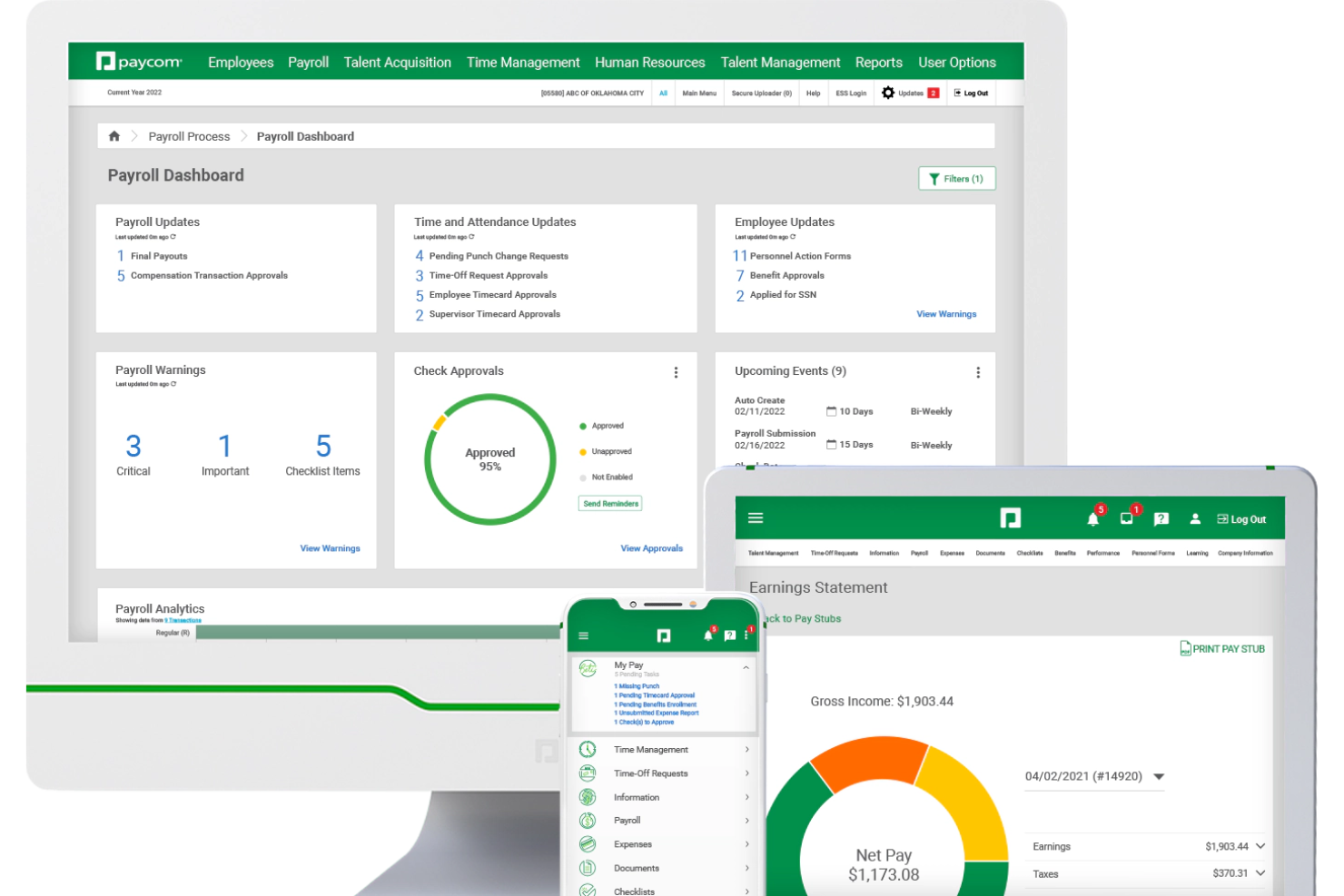
For manufacturing teams, Paycom is an HR and payroll platform that covers the full employee lifecycle—from applicant tracking and pre-day-one onboarding to time and labor management, OSHA safety training, certification tracking, and automated payroll processing.
Who Is Paycom Best For?
Paycom is a strong fit for mid-size to large manufacturing companies managing large hourly workforces across multiple shifts, cost centers, or plant locations.
Why I Picked Paycom
Paycom earns its spot as one of the best on my shortlist because of how deeply real-time data is woven into the platform. I love that the IWant AI engine lets me query employee data instantly, pulling live labor costs, overtime breakdowns, or headcount figures by typing a plain-language question. The Direct Data Exchange dashboard goes further, showing the real-time ROI of every self-service action employees take, quantified in dollars using Ernst & Young research.
Paycom Key Features
- Beti payroll: Automatically builds each pay run and prompts employees to review and correct their hours, deductions, and expenses before submission.
- GL Concierge: Generates general ledger reports mapped to your chart of accounts for direct import into your accounting software.
- GONE: Automatically approves or denies time-off requests based on rules you set, without manager intervention.
- Proximity-based time tracking: Restricts clock-ins to approved physical locations using geofencing on the mobile app.
Paycom Integrations
Integrations are primarily delivered through Paycom's native HR and payroll suite, which includes built-in tools for talent management, time tracking, benefits administration, and employee self-service within a single database.
Pros and Cons
Pros:
- Single database enables cross-module real-time reporting
- Employees review and correct pay before submission
- Mobile clock-in supports shift and hourly workers
Cons:
- Limited integrations
- Custom reporting often requires extra Excel work

Best for integrated time tracking tools
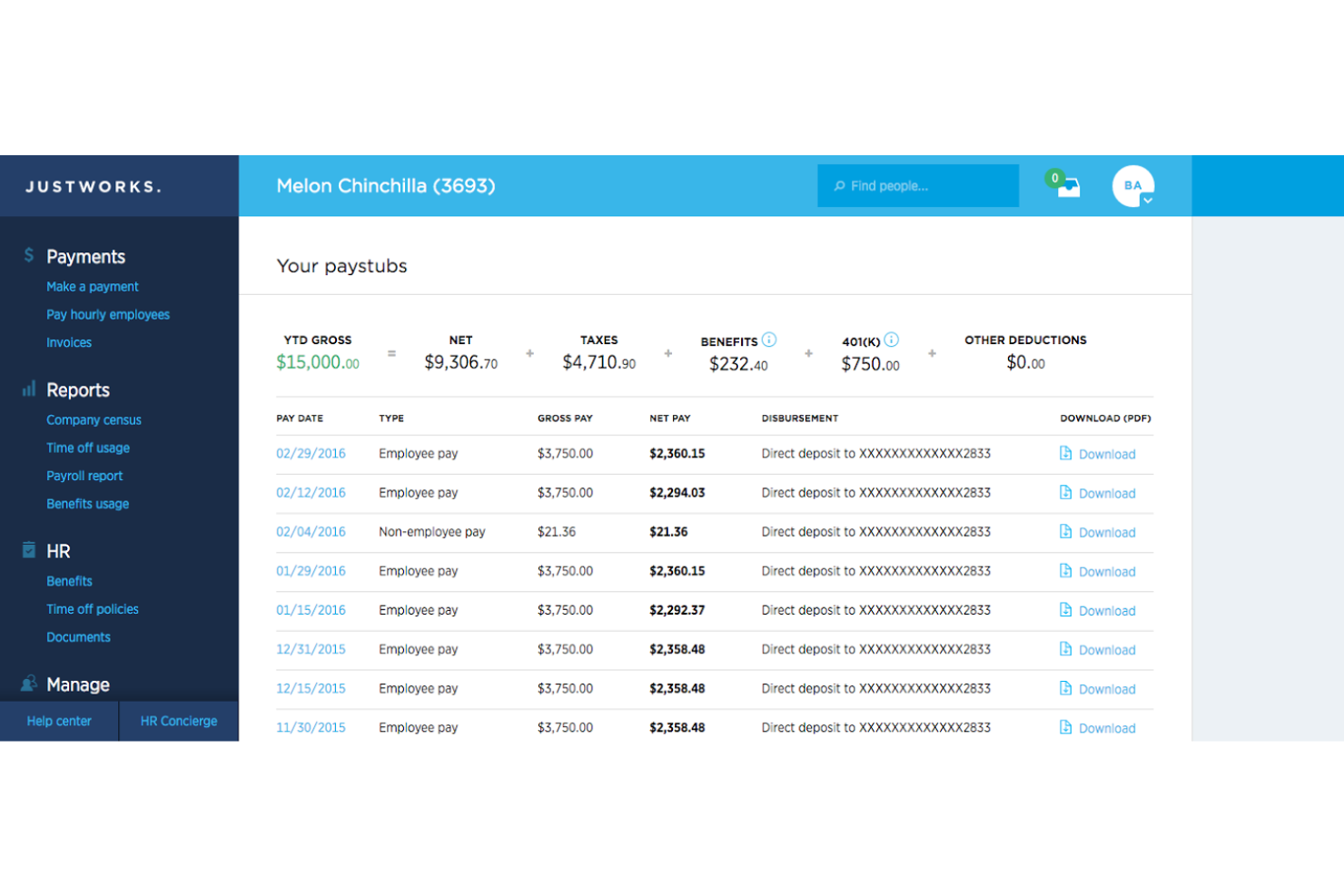
Justworks is a payroll and HR platform designed for manufacturing businesses that need payroll processing, time tracking, compliance management, and benefits administration in one system.
Who Is Justworks Best For?
Justworks is a good fit for manufacturing companies that need a unified payroll and HR platform to manage hourly and shift-based teams.
Why I Picked Justworks
I picked Justworks as one of the best because its integrated time tracking tools let my team capture hours worked directly within the payroll system. I can manage shift schedules, approve timesheets, and ensure accurate payroll for hourly manufacturing staff without juggling separate apps. This setup helps me keep everything in sync for compliance and payroll accuracy.
Justworks Key Services
- Automated payroll processing: Run payroll for hourly and salaried employees with automatic tax calculations and filings.
- Benefits administration: Offer and manage health, dental, vision, and other employee benefits from one platform.
- Compliance support: Access built-in tools and resources to help meet federal, state, and local employment regulations.
- Document management: Store and organize onboarding forms, tax documents, and employee records securely online.
Justworks Integrations
Native integrations are not clearly documented. The tool supports integrations via API for custom connections.
Pros and Cons
Pros:
- Digital onboarding workflows for manufacturing hires
- Automated multi-state payroll tax calculations
- Built-in time tracking for hourly workers
Cons:
- Custom reporting options are somewhat limited
- Benefits administration may not fit unionized shops

Best for recruiting, managing shifts, and training

Paylocity is a strong fit for manufacturing businesses that want payroll tied closely to recruiting, scheduling, and workforce development. It combines payroll with tools for shift-based work, hourly labor tracking, and employee training, making it especially useful for plants with multiple roles, locations, or skill requirements.
Why I Picked Paylocity
I picked Paylocity because it supports the full employee lifecycle in manufacturing, not just payroll. You can manage complex shift schedules by role or skill using its workforce scheduling tools, which helps reduce coverage gaps on the floor.
Its recruiting module supports high-volume hiring with built-in job postings, applicant tracking, and candidate communication, which is useful when turnover is high.
For training, Paylocity includes a learning management system where you can assign safety or compliance courses and track completion from the same platform you run payroll. I also like that real-time labor cost visibility helps you understand how scheduling decisions affect payroll spend.
Paylocity Key Features
Here are some key features worth highlighting:
- Real-Time Labor Cost Tracking: Monitor labor expenses as schedules and hours change.
- Mobile Time Tracking with Geofencing: Ensure accurate clock-ins tied to approved job sites.
- Employee Self-Service Portal: Let employees manage pay details, availability, and documents.
- Compliance Reporting Tools: Support wage, hour, and labor regulation reporting needs.
Paylocity Integrations
Integrations include QuickBooks, Microsoft 365, ADP, Gusto, APS, Deel, Rippling, Dayforce, FreshBooks, and QuickBooks Payroll.
Pros and Cons
Pros:
- Customizable learning modules
- Mobile punch and geofencing
- Advanced analytics
Cons:
- Requires setup fee
- Limited to paid plans
- Minimum seat requirement
New Product Updates from Paylocity

Paylocity Expands Expense and Purchase Request Tools
Paylocity adds connected personal cards, smarter expense categorization, and a streamlined purchase request experience. This reduces manual entry and helps finance teams manage expenses and approvals more efficiently. For more information, visit Paylocity’s official site.
 .
.
Gusto
Best for small-and-medium manufacturers

Gusto is best suited for small and mid-sized manufacturing businesses that want reliable payroll without adding HR complexity.
Why I Picked Gusto
I picked Gusto because it helps you run payroll accurately for hourly manufacturing teams without manual work. You can automate payroll runs, tax filings, and year-end forms, which reduces errors and keeps you compliant across states.
I like that Gusto includes built-in time tracking that feeds directly into payroll, so your team’s hours flow straight from the shop floor to paychecks, and they also handle employee benefits enrollment in the same system, making it easier to offer health insurance and stay competitive when hiring skilled labor. For small manufacturers, this balance of payroll automation and HR essentials makes day-to-day operations much easier to manage.
Gusto Key Features
Here are some key features worth highlighting:
- Automated Tax Filings: Calculates, files, and pays federal, state, and local payroll taxes automatically.
- Hourly Time Tracking: Tracks employee hours and syncs them directly into payroll runs.
- Employee Self-Service: Employees can access pay stubs, tax forms, and benefits online.
- Hiring & Onboarding Tools: New hires complete forms digitally, including I-9s and W-4s.
Gusto Integrations
Integrations include QuickBooks, Xero, FreshBooks, When I Work, Deputy, TSheets (QuickBooks Time), Expensify, Trainual, and Clover.
Pros and Cons
Pros:
- Automatic tax filings and direct deposit simplify payroll compliance
- Payroll, benefits, and HR in one unified platform
- Time tracking flows directly into payroll calculations
Cons:
- International payroll requires third-party solutions
- Limited support for complex union or multi-rate pay rules
New Product Updates from Gusto
Gusto Adds Solo Advisory Tools and Mobile Money Features
Gusto adds Solo S-Corp Advisory Tools and Gusto Money on Mobile for tax guidance, invoicing, and bill payments. These updates help accountants advise solopreneurs and let users manage business finances from their phones. For more information, visit Gusto’s official site.

Paycor
Best for payroll without manual intervention

Paycor is a payroll and HR platform built for mid-sized manufacturing companies that want payroll to run reliably without constant hands-on management. It’s especially well-suited for teams juggling multiple shifts, pay rates, and compliance requirements across locations.
Why I Picked Paycor
I picked Paycor because it lets your team run payroll with minimal manual intervention, which is critical in manufacturing environments with complex schedules and pay rules. Its AutoRun feature automatically processes payroll on a set schedule, reducing the risk of missed deadlines or human error.
I also like that Paycor handles real-time payroll calculations, so overtime, shift differentials, and pay changes are applied accurately without manual adjustments, and built-in compliance tools help ensure your payroll stays aligned with federal, state, and local labor laws, which is especially helpful if you operate across multiple states. Overall, Paycor works well if you want payroll to stay accurate and compliant without constant oversight from your HR team.
Paycor Key Features
Here are some key features worth highlighting:
- Earned Wage Access: Let employees access a portion of earned pay before payday, reducing payroll-related requests.
- Labor Cost Reporting: Track labor spend by role, shift, or department to support production planning decisions.
- Time and Attendance Controls: Capture hours accurately with rules for overtime, breaks, and shift differentials.
- Employee Self-Service: Reduce admin work by letting employees update personal and tax information themselves.
Paycor Integrations
Integrations include QuickBooks, Xero, SAP Concur, Indeed, LinkedIn, Glassdoor, Microsoft Teams, Slack, and DocuSign.
Pros and Cons
Pros:
- Strong compliance support for multi-state manufacturing operations
- Handles complex manufacturing pay rules and shift-based calculations
- AutoRun payroll reduces manual processing
Cons:
- May require additional support for full customization
- UX can feel a bit clunky at times
Best for built-in compliance support

RUN Powered by ADP® is a payroll solution designed for small manufacturing businesses that need compliance handled correctly from day one. It’s best suited for teams with hourly workers, overtime rules, and multi-state tax requirements who want payroll backed by built-in regulatory support rather than manual oversight.
Why I Picked RUN Powered by ADP®
I picked RUN Powered by ADP because it embeds compliance directly into payroll instead of treating it as an add-on. Payroll runs automatically with federal, state, and local tax calculations handled for you, reducing filing errors, and tax payments and filings are submitted on your behalf—especially useful if your team works across shifts or locations.
I also like that the platform surfaces compliance alerts, so you’re notified when payroll-related regulations change. For manufacturing businesses that want payroll done right without constant checking, this approach makes a real difference.
RUN Powered by ADP® Key Features
Here are some key features worth highlighting:
- Automated Payroll Processing: Calculates wages, overtime, and deductions accurately for hourly teams.
- Payroll Compliance Alerts: Notifies you of tax and labor regulation changes affecting payroll.
- Payroll & Labor Reports: Generates standard reports for audits, budgeting, and compliance tracking.
- Employee Self-Service Portal: Lets employees access pay stubs, W-2s, and personal details online.
RUN Powered by ADP® Integrations
Integrations include QuickBooks, QuickBooks Time, ZipRecruiter, retirement providers, benefits carriers, and workforce management tools available through ADP’s native partner ecosystem.
Pros and Cons
Pros:
- Self-service reduces payroll admin questions
- Compliance alerts help prevent missed regulatory changes
- Built-in tax filing reduces payroll compliance risk
Cons:
- Many HR features are limited to higher-tier plans
- Initial setup can be complex

TimeTrex
Best for handling complex pay structures

TimeTrex is a comprehensive workforce management software designed to streamline payroll, time and attendance tracking, and HR processes. It offers a flexible and scalable solution that caters to businesses of various sizes, particularly those in industries with complex workforce needs, like manufacturing.
Why I picked TimeTrex:
TimeTrex stands out with its ability to handle complex pay structures, including piece-rate pay, shift differentials, and overtime calculations, which are common in the manufacturing sector. Additionally, TimeTrex's ability to integrate with time and attendance tracking systems ensures that all employee hours are correctly accounted for.
Standout features & integrations:
TimeTrex's features include advanced scheduling, self-service portals, customizable reporting, automated tax calculations, accrual tracking, and multi-currency support. It also offers job costing, allowing manufacturers to track labor costs associated with specific projects or jobs, providing valuable insights into productivity and profitability.
Integrations include QuickBooks, ADP, Sage, Xero, PayPal, and FreshBooks.
Pros and Cons
Pros:
- Automated payroll and tax calculations
- Integrated payroll and HR management
- Robust time tracking features
Cons:
- Can be difficult to locate specific features
- Platform design is outdated
New Product Updates from TimeTrex
TimeTrex Adds Quick Punch App With Offline and QR Support
TimeTrex adds a new Quick Punch app, offline punching, QR code scanning, punch images, configurable messages, and punch warnings or lockouts to improve employee clock-ins across browsers and local computers. For more information, visit TimeTrex’s official site.
 .
.
APS
Best for flexible scheduling and labor management in manufacturing
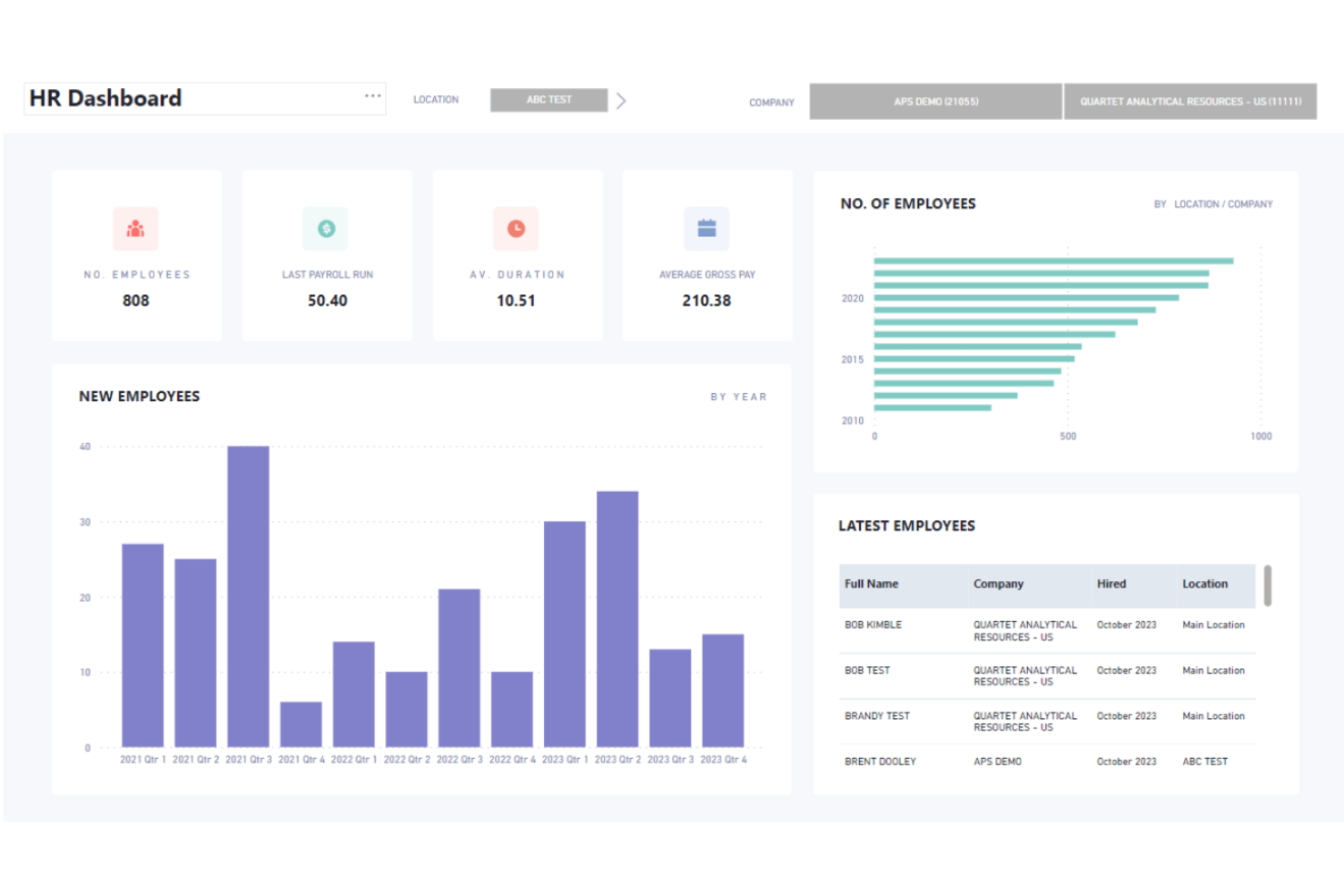
APS Payroll offers a comprehensive payroll and HR software solution for manufacturing companies, providing a range of services including paperless payroll, core HR, benefits administration, performance management, attendance, scheduling, Affordable Care Act reporting, and more. APS is designed to address the specific needs of manufacturing companies in managing employee safety and productivity, and automating core processes.
Why I picked APS:
I chose APS for its robust features tailored specifically for the manufacturing industry. APS stands out for its ability to manage complex scheduling and labor management needs, which are critical in manufacturing environments. The software's flexibility in handling various employee classifications and multiple locations makes it an ideal choice for manufacturing companies.
Standout features & integrations:
Standout features include flexible scheduling, labor management, intuitive reporting, asset tracking, and mobile management.
APS integrates natively with popular time-tracking software and shop management systems, including Sage Intacct, QuickBooks, NetSuite, ADP, Paychex, Kronos, Acumatica, AMGTime, Ascensus, Acuity Scheduling, and more.
Pros and Cons
Pros:
- Intuitive reporting
- Comprehensive labor management
- Flexible scheduling
Cons:
- Slight learning curve for new users
- Limited report and interface customization

Dayforce
Best for workforce management and compliance in manufacturing

Dayforce is a comprehensive payroll and HR software solution designed for manufacturing companies. It helps optimize labor costs, boost productivity, and ensure compliance with industry regulations.
Why I picked Dayforce:
I chose Dayforce for its robust workforce management capabilities tailored specifically for the manufacturing sector. The platform stands out for its ability to streamline operations, manage compliance, and provide real-time visibility into workforce performance.
Standout features & integrations:
Dayforce offers several standout features, including advanced scheduling, real-time labor cost management, and compliance automation. The platform also provides tools for employee training and development, ensuring a skilled and compliant workforce.
Integrations include popular tools such as ADP, SAP, Oracle, Workday, Microsoft Dynamics, Salesforce, QuickBooks, NetSuite, Kronos, and BambooHR.
Pros and Cons
Pros:
- Compliance automation
- Advanced scheduling tools
- Real-time labor cost management
Cons:
- May be cost prohibitive for small businesses
- Limited customization options
- Complex initial setup

ADP
Best for comprehensive payroll and HR solutions tailored to manufacturing

ADP offers a full suite of payroll and HR solutions specifically designed for the manufacturing industry. It excels because it combines industry expertise with client input to create solutions that meet the unique needs of manufacturing businesses.
Why I picked ADP:
I chose ADP for its extensive range of payroll and HR services that are specifically tailored to the manufacturing sector. ADP stands out due to its ability to handle complex payroll needs, such as multiple pay rates and shift tracking, which are common in manufacturing environments. I believe ADP is best for comprehensive payroll and HR solutions because it integrates payroll, time tracking, and HR services into a single platform, making it easier for manufacturing businesses to manage their workforce efficiently.
Standout features & integrations:
ADP's standout features include fast and accurate payroll processing, time and attendance tracking, and comprehensive HR services. The platform also offers data analytics tools to help businesses make strategic decisions.
Integrations include QuickBooks, Xero, Microsoft Dynamics, Oracle, SAP, Workday, Salesforce, BambooHR, Slack, and Google Workspace.
Pros and Cons
Pros:
- Data analytics tools
- Accurate payroll processing
- Able to perform complex HR tasks
Cons:
- Limited customization options
- May require support for setup
Other Payroll Software for Manufacturing To Consider
Below is a list of additional payroll software for manufacturing that we shortlisted, but did not make it to the top list. Definitely worth checking them out.
- Remofirst
For managing global payroll and local compliance
- Rippling
For unified payroll and IT management with global capabilities
- Deel Payroll
For global payroll and compliance
- Keka HR
With dedicated implementation and training
- QuickBooks Payroll
For automated payroll and tax compliance with HR support
- Paycor
For tailored HR and payroll solutions with industry-specific features
- BambooHR®
Good for HR integration with payroll
- Paychex Flex
Good for scalable payroll solutions
- Workday
For comprehensive enterprise planning and workforce management
- Papaya Global
Good for global payroll management


Related HR Software Reviews
If you still haven't found what you're looking for here, check out these other related tools that we've tested and evaluated:
- HR Software
- Payroll Software
- Recruiting Software
- Employer of Record Services
- Applicant Tracking Systems
- Workforce Management Software
How I Evaluate Payroll Software for Manufacturing
When a plant runs three shifts with union workers and piece-rate pay, not every payroll tool makes the cut—I split my evaluation into baseline criteria and differentiators that separate the best fits.
Core Functionality (Table Stakes For This List)
When I'm selecting tools for my list, I rank each one on a scale from 0 (does not offer the functionality) to 5 (excels in this area) for each core functionality listed below. Then, I calculate the tool's total score into a percentage. Each tool needs to achieve a minimum total score of 65% to be considered for inclusion.
- Time & Attendance Integration: I check whether the platform connects with time clocks and biometric systems so hourly punches from the shop floor flow into payroll without manual re-entry.
- Complex Pay Rule Engine: Shift differentials, piece-rate, overtime tiers, and prevailing wage all show up in manufacturing. I evaluate how flexibly a tool handles these calculations.
- Multi-State Tax & Compliance: For plants spread across multiple states, I look for automated tax filing plus support for certified payroll reports like WH-347 and Davis-Bacon tracking.
- Union & CBA Support: I evaluate how the platform handles multiple collective bargaining agreements, union dues, fringe benefits, and remittance reporting for multi-union workforces.
- Multi-Location & Cost Center Payroll: Manufacturing payroll often needs to split labor costs across plants, departments, and jobs. I look for GL mapping and per-location reporting capabilities.
- ERP & Workforce System Integration: Most manufacturers run an ERP like SAP, Oracle, or Epicor. I check for pre-built connectors and open API access that keep payroll and production data in sync.
Once I have a list of tools that meet this criteria, I consider what sets each platform apart.
Differentiating Factors (What Sets Vendors Apart)
Here's how I compare and contrast different vendors:
Standout Features
A self-service mobile app matters here because most shop floor workers don't sit at desks. I look for apps that let employees view pay stubs, update withholdings, and request time off from their phones. Real-time labor analytics also stand out—dashboards tracking costs per job, plant, or production line give operations leaders useful visibility. For large hourly workforces, garnishment automation saves admin time by handling disbursements to agencies without manual steps. I also evaluate workers' comp integrations, especially pay-as-you-go options paired with OSHA reporting.
Beyond Features
Implementation support is a big differentiator. Migrating payroll from a legacy system while running three shifts means you need parallel payroll runs and a team that understands manufacturing pay rules. I also evaluate how well each platform scales—a tool that works for a 50-person plant should still hold up when you add seasonal hires or open a second facility. Integration depth with your manufacturing stack matters too. I check for pre-built connectors to ERPs like SAP, Epicor, and Infor, plus open API access for custom shop floor systems.
How To Choose Payroll Software for Manufacturing
It’s easy to get bogged down in long feature lists and complex pricing structures. To help you stay focused as you work through your unique payroll software selection process, here’s a checklist of factors to keep in mind:
| Factor | What to Consider |
|---|---|
| Scalability | Can the software grow with your business? Consider if it supports increased employee numbers and complex payroll needs as your manufacturing operation expands. |
| Integrations | Does it connect well with your existing systems? Check if it integrates with your ERP and other tools to maintain workflow efficiency. |
| Customizability | Can you tailor the software to your processes? Look for options to customize reports and payroll settings to match your specific manufacturing requirements. |
| Ease of use | Is the interface user-friendly for your team? Ensure it’s intuitive and requires minimal training to reduce onboarding time and errors. |
| Implementation and onboarding | How long will it take to set up? Assess the complexity of getting started, including data migration and initial user training. |
| Cost | Are there hidden fees? Compare pricing models to ensure transparency. Consider total costs, including setup and maintenance, against your budget. |
| Security safeguards | How does it protect sensitive data? Verify encryption standards and compliance with data protection regulations to safeguard employee information. |
| Compliance requirements | Does it meet industry regulations? Ensure it supports compliance with manufacturing labor laws and tax requirements specific to your region. |
Trends for Payroll Software for Manufacturing
Manufacturing payroll software is evolving rapidly. Here are some key trends to watch.
- AI-Powered Payroll Processing: AI is automating payroll tasks, reducing errors and saving time. This technology can handle complex calculations and compliance issues. It is crucial for improving efficiency in payroll management.
- Blockchain for Payroll Security: Blockchain technology is being used to secure payroll data. It ensures transparency and prevents tampering. This trend is important for protecting sensitive employee information.
- Mobile Payroll Solutions: Mobile apps enable payroll management on the go. Employees can access their pay information anytime, anywhere. This trend is significant for increasing accessibility and convenience.
- Cloud-Based Payroll Systems: Cloud-based systems are becoming the norm for payroll management. They offer scalability and remote access. This trend is vital for businesses looking to adapt to flexible work environments.
- Integration with HR and ERP Systems: Payroll software is increasingly integrating with HR and ERP systems. This integration streamlines data flow and improves accuracy. It is essential for creating a unified business management system.
As these trends illustrate, payroll software in the manufacturing industry is becoming more sophisticated, with a strong focus on AI, Cloud and Mobile technology, and integration with other popular business tools. Keep an eye on these trends that are shaping the future of payroll software in manufacturing.
What Is Payroll Software for Manufacturing?
Payroll software for manufacturing is a tool designed to manage and automate the payroll process for manufacturing companies. It is used by HR departments, payroll managers, and finance teams to ensure accurate and timely payment of wages to employees. This software helps users handle complex payroll calculations, tax compliance, and benefits administration specific to the manufacturing sector.
The components of payroll software for manufacturing typically include time and attendance tracking, wage calculation, tax filing, and benefits management. It also integrates with other manufacturing HR systems to streamline data flow and reduce manual entry errors. This ensures that payroll processes are efficient and compliant with industry regulations.
Key Features
When selecting a platform for your manufacturing business, keep an eye out for these key payroll software features:
- Time tracking integration: Manufacturing payroll software should sync seamlessly with time clocks and shop-floor systems to capture hours worked across shifts, overtime, and job codes. This reduces manual entry and ensures accurate wage calculations.
- Direct deposit: Direct deposit ensures employees receive pay on time without paper checks, reducing administrative work and improving employee satisfaction—especially for large, hourly workforces.
- Shift differentials and complex pay rules: Manufacturing environments often require pay variations for night shifts, weekend work, hazardous duties, or union agreements. Payroll software should support these complex wage structures automatically.
- Expense management: Automated expense reporting and reimbursement tools help manage travel, lodging, tools, or safety equipment expenses—ensuring timely and accurate payments.
- Compensation management: Payroll platforms should help manage base pay, bonuses, incentives, and merit increases while supporting fair and competitive compensation strategies aligned with business goals.
- Employee self-service: Employees can access pay stubs, tax forms, benefits details, and personal information without relying on HR—reducing administrative workload and improving transparency.
- Payroll reports and analytics: Customizable reports provide insight into labor costs, overtime usage, department spending, and compliance metrics—supporting informed decision-making.
- Payroll auditing and error reporting: Built-in auditing tools flag inconsistencies, missing data, or calculation issues before payroll is finalized, helping prevent costly errors.
- Tax filing and compliance: Automated tax calculation, withholding, and filing ensures compliance with federal, state, and local regulations—reducing penalties and audit risk.
- Integrated payroll systems: Seamless integration with HRIS, ERP, accounting, and manufacturing systems ensures data consistency and eliminates duplicate entry.
- General ledger mapping: Payroll expenses are automatically mapped to the general ledger, supporting accurate financial reporting and easier reconciliation.
- Wage garnishment management: Payroll software automates garnishment deductions and remittances in compliance with legal requirements, reducing administrative complexity.
- Global payroll support: For manufacturers with international operations, payroll software supports multiple currencies, time zones, and local compliance rules.
- On-demand pay: Some platforms allow employees to access earned wages before payday, helping reduce financial stress and improve retention in high-turnover roles.
Common Payroll Software AI Features for Manufacturing
Modern manufacturing payroll platforms increasingly use AI to improve accuracy, compliance, and workforce planning, for example:
- AI-powered payroll error detection: AI scans payroll runs to identify anomalies such as incorrect overtime calculations, missed shift differentials, duplicate hours, or unusual pay patterns before payroll is processed.
- Predictive labor cost forecasting: AI analyzes production schedules, historical labor data, seasonality, and overtime trends to forecast labor costs more accurately.
- Smart compliance monitoring: AI tracks changes in labor laws, union agreements, overtime rules, and tax regulations—alerting payroll teams to compliance risks automatically.
- Automated timecard validation: AI reviews clock-in/out data to detect missed punches, buddy punching, or inconsistencies tied to specific machines or production lines.
- AI-driven scheduling insights: By analyzing production demand and labor availability, AI helps recommend staffing levels that minimize overtime while maintaining output targets.
- Turnover and absenteeism risk analysis: AI identifies patterns linked to employee burnout, absenteeism, or attrition—such as excessive overtime or inconsistent schedules—supporting proactive workforce interventions.
- Intelligent garnishment processing: AI helps validate garnishment rules across jurisdictions and flags incorrect deduction amounts or priority conflicts.
- AI-powered employee support: Chatbots answer common questions about pay, overtime, deductions, schedules, and tax forms—reducing interruptions for HR and payroll teams.
- Advanced analytics and insights: AI surfaces trends across labor efficiency, overtime dependency, payroll variance, and compliance risks—turning payroll data into actionable operational insights.
Benefits
Implementing payroll software in the manufacturing sector can significantly improve efficiency, accuracy, and compliance. Here are five primary benefits that potential buyers should consider:
- Increased Accuracy: Payroll software minimizes human errors by automating calculations and data entry, ensuring employees are paid correctly and on time.
- Time Savings: Automating payroll processes reduces the time spent on manual tasks, allowing HR staff to focus on more strategic activities.
- Regulatory Compliance: The software helps ensure compliance with labor laws and tax regulations by automatically updating to reflect the latest legal requirements.
- Cost Efficiency: By reducing the need for manual labor and minimizing errors, payroll software can lower operational costs and improve the bottom line.
- Data Security: Payroll software provides robust security features to protect sensitive employee information from unauthorized access and data breaches.
Investing in payroll software can lead to significant improvements in operational efficiency and accuracy, making it a valuable tool for any manufacturing organization.
Costs & Pricing
When it comes to managing payroll in the manufacturing industry, selecting the right software can significantly streamline operations, ensure compliance, and save time.
Below, I have provided an overview of the common pricing options and features available in payroll software for manufacturing to help you find the right fit.
Plan Comparison Table for Payroll Software for Manufacturing
| Plan Type | Average Price | Common Features |
| Free Plan | $0 | Basic payroll processing, employee self-service, limited support |
| Basic Plan | $17/month + $4/employee | Payroll processing, direct deposit, printable W-2s, setup and expert support |
| Standard Plan | $40/month + $6/employee | Full-service payroll, tax filing, employee self-service, basic HR tools |
| Advanced Plan | $80/month + $12/employee | Multi-state payroll, next-day direct deposit, advanced HR tools, PTO management |
| Premium Plan | $125/month + $10/employee | Tax penalty protection, mobile time tracking, dedicated HR advisor, compliance |
Consider the size of your business, the complexity of your payroll needs, and the level of support required when choosing payroll software for manufacturing. Each plan offers different features and pricing, so you can choose which one aligns with your business goals and budget based on your needs.
Payroll Software for Manufacturing FAQs
Here are some answers to common questions about payroll software for manufacturing:
How does payroll software handle compliance in manufacturing?
Payroll software for manufacturing helps you stay compliant with industry regulations by automatically updating tax rates and labor laws. It ensures accurate calculations and timely filings, reducing the risk of penalties. You should check if the software supports the specific compliance needs of your region.
Can payroll software integrate with existing systems?
Yes, many payroll software solutions offer integration capabilities with existing ERP and HR systems. This helps maintain a smooth workflow and reduces manual data entry. Ensure the software you choose can connect with your current tools to maximize efficiency.
What kind of support is available for payroll software users?
Most payroll software providers offer customer support through various channels like phone, email, and chat. Some also provide dedicated account managers for personalized assistance. It’s important to evaluate the level of support offered, especially during implementation and onboarding.
How does payroll software manage multi-shift scheduling?
Payroll software for manufacturing often includes features to handle complex shift schedules. It allows you to set different pay rates and manage overtime efficiently. This is particularly useful in manufacturing where shift work is common, ensuring accurate payroll processing.
Is payroll software scalable for growing manufacturing businesses?
Yes, many payroll software solutions are designed to scale with your business. They accommodate increased employee numbers and more complex payroll needs as your company grows. Check if the software offers flexible pricing plans to match your expansion.
What security measures are in place to protect payroll data?
Payroll software typically includes data encryption and compliance with data protection regulations to safeguard sensitive information. It’s crucial to verify the security features of the software to ensure your data is protected against unauthorized access and breaches.
What’s Next?
To remain up to date on all the latest in people management, subscribe to our newsletter for leaders and managers. You'll receive insights and offerings tailored to leaders and HR professionals straight to your inbox.