

40 Best Rippling Competitors of 2026

10 Best Rippling Competitors Shortlist


Rippling is a comprehensive platform that integrates HR, payroll, IT, and finance management, offering businesses a unified system to manage employee data, automate payroll, and streamline HR tasks.
While it's a well-known and worthwhile solution, it might not necessarily be the best for your specific needs.
In this article, I’ll walk you through my recommendations for the best Rippling competitors to manage your core HR functions within one system.
What is Rippling?
Rippling offers an all-in-one platform that integrates human resource management, financial and payroll software, and IT operations into one system.
It’s designed primarily for small and medium-sized businesses seeking to streamline their internal processes.
Rippling offers three distinct products—an HR Cloud, IT Cloud, and Finance Cloud— that cover a multitude of functions including recruiting, payroll, benefits administration, performance management, time and attendance, compliance, scheduling, and IT device management, among others.
Rippling’s appeal lies in the ability to centralize numerous administrative tasks into a single, cohesive system, helping businesses manage employee data and systems efficiently while ensuring compliance and improving overall operational workflows.
Why Use A Rippling Alternative?
Even though Rippling does have a lot to offer, there are several reasons why you might want to consider a Rippling competitor, including:
1. Can get expensive as you scale
Rippling starts off affordably, but costs rise quickly as you add modules (like IT, Finance, or Global Payroll).
If you're budget-conscious, it may end up being pricier than expected, however some users report being able to negotiate discounts for the first year.
2. Steep learning curve for admins
Because it’s highly customizable and covers a lot beyond HR, it can feel overwhelming for first-time users. You’ll likely need time (or support) to fully optimize it.
3. Not ideal for complex global entities (yet)
Rippling supports international hiring, but larger companies with complex legal structures or heavy compliance needs may find limitations. It’s still maturing compared to legacy enterprise tools.
4. Service and support can vary
Some users report delays or inconsistent help from customer support, especially during implementation as there's no support number, just a live chat. There If white-glove onboarding is a must, this could be a sticking point.
5. Still building out certain features
While Rippling moves fast, some features—like in-depth performance management, native LMS, or workforce planning—are lighter than dedicated tools. You might need add-ons or integrations.
With the above in mind, lets get into some Rippling alternative reviews!
Why Trust Our Software Reviews
We’ve been testing and reviewing HR software since 2019. As HR professionals ourselves, we know how critical and difficult it is to make the right decision when selecting software.
We invest in deep research to help our audience make better software purchasing decisions.
We’ve tested more than 2,000 tools for different HR use cases and written over 1,000 comprehensive software reviews.
Learn how we stay transparent, and take a look at our software review methodology.
Best Rippling Competitors: Pricing Comparison Chart
This comparison chart summarizes pricing details for my top Rippling competitor selections to help you find the best software for your budget and business needs.
| Tool | Best For | Trial Info | Price | ||
|---|---|---|---|---|---|
| 1 | Best for global payroll and compliance | Free demo available | From $599/employee/month | Website | |
| 2 | Best for global recruitment solutions | Free demo available | From $199/employee/month | Website | |
| 3 | Best for automated contract generation | Free demo available | From $579/month | Website | |
| 4 | Best for unified reporting dashboards | Free demo available | From $400/employee/month | Website | |
| 5 | Best for benefits management and administration | Not available | $599/employee/month | Website | |
| 6 | Best for global compliance handling | Free demo available | From $99/month per employee | Website | |
| 7 | Best for automated payroll and tax filing | Free demo + free plan available | From $49/month + $6/user/month | Website | |
| 8 | Best for core HR with employee engagement | Free demo available | Pricing upon request | Website | |
| 9 | Best for U.S. businesses with up to 500 employees | Free demo available | Pricing upon request | Website | |
| 10 | Best for budget-conscious teams | Free demo + free plan available | From $199/employee/month | Website |


-

Native Teams
Visit WebsiteThis is an aggregated rating for this tool including ratings from Crozdesk users and ratings from other sites.4.6 -
Remote People
Visit WebsiteThis is an aggregated rating for this tool including ratings from Crozdesk users and ratings from other sites.5 -
Checkr
Visit WebsiteThis is an aggregated rating for this tool including ratings from Crozdesk users and ratings from other sites.4.5



Best Rippling Competitor Reviews
Below are in-depth summaries of my recommendations for the best Rippling competitors. I’ll cover their features, pros and cons, and best use cases to help you find the best fit for your needs.

Deel helps global companies hire, pay, and manage talent across borders with built-in compliance and localized support.
Why It's A Good Rippling Alternative
I picked Deel because it lets you run compliant international payroll without relying on manual processes or third-party intermediaries. You can hire full-time employees through its employer of record (EOR) network, which handles local contracts, taxes, and benefits so your team can enter new markets quickly and safely.
I also like that it centralizes contractor payments in hundreds of currencies with automated invoicing and tax documents, reducing admin for finance teams. Deel’s built-in HRIS gives you a place to manage onboarding, documents, and performance for both employees and contractors. For companies scaling globally, this mix of compliance support and payroll automation makes international operations much easier to manage.
Deel Key Features
Here are some key features worth highlighting:
- Localized employment contracts: Country-specific agreements reviewed by local legal experts.
- Automated global payroll: Consolidates payroll, taxes, and statutory contributions across multiple countries.
- Equity management: Supports granting and administering equity to international employees.
- Immigration support: Provides visa sponsorship and relocation assistance for cross-border hires.
Deel Integrations
Integrations include QuickBooks, Xero, NetSuite, BambooHR, Greenhouse, Lever, Workday, SAP SuccessFactors, ADP, and Oracle.
Pros and Cons
Pros:
- Multi-currency payments simplify global contractor management
- Strong local compliance guidance across many countries
- Dedicated customer support
Cons:
- Payroll reporting customization can feel limited
- No free trial available


Remote People is a platform that helps businesses hire and manage remote talent across more than 150 countries. It's designed to support companies in expanding their global workforce by offering a range of recruitment and payroll services.
Why it's a good Rippling competitor: One of the reasons I picked Remote People as a competitor to Rippling is its global recruitment capabilities. It provides access to a vast pool of vetted candidates, ensuring businesses can find the right talent for various roles, including executive positions. This feature is crucial for companies looking to diversify their workforce with skilled professionals from around the world.
Another key feature is the employer of record (EOR) services, which allows businesses to hire employees in countries where they don't have a legal entity. This service ensures compliance with local labor laws, making it easier for companies to manage payroll and benefits for their international employees. The ability to legally hire and manage employees in multiple countries is a significant advantage for businesses aiming to expand globally.
Standout features & integrations:
Features include a streamlined hiring process that delivers a shortlist of vetted candidates within five days, making recruitment quick and efficient. The platform also offers contractor management services, allowing businesses to hire and pay international contractors with ease. Additionally, Remote People provides background checks, giving companies peace of mind when bringing new employees on board. These features work together to support a comprehensive approach to global workforce management.
Integrations are not presently listed by Remote People.
Pros and Cons
Pros:
- Candidate placement guarantee
- Dedicated client support contact
- Wide recruitment network
Cons:
- No publicly listed integrations
- Some services available only in certain regions

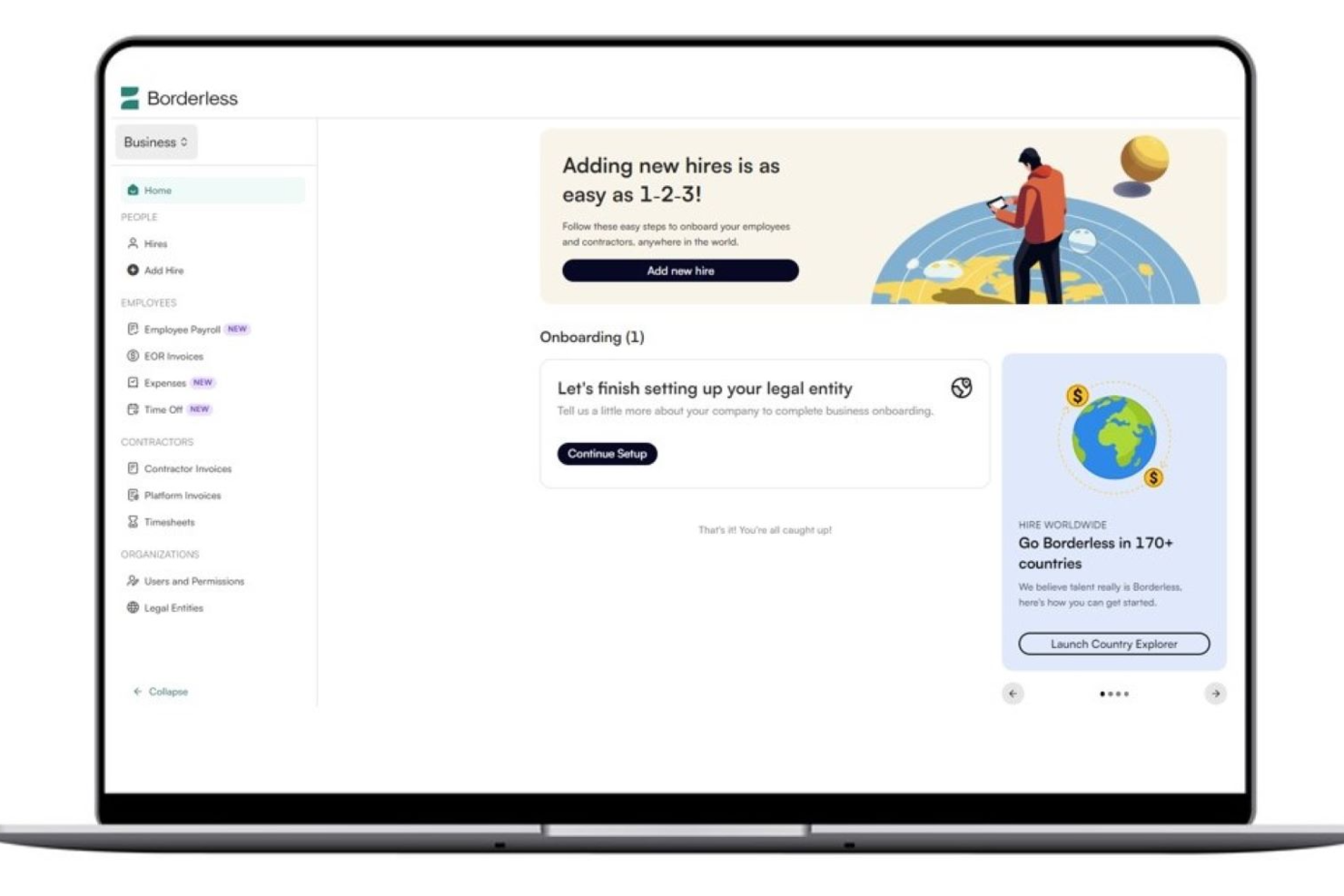
For businesses looking to expand internationally without the hassle of establishing foreign entities, Borderless AI offers a compelling solution. This platform is ideal for companies of all sizes across industries such as fintech, healthcare, and construction, providing streamlined international hiring, contractor management, and global payroll services. If your team is seeking to navigate the complexities of global compliance and payroll management, Borderless AI addresses these challenges with AI-driven tools designed for efficiency and compliance.
Why I Picked Borderless AI
I picked Borderless AI for its unique AI-driven capabilities that streamline HR and payroll processes, making it a strong contender among Rippling competitors. The platform's AI tools, such as automated contract generation and compliance management, cater to businesses seeking to simplify international operations. Additionally, its ability to process payroll in over 90 currencies and offer quick onboarding timelines sets it apart for companies needing efficient global expansion solutions. These features align with the needs of businesses facing the intricacies of managing a diverse workforce across multiple countries.
Borderless AI Key Features
In addition to its AI-driven HR tools, I also found the following features valuable for businesses exploring Rippling competitors:
- Employer of Record (EOR): Allows businesses to hire employees in over 170 countries without establishing foreign entities.
- Professional Employer Organization (PEO): Provides comprehensive HR management, including local benefits setup and tax compliance.
- Centralized Payroll Processing: Manages payroll across multiple countries and currencies from a single platform.
- 24/7 In-House Support: Offers dedicated customer service to assist with any HR or payroll inquiries.
Borderless AI Integrations
Native integrations are not currently listed by Borderless AI.
Pros and Cons
Pros:
- Provides dedicated HR legal support
- Handles multi-currency global payroll processing
- Manages compliant local employment contracts
Cons:
- Reporting depth may lack depth
- No native HRIS integrations available

Multiplier is a good fit for companies hiring internationally who want one place to manage payroll, compliance, and workforce costs across multiple countries. If you’re expanding into new markets and need clearer visibility into what you’re spending, its unified reporting dashboards help you monitor payroll, taxes, and headcount without juggling multiple vendors.
Why It's A Good Rippling Alternative
I picked Multiplier because it gives your team a single global payroll system where you can track costs, payments, and compliance requirements across 100+ countries. You can see country-level payroll totals, deductions, and employer contributions in one dashboard, which makes reporting much easier for finance teams.
I also like that Multiplier handles local taxes and filings for each region, so you don’t need separate in-country partners to stay compliant. Its ability to run payroll in local currencies—and consolidate all results into one view—helps you compare workforce costs across markets. For teams building globally, this clarity is a major advantage over tools that spread payroll features across multiple modules.
Multiplier Key Features
Here are some key features worth highlighting:
- Global Cost Visibility: Consolidated dashboards show payroll totals, contributions, and employer costs across regions.
- Country-Specific Payroll Processing: Local tax rules, deductions, and filings managed automatically for 100+ countries.
- Multi-Currency Payments: Supports payments in 120+ currencies with real-time exchange-rate calculations.
- Compliance Support: Access to in-country legal and tax specialists to help resolve region-specific questions.
Multiplier Integrations
Integrations include Workday, BambooHR, Personio, HiBob, Zoho People, Okta, Xero, and QuickBooks.
Pros and Cons
Pros:
- Fast onboarding for global employees via guided workflows
- Automates local tax calculations and statutory contributions
- Unified dashboard improves visibility into global payroll spending
Cons:
- Fewer native integrations than broader HR suites
- Limited contract-customization options for specific markets

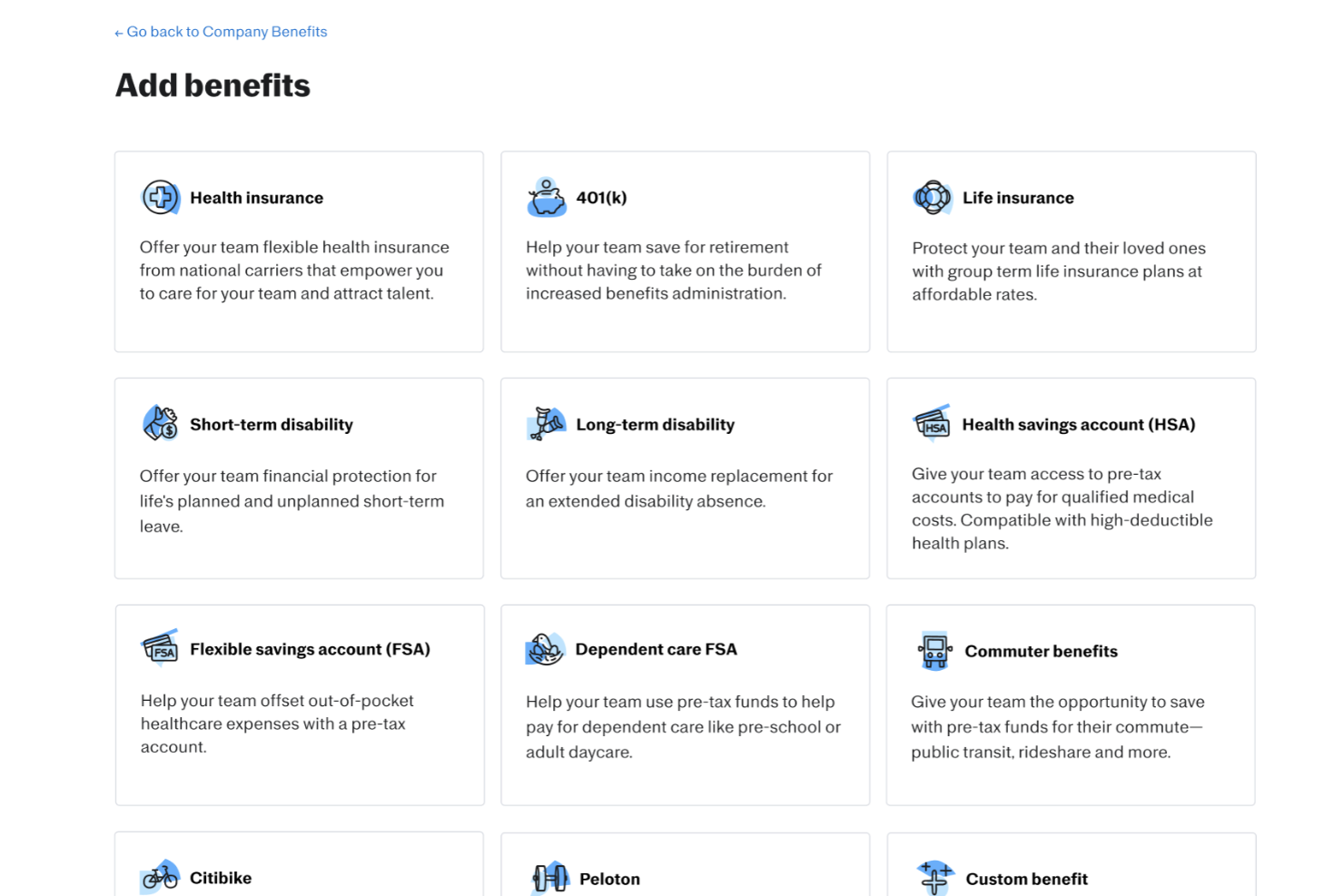
Justworks serves as an alternative to Rippling for businesses that need payroll and HR support in one system. It stands out for benefits management and administration, helping companies handle employee health plans and related programs alongside payroll and compliance. This structure supports organizations that prefer a centralized approach to workforce operations.
Why I Picked Justworks
I picked Justworks as a Rippling competitor for its benefits management and administration, which allows businesses to manage health insurance, retirement plans, and other employee programs within the same system as payroll. Compared to Rippling’s broader IT and HR focus, Justworks places stronger emphasis on structured benefits support alongside payroll and compliance. This setup helps small businesses keep benefits enrollment, contributions, and payroll records organized in one platform.
Justworks Key Features
In addition to benefits management and administration, Justworks offers:
- Time Tracking: Allows you to manage employee hours and attendance seamlessly.
- Employee Onboarding: Streamlines the process of bringing new hires into your organization with digital onboarding tools.
- Compliance Support: Helps you stay compliant with labor laws and regulations, reducing the risk of legal issues.
- Reporting and Analytics: Provides insights into various HR metrics, allowing you to make informed decisions.
Justworks Integrations
Integrations include QuickBooks, Xero, NetSuite, Sage Intacct, Electric AI, allwhere, JazzHR, Brex, Culture Amp, and Leapsome.
Pros and Cons
Pros:
- Automated payroll tax filings
- Clear employee dashboard for benefits and pay information
- Straightforward onboarding workflow for new hires
Cons:
- Reporting tools offer limited in-depth business insights
- Fewer advanced HR features than larger enterprise platforms


Native Teams is built for companies that need affordable, compliant hiring across multiple countries without opening local entities. It’s a strong fit for small and mid-sized teams that want to employ or pay workers abroad while keeping global payroll, taxes, and benefits legally sound.
Why I Picked Native Teams
I picked Native Teams because it focuses heavily on compliance, giving your team the legal coverage needed to hire in 95+ countries. You get EOR services that manage compliant contracts, payroll taxes, and statutory contributions, reducing the risk of misclassification or local law violations.
I also like that it pairs compliance with practical tools—such as localized benefits and multi-currency wallets—so employees receive country-appropriate perks while your finance team handles payments accurately.
Lastly, its visa and relocation support adds another compliance layer for cross-border mobility.
Native Teams Key Features
Here are some key features worth highlighting:
- Visa & Relocation Assistance: Supports compliant relocation by managing visa requirements and documentation.
- Contractor Payment Tools: Ensures freelancers are paid correctly and within local legal frameworks.
- Localized Benefits Administration: Offers country-specific insurance and perks that meet statutory standards.
- Tax Optimization Tools: Helps calculate salaries and taxes based on each region’s legal requirements.
Native Teams Integrations
Integrations include Slack, QuickBooks, Xero, Deel Payroll Sync (limited regions), Google Calendar, Microsoft Outlook, Wise, Revolut Business, and Payoneer.
Pros and Cons
Pros:
- Regional benefit requirements in many countries
- Compliant employment contracts and documentation
- Payroll calculators for compliant salary planning
Cons:
- Covers fewer countries than some competitors
- May not offer advanced HR tools beyond essential employment features

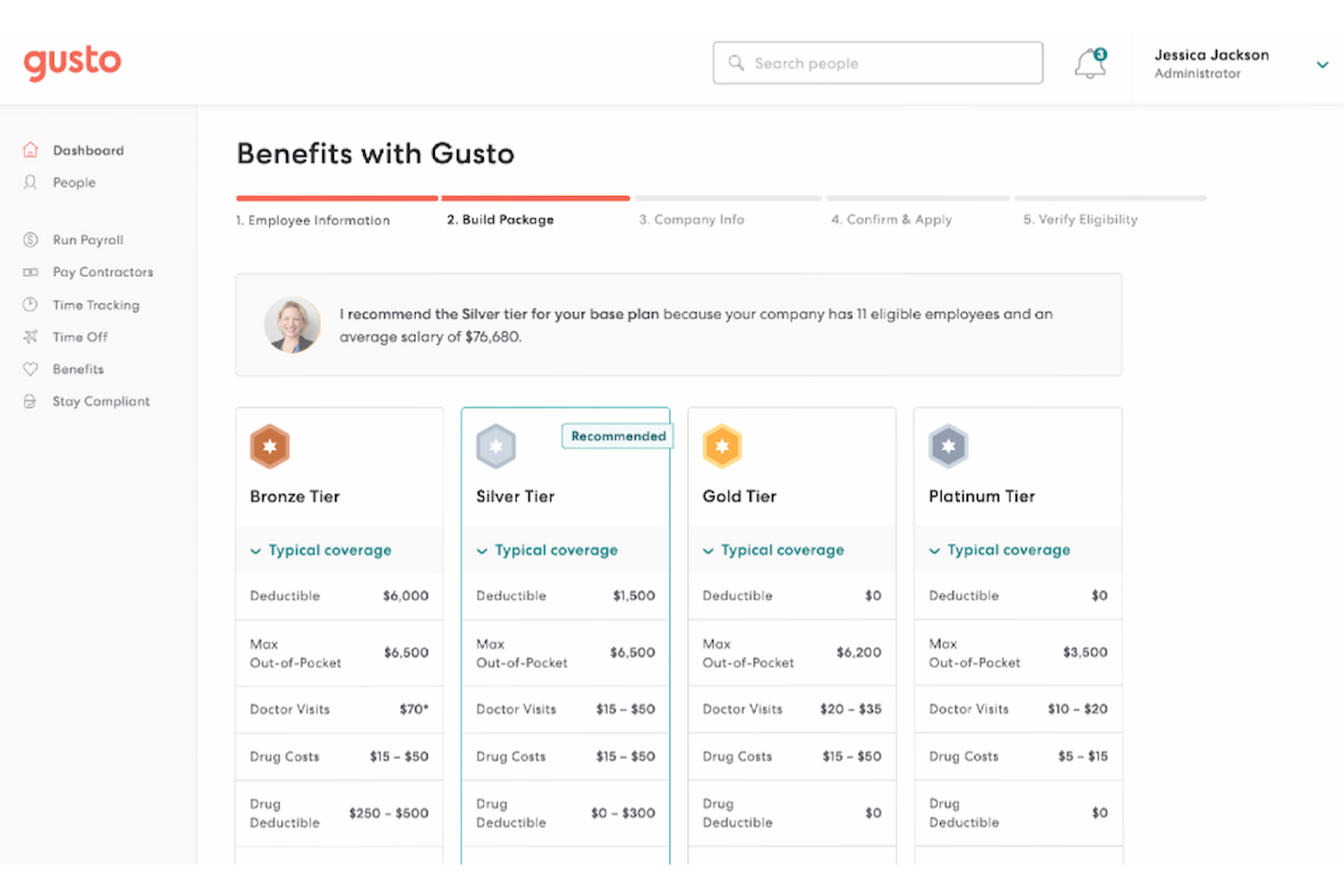
Gusto simplifies the complexities of managing payroll and HR tasks for small to mid-sized businesses. With its intuitive platform, it caters to business owners seeking to streamline payroll processes and enhance employee management without the administrative burden. Gusto addresses significant challenges, such as ensuring compliance and providing affordable benefits, making it a valuable solution for companies aiming to improve operational efficiency and employee satisfaction.
Why I Picked Gusto
I picked Gusto for its strong focus on automating payroll and tax filing, which is crucial for businesses seeking alternatives to Rippling. Gusto's automated payroll feature ensures timely and accurate payroll processing, while its tax compliance tools help you manage state and federal tax filings effortlessly. Additionally, Gusto's employee benefits management stands out by offering a comprehensive suite of health insurance options, which can be a pivotal factor for businesses looking to attract and retain top talent.
Gusto Key Features
In addition to automated payroll and tax filing, Gusto offers:
- Time Tracking: Enables your team to log hours directly within Gusto, seamlessly syncing with payroll for accurate compensation.
- Hiring and Onboarding: Provides paperless onboarding solutions that enable new hires to complete required documentation online.
- Compliance Support: Assists in staying updated with labor laws and regulations, reducing the risk of non-compliance penalties.
- Employee Self-Service: Empowers employees to view payslips, manage benefits, and request time off through a user-friendly portal.
Gusto Integrations
Integrations include QuickBooks, Xero, FreshBooks, TSheets, When I Work, Deputy, Expensify, Clover, Shopify, and Slack.
Pros and Cons
Pros:
- Integration with popular accounting tools simplifies bookkeeping
- Flexible PTO tracking supports custom leave policies
- Comprehensive benefits management integrates health and retirement plans
Cons:
- Less suitable for larger, multi-entity companies
- Reporting options are less flexible for custom analysis
New Product Updates from Gusto

Gusto Enhances Benefits Renewals with Personalized Insights
Gusto introduces a smarter benefits renewal process with personalized insights and benchmarking. This update helps businesses make more informed decisions when renewing coverage. For more information, visit Gusto’s official site.


Paylocity is a good fit for mid-sized organizations that want HR, payroll, and employee engagement tools in one place. It’s especially useful if your team values collaborative features—like social feeds and recognition tools—built directly into everyday HR workflows.
Why It's A Good Rippling Alternative
I picked Paylocity because it blends core HR and payroll with built-in tools that help your team stay connected. You get features like community hubs and peer recognition that encourage employees to share updates, highlight wins, and interact across departments.
Paylocity also supports ongoing development through its learning management tools, which let you assign courses and track progress. These engagement-focused features pair well with its strong compliance handling for payroll, benefits, and taxes, making it a practical Rippling alternative for teams that want both operational coverage and cultural support.
Paylocity Key Features
Here are some key features worth highlighting:
- Employee Self-Service: Lets employees update personal details, request time off, and access pay information on their own.
- Compensation Management: Helps you plan raises, track pay changes, and ensure consistent compensation practices.
- Applicant Tracking: Supports your hiring process with job postings, candidate tracking, and interview tools.
- Expense Management: Allows employees to submit expenses and receipts digitally for faster approvals.
Paylocity Integrations
Integrations include Azure, Atlassian, Asana, Box, ClearCompany, Dropbox, Freshdesk, Google Workspace, Greenhouse, HubSpot, Slack, Salesforce, Trakstar, and Zoho People.
Pros and Cons
Pros:
- Built-in social feed encourages cross-team engagement
- Learning tools support continuous development
- Global payroll and on-demand payments
Cons:
- Lacks support for independent contractor management
- Setup can be time consuming
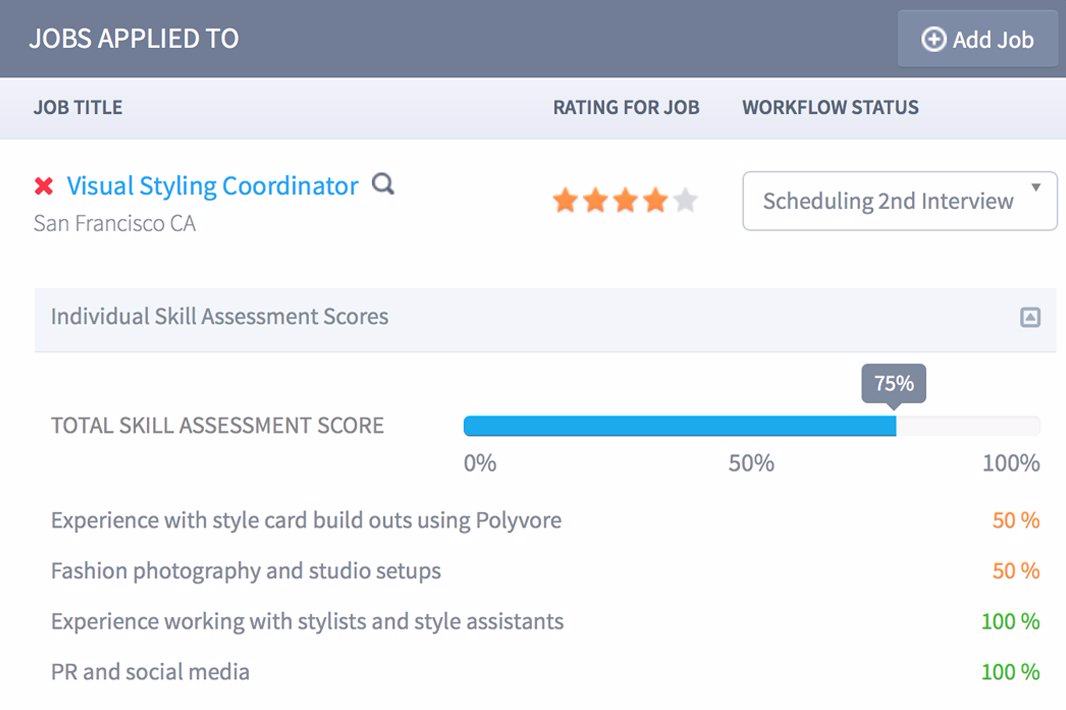
TriNet offers a versatile range of HR solutions tailored to small and midsize businesses, providing comprehensive payroll, benefits management, and compliance support. If you're seeking a solution to simplify HR tasks and ensure regulatory compliance, TriNet's platform, backed by advanced technology and personalized support, can help you navigate the complexities of workforce management. By focusing on these core areas, TriNet addresses the operational challenges businesses face, making it an appealing choice for those in need of a reliable HR partner.
Why I Picked TriNet
I picked TriNet as a strong contender among Rippling competitors due to its focus on providing tailored HR solutions that specifically address compliance and benefits management needs. TriNet's Professional Employer Organization (PEO) and HR Plus services stand out by offering not just payroll processing but also comprehensive compliance support, which is crucial for businesses looking to mitigate risks. Furthermore, its emphasis on personalized support ensures that your team receives the guidance needed to manage HR processes, making it an invaluable resource for companies looking to enhance their HR capabilities.
TriNet Key Features
In addition to its strong compliance and benefits management offerings, I also found several other features that make TriNet a compelling choice:
- HR Consulting Expertise: TriNet provides expert HR consulting services to help you tackle complex HR challenges and improve personnel decisions.
- Risk Mitigation Tools: The platform offers tools designed to help your business navigate and mitigate potential HR risks.
- Contractor and Global Workforce Management: TriNet supports the management of both contractors and the global workforce, expanding its integration capabilities.
- Educational Resources: TriNet engages its audience with educational content and customer stories, helping you stay informed about HR best practices.
TriNet Integrations
Integrations include partnerships with brokers and accountants to enhance integration capabilities. Native integrations are not currently listed by TriNet.
Pros and Cons
Pros:
- ACA COBRA compliance automation tools
- Payroll benefits compliance management tools
- PEO and HR Plus services
Cons:
- Pricing information available upon request
- Native integrations not publicly listed
New Product Updates from TriNet
TriNet HR Plus Adds Vestwell 401(k) Connect Integration
TriNet integrates with Vestwell for 401(k) Connect, streamlining deferrals and contributions via TriNet Payroll to Vestwell. For more information, visit TriNet's official site.
 .
.

RemoFirst is a global EOR platform designed for teams that want to hire internationally without overspending. It helps you employ talent in 185+ countries while keeping payroll and compliance simple—making it an ideal fit for budget-conscious teams expanding abroad.
Why It's A Good Rippling Alternative
I picked RemoFirst because it gives you the essentials for global hiring without the extra IT, finance, or device-management modules that drive up costs in tools like Rippling.
You get compliant hiring, localized contracts, and consolidated payroll through one dashboard, so you can hire abroad without juggling multiple vendors. Its country specialists guide you through local employment rules, minimizing compliance mistakes in new markets.
I also like that RemoFirst’s pricing stays predictable, which matters when you’re scaling a distributed team on a tight budget. For companies that want straightforward global hiring instead of a full internal ops suite, it hits the sweet spot.
RemoFirst Key Features
Here are some key features worth highlighting:
- Global Health Coverage (RemoHealth): Offers worldwide medical plans managed directly through your EOR account.
- Visa & Work Permit Support: Handles immigration processes in 85+ countries with local partners.
- Background Checks: Screens new hires globally through integrated verification services.
- Invoice Aggregation: Replaces multiple individual payments with one consolidated monthly invoice.
RemoFirst Integrations
Integrations include ADP, QuickBooks, Xero, NetSuite, BambooHR, Deel, Remote, HubSpot, Salesforce, and FreshBooks.
Pros and Cons
Pros:
- Immigration support available across 85+ countries
- Single global invoice simplifies multi-country payroll
- Clear, predictable pricing suitable for budget-sensitive teams
Cons:
- Lacks extensive integration options
- No mobile app
New Product Updates from RemoFirst

RemoFirst Launches BambooHR Integration
RemoFirst has launched a BambooHR integration for enhanced global hiring and HR management. For more details, visit RemoFirst's official site.
 .
.Other Rippling Competitors
If you’d like a few more options to consider, here are several other worthwhile Rippling competitors that are also worth checking out:
| Factor | What to Consider |
|---|---|
| Business Objectives | Identify your primary goals—e.g., automating HR processes, improving compliance, or scaling globally. Choose a solution that directly supports those objectives. |
| Core HR Features | Ensure the system includes essentials like employee records, time tracking, benefits administration, and compliance management. |
| Payroll and Benefits Management | Look for accurate, automated payroll with multi-country support (if needed), plus seamless benefits enrollment and management tools. |
| Talent Management | Consider whether the platform includes recruiting, onboarding, performance reviews, and learning management features to support employee growth. |
| Integration and Compatibility | Verify it integrates smoothly with your accounting software, collaboration tools (like Slack or Teams), and other HR platforms you use. |
| Ease of Use | Evaluate the user interface and employee experience. A clean, intuitive design reduces onboarding time and HR workload. |
| Scalability | Make sure the platform can grow with your company—supporting additional employees, locations, and compliance requirements as you expand. |
| Customization and Flexibility | Check if you can tailor workflows, reports, and user permissions to your organization’s structure and policies. |
| Support and Training | Compare customer service options—such as 24/7 chat, phone support, and onboarding assistance—and ask about training resources. |
| Compliance and Security | Confirm the system complies with relevant labor laws and data protection standards (e.g., GDPR, SOC 2, HIPAA). |
| Analytics and Reporting | Look for built-in dashboards that track workforce trends, payroll costs, and turnover rates for better decision-making. |
| Costs and Pricing Model | Understand how pricing scales with users and features. Watch for add-on fees for integrations or implementation. |
| Reputation and Reliability | Read user reviews, case studies, and third-party ratings (like G2 or Capterra) to assess product reliability and vendor trustworthiness. |
- BambooHR®
User-friendly HR software for SMBs
- Pebl
For AI-powered EOR tools
- RUN Powered by ADP®
For small businesses
- CXC Global
For integrating human expertise
- TimeTrex
For detailed job costing and expense tracking
- WorkBright
For mobile-first onboarding
- GoCo
For an easy-to-use interface with responsive customer support
- Remote
For flexible employee and contractor management
- Atlas HXM
For global compliance management
- Omnipresent
For adherence to employment laws
- Sage HR
Modular HR software solution for small businesses
- ADP
For comprehensive payroll and HR services
- SAP SuccessFactors
For AI-enabled talent management
- Oracle Cloud HCM
For AI-embedded HR processes
- Zoho People Plus
For customizable workflows
- Paychex
For all-in-one payroll and HR solutions
- UKG Ready
For AI-powered workforce management
- Remunance
EOR in India
- Papaya Global
For multi-currency payments
- Wisemonk
For India hiring compliance
- Oyster HR
For specialized local support
- TopSource
For compliance-focused global hiring
- QuickBooks Payroll
For integration with QuickBooks accounting
- Namely
For mid-sized companies needing HR and payroll
- Paycor
For robust reporting and analytics
- Trinet
For industry-specific HR services
- Paycom
For comprehensive HR and payroll solutions
- Workday
For a skills-based people strategy
- Insperity HCM
For scalable HR solutions
- Keka HR
For employee experience and engagement


Related HR Software Reviews
If you still haven't found what you're looking for here, check out these other related tools that we've tested and evaluated:
- HR Software
- Payroll Software
- Recruiting Software
- Employer of Record Services
- Applicant Tracking Systems
- Workforce Management Software
Selection Criteria for Rippling Competitors
Selecting competitors to Rippling requires a detailed understanding of the features and functionalities that serve common uses, buyer needs, and pain points the most effectively.
As a software-testing expert, I’ve personally tried and researched these tools and many others to ensure my recommendations are accurate.
Here’s a summary of the selection criteria I used to create this list:
Core Functionalities (25% of total score): To be considered for inclusion in this list, each solution had to fulfill these common use cases first:
- Payroll management
- Employee onboarding
- Benefits administration
- Time and attendance tracking
- Compliance management
Additional Standout Features (25% of total score): To help me find the best software out of numerous available options, I also kept a keen eye out for unique features, including the following:
- Integration with third-party applications
- Customizable workflows
- Advanced analytics and reporting
- Mobile app accessibility
- AI-driven insights and automation
Usability (10% of total score): To evaluate the usability of each system, I considered the following:
- Intuitive user interface
- Drag-and-drop scheduling
- Role-based access configuration
- Easy navigation and search functionality
- Customizable dashboards
Onboarding (10% of total score): To get a sense of each software provider's customer onboarding process, I considered the following factors:
- Availability of training videos
- Interactive product tours
- Pre-built templates
- Chatbots for instant support
- Webinars for in-depth training
Customer Support (10% of total score): To evaluate the level of customer support each vendor offered, I considered the following:
- 24/7 support availability
- Multi-channel support (phone, email, chat)
- Dedicated account managers
- Comprehensive help center
- Fast response times
Value for Price (10% of total score): To gauge the value of each software, I considered the following factors:
- Competitive pricing compared to Rippling's price structure
- Transparent pricing structure
- Flexible subscription plans
- Discounts for annual commitments
- Free trial availability
Customer Reviews (10% of total score): Evaluating customer reviews is the final element of my selection process, which helps me understand how well a product performs in the hands of real users. Here are the factors I considered:
- Overall satisfaction ratings
- Feedback on ease of use
- Comments on customer support quality
- Reviews on feature effectiveness
- User testimonials on ROI
Using this assessment framework helped me identify software that goes beyond basic requirements to offer additional value through unique features, intuitive usability, smooth onboarding, effective support, and overall value for the price.
Features of Rippling Alternatives
When selecting rippling alternatives, keep an eye out for the following key features:
- Payroll management: Make sure you can run payroll automatically, calculate taxes, and handle deductions with ease. It's best when the system guides you through pay runs so mistakes are less likely—even if you’re not a payroll expert.
- Benefits administration: Look for a solution that helps you set up and manage employee benefits, like health insurance and retirement plans. The best tools ensure employees can enroll easily while keeping you compliant with regulations.
- Time tracking: Choose software that lets employees clock in and out digitally, tracks hours worked, and streamlines timesheet approval. This removes manual tracking headaches (and the classic “who forgot to log their hours again?” chase).
- HR management: The system should make it simple to onboard new hires, handle employee records, and manage essential HR documentation all in one place. Bonus points if it keeps you updated on upcoming reviews or certifications.
- Expense tracking: Find a platform where employees can submit expenses, upload receipts, and get approvals quickly. It makes reimbursement painless and helps you avoid losing track of who spent what.
- Reporting and analytics: Go for a service that turns your payroll and HR data into easy-to-read reports. These insights can help you spot trends, plan budgets, and keep leadership happy with clear data.
- Integrations: The right choice should connect smoothly with your accounting platforms, time tracking tools, or other business apps. That way, you won’t need to juggle data between different systems.
- Self-service portals: Give employees their own dashboards so they can review pay stubs, update contact details, and request time off without extra emails or paperwork.
- Compliance support: With labor laws always changing, it helps to have software that stays on top of regulations for you. The best options send reminders or update documents automatically to keep you in the clear.
Common Rippling Alternatives AI Features
Beyond the standard rippling alternatives features listed above, many of these solutions are incorporating AI with features like:
- Automated document processing: AI speeds up tasks like reading resumes, sorting contracts, and extracting key details from documents—making admin work much faster (and giving you back your sanity).
- Predictive analytics: These tools use AI to forecast turnover risks, payroll spikes, or future hiring needs, so you can plan ahead with confidence instead of reacting to surprises.
- Smart chatbot support: Employees can get instant answers to HR or payroll questions thanks to AI-powered chatbots, cutting down on back-and-forth emails for everyone.
- Intelligent anomaly detection: AI scans for things that look off in payroll, benefits, or timesheets—flagging issues so you can fix them before they become costly mistakes.
- Personalized onboarding workflows: AI adapts onboarding steps for each new hire, making the process smoother and more relevant (and making newbies feel less nervous on their first day).
How To Choose A Rippling Alternative
When choosing an alternative to Rippling HCM, it’s important to evaluate how each option aligns with your business needs, technology setup, and growth plans. Use the table below to guide your comparison and decision-making process.
| Factor | What to Consider |
|---|---|
| Business Objectives | Identify your primary goals—e.g., automating HR processes, improving compliance, or scaling globally. Choose a solution that directly supports those objectives. |
| Core HR Features | Ensure the system includes essentials like employee records, time tracking, benefits administration, and compliance management. |
| Payroll and Benefits Management | Look for accurate, automated payroll with multi-country support (if needed), plus seamless benefits enrollment and management tools. |
| Talent Management | Consider whether the platform includes recruiting, onboarding, performance reviews, and learning management features to support employee growth. |
| Integration and Compatibility | Verify it integrates smoothly with your accounting software, collaboration tools (like Slack or Teams), and other HR platforms you use. |
| Ease of Use | Evaluate the user interface and employee experience. A clean, intuitive design reduces onboarding time and HR workload. |
| Scalability | Make sure the platform can grow with your company—supporting additional employees, locations, and compliance requirements as you expand. |
| Customization and Flexibility | Check if you can tailor workflows, reports, and user permissions to your organization’s structure and policies. |
| Support and Training | Compare customer service options—such as 24/7 chat, phone support, and onboarding assistance—and ask about training resources. |
| Compliance and Security | Confirm the system complies with relevant labor laws and data protection standards (e.g., GDPR, SOC 2, HIPAA). |
| Analytics and Reporting | Look for built-in dashboards that track workforce trends, payroll costs, and turnover rates for better decision-making. |
| Costs and Pricing Model | Understand how pricing scales with users and features. Watch for add-on fees for integrations or implementation. |
| Reputation and Reliability | Read user reviews, case studies, and third-party ratings (like G2 or Capterra) to assess product reliability and vendor trustworthiness. |
Rippling Competitors FAQs
Are There Any Free Rippling Competitors?
Which Rippling alternatives offer the best payroll functionality?
Are Rippling competitors better for international or remote teams?
Do Rippling alternatives integrate with my existing HR or payroll tools?
What's Next?
To remain up to date on all the latest in people management, subscribe to our newsletter for leaders and managers. You'll receive insights and offerings tailored to leaders and HR professionals straight to your inbox.