

10 Best Enterprise Payroll Software of 2026

10 Best Enterprise Payroll Software Shortlist


Choosing the right enterprise payroll software can be tough with so many options out there. You need a tool to manage payroll efficiently for a large number of employees, but figuring out which one is best can be overwhelming. That’s why I’ve written this article — to help you narrow down your options depending on what your needs are from customization, reporting, to integrations. Drawing on my years of experience testing and using different payroll tools, I'll help you find the best one for your needs.
Why Trust Our Software Recommendations
Our team has been testing and reviewing software since 2012. As HR experts ourselves, we know how difficult—and important—it is to choose the right software.
For this guide, we evaluated tools using hands-on testing and independent research, scoring tools using our selection criteria. We also draw on insights from industry thought leaders and practicing HR experts.
Our reviews reflect our human editorial judgment, not a sales pitch.
Expert reviewers:
Enterprise Payroll Software Pricing Comparison Table
The table below compares pricing details for my top enterprise payroll software selections.
| Tool | Best For | Trial Info | Price | ||
|---|---|---|---|---|---|
| 1 | Best for employee-managed payroll and HR data | Not available | Pricing upon request | Website | |
| 2 | Best for global compliance and payroll | Free demo available | From $29/user/month | Website | |
| 3 | Best for integrations and open APIs | Free demo available | Pricing upon request | Website | |
| 4 | Best with integrated time tracking | Not available | From $599/employee/month | Website | |
| 5 | Best for robust reporting and analytics | Free demo available | Pricing upon request | Website | |
| 6 | Best for handling complex pay structures | 30-day free trial + free demo available | From $50/user/month | Website | |
| 7 | Best for AI-powered workforce management | Free demo available | Pricing upon request | Website | |
| 8 | Best for complex payroll setups | Free demo available | From €499/employee/month | Website | |
| 9 | Best for simplifying global payroll processes | 30-day free trial | Pricing upon request | Website | |
| 10 | Best for customizable payroll and HR solutions | 4-month free trial upon signing up | From $5/user/month + $29/month base fee | Website |


Best Enterprise Payroll Software Reviews
This section provides an in-depth analysis and overview of each enterprise payroll software, plus notes on why I included them in this list. I’ve also included pros and cons, features, and best use cases for each system.

Paycom
Best for employee-managed payroll and HR data

Paycom offers an enterprise payroll software solution that empowers employees to manage their payroll and HR data directly. It is designed to streamline payroll processes and enhance data accuracy by giving employees control over their own information.
Why I picked Paycom: I chose Paycom after comparing it with other enterprise payroll software options because it uniquely focuses on employee-managed data through its unique Beti feature, which actively involves employees in the payroll process. This approach reduces administrative burdens and increases data accuracy by allowing employees to double-check their own payroll and HR information before payday.
For that reason, I believe Paycom is best for employee-managed payroll and HR data because it fosters a sense of ownership and responsibility among employees, leading to fewer errors and more efficient processes.
Paycom Standout Features & Integrations:
Features include payroll processing, compliance management, and real-time reporting and analytics, plus a self-service portal where employees can manage their payroll, benefits, and HR information. The software also offers mobile access, allowing employees to manage their information from anywhere.
Integrations are not available.
Pros and Cons
Pros:
- Comprehensive mobile access for on-the-go management
- Real-time reporting and analytics enhance decision-making
- Designed to reduce administrative workloads for HR teams
Cons:
- Could use more native integrations
- Pricing details are not transparent

Best for global compliance and payroll

Deel Payroll is a global payroll platform that handles multi-country payroll processing, local tax compliance, contractor payments, and workforce management across 150+ countries from a single system.
Who Is Deel Payroll Best For?
Deel Payroll is a natural fit for enterprise HR and payroll teams managing distributed workforces across multiple countries, especially those hiring both employees and contractors internationally.
Why I Picked Deel Payroll
I've included Deel Payroll in my top picks because no other platform handles the complexity of cross-border compliance at enterprise scale as well. I particularly like the built-in compliance engine, which automatically updates payroll calculations to reflect local tax laws, social contributions, and statutory deductions for each country. I also rely on the continuous compliance monitoring, which flags regulatory changes before they create payroll errors—something I've found invaluable when running payroll across regions like APAC and EMEA simultaneously.
Deel Payroll Key Features
- Multi-currency payroll: Run payroll and disburse funds in 120+ currencies without manual FX conversions or third-party exchange tools.
- Payroll Connect: Aggregates payroll data from third-party providers into a single dashboard, giving you visibility across every country.
- Configurable approval workflows: Set up multi-step payroll approval chains so finance, HR, and legal can each sign off before funds are released.
- AI-powered anomaly detection: Automatically flags unusual payroll entries—like duplicate payments or statistical outliers—before processing runs.
Pros and Cons
Pros:
- Offers optional add-ons for other human resources services
- Automated contract management and international onboarding
- Strong focus on global compliance and local expertise
Cons:
- No mobile app
- Limited invoicing customizations

Best for integrations and open APIs

Paylocity is a cloud-based payroll and HR platform that covers the full range of enterprise payroll needs, from multi-state and global tax compliance to time tracking, benefits administration, garnishment management, and on-demand payments.
Who Is Paylocity Best For?
Paylocity is a strong fit for mid-to-large U.S.-based organizations that need a unified payroll and HR platform with deep customization and integration capabilities.
Why Pick Paylocity
Paylocity's open, developer-friendly API and webhook infrastructure set it apart for enterprise teams that can't afford data silos. Webhooks push updates across your business in real time when payroll is processed and when employees are hired, transferred, or terminated. That means a termination in Paylocity instantly triggers downstream updates across your connected systems, with no manual intervention. Paylocity's Pay Entry API also lets third-party systems pass time tracking, earnings, deductions, and taxes directly to payroll, which is a real advantage when you're running a distributed tech stack with separate timekeeping or ERP tools.
Paylocity Key Features
- Multi-state tax automation: Automatically determines and applies the correct state and local tax rules for each employee based on their work location.
- On-demand pay: Lets employees access earned wages before the standard pay cycle without disrupting payroll processing.
- Garnishment management: Routes and manages wage garnishments through a dedicated team to reduce compliance risk.
- Global payroll activation: Extends payroll coverage to employees in 100+ countries directly within the platform.
Pros and Cons
Pros:
- Employee self-service portal for improved accessibility
- Advanced analytics and reporting capabilities
- Offers a wide range of HR features
Cons:
- Implementation can be complex due to having numerous modules
- Transparent pricing isn’t available
New Product Updates from Paylocity

Paylocity Expands Expense and Purchase Request Tools
Paylocity adds connected personal cards, smarter expense categorization, and a streamlined purchase request experience. This reduces manual entry and helps finance teams manage expenses and approvals more efficiently. For more information, visit Paylocity’s official site.
 .
.
Best with integrated time tracking
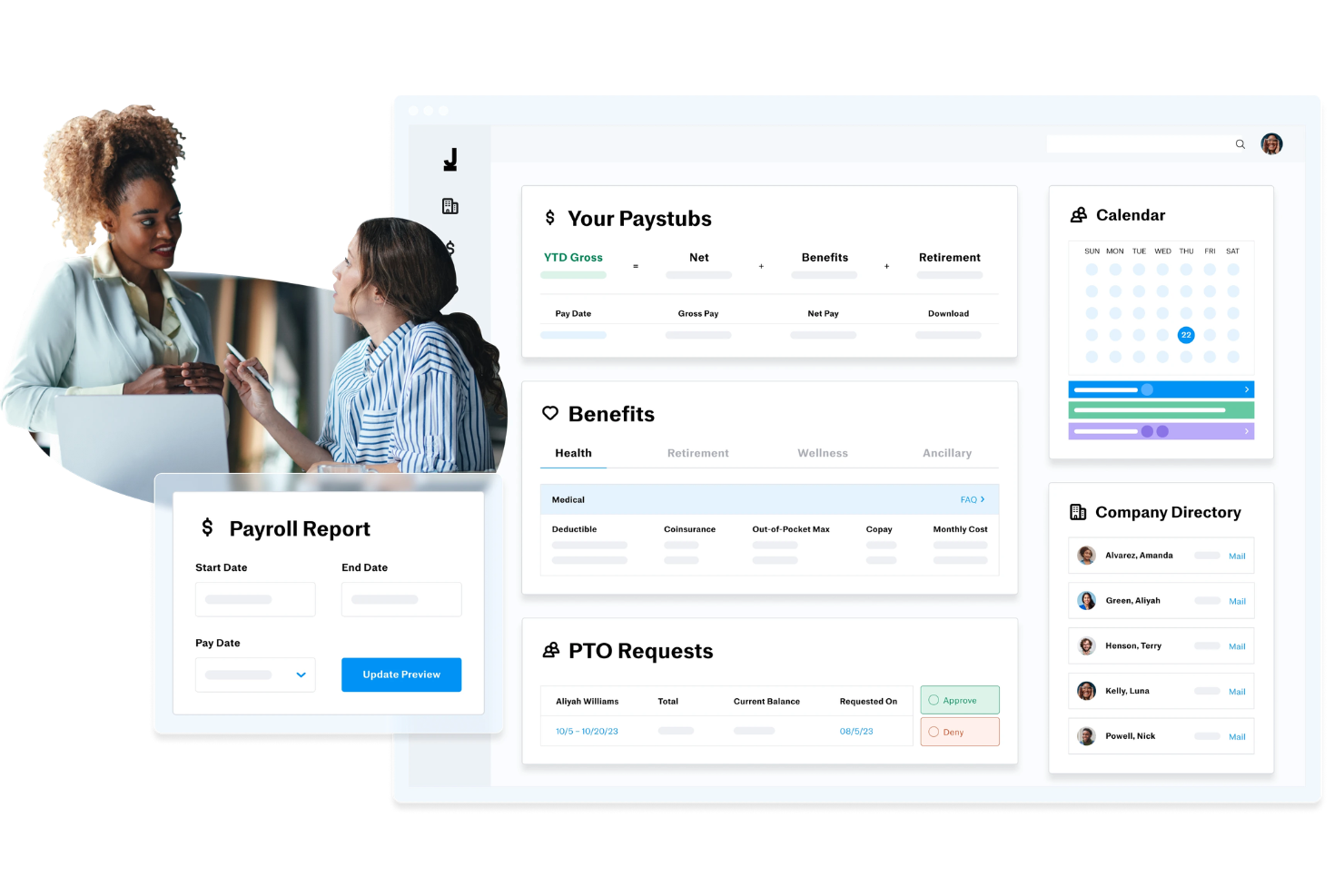
Justworks is a payroll, HR, and benefits platform that combines PEO, EOR, and payroll-only options with built-in tools for onboarding, compliance, and time tracking.
Who Is Justworks Best For?
Justworks is a strong fit for small to mid-sized businesses that need payroll, benefits, and HR tools in one place without building out a large HR team.
Why I Picked Justworks
I picked Justworks as one of the best because the time tracking module is built directly into the payroll workflow, not bolted on as an afterthought. Approved shifts automatically sync to payroll, which removes the manual reconciliation step that creates errors in most multi-tool setups. I also like the geofencing feature for location verification on hourly workers, and the ability to set custom overtime alerts so managers catch issues before payroll runs, not after.
Justworks Key Features
- Multi-state payroll processing: Run payroll across multiple states with automatic tax calculations and filings handled per jurisdiction.
- PEO services: Access a co-employment model that lets your team offer Fortune 500-level benefits without managing carrier relationships directly.
- Automated tax filing: Justworks handles federal, state, and local payroll tax filings and year-end W-2 and 1099 form generation.
- Employee self-service portal: Employees can access pay stubs, tax documents, and benefits enrollment from a single login.
Pros and Cons
Pros:
- Provides access to large-group employee benefits
- Handles both employee and contractor payroll
- Includes dedicated HR consulting as an add-on
Cons:
- Pricing increases quickly with add-ons and team size
- Health benefits are not included in all plans
Best for robust reporting and analytics

ADP Workforce Now is a cloud-based HCM platform that handles payroll processing, tax compliance, benefits administration, time and attendance tracking, talent management, and HR workflows in a single system.
Who Is ADP Workforce Now Best For?
ADP Workforce Now is a strong fit for mid-to-large enterprises that need a unified platform to manage payroll, HR, and compliance across multiple states or regions.
Why I Picked ADP Workforce Now
I've included ADP Workforce Now in my top picks because the reporting and analytics capabilities here are genuinely hard to match in the enterprise payroll space. The platform's built-in ADP DataCloud pulls together payroll, HR, talent, and benefits data into a single analytics layer, with pre-built dashboards and drag-and-drop custom reporting across every stage of the employee lifecycle. What I find especially useful is the compensation benchmarking tool, which lets you measure pay against anonymized data from 39 million U.S. employees to see whether your salaries are competitive by role, location, or industry. AI-powered anomaly detection also flags payroll discrepancies before they become costly errors.
ADP Workforce Now Key Features
- Automated tax filing: Calculates, files, and deposits federal, state, and local payroll taxes automatically.
- Multi-state payroll processing: Runs payroll across multiple states with jurisdiction-specific compliance rules applied.
- Time and attendance sync: Pulls approved hours directly from the timekeeping module into payroll calculations.
- Garnishment management: Calculates and processes wage garnishments, including child support orders and tax levies.
Pros and Cons
Pros:
- Scalable and suitable for businesses of all sizes
- Helps businesses stay compliant with labor laws and regulations
- Convenient employee self-service portal
Cons:
- Platform can be complex for new users
- Offers limited customization options

TimeTrex
Best for handling complex pay structures

TimeTrex is an enterprise-grade workforce management platform that combines payroll processing, time and attendance tracking, HR management, and employee scheduling in a single system.
Who Is TimeTrex Best For?
TimeTrex is a strong fit for mid-to-large organizations that manage hourly and salaried workers across multiple locations, departments, or pay groups.
Why I Picked TimeTrex
I picked TimeTrex as one of the best because of how well it handles layered pay structures that would break most standard payroll tools. Its custom deductions engine lets you configure benefits, insurance, garnishments, and both vacation and sick leave accruals independently per employee. Multi-source bank debiting lets you split employer payments across multiple accounts—useful for organizations with complex funding arrangements.
TimeTrex Key Features
- Automated tax calculations: TimeTrex calculates federal, state/provincial, and local payroll taxes automatically for each pay run.
- Year-end tax form generation: Generate and distribute W2, 1099, T4, and ROE forms directly from the platform at year-end.
- Job costing: Allocate labor costs across up to four levels of cost centers, giving finance teams granular visibility into workforce spend.
- Integrated time and attendance: Employee clock-in data feeds directly into payroll, reducing manual entry and timesheet discrepancies.
Pros and Cons
Pros:
- Automated payroll and tax calculations
- Integrated payroll and HR management solutions
- Robust time, attendance, and scheduling features
Cons:
- Some features are difficult to find within the platform
- Platform design is a little outdated
New Product Updates from TimeTrex
TimeTrex Adds Quick Punch App With Offline and QR Support
TimeTrex adds a new Quick Punch app, offline punching, QR code scanning, punch images, configurable messages, and punch warnings or lockouts to improve employee clock-ins across browsers and local computers. For more information, visit TimeTrex’s official site.
 .
.
Best for AI-powered workforce management
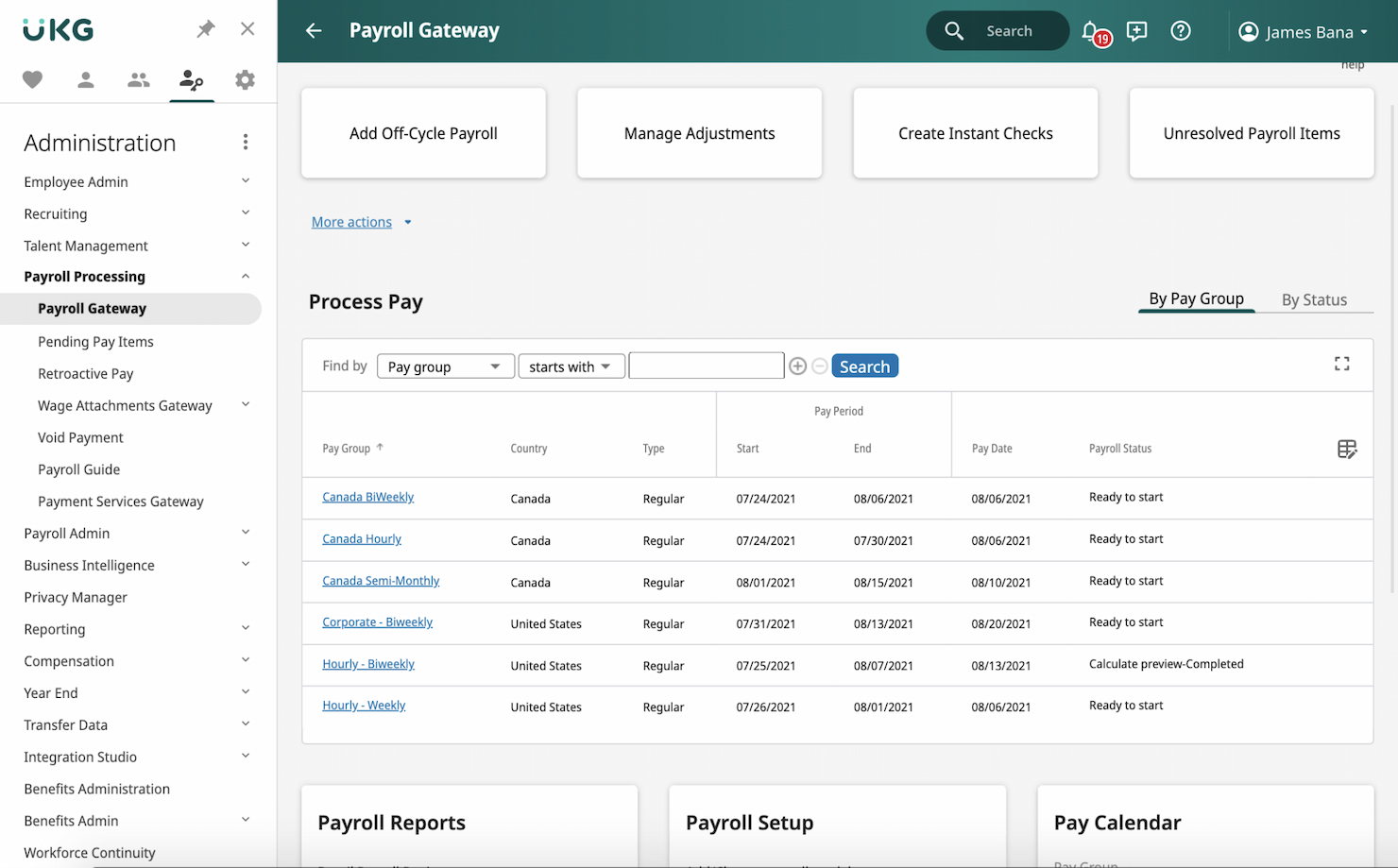
UKG Ready is an all-in-one HR and payroll platform that combines payroll processing, benefits administration, time and attendance, scheduling, talent management, and AI-driven workforce insights in a single solution.
Who Is UKG Ready Best For?
UKG Ready is a strong fit for growing and midsize businesses that need HR, payroll, and workforce management handled in one connected platform.
Why I Picked UKG Ready
Bryte AI is woven into payroll and workforce management workflows. Rather than a bolted-on chatbot, Bryte AI functions as an embedded advisor—flagging payroll anomalies, analyzing fatigue risks before they become attendance problems, and guiding managers toward schedule adjustments in real time. I also like that it runs continuous gross-to-net payroll calculations in the background, so by the time you're ready to run payroll, errors are already surfaced and resolved.
UKG Ready Key Features
- Automated tax compliance: Smart Tax Search automatically updates tax tables, W-2s, and garnishment rules across jurisdictions.
- Earned wage access: Employees can draw from earned wages before payday through on-demand pay options.
- Employee self-service portal: Employees access pay stubs, W-2s, and benefits details directly from a mobile app.
- Benefits administration: Manage enrollment, eligibility, and carrier connections within the same platform as payroll.
Pros and Cons
Pros:
- Strong compliance management features
- Comprehensive payroll processing with real-time analytics
- AI-driven workforce management for optimized scheduling and forecasting
Cons:
- Product structure is confusing due to having multiple payroll plans available
- Pricing details are not transparent

Lano
Best for complex payroll setups
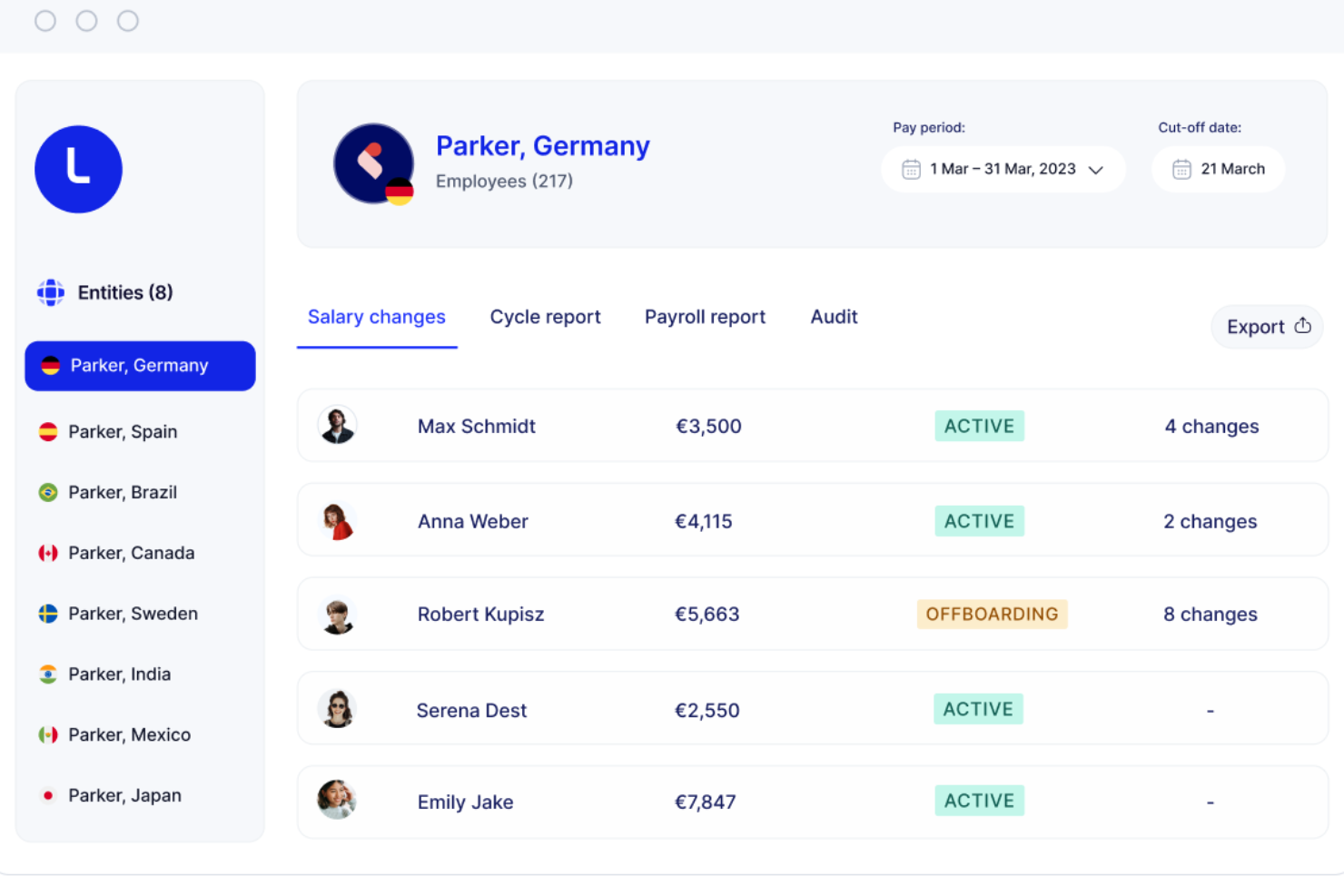
Lano is a global payroll platform that lets enterprise teams centralize multi-country, multi-entity payroll operations, consolidate existing local payroll providers, and manage cross-border payments and workforce data from a single platform.
Who Is Lano Best For?
Lano is a strong fit for global HR and payroll teams in mid-size to enterprise companies managing employees and contractors across multiple countries and legal entities.
Why I Picked Lano
I've included Lano in my top picks because it's one of the few platforms built specifically around consolidating fragmented, multi-country payroll setups rather than replacing them. I especially like how you can connect your existing local payroll providers into one system, so you're not forced into a rip-and-replace migration. Lano's AI-assisted payroll audits automatically flag anomalies across entities before each pay run, which is something I find genuinely useful when you're processing payroll across dozens of countries with different rules.
Lano Key Features
- Cross-border salary payments: Pay employees in 28 currencies directly through the platform without using third-party payment tools.
- Gross-to-net standardization: Lano normalizes payroll data across all countries into a consistent format for reporting and reconciliation.
- Contractor management: Create, send, and manage contractor agreements and invoices alongside employee payroll in one place.
- Multi-entity reporting: Access consolidated payroll reports across all your legal entities from a single dashboard.
Pros and Cons
Pros:
- Offers tools for automating onboarding processes
- Access to a network of vetted local experts
- Comprehensive global coverage for hiring and payroll in over 170 countries
Cons:
- No built-in recruitment services
- Integration with existing systems may require setup effort
Best for simplifying global payroll processes

SAP SuccessFactors is a cloud-based HCM suite with built-in payroll capabilities designed for enterprise organizations, covering multi-country payroll processing, core HR, time management, compliance, and AI-assisted pay explanation across global workforces.
Who Is SAP SuccessFactors Best For?
SAP SuccessFactors is a strong fit for large, multinational enterprises that need to manage payroll across multiple countries with localized compliance built in.
Why I Picked SAP SuccessFactors
SAP SuccessFactors earns its spot on my shortlist because it handles multi-country payroll without requiring separate tools for each region. I particularly like the Payroll Control Center, which runs continuous payroll checks and flags anomalies before processing—so my team isn't scrambling to fix errors after the fact. The embedded localization for 60+ countries, maintained by in-country product managers, keeps tax and compliance updates built in rather than bolted on.
SAP SuccessFactors Key Features
- Explain Pay: An AI-powered feature that translates pay statement line items into plain-language explanations employees can understand.
- Compliance reporting: Access 500+ pre-built, country-specific compliance reports tailored to local legal requirements.
- Multi-currency and multi-language support: Process payroll in 158 currencies across 34 languages for globally distributed workforces.
- Flexible deployment options: Run payroll in-house, fully outsourced, or in a hybrid model depending on your organization's operational needs.
Pros and Cons
Pros:
- Advanced reporting and analytics for payroll data insights
- Useful employee portal that’s available via mobile app
- Excellent for managing complex global payroll requirements
Cons:
- Implementation process is complex
- Pricing details are not transparent


ADP Lyric HCM is a full-suite human capital management platform built for large, multinational organizations, covering payroll processing, HR, workforce management, benefits administration, talent management, and analytics.
Who Is ADP Enterprise HR Best For?
ADP Enterprise HR suits large enterprises and multinational corporations needing payroll and HR capabilities across multiple countries and regulatory environments.
Why I Picked ADP Enterprise HR
ADP Lyric HCM earns its spot on my shortlist because it adapts to how large, complex organizations operate. Payroll in particular is built around what ADP calls adaptable payroll processing—automated workflows you configure to reflect your org's specific pay rules, approval chains, and pay structures. Layered on top of that, AI guidance validates pay data and flags issues before they cause errors. That combination matters when you're running payroll across dozens of business units or geographies.
ADP Enterprise HR Key Features
- Global payroll coverage: Process payroll across 140+ countries with localized compliance built into the platform for each region.
- Benefits administration: Configure and manage benefit plans, total rewards, and carrier connections directly within the system.
- Time and attendance tracking: Collect time data, manage schedules, and handle absence requests with flexible data collection options.
- HCM metrics and dashboards: Access 100+ industry-standard workforce metrics with AI-based benchmarking to compare against peers.
Pros and Cons
Pros:
- Wide range of integrations with other enterprise tools
- Extensive reporting and analytics capabilities
- Highly customizable to fit specific business needs
Cons:
- May require dedicated support for full utilization
- Initial setup can be complex
Other Enterprise Payroll Software
Here are several other worthwhile options for enterprise payroll software that didn’t make it into my top 10 list, but are still worth checking out:
- Dayforce HCM
For continuous payroll calculation
- Rippling
For all-in-one HR, IT, and finance management


Related HR Software Reviews
If you still haven't found what you're looking for here, check out these other related tools that we've tested and evaluated:
- HR Software
- Payroll Software
- Recruiting Software
- Employer of Record Services
- Applicant Tracking Systems
- Workforce Management Software
How I Evaluate Enterprise Payroll Software
I split my evaluation into baseline requirements—like multi-entity tax filing and payroll scale—and differentiators that separate one vendor from another for complex, global HR teams.
Core Functionality (Table Stakes For This List)
When I'm selecting tools for my list, I rank each one on a scale from 0 (does not offer the functionality) to 5 (excels in this area) for each core functionality listed below. Then, I calculate the tool's total score into a percentage. Each tool needs to achieve a minimum total score of 65% to be considered for inclusion.
- Large-Scale Payroll Processing: I evaluate how well a platform handles thousands of employees across multiple pay groups, entities, and schedules—like running biweekly salaried and weekly hourly cycles simultaneously.
- Tax Compliance & Filing: Each tool should automate tax calculations and filings at multiple government levels, including year-end forms, without requiring manual intervention from your payroll team.
- Multi-Jurisdiction Support: I check whether a platform can manage payroll across different states or countries, including localized tax rules, currencies, and labor law requirements for distributed workforces.
- HRIS & ERP Integrations: The platform's ability to connect with systems like Workday, SAP SuccessFactors, or NetSuite matters—I look for native connectors and open APIs, not just CSV imports.
- Direct Deposit & Payment Methods: I look for flexible disbursement options beyond basic direct deposit, such as pay cards, multi-account splits, and off-cycle runs for things like terminations or corrections.
- Reporting & Audit Controls: Strong platforms offer configurable payroll reports, full audit trails, and granular role-based permissions—especially important for organizations subject to internal or external audits.
Once I have a list of tools that meet this criteria, I consider what sets each platform apart.
Differentiating Factors (What Sets Vendors Apart)
Here's how I compare and contrast different vendors:
Standout Features
AI-powered anomaly detection is a major differentiator—I look for tools that catch duplicate entries or unusual pay amounts before a run finalizes. Employee self-service portals also matter at enterprise scale, where thousands of employees updating withholdings or downloading tax documents can overwhelm HR teams. I evaluate embedded analytics and forecasting too, since payroll directors and CPOs need labor cost modeling across business units to support planning cycles.
Beyond Features
Implementation support is a big one—enterprise payroll migrations involve parallel runs, data validation across entities, and phased rollouts that can span months. I check whether vendors offer dedicated implementation teams with payroll-specific expertise. Compliance certifications like SOC 1 Type II and SOC 2 Type II also carry real weight, especially when your organization handles sensitive compensation data across regions. Ongoing support matters too; I look for named customer success managers and access to in-house tax advisors rather than general help desk queues.
How to Choose Enterprise Payroll Software
As you work through your own unique software selection process, keep the following points in mind:
- Scalability and Flexibility: Ensure the software can grow with your business. For enterprises experiencing rapid growth or seasonal fluctuations, the ability to scale up or down without significant disruptions is crucial. For example, a retail company with a large number of temporary holiday staff will need a system that can handle sudden increases in payroll processing.
- Compliance and Reporting: The software must help you stay compliant with local, state, and federal regulations. Enterprises operating in multiple regions face complex tax laws and labor regulations. A healthcare organization, for instance, must adhere to specific labor laws and reporting requirements that vary by state.
- Integration Capabilities: The payroll software should integrate with your existing HR, accounting, and time-tracking systems. For a manufacturing company using specialized time-tracking tools, integration ensures accurate payroll processing and reduces manual data entry errors.
- User Experience and Support: The software should be user-friendly and come with robust customer support. Enterprises with a diverse workforce, such as multinational corporations, need intuitive interfaces to minimize training time and ensure all employees can use the system effectively. Additionally, reliable customer support is essential for resolving any issues quickly.
- Security and Data Privacy: Protecting sensitive employee information is paramount. Enterprises handling large volumes of personal data, like financial institutions, require advanced security features to prevent data breaches and ensure compliance with data protection regulations.
Trends for Enterprise Payroll Software
Enterprise payroll software has continued to evolve to incorporate advancements in technology (such as artificial intelligence and blockchain technology) and to match changing trends in organizational structures. Here’s a quick summary of the most important trends impacting payroll software development currently:
- AI and Machine Learning Integration: AI and machine learning are being integrated into payroll systems. These technologies assist with processing payroll by automating complex calculations and detecting anomalies, which reduces errors and saves time.
- Blockchain for Security: Blockchain technology is starting to infiltrate payroll systems to enhance security, ensure data integrity, and improve transparency. This is crucial for preventing fraud and ensuring compliance.
- Mobile Accessibility: Payroll software is increasingly accessible via mobile devices. This allows employees to access their payroll information anytime, anywhere, improving convenience and employee satisfaction.
- Same-Day Payments: Same-day payment options are becoming more common in payroll software. This new feature means employees can receive their wages instantly rather than waiting for traditional pay cycles. This is particularly beneficial for gig and contract workers.
These trends are examples of payroll software developers leveraging new technologies to help their clients provide a better employee experience, helping them stay competitive in the talent marketplace.
What is Enterprise Payroll Software?
Enterprise payroll software is a tool designed to manage and automate the payroll process for large organizations. It is used by HR departments, payroll administrators, and finance teams to ensure accurate and timely payment of employee wages, taxes, and benefits.
The primary components of enterprise payroll software include payroll processing, tax calculation, benefits administration, and compliance management. These features help organizations manage employee compensation, adhere to legal requirements, and maintain accurate financial records.
Features of Enterprise Payroll Software
Enterprise payroll software is designed to help organizations automate the complex process of managing employee compensation, with a particular focus on managing large volumes of payroll data. Below, I’ve outlined the most important payroll software features to look for in enterprise-level options to help you make an informed decision:
- Payroll Processing: This feature automates the calculation of employee wages, including deductions for taxes, benefits, and other withholdings. It ensures that employees are paid accurately and on time, reducing the risk of errors and saving administrative time.
- Direct Deposit: Direct deposit allows businesses to transfer employee wages directly into their bank accounts. This feature eliminates the need for physical paychecks, reducing paperwork and ensuring timely payments, which enhances employee satisfaction.
- Tax Filing and Compliance: Payroll software can automatically calculate, withhold, and submit payroll taxes on behalf of the business, including the preparation of year-end tax forms. This feature ensures compliance with federal, state, and local tax laws, reducing the risk of penalties and legal issues.
- Employee Self-Service: Self-service portals empower employees to access their pay stubs, update personal information, and manage tax forms. This reduces the administrative burden on HR and payroll departments and improves employee satisfaction by providing greater autonomy.
- Time Tracking Integration: Integrating time tracking with payroll software ensures accurate wage calculations based on actual hours worked. This feature is particularly beneficial for businesses with hourly employees, as it reduces manual data entry and minimizes errors.
- Expense Management: This feature allows businesses to track and manage employee expenses, such as travel and office supplies. It ensures that expenses are accurately recorded and reimbursed, helping to maintain financial control and transparency.
- Compensation Management: Payroll software can manage various types of compensation, including bonuses, commissions, and overtime. This feature ensures that all forms of employee compensation are accurately calculated and paid, supporting fair and transparent compensation practices.
- Payroll Reporting: Effective payroll reporting tools provide access to comprehensive, real-time reports on payroll expenses, tax liabilities, and other financial metrics. These reports support informed decision-making and help ensure regulatory compliance.
- Garnishments: Payroll software that supports garnishment processing can automatically deduct and remit garnishments, such as child support or tax levies, from employee wages. This feature ensures compliance with legal requirements and reduces administrative workload.
- ACA Reporting and Monitoring: For businesses that need to comply with the Affordable Care Act (ACA), payroll software can monitor and report on ACA-related data. This feature helps businesses stay compliant with healthcare regulations, avoiding penalties and ensuring that employee health insurance benefit requirements are met.
Choosing the right enterprise payroll software is crucial for the efficiency and effectiveness of your business operations. Each feature plays a role in enhancing payroll processing, ensuring compliance, and promoting employee satisfaction. As you evaluate different options, consider the specific needs of your business and look for software that aligns with those requirements.
Benefits of Enterprise Payroll Software
Enterprise payroll software is designed to optimize payroll processing and ensure accuracy, compliance, and efficiency when managing large volumes of employee data. Here are several benefits you can expect to gain by implementing enterprise payroll software in your organization:
- Time-Saving: Automating payroll processes significantly reduces the time spent on manual data entry and calculations, allowing HR departments to focus on more strategic tasks.
- Improved Accuracy: By automating calculations and data entry, payroll software minimizes the risk of human errors, ensuring employees are paid accurately and on time.
- Compliance Management: Payroll software helps organizations stay compliant with ever-changing tax laws and labor regulations, reducing the risk of costly penalties.
- Enhanced Security: Payroll software provides robust security features to protect sensitive employee data, including encryption, multi-factor authentication, and regular security updates.
- Employee Self-Service: Many payroll systems offer self-service portals where employees can access their pay stubs and tax forms, and update personal information, improving transparency and satisfaction.
Costs & Pricing For Enterprise Payroll Software
When considering enterprise payroll software, it's essential to understand the range of available pricing plans. Below, I’ve outlined the different plan types, their average prices, and common features. Please note, however, that to benefit from all the features enterprise payroll software offers, you'll need to sign up for the top-level Enterprise plan.
Plan Comparison Table for Payroll Software
| Plan Type | Average Price | Common Features |
| Free Plan | $0 | Basic payroll processing, direct deposit, employee self-service portal, and limited customer support |
| Basic Plan | $39/month + $5/employee | Payroll processing, tax filing, direct deposit, employee self-service, and basic reporting |
| Standard Plan | $50/month + $6/employee | All Basic features, plus time tracking, PTO management, compliance support, and enhanced reporting |
| Premium Plan | $99/month + $8/employee | All Standard features, plus advanced HR tools, benefits administration, dedicated account manager, and advanced analytics |
| Enterprise Plan | Custom Pricing | All Premium features, plus multi-country payroll, custom integrations, 24/7 support, and tailored compliance services |
When selecting your initial payroll plan, consider the size of your business, the complexity of your payroll needs, and the additional HR functionalities you may require. Each plan offers different features and pricing to accommodate different business needs and requirements.
Frequently Asked Questions About Enterprise Payroll Software
Here are some answers to popular FAQs you may have about enterprise payroll software and how it works:
How does enterprise payroll software ensure compliance with tax regulations?
Enterprise payroll software ensures compliance by automatically updating tax rates and regulations, generating accurate tax forms, and filing taxes on behalf of the company. It also provides alerts and notifications for upcoming tax deadlines and changes in tax laws, helping businesses stay compliant with federal, state, and local tax requirements.
Can enterprise payroll software handle multi-state payroll processing?
Many enterprise payroll software solutions are designed to handle multi-state payroll processing. They can manage different state tax rates, local taxes, and other state-specific regulations. This capability is crucial for businesses with employees in multiple states, ensuring accurate and compliant payroll processing across all locations.
What kind of support and training is available for enterprise payroll software?
Support and training options vary by provider but typically include online resources such as tutorials, webinars, and user guides. Many providers also offer live customer support via phone, email, or chat and dedicated account managers as part of their Enterprise payroll plan. Some may also provide on-site training or personalized onboarding services to help businesses get up and running quickly.
How secure is enterprise payroll software?
Enterprise payroll software prioritizes security by implementing measures such as data encryption, secure user authentication, and regular security audits. Many solutions are also compliant with industry standards like SOC 2, ensuring that sensitive payroll data is protected against unauthorized access and breaches.
Can enterprise payroll software integrate with other HR and accounting systems?
Yes, most enterprise payroll software solutions offer integration capabilities with other HR and accounting systems. This integration allows for seamless data transfer between systems, reducing manual data entry and minimizing errors. Common integrations include time and attendance systems, benefits administration, and accounting software for bookkeeping functions.
What are the benefits of using cloud-based enterprise payroll software?
Cloud-based enterprise payroll software offers several benefits, including accessibility from any location with an internet connection, automatic software updates, and reduced IT infrastructure costs. Additionally, cloud-based solutions often provide better scalability, allowing businesses to adjust their payroll processing capabilities as they grow easily.
How can enterprise payroll software improve payroll accuracy?
Enterprise payroll software improves payroll accuracy by automating calculations, reducing manual data entry, and providing validation checks for common errors. It also offers detailed reporting and audit trails, allowing businesses to identify and correct discrepancies quickly. These features help ensure that employees are paid correctly and on time, reducing the risk of payroll errors.