

10 Best Payroll Software for Construction Companies in 2026

Best Payroll Software For Construction Shortlist


If you're struggling to manage payroll for field crews, subcontractors, and union workers across multiple job sites, you're not alone, and you're in the right place. The best payroll software for construction can help you streamline payroll, reduce errors, stay compliant with certified payroll requirements, and free up time to focus on running your projects.
As someone who's researched a wide range of HR and workplace tools over the years—including those built specifically for the construction industry—I’ve reviewed the top options to help you find software that fits your needs.
Whether you're upgrading from spreadsheets or replacing a tool that’s falling short, this guide will help you choose a system that handles time tracking, job costing, tax filings, and payments, all while keeping you compliant and your teams paid on time.
Why Trust Our Software Recommendations
Our team has been testing and reviewing software since 2012. As HR experts ourselves, we know how difficult—and important—it is to choose the right software.
For this guide, we evaluated tools using hands-on testing and independent research, scoring tools using our selection criteria. We also draw on insights from industry thought leaders and practicing HR experts.
Our reviews reflect our human editorial judgment, not a sales pitch.
Expert reviewers:
Payroll Software for Construction Comparison Table
The table below compares pricing, trial, and demo details for my top payroll software selections for the construction industry.
| Tool | Best For | Trial Info | Price | ||
|---|---|---|---|---|---|
| 1 | Best for HR and benefits management | Not available | From $599/employee/month | Website | |
| 2 | Best for mixed W-2 and 1099 payroll | Free demo available | From $49/month + $6/month/user | Website | |
| 3 | Best for integrated project payroll workflows | Free demo available | Pricing upon request | Website | |
| 4 | Best for small construction businesses | 3-month free trial | Pricing upon request | Website | |
| 5 | Best for contractor-employee differentiation | Free demo available | Pricing upon request | Website | |
| 6 | Best for integrated job costing and payroll | 30-day free trial + free demo available | From $50/user/month | Website | |
| 7 | Best for free 2-day direct deposit for employees or contractors | 30-day free trial | From $17/month + $4/employee/month | Website | |
| 8 | Best for compliance in multi-jurisdiction environments | Free demo available | Pricing upon request | Website | |
| 9 | Best for scalable compliance and payroll solutions | Free demo available | Pricing upon request | Website | |
| 10 | Best for integrated construction accounting and management | Free demo available | Pricing upon request | Website |


Best Construction Payroll Software Reviews
This in-depth analysis covers the pros and cons of each payroll software tailored for the construction industry. It also provides an overview of their features, best use cases, and key integrations.

Best for HR and benefits management
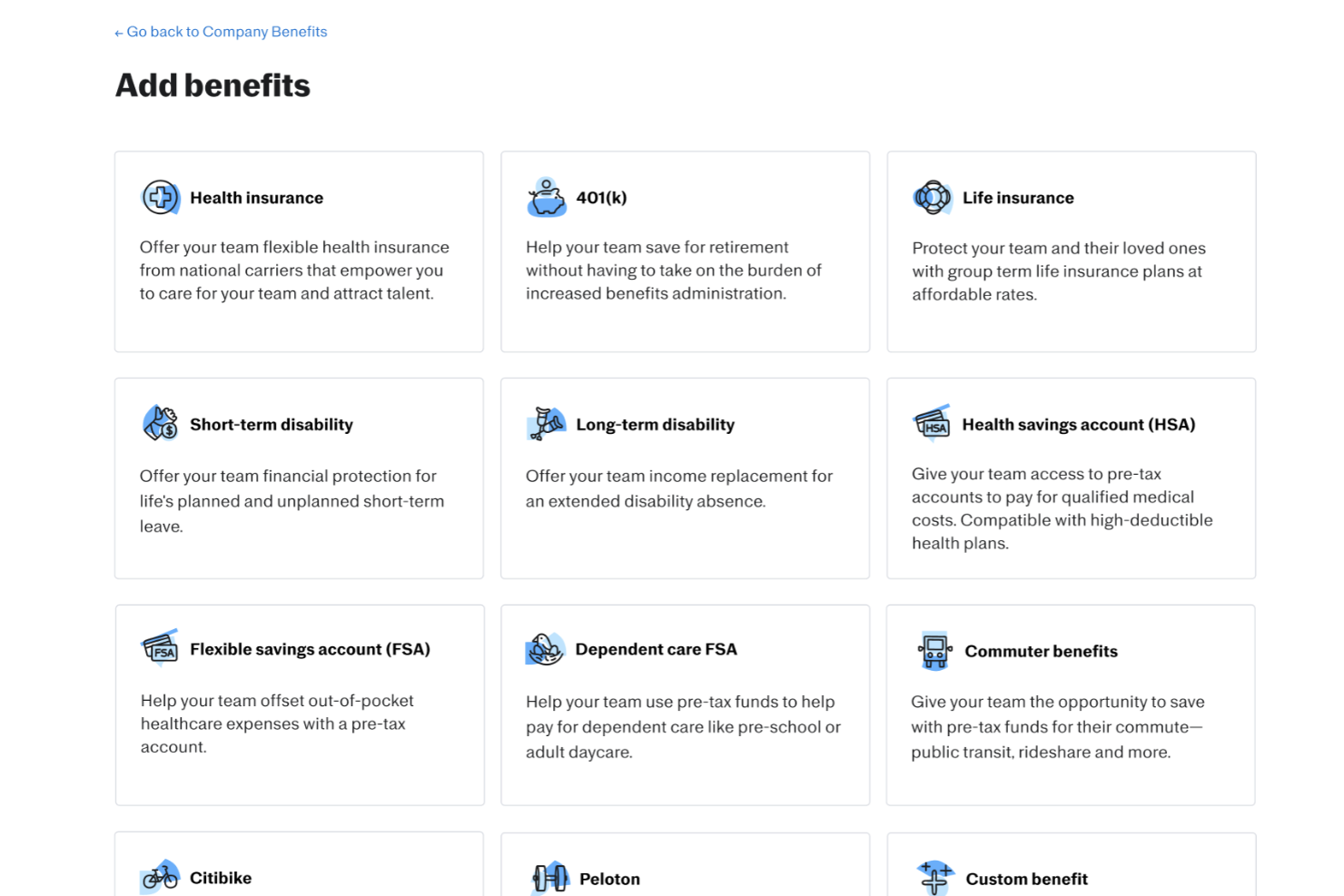
For construction businesses seeking a solid payroll solution, Justworks offers a platform that simplifies payroll management and workforce administration. It also supports HR and benefits management, helping companies manage employee benefits alongside payroll tasks. With tools for automated tax filing and employee management, Justworks helps construction businesses handle payroll responsibilities while supporting their workforce.
Why I Picked Justworks
I picked Justworks for its HR and benefits management, which helps construction businesses manage employee benefits alongside payroll on one platform. The software also includes automated payroll tax filing, which helps reduce the effort needed to manage payroll taxes. In addition, Justworks supports workers’ compensation management, which is important for construction companies handling workplace risk and employee coverage.
Justworks Key Features
In addition to HR and benefits management, Justworks offers:
- Time Tracking: Integrated time tracking tools ensure accurate payroll processing and compliance with labor laws.
- Employee Benefits: Access to a range of employee benefits, enhancing workforce satisfaction and retention.
- HR Tools: Comprehensive HR tools to manage employee records and performance evaluations.
- Document Storage: Secure storage for important documents, ensuring easy access and organization.
Justworks Integrations
Integrations include QuickBooks, Xero, BambooHR, JazzHR, Guideline, and Mineral. An API is also available for custom integrations.
Pros and Cons
Pros:
- Automated payroll tax filings
- Clear employee dashboard for benefits and pay information
- Centralizes payroll, HR, and health insurance administration
Cons:
- Fewer advanced HR features than larger enterprise platforms
- Limited customization for complex team structures

Gusto
Best for mixed W-2 and 1099 payroll

For construction businesses seeking a reliable payroll solution, Gusto offers an intuitive platform that caters to the unique needs of the industry. By automating time tracking and integrating job costing reports, Gusto helps you manage payroll complexities with ease.
Why I Picked Gusto
I picked Gusto because it supports both employees and contractors in the same system, which is especially valuable for construction firms juggling full-time crew and subcontractors — you can run payroll for W-2 hourly employees and issue 1099 contractor payments in one platform. Its automated tax filing and compliance support means you don’t have to manually calculate or file payroll taxes, which helps reduce errors and legal risks when dealing with varying pay schedules or jurisdictions.
Gusto Key Features
Aside from its payroll flexibility, you’ll find several features that matter for construction-oriented teams:
- Unlimited payroll runs: You can run payroll as often as needed — useful when paying irregular hours, overtime, or staggered crews.
- Integrated Benefits and Workers' Compensation: Seamlessly manage employee benefits and ensure compliance with pay-as-you-go workers' compensation tailored for construction.
- Time-off & sick/vacation policy tracking: You can set up vacation and sick-time policies and track balances, which helps manage leave and absences for crew members.
- Mobile access & calendar sync: You (or your admin) can run payroll or check payroll deadlines from a smartphone or tablet, and sync payroll-related dates (like deadlines, hire dates, anniversaries) with Google, Outlook, or iCal.
Gusto Integrations
Integrations include QuickBooks, Xero, TSheets, Deputy, Clover, Upserve, Expensify, Zapier, and Buildertrend.
Pros and Cons
Pros:
- Handles both contractor and employee payroll, simplifying mixed workforces.
- Payroll, benefits, and HR in one unified platform.
- Offers self-service onboarding and online storage of tax forms and pay stubs for contractors and employees.
Cons:
- SMBs that need advanced compliance or niche industry-specific HR modules may find Gusto limiting.
- Not customizable enough to handle large, complex orgs.
New Product Updates from Gusto
Gusto Adds Solo Advisory Tools and Mobile Money Features
Gusto adds Solo S-Corp Advisory Tools and Gusto Money on Mobile for tax guidance, invoicing, and bill payments. These updates help accountants advise solopreneurs and let users manage business finances from their phones. For more information, visit Gusto’s official site.
CMiC
Best for integrated project payroll workflows
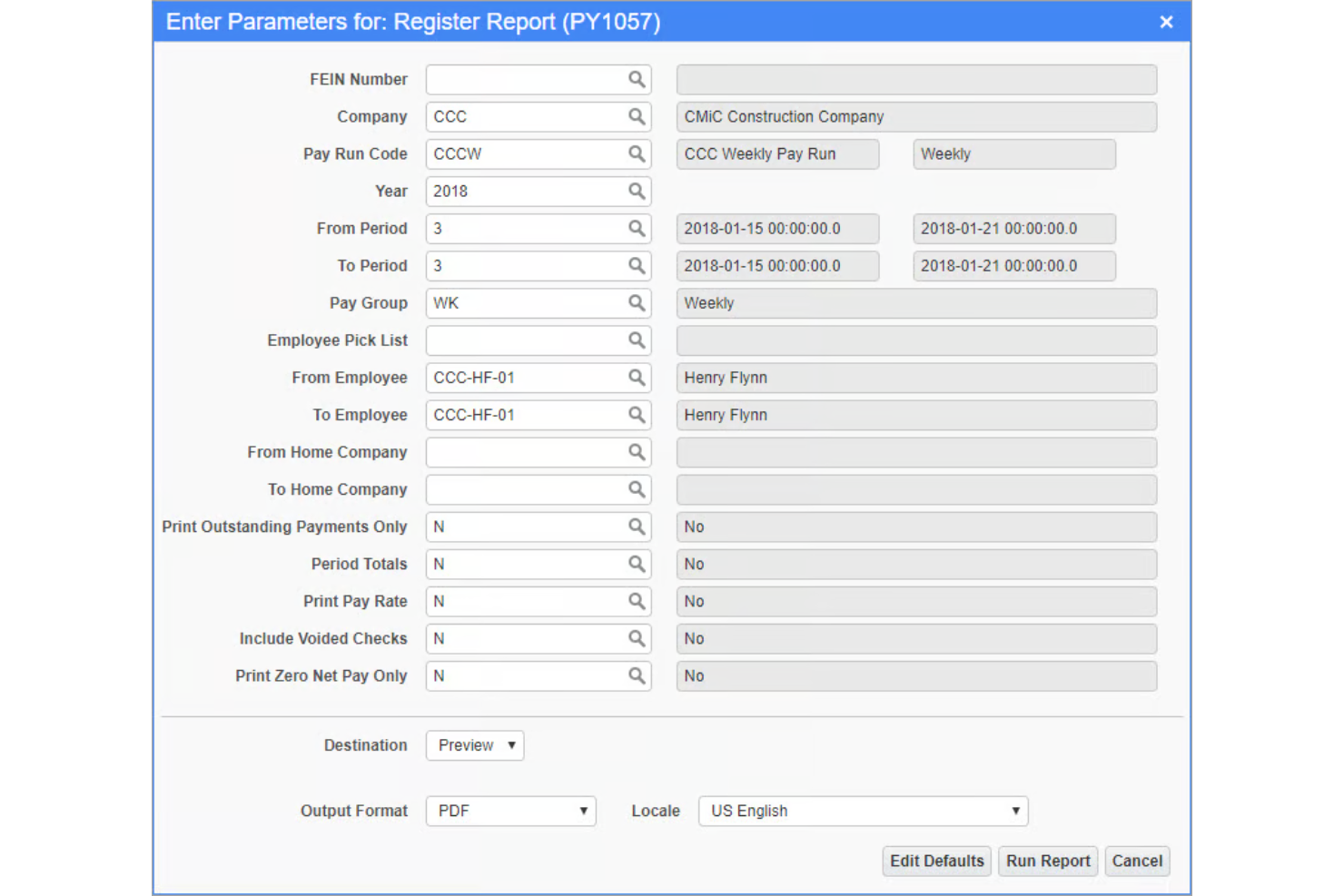
CMiC is a construction-specific ERP with a built-in payroll and HCM module that handles job costing, union pay structures, certified payroll, multi-jurisdictional taxes, and crew time tracking on a single database platform.
Who Is CMiC Best For?
CMiC is a strong fit for mid-to-large general contractors and specialty subcontractors that need payroll, project financials, and HR managed within one construction-native platform.
Why I Picked CMiC
I've included CMiC in my top picks because payroll and project financials live on the same single database platform, so labor costs flow directly into job costing and the general ledger without any manual re-entry. When a crew logs time in the field, those hours are immediately visible against the project budget. I also like that payroll calculations account for multiple pay rates by cost code within the same pay period, which is something most standalone payroll tools simply can't do.
CMiC Key Features
- Certified payroll reporting: Generate government-compliant certified payroll reports, including WH-347 forms, directly from payroll data for prevailing wage projects.
- Multi-jurisdictional tax management: Calculate and file payroll taxes across multiple states and localities within a single pay run.
- Employee self-service portal: Let employees view pay stubs, update personal information, and access tax documents without HR intervention.
- Mobile time capture: Field workers can clock in and out and enter job-specific time entries from a mobile device for real-time payroll data.
CMiC Integrations
CMiC offers partner-built integrations with Procore, Arcoro, Oracle Textura, hh2, SmartBarrel, Prophix, GCPay, Autodesk ProEst, Finvari, and EarthCam. An open API is available across functional areas including financials, HCM, project controls, and materials management for custom integrations.
Pros and Cons
Pros:
- Handles union payroll reporting natively
- Unified single-database platform for construction
- Payroll feeds directly into job costing
Cons:
- Implementation requires significant time and resources
- Slow support response times for payroll issues
Best for small construction businesses
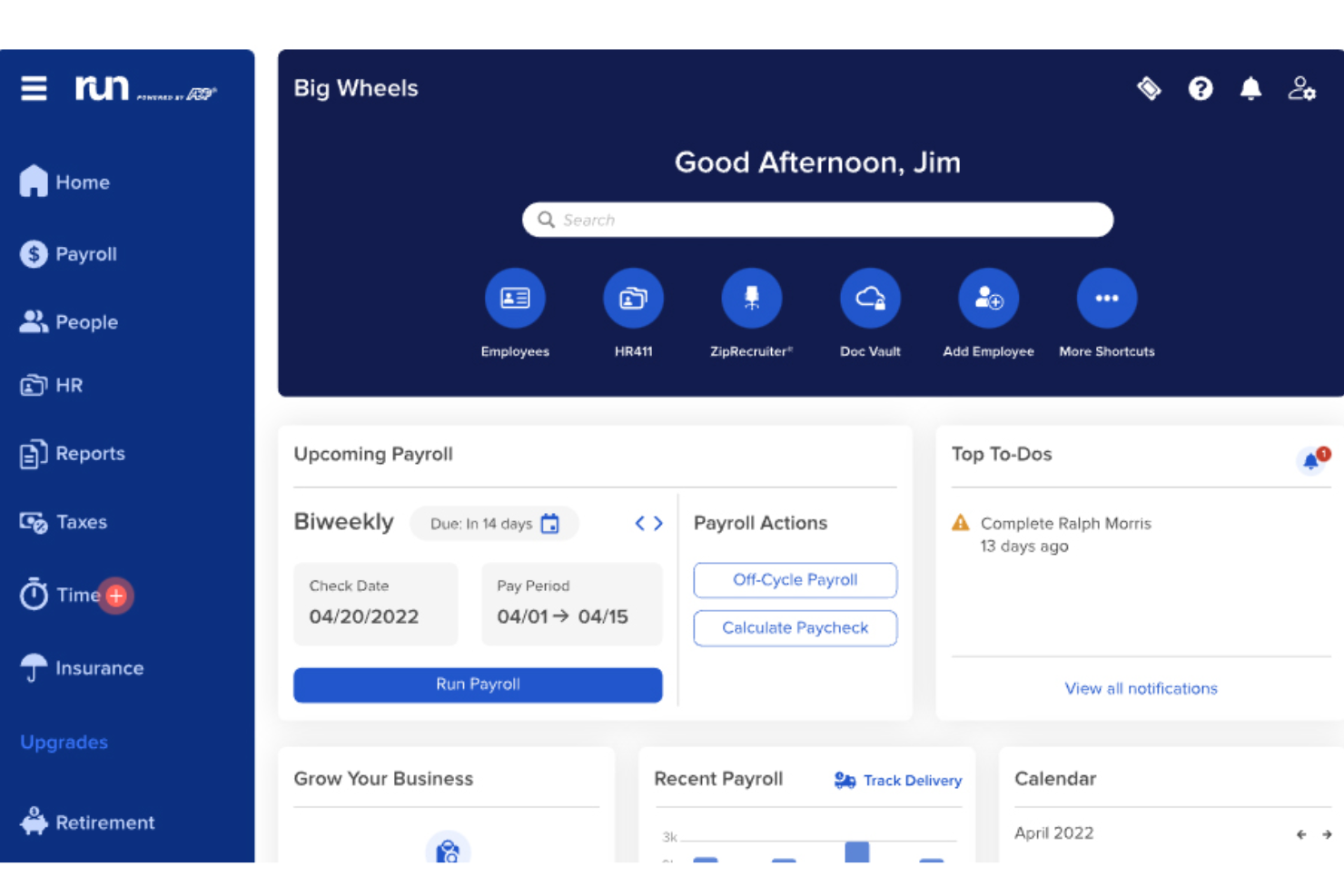
RUN by ADP is a payroll and HR platform tailored for small businesses, offering features such as automatic payroll tax calculation and filing, benefits and retirement deductions, and customizable plans.
Why I picked RUN by ADP:
RUN Powered by ADP is an excellent payroll software for small construction businesses because it allows for easy tracking of hours worked by job and location, which is crucial for managing employees across different construction sites.
RUN also simplifies the management of union dues, certified payroll, and prevailing wage requirements, helping construction businesses stay compliant with local, state, and federal regulations.
Standout Features & Integrations
Features include payroll processing, tax filing, direct deposit, employee self-service portal, HR compliance support, time and attendance tracking, garnishment payment services, new hire reporting, retirement plan services, workers' compensation management, payroll and tax reports, and mobile app access.
Integrations include QuickBooks, Wave, Xero, ClockShark, Points North, TruSaic, Compy, Wex, Synerion, JazzHR, 7Shifts, Snappy Gifts, Absorb LMS, SmartRecruiters, and hundreds more.
Pros and Cons
Pros:
- Customizable reporting functions
- Good mobile app
- Employee self-service portal
Cons:
- Most HR functions are only available on higher-tier plans
- Only supports up to 49 employees

Paycor
Best for contractor-employee differentiation

Paycor is a payroll and human capital management (HCM) platform that includes a full-service payroll solution built to support compliance-heavy industries like construction. It helps companies manage multi-site payroll, differentiate between contractors and employees, and stay up to date with evolving labor laws and tax requirements.
Why I picked Paycor:
I chose Paycor because it addresses two specific challenges in construction payroll: certified payroll reporting and contractor classification. It’s especially helpful for companies managing both union and non-union labor, as it tracks job-specific hours and handles compliance with the Davis-Bacon Act.
I also liked that Paycor allows you to automate payroll runs with AutoRun and preview net pay in real time—features that help avoid errors and save time when running payroll across multiple job sites.
Standout Features & Integrations
Features include certified payroll reporting tools that map job roles and pay rates to specific projects, real-time payroll calculations that eliminate batch processing, and flexible payment options like paycards and earned wage access.
It also includes built-in compliance updates to help you meet local, state, and federal regulations.
Integrations include QuickBooks, Xero, SAP Concur, Indeed, LinkedIn, Glassdoor, Zapier, Microsoft Teams, Slack, and DocuSign.
Pros and Cons
Pros:
- Industry-specific HR and payroll solutions
- Advanced employee performance tracking
- Wide range of integrations with popular tools
Cons:
- UX can feel a bit clunky at times
- May require additional support for full customization

TimeTrex
Best for integrated job costing and payroll

TimeTrex is a comprehensive workforce management solution that integrates time and attendance tracking, payroll, and human resources management into one platform. Companies can manage employee work hours, automate payroll processes, and ensure compliance with labor laws.
Why I picked TimeTrex:
For construction companies, TimeTrex stands out with its ability to handle complex payroll needs. Construction businesses often deal with varying pay rates, unionized labor, and multiple job sites, which can complicate payroll processing. TimeTrex addresses these challenges with features like job costing, which allows employers to track labor costs by project or job site, and advanced scheduling that ensures the right workers are assigned to the right jobs at the correct rates. This level of granularity is essential for accurate payroll.
Standout Features & Integrations
Features include direct deposit, tax calculations, multi-currency support, employee self-service portal, customizable pay stubs, compliance tracking, mobile time tracking, shift differentials, and automated wage garnishments.
Integrations include QuickBooks, Sage, ADP, Paychex, Xero, BambooHR, Zapier, and Microsoft Excel.
Pros and Cons
Pros:
- Integrated payroll and HR management
- Automated payroll and tax calculations
- Advanced scheduling tools
Cons:
- May load slower when handling large volumes of data or running complex reports
- User interface looks outdated
New Product Updates from TimeTrex
TimeTrex Adds Quick Punch App With Offline and QR Support
TimeTrex adds a new Quick Punch app, offline punching, QR code scanning, punch images, configurable messages, and punch warnings or lockouts to improve employee clock-ins across browsers and local computers. For more information, visit TimeTrex’s official site.
 .
.
Best for free 2-day direct deposit for employees or contractors
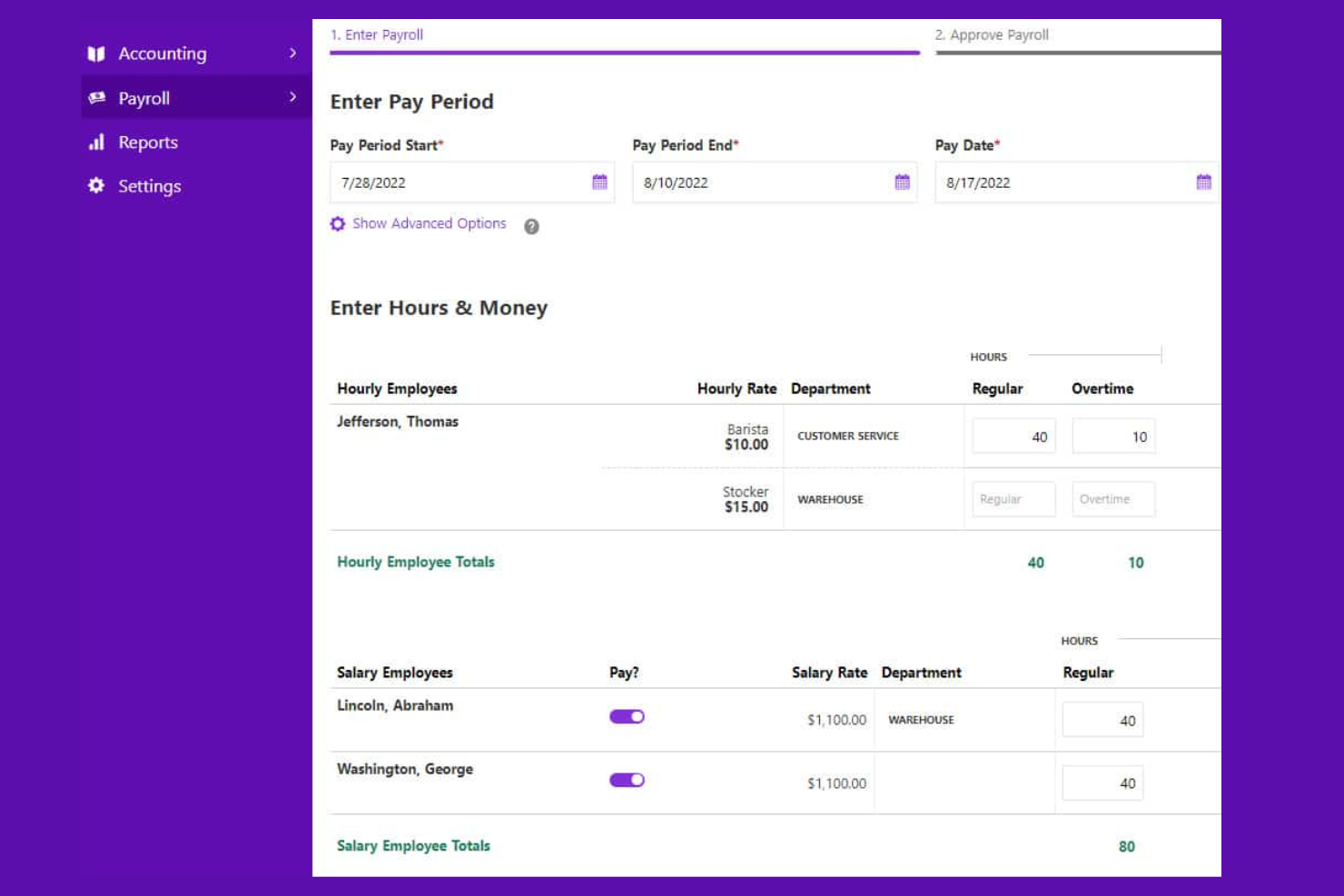
Patriot Payroll is an online payroll software designed for small businesses with 1 to 500 employees, offering both basic and full-service payroll options.
Why I picked Patriot Payroll:
I chose Patriot Payroll because it offers a comprehensive and affordable payroll solution that meets the needs of the small-scale construction industry. It has a free 2-day direct deposit feature, which is a significant advantage as it helps businesses save on additional banking fees.
Patriot Payroll combines low-cost plans with essential payroll features, ensuring that businesses can manage their payroll without incurring high costs. The software's ability to handle payroll tax filings and provide electronic or printable W-2s adds to its appeal, making it a reliable and cost-effective solution for US-based construction companies.
Standout features and integrations:
Features include flexible pay rates, a simple three-step process for running payroll, free setup and free direct deposit, customizable time-off accrual rules, and US-based support.
Integrations include Patriot Accounting, QuickBooks Online, QuickBooks Time, Plaid, and Workforce Time & Attendance.
Pros and Cons
Pros:
- Responsive customer support
- Compliant with tax rules in all 50 US States
- Supports contractor payments
Cons:
- For US-based businesses only
- No employee scheduling features

Dayforce
Best for compliance in multi-jurisdiction environments

Dayforce is a comprehensive payroll software solution designed for the construction industry. It simplifies payroll processing and ensures compliance across various jurisdictions.
Why I picked Dayforce:
I chose Dayforce because it excels in managing complex compliance requirements across multiple jurisdictions, a critical need in the construction industry. It stood out for its robust compliance management features and is particularly effective for businesses that operate in diverse regulatory environments.
Standout Features & Integrations
Features include real-time data processing, which helps keep payroll information accurate and up-to-date. It also provides extensive reporting capabilities, enabling detailed insights into payroll and workforce data. Additionally, Dayforce supports automated tax filing and compliance management, reducing the risk of errors and penalties.
Integrations include SAP, Workday, Oracle, Microsoft Dynamics, QuickBooks, ADP, SuccessFactors, NetSuite, Sage, and Salesforce.
Pros and Cons
Pros:
- Extensive reporting capabilities
- Comprehensive compliance management
- Real-time data processing
Cons:
- Cost can be more restrictive for small businesses
- Slight learning curve for new users

ADP
Best for scalable compliance and payroll solutions

ADP offers a comprehensive suite of payroll and compliance solutions designed for the construction industry. It provides scalable services that accommodate the needs of growing construction companies, ensuring accurate payroll processing and regulatory compliance.
Why I picked ADP:
I chose ADP because it excels in providing scalable payroll and compliance solutions that can grow with construction businesses. Its extensive compliance support and ability to handle the needs of a construction company make it stand out from other payroll software. It is particularly effective for companies looking for a reliable, scalable solution that can adapt to their changing requirements.
Standout Features & Integrations
Features include automated tax filing and compliance management. The software provides real-time labor cost tracking and job costing, enhancing financial oversight and project management. Additionally, ADP supports a range of HR features, including benefits administration and employee onboarding.
Integrations include tools such as QuickBooks, Xero, TSheets, Sage, Microsoft Dynamics, Salesforce, Expensify, Concur, Workday, and Oracle.
Pros and Cons
Pros:
- HR features including benefits administration
- Real-time labor cost tracking and job costing
- Scalable payroll and compliance solutions
Cons:
- Slight learning curve for new users
- Fewer customization options

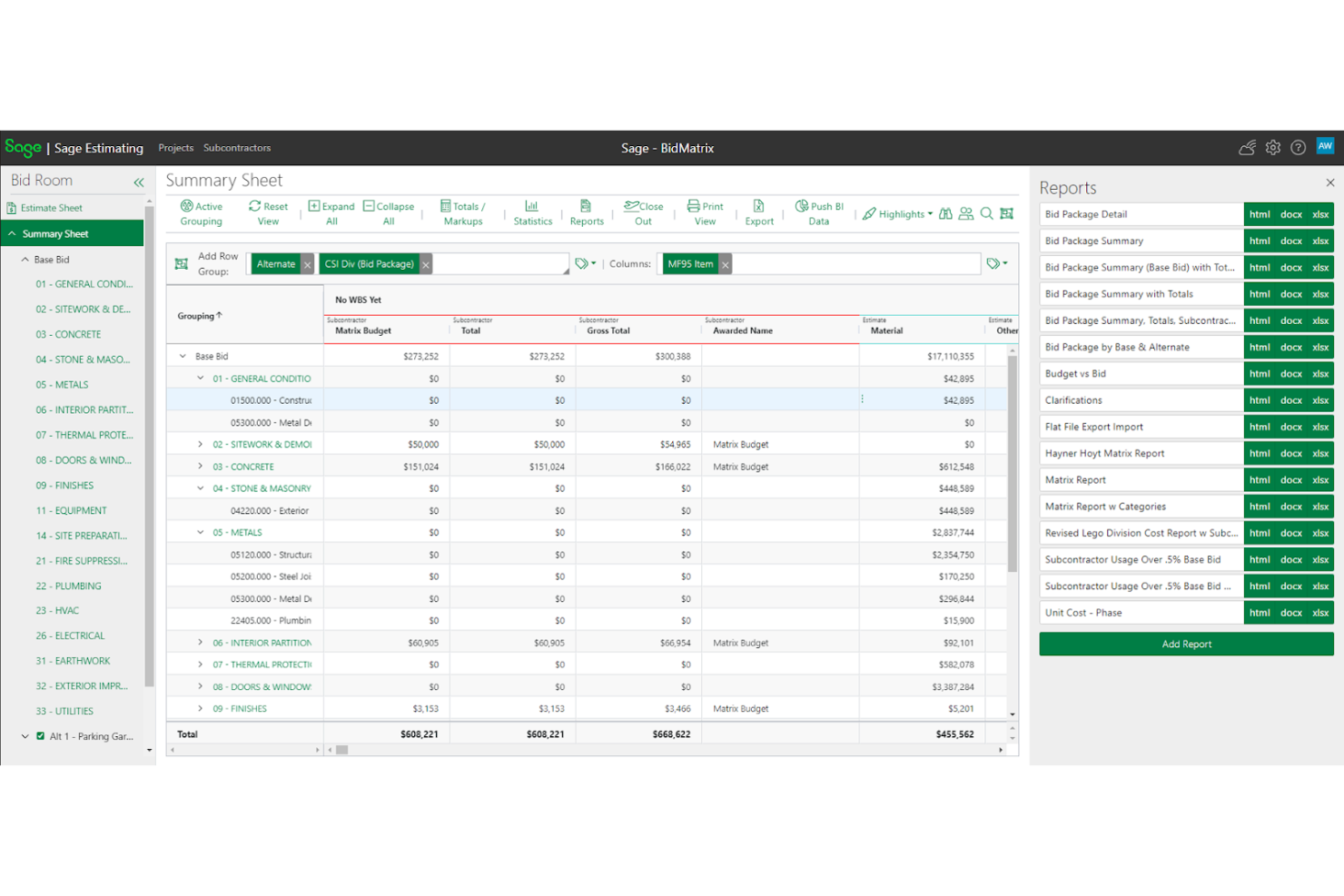
Sage is a comprehensive construction payroll service that provides integrated accounting and management solutions for the construction industry. It streamlines payroll processing and offers robust tools for financial management and project oversight.
Why I picked Sage:
I chose Sage because it combines construction accounting and project management into a single platform. Sage can provide detailed construction reports and financial insights, which is particularly effective for companies needing integrated accounting and management tools to streamline their operations.
Standout Features & Integrations
Features include advanced accounting features tailored to the construction industry, including job costing, payroll management, and financial reporting. The software also offers integrative project management tools, enhancing workflow and collaboration across teams. Additionally, Sage supports comprehensive compliance management, ensuring adherence to industry regulations and standards.
Integrations include Procore, Autodesk, QuickBooks, Microsoft Project, AIA Contract Documents, ADP, Bluebeam, eSub, ProEst, and Buildertrend.
Pros and Cons
Pros:
- Tailored construction industry accounting features
- Real-time visibility
- Integrated accounting and management
Cons:
- Basic reporting features
- Slight learning curve
Other Construction Payroll Software
Below is a list of additional payroll software for construction that didn’t make it to my top list, but are still worth checking out:
- Paychex
For all-in-one HR, payroll, and benefits
- Viewpoint
For mobile payroll time entry
- Assignar
For real-time field data tracking
- Payroll4Construction
For certified payroll reporting
- Construction Clock
For automated GPS time tracking
- ConstructionPayroll.com
For multi-state and multi-rate payroll
- Rippling
For mobile payroll access
- Deel Payroll
For global payroll and compliance
- BambooHR®
For multi-state payroll compliance
- Paylocity
For certified payroll reporting


Related HR Software Reviews
If you still haven't found what you're looking for here, check out these other related tools that we've tested and evaluated:
- HR Software
- Payroll Software
- Recruiting Software
- Employer of Record Services
- Applicant Tracking Systems
- Workforce Management Software
How I Evaluate Payroll Software for Construction
I evaluate these tools in two layers: baseline requirements every construction payroll platform must meet, and differentiators that determine fit for your union setup, job mix, and compliance needs.
Core Functionality (Table Stakes For This List)
When I'm selecting tools for my list, I rank each one on a scale from 0 (does not offer the functionality) to 5 (excels in this area) for each core functionality listed below. Then, I calculate the tool's total score into a percentage. Each tool needs to achieve a minimum total score of 55% to be considered for inclusion.
- Certified Payroll Reporting: I check whether a platform generates WH-347 forms and state-specific prevailing wage reports, especially for public works or government-funded projects.
- Union & Prevailing Wage Management: Multiple pay rates by craft, fringe benefit tracking, and union dues deductions all factor in here, since most crews span several trades.
- Multi-State & Multi-Jurisdiction Tax: Construction crews move between states and localities constantly, so I evaluate how each tool handles reciprocal agreements and local tax filing.
- Job Costing & Labor Allocation: I look for the ability to allocate wages, burden, and taxes down to jobs, cost codes, and phases rather than just tagging hours to a single project.
- Mobile Time Tracking Integration: Field crews rarely sit at a desk, so I evaluate whether the platform offers native mobile capture or integrates with apps like ExakTime or busybusy.
- Construction Accounting Integrations: A payroll tool needs to sync with the platforms your back office already uses, whether that's Sage, Foundation, Viewpoint, or QuickBooks.
Once I have a list of tools that meet the criteria, I consider what sets each platform apart.
Differentiating Factors (What Sets Vendors Apart)
Here's how I compare and contrast different vendors:
Standout Features
Workers' comp management matters when your crews span multiple trades with different classification codes. I look for platforms that auto-assign comp codes by trade and job, which saves hours during audit season. Per diem and travel pay handling is another area I evaluate closely, since traveling crews often trigger zone pay and subsistence rules that vary by project. AIA billing support also adds real value for GCs and subs who need labor data to flow into G702/G703 pay applications.
Beyond Features
Compliance depth is a big one. I evaluate whether a vendor actively updates prevailing wage rates and tax tables or leaves that responsibility to you. Scalability also matters because a 20-person subcontractor and a 2,000-person GC have very different needs. I check whether a platform supports multi-entity payroll and handles both W-2 employees and 1099 subs under one roof. Pricing structure deserves attention too, especially whether costs flex with seasonal headcount swings that are standard in construction.
How to Choose Payroll Software for Construction
As you work through the payroll software selection process, keep the following points in mind:
- Compliance with Labor Laws: Construction projects often span multiple states or regions, each with its own labor laws and regulations. Payroll software must ensure compliance with these laws to avoid legal issues and fines. For example, the software should automatically update tax rates and labor laws to reflect the latest changes in each jurisdiction.
- Job Costing and Budgeting: Accurate job costing is crucial in the construction industry to ensure projects stay within budget. Payroll software should integrate with job costing systems to allocate labor costs to specific projects or tasks. This helps in tracking expenses and making informed financial decisions. For instance, the software can provide detailed reports on labor costs per project, helping project managers adjust budgets as needed.
- Union and Certified Payroll Reporting: Many construction companies employ union workers and are required to submit certified payroll reports. The right payroll software should simplify the process of generating these reports, ensuring they meet all requirements. For example, the software can automatically generate certified payroll reports that comply with the Davis-Bacon Act, saving time and reducing errors.
- Time Tracking and Attendance: Construction workers often work on multiple sites with varying schedules. Payroll software should include intuitive time tracking and attendance features to accurately record hours worked. This can include GPS-based clock-ins, mobile app integrations, and real-time updates. For instance, workers can clock in and out using a mobile app, and the software will automatically update their hours in the payroll system.
- Integration with Other Systems: Construction companies use various software systems for project management, accounting, and human resources. Payroll software should seamlessly integrate with these systems to ensure data consistency and reduce manual data entry. For example, integrating payroll software with project management tools can automatically update labor costs in project budgets, providing a comprehensive view of project expenses.
Trends in Construction Payroll Software
The construction industry is seeing rapid changes in payroll software. Here are some key trends to watch.
- Mobile Accessibility: Mobile accessibility allows workers to clock in and out from job sites using their smartphones. This reduces the need for manual time tracking. It also ensures accurate payroll processing.
- Integration with Project Management Tools: Payroll software is increasingly integrating with project management tools. This helps in aligning labor costs with project budgets. It provides a clearer picture of project expenses.
- Automated Compliance Updates: Automated compliance updates ensure that payroll software stays current with labor laws. This reduces the risk of non-compliance penalties. It also saves time on manual updates.
- Real-Time Data Analytics: Real-time data analytics offer insights into labor costs and productivity. This helps in making informed decisions quickly. It also aids in identifying cost-saving opportunities.
- Cloud-Based Solutions: Cloud-based payroll solutions offer flexibility and scalability. They allow access to payroll data from anywhere. This is particularly useful for construction companies with multiple job sites.
These trends are shaping the future of payroll software in the construction industry.
What is Construction Payroll Software?
Construction payroll software is a specialized tool that helps construction companies manage payroll, track labor costs, and stay compliant with industry-specific regulations. It’s used by HR teams, contractors, and project managers to automate time tracking, job costing, union reporting, and certified payroll processing.
This software solves key pain points like managing mobile crews, handling complex pay rates, and ensuring accurate payments across multiple job sites.
Features of Payroll Software for Construction
When managing payroll in the construction industry, it is crucial to use specialized software that can handle the unique challenges and requirements of the field. Construction payroll software must be robust, flexible, and capable of managing complexities like union regulations, multiple job sites, varying pay rates, and labor costing.
Below are some of the most important payroll software features to look for when evaluating your options:
- Automated Timecard Entry: This feature allows for easy and efficient entry of payroll data, reducing manual errors and saving time. It is essential for handling the complexities of multiple job sites and varying pay rates.
- Certified Payroll Management: This feature ensures compliance with federal and state regulations by automatically calculating and generating certified payroll reports. It is crucial for managing prevailing wage and union payrolls.
- Multi-State and Multi-Union Payroll Processing: This feature allows the software to handle payroll for employees working in different states and under various union agreements without re-entering data. It ensures compliance and accuracy across different jurisdictions.
- Workers' Compensation Tracking: This feature helps in tracking and managing workers' compensation claims and premiums. It is important for ensuring compliance with state regulations and managing costs.
- Direct Deposit and W-2 Filing: This feature allows for direct deposit of employee wages and electronic filing of W-2 forms for multiple states. It simplifies the payroll process and ensures timely payments and filings.
- Mobile Timecard Entry: This feature enables employees to clock in and out from the field using a mobile app. It ensures accurate time tracking and reduces the need for paper timecards.
- Job Costing and Labor Reports: This feature provides detailed reports on job costs and labor hours, helping to manage project budgets and track productivity. It is essential for accurate project management and cost control.
- Integration with Accounting Software: This feature allows the payroll software to integrate with popular accounting software like QuickBooks. It ensures seamless data flow and reduces the need for manual data entry.
- Union Reporting and Tracking: This feature helps in managing union dues, benefits, and other union-related payroll requirements. It ensures compliance with union agreements and simplifies reporting.
- ACA Compliance: This feature helps in tracking and managing the requirements under the Affordable Care Act (ACA). It ensures compliance with healthcare regulations and simplifies reporting.
Having the right payroll software can significantly streamline payroll processes, reduce errors, and ensure compliance with various regulations. By focusing on these key features, construction companies can manage their payroll more efficiently and effectively.
Benefits of Payroll Software for Construction
Managing payroll in the construction industry can be complex due to varying job sites, different pay rates, and compliance requirements. Payroll software designed specifically for construction can simplify these tasks and offer significant advantages.
- Accurate Time Tracking - The software ensures precise tracking of hours worked across multiple job sites, reducing errors and ensuring employees are paid correctly.
- Compliance Management - It helps maintain compliance with labor laws and regulations, minimizing the risk of legal issues and fines.
- Cost Allocation - The software allows for detailed tracking and allocation of labor costs to specific projects, aiding in better project management and budgeting.
- Automated Payroll Processing - Automating payroll processes saves time and reduces the likelihood of manual errors, making payroll runs more efficient.
- Employee Self-Service - Employees can access their pay stubs, tax forms, and other payroll information online, reducing administrative workload and improving transparency.
Investing in payroll software tailored for the construction industry can lead to more efficient operations, better compliance, and improved employee satisfaction.
Costs & Pricing of Payroll Software for Construction
Selecting the right payroll software for your construction business can significantly streamline your operations, ensure compliance with regulations, and save time and money. This guide provides an overview of various payroll software options tailored for the construction industry, detailing their pricing plans and common features.
Below is a table summarizing the different plans, average prices, and common features of popular payroll software for construction companies.
Plan Comparison Table for Construction Payroll Software
| Plan Type | Average Price | Common Features |
| Free | $0 | Basic payroll processing, employee self-service portal, limited customer support |
| Basic | From $7/user/month | Payroll processing, direct deposit, tax filing, basic reporting, time tracking |
| Standard | From $12/user/month | All Basic features, advanced reporting, job costing, compliance management, integrations with accounting software |
| Premium | From $20/user/month | All Standard features, employee benefits management, mobile app access, enhanced customer support, automated workflows |
| Enterprise | Custom pricing | All Premium features, customized reporting, dedicated account manager, advanced analytics, unlimited integrations |
When choosing payroll software for your construction business, consider the specific needs of your operations, such as compliance requirements, time tracking, and integration capabilities. Each plan offers different features and pricing, so select the one that best aligns with your business size and requirements.
FAQs about Construction Payroll Software
Here are some of the frequently asked questions I receive about payroll software for construction.
How does payroll software handle union dues and benefits?
Payroll software designed for the construction industry typically includes functionality to manage union dues and benefits. Much like contractor payroll software used in construction, this includes automatic deductions for union dues, tracking of benefits, and ensuring compliance with union agreements. The software can generate reports and provide detailed records for auditing purposes.
Can payroll software manage multiple job sites and projects?
Yes, most payroll software for construction can handle multiple job sites and projects. It allows you to assign employees to different job sites, track hours worked at each location and allocate labor costs accordingly. This helps in accurate job costing and financial reporting.
Is it possible to integrate payroll software with other construction management tools?
Many payroll software solutions offer integration with other construction management tools such as project management, accounting, and time-tracking systems. This integration ensures that data flows seamlessly between systems, reducing manual data entry and improving accuracy.
How does payroll software ensure compliance with labor laws and regulations?
Payroll software for construction includes features to help ensure compliance with labor laws and regulations. This includes tracking employee hours, managing overtime, and ensuring proper classification of workers. The software can also generate reports to help with audits and compliance checks.
What are the benefits of using cloud-based payroll software for construction?
Cloud-based payroll software offers several benefits, including remote access, automatic updates, and data security. It allows you to access payroll information from anywhere, ensuring that you can manage payroll even when you are not on-site. Additionally, cloud-based solutions often include regular updates to ensure compliance with the latest regulations.
How can payroll software help with job costing in construction?
Payroll software helps with job costing by tracking labor costs for each project or job site. It allows you to allocate employee hours and wages to specific projects, providing detailed reports on labor expenses. This information is crucial for budgeting, forecasting, and ensuring that projects stay within budget.
What support options are available for payroll software users in the construction industry?
Support options for payroll software users typically include online resources, customer service hotlines, and dedicated account managers. Many providers offer training sessions, webinars, and detailed documentation to help users get the most out of their software. Some also provide on-site support and consulting services for more complex needs.