

17 Best Homebase Alternatives Reviewed in 2026

Best Homebase Alternatives Shortlist


While Homebase is a highly reputable and powerful workforce management software, it might not be the best solution for your needs.
I’ve spent years reviewing HR and workforce management software across different industries and team sizes.
In this article, I’ll break down the best Homebase alternatives—highlighting their standout features, strengths, and ideal use cases—so you can confidently choose the tool that actually works for your team.
What is Homebase?
Homebase is a workforce management software designed to simplify scheduling, time tracking, and team communication. It's commonly used by small business owners, managers, and HR professionals who need to manage hourly workers efficiently.
Features like employee scheduling, time clocks, and team messaging help organize work shifts and improve communication within your team. Overall, Homebase provides a valuable solution for managing your workforce with ease and efficiency.
Best Homebase Alternatives Summary
This comparison chart summarizes pricing details for my top Homebase alternative selections to help you find the best one for your budget and business needs.
| Tool | Best For | Trial Info | Price | ||
|---|---|---|---|---|---|
| 1 | Best for global teams managing hourly workers | Free demo available | From $5/employee/month | Website | |
| 2 | Best for customizable PTO tracking | Free demo + free 14-day trial available | From $4.49/user/month | Website | |
| 3 | Best for scheduling efficiency | Free 21-day trial + free demo available | From $2.93/user/month (billed annually) | Website | |
| 4 | Best for linking time data to payroll | Free trial available | From $50/month | Website | |
| 5 | Best for automating administrative tasks | Free demo + free trial available | Pricing upon request | Website | |
| 6 | Best for remote work support | Free demo available | Contact for pricing | Website | |
| 7 | Best for employee monitoring | Free trial + free demo available | From $14/seat/month (billed annually) | Website | |
| 8 | Best for integrated HR solutions | Free demo available | Pricing upon request | Website | |
| 9 | Best for hiring talent globally | Free demo available | From $199/employee/month | Website | |
| 10 | Best for labor forecasting | Free demo available | From $5/user/month (billed annually) | Website |


Why Trust Our Software Reviews
We’ve been testing and reviewing HR software systems since 2019. As HR experts ourselves, we know how critical and difficult it is to make the right decision when selecting software.
We invest in deep research to help our audience make better software purchasing decisions. We’ve tested more than 2,000 tools for different HR management use cases and written over 1,000 comprehensive software reviews. Learn how we stay transparent & our software review methodology.
-

Remote People
Visit WebsiteThis is an aggregated rating for this tool including ratings from Crozdesk users and ratings from other sites.5 -
Paycom
Visit WebsiteThis is an aggregated rating for this tool including ratings from Crozdesk users and ratings from other sites.4.3 -
edays
Visit WebsiteThis is an aggregated rating for this tool including ratings from Crozdesk users and ratings from other sites.4.7




Best Homebase Alternatives Reviews
Below are my detailed summaries of the best Homebase alternatives that made it onto my shortlist. My reviews offer a detailed look at the key features, pros & cons, integrations, and ideal use cases of each tool to help you find the best one for you.


Deel is a payroll and compliance software designed for businesses hiring international teams. HR managers and finance teams primarily use it to manage payroll, contracts, and compliance across multiple countries.
Why it's a good Homebase alternative: I picked Deel because it brings HR and payroll together in one place with a focus on compliance and automation. The platform's value lies in how it handles the complex parts of managing a distributed team—things like automating payroll in real time for hourly workers, managing employee data globally, and ensuring compliance across 150+ jurisdictions.
Deel’s single global payroll engine calculates gross-to-net costs instantly, so you can make adjustments like bonuses or deductions on the fly. It also uses AI to detect payroll errors and suggest corrections, which minimizes compliance risks and administrative strain.
Standout features & integrations:
Features include a unified workflow that connects HR, payroll, and workforce planning within one dashboard, giving you real-time visibility into labor costs and employee data. The built-in compliance system automatically updates with local labor laws and tax requirements, reducing your need for manual research or regional expertise.
Integrations include Xero, QuickBooks, NetSuite, BambooHR, Greenhouse, Ashby, Sage, Workday, Gusto, and SAP SuccessFactors.
Pros and Cons
Pros:
- AI identifies and corrects payroll errors
- Built-in compliance reduces manual admin work
- Automates payroll in 150+ countries
Cons:
- Limited customization in certain reports
- No robust employee scheduling like Homebase
New Product Updates from Deel HR

Deel HR Introduces AI-Powered ATS for Hiring
Deel HR introduces an AI-powered ATS built into its platform. This update enhances hiring efficiency by automating sourcing, screening, and workflows across the recruitment process. For more information, visit Deel HR’s official site.
 .
.
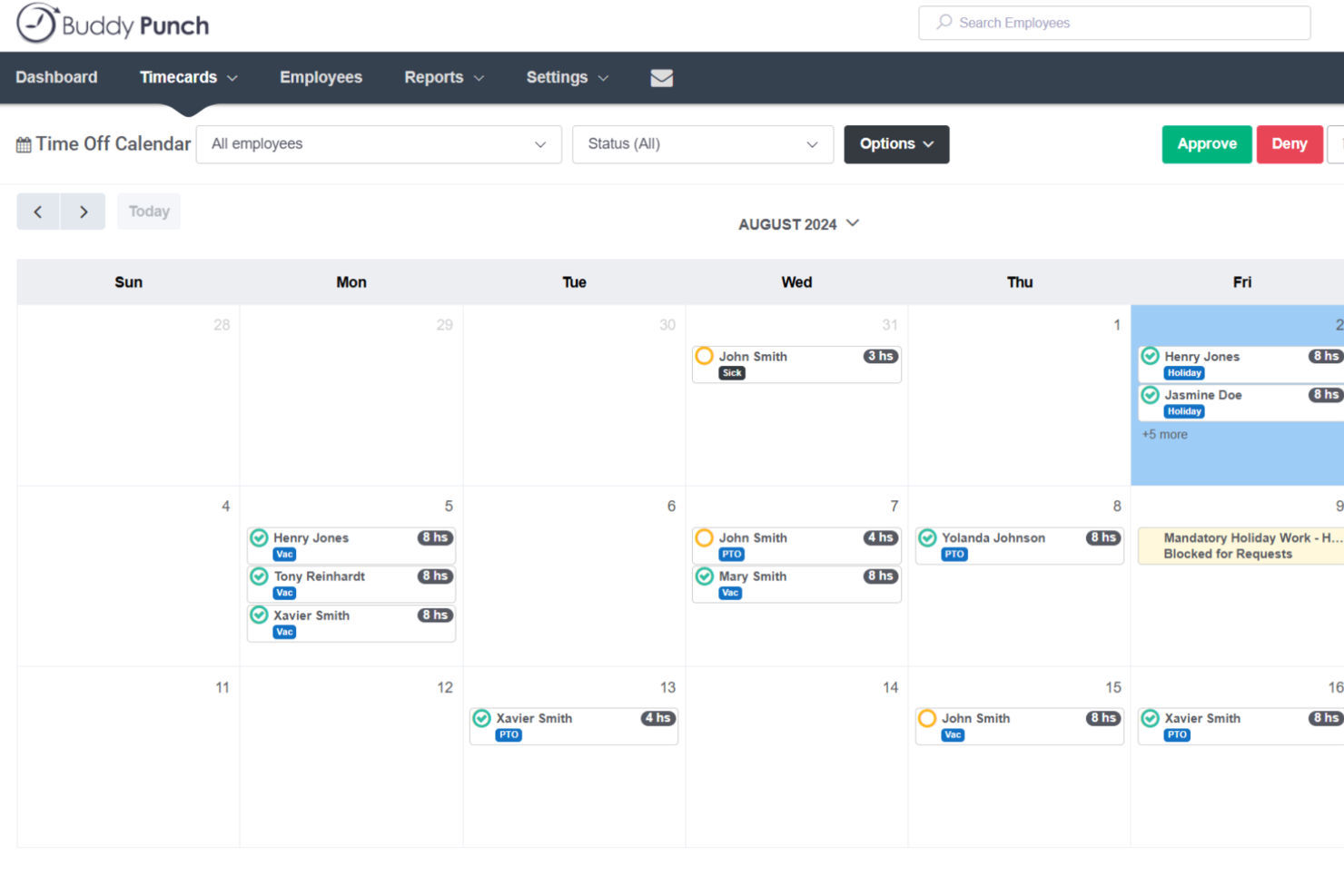
Buddy Punch helps small businesses and teams handle time tracking, scheduling, and attendance without the hassle of manual processes. If you want easy oversight of who’s working, time off, and payroll across your workforce, it’s built to keep everything organized in one place.
Who Is Buddy Punch Best For?
HR managers at small and midsize businesses who need to customize PTO policies and simplify leave management across multiple teams.
Why Buddy Punch Is a Good Homebase Alternative
I picked Buddy Punch for this spot largely because of how flexible its PTO tracking is. You can build out custom PTO types—whether that's sick leave, vacation, or floating holidays—and set different accrual rules for each employee group. In practice, that means my team isn't shoe-horning every leave type into the same box, which is a real limitation with Homebase. I also appreciate that employees can submit time-off requests directly from the mobile app, and managers get instant notifications to approve or deny them.
Buddy Punch Key Features
- GPS tracking: Clock-ins are logged with location data so you can verify where employees punched in.
- Automatic overtime alerts: Buddy Punch flags employees approaching overtime thresholds before it becomes a payroll issue.
- Shift scheduling: Build and publish weekly schedules, and let employees view their shifts from the mobile app.
- Facial recognition clock-in: Employees clock in using facial recognition to prevent buddy punching.
Buddy Punch Integrations
Buddy Punch offers native integrations with QuickBooks Online, Paychex, ADP Workforce Now, Zapier, and Gusto. An API is available for custom integrations.
Pros and Cons
Pros:
- Detailed time-off reports for managers
- Mobile time entry with GPS tracking
- Customizable PTO policies for different teams
Cons:
- No built-in hiring or applicant tracking
- Limited employee messaging and communication tools


Agendrix is a scheduling software designed to simplify workforce management for businesses in retail, healthcare, and hospitality. Managers and HR professionals mainly use it to handle employee scheduling, time tracking, and communication.
Why it's a good Homebase alternative: Agendrix offers scheduling efficiency with its intuitive schedule builder and shift swapping features, which Homebase doesn't emphasize. Its time clock feature helps your team track work hours accurately, reducing payroll errors.
The platform's mobile app enables employees to access their schedules on the go. These features make it an ideal choice for businesses looking to enhance scheduling efficiency.
Standout features & integrations:
Features include employee availability management to ensure optimal staffing, time-off requests to streamline approvals, and shift reminders to reduce no-shows. Your team can also benefit from the analytics tools that provide insights into workforce management.
Integrations include QuickBooks, ADP, BambooHR, Xero, Gusto, Paychex, Sage, Workday, Microsoft Teams, and Slack.
Pros and Cons
Pros:
- Accurate time tracking
- Efficient shift swapping
- Intuitive schedule builder
Cons:
- Requires internet access
- Complexity for large teams


For businesses searching for a dynamic alternative to Homebase, TimeTrex offers a comprehensive workforce management platform tailored to meet diverse industry needs. It works well whether you run a small business with hourly or remote staff, or a larger organization that needs precise attendance tracking, payroll automation, and multi-location flexibility.
Why I Picked TimeTrex
I picked TimeTrex because its unified time & attendance plus payroll engine makes it a practical all-in-one replacement for standalone scheduling or payroll tools. You get time tracking, scheduling, employee punch-in/out (with web, mobile or biometric recognition) and then payroll processing — tax & wage calculations, direct deposit, or check printing — all within the same system. This consolidation means you don’t have to export timesheets into a separate payroll tool or manually compute hours, which helps reduce errors and saves admin time.
TimeTrex Key Features
Aside from the core time tracking and payroll integration I highlighted above, you also benefit from:
- Mobile time tracking & punch-in/out: Employees can clock in or out from any smartphone or tablet, useful if you have remote, field, or flexible workers.
- Job costing & invoicing: Assign labor, materials and expenses to specific projects or tasks — and generate client invoices based on actual time worked.
- Leave and absence management: Manage employee leave, vacation, sick days and compensation time all in one place.
- Expense tracking: Allows your team to manage and report expenses directly through the platform, streamlining financial oversight.
TimeTrex Integrations
TimeTrex provides custom API integration for enhanced functionality, allowing seamless connectivity with existing systems.
Pros and Cons
Pros:
- Time and attendance plus payroll in one package
- Supports mobile and biometric clock-in, handy for distributed workforces
- Allows employee self-service for time off, schedules, timesheets
Cons:
- Free plan lacks customer support and mobile app access
- Limited number of native integrations compared with leading HR platforms

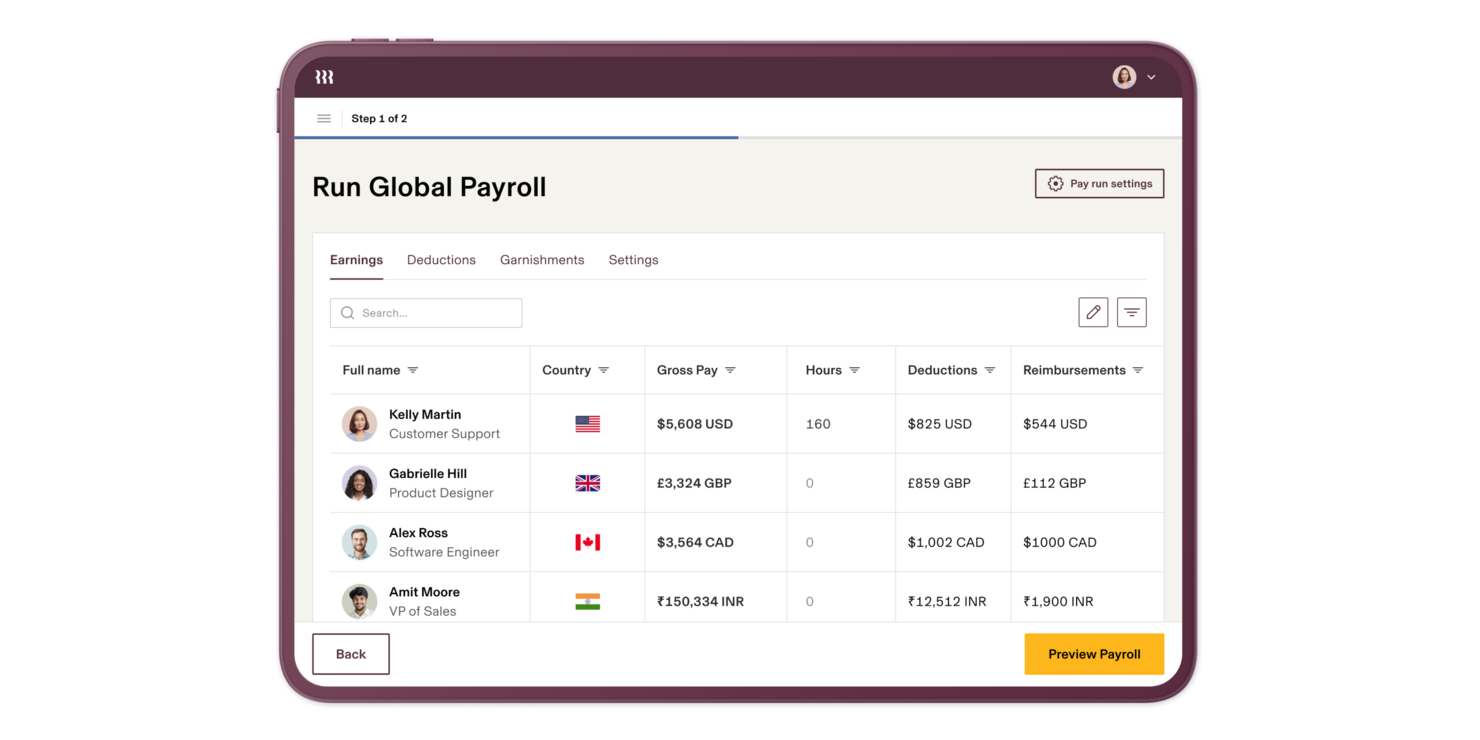
Rippling-Brand stands out as a versatile solution for those exploring alternatives to Homebase, especially for businesses seeking an all-in-one platform. Designed to cater to a range of industries and business sizes, Rippling-Brand simplifies complex processes by integrating HR, payroll, IT, and finance management into a single system. This not only helps streamline administrative tasks but also empowers teams to make data-driven decisions and manage operations more effectively.
Why I Picked Rippling-Brand
I picked Rippling-Brand as a contender for Homebase alternatives because of its unique ability to unify various business operations into one platform. Its capability to automate repetitive administrative tasks ensures that your team can focus on more strategic initiatives. Additionally, the platform's global HR system allows you to manage diverse teams with localized compliance, making it an excellent fit for companies with a global workforce.
Rippling-Brand Key Features
In addition to its unified platform, Rippling-Brand offers several features that make it a strong alternative to Homebase.
- Global Payroll: Allows you to pay employees and contractors globally from a single system, ensuring accuracy and compliance with local laws.
- IT Management: Provides total visibility and control over identity, devices, and inventory, enhancing security and operational efficiency.
- Spend Management: Enables automation and control of company spending, minimizing unauthorized expenses and improving financial oversight.
- Advanced Analytics: Offers custom reporting capabilities to fuel business insights and drive informed decision-making.
Rippling-Brand Integrations
Integrations include Slack, Google Workspace, Zoom, Asana, Salesforce, Microsoft 365, GitHub, Carta, Jira, and Checkr.
Pros and Cons
Pros:
- Workflow automation reduces manual payroll tasks
- Extensive third party software integrations
- Global payroll for contractors, employees
Cons:
- Setup complexity for advanced configurations
- Pricing less accessible for small agencies


Sloneek is a workforce management software designed to help businesses manage remote teams efficiently. HR departments and managers primarily use it to manage tasks such as employee attendance, task allocation, and document sharing.
Why it's a good Homebase alternative: Sloneek provides robust remote work support features that Homebase lacks. Its time tracking and attendance management tools help your team stay organized and efficient.
The software's task management capabilities ensure that projects are on track, even when working remotely. These features make it ideal for businesses that need to manage remote employees effectively.
Standout features & integrations:
Features include document management for easy sharing and storage, employee self-service options to empower your team, and customizable reporting to gain insights into workforce performance. You can also utilize the leave management system to streamline time-off requests.
Integrations include Slack, Google Workspace, Microsoft Teams, Zapier, Asana, Trello, Dropbox, OneDrive, BambooHR, and Xero.
Pros and Cons
Pros:
- Flexible document management
- Comprehensive time tracking
- Efficient task management
Cons:
- Feature updates can be slow
- Reporting setup feels clunky


Teramind is a monitoring software designed for businesses looking to enhance security and productivity by tracking employee activities. It's primarily used by IT and security teams to monitor user behavior and prevent data breaches.
Why it's a good Homebase alternative: Teramind offers advanced employee monitoring capabilities, which Homebase doesn't provide. Screen recording and keystroke logging allow you to keep an eye on user activities and ensure data protection.
Its behavior analytics help identify potential threats before they become issues. These features make it an excellent choice for businesses focused on security and compliance.
Standout features & integrations:
Features include policy management to set rules and alerts, productivity analysis to evaluate employee performance, and remote desktop control for direct intervention. You can also leverage its file tracking and USB device monitoring to protect sensitive information.
Integrations include Microsoft Azure, Google Workspace, Active Directory, Okta, Salesforce, Splunk, IBM QRadar, Dropbox, Box, and OneDrive.
Pros and Cons
Pros:
- Policy management
- Real-time alerts
- Advanced monitoring tools
Cons:
- Can be resource-intensive
- Complex setup
New Product Updates from Teramind

Teramind Enhances Tracking Flexibility, Mac Parity, and Security Controls
Teramind introduces flexible monitoring configuration, expanded Mac agent capabilities, and stronger security and data protection controls. These updates give organizations more precise tracking, improved cross-platform monitoring, and tighter privacy-focused security. For more information, visit Teramind’s official site.
 .
.

Workday is a workforce management software designed to streamline HR operations and financial management. It's primarily used by HR professionals and large enterprises to manage human resources, payroll, and talent management.
Why it's a good Homebase alternative: Workday provides integrated HR solutions that Homebase doesn't offer. Its comprehensive talent management and payroll features help your team manage employee lifecycles effectively.
The platform's analytics tools provide insights into workforce trends, aiding strategic decision-making. These capabilities make Workday suitable for businesses looking for a unified HR and financial management platform.
Standout features & integrations:
Features include advanced reporting tools for detailed insights, workforce planning to optimize staffing, and talent acquisition to streamline hiring processes. Your team can also benefit from performance management tools to track and improve employee performance.
Integrations include Salesforce, Microsoft Office 365, Slack, LinkedIn, ADP, ServiceNow, DocuSign, Google Workspace, Oracle, and SAP.
Pros and Cons
Pros:
- Efficient workforce planning
- Advanced analytics tools
- Integrated HR and payroll
Cons:
- Performance slows with large datasets
- Heavy setup and long rollout times


RemoFirst is a workforce management platform designed to support businesses in hiring and managing remote teams across the globe. It's mainly used by HR professionals and recruiters to facilitate international hiring and compliance.
Why it's a good Homebase alternative: RemoFirst focuses on global hiring, offering features like international payroll and compliance management, which Homebase doesn't provide. Its global talent pool access helps you find the right candidates, regardless of their location.
The platform's compliance tools ensure that you meet all local labor laws, reducing your risk of legal issues. These capabilities make it ideal for businesses looking to expand their workforce internationally.
Standout features & integrations:
Features include automated onboarding to streamline the hiring process, a centralized dashboard for managing multiple teams, and compliance management tools to ensure adherence to local laws. You can also benefit from payroll automation and tax compliance support.
Integrations include QuickBooks, Xero, BambooHR, Greenhouse, Lever, Workday, ADP, Gusto, SAP SuccessFactors, and Rippling.
Pros and Cons
Pros:
- Centralized dashboard
- Automated onboarding
- Global hiring capabilities
Cons:
- Learning curve for new users
- Limited customization options


Workforce.com is a workforce management software designed to help businesses optimize scheduling and labor costs. It's primarily used by HR managers and operations teams to manage employee schedules, track attendance, and analyze labor data.
Why it's a good Homebase alternative: Workforce.com offers labor forecasting features that Homebase doesn't provide. Its predictive scheduling tools help your team anticipate staffing needs and adjust schedules accordingly.
The software's labor cost analysis ensures that you stay within budget while maintaining productivity. These features make it a great choice for businesses focused on optimizing labor management and cost efficiency.
Standout features & integrations:
Features include real-time attendance tracking to ensure punctuality, automated compliance management to adhere to labor laws, and shift swapping to provide flexibility for your team. You can also use its reporting tools to gain insights into workforce patterns.
Integrations include ADP, QuickBooks, Xero, BambooHR, SAP SuccessFactors, Oracle, Microsoft Dynamics, Kronos, Gusto, and Sage.
Pros and Cons
Pros:
- Real-time attendance tracking
- Predictive scheduling tools
- Effective labor forecasting
Cons:
- Limited offline features
- Slows down with lots of edits
Other Homebase Alternatives
Here are some additional Homebase alternatives that didn’t make it onto my shortlist, but are still worth checking out:


Homebase Alternatives Selection Criteria
When selecting the best Homebase alternatives to include in this list, I considered common buyer needs and pain points related to workforce management software products, like efficient scheduling and compliance with labor laws. I also used the following framework to keep my evaluation structured and fair:
Core Functionality (25% of total score)
To be considered for inclusion in this list, each solution had to fulfill these common use cases:
- Scheduling
- Time tracking
- Attendance management
- Payroll processing
- Employee communication
Additional Standout Features (25% of total score)
To help further narrow down the competition, I also looked for unique features, such as:
- AI-driven scheduling
- Customizable reporting
- Geofencing capabilities
- Mobile access
- Compliance management
Usability (10% of total score)
To get a sense of the usability of each system, I considered the following:
- Intuitive interface
- Ease of navigation
- Customization options
- Mobile friendliness
- User feedback
Onboarding (10% of total score)
To evaluate the onboarding experience for each platform, I considered the following:
- Availability of training videos
- Interactive product tours
- Access to webinars
- Use of templates
- Support from chatbots
Customer Support (10% of total score)
To assess each software provider’s customer support services, I considered the following:
- Availability of live chat
- Response time
- Quality of support documentation
- Access to phone support
- Availability of 24/7 support
Value For Money (10% of total score)
To evaluate the value for money of each platform, I considered the following:
- Pricing transparency
- Feature set for price
- Scalability of plans
- Discounts for annual billing
- Cost-effectiveness for small teams
Customer Reviews (10% of total score)
To get a sense of overall customer satisfaction, I considered the following when reading customer reviews:
- Overall satisfaction rating
- Feedback on reliability
- Comments on customer support
- User experience insights
- Opinions on feature usefulness
Why Look For a Homebase Alternative?
While Homebase is a good choice of workforce management software, there are a number of reasons why some users seek out alternative solutions. You might be looking for a Homebase alternative because…
- You need better integration capabilities
- Your team requires advanced reporting tools
- You're managing a large, distributed workforce
- You need compliance with international laws
- You want more customization options
If any of these sound like you, you’ve come to the right place. My list contains several workforce management software options that are better suited for teams facing these challenges with Homebase and looking for alternative solutions.
Features
Here are some of the key features of Homebase, to help you contrast and compare what alternative solutions offer:
- Intuitive scheduling: Simplifies shift management with drag-and-drop functionality and easy shift swapping for your team.
- Time tracking: Accurately tracks employee hours to ensure precise payroll calculations and manage overtime.
- Mobile app: Allows managers and employees to view schedules, clock in and out, and communicate on the go.
- Employee communications: Built-in messaging tools help keep your team informed and connected with shift updates.
- Employee onboarding and offboarding: Streamlines processes with customizable workflows and templates for hiring and termination.
- Leave management: Manages PTO, sick leave, and other time-off requests through an easy-to-use interface.
- Employee self-service portal: Empowers employees to update personal information, view schedules, and submit leave requests, reducing HR's administrative workload.
- Performance management tools: Tracks employee performance with meeting minutes, agenda templates, and progress tracking features.
What’s Next:
If you're in the process of researching workforce management software, connect with a SoftwareSelect advisor for free recommendations.
You fill out a form and have a quick chat where they get into the specifics of your needs. Then you'll get a shortlist of software to review. They'll even support you through the entire buying process, including price negotiations.