

10 Best Cheap Payroll Services Reviewed for 2026

10 Best Cheap Payroll Services Shortlist


The best cheap payroll services help you process wages, taxes, and deductions accurately—without straining your budget or sacrificing essential features.
With so many low-cost providers on the market, it can be tough to figure out which ones truly deliver reliable payroll, strong compliance support, and timely filings. The right service takes the administrative burden off your plate, ensuring employees are paid correctly and on time while keeping your business compliant with federal, state, and local requirements.
After researching and comparing dozens of payroll solutions, I’ve narrowed down the most affordable options that still offer solid performance, automation, and ease of use. In this guide, you’ll find the best cheap payroll services that deliver value, accuracy, and peace of mind—without the high price tag.
Why Trust Our Software Recommendations
Our team has been testing and reviewing software since 2012. As HR experts ourselves, we know how difficult—and important—it is to choose the right software.
For this guide, we evaluated tools using hands-on testing and independent research, scoring tools using our selection criteria. We also draw on insights from industry thought leaders and practicing HR experts.
Our reviews reflect our human editorial judgment, not a sales pitch.
Expert reviewers:
Cheap Payroll Services Comparison Table
This comparison table summarizes pricing details for my top cheap payroll services selections.
| Service | Best For | Trial Info | Price | ||
|---|---|---|---|---|---|
| 1 | Best for automating direct deposits | Not available | From $599/employee/month | Website | |
| 2 | Best for paying global contractors | Free demo available | From $199/employee/month | Website | |
| 3 | Best for customizable payroll packages | 3-month free trial | Pricing upon request | Website | |
| 4 | Best for unlimited payroll flexibility | Free demo available | From $49/month + $6/month/user | Website | |
| 5 | Best for small businesses | Free plan + 14-day free trial available; | From $24/month (billed annually) | Website | |
| 6 | Best for mobile access | One month free trial | From $49/month + $6/user/month | Website | |
| 7 | Best for international compliance focus | Not available | Pricing upon request | Website | |
| 8 | Best for automatic tax filing | Free demo available | Pricing upon request | Website | |
| 9 | Best for US-based businesses | 30-day free trial | From $17/month + $4/employee/month | Website | |
| 10 | Best for freelancers | 30-day free trial | From $40/month | Website |


Best Cheap Payroll Services Reviews
Below are my evaluations of the best cheap payroll services available on the market. Each features a summary of its key features, an overview of why I selected it, a screenshot of the solution, and details about trials and pricing.


Justworks is a practical option if you are looking for affordable payroll software that still delivers meaningful functionality. Built for small to midsize businesses, it combines payroll processing, compliance support, and contractor management in one platform. For teams that need dependable payroll without the overhead of a large enterprise system, Justworks offers a balanced mix of cost control and capability.
Why I Picked Justworks
I picked Justworks because it gives you solid payroll automation without pushing you into an expensive, overbuilt system. You can automate direct deposits, run payroll for both employees and contractors, and manage filings in one place, which helps reduce manual work. I also like that it supports multi state compliance and tax calculations, which can be especially useful if your team operates across different jurisdictions.
Justworks Key Features
In addition to payroll automation and compliance support, Justworks offers other features that enhance its appeal:
- Employee Benefits Management: Manage health insurance and retirement plans seamlessly through the platform.
- Global Payroll Capabilities: Hire and pay employees in over 150 countries, expanding your team's reach.
- HR Tools: Utilize tools for PTO management and onboarding automation to streamline HR processes.
- Analytics: Access insights and analytics to make informed decisions about your workforce.
Justworks Integrations
Native integrations include QuickBooks, Sage Intacct, Xero, NetSuite, and others, which help your accounting and payroll processes.
Pros and Cons
Pros:
- Multi-factor authentication security
- Employee self service portal access
- Built-in tax filing and compliance
Cons:
- No built in shift scheduling
- Limited third party HR integrations


RemoFirst is designed for companies that need reliable global payroll for both contractors and employees. It’s a strong fit for teams hiring across multiple countries who want predictable pricing and built-in compliance support without managing local entities themselves.
Why I Picked RemoFirst
I picked RemoFirst because it helps you manage global payments while reducing the administrative and compliance risks that come with hiring abroad. You can pay international contractors for a flat monthly rate, and your team gets clear visibility into worker status through its misclassification checks.
Its employer-of-record (EOR) service gives you access to compliant hiring in over 180 countries, backed by localized labor-law monitoring to protect your business. I also like that contractor payments, contract management, and expense approvals all happen in one place, which helps you avoid juggling multiple systems.
RemoFirst Key Features
Here are some key features worth highlighting:
- Contractor Expense Management: Track, approve, and reimburse contractor expenses within the same payroll system.
- Time-Off & Availability Tracking: Contractors can request time off and share schedules through an integrated calendar.
- Work Permit & Visa Support: Helps international employees obtain required documentation through guided processes.
- Background Checks: Offers pre-employment screenings to support compliant global hiring.
RemoFirst Integrations
Integrations include ADP.
Pros and Cons
Pros:
- Centralized contractor payments and contract management
- Flat-rate contractor payroll pricing keeps monthly costs predictable
- Visa and work permit support simplifies international employee onboarding
Cons:
- No mobile app
- Lacks extensive integration options

RUN Powered by ADP® is designed for small businesses seeking a reliable and affordable payroll solution. It provides a simplified approach to payroll processing and tax management, catering to the needs of businesses with 1-49 employees. This service is particularly appealing to those looking to streamline their payroll functions while ensuring compliance with tax laws and regulations.
Why I Picked RUN Powered by ADP®
I picked RUN Powered by ADP® for its ability to offer essential payroll services at a competitive price, fitting well into the "cheap payroll service" category. Its standout feature is the customizable packages that allow businesses to select services that best fit their needs, such as payroll processing and tax management. Additionally, RUN includes tools for compliance support, which is crucial for small businesses navigating complex regulations. The platform's integration capabilities also enhance its value, allowing seamless connections with HR and benefits services.
RUN Powered by ADP® Key Features
In addition to its core payroll and tax management services, RUN Powered by ADP® offers several other features that enhance its functionality for small businesses.
- Time and Attendance Management: This feature helps you track employee hours and manage schedules, ensuring accurate payroll processing.
- Employee Benefits Administration: Streamline the management of employee benefits, including health insurance and retirement plans.
- HR Support: Access to HR support services, providing guidance on employee management and compliance issues.
- Mobile Access: Manage payroll on the go with an intuitive mobile app, allowing for flexibility and convenience.
RUN Powered by ADP® Integrations
Integrations include QuickBooks, Xero, Wave, ZipRecruiter, Clover, WorkMarket, Indeed, Slack, and BambooHR. These integrations enable seamless operations across various business functions, enhancing the overall efficiency of your payroll and HR tasks.
Pros and Cons
Pros:
- Flexible service package options
- Scales with business growth
- Strong payroll tax compliance
Cons:
- Limited report customization
- Higher starting monthly cost


Gusto helps you take the hassle out of payroll by giving you a simple, cloud-based platform that handles pay, taxes, and basic HR needs — ideal if you run a small to midsize business and want to spend less time wrestling with spreadsheets and compliance paperwork.
Why I Picked Gusto
I picked Gusto because it handles full payroll processing plus pre-tax benefits deductions as part of one unified service. It automatically calculates and files payroll taxes for federal, state, and local jurisdictions when you run payroll. It also supports flexible pay schedules and unlimited payroll runs, which is useful if you have hourly staff, contractors, or irregular pay cycles. Together, this means you can treat payroll and benefits deductions as routine tasks — with less manual overhead and lower risk of compliance mistakes.
Gusto Key Services
In addition to automated payroll and tax calculations, Gusto offers several other features that enhance its value as a payroll service:
- Paperless onboarding and digital employee setup: New hires enter their own contact information, bank account details, and tax forms (W-4, I-9) online — no paper forms required.
- Automated New Hire Reporting: This feature helps you stay compliant by automatically reporting new hires to the government.
- Employee Self-Service: Employees can access their pay stubs, tax forms, and personal details online, reducing administrative tasks.
- Time-Off Tracking: Manage and track employee vacation and sick days with ease, ensuring accurate payroll processing.
Gusto Integrations
Integrations include QuickBooks, Xero, FreshBooks, Deputy, TSheets, Clover, Expensify, ZipBooks, Bench, and Asana.
Pros and Cons
Pros:
- Employee self-service portal empowers staff to access pay and forms.
- Automatic tax filings and direct deposit simplify payroll compliance.
- Payroll, benefits, and HR in one unified platform.
Cons:
- Great for simple pay and HR management but not customizable enough to handle large, complex orgs
- SMBs that need advanced compliance or niche industry-specific HR modules may find Gusto limiting.
New Product Updates from Gusto
Gusto Adds Solo Advisory Tools and Mobile Money Features
Gusto adds Solo S-Corp Advisory Tools and Gusto Money on Mobile for tax guidance, invoicing, and bill payments. These updates help accountants advise solopreneurs and let users manage business finances from their phones. For more information, visit Gusto’s official site.


Homebase stands out as an affordable payroll service tailored for small business owners seeking to simplify employee management. It's designed for those in industries such as retail, hospitality, and food services, where managing hourly teams can be particularly challenging.
Why I Picked Homebase
I picked Homebase because it offers an integrated payroll solution specifically designed for small businesses, which simplifies complex tasks like managing multiple wage rates and tracking tips and overtime. The built-in automated tax calculations and direct deposit feature ensure accuracy and compliance, saving you valuable time. With its seamless integration of scheduling and time tracking, Homebase minimizes manual data entry, making payroll processing faster and less prone to errors.
Homebase Key Features
In addition to its payroll capabilities, Homebase provides several other features that enhance its value for small businesses.
- Time Tracking: Automatically track employee hours and breaks, reducing the need for manual timesheet entries.
- Team Communication: Built-in messaging allows your team to communicate shifts and updates efficiently.
- HR Compliance Tools: Ensure your business meets legal requirements with tools designed to manage labor laws and regulations.
- Mobile App Access: Manage scheduling, payroll, and team communication on the go with the Homebase mobile app.
Homebase Integrations
Integrations include QuickBooks, Paychex, ADP, Clover, Toast, Shopify, Google Jobs, ZipRecruiter, and Craigslist.
Pros and Cons
Pros:
- Direct deposit simplifies employee payment processes.
- Automated tax calculations reduce manual workload for payroll.
- Mobile app allows payroll management on the go.
Cons:
- Not ideal for rapidly scaling operations.
- Limited advanced reporting features for detailed analysis.

OnPay is a strong fit for small businesses that want a mobile-friendly payroll tool with full access to core HR features. You can manage payroll, benefits, and essential employee data from your phone without losing functionality, making it a practical option for teams that handle payroll on the go.
Why I Picked OnPay
I picked OnPay because its mobile access gives you the same payroll functionality you get on desktop, which isn’t common among budget-friendly payroll tools. You can run payroll, review employee files, and manage tax filings from anywhere—ideal if you’re not always at a desk.
I also like that OnPay supports industry-specific payroll needs, such as agriculture, nonprofits, and restaurants, through tailored settings and tax handling. Its built-in access to licensed insurance brokers helps your team compare and select medical, dental, and vision plans without navigating separate platforms.
OnPay Key Features
Here are some key features worth highlighting:
- Automated Tax Filing: Calculates, withholds, and files federal, state, and local taxes for you.
- Industry-Specific Payroll Options: Supports farms, nonprofits, and restaurants with tailored tax categories.
- Built-In HR Tools: Includes onboarding checklists, document storage, and e-signature capabilities.
- PTO Tracking: Lets you set accrual rules and approve time-off requests directly in the app.
OnPay Integrations
Integrations include Deputy, Guideline, Magnify, Mineral, PosterElite, QuickBooks, When I Work, Vestwell, and Xero.
Pros and Cons
Pros:
- Access to in-house insurance brokers for medical and dental plans
- Full payroll access through a reliable and well-designed mobile experience
- Industry-specific payroll options for farms, nonprofits, and restaurants
Cons:
- Limited automation for complex payroll workflows or custom rules
- Not designed for companies with multinational payroll needs


For global teams that need payroll handled across borders, TopSource Worldwide is my top choice. Their platform covers payroll and compliance in over 130 countries, while also offering extras like salary benchmarking and contractor misclassification audits to keep businesses aligned with local regulations.
Why I picked TopSource Worldwide: I chose TopSource because its primary strength is compliance across multiple regions. Managing payroll internationally comes with risks, and TopSource helps reduce them by focusing on correct employee classification and local law alignment. I also like that they offer advisory services—such as salary benchmarking and market selection—which make it easier to expand into new regions without guesswork.
TopSource Worldwide Standout Features and Integrations:
Features include salary benchmarking for market alignment, contractor misclassification audits to reduce legal risk, and market selection advisory to guide global expansion.
Integrations may include Oracle NetSuite, SAP B1, Microsoft Dynamics, e-commerce platforms, logistics carriers, and customer relationship management (CRM) systems.
Pros and Cons
Pros:
- Market expansion advisory services
- Contractor misclassification audits
- Global payroll compliance expertise
Cons:
- Limited published integration details
- No transparent public pricing

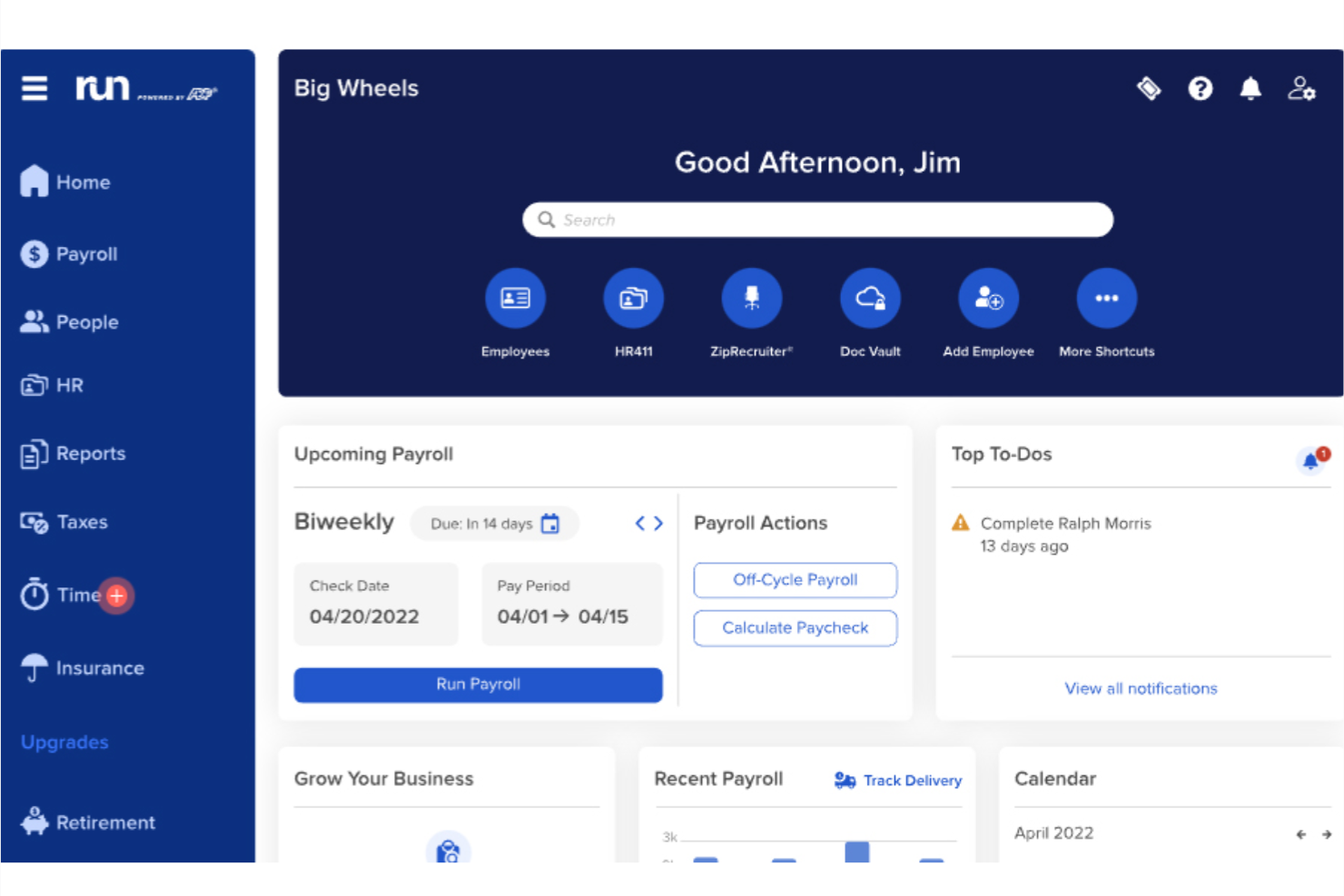
RUN Powered by ADP is designed for small businesses that want accurate payroll and reliable tax handling without extra admin work. It’s especially useful if you manage a team of up to 49 employees and need built-in compliance support and automated tax filing.
Why I Picked RUN Powered by ADP
I picked RUN by ADP because it automates payroll and tax filing so you don’t have to calculate deductions or manage filing deadlines yourself. You can run payroll from anywhere, and your team can view pay details through the mobile self-service portal.
I also like that it includes compliance alerts and error-flagging technology, helping you avoid costly mistakes before you process payroll. For small businesses without dedicated HR support, features like garnishment handling, new-hire reporting, and workers’ compensation management add meaningful value.
RUN Powered by ADP Key Features
Here are some key features worth highlighting:
- Time & attendance tracking: Sync employee hours directly into payroll to reduce manual entry.
- Garnishment payment services: Automatically calculates and sends garnishment payments on your behalf.
- Retirement plan management: Supports 401(k) plans and ensures accurate, timely deductions.
- AI-based error detection: Flags unusual payroll activity so you can correct issues before running payroll.
RUN Powered by ADP Integrations
Integrations include QuickBooks, Wave, Xero, ClockShark, JazzHR, SmartRecruiters, Absorb LMS, 7Shifts, Synerion, Wex, and Points North.
Pros and Cons
Pros:
- Built-in compliance tools for taxes, garnishments, and new hires
- Mobile self-service lets employees access pay info anytime
- Automates tax calculations and filings with minimal admin work
Cons:
- Advanced reporting and customizations are limited
- Many HR features require higher-tier plans


Patriot Payroll is built for U.S.-based small and midsize businesses that want an affordable way to run payroll without taking on extra administrative work. It offers clear, predictable pricing and gives you the core tools you need to pay employees accurately and stay compliant at a lower cost than many competitors.
Why I Picked Patriot Payroll
I picked Patriot Payroll because it gives you essential payroll automation—like automatic tax calculations, direct deposit, and year-end reporting—without inflating your monthly bill.
Its full-service plan handles all federal, state, and local tax filings for you, which reduces the risk of errors and saves time for small teams. I also like that you can manage employee pay rates, deductions, and time-off accruals in one place, making it easier to keep payroll data consistent.
Lastly, the platform’s employee portal cuts down on admin requests by letting workers access pay stubs and tax forms themselves.
Patriot Payroll Key Features
Here are some key features worth highlighting:
- Customizable Pay Rates: Set different pay types or rates for each employee based on role or work type.
- Time-Off Accrual Tracking: Automate accrual calculations so employees always see accurate leave balances.
- Built-In Payroll Reports: View detailed wage, tax, and deduction reports to help you understand labor costs.
- Employee Self-Service Portal: Employees can download pay stubs and W-2s without contacting your admin team.
Patriot Payroll Integrations
Integrations include QuickBooks, QuickBooks Online, Xero, FreshBooks, TSheets/QuickBooks Time, Square, Gusto (import only), and other accounting and time-tracking systems.
Pros and Cons
Pros:
- Affordable plans with transparent pricing
- Full-service option handles all federal, state, and local filings
- Employee portal reduces admin time for payroll teams
Cons:
- No international payroll options
- The initial setup requires a lot of manual data entry


Wave is a payroll solution designed for freelancers and small businesses. It facilitates payroll processing, tax calculations, and employee payments, offering a simple approach to managing finances.
Why I picked Wave: It caters specifically to freelancers by providing an easy-to-use platform for managing payroll without unnecessary complexity. You can handle payroll taxes and direct deposits effortlessly, saving you time. The tool also simplifies tax calculations, ensuring you stay compliant. In my experience, Wave's intuitive interface makes it a great choice for those who need straightforward payroll management.
Standout features & integrations:
Features include automated tax calculations, direct deposit options, and a user-friendly dashboard. You can set up payroll quickly and manage employee tax forms within the platform. Additionally, the tool offers reminders for important tax deadlines.
Integrations include QuickBooks, Xero, FreshBooks, PayPal, Shopify, Etsy, Stripe, Google Workspace, HubSpot, and Square.
Pros and Cons
Pros:
- Quick direct deposit options
- Automated tax reminders
- Intuitive user interface
Cons:
- Limited customer support options
- No advanced HR features
Other Cheap Payroll Service Options
I’ve included a few more options that didn’t make my top for cheap payroll services but are still worth exploring:
- Zoho Payroll
For automated payroll processing
- Square Payroll
For retail and restaurants
- TriNet HR Plus
For detailed reporting
- Gusto
For integrations
- Homebase Payroll
For shift scheduling
- SurePayroll
For easy setup
- Justworks Payroll
For compliance support
- Trolley
For international payments
- Warp
For remote teams
- Superworks
For employee self-service
- Payroll4Free
Free payroll service
- Rippling
For automation and global payroll
- Deel Payroll
For payroll across borders
- RemotePeople
For hiring across 150+ countries


What Are Cheap Payroll Services?
Cheap payroll services are tools that manage payroll processing, tax calculations, and employee payments at an affordable price. Small business owners, freelancers, and HR professionals commonly use these tools to reduce manual workload and ensure compliance. Automated tax filing, direct deposit, and employee self-service features help with accuracy, efficiency, and employee satisfaction. Overall, these tools provide a cost-effective way to manage payroll and related tasks.
Selection Criteria for Cheap Payroll Services
When selecting the best cheap payroll service providers to include in this list, I considered common business needs and pain points that these providers address. This included things like minimizing administrative overhead for payroll processing and ensuring timely, compliant employee payments. I also used the following framework to keep my evaluation structured and fair:
Core Services (25% of total score)
To be considered for inclusion in this list, each provider had to offer these basic services:
- Employee wage calculation
- Direct deposit and check issuance
- Tax filing and reporting
- Pay stub generation
- Year-end W-2 and 1099 preparation
Additional Standout Services (25% of total score)
To help further narrow down the competition, I also looked for unique or especially valuable services, such as:
- Automated compliance updates
- Employee self-service portals
- Mobile payroll apps
- Integration with accounting software
- Contractor payment support
Industry Experience (10% of total score)
To get a sense of the industry experience of each provider, I considered the following:
- Years of operation in payroll services
- Number of clients served across industries
- Specialization in small business payroll
- Presence of certified payroll professionals
- Proven track record with compliance and audits
Onboarding (10% of total score)
To evaluate the onboarding experience for each provider, I considered the following:
- Availability of setup assistance
- Step-by-step onboarding tutorials
- Time required to process first payroll
- Ease of migrating data from previous provider
- Access to dedicated onboarding specialists
Customer Support (10% of total score)
To assess the level of customer support each provider offers, I considered the following:
- Availability of live chat or phone support
- Speed of response to support tickets
- Availability of support outside business hours
- Knowledge and helpfulness of support staff
- Quality of self-service help resources
Value For Price (10% of total score)
To evaluate the pricing and potential ROI of working with each provider, I considered the following:
- Monthly base pricing and per-employee fees
- Included services at each pricing tier
- Transparency of pricing structure
- Cost savings compared to manual payroll
- ROI relative to service breadth
Customer Reviews (10% of total score)
To get a sense of the overall satisfaction of existing customers, I considered the following when reading customer reviews:
- Satisfaction with ease of use
- Comments on customer service experiences
- Reports of technical issues or bugs
- Perceived value for the cost
- Loyalty or repeat business from users
How to Choose a Cheap Payroll Service
It’s easy to get bogged down in long lists of services and complex pricing structures. To help you prioritize the things that matter most for your business, keep the following factors in mind:
| Factor | What to Consider |
|---|---|
| Business Objectives | Make sure the provider aligns with your goals, whether it’s saving time, ensuring compliance, or scaling with your growth. If you’re a startup, your needs may differ from a growing small business. |
| Service Scope and SLAs | Look for clear commitments on turnaround times, tax filings, and error resolutions. Confirm if they handle state and federal compliance, benefits deductions, and end-of-year forms. |
| Support Availability | You’ll want responsive support when issues arise. Check if support is available via phone or chat, during extended hours, and if you’ll get a dedicated rep or team. |
| Costs and Pricing Structure | Understand base fees, per-employee charges, and hidden costs for things like year-end filings. Transparent, flat-rate pricing is ideal for predictable budgeting. |
| Communication and Reporting | Make sure your team can access clear, timely payroll reports. Dashboards and automated email updates help track payments, taxes, and compliance. |
| Ease of Use | Choose a platform that's simple to navigate and doesn’t require hours of training. A clean interface and intuitive process will save you time every pay run. |
| Integration Options | Check if the system connects with your accounting, time tracking, and HR tools. Integrations reduce manual data entry and errors. |
| Scalability | Ensure the service can grow with your business—handling more employees, locations, and compliance requirements without significant cost increases. |
Key Services And Features
When selecting a cheap payroll service provider, keep an eye out for the following key services:
- Payroll processing: Even budget-friendly payroll services automate wage calculations, overtime, deductions, and paycheck distribution. This saves valuable time, reduces errors, and ensures employees are paid correctly every cycle.
- Direct deposit: Most affordable providers still support direct deposit, allowing employee wages to be sent straight to bank accounts. This increases convenience and speeds up the payment process.
- Tax filing: Cheap payroll services often offer automated filing of federal, state, and local payroll taxes. This includes calculating withholdings, submitting payments, and filing quarterly and annual tax forms to keep your business compliant.
- W-2 and 1099 preparation: Affordable payroll tools typically generate end-of-year tax forms for employees and contractors. This simplifies tax season and ensures all required documents are delivered accurately and on time.
- Employee self-service portal: Even lower-cost payroll solutions often include portals where employees can view pay stubs, tax forms, and update personal information — reducing administrative tasks for HR.
- Time tracking integration: Budget payroll tools frequently sync with time clocks or digital time-tracking systems, automatically pulling hours and PTO data to eliminate manual entry and improve payroll accuracy.
- Garnishment and deduction management: Cheap payroll services are equipped to process child support, tax levies, and other required deductions accurately, ensuring full compliance with court-ordered or statutory obligations.
- New hire reporting: Most providers automatically file new hire reports with state agencies, ensuring compliance deadlines are met without extra work from your team.
- Mobile access: Mobile-friendly platforms allow employers and employees to access payroll functions, pay records, and tax documents from smartphones or tablets — ideal for small, on-the-go teams.
- Custom reporting: Affordable payroll tools often include downloadable payroll, tax, and deduction reports that support audits, budgeting, and financial planning.
Common Cheap Payroll Services AI Features
Even low-cost payroll solutions are beginning to incorporate AI features to improve accuracy, speed, and compliance, for example:
- AI-powered payroll validation: AI scans payroll runs for inconsistencies — such as missed hours, duplicate entries, or incorrect deductions — catching errors before paychecks go out.
- Smart tax compliance automation: AI keeps track of changes to payroll tax rules and automatically updates calculations and filing requirements, helping small businesses stay compliant on a budget.
- Predictive cost forecasting: AI analyzes historical payroll data to estimate future labor costs, overtime expenses, and tax obligations, allowing small businesses to plan ahead financially.
- Automated data syncing: AI helps consolidate data from time tracking, HR tools, and benefits systems, reducing manual entry and keeping payroll information accurate in real time.
- Fraud detection alerts: AI monitors payroll activity for unusual transactions or unauthorized changes, adding an extra layer of protection even in lower-cost solutions.
- Chatbot-based employee support: Budget payroll platforms increasingly offer AI chatbots that answer common payroll questions — such as pay dates, tax form locations, or deduction explanations — without requiring HR intervention.
- AI-enhanced reporting: AI generates clearer, more actionable payroll insights by analyzing trends such as labor cost changes, overtime patterns, and employee hours.
- Automated reminders and workflows: AI sends alerts for payroll deadlines, tax submissions, timesheet approvals, and garnishment updates, reducing administrative oversight.
Benefits
Implementing a payroll service provides several benefits for your team and your business. Here are a few you can look forward to:
- Scales with growth: Supports more employees and features without needing a whole new system.
- Lower operating costs: Keeps payroll expenses down by offering essential tools at an affordable price.
- Fewer manual tasks: Automates calculations, filings, and payments so your team doesn’t have to do them by hand.
- Faster pay cycles: Speeds up payday with features like direct deposit and scheduled payroll runs.
- Easier tax compliance: Helps you avoid penalties by handling filings and staying current with tax rates.
- More time for people work: Frees up HR and managers to focus on employee support and team goals.
- Better employee access: Lets employees handle their own pay stubs and tax forms through self-service tools.
Costs & Pricing
Cheap payroll service providers typically come at a custom price to accommodate various business needs, sizes, and circumstances. When comparing payroll pricing, you’ll generally encounter one of the following structures:
- Flat monthly fee: A set monthly rate that covers a specific number of employees and standard services.
- Per employee per month: A base monthly fee plus an added charge for each employee on payroll.
- Pay-per-run: You’re charged each time you run payroll, which works well for businesses that don’t pay on a fixed schedule.
- Tiered plans: Providers offer multiple service packages at different price points, letting you pick based on your needs.
- Custom quotes: Pricing is based entirely on the size of your business, services needed, and any add-ons requested.
These pricing structures are also common across a broader range of payroll software options, which can help you compare budget services against the wider market.
Key Factors That Influence Payroll Service Provider Pricing
Beyond the specific pricing model, here are some additional factors that can influence the cost of cheap payroll service providers:
- Number of employees: More employees means more processing, forms, and payments, which usually raises the cost.
- Payroll frequency: Running payroll weekly instead of monthly can lead to higher charges due to more processing.
- Tax filing needs: If you operate in multiple states or have complex tax needs, pricing may go up to cover that work.
- Employee classification: Managing a mix of full-time employees and contractors may require extra services and cost more.
- Level of support: If you want live support or a dedicated rep, you might pay more than for basic chat or email help.
- Integration needs: Syncing with tools like accounting or time-tracking systems may add setup or monthly fees.
- Compliance complexity: Businesses in highly regulated industries may pay more for help staying on top of rules.
Being aware of these factors before you start seeking out custom quotes from providers helps you get a sense of what to expect, and compare and contrast quotes more effectively.
Cheap Payroll Services FAQs
Here are some answers to common questions about cheap payroll services:
How do I simplify my payroll process?
Generally, there are a few strategies that simplify payroll processes for businesses. First, find a payroll service or payroll software that uses automation. Those allow for a set-it-and-forget-it approach, eliminating redundant tasks.
Favoring electronic tax forms and filing, along with direct deposit, also simplifies the process. Finally, integrations can eliminate redundant data entry across your various solutions, which not only saves time but can reduce error rates since the process is less manual.
Are cheap payroll services safe to use?
They can be, as long as the provider uses encryption, secure logins, and follows data protection standards. Look for services that mention SOC 2 compliance or similar safeguards. You should also check if they offer two-factor authentication.
Do cheap payroll services include tax filing?
Some do, but not all. A few only calculate taxes and leave the filing to you, while others handle both filing and payment. Always confirm what’s included in the base price, since tax filing might cost extra.

