

Die 10 besten Buchhaltungsprogramme mit Lohnabrechnungsfunktionen im Jahr 2026

Beste Buchhaltungssoftware mit Lohnabrechnungsfunktionen – Auswahlliste


Buchhaltungssoftware mit Lohnabrechnungsfunktionen kombiniert zentrale Finanzverwaltungstools mit einer integrierten Verarbeitung von Mitarbeitervergütungen. Dadurch können Sie Ihre Bücher führen, die Lohnabrechnung durchführen sowie Lohnkosten und Verbindlichkeiten in einem System erfassen. Wenn Sie nach Möglichkeiten suchen, Zahlen korrekt zu halten, Zeit zu sparen und die Compliance-Anforderungen einzuhalten, ist es entscheidend, die richtige Lösung zu finden.
In diesem Leitfaden vergleiche ich Buchhaltungssoftware mit Lohnabrechnungsfunktionen für Unternehmen, die von kleinen Teams bis hin zu komplexen Großunternehmen reichen. Sie erfahren, welche Optionen sich am besten für integrierte Lohnabrechnung und Buchhaltung, die Automatisierung von der Lohnabrechnung ins Hauptbuch, Steuerunterstützung und unterschiedliche Unternehmensgrößen eignen.
Warum Sie unseren Software-Bewertungen vertrauen können
Unser Team testet und bewertet Software seit 2012. Als HR-Experten wissen wir selbst, wie schwierig – und wichtig – es ist, die richtige Software auszuwählen.
Für diesen Leitfaden haben wir Tools mithilfe von praktischen Tests und unabhängiger Recherche bewertet und dabei unsere Bewertungskriterien angewendet. Zudem greifen wir auf Erkenntnisse von Branchenvordenkern und praktizierenden HR-Experten zurück.
Unsere Bewertungen spiegeln unser menschliches redaktionelles Urteilsvermögen wider, keine Verkaufsstrategie.
Expertenprüfer:
Vergleichstabelle für Buchhaltungssoftware mit Lohnabrechnungsfunktionen
| Tool | Best For | Trial Info | Price | ||
|---|---|---|---|---|---|
| 1 | Am besten für die projektbasierte Verfolgung von Lohnkosten | Kostenlose Demo verfügbar | Preise auf Anfrage | Website | |
| 2 | Am besten geeignet für Unternehmensfinanzen und globale Lohnabrechnung | Kostenlose Demo verfügbar | Preis auf Anfrage | Website | |
| 3 | Am besten für quelloffene Buchhaltung und Lohnabrechnung | 14-tägige kostenlose Testversion | Ab $5/Monat | Website | |
| 4 | Am besten für modulare Buchhaltungs- und Lohnabrechnungs-Apps geeignet | Kostenloser Plan verfügbar | Ab $31.10/Nutzer/Monat | Website | |
| 5 | Am besten geeignet für Buchungen der Lohn- und Gehaltsabrechnung in Unternehmenshauptbücher | Kostenlose Demo verfügbar | Preis auf Anfrage | Website | |
| 6 | Am besten für Lohn- und Gehaltsdaten in Finanzsystemen in Echtzeit geeignet | Kostenlose Demo verfügbar | Preis auf Anfrage | Website | |
| 7 | Am besten geeignet für automatische Buchungssätze der Lohnabrechnung | 30-tägige kostenlose Testversion | Ab $40/Monat | Website | |
| 8 | Am besten für Buchführung und Lohnabrechnung unter einer Anmeldung | 30-tägige kostenlose Testversion | Ab $20/Monat | Website | |
| 9 | Am besten für Desktop-Buchhaltung mit Lohnabrechnung geeignet | 30-tägige kostenlose Testversion | Ab $124.42/Monat | Website | |
| 10 | Am besten für desktopbasierte Lohnabrechnung mit Steuertabellen geeignet | 30-tägige kostenlose Testversion | Ab 40 $/Monat mit Lohnabrechnung | Website |
Bewertungen von Buchhaltungssoftware mit Lohnabrechnungsfunktionen
Nachfolgend finden Sie meine ausführlichen Zusammenfassungen der besten Buchhaltungssoftware mit Lohnabrechnungsfunktionen, die es auf meine Auswahlliste geschafft haben. Meine Bewertungen bieten einen detaillierten Überblick über die Funktionen, Preise und besten Einsatzmöglichkeiten jeder Software, damit Sie die beste Lösung für sich finden.
Am besten für die projektbasierte Verfolgung von Lohnkosten
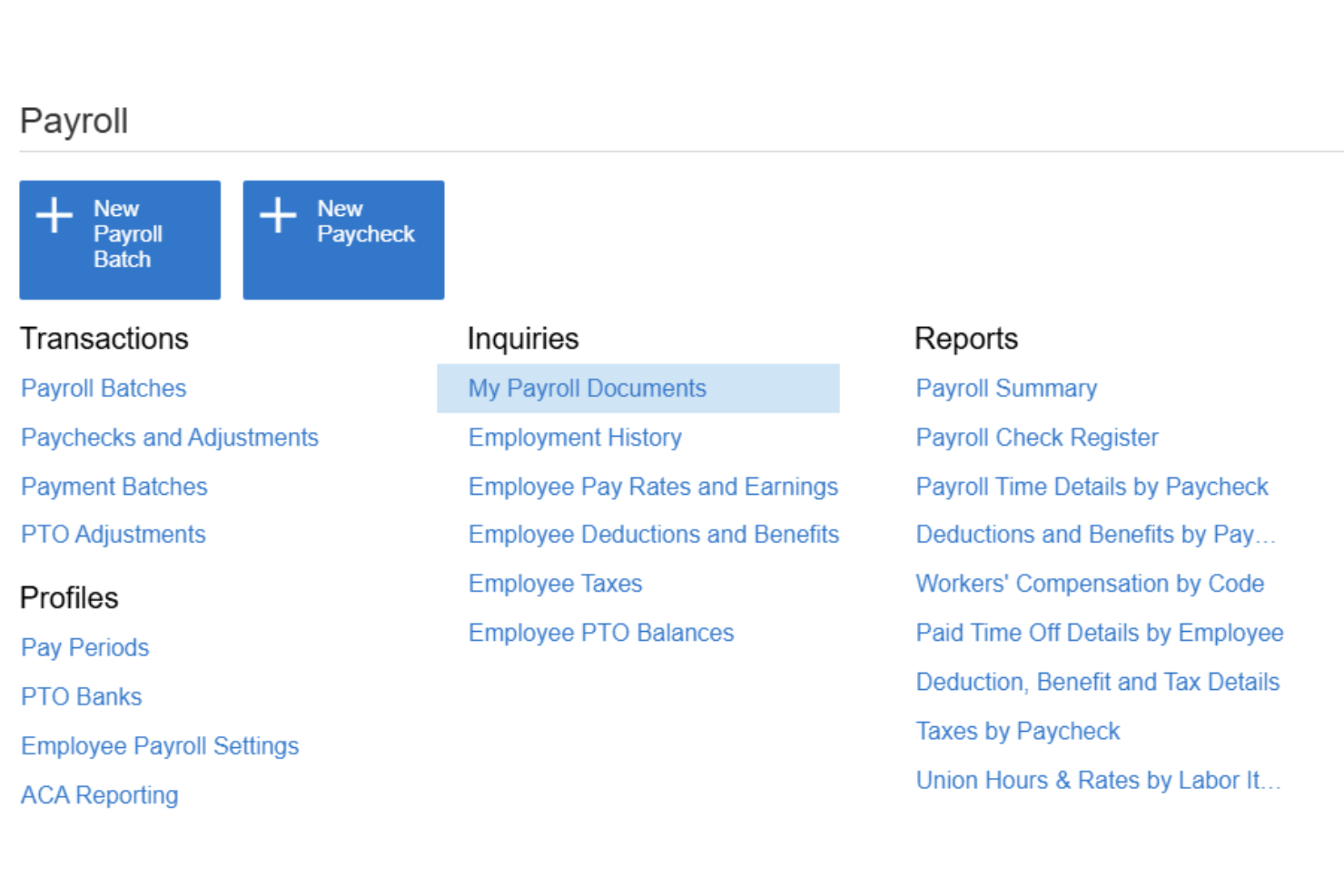
Acumatica ist eine cloudbasierte ERP-Plattform für mittelständische Unternehmen, die die durchgängige Lohn- und Gehaltsabrechnung, Hauptbuchhaltung, Projektkostenverfolgung und Zeitmanagement in einem einzigen System integriert.
Für wen eignet sich Acumatica am besten?
Acumatica eignet sich besonders für mittelständische Bauunternehmen, Fertigungsunternehmen und Unternehmen aus dem Bereich der professionellen Dienstleistungen, die Lohnkosten direkt Projekten und Jobcodes zuordnen müssen.
Warum ich Acumatica ausgewählt habe
Ich habe Acumatica als eine der besten Lösungen ausgewählt, weil keine andere Buchhaltungsplattform, die ich verwendet habe, die gleichzeitige Aufschlüsselung von Lohnkosten nach Projekt, Aufgabe, Kostenart, Gewerkschaft und Schicht ermöglicht. Wenn mein Team die Lohnabrechnung durchführt, werden diese Kosten automatisch mit einer Zuordnung im Hauptbuch verbucht, die die Struktur des Projekts widerspiegelt und nicht nur ein allgemeines Lohnkonto verwendet. Außerdem verlasse ich mich auf die zertifizierte Lohnabrechnungsberichterstattung, die für Bauprojekte mit Anforderungen an die geltenden Lohnsätze unverzichtbar ist.
Wichtige Funktionen von Acumatica
- Portal für die Mitarbeiterselbstverwaltung: Mitarbeiter können online oder über ein Mobilgerät auf Gehaltsabrechnungen, Steuerformulare, Details zur Direktüberweisung und PTO-Anträge zugreifen.
- Lohnsteuer und Regelkonformität: Unterstützt aktuelle Informationen zu Bundes-, FICA-, bundesstaatlichen und kommunalen Steuern, elektronische Lohnsteueranmeldungen, Übersichten zur Regelkonformität und Prüfpfade für die Lohnabrechnung.
- Buchhaltung für mehrere Unternehmen: Verwalten Sie Lohnabrechnung und Buchhaltung für mehrere Unternehmen oder Standorte über eine zentrale Plattform.
- Integrierte Zeiterfassung: Zeitdaten werden direkt mit Genehmigungsworkflows und Erinnerungen an fehlende Zeiten in die Lohnabrechnungsläufe importiert.
Acumatica-Integrationen
Acumatica bietet native Integrationen mit Microsoft 365, DocuSign, Avalara, ADP und Tableau. Für benutzerdefinierte Integrationen steht eine API zur Verfügung.
Pros and Cons
Pros:
- Integrierte Zuordnung von Lohnkosten auf Projektebene
- Unterstützt die gleichzeitige Lohnabrechnung für mehrere Unternehmen
- Zertifizierte Lohnabrechnungsberichterstattung für Projekte mit geltenden Lohnsätzen
Cons:
- Komplexe Konfiguration für kleinere Lohnabrechnungsteams
- Keine eigenständige Implementierung ohne Partner

Workday
Am besten geeignet für Unternehmensfinanzen und globale Lohnabrechnung
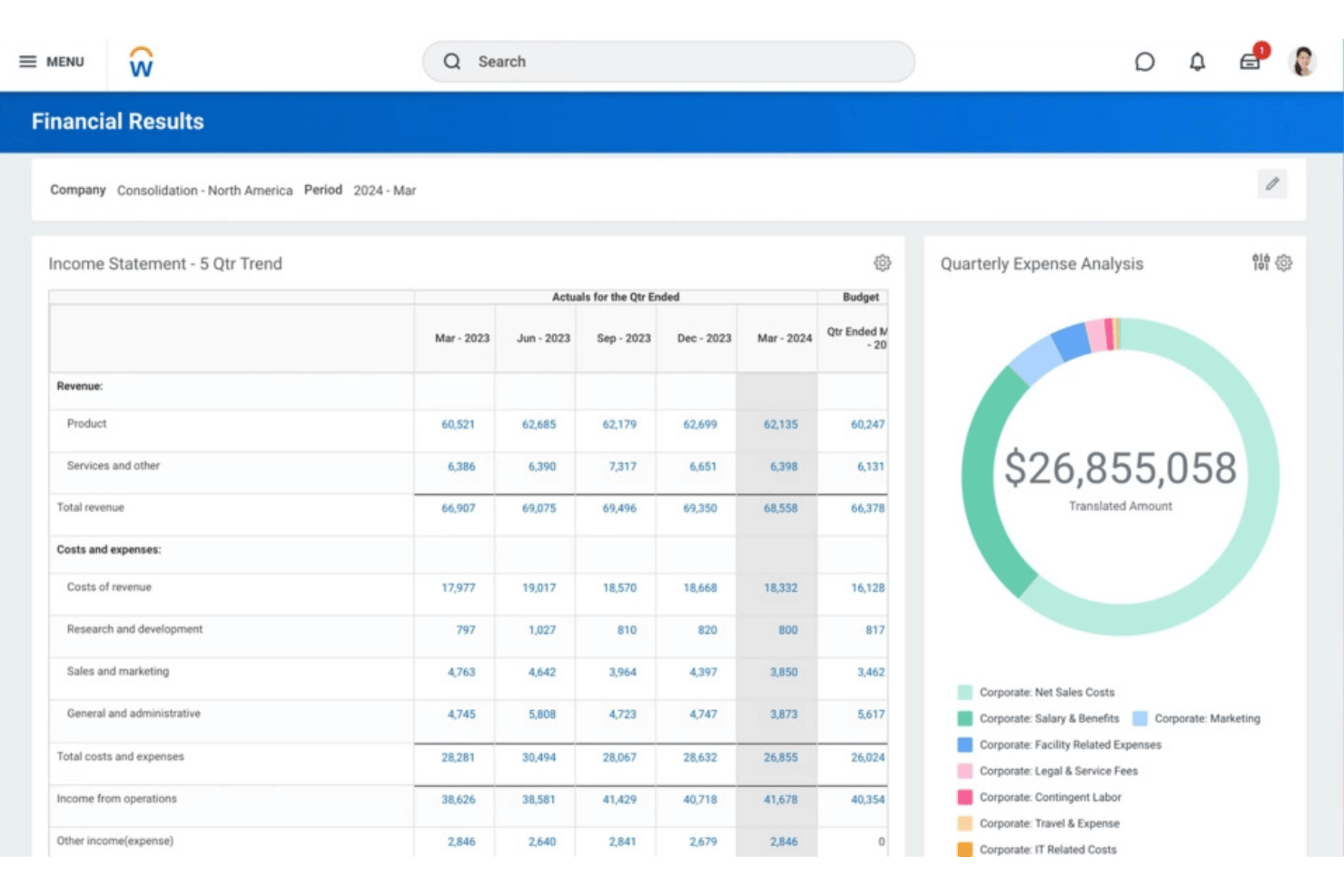
Workday ist eine Plattform auf Unternehmensniveau, die Lohnabrechnung, Finanzmanagement und HCM in einem einzigen System vereint – mit einem nativen Hauptbuch, kontinuierlicher Lohnabrechnung und globalen Lohnabrechnungsfunktionen, die von Workday und seinem Partnerökosystem unterstützt werden.
Für wen ist Workday am besten geeignet?
Workday wurde für große Unternehmen und Konzerne entwickelt, die komplexe Finanz- und Lohnabrechnungsprozesse für mehrere Unternehmen und Länder über eine einzige Plattform verwalten müssen.
Warum ich Workday ausgewählt habe
Ich habe Workday ausgewählt, weil es die Lohnabrechnung für Unternehmen direkt mit dem Finanzmanagement verbindet. Die Ergebnisse der Lohnabrechnung können Buchungseinträge erzeugen und Personalkosten in das Hauptbuch überführen, während Workday Financial Management zentrale Buchhaltungsfunktionen wie Hauptbuch, Kreditoren- und Debitorenbuchhaltung, Anlagevermögen und Konsolidierung übernimmt.
Wichtige Funktionen von Workday
- Lohnabrechnungsbuchhaltung: Workday erzeugt automatisch Buchungseinträge auf Grundlage der Ergebnisse der Lohnabrechnung und unterstützt die Zuordnung von Personalkosten.
- Integration des Hauptbuchs: Die Ergebnisse der Lohnabrechnung können mithilfe von Kontierungsregeln, Geschäftsjahresplänen, Hauptbuchtypen und anderen Buchhaltungskonfigurationen in Workday Financial Management übertragen werden.
- Kontinuierliche Lohnabrechnung: Workday unterstützt eine kontinuierliche Verarbeitung der Lohnabrechnung, anstatt sie ausschließlich als separaten Prozess am Ende eines Abrechnungszeitraums zu behandeln.
- Globale Lohnabrechnung: Die native/direkte Abdeckung der Lohnabrechnung wird durch Workdays globales Partnerökosystem und bidirektionale Integrationen ergänzt.
- Self-Service für Mitarbeitende: Mitarbeitende können über die auf mobile Nutzung ausgerichtete Workday-Oberfläche auf Lohnabrechnungsinformationen zugreifen; die Workday-Dokumentation unterstützt ausdrücklich den mobilen Zugriff von Mitarbeitenden auf Gehaltsabrechnungen.
- Von der Zeiterfassung zur Lohnabrechnung: Genehmigte Arbeitszeiten können in die Berechnung der Lohnabrechnung einfließen, indem Zeitberechnungstags mit Vergütungen oder Abzügen verknüpft werden.
Workday-Integrationen
Workday bietet native Integrationen mit ADP, Kronos, Salesforce, Microsoft 365, SAP, ServiceNow und Oracle und stellt eine API für benutzerdefinierte Integrationen bereit.
Pros and Cons
Pros:
- Lohnabrechnung und Finanzen befinden sich in einem einzigen System
- Native Lohnabrechnungsabdeckung in mehr als 180 Ländern
- Der Self-Service für Mitarbeitende reduziert den Verwaltungsaufwand der Personalabteilung
Cons:
- Für Unternehmen mit weniger als 500 Mitarbeitenden überdimensioniert
- Bei der Einrichtung ist eine erhebliche Einbindung der IT erforderlich

ERPNext
Am besten für quelloffene Buchhaltung und Lohnabrechnung
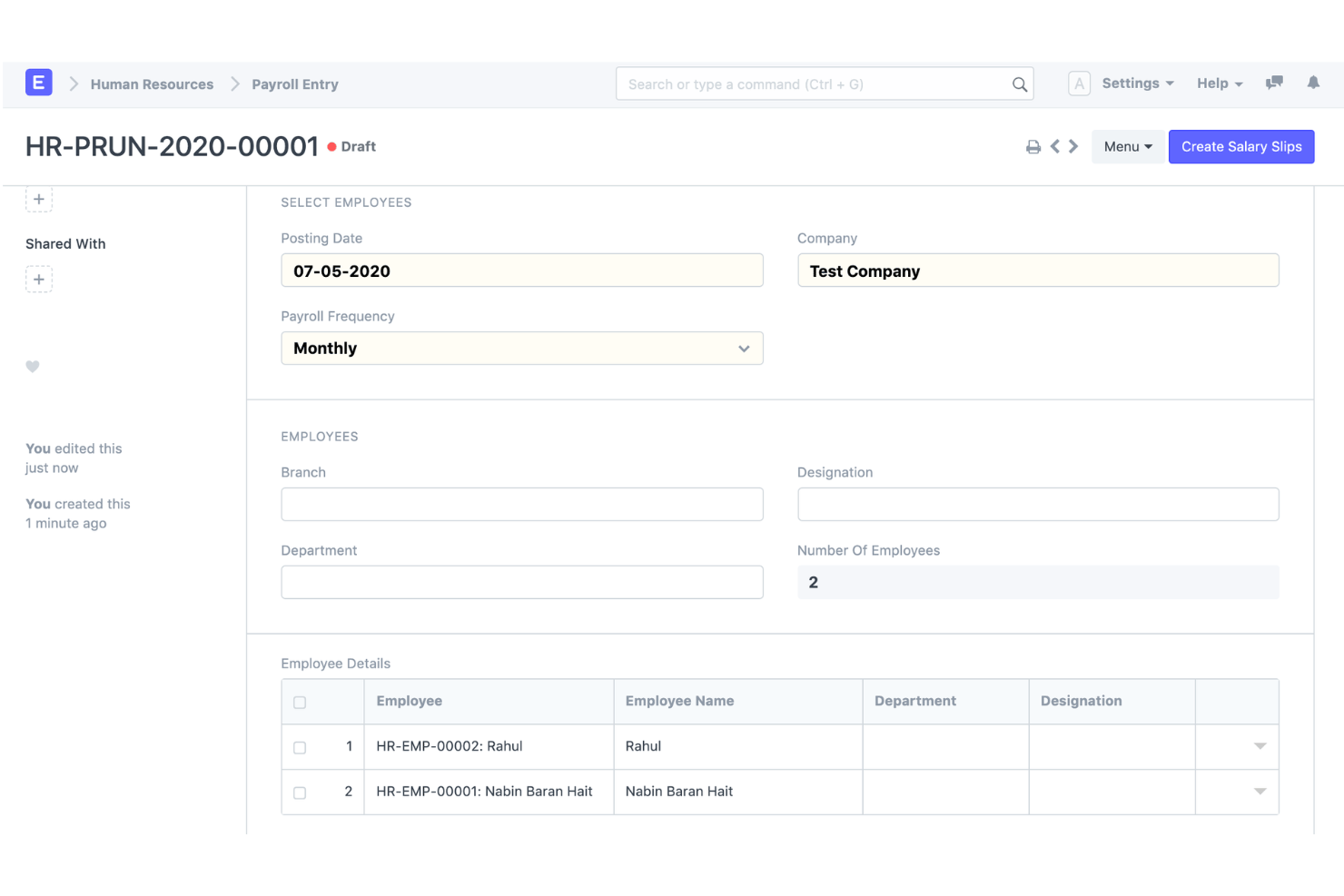
ERPNext ist eine quelloffene ERP-Plattform, die die doppelte Buchführung, eine eigene Lohnabrechnung, Personalverwaltung und Bestandsverfolgung in einem einzigen selbst gehosteten oder in der Cloud bereitgestellten System kombiniert.
Für wen ist ERPNext am besten geeignet?
ERPNext eignet sich für technisch versierte KMU und wachsende mittelständische Unternehmen, die ein voll ausgestattetes ERP-System ohne Lizenzkosten pro Benutzer benötigen.
Warum ich ERPNext ausgewählt habe
ERPNext steht auf meiner engeren Auswahl, weil das Lohnabrechnungsmodul direkt in das Hauptbuch bucht und dabei denselben Kontenplan und dieselben Kostenstellen verwendet, die Sie für den Rest Ihrer Buchhaltung konfigurieren. Das gefällt mir, denn da Sie mit einer einzigen Codebasis arbeiten, müssen keine Lohndaten über eine Zwischenschicht mit einem separaten Buchhaltungssystem synchronisiert werden. Die quelloffene Lizenz bedeutet außerdem, dass ich Gehaltsbestandteile oder Zuordnungen zu Hauptbuchkonten an eine bestimmte Struktur anpassen kann, ohne auf die Produktplanung eines Anbieters warten zu müssen.
Die wichtigsten Funktionen von ERPNext
- Integrierte Lohnabrechnung: Gehaltsstrukturen, Vergütungen und Abzüge, Lohnabrechnungszeiträume, Gehaltsabrechnungen und die gebündelte Lohnabrechnung.
- Lohnbuchhaltung: Lohnaufwendungen und -zahlungen können mit dem Buchhaltungssystem verbunden werden, anstatt in einem vollständig separaten Lohnabrechnungsprodukt verwaltet zu werden.
- Hauptbuch: ERPNext bietet ein vollständiges System der doppelten Buchführung und erstellt automatisch Hauptbucheinträge aus übermittelten Buchungsvorgängen.
- Kostenstellen und Projekte: Lohnabrechnungen können Projekten zugeordnet werden, während die Buchhaltung von ERPNext Kostenstellen, Projekte und weitere Buchhaltungsdimensionen unterstützt.
- Buchhaltung für mehrere Unternehmen und Währungen: ERPNext unterstützt mehrere Unternehmen, Tochtergesellschaften, Niederlassungen und Währungen mit konsolidierter Berichterstattung.
- Anpassung: ERPNext ist quelloffen und basiert auf dem Frappe-Entwicklungsrahmen mit Anpassungsmöglichkeiten, die wenig oder gar keinen Programmieraufwand erfordern.
Integrationen von ERPNext
ERPNext bietet integrierte Anbindungen an PayPal, Razorpay, Amazon S3, Slack, Dropbox, Shopify und WooCommerce. Für benutzerdefinierte Integrationen ist eine API verfügbar.
Pros and Cons
Pros:
- Umfangreiche ERP-Funktionen über den Finanzbereich hinaus
- Quelloffene Buchhaltung und Lohnabrechnung
- Starke Verbindung zwischen Lohnabrechnung und Buchhaltung
Cons:
- Mehr Einrichtung und Konfiguration als bei schlüsselfertigen Buchhaltungs- und Lohnabrechnungsprodukten für KMU
- Die Einhaltung gesetzlicher Vorschriften und die Lokalisierung der Lohnabrechnung variieren je nach Land

Odoo
Am besten für modulare Buchhaltungs- und Lohnabrechnungs-Apps geeignet
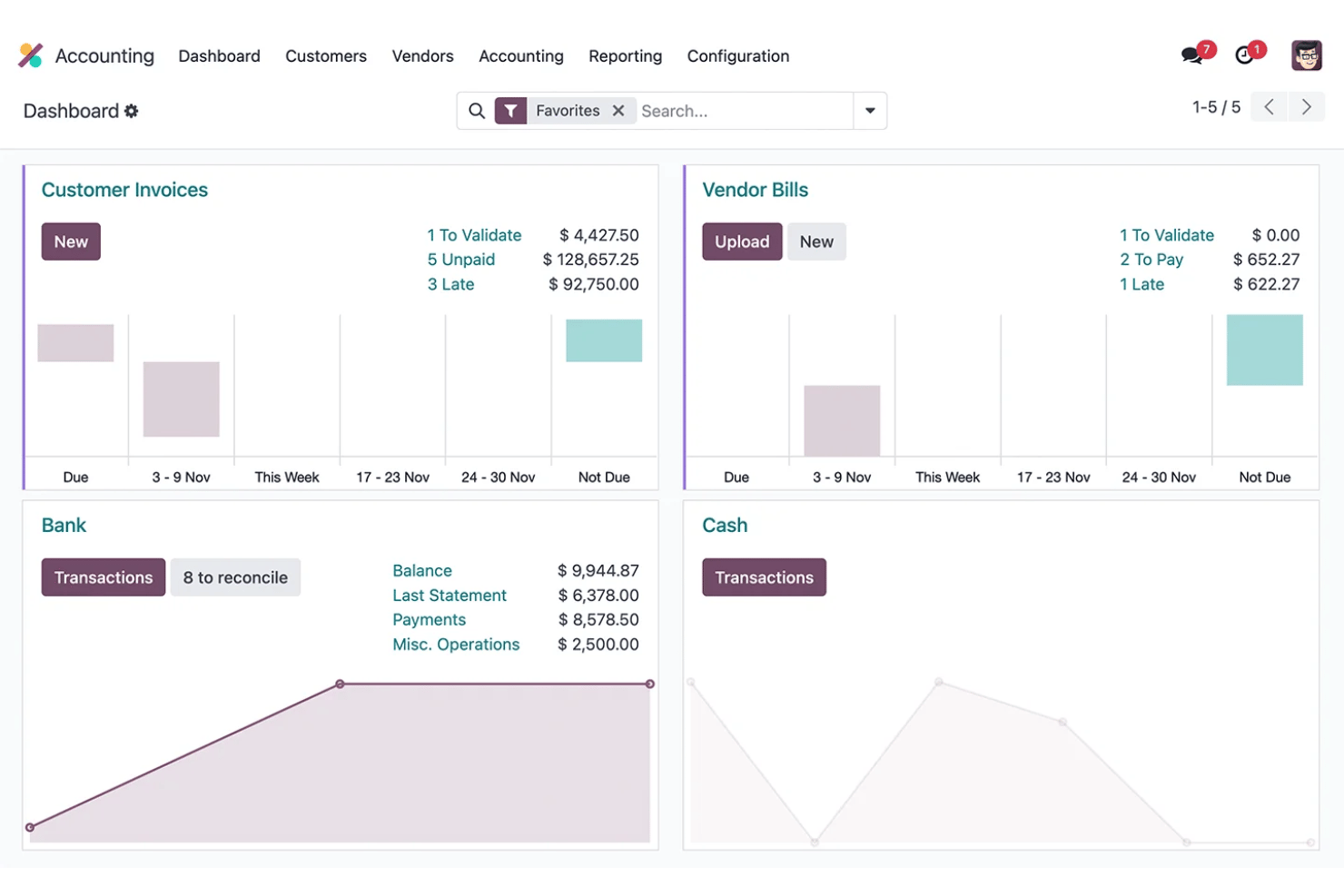
Odoo ist eine Open-Source-ERP-Plattform, die modulare Buchhaltung, Lohnabrechnung, Personalverwaltung und Ausgabenverwaltung in einer einzigen gemeinsamen Datenbank kombiniert.
Für wen ist Odoo am besten geeignet?
Odoo eignet sich besonders für wachsende KMU mit 6–250 Mitarbeitenden, die Buchhaltung, Lohnabrechnung und Personalverwaltung in einer Plattform zusammenführen möchten, ohne mehrere voneinander getrennte Tools verwalten zu müssen.
Warum ich Odoo ausgewählt habe
Ich habe Odoo ausgewählt, weil Unternehmen die vollständige Buchhaltungsanwendung mit der Lohnabrechnung und anderen Geschäftsanwendungen in einer modularen Plattform kombinieren können. Wenn Buchhaltung und Lohnabrechnung gemeinsam verwendet werden, können Gehaltsregeln Soll- und Habenkonten zugeordnet werden. Dadurch lässt sich die Mitarbeitervergütung mit dem Hauptbuch verknüpfen, ohne auf ein vollständig separates Buchhaltungssystem angewiesen zu sein.
Wichtige Funktionen von Odoo
- Buchhaltung: Vollständige doppelte Buchführung mit Kreditoren- und Debitorenbuchhaltung, Abstimmungen, Finanzberichten, Anlagen und Budgets.
- Lohnbuchhaltung: Gehaltsregeln können Soll- und Habenkonten zugeordnet werden, wodurch Lohnberechnungen mit Buchungsjournalen verbunden werden.
- Gehaltsabrechnung: Unternehmen können mehrere Gehaltsabrechnungen gemeinsam erstellen und verarbeiten, einschließlich der Gruppierung nach Gehaltsstruktur, Abteilung oder Stellenbezeichnung.
- Von der Zeiterfassung zur Lohnabrechnung: Die Lohnabrechnung verwendet Arbeitszeiteinträge der Mitarbeitenden, um die geleistete Arbeitszeit zu berechnen, bevor Gehaltsstrukturen und -regeln angewendet werden.
- Lokalisierung der Lohnabrechnung: Länderspezifische Konfigurationen der Lohnabrechnung berücksichtigen, sofern unterstützt, lokale Steuern, Gebühren, Zulagen und regulatorische Anforderungen.
- Mandantenfähige Buchhaltung: Odoo unterstützt mehrere Unternehmen mit unterschiedlichen steuerlichen Lokalisierungen, sofern dies angemessen ist.
Odoo-Integrationen
Odoo bietet native Integrationen mit Stripe, Plaid, PayPal, Authorize.Net und Shopify. Für individuelle Integrationen steht eine API zur Verfügung.
Pros and Cons
Pros:
- Modulare Apps wachsen mit den Anforderungen Ihres Unternehmens
- Die Lohnabrechnung wird automatisch im Hauptbuch verbucht
- Die Open-Source-Codebasis ermöglicht umfassende Anpassungen
Cons:
- Die Einreichung von Lohnsteuererklärungen erfordert Unterstützung durch Drittanbieter
- Die Ersteinrichtung erfordert eine umfangreiche technische Konfiguration
Am besten geeignet für Buchungen der Lohn- und Gehaltsabrechnung in Unternehmenshauptbücher
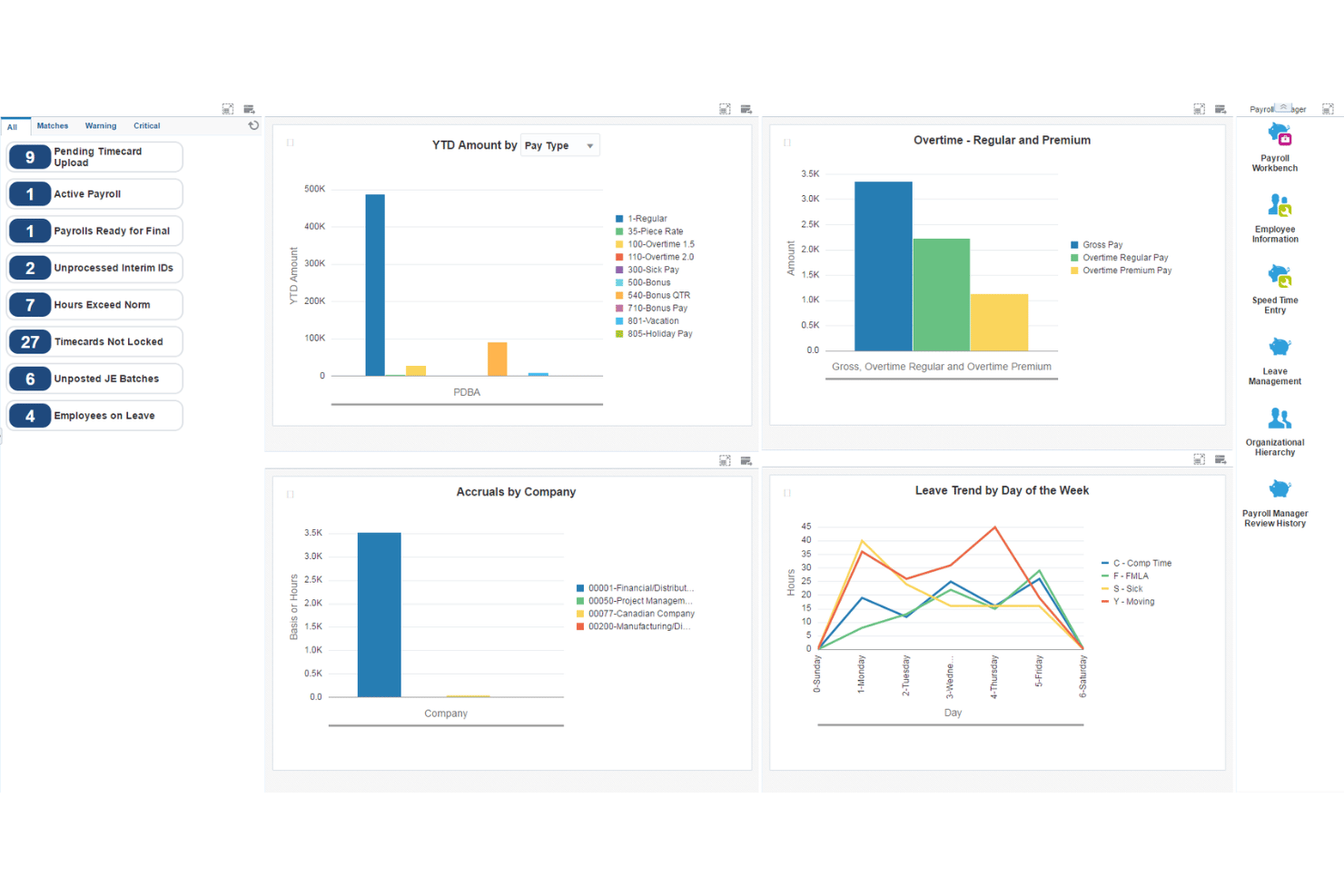
JD Edwards EnterpriseOne ist eine Enterprise-ERP-Suite von Oracle, die eine vollständige Lohn- und Gehaltsabrechnung, Hauptbuchhaltung, Kreditoren- und Debitorenbuchhaltung, Anlagenbuchhaltung sowie Personalmanagement über lokale, Cloud- und hybride Bereitstellungen hinweg kombiniert.
Für wen ist JD Edwards EnterpriseOne am besten geeignet?
JD Edwards EnterpriseOne wurde für große Unternehmen in der Fertigungsindustrie, im Vertrieb und in anlagenintensiven Branchen entwickelt, die integrierte Lohn- und Gehaltsabrechnung sowie Finanzverwaltung in großem Maßstab benötigen.
Warum ich JD Edwards EnterpriseOne ausgewählt habe
Ich habe JD Edwards EnterpriseOne ausgewählt, weil das Lohn- und Gehaltsabrechnungssystem eng mit der Finanzverwaltung von Unternehmen verbunden ist. Die Lohn- und Gehaltsabrechnung kann mithilfe konfigurierbarer automatischer Buchungsanweisungen Buchungssätze für das Hauptbuch erstellen und buchen, während Verbindlichkeiten aus der Lohn- und Gehaltsabrechnung wie Steuern und Versicherungen in die Kreditorenbuchhaltung übertragen werden können.
Wichtige Funktionen von JD Edwards EnterpriseOne
- Integration von Lohn- und Gehaltsabrechnung mit dem GL: Die Lohn- und Gehaltsabrechnung kann Buchungssätze erstellen und das EnterpriseOne-Hauptbuch aktualisieren, wobei automatische oder manuelle Buchungsoptionen zur Verfügung stehen.
- Automatische Buchungsanweisungen: AAIs bestimmen, wie die erstellten Buchungseinträge auf GL-Konten verteilt werden, und geben größeren Unternehmen eine umfassende Kontrolle über die Buchhaltung der Lohn- und Gehaltsabrechnung.
- Verbindlichkeiten aus der Lohn- und Gehaltsabrechnung und AP: EnterpriseOne kann über die Integration mit der Kreditorenbuchhaltung automatisch Belege für Lohnsteuern, Versicherungsprämien und andere Verbindlichkeiten aus der Lohn- und Gehaltsabrechnung gegenüber Dritten erstellen.
- Arbeitskostenrechnung: Die Lohn- und Gehaltsabrechnung unterstützt die Verteilung von Arbeitskosten und Lohnnebenkosten, einschließlich Löhnen, Steuern, Versicherungen, Arbeitsstunden und Kontoinformationen. Diese Transaktionen können in das Kontenbuch übertragen werden.
- US-Lohn- und Gehaltsabrechnung: EnterpriseOne unterstützt Anforderungen an den Einbehalt und die Meldung von Bundes-, Landes- und Kommunalsteuern, wobei Vertex für die Berechnung des Steuerabzugs verwendet wird.
- Kanadische Lohn- und Gehaltsabrechnung: Außerdem gibt es spezielle Funktionen für die kanadische Lohn- und Gehaltsabrechnung, die Vergütungen, Abzüge, Steuern, Brutto-Netto-/Netto-Brutto-Berechnungen, Urlaubsrückstellungen und staatlich vorgeschriebene Steuerinformationen abdecken.
Integrationen von JD Edwards EnterpriseOne
JD Edwards EnterpriseOne bietet integrierte Verbindungen mit Oracle Cloud Infrastructure, Oracle Analytics Cloud und Oracle Database sowie eine API für benutzerdefinierte Integrationen.
Pros and Cons
Pros:
- Detaillierte Buchung von Arbeitskosten nach Abteilung
- Unterstützt die Abrechnung und Buchhaltung mehrerer Unternehmen nativ
- Konfigurierbare GL-Kontenzuordnung für Abrechnungsläufe
Cons:
- Die Implementierung erfordert erhebliche IT- und Beratungsressourcen
- Nicht für kleine oder mittelständische Unternehmen geeignet
NetSuite
Am besten für Lohn- und Gehaltsdaten in Finanzsystemen in Echtzeit geeignet
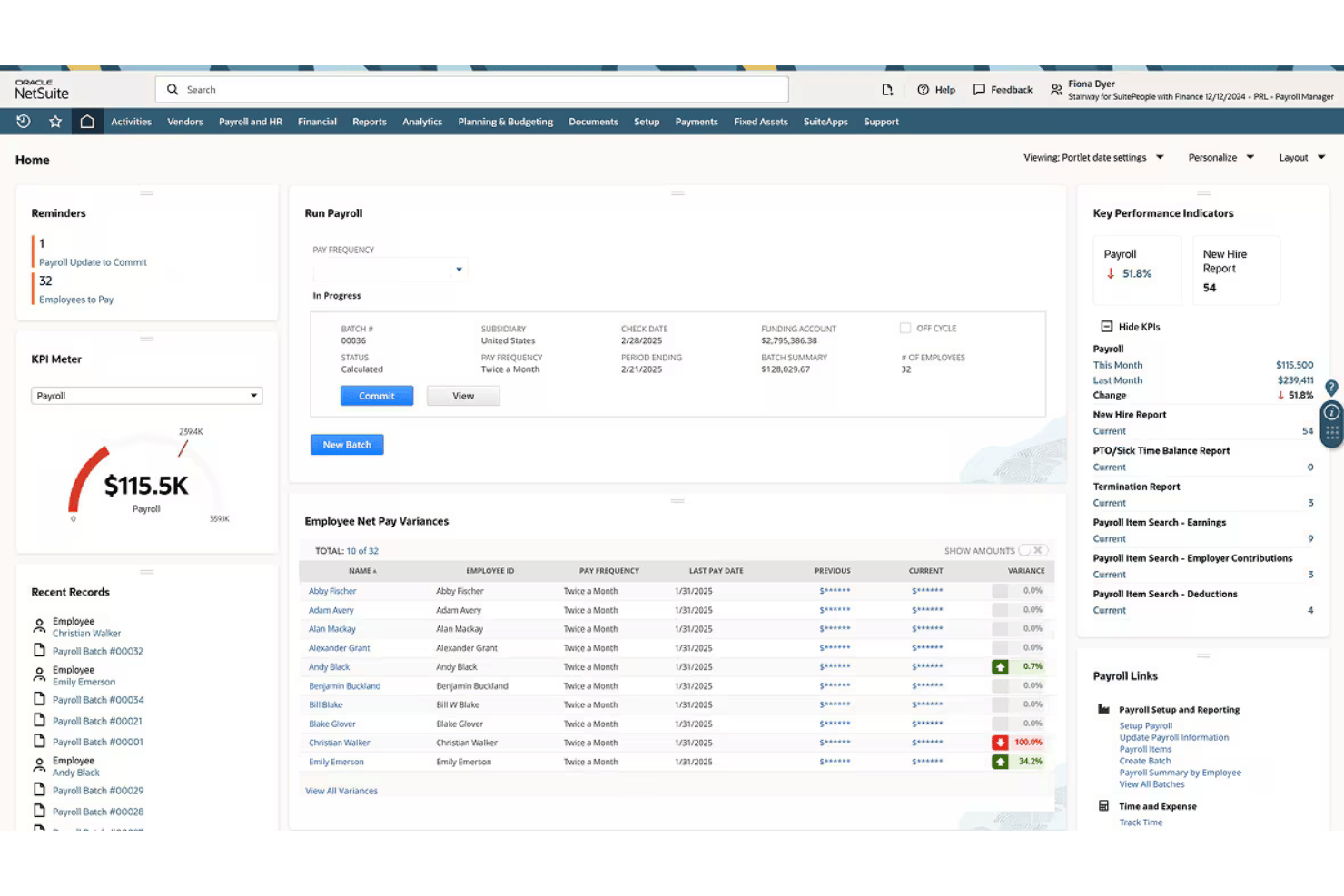
NetSuite ist eine cloudbasierte ERP-Plattform, die eine vollständige US-amerikanische Lohn- und Gehaltsabrechnung mit einem umfassenden Hauptbuch kombiniert, wobei jeder Abrechnungslauf in Echtzeit direkt auf Finanzkonten gebucht wird.
Für wen ist NetSuite am besten geeignet?
NetSuite eignet sich besonders für mittelständische Unternehmen, die Lohn- und Gehaltsabrechnung, Buchhaltung und HR innerhalb eines einzigen ERP-Systems verwalten möchten, anstatt über voneinander getrennte Tools.
Warum ich NetSuite ausgewählt habe
Ich habe NetSuite als eine der besten Lösungen ausgewählt, weil nach Abschluss eines Abrechnungslaufs jeder Lohn, jede Steuer und jeder Abzug automatisch in das Hauptbuch gebucht wird. Ich finde es besonders hilfreich, dass ich von einer Summen- und Saldenbilanz direkt zu einer einzelnen Gehaltsabrechnung navigieren kann, wodurch Prüfungen der Lohn- und Gehaltsabrechnung deutlich weniger aufwendig sind. Die Dashboards schlüsseln die Personalkosten außerdem nach Abteilung, Standort oder Tochtergesellschaft auf und bieten Finanz- und HR-Teams eine gemeinsame Ansicht der Arbeitskosten ohne manuelle Abstimmung.
Wichtige Funktionen von NetSuite
- Lohn- und Gehaltsabrechnung für mehrere Tochtergesellschaften: Führen Sie die Lohn- und Gehaltsabrechnung über mehrere Geschäftseinheiten hinweg durch, mit konsolidierter oder tochtergesellschaftsspezifischer Berichterstattung.
- Self-Service-Portal für Mitarbeitende: Ermöglichen Sie Mitarbeitenden, Gehaltsabrechnungen und Steuerformulare einzusehen sowie ihre persönlichen Daten und Bankverbindungen selbst zu aktualisieren.
- Automatisierte Einhaltung des ACA: Erstellen, übermitteln und verwalten Sie Formulare gemäß dem US-Gesetz über erschwingliche Gesundheitsversorgung (1095-C/1094-C) innerhalb der Plattform.
- Individuelle Dashboards für die Lohn- und Gehaltsabrechnung: Greifen Sie auf mehr als 100 standardmäßige Berichte zur Lohn- und Gehaltsabrechnung sowie interaktive Dashboards für Analysen zu.
NetSuite-Integrationen
NetSuite bietet native Integrationen mit SuitePeople HR, SuiteTime und weiteren NetSuite-Modulen für die Geschäftsverwaltung. Für individuelle Integrationen steht eine API zur Verfügung.
Pros and Cons
Pros:
- Die Lohn- und Gehaltsabrechnung wird direkt in das Hauptbuch gebucht
- Unterstützt Lohn- und Gehaltsabrechnungen für mehrere Unternehmen und Tochtergesellschaften
- Integrierte HR-, Zeiterfassungs- und Lohn- und Gehaltsabrechnungsfunktionen
Cons:
- Die Implementierung dauert bei den meisten Unternehmen mehrere Monate
- Die auf die USA beschränkte Lohn- und Gehaltsabrechnung schränkt die Verwaltung einer globalen Belegschaft ein

Wave
Am besten geeignet für automatische Buchungssätze der Lohnabrechnung
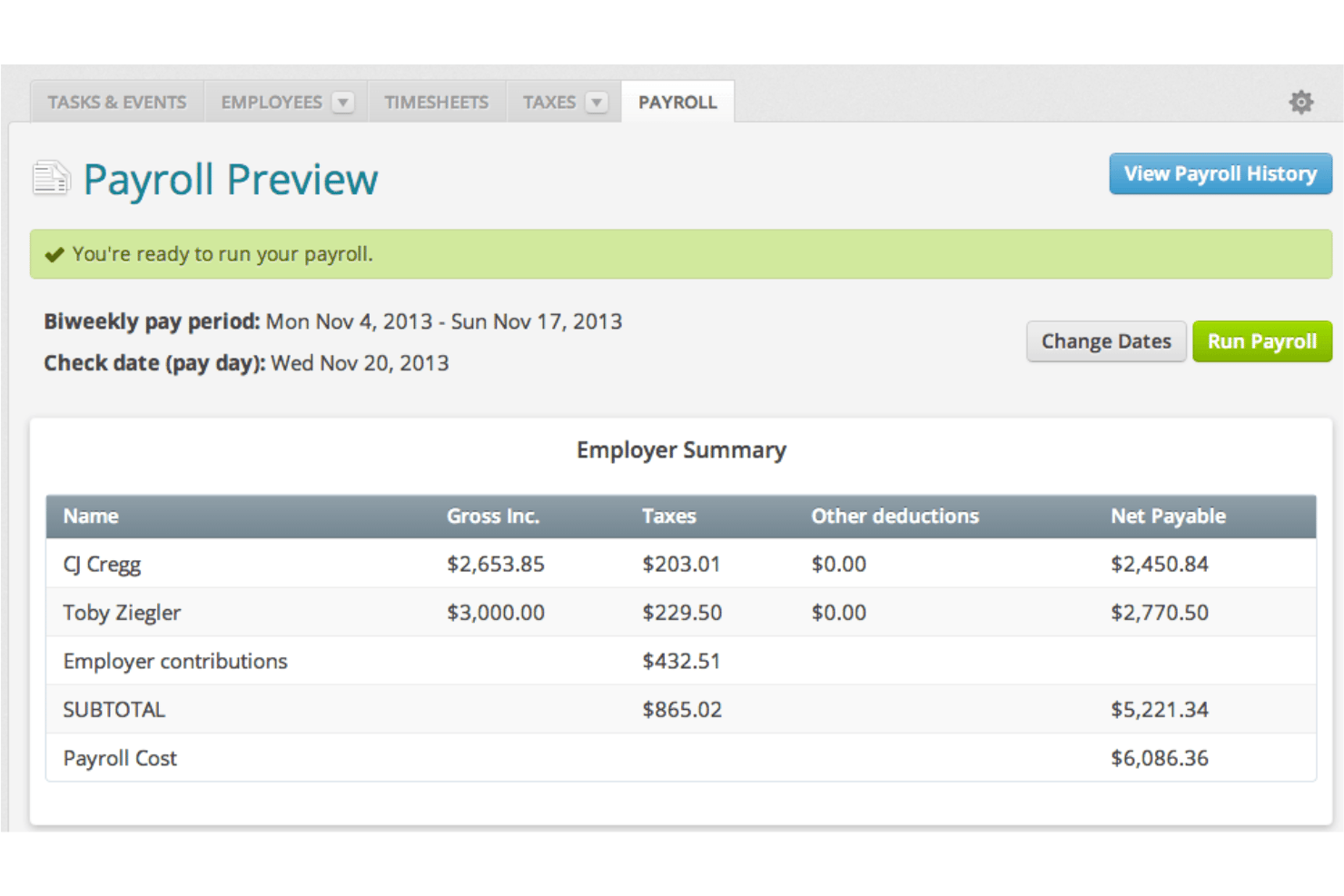
Wave ist eine Buchhaltungs- und Lohnabrechnungsplattform für kleine Unternehmen, die doppelte Buchführung, Rechnungsstellung und die vollständige Verarbeitung der Lohnabrechnung in einem einzigen System kombiniert.
Für wen ist Wave am besten geeignet?
Wave wurde für inhabergeführte Unternehmen und kleine Betriebe entwickelt, die Lohnabrechnung und Buchhaltung an einem Ort benötigen, ohne für Funktionen zu bezahlen, die sie nicht nutzen werden.
Warum ich Wave ausgewählt habe
Ich habe Wave als eine der besten Lösungen ausgewählt, weil jeder Lohnabrechnungslauf automatisch als Buchungssätze in das Buchhaltungsjournal übernommen wird, wobei Löhne, Steuern und Abzüge in Echtzeit den richtigen Konten zugeordnet werden. Da Lohnabrechnung und Buchhaltung dasselbe Datenmodell verwenden, sind kein manueller Export und keine Abstimmung erforderlich. Außerdem gefällt mir, dass W-2-, 1099-NEC- und Lohnberichte alle innerhalb desselben Systems erstellt werden.
Wichtige Funktionen von Wave
- Zahlungen per Direktüberweisung: Überweisen Sie Gehälter ohne zusätzliche Kosten direkt auf die Bankkonten von Mitarbeitenden und Auftragnehmern.
- Portal zur Selbstverwaltung für Mitarbeitende: Ermöglichen Sie Teammitgliedern, Gehaltsabrechnungen sicher online einzusehen und persönliche Informationen zu verwalten.
- Automatische Einreichung von Lohnsteuern: Berechnen, behalten Sie Bundes- und bundesstaatliche Lohnsteuern ein und melden Sie sie für Unternehmen mit Sitz in den USA.
- Erstellung von Steuerformularen zum Jahresende: Erstellen und übermitteln Sie W-2- und 1099-NEC-Formulare für Mitarbeitende und Auftragnehmer innerhalb des Systems.
Integrationen von Wave
Native Integrationen sind nicht eindeutig dokumentiert. Für individuelle Integrationen ist eine API verfügbar.
Pros and Cons
Pros:
- Lohnabrechnung und Buchhaltung verwenden dasselbe Datenmodell
- Automatische Buchungssätze nach jedem Lohnabrechnungslauf
- W-2- und 1099-NEC-Formulare werden innerhalb der Plattform erstellt
Cons:
- Lohnabrechnung nur in den USA und Kanada verfügbar, Quebec ausgenommen
- Begrenzte Unterstützung für wachsende Teams mit mehr als 10 Mitarbeitenden

Am besten für Buchführung und Lohnabrechnung unter einer Anmeldung
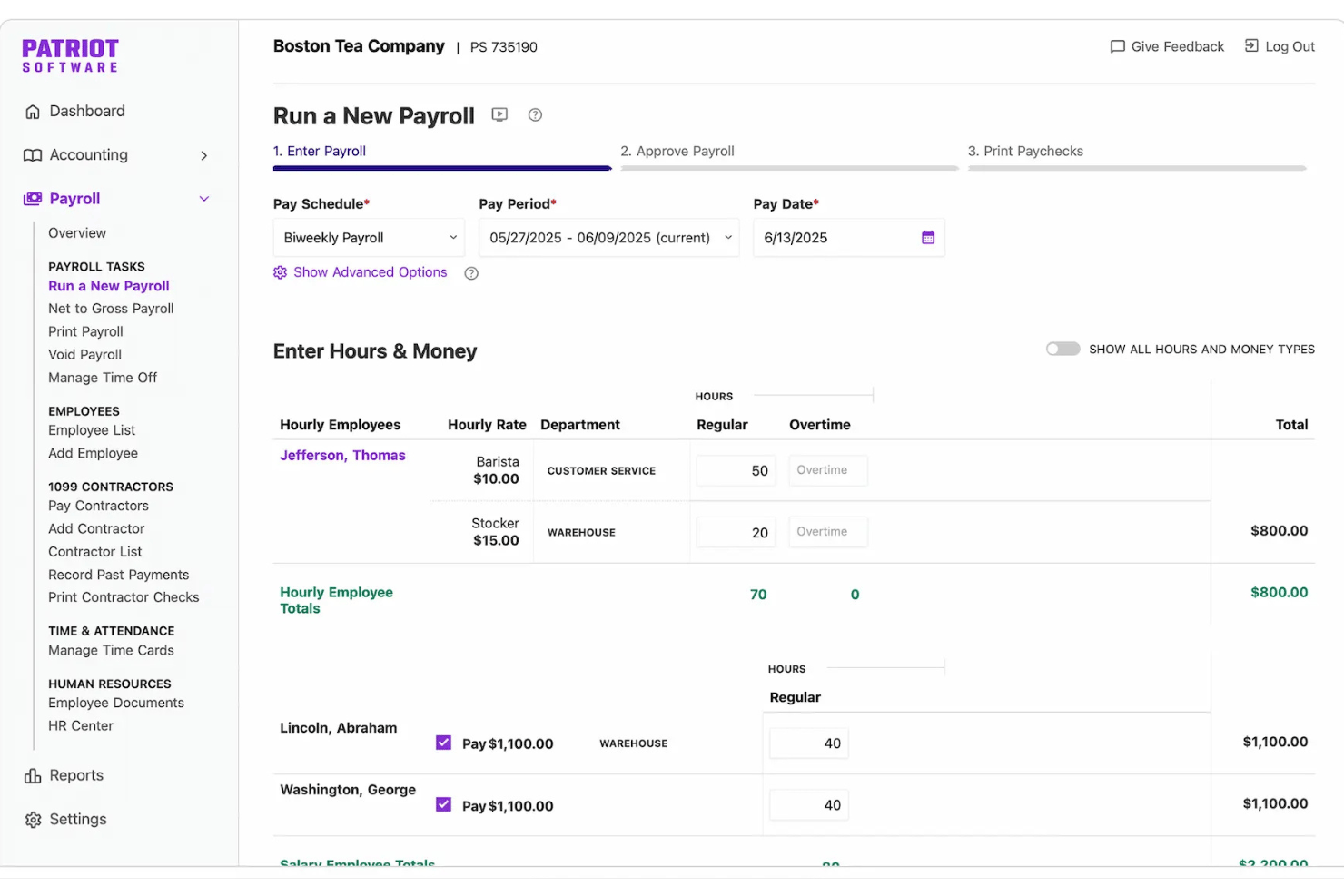
Patriot Software ist eine Plattform für Buchführung und Lohnabrechnung für kleine Unternehmen, die doppelte Buchführung, Rechnungsstellung, Direktüberweisungen und Lohnabrechnung in einer einzigen Anmeldung kombiniert. Die Einreichung von Lohnsteueranmeldungen ist über den Tarif mit Komplettservice für die Lohnabrechnung verfügbar.
Für wen ist Patriot Software am besten geeignet?
Patriot Software eignet sich besonders für Inhaber kleiner Unternehmen, die ihr Unternehmen selbst führen, sowie für Lohnbuchhalter, die Buchführung und Lohnabrechnung verwalten müssen, ohne zwei separate Systeme zu bedienen.
Warum ich Patriot Software ausgewählt habe
Ich habe Patriot Software als eine der besten Lösungen ausgewählt, weil Lohnabrechnung und Buchführung unter einer einzigen Anmeldung verfügbar sind und die Verbindung zwischen beiden automatisch erfolgt. Jedes Mal, wenn ich die Lohnabrechnung ausführe, erstellt Patriot direkt einen Buchungssatz im Hauptbuch und ordnet Löhne, Steuerabzüge und sonstige Abzüge den richtigen Konten zu, ohne dass manuelle Arbeit erforderlich ist. Außerdem gefällt mir das System mit zwei Buchführungsarten, mit dem ich zwischen Kassen- und Abgrenzungsbuchführung wechseln kann, ohne das Tool zu wechseln oder Datensätze zu duplizieren.
Wichtige Funktionen von Patriot Software
- Lohnsteueranmeldungen in mehreren Bundesstaaten: Der Tarif mit Komplettservice für die Lohnabrechnung berechnet, reicht Bundes-, Landes- und lokale Lohnsteuern in Ihrem Namen ein und führt sie ab.
- Selbstbedienungsportal für Mitarbeiter: Mitarbeiter können online auf Gehaltsabrechnungen und Steuerdokumente zugreifen und ihre Informationen zur Direktüberweisung aktualisieren.
- Zusatzmodul für Arbeitszeit und Anwesenheit: Erfassen Sie Arbeitsstunden und angesammelte Freistellungsansprüche von Mitarbeitern, die über ein eigenes Modul direkt mit der Lohnabrechnung synchronisiert werden.
- Abwicklung von Auftragnehmern und 1099-Formularen: Zahlen Sie Auftragnehmer über dieselbe Plattform wie die Mitarbeiterlöhne und erstellen Sie 1099-Formulare.
Integrationen von Patriot Software
Patriot Software bietet integrierte Verbindungen mit Vestwell für 401(k)-Pläne, SimplyInsured für Krankenversicherungen und ERGO NEXT für die Arbeitsunfallversicherung. Für benutzerdefinierte Integrationen ist eine API verfügbar. Integrierte Verbindungen mit anderen Buchführungs- oder Lohnabrechnungstools sind nicht eindeutig dokumentiert.
Pros and Cons
Pros:
- Die Lohnabrechnung wird automatisch im Hauptbuch verbucht
- Unterstützt sowohl Kassen- als auch Abgrenzungsbuchführung
- Der Tarif mit Komplettservice für die Lohnabrechnung automatisiert die Einreichung von Lohnsteueranmeldungen
Cons:
- Die Berichtsfunktionen bieten fortgeschrittenen Benutzern nicht genügend Möglichkeiten
- Keine nativen Funktionen für Personalwesen oder die Verwaltung von Zusatzleistungen

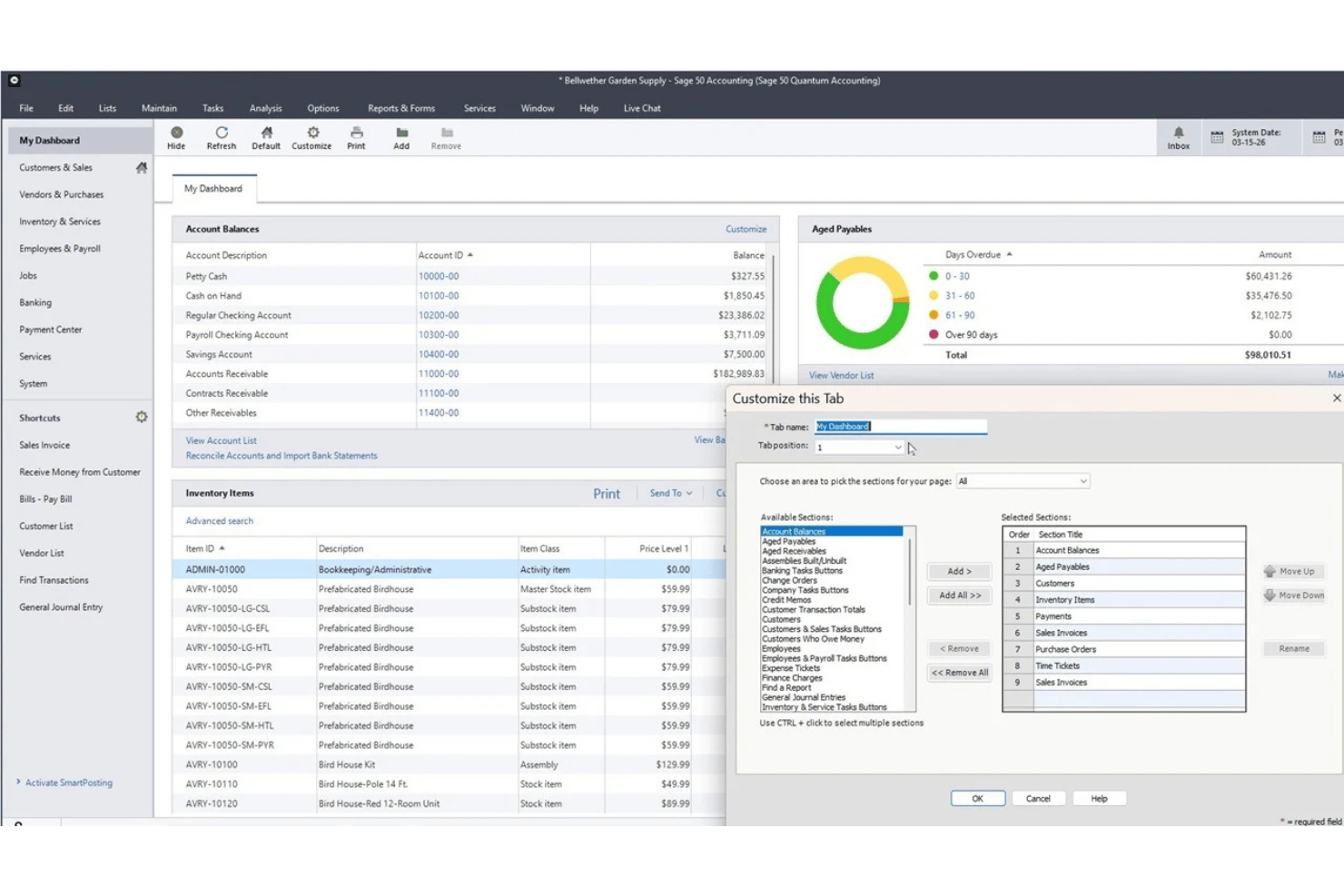
Sage 50 Accounting ist eine Buchhaltungsplattform für kleine Unternehmen, die als Cloud- und Desktop-Version verfügbar ist und Finanzverwaltung, Bestandsverwaltung, Auftragskalkulation und ein integriertes Lohnabrechnungsmodul kombiniert.
Für wen ist Sage 50 Accounting am besten geeignet?
Sage 50 eignet sich besonders für kleine Unternehmen und interne Buchhalter, die detaillierte Buchhaltungs-, Auftragskalkulations- und Lohnabrechnungsfunktionen in einem System benötigen.
Warum ich Sage 50 Accounting ausgewählt habe
Ich habe Sage 50 Accounting in meine Top-Auswahl aufgenommen, weil das Lohnabrechnungsmodul direkt in das Buchhaltungssystem integriert ist und nicht nachträglich als Integration eines Drittanbieters hinzugefügt wurde. Mir gefällt, dass Lohnabrechnungsläufe automatisch als Buchungssätze im Hauptbuch erfasst werden und Löhne, Steuern und Abzüge ohne manuellen Abstimmungsaufwand zugeordnet werden. Die Kombination aus Auftragskalkulation und Lohnabrechnung in einer Desktop-Umgebung hebt Sage 50 besonders hervor, da Sie sehen können, ob ein Projekt nach vollständiger Berücksichtigung der Arbeitskosten rentabel war.
Wichtige Funktionen von Sage 50 Accounting
- Auftragskalkulationsmodul: Erfassen Sie Arbeitskosten, Materialien und Gemeinkosten nach Auftrag oder Projekt, um die vollständige Rentabilität eines Auftrags zu ermitteln.
- Verwaltung mehrerer Unternehmen: Verwalten Sie Transaktionen und Berichte für mehrere Geschäftseinheiten in einem einzigen System.
- Bestandsverwaltung: Überwachen Sie Lagerbestände, Seriennummern, Lieferanten und Baugruppen direkt innerhalb der Buchhaltungsplattform.
- Erweiterte Berichtswerkzeuge: Greifen Sie auf mehr als 150 Berichte zu, die Bereiche wie Verbindlichkeiten, Forderungen, Ausgaben, Gewinne, Bestände, Lohnabrechnung und Aufträge abdecken, mit Optionen zur Anpassung und zum Drilldown bis auf Transaktionsebene.
Integrationen von Sage 50 Accounting
Sage 50 Accounting bietet native Integrationen mit Microsoft 365, AutoEntry und Sage Payroll. Für individuelle Integrationen ist eine API verfügbar.
Pros and Cons
Pros:
- Lohnabrechnungen werden direkt im Hauptbuch erfasst
- Umfassende Auftragskalkulation in die Buchhaltung integriert
- Starke Prüfspur für Lohnabrechnungstransaktionen
Cons:
- Für die Lohnabrechnung ist ein zusätzliches Abonnement erforderlich
- Lohnabrechnung und elektronische Einreichung erfordern separate Abonnements

AccountEdge
Am besten für desktopbasierte Lohnabrechnung mit Steuertabellen geeignet
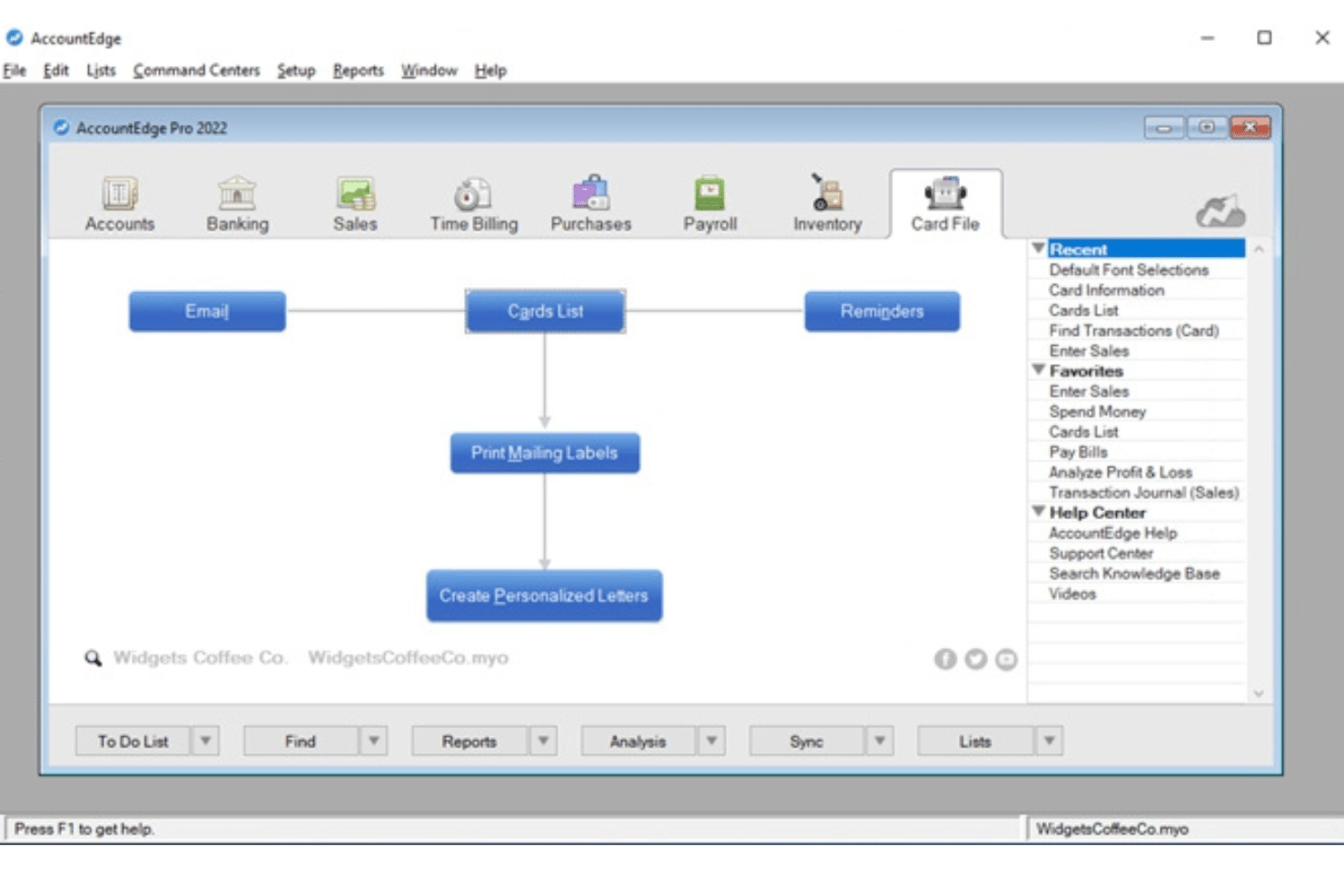
AccountEdge ist eine desktopbasierte Buchhaltungsplattform für kleine Unternehmen, die doppelte Buchführung, Inventarverwaltung und Rechnungsstellung mit einer optionalen Lohnabrechnungserweiterung für unbegrenzt viele Mitarbeiter sowie Zugriff auf aktuelle bundesweite, staatliche/provinzielle und lokale Lohnsteuersätze kombiniert.
Für wen ist AccountEdge am besten geeignet?
Die Software eignet sich besonders für Inhaber und Lohnbuchhaltungsadministratoren kleiner Unternehmen, die eine desktopbasierte Buchhaltungssoftware bevorzugen und die Lohnabrechnung für unbegrenzt viele Mitarbeiter ohne Gebühren pro Mitarbeiter durchführen möchten.
Warum ich AccountEdge ausgewählt habe
AccountEdge hat sich einen Platz auf meiner Auswahlliste verdient, weil die Software Lohnsteuertabellen besonders gut verarbeitet. Statt für Steueraktualisierungen auf einen Cloud-Dienst angewiesen zu sein, können Sie mit AccountEdge bundesweite, staatliche und lokale Steuertabellen direkt in der Desktop-Software herunterladen und anwenden. Außerdem gefällt mir, dass Lohnabrechnungen automatisch als Journalbuchungen im Hauptbuch erfasst werden. Löhne, Steuern und Abzüge werden ohne manuelle Neueingabe den richtigen Konten zugeordnet.
Wichtige Funktionen von AccountEdge
- Doppelte Buchführung im Hauptbuch: Bietet eine vollständige Buchhaltungslösung mit Kontenplan, Journalbuchungen, Kreditoren- und Debitorenbuchhaltung sowie Finanzberichten.
- Inventar- und Artikelverfolgung: Überwacht Lagerartikel und Nicht-Lagerartikel sowie Baugruppen und verwaltet mehrere Standorte und benutzerdefinierte Varianten.
- Anpassbare Berichte: Bietet Hunderte standardmäßiger Finanz-, Lohnabrechnungs- und Regelkonformitätsberichte sowie erweiterte Analysen über Power-BI-Exporte.
- Integrierte Zeiterfassung und Abrechnung: Ermöglicht die Eingabe von Stundenzetteln, wendet benutzerdefinierte Abrechnungssätze nach Mitarbeiter oder Projekt an und verknüpft die Stunden direkt mit der Lohnabrechnung.
Integrationen von AccountEdge
AccountEdge bietet Erweiterungen für Bankdatenfeeds, Direktzahlungen, Lohnabrechnungsformulare und elektronische Einreichungen, AccountEdge Connect, Web Pay und Zahlungsabwicklung. AccountEdge Connect ermöglicht browserbasierten Zugriff auf Verkäufe, Einkäufe, Zeiterfassung und Stundenzettel von Mitarbeitern, die mit der Desktop-Software synchronisiert werden.
Pros and Cons
Pros:
- Herunterladbare Steuertabellen aktualisieren die Lohnabrechnungsberechnungen
- Lohnabrechnungsbuchungen werden automatisch im Hauptbuch erfasst
- Unterstützt Lohnabrechnungen für unbegrenzt viele Mitarbeiter
Cons:
- Direktzahlungen und elektronische Einreichungen der Lohnabrechnung kosten extra
- Steuererklärungen werden vom Anbieter nicht automatisiert
Weitere Buchhaltungssoftware mit Lohnabrechnungsfunktionen
Hier finden Sie einige zusätzliche Optionen für Buchhaltungssoftware mit Lohnabrechnungsfunktionen, die es nicht auf meine Auswahlliste geschafft haben, aber dennoch einen Blick wert sind:
- Striven
Am besten für Gehaltsabrechnungen in betrieblichen Arbeitsabläufen geeignet
- QuickBooks Workforce
Am besten für verknüpfte Lohnabrechnung, HR und Buchhaltung
- Microsoft Dynamics GP
Am besten für fortgeschrittene Abzüge in der Lohnabrechnung und Zusatzleistungen
- SAP S/4HANA
Am besten für die globale Lohnabrechnung mit SAP-Finanzwesen


Wie ich Buchhaltungssoftware mit Lohnabrechnungsfunktionen bewerte
Wenn Lohnabrechnungsdaten nicht sauber ins Hauptbuch übertragen werden, weiß ich, dass dem Werkzeug einer der größten Vorteile der Kombination von Lohnabrechnung und Buchhaltung fehlt. Daher trenne ich unverzichtbare Funktionen von den Merkmalen, die Plattformen wirklich voneinander abheben.
Kernfunktionen (Grundvoraussetzungen für diese Liste)
Bei der Auswahl der Anwendungen für meine Liste bewerte ich jede einzelne auf einer Skala von 0 (bietet die Funktion nicht an) bis 5 (ist in diesem Bereich hervorragend) für jede der unten aufgeführten Kernfunktionen. Anschließend rechne ich die Gesamtpunktzahl der Anwendung in einen Prozentsatz um und verwende 65 % als Richtwert, um die allgemeine Eignung für die Liste zu beurteilen.
- Integrierte Lohnabrechnung: Ich achte auf integrierte oder eng angebundene Lohnabrechnungsläufe mit Direktüberweisung und flexiblen Zeitplänen, damit Unternehmen Zahlungen an Mitarbeiter und Auftragnehmer abwickeln können, ohne Lohnabrechnungsdaten manuell zwischen Systemen übertragen zu müssen.
- Hauptbuchhaltung: Ich prüfe, ob das Hauptbuch die Kreditoren- und Debitorenbuchhaltung, Buchungssätze und anpassbare Berichte unterstützt – beispielsweise eine nach Abteilungen aufgeschlüsselte Gewinn- und Verlustrechnung.
- Automatisierung der Lohnsteuer: Da sich steuerliche Anforderungen häufig ändern, bewerte ich, wie das Werkzeug Einbehalte berechnet, Steuerzahlungen und -meldungen unterstützt und, sofern verfügbar, Formulare zum Jahresende wie W-2s erstellt.
- Mitarbeiterdaten & Abzüge: Jedes Profil sollte Vergütungssätze, Einbehalte, Leistungen und Pfändungen speichern – Angaben, die Sie sonst in einem separaten System erfassen müssten.
- Synchronisierung von Lohnabrechnung und Hauptbuch: Nach jedem Lohnabrechnungslauf sollten Löhne und Steuerschulden automatisch auf die richtigen Hauptbuchkonten gebucht werden, mit einem Prüfpfad für die Überprüfung zum Quartalsende.
- Erfassung von Arbeitszeit & bezahltem Urlaub: Integrierte Zeiterfassungsbögen und Richtlinien zur Ansammlung von bezahltem Urlaub, die direkt in die Lohnabrechnung einfließen, ersparen Ihnen die erneute Eingabe von Stunden in jeder Abrechnungsperiode.
Sobald ich eine Liste von Anwendungen habe, die die Kriterien erfüllen, prüfe ich, wodurch sich die einzelnen Plattformen voneinander abheben.
Unterscheidungsmerkmale (wodurch sich Anbieter abheben)
So vergleiche ich die verschiedenen Anbieter miteinander:
Herausragende Funktionen
Ein Selbstbedienungsportal für Mitarbeiter reduziert Anfragen an die Personalabteilung – Beschäftigte können ihre eigenen Gehaltsabrechnungen abrufen, Angaben zur Direktüberweisung aktualisieren und Urlaubsanträge einreichen, ohne dass ein ständiger Austausch erforderlich ist. Ich bewerte außerdem die Verwaltung von Auftragnehmern und 1099-Formularen, insbesondere wenn Ihr Team sowohl W-2-Beschäftigte als auch Freiberufler umfasst, die zum Jahresende 1099-NEC-Formulare benötigen. Die Steuererklärung in mehreren Bundesstaaten ist ebenfalls wichtig, besonders bei verteilten Teams, bei denen jede neue Einstellung zusätzliche Anforderungen an die jeweilige Steuerzuständigkeit auslösen kann.
Mehr als nur Funktionen
Preistransparenz ist ein wichtiger Punkt – ich prüfe, ob die Gebühren für die Lohnabrechnung im Buchhaltungsabonnement enthalten sind oder als Zusatzgebühr pro Mitarbeiter berechnet werden, da sich diese Kosten mit wachsendem Team schnell summieren. Auch die Unterstützung bei der Migration ist wichtig, insbesondere wenn Sie unterjährig wechseln und Löhne sowie Steuerabzüge seit Jahresbeginn (YTD) korrekt importieren müssen. Außerdem achte ich auf Funktionen für die Zusammenarbeit mit Buchhaltern, etwa rollenbasierte Berechtigungen, die Ihrem Buchhalter Zugriff auf das Hauptbuch ermöglichen, ohne die Genehmigungen für die Lohnabrechnung zu beeinflussen.
So wählen Sie Buchhaltungssoftware mit Lohnabrechnungsfunktionen aus
Die richtige Buchhaltungssoftware mit Lohnabrechnungsfunktionen hängt davon ab, wie jede Plattform Ihre individuelle Kombination aus Compliance-, Automatisierungs- und HR-Aufgaben bewältigt. Bevor Sie sich für eine Plattform entscheiden, sollten Sie festlegen, wie eng Lohnabrechnung und Buchhaltung miteinander verbunden sein müssen. Ein Komplettsystem kann den Abstimmungsaufwand reduzieren, während Buchhaltungssoftware mit einer Erweiterung für die Lohnabrechnung möglicherweise mehr Flexibilität bietet. Wenn Sie bereits einen Lohnabrechnungsanbieter haben, kann eine zuverlässige Integration ausreichen – vorausgesetzt, Lohnkosten und Verbindlichkeiten werden korrekt in Ihr Hauptbuch übertragen.
| Wenn Ihre Priorität bei ... liegt | Achten Sie auf ... |
|---|---|
| Korrekte Lohnsteuererklärungen | Automatisierte Steuerberechnungen, Unterstützung bei der Einreichung und Compliance-Updates |
| Nahtlose Synchronisierung von Lohnabrechnung und Buchhaltung | Systemeigene, automatisierte Zuordnung von Buchungen im Hauptbuch |
| Verwaltung von Stunden- und Gehaltsempfängern | Flexible Zeiterfassung und kombinierte Lohnabrechnungsläufe |
| Verarbeitung von Lohnabrechnungen in mehreren Steuergebieten | Steuerunterstützung für jeden Bundesstaat und jede lokale Verwaltung, in denen Sie Mitarbeiter beschäftigen |
| Einfache Umstellung von Ihrem alten System | Unterstützte Migration von Lohnabrechnungsdaten und Importe der Jahresgesamtwerte |
So prüfen Sie Ihre Auswahlliste
- Unterstützung bei Jahressteuererklärungen überprüfen: Bestätigen Sie, welche W-2- und 1099-Formulare die Software erstellt oder einreicht. Prüfen Sie außerdem, welche Steuergebiete unterstützt werden und ob die Einreichung zum Jahresende zusätzliche Kosten verursacht.
- Einen simulierten Abrechnungslauf testen: Richten Sie einen Testabrechnungslauf mit Ihren typischen Zahlungsplänen, Vergütungen, Abzügen und Auftragnehmern ein. Prüfen Sie anschließend, wie die daraus resultierenden Ausgaben und Verbindlichkeiten im Hauptbuch verbucht werden.
- Ein Support-Ticket für ein Migrationsszenario einreichen: Beschreiben Sie, dass Sie unterjährig bisherige Lohnabrechnungsdaten importieren müssen, und achten Sie auf die Gründlichkeit und Reaktionszeiten der Antwort.
- Verantwortung für die Steueranmeldung klären: Bestätigen Sie, ob der Anbieter Lohnsteuern in Ihrem Namen berechnet, einreicht und bezahlt. Prüfen Sie außerdem, welche Steuergebiete der Anbieter abdeckt und wer für Fehler oder verspätete Einreichungen zuständig ist.
- Kontrolle gegen Komfort abwägen: Entscheiden Sie, ob Sie stark anpassbare Buchhaltungswerkzeuge mit integrierter Lohnabrechnung oder ein Lohnabrechnungssystem mit grundlegender Buchhaltung bevorzugen.
Was ist Buchhaltungssoftware mit Lohnabrechnungsfunktionen?
Buchhaltungssoftware mit Lohnabrechnungsfunktionen kombiniert grundlegende Finanzwerkzeuge mit einer integrierten oder eingebundenen Lohnabrechnung. Dazu können beispielsweise Hauptbuchhaltung, Kreditoren- und Debitorenbuchhaltung, Rechnungsstellung und Finanzberichte gehören. Mit diesen Plattformen können Sie Mitarbeitervergütungen berechnen, Abzüge und Steuern verwalten sowie Lohnabrechnungskosten und -verbindlichkeiten in Ihrem Buchhaltungssystem erfassen, ohne Daten manuell zwischen separaten Werkzeugen übertragen zu müssen.
Im Gegensatz zu eigenständiger Lohnabrechnungssoftware verbinden diese Plattformen Lohnabrechnungsvorgänge direkt mit Ihren Finanzaufzeichnungen. Abhängig von der Software können abgeschlossene Abrechnungsläufe automatisch Buchungssätze erzeugen, Aufwands- und Verbindlichkeitskonten aktualisieren, Arbeitskosten Abteilungen oder Projekten zuordnen und Lohnabrechnungsdaten in Finanzberichte überführen.
Funktionen
Achten Sie bei der Auswahl einer Buchhaltungssoftware mit Lohnabrechnungsfunktionen auf die folgenden wichtigen Funktionen:
- Integrierte Lohnabrechnung: Führen Sie Lohnabrechnungen durch, berechnen Sie Brutto-Netto-Vergütungen und verknüpfen Sie Mitarbeiterlöhne, Abzüge und Lohnabrechnungsverbindlichkeiten mit Ihren Buchhaltungsaufzeichnungen.
- Lohnsteuerverwaltung: Berechnen und behalten Sie anfallende Lohnsteuern ein, mit Optionen für Steuerzahlungen, Steueranmeldungen und Formulare zum Jahresende wie W-2 und 1099, abhängig von Plattform und Tarif.
- Synchronisierung mit dem Hauptbuch: Ordnen Sie Lohnabrechnungstransaktionen automatisch dem richtigen Kontenplan zu, damit Lohnkosten und Steuerverbindlichkeiten stets aktuell sind.
- Verwaltung von Mitarbeiterdaten: Speichern Sie Lohnsätze, Steuerabzüge, Abzüge für Zusatzleistungen und Beschäftigungsdetails in individuellen Mitarbeiterprofilen.
- Zahlungen an Auftragnehmer und 1099-Zahlungen: Bezahlen Sie Auftragnehmer zusammen mit Mitarbeitern und vereinfachen Sie die Einreichung von 1099-NEC-Formularen zum Jahresende im selben System.
- Erfassung von Arbeitszeit und bezahlter Freizeit: Erfassen Sie geleistete Arbeitsstunden und bezahlte Abwesenheiten und übertragen Sie diese Daten direkt in Abrechnungsläufe, um korrekte Gehaltszahlungen sicherzustellen.
- Direkteinzahlung und Zahlungsoptionen: Bieten Sie Mitarbeitern und Auftragnehmern flexible Zahlungsoptionen wie Direkteinzahlung, Zahlungskarten oder gedruckte Schecks.
- Selbstbedienungsportale für Mitarbeiter: Ermöglichen Sie Mitarbeitern, Gehaltsabrechnungen abzurufen, Steuerformulare einzusehen, Urlaub zu beantragen und persönliche Informationen ohne Einschaltung der Personalabteilung zu verwalten.
- Individuelle Berichte und Analysen: Erstellen Sie Lohnabrechnungs- und Finanzberichte, die Arbeitskosten, Überstunden und die Nutzung von Zusatzleistungen hervorheben, um bessere Geschäftsentscheidungen zu treffen.
- Sicherheits- und Berechtigungskontrollen: Legen Sie Benutzerzugriffsebenen fest, setzen Sie Genehmigungen durch und erstellen Sie Prüfpfade, um Lohnabrechnungs- und Finanzdaten zu schützen.
Vorteile
Die Einführung einer Buchhaltungssoftware mit Lohnabrechnungsfunktionen bietet Ihrem Team und Ihrem Unternehmen mehrere Vorteile. Auf Folgendes können Sie sich unter anderem freuen:
- Weniger manuelle Dateneingabe: Die automatische Synchronisierung zwischen Lohnabrechnung und Hauptbuch macht doppelte Eingaben überflüssig und hilft, kostspielige Fehler zu vermeiden.
- Verbesserte Einhaltung der Lohnsteuervorschriften: Automatisierte Berechnungen und Tools zur Einhaltung von Vorschriften können dazu beitragen, dass Lohnsteuern und Jahresendmeldungen mit den geltenden bundesstaatlichen und lokalen Anforderungen übereinstimmen.
- Schnellere Lohnabrechnungszyklen: Integrierte Zeiterfassung und Funktionen für Direktüberweisungen beschleunigen jeden Abrechnungslauf – von der Lohnberechnung bis zur Auszahlung.
- Mehr Transparenz für Mitarbeitende: Selbstbedienungsportale ermöglichen es Mitarbeitenden, Gehaltsabrechnungen, Steuerformulare und Urlaubsguthaben einzusehen, ohne auf die Personalabteilung angewiesen zu sein.
- Genauere Finanzberichte: Die Echtzeitübertragung von Lohnabrechnungsdaten ins Hauptbuch stellt sicher, dass Lohn-, Steuer- und Leistungsdaten stets in den Unternehmensberichten berücksichtigt werden.
- Einfachere Abrechnung von Auftragnehmenden und länderübergreifende Lohnabrechnung: Plattformen, die Auftragnehmende und mehrere Steuerhoheitsgebiete unterstützen, können den manuellen Aufwand für die Bezahlung verschiedener Arten von Arbeitskräften an unterschiedlichen Standorten reduzieren. Unternehmen, die international expandieren, können außerdem unseren Leitfaden zur globalen Lohnabrechnung in Mexiko lesen.
- Verbesserte Sicherheit und Kontrolle: Rollenbasierte Berechtigungen und Prüfpfade schützen sensible Lohnabrechnungs- und Finanzdaten vor unbefugtem Zugriff.
Kosten und Preise
Die Auswahl einer Buchhaltungssoftware mit Lohnabrechnungsfunktionen erfordert ein Verständnis der verschiedenen verfügbaren Preismodelle und Tarife. Die Kosten variieren stark je nachdem, ob die Lohnabrechnung enthalten ist, als Zusatzmodul verkauft wird oder Bestandteil einer größeren ERP-Suite ist. Produkte für kleine Unternehmen kombinieren häufig ein monatliches Buchhaltungsabonnement mit einer Grundgebühr für die Lohnabrechnung und Gebühren pro Arbeitskraft, während Unternehmensplattformen typischerweise individuelle Preise auf Grundlage von Modulen, Nutzenden, Unternehmensgröße und Implementierungsanforderungen verwenden. Die folgende Tabelle fasst die gängigsten Preismodelle zusammen:
Gängige Preismodelle für Buchhaltungssoftware mit Lohnabrechnungsfunktionen
| Tarifart | Durchschnittlicher Preis | Übliche Funktionen |
|---|---|---|
| Kostenlose Buchhaltung | $0 Grundtarif; Lohnabrechnung kostet in der Regel extra | Grundlegende Buchführung, Rechnungsstellung, Finanzberichte und optionale kostenpflichtige Lohnabrechnung |
| Buchhaltung + Zusatzmodul für Lohnabrechnung | Monatliche Buchhaltungsgebühr + Grundgebühr für die Lohnabrechnung und/oder Gebühr pro Arbeitskraft | Integrierte Buchhaltung, Lohnabrechnung, Direktüberweisungen und Übertragung der Lohnabrechnung ins Hauptbuch |
| Nutzerbasierte oder modulare Software | Monatliche oder jährliche Gebühren auf Grundlage der Nutzenden und ausgewählten Module | Buchhaltungs- und Lohnabrechnungsmodule mit zusätzlichen Werkzeugen für Personalwesen, Lagerbestand, Projekte oder betriebliche Abläufe |
| Unternehmens-ERP | Individuelles Angebot | Erweiterte Finanzverwaltung, Lohnabrechnung, Unterstützung mehrerer Rechtsträger, Berechtigungen, Integrationen und Implementierungsservices |
Häufig gestellte Fragen zu Buchhaltungssoftware mit Lohnabrechnungsfunktionen
Hier finden Sie Antworten auf häufige Fragen zu Buchhaltungssoftware mit Lohnabrechnungsfunktionen:
Kann ich mit Buchhaltungssoftware mit integrierter Lohnabrechnung sowohl Mitarbeiter als auch Auftragnehmer bezahlen?
Viele Buchhaltungsplattformen mit Lohnabrechnungsfunktionen unterstützen sowohl W-2-Mitarbeiter als auch 1099-Auftragnehmer. Die Möglichkeiten zur Bezahlung von Auftragnehmern und zur Erstellung von Steuerformularen unterscheiden sich jedoch je nach Produkt und Tarif. Wenn Sie beide Mitarbeitertypen beschäftigen, prüfen Sie, ob die Software Zahlungen an Auftragnehmer unterstützt und die erforderlichen Formulare W-2 und 1099-NEC erstellt oder einreicht.
Wie funktioniert die Einreichung von Lohnsteuererklärungen in diesen Systemen?
Die Unterstützung bei der Lohnsteuer variiert je nach Plattform und Tarif. Einige Systeme berechnen die Abzüge, überlassen Ihnen jedoch die Einreichung und Zahlungen, während umfassende Lohnabrechnungsprodukte die Bundes-, Landes- und lokalen Lohnsteuern in Ihrem Namen berechnen, einreichen und bezahlen können. Prüfen Sie vor der Auswahl eines Systems, welche Steuergebiete und Jahresendformulare unterstützt werden.
Welche Unterstützung gibt es bei der Migration von Lohndaten eines vorherigen Anbieters?
Die meisten Anbieter bieten Unterstützung bei der Einrichtung an. Einige stellen spezielle Migrationsfachleute bereit, die beim Import der Lohnabrechnungsdaten seit Jahresbeginn helfen und einen reibungslosen Übergang sicherstellen.
Können Mitarbeiter selbst auf Gehaltsabrechnungen und Steuerformulare zugreifen?
Ja, Portale zur Selbstbedienung für Mitarbeiter sind üblich. Sie ermöglichen es den Mitarbeitern, Gehaltsabrechnungen abzurufen, Steuerdokumente einzusehen und persönliche Daten zu aktualisieren, ohne die Personalabteilung einzubeziehen.
Ist eine erweiterte Zeiterfassung enthalten oder benötige ich Tools von Drittanbietern?
Einige Lösungen verfügen über eine integrierte Zeiterfassung, während andere nahtlose Integrationen mit Zeiterfassungsanwendungen anbieten. In beiden Fällen wird dadurch sichergestellt, dass die Arbeitsstunden für die Lohnabrechnung korrekt erfasst werden.