10 Best OKR Software of 2026: Reviewed & Compared

10 Best OKR Software Shortlist


OKR software lets you set aligned goals, track measurable outcomes, and keep your team accountable with real-time dashboards and automated updates. The right tool brings clarity to your OKR process, making sure priorities stay visible and teams don’t lose momentum.
Having implemented and tested dozens of OKR platforms myself, I’ll walk you through the best options to help you easily manage goals, improve adoption, and drive results across your team.
Why Trust Our Software Recommendations
Our team has been testing and reviewing software since 2012. As HR experts ourselves, we know how difficult—and important—it is to choose the right software.
For this guide, we evaluated tools using hands-on testing and independent research, scoring tools using our selection criteria. We also draw on insights from industry thought leaders and practicing HR experts.
Our reviews reflect our human editorial judgment, not a sales pitch.
Expert reviewers:
OKR Software Comparison Table
This comparison table summarizes pricing details for my top OKR software selections:
| Tool | Best For | Trial Info | Price | ||
|---|---|---|---|---|---|
| 1 | Best with advanced analytics tools | Free demo available | From $5/user/month | Website | |
| 2 | Best for regular check-ins | Free plan + 30-day free trial + free demo available | From $7/user/month | Website | |
| 3 | Best with AI-powered workflow automation | Free plan available; 14-day free trial | From $9/user/month (billed annually) | Website | |
| 4 | Best with AI-powered skill and career pathing | Free demo available | From $5/user/month (billed annually) | Website | |
| 5 | Best for AI-assisted goal setting | 14-days free trial + demo available | From $5/user/month | Website | |
| 6 | Best as an AI for business | Free demo available | From $8/user/month | Website | |
| 7 | Best for tracking OKRs and KPIs together | Free trial and demo available | From $0.09/user/month | Website | |
| 8 | Best for continuous performance feedback | 30-day free trial + free demo available | From $3/user/month (billed annually) | Website | |
| 9 | Best for growing teams implementing OKRs | 14-day free trial | From $129/month | Website | |
| 10 | Best for strategy-to-OKR alignment visualization | Free plan + free trial + free demo available | From €15/user/month (billed annually) | Website |

Best OKR Software Reviews
Here are my detailed summaries of the best OKR software that made it into my top 10 list, including notes on why I picked them. Each review offers a detailed look at the key features, pros & cons, integrations, and ideal use cases of each system to help you find the best OKR tool for you.

Deel HR
Best with advanced analytics tools

Deel Engage is ideal for companies that want to connect OKRs, career development, and performance insights in one place. It’s especially useful for HR teams with distributed workforces that need a clear, consistent way to measure skills, progress, and outcomes across regions.
Why I Picked Deel Engage
I picked Deel Engage because its analytics tools—Radar charts, 9-box grids, and skills matrices—let you see strengths, development needs, and performance trends without relying on gut feel or external dashboards.
These insights link directly to OKRs and performance reviews, helping you measure progress continuously, not just at review cycles. I also like that competency-based career paths give employees a transparent view of what’s expected as they grow. If your team needs OKRs backed by measurable, skills-based data, Deel Engage is a strong choice.
Deel Engage Key Features
Here are some standout features worth highlighting:
- Radar & Skills Analytics: Visualize team strengths, gaps, and progress against defined objectives.
- Career Path & Competency Frameworks: Show employees required skills and role expectations with clear, structured benchmarks.
- 9-Box Talent Mapping: Identify high-potential team members and assess both performance and future potential.
- Built-In Feedback Tools: Run 360° reviews, check-ins, and pulse surveys to gather meaningful employee insights.
Deel Engage Integrations
Integrations include Deel HR, Slack, Workday, BambooHR, Personio, HiBob, SAP SuccessFactors, Okta, and Google Workspace.
Pros and Cons
Pros:
- 360-degree feedback collection
- Integrated learning management system
- Comprehensive performance analytics
Cons:
- Could have more customization options
- Potential learning curve for new users
New Product Updates from Deel HR

Deel Expands Stablecoin Wallet to 80+ Countries
Deel expands its Stablecoin Wallet to 80+ countries with dollar-backed balances and optional rewards. This gives eligible contractors more ways to hold and manage earnings inside Deel. For more information, visit Deel’s official site.
 .
.
Best for regular check-ins
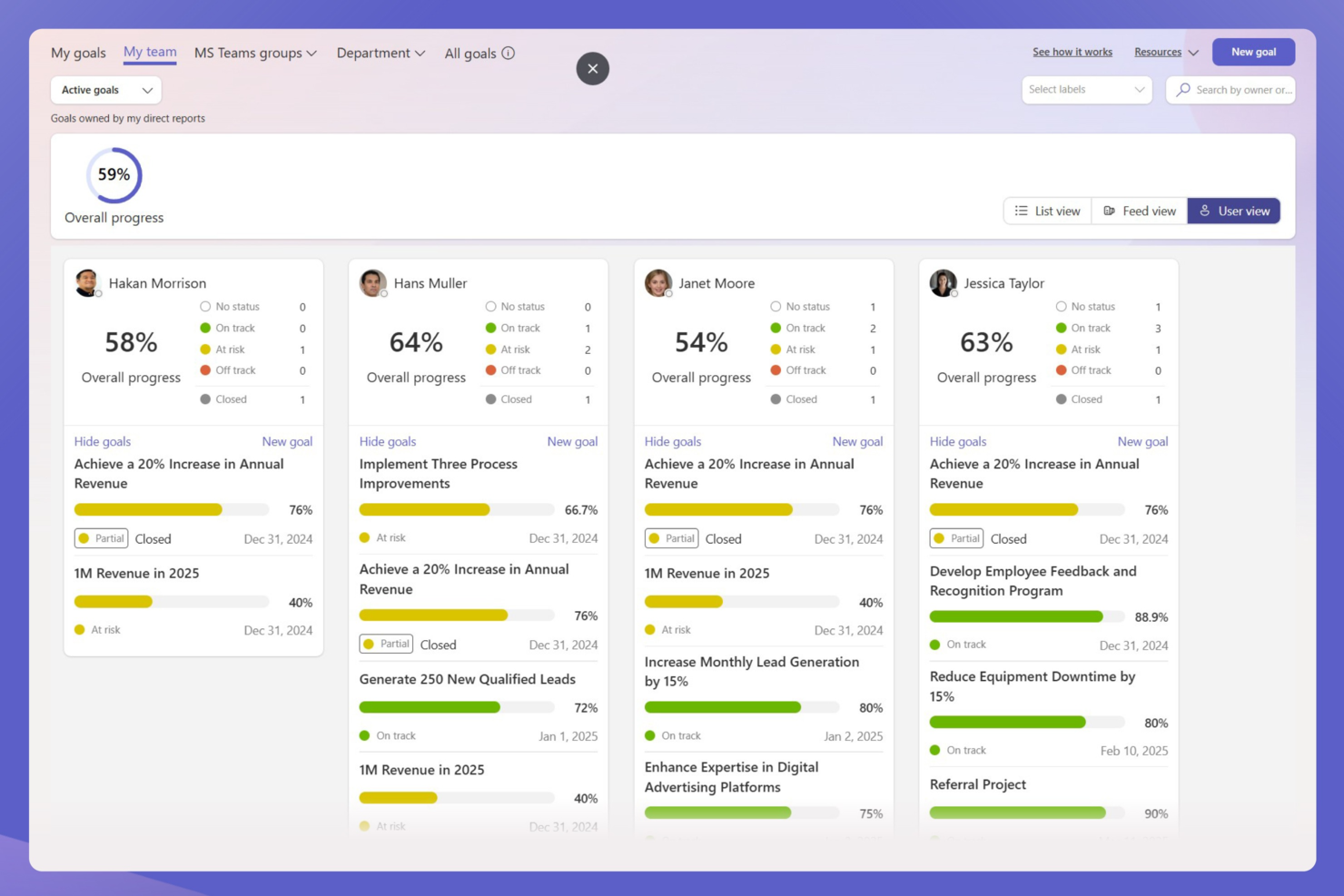
For organizations seeking to enhance their performance management processes, Teamflect offers a compelling solution integrated seamlessly with Microsoft Teams. Designed for businesses of all sizes, Teamflect appeals especially to HR professionals and team leaders who aim to align goals and drive engagement. By addressing challenges like fragmented communication and inconsistent performance tracking, Teamflect provides a centralized platform to streamline objectives and enhance productivity.
Why I Picked Teamflect
I picked Teamflect for its unique integration with Microsoft Teams, which facilitates the seamless alignment of team objectives through cascading OKRs, ensuring every team member is on the same page. The continuous feedback mechanism provides a dynamic way to monitor progress and make real-time adjustments, which is crucial for maintaining momentum towards achieving goals. Additionally, the automated performance reviews help alleviate the administrative burden, allowing HR professionals to focus more on strategic initiatives.
Teamflect Key Features
In addition to its standout integration capabilities, Teamflect offers several other features that enhance its functionality as an OKR software:
- 1-on-1 Meeting Tools: Facilitates regular check-ins between managers and employees to discuss progress and address any concerns.
- Engagement Surveys: Collects employee feedback to gauge morale and identify areas for improvement.
- Rewards and Recognition: Provides a platform for acknowledging employee achievements, fostering a positive work environment.
- Individual Development Plans: Supports personalized career growth by setting and tracking development goals.
- Cascading OKRs: Supports cascading goals connecting company, team, and individual objectives.
- Performance Reviews: Built-in performance review templates with OKR alignment and feedback components.
Teamflect Integrations
Integrations include Microsoft Teams, Microsoft 365, Azure Active Directory (Entra ID), Outlook, Power BI, and over 200 HRIS platforms.
Pros and Cons
Pros:
- Built-in feedback and reviews
- Strong cascading OKR alignment support
- Native Microsoft Teams OKR management
Cons:
- Feature-rich interface may overwhelm some users
- Microsoft Teams dependency required

Best with AI-powered workflow automation
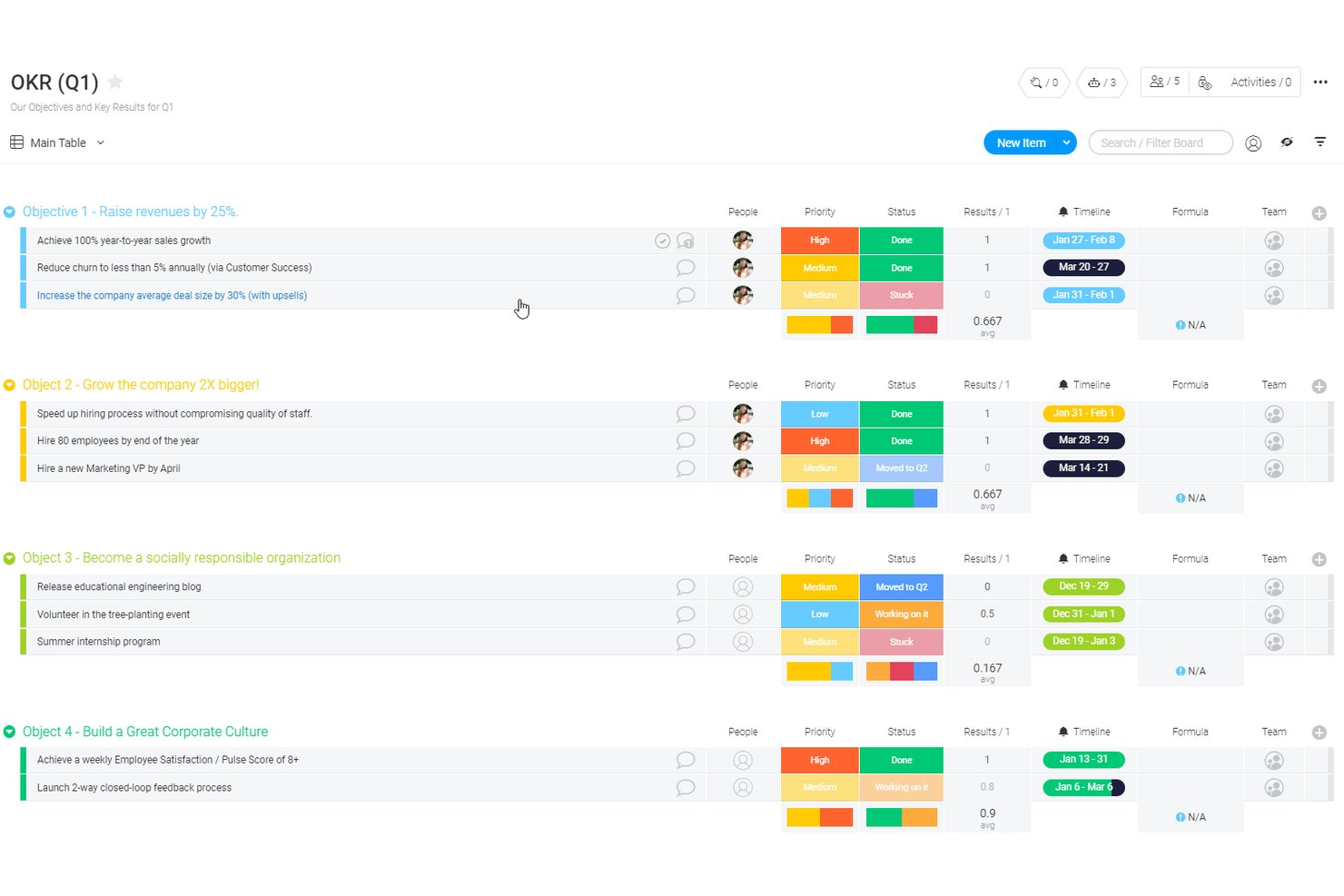
monday AI Workspace is a customizable work management platform that lets teams define OKRs, cascade goals across organizational levels, and track progress through visual dashboards and AI-powered workflow automation.
Who Is monday AI Workspace Best For?
It's a strong fit for cross-functional teams at mid-size to large companies that want OKR tracking built into their existing work management workflows.
Why I Picked monday AI Workspace
I picked monday AI Workspace as one of the best because its AI workflow builder genuinely reduces the manual overhead that makes OKR tracking fall apart. I use the AI Sidekick to get context-aware updates on goal progress without digging through boards, and AI Columns automatically surface status changes across key results. That combination keeps OKR cycles moving without relying on people to manually report upward.
monday AI Workspace Key Features
- Customizable OKR templates: Build and modify OKR boards to fit unique team structures and processes.
- Visual dashboards: Track goal status, timelines, and dependencies using colorful, interactive views.
- Native collaboration tools: Assign owners, share workdocs, and comment directly within OKR boards.
- Automation recipes: Automate routine updates, reminders, or notifications without coding.
monday AI Workspace Integrations
monday AI Workspace offers hundreds of native integrations through its built-in integrations and marketplace, including Slack, Salesforce, HubSpot, Google Workspace, Microsoft Teams, Zoom, and Jira. It also supports Zapier and provides an API for custom integrations.
Pros and Cons
Pros:
- Strong visual dashboards for goal visibility
- Highly customizable goal-tracking boards
- AI automates OKR progress updates
Cons:
- Dedicated OKR features require significant setup
- Not purpose-built for OKR methodology
New Product Updates from monday AI Workspace
monday AI Workspace Adds Human Approval Routing
monday AI Workspace adds a human-in-the-loop approval block to AI Workflows, sending approval requests and routing workflow paths based on responses. For more information, visit monday AI Workspace's official site.
Best with AI-powered skill and career pathing
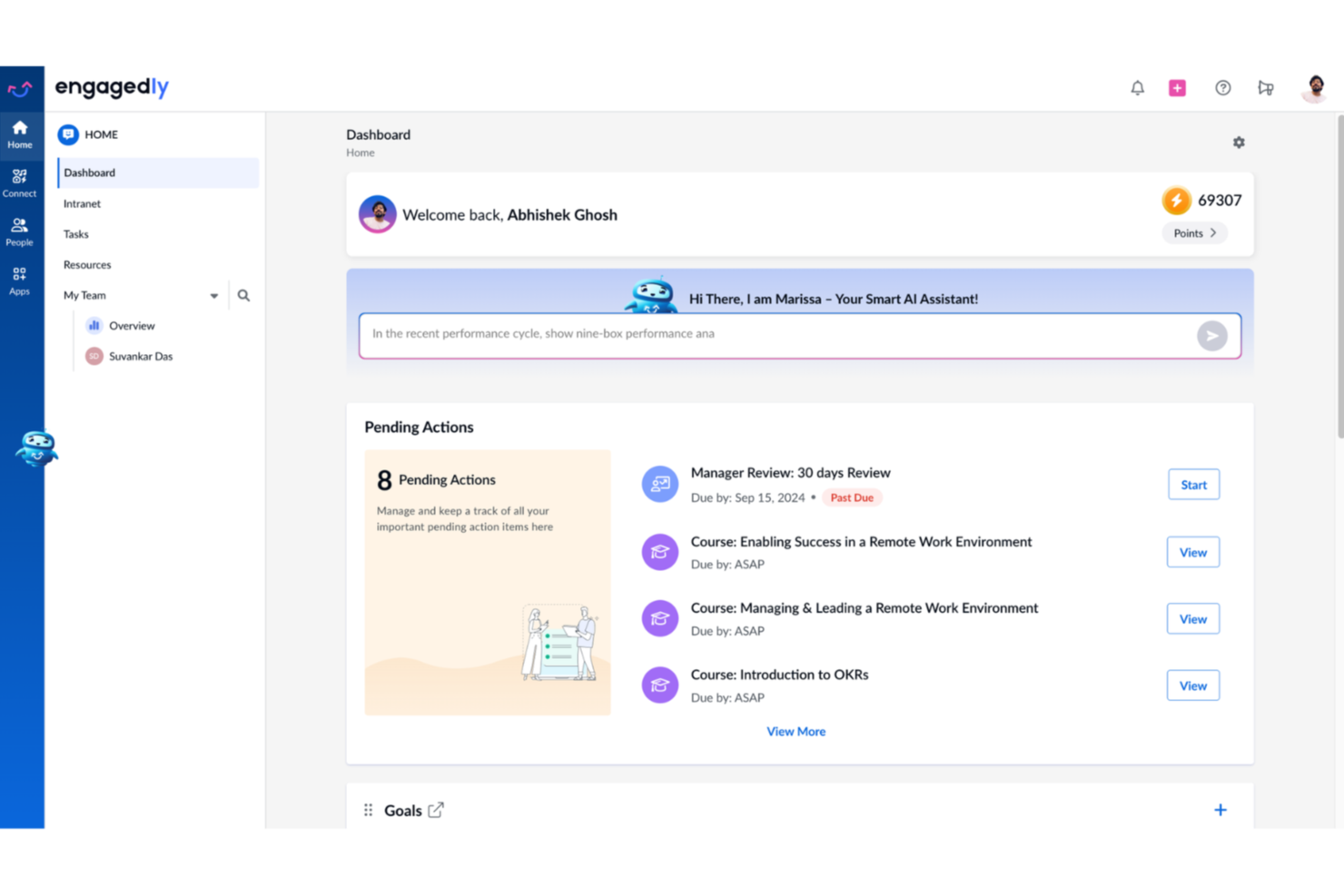
Engagedly is a talent management platform that combines OKRs and goal-setting with performance reviews, 360-degree feedback, learning, employee engagement, and AI-powered career development tools.
Who Is Engagedly Best For?
Engagedly suits mid-market to enterprise HR teams that want OKRs connected to performance, learning, and talent development in one platform.
Why I Picked Engagedly
Engagedly earns its spot on my shortlist because it goes further than most OKR tools by tying objectives directly to skill development and career growth. I love how Marissa, its AI assistant, can analyze a goal and surface the specific skills an employee needs to achieve it. From there, the Skill Gap Analysis and Career Paths modules create a personalized development roadmap, so goals drive real growth conversations rather than sitting on a dashboard untouched.
Engagedly Key Features
- Goals 2.0 module: Set up cascading OKRs and link them across teams and projects.
- 360-degree feedback: Launch multi-rater feedback cycles with customizable templates and workflows.
- Gamified recognition: Award badges and points for performance achievements directly inside the platform.
- Integrated meeting tools: Schedule one-on-ones, pull in goals or discussion points, and add private or public notes.
Engagedly Integrations
Engagedly offers native integrations with BambooHR, Okta, OneLogin, Microsoft Teams, Jira, Gmail, Google Sheets, and LinkedIn Learning. An API is available for custom integrations.
Pros and Cons
Pros:
- Highly configurable OKR and goal workflows
- AI assists OKR generation
- Supports 17 languages
Cons:
- Analytics dashboards can be slow to load
- Advanced features require higher-tier plans

Tability
Best for AI-assisted goal setting
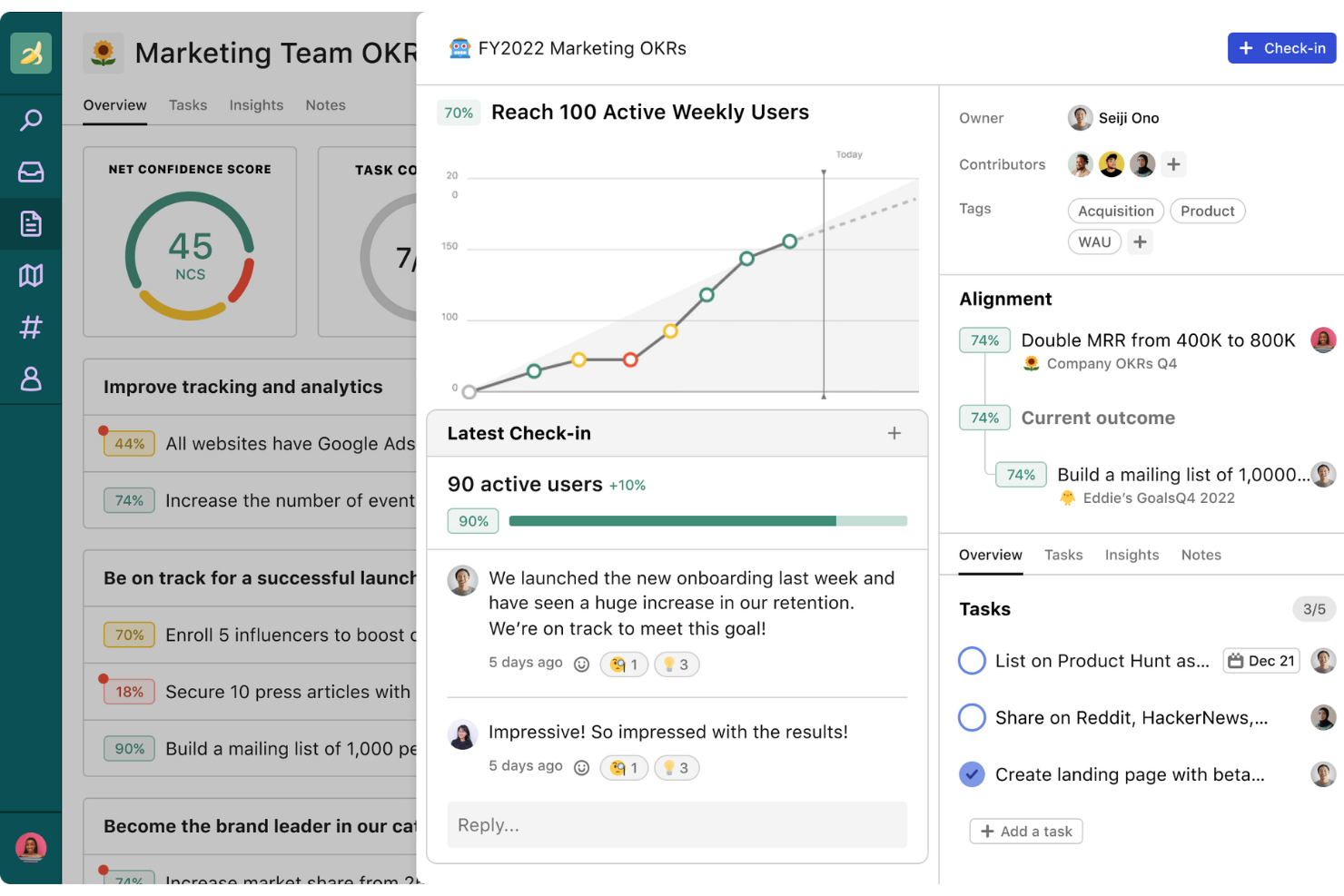
Tability's AI tools help you draft objectives, key results, and action plans quickly, making it especially useful for teams that struggle with wording, structure, or figuring out what “good” OKRs should look like.
Why I Picked Tability
I picked Tability because it uses AI in a practical way by helping you define meaningful goals instead of leaving you with vague or untrackable OKRs. The AI goal editor suggests specific, measurable key results based on your prompt, which reduces guesswork and ensures consistency across teams.
I also like that you can generate action plans directly from your OKRs, giving your team clear next steps rather than abstract targets. Tability’s alignment view helps you see how goals connect across departments, which is helpful when AI-generated goals need context or validation. And since weekly check-ins are built in, your team is guided to update progress regularly so AI suggestions stay tied to real-world results.
Tability Key Features
Here are some standout features worth highlighting:
- AI Goal Editor: Creates draft OKRs from your prompt to speed up planning.
- AI Action Plan Suggestions: Recommends initiatives tied to each key result to help teams move from goals to execution.
- Strategy Map: Shows how goals link across teams to improve alignment.
- Presentation-Ready Reports: Turns updates into shareable summaries for reviews or leadership meetings.
Tability Integrations
Integrations include Slack, Microsoft Teams, Jira, Asana, Trello, ClickUp, Confluence, Azure AD, Okta, Notion, and HubSpot.
Pros and Cons
Pros:
- AI-powered goal suggestions
- Good progress tracking features
- Can adapt to different goal frameworks
Cons:
- Navigation could be smoother
- Not ideal for those who require complex goal management

Best as an AI for business
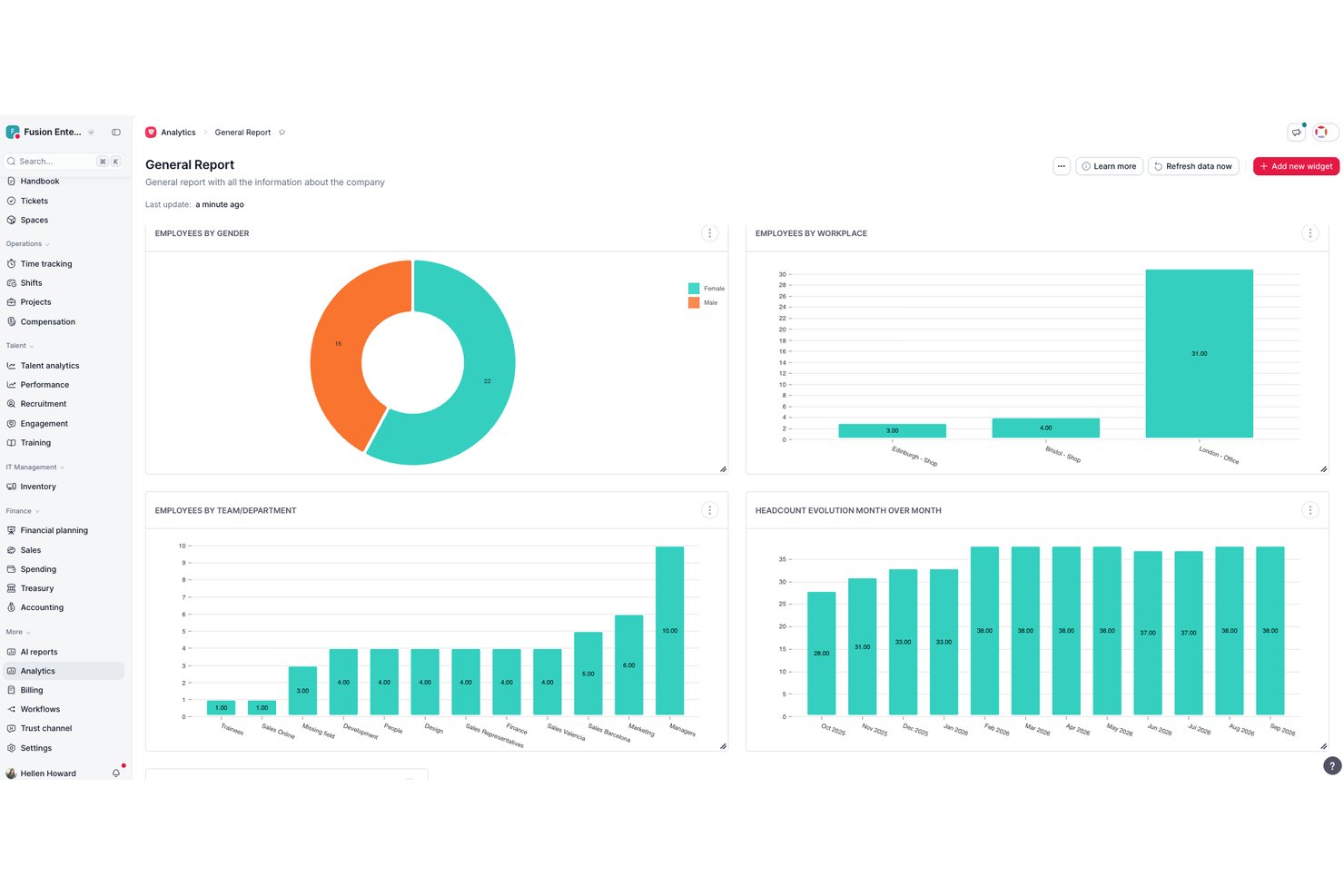
Factorial is an all-in-one HR platform that brings goal-setting and OKR tracking into the same system as performance reviews, engagement surveys, 1:1 meetings, and AI-assisted reporting.
Who Is Factorial Best For?
Factorial suits HR teams and people operations managers who want goal-setting and performance tools built into the same system they use for daily HR work.
Why I Picked Factorial
I've included Factorial in my top picks because its AI for business positioning goes beyond a catchy label—the platform's AI actively handles the day-to-day operations that slow HR teams down, from generating reports to answering employee policy questions. I especially like how goal progress surfaces directly inside performance review panels, so managers can see key result completion alongside review scores without switching tools. The cascading parent and sub-goal structure with automatic roll-up also keeps company-wide OKR alignment visible without manual consolidation.
Factorial Key Features
- Weighted key results: Assign individual weights to each key result so goal progress reflects the relative importance of each contribution.
- Negative goal logic: Track goals where a lower value signals success, such as reducing churn, absenteeism, or delivery time.
- Period-based targets: Break a single goal into milestone targets across quarters or half-years instead of measuring only a final end result.
- Goals visibility controls: Set each goal's audience to an individual, team, manager, or the whole company using built-in visibility settings.
Factorial Integrations
Factorial documents hundreds of integrations, including Microsoft Teams, Slack, Microsoft Power BI, Google Workspace, Outlook, and monday.com. It also offers a public API and Zapier for custom connectivity.
Pros and Cons
Pros:
- Review panels show live goal progress
- Parent goals automatically roll up progress
- AI-assisted HR reporting supports goal oversight
Cons:
- No dedicated OKR health dashboard
- Manual updates limit ongoing progress tracking

Oboard OKR software is available as a standalone web app and also offers integrated apps for Jira, monday.com, and Salesforce. A key strength of Oboard is its interconnected ecosystem. For example, if product and engineering work in Jira, marketing in monday.com, and sales in Salesforce — they can collaborate in the same Oboard workspace. All the success metrics are synced, and teams are aligned across different platforms.
Why I Picked Oboard
I picked Oboard because it lets you manage OKRs and KPIs in the same environment where your team already plans, ships, and reviews work. You can link objectives to any Jira epic, issue, or project, so progress updates stay accurate without manual tracking.
Oboard also stands out for its simplicity and ease of use. Unlike some tools that require lengthy onboarding processes, you can set up Oboard and start tracking your first metrics in a day. Training your team to manage them is also very simple. There are also numerous customizations available, so you can benefit from the advanced settings once you're ready.
Oboard Key Features
Oboard offers plenty of useful features, enabling you to configure your goals in a way that perfectly aligns with your organization's unique structure and processes. Here’s what you can expect:
- Strategy Maps: Get a bird’s eye view of all your OKRs and KPIs, as well as tasks that inform them.
- Metric Weights: Assign different levels of importance to your various objectives.
- OKR Roadmaps: Visualize your strategic goals alongside related initiatives over time and identify potential bottlenecks.
- Customizable Dashboards: Create personalized views of your priority goals with dedicated KPI and OKR modules.
Oboard Integrations
Integrations include Jira, monday.com, Salesforce, and Confluence.
Pros and Cons
Pros:
- Can be used across multiple ecosystems (Atlassian, monday.com, Salesforce) or independently.
- Deep Jira integration links OKRs and KPIs to Epics, Issues, and Projects.
- Strategy maps easily visualize alignment between departments.
Cons:
- No mobile app.
- Only supports 7 languages.

Best for continuous performance feedback

Small Improvements is a performance management tool that connects goals, feedback, and engagement in one place. As an OKR platform, it turns objectives into action through continuous check-ins, pulse surveys, and 1:1 meetings—helping teams stay aligned and focused on growth.
Why I picked Small Improvements: I picked Small Improvements because it combines OKR tracking with continuous feedback and recognition features that keep teams motivated. You can set measurable goals, collect 360-degree feedback, and conduct regular check-ins to maintain visibility into progress. I also like how it blends performance reviews and real-time engagement tools—helping you spot early trends in morale or productivity before they impact results.
For HR teams aiming to build a feedback-driven OKR culture, this platform makes it easy to maintain alignment and accountability throughout the year.
Small Improvements standout features and integrations:
Features include 1:1 meeting scheduling, pulse surveys to track engagement, and praise tools to recognize contributions. You can set team and individual objectives, link them to broader company goals, and analyze performance data using built-in reports.
Integrations include popular HR systems and communication tools such as Personio, Slack, BambooHR, and ADP, ensuring seamless data flow across your performance and HR ecosystem.
Pros and Cons
Pros:
- Strong goal-tracking and visibility tools
- Encourages peer praise and feedback
- Facilitates 1:1 meeting agendas
Cons:
- Requires some training to master
- May feel complex for small teams

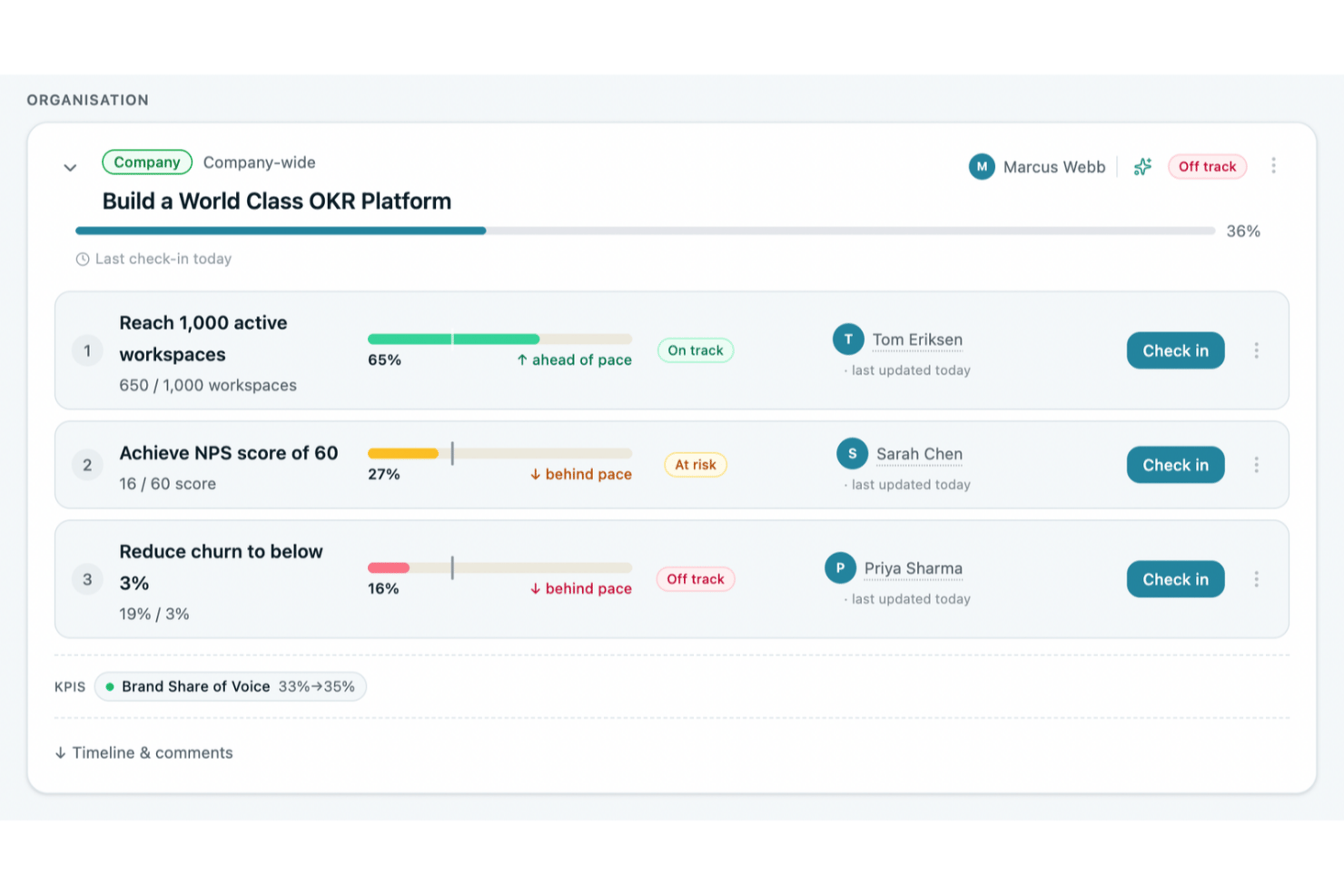
OKRs Tool is an OKR software platform built for growing organizations that combines objective and key result setting, multi-level cascading, AI-assisted goal drafting, automated check-ins, and progress tracking across teams and cycles.
Who Is OKRs Tool Best For?
OKRs Tool is a strong fit for operators and business leaders at growing companies who want to implement OKRs without the complexity of enterprise software.
Why I Picked OKRs Tool
I picked OKRs Tool as one of the best because it's purpose-built for growing teams that want real OKR structure without enterprise-scale complexity. I love how the Alignment Map makes it immediately visible when a team's goals have drifted from company priorities, and the AI OKR Analysis flags weak key results and suggests rewrites before a cycle even begins. Plans start from $129/month (flat fee), covering the whole organization rather than charging per seat.
OKRs Tool Key Features
- Automated check-ins: Weekly reminders prompt team members to update key results, with progress rolling up through the OKR hierarchy automatically.
- KPI tracking: Track organization-level KPIs against targets, assign owners, and link each KPI to the goals it supports.
- OKR Vault: Browse and reuse an archive of past OKRs across cycles to carry forward, clone, or adapt goals.
- Cycle retrospectives: Guided close-of-cycle questions surface AI-suggested continue, stop, and start actions for the next period.
OKRs Tool Integrations
OKRs Tool offers 10 documented integrations, including Slack, Microsoft Teams, Google Workspace, Jira, Asana, Linear, ClickUp, and Notion, plus REST API and webhooks. Paid plans support the REST API for custom integrations.
Pros and Cons
Pros:
- Dashboards make cross-team progress easy to scan
- Visual maps connect team goals to priorities
- AI suggestions help teams write clearer OKRs
Cons:
- Role granularity may frustrate larger teams
- Reporting offers limited flexibility for summaries
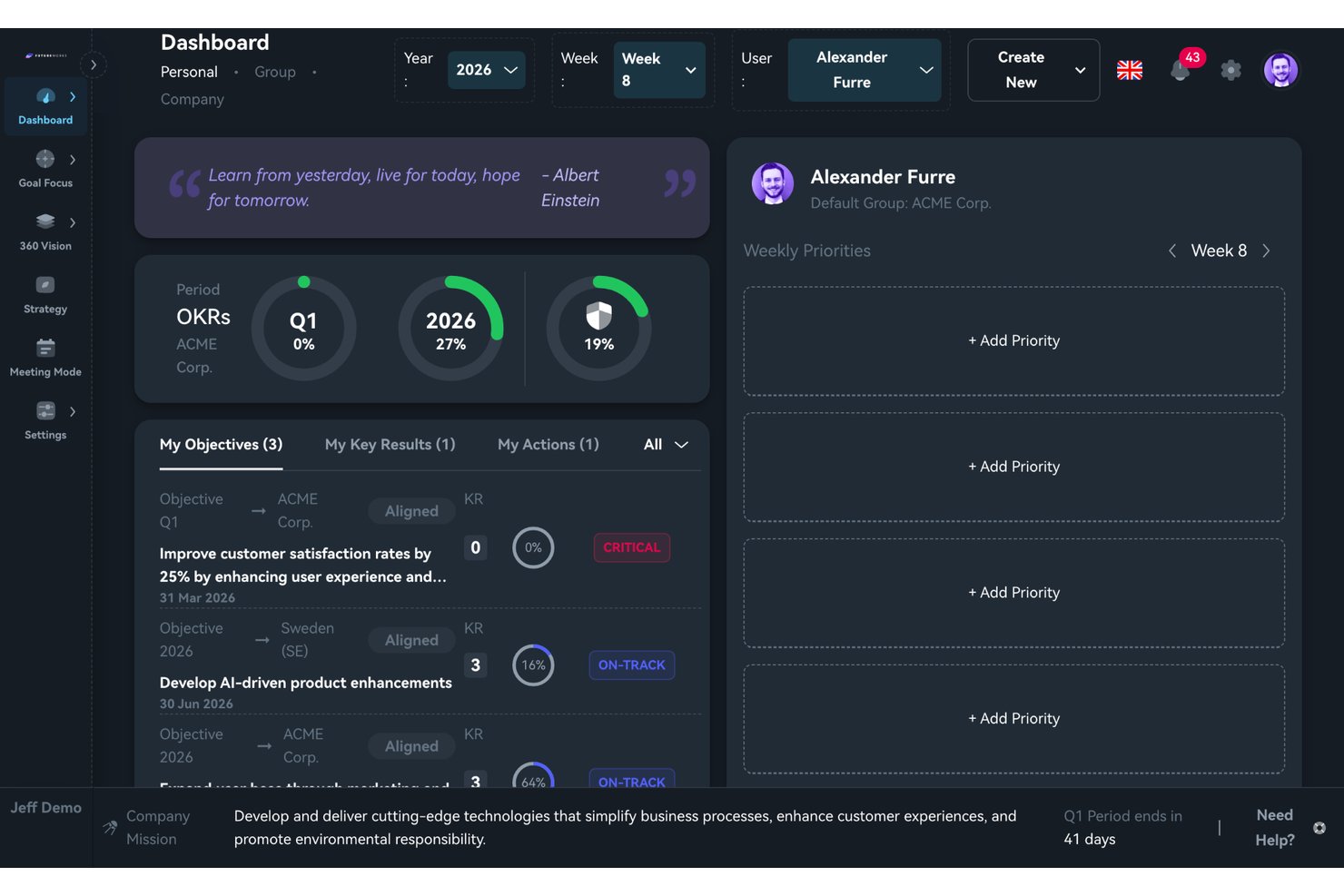
FutureWorks is an OKR management platform that combines multi-level goal cascading, strategy alignment visualization, and structured meeting facilitation with AI-assisted OKR drafting.
Who Is FutureWorks Best For?
FutureWorks is a strong fit for leadership teams and strategy owners who need to connect company-level objectives to team and individual goals in one clear view.
Why I Picked FutureWorks
FutureWorks earns its spot on my shortlist because the 360 Vision feature solves a problem most OKR tools handle poorly: showing exactly where alignment breaks down. I can toggle between aligned and unaligned views across the full company-to-individual hierarchy, with color-coded status badges that make gaps obvious at a glance. The AI Context Engine is also genuinely useful, converting existing strategy documents (PDFs, Word files, decks) into structured OKRs rather than making you start from scratch.
FutureWorks Key Features
- Meeting Mode with live agendas: Run time-boxed weekly check-ins using pre-built agenda templates that pull real OKR status and action points right into the meeting.
- Personal dashboard and progress rings: Give every user a dashboard with visual progress rings showing quarter, year, and all-time OKR completion.
- Task sync with Jira, GitHub, and Microsoft Planner: Link and sync tasks to Key Results across Jira, GitHub, and Microsoft Planner, updating OKR progress automatically as tasks close.
- Mobile app for iOS and Android: Let users check in and update OKR progress directly from their mobile device, supporting on-the-go updates.
FutureWorks Integrations
FutureWorks offers native integrations with Jira, GitHub, Microsoft Planner, Azure DevOps, Microsoft Teams, and Google Workspace. It also provides SCIM 2.0 provisioning, supports SSO with Microsoft and Google, and offers webhooks and a REST API for custom integrations.
Pros and Cons
Pros:
- Meeting Mode brings OKR check-ins into timed agendas
- AI converts existing strategy docs into OKRs
- 360 Vision makes alignment gaps instantly visible
Cons:
- Limited brand recognition outside Nordic markets
- No dedicated continuous feedback or 1:1 module
Other OKR Software
Here are a few more worthwhile options that didn’t make it into my top 10 shortlist for the best OKR software, but are still worth taking a closer look at:
- ThriveSparrow
For flexible OKR cycles
- PerformYard
For integrated goals and performance
- Profit.co
For an intuitive user experience
- Lattice
Bes OKR progress tracking integrations
- Quantive Results
For creating cross-team alignment
- Inspire
AI-powered holistic OKR solution
- Workleap
For goal setting and employee engagement
- PeopleGoal
Employee-led OKRs
- Synergita
For continuous performance management
- WorkBoard
For cross-company objective alignment
- Weekdone
For weekly planning tools
- Yaguara
For e-retailers
- Huminos
For remote employees
- Kazoo
For peer-to-peer feedback
- Heartpace
For individual goal-setting
- Unlock:OKR
For OKR coaching
- Simple OKR
For work culture research
- Ally.io
For OKR collaboration
- Leapsome
For performance-oriented companies
- Peoplebox.ai
With automated goal tracking and reviews
- Effy AI
For fast OKR rollout
- Mitratech Perform
Tools within a performance management system
- Primalogik
For tracking goals with ease and precision
- Paycor
For OKR compensation management
- Betterworks
For enterprise goal alignment
- Topicflow
For customizable goal-setting frameworks
- 15Five
OKR software for cross team collaboration, and keeping OKRs top of mind
- Teamwork.com
OKRs for professional services
- Perdoo
Free OKR software
- Hirebook
OKR management software for customer support services


Related HR Software Reviews
If you still haven't found what you're looking for here, check out these other related tools that we've tested and evaluated:
- HR software
- Payroll software
- Recruiting software
- Employer of Record services
- Applicant tracking systems
- Workforce management software
How I Evaluate OKR Software
I split my evaluation into two layers: baseline capabilities a tool must have—like goal cascading and check-ins—and the differentiators that distinguish the best options for HR teams.
Core Functionality (Table Stakes For This List)
When I'm selecting tools for my list, I rank each one on a scale from 0 (does not offer the functionality) to 5 (excels in this area) for each core functionality listed below. Then, I calculate the tool's total score into a percentage. Each tool needs to achieve a minimum total score of 65% to be considered for inclusion.
- Objective & Key Result Creation: I evaluate whether you can define objectives with multiple key result types—like percentages, milestones, or numeric targets—rather than just basic text fields.
- Goal Alignment & Cascading: Connecting a team-level OKR to a company objective should be visual and intuitive, so I check for alignment trees or hierarchy maps.
- Progress Tracking & Check-ins: I look for structured check-in workflows with reminders and confidence scoring, not just a manual slider to update completion percentage.
- OKR Dashboards & Reporting: HR leaders need a quick read on goal health across departments, so dashboards should offer filtering by team, time period, and status.
- Performance Management Integration: I check whether OKRs feed into review cycles and 1:1 agendas, since tools like Lattice and 15Five tie goals directly into performance conversations.
- HRIS & Collaboration Integrations: The tool should connect to your HRIS for employee data sync and to platforms like Slack or Microsoft Teams for in-context updates and nudges.
Once I have a list of tools that meet the criteria, I consider what sets each platform apart.
Differentiating Factors (What Sets Vendors Apart)
Here's how I compare and contrast different vendors:
Standout Features
AI-powered OKR coaching is a big differentiator. Tools like Betterworks and Quantive offer AI suggestions that help managers write stronger key results. I also look for built-in 1:1 meeting workspaces where talking points link directly to OKRs, keeping conversations focused on goal progress. Engagement surveys round out the picture—platforms that correlate pulse survey data with OKR completion give HR leaders a clearer read on whether goals are driving motivation or burnout.
Beyond Features
OKR adoption often stalls without proper rollout support, so I evaluate whether vendors provide onboarding coaches, pre-built templates, and change management resources for HR teams. Tech stack fit matters just as much—I check for native HRIS connections with platforms like Workday or BambooHR, since manual data entry defeats the purpose. Security is another priority because OKR tools hold sensitive performance data. I look for SOC 2 Type II compliance and role-based access controls that let HR restrict visibility by department or level.
How to Choose OKR Software
I've provided some examples of the best OKR software on the market today, now it's over to you.
Start by matching the software to how your team actually sets, tracks, and reviews goals, whether that’s company-wide OKRs, team objectives, individual goals, progress updates, or performance alignment. From there, compare factors like integrations, reporting, visibility, ease of use, scalability, and how well the software fits your existing goal-setting process.
Try our tool below to narrow your options based on your specific needs.
For a more detailed walkthrough, see our guide on how to choose OKR software.
What is OKR Software?
OKR software is a digital tool designed to help individuals, teams, and organizations set, track, and manage Objectives and Key Results (OKRs)—a popular goal-setting framework used to align work with strategic priorities.
The software provides a centralized platform to define ambitious objectives and link them to measurable key results, promoting clarity, alignment, and accountability across an organization.
It's similar to an online goal-tracking tool for all levels of your company.
Features of OKR Software
OKR software is designed to help you set, track, and achieve your company-wide goals. Using OKR management software helps align company-wide objectives across different teams, ensuring everyone moves in the same direction towards achieving the common goals.
Here are the most important features to look for in OKR software to ensure your company's success:
- Objective setting and tracking: Set clear, measurable objectives and key results, then monitor progress in real time. This helps you break down lofty ambitions into manageable targets—and actually see how close you are to that finish line.
- Goal alignment: Connect individual, team, and company-wide goals so everyone paddles in the same direction. This feature makes sure all efforts support the bigger picture, preventing "Hey, why are we working on this again?" moments.
- Progress visualization: Visual dashboards, charts, and timelines show you exactly where you stand with your goals. Instead of digging through spreadsheets, you get instant clarity—think of it as a progress bar for your entire organization.
- Collaboration tools: Share, comment, and update OKRs together so everyone stays in sync. These tools encourage peer feedback, teamwork, and keep the lines of communication open (no more mystery around who’s responsible for what).
- Check-in and update reminders: Get friendly nudges to update your progress on a regular basis. This keeps everyone engaged and keeps those goals from quietly gathering dust.
- Performance analytics and reporting: Dive into detailed reports that show trends, bottlenecks, and victories. These insights make it easy for you to tweak strategies, celebrate big wins, or adjust course if a target turns out to be more Everest than hill.
- Integration capabilities: Connect your OKR software to other tools you already use, like project management apps or communication platforms. This means less manual entry for you and smoother workflows all around.
- Customizable templates: Use and tweak objective templates to fit your company’s style and needs. If you’re not a born goal-writer, these templates jumpstart the OKR process for you—no starting from scratch.
- Permission and privacy controls: Decide who can view or edit specific OKRs to protect sensitive information and foster trust. This feature lets you open up or lock down access, depending on what’s best for your team.
Common OKR Software AI Features
Beyond the standard OKR software features listed above, many of these solutions are incorporating AI with features like:
- Automated goal recommendations: Get smart suggestions for new objectives based on past performance and company priorities. This feature saves you brainstorming time and surfaces goals you might have overlooked.
- AI-powered progress forecasting: Let AI analyze your update patterns and tell you if you’re likely to hit or miss your objectives. It’s like having a crystal ball for your team’s progress—minus the smoke and mirrors.
- Sentiment analysis on updates: AI helps gauge the tone of team member updates, catching burnout or uncertainty early. You’ll know not just what’s happening, but how your people feel about it.
- Automated check-in summaries: Receive quick, AI-generated rundowns of each team’s OKR status so you can get up to speed in seconds. No more reading every comment—just the important stuff, right away.
- Predictive analytics for roadblocks: Spot potential obstacles in achieving your goals before they become major setbacks. AI sifts through your data and flags issues while there’s still time to reroute.
Benefits of OKR Software
OKR software is designed to help organizations optimize their goal-setting and tracking processes, enhance alignment across teams, and drive operational success.
By selecting the best OKR software for your needs, you can expect to gain the following benefits:
- Enhanced Goal Alignment and Transparency: OKR software ensures that everyone in the organization understands the company's strategic goals and their role in achieving them. This clarity fosters a sense of purpose and direction, leading to increased engagement and productivity among employees.
- Improved Focus and Prioritization: By clearly defining objectives and key results, OKR software helps teams and individuals focus on the tasks that matter most. This prioritization ensures that resources are allocated efficiently, driving better outcomes for the business.
- Better Communication and Collaboration: OKR software provides a platform for ongoing discussions about goals, progress, challenges, and roadblocks. This enhances collaboration across different levels of the organization, breaking down silos and fostering a culture of teamwork and shared success.
- Real-time Progress Tracking: The ability to monitor progress towards goals in real-time allows for quick adjustments and keeps everyone informed about their achievements or areas needing attention. This immediate feedback loop is crucial for maintaining momentum and ensuring continuous improvement.
- Data-driven Decision Making: Owing to its comprehensive analytics and reporting features, OKR software offers valuable insights into performance trends and areas for improvement. This data-driven approach supports informed decision-making, strategic planning, and strategy execution, aligning efforts with business objectives.
By leveraging the power of OKR software, organizations can enhance their operational efficiency, foster a high-performance culture, and drive sustained growth in an increasingly competitive business environment.
Costs & Pricing for OKR Software
When considering OKR software pricing, it's important to consider the value you're gaining for your company. If you're running a small business or startup, you may be able to get away with a free version to track small team goals. However, a free plan won't have the same capabilities as a monthly paid offering.
As a software buyer, it's important to understand the variety of available plans, and the differences in features, support, and prices.
Plan Comparison Table for OKR Software
| Plan Type | Average Price | Common Features | Best for |
|---|---|---|---|
| Free | $0 | Basic OKR tracking, limited users, access to community support | Startups and small teams looking to experiment with OKRs without a financial commitment |
| Basic | $5-10 per user/month | Enhanced OKR tracking, unlimited OKRs, basic reporting, and email support | Small to medium-sized businesses that need more robust tracking and reporting without breaking the bank |
| Professional | $10-20 per user/month | All Basic features, plus advanced reporting, integration capabilities, and priority email support | Medium to large businesses that require detailed analytics and seamless integration with existing tools |
| Enterprise | Custom pricing | All Professional features, plus custom integrations, a dedicated account manager, 24/7 support, and advanced security features | Large enterprises with complex needs and a demand for high-level customization, dedicated support, and top-tier security |
When considering an OKR software plan, it's essential to evaluate the size of your team, the complexity of your goals, and the level of support you anticipate needing. Each plan is designed to cater to different organizational needs, from small startups to large enterprises.
While it's understandable that you may want to start with a free or basic plan initially, there are several reasons why you may want to opt for a more advanced plan to start, including:
- Priority Support and Training: Arguably the most common reason to improve on a free or basic plan is the lack of customer support those plans provide. By upgrading to a more advanced plan, you'll gain access to premium support and training resources, helping your team quickly resolve issues and fully leverage the software’s capabilities. Since OKR tools can be a bit complicated to set up initially, this is definitely worth paying a bit extra for, in my opinion.
- Customizable OKR Frameworks: Basic plans often lack flexibility in customizing OKR frameworks for your specific business needs. By upgrading your plan, you'll gain the ability to tailor the OKR software to fit your unique business model and strategic goals.
- Advanced Goal Alignment Features: To maintain alignment as your company’s objectives evolve, you'll need sophisticated alignment and visualization tools. Since these are often lacking in free or basic plans, you'll need to scale up to unlock this advanced feature.
- Automated Progress Updates: Free or basic plans usually require manual updates, which can be time-consuming or fall through the cracks easily. Higher-priced plans offer automated progress tracking and updates, saving you time and reducing the likelihood of errors.
- Integration with Other Tools: Most free or basic plans don't offer integration abilities, making this another common reason why you might want to opt for a more robust plan. By integrating your OKR management software with other key systems (including project management and internal communication tools), you'll improve your workflows and data synchronization.
Ultimately, it's important to secure a plan that offers the features you require to satisfy your current needs and solve your challenges without exceeding your budget.
OKR Software: Frequently Asked Questions
Still trying to wrap your head around what OKR software is and how it can help your organization? These answers to frequently asked questions are a great place to start:
How can you measure the ROI of your OKR software?
Gauging the return on investment of a software can be tricky, but it makes sense that you would want to quantify the output of a new tool. To measure the ROI of anything means to divide the total value of that thing by its cost. So the question becomes, how do you measure the value of the software? Here are a few factors you could weigh into that calculation:
- Levels of employee alignment around common goals.
- How each department’s roadmap corresponds to your overall OKRs.
- Your ability to track goals through to completion at various company levels.
- Overall OKR management: is it clear who is responsible for setting, monitoring, and reporting on OKRs?
- Time saved through automation, for example with the ability to track OKRs through interactive dashboards.
Ultimately, it will be up to you to define the value you get from your OKR management software. This is something worth considering before you invest—your definition of success is directly related to your goals in employing a software solution in the first place. So be sure you have a measurable framework for what you expect to see.
What's the average setup time for OKR software?
The average setup time for OKR software can vary depending on the complexity of the tool, the size of your organization, and how detailed your objectives and key results are. Some systems offer quick setup options that can get you started in a matter of hours or days, especially if they offer pre-built templates.
For more complex implementations, particularly in large organizations with numerous integrations, the setup could take weeks to months. This process involves not just the technical setup but also aligning your team, training users, and ensuring your OKRs are well-defined and integrated with existing workflows.
To get a better handle on OKR best practices, take a look at our list of the best OKR-focused podcasts for further inspiration.
Are there industry-specific OKR software options?
While most OKR software is designed to be flexible and adaptable across various industries, some solutions offer features tailored to specific sectors, like technology, healthcare, or manufacturing. These specialized tools might include industry-specific templates or integrations with commonly used software in that field.
However, the broad applicability of OKRs means that even generalist OKR software can be effectively used across industries by customizing objectives and key results to align with industry-specific goals.
What level of customer support do OKR software companies provide?
The level of customer support for OKR software ranges from self-service resources, like knowledge bases and community forums, to personalized assistance via email, chat, or phone.
Some providers, like PerformYard, offer dedicated account managers or access to certified OKR coaches, especially on higher-tier plans. The availability of support can vary; some services provide 24/7 support, while others may have more limited hours.
It’s essential to consider what level of support you’ll need to successfully implement and use the software, including training for your team on best practices for setting and tracking OKRs
How does OKR software support bottom-up and bidirectional goal setting?
OKR software supports bottom-up and bidirectional goal setting by enabling employees to actively contribute to the goal-setting process, rather than just receiving top-down directives.
With this approach, employees are empowered to set their own objectives that align with broader company goals, fostering a sense of ownership and accountability. This transparency ensures that individual contributions are visible, and employees understand how their work drives the company’s success, promoting higher levels of engagement.
By facilitating bidirectional goal setting, OKR software creates a continuous feedback loop between employees and leadership. This ongoing communication ensures that goals remain flexible and adaptable to changing priorities while keeping everyone aligned.
As employees contribute their insights and adapt their objectives, companies benefit from a more engaged workforce, as well as a clearer path to achieving shared objectives.
Related Software Reviews
Looking for another type of software to motivate your team members? These other top 10 lists I've prepared are a good place to start:
- Productivity Tracking Software for Hybrid Teams
- Online Collaboration Tools For Teams
- Strategic Planning Software for Planning Ahead
- Corporate Wellness Apps