

10 migliori alternative a Skedda per la prenotazione delle sale nel 2026

10 Elenco delle migliori alternative a Skedda


Una valida alternativa a Skedda offre prenotazioni flessibili degli spazi, integrazioni semplici e informazioni utili su come il tuo team utilizza effettivamente gli ambienti di lavoro. Se stai cercando alternative a Skedda, probabilmente devi gestire orari di lavoro ibridi in continua evoluzione, regole di occupazione ed esperienza dei dipendenti, il tutto senza rinunciare alla visibilità o sprecare ore nella gestione delle prenotazioni.
È difficile trovare uno strumento che soddisfi le tue esigenze specifiche, soprattutto quando il luogo di lavoro cambia. Questa guida ti aiuterà a confrontare le migliori alternative a Skedda, così potrai trovare rapidamente il sistema di prenotazione più adatto al tuo team oggi e che possa crescere insieme alle esigenze future.
Che cos'è Skedda?
Skedda è una piattaforma basata sul cloud per la prenotazione degli spazi, progettata per gestire sale, scrivanie e ambienti di lavoro. Offre ai team un modo semplice per prenotare uffici, sale riunioni o aree condivise, il tutto gestito da un'interfaccia online intuitiva.
Gli amministratori possono impostare regole di prenotazione, automatizzare le approvazioni e monitorare le tendenze di utilizzo. Skedda è apprezzato dalle organizzazioni che hanno bisogno di una pianificazione flessibile e centralizzata per il lavoro ibrido, le sedi per eventi o le strutture comunitarie.
Riepilogo delle migliori alternative a Skedda
Questa tabella comparativa riassume i dettagli dei prezzi delle mie migliori alternative a Skedda, per aiutarti a trovare quella più adatta al tuo budget e alle esigenze della tua azienda.
| Tool | Best For | Trial Info | Price | ||
|---|---|---|---|---|---|
| 1 | Ideale per gestire spazi condivisi per team e visitatori | Prova gratuita di 14 giorni | A partire da $19/postazione/mese | Website | |
| 2 | Ideale per monitorare l’occupazione con sensori per l’ufficio | Piano gratuito + demo gratuita disponibile | Da $500/mese | Website | |
| 3 | Ideale per una migrazione fluida della piattaforma e il trasferimento dei dati | Demo gratuita disponibile | Prezzi su richiesta | Website | |
| 4 | Ideale per orari di lavoro ibridi | Prova gratuita di 7 giorni + demo gratuita disponibile | Da $1.79/utente/mese (fatturazione annuale) | Website | |
| 5 | Ideale per il monitoraggio delle emissioni di carbonio nello spazio di lavoro | Demo gratuita disponibile | Da $99/sede/mese | Website | |
| 6 | Ideale per la visualizzazione immersiva 3D delle scrivanie | Prova gratuita di 30 giorni + demo gratuita disponibile | A partire da €3.00/risorsa/mese (fatturato annualmente) | Website | |
| 7 | Ideale per la visualizzazione in tempo reale dello stato delle sale | Prova gratuita di 30 giorni + demo gratuita disponibile | A partire da £10/mese (fatturazione annuale) | Website | |
| 8 | Ideale per display digitali per sale riunioni | Prova gratuita di 30 giorni disponibile | Prezzo su richiesta | Website | |
| 9 | Ideale per la mappatura visiva degli spazi | Prova gratuita di 14 giorni + piano gratuito disponibile | A partire da $1,9/utente/mese (fatturazione annuale) | Website | |
| 10 | Ideale per il rilascio automatico di scrivanie e sale | Piano gratuito + demo gratuita disponibile | Da $362/località/mese (fatturato annualmente) | Website |

Perché fidarsi delle nostre recensioni sui software
Il nostro team testa e recensisce software dal 2012. In quanto esperti HR noi stessi, sappiamo quanto sia difficile — e importante — scegliere il software giusto.
Per questa guida, abbiamo valutato gli strumenti attraverso test pratici e ricerche indipendenti, assegnando un punteggio agli strumenti in base ai nostri criteri di selezione. Ci basiamo inoltre sulle competenze di leader di pensiero del settore e di professionisti HR attivi.
Le nostre recensioni riflettono il nostro giudizio editoriale umano, non un discorso di vendita.
Revisori esperti:
Recensioni delle migliori alternative a Skedda
Di seguito trovi i miei riepiloghi dettagliati delle migliori alternative a Skedda incluse nel mio elenco. Le mie recensioni offrono un’analisi approfondita delle funzionalità, delle integrazioni e dei casi d’uso migliori di ogni piattaforma, per aiutarti a trovare quella più adatta a te.

Whatspot
Ideale per gestire spazi condivisi per team e visitatori
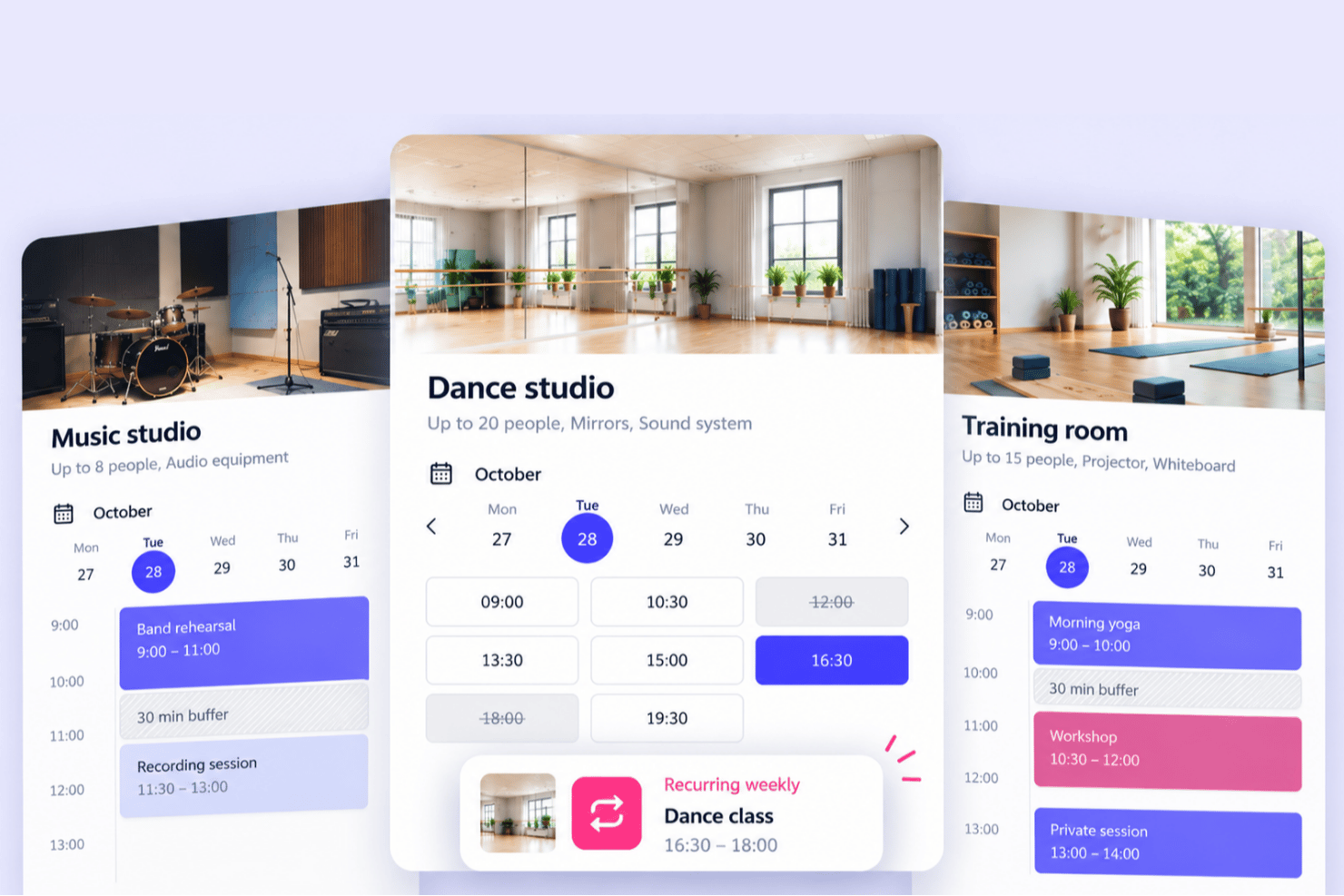
Whatspot è una piattaforma di prenotazione degli spazi progettata per gli spazi condivisi che servono sia i team interni sia i visitatori esterni, i membri o i gruppi della comunità. Invece di utilizzare strumenti separati per le prenotazioni del personale e del pubblico, le organizzazioni possono gestire entrambe da un unico sistema, con esperienze di prenotazione dedicate, modalità di prenotazione flessibili e un unico calendario condiviso.
Per chi è più adatto Whatspot?
Centri comunitari, organizzazioni educative e senza scopo di lucro, chiese, spazi per terapia e consulenze, strutture sportive, spazi di coworking, studi e sedi per eventi che devono gestire le prenotazioni sia degli utenti interni sia dei visitatori esterni.
Perché Whatspot è una buona alternativa a Skedda
Ho scelto Whatspot per questo elenco perché gestisce le prenotazioni interne e pubbliche in un unico sistema, che è il motivo principale per cui prenderlo in considerazione al posto di Skedda. Molti strumenti di prenotazione si concentrano sulle prenotazioni degli spazi di lavoro oppure sulle prenotazioni dei visitatori, mentre Whatspot consente di rendere alcuni spazi disponibili al proprio team e altri al pubblico, ciascuno con le proprie regole di prenotazione e i propri flussi di approvazione. I visitatori possono prenotare senza creare un account e ogni prenotazione, interna o esterna, viene inserita in un unico calendario condiviso. Per le organizzazioni i cui spazi servono il personale, i membri e la comunità più ampia, questa combinazione rappresenta una soluzione particolarmente adatta.
Funzionalità principali di Whatspot
- Prenotazioni interne e pubbliche separate: Offri esperienze di prenotazione distinte per gli utenti interni e i visitatori esterni, con prenotazioni pubbliche che non richiedono un account.
- Modalità di prenotazione flessibili: Scegli tra prenotazioni flessibili, a durata fissa o a intervalli fissi per adattarti ai diversi tipi di spazi.
- Flussi di approvazione e regole di prenotazione: Imposta regole per ogni spazio e richiedi l'approvazione manuale prima che le prenotazioni vengano confermate.
- Amministrazione centralizzata: Gestisci insieme le prenotazioni interne ed esterne in un unico calendario condiviso.
- Prenotazione integrabile e ottimizzata per dispositivi mobili: Integra la prenotazione pubblica nel tuo sito web e consenti alle persone di prenotare gli spazi da qualsiasi dispositivo.
Integrazioni di Whatspot
Le integrazioni includono Google Calendar, Microsoft Outlook Calendar, Microsoft Teams, Microsoft Entra SSO e Google Workspace SSO.
Pros and Cons
Pros:
- Prenotazione pubblica senza necessità di creare un account
- Prenotazione web da dispositivi mobili senza installazione di app
- Supporto multilingue per i team internazionali
Cons:
- Meno adatto ai grandi uffici aziendali
- Il flusso di approvazione non dispone di automazioni avanzate
New Product Updates from Whatspot

Whatspot Adds Booking Modes for Different Space Types
Whatspot introduces Booking Modes to support different reservation rules for different space types. Admins can choose flexible bookings, fixed durations, or fixed intervals based on how each space is used. For more information, visit Whatspot's official site.
 .
.
elia
Ideale per monitorare l’occupazione con sensori per l’ufficio
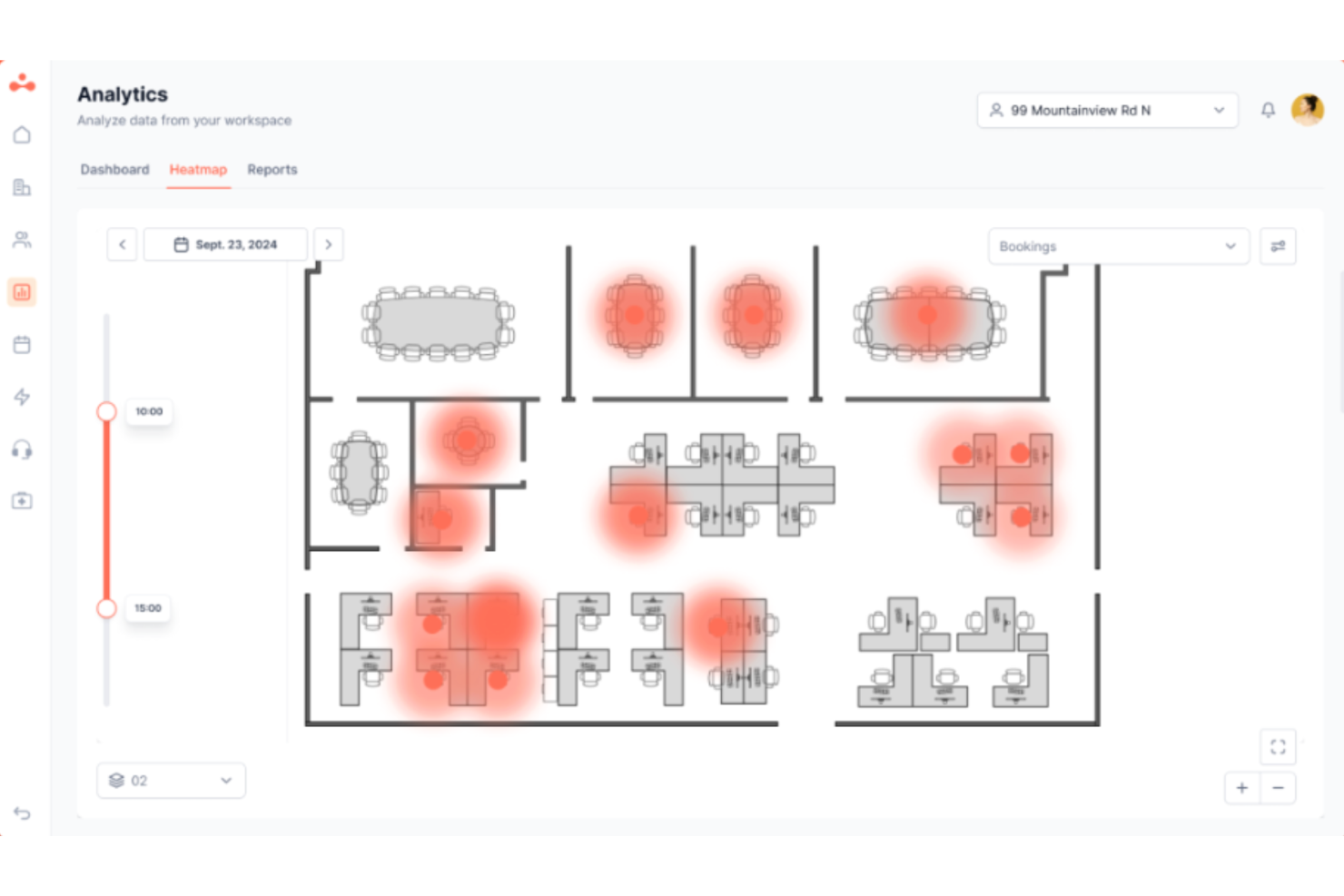
elia è una piattaforma modulare per la gestione dell’ambiente di lavoro, pensata per i team HR, facility manager e operation che devono gestire la prenotazione di scrivanie e sale riunioni, la programmazione ibrida, la gestione dei visitatori e i dati reali di occupazione—tutto in un’unica soluzione.
Per chi è più adatto elia?
elia è particolarmente indicato per organizzazioni di medie e grandi dimensioni che gestiscono una forza lavoro ibrida in più sedi e vogliono prendere decisioni informate sui propri spazi fisici grazie ai dati.
Perché elia è una delle migliori alternative a Skedda
elia si merita un posto nella mia lista perché la sua tecnologia a sensori va oltre ciò che può offrire il solo dato di prenotazione. Apprezzo molto che i sensori nelle sale contino sia le entrate che le uscite, offrendo un quadro reale di quante persone sono in uno spazio, non solo chi lo ha prenotato. I sensori delle scrivanie utilizzano il rilevamento a infrarossi del calore corporeo per captare dati reali di presenza, in modo anonimo, senza affidarsi ai check-in dei dipendenti. Questi dati alimentano direttamente le analisi sull’occupazione di elia, permettendomi di vedere i reali schemi di utilizzo su ogni piano.
Funzionalità principali di elia
- Costruttore di planimetrie interattive: permette agli amministratori di creare mappe cliccabili su più piani che i dipendenti possono usare per prenotare scrivanie e sale.
- Gestione dei visitatori: include il check-in degli ospiti, notifiche agli host e registri sicuri dei visitatori integrati con la prenotazione dei dipendenti.
- Gestione delle richieste: consente ai dipendenti di inviare richieste di servizi come catering o manutenzione direttamente dalla planimetria.
- Controlli di accesso basati sui ruoli: permette di impostare permessi di prenotazione e politiche dettagliate per gruppo di utenti, dipartimento o sede.
Integrazioni di elia
elia offre integrazioni native con Microsoft 365, Google Workspace e Slack. L’API è disponibile per integrazioni personalizzate e il piano Enterprise include un costruttore di integrazioni su misura per strumenti IoT e software.
Pros and Cons
Pros:
- Monitora la reale occupazione con sensori IoT
- Offre mappe di prenotazione interattive su più piani
- Gestione dei visitatori e flussi di check-in integrati
Cons:
- Nessuna opzione di integrazione nativa con HRIS
- Analytics avanzate riservate ai piani di fascia alta

Ideale per una migrazione fluida della piattaforma e il trasferimento dei dati
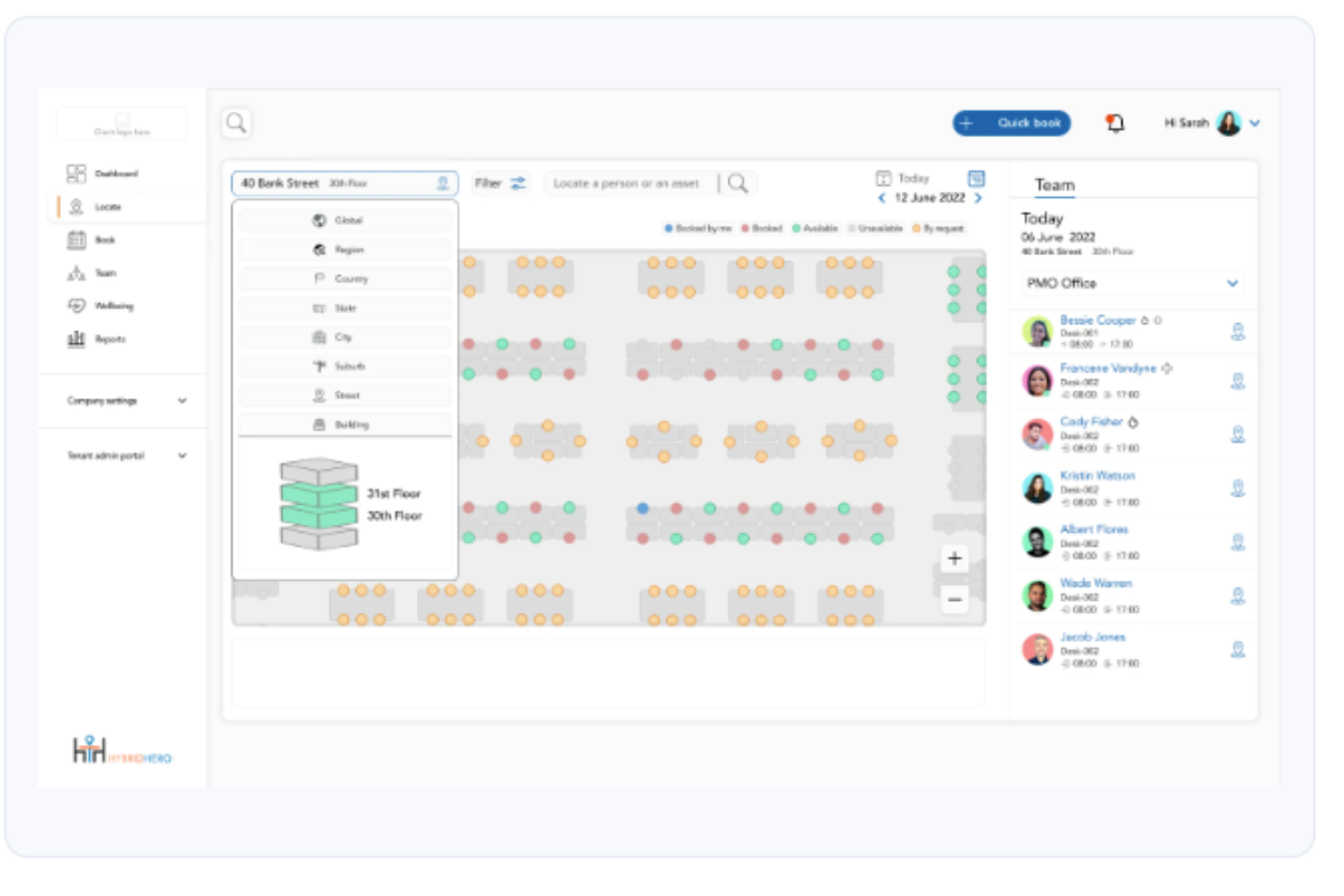
Hybrid Hero è una piattaforma aziendale per la gestione degli ambienti di lavoro, progettata per i team delle risorse umane e delle operazioni che devono gestire scrivanie, sale riunioni, parcheggi e visitatori insieme alla pianificazione del lavoro ibrido e all'analisi della forza lavoro, tutto da un unico sistema.
Per chi è più adatto Hybrid Hero?
Hybrid Hero è particolarmente adatto alle aziende di medie e grandi dimensioni con 500 o più dipendenti, che gestiscono ambienti di lavoro ibridi complessi e distribuiti su più sedi.
Perché Hybrid Hero è una buona alternativa a Skedda
Ho scelto Hybrid Hero per questo elenco proprio per il suo programma Switch, che rappresenta l'offerta di migrazione più strutturata che abbia visto tra tutte le alternative a Skedda. Il programma trasferisce i dati esistenti relativi a scrivanie, sale e utenti senza reinserimento manuale, esegue i vecchi e i nuovi sistemi in parallelo e garantisce l'operatività entro 30 giorni. Apprezzo inoltre che il processo di preventivazione presenti fin dall'inizio una ripartizione completa dei costi per modulo e una tempistica dettagliata dell'implementazione, così da evitare sorprese durante la migrazione.
Funzionalità principali di Hybrid Hero
- Planimetrie interattive: Gli utenti possono prenotare scrivanie, sale e parcheggi direttamente da mappe visive degli uffici.
- Gestione dei visitatori integrata: Include il check-in tramite chiosco, la stampa dei badge e l'acquisizione degli NDA per semplificare le operazioni della reception.
- Supporto per app mobili e Teams: I dipendenti possono prenotare ed effettuare il check-in per le risorse utilizzando iOS, Android e Microsoft Teams.
- Controlli degli accessi basati sui ruoli: Gli amministratori impostano autorizzazioni di prenotazione e livelli di accesso diversi per team, area geografica o ruolo.
Integrazioni di Hybrid Hero
Hybrid Hero offre integrazioni native con Microsoft 365, Google Workspace, Slack, Azure Active Directory, Okta e SAML SSO. È disponibile un'API per le integrazioni personalizzate.
Pros and Cons
Pros:
- Programma di migrazione strutturato con garanzia di 30 giorni
- Gestisce scrivanie, sale, parcheggi e visitatori
- Supporto integrato per sensori IoT per rilevare l'occupazione effettiva
Cons:
- Documentazione pubblica limitata sull'analisi avanzata
- Presenza nelle recensioni di terze parti inferiore rispetto ai concorrenti

Ideale per orari di lavoro ibridi
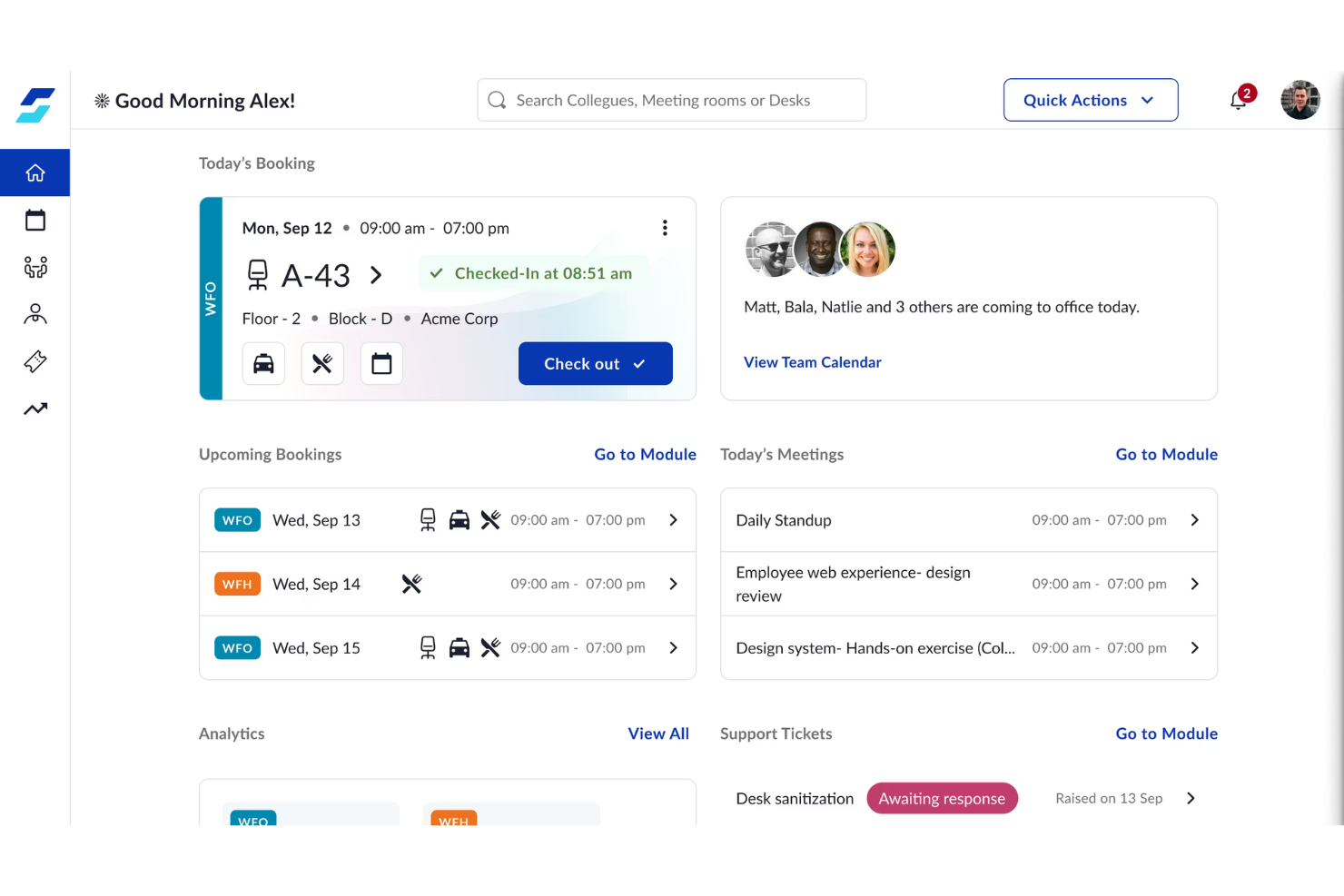
WorkInSync è una piattaforma tutto-in-uno per le aziende che gestiscono il lavoro ibrido e che necessitano di visibilità in tempo reale e coordinamento degli orari dei dipendenti, delle scrivanie e delle sale riunioni. Le aziende che cercano un modo semplice per allineare i team ibridi e migliorare l'utilizzo delle risorse in ufficio troveranno particolarmente interessante la sua gamma di funzionalità.
Per Chi è Ideale WorkInSync?
I team delle risorse umane e i responsabili degli ambienti di lavoro in organizzazioni di medie e grandi dimensioni che coordinano orari ibridi tra più dipartimenti o sedi.
Perché WorkInSync è una Buona Alternativa a Skedda
Ho scelto WorkInSync perché va oltre la semplice prenotazione degli spazi e coordina effettivamente gli orari ibridi tra i team. La funzione di sincronizzazione del team permette ai dipendenti di pubblicare i loro piani settimanali di lavoro in sede o da remoto, così posso vedere a colpo d'occhio chi è presente in un determinato giorno e pianificare l'assegnazione delle scrivanie di conseguenza. Mi piace anche la funzione di pianificazione dei tragitti, che aiuta i dipendenti a coordinare i carpool e i trasporti pubblici—un aspetto che Skedda non copre affatto. Per le organizzazioni che gestiscono ampie forze lavoro ibride, dove il coordinamento degli orari è importante tanto quanto la disponibilità delle scrivanie, WorkInSync copre entrambe le esigenze in un'unica piattaforma.
Funzionalità Principali di WorkInSync
- Rilascio automatico delle prenotazioni fantasma: Rileva automaticamente e annulla le prenotazioni di sale o scrivanie non utilizzate quando i dipendenti non effettuano il check-in, liberando spazio in tempo reale.
- Gestione dei parcheggi: I dipendenti possono prenotare i posti auto in anticipo, con monitoraggio in tempo reale dell'occupazione e supporto per la lista d'attesa integrati.
- Gestione dei pasti: Permette ai dipendenti di prenotare i pasti in anticipo e aiuta gli amministratori a monitorare la richiesta di cibo, il consumo e la disponibilità nell'ufficio.
- Analisi dell'utilizzo degli spazi: Genera report sui modelli di utilizzo di scrivanie e sale in modo che gli amministratori possano prendere decisioni informate su layout e pianificazione della capacità degli uffici.
Integrazioni di WorkInSync
Le integrazioni includono Google Calendar, Microsoft Outlook, Microsoft Teams, Okta, OneLogin, Oracle PeopleSoft, Honeywell, Dormakaba, Axis Technologies e Cisco.
Pros and Cons
Pros:
- Controlli dettagliati per prenotazioni di scrivanie e spazi
- Moduli di gestione dei pasti integrati
- Flussi di approvazione personalizzabili
Cons:
- Richiede configurazione manuale per turni complessi
- Analisi self-service limitata
YAROOMS
Ideale per il monitoraggio delle emissioni di carbonio nello spazio di lavoro
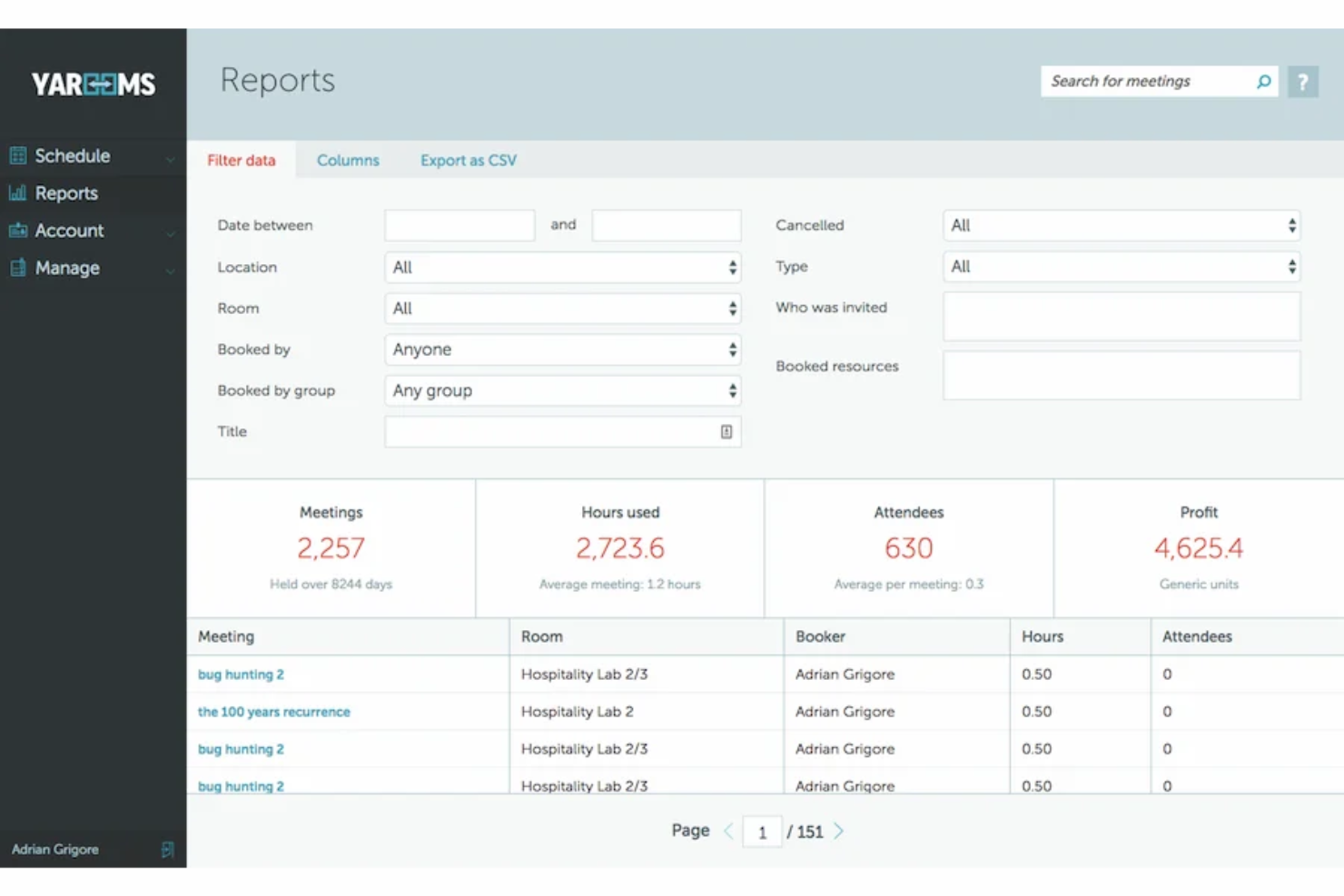
YAROOMS è una piattaforma per la gestione degli spazi di lavoro progettata per le organizzazioni focalizzate sulla programmazione delle risorse e sull'ottimizzazione degli spazi in tempo reale. I team delle strutture e le organizzazioni attente alla sostenibilità la utilizzano per semplificare la prenotazione delle sale e affrontare le sfide moderne del lavoro ibrido.
Per chi è ideale YAROOMS?
Team delle strutture e responsabili della sostenibilità in organizzazioni di medie e grandi dimensioni che desiderano monitorare l'utilizzo degli spazi e l'impatto ambientale.
Perché YAROOMS è una valida alternativa a Skedda
Ho scelto YAROOMS perché è uno dei pochi strumenti di prenotazione degli spazi di lavoro che collega direttamente le prenotazioni degli spazi ai dati sull'impronta di carbonio. Quando un dipendente prenota una scrivania o una sala, YAROOMS calcola le emissioni di CO2 associate in base al tragitto casa-lavoro e all'occupazione—una funzionalità che non ho visto integrata nativamente nella maggior parte dei concorrenti. Apprezzo anche il pianificatore del lavoro ibrido, che consente ai dipendenti di programmare le giornate in ufficio insieme ai colleghi, riducendo i viaggi non necessari e le emissioni correlate. Per i team concentrati sulla sostenibilità che devono occuparsi sia della reportistica ESG che della gestione degli spazi, YAROOMS gestisce entrambe le cose senza la necessità di strumenti separati.
Funzionalità principali di YAROOMS
- Visualizzazione mappa degli spazi: Naviga in una piantina interattiva per vedere in tempo reale quali scrivanie e sale sono disponibili.
- Gestione dei visitatori: Registra gli ospiti, invia notifiche di arrivo e gestisci i check-in da una dashboard centrale.
- Display sala riunioni: Collega YAROOMS a schermi nella hall o su porte per mostrare la disponibilità delle sale in tempo reale.
- Analisi dell'utilizzo: Genera report sui tassi di occupazione di scrivanie e sale in base a sedi e periodi temporali.
Integrazioni di YAROOMS
Le integrazioni includono Microsoft Teams, Microsoft 365, Outlook, Google Calendar, Azure AD, Slack, SAML 2.0, Zoom, Google Meet e MappedIn.
Pros and Cons
Pros:
- Monitora le emissioni di carbonio insieme alle prenotazioni degli spazi di lavoro
- Standard di conformità dei dati integrati
- Include mappe interattive degli spazi in tempo reale
Cons:
- Nessuno strumento di gestione del parcheggio integrato
- Numero limitato di piani disponibili nei pacchetti base

Tribeloo
Ideale per la visualizzazione immersiva 3D delle scrivanie
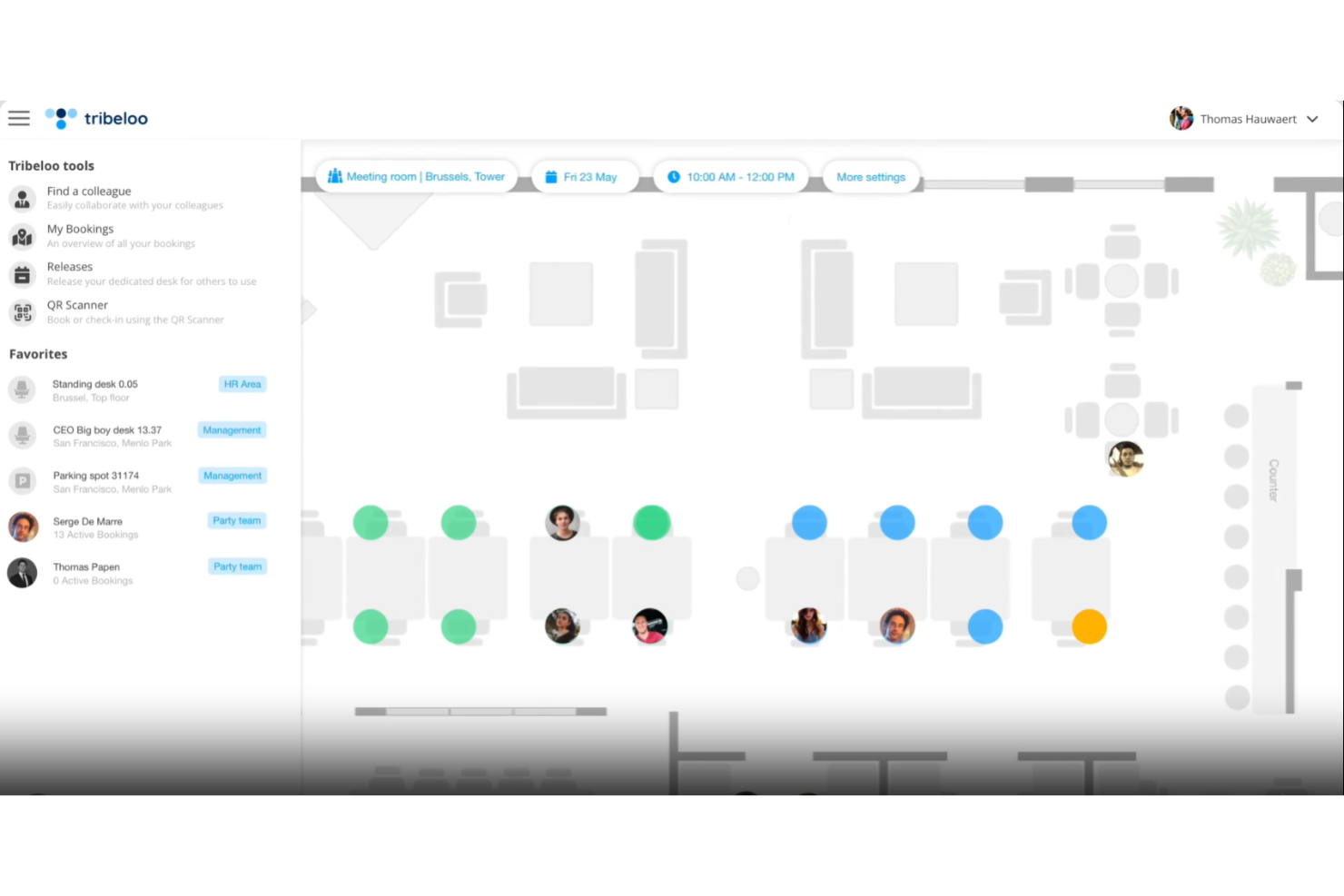
Tribeloo è una piattaforma di gestione degli spazi di lavoro pensata per le aziende che vogliono rendere la collaborazione in sede semplice e flessibile. Credo che i team dei servizi generali e gli ambienti di lavoro ibridi che necessitano di prenotazione di scrivanie e sale riunioni con visualizzazione autonoma troveranno particolarmente utile questa soluzione.
A chi è rivolto Tribeloo?
Responsabili d'ufficio e team di gestione degli spazi in aziende medio-grandi che desiderano coordinare la prenotazione delle scrivanie e l'uso flessibile degli spazi tra più sedi.
Perché Tribeloo è una buona alternativa a Skedda
Ho scelto Tribeloo perché le sue planimetrie interattive 3D rendono la ricerca e la prenotazione di una scrivania molto più intuitiva rispetto alle planimetrie tradizionali. Il mio team può vedere una visualizzazione immersiva e in scala dell'ufficio, individuare dove si siedono i colleghi e prenotare una scrivania vicina senza continue comunicazioni. Apprezzo anche la funzione di ricerca dei colleghi, che permette di scegliere la scrivania in base a chi sarà presente quel giorno. Nei team ibridi, dove la coordinazione è importante, questo livello di visibilità migliora davvero l'esperienza dei dipendenti.
Funzionalità principali di Tribeloo
- Gestione visitatori: Registra gli ospiti, invia email di benvenuto e gestisci il check-in direttamente dalla piattaforma
- Prenotazione sale riunioni: Prenota le sale direttamente dalla mappa interattiva o dalla vista calendario
- Analisi dell'uso: Tieni traccia dei dati relativi all'occupazione di scrivanie e sale per sapere quali spazi vengono realmente utilizzati
- Configurazione di zone e aree: Assegna i team a specifiche aree dell'ufficio per organizzare al meglio la distribuzione degli spazi
Integrazioni di Tribeloo
Le integrazioni includono Microsoft Azure AD, Microsoft Outlook, Google Calendar e Okta.
Pros and Cons
Pros:
- Le planimetrie 3D semplificano la scelta della scrivania
- Suggerisce scrivanie vicino a colleghi o team
- Automatizza i programmi di pulizia dopo ogni utilizzo della scrivania
Cons:
- L'impostazione della mappa può richiedere l'inserimento manuale dei dati della planimetria
- Possibilità limitate di modifica della dashboard

Ideale per la visualizzazione in tempo reale dello stato delle sale
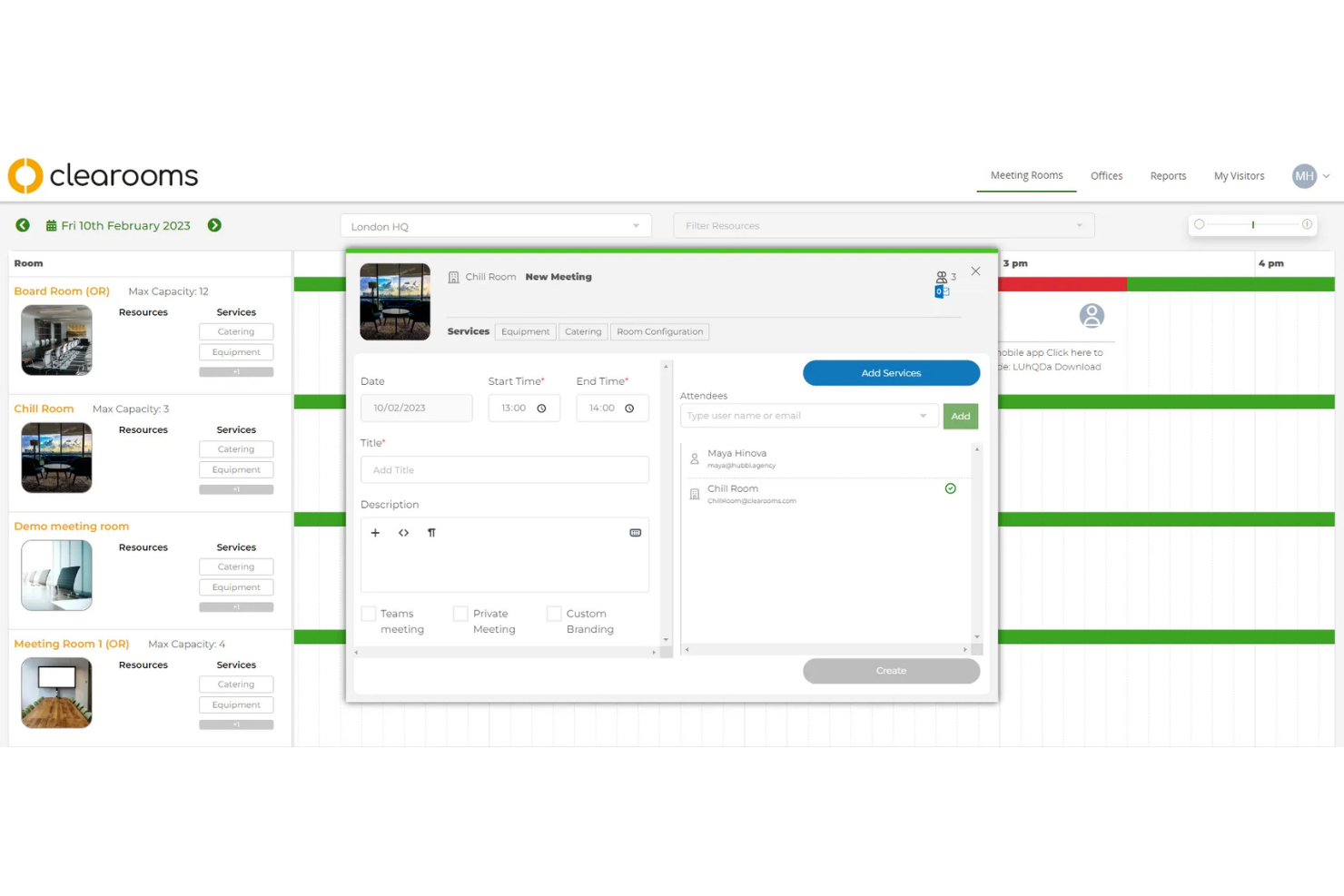
Clearooms è un software di gestione degli spazi di lavoro progettato per le organizzazioni che necessitano di una chiara visibilità sulla disponibilità delle sale riunioni. Penso che i team che lavorano in uffici dinamici o in ambienti di coworking apprezzeranno il modo in cui aiuta a prevenire doppie prenotazioni e ricerche di sale che fanno perdere tempo.
Per chi è ideale Clearooms?
Responsabili delle strutture e degli uffici in spazi aziendali o di coworking molto frequentati che devono monitorare e condividere lo stato delle sale riunioni in tempo reale.
Perché Clearooms è una valida alternativa a Skedda
La visualizzazione in tempo reale dello stato delle sale è ciò che rende Clearooms davvero unico ed è la ragione principale per cui l'ho incluso in questa lista. Mi piace come i display delle sale riunioni si aggiornano in tempo reale, così chiunque passi davanti a una sala conferenze può vedere a colpo d'occhio se è occupata o libera. Il mio team può prenotare direttamente tramite il pannello presente nella sala senza dover aprire un'app o accedere a un portale. Apprezzo molto anche la funzione di auto-liberazione, che rende disponibili le sale quando gli invitati non si presentano, evitando che le prenotazioni fantasma blocchino gli spazi condivisi per tutta la giornata.
Caratteristiche principali di Clearooms
- Prenotazione delle scrivanie: Prenota le scrivanie individuali in anticipo o nella stessa giornata da web o dispositivi mobili
- Piantine interattive: Visualizza e seleziona scrivanie o sale disponibili tramite una mappa visiva della disposizione dell’ufficio
- Gestione dei visitatori: Pre-registrazione degli ospiti, invio di notifiche di arrivo e gestione del check-in da un unico luogo
- Reportistica sull’utilizzo: Accedi ai dati di occupazione e ai trend di prenotazione per capire come vengono effettivamente utilizzati gli spazi
Integrazioni Clearooms
Le integrazioni includono Azure, Google Workspaces, Okta, OneLogin, Google Calendar, Office 365, Microsoft Teams, Paxton Access, Salto e Slack.
Pros and Cons
Pros:
- Sistema a semaforo per lo stato immediato delle sale
- Le prenotazioni delle sale vengono liberate automaticamente in caso di assenza
- Prenotazione diretta dai pannelli touch in sede
Cons:
- Analisi limitata sull’utilizzo complessivo delle sale
- Personalizzazione limitata delle regole di prenotazione

Joan
Ideale per display digitali per sale riunioni
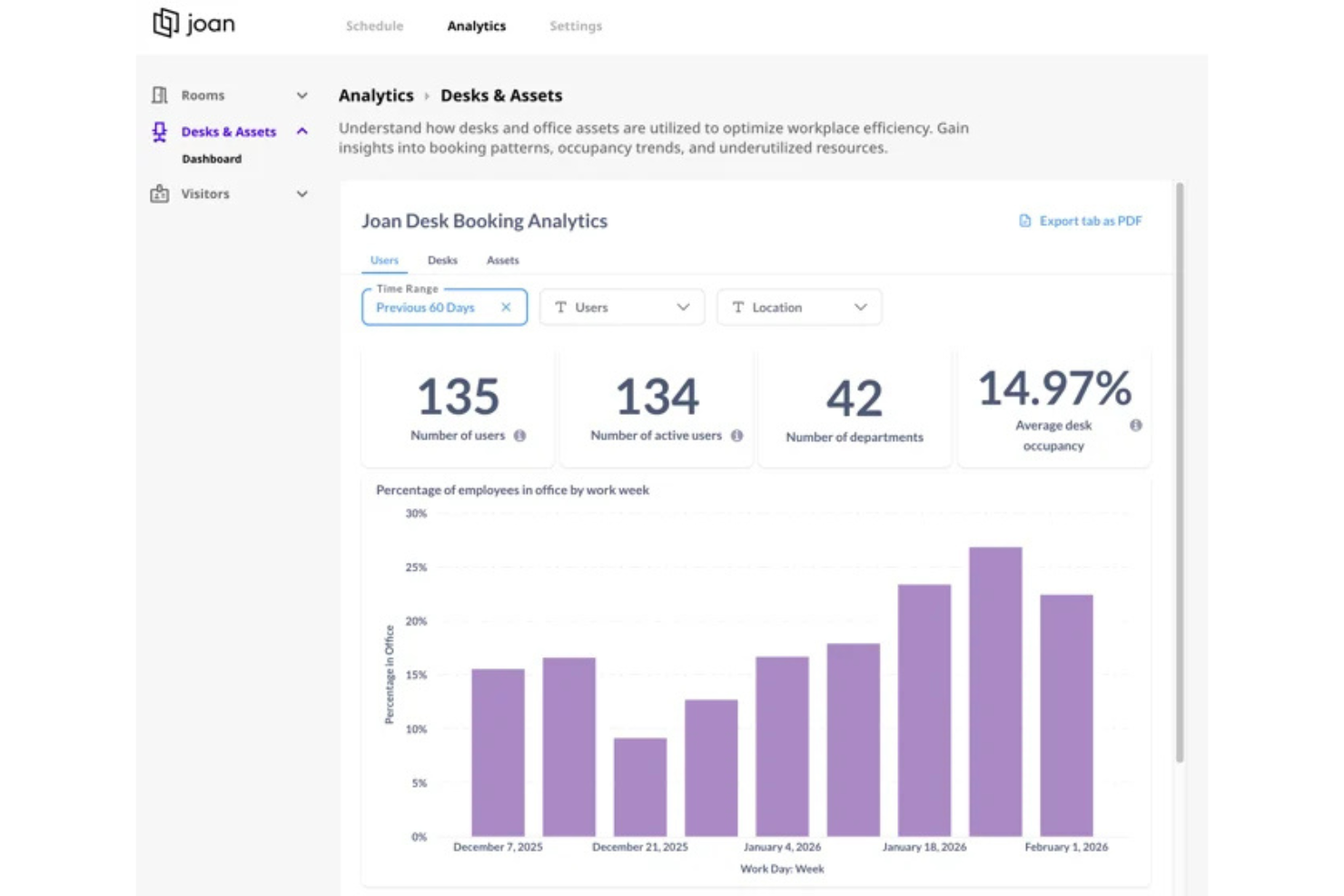
Joan è specializzata in display intelligenti e wireless per gestire le prenotazioni delle sale riunioni all'esterno degli spazi meeting. I team delle strutture, i responsabili IT e gli amministratori d'ufficio utilizzano Joan per ridurre i conflitti di prenotazione e offrire ai dipendenti una chiara disponibilità delle sale in tempo reale, a colpo d'occhio.
Per chi è ideale Joan?
Responsabili degli spazi di lavoro e team IT in uffici che desiderano soluzioni di visualizzazione delle sale riunioni in tempo reale e in loco.
Perché Joan è una valida alternativa a Skedda
Ho scelto Joan perché i suoi pannelli e-ink per la visualizzazione delle sale sono specificamente progettati per essere posizionati all'esterno delle sale riunioni, offrendo ai dipendenti visibilità immediata sulla disponibilità di uno spazio senza dover utilizzare una tastiera. Apprezzo particolarmente la funzione di rilevamento delle assenze, grazie alla quale Joan libera automaticamente una sala se nessuno conferma la prenotazione alla porta—una soluzione che riduce direttamente le prenotazioni fantasma negli uffici affollati. La visualizzazione della piantina consente inoltre ad amministratori e dipendenti di vedere lo stato di ogni sala su un intero piano con un solo sguardo. Per i team che considerano la segnaletica fisica degli spazi importante quanto il software di prenotazione, Joan risolve entrambi i problemi contemporaneamente.
Funzionalità principali di Joan
- Pannello di prenotazione sala: Prenota o libera una sala direttamente dal display Joan montato fuori dalla porta.
- Prenotazione scrivanie: I dipendenti possono cercare, filtrare e prenotare singole scrivanie tramite l'app o il portale web di Joan.
- Dashboard analitico: Monitora i dati di occupazione di sale e scrivanie per mostrare le tendenze di utilizzo in ufficio.
- Check-in visitatori: Gestisce l'arrivo degli ospiti e notifica gli host quando i visitatori sono pronti alla reception.
Integrazioni di Joan
Le integrazioni includono Slack, MS Teams, Webex, Jabra, Logitech, Azure AD, Okta e OneLogin.
Pros and Cons
Pros:
- Utilizza display a carta elettronica per lo stato delle sale
- Identifica le riunioni "fantasma" tramite rilevamento AI
- Notifiche personalizzabili per eventi nelle sale riunioni
Cons:
- Richiede la sostituzione della batteria del dispositivo
- Personalizzazione limitata dei layout dello schermo display

Dibsido
Ideale per la mappatura visiva degli spazi
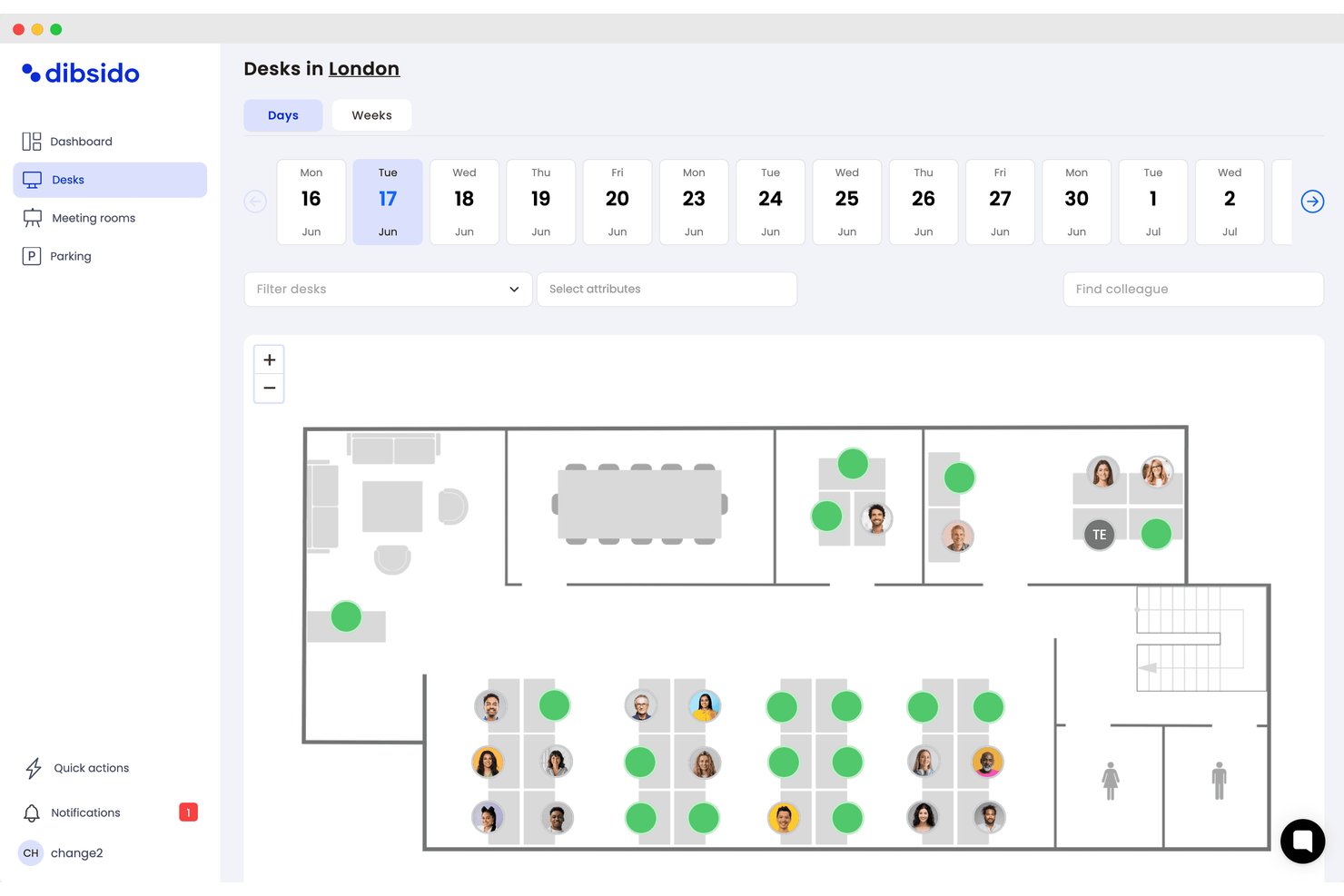
Dibsido è una piattaforma di prenotazione degli spazi di lavoro progettata per le organizzazioni che necessitano di modalità flessibili e intuitive per gestire scrivanie, sale riunioni e risorse condivise, supportando al contempo il lavoro ibrido e la visibilità in tempo reale degli uffici.
Per chi è più adatto Dibsido?
Team delle strutture e delle risorse umane di aziende di medie dimensioni che desiderano centralizzare le prenotazioni di scrivanie, sale e parcheggi in spazi di lavoro flessibili.
Perché Dibsido è una buona alternativa a Skedda
Ho scelto Dibsido tra le migliori soluzioni perché la piattaforma permette di creare e implementare planimetrie interattive per scrivanie, sale e parcheggi, così posso adattare la disposizione delle prenotazioni man mano che le politiche aziendali cambiano. Le stesse mappe sono disponibili tramite l'app per iOS e Android, mentre le liste d'attesa per il parcheggio e il passaggio dei posti auto aiutano a massimizzare gli spazi disponibili.
Caratteristiche principali di Dibsido
- Prenotazione tramite planimetrie interattive: Gli utenti cliccano sulle mappe degli uffici per prenotare in tempo reale scrivanie, sale o parcheggi.
- Interfaccia multilingue: L'app supporta 11 lingue per team globali e contesti aziendali internazionali.
- Sincronizzazione calendario: Si integra con Google e Outlook Calendar per mantenere le prenotazioni visibili assieme agli incontri.
- Controlli di accesso basati sui ruoli: Gli amministratori possono impostare permessi utente e regole di prenotazione in base a team, ruolo o posizione.
Integrazioni di Dibsido
Dibsido offre integrazioni native con Google Workspace, Microsoft 365 (incluso Outlook), Slack, Microsoft Teams e Microsoft Entra ID. Supporta anche il single sign-on SAML 2.0 con provider di identità compatibili. È disponibile un'API per integrazioni personalizzate.
Pros and Cons
Pros:
- Prenotazione interattiva con visualizzazione della planimetria
- Supporta la prenotazione di sale riunioni e parcheggi
- Configurazione rapida con pochi passaggi di onboarding
Cons:
- Opzioni limitate per flussi di approvazione avanzati
- Mancano funzionalità HRIS avanzate

Envoy
Ideale per il rilascio automatico di scrivanie e sale
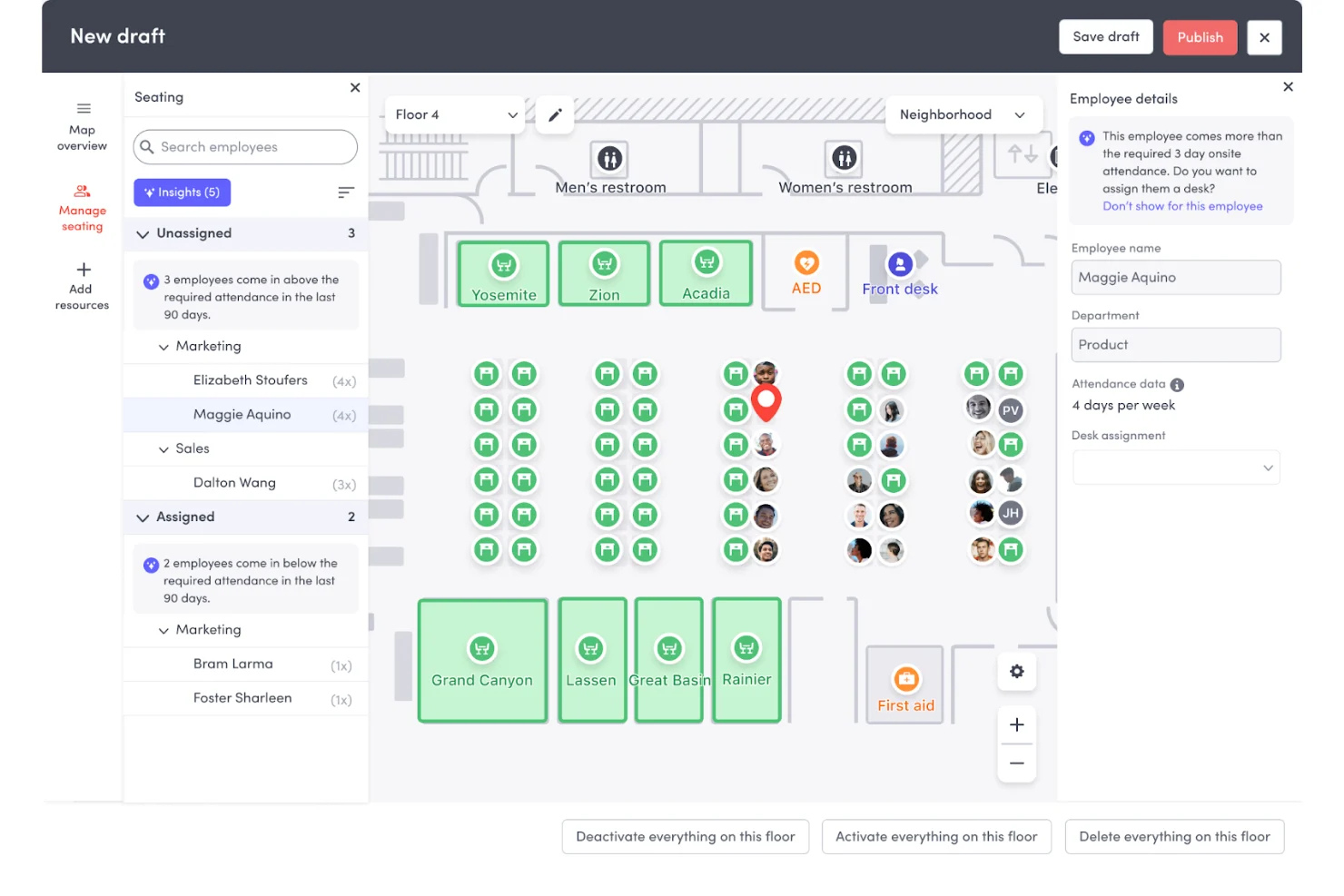
Envoy aumenta l'efficienza dell'ufficio tramite il rilascio automatico di scrivanie e sale riunioni, rendendolo ideale per le aziende che devono eliminare le 'prenotazioni fantasma' e recuperare lo spazio inutilizzato in tempo reale. È particolarmente utile per i team di gestione delle strutture e delle operazioni che desiderano ottimizzare la capacità dei piani e assicurarsi che le scrivanie disponibili vengano effettivamente utilizzate.
Per chi è più adatto Envoy?
Reception, strutture e team HR che gestiscono sedi fisiche e hanno bisogno di eliminare spazi sprecati e assicurarsi che le scrivanie e le sale 'prenotate' vengano realmente usate.
Perché Envoy è una valida alternativa a Skedda
Ho scelto Envoy perché i suoi trigger di rilascio automatico risolvono il problema dei 'no-show' che Skedda spesso lascia alla supervisione manuale. Se qualcuno manca la finestra di check-in, Envoy rilascia immediatamente la scrivania o la sala per renderla disponibile agli altri. Apprezzo anche come utilizzi i dati Wi-Fi e i badge per verificare la presenza fisica—trasformando un ufficio 'tutto esaurito' in uno realmente funzionale gestendo la pulizia per te. Per i team che danno priorità all'utilizzo ad alta efficienza rispetto alla semplice pianificazione, Envoy è la scelta più intelligente.
Funzionalità principali di Envoy
- Rilascio automatico degli spazi: Cancella automaticamente le prenotazioni di scrivanie o sale se un utente non effettua il check-in tramite l'app o il badge alla porta, aggiornando istantaneamente la disponibilità.
- Display integrati per le sale: Segnaletica fisica presso le sale riunioni per consentire la prenotazione 'ad hoc' o il check-in immediato per evitare l'occupazione irregolare.
- Monitoraggio dell'occupazione: Tiene traccia in tempo reale del numero di persone su piani e zone dell'ufficio per mostrare chi è presente in un dato momento.
- Verifica della presenza: Si sincronizza con i tuoi sistemi Wi-Fi o con i badge esistenti per confermare quando una persona è fisicamente in sede, garantendo accuratezza dei dati per la pianificazione degli spazi.
Integrazioni di Envoy
Le integrazioni includono Luxer One Lockers, Gallagher Command Centre, Verkada, Google Drive, Neat Pad, Rhombus Systems, Sharebite, Pipedream, Automatic Sign Out+, e Text Field Rules.
Pros and Cons
Pros:
- Riduce lo spreco di spazi dovuti ai "no-show"
- Integrazione nativa con i sensori dell'ambiente di lavoro
- Registrazione e monitoraggio dei visitatori in tempo reale
Cons:
- La prenotazione delle scrivanie necessita di una configurazione amministrativa separata
- L'automazione completa richiede integrazione hardware
Altre alternative a Skedda
Ecco alcune ulteriori alternative a Skedda che non sono state incluse nel mio elenco, ma che vale comunque la pena prendere in considerazione:
- Officely
Ideale per la prenotazione delle scrivanie di team su Slack
- Eptura Engage
Ideale per le prenotazioni di sale riunioni aziendali
- Robin
Ideale per previsioni degli ambienti di lavoro basate su AI
- Archie
Ideale per l'integrazione con il controllo degli accessi
- DeskFlex
Ideale per ospedali e strutture educative
- Awaio
Ideale per la gestione degli armadietti senza hardware


Come valuto le alternative a Skedda
Divido la mia valutazione in due livelli: requisiti di base che ogni piattaforma deve soddisfare e fattori distintivi, come la pianificazione ibrida e le integrazioni con gli HRIS, che separano le soluzioni valide da quelle eccellenti.
Funzionalità principali (requisiti essenziali per questo elenco)
Quando seleziono gli strumenti per il mio elenco, assegno a ciascuno un punteggio su una scala da 0 (non offre la funzionalità) a 5 (eccelle in quest'area) per ogni funzionalità principale elencata di seguito. Successivamente, converto il punteggio totale dello strumento in una percentuale. Ogni strumento deve raggiungere un punteggio totale minimo del 65% per essere preso in considerazione.
- Prenotazione di scrivanie e sale: verifico se i dipendenti possono effettuare autonomamente prenotazioni per scrivanie, sale riunioni e risorse condivise come cabine telefoniche o posti auto.
- Planimetrie interattive: le mappe visive e cliccabili fanno davvero la differenza quando i dipendenti scelgono una scrivania vicino al proprio team in uffici distribuiti su più piani.
- Supporto alla pianificazione ibrida: cerco modelli di prenotazione ricorrenti, coordinamento delle giornate del team e flussi di lavoro per il check-in che riflettano il reale funzionamento delle politiche ibride.
- Integrazioni con HRIS e calendari: la sincronizzazione con Google Calendar o Outlook è un requisito essenziale, ma valuto anche il supporto per SSO e SCIM per il provisioning dei dipendenti.
- Analisi dell'utilizzo: i report dovrebbero mostrare le tendenze di occupazione, i dati sulle prenotazioni nei giorni di maggiore affluenza e i modelli di utilizzo su cui i team HR e delle strutture possano intervenire.
- Controlli di accesso e delle policy: valuto se gli amministratori possono impostare regole di prenotazione per reparto, sede o ruolo, ad esempio riservando determinate zone a team specifici.
Una volta ottenuto un elenco di strumenti che soddisfano questi criteri, considero ciò che distingue ogni piattaforma.
Fattori distintivi (ciò che differenzia i fornitori)
Ecco come confronto e metto a confronto i diversi fornitori:
Funzionalità di spicco
Uno strumento per trovare i colleghi aiuta i dipendenti a vedere chi si trova in ufficio prima di prenotare, rendendo molto più semplice il coordinamento delle giornate del team per i team ibridi. Cerco anche l'integrazione con sensori IoT: le piattaforme che acquisiscono dati reali sull'occupazione dai sensori sotto la scrivania forniscono ai team HR dati sull'utilizzo molto più accurati rispetto ai soli registri delle prenotazioni. Anche le app native per Slack o Teams sono importanti, poiché i dipendenti hanno maggiori probabilità di prenotare con costanza quando possono farlo dall'ambiente in cui lavorano già.
Oltre le funzionalità
La struttura dei prezzi è importante in questo caso, perché gli strumenti per la gestione degli spazi di lavoro variano notevolmente: alcuni applicano un costo per scrivania, altri per utente, e il modello sbagliato può far aumentare rapidamente i costi con la crescita del numero di dipendenti. Valuto anche la compatibilità con lo stack tecnologico HR, in particolare se una piattaforma offre connettori HRIS nativi e il provisioning SCIM, in modo che gli elenchi dei dipendenti restino aggiornati senza manutenzione manuale. Anche la sicurezza è un fattore chiave. Le piattaforme che gestiscono dati sulla posizione e sulle presenze dei dipendenti dovrebbero soddisfare gli standard SOC 2 o ISO 27001 e offrire registri di audit conformi alle verifiche interne di conformità.
Perché cercare un'alternativa a Skedda?
Sebbene Skedda sia una buona scelta per la gestione degli ambienti di lavoro, ci sono diversi motivi per cui alcuni utenti cercano soluzioni alternative. Potresti cercare un'alternativa a Skedda perché…
- Vuoi visualizzazioni immersive delle planimetrie in 3D per migliorare l'esperienza degli utenti
- Hai bisogno di analisi o report avanzati per una strategia d'ufficio più facilmente scalabile
- È necessaria l'integrazione con strumenti specifici per il luogo di lavoro o componenti aggiuntivi di terze parti
- Manca il supporto per uffici grandi e distribuiti in più sedi nel modello di prezzo base
- La gestione dei visitatori o il controllo degli accessi sono una priorità
- Le opzioni di personalizzazione del marchio o di configurazione sono limitate senza un impegno trasparente sui prezzi
Se ti riconosci in una di queste situazioni, sei nel posto giusto. Il mio elenco contiene diverse alternative a Skedda più adatte ai team che affrontano queste difficoltà con Skedda e cercano soluzioni alternative.
Caratteristiche principali di Skedda
Ecco alcune delle caratteristiche principali di Skedda, che ti aiuteranno a mettere a confronto ciò che offrono le soluzioni alternative:
- Prenotazione online: I partecipanti possono prenotare online scrivanie, sale o posti auto tramite un'interfaccia web intuitiva, riducendo la necessità di pianificazioni manuali.
- Planimetrie interattive: Gli utenti possono selezionare e prenotare gli spazi direttamente da una mappa visiva della disposizione dell'ufficio, per una migliore comprensione dello spazio e un'interfaccia intuitiva.
- Regole di prenotazione automatizzate: Gli amministratori possono configurare autorizzazioni specifiche per stabilire chi può prenotare determinati spazi, in quali giorni e a quali condizioni, garantendo il rispetto delle regole.
- Gestione autonoma: I dipendenti possono gestire le proprie prenotazioni, cancellazioni e preferenze senza dover ricorrere al reparto IT o a un team di supporto.
- Quote di prenotazione: Limitano il numero di prenotazioni per utente o squadra, garantendo un accesso equo alle risorse limitate nell'ambiente di lavoro.
- Notifiche personalizzabili: Inviare email automatiche e avvisi nell'app per tenere gli utenti informati sugli aggiornamenti delle prenotazioni o sulle prenotazioni imminenti.
- Analisi e report: Consentono di monitorare i modelli di utilizzo e le tendenze delle prenotazioni, fornendo informazioni utili per la pianificazione degli spazi e l'ottimizzazione delle risorse.
- Accesso singolo (SSO): Integrare l'autenticazione con i fornitori Microsoft, Google o SAML per un accesso degli utenti semplice e sicuro.
- Integrazione del controllo degli accessi: Collegare le prenotazioni del sistema di prenotazione di scrivanie e sale ai sistemi di sicurezza delle porte, garantendo l'accesso alle sale prenotate esclusivamente agli utenti autorizzati.
- Sincronizzazione del calendario: Trasferire automaticamente i dati delle prenotazioni a calendari esterni come Google Calendar o Outlook, mantenendo allineati gli impegni.