

Le 10 migliori alternative a Homebase recensite nel 2026

Elenco delle migliori alternative a Homebase


Sebbene Homebase sia un software per la gestione della forza lavoro molto affidabile e potente, potrebbe non essere la soluzione più adatta alle tue esigenze.
Da anni recensisco software per la gestione delle risorse umane e della forza lavoro in diversi settori e per team di varie dimensioni.
In questo articolo analizzerò le migliori alternative a Homebase, evidenziandone le caratteristiche distintive, i punti di forza e i casi d'uso ideali, così potrai scegliere con sicurezza lo strumento più adatto al tuo team.
Che cos'è Homebase?
Homebase è un software per la gestione della forza lavoro progettato per semplificare la pianificazione dei turni, il monitoraggio delle ore e la comunicazione tra i membri del team. Viene comunemente utilizzato da titolari di piccole imprese, responsabili e professionisti delle risorse umane che devono gestire in modo efficiente i lavoratori retribuiti su base oraria.
Funzionalità come la pianificazione dei turni dei dipendenti, i sistemi di rilevazione delle presenze e la messaggistica del team aiutano a organizzare i turni di lavoro e a migliorare la comunicazione all'interno del team. Nel complesso, Homebase offre una soluzione preziosa per gestire la forza lavoro in modo semplice ed efficiente.
Tabella di confronto delle alternative a Homebase
Questa tabella di confronto riassume i dettagli sui prezzi delle migliori alternative a Homebase che ho selezionato:
| Tool | Best For | Trial Info | Price | ||
|---|---|---|---|---|---|
| 1 | Ideale per team globali che gestiscono lavoratori a ore | Demo gratuita disponibile | Da $5/dipendente/mese | Website | |
| 2 | Ideale per la gestione personalizzabile del PTO | Demo gratuita + prova gratuita di 14 giorni disponibile | Da $4,49/utente/mese | Website | |
| 3 | Ideale per l'efficienza nella programmazione | Prova gratuita di 21 giorni + demo gratuita disponibile | A partire da $2.93/utente/mese (fatturazione annuale) | Website | |
| 4 | Ideale per collegare dati orari alle buste paga | Prova gratuita di 30 giorni + demo gratuita disponibile | Da $50/mese | Website | |
| 5 | Ideale per il supporto al lavoro da remoto | Demo gratuita disponibile | Contatta per il prezzo | Website | |
| 6 | Ideale per soluzioni HR integrate | Demo gratuita disponibile | Prezzo su richiesta | Website | |
| 7 | Ideale per assumere talenti a livello globale | Demo gratuita disponibile | A partire da $199/dipendente/mese | Website | |
| 8 | Ideale per automatizzare le attività amministrative | Demo gratuita disponibile | Prezzo su richiesta | Website | |
| 9 | Ideale per il monitoraggio dei dipendenti | Prova gratuita + demo gratuita disponibili | Da $14/postazione/mese (fatturazione annuale) | Website | |
| 10 | Ideale per le funzionalità di monitoraggio del tempo | Prova gratuita di 14 giorni + demo gratuita disponibile | Da $4.99/utente/mese (fatturato annualmente) | Website |


Perché fidarsi delle nostre recensioni sui software
Il nostro team testa e recensisce software dal 2012. In quanto esperti HR noi stessi, sappiamo quanto sia difficile — e importante — scegliere il software giusto.
Per questa guida, abbiamo valutato gli strumenti attraverso test pratici e ricerche indipendenti, assegnando un punteggio agli strumenti in base ai nostri criteri di selezione. Ci basiamo inoltre sulle competenze di leader di pensiero del settore e di professionisti HR attivi.
Le nostre recensioni riflettono il nostro giudizio editoriale umano, non un discorso di vendita.
Revisori esperti:
Recensioni delle migliori alternative a Homebase
Di seguito trovi i miei riepiloghi dettagliati delle migliori alternative a Homebase incluse nel mio elenco. Le mie recensioni offrono una panoramica dettagliata delle caratteristiche principali, dei pro e dei contro, delle integrazioni e dei casi d’uso ideali di ogni strumento, per aiutarti a trovare quello più adatto a te.

Deel HR
Ideale per team globali che gestiscono lavoratori a ore

Deel è un software per la gestione delle paghe e della conformità normativa, progettato per aziende che assumono team internazionali. I responsabili delle risorse umane e i team finanziari lo utilizzano principalmente per gestire paghe, contratti e conformità in diversi Paesi.
Perché è una valida alternativa a Homebase: Ho scelto Deel perché unisce HR e paghe in un'unica piattaforma con particolare attenzione alla conformità normativa e all'automazione. Il suo valore risiede nella gestione delle complessità di un team distribuito, come l'automazione delle paghe in tempo reale per i lavoratori a ore, la gestione globale dei dati dei dipendenti e la garanzia di conformità in oltre 150 giurisdizioni.
Il motore unico di payroll globale di Deel calcola istantaneamente il costo lordo/netto, consentendo di effettuare modifiche come bonus o detrazioni in tempo reale. Utilizza anche l'IA per rilevare errori nelle paghe e suggerire correzioni, riducendo così i rischi di non conformità e il lavoro amministrativo.
Funzionalità e integrazioni principali:
Le funzionalità includono un flusso di lavoro unificato che collega HR, paghe e pianificazione della forza lavoro su una sola dashboard, offrendo visibilità in tempo reale sui costi del lavoro e sui dati dei dipendenti. Il sistema di conformità integrato si aggiorna automaticamente con le leggi locali sul lavoro e i requisiti fiscali, riducendo la necessità di ricerche manuali o di competenze regionali.
Le integrazioni includono Xero, QuickBooks, NetSuite, BambooHR, Greenhouse, Ashby, Sage, Workday, Gusto e SAP SuccessFactors.
Pros and Cons
Pros:
- Automatizza le paghe in oltre 150 paesi
- La conformità integrata riduce il lavoro amministrativo manuale
- L'IA individua e corregge errori nelle paghe
Cons:
- Nessuna pianificazione oraria dei dipendenti avanzata come Homebase
- Personalizzazione limitata in alcuni report
New Product Updates from Deel HR

Deel Expands Stablecoin Wallet to 80+ Countries
Deel expands its Stablecoin Wallet to 80+ countries with dollar-backed balances and optional rewards. This gives eligible contractors more ways to hold and manage earnings inside Deel. For more information, visit Deel’s official site.
 .
.
Ideale per la gestione personalizzabile del PTO

Buddy Punch aiuta le piccole imprese e i team a gestire il rilevamento delle presenze, la pianificazione e la gestione dell'orario senza lo stress dei processi manuali. Se desideri avere facilmente sotto controllo chi sta lavorando, le assenze e le paghe nel tuo personale, è stato progettato per mantenere tutto organizzato in un unico posto.
Per chi è Buddy Punch?
Responsabili delle risorse umane di piccole e medie imprese che hanno bisogno di personalizzare le regole di PTO e semplificare la gestione delle assenze in diversi team.
Perché Buddy Punch è una valida alternativa a Homebase
Ho scelto Buddy Punch soprattutto per la flessibilità nella gestione del PTO. Puoi creare tipologie personalizzate di permesso retribuito, come malattia, ferie o festività fluttuanti, e impostare regole di maturazione differenti per ogni gruppo di dipendenti. In pratica, ciò significa che il mio team non deve forzare ogni tipo di permesso nello stesso schema, che è invece una vera limitazione con Homebase. Apprezzo inoltre che i dipendenti possano inviare richieste di assenza direttamente dall'app mobile e che i manager ricevano notifiche istantanee per approvarle o rifiutarle.
Caratteristiche principali di Buddy Punch
- Tracciamento GPS: Le timbrature sono registrate con i dati della posizione, così puoi verificare dove i dipendenti hanno effettuato l’accesso.
- Avvisi automatici per gli straordinari: Buddy Punch segnala i dipendenti che stanno raggiungendo le soglie di straordinario prima che diventi un problema di busta paga.
- Pianificazione dei turni: Crea e pubblica orari settimanali e consenti ai dipendenti di visualizzare i propri turni tramite app mobile.
- Timbratura con riconoscimento facciale: I dipendenti timbrano l’ingresso utilizzando il riconoscimento facciale per evitare la timbratura tra colleghi.
Integrazioni di Buddy Punch
Buddy Punch offre integrazioni native con QuickBooks Online, Paychex, ADP Workforce Now, Zapier e Gusto. È disponibile un'API per integrazioni personalizzate.
Pros and Cons
Pros:
- Regole PTO personalizzabili per diversi team
- Inserimento orari da mobile con tracciamento GPS
- Report dettagliati sulle assenze per i gestori
Cons:
- Strumenti limitati per la comunicazione e messaggistica tra dipendenti
- Nessun sistema integrato per assunzioni o tracciamento candidati

Agendrix
Ideale per l'efficienza nella programmazione
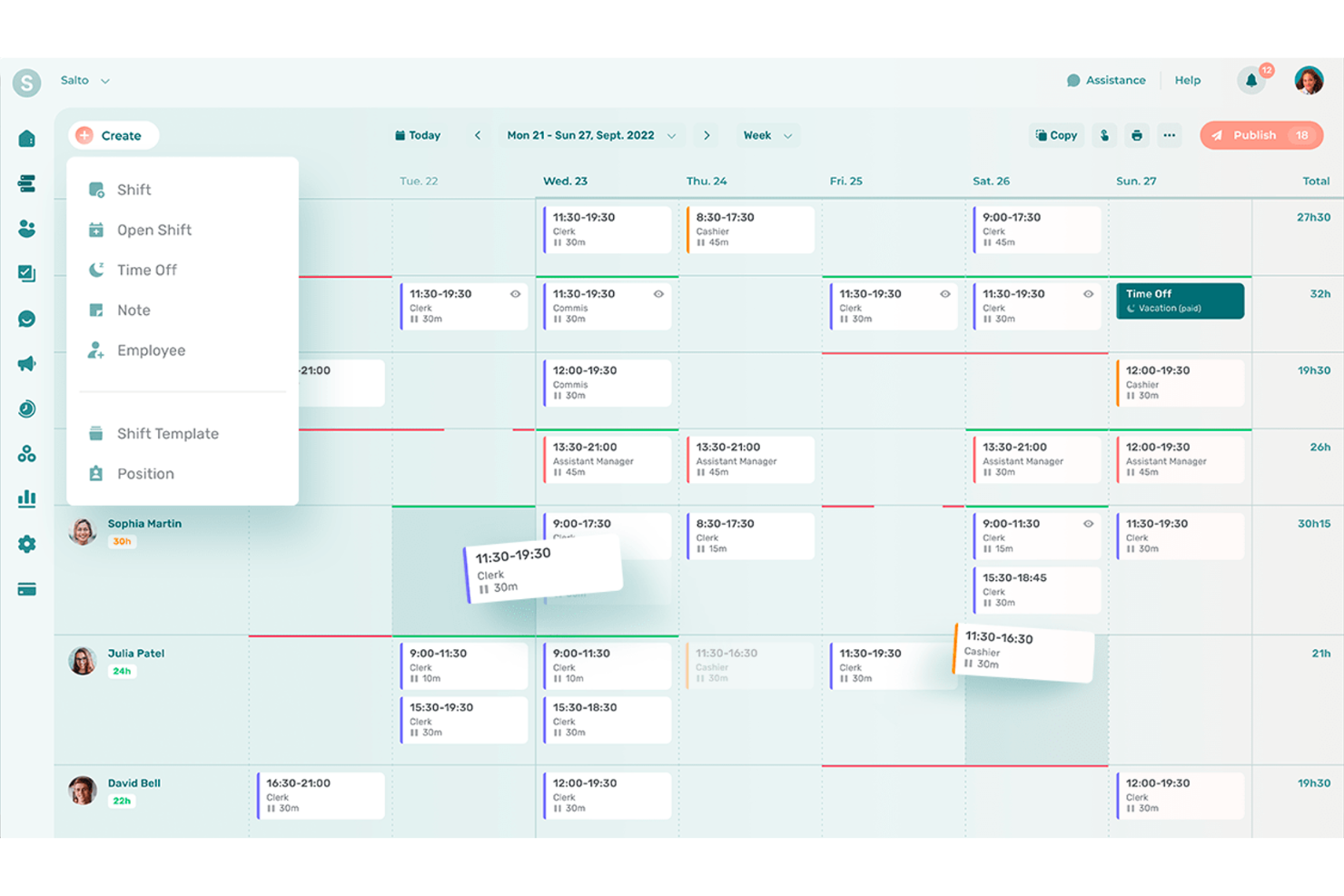
Agendrix è un software di pianificazione progettato per semplificare la gestione del personale nelle aziende dei settori retail, sanitario e dell'ospitalità. Manager e professionisti delle risorse umane lo utilizzano principalmente per gestire la pianificazione dei turni, il monitoraggio delle presenze e la comunicazione con i dipendenti.
Perché è una valida alternativa a Homebase: Agendrix offre efficienza nella programmazione grazie al suo intuitivo creatore di orari e alle funzionalità di scambio turno, aspetti che Homebase non mette in primo piano. La funzione di rilevazione delle presenze consente al team di registrare con precisione le ore lavorate, riducendo gli errori nei salari.
L'app mobile della piattaforma consente ai dipendenti di accedere ai propri turni ovunque si trovino. Queste caratteristiche rendono Agendrix una scelta ideale per le aziende che vogliono migliorare l'efficienza nella pianificazione.
Funzioni principali e integrazioni:
Le funzionalità includono la gestione della disponibilità dei dipendenti per garantire un organico ottimale, la richiesta di giorni liberi per semplificare le approvazioni e promemoria dei turni per ridurre le assenze. Il tuo team può inoltre usufruire di strumenti di analisi che offrono approfondimenti sulla gestione del personale.
Le integrazioni includono QuickBooks, ADP, BambooHR, Xero, Gusto, Paychex, Sage, Workday, Microsoft Teams e Slack.
Pros and Cons
Pros:
- Creatore di orari intuitivo
- Scambio turni efficiente
- Rilevazione orari precisa
Cons:
- Complessità per i team numerosi
- Richiede accesso a Internet

TimeTrex
Ideale per collegare dati orari alle buste paga

Per le aziende che cercano un'alternativa dinamica a Homebase, TimeTrex offre una piattaforma completa per la gestione della forza lavoro, pensata per soddisfare le esigenze di settori diversi. Funziona bene sia per le piccole imprese con personale a ore o remoto, sia per le grandi organizzazioni che necessitano di un monitoraggio preciso delle presenze, automazione delle buste paga e flessibilità multi-sede.
Perché ho scelto TimeTrex
Ho scelto TimeTrex perché il suo motore unificato per la gestione di presenze e buste paga lo rende una soluzione tutto-in-uno valida per sostituire strumenti singoli di pianificazione o di contabilità paghe. Hai rilevazione delle ore lavorate, pianificazione, entrata/uscita dei dipendenti (via web, mobile o riconoscimento biometrico) e poi elaborazione delle buste paga — calcolo di tasse e salari, bonifici bancari o stampa degli assegni — tutto nello stesso sistema. Questa integrazione fa sì che non sia necessario esportare i fogli presenze in uno strumento di buste paga separato o calcolare manualmente le ore, riducendo così gli errori e risparmiando tempo amministrativo.
Caratteristiche principali di TimeTrex
Oltre all'integrazione tra rilevamento orario e gestione buste paga sottolineata sopra, puoi contare anche su:
- Rilevamento orario e timbratura mobile: I dipendenti possono timbrare entrata o uscita da qualsiasi smartphone o tablet, ideale se hai lavoratori remoti, sul campo o con orari flessibili.
- Analisi dei costi di progetto e fatturazione: Assegna manodopera, materiali e spese a specifici progetti o compiti — e genera fatture per i clienti in base al tempo effettivamente lavorato.
- Gestione permessi e assenze: Gestisci permessi, ferie, malattie e recuperi tutto in un unico posto.
- Tracciamento delle spese: Permette al team di gestire e segnalare le spese direttamente dalla piattaforma, semplificando il controllo finanziario.
Integrazioni di TimeTrex
TimeTrex offre integrazione API personalizzata per funzionalità avanzate, consentendo una connessione senza soluzione di continuità ai sistemi già esistenti.
Pros and Cons
Pros:
- Consente ai dipendenti l'autogestione di ferie, orari e fogli presenze
- Supporta timbratura mobile e biometrica, utile per team distribuiti
- Presenze e paghe integrate in un'unica soluzione
Cons:
- Numero limitato di integrazioni native rispetto alle principali piattaforme HR
- Il piano gratuito non include supporto clienti né accesso all'app mobile
New Product Updates from TimeTrex
TimeTrex Adds Quick Punch App With Offline and QR Support
TimeTrex adds a new Quick Punch app, offline punching, QR code scanning, punch images, configurable messages, and punch warnings or lockouts to improve employee clock-ins across browsers and local computers. For more information, visit TimeTrex’s official site.
 .
.
Sloneek
Ideale per il supporto al lavoro da remoto
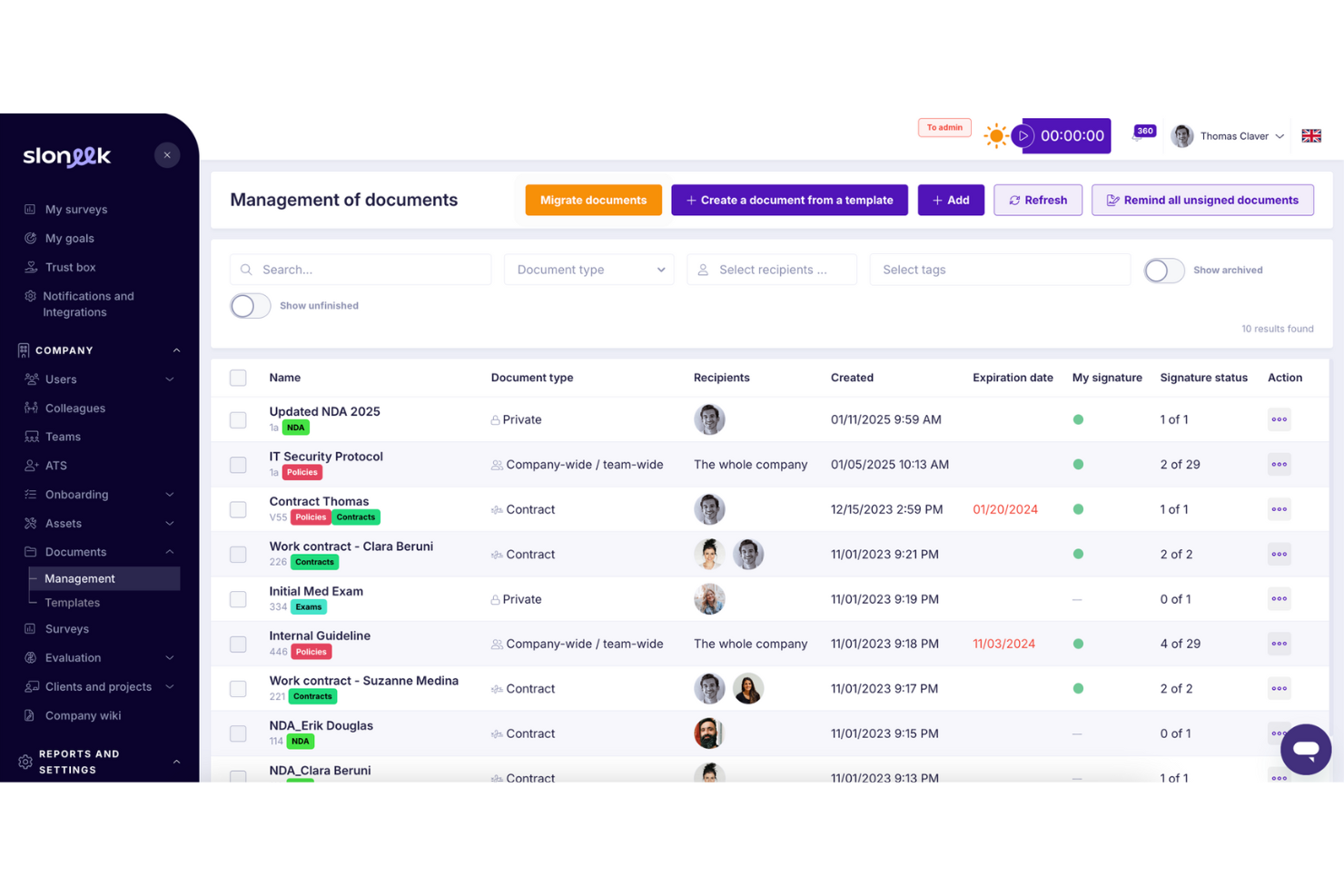
Sloneek è un software di gestione del personale progettato per aiutare le aziende a gestire in modo efficiente i team da remoto. È utilizzato principalmente dai reparti HR e dai manager per gestire attività come la presenza dei dipendenti, l'assegnazione dei compiti e la condivisione dei documenti.
Perché è una buona alternativa a Homebase: Sloneek offre solide funzionalità di supporto al lavoro da remoto che mancano a Homebase. I suoi strumenti di monitoraggio del tempo e gestione delle presenze aiutano il tuo team a rimanere organizzato ed efficiente.
Le capacità di gestione delle attività del software assicurano che i progetti rimangano sulla buona strada, anche lavorando a distanza. Queste caratteristiche lo rendono ideale per le aziende che devono gestire dipendenti remoti in modo efficace.
Caratteristiche principali e integrazioni:
Le funzionalità includono la gestione dei documenti per una facile condivisione e archiviazione, opzioni di self-service per i dipendenti per dare autonomia al team, e report personalizzabili per ottenere informazioni sulle prestazioni del personale. Puoi anche utilizzare il sistema di gestione delle ferie per semplificare le richieste di assenza.
Le integrazioni comprendono Slack, Google Workspace, Microsoft Teams, Zapier, Asana, Trello, Dropbox, OneDrive, BambooHR e Xero.
Pros and Cons
Pros:
- Gestione efficiente delle attività
- Monitoraggio del tempo completo
- Gestione flessibile dei documenti
Cons:
- La configurazione dei report risulta macchinosa
- Gli aggiornamenti delle funzionalità possono essere lenti

Workday
Ideale per soluzioni HR integrate
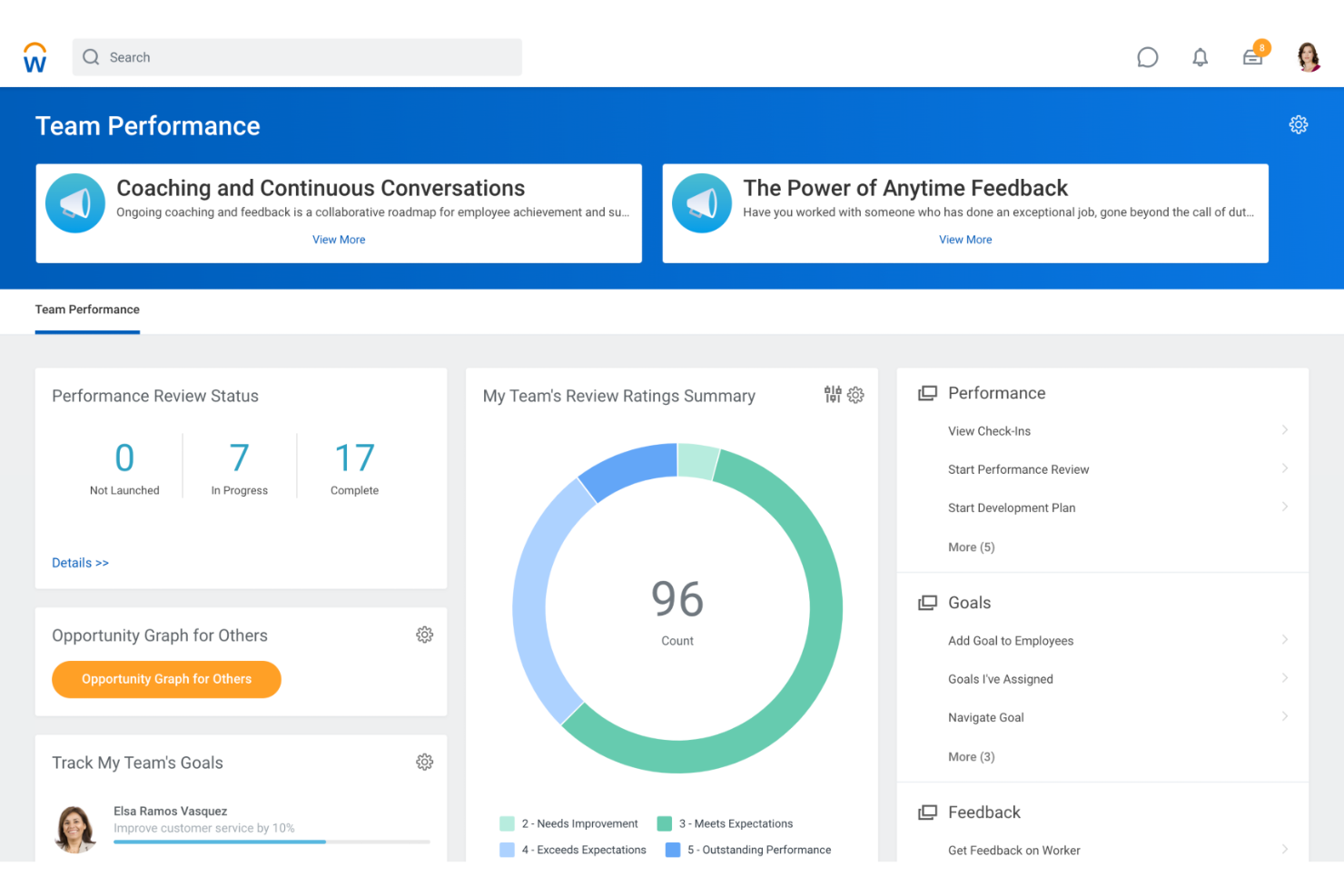
Workday è un software di gestione della forza lavoro progettato per semplificare le operazioni HR e la gestione finanziaria. È utilizzato principalmente da professionisti delle risorse umane e grandi aziende per gestire risorse umane, paghe e amministrazione del personale.
Perché è una buona alternativa a Homebase: Workday offre soluzioni HR integrate che Homebase non include. Le sue funzionalità complete per la gestione dei talenti e delle paghe aiutano il tuo team a gestire efficacemente il ciclo di vita dei dipendenti.
Gli strumenti di analisi della piattaforma forniscono approfondimenti sulle tendenze della forza lavoro, supportando decisioni strategiche. Queste capacità rendono Workday adatto alle imprese che cercano una piattaforma unificata per la gestione di HR e finanza.
Funzionalità principali & integrazioni:
Le funzionalità includono strumenti di reportistica avanzati per analisi dettagliate, pianificazione della forza lavoro per ottimizzare il personale e acquisizione di talenti per snellire i processi di assunzione. Il tuo team può anche beneficiare degli strumenti di gestione delle prestazioni per monitorare e migliorare la performance dei dipendenti.
Le integrazioni includono Salesforce, Microsoft Office 365, Slack, LinkedIn, ADP, ServiceNow, DocuSign, Google Workspace, Oracle e SAP.
Pros and Cons
Pros:
- HR e paghe integrati
- Strumenti di analisi avanzati
- Pianificazione efficiente della forza lavoro
Cons:
- Implementazione complessa e tempi di avvio lunghi
- Prestazioni lente con grandi volumi di dati

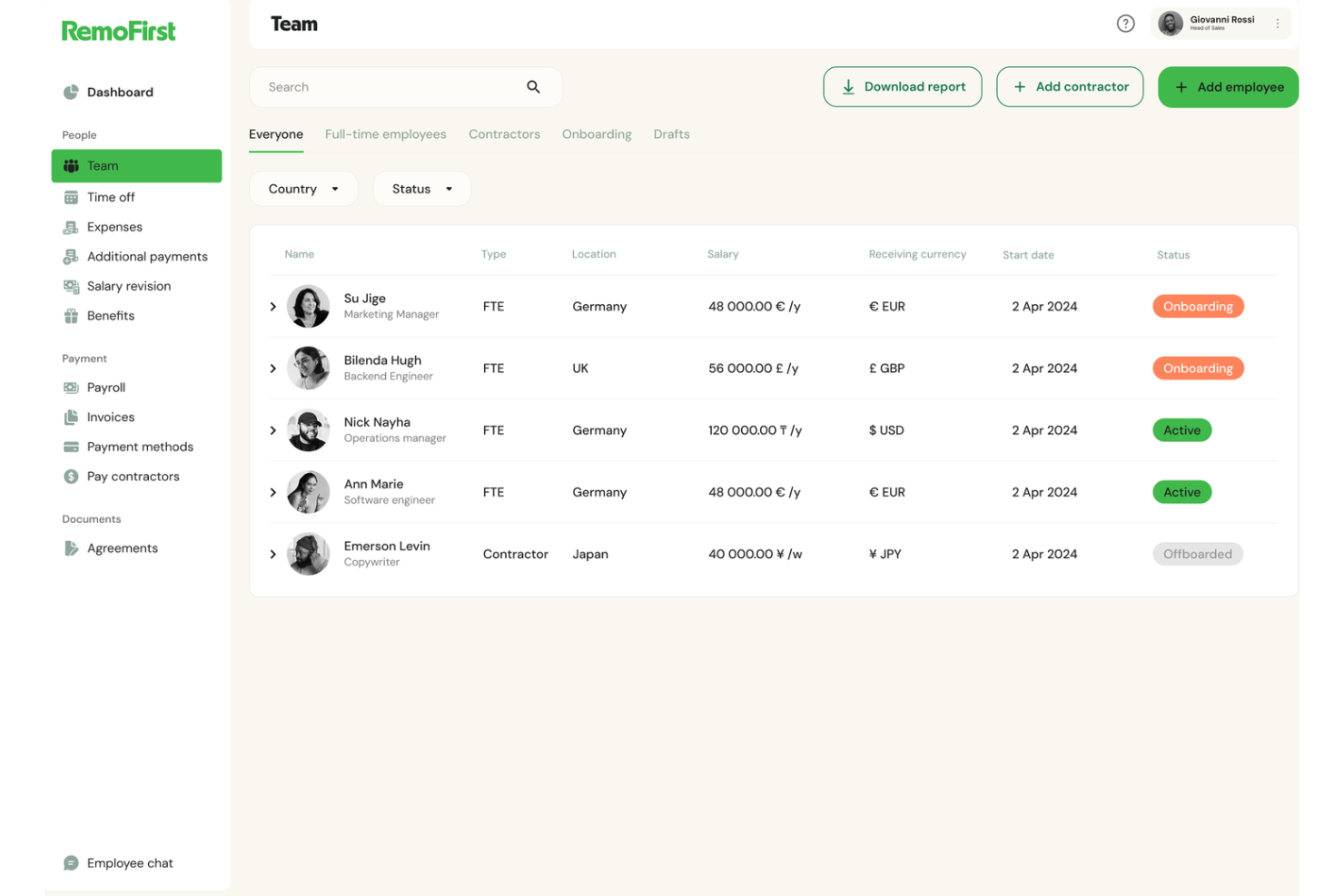
RemoFirst è una piattaforma di gestione della forza lavoro progettata per supportare le aziende nell'assunzione e nella gestione di team remoti in tutto il mondo. È utilizzata principalmente da professionisti HR e recruiter per facilitare l'assunzione internazionale e la conformità normativa.
Perché è una valida alternativa a Homebase: RemoFirst si concentra sull'assunzione globale, offrendo funzionalità come gestione delle buste paga internazionali e conformità normativa, che Homebase non fornisce. L'accesso a un bacino di talenti internazionale ti aiuta a trovare i candidati giusti, indipendentemente dalla loro posizione.
Gli strumenti di conformità della piattaforma garantiscono il rispetto di tutte le normative del lavoro locali, riducendo il rischio di problemi legali. Queste funzionalità la rendono ideale per le aziende che vogliono espandere la propria forza lavoro a livello internazionale.
Funzionalità e integrazioni principali:
Le funzionalità includono onboarding automatizzato per semplificare il processo di assunzione, una dashboard centralizzata per gestire più team e strumenti di gestione della conformità per assicurare l'aderenza alle leggi locali. Puoi anche beneficiare dell'automazione delle buste paga e del supporto per la conformità fiscale.
Le integrazioni includono QuickBooks, Xero, BambooHR, Greenhouse, Lever, Workday, ADP, Gusto, SAP SuccessFactors e Rippling.
Pros and Cons
Pros:
- Capacità di assunzione globale
- Onboarding automatizzato
- Dashboard centralizzata
Cons:
- Opzioni di personalizzazione limitate
- Curva di apprendimento per i nuovi utenti

Rippling
Ideale per automatizzare le attività amministrative
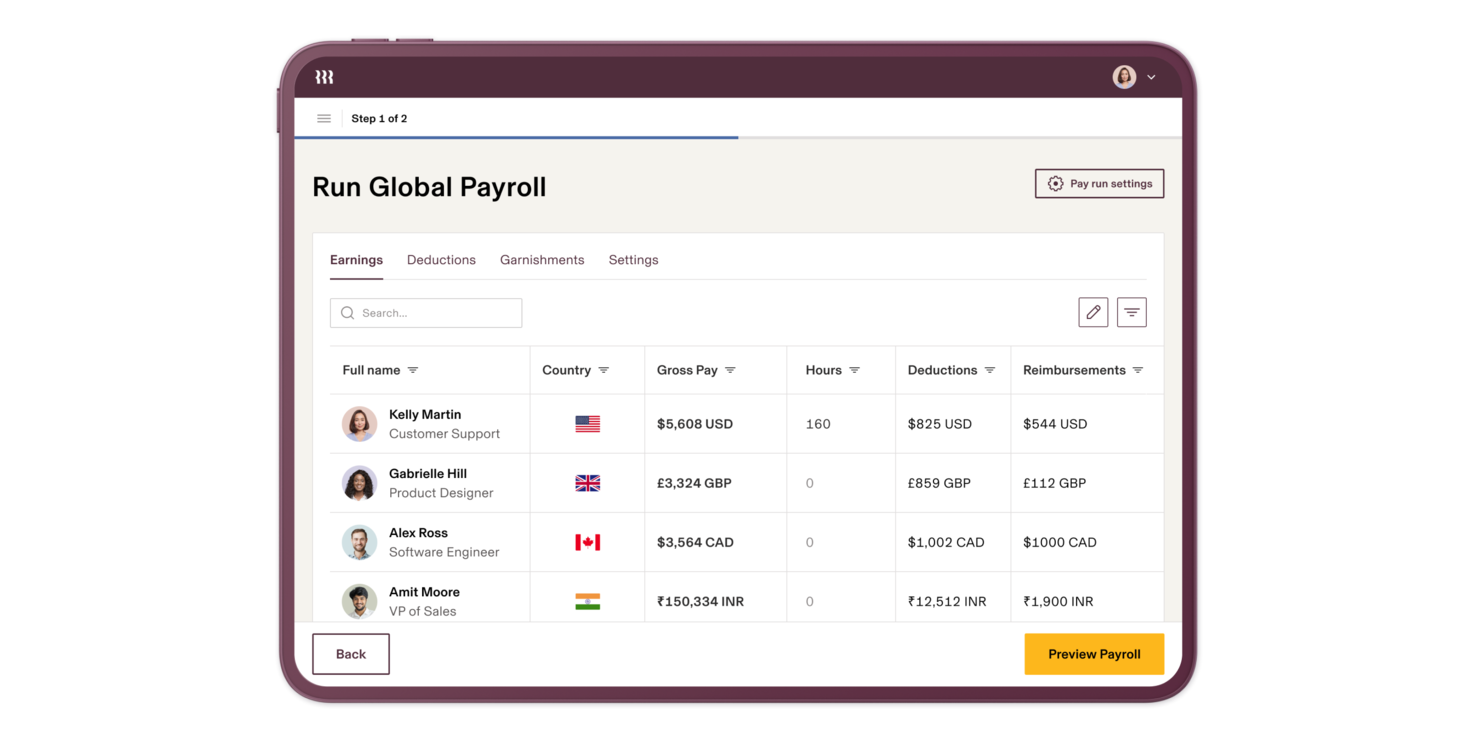
Rippling-Brand si distingue come una soluzione versatile per chi esplora alternative a Homebase, specialmente per le aziende che cercano una piattaforma tutto-in-uno. Progettato per soddisfare una varietà di settori e dimensioni aziendali, Rippling-Brand semplifica i processi complessi integrando gestione delle risorse umane, paghe, IT e finanza in un unico sistema. Questo non solo aiuta a snellire le attività amministrative, ma consente anche ai team di prendere decisioni basate sui dati e gestire le operazioni in modo più efficace.
Perché ho scelto Rippling-Brand
Ho scelto Rippling-Brand come alternativa a Homebase per la sua capacità unica di unificare varie operazioni aziendali in un'unica piattaforma. La sua capacità di automatizzare compiti amministrativi ripetitivi garantisce che il tuo team possa concentrarsi su iniziative più strategiche. Inoltre, il sistema HR globale della piattaforma consente di gestire team diversificati con conformità localizzata, rendendolo un'ottima soluzione per le aziende con una forza lavoro internazionale.
Caratteristiche principali di Rippling-Brand
Oltre alla sua piattaforma unificata, Rippling-Brand offre diverse funzionalità che lo rendono una valida alternativa a Homebase.
- Paghe globali: consente di pagare dipendenti e collaboratori in tutto il mondo da un unico sistema, garantendo precisione e conformità alle leggi locali.
- Gestione IT: offrendo visibilità e controllo totali su identità, dispositivi e inventario, aumenta la sicurezza e l’efficienza operativa.
- Gestione della spesa: permette l’automazione e il controllo delle spese aziendali, riducendo al minimo le spese non autorizzate e migliorando la supervisione finanziaria.
- Analisi avanzata: offre capacità di reportistica personalizzata per stimolare le analisi aziendali e agevolare decisioni informate.
Integrazioni Rippling-Brand
Le integrazioni includono Slack, Google Workspace, Zoom, Asana, Salesforce, Microsoft 365, GitHub, Carta, Jira e Checkr.
Pros and Cons
Pros:
- Paghe globali per collaboratori e dipendenti
- Integrazioni estese con software di terze parti
- L'automazione dei workflow riduce le attività manuali sulle buste paga
Cons:
- Prezzi meno accessibili per piccole agenzie
- Complessità di configurazione per impostazioni avanzate
New Product Updates from Rippling

Rippling AI Adds Plugins, Skills, and Automations
Rippling AI now supports plugins, skills, and automations so employees can connect approved third-party tools, package repeatable work into reusable AI instructions, and run recurring workflows under existing Rippling policies and permissions. For more information, visit Rippling's official site.

Teramind
Ideale per il monitoraggio dei dipendenti

Teramind è un software di monitoraggio progettato per le aziende che desiderano aumentare la sicurezza e la produttività tracciando le attività dei dipendenti. È utilizzato principalmente dai team IT e di sicurezza per monitorare il comportamento degli utenti e prevenire violazioni dei dati.
Perché è una valida alternativa a Homebase: Teramind offre avanzate capacità di monitoraggio dei dipendenti che Homebase non fornisce. La registrazione dello schermo e la registrazione dei tasti consentono di tenere sotto controllo le attività degli utenti e garantire la protezione dei dati.
Le sue analisi comportamentali aiutano a identificare potenziali minacce prima che si trasformino in problemi. Queste caratteristiche lo rendono una scelta eccellente per le aziende focalizzate su sicurezza e conformità.
Funzionalità e integrazioni principali:
Le funzionalità includono la gestione delle policy per impostare regole e avvisi, l’analisi della produttività per valutare le prestazioni dei dipendenti e il controllo remoto del desktop per un intervento diretto. Puoi anche utilizzare il tracciamento dei file e il monitoraggio dei dispositivi USB per proteggere le informazioni sensibili.
Le integrazioni comprendono Microsoft Azure, Google Workspace, Active Directory, Okta, Salesforce, Splunk, IBM QRadar, Dropbox, Box e OneDrive.
Pros and Cons
Pros:
- Strumenti di monitoraggio avanzati
- Avvisi in tempo reale
- Gestione delle policy
Cons:
- Configurazione complessa
- Può essere impegnativo per le risorse

Hubstaff
Ideale per le funzionalità di monitoraggio del tempo
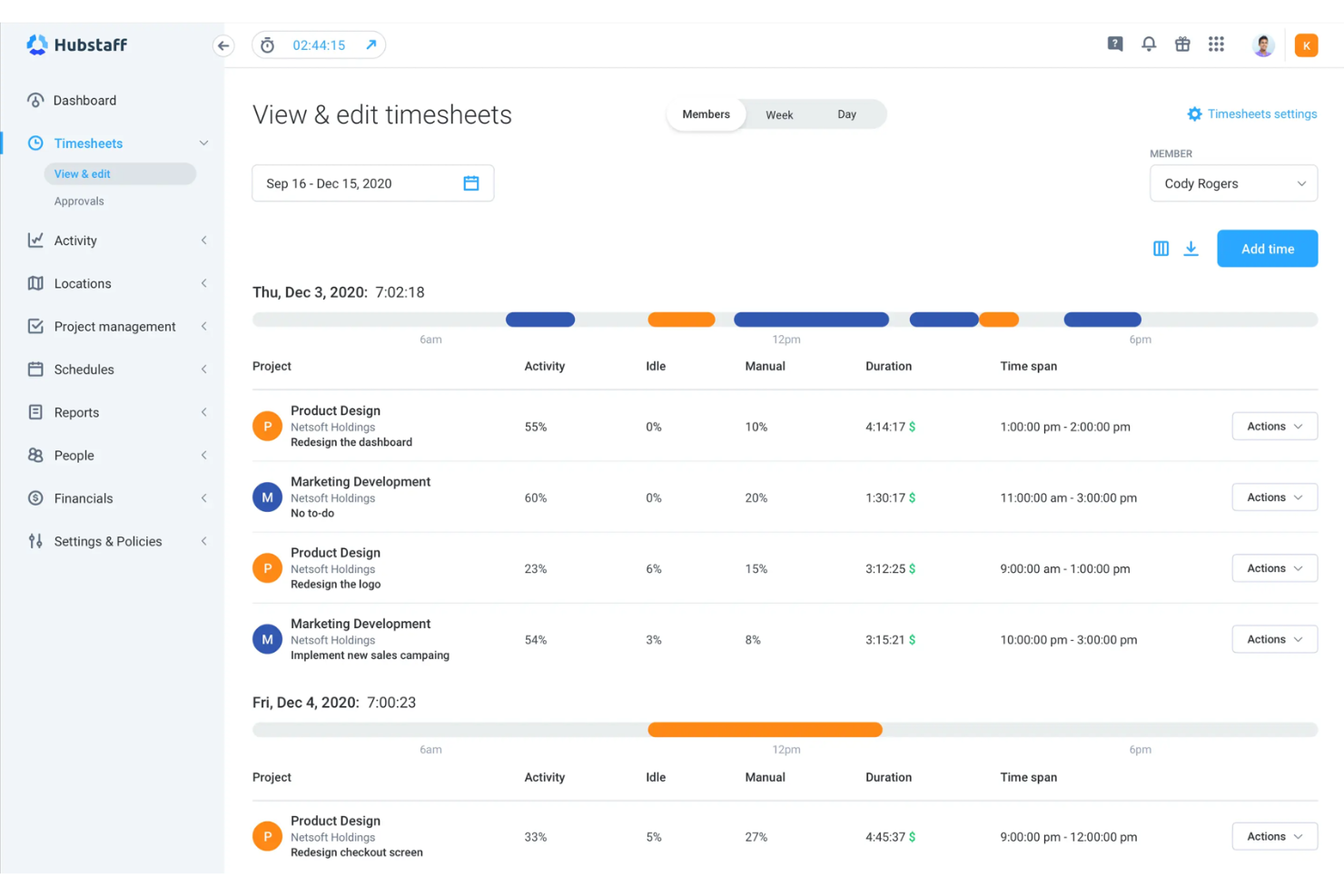
Hubstaff è un software di monitoraggio del tempo progettato per le aziende che desiderano aumentare la produttività e gestire team da remoto. È utilizzato principalmente da manager e responsabili di team per monitorare le ore di lavoro, seguire l'avanzamento dei progetti e gestire le paghe.
Perché è una valida alternativa a Homebase: Hubstaff offre funzionalità avanzate di monitoraggio del tempo che Homebase non fornisce. Le sue capacità di tracciamento GPS e geofencing aiutano il tuo team a gestire il lavoro da remoto in modo efficiente.
Le funzionalità di gestione automatica delle paghe e di fatturazione riducono le attività amministrative, risparmiando tempo e fatica. Questi strumenti rendono Hubstaff una scelta eccellente per le aziende che necessitano di una gestione precisa del tempo e delle paghe.
Funzionalità e integrazioni principali:
Le funzionalità includono monitoraggio della produttività per valutare le prestazioni del team, fogli presenze online per una registrazione accurata e budgeting dei progetti per tenere sotto controllo le spese. Il tuo team può anche beneficiare del tracciamento di app e URL.
Le integrazioni includono QuickBooks, Asana, Trello, Jira, PayPal, Xero, Zapier, Salesforce, FreshBooks e Basecamp.
Pros and Cons
Pros:
- Tracciamento GPS
- Paghe automatiche
- Monitoraggio della produttività
Cons:
- L'app mobile non dispone di alcune funzionalità
- La modifica delle voci di tempo risulta macchinosa
Altre alternative a Homebase
Ecco alcune ulteriori alternative a Homebase che non sono entrate nel mio elenco, ma che vale comunque la pena valutare:
- Workforce.com
Ideale per la previsione del fabbisogno di personale
- Rotageek
Ideale per la pianificazione dei turni con intelligenza artificiale
- Parim
Ideale per strumenti di pianificazione dei turni
- Veriato
Ideale per la gestione dei rischi interni
- Aeqium
Ideale per la pianificazione della retribuzione


Come valuto le alternative a Homebase
Divido la mia valutazione in requisiti di base, come la pianificazione dei turni, i sistemi di rilevazione delle presenze e la sincronizzazione delle buste paga, e gli elementi distintivi che separano una soluzione adatta da quella giusta per le squadre con lavoratori pagati a ore nei ristoranti, nel commercio al dettaglio e nelle aziende di servizi.
Funzionalità fondamentali (requisiti essenziali per questo elenco)
Quando seleziono gli strumenti per il mio elenco, assegno a ciascuno un punteggio su una scala da 0 (non offre la funzionalità) a 5 (eccelle in quest'area) per ogni funzionalità fondamentale elencata di seguito. Poi converto il punteggio totale dello strumento in una percentuale. Ogni strumento deve raggiungere un punteggio totale minimo del 65% per essere preso in considerazione.
- Pianificazione dei dipendenti: verifico se ogni strumento supporta la creazione dei turni tramite trascinamento, i modelli per le settimane ricorrenti e la disponibilità dei dipendenti, ad esempio la gestione dei turni a rotazione FOH/BOH in più sedi.
- Rilevazione delle presenze e del tempo: ogni piattaforma dovrebbe offrire la timbratura digitale in entrata e in uscita da dispositivi mobili o tablet, con registrazione delle pause e approvazione dei fogli presenze, così i responsabili non devono inseguire i cartellini cartacei.
- Comunicazione della squadra: cerco funzionalità di messaggistica integrate e collegate direttamente al calendario dei turni, che consentano al personale di coordinare gli scambi di turno o ai responsabili di inviare aggiornamenti dell'ultimo minuto senza ricorrere alle chat di gruppo personali.
- Integrazione o gestione delle buste paga: indipendentemente dal fatto che uno strumento gestisca le buste paga in modo nativo o sincronizzi i fogli presenze con fornitori come Gusto, ADP o QuickBooks, valuto quanto correttamente le ore e le retribuzioni confluiscano nei cicli di pagamento.
- Monitoraggio del costo del lavoro: la visibilità in tempo reale sui costi del lavoro pianificati è importante, soprattutto per i responsabili di ristoranti e negozi che devono confrontare la spesa salariale con la copertura necessaria prima dell'inizio della settimana.
- Strumenti per assunzioni e inserimento: cerco il monitoraggio dei candidati, le lettere di offerta digitali e le liste di controllo per l'inserimento, che consentano ai nuovi assunti di inviare i moduli fiscali e le conferme di presa visione delle politiche aziendali prima del loro primo turno.
Una volta ottenuto un elenco di strumenti che soddisfano questo criterio, considero ciò che distingue ciascuna piattaforma.
Fattori distintivi (ciò che differenzia i fornitori)
Ecco come confronto e metto in contrapposizione i diversi fornitori:
Funzionalità distintive
L'automazione della conformità normativa è un importante elemento distintivo: cerco strumenti che segnalino i rischi legati agli straordinari, le violazioni delle normative sulle pause e le limitazioni sul lavoro minorile prima che creino responsabilità legali. Anche l'integrazione con i sistemi POS è importante per le squadre della ristorazione e del commercio al dettaglio, dove la sincronizzazione dei dati sulle vendite con i turni aiuta responsabili e personale a soddisfare la domanda effettiva. L'accesso anticipato alla retribuzione è diventato un concreto strumento di fidelizzazione per i lavoratori pagati a ore, mentre gli strumenti di gestione delle mance che gestiscono la condivisione e la distribuzione fanno risparmiare ai responsabili ore di lavoro manuale a ogni ciclo di pagamento.
Oltre le funzionalità
L'adattamento al settore è uno dei primi aspetti che valuto: uno strumento progettato per i ristoranti, con modelli FOH/BOH, sarà molto diverso da uno pensato per la copertura dei reparti di vendita al dettaglio o per i servizi a domicilio. Considero anche l'ecosistema delle integrazioni, in particolare la connettività con i fornitori di servizi per le buste paga e con i sistemi POS su cui le squadre con lavoratori pagati a ore fanno già affidamento. Anche il prezzo e la scalabilità sono importanti, poiché molti acquirenti sono piccole imprese che hanno bisogno di un punto di accesso gratuito o economico, con la possibilità di aggiungere sedi o funzionalità senza dover cambiare completamente piattaforma.
Perché cercare un'alternativa a Homebase?
Sebbene Homebase sia una buona scelta per la gestione della forza lavoro, ci sono diversi motivi per cui alcuni utenti cercano soluzioni alternative. Potresti cercare un'alternativa a Homebase perché…
- Hai bisogno di migliori funzionalità di integrazione
- Il tuo team necessita di strumenti avanzati per la reportistica
- Gestisci una forza lavoro numerosa e distribuita
- Hai bisogno di conformità alle leggi internazionali
- Desideri più opzioni di personalizzazione
Se ti riconosci in una di queste situazioni, sei nel posto giusto. Il mio elenco include diverse opzioni di software per la gestione della forza lavoro più adatte ai team che affrontano queste difficoltà con Homebase e cercano soluzioni alternative.
Caratteristiche
Ecco alcune delle caratteristiche principali di Homebase, che ti aiuteranno a confrontare ciò che offrono le soluzioni alternative:
- Pianificazione intuitiva: semplifica la gestione dei turni con funzionalità di trascinamento e rilascio e consente al tuo team di scambiare facilmente i turni.
- Monitoraggio delle ore: tiene traccia con precisione delle ore dei dipendenti per garantire calcoli accurati delle buste paga e gestire gli straordinari.
- App mobile: consente a manager e dipendenti di visualizzare i turni, timbrare entrata e uscita e comunicare ovunque si trovino.
- Comunicazioni con i dipendenti: gli strumenti di messaggistica integrati aiutano a mantenere il team informato e connesso sugli aggiornamenti dei turni.
- Inserimento e cessazione dei dipendenti: ottimizza i processi con flussi di lavoro e modelli personalizzabili per le assunzioni e le cessazioni.
- Gestione delle assenze: gestisce i permessi retribuiti (PTO), i congedi per malattia e altre richieste di assenza tramite un'interfaccia facile da usare.
- Portale self-service per i dipendenti: consente ai dipendenti di aggiornare le informazioni personali, visualizzare i turni e inviare richieste di assenza, riducendo il carico di lavoro amministrativo delle risorse umane.
- Strumenti per la gestione delle prestazioni: monitorano le prestazioni dei dipendenti con verbali delle riunioni, modelli di ordine del giorno e funzionalità di monitoraggio dei progressi.