

10 Migliori Software di Gestione delle Risorse Umane Recensiti nel 2026

10 Migliori Software di Gestione Risorse Umane - Shortlist


Gestire le attività HR può essere davvero stressante, vero? Tra l'elaborazione delle buste paga, il monitoraggio delle presenze e la conformità normativa, ci si può facilmente sentire sopraffatti. Ed è proprio qui che entra in gioco il software per la gestione delle risorse umane: ti aiuta a gestire tutto in modo efficiente, lasciandoti più tempo da dedicare al tuo team.
Ho passato molto tempo a testare e recensire i software HR e ho visto personalmente quanto possano semplificare il lavoro quotidiano. Voglio condividere con te le mie scoperte, offrendoti uno sguardo imparziale sulle migliori soluzioni disponibili.
In questo articolo ti guiderò tra le mie soluzioni preferite, evidenziando ciò che rende unico ogni software. Che tu abbia una piccola azienda o una grande impresa, qui troverai sicuramente qualcosa di adatto alle tue esigenze.
Perché fidarsi delle nostre recensioni sui software
Il nostro team testa e recensisce software dal 2012. In quanto esperti HR noi stessi, sappiamo quanto sia difficile — e importante — scegliere il software giusto.
Per questa guida, abbiamo valutato gli strumenti attraverso test pratici e ricerche indipendenti, assegnando un punteggio agli strumenti in base ai nostri criteri di selezione. Ci basiamo inoltre sulle competenze di leader di pensiero del settore e di professionisti HR attivi.
Le nostre recensioni riflettono il nostro giudizio editoriale umano, non un discorso di vendita.
Revisori esperti:
Riepilogo Migliori Software di Gestione Risorse Umane
Questa tabella comparativa riassume i dettagli sui prezzi delle mie migliori scelte di software per la gestione HR per aiutarti a trovare quello più adatto al tuo budget e alle esigenze della tua azienda.
| Tool | Best For | Trial Info | Price | ||
|---|---|---|---|---|---|
| 1 | Miglior software di gestione delle risorse umane con funzioni IT integrate | Demo gratuita disponibile | Da $8/dipendente/mese | Website | |
| 2 | Ideale per la gestione dei benefit | Demo gratuita disponibile | Da $599/dipendente/mese | Website | |
| 3 | Ideale per la gestione HR a livello globale | Demo gratuita disponibile | A partire da $5/dipendente/mese | Website | |
| 4 | Ideale per la gestione delle ferie | Demo gratuita disponibile | Da $8/utente/mese | Website | |
| 5 | Ideale per l'integrazione buste paga-HR | Demo gratuita disponibile | Da $49/mese + $6/mese per persona | Website | |
| 6 | Ideale per l'integrazione con il sistema paghe | Demo gratuita disponibile | Prezzo su richiesta | Website | |
| 7 | Ideale per piccole e medie imprese | Prova gratuita + demo gratuita | Prezzo su richiesta | Website | |
| 8 | Ideale per l’onboarding di nuovi assunti | Demo gratuita disponibile | Prezzi su richiesta | Website | |
| 9 | Ideale per esigenze HR in crescita | Demo gratuita disponibile | Prezzo su richiesta | Website | |
| 10 | Ideale per il flusso HRIS-performance integrato | Demo gratuita disponibile | Prezzo su richiesta | Website |


Recensioni Migliori Software di Gestione Risorse Umane
Di seguito trovi le mie recensioni dettagliate dei migliori software HR inclusi nella mia shortlist. Le mie recensioni offrono una panoramica su funzionalità chiave, pro e contro, integrazioni e casi d’uso ideali di ciascun tool per aiutarti a individuare quello giusto per te.

Rippling
Miglior software di gestione delle risorse umane con funzioni IT integrate
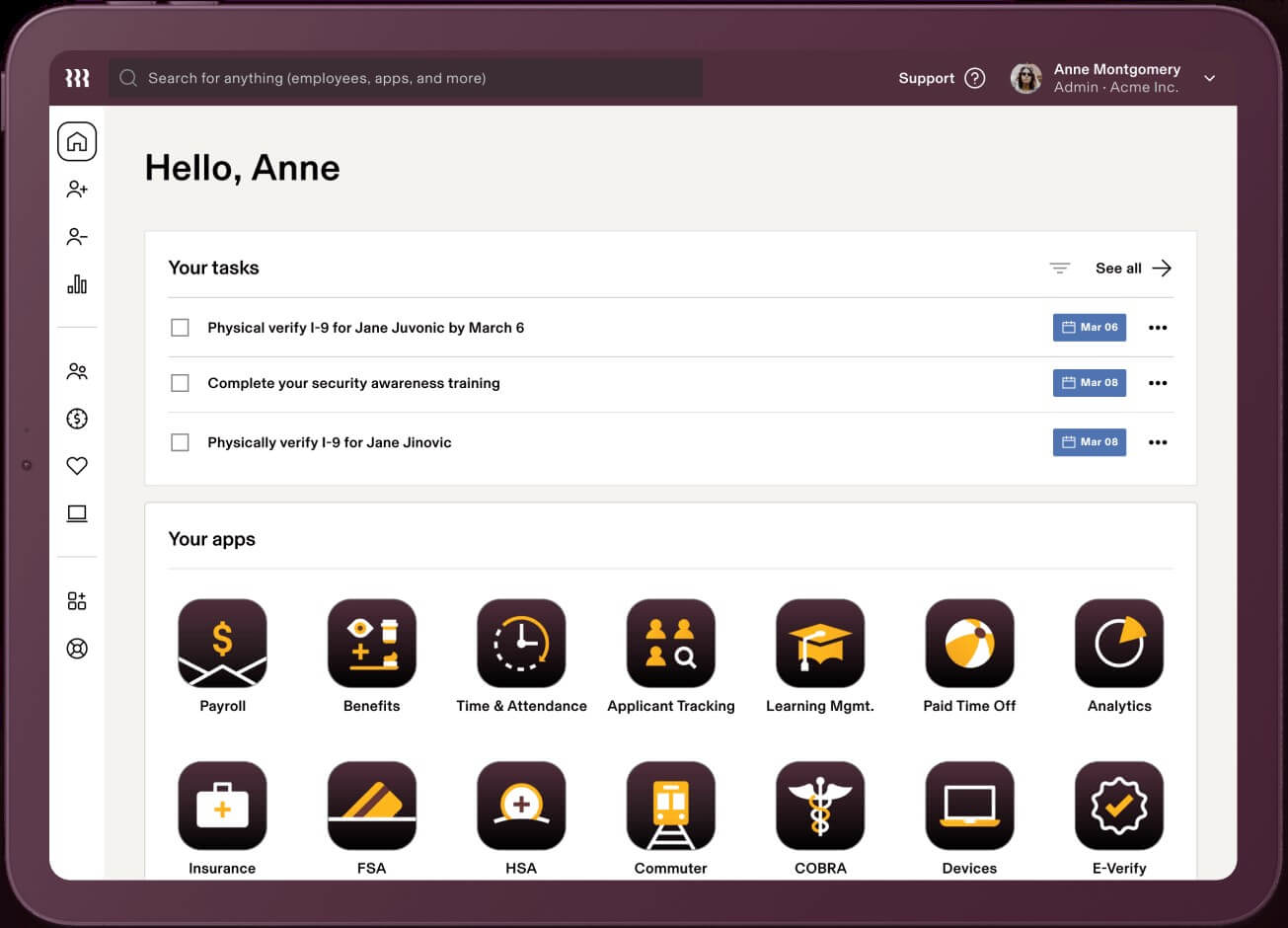
Rippling è un sistema di gestione delle risorse umane basato su cloud che funge da fonte unica di verità per i dati dei dipendenti, offrendo numerose automazioni per ridurre il lavoro manuale.
Perché ho scelto Rippling: Il software di gestione delle risorse umane è disponibile in tre diversi pacchetti: Workforce Platform, HR Cloud e IT Cloud. Tutti e tre i prodotti funzionano in modo integrato oppure possono essere acquistati separatamente, a seconda delle esigenze dell'azienda. Grazie alle loro avanzate funzionalità IT e globali, questo software è ideale per supportare una forza lavoro distribuita.
Funzionalità e integrazioni principali di Rippling:
La loro Workforce Platform offre solide automazioni dei flussi di lavoro e strumenti per il miglioramento dei processi nella gestione del personale, inclusi strumenti per l'onboarding e l'offboarding e l'approvazione dei documenti tramite firma elettronica.
L'HR Cloud comprende una suite di moduli flessibili per le principali attività di HR, tra cui un software per l'elaborazione delle buste paga completo di rilevamento delle presenze e gestione dei benefit, con sincronizzazione automatica dei dati sulla busta paga per aumentare la produttività e la precisione. Offrono anche servizi di organizzazione professionale per i datori di lavoro (PEO) dedicati alle aziende interessate all'assunzione di talenti internazionali, inclusi piani di benefit internazionali, monitoraggio della conformità e gestione delle retribuzioni a livello globale.
Sempre all'interno di HR Cloud, il modulo per il talent management e il recruiting consente la pubblicazione di offerte di lavoro su più portali con un solo clic, un sistema di gestione dei candidati per organizzare le candidature e la pianificazione automatica dei colloqui grazie all'integrazione con i calendari. A completamento, l’HR Cloud include anche un sistema di gestione dell'apprendimento (LMS) flessibile con oltre 1.000 corsi preconfigurati e strumenti per crearne di nuovi, oltre ad automazioni per assegnare, ricordare e tracciare il completamento dei corsi.
Infine, la loro proposta IT Cloud li distingue realmente dagli altri tradizionali sistemi HRIS. Comprende funzionalità avanzate per la gestione dei dispositivi e dell’inventario per monitorare, aggiornare, bloccare e resettare dispositivi, gestire le minacce alla sicurezza e organizzare software (inclusi acquisto di app e hardware) per i nuovi assunti. Inoltre, offrono strumenti per la gestione delle app e delle identità, inclusa la gestione delle password, la gestione del ciclo di vita dei software, l’assegnazione e la revoca delle licenze software, autenticazione multifattore e servizi di single sign-on.
Integrazioni disponibili con oltre 500 sistemi software di terze parti tramite il loro App Shop. Se necessario, è possibile configurare anche integrazioni personalizzate tramite la loro API.
Dispongono inoltre di due app mobili: “Rippling - Time Clock” per la timbratura degli ingressi/uscite e “Rippling - Simplify HR & IT” per visualizzare le buste paga, gestire ferie e permessi, accedere alla directory dei dipendenti e gestire password e app.
New Product Updates from Rippling

Rippling AI Adds Plugins, Skills, and Automations
Rippling AI now supports plugins, skills, and automations so employees can connect approved third-party tools, package repeatable work into reusable AI instructions, and run recurring workflows under existing Rippling policies and permissions. For more information, visit Rippling's official site.

Ideale per la gestione dei benefit
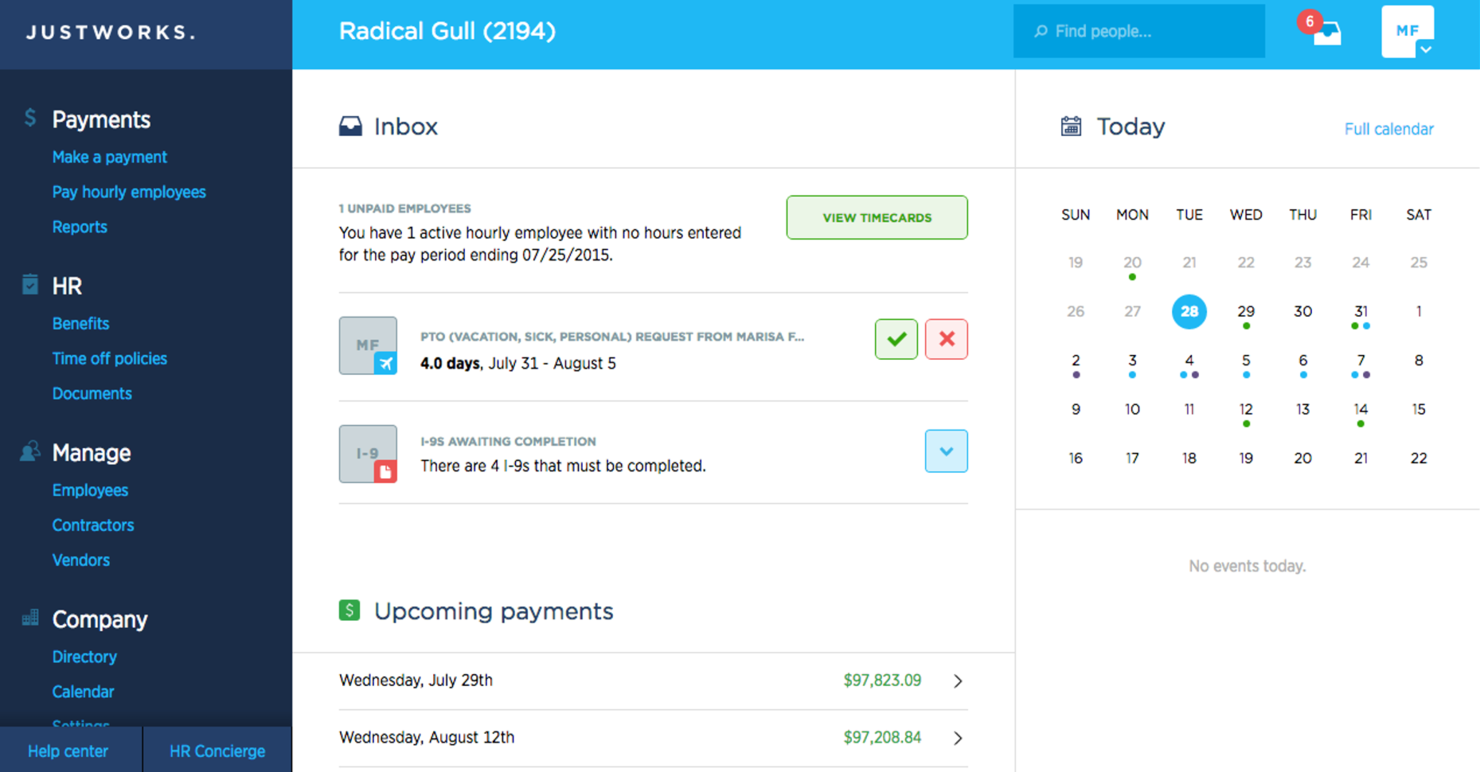
Justworks è una piattaforma HR e payroll progettata per piccole e medie imprese, che offre soluzioni per la gestione dei benefit, la conformità normativa e le paghe. Ti aiuta a gestire i benefit dei dipendenti e a garantire la conformità con le normative.
Perché ho scelto Justworks: Justworks eccelle nella gestione dei benefit, offrendo accesso diretto ad assicurazioni sanitarie, piani 401(k) e altri vantaggi. Puoi gestire la conformità con facilità, grazie agli strumenti e alle risorse integrate.
Il software gestisce il payroll e la presentazione delle tasse, assicurando che le tue finanze siano in ordine. Offre anche supporto per l'onboarding dei dipendenti, facilitando l'integrazione dei nuovi assunti nel tuo team.
Funzionalità principali e integrazioni:
Funzionalità includono gestione automatizzata delle paghe, supporto per la conformità e self-service per i dipendenti. Queste funzionalità permettono al tuo team di gestire le attività HR in modo efficiente. Justworks offre assistenza 24/7, assicurando supporto costante quando necessario.
Integrazioni includono QuickBooks, Xero, Slack, Expensify, TSheets, Google Workspace, Microsoft Teams, BambooHR, Gusto e ADP.
Pros and Cons
Pros:
- Ottima gestione dei benefit
- Assistenza clienti 24/7
- Facile onboarding dei dipendenti
Cons:
- Alcune funzionalità da migliorare
- Occasionali malfunzionamenti del software

Deel HR
Ideale per la gestione HR a livello globale
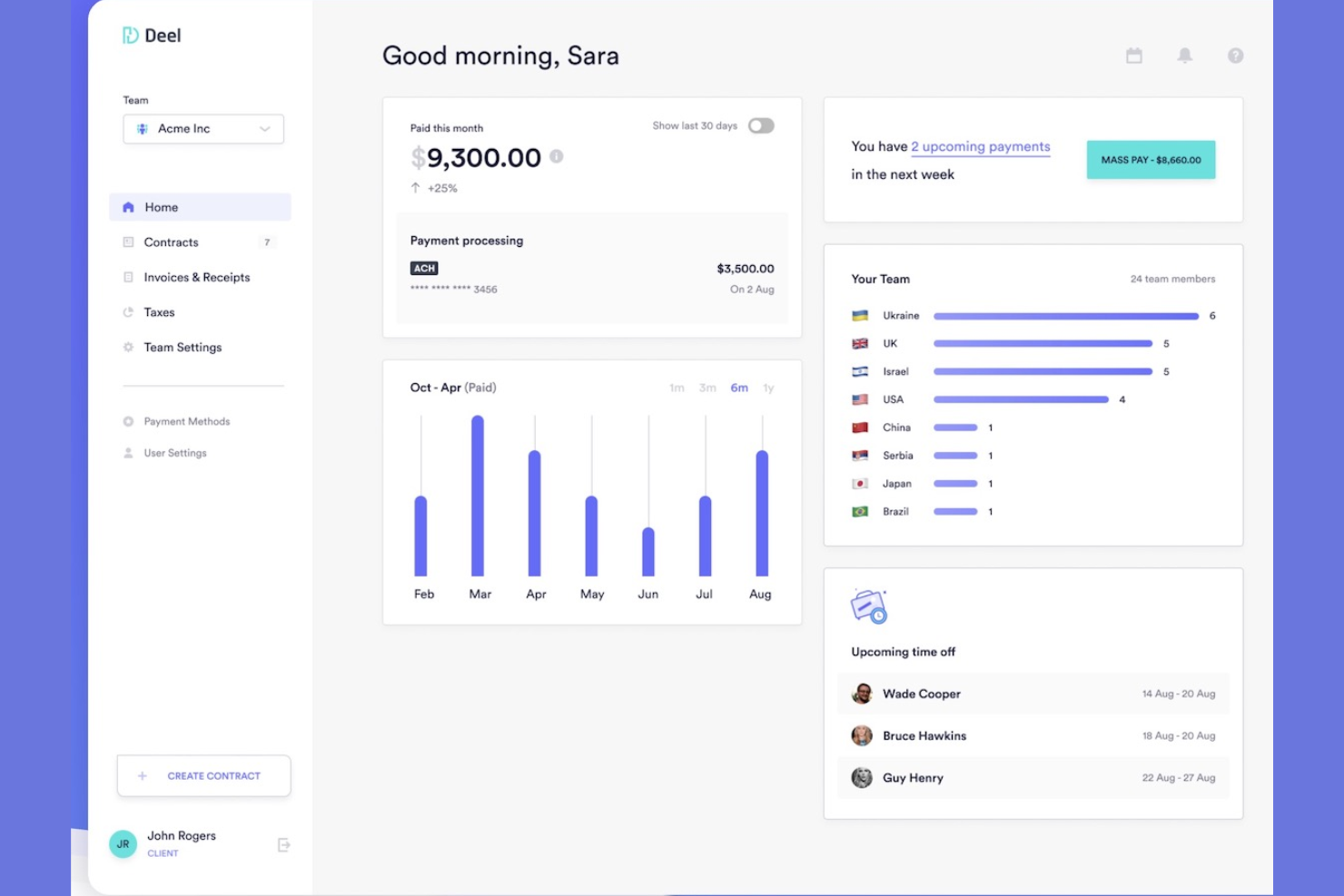
Deel è progettato per le aziende che assumono in più paesi e necessitano di un'unica piattaforma affidabile per la gestione globale delle paghe, della conformità e dell'amministrazione HR. È particolarmente utile per i team che gestiscono dipendenti distribuiti o collaboratori esterni e desiderano centralizzare onboarding, pagamenti e documentazione.
Perché ho scelto Deel
Ho scelto Deel perché permette di gestire HR, paghe e conformità in oltre 150 paesi attraverso un unico sistema, senza dover coordinare fornitori locali. Si possono gestire le ferie, monitorare la documentazione delle performance e automatizzare l'onboarding attraverso workflow strutturati che garantiscono che ogni assunzione rispetti i requisiti locali.
Apprezzo anche la possibilità di offrire pacchetti di benefit localizzati e gestire le policy di compensazione globale direttamente sulla piattaforma. Il motore paghe conforme di Deel si occupa automaticamente di tasse, buste paga e pagamenti ai collaboratori, riducendo il carico amministrativo.
Funzionalità principali di Deel
Ecco alcune funzionalità principali da evidenziare:
- Generazione fatture: Crea fatture e pagamenti conformi per i collaboratori da un'unica dashboard.
- Gestione fiscale e della conformità: Applica automaticamente regole fiscali e obblighi dichiarativi specifici per ciascun paese.
- Gestione buste paga: Genera buste paga localizzate e a norma di legge per ogni assunzione.
- Integrazioni contabili: Sincronizza paghe e pagamenti dei collaboratori direttamente con i tuoi sistemi finanziari.
Integrazioni Deel
Le integrazioni includono BambooHR, Ashby, Expensify, Greenhouse, Hibob, Netsuite, Okta, OneLogin, QuickBooks, Xero, Workday e Workable.
Pros and Cons
Pros:
- Supporta HR e paghe conformi in oltre 150 paesi
- Gestione dei benefit localizzati per team globali
- Workflow di onboarding automatizzati con documentazione richiesta
Cons:
- Alcuni strumenti HR (come la performance) meno avanzati
- Personalizzazione limitata in alcune regioni
New Product Updates from Deel HR

Deel Expands Stablecoin Wallet to 80+ Countries
Deel expands its Stablecoin Wallet to 80+ countries with dollar-backed balances and optional rewards. This gives eligible contractors more ways to hold and manage earnings inside Deel. For more information, visit Deel’s official site.
 .
.
Ideale per la gestione delle ferie
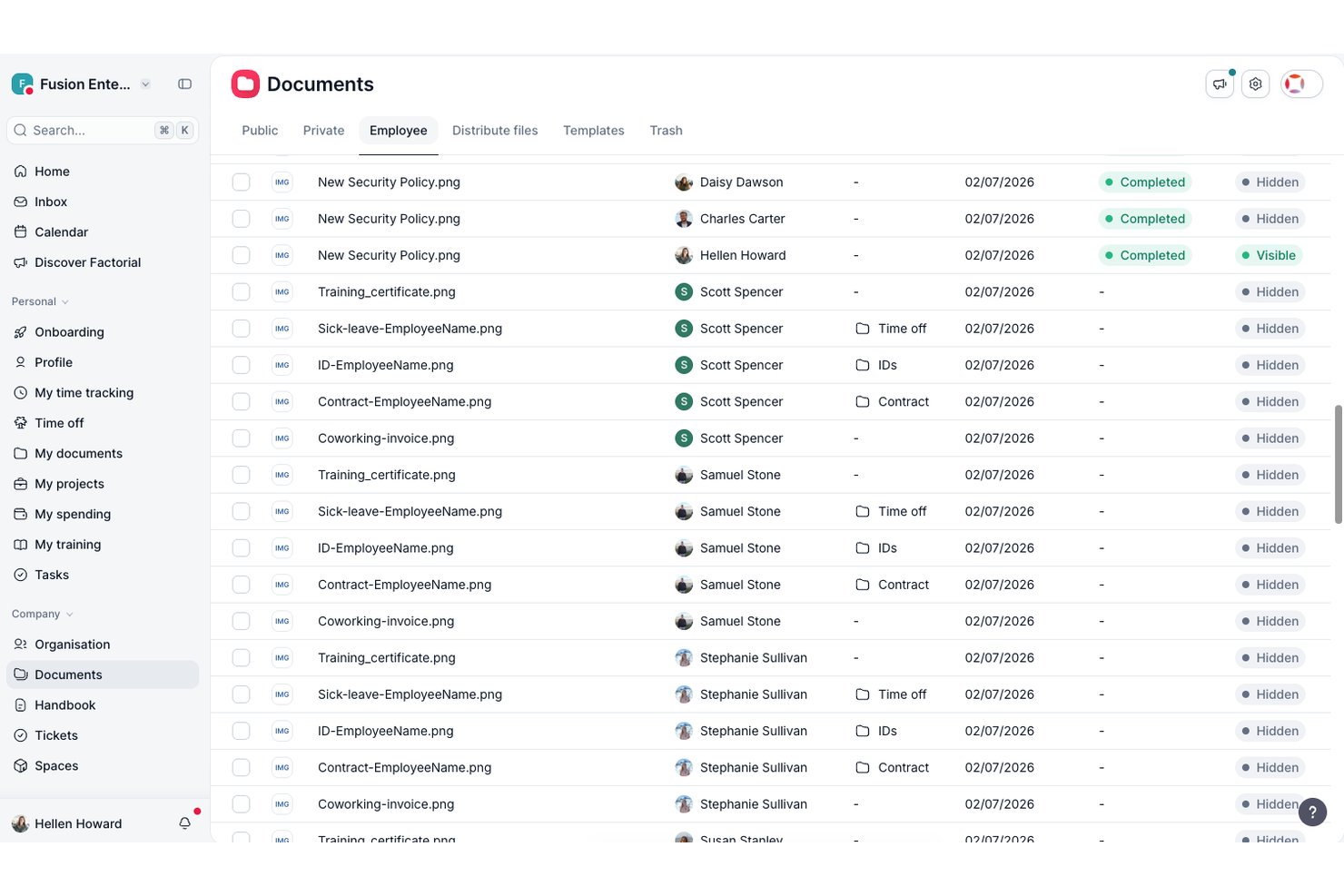
Factorial è un software per la gestione delle risorse umane progettato per le piccole e medie imprese. Si concentra sulla semplificazione delle attività HR, tra cui la gestione delle ferie, la gestione dei dati dei dipendenti e l'elaborazione delle buste paga.
Perché ho scelto Factorial: Factorial eccelle nella gestione delle ferie, offrendo un modo semplice per gestire le richieste di assenza dei dipendenti. Offre funzionalità come il monitoraggio automatizzato delle ferie e politiche personalizzate per le assenze, adattabili alle esigenze specifiche del tuo team.
Puoi approvare o rifiutare facilmente le richieste e tenere traccia di tutte le assenze dei dipendenti in un unico posto. Factorial fornisce inoltre informazioni sulle tendenze relative alle ferie, aiutandoti a gestire le risorse in modo efficace.
Funzionalità e integrazioni principali:
Le funzionalità includono valutazioni delle prestazioni, gestione dei documenti e report personalizzabili. Queste funzionalità ti consentono di valutare le prestazioni dei dipendenti e gestire efficacemente i documenti HR. Le funzionalità di reportistica di Factorial offrono informazioni preziose sui tuoi processi HR.
Le integrazioni includono Slack, Google Calendar, Microsoft Outlook, BambooHR, Zapier, QuickBooks, Xero, Sage, LinkedIn e Indeed.
Pros and Cons
Pros:
- Gestione efficace delle ferie
- Politiche per le ferie personalizzabili
- Analisi dettagliate delle ferie
Cons:
- Richiede conoscenze tecniche per la personalizzazione
- Alcune funzionalità devono essere perfezionate

Gusto
Ideale per l'integrazione buste paga-HR
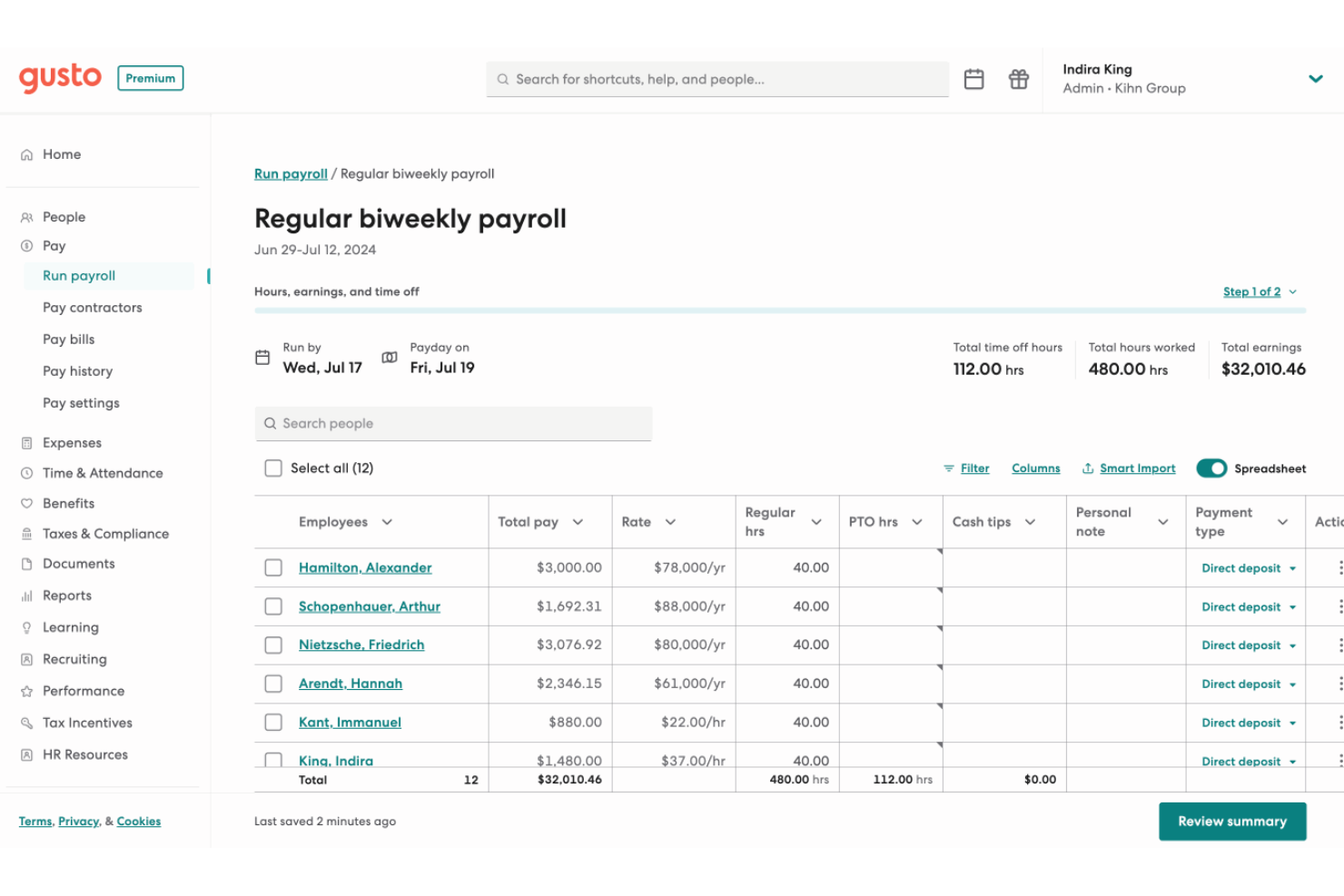
Gusto offre un'esperienza pulita e tutto-in-uno per la gestione delle buste paga e delle risorse umane che ti consente di gestire buste paga, benefit e dati dei dipendenti in un unico posto — ideale se vuoi semplificare assunzioni, onboarding e pagamenti senza dover usare più strumenti. È particolarmente adatto a piccole e medie imprese, startup e altri team che potrebbero non avere un reparto HR dedicato ma che hanno comunque bisogno di un supporto affidabile per buste paga, benefit e conformità.
Perché ho scelto Gusto
Ho scelto Gusto perché combina le funzioni di buste paga, benefit e HR in un'unica piattaforma, il che significa che il tuo team non ha bisogno di sistemi separati per paga e HR — ottieni versamenti diretti, dichiarazioni fiscali e gestione delle detrazioni per i benefit tutto sotto lo stesso tetto. Il sistema di buste paga automatizzato di Gusto assicura che tutti i calcoli e le dichiarazioni vengano gestiti con precisione, riducendo il rischio di errori. Inoltre, la sua gestione completa dei benefit consente di offrire piani salute e pensione in modo fluido, allineandosi agli obiettivi aziendali. Queste caratteristiche rendono Gusto una scelta ideale per le imprese che desiderano migliorare i propri processi HR.
Funzionalità principali di Gusto
Oltre alla gestione delle buste paga e dei benefit, Gusto offre altre funzionalità preziose:
- Gestione presenze e orari: Gestisci le ore lavorate dai dipendenti e le richieste di permessi con facilità, assicurando registrazioni accurate.
- Assunzioni e onboarding: Semplifica il processo di inserimento con strumenti per creare lettere di offerta e gestire i documenti dei nuovi assunti.
- Gestione dei talenti: Effettua valutazioni delle prestazioni e monitora lo sviluppo dei dipendenti per promuovere un ambiente di lavoro produttivo.
- Analisi e reportistica: Accedi a report guidati dai dati per prendere decisioni informate sulla tua forza lavoro e sulle strategie aziendali.
Integrazioni di Gusto
Le integrazioni includono QuickBooks, Xero, FreshBooks, Clover, TSheets, Trainual, Deputy, Expensify, Homebase e When I Work.
Pros and Cons
Pros:
- Buste paga, benefit e HR riuniti in un'unica piattaforma.
- Dichiarazioni fiscali automatiche e versamenti diretti semplificano la conformità retributiva.
- Il portale self-service permette allo staff di accedere a stipendio e moduli in autonomia.
Cons:
- Il costo per persona può diventare elevato man mano che il team cresce.
- Le PMI che necessitano di moduli HR avanzati per la conformità o settori di nicchia possono trovare Gusto limitato.
New Product Updates from Gusto
Gusto Adds Solo Advisory Tools and Mobile Money Features
Gusto adds Solo S-Corp Advisory Tools and Gusto Money on Mobile for tax guidance, invoicing, and bill payments. These updates help accountants advise solopreneurs and let users manage business finances from their phones. For more information, visit Gusto’s official site.

Ideale per l'integrazione con il sistema paghe
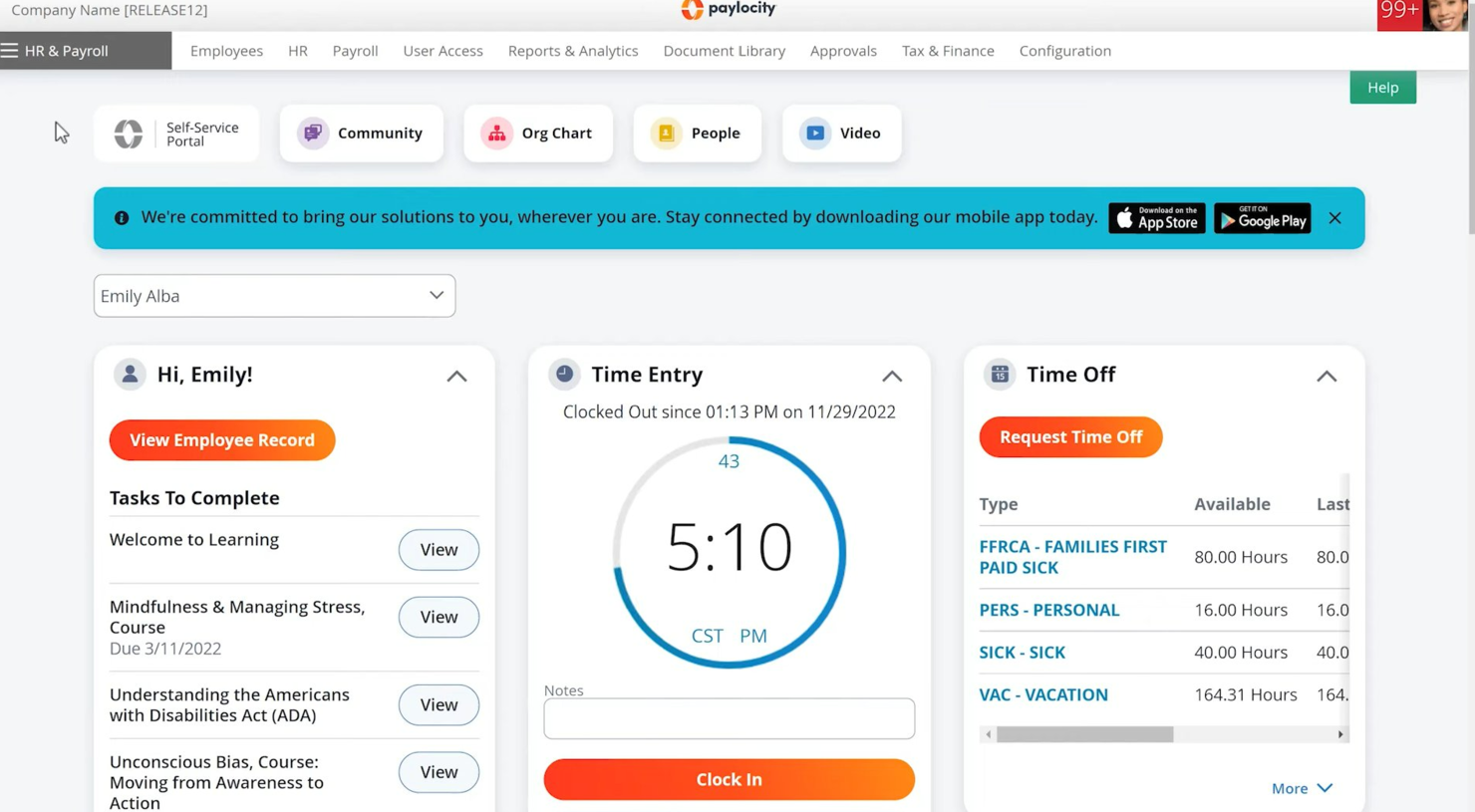
Paylocity è una piattaforma per la gestione delle risorse umane e delle paghe progettata per aziende di tutte le dimensioni. Offre elaborazione delle paghe, amministrazione dei benefit e soluzioni per la gestione dei dipendenti.
Perché ho scelto Paylocity: La potente integrazione con il sistema paghe di Paylocity è una caratteristica chiave, che lo rende ideale se hai bisogno di una soluzione affidabile per la gestione delle buste paga. Offre elaborazione automatizzata delle paghe e gestione delle dichiarazioni fiscali, semplificando la gestione finanziaria.
Il software offre anche opzioni di self-service per i dipendenti, riducendo il carico amministrativo sul tuo team HR. Puoi gestire i benefit e monitorare le performance dei dipendenti tutto in un unico luogo.
Funzionalità principali & integrazioni:
Funzionalità includono un sistema di gestione dell'apprendimento, strumenti per i sondaggi e valutazioni delle performance. Queste funzionalità ti aiutano a sviluppare e coinvolgere efficacemente la tua forza lavoro. Gli strumenti per i sondaggi di Paylocity permettono di raccogliere preziosi feedback dai dipendenti.
Integrazioni includono QuickBooks, ADP, Workday, Salesforce, Microsoft Dynamics, BambooHR, Xero, NetSuite, Oracle e G Suite.
Pros and Cons
Pros:
- Gestione automatica delle dichiarazioni fiscali
- Opzioni di self-service per i dipendenti
- Sistema di gestione dell'apprendimento
Cons:
- Problemi tecnici occasionali
- Accesso offline limitato
New Product Updates from Paylocity

Paylocity Expands Expense and Purchase Request Tools
Paylocity adds connected personal cards, smarter expense categorization, and a streamlined purchase request experience. This reduces manual entry and helps finance teams manage expenses and approvals more efficiently. For more information, visit Paylocity’s official site.
 .
.
Ideale per piccole e medie imprese
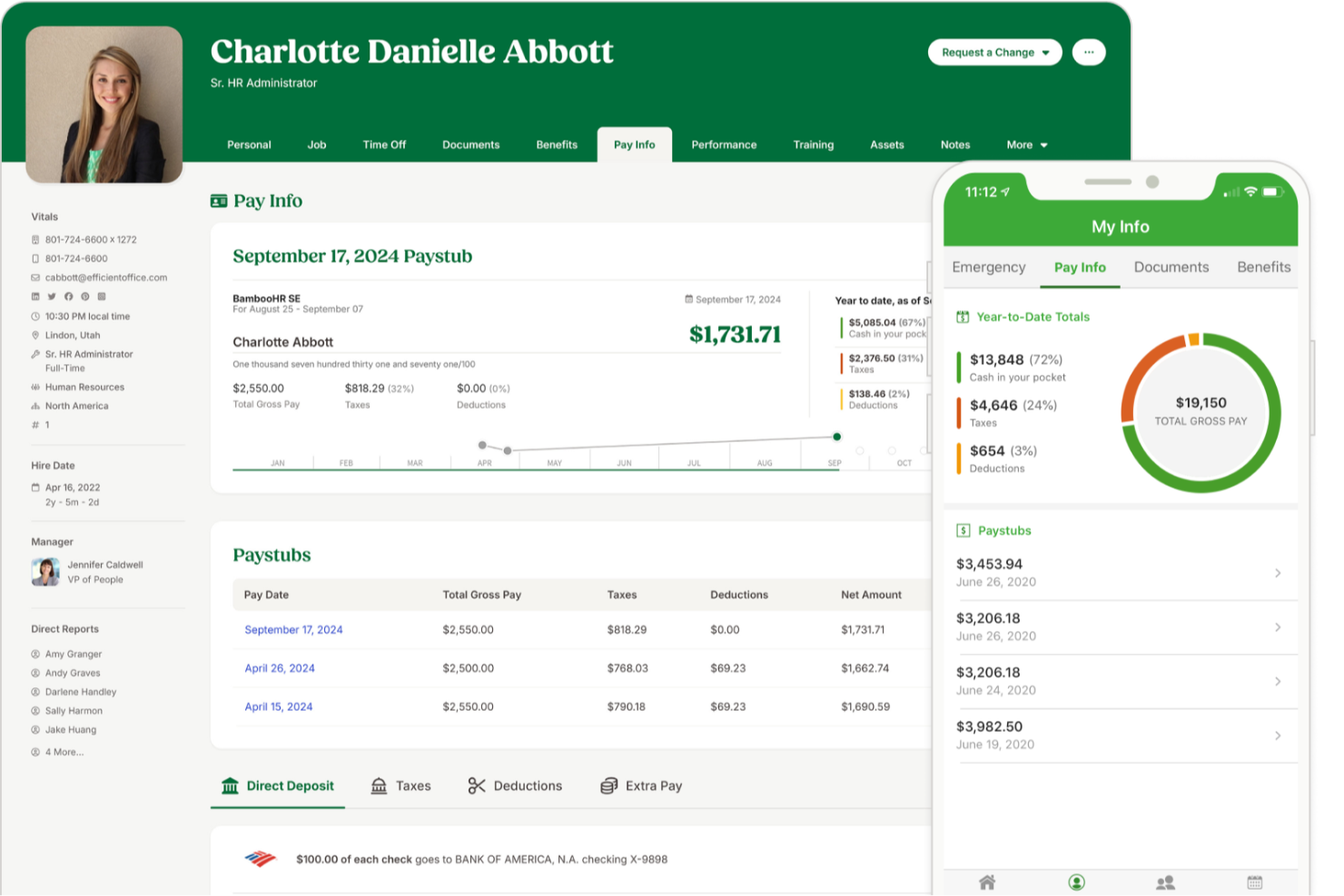
BambooHR è adatto per aziende di piccole e medie dimensioni che desiderano un unico luogo per gestire i dati dei dipendenti, semplificare le attività HR quotidiane e offrire al personale un facile accesso self-service. È particolarmente utile per i team che vogliono maggiore visibilità sul sentiment dei dipendenti, flussi di onboarding più efficaci e strumenti mobile-friendly che i dipendenti utilizzeranno davvero.
Perché ho scelto BambooHR
Ho scelto BambooHR perché offre al tuo team un sistema centralizzato per i registri dipendenti, la gestione delle assenze, l’assunzione e l’onboarding senza aggiungere lavoro amministrativo extra. I suoi strumenti self-service permettono ai dipendenti di richiedere permessi, aggiornare i propri dati e accedere agli organigrammi o alle directory tramite l’app mobile, riducendo il carico di lavoro quotidiano del tuo team.
Apprezzo anche i suoi strumenti di coinvolgimento inclusi, che combinano sondaggi eNPS, check-in sul benessere e analisi del sentiment per aiutarti a capire meglio come sta andando la tua forza lavoro. Per le assunzioni, il suo sistema ATS compila automaticamente i modelli di offerte con dettagli di candidati e posizione e supporta le firme elettroniche per accelerare le procedure. Inoltre, grazie alla sincronizzazione dei dati tra tutte le funzioni, eviti le doppie registrazioni e mantieni tutte le informazioni dei dipendenti aggiornate e coerenti.
Funzionalità principali di BambooHR
Ecco alcune funzionalità principali da evidenziare:
- Sondaggi sul Benessere dei Dipendenti: Raccogli feedback anonimi tramite check-in ricorrenti e risposte a testo libero.
- App Mobile per i Dipendenti: Gestisci permessi, visualizza calendari, completa le attività di onboarding e firma documenti da iOS o Android.
- Template di Onboarding Personalizzabili: Crea elenchi di attività di pre-boarding e onboarding adattabili per ruolo, dipartimento o sede.
- Modulo aggiuntivo per la Rilevazione Ore: Traccia le ore, approva i timesheet e sincronizza i dati direttamente in busta paga quando attivo.
Integrazioni di BambooHR
Le integrazioni includono Slack, Microsoft Teams, Google Workspace, Indeed, Checkr, Greenhouse, Okta, OneLogin, NetSuite e Trainual.
Pros and Cons
Pros:
- Potenti strumenti eNPS e di sentiment migliorano l’analisi dell’engagement
- Template di pre-boarding riducono i tempi di inserimento dei nuovi assunti
- App mobile per i dipendenti supporta permessi, documenti e comunicazioni
Cons:
- Payroll è un modulo aggiuntivo
- Personalizzazione limitata in alcuni flussi HR
New Product Updates from BambooHR®

BambooHR Adds Enrollment Waivers and Plan Year Continuity
BambooHR adds automatic enrollment waivers and plan year continuity for Benefits Administration. These updates help admins handle missed deadlines and prepare benefit renewals with less manual work. For more information, visit BambooHR’s official site.
 .
.
HiBob
Ideale per l’onboarding di nuovi assunti
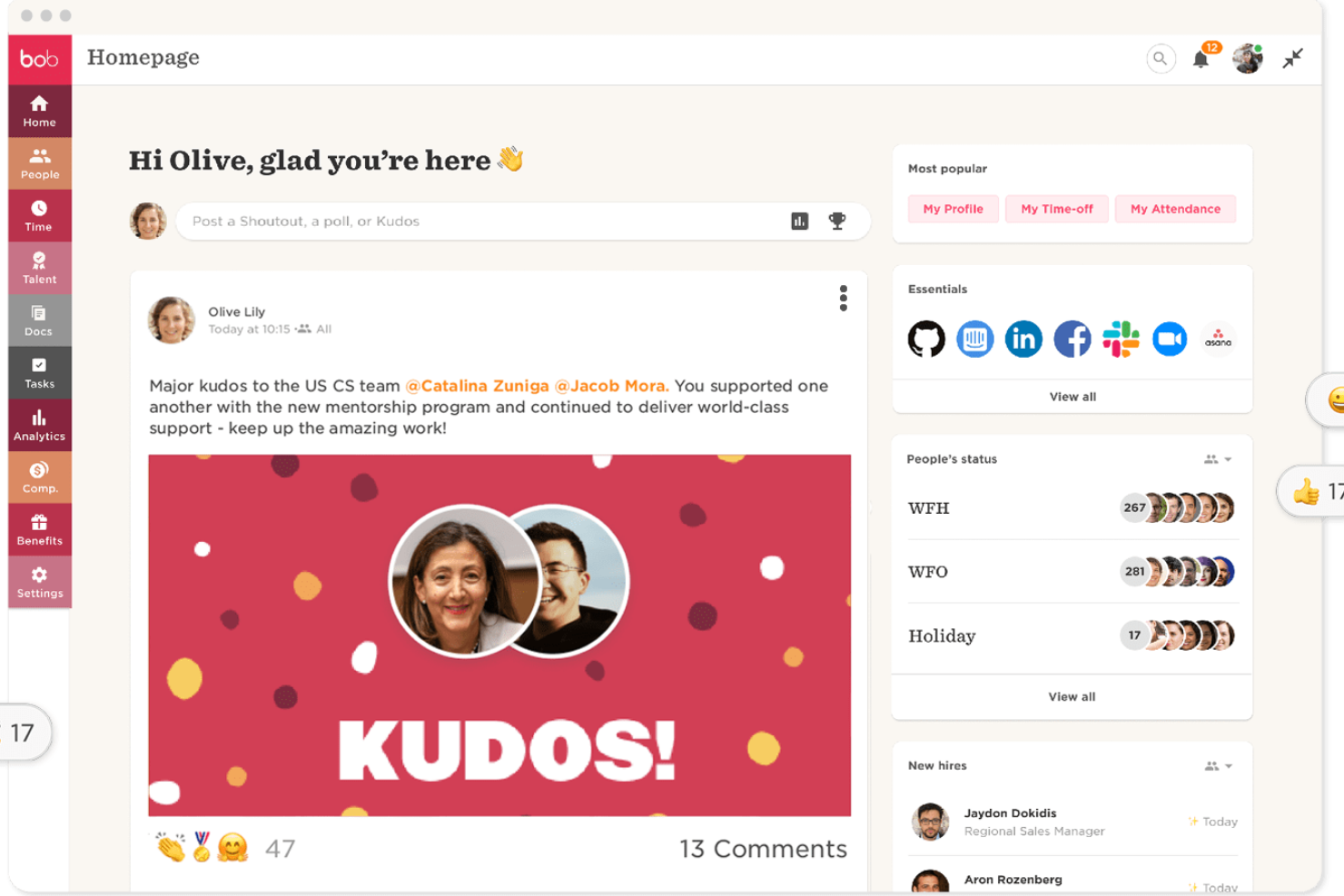
HiBob è pensato per le aziende che desiderano un modo moderno e orientato alle persone per gestire le principali attività HR. È particolarmente adatto a team di medie dimensioni e in rapida crescita che hanno bisogno di flussi di onboarding chiari, strumenti affidabili per la valutazione delle prestazioni e un unico luogo dove mantenere i dati dei dipendenti.
Perché ho scelto HiBob
Ho scelto HiBob perché offre strumenti pratici per supportare l’intero ciclo di vita del dipendente senza aggiungere complicazioni amministrative. Puoi integrare i nuovi assunti con passaggi guidati che aiutano il tuo team a definire aspettative, assegnare compiti e monitorare i progressi dal primo giorno.
Le funzionalità di definizione degli obiettivi e recensioni aiutano a collegare le prestazioni individuali agli obiettivi aziendali, offrendo ai manager una struttura chiara. Mi piace inoltre che HiBob includa strumenti per la pianificazione della retribuzione, permettendo di confrontare dati salariali e gestire gli aumenti in un unico posto. Le sue analisi integrate sulle persone offrono vere informazioni sulla forza lavoro che puoi usare per prendere decisioni HR consapevoli.
Funzionalità principali di HiBob
Ecco alcune caratteristiche chiave da evidenziare:
- Payroll Hub: Centralizza i dati delle buste paga e si collega ai principali provider per una gestione coerente.
- Monitoraggio presenze e orari: Consente ai dipendenti di registrare le ore e inviare richieste di ferie, offrendo ai manager una supervisione chiara.
- Flussi di lavoro personalizzabili: Aiuta ad automatizzare ricorrenti attività HR come approvazioni, promemoria e conferme di policy.
- Strumenti per il coinvolgimento dei dipendenti: Permette riconoscimenti, aggiornamenti e sondaggi per aiutare il team a rimanere connesso.
Integrazioni HiBob
Le integrazioni includono Slack, Microsoft Teams, Zoom, LinkedIn Learning, Deel, CloudPay, Culture Amp, Capdesk, ClickTime e NetSuite.
Pros and Cons
Pros:
- I flussi di onboarding guidati riducono il lavoro amministrativo per i manager
- Gli strumenti di definizione degli obiettivi aiutano ad allineare i team agli obiettivi aziendali
- La modellizzazione delle retribuzioni supporta decisioni eque e coerenti sulla paga
Cons:
- Alcune funzionalità richiedono componenti aggiuntivi a seconda del piano
- L’impostazione dei report può richiedere tempo per i nuovi amministratori

Paycor
Ideale per esigenze HR in crescita
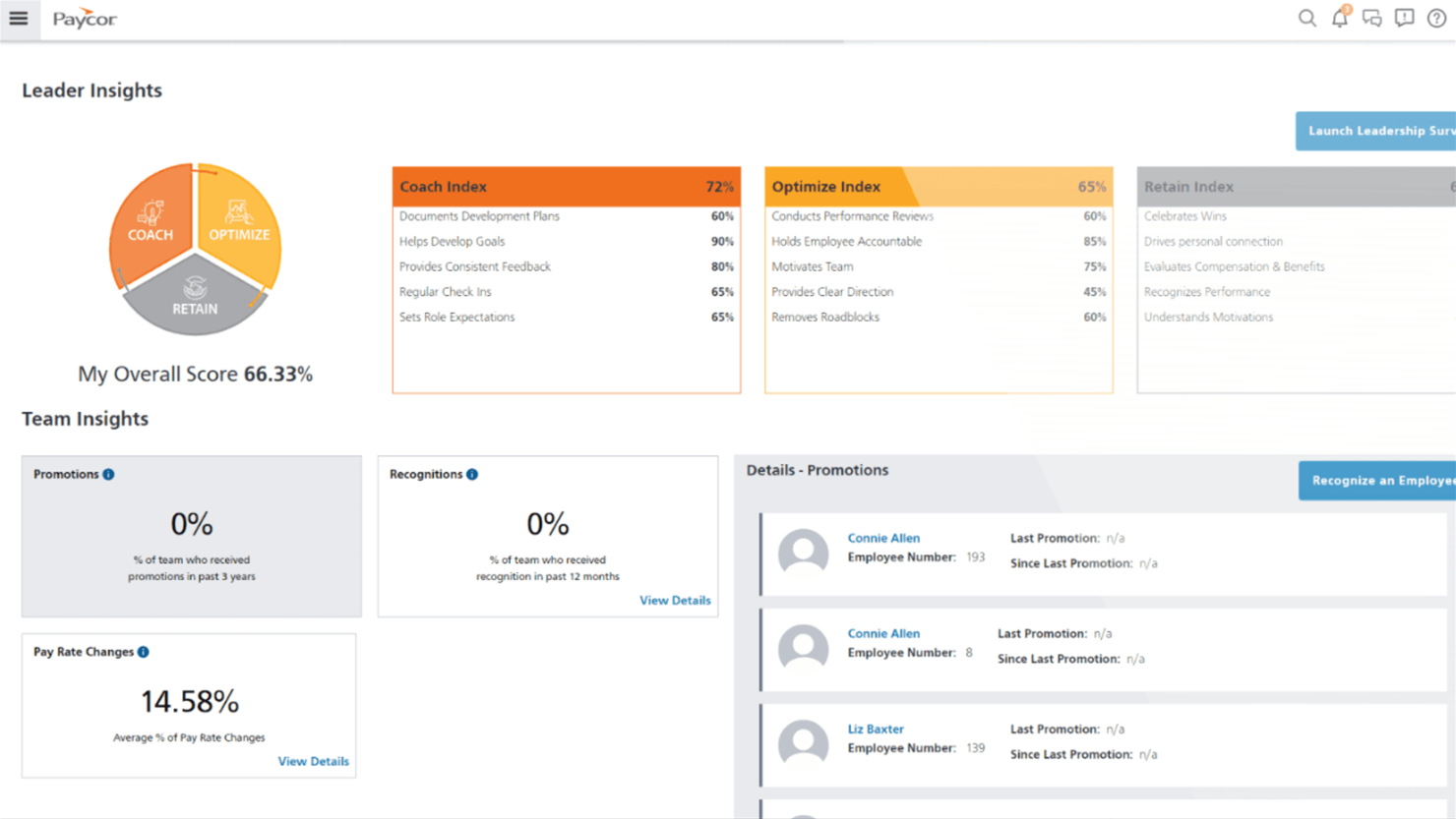
Paycor è pensato per piccole e medie imprese che necessitano di strumenti HR e payroll in grado di crescere insieme all'azienda. È particolarmente utile se il tuo team desidera un sistema che supporti assunzioni, elaborazione stipendi e conformità normativa, permettendoti di ampliare le funzionalità nel tempo.
Perché ho scelto Paycor
Ho scelto Paycor perché offre alle organizzazioni in crescita una solida base HR senza introdurre complessità inutili. Puoi gestire le buste paga con sicurezza grazie ai calcoli fiscali integrati e alle dichiarazioni automatiche, che aiutano a ridurre gli errori manuali.
I suoi strumenti per le assunzioni—come il tracciamento dei candidati e l’onboarding strutturato—rendono più semplice e fluida l'integrazione di nuovi dipendenti man mano che il personale cresce. Mi piace anche che gli strumenti di gestione della forza lavoro, tra cui pianificazione e monitoraggio presenze, offrano visibilità sulle esigenze di personale in aziende di diverse dimensioni.
E grazie ai componenti aggiuntivi modulari di Paycor, puoi estendere le funzionalità—come benefit, valutazioni o formazione—quando il tuo team è pronto.
Caratteristiche principali di Paycor
Ecco alcune caratteristiche da evidenziare:
- Checklist di onboarding: Crea esperienze coerenti per i nuovi assunti con attività personalizzabili, passo per passo.
- Self-service per i dipendenti: Permetti ai dipendenti di aggiornare i propri dati, consultare le informazioni sulle paghe e gestire le richieste di permessi.
- Gestione delle performance: Monitora obiettivi e condividi feedback utilizzando strumenti di valutazione e revisione integrati.
- Gestione dei benefit: Gestisci l’iscrizione, l’idoneità e la scelta dei piani benefit in un unico luogo.
Integrazioni Paycor
Le integrazioni includono QuickBooks, Xero, NetSuite, ADP, Salesforce, Indeed, Glassdoor, BambooHR, Microsoft Dynamics e Workday.
Pros and Cons
Pros:
- Gestione efficace della conformità
- Interfaccia facile da usare
- I componenti aggiuntivi permettono di espandere le funzionalità HR durante la crescita
Cons:
- La configurazione può richiedere tempo per team con esigenze di payroll complesse
- Personalizzazione limitata per dashboard e report

Leapsome
Ideale per il flusso HRIS-performance integrato
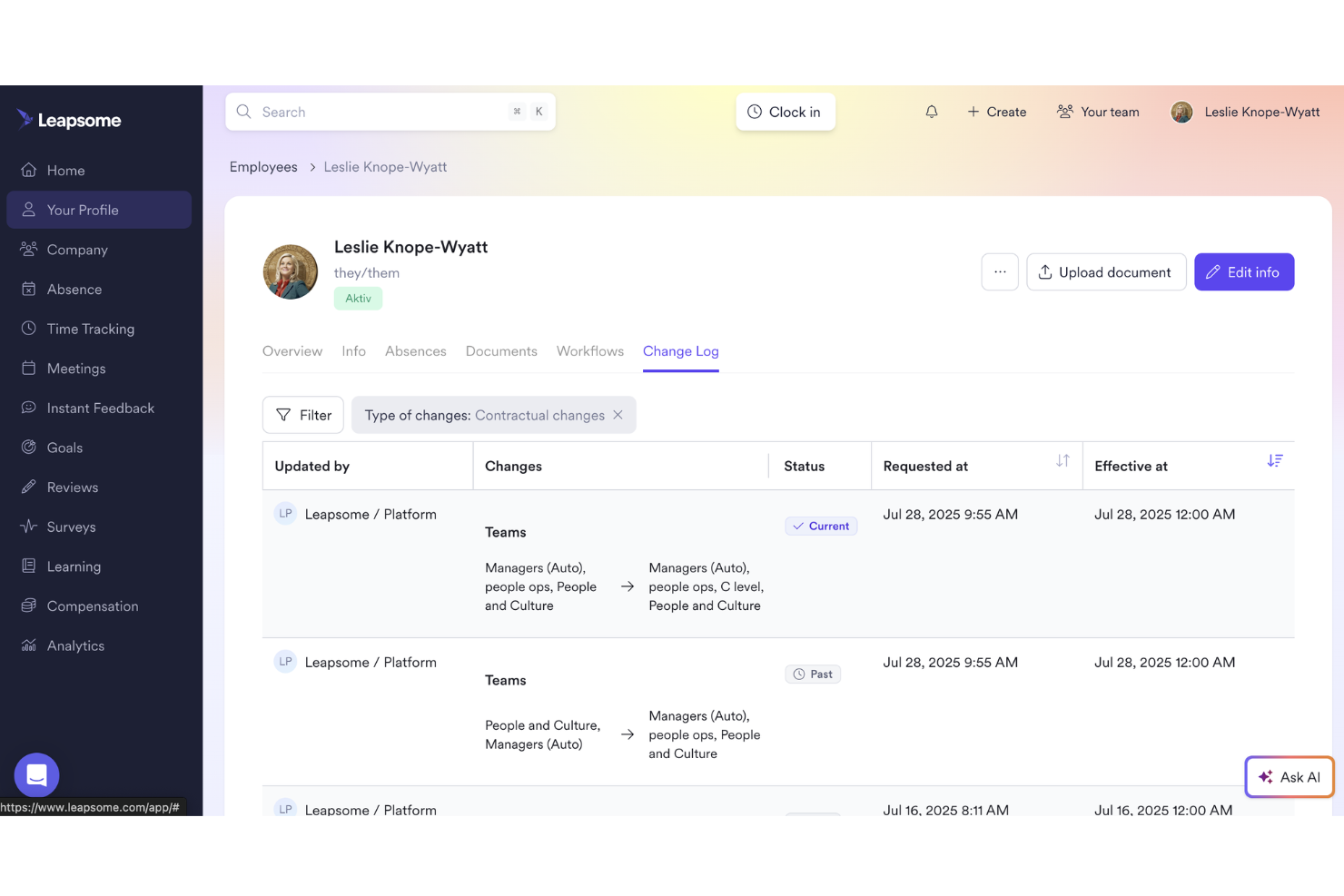
Leapsome è ideale per i team che desiderano avere i dati HR, i processi di performance e i flussi di sviluppo collegati in un unico posto.
Perché ho scelto Leapsome
Ho scelto Leapsome perché unisce un moderno HRIS a strumenti per l'abilitazione delle persone in modo che le tue operazioni rimangano conformi senza sacrificare la cultura aziendale. Hai un sistema unificato di registri dei dipendenti collegato direttamente a obiettivi, valutazioni e sviluppo, così ogni cosa rimane coerente e connessa in tutto il ciclo di vita del dipendente.
Apprezzo anche il suo assistente AI, Leapy, che redige politiche, evidenzia intuizioni e suggerisce i prossimi passi affinché tu possa ridurre il lavoro manuale e concentrarti su conversazioni di maggior valore.
Caratteristiche principali di Leapsome
Ecco alcune funzioni chiave da menzionare:
- Registri dipendenti e gestione dei documenti: Ti permette di archiviare dati, file e firme dei dipendenti in un unico luogo centralizzato e conforme.
- Gestione delle assenze e delle presenze: Offre al tuo team visibilità chiara su ferie, presenze e pianificazione senza dover ricorrere a fogli di calcolo.
- Flussi di onboarding e pre-boarding: Fornisce processi guidati affinché i nuovi assunti ricevano esperienze di onboarding coerenti con meno compiti manuali per le risorse umane.
- Sincronizzazione paghe e controlli automatizzati: Collega i dati fondamentali dei dipendenti alle paghe ed esegue verifiche automatiche per aiutare a ridurre errori e rielaborazioni amministrative.
Integrazioni di Leapsome
Le integrazioni includono Slack, Microsoft Teams, Google Workspace, Jira, BambooHR, Personio, Okta, OneLogin, Rippling e Workday.
Pros and Cons
Pros:
- Collega direttamente i dati HRIS con obiettivi, valutazioni e flussi di sviluppo
- Automatizza onboarding, rilevazione presenze e sincronizzazione paghe per ridurre i compiti manuali
- I sondaggi di coinvolgimento includono benchmark e consigli pratici sui prossimi passi
Cons:
- Esperienza mobile meno rifinita rispetto all’ambiente desktop
- Personalizzazione limitata per esigenze aziendali di nicchia
Altri Software di Gestione Risorse Umane
Qui trovi altre opzioni di software HR che non sono entrate nella mia shortlist, ma che vale comunque la pena considerare:
- monday AI Workspace
Ideale per gestione dettagliata dei task + automazioni
- Breathe HR
Ideale per PMI che cercano soluzioni HR
- Workable HR
Ideale per flussi di onboarding personalizzabili
- Sloneek
Ideale per feedback a 360 gradi
- RemoFirst
I migliori sistemi di gestione HR per la gestione globale dei benefit
- Lattice
Ideale per valutazioni delle performance personalizzabili
- factoHR
Ideale per la gestione della conformità
- GoCo
Ideale per piccole e medie imprese
- IntelliHR
Ideale per analisi avanzate e funzionalità di gestione della conformità che fanno risparmiare tempo
- edays
Ideale per calendari di squadra condivisi
- Oracle HCM Cloud
Ideale per la gestione del ciclo di vita della forza lavoro
- Workleap
Ideale per feedback e analisi in tempo reale
- Workday
Ideale per la gestione del capitale umano
- Personio
Ideale per strumenti di automazione dei flussi di lavoro HR per la produttività
- Kallidus Sapling
Il miglior software HR con sistema integrato di gestione dell'apprendimento
- UKG Pro
Software HCM avanzato con strumenti di gestione dei talenti e analisi del sentiment dei feedback dei dipendenti supportata dall'AI
- OrangeHRM
Ideale per la flessibilità dell’open-source
- Odoo (HR module)
Ideale per la scalabilità modulare
- Dayforce
Ideale per decisioni HR basate sui dati
- Namely
Ideale per aziende di medie dimensioni
- Sage HR
Software HRMS adattabile con pipeline candidati illimitate e app per la gestione delle spese
- SAP SuccessFactors
Suite software per la gestione HR a livello enterprise incentrata sulla gestione dell'esperienza umana.
- Cezanne HR
Ideale per i mercati europei
- Vault ERP
Software HR scalabile con componenti aggiuntivi per budgeting, operazioni, gestione asset, gestione clienti e altro
- Zoho People
Ideale per il supporto multilingue


Come valuto i software di gestione HR
Divido la mia valutazione in criteri di base—come la completezza dell’anagrafica dipendenti e la gestione delle assenze—e fattori differenzianti che distinguono i fornitori in base alla dimensione del team o alle esigenze di conformità.
Funzionalità di base (Requisiti imprescindibili per questa lista)
Quando seleziono gli strumenti per la mia lista, valuto ciascuno su una scala da 0 (funzionalità assente) a 5 (eccellenza in questo ambito) per ogni funzionalità di base indicata qui sotto. Poi, calcolo il punteggio totale dello strumento in percentuale. Ogni strumento deve raggiungere un punteggio minimo totale del 75% per essere preso in considerazione.
- Anagrafica e registri dei dipendenti: Cerco un elenco centralizzato in cui il team HR possa archiviare e consultare profili, documenti e storici occupazionali senza dover passare da un foglio di calcolo o da un sistema di file all’altro.
- Flussi di onboarding e offboarding: Ogni strumento deve supportare sequenze di attività strutturate per nuovi assunti e uscite, inclusa la raccolta delle lettere d’offerta, firme elettroniche, checklist di provisioning IT e pianificazione dei colloqui di uscita.
- Gestione di presenze e assenze: Valuto come la piattaforma gestisca le richieste di ferie, le politiche di maturazione e l’instradamento delle approvazioni—soprattutto per le organizzazioni che hanno diversi tipi di permessi come congedi parentali, malattia o festività variabili.
- Strumenti di gestione delle performance: In questa sezione contano la definizione degli obiettivi, i cicli di valutazione e i meccanismi di feedback. Verifico se lo strumento supporta formati come le valutazioni a 360 gradi, il tracking 1:1 o l’allineamento agli OKR, non solo le semplici valutazioni annuali.
- Conformità e reportistica: La piattaforma deve generare report sul personale e supportare i requisiti normativi come le dichiarazioni EEO-1 o esportazioni di dati pronte per eventuali audit, non solo riepiloghi base del numero di dipendenti.
- Integrazione con paghe e benefit: Valuto se la gestione paghe e benefit è integrata nell’applicativo o se viene collegata tramite integrazioni con provider come ADP, Gusto o Paychex—e quanto sia fluido lo scambio dati tra i sistemi.
Dopo aver selezionato gli strumenti che rispondono a questi criteri, considero cosa distingue ogni piattaforma.
Fattori differenzianti (Cosa distingue i fornitori)
Ecco come confronto i diversi fornitori:
Funzionalità distintive
I portali self-service per i dipendenti rappresentano un forte elemento differenziante. Quando i dipendenti possono aggiornare i propri indirizzi, scaricare documenti fiscali o inviare richieste di ferie senza dover contattare l’HR, vengono risparmiate ore di lavoro ogni settimana. Valuto anche la qualità delle app mobili—soprattutto per i team operativi o sul campo che necessitano di timbrare le presenze, controllare i turni o visualizzare le buste paga direttamente dallo smartphone. Anche i sondaggi flash e gli strumenti eNPS sono da prendere in considerazione, poiché forniscono dati in tempo reale sul sentiment del personale anziché affidarsi solo a sondaggi annuali di engagement.
Oltre le funzionalità
L’ecosistema di integrazioni è fondamentale. Controllo se una piattaforma si collega con il sistema paghe in uso, l’ATS e strumenti come Slack o Microsoft 365—perché sistemi scollegati portano a doppie registrazioni. La conformità e la sicurezza dei dati hanno lo stesso peso; verifico la certificazione SOC 2, controlli di accesso basati sui ruoli e log di audit utili sia per revisioni interne che esterne. Considero anche il supporto all’implementazione, dato che migrare dati da un vecchio HRIS può essere complesso, e un team dedicato all’onboarding fa davvero la differenza.
Come scegliere un software di gestione delle risorse umane
È facile perdersi tra lunghe liste di funzionalità e strutture di prezzo complesse. Per aiutarti a rimanere concentrato durante la valutazione delle tue alternative, ecco una checklist di fattori da tenere a mente:
| Fattore | Cosa considerare |
|---|---|
| Scalabilità | Il software crescerà con la tua azienda? Valuta se è in grado di gestire un aumento del numero di dipendenti o di offrire ulteriori funzionalità HR man mano che la tua attività si espande. |
| Integrazioni | Funziona con gli strumenti che già usi? Verifica la compatibilità con il tuo attuale stack software per evitare interruzioni nei flussi di lavoro. |
| Personalizzazione | Puoi adattare il software alle tue necessità? Cerca possibilità di modificare workflow, campi e report per rispecchiare i tuoi processi HR. |
| Facilità d'uso | È intuitivo per il tuo team? Assicurati che l'interfaccia sia semplice e che richieda poca formazione, così da ridurre la curva di apprendimento per il personale. |
| Implementazione e onboarding | Quanto tempo serve per iniziare? Valuta il tempo e le risorse necessari per il deployment e la formazione, e cerca soluzioni di supporto offerte dal fornitore. |
| Costo | Rientra nel tuo budget? Confronta i diversi piani e considera il costo effettivo, includendo eventuali spese nascoste o costi per funzionalità extra. |
| Sicurezza | I tuoi dati sono protetti? Verifica che il software rispetti gli standard del settore e offra cifratura, controlli di accesso e aggiornamenti di sicurezza regolari. |
| Requisiti di conformità | Rispetta la normativa? Assicurati che il software sia conforme alle leggi locali sul lavoro e alle regolamentazioni vigenti, per evitare problemi legali. |
Che cos'è un software di gestione delle risorse umane?
Il software di gestione delle risorse umane è uno strumento progettato per aiutare le organizzazioni a gestire in modo efficiente le funzioni relative alle risorse umane. I professionisti HR, inclusi manager e recruiter, utilizzano normalmente questi strumenti per semplificare attività come l'elaborazione delle buste paga, l'amministrazione dei benefit e la gestione dei dati dei dipendenti. Funzionalità come il monitoraggio delle presenze, le valutazioni delle prestazioni e la gestione della conformità aiutano a mantenere i registri e a garantire il rispetto delle normative. Questi strumenti consentono in definitiva di risparmiare tempo e ridurre gli errori, rendendo i processi HR più efficienti.
Funzionalità
Quando scegli un software di gestione delle risorse umane, presta attenzione alle seguenti funzionalità chiave:
- Gestione dei dati dei dipendenti: Organizza e archivia le informazioni dei dipendenti, rendendo semplice l'accesso e l'aggiornamento dei registri.
- Elaborazione buste paga: Automatizza il calcolo degli stipendi e delle detrazioni fiscali, riducendo gli errori e risparmiando tempo.
- Monitoraggio di orari e presenze: Monitora le ore di lavoro e la presenza dei dipendenti, garantendo un'elaborazione delle buste paga precisa e il rispetto della normativa.
- Gestione dei benefit: Gestisce i benefit dei dipendenti, inclusi assicurazione sanitaria e piani pensionistici, semplificando l'iscrizione e il monitoraggio.
- Valutazioni delle prestazioni: Favorisce revisioni regolari dei dipendenti, aiutando i manager a monitorare i progressi e a fissare obiettivi.
- Gestione della conformità: Garantisce il rispetto delle leggi sul lavoro e delle normative, riducendo il rischio di problemi legali.
- Strumenti di onboarding: Semplifica il processo di assunzione, rendendo più facile l'inserimento dei nuovi dipendenti in azienda.
- Portali self-service: Permette ai dipendenti di accedere e aggiornare le proprie informazioni, riducendo il carico amministrativo per il personale HR.
- Funzionalità app mobile: Fornisce accesso agli strumenti HR anche in mobilità, aumentando la flessibilità e la comodità per gli utenti.
- Flussi di lavoro personalizzabili: Consente di adattare processi e campi alle specifiche esigenze dell'organizzazione.
Vantaggi
L'implementazione di un software di gestione delle risorse umane offre diversi benefici per il tuo team e la tua azienda. Eccone alcuni di cui potrai usufruire:
- Miglioramento dell'efficienza: Automatizza attività come la gestione delle buste paga e il monitoraggio delle presenze, facendo risparmiare tempo e riducendo gli errori manuali.
- Conformità rafforzata: Garantisce il rispetto delle normative sul lavoro grazie alle funzionalità di gestione della conformità, minimizzando i rischi legali.
- Maggiore coinvolgimento dei dipendenti: Offre portali self-service e accesso da mobile, consentendo ai dipendenti di gestire autonomamente le proprie informazioni.
- Onboarding più rapido: Semplifica il processo di assunzione grazie agli strumenti di onboarding, rendendo più facile l'integrazione dei nuovi assunti.
- Decisioni più informate: Fornisce approfondimenti tramite le valutazioni delle prestazioni e strumenti di reportistica, aiutando i manager a prendere decisioni basate sui dati.
- Risparmio sui costi: Riduce gli oneri amministrativi automatizzando e centralizzando le attività HR, portando a potenziali riduzioni dei costi.
- Scalabilità: Si adatta alle esigenze crescenti dell'azienda grazie a flussi di lavoro personalizzabili e opzioni scalabili, garantendo utilità nel lungo termine.
Costi e Prezzi
Scegliere un software di gestione delle risorse umane richiede la comprensione dei vari modelli e piani tariffari disponibili. I costi variano in base alle funzionalità, alla dimensione del team, agli accessori e altro ancora. La tabella seguente riassume i piani più comuni, i prezzi medi e le funzionalità tipiche incluse nei software di gestione HR:
Tabella di confronto dei piani per il software di gestione delle risorse umane
| Tipo di piano | Prezzo medio | Funzionalità comuni |
|---|---|---|
| Piano gratuito | $0 | Gestione base dei dati dei dipendenti, report limitati e monitoraggio semplice degli orari. |
| Piano personale | $5-$25/user/month | Gestione dei dati dei dipendenti, elaborazione delle buste paga e gestione base della conformità. |
| Piano business | $30-$60/user/month | Report avanzati, valutazioni delle prestazioni, amministrazione dei benefit e accesso tramite app mobile. |
| Piano enterprise | $70-$100/user/month | Flussi di lavoro personalizzabili, supporto dedicato, funzionalità avanzate di conformità e possibilità di integrazione. |
Domande frequenti sul software di gestione HR
Ecco alcune risposte alle domande più comuni sul software di gestione delle risorse umane:
Il software di gestione HR può integrarsi con le piattaforme di paghe e benefit?
Sì, la maggior parte dei principali software di gestione HR offre integrazione diretta con i fornitori di sistemi paghe e benefit più diffusi. Questo riduce l’inserimento manuale dei dati e aiuta a evitare errori. Verifica sempre se il software supporta i tuoi fornitori attuali oppure se offre esportazioni dati semplici e accesso API per integrazioni personalizzate.
Quanto è facile migrare i dati dei dipendenti esistenti in una nuova piattaforma HR?
La maggior parte dei software di gestione HR fornisce strumenti di importazione guidata o un onboarding guidato per aiutare nella migrazione dei tuoi attuali archivi. Alcuni fornitori offrono supporto dedicato alla migrazione o servizi di mappatura dei dati, che possono farti risparmiare tempo e prevenire errori. Pianifica un’importazione di prova prima di effettuare la transizione definitiva per assicurarti che i dati vengano trasferiti correttamente.
Quanto sono accessibili da mobile i sistemi di gestione HR?
Molti sistemi di gestione HR offrono app mobili che permettono ai dipendenti di accedere alle proprie informazioni ovunque si trovino. Questa funzione è particolarmente utile per il lavoro da remoto, consentendo al personale di gestire attività come richieste di ferie o rilevamento presenze direttamente dallo smartphone. Assicurati che l’app sia facile da usare e compatibile con i tuoi dispositivi.
Come può il software di gestione HR migliorare il coinvolgimento e la fidelizzazione dei dipendenti?
Il software di gestione HR offre strumenti per feedback frequenti, programmi di riconoscimento e sondaggi u0022pulseu0022, facilitando l’azione sui suggerimenti dei dipendenti. I flussi di lavoro automatizzati liberano il team HR da compiti ripetitivi permettendo loro di concentrarsi su interazioni più significative. Monitorando metriche di coinvolgimento e rischi di turnover, puoi affrontare tempestivamente eventuali criticità e trattenere i migliori talenti.
Cosa succede dopo:
Se stai cercando il software di gestione delle risorse umane più adatto alle tue esigenze, contatta gratuitamente un consulente SoftwareSelect per ricevere consigli personalizzati.
Compila un modulo e partecipa a una breve chiamata per confrontarti sulle tue necessità specifiche. Riceverai così una selezione di software da valutare. Verrai supportato durante l'intero processo d'acquisto, comprese eventuali trattative sui prezzi.