

I 10 migliori software per la gestione degli appaltatori recensiti per il 2026

10 Le migliori soluzioni software per la gestione dei collaboratori esterni


Il miglior software per la gestione dei collaboratori esterni ti aiuta a integrarli, pagarli e gestire la conformità in modo efficiente, così puoi mantenere la flessibilità riducendo al minimo i rischi.
Quando ti affidi a collaboratori esterni per competenze specialistiche o progetti a breve termine, i processi manuali e i sistemi non collegati tra loro possono causare errori, ritardi nei pagamenti e problemi di conformità. La piattaforma giusta centralizza le informazioni sui collaboratori, semplifica l'inserimento e automatizza i pagamenti, garantendo al contempo il rispetto dei requisiti legali e fiscali.
Grazie alla mia esperienza come specialista delle risorse umane, ho valutato i principali strumenti per la gestione dei collaboratori esterni, intuitivi, affidabili e progettati per supportare una forza lavoro flessibile. In questa guida troverai soluzioni che semplificano l'amministrazione dei collaboratori esterni e ti offrono la visibilità necessaria per crescere con sicurezza.
Perché fidarsi delle nostre recensioni sui software
Il nostro team testa e recensisce software dal 2012. In quanto esperti HR noi stessi, sappiamo quanto sia difficile — e importante — scegliere il software giusto.
Per questa guida, abbiamo valutato gli strumenti attraverso test pratici e ricerche indipendenti, assegnando un punteggio agli strumenti in base ai nostri criteri di selezione. Ci basiamo inoltre sulle competenze di leader di pensiero del settore e di professionisti HR attivi.
Le nostre recensioni riflettono il nostro giudizio editoriale umano, non un discorso di vendita.
Revisori esperti:
Tabella comparativa delle soluzioni per la gestione dei collaboratori esterni
Questa tabella comparativa riassume i dettagli dei prezzi delle mie migliori selezioni di software per la gestione dei collaboratori esterni:
| Tool | Best For | Trial Info | Price | ||
|---|---|---|---|---|---|
|
1
|
Migliore con indennizzo da $1M per collaboratore |
Demo gratuita disponibile |
Da $19/lavoratore/mese | Website | |
|
2
|
Ideale per pagamenti e prelievi flessibili |
Demo gratuita disponibile |
Da $49/collaboratore/mese | Website | |
|
3
|
Ideale per collaboratori nazionali e internazionali |
Demo gratuita disponibile |
Da $49/mese + $6/mese per persona | Website | |
|
4
|
Ideale per la personalizzazione dei flussi di lavoro per paese |
Demo gratuita disponibile |
A partire dal 3% di commissione di servizio per flusso attivo del collaboratore | Website | |
|
5
|
La migliore soluzione all-in-one per la gestione dei freelance e l'assegnazione rapida del lavoro |
Demo gratuita disponibile |
Da $50/utente/mese | Website | |
|
6
|
Ideale per tracciamenti flessibili e automazioni |
14 giorni di prova gratuita |
From $8/user/month | Website | |
|
7
|
Ideale per la gestione di freelance globali a livello enterprise |
Demo gratuita disponibile |
Prezzo su richiesta | Website | |
|
8
|
Ideale per la copertura contro le responsabilità |
Demo gratuita disponibile |
Da $199/utente/mese | Website | |
|
9
|
Ideale per pagamenti flessibili in criptovaluta |
Demo gratuita disponibile |
Da $40/mese | Website | |
|
10
|
Ideale per fatturazione e pagamenti in valuta locale |
Demo gratuita disponibile |
Da $199/utente/mese | Website |


Recensioni dei migliori software per la gestione dei collaboratori esterni
Ecco una breve descrizione di ciascun software per la gestione dei collaboratori esterni, per illustrare il caso d’uso migliore e le funzionalità più interessanti di ogni sistema. Continua a leggere per scoprire ulteriori opzioni bonus in fondo all’elenco.

Migliore con indennizzo da $1M per collaboratore
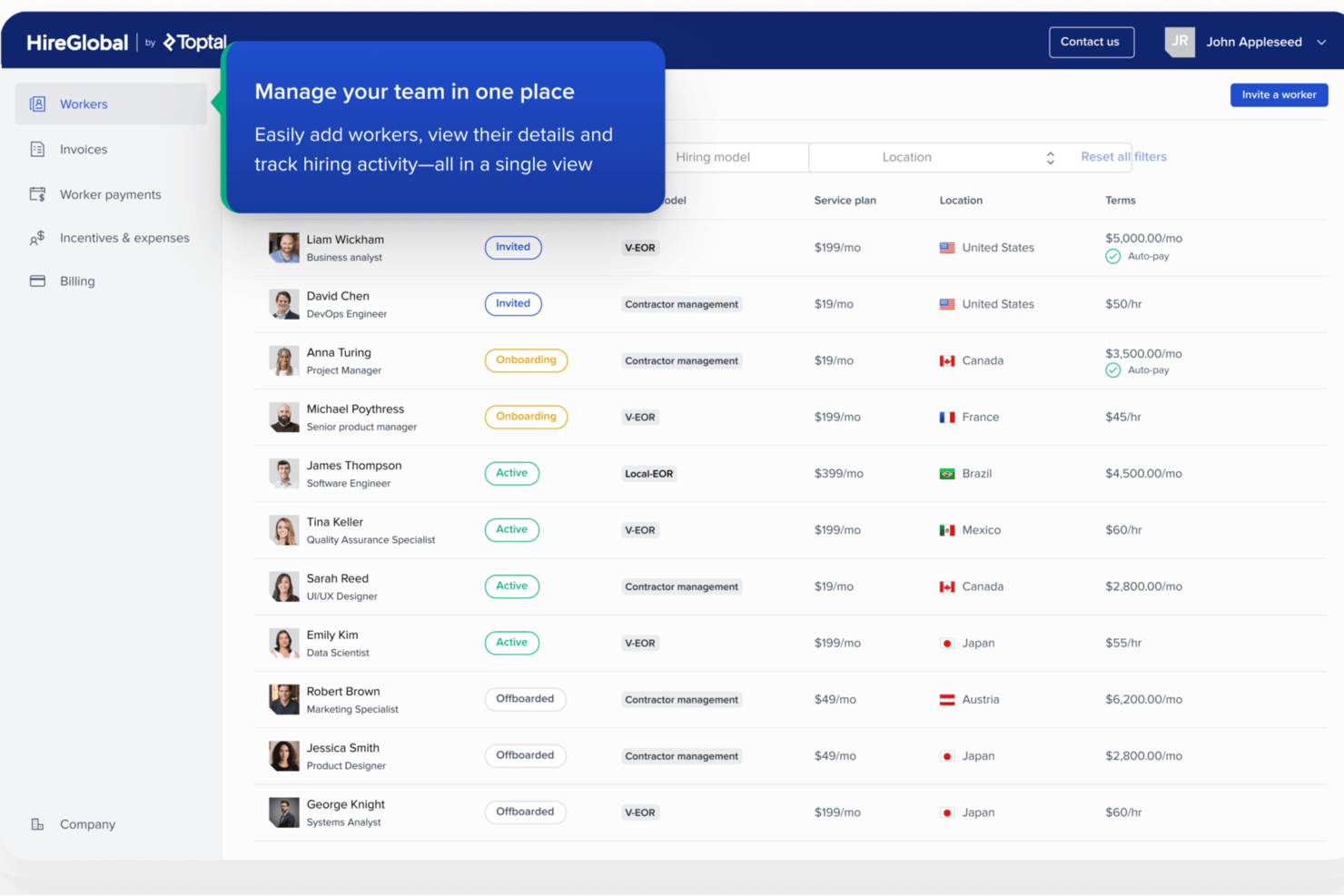
HireGlobal è una piattaforma globale di gestione dei collaboratori e payroll sviluppata da Toptal che si occupa di onboarding dei collaboratori, pagamenti in più valute, conformità nella classificazione dei lavoratori e servizi di employer of record in oltre 180 paesi.
Per chi è ideale HireGlobal?
HireGlobal è adatto ai team HR e alle risorse umane che gestiscono collaboratori internazionali e necessitano di una protezione di conformità integrata insieme a capacità di pagamento globale.
Perché ho scelto HireGlobal
HireGlobal si guadagna un posto nella mia shortlist perché il suo modello di Virtual Employer of Record garantisce ogni collaborazione con un'indennità contro errata classificazione fino a $1M. In pratica, ciò significa che se un collaboratore viene riclassificato come dipendente nella sua giurisdizione locale, il team legale di HireGlobal si fa carico di quel rischio. Apprezzo anche che i contratti Agent of Record siano integrati direttamente nel flusso di onboarding dei collaboratori, quindi la protezione della conformità non è un'aggiunta manuale.
Funzionalità chiave di HireGlobal
- Pagamenti di massa ai collaboratori: Paga collaboratori in oltre 180 paesi e più di 50 valute tramite una singola transazione collettiva.
- Sicurezza conforme SOC 2: La piattaforma è certificata SOC 2 e utilizza la crittografia end-to-end per tutti i dati sensibili.
- Integrazione con TopTracker: La connessione integrata con TopTracker consente monitoraggio del tempo e approvazione delle fatture in modo diretto.
- Workflow di onboarding configurabili: L'onboarding digitale raccoglie i moduli fiscali richiesti e i dati dei collaboratori con template specifici per giurisdizione.
Integrazioni di HireGlobal
HireGlobal offre un'integrazione nativa con TopTracker per monitoraggio delle ore e approvazione delle fatture. Le integrazioni native con altri sistemi HR o contabili di terze parti non sono chiaramente documentate.
Pros and Cons
Pros:
- $1M di indennizzo per collaboratore
- Paga collaboratori in oltre 180 paesi
- Contratti AOR integrati nel flusso di onboarding
Cons:
- Documentazione della libreria contratti self-serve poco approfondita
- Integrazioni native limitate con sistemi HR

Ideale per pagamenti e prelievi flessibili
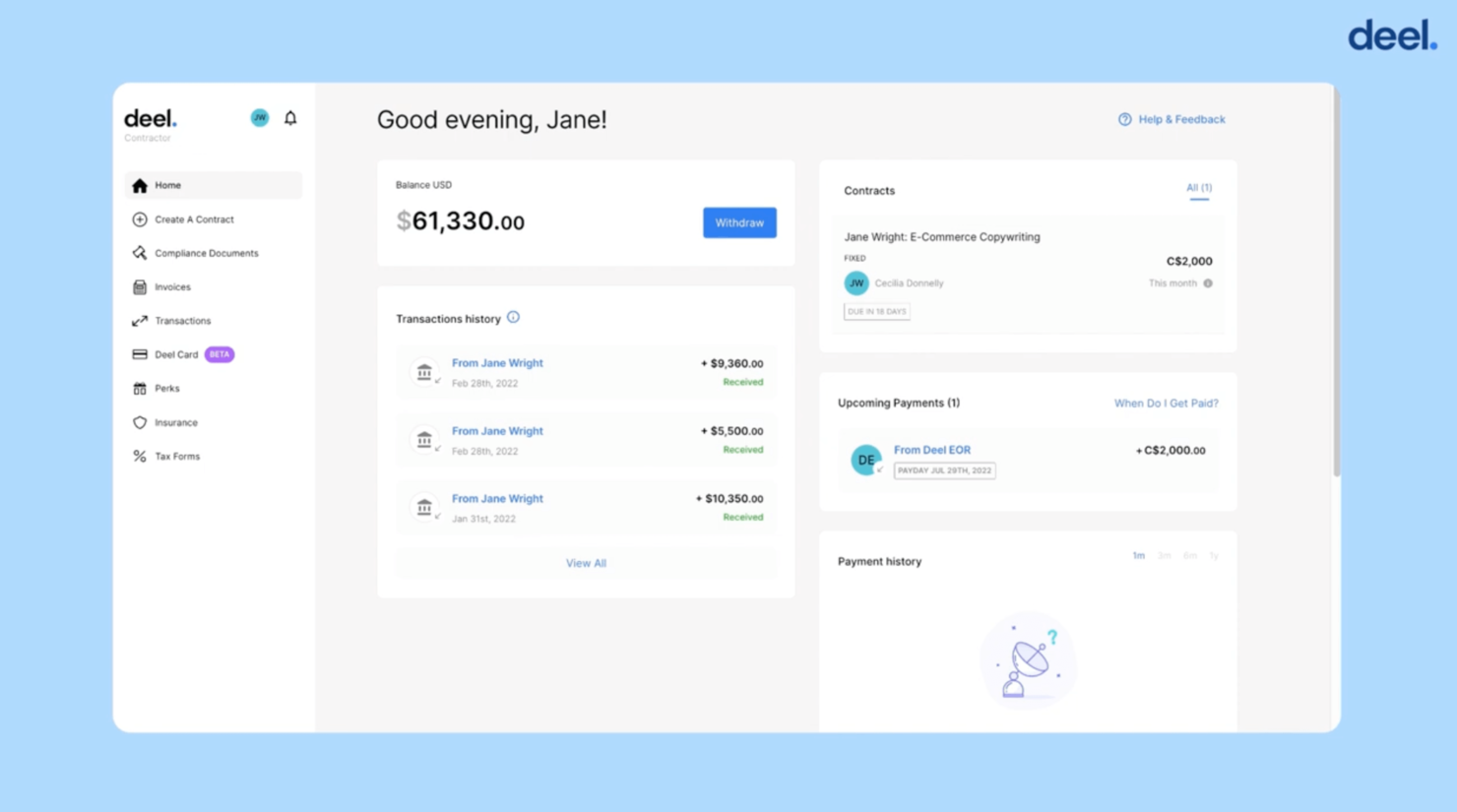
Deel è ideale per le aziende che vogliono assumere, gestire e pagare collaboratori in diverse nazioni rimanendo conformi alle normative globali. Se il tuo team si sta espandendo a livello internazionale o collabora con freelance in molte giurisdizioni, Deel ti aiuta a ridurre la burocrazia e i rischi legati alla gestione dei collaboratori internazionali.
Perché ho scelto Deel
Ho scelto Deel perché offre un'unica piattaforma per inserire, contrattualizzare e pagare collaboratori in tutto il mondo, senza dover integrare più strumenti diversi. Genera contratti localizzati per ogni paese (riducendo il rischio di errata classificazione) e consente al tuo team di pagare i collaboratori in oltre 120 valute e più di 8 metodi di pagamento.
Mi piace che automatizzi la verifica dell'identità e la raccolta dei documenti (non serve inseguire manualmente i moduli fiscali e i documenti d'identità), e se lavori in tanti paesi, il fatto che Deel supporti oltre 150 giurisdizioni significa che passerai più tempo a far crescere il team che a gestire le regole locali.
Funzionalità principali di Deel
Ecco alcune funzionalità principali degne di nota:
- Modelli di Contratto Localizzati: Redige automaticamente contratti specifici per paese in base alle leggi sul lavoro locali.
- Pagamenti Multi-Valuta e Multi-Metodo: Permette pagamenti in oltre 120 valute tramite bonifico bancario, PayPal, Wise, carte e altri metodi.
- Raccolta Automatica di Documenti per Conformità: Verifica le identità dei collaboratori e raccoglie i documenti fiscali o permessi richiesti con il minimo intervento manuale.
- Self-Service per Collaboratori & Dashboard: I collaboratori possono firmare i contratti, emettere fatture e prelevare fondi in autonomia, riducendo il carico sul team HR/finanza.
Integrazioni di Deel
Le integrazioni includono BambooHR, Workday, QuickBooks, NetSuite, Xero, Slack, Expensify, Zapier.
Pros and Cons
Pros:
- Inserisce collaboratori internazionali in pochi minuti
- Effettua pagamenti in molte valute e con diversi metodi di pagamento
- Automatizza la raccolta di documenti per la conformità in più giurisdizioni
Cons:
- L’app mobile non dispone di tutte le funzionalità amministrative della piattaforma completa
- In alcuni paesi è necessario utilizzare una società locale tramite Deel

Gusto
Ideale per collaboratori nazionali e internazionali
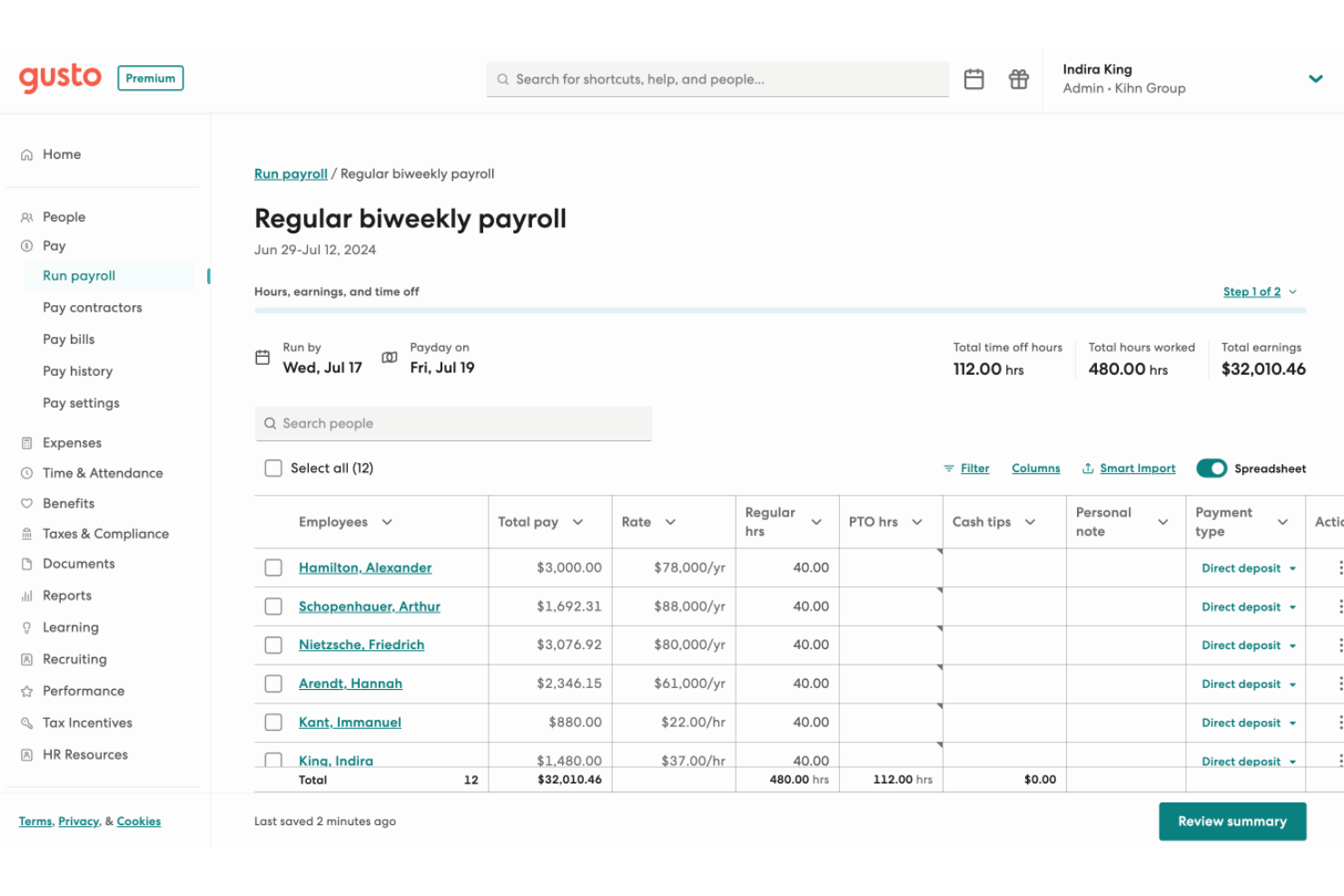
Gusto offre una soluzione pensata per le piccole e medie imprese che necessitano di una gestione efficiente dei collaboratori. È particolarmente interessante per startup e aziende statunitensi che mirano a un'espansione internazionale, grazie a un'interfaccia semplice e a servizi di elaborazione stipendi completi. Gusto ti aiuta a gestire sia dipendenti W-2 sia collaboratori 1099, affrontando agevolmente le complessità delle strategie di assunzione globale.
Perché ho scelto Gusto
Ho scelto Gusto per la sua capacità di gestire sia collaboratori nazionali che internazionali insieme ai dipendenti tradizionali. I servizi di buste paga includono amministrazione integrata dei benefit e supporto per la conformità tramite partnership locali. L'interfaccia intuitiva consente di inserire facilmente i collaboratori e gestirne i pagamenti, garantendo operazioni fluide senza complessità aggiuntive.
Caratteristiche principali di Gusto
Oltre alle funzioni di buste paga e conformità, Gusto offre diverse caratteristiche pensate specificamente per la gestione dei collaboratori:
- Onboarding Self-Service: I collaboratori possono completare in autonomia la fase di onboarding, riducendo il carico amministrativo sul tuo team.
- Elaborazioni stipendio illimitate (per piani collaboratore + dipendente): Puoi elaborare tutte le buste paga che desideri senza preoccuparti di raggiungere limiti — utile quando hai pagamenti a collaboratori frequenti o irregolari.
- Bonifico diretto: Offri ai collaboratori la comodità del pagamento tramite bonifico bancario, semplificando il processo di pagamento.
- Rilevazione ore & Analisi dei costi (per lavoro a ore dei collaboratori): Per i team che pagano i collaboratori a ore o su più progetti, puoi monitorare le ore e collegare i pagamenti al lavoro effettivo, offrendo trasparenza e aiutando nella pianificazione del budget.
Integrazioni di Gusto
Le integrazioni includono Xero, QuickBooks, FreshBooks, Deputy, TSheets, Clover, Receipt Bank, When I Work, Expensify e Trainual.
Pros and Cons
Pros:
- Buste paga, benefit e HR su un'unica piattaforma integrata.
- Gestisce le buste paga sia per collaboratori che per dipendenti, semplificando i team misti.
- Offre onboarding self-service e archiviazione online di moduli fiscali e cedolini paga per collaboratori e dipendenti.
Cons:
- Le PMI che necessitano di conformità avanzata o moduli HR di settore specifici potrebbero trovare Gusto limitante.
- Ottimo per la gestione semplice di paghe e HR ma non abbastanza personalizzabile per organizzazioni grandi e complesse.
New Product Updates from Gusto
Gusto Adds Solo Advisory Tools and Mobile Money Features
Gusto adds Solo S-Corp Advisory Tools and Gusto Money on Mobile for tax guidance, invoicing, and bill payments. These updates help accountants advise solopreneurs and let users manage business finances from their phones. For more information, visit Gusto’s official site.

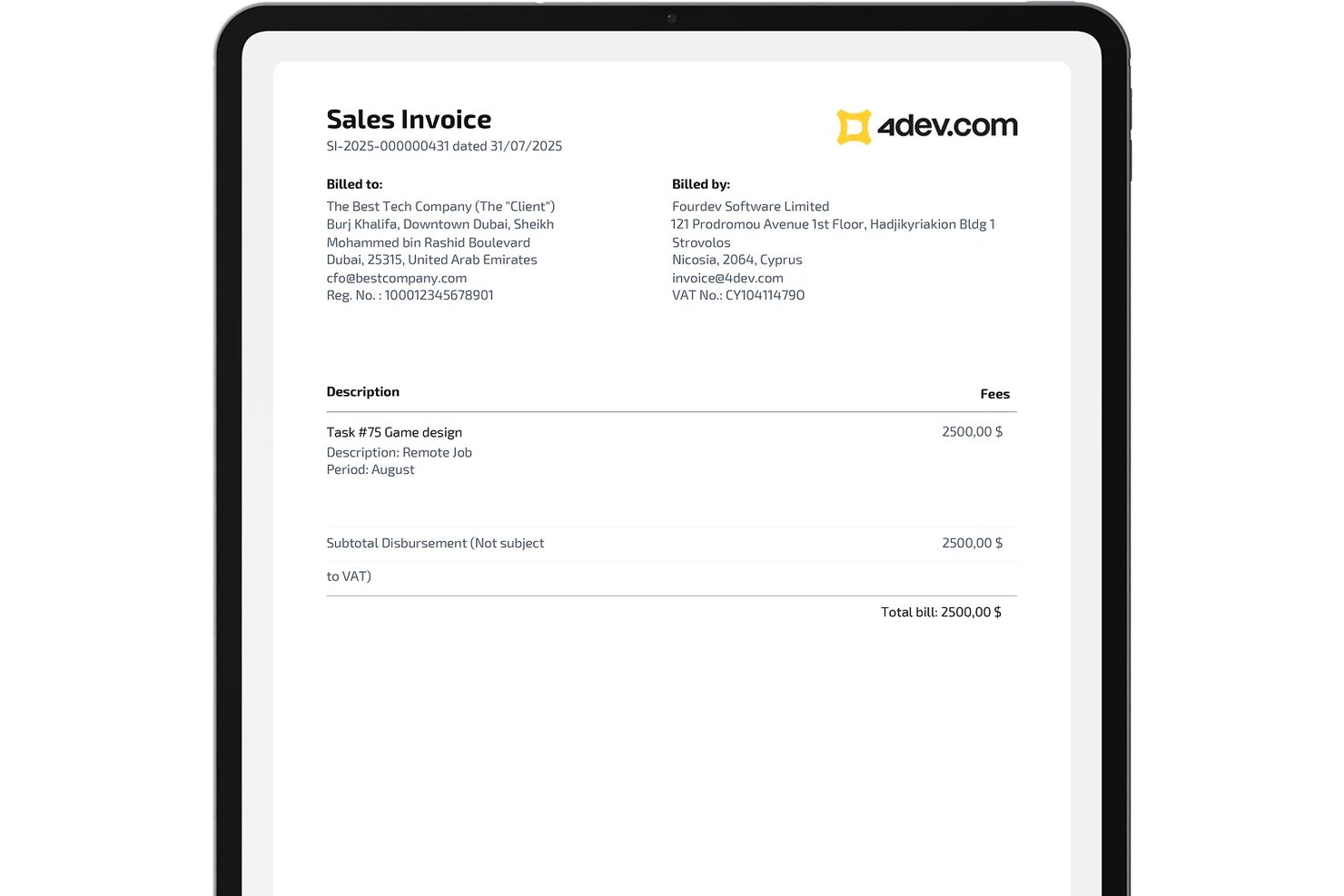
4dev.com è un software di gestione dei collaboratori progettato per i team HR che devono gestire l'onboarding, la conformità, la documentazione contrattuale, l'elaborazione delle fatture e i pagamenti globali dei collaboratori indipendenti.
Per chi è ideale 4dev.com?
Team HR e operations a livello globale che gestiscono la conformità e i pagamenti dei collaboratori in più paesi e giurisdizioni legali.
Perché ho scelto 4dev.com
Ho scelto 4dev.com perché permette di personalizzare l'onboarding, la conformità e i flussi di pagamento dei collaboratori secondo i requisiti legali di ciascun paese. Il mio team si affida alla generazione di documenti localizzati, ai modelli di contratto specifici per paese e ai controlli di approvazione flessibili.
Caratteristiche principali di 4dev.com
- Motore di pagamento di massa: Invia i pagamenti ai collaboratori in diverse valute con un unico lotto di fatture.
- Supporto firma digitale: Raccogli firme elettroniche legalmente vincolanti su contratti e documenti di conformità.
- Portale self-service per collaboratori: I collaboratori caricano la documentazione, inviano fatture e gestiscono il proprio profilo.
- Raccolta automatizzata dei moduli fiscali: Raccogli i moduli W-9 e W-8BEN e conservali in sicurezza per ogni collaboratore.
Integrazioni di 4dev.com
Le integrazioni native non sono attualmente elencate. Lo strumento supporta integrazioni tramite API per flussi di lavoro personalizzati.
Pros and Cons
Pros:
- Configurazione dei flussi di lavoro specifica per paese per la conformità
- Monitoraggio centralizzato di contratti e documenti
- Raccolta automatizzata dei moduli fiscali globali
Cons:
- Nessuna funzione di rilevazione tempi integrata
- Visibilità limitata sull'automazione della conformità

La migliore soluzione all-in-one per la gestione dei freelance e l'assegnazione rapida del lavoro
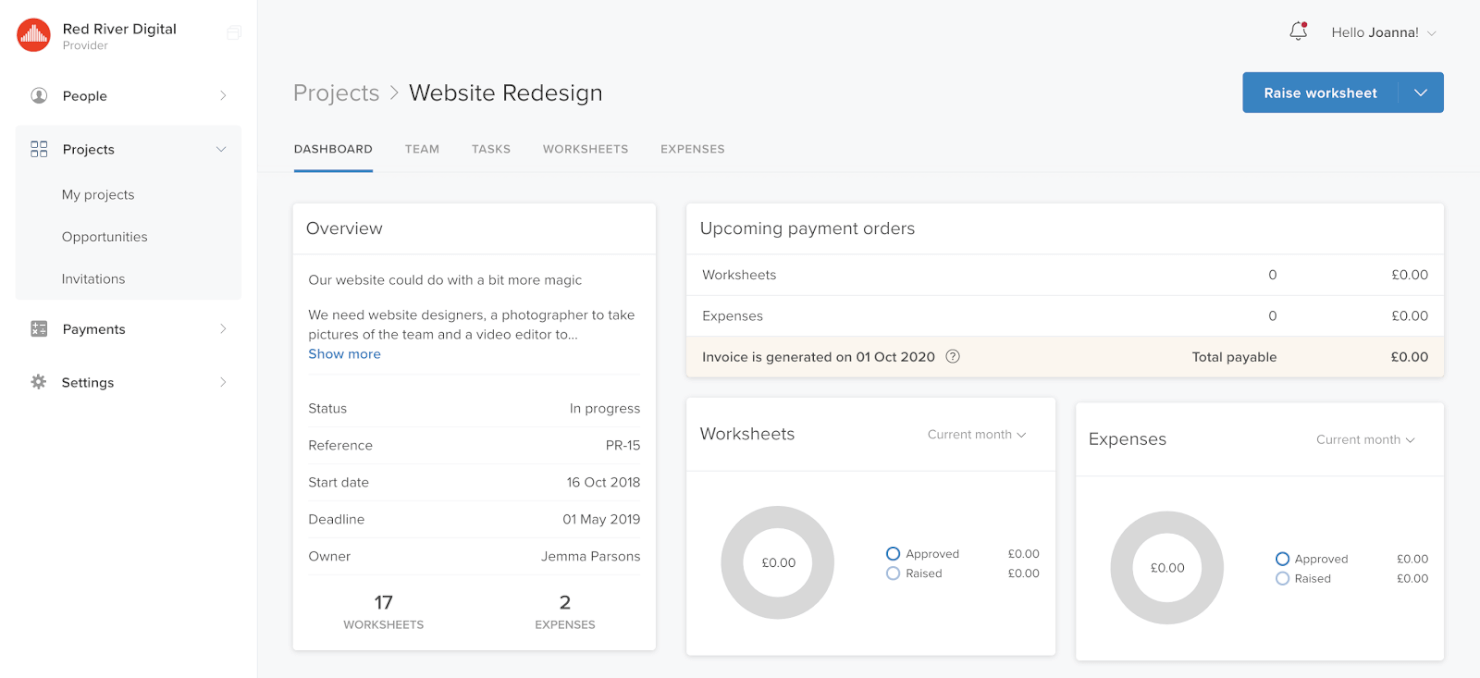
TalentDesk è una soluzione basata su cloud che ti aiuta a gestire in modo efficace collaboratori e freelance. Le funzionalità includono una dashboard centralizzata dove puoi organizzare le risorse, inviare inviti multipli e completare i moduli di onboarding. I manager possono creare attività all'interno dei progetti con team dedicati.
Con TalentDesk, puoi assegnare il lavoro ai collaboratori in modo più rapido. Puoi ottimizzare il ciclo di vita dei progetti, dalla collaborazione iniziale al monitoraggio dei budget fino al rispetto delle scadenze.
Sono disponibili integrazioni con Clearbooks, FreshBooks, Oracle Netsuite, PeoplePerHour, Microsoft Dynamics 365, QuickBooks, Xero, Zoho Books, Wave e Sage Intacct.

Ideale per tracciamenti flessibili e automazioni
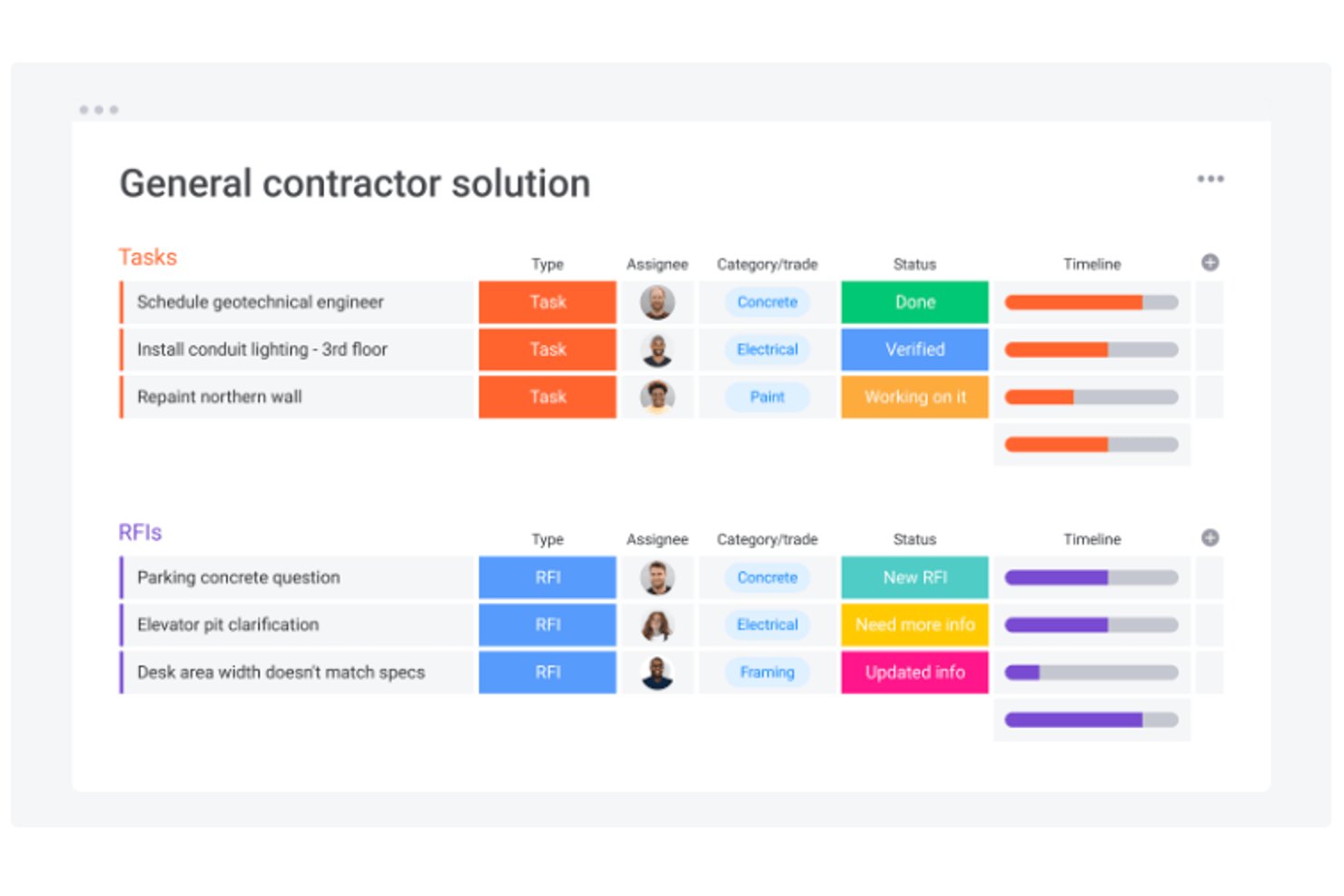
monday AI Workspace è una piattaforma di gestione del lavoro che combina bacheche di progetto personalizzabili, automazioni potenziate dall’IA e pianificazione multi-vista per coordinare i flussi di lavoro dei collaboratori, l’assegnazione delle attività e il monitoraggio dei progetti in un solo posto.
Per chi è ideale monday AI Workspace?
È particolarmente adatto a team che lavorano su progetti e responsabili operativi che gestiscono più collaboratori su iniziative strutturate e di lunga durata.
Perché ho scelto monday AI Workspace
Ho scelto monday AI Workspace tra i migliori per la capacità del suo motore di automazione di gestire molte operazioni senza intervento manuale. Utilizzo le automazioni per monitorare le scadenze delle assicurazioni dei collaboratori e attivare promemoria email in automatico, mantenendo così la conformità su più progetti attivi. Il generatore di flussi di lavoro con IA aggiunge un ulteriore livello, consentendomi di impostare sequenze di trigger multi-step per approvazioni di offerte e rinnovi di contratti senza dover intervenire singolarmente su ogni record.
Funzionalità chiave di monday AI Workspace
- Bacheche di progetto personalizzabili: Organizza incarichi, documenti e avanzamenti dei collaboratori in bacheche visive e adattabili.
- Colonna di tracciamento delle ore: Rileva e registra le ore lavorate dai collaboratori direttamente su ogni bacheca di progetto.
- Aggiornamenti di stato automatici: Imposta trigger per aggiornare automaticamente gli stati in base all’avanzamento delle attività o alle scadenze.
- Viste multiple dei progetti: Alterna tra vista Gantt, calendario o Kanban per visualizzare le tempistiche e le dipendenze dei progetti.
Integrazioni di monday AI Workspace
monday AI Workspace offre integrazioni native con Slack, Salesforce, HubSpot, Google Workspace, Microsoft Teams, DocuSign, Dropbox, GitHub, Jira e Zoom. Supporta anche Zapier e offre un’API per integrazioni personalizzate.
Pros and Cons
Pros:
- Bacheche altamente personalizzabili per il tracciamento delle attività dei collaboratori
- Il generatore di automazioni riduce il lavoro di follow-up manuale
- Le viste multiple dei progetti supportano esigenze di pianificazione complesse
Cons:
- Nessun sistema nativo di gestione dei pagamenti dei collaboratori integrato
- Strumenti di classificazione dei lavoratori completamente assenti
New Product Updates from monday AI Workspace
monday AI Workspace Adds Human Approval Routing
monday AI Workspace adds a human-in-the-loop approval block to AI Workflows, sending approval requests and routing workflow paths based on responses. For more information, visit monday AI Workspace's official site.

Ideale per la gestione di freelance globali a livello enterprise
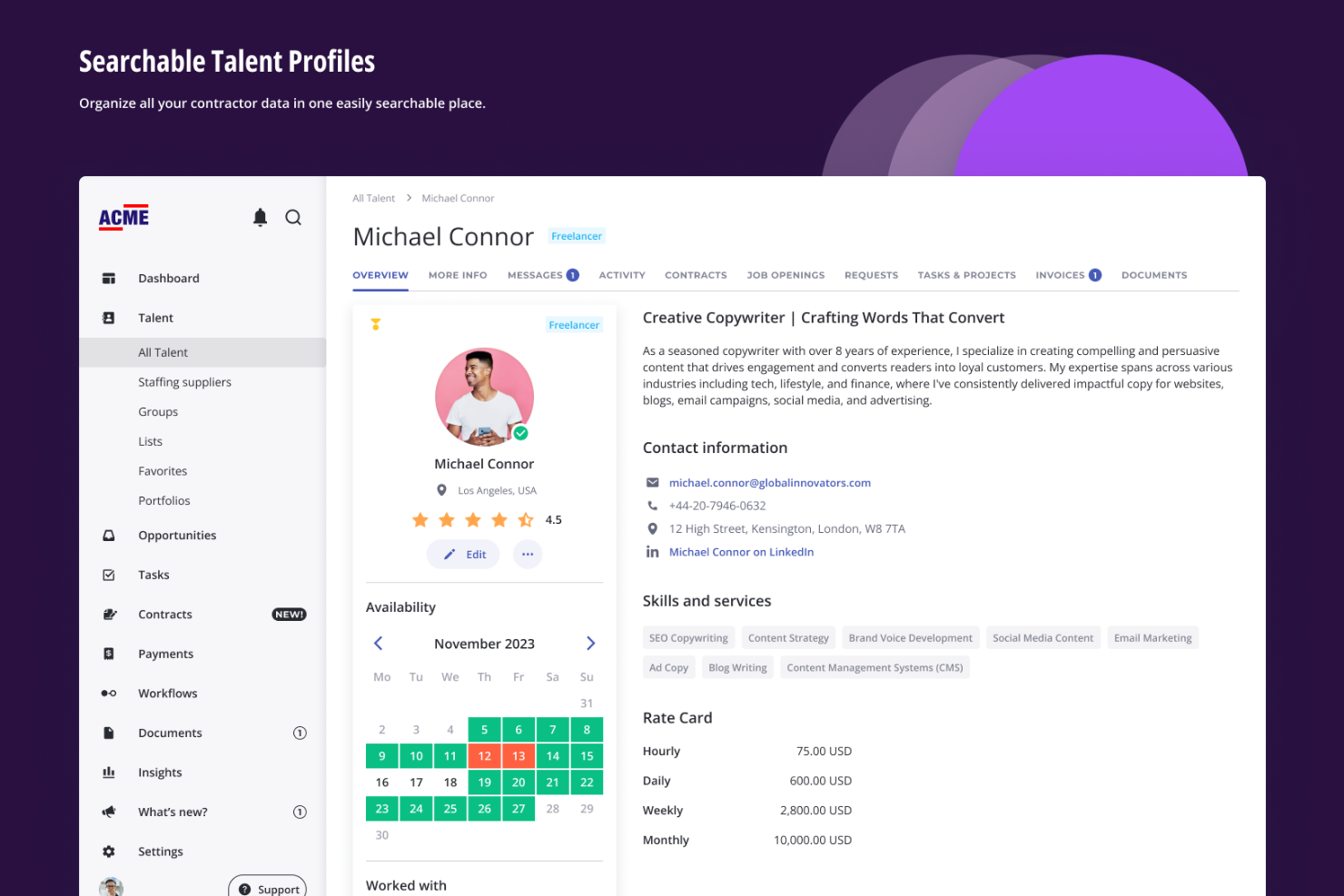
Worksuite (precedentemente Shortlist.co) è una piattaforma cloud che ti aiuta a reperire, inserire, gestire, valutare e pagare i tuoi team di freelance. Le aziende utilizzano il software per la gestione di risorse creative, contenuti editoriali ed eventi dal vivo. Le funzionalità includono monitoraggio delle prestazioni, gestione documentale, assegnazione di progetti, gestione dei contratti e tracciamento delle metriche.
Puoi automatizzare, personalizzare e ottimizzare il processo di onboarding, oltre a monitorare freelance e potenziali assunzioni. I moduli di Worksuite ti permettono di gestire le risorse in tempo reale in base alla disponibilità e alle competenze dei lavoratori. Altre funzionalità includono la gestione delle fatture, la previsione, la reportistica e la dichiarazione fiscale.
Sono disponibili integrazioni con Asana, Basecamp, Google Sheets, Mavenlink, Salesforce, Slack, Teamwork, QuickBooks e Xero.

Ideale per la copertura contro le responsabilità
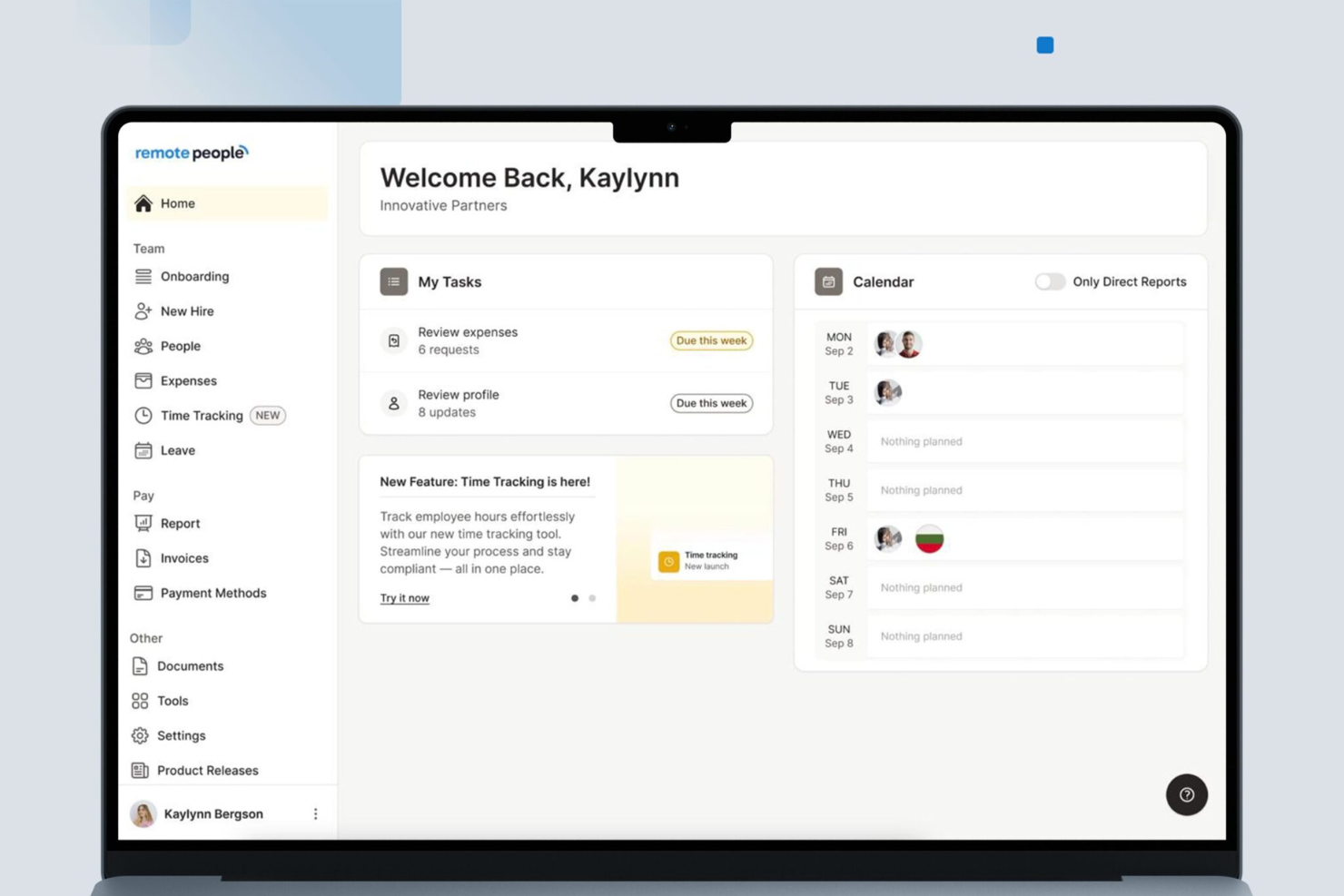
RemotePeople aiuta le aziende ad assumere e gestire collaboratori internazionali riducendo i rischi legali e finanziari che spesso accompagnano il lavoro transfrontaliero. È pensato per team operativi in più paesi che hanno bisogno di onboarding conforme, corretta classificazione dei lavoratori e strumenti di pagamento che riducano l’esposizione a responsabilità.
Perché ho scelto RemotePeople
Ho scelto RemotePeople perché integra la conformità e la protezione da responsabilità direttamente in ogni fase della gestione dei collaboratori. Ottieni contratti specifici per paese e supporto nella classificazione, così è meno probabile classificare erroneamente i lavoratori o violare le regole locali sul lavoro.
I suoi servizi di Employer of Record e Contractor of Record gestiscono le dichiarazioni fiscali e gli obblighi legali al posto tuo, risultando particolarmente utili se stai assumendo in giurisdizioni sconosciute. Inoltre, apprezzo il fatto che processi i pagamenti nelle valute locali assicurandosi che la documentazione soddisfi gli standard di rendicontazione. Se la tua squadra vuole lavorare a livello globale senza aumentare il rischio legale, questa piattaforma offre barriere protettive che riducono il rischio fin dal primo giorno.
Caratteristiche principali di RemotePeople
Ecco alcune funzionalità degne di nota:
- Contratti legali specifici per paese: Fornisce accordi conformi alle normative sul lavoro di ciascuna regione.
- Protezione integrata contro la classificazione errata: Ti avvisa quando i ruoli dei collaboratori potrebbero violare le regole locali di classificazione.
- Pagamenti ai collaboratori in più valute: Esegue pagamenti nelle valute locali con documentazione conforme.
- Dashboard centrale di conformità: Monitora lo stato di onboarding, i documenti richiesti e i rischi specifici di ciascuna regione.
Integrazioni di RemotePeople
Le integrazioni includono sistemi HRIS, strumenti di payroll globale, piattaforme di verifica dell’identità, strumenti di raccolta documenti e processori di pagamenti.
Pros and Cons
Pros:
- Robuste protezioni contro responsabilità integrate nell’onboarding e nella classificazione
- I contratti specifici per paese riducono il rischio
- Supporta pagamenti conformi in più valute
Cons:
- Le integrazioni native non sono chiaramente elencate pubblicamente
- I servizi avanzati di conformità possono comportare costi aggiuntivi

Ideale per pagamenti flessibili in criptovaluta
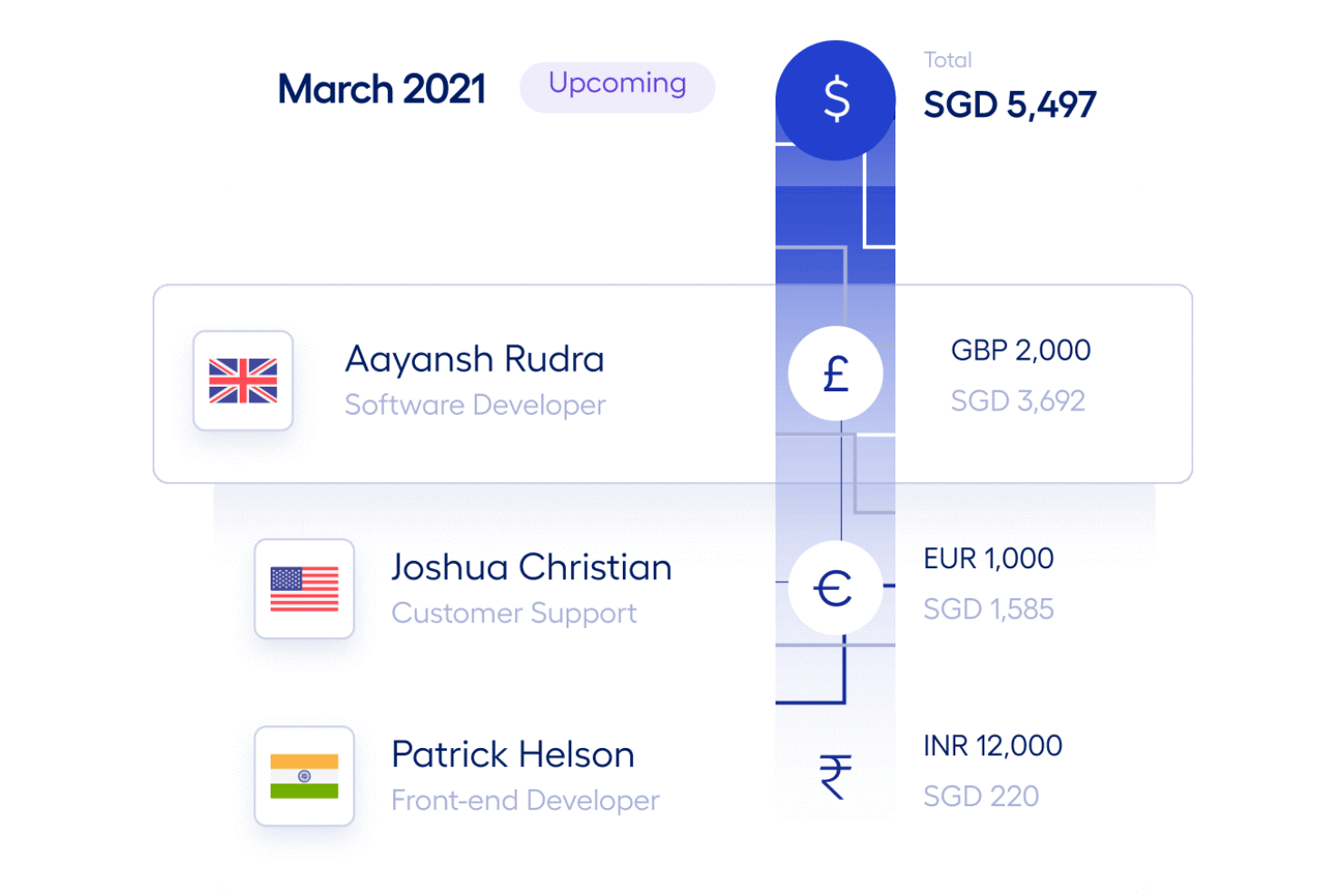
Multiplier è ideale per le aziende che assumono collaboratori internazionali che desiderano opzioni di pagamento flessibili—including criptovaluta—e hanno bisogno della certezza che ogni collaborazione sia conforme alle normative locali sul lavoro.
Perché ho scelto Multiplier
Ho scelto Multiplier perché aiuta il tuo team a gestire collaboratori globali mantenendo ogni collaborazione conforme alle leggi locali. Il suo motore legale genera contratti specifici per paese e li aggiorna in base ai cambiamenti delle normative, riducendo il rischio di errata classificazione.
Puoi anche pagare i collaboratori in oltre 120 valute, inclusa la criptovaluta, offrendo loro maggiore libertà su come ricevere i pagamenti. Mi piace che unisca onboarding, pagamenti, gestione delle spese e revisioni di conformità in un unico flusso di lavoro, evitando così di dover gestire sistemi separati. Queste funzionalità lo rendono una scelta solida per team che espandono in più paesi e desiderano operazioni con collaboratori prevedibili e legalmente corrette.
Caratteristiche principali di Multiplier
Ecco alcune funzioni di spicco da evidenziare:
- Generazione localizzata di contratti: Crea automaticamente accordi di lavoro conformi alle leggi sul lavoro di ciascun paese.
- Motore di pagamento multivaluta: Invia pagamenti in oltre 120 valute con gestione trasparente dei cambi.
- Rimborsi spese automatizzati: Sincronizza ricevute, approvazioni e pagamenti per collaboratori in diverse regioni.
- Foglio presenze integrato: Tiene traccia delle ore dei collaboratori e le collega direttamente ai cicli di pagamento.
Integrazioni di Multiplier
Le integrazioni comprendono Workday, BambooHR, Personio, HiBob, Xero, QuickBooks Online, Deel Passport SSO, Google Workspace e Microsoft 365.
Pros and Cons
Pros:
- Onboarding globale rapido con contratti conformi
- Supporto 24/7 con account manager dedicati
- Pagamenti in criptovaluta e multivaluta in oltre 120 paesi
Cons:
- Alcuni utenti potrebbero trovare l'interfaccia inizialmente difficile da navigare
- Risorse self-service e guide alla risoluzione limitate

RemoFirst
Ideale per fatturazione e pagamenti in valuta locale
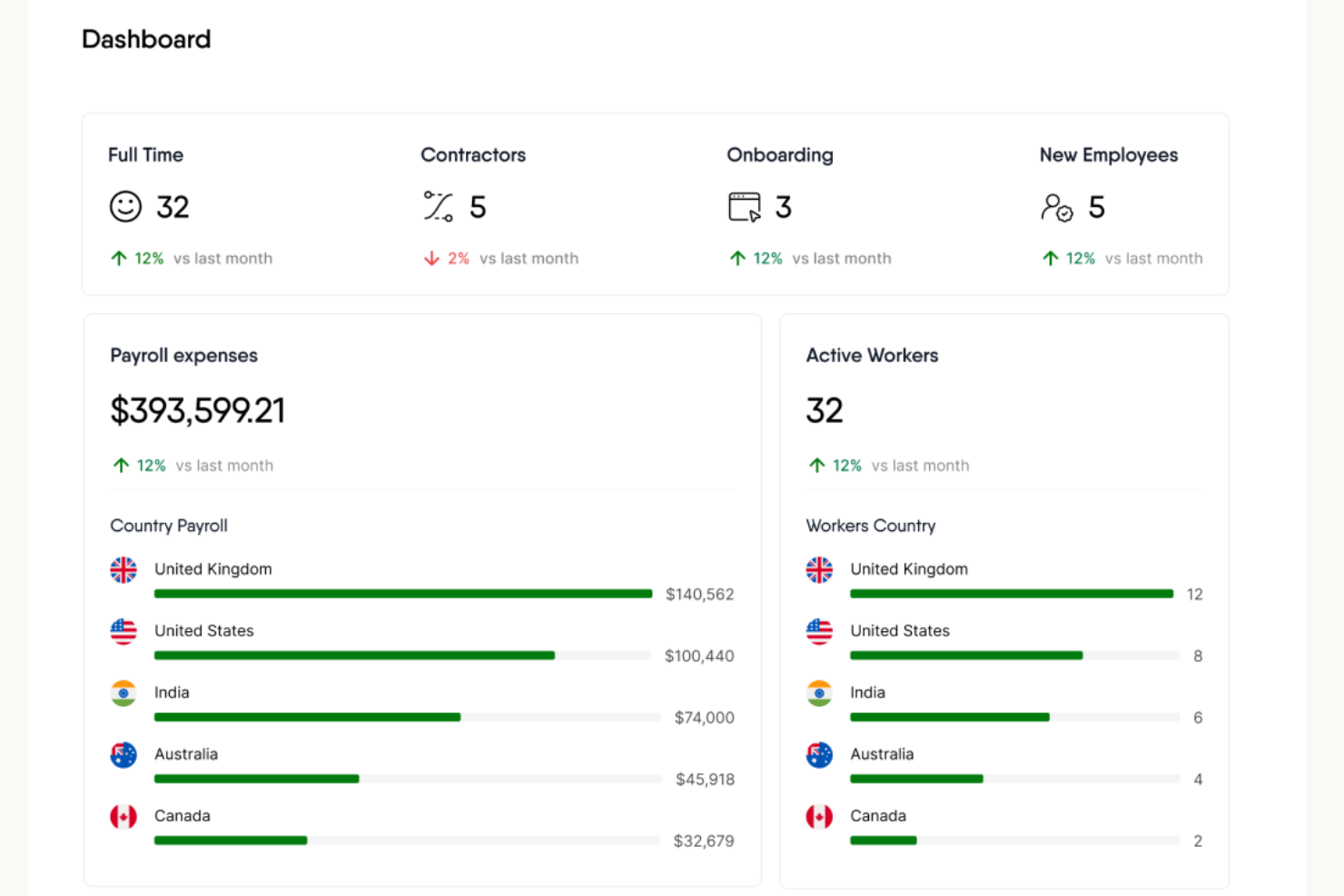
Remofirst è pensato per le aziende che assumono e pagano collaboratori in più paesi e desiderano gestire fatturazione, conformità e pagamenti in un'unica piattaforma. È particolarmente utile se il tuo team collabora con professionisti internazionali che si aspettano di essere pagati nella loro valuta locale e necessitano di una corretta classificazione e documentazione fiscale.
Perché ho scelto Remofirst
Ho scelto Remofirst perché offre un modo chiaro per gestire i collaboratori internazionali senza dover usare strumenti separati o rischiare errori di classificazione. È possibile creare, inviare e firmare digitalmente i contratti con i collaboratori, mantenendo così la fase di onboarding rapida e coerente.
La piattaforma effettua anche controlli KYC automatizzati, aiutandoti a verificare le identità e a rispettare le normative locali; inoltre, apprezzo il fatto che centralizzi tutti i documenti relativi a tasse e conformità, così il tuo team saprà sempre dove trovarli. E poiché supporta i pagamenti in valuta locale, si evitano problemi di conversione e i tuoi collaboratori vengono pagati in modo preciso e puntuale.
Funzionalità principali di Remofirst
Ecco alcune funzionalità di spicco da segnalare:
- Creazione digitale dei contratti: Crea e invia accordi conformi per una rapida integrazione dei collaboratori.
- Gestione globale dei pagamenti: Paga i collaboratori nelle valute locali tramite una dashboard unificata.
- Monitoraggio automatico della conformità: Archivia moduli fiscali e documentazione specifica per regione in un unico luogo.
- Verifica dell’identità dei collaboratori: Utilizza controlli KYC integrati per ridurre i rischi nell’assunzione internazionale.
Integrazioni Remofirst
Le integrazioni includono ADP.
Pros and Cons
Pros:
- I pagamenti in valuta locale riducono errori di conversione e ritardi
- Il KYC integrato riduce rischi di conformità e frodi
- I contratti digitali velocizzano l’onboarding internazionale
Cons:
- Integrazioni native limitate oltre ad ADP
- Non dispone di strumenti integrati per la gestione dei progetti o il monitoraggio del tempo
Altri software per la gestione dei collaboratori esterni
Ecco alcune altre opzioni che non sono rientrate nella selezione dei 10 migliori software per la gestione dei collaboratori esterni. Non avevo spazio per una recensione completa di ciascuno di questi strumenti, ma meritano comunque di essere presi in considerazione:
-
Connecteam
Ideale per la rilevazione delle presenze tramite GPS
-
Insightful
Ideale per monitorare collaboratori distribuiti
-
TimeTrex
Ideale per la rilevazione biometrica delle presenze
-
Patriot Payroll
Ideale per deposito diretto gratuito per collaboratori
-
Pipedrive CRM
Il miglior sistema CRM facile da usare che consente alle piccole e medie imprese di gestire i propri contatti con semplicità
-
Omnipresent
Ideale per la conversione conforme dei collaboratori
-
Lusha
Il miglior sistema di gestione dei contatti per aziende B2B
-
Wingspan
Ideale per la gestione completa dei collaboratori
-
Zoho FSM
Ideale per la gestione degli ordini di lavoro
-
Transformify
Ideale per automatizzare la conformità, la fatturazione e i pagamenti a lavoratori autonomi/indipendenti
-
ExakTime
Ideale per appaltatori che lavorano in campo
-
Atlas
Ideale per consolidare i dati dei tuoi collaboratori globali
-
ADP Workmarket
La migliore piattaforma di gestione dei collaboratori per un'app mobile avanzata
-
Donesafe
Miglior sistema di gestione appaltatori con funzionalità avanzate di gestione della sicurezza
-
Lano
Miglior sistema di gestione dei collaboratori per creare contratti intelligenti
-
Hopscotch
Ideale per piccole imprese e liberi professionisti
-
Rippling
Ideale per il time-tracking specifico dei progetti, integrato nella gestione delle paghe
-
Remote
Ideale per la conformità internazionale
-
ContractSafe
Ideale per funzionalità di ricerca potenziate da intelligenza artificiale
-
Worksome
Ideale per la classificazione integrata dei lavoratori
-
Papaya Global
Ideale per la gestione di collaboratori globali e delle normative locali in 160 paesi
-
Oyster HR
Ideale per pagamenti veloci e semplici ai collaboratori
-
Payoneer Workforce Management
Ideale per l'onboarding e i pagamenti dei collaboratori
-
QuickBooks Payroll
Ideale per la protezione integrata contro le sanzioni fiscali
-
Native Teams
Ideale per pagamenti economici ai collaboratori
-
ADP Workforce Now
Ideale per tecnologia e supporto HR
-
TimeClock Plus
Migliore per le numerose integrazioni con fornitori di servizi payroll
-
QuickBooks Online
Il migliore per pagare spese e fatture dei collaboratori in tutto il mondo


Recensioni correlate di software per le risorse umane
Se non hai ancora trovato quello che cerchi, dai un'occhiata a questi altri strumenti correlati che abbiamo testato e valutato:
- Software per le risorse umane
- Software per la gestione delle paghe
- Software per il reclutamento
- Servizi di datore di lavoro registrato
- Sistemi di tracciamento dei candidati
- Software per la gestione della forza lavoro
Come Valuto il Software di Gestione dei Collaboratori
Valuto ogni strumento secondo due livelli: i requisiti di base come l'onboarding conforme dei collaboratori e i pagamenti globali, e i fattori che distinguono le migliori piattaforme.
Funzionalità Principali (Requisiti Minimi per Questa Lista)
Quando seleziono gli strumenti per la mia lista, valuto ciascuno su una scala da 0 (non offre la funzionalità) a 5 (eccelle in quest'area) per ogni funzionalità principale elencata di seguito. Quindi, calcolo il punteggio totale dello strumento in percentuale. Ogni strumento deve raggiungere un punteggio totale minimo del 65% per essere preso in considerazione.
- Flussi di lavoro per l'Onboarding dei Collaboratori: Controllo se una piattaforma offre un onboarding digitale strutturato con modelli di contratto e raccolta automatizzata dei moduli fiscali, e non solo un semplice modulo di registrazione.
- Conformità alla Classificazione dei Lavoratori: Ogni strumento dovrebbe includere valutazioni di classificazione che tengano conto delle regole specifiche della giurisdizione, poiché classificare erroneamente un collaboratore in un paese può comportare rischi molto diversi rispetto a un altro.
- Pagamenti Globali dei Collaboratori: Cerco pagamenti in più valute tramite diversi metodi di pagamento e valuto in quanti paesi ogni piattaforma consente effettivamente i pagamenti diretti ai collaboratori.
- Gestione di Contratti e Documenti: Una piattaforma efficace centralizza accordi, NDA e documenti fiscali in un unico luogo con firme elettroniche integrate, così il tuo team non perde tempo a cercare file tra le email.
- Generazione e Presentazione dei Moduli Fiscali: Valuto se lo strumento genera automaticamente i moduli fiscali richiesti come i 1099 e gestisce la presentazione, invece di limitarsi a conservare documenti caricati manualmente.
- Monitoraggio di Tempo, Fatture e Attività: I collaboratori hanno bisogno di un modo chiaro per inviare fatture o registrare le ore che alimenta un flusso di approvazione; quindi cerco strumenti che colleghino il tracciamento direttamente all'elaborazione dei pagamenti.
Una volta che ho una lista di strumenti che soddisfano questi criteri, considero cosa distingue ciascuna piattaforma.
Fattori di Differenziazione (Cosa Distingue i Fornitori)
Ecco come confronto e metto a contrasto i diversi fornitori:
Funzionalità Distintive
Una funzionalità a cui presto molta attenzione è la conversione EOR. Quando una relazione con un collaboratore si trasforma in un ruolo a tempo pieno, le piattaforme che gestiscono internamente quella transizione evitano al tuo team di dover ripartire da zero con un nuovo fornitore. L'assicurazione contro l'errata classificazione è un altro elemento di differenziazione importante, poiché trasferisce la responsabilità finanziaria fuori dalla tua organizzazione nel caso di una controversia sulla classificazione. Valuto anche i portali self-service per i collaboratori, dove possono gestire autonomamente fatture, dati fiscali e cronologia dei pagamenti senza intervento delle risorse umane.
Oltre le Funzionalità
Guardo anche quanto bene una piattaforma si integra con il tuo attuale sistema HR e finanziario. Se il tuo team gestisce le paghe con QuickBooks o controlla il personale su BambooHR, integrazioni native fanno risparmiare ore di riconciliazione manuale. Anche la trasparenza dei prezzi è importante—verifico se i fornitori applicano commissioni nascoste su FX o sui pagamenti oltre la tariffa per collaboratore. Infine, la copertura globale è un vero elemento distintivo. Alcune piattaforme operano tramite entità locali mentre altre si affidano a reti di partner, e questa differenza influisce sulla velocità dei pagamenti e sul livello di conformità.
Come scegliere il software per la gestione dei collaboratori esterni
Per capire quale software per la gestione dei collaboratori esterni sia più adatto alle tue esigenze, il primo passo consiste nell'individuare gli utenti principali e documentare le loro difficoltà specifiche.
Mentre affronti il tuo personale e unico processo di selezione del software, tieni a mente i seguenti aspetti:
| Fattore | Cosa considerare |
|---|---|
| Chi lo utilizzerà? | Chi sono gli utenti principali: risorse umane, finanza, ufficio legale, responsabili dei team o gli stessi collaboratori? Assicurati che lo strumento soddisfi le loro esigenze di flusso di lavoro e di accesso. |
| Gestione della conformità | Supporta le leggi sul lavoro locali e internazionali, le normative fiscali e i controlli sulla classificazione (W-9, 1099, IR35, ecc.)? |
| Inserimento dei collaboratori | Con quale efficienza puoi inserire nuovi collaboratori? Cerca strumenti per la firma elettronica, librerie di modelli e raccolta automatizzata dei documenti. |
| Pagamenti e fatturazione | Supporta pagamenti in più valute, detrazioni fiscali, fatturazione automatica e integrazioni con piattaforme contabili? |
| Monitoraggio del tempo | È disponibile il monitoraggio integrato del tempo o l'integrazione con strumenti esterni (ad es. Toggl, Harvest)? È in grado di distinguere tra lavoro a ore e lavoro basato su obiettivi intermedi? |
| Gestione dei documenti | Può archiviare in modo sicuro contratti, NDA, moduli fiscali e consegne dei prodotti del lavoro? Offre il controllo delle versioni o avvisi di scadenza? |
| Portale per i collaboratori | È disponibile un portale self-service che consenta ai collaboratori di aggiornare le informazioni, visualizzare i pagamenti, inviare documenti e monitorare le attività? |
| Integrazioni | Può connettersi al tuo HRMS, ATS, agli strumenti per le paghe e della comunicazione (ad es. Slack, QuickBooks, Gusto, BambooHR)? |
| Scalabilità | Si adatterà alla crescita del numero di collaboratori? Considera le prestazioni sotto carico e il livello di granularità del controllo amministrativo. |
| Reportistica e analisi | Sono disponibili dashboard o report personalizzabili per monitorare la spesa, le prestazioni e i parametri di conformità? |
| Sicurezza e privacy dei dati | È conforme al GDPR/CCPA? Quali protocolli di crittografia dei dati e controllo degli accessi sono presenti? |
| Esperienza utente | L'interfaccia utente è intuitiva sia per gli amministratori sia per i collaboratori? Quanta formazione è necessaria per l'adozione? |
| Assistenza clienti e SLA | Quale livello di assistenza viene offerto (chat, telefono, responsabile dedicato)? Sono previste garanzie sui tempi di risposta e risoluzione? |
| Struttura dei prezzi | Il prezzo si basa sul numero di collaboratori, sulle funzionalità utilizzate o su tariffe mensili fisse? Sono previsti costi nascosti (ad es. commissioni di elaborazione dei pagamenti)? |
Tendenze nei software di gestione dei collaboratori per il 2025
Nel 2025, i software di gestione dei collaboratori continuano a evolversi rapidamente, spinti dalla crescente complessità nella gestione di una forza lavoro contingente e dalla pressante necessità per le aziende di rimanere agili.
Ecco le tendenze più diffuse che attualmente influenzano lo sviluppo dei software di gestione dei collaboratori:
- IA e apprendimento automatico per l'abbinamento dei collaboratori: alcune piattaforme stanno introducendo funzionalità basate sull'IA per abbinare i collaboratori ai progetti in base a competenze, esperienza e prestazioni passate. Questo nuovo approccio mira a ottimizzare i risultati dei progetti e a ridurre il tempo dedicato alla ricerca del collaboratore più adatto al lavoro.
- Accessibilità e funzionalità da dispositivi mobili: il potenziamento delle app mobili per offrire tutte le funzionalità della piattaforma riflette la crescente necessità di accedere agli strumenti anche in movimento. I professionisti delle risorse umane e i responsabili di progetto devono poter gestire i collaboratori, approvare i documenti e monitorare i progressi dei progetti da qualsiasi luogo e in qualsiasi momento.
- Blockchain per la gestione sicura dei contratti: l'uso della tecnologia blockchain per creare registri immutabili dei contratti e dei documenti di conformità è un'altra tendenza emergente. Questa funzionalità insolita risponde alla necessità fondamentale di sicurezza e trasparenza negli accordi con i collaboratori.
Queste tendenze evidenziano una chiara direzione verso soluzioni di gestione dei collaboratori più integrate, intelligenti e sicure. Mentre cerchi il miglior software di gestione dei collaboratori per te, tieni d'occhio i sistemi che sfruttano queste tendenze, per aiutarti a ottenere un maggiore successo operativo.
Che cos'è un software di gestione dei collaboratori?
Il software di gestione dei collaboratori è una piattaforma digitale che aiuta le organizzazioni a supervisionare e coordinare in modo efficiente la propria forza lavoro composta da freelance, lavoratori della gig economy e collaboratori indipendenti.
Le funzionalità includono l'inserimento dei collaboratori, la gestione dei documenti, il monitoraggio delle attività e dei progetti, il monitoraggio del tempo e delle spese, la gestione della conformità per garantire il rispetto delle normative, strumenti di reportistica per l'analisi delle prestazioni e finanziaria e piattaforme di comunicazione per interazioni più semplici.
Questo software semplifica il coordinamento, migliora l'efficienza e aiuta a gestire efficacemente le attività e i progetti relativi ai collaboratori; è particolarmente utile per le aziende che gestiscono collaboratori in più sedi o giurisdizioni.
Funzionalità principali del software di gestione dei collaboratori
Quando selezioni un software di gestione dei collaboratori, presta attenzione alle seguenti funzionalità principali:
- Gestione dell'onboarding: Semplifica il processo di inserimento dei collaboratori nella tua organizzazione automatizzando la gestione della documentazione, la verifica delle credenziali e le attività di orientamento, così potrai rendere operativi i nuovi assunti senza difficoltà.
- Monitoraggio della conformità: Monitora automaticamente le certificazioni, le assicurazioni e i documenti legali dei collaboratori. Questo ti aiuta a essere sempre pronto per gli audit ed evitare costosi problemi di conformità.
- Gestione dei documenti: Archivia, organizza e recupera tutti i documenti dei collaboratori in un unico luogo sicuro, così non dovrai mai affannarti per trovare file importanti o inseguire documenti mancanti.
- Monitoraggio delle ore e delle presenze: Consenti ai collaboratori di registrare digitalmente le ore lavorate e le presenze, semplificando la revisione, l'approvazione e l'elaborazione dei dati di lavoro senza difficoltà.
- Strumenti di valutazione dei rischi: Individua e gestisci i potenziali rischi, come certificazioni scadute o corsi di sicurezza non completati, prima che si trasformino in problemi costosi per i tuoi progetti.
- Elaborazione dei pagamenti: Automatizza la fatturazione e i pagamenti ai collaboratori, così potrai pagare con precisione e puntualità, mantenendo soddisfatta la tua forza lavoro e i tuoi conti in ordine.
- Valutazione delle prestazioni: Monitora e valuta la qualità del lavoro, le scadenze e i risultati dei collaboratori, ottenendo informazioni chiare per decidere chi assumere nuovamente o premiare.
- Centro di comunicazione: Centralizza messaggi, aggiornamenti e avvisi, così tutti rimangono informati ed eviti il caos delle interminabili catene di email.
Funzionalità comuni dell'intelligenza artificiale nei software per la gestione dei collaboratori
Oltre alle funzionalità standard dei software per la gestione dei collaboratori elencate sopra, molte di queste soluzioni stanno integrando l'intelligenza artificiale con funzionalità come:
- Chatbot in linguaggio naturale: Offri assistenza 24 ore su 24, 7 giorni su 7 a collaboratori e responsabili con chatbot basati sull'intelligenza artificiale che rispondono alle domande, guidano nelle fasi di onboarding o risolvono immediatamente i problemi.
- Verifica automatizzata dei documenti: Utilizza strumenti basati sull'intelligenza artificiale per verificare rapidamente i documenti caricati dai collaboratori, riducendo i tempi di revisione manuale e segnalando le incongruenze alla tua attenzione.
- Analisi predittiva dei rischi: Sfrutta l'intelligenza artificiale per analizzare le prestazioni dei collaboratori, gli incidenti passati e le tendenze relative alla conformità, ricevendo avvisi sui rischi in tempo reale per poter agire in modo proattivo.
- Monitoraggio intelligente della conformità: Affidati all'intelligenza artificiale per monitorare le modifiche normative e aggiornare automaticamente i requisiti di conformità, così i tuoi collaboratori rispettano sempre gli standard più recenti.
- Abbinamento intelligente: Abbina i collaboratori a progetti o ruoli in base alle competenze, allo storico delle prestazioni e alla disponibilità utilizzando analisi basate sull'intelligenza artificiale, aiutandoti a creare rapidamente i team migliori.
Vantaggi dei software per la gestione dei collaboratori
Per le organizzazioni che si affidano a lavoratori occasionali, un software per la gestione dei collaboratori è un investimento vantaggioso che ti aiuta a organizzare tutti i processi correlati in un unico sistema accessibile. Ecco alcuni dei vantaggi che puoi aspettarti investendo nel miglior software per la gestione dei collaboratori adatto alle tue esigenze:
- Dati centralizzati sui collaboratori: Offrendo alle organizzazioni un database unificato per tutte le informazioni relative ai collaboratori, il tuo personale potrà accedere più facilmente alle informazioni di cui ha bisogno. Questo rende più efficiente l'aggiornamento e la gestione dei dati dei collaboratori, migliorando il processo decisionale e la trasparenza operativa.
- Maggiore efficienza nell'onboarding: L'inserimento di nuovi collaboratori in un progetto richiede sempre tempo, ma questo software può accelerare notevolmente il processo, riducendo le attività amministrative e consentendo un'implementazione più rapida.
- Gestione della conformità migliorata: Utilizzando un software che ti aiuti a garantire che tutti i collaboratori rispettino i requisiti legali e specifici del progetto, ridurrai significativamente il rischio di sanzioni per non conformità e avrai la tranquillità che tutte le certificazioni necessarie siano aggiornate e valide.
- Fatturazione ed elaborazione dei pagamenti automatizzate: Automatizzando la fatturazione e i pagamenti, puoi migliorare la gestione del flusso di cassa e mantenere rapporti positivi con i tuoi collaboratori, assicurandoti al contempo che i pagamenti siano correttamente riconciliati con le ore effettivamente lavorate.
- Maggiore visibilità sui progetti: Il software per la gestione dei collaboratori semplifica il monitoraggio completo di molti aspetti diversi della gestione dei progetti, compresi i contributi dei collaboratori. Questa visibilità aiuta a identificare tempestivamente i potenziali colli di bottiglia e garantisce la consegna puntuale dei progetti.
Come puoi vedere, investire in un sistema per la gestione dei collaboratori può migliorare le tue attività, trasformando il modo in cui gestisci la tua forza lavoro occasionale. Pertanto, queste piattaforme non si concentrano solo su una gestione più efficace dei collaboratori, ma sono progettate per migliorare le prestazioni e l'agilità complessive della tua organizzazione di fronte all'evoluzione degli ambienti di lavoro.
Costi e prezzi dei software per la gestione dei collaboratori
Queste piattaforme offrono una vasta gamma di piani tariffari per adattarsi alle diverse dimensioni e necessità aziendali. Per fornire una panoramica di base, ho illustrato nella tabella seguente le opzioni di piano tipiche e le funzionalità comunemente incluse.
Tabella di confronto dei piani per il software di gestione dei collaboratori esterni
| Tipo di piano | Prezzo medio | Funzionalità comuni |
|---|---|---|
| Gratuito | $0 | Gestione di base dei collaboratori esterni, progetti limitati e reportistica di base |
| Base | $10 - $30 per utente/mese | Monitoraggio avanzato dei progetti, gestione della conformità e opzioni di integrazione limitate |
| Professionale | $30 - $60 per utente/mese | Reportistica avanzata, progetti illimitati, integrazioni personalizzate e analisi delle prestazioni |
| Aziendale | Prezzo personalizzato | Supporto di livello superiore, responsabile dedicato dell'account, sviluppo personalizzato e funzionalità di sicurezza avanzate |
La scelta del piano giusto dipende dalle dimensioni della tua azienda, dalla complessità delle tue esigenze di gestione dei collaboratori esterni e dal tuo budget. Assicurati di valutare i requisiti attuali e di considerare la possibile crescita futura quando selezioni un piano, poiché la scalabilità è fondamentale per il successo a lungo termine.
Domande frequenti
Hai ancora dubbi sul software di gestione dei contratti e su come possa aiutare la tua organizzazione? Le risposte alle domande frequenti qui sotto dovrebbero chiarire ogni dubbio:
Quando potrei aver bisogno di un software per la gestione dei collaboratori esterni?
In genere hai bisogno di un software per la gestione dei collaboratori esterni quando gestirli diventa troppo complesso, dispendioso in termini di tempo o rischioso da gestire manualmente. Questo accade solitamente quando:
-
Lavori con più di una manciata di collaboratori esterni, soprattutto in località, valute o giurisdizioni legali diverse.
-
Il tuo team dedica troppo tempo alle attività amministrative, come sollecitare i moduli fiscali, inviare pagamenti o creare contratti.
-
Stai affrontando un aumento dei rischi legati alla conformità, come dubbi sulla corretta classificazione, preparazione per gli audit o espansione nei mercati internazionali.
-
Hai bisogno di maggiore visibilità e controllo sui costi, sulle prestazioni e sulle tempistiche dei collaboratori esterni, ma i tuoi fogli di calcolo o strumenti ad hoc non sono sufficienti.
Se riconosci uno di questi segnali, è un’indicazione evidente che sei pronto per un sistema più scalabile e sicuro.
Lo strumento può gestire sia i lavoratori occasionali a breve termine sia i collaboratori esterni a lungo termine?
Sì, ma non tutte le piattaforme lo fanno bene. Assicurati che il software sia in grado di distinguere tra diversi tipi di collaborazione—su base oraria, legata a un traguardo o a progetto—e di supportare di conseguenza diverse strutture e tempistiche di pagamento.
In che modo il software di gestione dei collaboratori esterni gestisce la conformità internazionale?
La maggior parte delle piattaforme offre strumenti di conformità specifici per area geografica, come la raccolta dei moduli fiscali (ad esempio, W-9, W-8BEN), i controlli sulla classificazione (ad esempio, IR35) e modelli di contratto adattati alle leggi locali sul lavoro. Tuttavia, il livello di supporto alla conformità varia: alcune piattaforme si limitano a segnalare i problemi, mentre altre forniscono indicazioni legali direttamente nella piattaforma o l’accesso a partner legali.
Altri tipi di software per la gestione delle risorse
Cerchi altri tipi di software per alleggerire il tuo carico amministrativo? Dai un'occhiata a questi altri elenchi specializzati per scoprire ulteriori soluzioni che potrebbero aiutarti:
- Software per la gestione della forza lavoro
- Software per la gestione della sicurezza
- Software per la pianificazione dei turni dei dipendenti
- Software per la pianificazione della forza lavoro
- Software integrato per la gestione dei rischi
- Strumenti di gestione dei progetti HR
- Software per la gestione delle prestazioni aziendali (EPM)