

10 Best HR Project Management Software in 2026

Best HR Project Management Software Shortlist


HR project management software helps your HR team organize, track, and deliver people-focused projects—like onboarding, policy rollouts, and engagement initiatives—on time and with less hassle. If you’re searching for the best HR project management software, you’re likely juggling multiple priorities, tight deadlines, and the need to keep everyone aligned. The right tool can help you manage tasks, documents, and communication in one place, so nothing falls through the cracks. In this guide, you’ll find trusted options that fit different HR needs, so you can choose the best solution for your team’s workflow and goals.
Why Trust Our Software Recommendations
Our team has been testing and reviewing software since 2012. As HR experts ourselves, we know how difficult—and important—it is to choose the right software.
For this guide, we evaluated tools using hands-on testing and independent research, scoring tools using our selection criteria. We also draw on insights from industry thought leaders and practicing HR experts.
Our reviews reflect our human editorial judgment, not a sales pitch.
Expert reviewers:
HR Project Management Software Comparison Table
This comparison table summarizes pricing details for my top HR project management software selections:
| Tool | Best For | Trial Info | Price | ||
|---|---|---|---|---|---|
| 1 | Best for customizable HR process templates | 14-day free trial | From $15/user/month (billed annually) | Website | |
| 2 | Best for visual workflow boards | 14-day free trial | From $5/user/month (billed annually) | Website | |
| 3 | Best for combining tasks and databases | Free plan + free demo available | From $10/user/month (billed annually) | Website | |
| 4 | Best for visual employee lifecycle tracking | Free plan available | From $10.99/user/month (billed annually) | Website | |
| 5 | Best for process checklists and automation | Free demo available | Pricing upon request | Website | |
| 6 | Best for managing client collaboration | Free plan + 14-day free trial available | From $9.99/user/month (billed annually) | Website | |
| 7 | Best for HR request ticketing and tracking | Free plan + 14-day free trial available | From $25/user/month | Website | |
| 8 | Best for real-time project visibility and reporting | Free trial available | From $15/user/month (billed annually) | Website | |
| 9 | Best for spreadsheet-style project tracking | 30-day free trial | From $9/user/month (billed annually) | Website | |
| 10 | Best for integrating with Microsoft Teams | Free plan + 30-day free trial + free demo available | From $7/user/month | Website |

Best HR Project Management Software Reviews
Below are my detailed summaries of the best HR project management software that made it onto my shortlist. My reviews offer a detailed look at the features, best use cases, and integrations of each platform to help you find the best one for you.
Best for customizable HR process templates
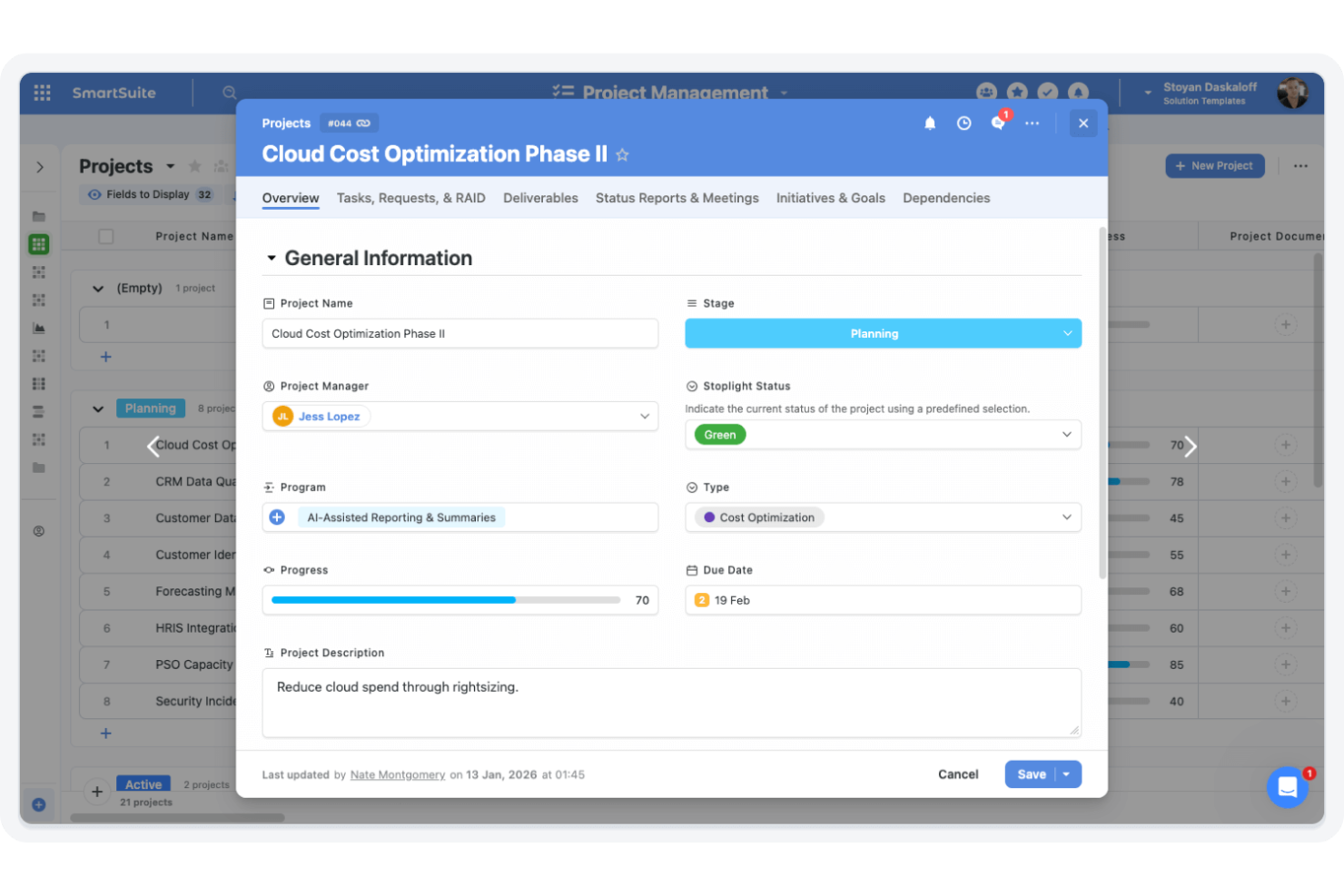
SmartSuite is a work management platform for HR teams that combines customizable workflows, process templates, task tracking, and employee data management in one system.
Who Is SmartSuite Best For?
HR teams at growing companies who want to tailor workflows and processes to their unique needs.
Why I Picked SmartSuite
I picked SmartSuite because I can start with ready-made HR process templates and then customize every field, workflow, and automation to fit my team’s needs. I like that I can build out onboarding, performance reviews, and employee records in one place. My team uses the drag-and-drop designer to tweak processes as we grow or change policies.
SmartSuite Key Features
- Role-based permissions: Control access to sensitive HR data by user role.
- Integrated document storage: Store and organize employee files within each record.
- Automated reminders: Set up notifications for key HR dates and deadlines.
- Mobile app access: Manage HR workflows and approvals from any device.
SmartSuite Integrations
SmartSuite offers 40+ native integrations, including Slack, Google Workspace, Microsoft 365, Jira, HubSpot, Salesforce, QuickBooks, and connects with Zapier.
Pros and Cons
Pros:
- Integrated document storage for employee files
- Role-based permissions for sensitive HR data
- Customizable HR templates for onboarding
Cons:
- Limited HR analytics and reporting tools
- No native payroll or benefits management
Trello
Best for visual workflow boards
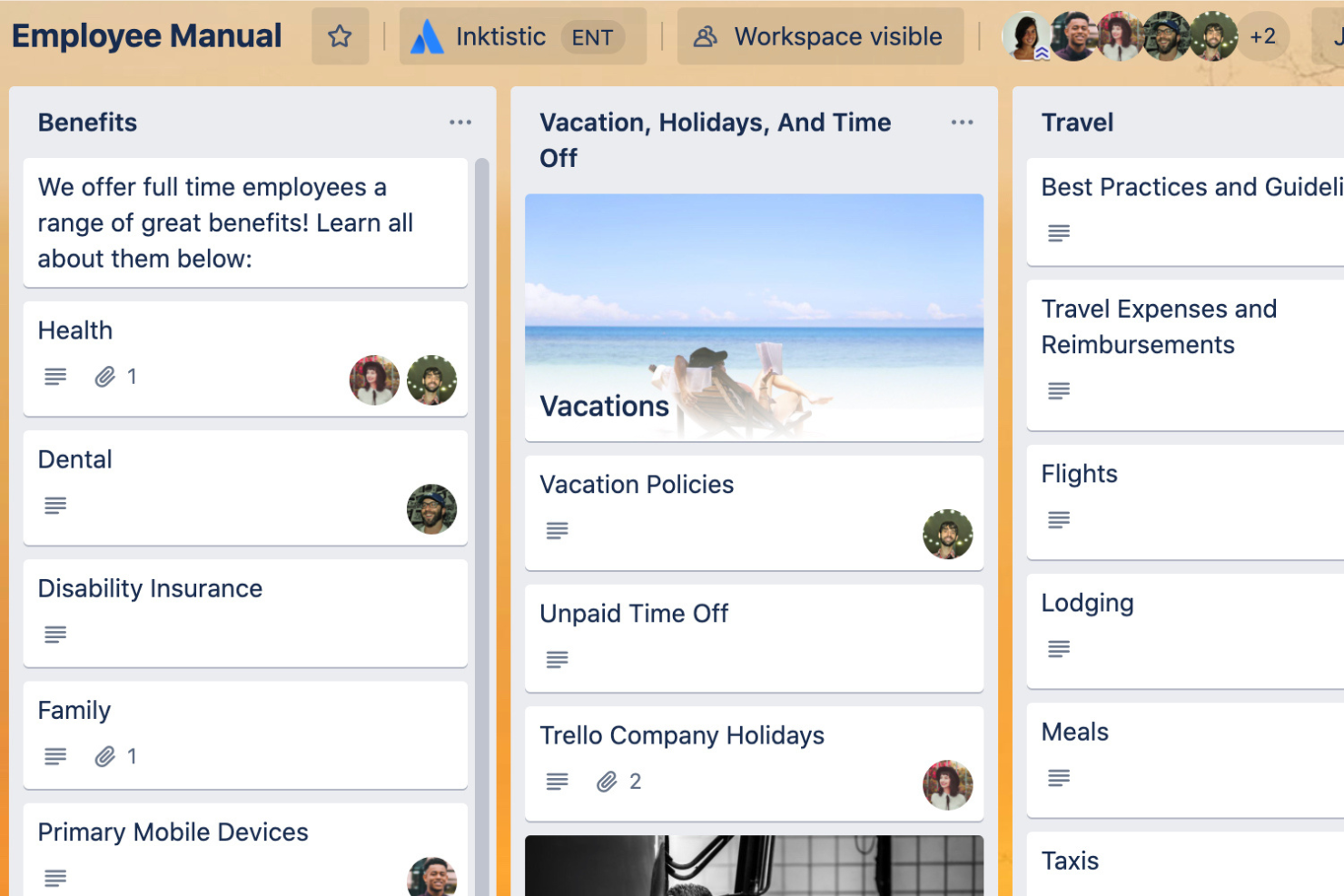
Trello is a visual project management platform that lets HR teams organize tasks, manage onboarding workflows, and track employee requests using customizable boards, lists, and cards.
Who Is Trello Best For?
HR teams at small to mid-sized companies who want a flexible, visual way to manage people-related projects and workflows.
Why I Picked Trello
I picked Trello because I can set up visual boards for every HR process—onboarding, recruitment, policy updates, and more. I use card templates to standardize recurring HR tasks, and the drag-and-drop lists make it easy for my team to track progress at a glance. In practice, that means we can quickly adapt our boards as priorities shift or new HR projects come up.
Trello Key Features
- Power-Ups: Add integrations like Slack, Google Drive, and Jira to boards.
- Custom fields: Track HR-specific data such as start dates or employee status.
- Board permissions: Control who can view or edit sensitive HR boards.
- Calendar view: Visualize HR tasks and deadlines on a shared calendar.
Trello Integrations
Trello offers 200+ native integrations, including Slack, Google Drive, Dropbox, Jira, Confluence, Microsoft Teams, Salesforce, GitHub, Evernote, and Mailchimp, and connects with Zapier.
Pros and Cons
Pros:
- Calendar view tracks HR deadlines and events
- Card templates support repeatable HR workflows
- Visual boards simplify HR process mapping
Cons:
- No dedicated HR onboarding or offboarding modules
- Difficult to manage large-scale HR projects

Notion
Best for combining tasks and databases
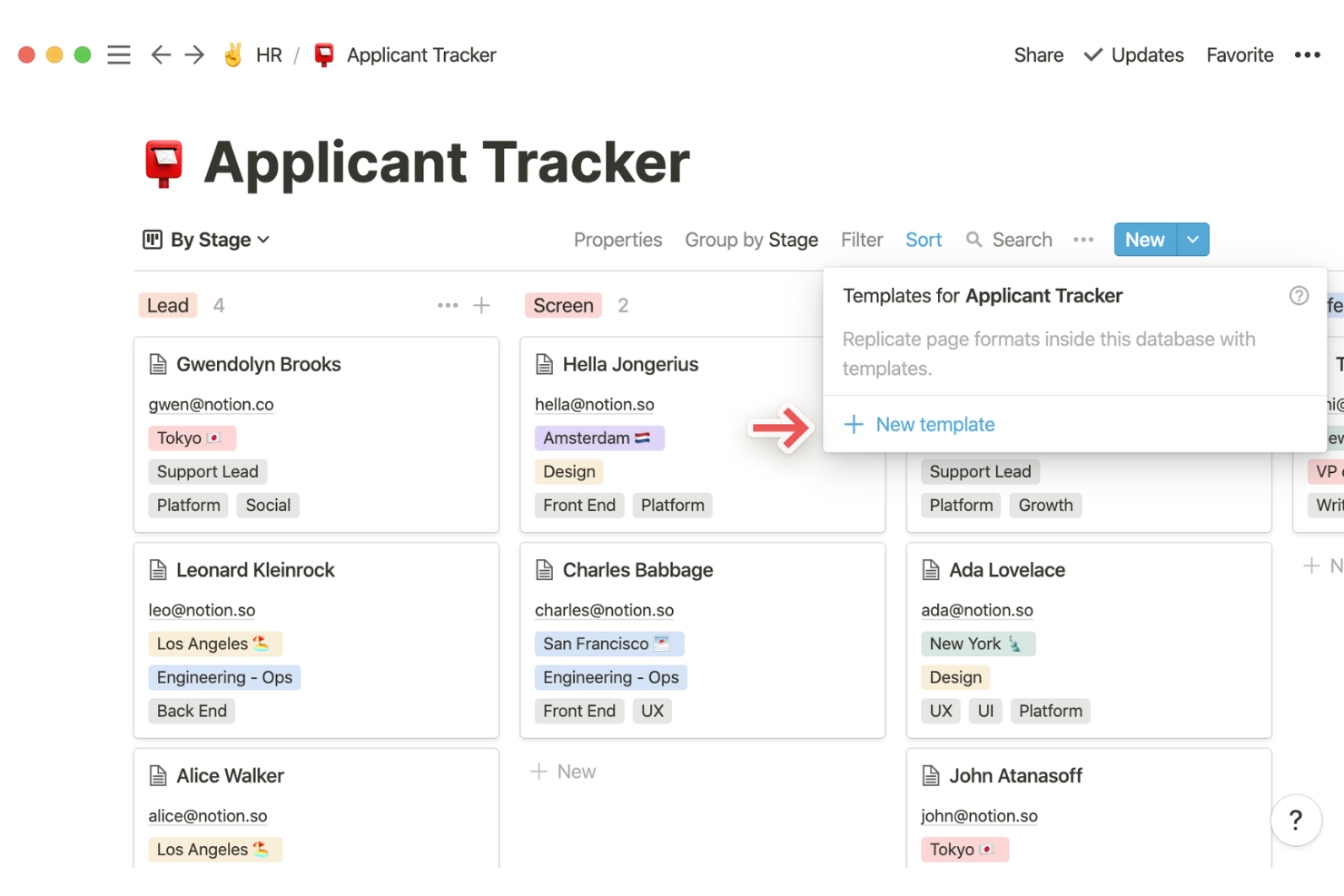
Notion is a flexible workspace platform for HR teams that combines project management, document creation, and custom databases in one system.
Who Is Notion Best For?
HR teams at startups and growing companies who want to centralize people operations, documentation, and project tracking in one customizable workspace.
Why I Picked Notion
I picked Notion as one of the best because I can build custom HR databases and link them directly to project boards, so my team tracks everything from candidate pipelines to onboarding checklists in one place. I like using Notion’s relational databases to connect employee records with tasks, policies, and meeting notes. In practice, that means we can update HR docs and project plans side by side, without switching tools.
Notion Key Features
- Permission controls: Set granular access for HR documents and pages.
- Template gallery: Use pre-built HR templates for onboarding, reviews, and policies.
- Timeline view: Visualize HR projects and milestones on a timeline.
- Commenting and mentions: Collaborate on HR tasks with in-line comments and team mentions.
Notion Integrations
Notion offers 80+ native integrations, including Slack, Google Drive, Microsoft Teams, GitHub, Jira, Asana, Zoom, Figma, Typeform, and Zapier.
Pros and Cons
Pros:
- Highly flexible custom metadata for candidates
- Custom templates for HR onboarding and reviews
- Combines HR databases with project tracking tools
Cons:
- Can get cluttered with large HR teams
- Limited offline editing and synchronization

Asana
Best for visual employee lifecycle tracking
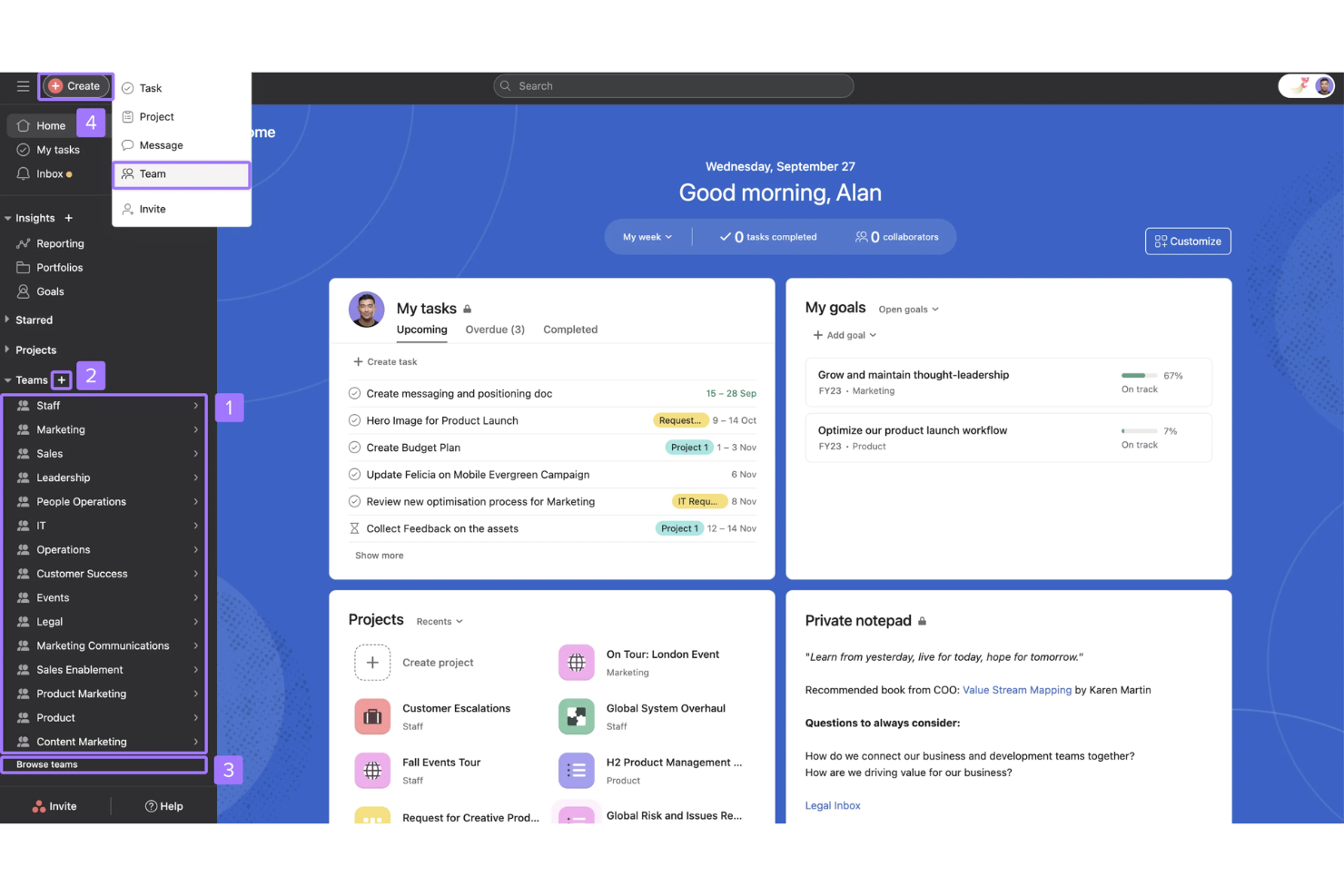
Asana is a project and workflow management platform for HR teams that offers visual task boards, timeline views, automation tools, and customizable templates for managing employee-related projects and processes.
Who Is Asana Best For?
HR teams at mid-sized to large organizations who need visual tools to manage employee lifecycle projects and processes.
Why I Picked Asana
I picked Asana as one of the best because I can visually map out every stage of the employee lifecycle using timeline and board views. My team uses its workflow automation to assign onboarding tasks, track progress, and manage approvals in one place. I like that I can customize templates for recurring HR processes, so we keep everything organized and transparent.
Asana Key Features
- Task dependencies: Set tasks to start only after others are completed.
- Custom fields: Add and track HR-specific data points on tasks and projects.
- Advanced search and reporting: Build custom reports to monitor HR project metrics.
- File attachments: Upload and store documents directly within tasks for easy access.
Asana Integrations
Asana offers 200+ native integrations, including Slack, Microsoft Teams, Google Workspace, Zoom, Jira Cloud, Salesforce, Adobe Creative Cloud, Okta, Dropbox, and Zapier. An API is available for custom integrations.
Pros and Cons
Pros:
- Built-in automation for repetitive HR tasks
- Custom fields for tracking HR-specific data
- Visual project boards for HR workflows
Cons:
- Lacks native time tracking for HR tasks
- No built-in HR analytics dashboards

Best for process checklists and automation
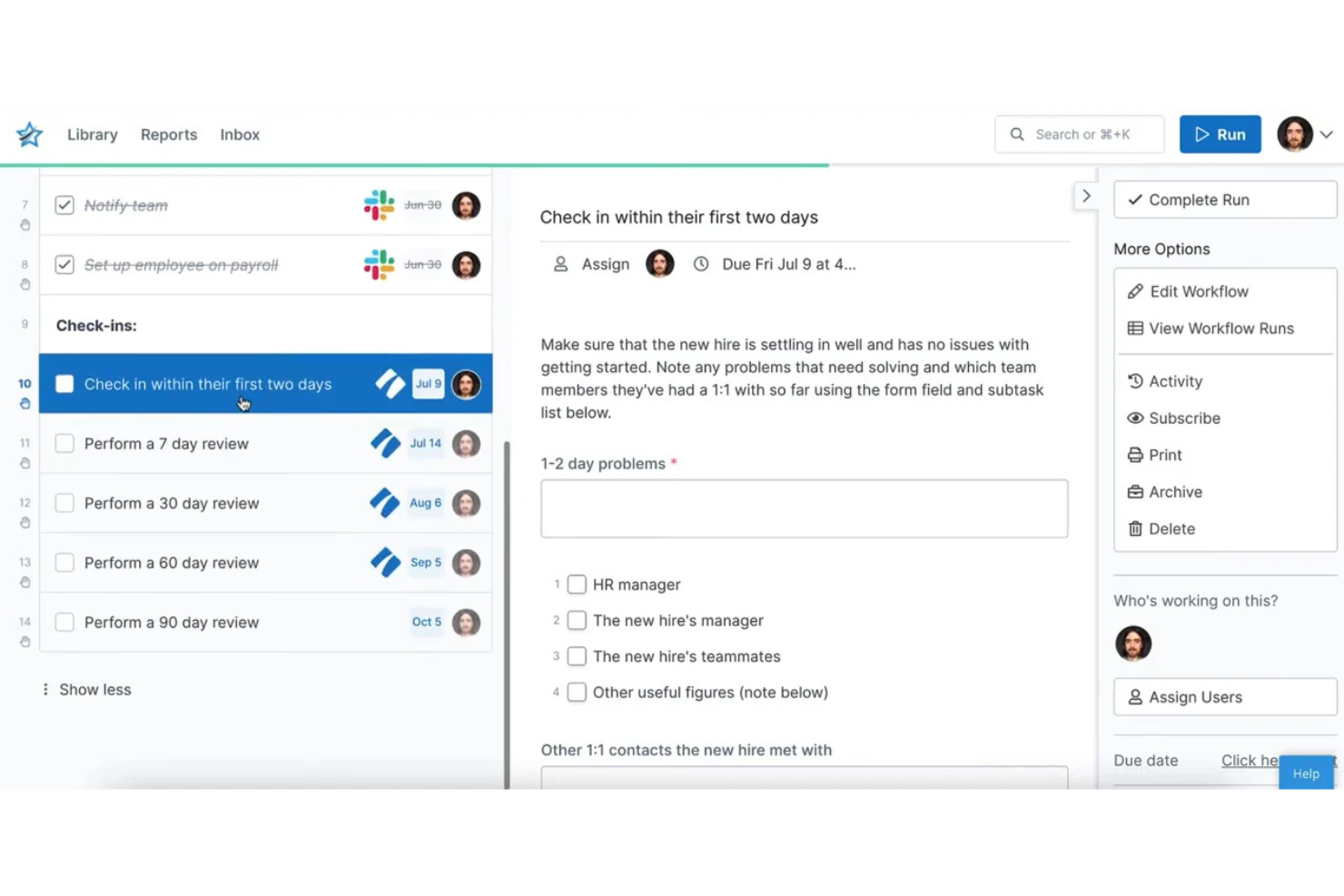
Process Street is a workflow and process management platform for HR teams that lets you create, automate, and track recurring checklists, approvals, and documentation tasks.
Who Is Process Street Best For?
HR teams at growing companies who need to automate and standardize recurring people processes.
Why I Picked Process Street
I picked Process Street as one of the best because I can build detailed HR process checklists that trigger automated tasks, approvals, and notifications for my team. I like using conditional logic to create dynamic onboarding flows and recurring compliance audits. In practice, that means my team can standardize every HR process and automate repetitive steps without coding.
Process Street Key Features
- Role-based permissions: Control access to HR workflows and sensitive information.
- Form fields: Collect structured employee data directly within checklists.
- Task assignments: Assign checklist steps to specific team members.
- Audit trail: Track all activity and changes for compliance and accountability.
Process Street Integrations
Process Street offers 20+ native integrations, including Slack, Google Sheets, Salesforce, Jira, Trello, Dropbox, Airtable, and connects with Zapier.
Pros and Cons
Pros:
- Tracks HR process completion with audit trails
- Conditional logic for dynamic workflows
- Customizable checklist templates
Cons:
- No automatic task allocation for checklists
- High minimum cost for small teams

Best for managing client collaboration
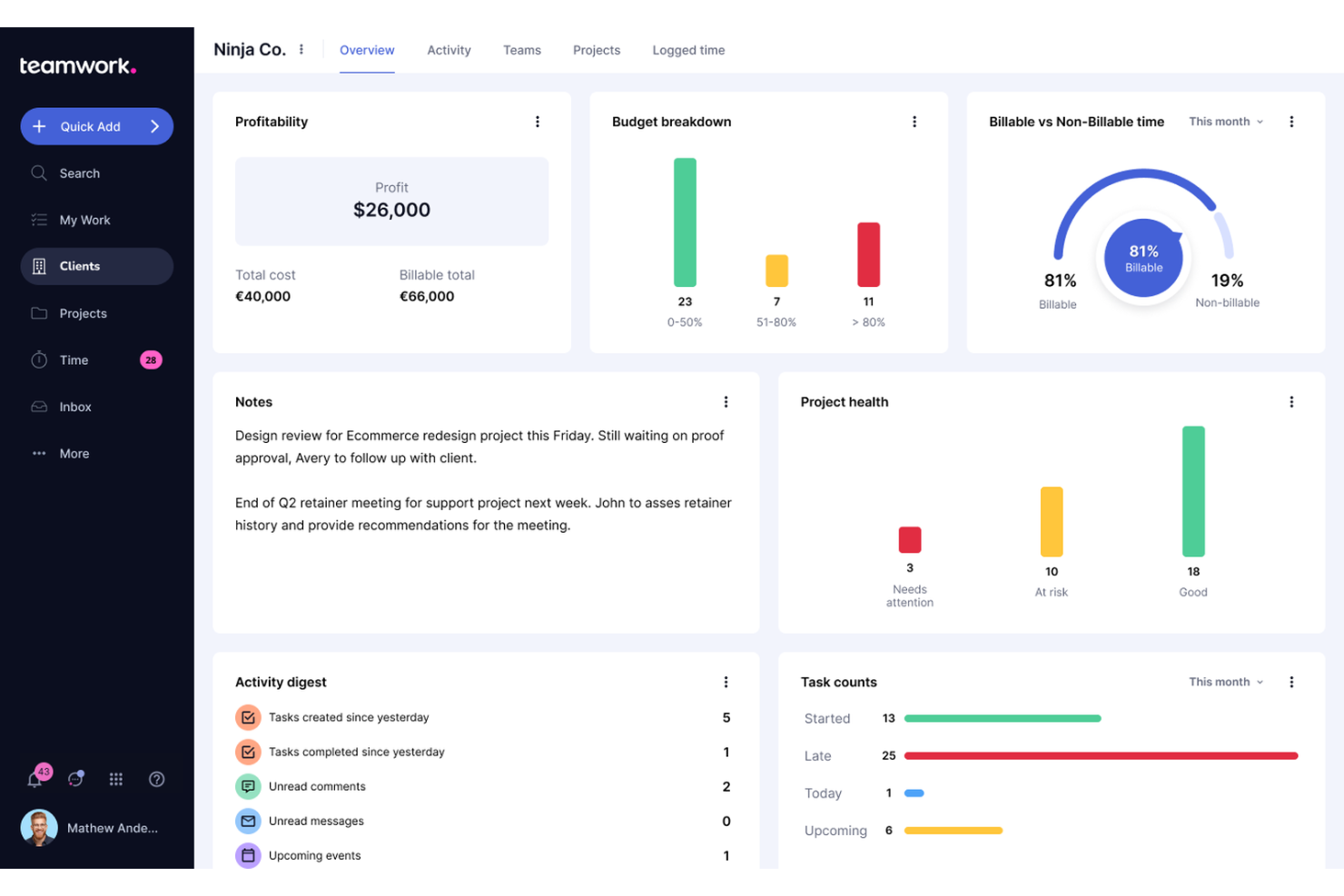
Teamwork.com is a project management platform for HR teams that combines task management, time tracking, document sharing, and client collaboration tools in one system.
Who Is Teamwork.com Best For?
HR teams at agencies or service-based businesses who need to manage projects and collaborate with external clients.
Why I Picked Teamwork.com
I picked Teamwork.com because I can invite clients directly into projects and control what they see, which is perfect for HR teams working with external partners. I use the built-in client portal to share documents, assign tasks, and keep communication organized. The ability to set granular permissions means I can protect sensitive HR data while still collaborating closely with clients.
Teamwork.com Key Features
- Time tracking: Track billable and non-billable hours for HR projects.
- Task dependencies: Set and manage task relationships to control project flow.
- Resource management: Allocate team members and monitor workloads across projects.
- Project templates: Use pre-built templates to quickly launch recurring HR processes.
Teamwork.com Integrations
Teamwork.com offers 100+ native integrations, including Slack, Microsoft Teams, Google Drive, Dropbox, HubSpot, Xero, QuickBooks, Harvest, OneDrive, and Box.
Pros and Cons
Pros:
- Portfolio views for multi-department project oversight
- Integrated time tracking for payroll accuracy
- Client-facing portals for external recruitment partners
Cons:
- Interface clutter from excessive unused features
- Manual tagging required for task categorization

Best for HR request ticketing and tracking
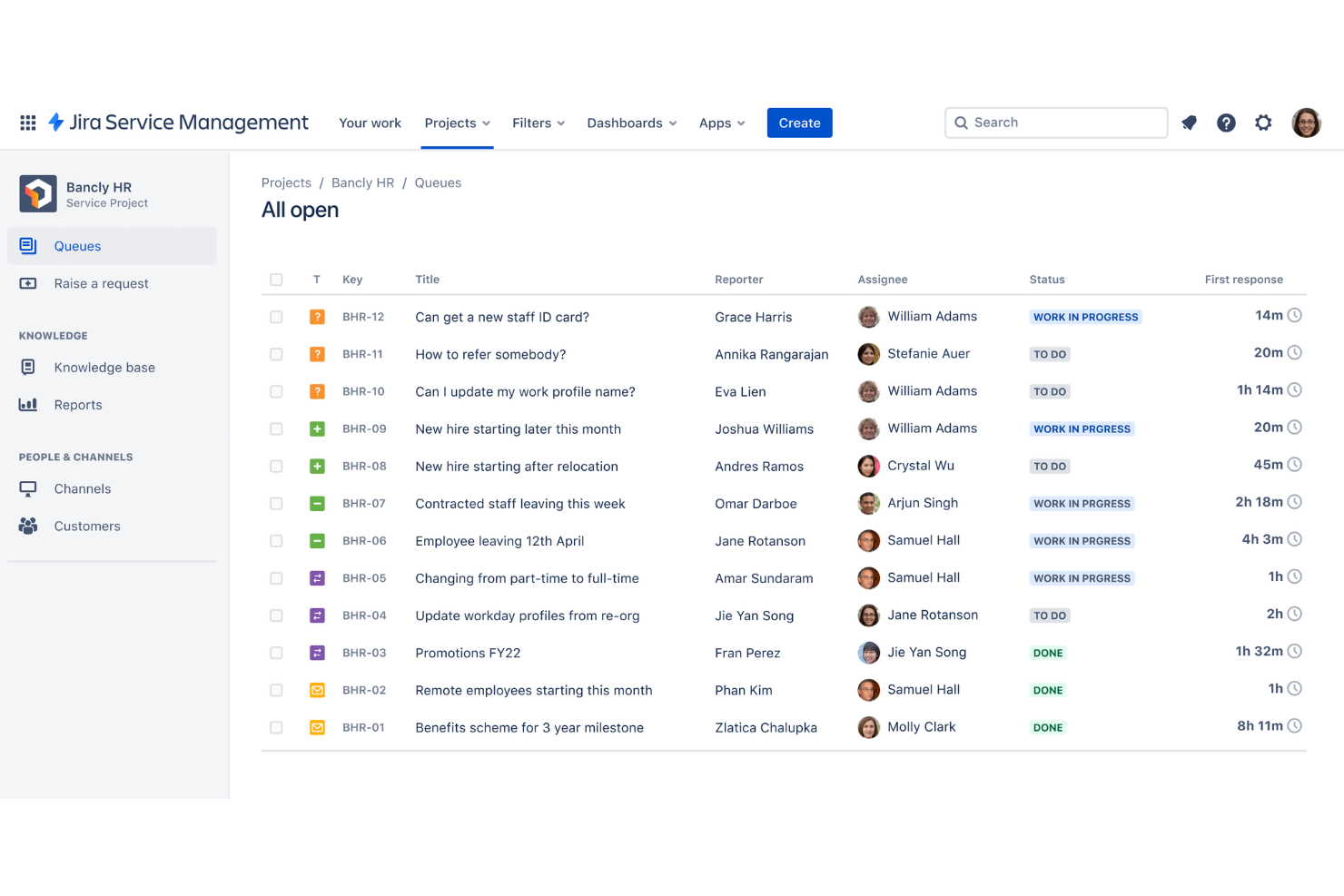
Jira Service Management is a service desk and request management platform from Atlassian that lets HR teams organize, track, and automate employee requests, onboarding tasks, and internal workflows.
Who Is Jira Service Management Best For?
HR teams at mid-sized to large organizations who need to centralize and track employee service requests.
Why I Picked Jira Service Management
I picked Jira Service Management because I can set up dedicated HR request queues and automate ticket routing for onboarding, offboarding, and employee inquiries. I use custom forms to capture all the details HR needs up front, and the built-in SLAs help my team prioritize urgent requests. In practice, that means my team can track every HR ticket from submission to resolution without losing visibility.
Jira Service Management Key Features
- Knowledge base integration: Connects with Confluence to provide self-service HR resources.
- Custom workflow builder: Lets you design HR approval and review processes.
- Role-based access controls: Restricts sensitive HR data to authorized users.
- Automated notifications: Sends alerts for ticket updates and status changes.
Jira Service Management Integrations
Jira Service Management offers 1,000+ native integrations, including Slack, Microsoft Teams, Google Workspace, Confluence, Trello, GitHub, Salesforce, Okta, Zoom, and Dropbox.
Pros and Cons
Pros:
- Integrates with Confluence for HR knowledge base
- Built-in SLAs for HR ticket prioritization
- Customizable HR request types and workflows
Cons:
- Basic reporting without premium plan add-ons
- Limited HR document management features
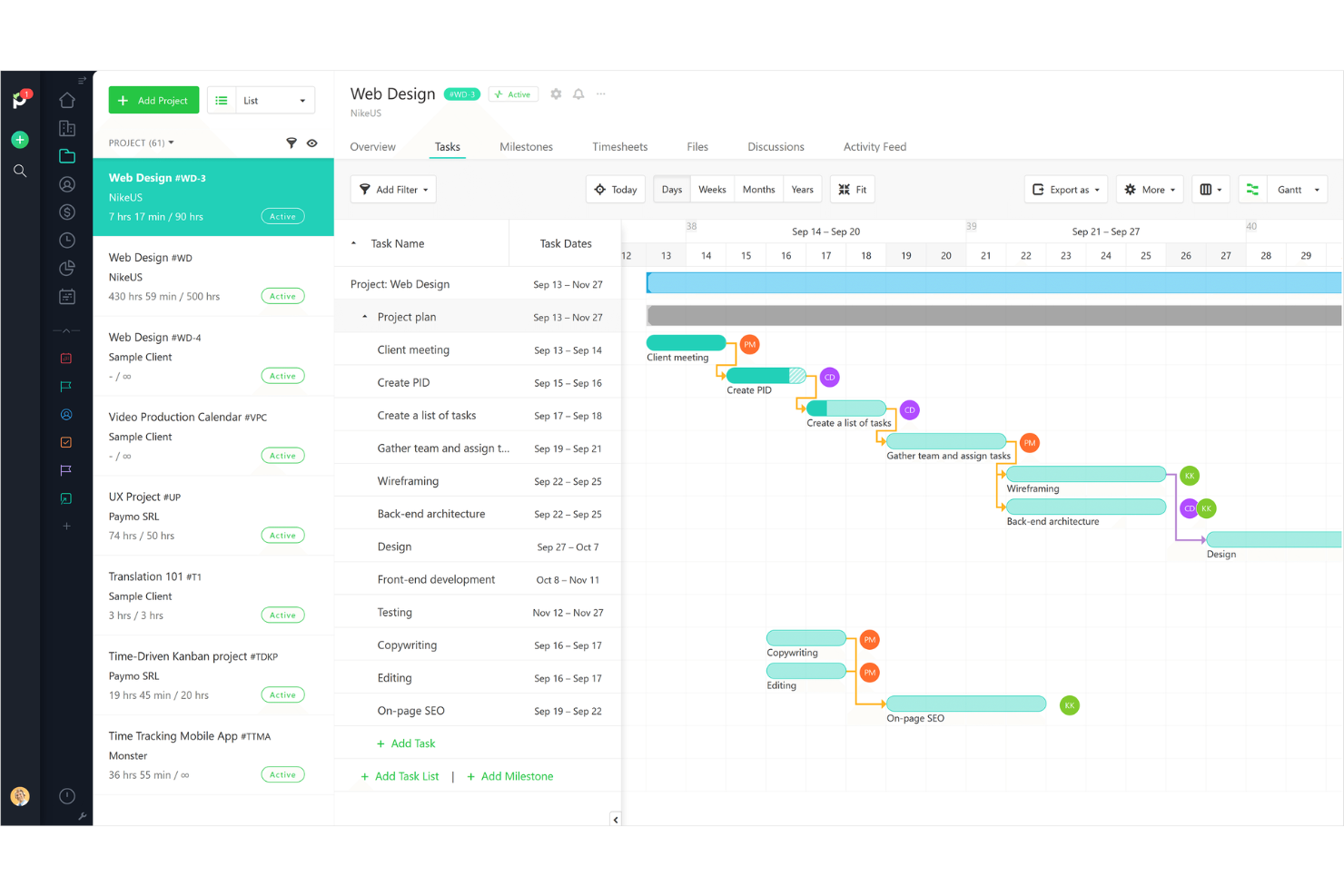
ProjectManager is a cloud-based project management platform for HR teams that brings together task management, resource scheduling, time tracking, and real-time dashboards in one system.
Who Is ProjectManager Best For?
HR leaders and project teams at midsize to large organizations who need real-time project tracking and reporting.
Why I Picked ProjectManager
I picked ProjectManager because I can monitor HR project progress in real time with live dashboards and customizable reports. I use the workload management view to balance recruiting and onboarding tasks across my team. The timeline and portfolio features help me track multiple HR initiatives at once and quickly spot bottlenecks.
ProjectManager Key Features
- Kanban boards: Visualize HR tasks and workflows using drag-and-drop boards.
- Document management: Store, share, and organize HR files within each project.
- Custom project templates: Start new HR projects quickly with reusable templates.
- Time tracking: Log and monitor hours spent on HR activities and projects.
ProjectManager Integrations
ProjectManager offers native integrations with Microsoft Teams, Google Drive, Slack, Jira, Salesforce, Dropbox, OneDrive, and Box, and connects with Zapier.
Pros and Cons
Pros:
- Resource reallocation for team capacity
- Dynamic Gantt charts for hiring timelines
- Real-time dashboards for HR project tracking
Cons:
- Limited column customization in project views
- Manual data entry for resource allocation

Best for spreadsheet-style project tracking
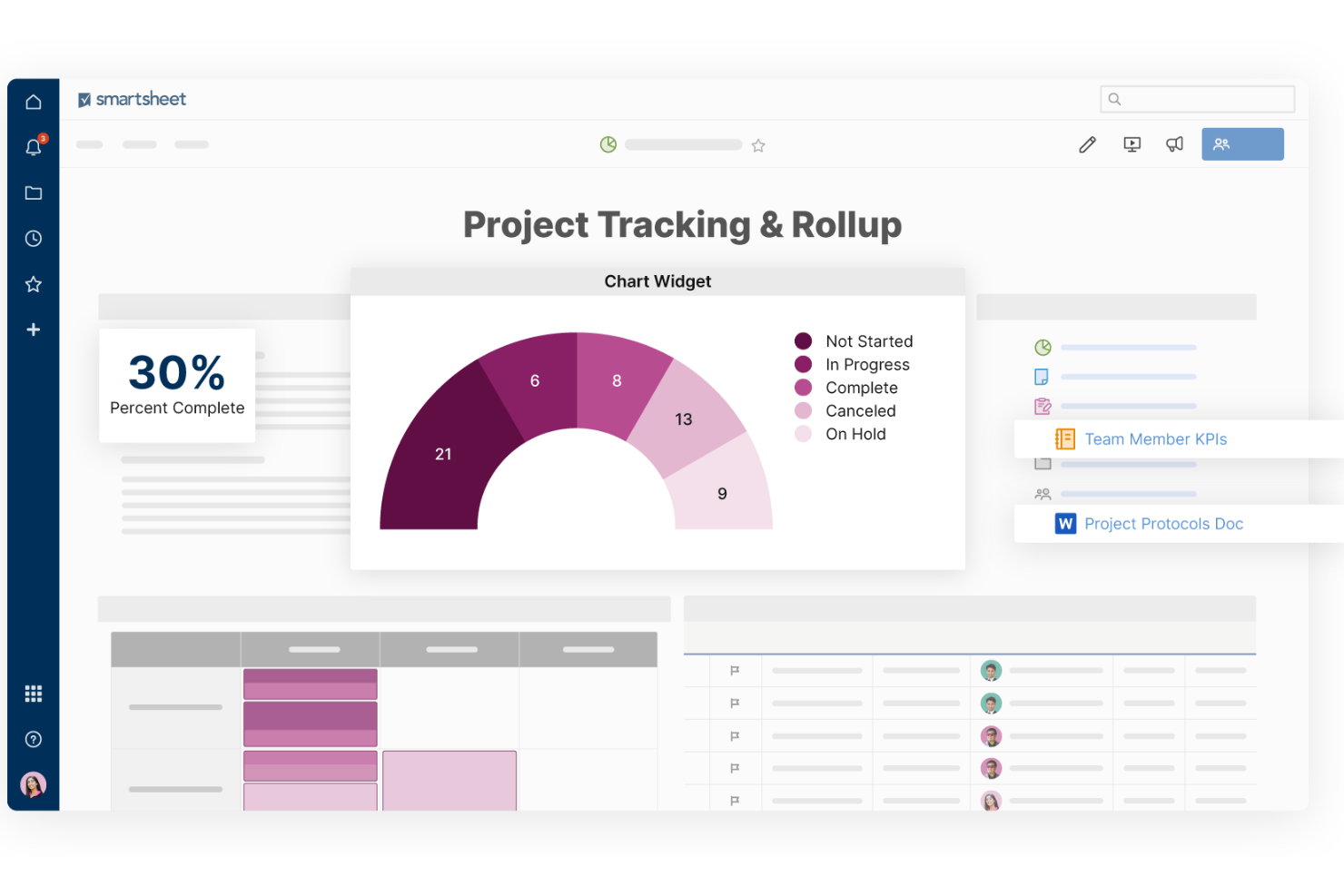
Smartsheet is a project and work management platform that combines spreadsheet-style task tracking, resource management, workflow automation, and reporting tools for HR project management teams.
Who Is Smartsheet Best For?
HR teams at midsize and large organizations who want spreadsheet-style control over project and resource tracking.
Why I Picked Smartsheet
I picked Smartsheet because I can build custom project trackers using familiar spreadsheet layouts, which makes it easy to manage HR initiatives with lots of moving parts. I use conditional formatting and automated reminders to keep hiring and onboarding tasks on schedule. My team also relies on Smartsheet’s resource management and Gantt chart features to visualize workloads and deadlines across multiple HR projects.
Smartsheet Key Features
- Form builder: Create custom forms to collect HR requests and feedback.
- Automated approval workflows: Route HR documents and requests for multi-step approvals.
- Document attachment: Attach resumes, contracts, and HR files directly to project rows.
- Role-based permissions: Control access to sensitive HR data by user role.
Smartsheet Integrations
Smartsheet offers 100+ native integrations, including Docusign, Workday, ADP, Jira, Salesforce, Slack, Google Workspace, Box, and Dropbox. An API is available for custom integrations, and it connects with Zapier.
Pros and Cons
Pros:
- Role-based permissions for sensitive HR data
- Customizable forms for HR request intake
- Spreadsheet-style interface familiar to HR teams
Cons:
- Gantt charts require higher-tier plans
- No built-in applicant tracking system
New Product Updates from Smartsheet

Smartsheet Adds Non-Plan User Management in Admin Center
Smartsheet adds a Non plan users tab to the Seat types and true-up page in Admin Center. This lets system admins review non-plan users and add them to the plan or remove them from the organization in one place. For more information, visit Smartsheet’s official site.
Teamflect
Best for integrating with Microsoft Teams

Teamflect is an HR project management software solution designed for teams that want to manage tasks, meetings, feedback, and goals directly within Microsoft Teams.
Who Is Teamflect Best For?
HR teams at organizations using Microsoft Teams as their primary collaboration platform.
Why I Picked Teamflect
I picked Teamflect as one of the best because it lets me manage HR projects, tasks, and feedback directly inside Microsoft Teams without switching platforms. I like that I can assign tasks, set goals, and run performance check-ins all within the Teams interface. My team uses its meeting agenda and notes features to keep HR initiatives organized and actionable during our regular syncs.
Teamflect Key Features
- Recognition badges: Send digital badges to recognize employee achievements within Microsoft Teams.
- 360-degree feedback: Collect and manage multi-source feedback for performance reviews.
- Customizable forms: Build and deploy HR forms for surveys, onboarding, or check-ins.
- One-on-one meeting templates: Use structured templates to guide recurring HR meetings.
Teamflect Integrations
Teamflect offers native integrations across the Microsoft ecosystem, including Microsoft 365 and Azure, and connects with Zapier. An API is available for custom integrations.
Pros and Cons
Pros:
- Customizable HR forms for surveys
- Built-in 360-degree feedback tools
- Deep integration with Microsoft Teams environment
Cons:
- No advanced project timeline or Gantt charts
- Limited integrations outside Microsoft ecosystem
Other HR Project Management Software
Here are some additional HR project management software options that didn’t make it onto my shortlist, but are still worth checking out:
- Teamflect
For integrating with Microsoft Teams
- Factorial
For centralized HR document management
- GoodDay
For built-in analytics
- Wrike
With advanced request forms
- Zoho Projects
With built-in time tracking
- monday AI Workspace
With AI-powered task and risk detection
- Airtable
For customizable workflow templates
- Kanbanchi
With Google Workspace integration
- Deel HR
For global workforce compliance
- ClickUp
For all-in-one task views
- TeamGantt
For interactive Gantt charts


How I Evaluate HR Project Management Software
I split my evaluation into two layers: baseline features every HR tool must have—like onboarding workflows and task tracking—and differentiators that separate the best from the rest.
Core Functionality (Table Stakes For This List)
When I'm selecting tools for my list, I rank each one on a scale from 0 (does not offer the functionality) to 5 (excels in this area) for each core functionality listed below. Then, I calculate the tool's total score into a percentage. Each tool needs to achieve a minimum total score of 65% to be considered for inclusion.
- HR Workflow Templates: I check whether a tool offers prebuilt templates for core HR processes like onboarding sequences, offboarding handoffs, and performance review cycles rather than only generic project templates.
- Task & Project Tracking: Each platform should let you create, assign, and track tasks with due dates, dependencies, and status updates across multi-step HR initiatives like open enrollment rollouts.
- Team Collaboration Tools: I evaluate how well a tool supports cross-functional work through comments, mentions, and file sharing so HR teams and hiring managers can stay aligned within tasks.
- HR System Integrations: Connection to HRIS, ATS, and payroll platforms matters here. I look for native integrations or open API access that keeps employee data in sync across systems.
- Employee Data & Document Management: Secure storage with role-based access controls is what I look for, especially for handling sensitive files like offer letters, policy acknowledgments, and personnel records.
- Reporting & Dashboards: Visual project views like Kanban boards, Gantt charts, or timeline views help HR ops managers monitor workloads and deadlines. I evaluate how well each tool surfaces this data.
Once I have a list of tools that meet the criteria, I consider what sets each platform apart.
Differentiating Factors (What Sets Vendors Apart)
Here's how I compare and contrast different vendors:
Standout Features
No-code automation is a big differentiator. I look for tools that let you trigger task assignments, reminders, and status changes automatically—like kicking off an entire onboarding checklist the moment a new hire is confirmed in your ATS. Compliance tracking also matters, especially for teams managing training deadlines, certification renewals, or policy attestations across departments. An employee self-service portal rounds things out by letting new hires complete their own tasks without HR chasing them down.
Beyond Features
HR teams handle sensitive employee data daily, so I evaluate each vendor's security posture—SOC 2 compliance, role-based permissions, and audit logs are what I look for. How well a tool fits into your existing HR tech stack is equally important. A platform that syncs with your HRIS and ATS saves hours of manual data entry. I also consider scalability: whether the tool supports multi-location teams, guest collaborators for hiring managers, and pricing that grows with headcount instead of forcing a costly tier jump.
How to Choose HR Project Management Software
It’s easy to get bogged down in long feature lists and complex pricing structures. To help you stay focused as you work through your unique software selection process, here’s a checklist of factors to keep in mind:
| Factor | What to Consider |
| Scalability | Will the software support your team as you grow, add locations, or expand HR processes? |
| Integrations | Does it connect natively with your HRIS, payroll, or communication tools, or will you need workarounds? |
| Customizability | Can you tailor workflows, permissions, and fields to match your HR processes and terminology? |
| Ease of use | Will your HR team and stakeholders adopt it quickly, or will training and support be a barrier? |
| Implementation and onboarding | How long will it take to get up and running, and what resources or support will you need during rollout? |
| Cost | Are pricing tiers clear, and do they align with your budget and expected usage as your team grows? |
| Security safeguards | Does the platform offer role-based access, data encryption, and compliance with relevant standards? |
| Support availability | What support channels are offered, and are they available during your business hours or region? |
What is HR Project Management Software?
HR project management software is a digital platform designed to help HR teams plan, organize, and track projects, tasks, and workflows specific to human resources. These tools centralize project timelines, document sharing, team collaboration, and progress monitoring, making it easier to manage complex HR initiatives like recruitment, onboarding, policy updates, and employee engagement programs.
Features
Here are the core features any great HR project management software should have:
- Task management: Lets you assign, prioritize, and track HR-related tasks, ensuring nothing falls through the cracks during projects like onboarding or policy rollouts.
- Workflow automation: Automates repetitive HR processes, such as approvals or document routing, to save time and reduce manual errors.
- Document management: Provides a secure space to store, organize, and share HR documents, making it easy to access policies, forms, and employee files.
- Collaboration tools: Offers built-in chat, comments, or shared workspaces so HR teams and stakeholders can communicate and coordinate in real time.
- Timeline and calendar views: Visualizes project schedules, deadlines, and milestones, helping teams stay on track and manage overlapping HR initiatives.
- Role-based permissions: Controls who can view, edit, or approve sensitive HR information, supporting data privacy and compliance.
- Reporting and analytics: Generates insights on project progress, team workloads, and HR metrics, helping you make informed decisions and demonstrate impact.
- Integration capabilities: Connects with other HR systems, such as payroll, HRIS, or communication platforms, to manage data flow and reduce duplicate work.
- Custom forms: Allows you to create and use forms for collecting HR data, such as feedback, requests, or onboarding details, directly within the platform.
Common HR Project Management Software AI Features
Beyond the standard HR project management software features listed above, many of these solutions are incorporating AI with features like:
- Predictive project analytics: Uses AI to forecast project risks, resource bottlenecks, and potential delays based on historical HR project data, helping teams proactively address issues before they escalate.
- Automated task assignment: Leverages AI to analyze team workloads, skills, and availability, then automatically assigns tasks to the most suitable HR team members.
- Natural language processing for requests: Allows employees to submit HR requests or questions in plain language, with AI interpreting and routing them to the right workflow or person.
- Smart document classification: Uses AI to automatically categorize, tag, and organize HR documents, making it easier to find and manage files without manual sorting.
- Sentiment analysis on feedback: Applies AI to analyze employee feedback or survey responses, identifying trends in morale or engagement that might impact HR projects.
Benefits
Implementing HR project management software provides several benefits for your team and your business. Here are a few you can look forward to:
- Centralized project oversight: Keeps all HR projects, tasks, and documents in one place, making it easier to monitor progress and maintain accountability.
- Improved team collaboration: Enables real-time communication and shared workspaces, so HR teams and stakeholders can coordinate more effectively.
- Enhanced data security: Offers role-based permissions and secure document management, helping protect sensitive HR information and support compliance.
- Faster process automation: Automates repetitive HR workflows, such as approvals and document routing, freeing up time for more strategic work.
- Better resource allocation: Provides analytics and workload tracking, allowing you to assign tasks based on team capacity and project needs.
- Greater transparency for stakeholders: Delivers clear timelines, status updates, and reporting, so leaders and team members always know where projects stand.
- Easier integration with HR systems: Connects with payroll, HRIS, and communication tools, reducing manual data entry and keeping information consistent across platforms.
Costs and Pricing
Selecting HR project management software requires an understanding of the various pricing models and plans available. Costs vary based on features, team size, add-ons, and more. The table below summarizes common plans, their average prices, and typical features included in HR project management software solutions:
Plan Comparison Table for HR Project Management Software
| Plan Type | Average Price | Common Features |
| Free Plan | $0 | Basic task management, limited users, simple document sharing, and basic collaboration tools. |
| Personal Plan | $5-$15/user/month | Task and project tracking, calendar views, limited integrations, and basic reporting features. |
| Business Plan | $15-$30/user/month | Advanced workflow automation, document management, analytics dashboards, and integration with HR systems. |
| Enterprise Plan | $30-$60/user/month | Custom workflows, enhanced security, advanced permissions, priority support, and compliance features. |
FAQs
Here are some answers to common questions about HR project management software:
How is HR project management software different from general project management tools?
HR project management software is designed specifically for HR workflows, such as onboarding, compliance, and employee engagement projects. It helps optimize specific HR operations with features like document management, role-based permissions, and integrations with HRIS or payroll systems that general tools may not offer.
Can HR project management software help with compliance tracking?
Yes, many HR software for project management include compliance tracking features. These help you manage document retention for employee information, monitor policy updates, and ensure tasks related to legal requirements are completed on time. Some modern platforms even use AI-powered alerts to flag missing certifications or expiring documents.
What should I consider when migrating from spreadsheets to HR project management software?
Start by mapping your current processes and identifying which workflows need to move from Excel into the new system. Look for software with import tools and templates that support an agile transition. It is also helpful to choose a provider with a dedicated support team to assist during the initial setup phase.
Is HR project management software suitable for small HR teams?
Yes, many solutions offer flexible plans and a user-friendly interface tailored for a small business. These tools streamline the hiring process and ensure that even a solo practitioner can manage complex tasks without getting overwhelmed.
How do integrations improve the value of HR project management software?
Integrations connect your tool with HRIS and communication platforms to improve decision-making through real-time data. This automation simplifies the onboarding process for new hires and can even link to accounting modules for invoicing contractors or external recruiters, saving your team time and reducing errors.