

10 migliori software per il personale del 2026 per trovare i migliori talenti

10 Elenco dei migliori software per il personale


Il miglior software per il personale ti aiuta a gestire candidati, clienti e conformità in modo efficiente, così puoi concentrarti sul coprire le posizioni più velocemente e costruire relazioni più solide.
Quando devi gestire molteplici esigenze di assunzione, il monitoraggio manuale può causare errori, ritardi e opportunità perse. La piattaforma giusta centralizza i dati del recruiting, automatizza i flussi di lavoro principali e ti offre visibilità su ogni fase del processo di assunzione.
Basandomi sulla mia esperienza nel testare e recensire le piattaforme per il personale, ho selezionato un elenco dei migliori software per il personale, intuitivi, affidabili e progettati per crescere insieme alla tua azienda. In questa guida troverai soluzioni che semplificano le operazioni, riducono il lavoro amministrativo e aiutano il tuo team a fare recruiting in modo più intelligente.
Perché fidarsi delle nostre recensioni sui software
Il nostro team testa e recensisce software dal 2012. In quanto esperti HR noi stessi, sappiamo quanto sia difficile — e importante — scegliere il software giusto.
Per questa guida, abbiamo valutato gli strumenti attraverso test pratici e ricerche indipendenti, assegnando un punteggio agli strumenti in base ai nostri criteri di selezione. Ci basiamo inoltre sulle competenze di leader di pensiero del settore e di professionisti HR attivi.
Le nostre recensioni riflettono il nostro giudizio editoriale umano, non un discorso di vendita.
Revisori esperti:
Riepilogo dei migliori software per il personale
Questa tabella comparativa riassume i dettagli sui prezzi delle mie migliori selezioni di software per il personale, per aiutarti a trovare quello più adatto al tuo budget e alle esigenze della tua azienda.
| Tool | Best For | Trial Info | Price | ||
|---|---|---|---|---|---|
| 1 | Ideale per la gestione globale del personale | Demo gratuita disponibile | Da $5/dipendente/mese | Website | |
| 2 | Ideale per agenzie di ricerca e selezione del personale e società di executive search | 14 giorni di prova gratuita e demo gratuita | Da $69/utente/mese fatturato annualmente | Website | |
| 3 | Ideale con ATS e CRM integrati | Prova gratuita e demo | Da $35/utente/mese | Website | |
| 4 | Ideale per agenzie di selezione del personale | Prova gratuita illimitata | Da $49/utente/mese (fatturato annualmente) | Website | |
| 5 | Ideale per l’onboarding da remoto su dispositivi mobili | Demo gratuita disponibile | Prezzo su richiesta | Website | |
| 6 | Ideale per screening automatizzati e pianificazione dei colloqui | Demo gratuita disponibile | Prezzi su richiesta | Website | |
| 7 | Ideale per lo screening dei precedenti alimentato da intelligenza artificiale | Demo gratuita disponibile | Da $29.99/report | Website | |
| 8 | Ideale per le opzioni di integrazione di terze parti | Demo gratuita | Disponibile su richiesta | Website | |
| 9 | Ideale per il reclutamento e la gestione di lavoratori orari | Demo gratuita disponibile | Prezzi su richiesta | Website | |
| 10 | Il miglior software per il personale con business intelligence (BI) | Demo dal vivo | I prezzi sono disponibili su richiesta | Website |
Recensioni dei migliori software per il personale
Di seguito trovi i miei riepiloghi dettagliati dei migliori software per il personale inclusi nel mio elenco. Le mie recensioni offrono uno sguardo approfondito sulle funzionalità principali, sui vantaggi & svantaggi, sulle integrazioni e sui casi d’uso ideali di ogni strumento, per aiutarti a trovare quello più adatto a te.

Deel HR
Ideale per la gestione globale del personale
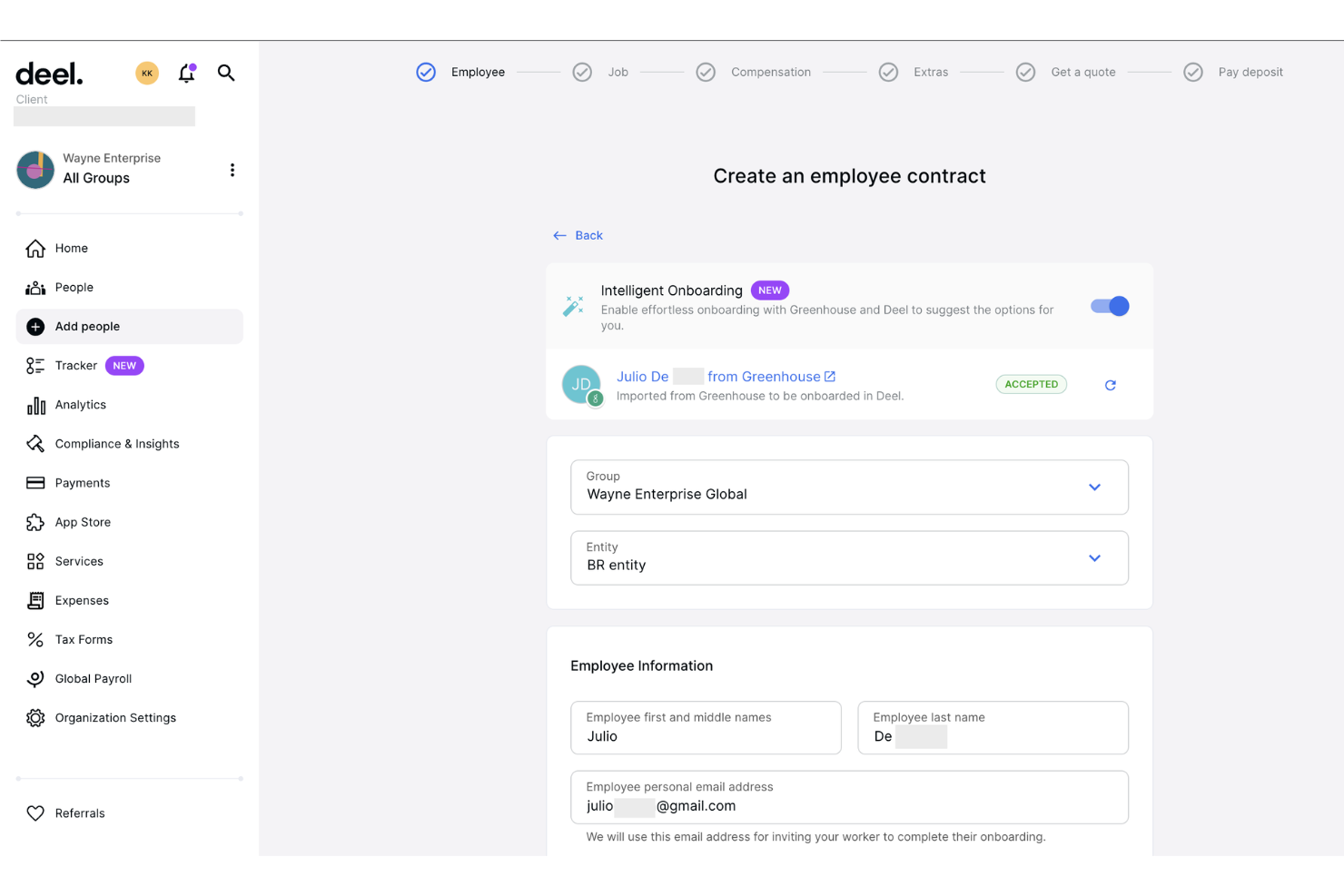
Deel è una soluzione globale per la gestione delle risorse umane e delle paghe progettata per aziende che desiderano assumere a livello internazionale. Supporta imprese di ogni dimensione nella gestione di dipendenti e collaboratori in oltre 150 paesi, grazie a funzionalità principali come payroll, conformità normativa e assunzione globale.
Perché ho scelto Deel: Deel si distingue nell’assunzione internazionale offrendo contratti localizzati e una gestione della compliance. Fornisce servizi di onboarding in oltre 150 paesi, assicurando che il tuo team rispetti le normative locali.
L’elaborazione delle buste paga di Deel è pensata sia per dipendenti che per collaboratori, rendendola versatile per diverse esigenze di assunzione. Le sue soluzioni white label per i servizi Employer of Record (EOR) aggiungono flessibilità per le aziende che intendono espandersi globalmente.
Caratteristiche e integrazioni di spicco:
Caratteristiche includono onboarding globale, monitoraggio della conformità e gestione delle paghe. Puoi gestire facilmente le assunzioni oltre i confini senza preoccuparti delle normative locali. Deel offre anche strutturazione dei contratti e amministrazione dei benefit per una soluzione HR completa.
Pros and Cons
Pros:
- Opzioni contrattuali localizzate
- Servizi EOR flessibili
- Ampia copertura geografica
Cons:
- Configurazione complessa per alcune regioni
- Assistenza talvolta lenta
New Product Updates from Deel HR

Deel Expands Stablecoin Wallet to 80+ Countries
Deel expands its Stablecoin Wallet to 80+ countries with dollar-backed balances and optional rewards. This gives eligible contractors more ways to hold and manage earnings inside Deel. For more information, visit Deel’s official site.
 .
.
Ideale per agenzie di ricerca e selezione del personale e società di executive search

Recruiterflow è un software di reclutamento progettato specificamente per agenzie e società di ricerca e selezione del personale. Facilita la gestione dei candidati, la pubblicazione delle offerte di lavoro e la gestione delle relazioni con i clienti, migliorando il processo di selezione per i suoi utenti.
Perché ho scelto Recruiterflow: Recruiterflow è pensato per agenzie di selezione, offrendo funzionalità come l'automazione delle pipeline e la ricerca dei candidati. La sincronizzazione di email e calendario aiuta a rimanere organizzati con il minimo sforzo.
L'interfaccia drag-and-drop del software semplifica la gestione dei candidati e il monitoraggio del loro percorso. Gli strumenti per la gestione dei clienti rendono facile gestire più clienti in modo trasparente.
Funzionalità e integrazioni principali:
Funzionalità includono avanzate capacità di reportistica, che permettono di monitorare facilmente le metriche di selezione. È possibile personalizzare i flussi di lavoro in base alle esigenze della tua agenzia, garantendo flessibilità. Recruiterflow offre anche il parsing dei CV, velocizzando l'inserimento dei dati dei candidati.
Integrazioni includono LinkedIn, Gmail, Outlook, Slack, Mailchimp, Zapier, Google Calendar, Microsoft Teams, WhatsApp e Zoom.
Pros and Cons
Pros:
- Gestione clienti semplificata
- Interfaccia drag-and-drop
- Forte integrazione con l'email
Cons:
- Occasionali bug delle funzionalità
- La reportistica avanzata può essere migliorata

Manatal
Ideale con ATS e CRM integrati

Manatal è un software di recruitment basato sull'IA, progettato per agenzie di selezione, grandi organizzazioni e piccole e medie imprese. Migliora il processo di assunzione con funzionalità come il tracciamento dei candidati e la ricerca dei talenti, concentrandosi sull’efficienza nel reclutamento e sul branding del datore di lavoro.
Perché ho scelto Manatal: Manatal sfrutta l’IA integrata nel proprio ATS e CRM per arricchire i profili dei candidati e offrire raccomandazioni intelligenti, distinguendosi nell’ambito del recruitment supportato dall’IA. I suoi strumenti di intelligenza artificiale ti aiutano a trovare i candidati migliori analizzando dati provenienti dai social media e da altre fonti.
La pipeline di recruitment personalizzabile e la board Kanban rendono il monitoraggio dei candidati semplice e intuitivo. Manatal permette di pubblicare offerte su oltre 2.500 job board, consentendo di raggiungere un pubblico più vasto.
Caratteristiche principali & integrazioni:
Funzionalità comprendono pagine carriera personalizzabili, un’app mobile per l’accesso in mobilità, e reportistica e analisi complete. Puoi anche gestire l’onboarding e il placement, garantendo un’esperienza fluida ai candidati. Gli strumenti di collaborazione di Manatal migliorano il lavoro di squadra all’interno del tuo team di selezione.
Integrazioni includono LinkedIn, Indeed, ZipRecruiter, Facebook Jobs, Google for Jobs, Monster, Glassdoor, Slack, Microsoft Teams e Gmail.
Pros and Cons
Pros:
- Raccomandazioni di candidati guidate dall'IA
- Workflow di selezione personalizzabili
- Pubblicazione facile sulle job board
Cons:
- Personalizzazione limitata per piccoli team
- Alcune funzionalità richiedono competenze tecniche
New Product Updates from Manatal

Manatal Adds Candidate Login and Employee Portal to Career Pages
Manatal has added Candidate Login, Internal Employee Portal, and internal job visibility controls for Career Pages. These features help teams simplify applications, support employee mobility, and manage internal hiring workflows. For more information, visit Manatal’s official site.
 .
.
Ideale per agenzie di selezione del personale

Recruit CRM è un software di reclutamento potenziato dall’IA, pensato per agenzie di selezione e società di ricerca e selezione di dirigenti. Combina il tracking dei candidati e la gestione dei clienti per ottimizzare il processo di assunzione dei suoi utenti.
Perché ho scelto Recruit CRM: Recruit CRM è progettato per le società di ricerca di dirigenti, offrendo sourcing tramite IA per trovare rapidamente candidati usando semplici richieste in linguaggio naturale. L'automazione dei flussi di lavoro semplifica i processi di assunzione senza necessità di codice.
La funzione di multiposting degli annunci di lavoro permette di pubblicare offerte su oltre 5.000 job board da un’unica piattaforma. Recruit CRM fornisce anche analisi avanzate per ottenere informazioni dettagliate dai dati di reclutamento.
Funzionalità e integrazioni di rilievo:
Funzionalità includono l’ottimizzazione per dispositivi mobili, consentendo di gestire le attività ovunque tramite app mobile. La funzione di invio dei candidati permette di proporre i profili tramite report o portali per clienti, ricevendo feedback in tempo reale. L’estensione Chrome di Recruit CRM aiuta a trovare candidati con un solo clic, eliminando l'inserimento manuale dei dati.
Le integrazioni includono LinkedIn, Gmail, Outlook, Slack, Mailchimp, Zapier, Google Calendar, Microsoft Teams, WhatsApp e Zoom.
Pros and Cons
Pros:
- Ricerca candidati tramite IA
- Pubblicazione estesa su job board
- Conforme al GDPR
Cons:
- Personalizzazione limitata per esigenze di nicchia
- Ritardi occasionali negli aggiornamenti delle funzionalità
Ideale per l’onboarding da remoto su dispositivi mobili

WorkBright è una soluzione software per l’onboarding progettata per le aziende che gestiscono team remoti o distribuiti. Semplifica il processo di onboarding consentendo ai dipendenti di completare la documentazione e la formazione online prima del loro primo giorno.
Perché ho scelto WorkBright: WorkBright è pensato su misura per l’onboarding da remoto, assicurando che i nuovi assunti possano completare la documentazione necessaria in formato digitale. Consente di raccogliere e archiviare i documenti in modo sicuro, fondamentale per mantenere la conformità.
La piattaforma offre inoltre funzionalità di firma elettronica, riducendo la necessità di documentazione cartacea. Il design mobile-friendly di WorkBright assicura che i dipendenti possano completare le attività di onboarding da qualsiasi dispositivo, rendendo il processo accessibile e comodo.
Funzionalità di punta & integrazioni:
Funzionalità includono promemoria automatici, che aiutano i nuovi assunti a restare al passo con le attività di onboarding. La piattaforma supporta il caricamento dei documenti, permettendo ai dipendenti di inviare in modo sicuro i moduli e i documenti di identificazione richiesti. WorkBright offre anche flussi di lavoro per l’onboarding personalizzabili, così da adattare il processo alle esigenze specifiche della tua organizzazione.
Integrazioni includono ADP, BambooHR, Paychex, QuickBooks, Gusto, Paylocity, Rippling, Zenefits, SAP SuccessFactors e Workday.
Pros and Cons
Pros:
- Interfaccia mobile-friendly
- Promemoria automatici delle attività
- Gestione sicura dei documenti
Cons:
- Reportistica avanzata limitata
- Possibile curva di apprendimento per i nuovi utenti

Ideale per screening automatizzati e pianificazione dei colloqui

myInterview è una piattaforma di video colloqui progettata per le aziende che desiderano migliorare il proprio processo di selezione attraverso valutazioni visive. Si rivolge a società di tutte le dimensioni, fornendo strumenti per condurre e valutare colloqui video.
Perché ho scelto myInterview: myInterview si concentra sui colloqui video, distinguendosi per le valutazioni visive. I colloqui video unidirezionali permettono ai candidati di registrare le risposte nel momento più opportuno, aiutandoti a risparmiare tempo.
La piattaforma offre modelli di colloquio personalizzabili per allinearsi alle esigenze della tua azienda. Fornisce anche approfondimenti basati sull’intelligenza artificiale per aiutarti a valutare i candidati in modo più efficace.
Funzionalità e integrazioni principali:
Funzionalità includono la trascrizione automatica dei video, che ti permette di rivedere i colloqui senza dover guardare l’intero video. Puoi anche personalizzare il portale dei colloqui con il brand aziendale per offrire ai candidati un’esperienza coerente. La piattaforma supporta un’archiviazione video illimitata, garantendo l’accesso a tutti i colloqui passati quando necessario.
Integrazioni includono LinkedIn, Indeed, Workable, Greenhouse, SmartRecruiters, Zapier, BambooHR, Lever, Recruitee e JobAdder.
Pros and Cons
Pros:
- Modelli di colloquio personalizzabili
- Supporta colloqui asincroni
- Archiviazione video illimitata
Cons:
- Comunicazione testuale limitata
- Richiede una connessione Internet stabile

Checkr
Ideale per lo screening dei precedenti alimentato da intelligenza artificiale

Un elemento centrale di molti criteri di selezione del personale sono i controlli dei precedenti, e mentre Checkr non offre un pacchetto completo di funzionalità per l'assunzione, gestisce questa fase del processo di selezione in modo particolarmente efficace. La piattaforma, integrabile con il tuo sistema esistente tramite API, è focalizzata su verifiche dei precedenti rapide e conformi, e include strumenti come un portale clienti che facilita la gestione dei controlli, la revisione dei risultati e l'organizzazione dei flussi di lavoro di selezione. Per i team che necessitano di un metodo affidabile per valutare i candidati, Checkr rappresenta una soluzione mirata che riduce il tempo e lo sforzo richiesti per i controlli dei precedenti.
Perché ho scelto Checkr
Ho scelto Checkr per le sue capacità di screening dei precedenti alimentate da intelligenza artificiale che aiutano a migliorare la rapidità e l'accuratezza del processo di assunzione. I suoi strumenti di valutazione supportano la conformità standardizzando il modo in cui i team esaminano i risultati dei controlli e applicano le linee guida per l'assunzione. Checkr offre anche controlli continui che monitorano nel tempo i record dei dipendenti e avvisano il tuo team di nuovi eventi segnalabili. Insieme, queste funzionalità aiutano le organizzazioni a gestire le verifiche dei precedenti in modo più efficiente mantenendo la visibilità sui potenziali rischi.
Funzionalità principali di Checkr
Oltre ai suoi eccezionali strumenti di valutazione, ecco alcune altre funzionalità che il tuo team potrebbe trovare utili:
- Portale candidati: Questa funzione consente ai candidati di monitorare l'avanzamento dei propri controlli, migliorando trasparenza e comunicazione.
- Strumenti di analisi: Fornisce informazioni dettagliate sulle operazioni di controllo, aiutandoti a prendere decisioni basate sui dati.
- Verifica dell'identità: Garantisce che l'identità del candidato venga verificata accuratamente, riducendo il rischio di frode.
- API e soluzioni integrate: Offre opzioni di integrazione flessibili con i tuoi sistemi esistenti, facilitando l'inserimento delle funzionalità di Checkr nei tuoi flussi di lavoro.
Integrazioni Checkr
Le integrazioni includono Gusto, iCIMS, Workday, Greenhouse, BambooHR, Rippling, Planning Center, Zenefits, Lever e JazzHR.
Pros and Cons
Pros:
- Tempi rapidi per i controlli dei precedenti che accelerano le decisioni di assunzione
- Forte integrazione con piattaforme ATS e HR che supportano flussi di lavoro di assunzione automatizzati
- I controlli continui possono aumentare la sicurezza monitorando i record nel tempo
Cons:
- Il costo per controllo dei precedenti può essere elevato per i team con un alto volume di assunzioni
- Funzionalità limitate al di fuori dello screening rispetto ai software completi di selezione del personale
New Product Updates from Checkr
Checkr Adds Post-Hire Drug & Alcohol Clearinghouse Screening
Checkr adds post-hire limited-query support to its Drug & Alcohol Clearinghouse screening, alongside existing pre-hire full queries. The update helps employers manage recurring FMCSA screening requirements for employed CDL drivers within the same platform. For more information, visit Checkr’s official site.
 .
.
JobAdder
Ideale per le opzioni di integrazione di terze parti

JobAdder è una piattaforma software di reclutamento rivolta ad agenzie di ricerca personale e team di selezione interni. Fornisce strumenti per la pubblicazione di annunci di lavoro, gestione dei candidati e automazione dei processi di reclutamento per migliorare l’efficienza dell’assunzione.
Perché ho scelto JobAdder: JobAdder eccelle nell’automazione del reclutamento, offrendo funzionalità che riducono il lavoro manuale e accelerano il processo di assunzione. Le sue capacità di pubblicazione consentono di inserire offerte su più portali lavoro con un solo clic.
Il sistema di gestione dei candidati della piattaforma centralizza tutte le informazioni relative ai candidati, facilitando il monitoraggio e la valutazione delle candidature. I flussi di lavoro automatizzati di JobAdder semplificano le attività ripetitive, liberando tempo per consentire al tuo team di dedicarsi ad attività di selezione strategica.
Caratteristiche principali e integrazioni:
Funzionalità includono un'app mobile che ti permette di rimanere connesso alle attività di selezione anche in movimento. La piattaforma offre strumenti di analisi per aiutare a misurare le performance del reclutamento e individuare aree di miglioramento. JobAdder mette anche a disposizione una dashboard personalizzabile, così da adattare l'interfaccia alle esigenze del tuo team.
Integrazioni includono LinkedIn, SEEK, Indeed, Gmail, Outlook, Xero, Slack, Mailchimp, Zapier e MYOB.
Pros and Cons
Pros:
- Gestione centralizzata dei candidati
- Opzioni di dashboard personalizzabili
- Capacità di pubblicazione delle offerte altamente efficienti
Cons:
- È necessaria una connessione internet costante
- Occorre un po' di tempo per imparare a usarlo per i nuovi utenti

Ideale per il reclutamento e la gestione di lavoratori orari
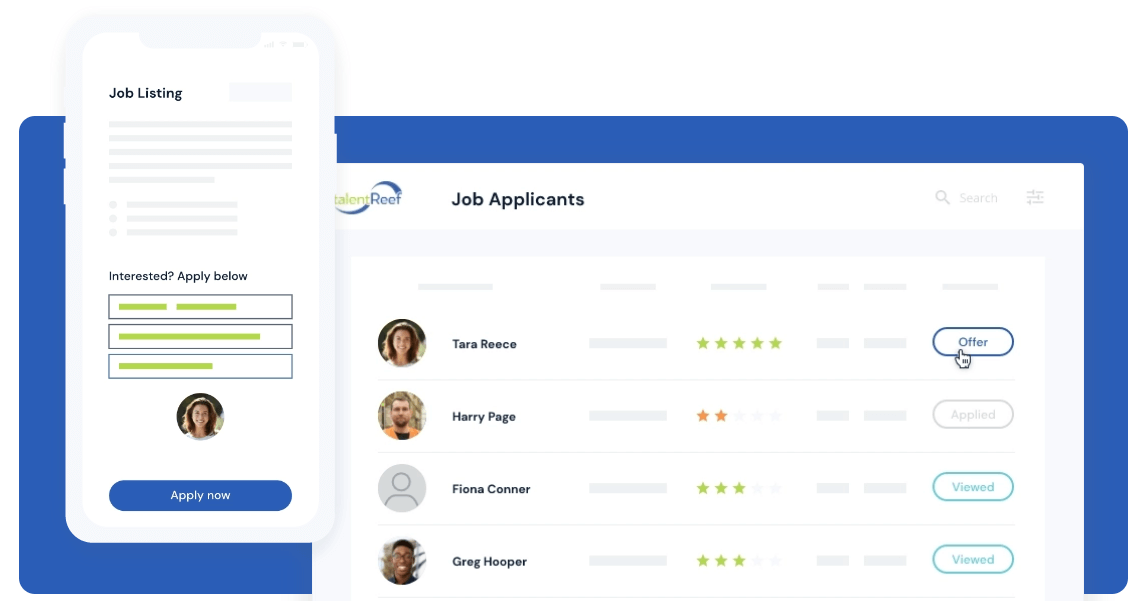
Mitratech TalentReef è una soluzione software per la gestione del personale focalizzata sulla forza lavoro oraria. Si rivolge a settori come la vendita al dettaglio, l'ospitalità e la ristorazione, offrendo strumenti per il reclutamento, l'onboarding e la gestione della conformità.
Perché ho scelto Mitratech TalentReef: Mitratech TalentReef è specializzato nella gestione della forza lavoro oraria, rispondendo alle esigenze specifiche di questi settori. Il suo approccio mobile-first consente di raggiungere i candidati dove sono più attivi.
La gestione della conformità garantisce il rispetto delle normative di settore. Gli strumenti di onboarding di TalentReef semplificano il processo di assunzione, consentendo di integrare rapidamente i nuovi assunti.
Funzionalità e integrazioni principali:
Funzionalità comprendono un processo di candidatura ottimizzato che riduce il tasso di abbandono dei candidati. Il software offre strumenti automatizzati di comunicazione per mantenere i candidati coinvolti durante tutto il processo di selezione. Inoltre, TalentReef mette a disposizione analisi approfondite per aiutare a monitorare efficacemente le metriche di reclutamento.
Integrazioni includono ADP, Ceridian, Kronos, Paychex, Paycor, Paylocity, SAP SuccessFactors, Ultimate Software, Workday, e UKG Pro.
Pros and Cons
Pros:
- Coinvolgimento dei candidati mobile-first
- Processo di onboarding snello
- Strumenti di analisi completi
Cons:
- Funzionalità limitate per posizioni a salario fisso
- Complessità nella configurazione

Bullhorn
Il miglior software per il personale con business intelligence (BI)
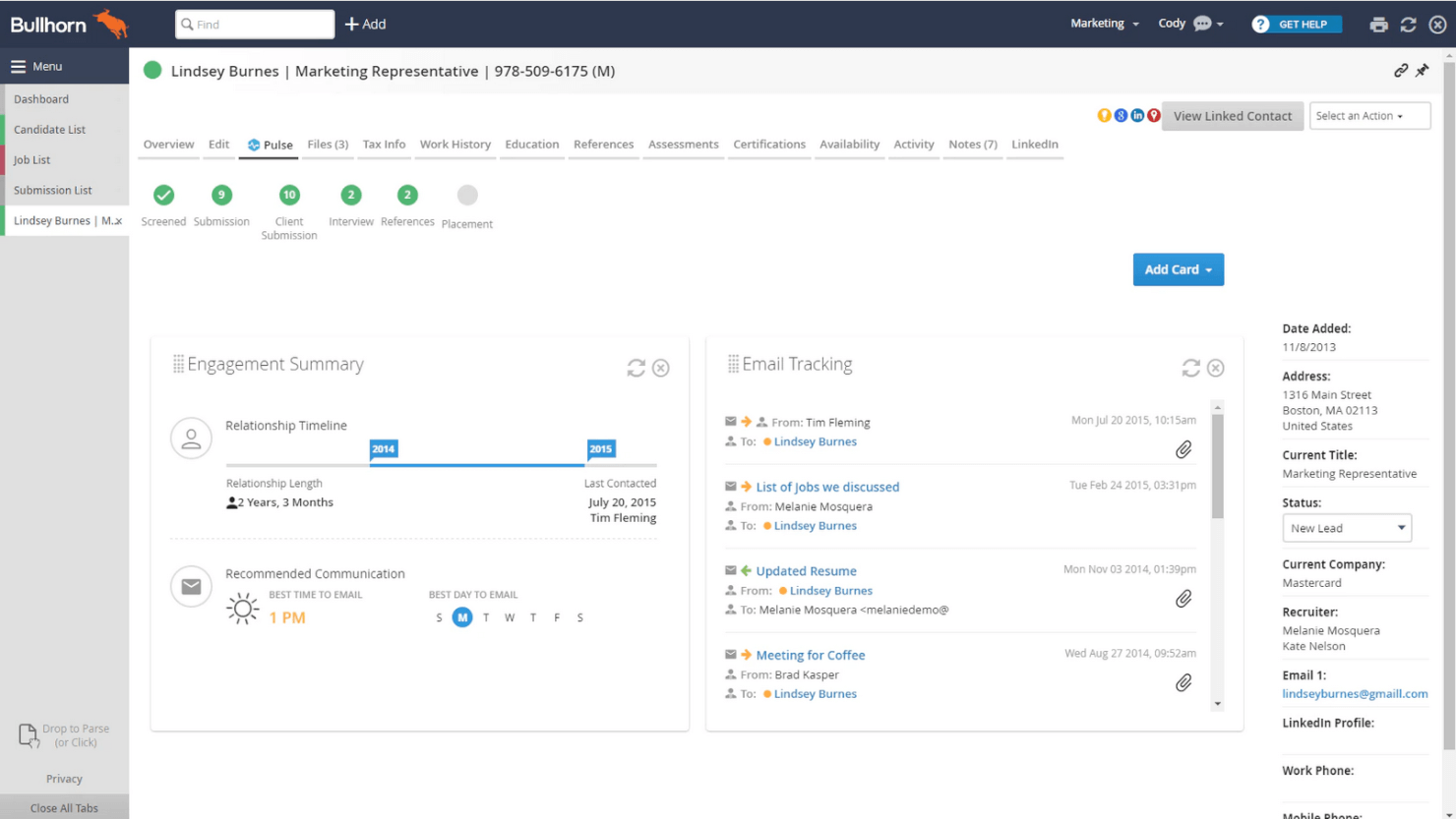
Bullhorn è un software cloud per la gestione del personale e il recruitment progettato per grandi aziende e agenzie per il lavoro. Offre strumenti di tracciamento dei candidati, CRM e gestione delle operazioni per semplificare il processo di reclutamento e migliorare le relazioni con i clienti.
Perché ho scelto Bullhorn: Bullhorn è ideale per le grandi imprese grazie alla sua scalabilità e alle sue complete funzionalità di CRM. Permette di gestire efficientemente ampi database di candidati.
Gli strumenti di reporting e analytics del software forniscono dati e approfondimenti utili per prendere decisioni basate sui dati. Le funzionalità mobili di Bullhorn ti permettono di accedere alle informazioni sul reclutamento ovunque ti trovi, garantendo una connessione continua con il tuo team.
Caratteristiche principali e integrazioni:
Funzionalità includono un sistema di reportistica avanzato che offre approfondimenti sui processi di selezione. Il software offre inoltre la gestione della pipeline, che aiuta a monitorare i candidati in ogni fase. L'app mobile di Bullhorn consente di gestire le attività di recruitment ovunque ci si trovi, garantendo flessibilità al team.
Integrazioni includono LinkedIn, Indeed, Monster, Daxtra, Microsoft Outlook, Gmail, TextUs, Herefish, CloudCall e Cube19.
Pros and Cons
Pros:
- Funzionalità CRM complete
- Potenti funzionalità mobili
- Gestione approfondita dei database dei candidati
Cons:
- Costo elevato per piccoli team
- Rallentamenti occasionali del sistema
Altri software per il personale
Ecco alcune ulteriori opzioni di software per il personale che non sono state incluse nel mio elenco, ma che vale comunque la pena prendere in considerazione:
- TargetRecruit
La migliore piattaforma per agenzie di recruiting con integrazioni ai portali di lavoro
- Avionté
Il miglior software per l'amministrazione del personale con buste paga e fatturazione
- Unnanu Hire
Ideale per il punteggio dei candidati basato sull'IA
- SmarterSelect
Ideale per ONG e assunzioni per sovvenzioni
- ENGAGE
Migliore intelligenza artificiale per i talenti con analisi di mercato operative
- Rippling
Ideale per l’automazione dell’onboarding dei dipendenti
- GanttPRO
Il miglior software di gestione dei progetti di staffing con diagrammi di Gantt
- Teamtailor
Ideale per la gestione di assunzioni a breve termine, oltre a workflow di onboarding e offboarding
- hireEZ
Ideale per il reclutamento outbound con accesso a oltre 800 milioni di candidati
- Connecteam
Il miglior software per la gestione del personale in termini di pianificazione drag-and-drop e gestione delle attività dei dipendenti
- Tracker
Il migliore per CRM e reportistica
- TE Recruit
Ideale per recruiting in rete e incarichi condivisi
- Greenhouse
Ideale per approcci strutturati all’assunzione
- Zoho Recruit
Il miglior software per agenzie di collocamento
- Mitratech Perform
Migliore software di reclutamento per assunzioni collaborative


Come Valuto il Software di Staffing
Divido la mia valutazione in due livelli: le capacità di base come pipeline ATS, gestione degli ordini di lavoro e tracciamento delle assegnazioni; poi, i fattori differenzianti come l'adattamento al settore verticale e le integrazioni con il back-office.
Funzionalità Core (Requisiti Minimi per Questa Lista)
Quando seleziono gli strumenti per la mia lista, attribuisco a ciascuno un punteggio da 0 (non offre la funzionalità) a 5 (eccelle in quest'area) per ognuna delle funzionalità core elencate qui sotto. Poi, calcolo il punteggio totale di ciascuno strumento in percentuale. Ogni strumento deve raggiungere un punteggio totale minimo del 65% per essere preso in considerazione.
- Applicant Tracking System: Valuto come i candidati vengono spostati all'interno delle pipeline—stadi personalizzati, azioni in blocco e aggiornamenti di stato automatici per grandi volumi di richieste.
- Gestione degli Ordini di Lavoro: Ogni strumento deve permettere di creare ordini di lavoro per i clienti, pubblicare su più job board e tracciare le richieste fino all'evasione.
- Database Candidati & CRM: Cerco funzionalità di parsing dei CV, ricerca booleana, tagging, e una cronologia completa dei contatti, così i recruiter possono rapidamente ritrovare candidati precedenti.
- Matching Candidato-Posizione: Che sia basato su parole chiave o guidato da AI, verifico come la piattaforma classifica e raccomanda i candidati rispetto agli ordini di lavoro aperti.
- Tracciamento Assegnazioni & Collocamenti: Il monitoraggio di tariffe orarie, tariffe fatturabili, date di inizio/fine e rinnovi di contratto è fondamentale—soprattutto per le agenzie che gestiscono centinaia di inserimenti.
- Integrazione Fogli Presenza & Fatturazione: Analizzo come ciascuno strumento gestisce la raccolta dei fogli presenza, le approvazioni e la fatturazione o le integrazioni con sistemi payroll come ADP o QuickBooks.
Dopo aver individuato gli strumenti che rispettano questi criteri, considero cosa rende ciascuna piattaforma unica.
Fattori Differenzianti (Cosa Distingue i Fornitori)
Ecco come confronto e distinguo i vari fornitori:
Funzionalità Distintive
Il sourcing alimentato da AI rappresenta un grande elemento di distinzione—controllo se una piattaforma può riproporre automaticamente candidati passati e generare sequenze di contatto personalizzate, risparmiando così ore ai recruiter su ruoli ad alto volume. Anche l'automazione di onboarding e compliance è importante, soprattutto per agenzie che inseriscono collaboratori che necessitano di background check, firme elettroniche e tracciamento delle credenziali prima del primo giorno. I portali self-service per i candidati completano l’offerta, consentendo ai lavoratori inseriti di inviare fogli presenza e caricare documenti senza coinvolgimento dei recruiter.
Oltre le Funzionalità
Le integrazioni sono una considerazione primaria—verifico se una piattaforma si collega ai job board e ai sistemi payroll già utilizzati dalla vostra agenzia e se è supportato un API aperto per flussi di lavoro personalizzati. Anche la specializzazione verticale conta. Uno strumento studiato per il personale sanitario gestisce abilitazioni e scadenze credenziali in modo molto diverso rispetto a uno progettato per l’IT contracting. Valuto inoltre la trasparenza dei prezzi, poiché nelle agenzie di staffing la forza lavoro cresce rapidamente e costi nascosti per utente o per record possono diventare un problema man mano che il team di recruiter si espande.
Come scegliere il software per il personale
È facile perdersi in lunghi elenchi di funzionalità e strutture di prezzo complesse. Per aiutarti a rimanere concentrato mentre affronti il tuo specifico processo di selezione del software, ecco un elenco dei fattori da tenere a mente:
| Fattore | Cosa considerare |
|---|---|
| Scalabilità | Il software crescerà insieme alla tua azienda? Assicurati che possa gestire un numero maggiore di utenti, dati e processi senza problemi di prestazioni. Cerca testimonianze o casi di studio. |
| Integrazioni | Si integra con gli strumenti che già utilizzi? Verifica la compatibilità con i tuoi sistemi HR, calendari e piattaforme di comunicazione per evitare dati isolati e soluzioni manuali. |
| Personalizzazione | Puoi adattare il software ai tuoi processi? Cerca impostazioni flessibili e autorizzazioni utente per adattarlo ai flussi di lavoro e alle preferenze del tuo team. |
| Semplicità d'uso | L'interfaccia è intuitiva? Un sistema complesso può rallentarne l'adozione. Provalo con i potenziali utenti per valutare il loro livello di familiarità e la facilità di navigazione. |
| Implementazione e avviamento | Quanto tempo servirà per renderlo operativo? Considera il tempo e le risorse necessari per la configurazione, la migrazione dei dati e la formazione. Informati sul supporto del fornitore durante questa fase. |
| Costo | Il prezzo rientra nel tuo budget? Confronta il valore delle funzionalità con il costo. Fai attenzione ai costi nascosti o agli addebiti per servizi essenziali come l'assistenza. |
| Misure di sicurezza | Come protegge i tuoi dati? Valuta la crittografia, i controlli di accesso degli utenti e la conformità alle normative sulla protezione dei dati per evitare violazioni e problemi legali. |
Che cos'è il software per il personale?
Il software per il personale è uno strumento che aiuta le organizzazioni a gestire i processi di ricerca e assunzione. I professionisti delle risorse umane e i selezionatori utilizzano questi strumenti per monitorare in modo efficiente i candidati, gestire gli annunci di lavoro e garantire la conformità alle normative sulle assunzioni. Funzionalità come il monitoraggio dei candidati, la programmazione dei colloqui e l'analisi dei curriculum aiutano a organizzare le attività di selezione e a migliorare l'efficienza delle assunzioni. Nel complesso, questi strumenti fanno risparmiare tempo e migliorano la qualità delle assunzioni semplificando e automatizzando il processo di selezione.
Funzionalità
Quando scegli il software per il personale, presta attenzione alle seguenti funzionalità chiave:
- Monitoraggio dei candidati: gestisce le informazioni sui candidati e l'avanzamento delle candidature per semplificare il processo di assunzione.
- Analisi dei curriculum: estrae automaticamente le informazioni sui candidati dai curriculum, facendo risparmiare tempo nell'inserimento dei dati.
- Programmazione dei colloqui: coordina gli orari e le date dei colloqui, riducendo le comunicazioni ripetute.
- Gestione della conformità: garantisce che le pratiche di assunzione rispettino le leggi e le normative sul lavoro, riducendo al minimo i rischi legali.
- Integrazione con la pubblicazione degli annunci: si collega ai portali di lavoro per distribuire ampiamente gli annunci e attirare più candidati.
- Coinvolgimento dei candidati: fornisce strumenti per mantenere la comunicazione con i candidati e tenerli informati e interessati.
- Analisi delle prestazioni: offre informazioni sulle metriche di selezione per contribuire a migliorare le strategie e i risultati delle assunzioni.
- Flussi di lavoro personalizzabili: consentono di adattare i processi alle esigenze specifiche dell'organizzazione, migliorando l'efficienza.
- Accesso da dispositivi mobili: consente ai selezionatori di gestire le attività ovunque si trovino, garantendo flessibilità e accessibilità.
- Strumenti per l'inserimento dei nuovi assunti: supportano l'integrazione dei nuovi dipendenti attraverso la gestione della formazione e della documentazione, facilitando la transizione.
Vantaggi
L'implementazione di un software per il personale offre diversi vantaggi al tuo team e alla tua azienda. Ecco alcuni dei vantaggi che puoi aspettarti:
- Maggiore efficienza: automatizza le attività ripetitive come l'analisi dei curriculum e la programmazione dei colloqui, liberando tempo per attività più strategiche.
- Maggiore conformità: aiuta a gestire e monitorare la conformità alle leggi sul lavoro, riducendo il rischio di problemi legali.
- Migliore esperienza dei candidati: semplifica la comunicazione e il coinvolgimento dei candidati, tenendoli informati e interessati durante tutto il processo di assunzione.
- Processo decisionale consapevole: fornisce analisi e informazioni sulle metriche di selezione, consentendo di migliorare le strategie di assunzione sulla base dei dati.
- Processi personalizzabili: offre la flessibilità di adattare i flussi di lavoro alle esigenze specifiche della tua organizzazione, migliorando l'efficacia complessiva.
- Maggiore accessibilità: l'accesso da dispositivi mobili garantisce che i selezionatori possano gestire le attività e comunicare con i candidati da qualsiasi luogo, aumentando la flessibilità.
- Inserimento agevole: supporta i nuovi assunti con strumenti per la formazione e la documentazione, facilitando il loro ingresso in azienda.
Costi e prezzi
La scelta del software per il personale richiede una conoscenza dei diversi modelli di prezzo e dei piani disponibili. I costi variano in base alle funzionalità, alle dimensioni del team, ai componenti aggiuntivi e ad altri fattori. La tabella seguente riassume i piani più comuni, i relativi prezzi medi e le funzionalità generalmente incluse nelle soluzioni software per il personale:
Tabella di confronto dei piani per il software per il personale
| Tipo di piano | Prezzo medio | Funzionalità comuni |
|---|---|---|
| Piano gratuito | $0 | Monitoraggio di base dei candidati, numero limitato di annunci di lavoro e gestione di base dei candidati. |
| Piano personale | $5-$25/user/month | Analisi avanzata dei curriculum, programmazione dei colloqui e analisi di base. |
| Piano aziendale | $30-$60/user/month | Gestione avanzata della conformità, flussi di lavoro personalizzabili e strumenti per il coinvolgimento dei candidati. |
| Piano per grandi aziende | $75-$150/user/month | Analisi completa delle prestazioni, accesso completo da dispositivi mobili e funzionalità avanzate per l'inserimento dei nuovi assunti. |
Domande frequenti sul software per il personale
Ecco alcune risposte alle domande comuni sul software per il personale:
La sicurezza dei dati è una preoccupazione con il software per il personale?
Sì, la sicurezza dei dati è fondamentale quando si utilizza un software per il personale. Assicurati che il fornitore del software sia conforme alle normative sulla protezione dei dati e offra funzionalità come la crittografia e i controlli degli accessi. Questo protegge le informazioni sensibili dei candidati e dell’azienda, riducendo il rischio di violazioni dei dati. Chiedi informazioni sulle misure di sicurezza del fornitore durante il processo di valutazione.
Chi utilizza il software per il personale?
Le agenzie per il personale sono ovviamente tra i candidati più probabili all’utilizzo di un software per il personale. Tuttavia, anche molte aziende più grandi, con solidi dipartimenti delle risorse umane e ampi team di reclutamento, possono utilizzare un software per il personale per gestire le proprie iniziative interne di assunzione. In alcuni casi, le organizzazioni utilizzano una combinazione di assunzioni interne e supporto da parte di agenzie di reclutamento.
Il software per il personale temporaneo può essere utilizzato anche dalle società di selezione per individuare lavoratori temporanei o con contratto. Il personale temporaneo può essere gestito insieme a soluzioni per il personale permanente per rafforzare il supporto alla forza lavoro.
Perché utilizzare un software per il personale invece di rivolgersi a un'agenzia per il personale?
Scegliendo un software per il personale invece di un’agenzia di reclutamento esterna, hai il pieno controllo del processo di assunzione. Inoltre, qualsiasi investimento di tempo o denaro effettuato negli strumenti di reclutamento resterà a disposizione della tua azienda per i futuri processi di assunzione. Un’azienda di selezione gestisce le assunzioni per molti clienti diversi, quindi potresti non ricevere il supporto personalizzato di cui hai bisogno.
Quanto tempo occorre per implementare un software per il personale?
Il tempo di implementazione varia in base alla complessità del software e al livello di preparazione del tuo team. Alcune soluzioni possono essere configurate rapidamente, mentre altre possono richiedere più tempo per la personalizzazione e la migrazione dei dati. Prevedi un periodo di transizione e assegna risorse alla formazione per garantire un’implementazione fluida e l’adozione da parte del tuo team.
Cosa succede ora:
Se stai cercando un software per il personale, contatta gratuitamente un consulente SoftwareSelect per ricevere consigli.
Compilerai un modulo e farai una breve conversazione durante la quale verranno approfondite le tue esigenze specifiche. In seguito riceverai una selezione ristretta di software da esaminare. Ti supporteranno anche durante l'intero processo di acquisto, comprese le negoziazioni sul prezzo.