

10 beste lønnssystemer for tannleger i 2026

Beste lønnssystemer for tannleger – kortliste


Lønnssystemer for tannleger er utviklet for å håndtere lønnskjøring, etterlevelse av regelverk og unike kompensasjonsbehov i tannlegepraksiser. Hvis du ser etter en smartere måte å betale teamet ditt på, håndtere trekk og holde tritt med skatteregler som gjelder spesielt for tannleger, er du ikke alene. HR-team i tannlegekontorer er under konstant press for å unngå kostbare feil og holde de ansatte fornøyde. Denne listen hjelper deg med å sammenligne de beste lønnsløsningene for tannleger raskt, slik at du kan finne verktøy som forenkler lønnsarbeidet, minimerer utfordringer knyttet til etterlevelse av regelverket og støtter praksisen din etter hvert som den vokser.
Why Trust Our Software Recommendations
Our team has been testing and reviewing software since 2012. As HR experts ourselves, we know how difficult—and important—it is to choose the right software.
For this guide, we evaluated tools using hands-on testing and independent research, scoring tools using our selection criteria. We also draw on insights from industry thought leaders and practicing HR experts.
Our reviews reflect our human editorial judgment, not a sales pitch.
Expert reviewers:
Sammenligningstabell for lønnssystemer for tannleger
Tabellen nedenfor sammenligner prisopplysninger for mine beste utvalgte lønnssystemer for tannleger.
| Tool | Best For | Trial Info | Price | ||
|---|---|---|---|---|---|
| 1 | Best for benefits administration for dental teams | Free demo available | From $49/month + $6/month/user | Website | |
| 2 | Best for time-tracking-linked dental payroll | 30-day free trial + free demo available | From $50/user/month | Website | |
| 3 | Best for unified HR and payroll app sync | Free demo available | Upon request | Website | |
| 4 | Best for role-based practice reporting | Free demo available | Pricing upon request | Website | |
| 5 | Best for automated tax and deduction processing | Free demo available | Pricing upon request | Website | |
| 6 | Best for guided tax compliance support | Free demo available | Pricing upon request | Website | |
| 7 | Best for multi-location dental payroll management | Free demo available | Pricing upon request | Website | |
| 8 | Best for small dental office payroll | Not available | From $29/month | Website | |
| 9 | Best for transparent per-employee pricing | 30-day free trial | From $17/month | Website | |
| 10 | Best for flexible wage type configuration | Free demo available | Pricing upon request | Website |


Anmeldelser av lønnssystemer for tannleger
Nedenfor finner du mine detaljerte sammendrag av de beste lønnssystemene for tannleger som kom med på kortlisten. Anmeldelsene mine gir et detaljert innblikk i funksjonene, prisene og de beste bruksområdene for hvert program, slik at du kan finne det som passer best for deg.

Gusto
Best for benefits administration for dental teams
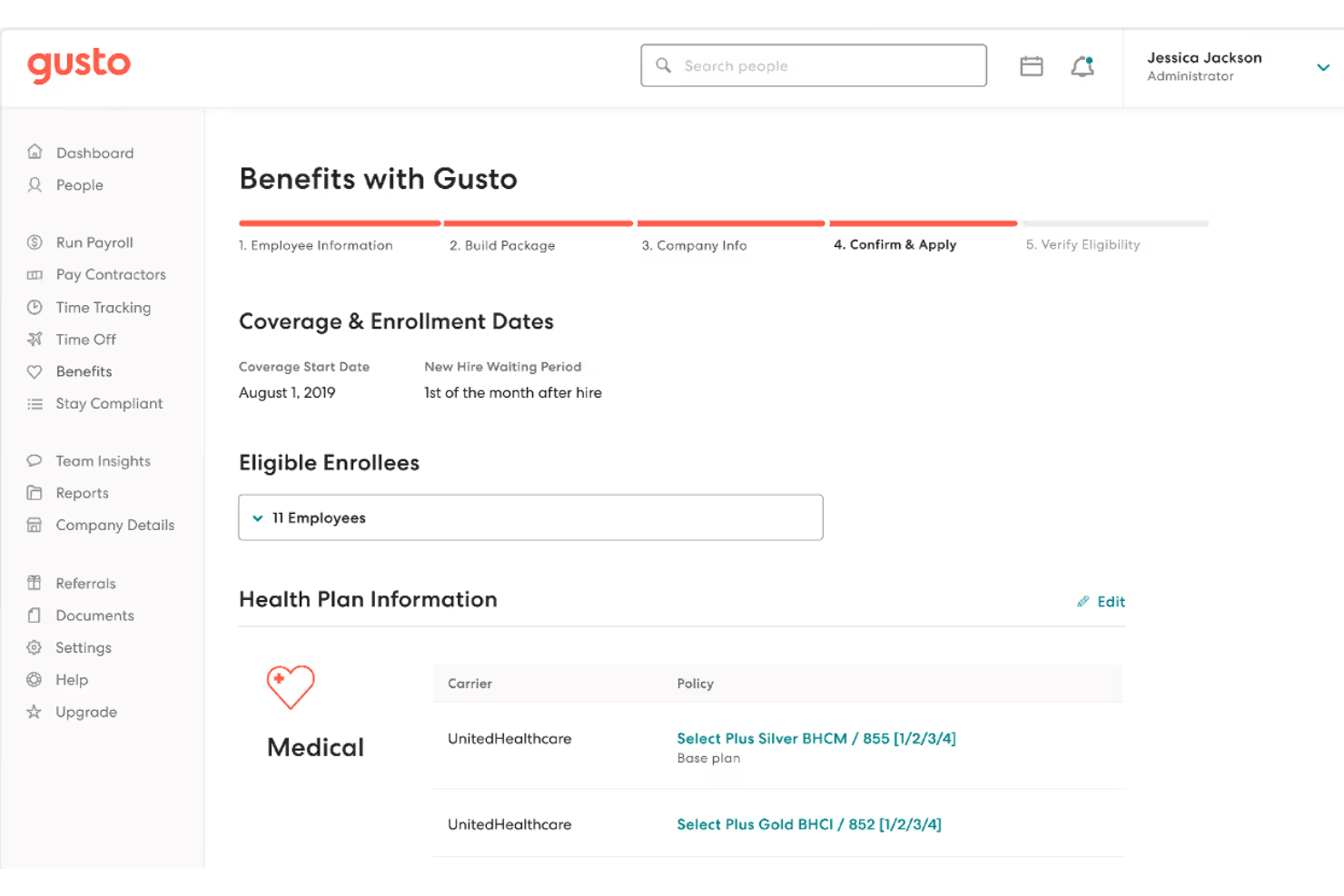
Gusto is a payroll and people platform built for small businesses, offering dental practices full-service payroll, automated tax filing, production-based pay structures, and integrated benefits administration in a single system.
Who Is Gusto Best For?
Gusto is a strong fit for independent dental practices and small DSOs that need to manage W-2 and 1099 staff, variable compensation, and benefits administration without a dedicated HR team.
Why I Picked Gusto
I picked Gusto as one of the best because its benefits administration goes well beyond a basic deductions list. With access to 9,000+ health plans across 30+ carriers, plus HSA, FSA, and 401(k) options, I can enroll new dental team members, set up deductions, and manage plan changes without leaving the payroll platform. It also handles HIPAA compliance training through a built-in LMS, which is a genuinely useful detail for practices that need to document staff training as part of their compliance record.
Gusto Key Features
- Recurring payroll cycles: Run unlimited payrolls each month, including off-cycle, with no additional processing fees.
- Multi-state and location support: Handle payroll across multiple practice locations, each with unique tax rules and reporting needs.
- Production and commission pay structures: Configure pay rates for hygienists, associates, and other roles based on production, commission, or bonuses.
- Employee self-service portal: Give dental staff secure access to pay stubs, W-2s, PTO balances, and personal information updates online.
Gusto Integrations
Gusto offers native integrations with QuickBooks Online, Xero, Archy, FreshBooks, QuickBooks Time, and Deputy. An API is available for custom integrations.
Pros and Cons
Pros:
- Built-in HIPAA compliance training modules
- Automatic new hire reporting to state agencies
- Access to 9,000+ health plans
Cons:
- Reporting lacks per-procedure cost breakdowns
- No native Dentrix or Eaglesoft sync
New Product Updates from Gusto
Gusto Adds Solo Advisory Tools and Mobile Money Features
Gusto adds Solo S-Corp Advisory Tools and Gusto Money on Mobile for tax guidance, invoicing, and bill payments. These updates help accountants advise solopreneurs and let users manage business finances from their phones. For more information, visit Gusto’s official site.

TimeTrex
Best for time-tracking-linked dental payroll
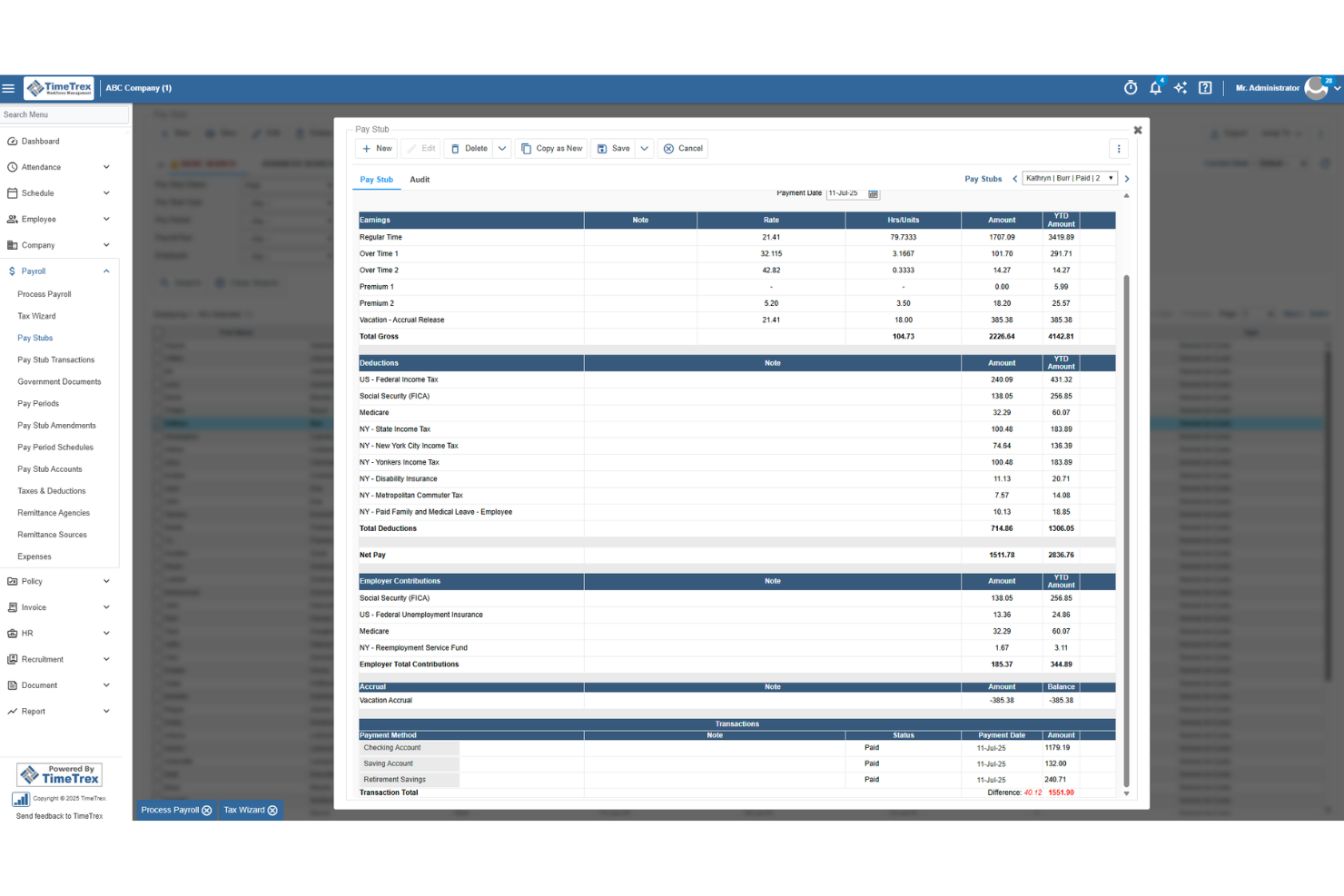
TimeTrex is a workforce management platform that combines time tracking, employee scheduling, leave management, HR tools, and payroll processing with built-in multi-state tax calculations and direct deposit.
Who Is TimeTrex Best For?
TimeTrex suits dental office managers and practice owners who want time tracking and payroll running in one place, without juggling separate systems.
Why I Picked TimeTrex
I've included TimeTrex in my top picks because it's the only tool on this list where time tracking and payroll aren't just connected—they're built as one. When a hygienist clocks out after a shift, that data feeds directly into payroll calculations, including blended overtime and pay-formula policies that account for multiple hourly rates across roles. I also like that managers get real-time attendance visibility, so there's no manual timesheet reconciliation before every pay run.
TimeTrex Key Features
- Multi-state tax calculations: Automatically calculates federal, state, and local payroll taxes based on each employee's work and home locations across thousands of jurisdictions.
- Deduction management: Supports medical, dental, and vision premium deductions, retirement contributions, garnishments, and custom deduction categories with filterable reporting.
- Biometric facial recognition: Verifies employee identity at clock-in and clock-out to prevent buddy punching at the front desk or operatory.
- Branch-level geofencing: Restricts mobile clock-ins to approved locations, giving multi-location practices control over where staff can record their time.
TimeTrex Integrations
TimeTrex supports integrations with Intuit QuickBooks and Sage, plus API-based two-way and flat-file connections for custom data exchange. Native Dentrix, Eaglesoft, and Open Dental integrations aren’t documented.
Pros and Cons
Pros:
- Support helps configure reports and garnishments
- Reviewers value connected payroll and timekeeping
- Clock hours feed directly into payroll
Cons:
- Payroll screens can involve too many dropdowns
- Dental production pay needs manual handling
New Product Updates from TimeTrex
TimeTrex Adds Quick Punch App With Offline and QR Support
TimeTrex adds a new Quick Punch app, offline punching, QR code scanning, punch images, configurable messages, and punch warnings or lockouts to improve employee clock-ins across browsers and local computers. For more information, visit TimeTrex’s official site.
 .
.
Rippling
Best for unified HR and payroll app sync
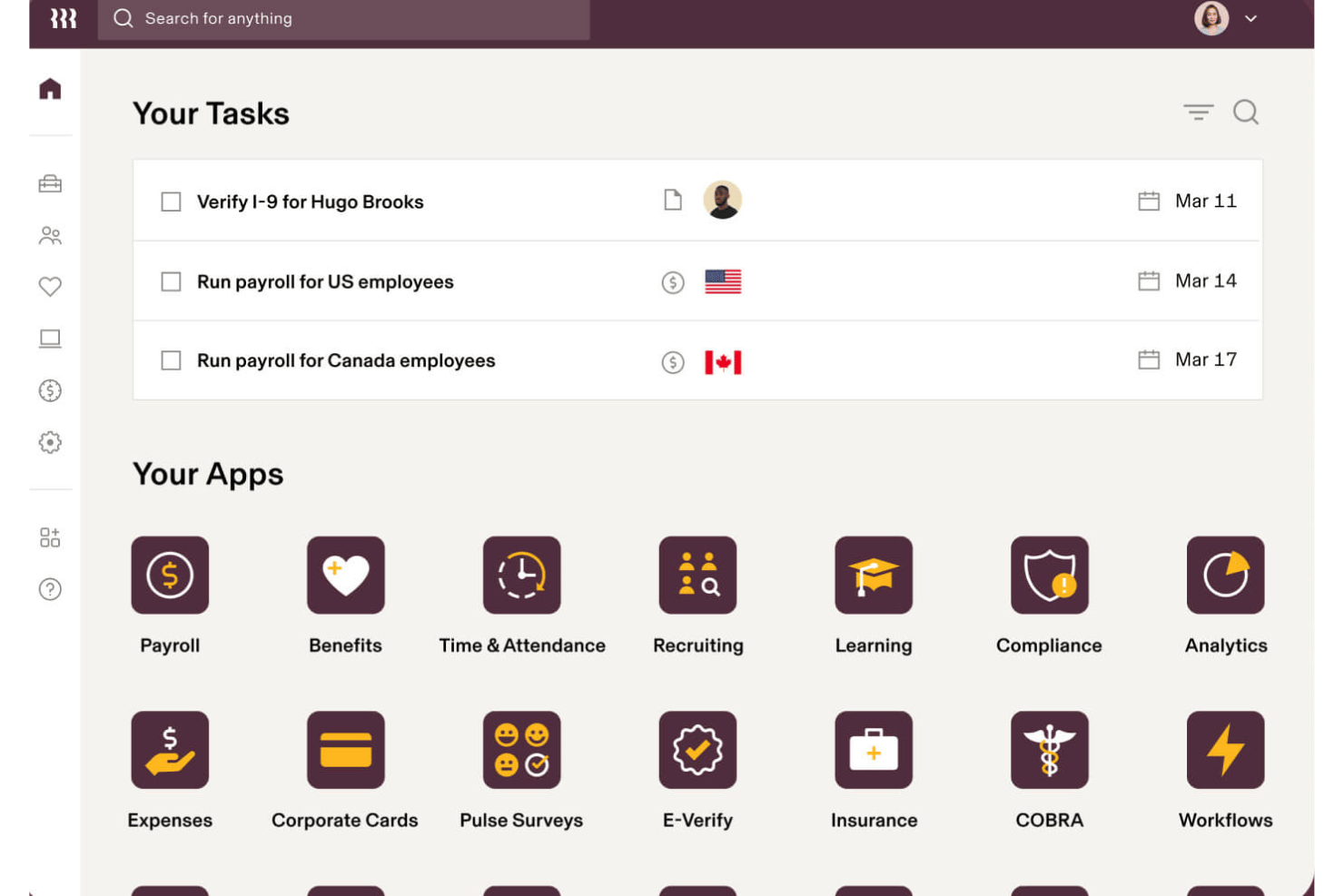
Rippling is an HR and payroll platform that handles automated payroll runs, tax filing, benefits administration, time tracking, and multi-state compliance for both W-2 employees and 1099 contractors.
Who Is Rippling Best For?
Rippling is a strong fit for multi-location dental groups and DSOs managing payroll, HR, and compliance across multiple offices and states.
Why I Picked Rippling
I picked Rippling as one of the best because of how tightly it syncs HR data directly into payroll. When a dental practice hires a new hygienist or updates a salary, that change flows automatically into the next payroll run — no manual re-entry. I also like its pay run comparison tool, which puts current and previous payroll side-by-side so catching discrepancies in gross pay or deductions takes seconds rather than a manual audit.
Rippling Key Features
- Multi-location payroll management: Run payroll across unlimited dental offices with automatic state and local tax handling for each location.
- Commission and bonus pay configuration: Set up custom curative pay types for dental associates, including production bonuses and tiered commissions.
- Benefits administration platform: Manage health, dental, vision, and retirement plans with automated payroll sync for deductions.
- Contractor and W-2 processing: Pay both salaried employees and 1099 dental contractors in a single system with year-end tax form generation.
Rippling Integrations
Rippling offers over 650 native integrations, including QuickBooks, Xero, Slack, Google Workspace, Office 365, Okta, Zoom, Zendesk, Jira, and BambooHR. An API is available for custom integrations.
Pros and Cons
Pros:
- HR and payroll data sync automatically
- Handles W-2 and 1099 workers simultaneously
- Custom workflow automation for employee onboarding
Cons:
- No native dental practice management software integrations
- Setup complexity for small single-location practices
New Product Updates from Rippling

Rippling Expands Automated Compliance With AI Workflows
Rippling expands Automated Compliance with multi-framework support, AI workflows, an audit portal, and trust centers. These updates help GRC teams manage compliance work and audits. For more information, visit Rippling’s official site.

Best for role-based practice reporting
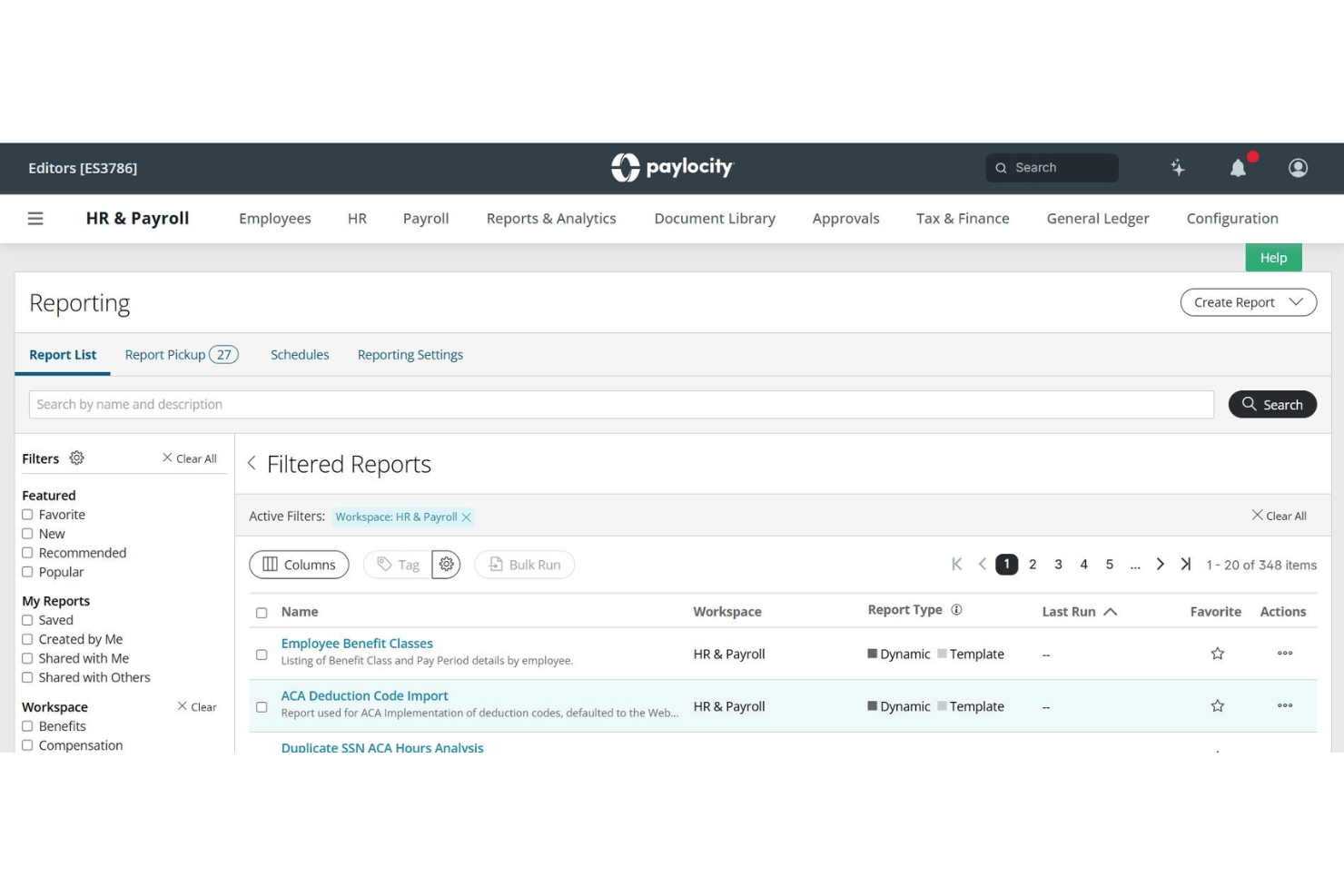
Paylocity is a cloud-based HCM platform that handles payroll processing, tax filing, time and labour tracking, benefits administration, and workforce analytics across multiple roles and locations.
Who Is Paylocity Best For?
Paylocity is a strong fit for multi-location dental groups and DSOs managing mixed payroll across hygienists, associates, and administrative staff.
Why I Picked Paylocity
I picked Paylocity because of how it handles role-based access and reporting across a dental group's org structure. Its Workforce Analytics module lets me build custom dashboards segmented by position, so I can view hygienist production data separately from associate dentist compensation and admin payroll. The Payroll Readiness Dashboard runs 40+ automated audits before each submission, flagging anomalies like unexpected pay spikes by role before they become compliance issues.
Paylocity Key Features
- Certified payroll and compliance reports: Generate workers' comp audits, 401(k) census data, and custom provider job-costing reports.
- Employee self-service portal: Dental staff can update direct deposit info, access pay stubs, and review W-2s online.
- Automatic garnishment and deduction handling: Supports pre- and post-tax deductions including health, dental, and retirement plans tailored for dental teams.
- Multi-location and state payroll management: Single account handles pay, tax rules, and reporting for multiple practices across states.
Paylocity Integrations
Paylocity offers over 400 marketplace integrations, including QuickBooks, ADP, NetSuite, and Paychex. An API is available for custom integrations. Native integrations with dental practice management software are not clearly documented.
Pros and Cons
Pros:
- Production-based and bonus pay fully supported
- Mobile app access for worker time tracking
- Segmented pay reporting by dental role
Cons:
- Setup complexity is high for small practices
- No native dental practice management sync
New Product Updates from Paylocity

Paylocity Expands Expense and Purchase Request Tools
Paylocity adds connected personal cards, smarter expense categorization, and a streamlined purchase request experience. This reduces manual entry and helps finance teams manage expenses and approvals more efficiently. For more information, visit Paylocity’s official site.
 .
.
Best for automated tax and deduction processing
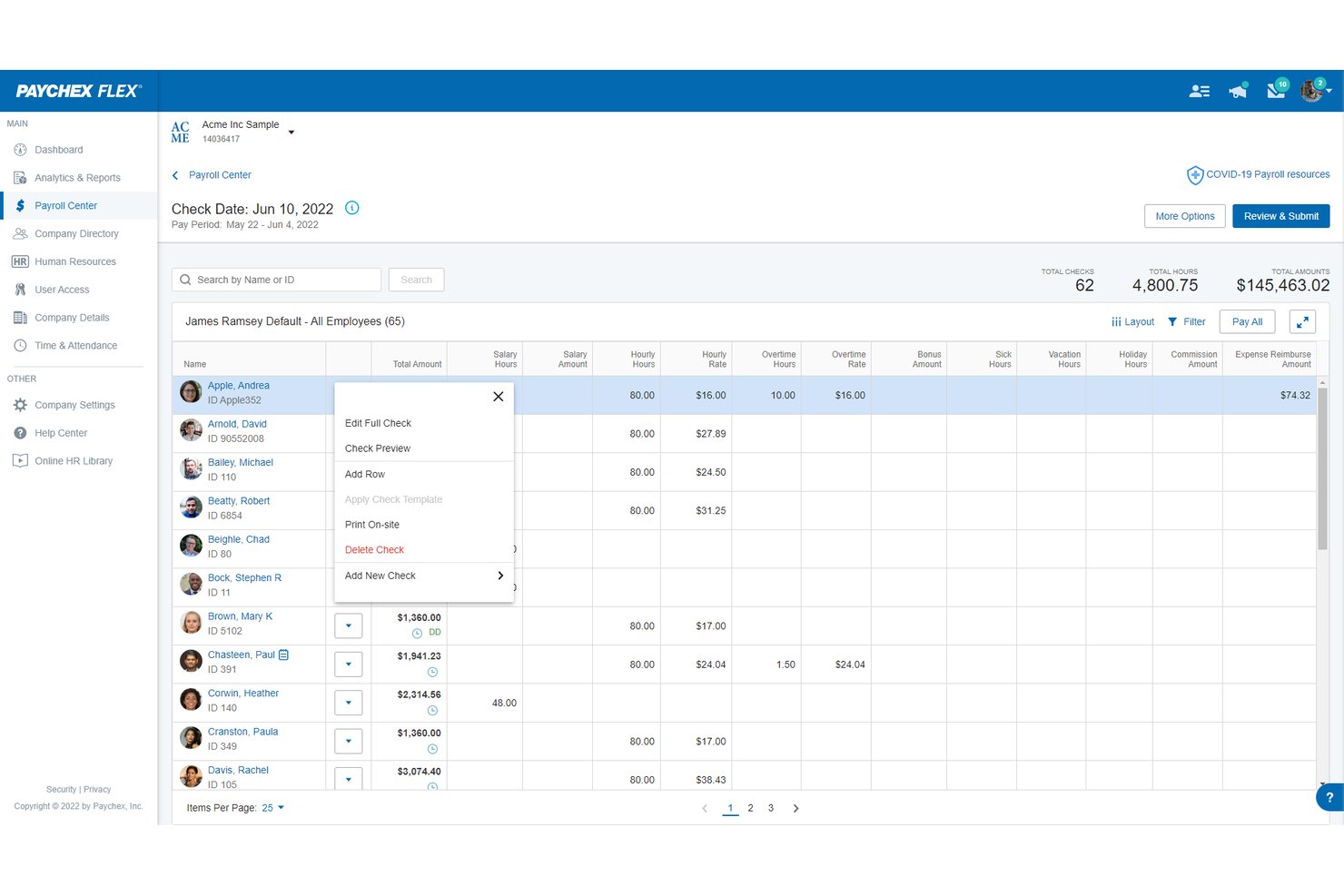
Paychex Flex is a cloud-based payroll and HR platform that handles automated tax filing, W-2 and 1099 processing, benefits deductions, and multi-location payroll for both salaried dental staff and 1099 associate dentists.
Who Is Paychex Flex Best For?
Paychex Flex suits dental practices of any size—from solo practitioners to multi-location DSOs—that need automated tax handling and support for both W-2 staff and 1099 associate dentists.
Why I Picked Paychex Flex
I picked Paychex Flex because its Taxpay® engine automatically calculates, files, and remits federal, state, and local payroll taxes without any manual input from me. I particularly like how it handles both W-2s for dental staff and 1099s for associate dentists within the same payroll run. The automated garnishment and deduction tracking also means benefit withholdings update without requiring me to manually adjust anything each pay cycle.
Paychex Flex Key Features
- Employee self-service portal: Staff can securely view pay stubs, W-2s, PTO balances, and manage direct deposit details online.
- Multi-location payroll management: Run payroll for multiple dental offices with location-specific wage, tax, and reporting configurations.
- Integrated benefits administration: Handle health, dental, vision, and 401(k) plans directly through the Paychex Flex platform.
- Contractor and associate payments: Process 1099 payments for associate dentists and specialists alongside traditional W-2 payroll runs.
Paychex Flex Integrations
Paychex Flex offers native integrations with QuickBooks Online, Xero, and Sage Intacct, and provides an API for custom integrations. Native dental practice management system integrations are not documented.
Pros and Cons
Pros:
- Multi-location payroll with location-specific tax rules
- Built-in compliance rules for employee breaks
- Direct garnishment payments to state agencies
Cons:
- Customer support response times vary significantly
- Setup can be complex for small practices
ADP Run
Best for guided tax compliance support
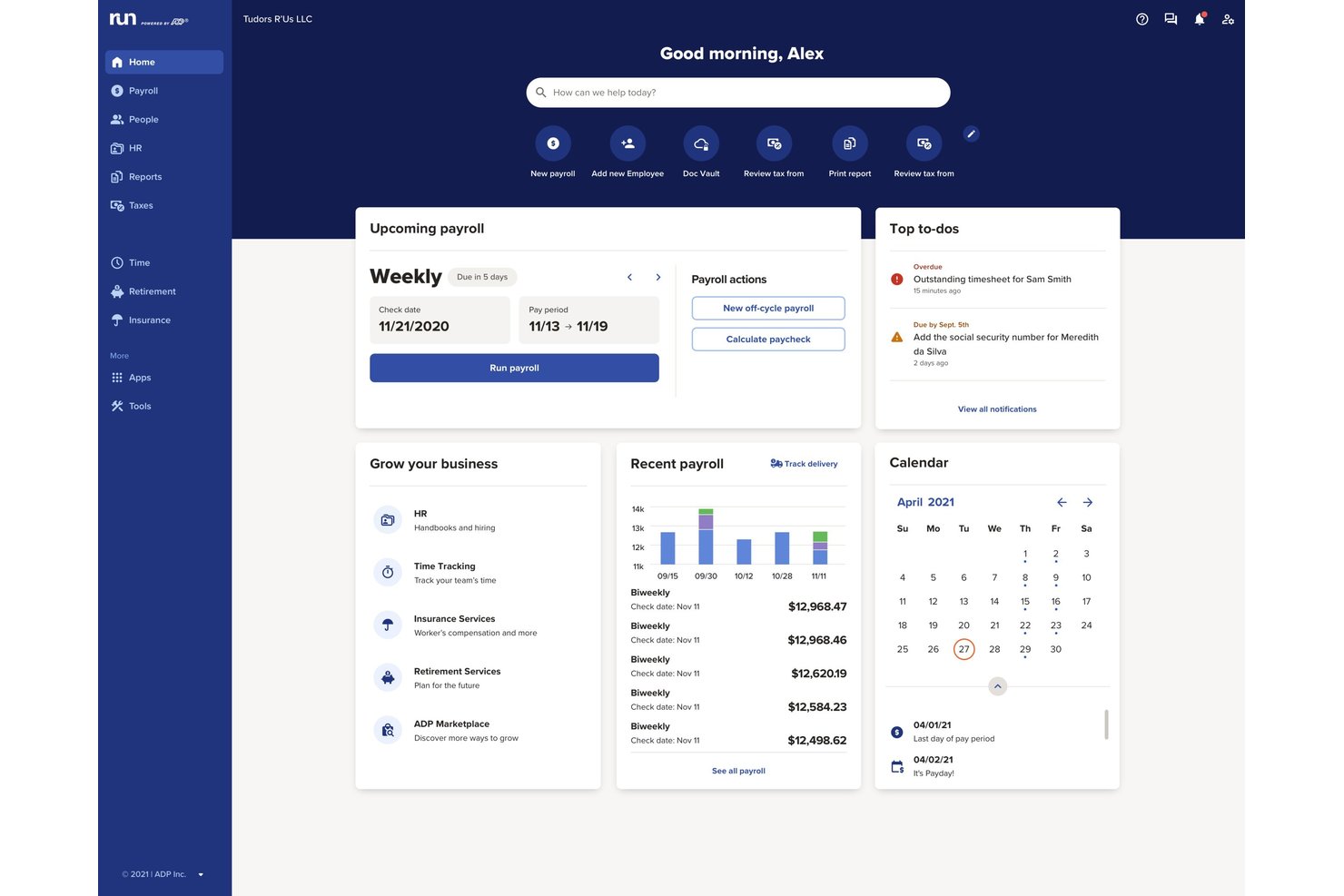
RUN Powered by ADP is a small-business payroll and HR platform that handles automated payroll processing, tax filing, benefits administration, and time tracking for practices with up to 49 employees.
Who Is ADP Run Best For?
ADP Run suits dental practice owners and office managers who need reliable multi-state tax filing and compliance support without a dedicated in-house HR team.
Why I Picked ADP Run
I picked ADP Run because of how it handles tax compliance proactively. ADP Assist, the platform's built-in AI, reviews your payroll data and flags potential errors before you submit a run. ADP also maintains compliance experts in all 50 states who track tax law changes continuously. That kind of coverage is useful when a dental practice expands to a second or third location.
ADP Run Key Features
- RUN & DONE auto-payroll: Automates recurring payroll runs for both salaried and hourly staff with minimal manual steps.
- Multi-location payroll management: Handles payroll, tax calculations, and compliance across multiple dental practice locations and states.
- Integrated time tracking: Syncs time data from built-in time-tracking tools or external systems directly into payroll.
- Employee self-service portal: Allows dental staff to view pay stubs, tax documents, and update personal or banking information online.
ADP Run Integrations
ADP Run offers native integrations with QuickBooks Online, Clover, Xero, and Wave, and provides access to 300+ apps through the ADP Marketplace. An API is available for custom integrations.
Pros and Cons
Pros:
- Workers' comp pay-as-you-go option included
- Handles 1099 contractor and W-2 payroll
- Optional human resources toolkits and templates
Cons:
- Limited access to human resources advisors
- No native dental practice management software sync

Netchex
Best for multi-location dental payroll management
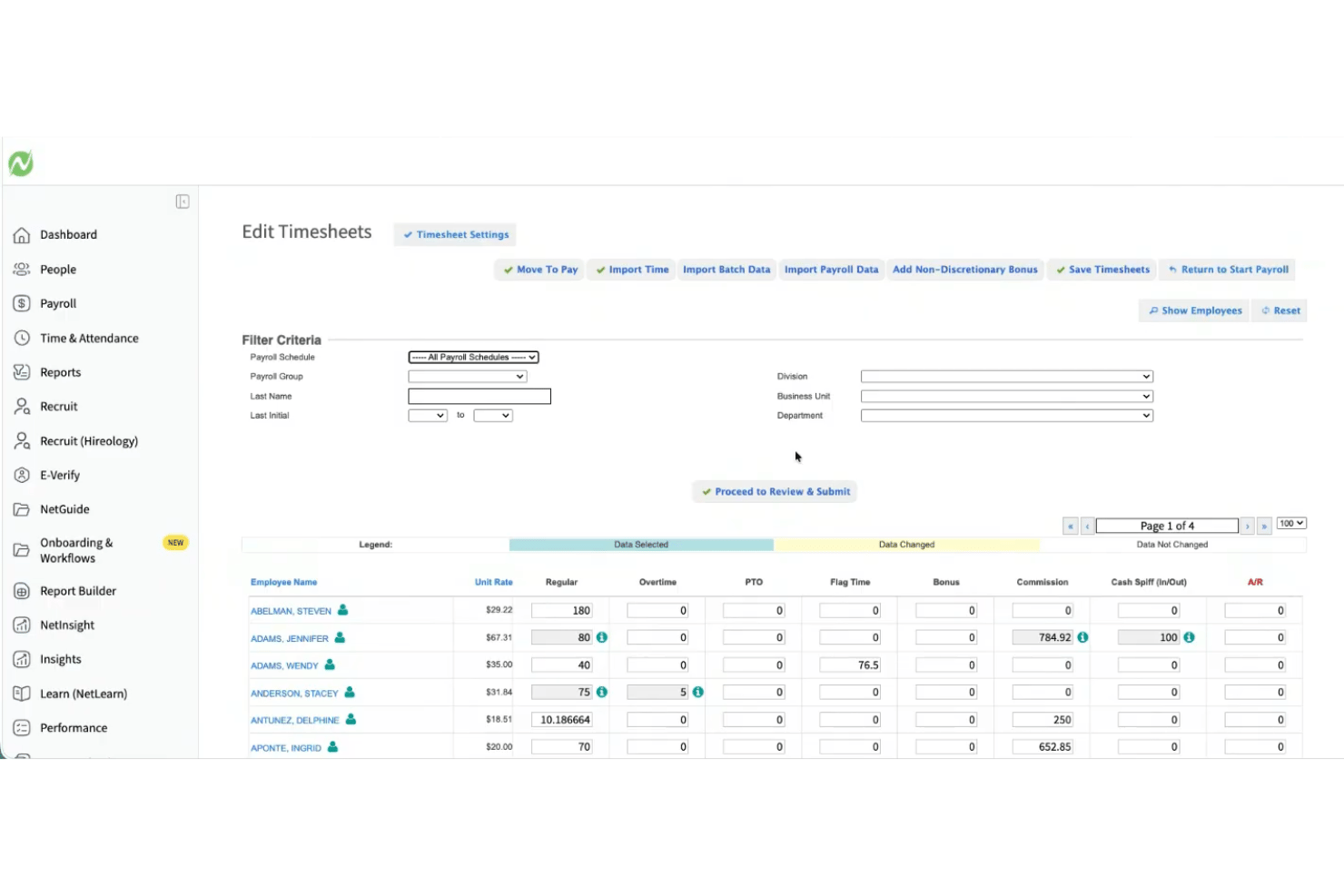
Netchex is a payroll and HR platform built for dental and vision practices, handling production-based provider pay, multi-location payroll, credential tracking, and time & attendance in a single system.
Who Is Netchex Best For?
Netchex is a strong fit for dental service organizations (DSOs) and growing group practices managing payroll across multiple locations or states.
Why I Picked Netchex
I picked Netchex as one of the best because no other platform in this space handles the DSO payroll model as cleanly. Managing multiple EINs from a single account means I can run payroll across every location without switching between systems. OneScreen Payroll™ flags errors before each run, which matters when you're calculating production-based pay for associate dentists alongside hourly rates for hygienists and front-office staff.
Netchex Key Features
- Credential and license tracking: Store and monitor dentist and hygienist certifications with automated expiration alerts.
- Employee Navigator integration: Sync benefits administration data directly between Netchex and benefits broker systems.
- ACA and compliance tracking: Track full-time, part-time, and variable hour eligibility for Affordable Care Act compliance.
- Mobile employee self-service: Allow dental staff to view pay, update direct deposit, and access tax documents from their phones.
Netchex Integrations
Netchex offers native integrations with Employee Navigator for benefits administration and supports 401(k) plan providers. An API is available for custom integrations. Native integrations with dental practice management systems are not documented.
Pros and Cons
Pros:
- OneScreen Payroll flags errors before each run
- Supports production-based pay for dental providers
- Handles multi-location payroll under one account
Cons:
- High setup fees for implementation
- No native dental practice management integrations
Best for small dental office payroll
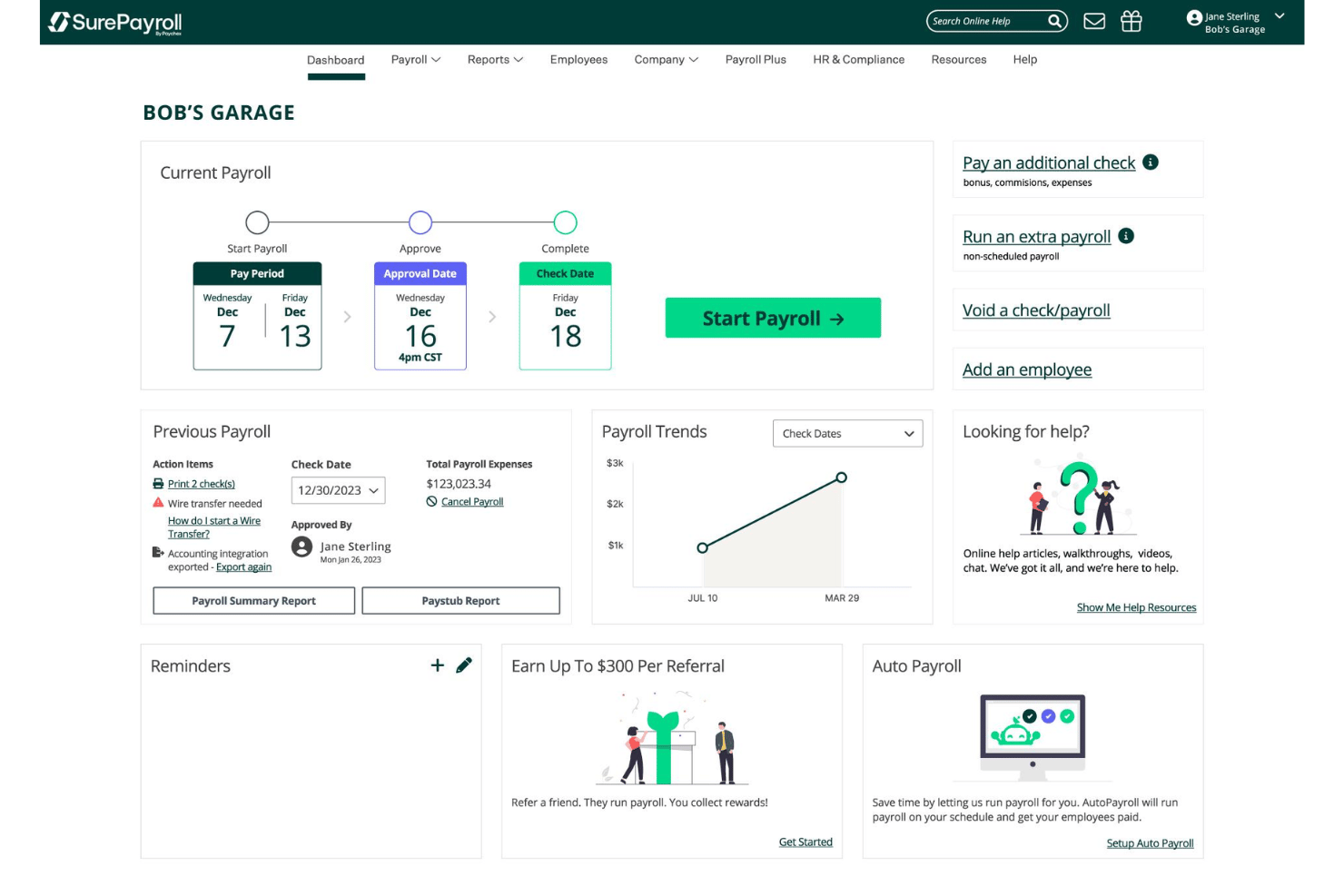
SurePayroll is a cloud-based payroll platform for small businesses that handles automated payroll runs, tax filing, and direct deposit for both W-2 employees and 1099 contractors from a single dashboard.
Who Is SurePayroll Best For?
SurePayroll fits small dental practices with lean teams where the owner or office manager handles payroll without dedicated HR or payroll staff.
Why I Picked SurePayroll
I picked SurePayroll as one of the best because it handles W-2 hygienists and 1099 associate dentists from a single dashboard, which is a combination that trips up a lot of generic payroll tools. I also like the Auto Payroll feature, which lets small practices schedule recurring payroll runs without logging in each cycle. The Full Service plan's tax-penalty guarantee covers federal, state, and local filings automatically, so an office manager running solo isn't left exposed to compliance errors.
SurePayroll Key Features
- In-app employee self-service portal: Allows dental staff to access pay stubs, W-2s, and update direct deposit information from their phones or computers.
- Accounting software integration: Syncs payroll data with popular accounting tools like QuickBooks Online, Xero, and Sage 50 for enhanced reconciliation.
- Multi-state payroll support: Processes payroll and manages taxes for dental offices with employees working in more than one state.
- Customizable deduction management: Enables setup of health insurance, retirement contributions, and garnishments tailored to dental practice needs.
SurePayroll Integrations
SurePayroll offers native integrations with QuickBooks Online, Xero, and Sage 50 for syncing payroll and accounting data. An API is available for custom integrations.
Pros and Cons
Pros:
- Auto Payroll reduces manual processing each cycle
- Tax-penalty guarantee covers all filing jurisdictions
- Includes free direct deposit for employees
Cons:
- Limited reporting options for multi-provider practices
- No native time clock for dental staff

Best for transparent per-employee pricing
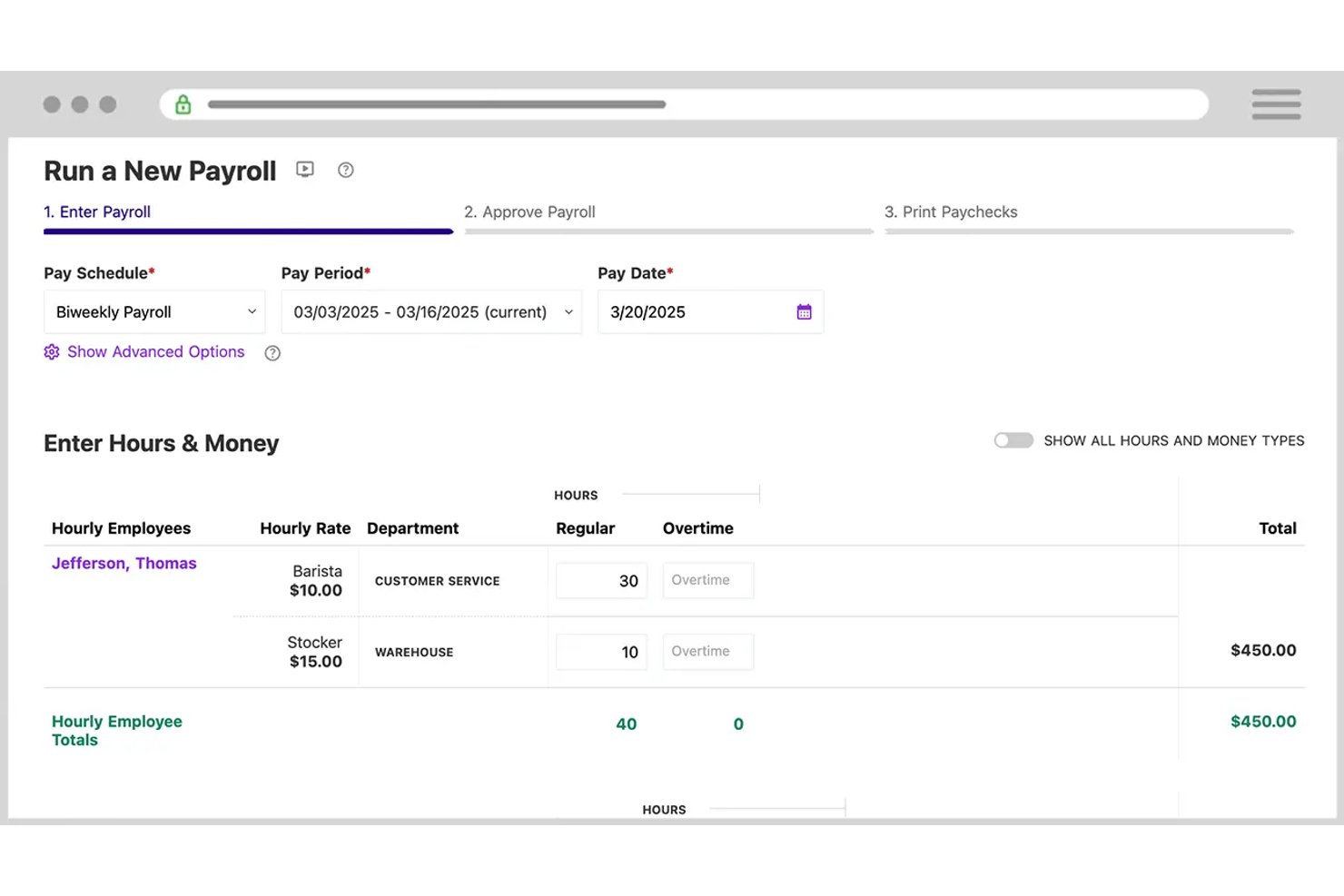
Patriot Software is a U.S.-based payroll platform built for small businesses, including dental practices, that runs payroll for W-2 employees and 1099 contractors with automated tax filing, direct deposit, and benefits deduction management.
Who Is Patriot Software Best For?
Patriot Software suits independent dental practice owners and office managers running payroll for small teams at a single location.
Why I Picked Patriot Software
Patriot Software earns its spot on my shortlist because the per-worker pricing model removes a real frustration: being charged per payroll run. With Patriot, you pay a flat base fee plus a per-worker charge, with unlimited runs at no extra cost. I also like that you can pay W-2 hygienists and 1099 associate dentists in the same payroll run, and assign up to 25 pay rates per employee to handle production bonuses alongside base wages.
Patriot Software Key Features
- Time and attendance add-on: Capture staff hours within Patriot or import hours from compatible time systems for payroll calculations.
- Multi-state payroll support: Manage tax calculations and filings for practices operating across multiple U.S. states with location-specific payroll settings.
- Integrated benefits administration: Connect health, dental, vision insurance, and 401(k) plans directly to payroll for automatic deduction management.
- Employee self-service portal: Allow dental staff to access pay stubs, tax forms, and update direct deposit information online.
Patriot Software Integrations
Patriot Software offers native integrations with Vestwell for 401(k), Next Insurance for workers’ compensation, and SimplyInsured for health, dental, and vision benefits. An API is available for custom integrations.
Pros and Cons
Pros:
- U.S.-based customer support included
- Optional employee portal access for tax documents
- Unlimited payroll runs at no extra cost
Cons:
- Multi-location reporting is limited for DSOs
- No native dental practice management software sync
Paycor
Best for flexible wage type configuration
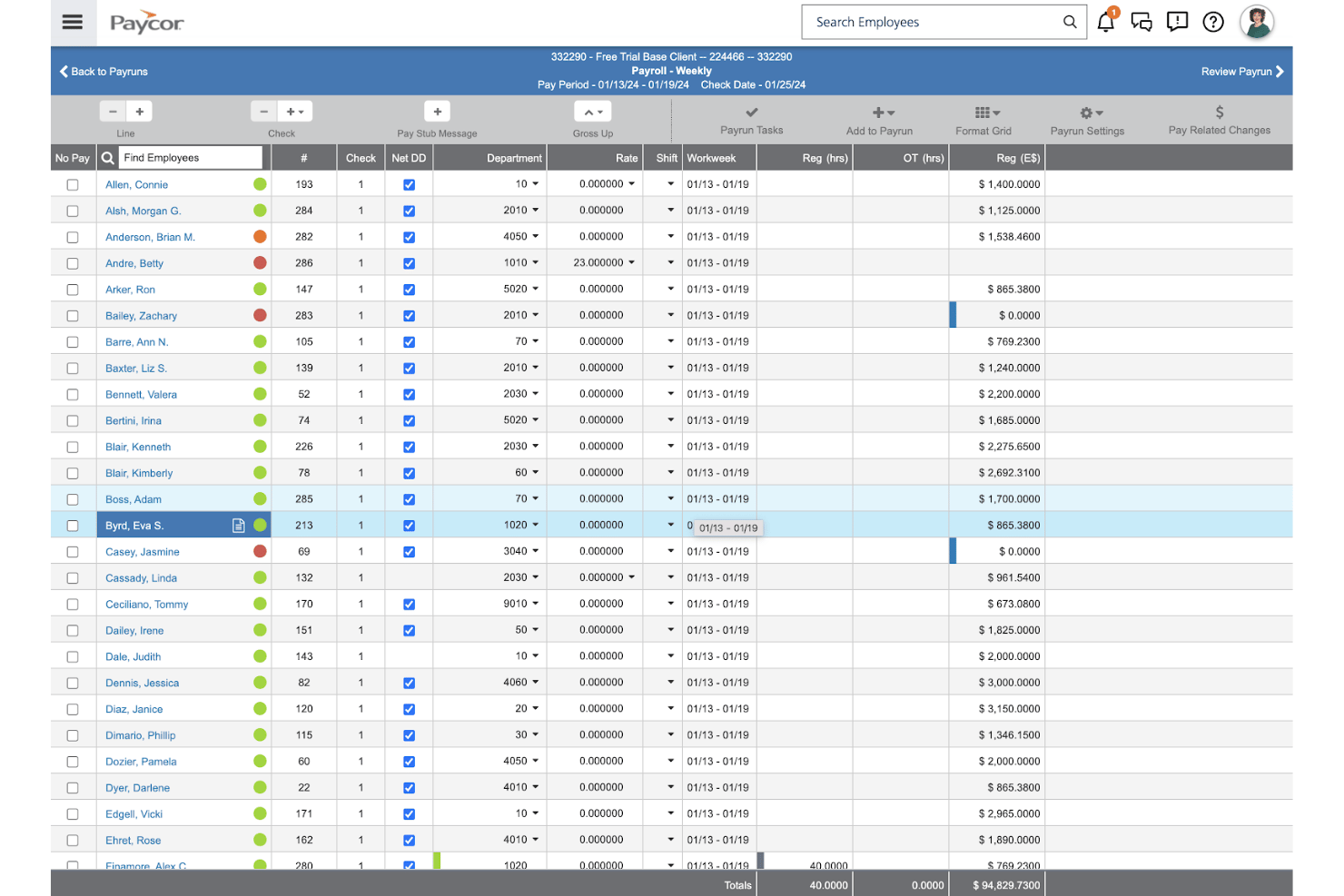
Paycor is a US-based HCM platform with a payroll engine built around configurable earnings codes, custom pay cycles, and automated tax filing for dental practices managing complex, multi-type compensation structures.
Who Is Paycor Best For?
Paycor is a strong fit for multi-location dental groups and DSOs that need to standardize payroll across multiple offices, states, and employee types under one platform.
Why I Picked Paycor
I picked Paycor as one of the best because of how it handles earnings code configuration. Dental practices can build unlimited custom earnings codes to separate associate production splits, hygiene bonuses, and per-diem pay without contacting support. Pair that with custom pay cycles and AutoRun scheduling, and you can run separate payrolls for salaried front-desk staff and commission-based associates on different cadences, all from the same platform.
Paycor Key Features
- Compliance dashboard: Offers proactive alerts for tax IDs, missing records, and address issues.
- Employee self-service portal: Staff can access pay stubs, W-2s, and manage direct deposit details.
- OnDemand Pay: Lets employees access earned wages before payday through a mobile wallet.
- 100% paperless onboarding: Allows new hires to complete all payroll and HR paperwork digitally.
Paycor Integrations
Paycor offers native integrations with QuickBooks, Slack, Indeed, and BambooHR, and provides an API for custom integrations.
Pros and Cons
Pros:
- AutoRun scheduling across multiple pay cycles
- Digital signatures for new hire paperwork
- Handles multi-state payroll for DSO networks
Cons:
- Lacks native time tracking software
- No native dental practice management integrations
Andre lønnssystemer for tannleger
Her er noen flere lønnsløsninger for tannleger som ikke kom med på kortlisten min, men som likevel er verdt å se nærmere på:
- ADP Workforce Now
For large group compliance and reporting
- OnPay
For dental-specific compensation types
- BambooHR®
For PTO and licensure management integration
- QuickBooks Payroll
For practice accounting synchronization
- Square Payroll
For hourly and contractor team configurations
- Justworks
For bundled insurance and payroll services
- Wagepoint
For Canadian dental clinic payroll needs
- Paypro
For custom dental payroll setups
- CoAd Payroll
For HR and payroll compliance


How I Evaluate Payroll Software for Dentists
I evaluate payroll for dentists across two layers: baseline requirements like tax filing and variable pay, and differentiators like dental practice management integrations and multi-location support.
Core Functionality (Table Stakes For This List)
When I'm selecting tools for my list, I rank each one on a scale from 0 (does not offer the functionality) to 5 (excels in this area) for each core functionality listed below. I then calculate the tool's total score as a percentage, using 55% as a benchmark to help assess its overall fit for the list.
- Automated payroll processing: I check whether the tool runs recurring cycles for both W-2 employees and 1099 contractors, including off-cycle runs for bonus payouts.
- Tax filing and compliance: Each tool should calculate, file, and remit taxes across federal, state, and local levels, plus generate year-end W-2s and 1099s.
- Variable pay handling: I evaluate how well each platform handles hygienist production bonuses, associate commissions, and tip tracking alongside standard hourly wages.
- Time and attendance integration: The tool should sync hours from time-tracking or practice management systems so front desk and clinical staff hours flow into payroll.
- Multi-state and multi-location support: I look for the ability to manage payroll across multiple office locations with location-specific tax rules and consolidated reporting.
- Benefits and deductions management: Dental teams need pre- and post-tax deduction handling for health insurance, retirement contributions, garnishments, and workers' comp.
Once I have a list of tools that meet the criteria, I consider what sets each platform apart.
Differentiating Factors (What Sets Vendors Apart)
Here's how I compare and contrast different vendors:
Standout Features
Tip and bonus handling matters because dental compensation often includes hygienist production bonuses and referral incentives that need proper tracking and taxation. I also evaluate how each platform handles contractor and associate payments, since many practices run 1099 processing for associate dentists alongside regular W-2 payroll. An employee self-service portal is another differentiator—it lets clinical staff check pay stubs, download W-2s, and update direct deposit details without pulling the office manager away from other tasks.
Beyond Features
Integration with dental practice management systems like Dentrix, Eaglesoft, or Open Dental is a major differentiator. It determines whether hours and production data flow into payroll automatically or require manual entry. Pricing structure also matters for smaller practices, where per-employee-per-month models with transparent year-end filing fees help avoid budget surprises. I look at onboarding support too, since migrating payroll mid-year with historical data needs guided help from specialists who understand dental workflows.
Slik velger du lønnssystem for tannleger
Prøver du å finne ut hva som virkelig er viktig når du skal velge lønnssystem for tannlegepraksisen din?
| Hvis prioriteten din er... | Prioriter... |
|---|---|
| Å synkronisere timer fra Dentrix eller Eaglesoft | Direkte integrasjoner med administrasjonsverktøy for tannlegepraksiser |
| Å håndtere komplisert lønn, som produksjonsbonuser | Tilpassede lønnskoder og støtte for flere lønnssatser |
| Å unngå lønnsfeil midt i året | Implementering ledet av spesialister med dataimport |
| Å støtte eksterne eller lokasjoner i flere delstater | Etterlevelse av regelverk og rapportering på tvers av jurisdiksjoner |
| Å håndtere lønn til assosierte tannleger og oppdragstakere | Utvidet behandling av W-2- og 1099-skjemaer |
Slik vurderer du kortlisten
- Bekreft integrasjoner: Be om en liste over aktuelle integrasjoner med administrasjonsprogramvare for tannlegepraksiser, og planlegg en demonstrasjon som viser synkronisering av reelle data.
- Garanti for etterlevelse: Be om en prøvekjøring av lønn med beregning av skatter på delstats- eller lokalt nivå for minst to lokasjoner.
- Håndtering av kompensasjon: Opprett en prøveversjon og kjør en lønn som inneholder grunnlønn, provisjon og produksjonsbonuser for minst tre roller.
- Implementeringsstøtte: Send inn en forespørsel om arbeidsflyten for innføringen, inkludert reelle tidsplaner for migrering og involvering av spesialister.
- Vei fleksibilitet mot spesialisering: Avgjør om du trenger en plattform som er spesielt utviklet for tannleger, med innebygde nisjeintegrasjoner, eller en generell leverandør med bredere funksjonalitet.
Hva er lønnssystemer for tannleger?
Lønnsprogramvare for tannleger er en spesialisert plattform som automatiserer lønnskjøring, skatteinnrapportering og håndtering av variabel godtgjørelse for tannlegepraksiser. Disse systemene håndterer lønnsstrukturer basert på timelønn, fastlønn, provisjon og produksjon, synkroniserer med verktøy for tannlegepraksiser og administrerer både W-2-ansatte og 1099-oppdragstakere. Tannlegekontorer bruker dem for å overholde arbeidslovgivningen, håndtere komplekse godtgjørelsesordninger og effektivt administrere lønn på tvers av flere lokasjoner eller jurisdiksjoner.
Funksjoner i lønnsprogramvare for tannleger
Når du velger lønnsløsning for tannleger, bør du se etter følgende nøkkelfunksjoner:
- Automatiserte lønnskjøringer: Lar deg sette opp gjentakende lønnssykluser for alle ansatte, beregner nettolønn og sender direkte innbetalinger eller utsteder sjekker automatisk.
- Støtte for variabel godtgjørelse: Håndterer timelønn, fastlønn, bonuser, produksjonsbasert lønn og provisjonsordninger som er vanlige på tannlegekontorer.
- Integrert skatteinnrapportering: Beregner, rapporterer og innbetaler føderale, statlige og lokale lønnsskatter, og oppretter W-2- og 1099-skjemaer ved årets slutt på dine vegne.
- Integrasjoner med praksisadministrasjon: Synkroniserer med tannlegesystemer som Dentrix eller Eaglesoft for å hente arbeidstimer, produksjon og personalinformasjon direkte inn i lønnssystemet.
- Overholdelse av regler på tvers av delstater og lokasjoner: Håndterer lønnsregler, skatter og rapportering for ansatte som arbeider på tvers av delstater eller ved flere praksissteder.
- Administrasjon av ytelser og fradrag: Følger opp fradrag før og etter skatt, som helseytelser, pensjonsordninger, lønnstrekk og refusjon av etterutdanning.
- Selvbetjeningsportal for ansatte: Lar ansatte se lønnsslipper, oppdatere opplysninger om direkte innbetalinger, få tilgang til skatteskjemaer og følge med på PTO-saldoer på nett eller via mobil.
- Betalinger til oppdragstakere og samarbeidende tannleger: Støtter sjekker og direkte innbetalinger for 1099-oppdragstakere, samarbeidende tannleger og vikarierende tannleger, med automatisert skattedokumentasjon.
- Detaljert lønnsrapportering: Tilbyr tilpassbare rapporter for praksiseiere, inkludert oversikter over lønnskostnader, kostnadsberegning per stilling og revisjonsklare dokumenter.
- Ressurser for introduksjon og brukerstøtte: Tilbyr veiledet implementering, hjelp med migrering og tilgang til lønnsspesialister som kjenner normene i tannlegebransjen.
Fordeler med lønnsprogramvare for tannleger
Implementering av en lønnsløsning for tannleger gir flere fordeler for teamet og virksomheten din. Her er noen av fordelene du kan se frem til:
- Bedre nøyaktighet: Automatiserte lønnsberegninger og integrert skatteinnrapportering minimerer feil og bidrar til å forhindre kostbare feil i forbindelse med regelverksetterlevelse.
- Tidsbesparelser: Gjentakende lønnskjøringer, direkte innbetalinger og selvbetjeningsfunksjoner for ansatte frigjør tid for ledere og eiere, slik at de kan fokusere på pasientbehandling.
- Forenklet regelverksetterlevelse: Innebygd støtte for regler på tvers av delstater, oppfølging av autorisasjoner og betalinger til oppdragstakere hjelper deg med å håndtere juridiske krav som er spesifikke for tannlegebransjen.
- Bedre rapportering: Tilpassbare lønns- og godtgjørelsesrapporter gjør det enkelt å analysere arbeidskostnader, bonuser og produktivitet på tvers av lokasjoner.
- Bedre opplevelse for ansatte: Ansatte kan få tilgang til lønnsslipper, PTO og skatteskjemaer på nett, noe som fremmer åpenhet og reduserer avbrytelser i resepsjonen.
- Tilpasningsevne for praksiser i vekst: Støtte for flere lokasjoner og roller gjør det enklere å skalere lønnsprosessene etter hvert som virksomheten vokser eller knytter seg til andre virksomheter.
- Integrert administrasjon av ytelser: Automatisk oppfølging av fradrag for helseordninger og refusjon av etterutdanning støtter en smidig administrasjon av ytelser for tannlegeteamet.
Kostnader og priser for lønnsprogramvare for tannleger
Valg av lønnsløsning for tannleger krever en forståelse av de ulike prismodellene og abonnementene som er tilgjengelige. Kostnadene varierer basert på funksjoner, teamstørrelse, tilleggstjenester og mer. Tabellen nedenfor oppsummerer vanlige abonnementer, gjennomsnittsprisene deres og typiske funksjoner som er inkludert i lønnsløsninger for tannleger:
Sammenligningstabell for lønnsprogramvare for tannleger
| Plantype | Gjennomsnittspris | Vanlige funksjoner |
|---|---|---|
| Gratisabonnement | $0 | Grunnleggende lønnskalkulatorer, manuell oppretting av lønnsslipper og begrenset støtte. |
| Personlig abonnement | $10-$20/bruker/måned | Automatiske lønnskjøringer, støtte for W-2/1099, nødvendig skatterapportering og grunnleggende rapportering. |
| Bedriftsabonnement | $25-$40/bruker/måned | Støtte for flere lokasjoner, integrert tidsregistrering, overholdelse av krav i flere delstater, administrasjon av personalgoder og avanserte rapporter. |
| Storbedriftsabonnement | $40-$60/bruker/måned | Integrasjoner med systemer for praksisadministrasjon, dedikert oppstart, tilpassede arbeidsflyter, prioritert støtte og veiledning fra spesialister. |
Vanlige spørsmål om lønnssystemer for tannleger
Her er noen svar på vanlige spørsmål om lønnssystemer for tannleger:
Hvordan håndterer lønnssystemer for tannleger produksjonsbaserte bonuser?
Lønnssystemer for tannleger beregner og behandler automatisk en produksjonsbonus knyttet til produksjonen til tannpleiere eller assisterende tannleger. Disse lønnssystemene for tannlegepraksiser lar deg konfigurere formler eller regler for lønn, inkludert overtidsbetaling, slik at bonuser vises direkte i hver lønnskjøring.
Kan lønnssystemer for tannleger støtte utbetalinger til både W-2-ansatte og 1099-oppdragstakere?
Ja, de fleste lønnssystemer for tannleger støtter både W-2-ansatte og 1099-uavhengige oppdragstakere. Du kan kjøre lønn for fast ansatte, inkludert beregning av FICA, helseforsikring og trekk for personalgoder, og betale assisterende tannleger eller vikarer som oppdragstakere på samme plattform.
Hvilke integrasjoner bør jeg se etter i lønnssystemer for tannlegepraksiser?
Se etter integrasjoner med systemer for administrasjon av tannlegepraksiser, som Dentrix eller Open Dental, samt regnskapsprogrammer som QuickBooks eller Xero. Dette sikrer at arbeidstimer og praksisdata importeres sømløst til lønnssystemet.
Hvordan påvirker bytte av lønnssystem midt i året skatterapportering og rapportering?
Det er mulig å bytte lønnssystem midt i året hvis den nye leverandøren tilbyr datamigrering og import av historiske lønnsdata. På denne måten forblir alle lønns- og trekkdata korrekte for årsrapportering på W-2- eller 1099-skjemaer.
Hjelper lønnssystemer for tannleger med sporing av delstatslisenser eller refusjon for etterutdanning?
Noen lønnssystemer for tannleger lar deg konfigurere tilpassede trekk eller refusjoner for lisensavgifter i delstaten og etterutdanning. Dette hjelper praksiser med å overholde kravene og støtte de ansattes faglige utvikling.