

10 beste rimelige lønnsprogramvarer gjennomgått i 2026

Kortliste over de beste rimelige lønnssystemene


Håndtering av lønn kan være en hodepine for HR-team, spesielt når budsjettene er stramme. Du trenger en løsning som er rimelig, men som ikke sparer på viktige funksjoner. Det er her rimelig lønnsprogramvare kommer inn i bildet. Den hjelper deg med å håndtere lønn effektivt, spare tid og redusere feil.
Jeg har brukt mye tid på å teste og vurdere ulike programvarer, og jeg forstår hva som fungerer best innen HR. I denne artikkelen deler jeg mine beste anbefalinger for budsjettvennlig lønnsprogramvare. Du får innsikt i funksjoner, fordeler og ulemper samt priser, slik at du kan ta en informert beslutning for teamet ditt. La oss se nærmere på de beste alternativene som kan gjøre lønnshåndteringen enklere og mer kostnadseffektiv for deg.
Why Trust Our Software Recommendations
Our team has been testing and reviewing software since 2012. As HR experts ourselves, we know how difficult—and important—it is to choose the right software.
For this guide, we evaluated tools using hands-on testing and independent research, scoring tools using our selection criteria. We also draw on insights from industry thought leaders and practicing HR experts.
Our reviews reflect our human editorial judgment, not a sales pitch.
Expert reviewers:
Sammenligningstabell for rimelig lønnsprogramvare
Denne sammenligningstabellen oppsummerer prisopplysningene for mine beste utvalgte rimelige lønnsprogrammer:
| Tool | Best For | Trial Info | Price | ||
|---|---|---|---|---|---|
| 1 | Best with integrated time tracking tools | Not available | From $599/employee/month | Website | |
| 2 | Best for small business payroll and compliance | 3-month free trial | Pricing upon request | Website | |
| 3 | Best for freelancers needing payroll and invoicing | 30-day free trial | From $40/month | Website | |
| 4 | Best for small POS retailers with hourly staff | Not available | From $35/month + $6/person/month | Website | |
| 5 | Best for household employers | Not available | From $29/month | Website | |
| 6 | Best for growing SMBs with HR support | Free demo available | Pricing upon request | Website | |
| 7 | Best for global, multi-country payroll | Free demo available | Pricing upon request | Website | |
| 8 | Best for full-service PEO HR outsourcing | Free demo available | Pricing upon request | Website | |
| 9 | Best for automated payroll tax filings | 30-day free trial | From $17/month | Website | |
| 10 | Best for Intuit QuickBooks-native payroll users | 30-day free trial | From $30/month | Website |

Anmeldelse av de beste rimelige lønnssystemene
Nedenfor finner du mine detaljerte sammendrag av de beste rimelige lønnssystemene som kom med på kortlisten. Anmeldelsene mine gir en detaljert gjennomgang av de viktigste funksjonene, fordelene og ulempene, integrasjonene og ideelle bruksområdene for hvert verktøy, slik at du kan finne det som passer best for deg.

Best with integrated time tracking tools
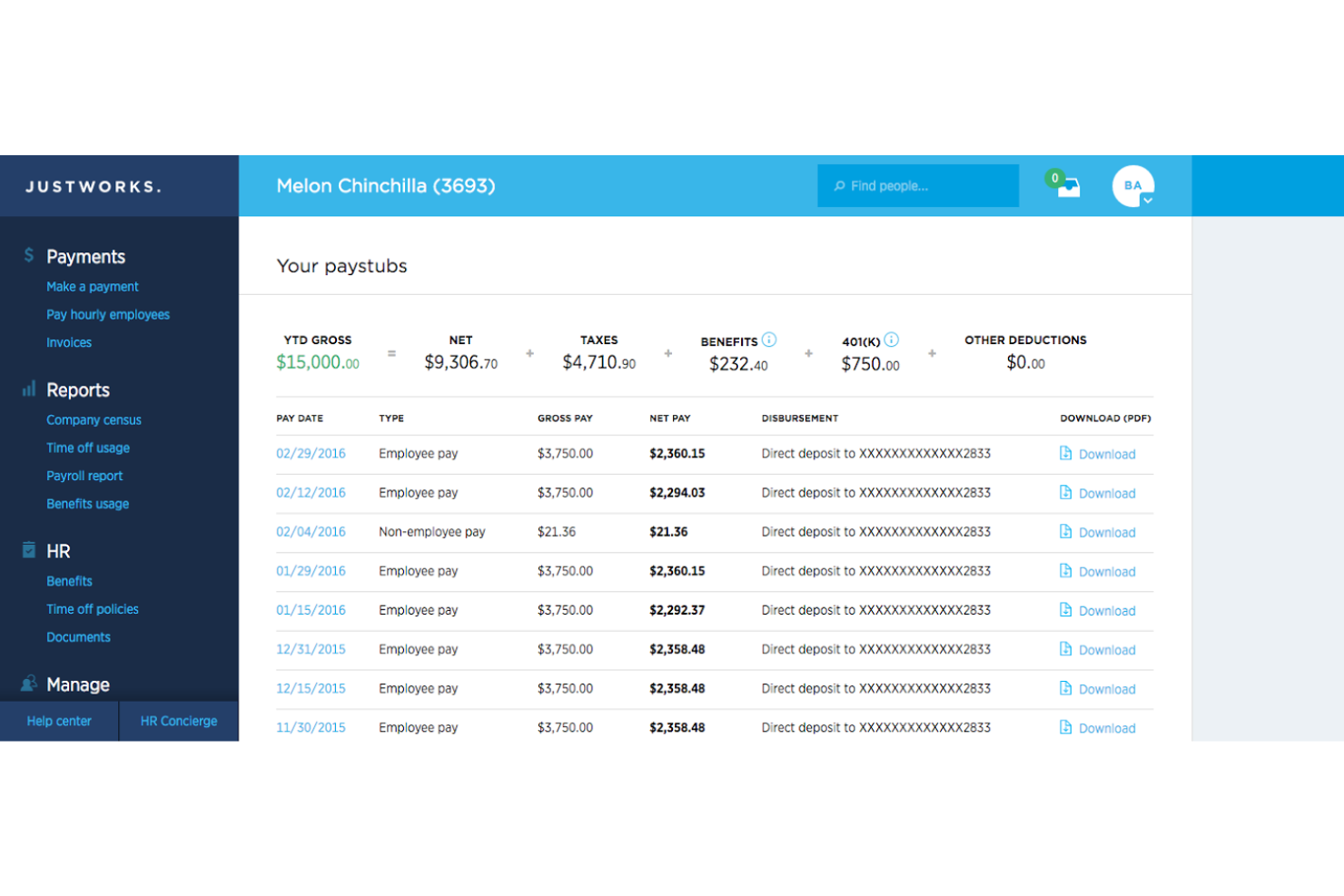
Justworks is a payroll and HR platform that combines automated payroll processing, compliance support, benefits administration, and time tracking for small businesses seeking affordable payroll software.
Who Is Justworks Best For?
Justworks is a good fit for small to midsize businesses that need affordable payroll and HR tools with built-in compliance support.
Why I Picked Justworks
I picked Justworks as one of the best because I like how it combines payroll with integrated time tracking tools. My team can track employee hours directly in the platform, which syncs with payroll calculations and overtime management. I also use the built-in time tracking to monitor attendance and ensure accurate wage payments without juggling separate systems.
Justworks Key Services
- Automated payroll processing: Run payroll for salaried and hourly employees with automatic tax calculations.
- Multi-state payroll support: Pay employees in multiple states and handle state-specific tax filings.
- Benefits administration: Manage health insurance, 401(k), and other employee benefits from one platform.
- Compliance management: Access built-in tools for labor law compliance, reporting, and document storage.
Justworks Integrations
Native integrations are not clearly documented. The tool supports integrations via API for custom connections.
Pros and Cons
Pros:
- HR document storage and onboarding workflows
- Automated W-2 and 1099 form generation
- Built-in time tracking for hourly workers
Cons:
- No in-app pay advance or earned wage access
- No free plan or trial available
Best for small business payroll and compliance
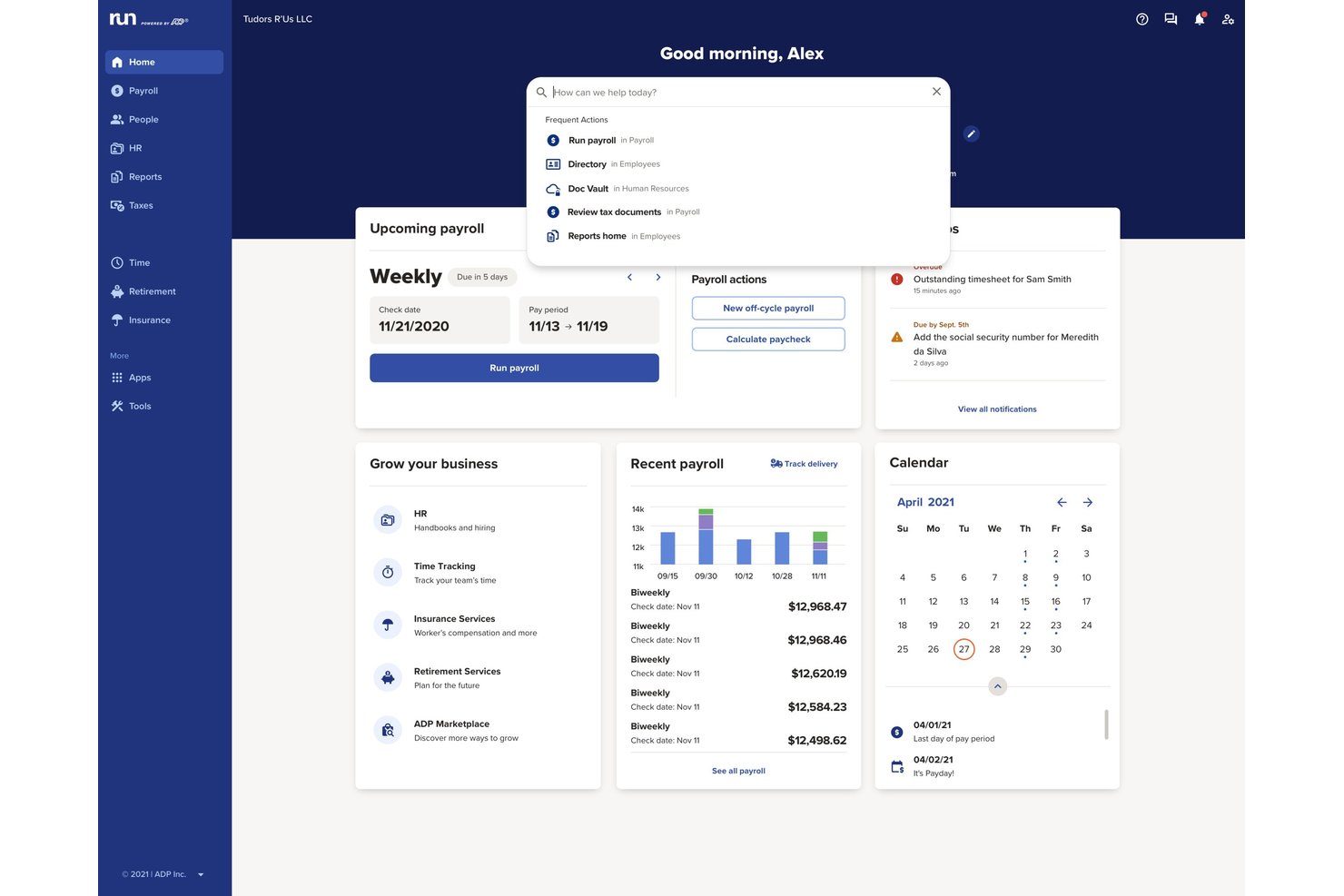
RUN Powered by ADP is a small business payroll software platform that automates payroll processing, tax filing, direct deposit, employee payments, and year-end reporting for employees and contractors.
Who Is RUN Powered by ADP Best For?
Small business owners and office managers looking for reliable payroll automation and built-in compliance across multiple states.
Why I Picked RUN Powered by ADP
I picked RUN Powered by ADP because I see how it handles complex payroll compliance, taking care of payroll tax calculations and filing for every jurisdiction my business operates in. I rely on its automatic regulatory updates and secure employee self-service portal.
RUN Powered by ADP Key Features
- Built-in new hire onboarding: Add new employees and collect required tax forms within the platform.
- Mobile payroll app: Run payroll and view pay data from iOS and Android devices.
- Custom payroll deductions: Configure garnishments, benefits, or retirement deductions for each pay run.
- Automated year-end tax forms: Generate and distribute W-2 and 1099 forms to employees and contractors.
RUN Powered by ADP Integrations
RUN Powered by ADP offers native integrations with QuickBooks, Xero, Wave, Clover, and Deputy. An API is available for custom integrations.
Pros and Cons
Pros:
- Supports contractor and employee payments
- Robust employee self-service portal
- Automatic tax filing in all states
Cons:
- Initial system setup is time-consuming
- Reporting customization options are highly limited
Wave
Best for freelancers needing payroll and invoicing
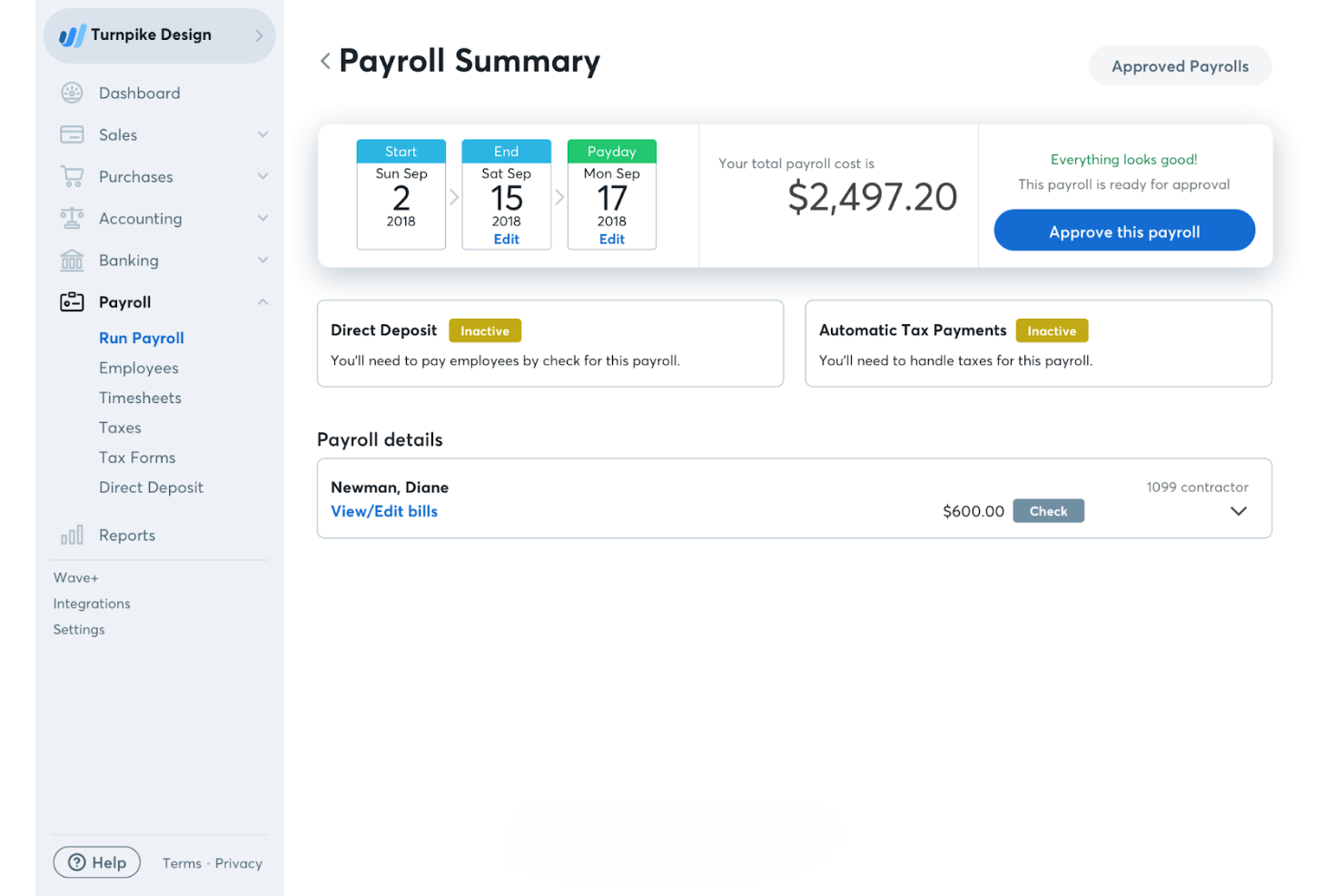
Wave is an online payroll service tailored for freelancers and small businesses. It handles payroll processing, tax calculations, and direct deposits, making it a solid choice for managing your payroll needs.
Why I picked Wave: Wave is particularly beneficial for freelancers due to its straightforward payroll processing and easy-to-use interface. The software allows you to pay employees and contractors via direct deposit, which is a convenient feature for small teams. Additionally, Wave integrates with Wave's accounting software, supporting basic bookkeeping and providing a full financial picture for your business.
Standout Features and Integrations:
Features include automatic tax payment reminders, ensuring you never miss a deadline. You can also manage payroll deductions and benefits. The software provides detailed payroll reports, giving you insights into your payroll expenses.
Integrations include Wave Accounting, Wave Invoicing, Wave Receipts, Wave Payments, and more.
Pros and Cons
Pros:
- Simple payroll structure
- Contractor payment support
- Freelancer-friendly payroll
Cons:
- Limited scalability for larger businesses
- Lacks built-in time-tracking features
Best for small POS retailers with hourly staff
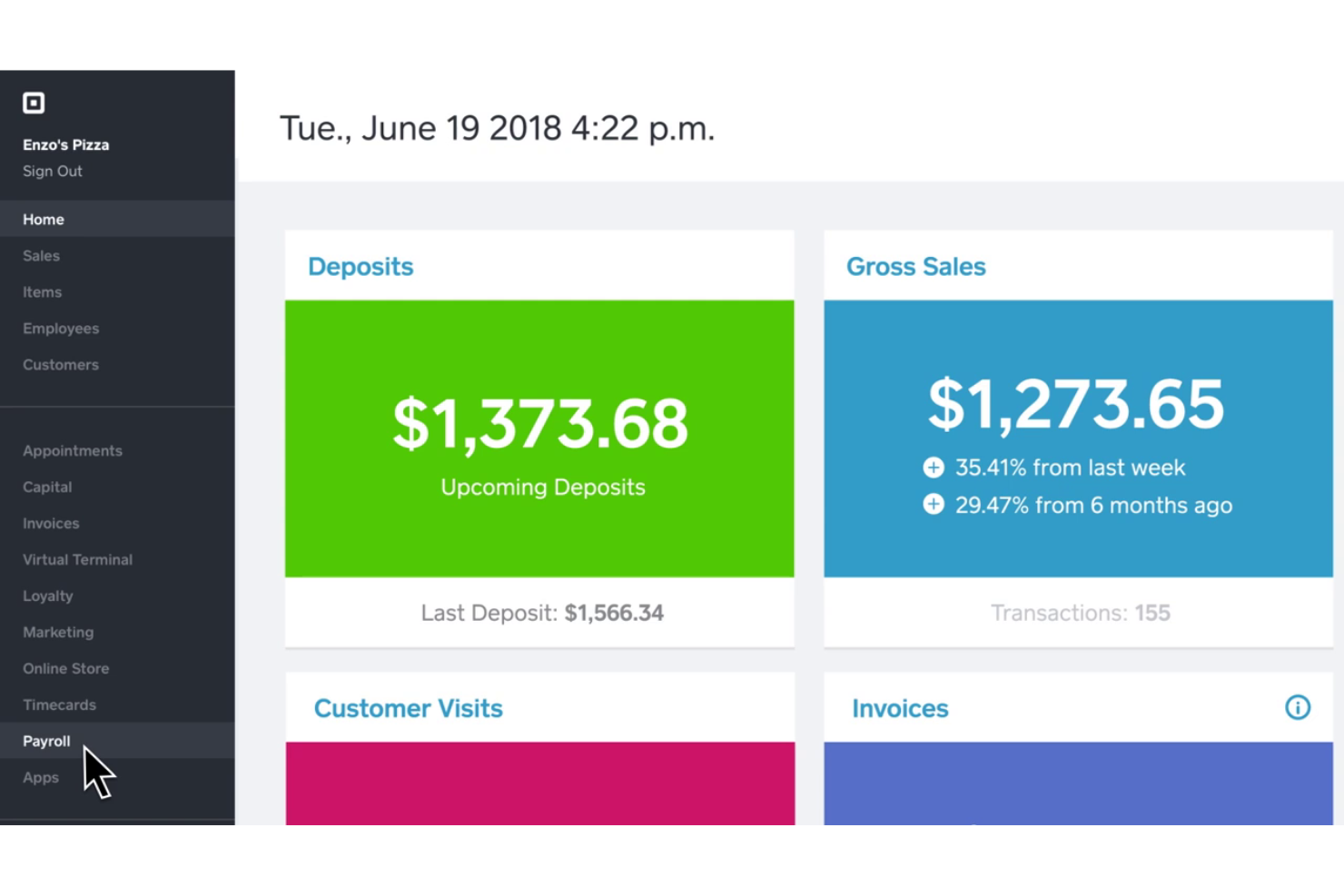
Square Payroll is an online payroll solution designed for small and mid-sized businesses, especially in retail and service industries. It handles payroll processing, tax filings, and employee benefits, making it a valuable tool for managing your team’s payroll needs.
Why I picked Square Payroll: Square Payroll caters to small retailers and startups by integrating directly with Square POS, which simplifies payroll for businesses already using Square’s ecosystem. The software also offers automatic tax filings and compliance, allowing you to focus more on your business operations. With features such as direct deposit and tools to run payroll via the Square Dashboard or Team App, it’s tailored to meet the needs of small business owners.
Standout Features and Integrations:
Features include unlimited monthly payroll runs, automated tax filings, and direct tip imports from Square POS. You’ll also find flexible pay management options, allowing for commissions, bonuses, and tips. The software provides live support and onboarding assistance to get you started smoothly.
Integrations include Intuit QuickBooks Online, Square POS, Square Appointments, Square Invoices, Square Online, and more.
Pros and Cons
Pros:
- Retail-focused workflows
- Handles tips automatically
- POS-linked payroll automation
Cons:
- Lacks advanced HR features and reporting
- Dependency on the Square ecosystem
Best for household employers
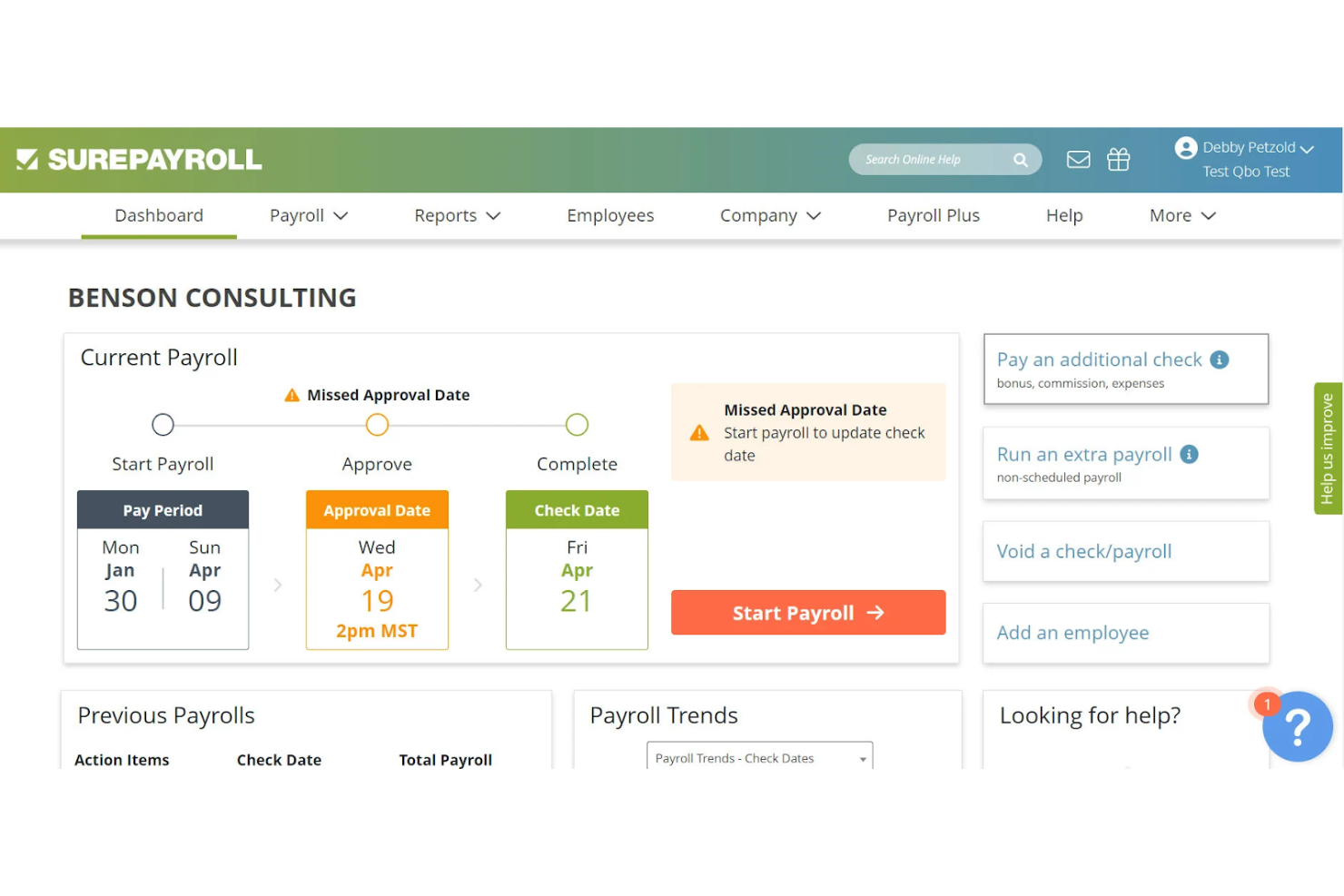
SurePayroll is an online payroll service aimed at small businesses and household employers, providing payroll processing and tax filing services. It simplifies payroll management for those who need to handle payroll for household staff or small business teams.
Why I picked SurePayroll: SurePayroll is ideal for household employers due to its tailored payroll solutions that include tax filings specifically for household employees. It offers automatic payroll tax calculations and filings—including local tax requirements—taking the headache out of managing taxes. You can also set up automatic payroll runs, which saves time and effort. The software is user-friendly, with a focus on simplifying payroll for those who may not have a dedicated HR department.
Standout Features and Integrations:
Features include customizable payroll reports that let you track expenses and budget effectively. You can also manage employee benefits and deductions with ease. The software provides mobile access, allowing you to manage payroll on the go.
Integrations include Intuit QuickBooks Online, Intuit QuickBooks Desktop, and more.
Pros and Cons
Pros:
- Simple recurring payroll
- Nanny tax automation
- Household payroll specialization
Cons:
- Lacks in-depth HR tools
- Narrow use cases
Paychex
Best for growing SMBs with HR support
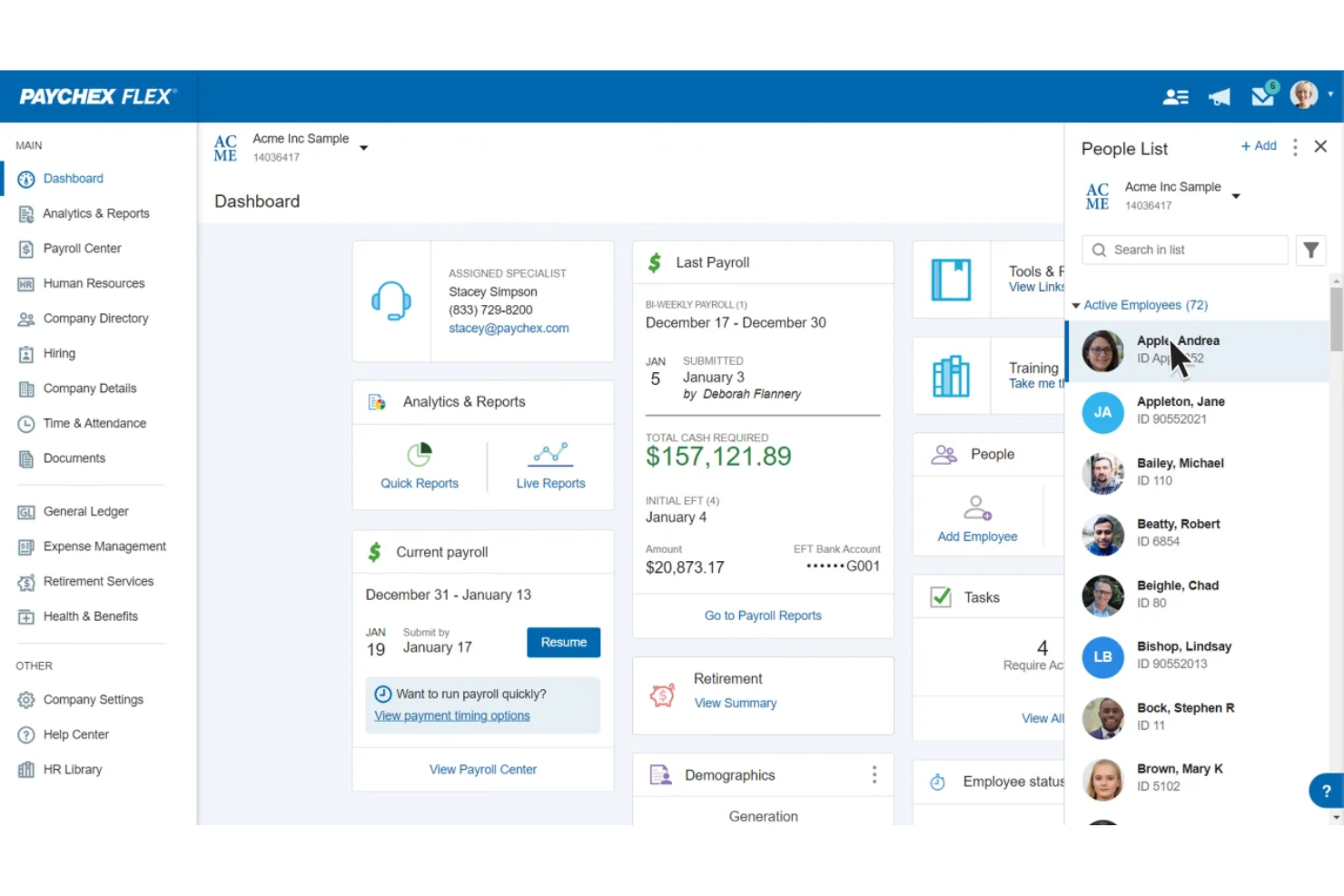
Paychex is a payroll and HR solution designed for small to medium-sized businesses, offering payroll processing and tax services. It simplifies payroll management and provides scalable solutions as your business expands.
Why I picked Paychex: Paychex is ideal for growing businesses because it offers scalable payroll solutions that can adapt as your team grows. It includes features such as automatic payroll tax administration, which helps keep your business compliant. You can manage employee benefits and retirement plans, providing a complete HR solution. The software also offers mobile access, allowing you to manage payroll on the go.
Standout Features and Integrations:
Features include detailed payroll reporting, giving you insights into your payroll expenses. The software provides employee self-service options, enabling your team to access pay stubs and year-end tax forms. Additionally, Paychex offers dedicated customer support to assist with any issues.
Integrations include Intuit QuickBooks, Xero, Sage Intacct, Oracle NetSuite, and more.
Pros and Cons
Pros:
- HR expansion ready
- Automated tax administration
- Supports business growth
Cons:
- Cost increases quickly
- Upselling of unnecessary services
ADP
Best for global, multi-country payroll
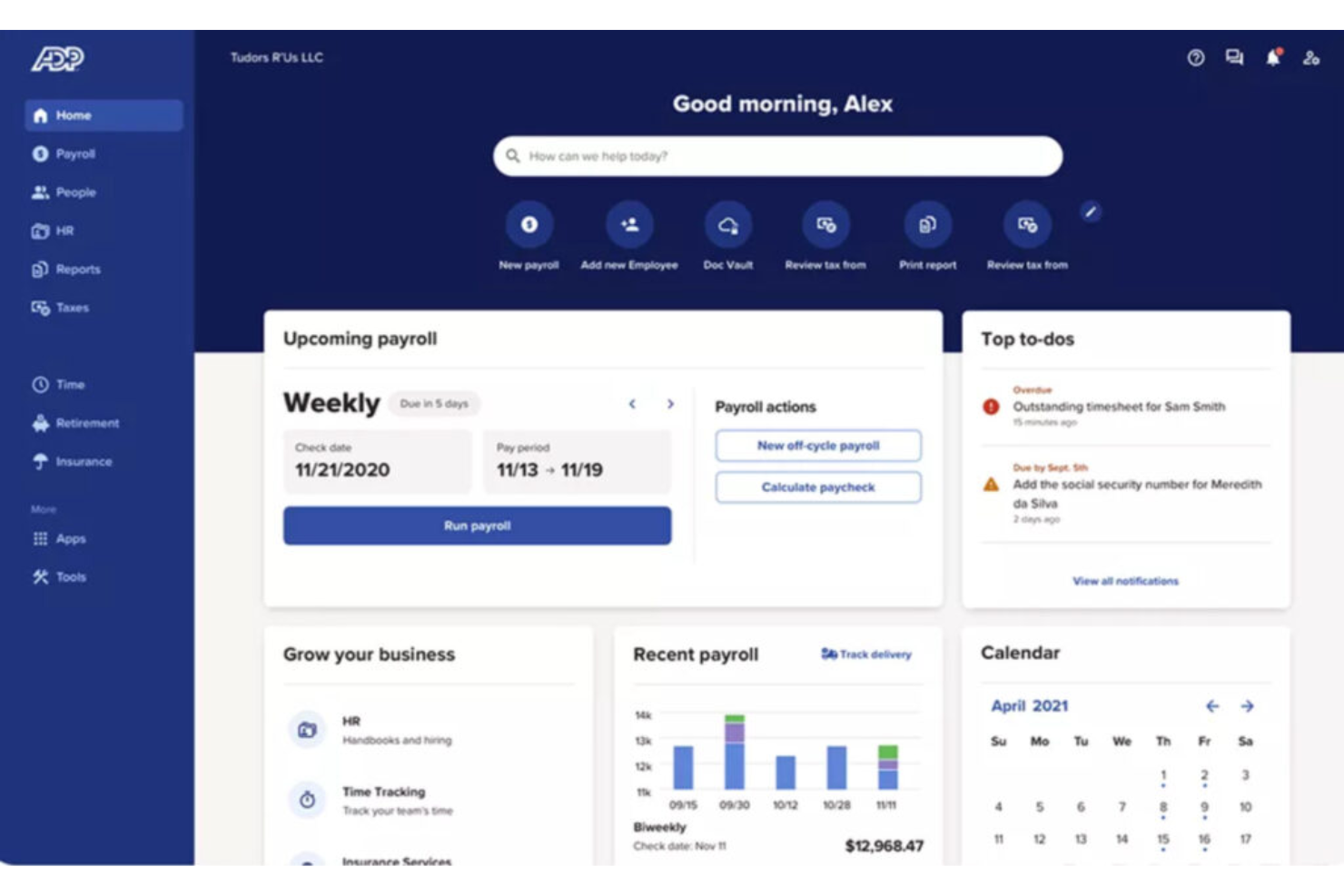
ADP is a full-service payroll and HR solution designed for businesses of all sizes, including global enterprises. It manages payroll processing, tax compliance, and HR services, providing a reliable tool for handling complex payroll needs.
Why I picked ADP: ADP is suited for global businesses, offering features such as multi-country payroll processing and compliance with international regulations. It provides real-time payroll data analytics, helping you make informed decisions. The software includes automated tax filing and reporting, reducing the risk of errors. ADP's scalable platform can grow with your business, accommodating expanding teams and operations.
Standout Features and Integrations:
Features include employee self-service portals, enabling your team to access pay stubs, tax forms, and workers’ compensation information. The software offers advanced reporting capabilities, providing insights into payroll and HR metrics. You can also benefit from dedicated customer support to assist with any issues.
Integrations include Intuit QuickBooks, Xero, Sage, Microsoft Dynamics, and more.
Pros and Cons
Pros:
- Scales across regions
- Enterprise compliance support
- Global payroll coverage
Cons:
- Complex admin management
- Heavy setup and implementation effort

Trinet
Best for full-service PEO HR outsourcing
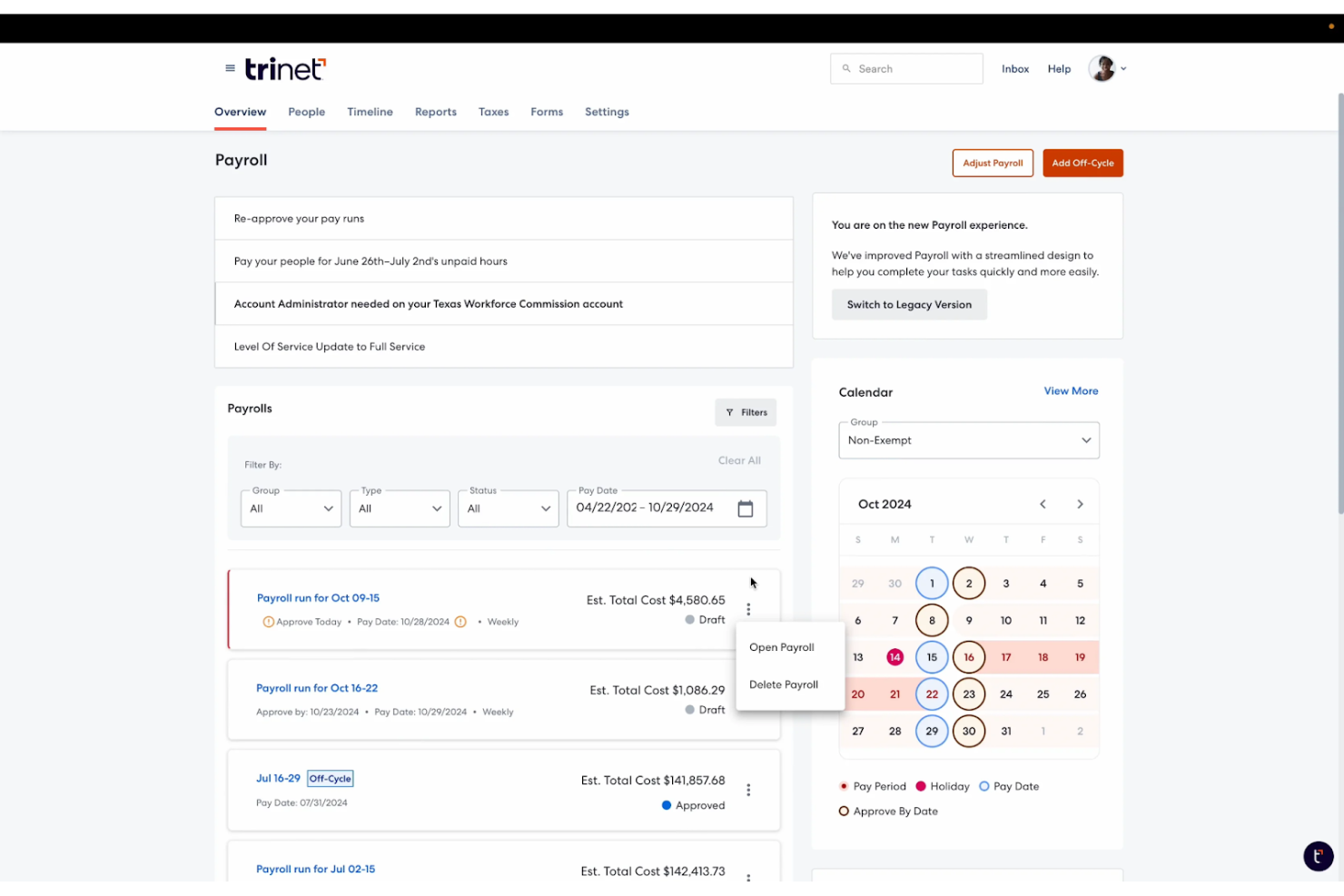
TriNet is an all-in-one cloud-based payroll and HR platform designed for small to medium-sized businesses. It simplifies payroll processing, benefits management—including health insurance—and compliance, making it a perfect solution for HR needs.
Why I picked TriNet: TriNet integrates payroll with HR functionalities, providing a unified platform for managing your team. It offers automated payroll processing, reducing manual tasks for your HR department. You can manage benefits—including workers’ comp—and employee information in one place, which improves efficiency. The software also supports employee self-service, allowing your team to access their information.
Standout Features and Integrations:
Features include detailed compliance support, helping you navigate complex regulations. The software offers customizable dashboards, giving you insights into your HR and payroll metrics. You can also automate onboarding processes, simplifying the hiring experience for new employees.
Integrations include Intuit QuickBooks Online, Xero, Oracle NetSuite, Sage Intacct, and more.
Pros and Cons
Pros:
- Automated onboarding workflows
- Benefits administration included
- Unified HR payroll system
Cons:
- Not microbusiness-friendly
- Expensive add-ons and hidden fees

Best for automated payroll tax filings
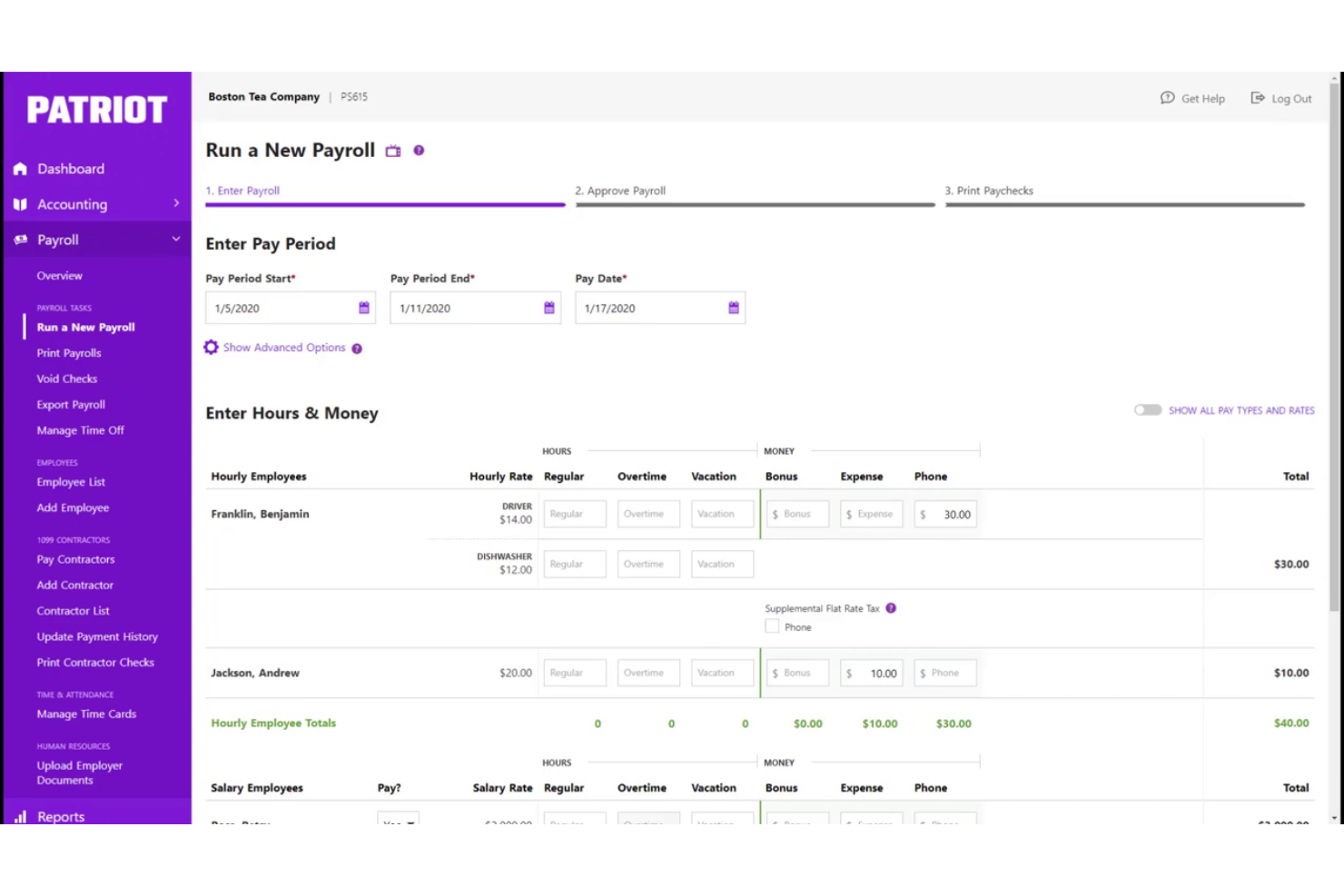
Patriot Software is a payroll solution tailored for small businesses, focusing on ease of use and compliance. It handles payroll processing and tax filings, which helps you manage your payroll efficiently.
Why I picked Patriot Software: Patriot Software simplifies tax filings with its automated tax calculations and filings, making it ideal for small businesses looking to avoid tax errors. It offers features such as customizable payroll reports to give you insights into your payroll costs. You can also manage employee information and payroll history in one place. Additionally, the straightforward interface reduces the learning curve for new users, which is a plus for small teams with limited resources.
Standout Features and Integrations:
Features include flexible payroll schedules, allowing you to choose between weekly, bi-weekly, or monthly pay periods so you can set a regular payday. You can also manage payroll deductions and contributions. The software provides employee portals for direct access to paychecks, pay stubs, and tax forms.
Integrations include Intuit QuickBooks Online, Intuit QuickBooks Desktop, TSheets, and more.
Pros and Cons
Pros:
- Flexible pay schedules and unlimited payroll
- Clear payroll setup
- Simple tax filing flow
Cons:
- Accounting reports are fairly basic
- No built-in health insurance tools
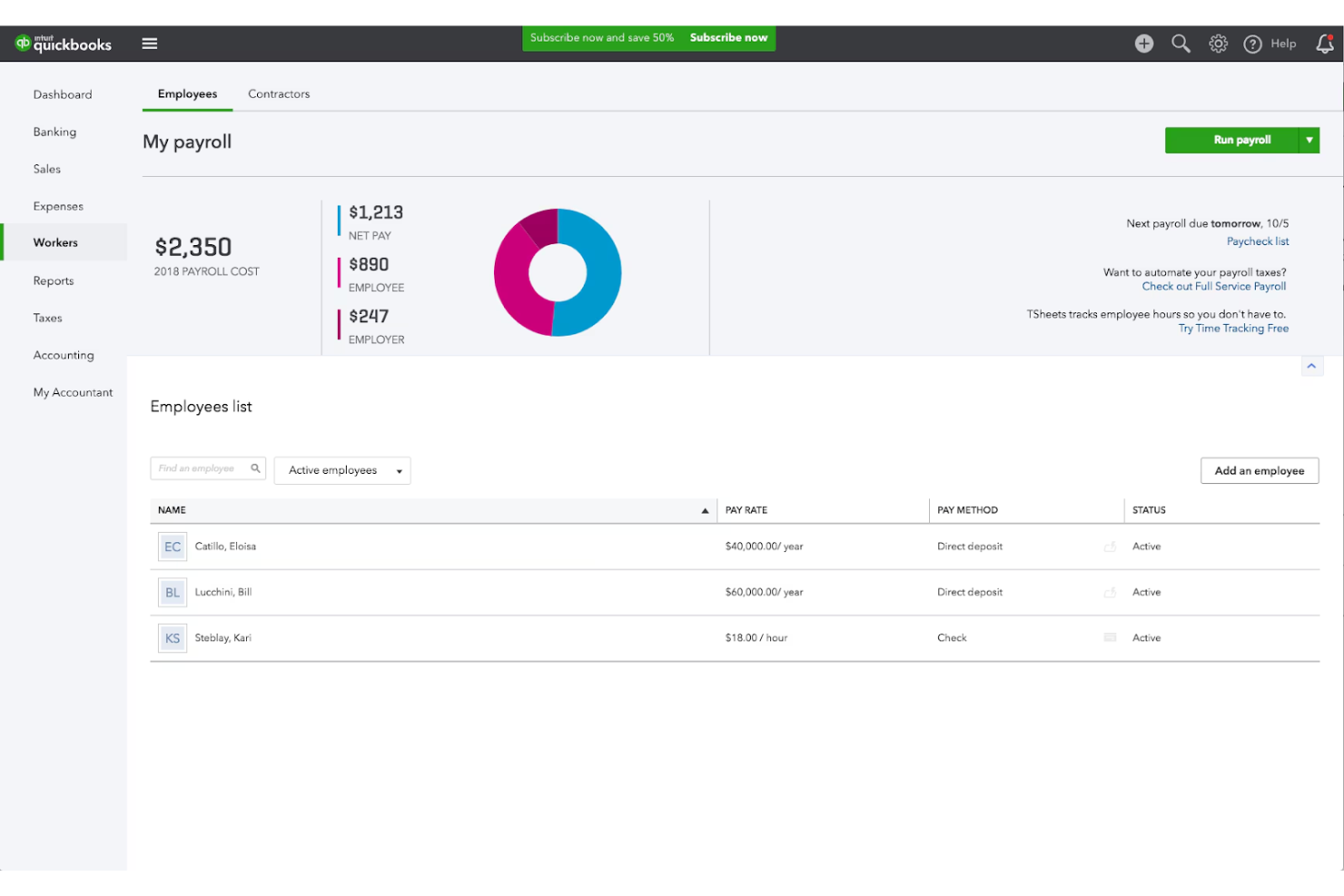
Intuit QuickBooks Payroll is a payroll solution tailored for small businesses. It offers payroll processing and tax management. It's designed to integrate with Intuit QuickBooks Accounting, providing a unified financial management experience.
Why I picked Intuit QuickBooks Payroll: Intuit QuickBooks Payroll excels in integrating payroll with accounting, making it ideal for businesses already using Intuit QuickBooks. It offers automatic tax calculations and filings, reducing the administrative burden on your team. The software’s direct deposit and employee self-service options improve convenience. Additionally, its user-friendly interface simplifies payroll management for small business owners.
Standout Features and Integrations:
Features include automated payroll taxes, ensuring compliance with federal and provincial regulations. You can also track hours per employee and manage benefits directly within the platform. The software offers customizable payroll reports to help you analyze your payroll expenses effectively.
Integrations include Intuit QuickBooks Online, Intuit QuickBooks Desktop, and more.
Pros and Cons
Pros:
- Familiar financial workflows
- Automated tax filings
- Accounting-linked payroll
Cons:
- Integration glitches with apps
- Customer support wait times
Andre rimelige lønnssystemer
Her er noen flere rimelige lønnssystemer som ikke kom med på kortlisten min, men som likevel er verdt å se nærmere på:
- Payroll4free.com
Free payroll service for under 25 employees
- ezPaycheck
For offline, locally-installed payroll
- Deel Payroll
For contractor management tools
- Homebase
For scheduling hourly shift workers
- Paylocity
For mid-sized payroll and workforce tools
- Remofirst
For global remote team payroll


How I Evaluate Cheap Payroll Software
When a five-person team needs to run payroll Friday without a tax error, the stakes are real—I split my evaluation into baseline must-haves and the differentiators that separate good from great.
Core Functionality (Table Stakes For This List)
When I'm selecting tools for my list, I rank each one on a scale from 0 (does not offer the functionality) to 5 (excels in this area) for each core functionality listed below. Then, I calculate the tool's total score into a percentage. Each tool needs to achieve a minimum total score of 65% to be considered for inclusion.
- Automated Payroll Processing: I look for tools that calculate wages, deductions, and net pay automatically across recurring schedules rather than requiring manual math every pay period.
- Tax Filing & Compliance: Each tool should handle tax withholding, filing, and remittance at multiple jurisdictional levels so you're not manually submitting forms each quarter.
- Direct Deposit & Payments: I evaluate how each platform pays workers, checking for direct deposit speed and whether it supports both W-2 employees and 1099 contractors.
- Transparent Low-Cost Pricing: Pricing needs to be publicly listed and genuinely affordable for small teams, with no surprise fees buried in tax filing or year-end form generation.
- Employee Self-Service Portal: A portal where employees can pull up pay stubs, download tax forms, and update their own withholding details saves HR from fielding repetitive requests.
- Pay Statements & Year-End Forms: I check whether the tool generates pay stubs per cycle and produces year-end documents like W-2s and 1099s without charging extra or requiring manual setup.
Once I have a list of tools that meet this criteria, I consider what sets each platform apart.
Differentiating Factors (What Sets Vendors Apart)
Here's how I compare and contrast different vendors:
Standout Features
Built-in time tracking matters for teams with hourly workers because when hours sync directly into payroll, you eliminate manual entry mistakes before they compound. I also evaluate multi-state payroll support, which is key for distributed teams hiring across jurisdictions without paying extra per state. A native sync with accounting tools like QuickBooks or Xero keeps your books accurate without double data entry. For businesses that only pay contractors, a dedicated low-cost tier can mean real savings over a full plan you don't need.
Beyond Features
Total cost of ownership goes beyond the sticker price. I check whether tax filing, year-end forms, or state registrations trigger add-on fees that quietly inflate what looked like a budget-friendly plan. Tax accuracy guarantees also matter a lot here. A vendor that covers penalty costs when they miscalculate gives a small team real peace of mind. Finally, I evaluate whether the platform scales with you. A five-person startup today may be a 30-person company next year, so I look for upgrade paths that add HR tools or advisory support without forcing a full platform switch.
Slik velger du rimelig lønnsprogramvare
Det er lett å gå seg vill i lange funksjonslister og kompliserte prisstrukturer. For å hjelpe deg med å holde fokus mens du går gjennom valg av lønnsprogramvare, har jeg laget en sjekkliste over faktorer du bør ha i tankene:
| Faktor | Hva du bør vurdere |
|---|---|
| Skalerbarhet | Vil programvaren vokse sammen med teamet ditt? Vurder om den kan håndtere flere ansatte etter hvert som virksomheten utvides. Se etter fleksible prisplaner som kan tilpasses behovene dine. |
| Integrasjoner | Fungerer den sammen med verktøyene du allerede bruker? Sjekk om den kan integreres med regnskaps- og HR-systemene dine, slik at du unngår manuell dataregistrering. |
| Tilpasningsmuligheter | Kan du tilpasse den til arbeidsflytene dine? Sørg for at den gir mulighet til å justere lønnsprosesser og rapportering slik at de passer med virksomheten din. |
| Brukervennlighet | Er den brukervennlig for teamet ditt? Se etter intuitive grensesnitt og enkel navigering for å redusere opplæringstid og feil. |
| Implementering og introduksjon | Hvor lang tid tar det å komme i gang? Vurder hvor mye tid og hvilke ressurser som trengs for å sette opp løsningen og lære opp teamet ditt. Se etter verktøy med veiledede introduksjonsprosesser. |
| Kostnad | Er den innenfor budsjettet ditt? Sammenlign prisnivåer og totalkostnader, inkludert skjulte gebyrer. Vurder om funksjonene forsvarer kostnaden. |
| Sikkerhetstiltak | Er dataene og lønnsopplysningene dine beskyttet? Se etter kryptering, regelmessige oppdateringer og samsvar med regelverk for databeskyttelse. |
| Overholdelse av regelverk | Oppfyller den juridiske krav? Kontroller om programvaren støtter lokale og nasjonale lønnsbestemmelser for å unngå juridiske problemer. |
Hva er rimelig lønnsprogramvare?
Billig lønnsprogramvare er en kostnadseffektiv løsning for håndtering av lønnsprosesser. Disse verktøyene brukes vanligvis av småbedriftseiere, HR-medarbeidere og regnskapsførere for å håndtere lønnsoppgaver effektivt. Automatiserte beregninger, direkte innbetalinger og funksjoner for innsending av skatteskjemaer bidrar til å redusere feil og spare tid. Alt i alt gir disse verktøyene en budsjettvennlig måte å håndtere lønn på en enkel måte.
Funksjoner i billig lønnsprogramvare
Når du velger en budsjettvennlig plattform, bør du se etter disse viktige funksjonene i lønnsprogramvare:
- Automatiserte beregninger: Sørger for nøyaktige lønnsberegninger, reduserer manuelle feil og sparer tid for teamet ditt.
- Direkte innbetaling: Gjør det mulig for W-2-ansatte og kontraktører å få lønnen direkte inn på bankkontoene sine, noe som gir enkelhet og effektivitet.
- Funksjoner for innsending av skatteskjemaer: Bidrar til å håndtere og sende inn lønnsskatt, slik at lokale og føderale regler overholdes.
- Selvbetjeningsportaler for ansatte: Gjør det mulig for ansatte å få tilgang til lønnsslippene og skatteskjemaene sine, noe som reduserer den administrative belastningen på HR.
- Tilpassbare rapporter: Gir innsikt i lønnskostnader gjennom skreddersydd rapportering, noe som bidrar til økonomisk analyse og bedre beslutningstaking.
- Integrasjon med regnskapsverktøy: Kobler seg til eksisterende regnskapsprogramvare for å eliminere dobbeltregistrering av data og forbedre nøyaktigheten.
- Håndtering av regelverksetterlevelse: Sikrer at arbeidslover og lønnsbestemmelser overholdes, og minimerer risikoen for juridiske problemer.
- Mobiltilgang: Gjør det mulig å håndtere lønn på farten, og gir fleksibilitet for bedriftseiere og HR-medarbeidere.
- Fleksible lønnsplaner: Støtter ulike utbetalingsfrekvenser og tilpasser seg forskjellige bedriftsbehov og preferanser blant ansatte.
- Håndtering av personalgoder: Håndterer personalgoder og trekk for å forbedre den samlede opplevelsen for de ansatte.
Fordeler med billig lønnsprogramvare
Implementering av billig lønnsprogramvare gir flere fordeler for teamet og virksomheten din. Her er noen av fordelene du kan se frem til:
- Kostnadsbesparelser: Reduserer utgifter knyttet til manuelle lønnsprosesser og dyr programvare, noe som gjør løsningen budsjettvennlig.
- Tidsbesparelser: Bruker automatisering av lønn til beregninger og innsending av skatteskjemaer, slik at teamet ditt får mer tid til å fokusere på andre viktige oppgaver.
- Færre feil: Minimerer feil i lønnsbehandlingen gjennom automatiserte beregninger og håndtering av regelverksetterlevelse.
- Enkelhet: Tilbyr direkte innbetaling og selvbetjeningsportaler for ansatte, slik at ansatte enkelt får tilgang til lønnsinformasjon.
- Overholdelse av regelverk: Sikrer at arbeidslover og skatteregler overholdes, og reduserer risikoen for juridiske problemer.
- Forbedret datanøyaktighet: Integreres med regnskapsverktøy, eliminerer dobbeltregistrering av data og forbedrer økonomisk nøyaktighet.
- Fleksibilitet: Støtter ulike lønnsplaner og mobiltilgang, og tilpasser seg forskjellige bedriftsbehov og arbeidsmåter.
Kostnader og priser for billig lønnsprogramvare
Valg av billig lønnsprogramvare krever en forståelse av de ulike prismodellene og planene som er tilgjengelige. Kostnaden ved å kjøre lønn varierer basert på funksjoner, teamstørrelse, tillegg og mer. Tabellen nedenfor oppsummerer vanlige planer, gjennomsnittsprisene deres og typiske funksjoner som inngår i billige lønnsprogramvareløsninger:
Sammenligningstabell for planer med billig lønnsprogramvare
| Plantype | Gjennomsnittspris | Vanlige funksjoner |
|---|---|---|
| Gratisplan | $0 | Grunnleggende lønnsbehandling, begrenset rapportering og grunnleggende brukerstøtte. |
| Personlig plan | $5-$40/måned | Automatiserte beregninger, direkte innbetaling, innsending av skatteskjemaer og selvbetjeningsportaler for ansatte. |
| Bedriftsplan | $15-$50/måned | Avansert rapportering, integrasjon med regnskapsverktøy, håndtering av regelverksetterlevelse og mobiltilgang. |
| Plan for store virksomheter | $50+/måned | Tilpassbare rapporter, dedikert kundeansvarlig, avanserte sikkerhetsfunksjoner og full brukerstøtte. |
Vanlige spørsmål om rimelig lønnsprogramvare
Her er noen svar på vanlige spørsmål om rimelig lønnsprogramvare:
Hvordan vet jeg om bedriften min trenger lønnsprogramvare?
Hvis du bruker for mye tid på manuelle lønnsoppgaver eller ofte gjør feil, er det på tide å vurdere lønnsprogramvare. Den bidrar til å automatisere prosesser som skatteberegninger og direkte innbetalinger, noe som sparer tid og reduserer feil. For små bedrifter kan lønnsprogramvare for små bedrifter gi disse effektiviseringsgevinstene, samtidig som du får mer tid til å fokusere på vekst. Når du vurderer lønnsprogramvare, bør du se etter tegn som flere henvendelser fra ansatte om lønn eller problemer med å holde tritt med endringer i regelverket.
Kan rimelig lønnsprogramvare håndtere skatteoverholdelse?
Ja, de fleste rimelige lønnsprogramvareløsninger har funksjoner for skatteoverholdelse. De beregner og rapporterer automatisk skatter i henhold til lokale regler, noe som reduserer risikoen for bøter. Sørg for at programvaren du velger, er oppdatert med gjeldende lover. Noen verktøy sender også påminnelser om skattefrister, slik at du kan overholde regelverket uten stress.
Er rimelig lønnsprogramvare sikker?
Ja, anerkjente leverandører av rimelig lønnsprogramvare prioriterer sikkerhet. Se etter funksjoner som datakryptering og regelmessige sikkerhetsoppdateringer. Kontroller alltid at leverandøren overholder bransjestandarder og regelverk. For å beskytte dataene dine ytterligere bør du bruke sterke passord og aktivere tofaktorautentisering der det er tilgjengelig.
Hvordan velger jeg riktig lønnsprogramvare for teamet mitt?
Begynn med å kartlegge teamets spesifikke behov, for eksempel om du trenger lønnsprogramvare for én ansatt eller støtte for et større team, samt hvilke funksjoner du trenger. Sammenlign ulike lønnsalternativer på nett, og fokuser på faktorer som brukervennlighet, skalerbarhet og integrasjon med eksisterende systemer. Les kundeanmeldelser for å få innsikt i ytelse i praksis. Vurder å starte med en gratis prøveperiode for å teste programvaren før du bestemmer deg.