
14 Best Free Employee Monitoring Software Reviewed in 2026

Best Free Employee Monitoring Software Shortlist
Here’s my shortlist of the best free employee monitoring software:


Managing productivity and visibility across your team isn’t easy. If you're looking for a way to monitor activity and understand how work hours are spent, free employee monitoring software can be a practical solution.
Employee monitoring software tools help you track time, review activity logs, and understand productivity patterns so you get better employee support. There are many free versions of these tools, with free plans that often include helpful features such as screenshots, basic reporting, and mobile tracking. These features lend you insight to make informed decisions even on a limited budget.
In this guide, I’ve reviewed a range of free and free-to-try employee monitoring tools to highlight what each one does well and where it fits best. Whether you manage a small team or coordinate a large, distributed workforce, the options below will help you find a tool that supports your workflows without stretching your budget.
Why Trust Our Software Reviews
Best Free Employee Monitoring Software Summary
While all of the employee monitoring software in my list has free offerings, they also have paid plans should you wish to upgrade. Here are the base costs for each of the tools that made it onto my shortlist:
| Tool | Best For | Trial Info | Price | ||
|---|---|---|---|---|---|
| 1 | Best for unlimited users | Free 7-day trial + free plan + free demo available | From $3.99/seat/month (billed annually) | Website | |
| 2 | Best for mobile time tracking | Free | Free forever plan | Website | |
| 3 | Best for remote desktop access | Free demo available | From $112/year | Website | |
| 4 | Best for simple time tracking | Free plan + free download available | From $39/user/month | Website | |
| 5 | Best for remote workforce management | Free trial + free plan available | From $1/employee/month | Website | |
| 6 | Best for browser-based remote team monitoring | 14-day free trial + free plan available | From $4.99/user/month | Website | |
| 7 | Best for automated time tracking | Free 7-day trial available | From $6.40/seat/month (billed annually) | Website | |
| 8 | Best for screenshot monitoring | Free 10-day trial + free demo available | From $6.49/user/month (billed annually) | Website | |
| 9 | Best for team productivity insights | 14-day free trial + free plan + free demo available | From $10/user/month (billed annually) | Website | |
| 10 | Best for GPS location tracking | Free 14-day trial + free demo available | From $4.99/seat/month (billed annually) | Website |

-

Checkr
Visit WebsiteThis is an aggregated rating for this tool including ratings from Crozdesk users and ratings from other sites.4.5 -
Kudoboard
Visit WebsiteThis is an aggregated rating for this tool including ratings from Crozdesk users and ratings from other sites.4.8 -
Native Teams
Visit WebsiteThis is an aggregated rating for this tool including ratings from Crozdesk users and ratings from other sites.4.9





Best Free Employee Monitoring Software Review
Below are my detailed summaries of the best free employee monitoring software on my shortlist. My reviews offer a thorough look at the key features, pros & cons, integrations, and ideal use cases of each tool, helping you find the best one for you. While some of these tools offer a completely free version, others offer a free trial period. I’ve added a note about what’s free in each of my reviews.

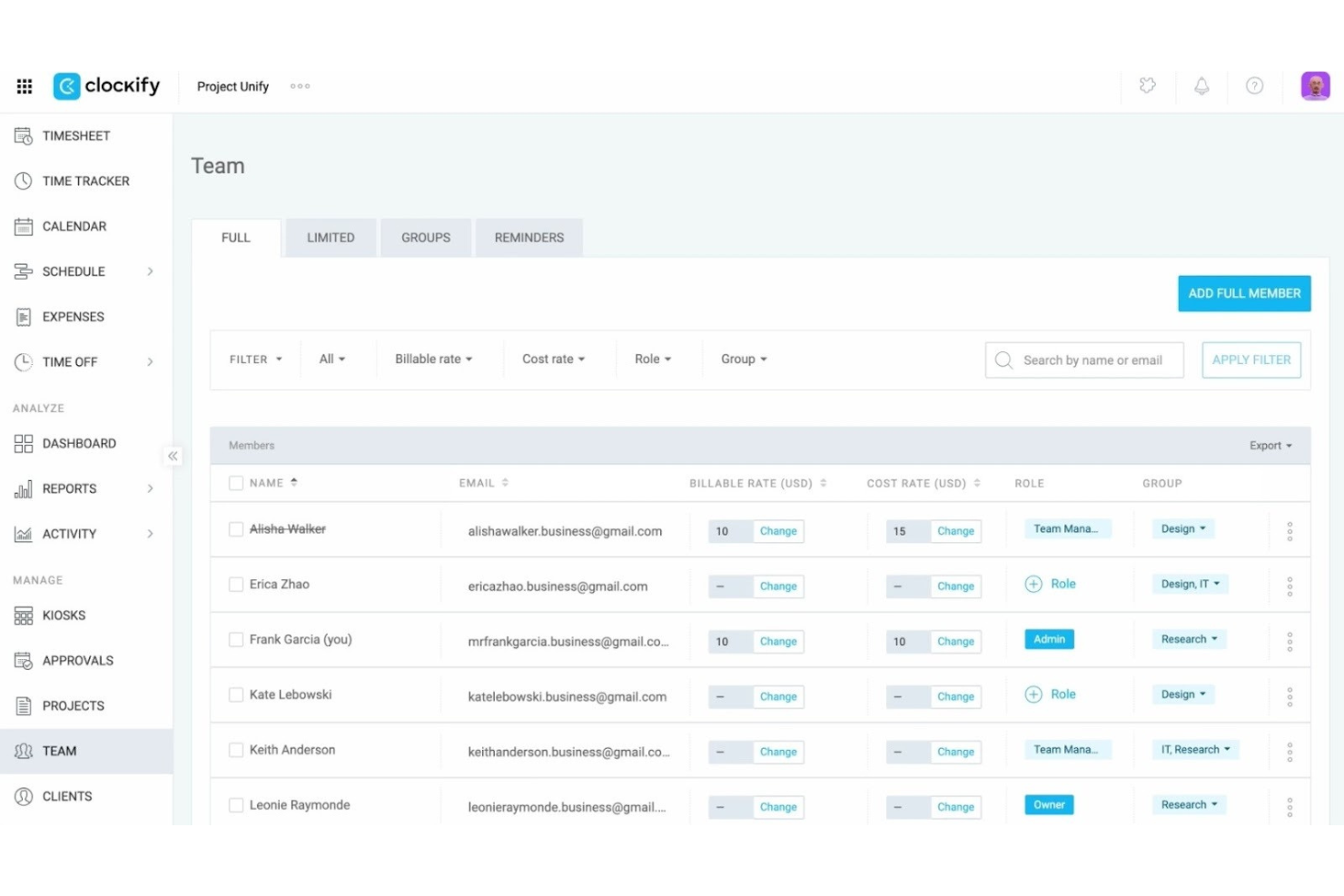
Clockify is a time-tracking and management software ideal for businesses of all sizes, particularly those that need to track work hours across unlimited users. It supports a wide range of time management functions, including project tracking and reporting.
Why I picked Clockify: Clockify's free plan lets you track time for unlimited users, which is rare among free tools. This makes it perfect for larger teams or organizations that need to monitor time without worrying about user limits. The free version includes time tracking, reporting, and project management features. These tools help you manage team productivity and project progress efficiently.
Standout features & integrations:
Features include detailed reporting tools that help you analyze time data effectively. You can also set up project management features to keep track of tasks and deadlines. The software supports timesheet approvals, enabling managers to review and approve work hours.
Integrations include Trello, Asana, Jira, Slack, QuickBooks, Microsoft Teams, Zoom, Monday.com, Google Calendar, and Notion.
What's free? Clockify offers a free-forever plan with unlimited users and essential time tracking features, but some advanced features may be restricted.
Pros and Cons
Pros:
- Supports project management
- Detailed reporting tools
- Unlimited users on the free plan
Cons:
- Slow response times
- Requires a constant internet connection
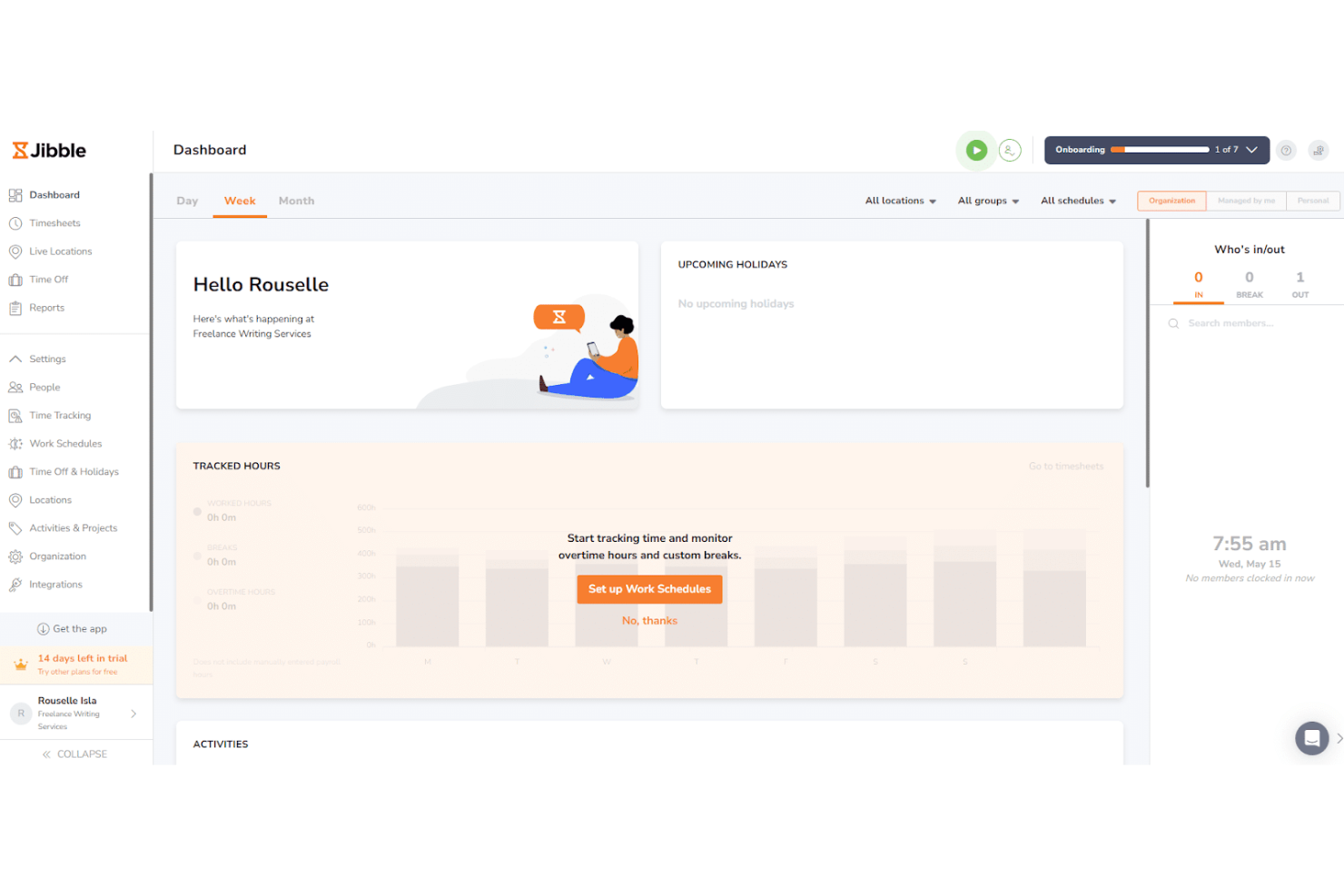
Jibble is time-tracking and attendance management software designed for businesses that need efficient tracking on the go. It's particularly popular among industries with mobile workforces, offering a straightforward way to manage time and attendance.
Why I picked Jibble: Jibble's free version provides mobile time tracking capabilities, which is essential for teams working remotely or in the field. It allows you to track time through mobile devices, making it highly accessible for your team members. The tool also includes GPS location tagging, ensuring accurate time logs. This is especially useful if you're managing a dispersed workforce and need reliable attendance data.
Standout features & integrations:
Features include facial recognition, which adds an extra layer of security to time tracking. You can also track productivity with automated timesheets. The software offers custom reporting tools to help you analyze attendance metrics effectively.
Integrations include Slack, Microsoft Teams, Asana, Trello, Google Calendar, Zapier, Xero, QuickBooks, Gusto, and BambooHR.
What's free? Jibble offers a free-forever plan that includes basic time-tracking and attendance features, but it may have limitations on advanced functionality and the number of users.
Pros and Cons
Pros:
- Automated timesheets
- Facial recognition feature
- GPS tagging for accuracy
Cons:
- Basic customer support
- No offline tracking capability
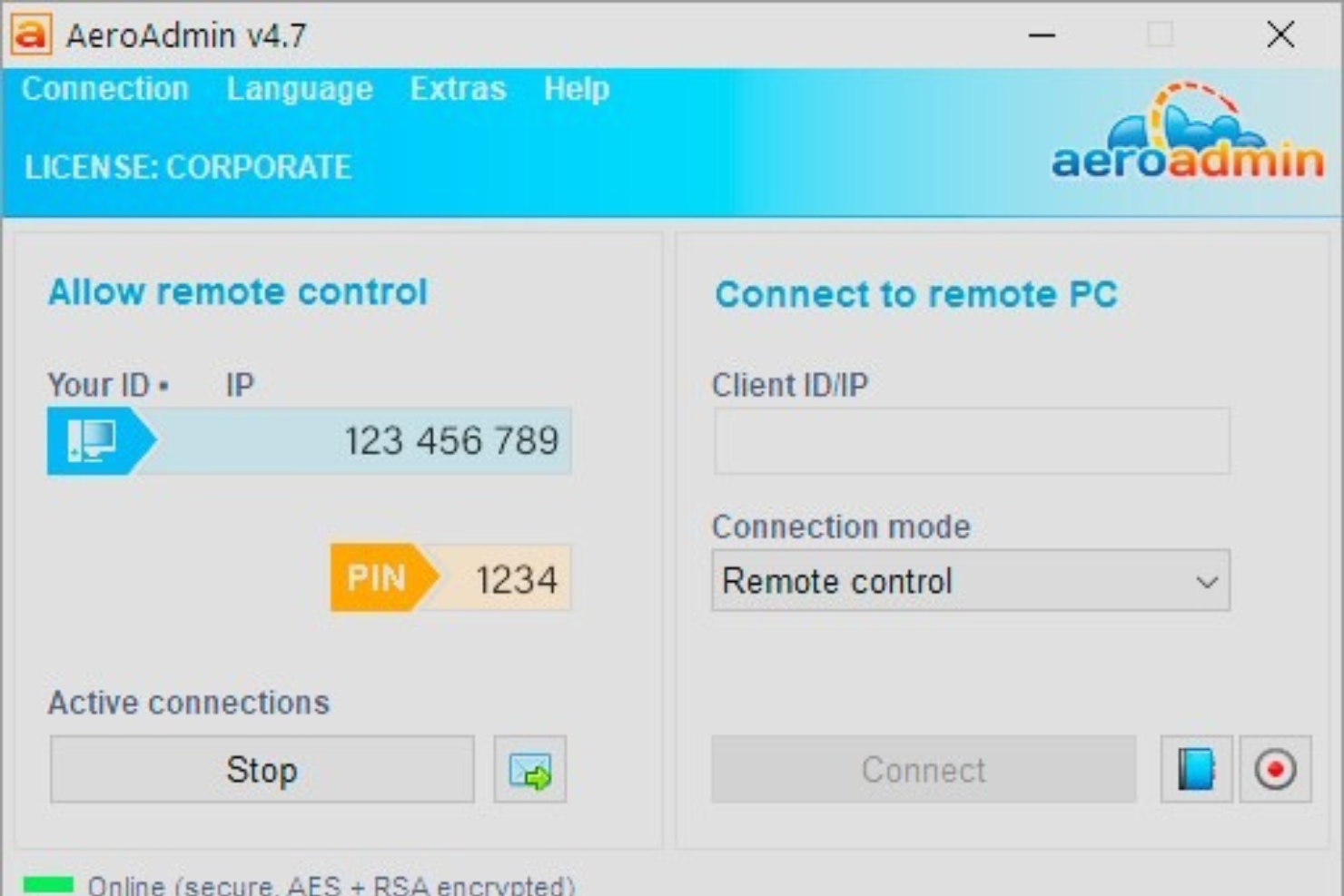
AeroAdmin is a remote desktop software designed for businesses and individuals who need easy, quick access to remote computers. It's ideal for IT support teams and businesses that require simple remote access solutions without complex setups.
Why I picked AeroAdmin: AeroAdmin is a simple remote-access tool that supports basic oversight. I included it because its free version allows instant, secure connections without installation, making it useful for teams that rely on quick support or remote troubleshooting. While it’s not a traditional monitoring solution, AeroAdmin offers value for organizations that need occasional visibility into employee desktops or require remote administration without complex configuration.
Standout features & integrations:
Features include secure remote access, which ensures your data remains private during sessions. You can also transfer files between local and remote computers. The software supports unattended access, allowing you to connect to remote computers without user intervention.
Integrations include none, as AeroAdmin functions independently without requiring third-party tools.
What's free? AeroAdmin offers a free-forever plan with basic remote desktop access features, but it may have limitations on session time and the number of simultaneous connections.
Pros and Cons
Pros:
- Unattended access feature
- Supports file transfers
- Secure remote connections
Cons:
- No advanced features
- Limited session time

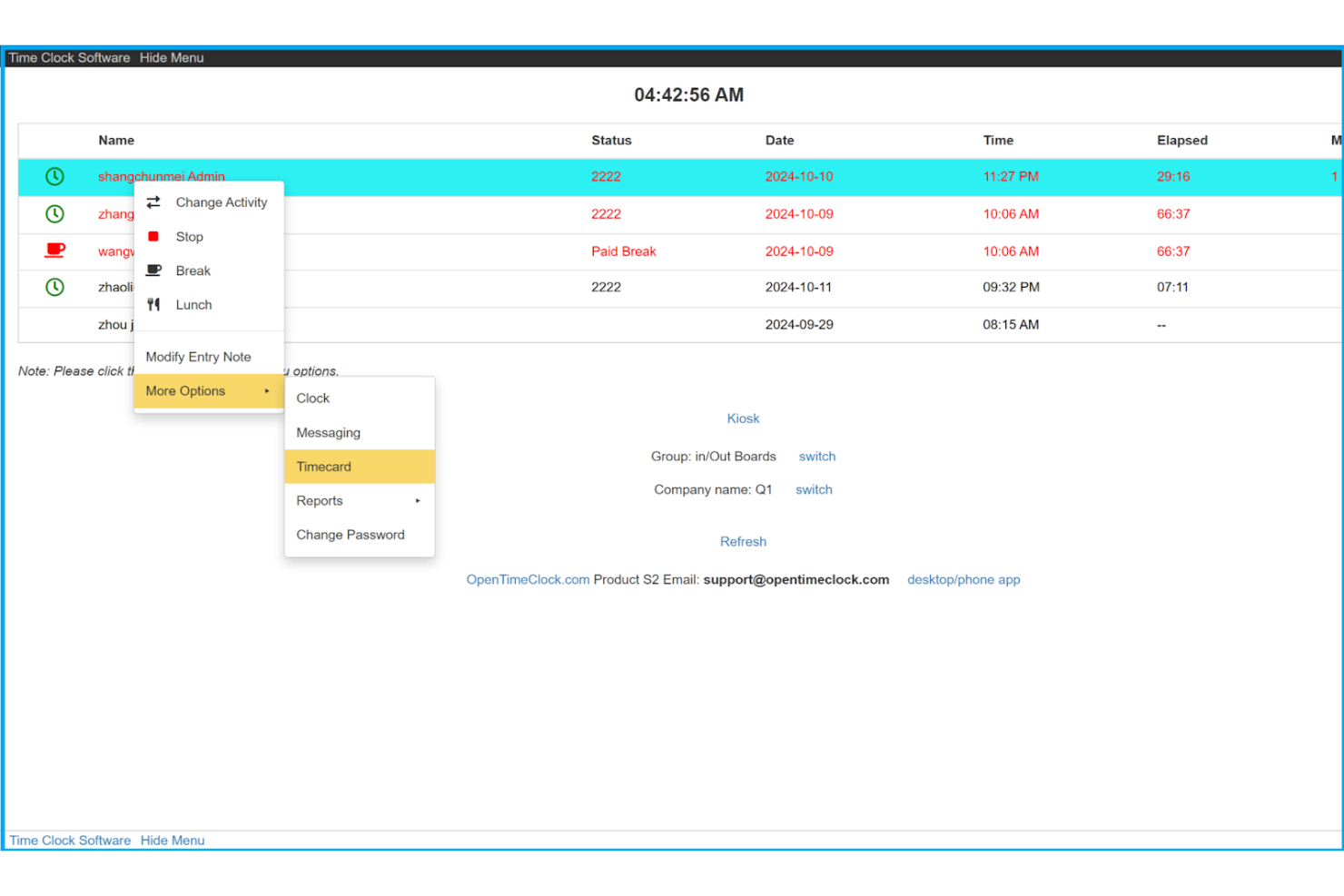
Open Time Clock is an employee time-tracking software designed for businesses that need straightforward clock-in and clock-out functionality. It's perfect for small to medium-sized companies that want to manage employee time and attendance effectively.
Why I picked Open Time Clock: Its free version offers basic time-tracking features that make it easy for you to manage employee attendance. Its simplicity in design allows for quick setup and minimal training for your team. The tool provides essential clock-in and clock-out functions without unnecessary complexity. This makes it an ideal choice if you're looking for a no-frills time management solution.
Standout features & integrations:
Features include a user-friendly interface that makes clock-ins and clock-outs easy. You can also manage employee schedules and track attendance. Additionally, it offers reporting tools to help you analyze time data for better decision-making.
Integrations include QuickBooks, ADP, Gusto, BambooHR, Xero, Paychex, Sage, Rippling, Zenefits, and Square.
What's free? Open Time Clock offers a free-forever plan with essential time tracking features, but it may have limitations on advanced features and integrations.
Pros and Cons
Pros:
- Supports clock-in and clock-out
- Quick setup process
- Simple time tracking interface
Cons:
- Slow response times
- No mobile app support
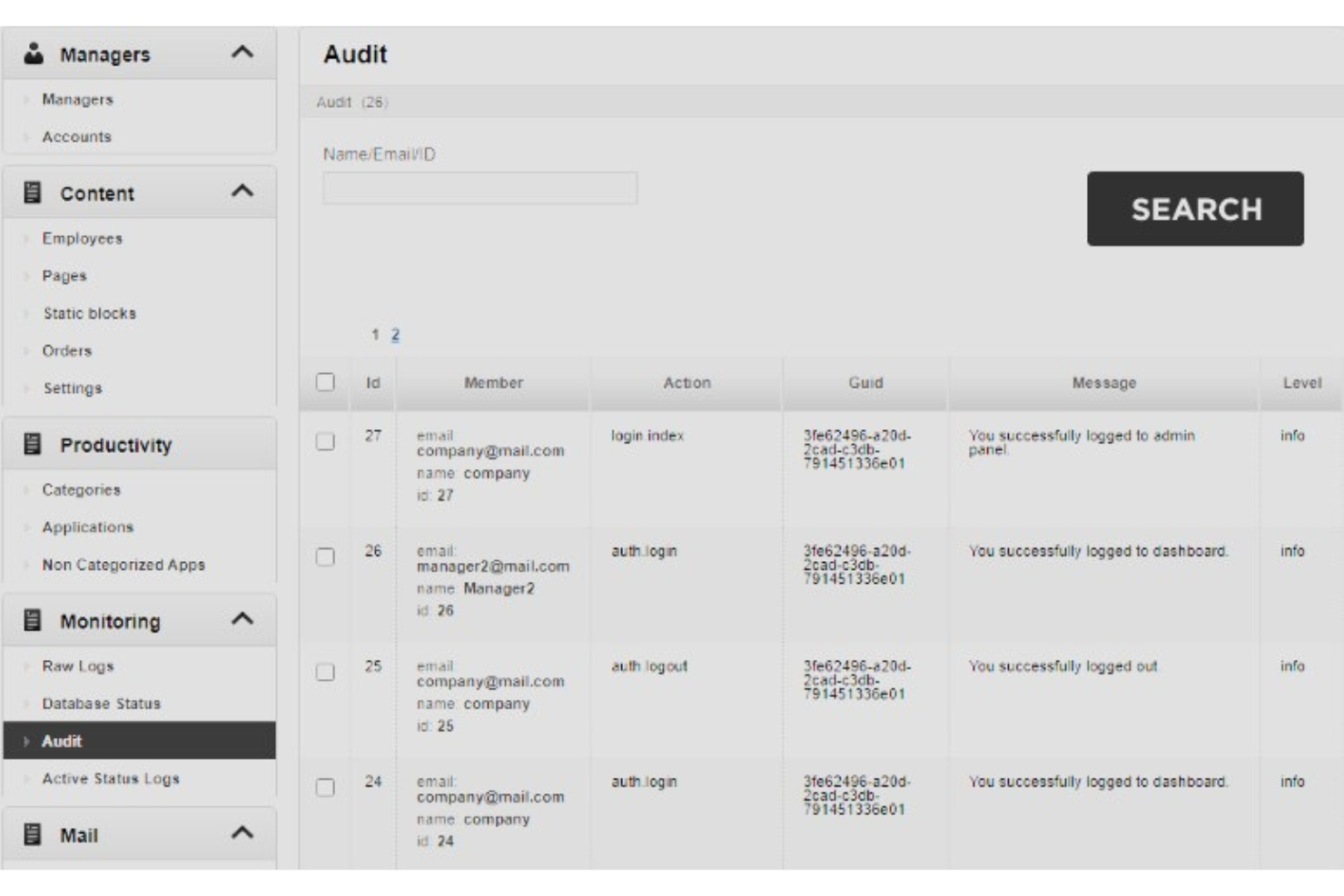
StaffCounter is an employee monitoring software designed to manage remote workforces. It helps businesses track employee activity, ensuring productivity and accountability in remote settings.
Why I picked StaffCounter: StaffCounter works well for remote teams that need detailed visibility into how time is spent. I chose it because its free plan includes key monitoring tools that help managers understand productivity patterns. It’s useful for businesses that need transparency across distributed teams, offering clear insight into online behavior and application usage without a complicated setup. These capabilities make it a reliable option for remote workforce oversight.
Standout features & integrations:
Features include detailed activity logs that give you insights into employee work patterns. The software also offers productivity analysis to help you identify inefficiencies. Additionally, it provides internet usage tracking to monitor how time is spent online.
Integrations include Microsoft Teams, Slack, Google Workspace, Trello, Asana, Basecamp, Jira, QuickBooks, GitHub, and Dropbox.
What's free? StaffCounter offers a free-forever plan with basic monitoring features, but it may have limitations on the number of users and advanced functionalities.
Pros and Cons
Pros:
- Supports remote workforce management
- Detailed productivity analysis
- Internet usage monitoring
Cons:
- No real-time alerts
- Fewer customization options

Workfolio provides cloud-based employee monitoring, productivity tracking, and automated timesheets for teams of any size. It’s designed for businesses that want a simple, no-install platform to track activity, understand work patterns, and manage remote or hybrid teams effectively.
Why I picked Workfolio: Workfolio offers unlimited user monitoring, even in its free tier. It provides real-time activity views, automated time tracking, and productivity insights, all accessible in the browser. This makes it convenient for distributed teams or companies that want a quick setup. Workfolio’s focus on transparency and simple reporting makes it a strong pick for organizations that need foundational monitoring without complexity.
Standout features & integrations:
Features include real-time activity monitoring, automated timesheets that eliminate manual input, and productivity scoring to help you understand engagement levels. The dashboard provides a clear overview of online status, recent activity, and time distribution. Workfolio also supports browser-based session tracking, enabling fast, hassle-free deployment.
Integrations include Slack, Google Workspace, Microsoft Teams, and popular project management platforms via API connections.
What's free? Workfolio offers a free-forever plan with unlimited users and access to its core monitoring, time tracking, and productivity features. However, advanced analytics and specific automation options may require an upgrade.
Pros and Cons
Pros:
- Automated timesheets reduce manual work
- Browser-based monitoring with no installation
- Unlimited users on the free plan
Cons:
- Fewer integrations than larger monitoring platforms
- No offline activity tracking
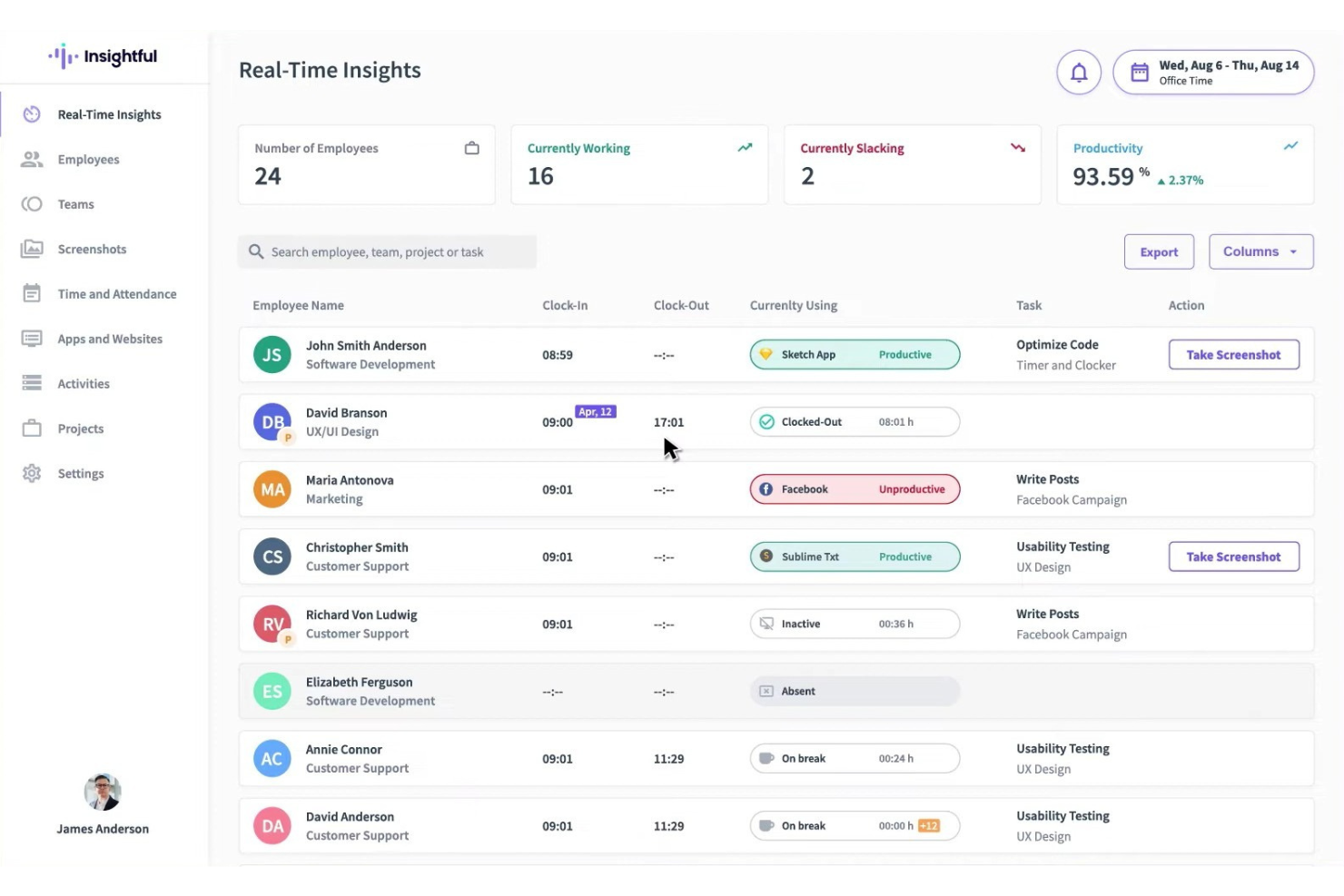
Insightful is an employee monitoring and productivity analysis tool designed for businesses seeking to optimize workforce efficiency. It caters to organizations that need detailed insights into employee activities and time usage.
Why I picked Insightful: Insightful is great for teams that need hands-off, automated time tracking paired with meaningful productivity insights. I chose it because it removes the need for manual time entry. Its monitoring capabilities highlight trends and inefficiencies without overwhelming you with data. This makes Insightful a strong option for teams that want deeper visibility into work patterns but prefer a monitoring approach that runs quietly in the background.
Standout features & integrations:
Features include detailed productivity analysis that helps you identify areas for improvement. You can also access real-time monitoring to keep track of employee activities as they happen. Additionally, Insightful offers basic reporting tools for analyzing work patterns.
Integrations include Slack, Microsoft Teams, Asana, Trello, Jira, QuickBooks, GitHub, Basecamp, Google Workspace, and Zoom.
What's free? Insightful offers a limited-time free trial that lets you explore its features, but it may have restrictions on the number of users and some functionalities.
Pros and Cons
Pros:
- Detailed productivity analysis
- Real-time monitoring
- Automated time tracking tools
Cons:
- No offline tracking
- Limited free trial period

Monitask is an employee monitoring software designed for businesses seeking to enhance productivity through detailed activity tracking. It's ideal for remote teams and businesses that require transparency and accountability in employee activities.
Why I picked Monitask: Monitask’s free plan includes screenshot monitoring, which many competitors reserve for paid tiers. I selected it for teams that need clear visibility into daily activities, especially in remote environments where accountability matters. The platform captures screenshots, tracks activity, and automatically logs time. These features help identify productivity gaps and understand work habits without requiring a complex setup.
Standout features & integrations:
Features include detailed activity logs, which provide insights into your team's work patterns. You can also access productivity analytics to identify areas for improvement. Additionally, Monitask offers automated time tracking, which reduces manual input and errors.
Integrations include Microsoft Teams, Slack, Trello, Asana, Google Workspace, Jira, QuickBooks, Basecamp, GitHub, and Dropbox.
What's free? Monitask doesn’t offer a free plan, but it does provide a free trial that lets you test its core features before subscribing to a paid plan. The trial is time-limited and includes only a subset of the functionalities available in the full version.
Pros and Cons
Pros:
- Supports remote work monitoring
- Productivity analytics
- Automated time tracking
Cons:
- No integration with payroll systems
- Basic reporting features
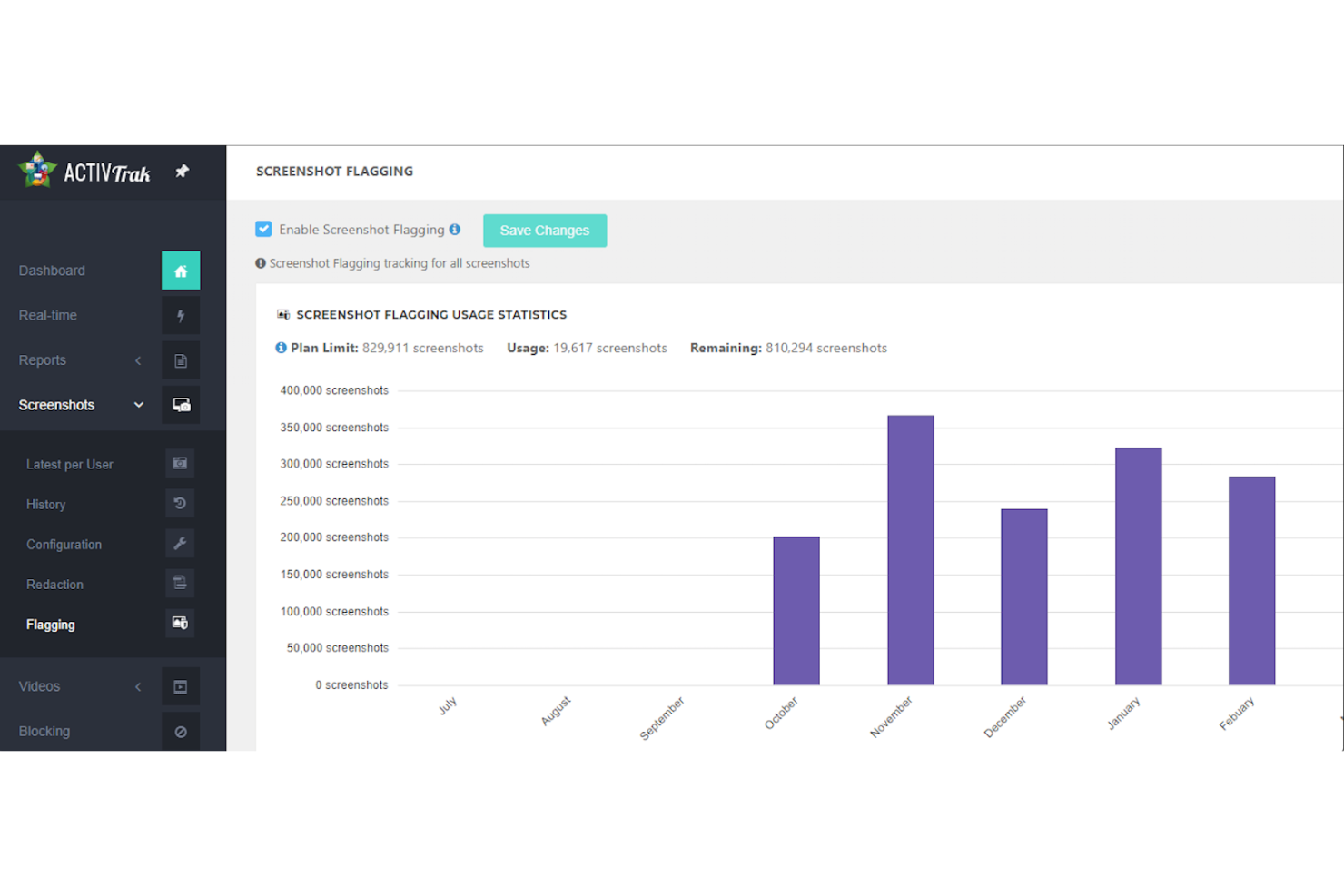
ActivTrak is a workforce analytics platform designed to enhance productivity and performance for organizations. It primarily serves teams looking to improve productivity and manage remote workforces, with features such as employee monitoring and productivity management.
Why I picked ActivTrak: ActivTrak offers a free plan that provides real-time visibility into team activity, productivity trends, and workload balance. The platform is unique for its focus on team productivity insights, allowing you to monitor daily work metrics and productivity without invasive practices like keystroke logging. It includes customizable dashboards and tools for capacity planning and technology optimization. These features help maintain privacy while still offering valuable productivity insights.
Standout features & integrations:
Features include daily work metrics, customizable dashboards, and tools for remote workforce management. You can also access productivity trends and performance management tools. The platform emphasizes privacy and avoids invasive monitoring practices.
Integrations include Power BI, Salesforce, ServiceNow, Microsoft Teams, Slack, Google Workspace, Zoom, Asana, Trello, and GitHub.
What's free? ActivTrak offers a free-forever plan with access to essential monitoring features, but it may have limitations on the number of users and available integrations.
Pros and Cons
Pros:
- Customizable dashboards
- Privacy-focused monitoring
- Real-time productivity insights
Cons:
- No email monitoring
- User limit on the free tier
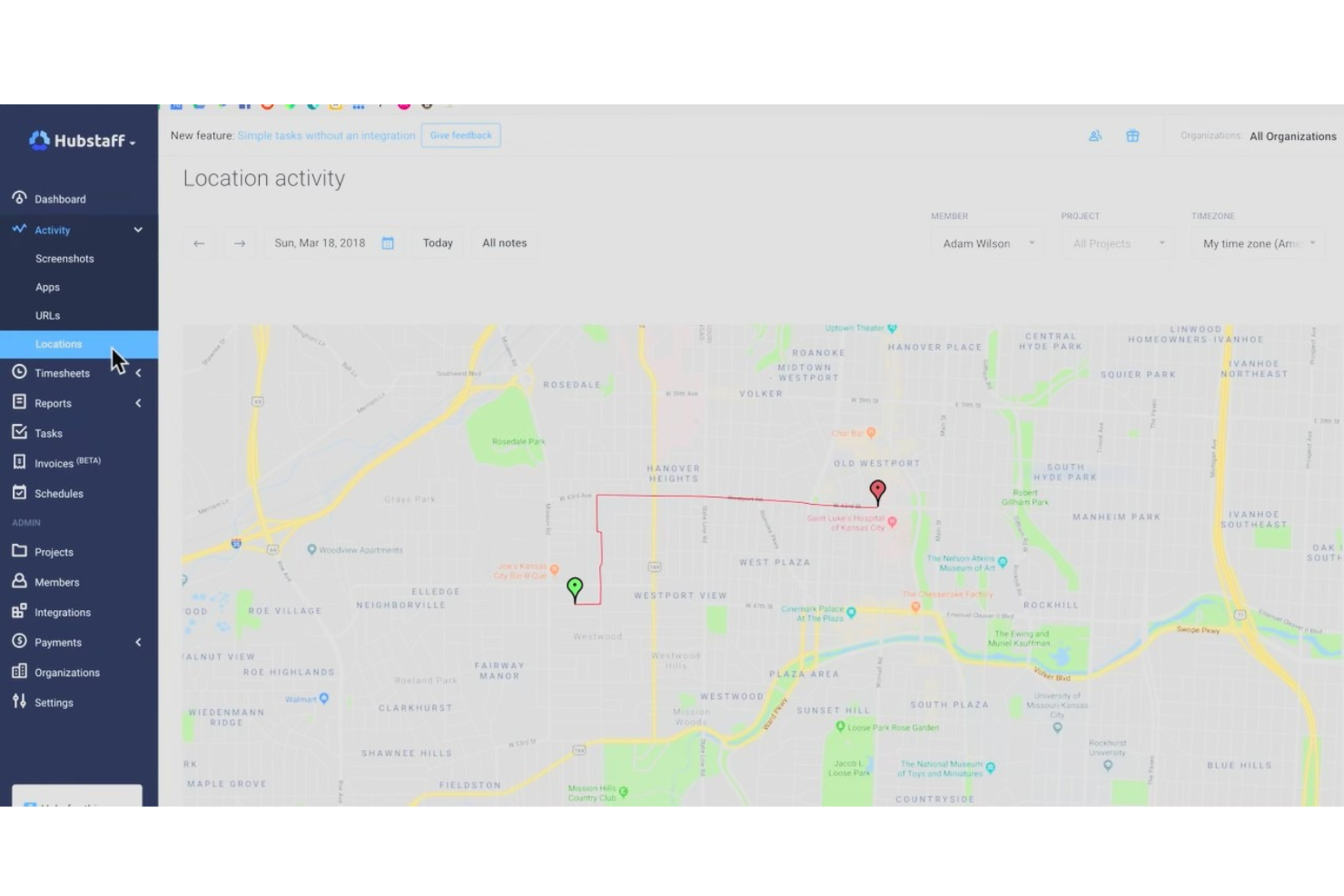
Hubstaff is a time-tracking and productivity-monitoring tool designed for businesses that need to manage remote teams effectively. It serves industries like field services and remote workforces, focusing on time management and activity tracking.
Why I picked Hubstaff: Hubstaff's free version includes GPS location tracking, great for teams on the move. This feature helps you monitor where your team members are working, ensuring accountability. The tool also offers time tracking and basic productivity monitoring, allowing you to keep tabs on work hours and activities. These features make Hubstaff a solid choice for businesses needing location-based tracking.
Standout features & integrations:
Features include detailed project management tools that help you organize tasks efficiently. You can also access online timesheets, which streamline payroll processes. Additionally, Hubstaff offers reporting tools to analyze productivity metrics.
Integrations include QuickBooks, Asana, Trello, Slack, Jira, Salesforce, Zapier, Basecamp, GitHub, and PayPal.
What's free? Hubstaff offers a 14-day free trial for its full features. Some of its services, like the Hubstaff Talent platform for finding freelancers, are free to use. The main time-tracking and project management tools require a paid subscription after the trial period ends.
Pros and Cons
Pros:
- Easy to set up
- Supports project management
- Online timesheets available
Cons:
- Slow response times
- Limited advanced features
New Product Updates from Hubstaff

Hubstaff Enhances Productivity and Team Management Features
Hubstaff’s latest updates introduce new tools to simplify workforce management and improve visibility into team productivity. Highlights include the new Insights Timeline, manual time approval, enhanced reports, and smarter activity detection. For more information, visit Hubstaff's official site.
 .
.Other Free Employee Monitoring Software
Here are some additional employee monitoring software options that also offer free plans or trials. While these tools didn’t make it onto my shortlist, they’re still worth checking out:
- Connecteam
For deskless workforce management
- Apploye
For tracking productivity
- We360.ai
For real-time productivity tracking
- Harvest
For project time tracking


Free Employee Monitoring Software Selection Criteria
When selecting the best free employee monitoring software to include in this list, I considered common buyer needs and pain points like budget constraints and ease of use for remote teams. I also used the following framework to keep my evaluation structured and fair:
Core Functionality (25% of total score)
To be considered for inclusion in this list, each solution had to fulfill these common use cases:
- Track employee work hours
- Monitor application usage
- Provide activity logs
- Offer screenshot capturing
- Generate productivity reports
Additional Standout Features (25% of total score)
To help further narrow down the competition, I also looked for unique features, such as:
- GPS location tracking
- Facial recognition for clock-ins
- Offline tracking capabilities
- Real-time alerts and notifications
- Customizable dashboards
Usability (10% of total score)
To get a sense of the usability of each system, I considered the following:
- Intuitive interface design
- Easy navigation
- Minimal learning curve
- Clear and concise instructions
- Availability of mobile apps
Onboarding (10% of total score)
To evaluate the onboarding experience for each platform, I considered the following:
- Availability of training videos
- Interactive product tours
- Access to templates and guides
- Chatbot assistance
- Scheduled webinars and workshops
Customer Support (10% of total score)
To assess each software provider’s customer support services, I considered the following:
- 24/7 support availability
- Live chat options
- Trusty help center
- Response time to inquiries
- Availability of dedicated account managers
Value For Money (10% of total score)
To evaluate the value for money of each platform, I considered the following:
- Feature set relative to cost
- Availability of free plan or trial
- Scalability options
- Transparent pricing structure
- Competitive pricing against similar tools
Customer Reviews (10% of total score)
To get a sense of overall customer satisfaction, I considered the following when reading customer reviews:
- Overall satisfaction ratings
- Commonly mentioned pros and cons
- Feedback on ease of use
- Reports on reliability and uptime
- User comments on support quality
How to Choose Free Employee Monitoring Software
Complex feature lists and pricing structures can make it hard to figure out what you’re really getting from a free employee monitoring software. To help you stay focused as you work through your software selection process, here are some factors to keep in mind:
| Factor | What to Consider |
|---|---|
| Free offer scope | Check what's included in the free plan. Are key features like time tracking and reporting available? Ensure it meets your basic needs without hidden costs. |
| Scalability | Consider if the software can grow with your team. Look for options that offer paid plans with more features as your needs expand. |
| Integrations | Verify compatibility with tools you already use, like payroll or project management systems. This ensures smooth data flow across platforms. |
| Ease of Use | Ensure the software is intuitive for your team. A user-friendly interface reduces training time and improves adoption. |
| Security | Evaluate data protection measures. Look for features like encryption and secure access to ensure your team's information is safe. |
| Customer Support | Assess the quality of support. Check for 24/7 availability, responsiveness, and helpful resources like guides or tutorials. |
| Customization | Determine if the tool allows for customization to fit your specific workflows and reporting needs. |
| Mobile Access | If your team works on the go, ensure the software has a reliable mobile app for tracking and monitoring from anywhere. |
What Is Free Employee Monitoring Software?
Employee monitoring software is a tool used to track and manage employee activities during work hours. It often comes with free plans or trials, allowing businesses to try essential features like time tracking and productivity reporting without initial costs. These tools are typically used by managers, team leaders, and HR professionals to boost productivity and remote employee monitoring. Time tracking, productivity analysis, and activity logging features help with managing work hours, assessing team performance, and ensuring efficient workflow.
Features
Let’s go over the features commonly found in employee monitoring software, and which ones are usually included in free vs. paid plans.
Typically Free Employee Monitoring Software Features
- Time tracking: Monitors the hours employees work, helping teams manage time efficiently.
- Activity logging: Records user activity on devices to provide insights into how work hours are spent.
- Basic reporting: Offers simple reports on productivity metrics to help assess team performance.
- Screenshot capture: Takes periodic screenshots to ensure transparency in remote work environments.
- Task management: Allows teams to assign and track tasks, improving workflow organization.
Typically Paid Employee Monitoring Software Features
- Advanced reporting: Provides detailed analytics and insights into productivity trends and team performance.
- GPS tracking: Monitors team members' locations, useful for fieldwork and remote teams.
- Facial recognition: Adds an extra layer of security by verifying employee identity during clock-ins.
- Customizable dashboards: Allow teams to tailor the interface and reports to fit specific workflow needs.
- Integration capabilities: Connects with other tools and platforms for easy data exchange and enhanced functionality.
- Real-time alerts: Notifies managers of specific activities or issues as they occur, enabling quick responses.
Benefits
Implementing free employee monitoring software provides several benefits for your team and your business. Here are a few you can look forward to:
- Cost-effective solution: Provides essential monitoring functions without upfront costs, making it accessible for budget-conscious teams.
- Clearer performance expectations: Helps teams align on work habits by highlighting trends that may support coaching and workload discussions.
- Greater visibility into workflows: Provides a clearer understanding of how work unfolds across teams, helping managers identify bottlenecks or areas that need support.
- Better allocation of work hours: Helps teams focus on priorities by showing how effort is distributed across tasks and projects.
- Easy adoption: Simple interfaces and quick setup reduce onboarding time, allowing teams to start using the tool without technical barriers.
- Trial of advanced features: Let teams explore premium capabilities before committing to a paid plan, ensuring the software matches long-term needs.
Costs & Pricing
I realize you came to this article looking for the best employee monitoring software options that are available for free. However, since free plans offer limited features, there's a good chance you'll need to upgrade in the future.
The table below summarizes common plans, their average prices, and typical features included in employee monitoring software solutions:
Plan Comparison Table for Employee Monitoring Software
| Plan Type | Average Price | Common Features |
|---|---|---|
| Free Plan | $0 | Basic time tracking, activity logging, and limited reporting. |
| Personal Plan | $5-$12/user/month | Advanced time tracking, screenshot capture, and task management. |
| Business Plan | $15-$35/user/month | Productivity analysis, GPS tracking, customizable dashboards, and integrations. |
| Enterprise Plan | $40-$80/user/month | Advanced reporting, real-time alerts, facial recognition, and full customization options. |
Free Employee Monitoring Software FAQs
Here are some answers to common questions about free employee monitoring software:
How do we handle privacy and consent at work?
Start by creating a clear written policy that explains what’s monitored, why it’s needed, and how data is stored, used, and deleted. Get explicit acknowledgment from employees, ideally during onboarding or before rollout, and clarify when permission is required, especially when reviewing employee computer activity. Limit monitoring to work purposes and company-owned workstations where possible, and avoid capturing personal content. Involve HR and legal in policy design, and review tools to ensure they continue to respect employee privacy, GDPR requirements, and broader data protection expectations.
How transparent should we be about monitoring?
Aim for “no surprises.” Employees should know which activities are tracked (time, apps, websites, screenshots, screen recording, GPS, etc.), how often they are tracked, and who can see the reports. Be clear about whether monitoring applies to remote workers or in-office teams. Share sample dashboards, retention periods, and how data influences decisions, such as evaluating employee performance or billable hours. Encourage questions in town halls or Q&A sessions. Transparency reduces fear, helps you correct misconceptions early, and reinforces that monitoring is about improving workflows and fairness, not spying on individual employees in secret.
Can monitoring coexist with a culture of trust?
Yes, if you frame and use it correctly. Position monitoring as a way to remove guesswork, protect focus time, and distribute workloads fairly, not as a punishment tool. Focus on feedback on patterns, processes, and team-level improvements rather than micromanaging idle time. Celebrate positive trends in the data, such as increased productivity or improved overall employee productivity. Combine monitoring with autonomy, clear goals, and recognition so employees feel supported and empowered rather than constantly policed, whether they are remote employees, freelancers, or full-time staff.
How do we use monitoring data fairly in reviews?
Treat monitoring data as supporting evidence, not the whole story. Combine it with qualitative feedback, goals, project outcomes, and context, like role type or seasonality. Avoid ranking people purely by “activity scores” or time online, especially when computer activity or an employee screen snapshot might lack context. Discuss the data with employees before performance reviews so they can explain anomalies. Document how metrics are interpreted and ensure managers apply the same standards across teams to avoid bias or inconsistent expectations.
What legal risks come with monitoring tools?
Legal risks vary by country, but common issues include monitoring without proper notice, capturing personal or sensitive information, storing data insecurely, or tracking employees off-hours without consent. Some regions require works council input or written agreements before deploying monitoring systems. Work with legal counsel to confirm what’s allowed in each jurisdiction, especially around GPS, keystroke logging, and social media oversight. Keep audit trails, restrict access to sensitive data, and define strict retention and deletion timelines to maintain strong data security.
How do we roll out monitoring to global teams smoothly?
Start with a pilot in one region or department to uncover issues early. Map legal requirements by country and adjust settings; some locations may need lighter monitoring or extra consent steps. Provide localized documentation and training in employees’ primary languages. Involve regional managers in communication so messaging respects local norms across both office and work time environments. Stagger rollout dates, gather feedback, and refine policies and configurations before scaling to the rest of your global workforce.
What’s Next:
If you're researching free employee monitoring software, connect with a SoftwareSelect advisor for free recommendations.
You fill out a form and have a quick chat where they get into the specifics of your needs. Then you'll get a shortlist of software to review. They'll even support you through the entire buying process, including price negotiations.