

10 Best AI Sourcing Tools Reviewed in 2026

Best AI Sourcing Tools Shortlist


Hiring for today’s HR teams requires speed, precision, and the ability to sort through far more candidate data than ever before. AI sourcing tools help teams move faster by identifying qualified talent, improving matching accuracy, and reducing the hours spent on manual search and screening.
From my experience testing these platforms, AI capabilities meaningfully change the sourcing process. They automate routine tasks, surface candidates who might otherwise go unnoticed, and provide insights that help recruiters prioritize outreach and improve overall pipeline quality. In this article, I’ll walk you through the best AI sourcing tools available today, with a focus on the features that genuinely improve hiring outcomes.
You will see how each tool supports different team needs, where they stand out, and how they can streamline your hiring workflow. By the end, you’ll have a clearer sense of which solution fits your goals and can strengthen your approach to talent acquisition.
Why Trust Our Software Recommendations
Our team has been testing and reviewing software since 2012. As HR experts ourselves, we know how difficult—and important—it is to choose the right software.
For this guide, we evaluated tools using hands-on testing and independent research, scoring tools using our selection criteria. We also draw on insights from industry thought leaders and practicing HR experts.
Our reviews reflect our human editorial judgment, not a sales pitch.
Expert reviewers:
AI Sourcing Tools Comparison Table
This comparison table summarizes pricing details for my top AI sourcing tool selections:
| Tool | Best For | Trial Info | Price | ||
|---|---|---|---|---|---|
| 1 | Best with built-in worker misclassification checks | Free demo available | From $599/employee/month | Website | |
| 2 | Best for sourcing licensed healthcare clinicians | Free demo available | Pricing upon request | Website | |
| 3 | Best with multilingual and RTL language support | 14-day free trial + free demo available | From $15/user/month (billed annually) | Website | |
| 4 | Best for interview intelligence | Free plan available | From $100/user/month | Website | |
| 5 | Best for automated outreach | Free demo available | From $115/month (billed annually) | Website | |
| 6 | Best for global compliance | Free demo available | From $599/employee/month | Website | |
| 7 | Best for AI-enhanced diversity hiring | Free trial + free demo available | From $149/month (billed annually) | Website | |
| 8 | Best for small businesses | Free demo available | From $299/month | Website | |
| 9 | Best for data-driven insights | Free demo available | From $270/10 users/per month | Website | |
| 10 | Best for AI resume screening | Free trial available | From $86/user/month (billed annually) | Website |

Best AI Sourcing Tool Reviews
Below are my detailed summaries of the best AI sourcing tools that made it onto my shortlist. My reviews offer a detailed look at the key features, pros & cons, integrations, and ideal use cases of each tool to help you find the best one for you.

Best with built-in worker misclassification checks
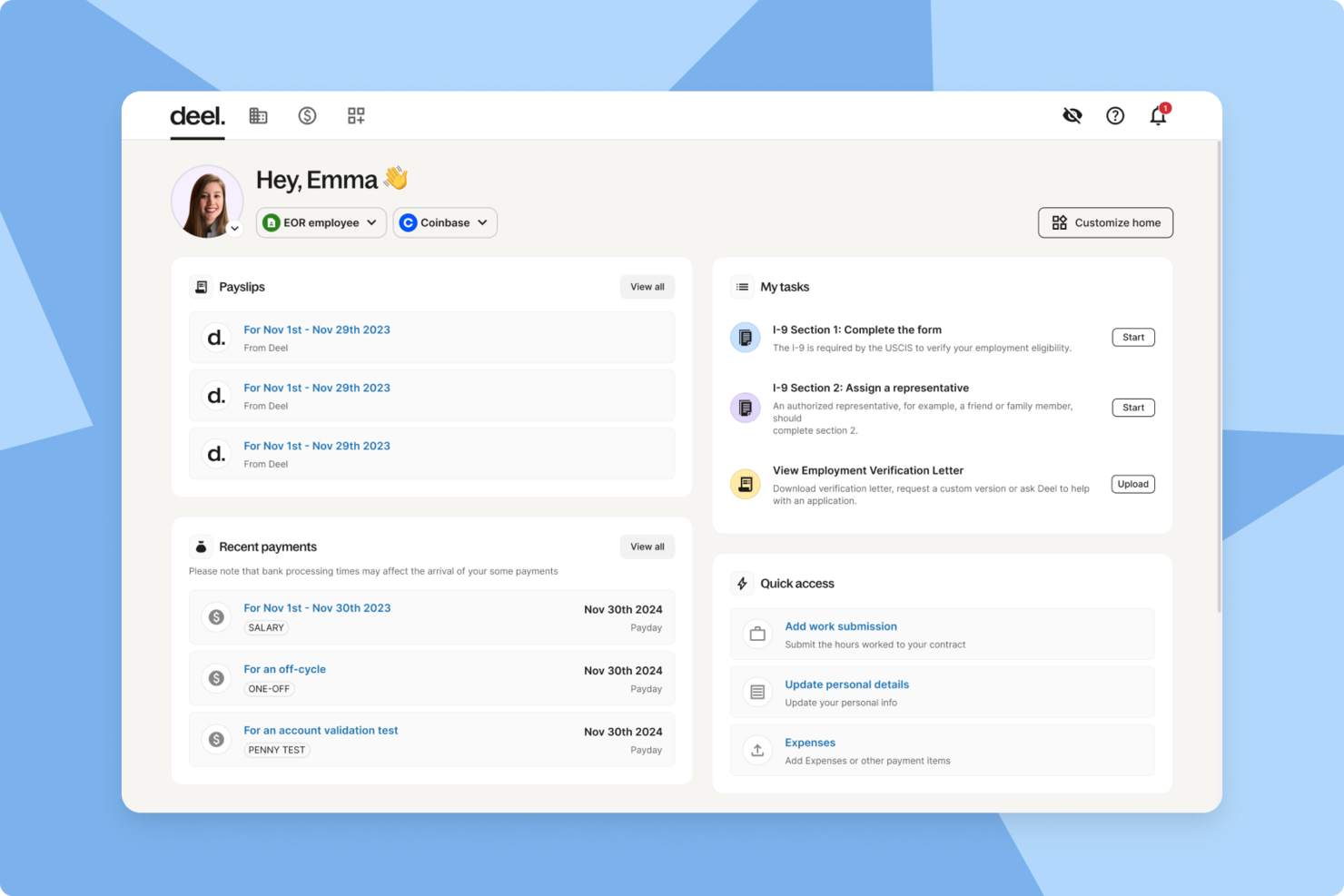
Deel Hire makes my shortlist because I rarely see other platforms surface misclassification risk inside their AI sourcing and hiring flow. This is where Deel Hire stands out—its built-in compliance engine automatically assesses every sourced role for worker classification.
What I appreciate is the instant feedback on employment status, which means you don’t need to cross-reference with legal or external services. When teams scale global sourcing or mix contractors and employees, I think Deel Hire saves time and mitigates risk before onboarding even starts.
Deel Hire’s Best For
- Global hiring teams needing built-in misclassification checks
- Organizations balancing contractors and full-time employees across borders
Deel Hire’s Not Great For
- Companies focusing only on traditional in-country hiring
- Teams wanting basic sourcing tools without advanced compliance
What sets Deel Hire apart
Deel Hire takes a compliance-first approach that’s hard to find in other sourcing platforms. Instead of treating compliance as a separate step or checklist, Deel Hire bakes worker classification analysis into the AI sourcing flow itself. Unlike platforms like LinkedIn Recruiter, which focus on finding candidates, Deel Hire expects you to consider legal employment status at the very start.
This works best when you’re expanding across borders or mixing employee types and need to surface misclassification risks while sourcing, not just after making a hire.
Tradeoffs with Deel Hire
Deel Hire optimizes for built-in compliance but gives up feature depth in sourcing tactics or customization. If you want advanced talent pooling, analytics, or highly flexible sourcing workflows, you’ll probably feel boxed in.
Pros and Cons
Pros:
- Multiple payment methods including crypto and Wise
- Automated global payroll and tax compliance
- Localized contract generation for each region
Cons:
- Advanced features require higher-tier subscriptions
- Occasional issues with document verification accuracy

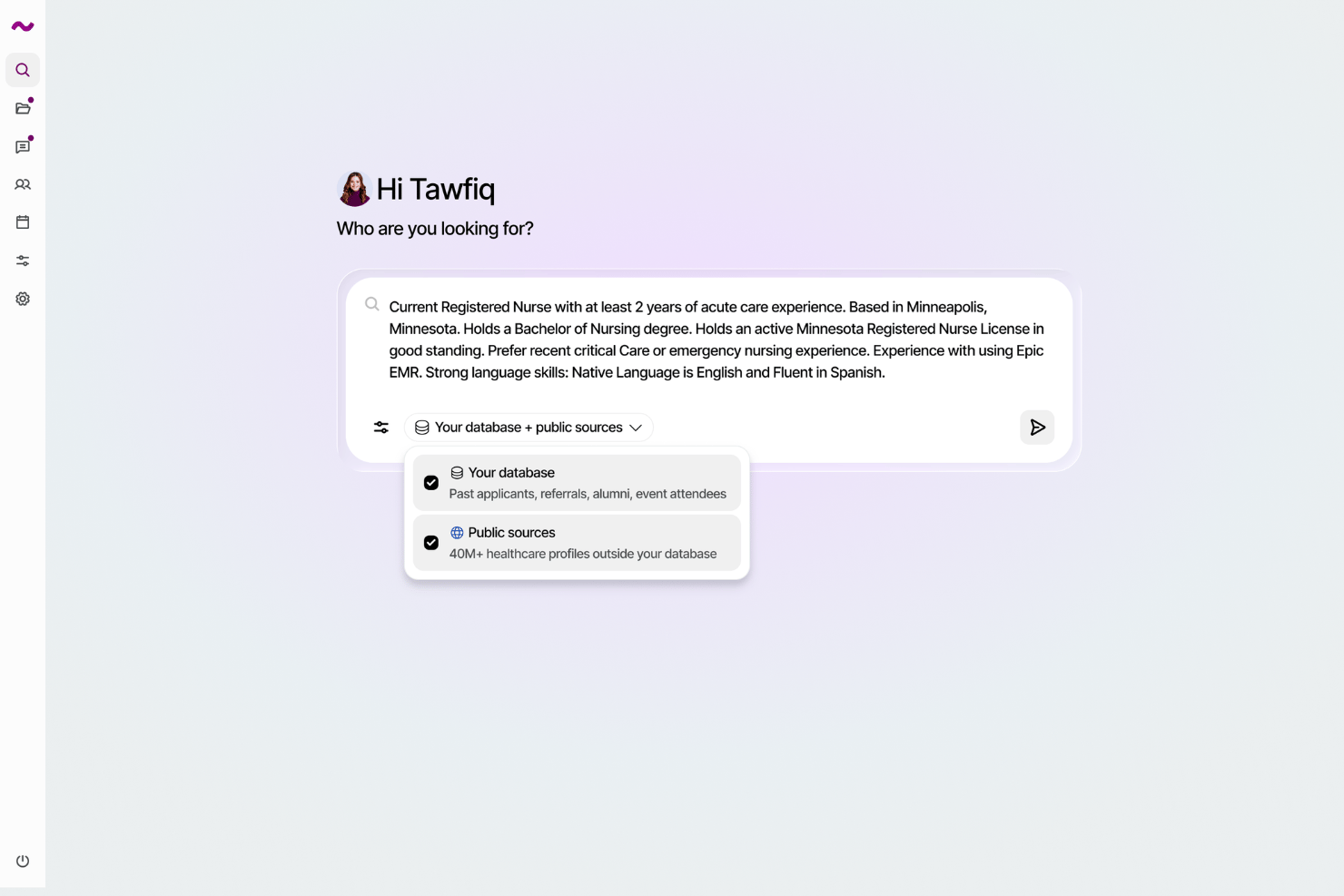
Hellora is an AI sourcing platform built for healthcare hiring. It aggregates state and federal licensing records into 40M+ contactable U.S. clinician profiles and searches them alongside a health system’s own ATS database using natural language rather than Boolean strings.
Who Is Hellora Best For?
Hellora is a strong fit for U.S. healthcare organizations that need to proactively source licensed clinicians beyond the candidates already in their ATS.
Why I Picked Hellora
Hellora earns its spot because it solves a sourcing problem specific to healthcare: every licensed clinician in the country is a matter of public record, but that data is fragmented across state and federal sources without the contact details and work history recruiters need. Hellora aggregates it into 40M+ searchable, contactable profiles. I like that recruiters can describe what they need in plain English, such as an ICU-certified RN in a specific metro with Epic experience, and get results from both the public pool and their own ATS database, labeled by source.
Hellora Key Features
- Natural language search: Describe a role in plain English and get ranked results across public licensing data and your existing ATS database.
- Candidate pipeline tracking: A built-in pipeline view lets you monitor where each candidate stands across sourcing, outreach, and engagement stages.
- Continuous enrichment: Keep licenses, certifications, and contact details updated automatically as public records change.
- Public license sourcing: Aggregates state and federal licensing records into 40M+ contactable U.S. clinician profiles.
Hellora Integrations
Hellora offers native integrations across ATS, HRIS, and recruiting platforms, including UKG, Workday, Workable, JazzHR, BambooHR, and more.
Pros and Cons
Pros:
- Searches public and ATS data
- Natural-language clinician sourcing
- 40M+ contactable clinician profiles
Cons:
- Limited to U.S. healthcare organizations
- No free trial option available

Manatal
Best with multilingual and RTL language support
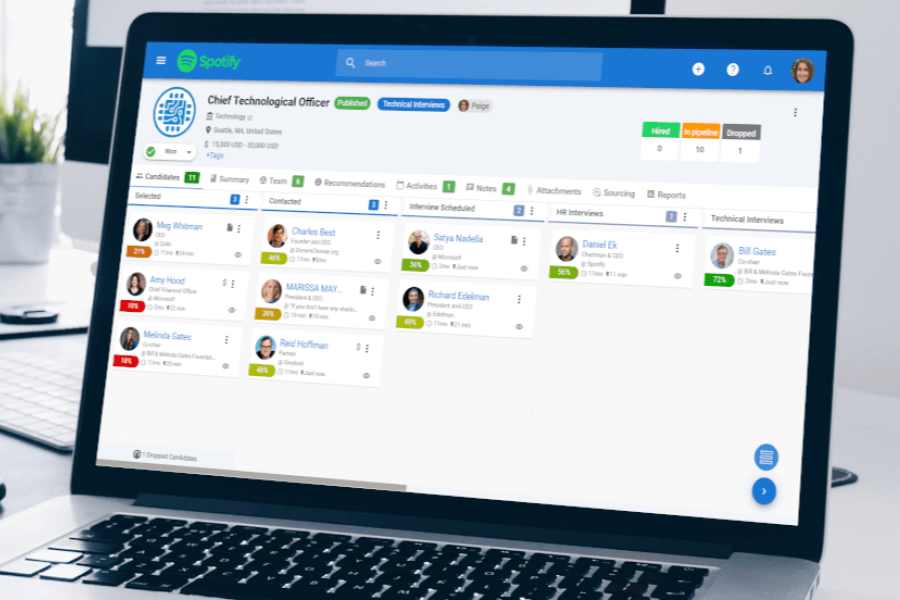
Manatal makes my shortlist because it’s one of the few AI sourcing tools that consistently handles multilingual and right-to-left languages. I recommend it when you’re hiring for roles spanning global regions or local teams working in non-Latin scripts, since its parsing and candidate search work reliably across a wide range of languages.
What I appreciate most is how Manatal keeps its search, pipelines, and analytics accessible in Arabic, Hebrew, and dozens of other languages.
Manatal’s Best For
- Recruiters sourcing across multilingual or RTL language regions
- Organizations needing AI-powered, language-flexible candidate search
Manatal’s Not Great For
- Teams focused on highly technical talent sourcing
- Companies needing deep customization of sourcing workflows
What sets Manatal apart
Manatal carves out space for recruiters who need consistent sourcing and management of candidates in multiple languages. Unlike Breezy HR, which sticks to a narrower set of language options, Manatal expects you to manage candidate pipelines in Arabic, Hebrew, or any language needed without having to patch around language barriers.
It’s designed so multilingual teams can collaborate or hand off searches without workflows breaking down mid-process.
Tradeoffs with Manatal
Manatal optimizes for language flexibility and broad accessibility, but the tradeoff is limited depth for highly technical or specialized sourcing workflows. You might need a more configurable tool if you require heavy process customization or deep analytics.
Pros and Cons
Pros:
- Social media enrichment for candidate profiles
- Bulk job board posting from one dashboard
- Branded resume formatting with custom templates
Cons:
- Mobile app lacks full desktop functionality
- No built-in video interviewing feature
New Product Updates from Manatal

Manatal Adds Candidate Login and Employee Portal to Career Pages
Manatal has added Candidate Login, Internal Employee Portal, and internal job visibility controls for Career Pages. These features help teams simplify applications, support employee mobility, and manage internal hiring workflows. For more information, visit Manatal’s official site.
 .
.
Metaview
Best for interview intelligence

Metaview is my top pick for teams who need interview intelligence built into their AI sourcing stack. When I tested it, I found its automated note-taking and detailed interview insights transformed how recruiters review and learn from conversations. I especially like how it generates accurate summaries and highlights key candidate responses, making debriefs much easier. Teams seem to get the most out of it when they run lots of structured interviews and want real evidence for shortlist decisions.
Metaview’s Best For
- Recruitment teams running frequent structured interviews
- Organizations needing real-time interview summaries and highlights
Metaview’s Not Great For
- Small teams with low interview volume
- Those who prefer manual note-taking and feedback
What sets Metaview apart
Metaview is built around automating and elevating interview capture. Instead of relying on distracted notetaking or memory, you get structured insights and transcripts right after each interview. Compared to something like Google Meet’s recording features, Metaview expects hiring teams to review interviews quickly and base shortlist decisions on specific evidence, not gut feeling.
This tends to fit organizations that run lots of structured interviews and want transparency around the hiring process.
Tradeoffs with Metaview
Metaview optimizes for interview analysis and documentation, but that focus means you give up broader sourcing features or pipeline management that full ATS platforms provide. You’ll need another tool for end-to-end candidate tracking.
Pros and Cons
Pros:
- Offers feedback aggregation
- Strong ATS integrations and compliance
- Structured notes and summaries for video interviews
Cons:
- Templates lack customization options
- Limited multilingual capabilities

Fetcher
Best for automated outreach

Fetcher stands out for automating sourcing and outreach in a way that actually saves time for recruiters. I like that the platform scrapes contact details and relevant candidate info, then customizes sequences based on your search. Teams tend to see the biggest gains here when outbound campaigns get tricky or too manual to manage at scale.
What I appreciate most is how Fetcher lets you skip repetitive outreach tasks and focus on qualifying responses.
Fetcher’s Best For
- Recruiters running high-volume, automated outbound sourcing campaigns
- Teams who want candidate outreach handled with minimal manual effort
Fetcher’s Not Great For
- Hiring for niche or highly specialized technical roles
- Recruiters who want full control over every message and search parameter
What sets Fetcher apart
Fetcher flips the traditional sourcing process by automating both candidate discovery and the first touch of outreach rather than expecting you to manually build lists. Unlike LinkedIn Recruiter, which gives you control and visibility over each search, Fetcher puts automation in front. This tends to work best when you want rapid outreach at scale, and you’re less concerned about fine-tuning every message.
Tradeoffs with Fetcher
Fetcher optimizes for speed and automation, but you lose visibility and precision in targeting, so you have less control over niche hard-to-fill roles.
Pros and Cons
Pros:
- Built-in DE&I insights
- Structured feedback loops
- Smart sourcing includes ongoing recruiter feedback
Cons:
- Rigid and uncustomizable email templates
- Limited built-in screening/assessment

Remote
Best for global compliance
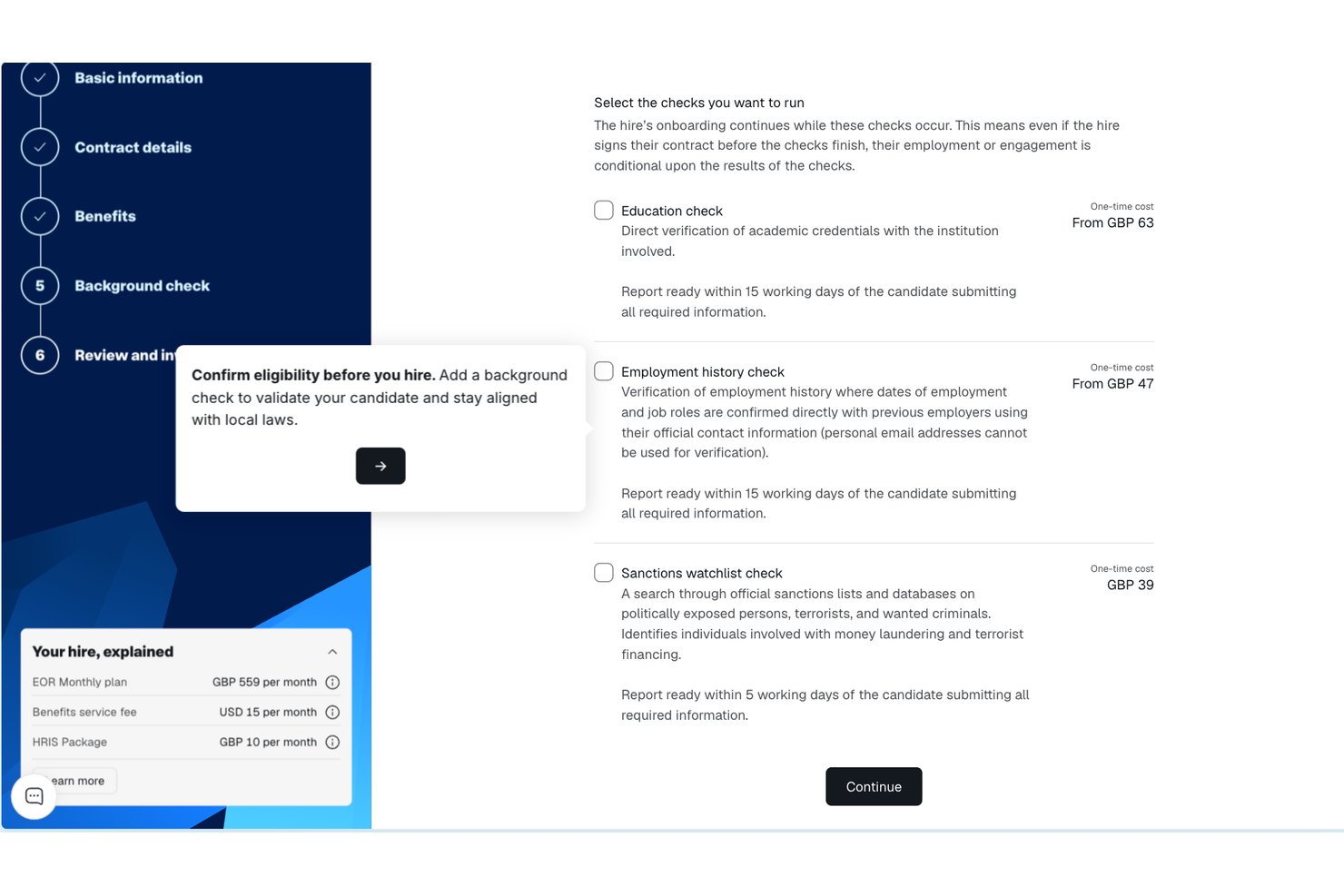
Remote makes my list because it solves global compliance problems that come up when hiring internationally or building distributed sourcing teams. I see organizations using Remote to legally hire and pay talent in over 170 countries, while handling local taxes and labor laws automatically.
What I appreciate is how Remote centralizes country-specific legal documents and payroll, which removes most of the complexity of cross-border AI sourcing.
Remote’s Best For
- Global organizations hiring and paying across many countries
- Teams needing airtight compliance for international AI sourcing
Remote’s Not Great For
- Companies that only hire within one country
- Teams needing advanced talent analytics or AI-based candidate scoring
What sets Remote apart
Remote takes a fundamentally compliance-first approach for global hiring and payments. Instead of layering international capabilities onto a payroll system like Deel or Oyster, Remote is designed for organizations that start with distributed teams and want to avoid local legal risks. In practice, this works best for companies that prioritize risk reduction over customization.
Tradeoffs with Remote
Remote optimizes for compliance and coverage across many countries, but sacrifice flexibility over contract terms and custom payroll schemes. This can slow you down if you need to adapt for unique, local hiring exceptions.
Pros and Cons
Pros:
- Secure and compliant Mobile Device Management
- User-friendly and responsive UX
- Includes country misclassification risk generator
Cons:
- Limited features for non-global teams
- Scale may not be suitable for small companies

SeekOut
Best for AI-enhanced diversity hiring

SeekOut makes my shortlist because of its focus on diversity hiring, powered by AI-driven talent discovery. I rely on it when teams want to move beyond catch-all search filters and prioritize inclusive pipelines. What impresses me is how SeekOut’s AI finds underrepresented talent others miss, plus its in-depth diversity analytics give you real-time insights into representation gaps. I like how practical the data is for auditing and adjusting sourcing strategies.
SeekOut’s Best For
- Talent teams focused on increasing diversity in hiring
- Sourcing underrepresented candidates in technical and specialized roles
SeekOut’s Not Great For
- Organizations with no diversity sourcing targets
- Recruiters who want broad, generic candidate pools
What sets SeekOut apart
SeekOut is built for sourcing teams who want AI to help surface candidates who might not show up using standard filters. Unlike LinkedIn Recruiter, SeekOut expects you to focus on the quality and diversity of your searches rather than just quantity. It’s really designed for recruiters who want transparency into candidate pools and actionable data for improving representation.
Tradeoffs with SeekOut
SeekOut optimizes for targeted, data-driven searches, but you give up broader-market reach and simple bulk outreach. If you need high volume rather than precision, it can feel limiting.
Pros and Cons
Pros:
- Talent insights for workforce planning
- Automated outreach with real-time engagement tracking
- Offers bias mitigation tools
Cons:
- Limited ATS and CRM integration capabilities
- Limited contact credits with no rollover

Workable lands high on my list for small businesses that need modern AI candidate sourcing without heavy complexity or overhead. The AI-powered sourcing tool identifies and suggests candidates you’d likely overlook if you searched manually, and I appreciate the automated job posting to over 200 boards with smart screening. What usually happens is a hiring manager needs to fill roles fast but doesn’t have time for hours of manual resume review—Workable’s automated candidate ranking brings the best fits up front, keeping hiring momentum up for teams that can’t afford to fall behind.
Workable’s Best For
- Small businesses needing automated candidate sourcing and screening
- Hiring managers with broad role requirements and limited recruiting resources
Workable’s Not Great For
- Enterprises with complex, multi-stage hiring workflows
- Teams seeking deep candidate assessment and custom evaluation tools
What sets Workable apart
Workable stands out because it expects you to handle the entire sourcing and evaluation process in one place, without leaning on outside solutions or separate recruiter tools. Unlike Greenhouse, which is built for larger teams and custom process design, Workable bets on guided workflows and built-in sourcing so hiring managers don’t need to configure much. You get candidate suggestions and job board posting in a single flow. This tends to suit orgs that want to move quickly on hiring without extra setup.
Tradeoffs with Workable
Workable optimizes for self-service simplicity, but you give up depth in custom assessment and advanced workflow automations. In practice, specialized hiring processes or complex interviewing setups push the tool past its comfort zone.
Pros and Cons
Pros:
- Customizable job templates
- Easy to use and intuitive UI
- AI-powered candidate recommendations
Cons:
- Advanced reporting requires a subscription
- Costs expand as headcount grows


Gem cracks my list because it’s built around surfacing actionable insights from talent pipelines. What stands out in real usage is the way analytics help you spot sourcing bottlenecks with data on response rates, diversity efforts, and recruiter activity. I appreciate how granular you can get with reporting—this is where I see teams who care about talent metrics leaning in.
Gem’s Best For
- TA teams measuring and optimizing sourcing funnel performance
- Organizations tracking DEI, outreach, and recruiter productivity metrics
Gem’s Not Great For
- Teams prioritizing manual, small-scale candidate searches
- Organizations that don’t need deep sourcing analytics
What Sets Gem Apart
Gem expects you to drive sourcing off real data rather than gut feeling. It approaches sourcing like a funnel, surfacing analytics at every stage instead of just tracking candidate lists like Loxo or Hiretual. I see this working best when recruiting teams treat sourcing as measurable and want to find where drop-off happens, not just pool candidates. Instead of manual tracking in spreadsheets, Gem makes it easy to benchmark and pinpoint sourcing gaps.
Tradeoffs with Gem
Gem optimizes for insight from sourcing metrics, but this depth adds complexity if you want simple, one-off outreach without tracking every stage. For teams just looking to find and message a few candidates, it feels like too much machine for the job.
Pros and Cons
Pros:
- Centralizes candidate history across campaigns
- Provides both sourcing and sequenced outreach for passive talent
- Strong pipeline visibility and reporting
Cons:
- Clunky and slow interface
- Limited workflows and reports customization


recruitRyte stands out for AI resume screening that actually helps you prioritize quality sourcing over manual sorting. When I tested its screening automations, I saw how its algorithms quickly ranked and flagged top matches, catching keywords and context I usually see missed by more basic filters.
What I like is how you can customize screening rules to focus on success criteria unique to each role. Teams who process high volumes of applicants will find these customizable automations free up sourcing hours for outreach and relationship-building.
recruitRyte’s Best For
- Companies screening large volumes of resumes with AI
- Talent acquisition teams that want automated candidate ranking
recruitRyte’s Not Great For
- Roles needing high-touch, personalized candidate review
- Organizations with minimal resume inflow or sourcing needs
What sets recruitRyte apart
recruitRyte approaches sourcing by having AI handle initial screening using criteria you define, not just keyword matching. Unlike applicant tracking systems like Greenhouse, it expects you to fine-tune automations and filters instead of relying on strict rule-based workflows. In practice, this makes it good for teams who want to delegate first-round resume review while maintaining control of screening logic.
Tradeoffs with recruitRyte
recruitRyte optimizes for automated resume assessment, but it loses the nuanced, context-driven insights you get from hands-on review. That means it isn’t ideal if you treat every resume as a unique story needing human context from the start.
Pros and Cons
Pros:
- Global candidate access
- Chat-powered search refinement
- Candidate-based contextual ranking
Cons:
- Limited advanced reporting features
- Limits on users apply across all subscription levels


How I Evaluate AI Sourcing Tools
Every tool on this list needs to deliver real AI value—not just keyword search with an "AI" label slapped on. I split my evaluation into core functionality that a tool must have to qualify (like AI candidate discovery and intelligent matching) and differentiating factors that separate good options from great ones for specific teams.
Core Functionality (Table Stakes For This List)
When I'm selecting tools for my list, I rank each one on a scale from 0 (does not offer the functionality) to 5 (excels in this area) for each core functionality listed below. Then, I calculate the tool's total score into a percentage. Each tool needs to achieve a minimum total score of 65% to be considered for inclusion.
- AI-Driven Candidate Discovery: I check how many sources a tool indexes—LinkedIn, GitHub, niche communities—and whether AI surfaces relevant profiles beyond basic filters.
- Intelligent Candidate Matching: Strong tools score and rank candidates against a job description using ML or NLP, not just keyword overlap in resumes.
- AI-Powered Outreach Automation: I look for generative AI that drafts personalized sequences, not just mail-merge templates with a first-name token swapped in.
- Contact Data Enrichment: Tools should auto-retrieve verified emails and phone numbers so sourcers can reach candidates directly rather than waiting on InMail.
- Boolean & Natural Language Search: I evaluate whether the tool translates plain-language prompts into accurate results or helps build Boolean strings automatically.
- ATS/CRM Integration: Sourced candidates need to flow into systems like Greenhouse, Lever, or Bullhorn without manual re-entry or broken data mapping.
Once I have a list of tools that meet this criteria, I consider what sets each platform apart.
Differentiating Factors (What Sets Vendors Apart)
Here's how I compare and contrast different vendors:
Standout Features
Candidate intent signals are a big differentiator. Tools that flag when someone is likely open to a move help sourcers prioritize warm outreach over cold blasts. I also evaluate diversity sourcing filters, which let teams build inclusive pipelines using built-in DEI signals rather than manual workarounds. A strong chrome extension matters too, since most sourcing happens on LinkedIn or GitHub. Being able to enrich and save profiles without switching tabs saves real time.
Beyond Features
Compliance and ethical AI practices weigh heavily in my evaluation. I look for tools with clear bias auditing, GDPR and CCPA readiness, and transparent matching logic—especially since AI sourcing decisions can carry legal risk. Data source coverage also matters. A tool indexing only one or two platforms limits your reach, so I check the breadth and freshness of each vendor's candidate database. Finally, I consider pricing structure, since credit-based models can get expensive fast for high-volume sourcing teams at agencies or enterprise TA functions.
How to Choose AI Sourcing Tools
It’s easy to get bogged down in long feature lists and complex pricing structures. To help you stay focused as you work through your unique software selection process, here’s a checklist of factors to keep in mind:
| Factor | What to Consider |
|---|---|
| Scalability | Can the tool grow with your team? Consider whether it handles increased job postings and users without extra costs or performance hits. |
| Integrations | Does it work with your existing systems? Check for compatibility with your ATS, CRM, and communication tools to avoid workflow disruptions. |
| Customizability | Can you tailor it to fit your processes? Look for options to adjust workflows, templates, and notifications to match your unique needs. |
| Ease of use | Will your team find it intuitive? A steep learning curve can slow down adoption, so opt for interfaces that are easy to navigate and understand. |
| Implementation and onboarding | How quickly can you get started? Evaluate the time and resources needed for setup, including training and data migration. |
| Cost | Is it within your budget? Compare pricing plans, including hidden fees, and consider the value each plan offers relative to your needs. |
| Security safeguards | How does it protect your data? Ensure it has strong security measures like encryption and regular audits to safeguard sensitive information. |
| Vendor transparency | Are they open about their practices? Look for clear communication regarding updates, downtime, and data usage to ensure a trustworthy partnership. |
What Are AI Sourcing Tools?
AI sourcing tools are software solutions that use artificial intelligence to find and engage potential job candidates efficiently. Recruiters, talent acquisition specialists, and HR professionals typically use these tools to improve hiring processes and make data-driven decisions. Automated candidate sourcing, resume parsing, and predictive analytics features help with identifying top talent, saving time, and enhancing recruitment strategies. Overall, these tools bring significant value by optimizing the talent acquisition process and reducing the time to hire.
Features
When selecting AI sourcing tools, keep an eye out for the following key features:
- Automated candidate sourcing: Uses AI to find and rank potential candidates, saving time on manual searches.
- Resume parsing: Extracts and organizes candidate information from resumes, making it easier to assess qualifications.
- Predictive analytics: Analyzes data to forecast hiring outcomes and improve decision-making.
- Candidate engagement: Automates personalized communication with candidates to maintain interest and improve response rates.
- Diversity sourcing: Identifies diverse candidate pools to support inclusive hiring practices.
- Interview intelligence: Provides insights and feedback on interviews to improve the recruitment process.
- Market research tools: Offers insights into industry trends and candidate availability to refine recruitment strategies.
- Customizable dashboards: Allow users to tailor views and reports to match specific recruitment needs.
- Integration capabilities: Ensures easy connection with existing HR systems, enhancing workflow efficiency.
- Security safeguards: Protects sensitive candidate data through encryption and regular audits.
Benefits
Implementing AI sourcing tools provides several benefits for your team and your business. Here are a few you can look forward to:
- Time savings: Automated candidate sourcing and resume parsing reduce the time spent on manual recruitment tasks.
- Improved candidate quality: Predictive analytics helps identify top talent, ensuring better candidate matches.
- Enhanced diversity: Diversity sourcing supports inclusive hiring by identifying diverse candidate pools.
- Better decision-making: Market research tools provide insights into industry trends, aiding strategic recruitment decisions.
- Increased engagement: Automated candidate engagement maintains interest and improves response rates.
- Data security: Security safeguards protect sensitive candidate information, ensuring compliance with data protection standards.
- Interview improvements: Interview intelligence provides insights and feedback to enhance the quality and consistency of interviews.
Costs & Pricing
Selecting AI sourcing tools requires an understanding of the various pricing models and plans available. Costs vary based on features, team size, add-ons, and more. The table below summarizes common plans, their average prices, and typical features included in AI sourcing tools solutions:
Plan Comparison Table for AI Sourcing Tools
| Plan Type | Average Price | Common Features |
|---|---|---|
| Free Plan | $0 | Basic candidate sourcing, resume parsing, and limited analytics. |
| Personal Plan | $50-$379/user/month | Automated sourcing, basic analytics, candidate engagement, and email support. |
| Business Plan | $179-$599/user/month | Advanced analytics, diversity sourcing, interview intelligence, and priority customer support. |
| Enterprise Plan | $649-$2390/user/month | Customizable dashboards, full integration capabilities, enhanced security, and dedicated account management. |
AI Sourcing Tools FAQs
Here are some answers to common questions about AI sourcing tools:
How do AI sourcing tools integrate with existing HR systems?
AI sourcing tools typically offer integration capabilities with popular HR systems like ATS and CRM platforms. You can connect tools like Greenhouse, Workday, or BambooHR to sync candidate data and simplify your workflow. Check if the AI sourcing tool provides API access or pre-built connectors for easy integration. This will allow your team to maintain consistency across platforms and avoid data silos.
Can AI sourcing tools improve diversity hiring?
Yes, AI sourcing tools can improve diversity hiring by identifying diverse candidate pools and mitigating bias in the recruitment process. These tools use AI algorithms to search for candidates from varied backgrounds and provide insights into diversity metrics. To enhance your diversity efforts, ensure the tool offers features like blind hiring and diversity analytics.
What should I consider when evaluating AI sourcing tools for scalability?
When evaluating scalability, consider the tool’s ability to handle increased job postings, users, and data without performance degradation. Look for flexible pricing plans that accommodate growing teams and features that support large-scale recruitment efforts. Assess whether the tool can integrate with other systems and adapt to your evolving needs.
How do AI sourcing tools handle data security?
AI sourcing tools typically implement data security measures like encryption, regular audits, and compliance with data protection regulations (e.g., GDPR). When choosing a tool, verify its security certifications and inquire about data storage practices. Ensure the vendor provides transparency about their security protocols to protect sensitive candidate information.
Are there customization options available in AI sourcing tools?
Yes, many AI sourcing tools offer customization options to tailor workflows, dashboards, and communication templates to your team’s needs. Customization can enhance user experience and efficiency by aligning the tool with your specific recruitment processes. Check if the tool allows you to modify search criteria, reporting formats, and candidate engagement strategies.
What’s Next:
If you're in the process of researching AI sourcing tools, connect with a SoftwareSelect advisor for free recommendations.
You fill out a form and have a quick chat where they get into the specifics of your needs. Then you'll get a shortlist of software to review. They'll even support you through the entire buying process, including price negotiations.