
18 Best Enterprise Employee Scheduling Software Reviewed in 2026

Best Enterprise Employee Scheduling Software Shortlist
Here’s my shortlist of the best enterprise employee scheduling software:


Managing employee schedules can be a challenge, especially in large enterprises. You might find yourself juggling endless spreadsheets, dealing with last-minute changes, and trying to keep everyone happy. That's where enterprise employee scheduling software comes in, helping you save time and reduce stress.
I've spent years in the HR management industry and have tested and reviewed software independently. In this article, I'll share my top picks for the best scheduling tools on the market. Some options here are dedicated schedulers, while others are full workforce management suites that include forecasting, labor analytics, and compliance controls.
You'll get an unbiased, well-researched look at how these solutions can benefit your team. By the end, you'll have a clear understanding of which software fits your needs, making scheduling a smoother process for everyone involved.
Why Trust Our Software Reviews
Best Enterprise Employee Scheduling Software Summary
This comparison chart summarizes pricing details for my top enterprise employee scheduling software selections to help you find the best one for your budget and business needs
| Tool | Best For | Trial Info | Price | ||
|---|---|---|---|---|---|
| 1 | Best with customizable workflow automation | Free demo available | Pricing upon request | Website | |
| 2 | Best for payroll integration | 30-day free trial | From $50/month | Website | |
| 3 | Best for shift swapping | 31-day free trial + free demo available | From $5/user/month | Website | |
| 4 | Best for HR integration | Free demo available | Pricing upon request | Website | |
| 5 | Best for predictive modeling | Free demo available | Pricing upon request | Website | |
| 6 | Best for large companies | Free demo available | Pricing upon request | Website | |
| 7 | Best for compliance tracking | Free demo available | From $15/user/month | Website | |
| 8 | Best for healthcare professionals | Free plan + free demo available | Pricing upon request | Website | |
| 9 | Best for quick onboarding | 14-day free trial + free plan available | From $379/month | Website | |
| 10 | Best for distributed frontline orgs | Free 14-day trial + free plan + free demo available | From $29/month (billed annually) | Website |
-

Checkr
Visit WebsiteThis is an aggregated rating for this tool including ratings from Crozdesk users and ratings from other sites.4.5 -
Kudoboard
Visit WebsiteThis is an aggregated rating for this tool including ratings from Crozdesk users and ratings from other sites.4.8 -
Native Teams
Visit WebsiteThis is an aggregated rating for this tool including ratings from Crozdesk users and ratings from other sites.4.9





Best Enterprise Employee Scheduling Software Reviews
Below are my detailed summaries of the best enterprise employee scheduling software that made it onto my shortlist. My reviews offer a detailed look at the key features, pros and cons, integrations, and ideal use cases of each tool to help you find the best one for you.

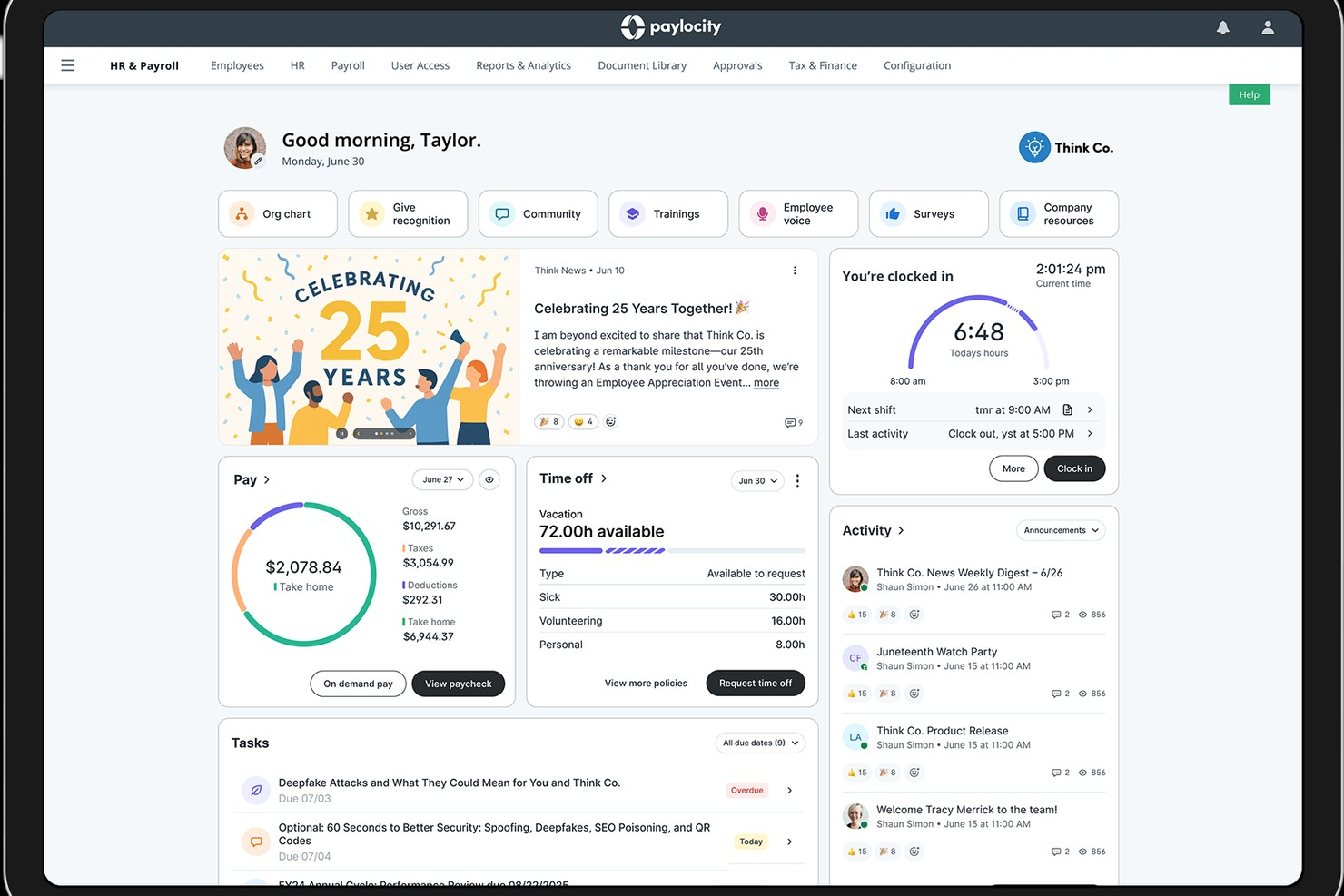
Paylocity offers a unified platform for managing complex employee scheduling needs in large organizations. It’s designed for HR teams and operations leaders who need to coordinate shifts, track time, and ensure compliance across multiple locations or departments. With features that address workforce management challenges at scale, Paylocity helps enterprises streamline scheduling and adapt to changing labor demands.
Who Is Paylocity Best For?
Paylocity suits large organizations and HR teams that need to automate complex, multi-step scheduling and approval workflows.
Why I Picked Paylocity
I picked Paylocity because its workflow automation tools let you design and automate complex scheduling processes that many enterprise organizations require. You can set up custom approval chains, automate notifications for shift changes, and trigger compliance checks based on your own rules. I appreciate how these automation features reduce manual work for HR and operations teams managing large, distributed workforces. This level of customization is especially valuable for companies with unique scheduling policies or multi-location operations.
Paylocity Key Features
Some other features that make Paylocity useful for enterprise scheduling include:
- Mobile self-service tools: Employees can view schedules, request time off, and swap shifts directly from their mobile devices.
- Advanced analytics dashboards: HR and managers can access real-time data on attendance, overtime, and scheduling trends.
- Built-in compliance management: The platform monitors scheduling rules and labor law requirements to help reduce compliance risks.
- Time and attendance tracking: Paylocity captures clock-in and clock-out data and syncs it with scheduling and payroll modules.
Paylocity Integrations
Integrations include Microsoft Entra, Google Workspace, Okta, various applicant tracking systems, job boards, benefits providers, 401(k) and retirement providers, point of sale systems, background check services, and ERP platforms. Paylocity also offers an API for custom integrations.
Pros and Cons
Pros:
- Built-in compliance tracking for labor laws
- Mobile app allows shift swaps and approvals
- Customizable scheduling workflows for complex organizations
Cons:
- Fewer industry-specific scheduling templates available
- No free plan for ongoing use

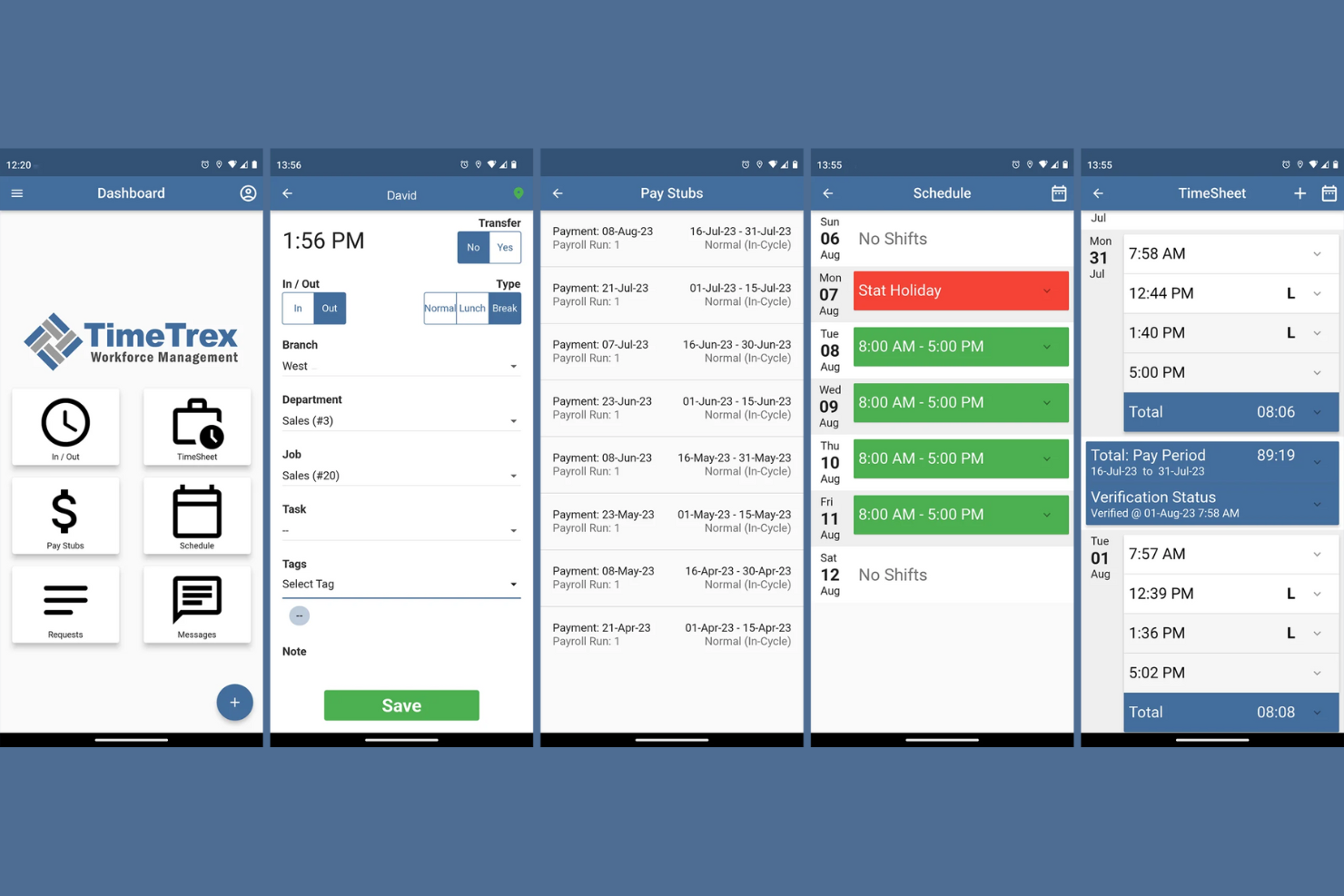
TimeTrex is a workforce management tool that caters to businesses that need integrated scheduling, time tracking, and payroll processing. It's suitable for companies looking to streamline these functions into one platform.
Why I picked TimeTrex: TimeTrex offers payroll integration, allowing you to manage employee scheduling and payroll in one place. You can track employee hours accurately and ensure that payroll is processed without errors. This makes it ideal for businesses aiming to simplify workforce management.
Standout features and integrations:
Features include automated timesheet calculations that reduce manual entry, customizable reporting tools to gain insights into workforce data, and a mobile app for managing schedules on the go.
Integrations include QuickBooks, ADP, Paychex, Sage, and more.
Pros and Cons
Pros:
- Customizable reporting tools
- Steeper learning curve
- Reporting tools lack ease of use
Cons:
- Payroll integration
- Automated timesheet calculations

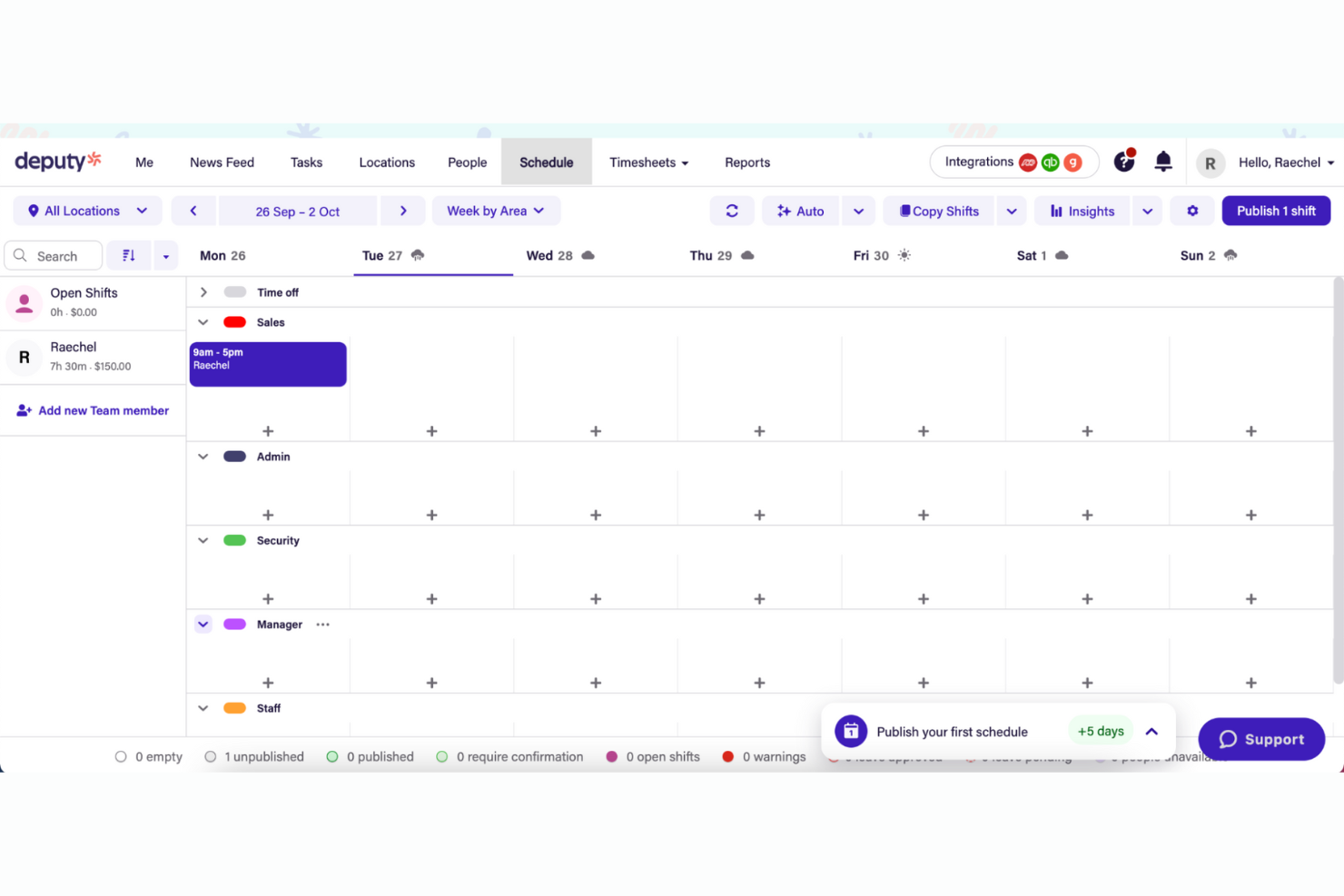
Deputy is a workforce management tool designed for businesses that need flexible scheduling and time tracking. It's ideal for industries such as retail and hospitality where shift swapping is common.
Why I picked Deputy: Deputy offers features that let employees easily trade shifts with each other. You can manage schedules and track time with minimal hassle. The tool's flexibility supports businesses with fluctuating staffing needs. It simplifies communication between managers and staff, keeping everyone informed.
Standout features and integrations:
Features include task management to assign and track tasks, compliance tools to ensure labor law adherence, and a mobile app for managing schedules and timesheets on the go.
Integrations include Xero, ADP, QuickBooks, Square, Gusto, Zapier, BambooHR, NetSuite, and more.
Pros and Cons
Pros:
- Task management included
- Simplifies staff communication
- Supports fluctuating staffing needs
Cons:
- Costs rise with team size
- Limited customization

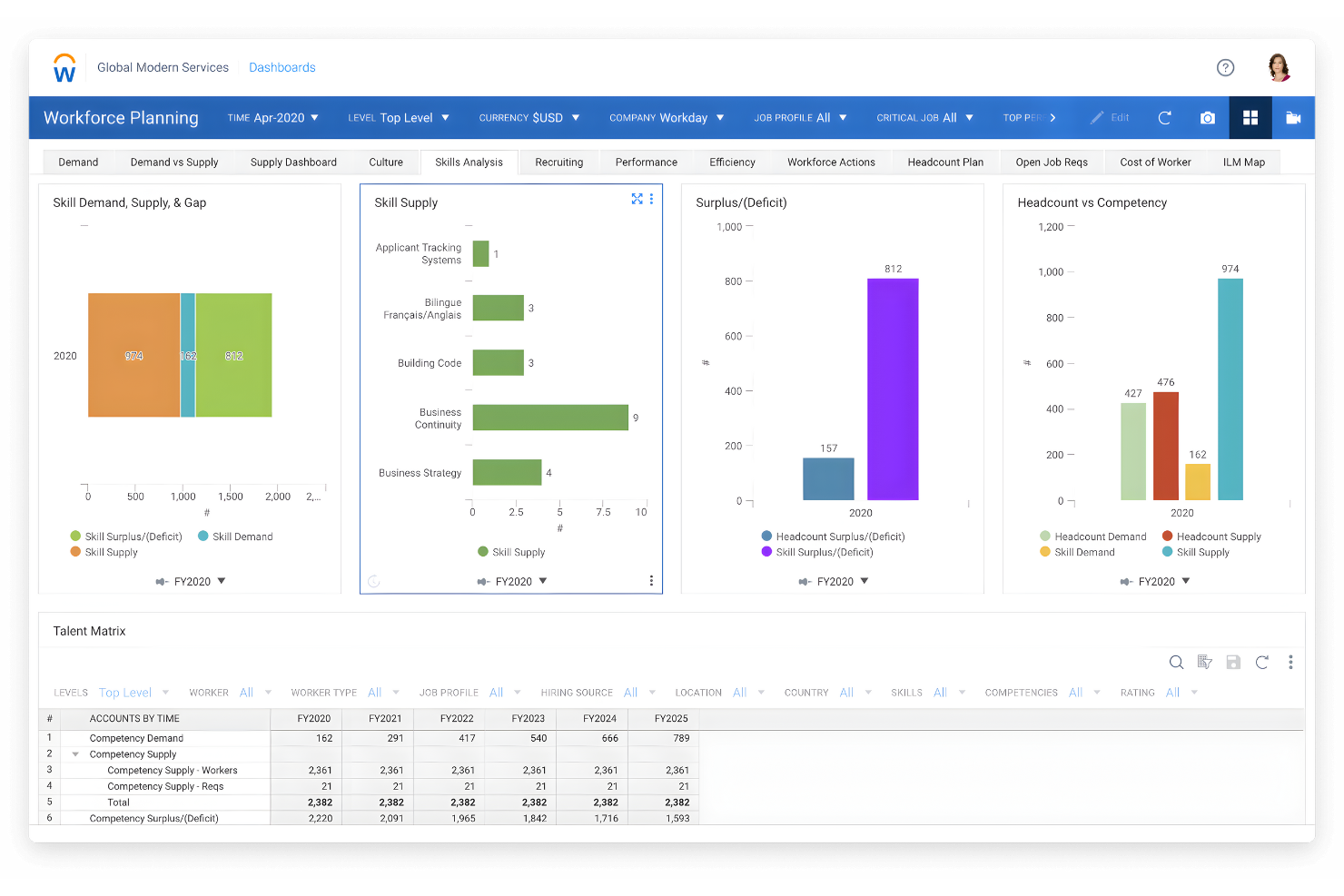
Workday is an enterprise-level software solution designed for human capital management and financial management. It serves large businesses looking to integrate HR processes with their scheduling and workforce management.
Why I picked Workday: Workday excels in HR integration, offering features that connect scheduling with payroll and talent management. You can manage employee data, payroll, and scheduling from one platform. This integration helps streamline HR operations and improve data accuracy. The tool also provides insights into workforce performance and costs.
Standout features and integrations:
Features include workforce planning that helps you optimize staffing levels, performance management to track employee progress, and real-time analytics for informed decision-making.
Integrations include Salesforce, Slack, ServiceNow, Okta, SAP, Oracle, ADP, and more.
Pros and Cons
Pros:
- Enhances data accuracy
- Supports performance management
- HR integration capabilities
Cons:
- Requires technical expertise
- Lengthy implementation process

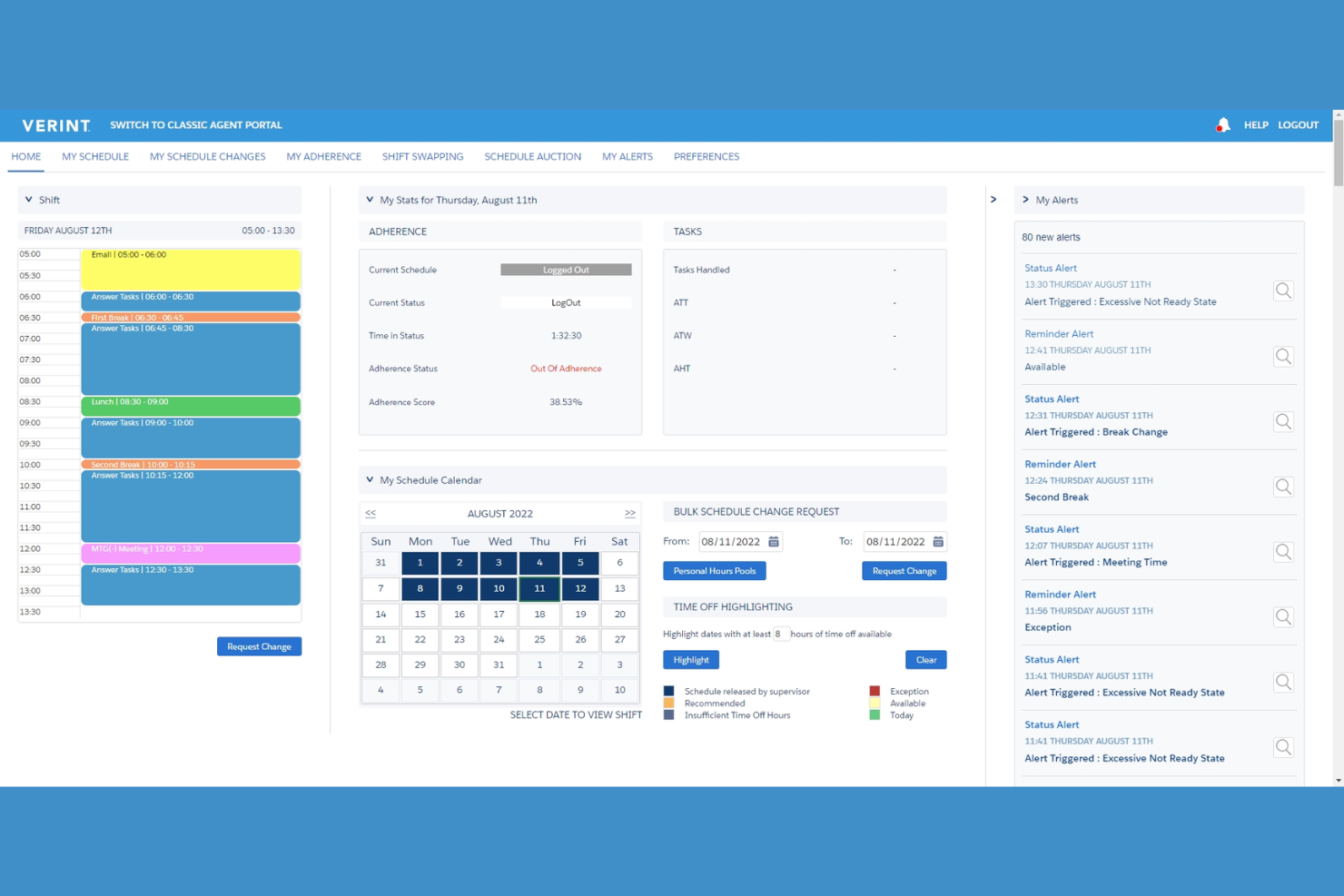
Verint is a workforce management tool that specializes in predictive modeling and analytics, targeting large enterprises that need to optimize their workforce. It helps businesses forecast staffing needs and improve operational performance.
Why I picked Verint: Verint offers advanced predictive modeling capabilities, allowing you to anticipate staffing requirements and adjust schedules proactively. The tool's analytics provide insights into workforce trends and productivity. You can use these insights to make informed decisions about staffing levels and resource allocation. This is particularly valuable for enterprises looking to optimize labor costs and efficiency.
Standout features and integrations:
Features include advanced analytics that help you understand workforce trends, real-time monitoring to track performance, and customizable dashboards for easy data visualization.
Integrations include Salesforce, Microsoft Dynamics, SAP, Oracle, Workday, Kronos, and more.
Pros and Cons
Pros:
- Helps optimize labor costs
- Real-time performance monitoring
- Advanced predictive modeling
Cons:
- Limited customization for small teams
- May require technical expertise
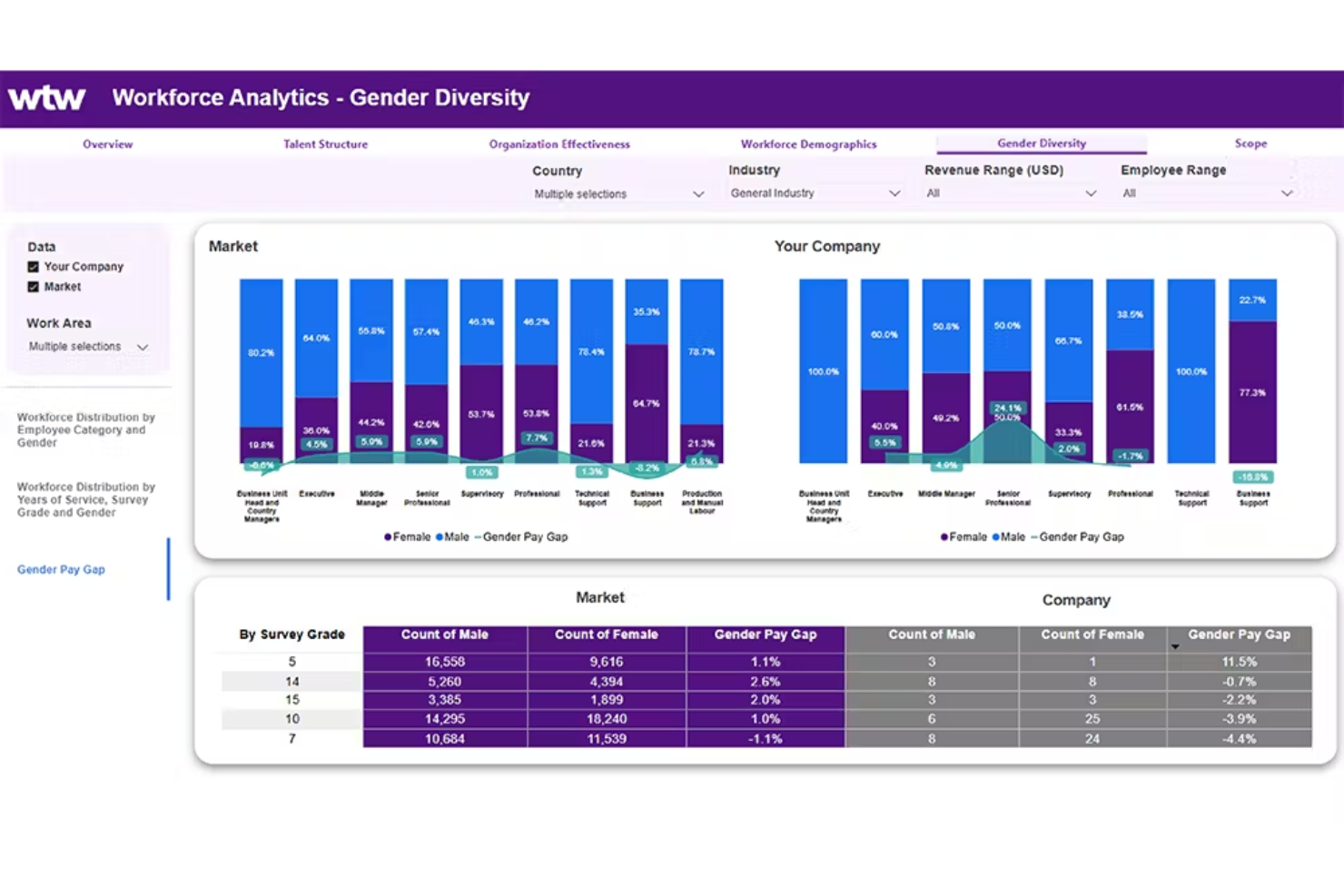
ADP WorkForce Suite provides tools for workforce management and caters primarily to large enterprises. It focuses on scheduling, time tracking, and labor analytics to help businesses optimize their workforce.
Why I picked ADP WorkForce Suite: ADP WorkForce Suite is designed for large-scale operations, offering extensive scheduling options and analytics. It can handle complex scheduling needs, ensuring your workforce is used efficiently. The tool's analytics provide insights into labor costs and productivity. It supports compliance with labor regulations, making it a great fit for large enterprises.
Standout features and integrations:
Features include labor analytics that offer insights into workforce efficiency, compliance management to adhere to labor laws, and mobile-friendly access for managing schedules on the go.
Integrations include SAP, Oracle, QuickBooks, Sage, Xero, and more.
Pros and Cons
Pros:
- Mobile-friendly access
- Supports compliance management
- Strong labor analytics
Cons:
- Requires user training
- Initial setup time-consuming

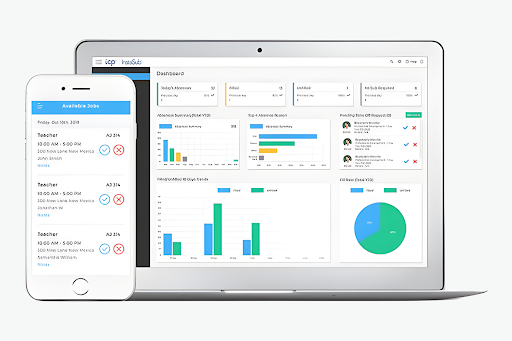
TCP Software is an enterprise solution focused on employee scheduling and time tracking. The company has products designed for industries such as education, healthcare, and public safety, helping manage complex pay rules and compliance.
Why I picked TCP Software: TCP Software excels in compliance tracking and managing complex pay rules, with features like dynamic scheduling and automated time tracking. It integrates with ERP, HCM, and payroll systems to ensure your scheduling and payroll processes are aligned.
Standout features and integrations:
Features include dynamic scheduling that adjusts to your team's needs, automated time tracking to reduce errors, and compliance management to keep your business aligned with regulations.
Integrations include Oracle, ADP, Workday, QuickBooks, Sage, BambooHR, Paychex, and more.
Pros and Cons
Pros:
- Enhances payroll accuracy
- Strong compliance management
- Dynamic scheduling capabilities
Cons:
- Lack of pricing transparency
- Complexity for new users
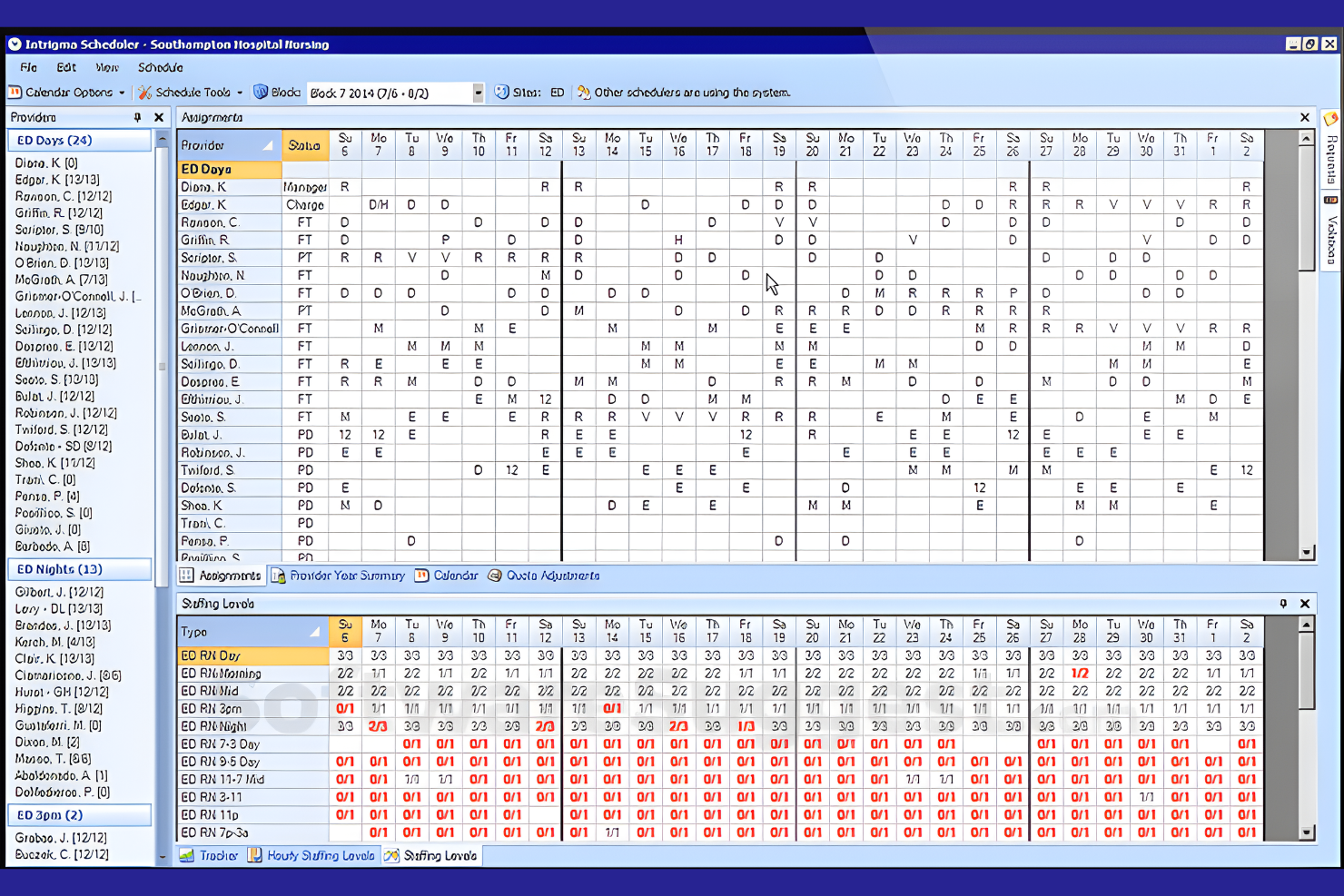
Intrigma is a scheduling solution tailored for the healthcare industry, focusing on shift planning and workforce management. It helps healthcare providers manage staff schedules efficiently.
Why I picked Intrigma: Intrigma is designed specifically for healthcare, offering features such as automatic shift assignments and compliance tracking. The software can handle complex scheduling requirements, ensuring shifts align with skill levels and certifications. The tool's focus on healthcare means it understands the intricacies of medical staff scheduling. It allows you to optimize staffing levels while maintaining compliance with industry regulations.
Standout features and integrations:
Features include automatic shift assignments that consider staff availability, compliance tracking to meet healthcare standards, and secure electronic data exchange through the system's API.
Integrations include Google Calendar, Epic, Outlook, Allscripts, McKesson, Kronos, ADP, and more.
Pros and Cons
Pros:
- Supports complex schedules
- Compliance tracking
- Tailored for healthcare needs
Cons:
- Setup can be time-consuming
- Limited to the healthcare industry
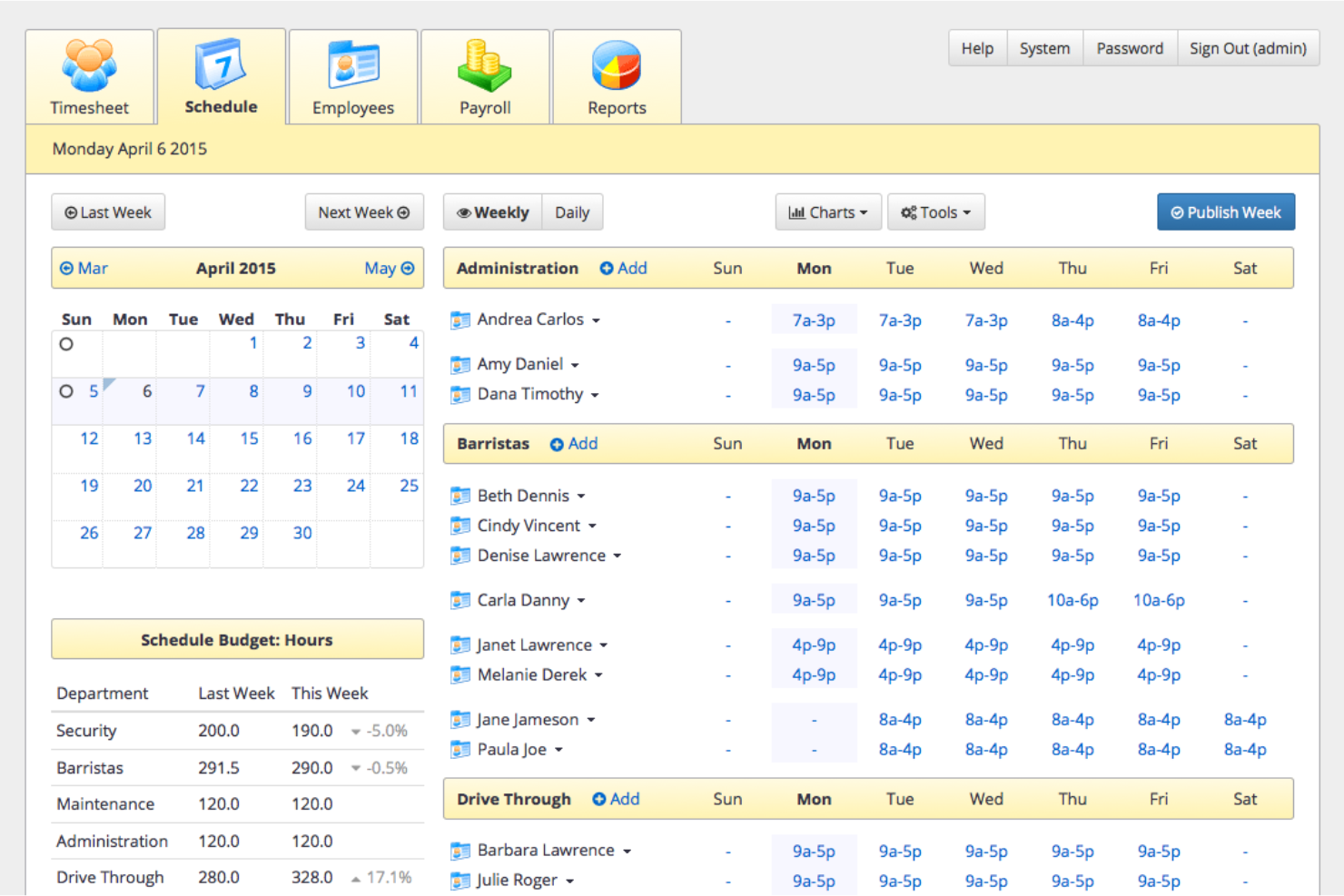
TixTime is an employee scheduling platform designed for organizations with distributed teams that operate across multiple regions. It focuses on reducing scheduling errors caused by time zone differences and improving coordination for large, geographically dispersed workforces.
Why I picked TixTime: TixTime stands out for its automatic time zone conversion, which helps prevent scheduling conflicts for global teams. Managers can coordinate availability across regions without manual adjustments, reducing miscommunication and missed shifts. This makes TixTime a good fit for organizations that need fast, reliable scheduling without complex workforce management requirements.
Standout features and integrations:
Features include automatic time zone conversion to eliminate cross-region scheduling errors, push notifications to keep employees informed of schedule changes, employee self-service access for availability updates, and mobile access so teams can view schedules from anywhere.
Integrations include Google Calendar, Microsoft Outlook, Slack, Zoom, QuickBooks, ADP, Paychex, Xero, BambooHR, and Salesforce.
Pros and Cons
Pros:
- Simple, quick setup
- Employee self-service for availability and schedule access
- Automatic time zone conversions for global teams
Cons:
- Fewer customization options than enterprise WFM platforms
- Limited advanced workforce management features

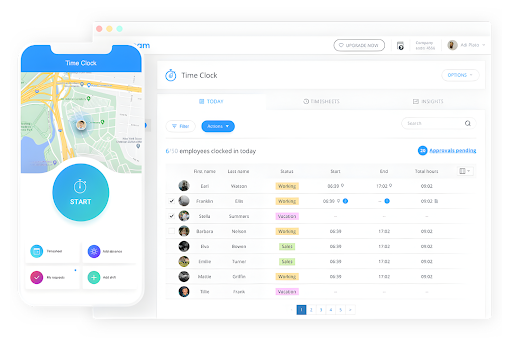
Connecteam is designed for organizations with large, distributed frontline teams that need simple scheduling, time tracking, and communication—without the complexity of full workforce management suites.
Why I picked Connecteam: Connecteam works well for enterprises that prioritize mobility and speed over advanced labor forecasting or union rule engines. Managers can create and adjust shifts, track hours, and send real-time updates directly from a mobile app, while employees can access schedules and tasks on the go. This makes it a strong option for field-based, retail, and frontline teams that rely on fast coordination rather than complex scheduling logic.
Standout features and integrations:
Features include a GPS-enabled time clock for location-based attendance tracking, task management tools for assigning and monitoring frontline work, and an employee directory that centralizes contact details and roles for easy team communication.
Integrations include QuickBooks, Gusto, Xero, Square, Zapier, and more.
Pros and Cons
Pros:
- Real-time updates
- Shift management
- Mobile app accessibility
Cons:
- Requires regular app updates
- Limited offline functionality
Other Enterprise Employee Scheduling Software
Here are some additional enterprise employee scheduling software options that didn’t make it onto my shortlist, but are still worth checking out:
- Homebase
For hourly teams
- UKG
For a global workforce
- When I Work
For small enterprises
- Agendrix
For employee engagement
- Apploye
For remote workforce management
- Zoho Shifts
For budget-friendly scheduling
- Zendesk
For customer support teams
- Workforce.com
For call center scheduling


Enterprise Employee Scheduling Software Selection Criteria
When selecting the best enterprise employee scheduling software to include in this list, I considered common buyer needs and pain points such as managing complex shift patterns and ensuring compliance with labor laws. I also used the following framework to keep my evaluation structured and fair:
Core Functionality (25% of total weighting score)
To be considered for inclusion in this list, each solution had to fulfill these common use cases:
- Schedule shifts
- Track employee hours
- Manage time-off requests
- Automate payroll calculations
- Generate compliance reports
Additional Standout Features (25% of total weighting score)
To help further narrow down the competition, I also looked for unique features, such as:
- Real-time schedule updates
- Mobile app access
- Integration with HR systems
- Predictive scheduling
- Customizable dashboards
Usability (10% of total weighting score)
To get a sense of the usability of each system, I considered the following:
- Intuitive interface
- Easy navigation
- Minimal learning curve
- Customization options
- Accessibility features
Onboarding (10% of total weighting score)
To evaluate the onboarding experience for each platform, I considered the following:
- Availability of training videos
- Interactive product tours
- Chatbot assistance
- Webinars for training
- Pre-built templates
Customer Support (10% of total weighting score)
To assess each software provider’s customer support services, I considered the following:
- 24/7 support availability
- Multiple support channels
- Responsive support team
- Knowledge base access
- Personalized support options
Value For Money (10% of total weighting score)
To evaluate the value for money of each platform, I considered the following:
- Competitive pricing
- Feature set relative to cost
- Flexible pricing plans
- Discounts for annual billing
- Free trial availability
Customer Reviews (10% of total weighting score)
To get a sense of overall customer satisfaction, I considered the following when reading customer reviews:
- Overall satisfaction ratings
- Frequency of updates
- Responsiveness to feedback
- Reported issues and resolutions
- Long-term user retention
How to Choose Enterprise Employee Scheduling Software
It’s easy to get bogged down in long feature lists and complex pricing structures. To help you stay focused as you work through your unique software selection process, here’s a checklist of factors to keep in mind:
| Factor | What to Consider |
|---|---|
| Scalability | Can the software grow with your team? Consider if it handles more employees or locations as your business expands without a hitch. |
| Integrations | Does it connect with your existing systems like payroll or HR software? Ensure it fits into your current tech stack to avoid disruptions. |
| Customizability | Can you adjust the software to fit your unique workflow? Look for tools that let you tailor features without needing a developer. |
| Ease of use | Is the interface intuitive for everyone on your team? Avoid software that requires extensive training or feels clunky to navigate. |
| Implementation and onboarding | How long does it take to get up and running? Watch out for lengthy setups that could delay your operations. Check for training resources, too. |
| Cost | Does the pricing fit your budget? Be wary of hidden fees or plans that don’t offer value for the price. Consider annual vs. monthly billing. |
| Security safeguards | How does it protect your data? Verify encryption, compliance with data laws, and how frequently they update security protocols. |
| Support availability | What kind of support does the vendor offer? Look for 24/7 support if your operations run around the clock, and check if they provide multiple support channels. |
What Is Enterprise Employee Scheduling Software?
Enterprise employee scheduling software is a tool used to manage and automate scheduling for large teams across various industries. HR managers, operations leaders, and team supervisors generally use these tools to plan shifts and manage workforce needs. Automated scheduling, time tracking, and compliance management features help with reducing scheduling conflicts, ensuring labor law compliance, and improving overall productivity. These tools offer valuable insights and control, making workforce management more manageable and efficient.
Features
When selecting enterprise employee scheduling software, keep an eye out for the following key features:
- Automated scheduling: Automatically create and adjust work schedules to save time and reduce errors.
- Time tracking: Accurately track employee time to ensure proper payroll processing and compliance with labor laws.
- Shift swapping: Allow employees to easily trade shifts, reducing scheduling conflicts and enhancing flexibility.
- Compliance management: Ensure your business adheres to labor regulations and standards, minimizing legal risks.
- Mobile access: Enable employees to view schedules and clock in/out from their smartphones for convenience and flexibility.
- Real-time updates: Provide instant schedule changes and push notifications to keep your team informed and aligned.
- Payroll integration: Seamlessly connect scheduling with payroll systems to streamline pay processing and reduce administrative workload.
- Customizable reporting: Generate tailored reports to gain insights into workforce productivity and scheduling features efficiency.
- Employee self-service: Allow team members to manage their availability and requests, empowering them and reducing administrative tasks.
- Task management: Assign and track tasks alongside scheduling to ensure operational efficiency and accountability.
Benefits
Implementing enterprise employee scheduling software provides several benefits for your team and your business. Here are a few you can look forward to:
- Efficiency gains: Automated scheduling features and time tracking save time and reduce manual errors, allowing your team to focus on more important tasks.
- Improved compliance: Compliance management ensures your business meets labor regulations, minimizing the risk of legal issues.
- Enhanced flexibility: Shift swapping and mobile devices empower employees with more control over their schedules, boosting morale and reducing absenteeism.
- Cost savings: Payroll integration and accurate time tracking help prevent overpayments and optimize labor costs.
- Increased transparency: Real-time updates and reporting provide clear visibility into scheduling and workforce dynamics, improving decision-making.
- Employee empowerment: Self-service features allow team members to manage their employee time and requests, fostering a sense of ownership and responsibility.
- Better communication: Task management and notifications keep everyone informed and aligned, promoting smoother operations.
Costs & Pricing
Selecting enterprise employee scheduling software requires an understanding of the various pricing models and plans available. Costs vary based on features, team size, add-ons, and more. The table below summarizes common plans, their average prices, and typical features included in enterprise employee scheduling software solutions:
Plan Comparison Table for Enterprise Employee Scheduling Software
| Plan Type | Average Price | Common Features |
|---|---|---|
| Free Plan | $0 | Basic scheduling, time tracking, and limited reporting. |
| Personal Plan | $5-$25/user/month | Advanced scheduling, mobile access, and shift swapping. |
| Business Plan | $25-$50/user/month | Compliance management, payroll integration, and customizable reporting. |
| Enterprise Plan | $50+/user/month | Full customization, dedicated support, and advanced analytics. |
Enterprise Employee Scheduling Software FAQs
Here are some answers to common questions about enterprise employee scheduling software:
What should I look for in a vendor's customer support?
Look for vendors offering 24/7 support, multiple channels such as chat and phone, and a responsive support team. Check if they have an extensiveknowledge base and offer personalized support options. These factors ensure you get help when you need it, minimizing downtime for your team. A user-friendly interface and mobile device support can also improve accessibility and convenience for your staff.
Do I need technical skills to implement the software?
No, most enterprise employee scheduling software is designed for ease of use, but some technical setup may be needed. Vendors often provide implementation support, including setup guides and training resources. If you’re not tech-savvy, choose a vendor with strong onboarding support and clear documentation.
How do I ensure data security with scheduling software?
Ensure the software uses encryption and complies with data protection regulations such as GDPR. Ask vendors about their security protocols and how often they update them. It’s important to know who has access to your data and how it’s being protected to safeguard your team’s information. Advanced features like geofencing can also provide added security for tracking employee attendance.
Can scheduling software integrate with my existing systems?
Yes, many scheduling tools offer integrations with payroll, HR, and communication systems. Check the software’s integration capabilities and ensure it connects with your current tools. Native integrations reduce manual data entry and ensure consistent information across platforms, saving you time and effort. Make sure it supports open shifts and attendance tracking with your existing solutions.
How can scheduling software improve employee engagement?
Scheduling software can boost employee engagement by giving workers more control over their shifts, such as the ability to request time off or swap shifts easily. This flexibility shows employees you value their input and helps reduce frustration with rigid schedules. It also helps managers ensure fair distribution of hours, which can improve morale and retention. Features like employee availability and notifications for right-time scheduling can also enhance engagement and communication.
What should I consider when scaling scheduling software for a growing team?
As your team expands, look for software that can handle increased complexity, such as managing multiple locations, departments, or roles. Ensure it can scale without compromising functionality or performance. You’ll also want to evaluate the software’s reporting capabilities to track key metrics like labor costs, attendance, and shift patterns as your workforce grows. Make sure it can easily integrate with other workforce management software to meet your evolving needs.
What’s Next:
If you're in the process of researching enterprise employee scheduling software, connect with a SoftwareSelect advisor for free recommendations.
You fill out a form and have a quick chat where they get into the specifics of your needs. Then you'll get a shortlist of software to review. They'll even support you through the entire buying process, including price negotiations.