

10 Best Job Description Bias Checker in 2026

Best Job Description Bias Checker Shortlist


A job description bias checker is a tool that scans your job postings for biased or exclusionary language before they reach candidates. If you want to attract a diverse, qualified team and reduce unintentional barriers in your hiring process, the right tool makes all the difference.
This guide covers what top bias checkers offer, why leading HR teams use them, and how you can use these solutions to write job descriptions that promote fairness, compliance, and inclusion in 2026.
Why Trust Our Software Reviews
Our team has been testing and reviewing software since 2012. As HR experts ourselves, we know how difficult—and important—it is to choose the right software.
For this guide, we evaluated tools using hands-on testing and independent research, scoring tools using our selection criteria. We also draw on insights from industry thought leaders and practicing HR experts.
Our reviews reflect our human editorial judgment, not a sales pitch.
Expert reviewers:
Best Job Description Bias Checker Summary
This comparison chart summarises pricing details for my job description bias checker to help you find the best one for your budget and business needs.
| Tool | Best For | Trial Info | Price | ||
|---|---|---|---|---|---|
| 1 | Best for interview-informed JD bias checks | Free plan available | From $100/user/month | Website | |
| 2 | Best for pay-informed JD bias checks at scale | Free plan + free demo available | Pricing upon request | Website | |
| 3 | Best for research-backed, multi-category bias checks | Free demo available | From $20,000/year (billed annually) | Website | |
| 4 | Best for full-cycle DEI hiring in staffing firms | Not available | Pricing upon request | Website | |
| 5 | Best for tailored language compliance monitoring | Free demo available | Pricing upon request | Website | |
| 6 | Best for third-party-certified AI bias governance | Free demo available | From $28,000/year (billed annually) | Website | |
| 7 | Best for data-driven 8-category bias detection | Free demo available | Pricing upon request | Website | |
| 8 | Best for outcome-tied inclusive language coaching | Free demo available | Pricing upon request | Website | |
| 9 | Best for automated writing guidance at scale | Free demo available | From $4,900/year | Website | |
| 10 | Best for science-backed subtle bias detection | Free demo available | Pricing upon request | Website |
Best Job Description Bias Checker Reviews
Below are my detailed summaries of the best job description bias checker tools that made it onto my shortlist. My reviews offer a detailed look at the features, integrations, and best use cases of each tool to help you find the best one for you.

Metaview
Best for interview-informed JD bias checks
My Evaluation Score
- Bias Detection Engine
- 3/5
- Job Description Editor
- 4/5
- Bias Scoring & Reporting
- 1/5
- ATS / Workflow Integration
- 5/5
- Multi-Category Bias Coverage
- 2/5
- Inclusive Language Suggestions
- 4/5
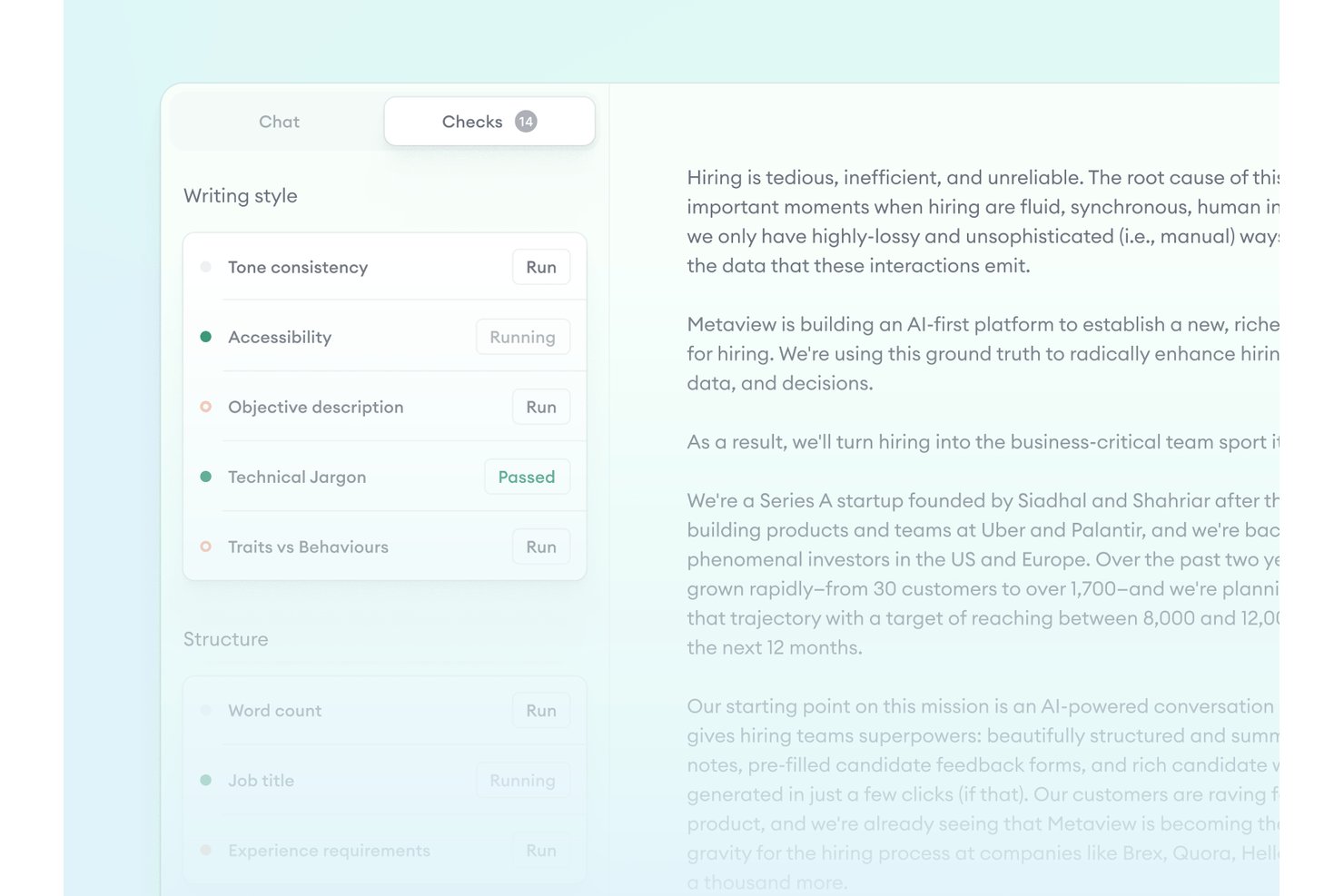
Metaview is an agentic recruiting platform with a Job Posts feature that flags gendered language, non-inclusive terms, and overly competitive phrasing in job descriptions while cross-referencing posts against interview scorecards and intake calls.
Who Is Metaview Best For?
Metaview suits talent acquisition teams that want job description bias checks tied directly to intake calls and interview scorecards, rather than a standalone editing tool.
Why I Picked Metaview
I picked Metaview as one of the best because of its interview-informed approach to JD bias checks, which no other tool on this list replicates. The Job Posts feature cross-references live and draft job descriptions against intake call recordings and scorecards, flagging gaps where a hiring manager's stated requirements don't match what's actually posted. It also catches gendered language, non-inclusive terms, and overly competitive phrasing while enforcing your brand voice so rewrites stay on-tone.
Metaview Key Features
- Brand voice enforcement: The AI learns your company's employer value proposition and tone, so any bias-related rewrites stay on-brand rather than generic.
- ATS write-back: Metaview pushes updated job post data directly back into connected ATS platforms, including Greenhouse, Lever, and Ashby.
- Customizable checks: Teams can configure which DEI and quality checks apply to their job posts based on internal standards.
- Multilingual job post support: The platform supports 50+ languages, letting global teams run checks on job descriptions written outside of English.
Metaview Integrations
Metaview has 47+ native ATS integrations, including Greenhouse, Lever, Workday, Ashby, iCIMS, SmartRecruiters, and SAP SuccessFactors. ATS write-back is supported for Ashby, Greenhouse, and Lever; no public API is currently listed.
Pros and Cons
Pros:
- Checks job posts in 50+ languages
- Customizes bias suggestions to your brand voice
- Flags language based on interview insights
Cons:
- Limited coverage of bias categories beyond gender
- No numeric bias scores or DEI dashboard
My Evaluation Score
- Bias Detection
- 3/5
- Reporting & Analytics
- 4/5
- Job Description Scoring
- 4/5
- Multi-Category Bias Coverage
- 2/5
- Inclusive Language Suggestions
- 4/5
- JD Editor or Workflow Integration
- 4/5
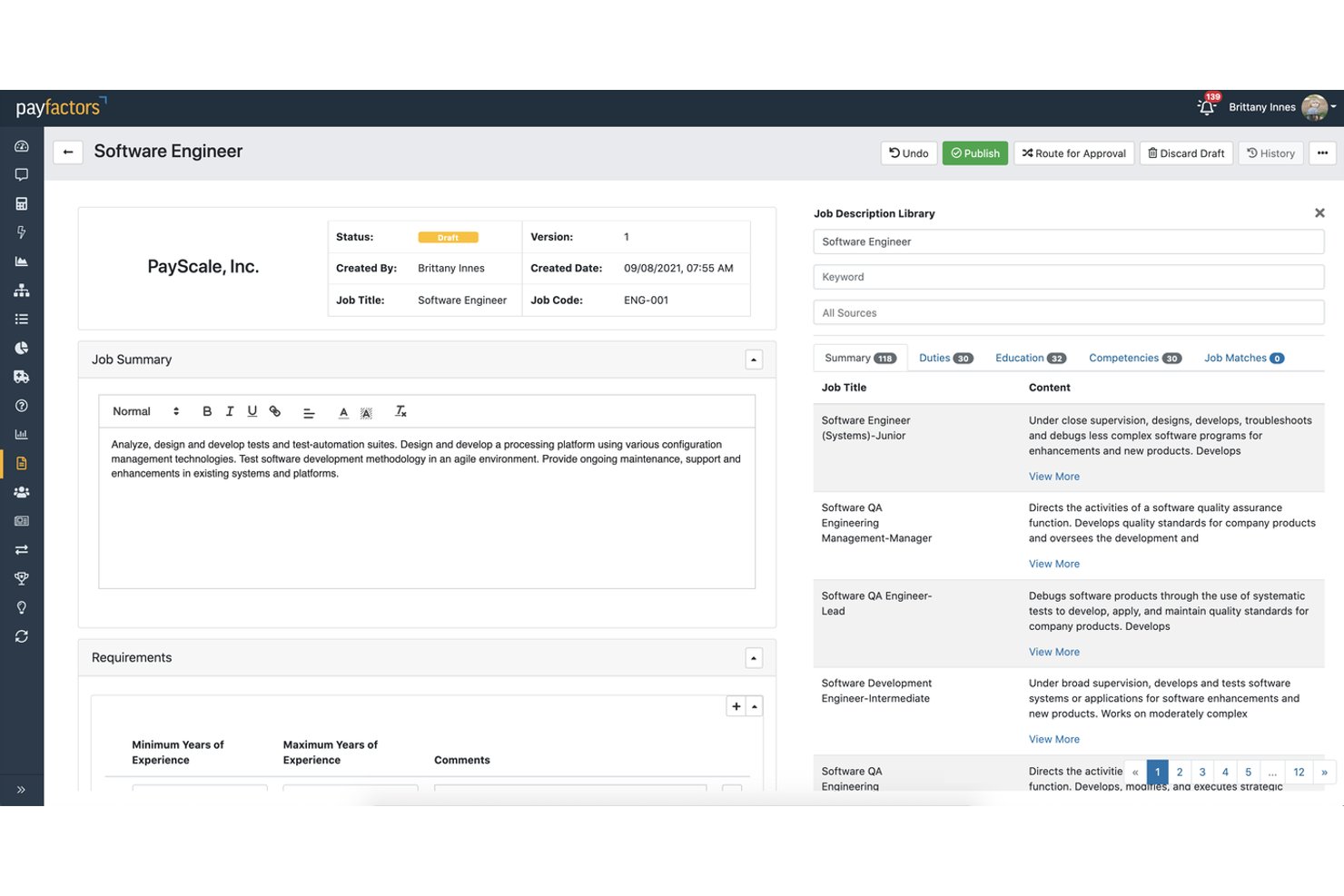
Payscale is a compensation intelligence platform that, through its JobNav Recruiter module, combines AI-guided job description scoring, inclusive language generation, and multi-country compliance checks to help enterprise teams create and manage job postings at scale.
Who Is Payscale Best For?
Payscale is a strong fit for enterprise TA and HR teams that need inclusive JD creation, pay transparency compliance, and compensation alignment in a single workflow.
Why I Picked Payscale
I picked Payscale as one of the best because no other tool on this list ties pay transparency compliance directly into the JD bias review process. When your team is writing a posting, JobNav Recruiter scores it across inclusivity, compliance, and clarity simultaneously, so you're catching biased language and illegal pay omissions in the same pass. I especially like that it's built on data from over 100 million jobs, which gives the AI-generated rewrites real market grounding rather than generic substitutions.
Payscale Key Features
- AI job description scoring: Evaluates each JD across inclusivity, compliance, and clarity simultaneously before the posting goes live.
- Governed job architecture: Locks job levels, families, and a mapped skills library to enforce consistent, inclusive language across all postings.
- Greenhouse bidirectional sync: Automatically syncs job content between JobNav Recruiter and Greenhouse every 20 minutes, keeping postings consistent across platforms.
- Multi-country compliance checks: Automatically flags pay transparency and regulatory requirements across 80+ countries, including US state-level laws and the EU Directive.
Payscale Integrations
Payscale offers a native bidirectional Greenhouse integration, references Workday connectivity, and provides 14 HRIS integrations through its Partner Marketplace. Its API supports custom integrations.
Pros and Cons
Pros:
- Generates inclusive language from job architecture
- Scores job descriptions before posting live
- Flags pay transparency and compliance issues
Cons:
- Not a dedicated standalone bias checker
- Bias categories not specifically broken out

Best for research-backed, multi-category bias checks
My Evaluation Score
- Bias Detection Engine
- 5/5
- Job Description Editor
- 4/5
- Bias Scoring & Reporting
- 2/5
- ATS / Workflow Integration
- 5/5
- Multi-Category Bias Coverage
- 4/5
- Inclusive Language Suggestions
- 3/5
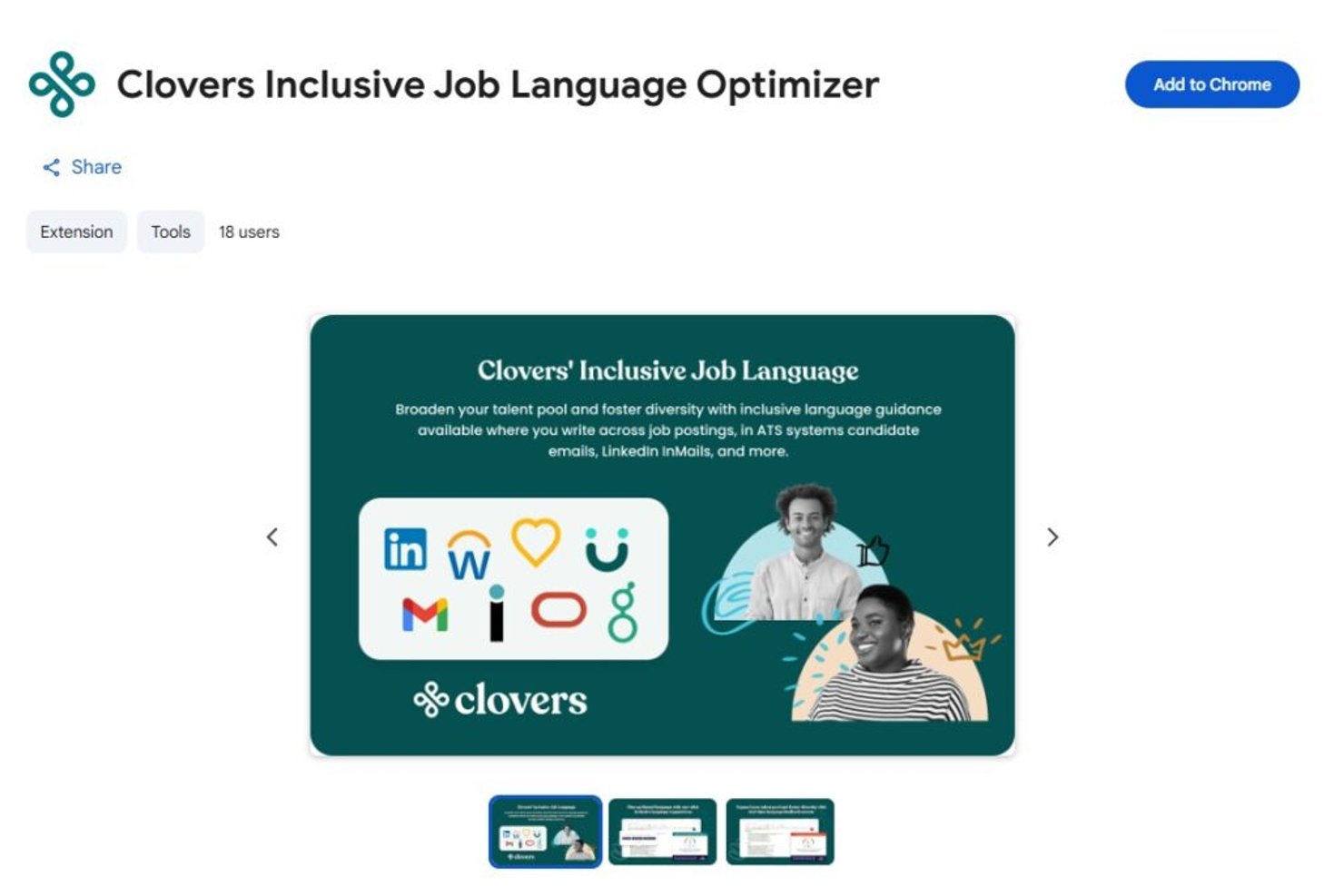
Clovers AI is a job description bias checker and inclusive hiring platform that combines a research-validated language optimization engine with an AI-powered job description editor, multi-category bias scoring, and a Chrome extension for in-browser editing.
Who Is Clovers AI Best For?
Clovers AI is a strong fit for enterprise talent acquisition teams that need bias detection grounded in peer-reviewed research across multiple protected categories.
Why I Picked Clovers AI
I picked Clovers AI because its bias detection engine is one of the few I've seen grounded in actual peer-reviewed research, specifically a Duke University study that informs how it flags language across six protected categories: gender, race, ethnicity, disability, veteran status, and LGBTQ+ identity. The Chrome extension checks language in real time, directly inside whatever tool you're already writing in, so there's no copy-paste step slowing you down. I also think the live inclusion score, which updates as you edit, gives recruiters immediate, concrete feedback rather than a vague pass/fail result.
Clovers AI Key Features
- ATS integrations: Connects natively with 12+ ATS and HRIS platforms, including Greenhouse, Workday, Lever, and SAP SuccessFactors, with two-way sync support.
- Chrome extension: Checks job description language for bias directly in your browser, across ATS platforms, Google Docs, and email, without copy-pasting text.
- Closed-loop hiring workflow: Combines job description optimization with structured interview question generation and interview transcription, covering bias detection across the full hiring process.
- SOC 2 Type II and GDPR compliance: Meets enterprise security and data privacy requirements out of the box.
Clovers AI Integrations
Clovers AI offers 12+ native ATS and HRIS integrations, including Greenhouse, Workday, Lever, and SAP SuccessFactors. It also supports two-way sync, SSO, and API access for custom integrations.
Pros and Cons
Pros:
- Inclusion score updates as you edit
- Chrome extension checks JDs in real time
- Flags bias across six protected categories
Cons:
- Limited in-app coaching on language choices
- No feature for pay transparency compliance
My Evaluation Score
- Bias Detection Engine
- 4/5
- Job Description Editor
- 2/5
- Bias Scoring & Reporting
- 4/5
- ATS / Workflow Integration
- 4/5
- Multi-Category Bias Coverage
- 5/5
- Inclusive Language Suggestions
- 4/5
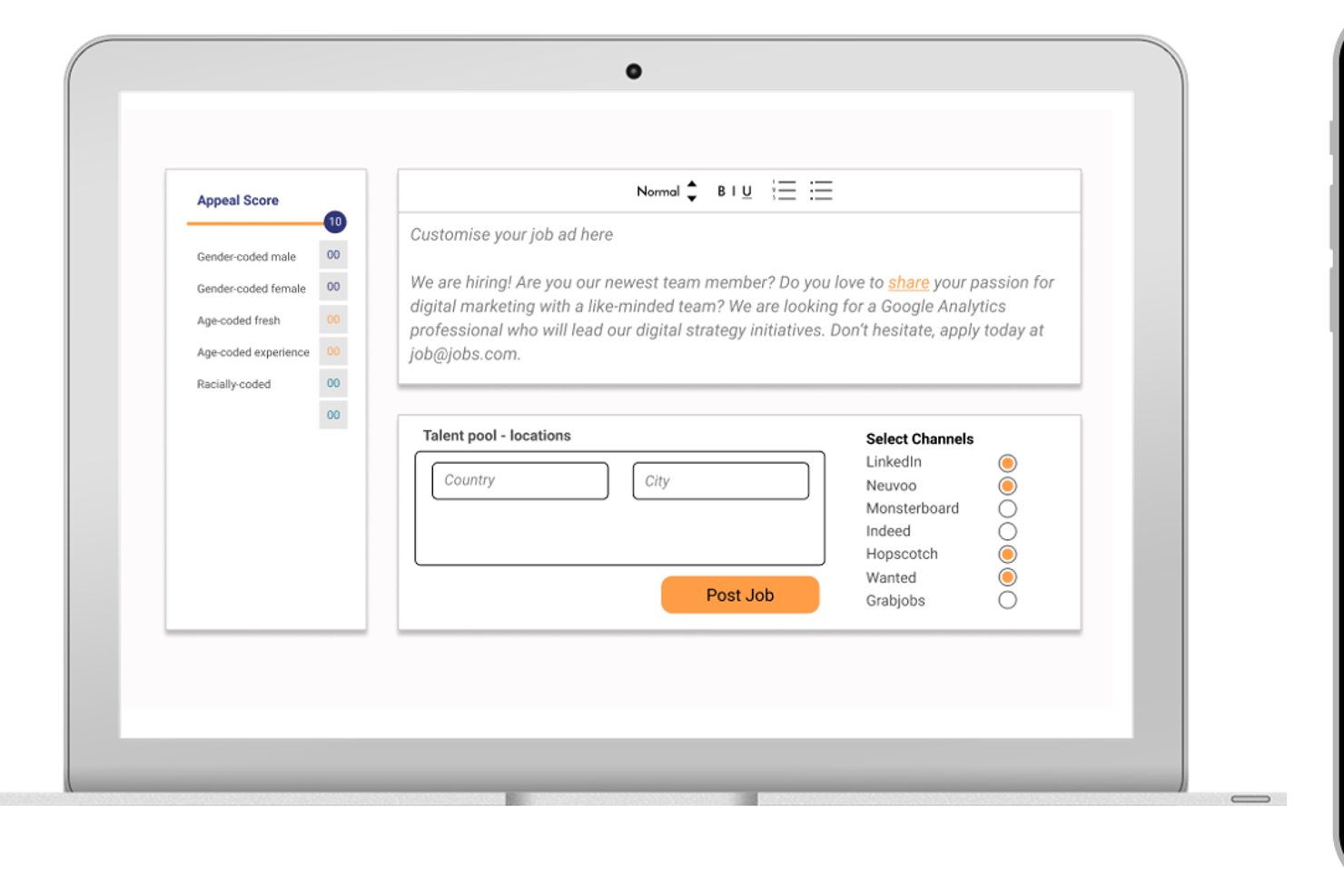
Diversely.io is a DEI recruiting platform that combines an AI-powered job ad bias analyser, anonymized candidate screening, diversity-focused job board distribution, and multi-dimensional diversity tracking across up to eight demographic dimensions.
Who Is Diversely.io Best For?
Diversely.io is a strong fit for staffing firms and recruitment agencies that want to embed DEI practices across the full hiring cycle, from job ad writing to candidate screening.
Why I Picked Diversely.io
I've included Diversely.io in my top picks because it goes well beyond a standalone bias checker, covering the full hiring cycle from job ad analysis to anonymized screening and DEI reporting. I especially like how the AI-powered Bias Analyser doesn't just flag gendered or exclusionary language; it actively suggests inclusive rewrites, which is exactly what staffing firms need when processing high volumes of job ads across multiple clients. The platform also tracks up to eight diversity dimensions, including socioeconomic status, and distributes postings to niche diversity job boards to actively broaden candidate pools.
Diversely.io Key Features
- Profile anonymiser: Automatically rewrites candidate profiles to remove identifying details like name, age, and school, leaving only skills-relevant content for shortlisting.
- Niche job board distribution: Posts job ads to diversity-specific and niche job boards globally to reach underrepresented candidate pools.
- Customizable diversity dashboard: Tracks hiring diversity data in real time, with filters by country, department, and role, plus Excel export for reporting.
- ATS integrations: Connects natively with Greenhouse, JobAdder, Bullhorn, SAP SuccessFactors, and Recruitee to embed DEI tracking directly into existing hiring workflows.
Diversely.io Integrations
Diversely.io has native integrations with Greenhouse, JobAdder, Bullhorn, SAP SuccessFactors, and Recruitee. Bryq, Crelate, Access Volcanic, and an API support additional connections.
Pros and Cons
Pros:
- Anonymizes profiles for fairer candidate review
- AI suggests inclusive rewrites for job ads
- Tracks up to eight diversity dimensions
Cons:
- No pay transparency compliance flagging
- Not available as a standalone product
My Evaluation Score
- Bias Detection Engine
- 4/5
- Job Description Editor
- 4/5
- Bias Scoring & Reporting
- 4/5
- ATS / Workflow Integration
- 5/5
- Multi-Category Bias Coverage
- 3/5
- Inclusive Language Suggestions
- 3/5
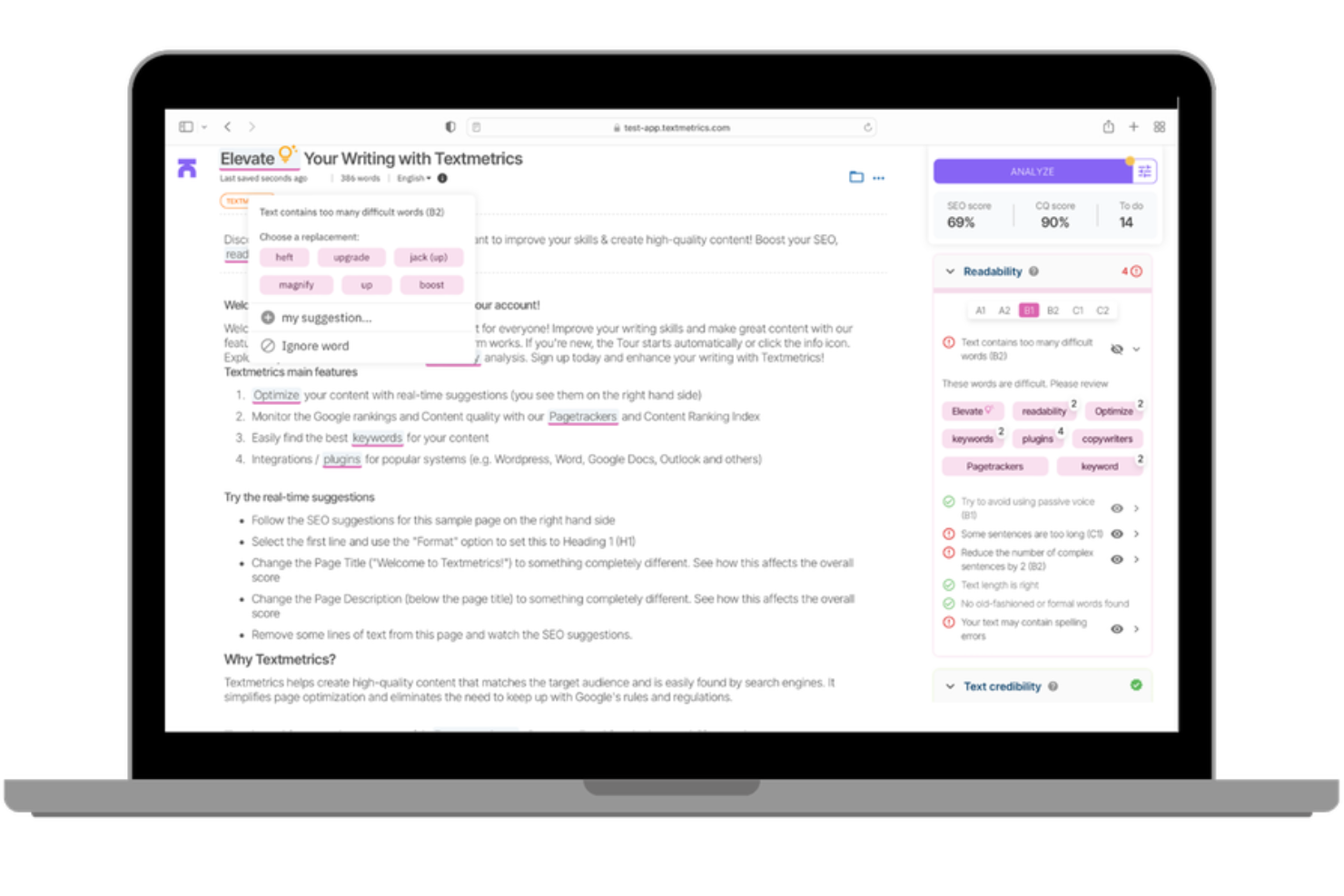
An AI-powered content compliance platform, Textmetrics scans job descriptions for gender bias, inclusive language issues, and readability gaps using configurable rules your organization sets.
Who Is Textmetrics Best For?
Textmetrics is a good fit for HR and employer branding teams in regulated industries where inclusive language in job postings needs to align with internal DEI policies or regional compliance standards.
Why I Picked Textmetrics
Textmetrics is one of my top picks because I love that it builds language compliance into the writing process itself, not just as a post-draft review. The custom word list feature lets my team flag or block specific terms that conflict with our inclusion standards, which I find more practical than relying on a generic ruleset.
I also use the multi-language support to apply the same compliance standards across postings written in different languages, keeping our standards consistent globally.
Textmetrics Key Features
- Gender bias score: Rates each job posting on a male-to-female language scale so you can see at a glance how gendered your text reads.
- Readability scoring: Analyzes text complexity against a target reading level to keep job postings accessible to a wider candidate pool.
- Tone of voice checker: Compares your writing against predefined brand voice guidelines to keep postings consistent across authors.
- ATS plugin integration: Embeds the writing assistant directly into your existing ATS so writers get compliance feedback without switching tools.
Textmetrics Integrations
Integrations include Greenhouse, SmartRecruiters, Lever by Employ, Recruitee, Pinpoint, Ubeeo, WordPress, Drupal, Optimizely, and Adobe Experience Manager.
Pros and Cons
Pros:
- Real-time inclusivity suggestions while you write
- Offers extensive multilingual support
- Broad scope of identity checks
Cons:
- No auto-apply for suggested text changes
- Limited accuracy with complex non-English grammar
X0PA AI
Best for third-party-certified AI bias governance
My Evaluation Score
- Bias Detection Engine
- 4/5
- Job Description Editor
- 5/5
- Bias Scoring & Reporting
- 4/5
- ATS / Workflow Integration
- 5/5
- Multi-Category Bias Coverage
- 4/5
- Inclusive Language Suggestions
- 4/5
X0PA AI is an AI-powered recruiting platform that embeds bias detection directly into its job description generator, scanning for gendered, racial, ethnic, and cultural language across 72+ languages with inclusive rewrite suggestions built into the creation flow.
Who Is X0PA AI Best For?
X0PA AI suits multinational enterprise teams that need job description bias checks across dozens of languages and regions within a single recruiting platform.
Why I Picked X0PA AI
I picked X0PA AI as one of the best because no other tool on this list scans for gendered, racial, ethnic, and cultural bias across 72+ languages, which matters when you're hiring across regions where language nuance shifts dramatically. The bias detection is baked into the JD generation flow, so inclusive rewrites happen during drafting, not after. It's also the only tool here with independent AI fairness certifications from Singapore's IMDA and Dubai's AI Center, giving enterprise DEI teams third-party validation beyond vendor self-reporting.
X0PA AI Key Features
- EEO statement auto-inclusion: The generator automatically embeds EEO and compliance statements into every job description it produces.
- Unlimited JD variants: You can generate multiple versions of a job description for A/B testing or platform-specific publishing.
- Adverse impact calculator: A built-in tool quantifies hiring bias across gender and race/ethnicity using the EEOC Four-Fifths Rule.
- One-click job board publishing: Completed job descriptions publish directly to 2,000+ job boards from within the platform.
X0PA AI Integrations
X0PA AI offers 60+ pre-built integrations, including Greenhouse, Workday, SAP SuccessFactors, Oracle HCM, Lever, SmartRecruiters, Taleo, and Jobvite. Its API supports custom connectors for additional HR systems.
Pros and Cons
Pros:
- Embedded inclusive rewrites during JD drafting
- Bias checks in 72+ languages and regions
- Certified for fairness by independent AI bodies
Cons:
- No standalone option for job description scanning
- Only available within larger recruiting platform

My Evaluation Score
- Bias Detection Engine
- 5/5
- Job Description Editor
- 5/5
- Bias Scoring & Reporting
- 5/5
- ATS / Workflow Integration
- 5/5
- Multi-Category Bias Coverage
- 5/5
- Inclusive Language Suggestions
- 4/5
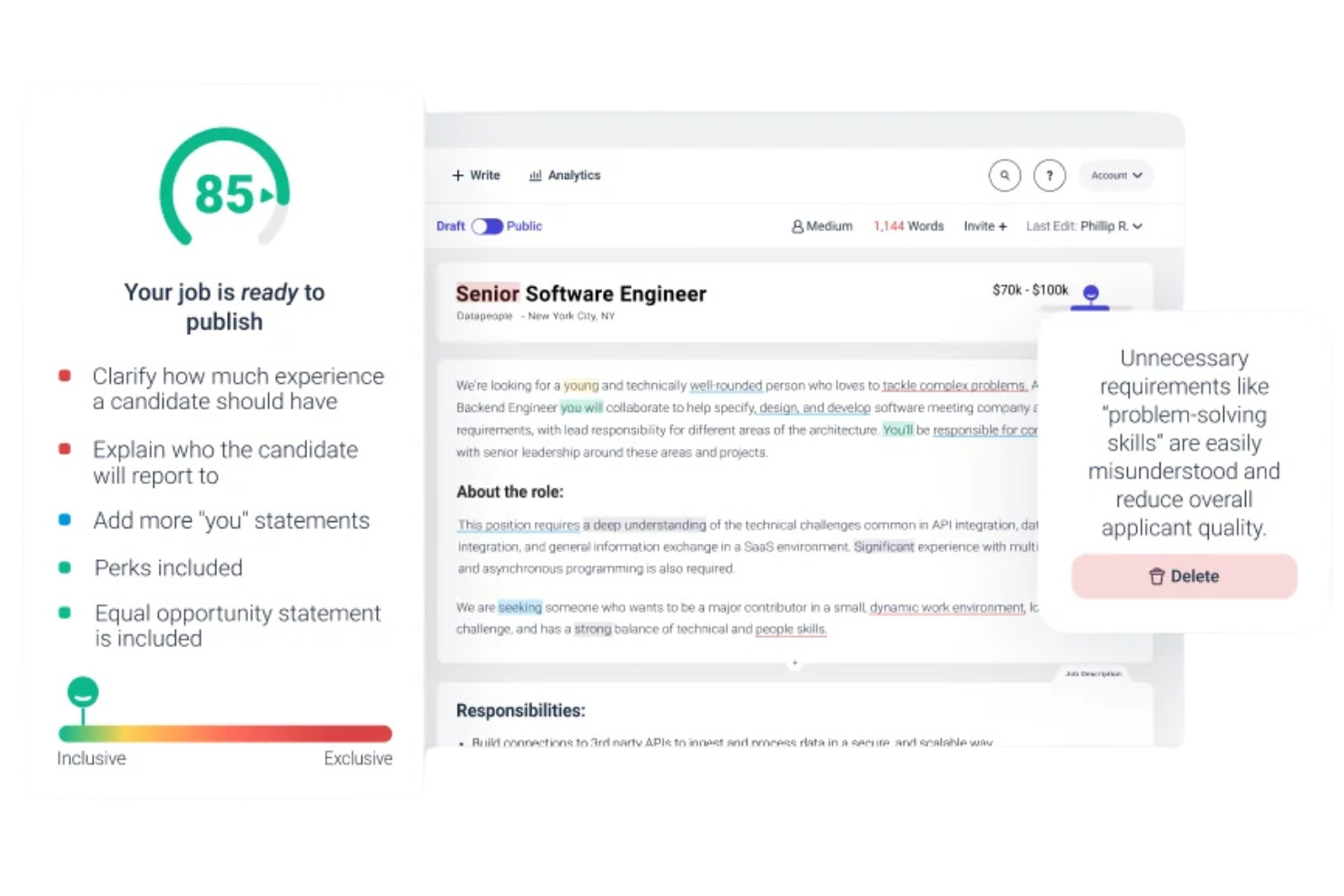
Datapeople is a job description optimization platform that combines talent-focused AI, bias and language scoring, template management, and policy controls to help teams write, standardize, and publish job ads.
Who Is Datapeople Best For?
Datapeople is a strong fit for recruiting teams and talent operations leaders who need data-backed visibility into how job description language affects candidate attraction.
Why I Picked Datapeople
I've included Datapeople in my top picks because the language analytics are genuinely differentiated from what I see in most other tools. Rather than a single bias score, Datapeople uses a colour-coded five-category system, flagging eight specific bias types in yellow, removing harmful content in red, and reinforcing good language choices in green.
My team can see exactly what kind of problem each flag represents, which makes corrections faster and more consistent. I also rely on the competitive job benchmarking feature, which lets you compare your posting against similar open roles from local talent competitors.
Datapeople Key Features
- Policy and style guides: Configure custom rules for tone, required content sections, and employer brand guidelines that apply across every job description your team publishes.
- AI first draft generation: Produces an initial job description draft using talent-trained AI, pulling from a dataset of over 100 million jobs and outcomes.
- Requirements analysis: Flags requirement combinations, degree mandates, and overloaded tech stacks that are likely to narrow or deter qualified applicants.
- Browser overlay: Surfaces real-time Datapeople guidance directly inside your ATS, so hiring managers can write and edit without leaving their existing workflow.
Datapeople Integrations
Datapeople offers native ATS integrations with Greenhouse, Lever, Workday, iCIMS, SmartRecruiters, SAP SuccessFactors, and GR8 People, with bidirectional sync and SSO support.
Pros and Cons
Pros:
- Hiring managers can self-edit in the ATS
- Scores predict real-world job post performance
- Explains the reason behind each bias flag
Cons:
- Lacks native API configurations
- No independent desktop client application
My Evaluation Score
- Bias Detection Engine
- 5/5
- Job Description Editor
- 5/5
- Bias Scoring & Reporting
- 4/5
- ATS / Workflow Integration
- 4/5
- Multi-Category Bias Coverage
- 5/5
- Inclusive Language Suggestions
- 5/5
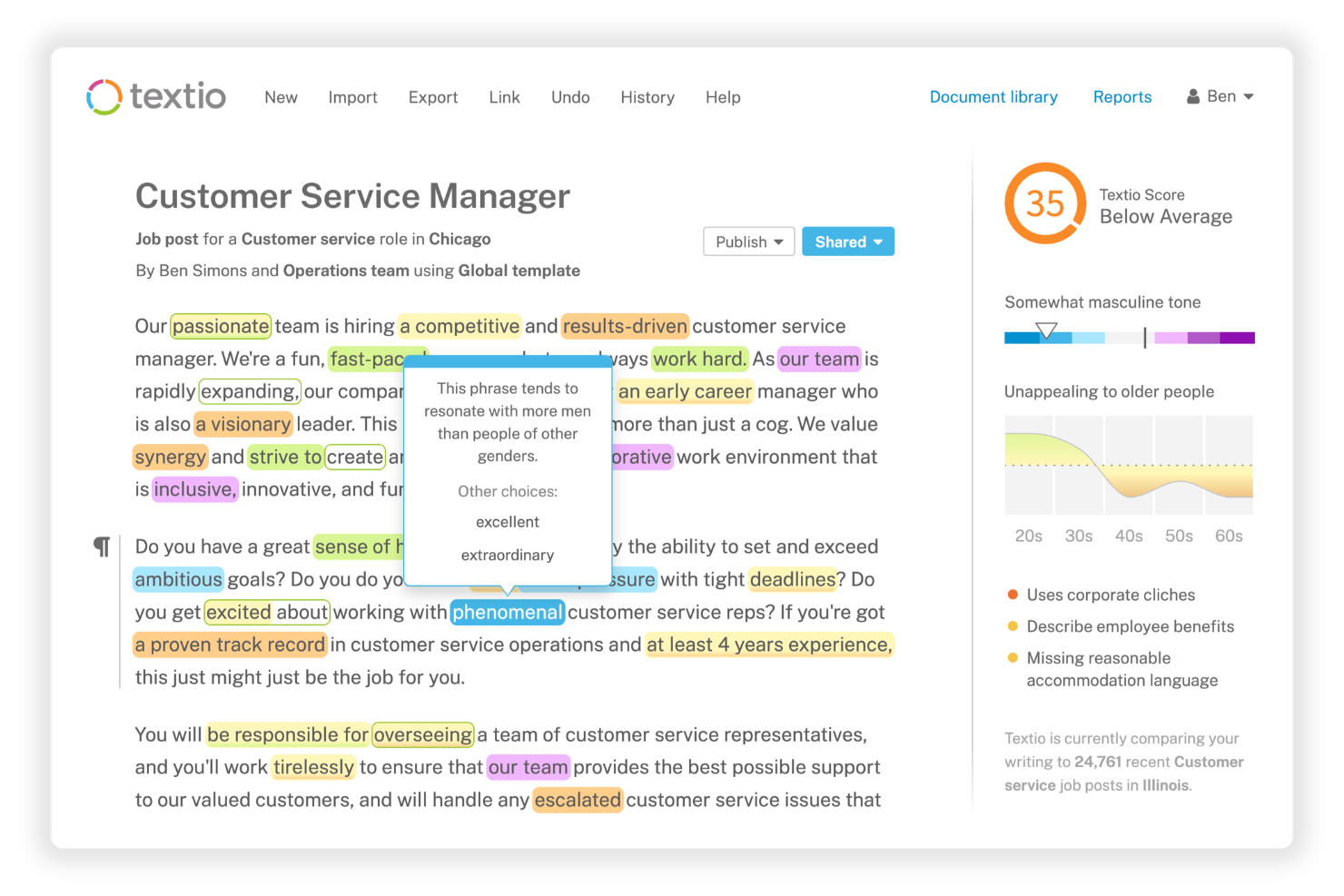
Textio is a job description bias checker and recruiting content platform that combines real-time inclusive language scoring, a gender meter, an age graph, and AI-assisted draft generation to help recruiting teams write and standardize bias-free job posts.
Who Is Textio Best For?
Textio is a strong fit for enterprise talent acquisition teams and recruiters who need to standardize inclusive language across a large volume of job posts, sourcing messages, and careers content.
Why I Picked Textio
I've included Textio in my top picks because the real-time language suggestions go deeper than a simple score. As you type, Textio flags biased phrases inline and immediately surfaces replacement options, so recruiters aren't hunting for answers after the fact.
I also like the Textio Score, which predicts who will apply based on your current language, giving you a concrete signal before you publish. Pair that with the gender meter and age graph, and you get a layered, visual read on exactly how your content is landing across different candidate groups.
Textio Key Features
- Custom brand guidance: Program your own word preferences and style rules directly into Textio so every job post reflects your employer brand.
- Job post library: Store, organize, and manage approved job descriptions in a central repository with templates, group labels, and status tracking.
- Sourcing message editor: Write and score candidate outreach emails in Textio using the same inclusive language guidance applied to job posts.
- Interview feedback tool: Write structured, skills-focused interview feedback with built-in bias detection to support fair hiring decisions.
Textio Integrations
Textio offers native ATS integrations with Workday, Greenhouse, iCIMS, Oracle Recruiting Cloud, SAP SuccessFactors, and Taleo, delivered through a browser extension that embeds Textio's guidance directly into each platform.
Pros and Cons
Pros:
- Supports unbiased internal appraisal processes
- Suggestions trained on real hiring outcomes
- Highlights latent demographic coded language
Cons:
- Requires periodic manual rule adjustment
- Restricted to single language usage
My Evaluation Score
- Bias Detection Engine
- 4/5
- Job Description Editor
- 5/5
- Bias Scoring & Reporting
- 5/5
- ATS / Workflow Integration
- 4/5
- Multi-Category Bias Coverage
- 5/5
- Inclusive Language Suggestions
- 4/5
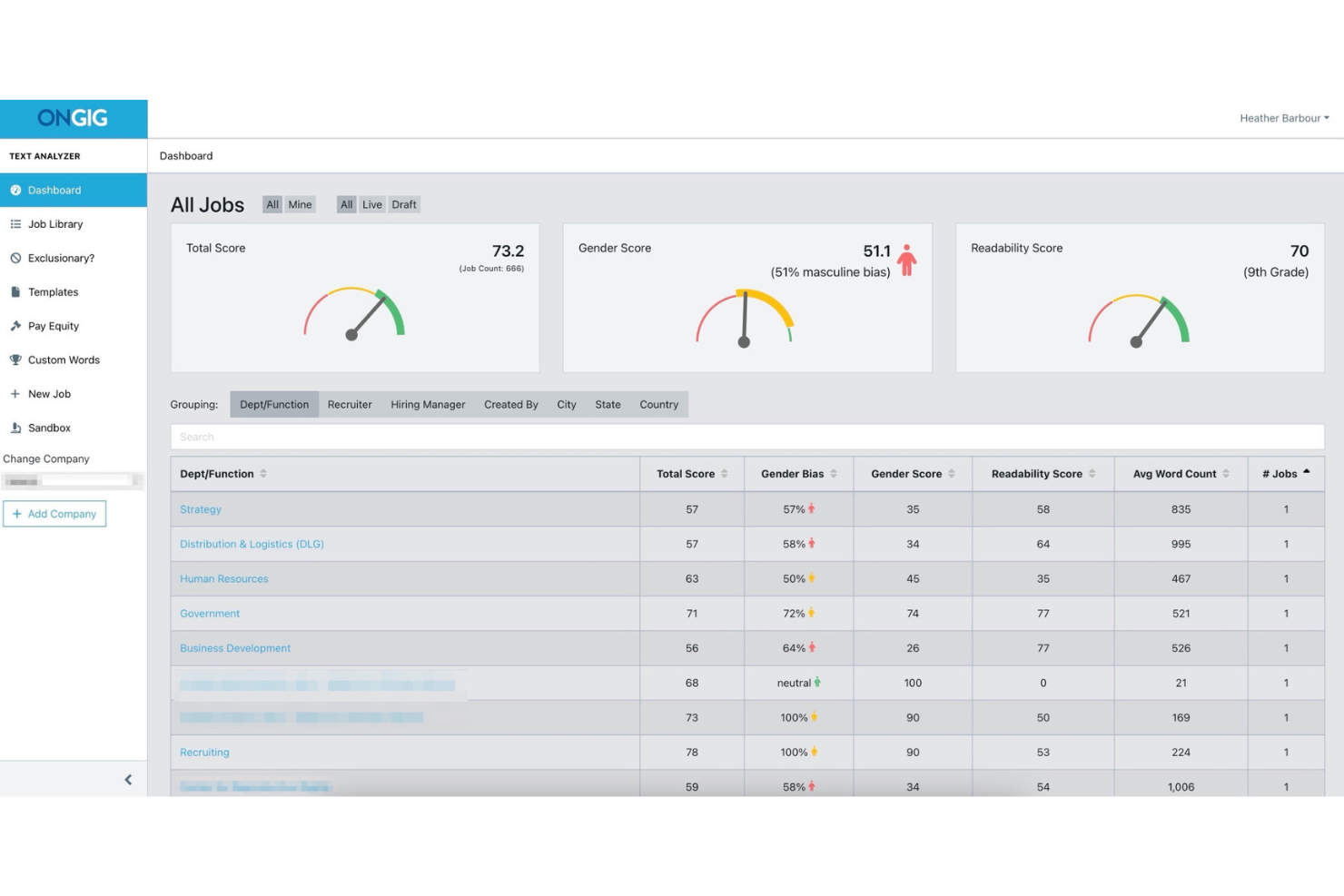
Ongig is a job description software platform that combines bias detection, template management, compliance controls, and ATS integration to help teams create and manage job postings at scale.
Who Is Ongig Best For?
Ongig is a strong fit for large enterprise HR teams and talent acquisition leaders managing high volumes of job descriptions across multiple departments or locations.
Why I Picked Ongig
Ongig is one of my top picks because I love how it handles bias detection and writing guidance at scale, which few tools do as well. The automated flagging of exclusionary language is paired with plain-language suggestions, so my team isn't just catching problems but actively rewriting them.
I also rely on the lockable template sections, which keep approved, bias-reviewed language consistent across every job family and location without having to manually audit each post.
Ongig Key Features
- Compliance auto-population: Automatically adds required sections like EEO statements and salary disclosures to keep job ads aligned with state and federal regulations.
- Version tracking: Maintains a full version history of each job description so recruiters and hiring managers always work from the most current, approved copy.
- Centralized job description repository: Stores all job descriptions in one cloud-based location, making it easy to organize, update, and access postings across teams.
- ATS integration via API: Connects with your existing applicant tracking system using one-way or two-way data exchange, depending on your plan tier.
Ongig Integrations
Integrations include Greenhouse, iCIMS, PCRecruiter, Oracle Taleo, SmartRecruiters, Breezy HR, Lever, Bullhorn, BambooHR, and Workday.
Pros and Cons
Pros:
- Provides a gender score per posting
- Handles high-volume job posting workflows
- Detects distinct bias categories simultaneously
Cons:
- No free self-service trial offered
- Lacks public user sentiment feedback

My Evaluation Score
- Bias Detection Engine
- 5/5
- Job Description Editor
- 4/5
- Bias Scoring & Reporting
- 5/5
- ATS / Workflow Integration
- 4/5
- Multi-Category Bias Coverage
- 4/5
- Inclusive Language Suggestions
- 5/5
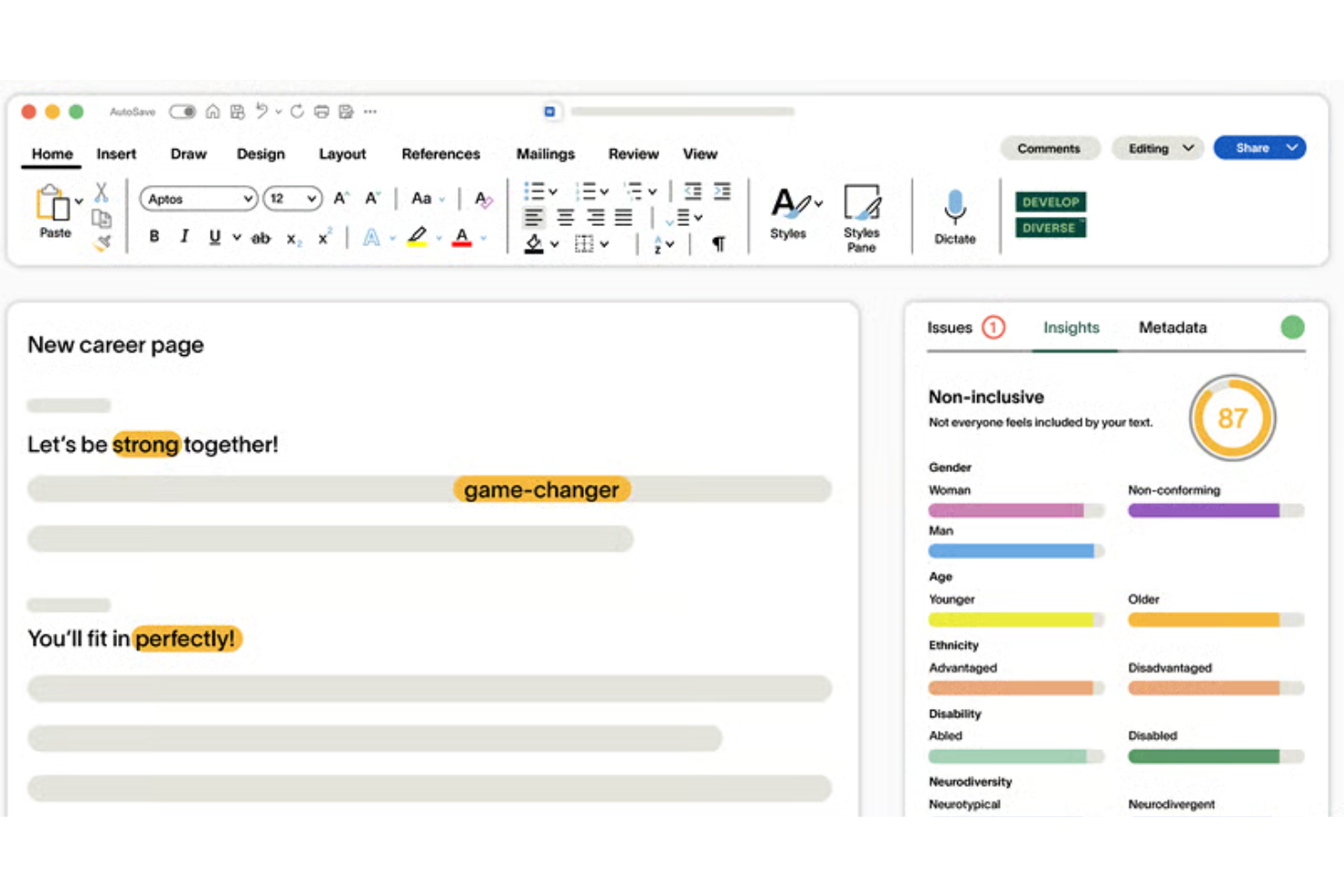
Develop Diverse is a science-backed AI writing editor that analyzes job descriptions, career pages, and recruiting emails for exclusionary language, clichés, and stereotypes, flagging issues at both word and sentence level with research-trained replacement suggestions.
Who Is Develop Diverse Best For?
Develop Diverse is a strong fit for DEI teams and HR professionals in mid-to-large organizations who need consistent, research-backed bias detection across all recruiting content, not just job descriptions.
Why I Picked Develop Diverse
Develop Diverse earns its spot on my shortlist because it goes further than most bias checkers in explaining the "why" behind each flag. When the editor highlights a word or phrase, it tells you who it's excluding and why, which builds real awareness over time, not just quick fixes.
I also like that its AI is continuously trained by linguists using current research, so it catches subtle bias patterns that generic tools built on ChatGPT-style models tend to miss.
Develop Diverse Key Features
- Inclusivity score: Each job description receives a real-time inclusivity score so you can track improvement as you edit.
- One-click sentence rewrites: Replace entire flagged sentences in a single click, not just individual words.
- Inclusivity Monitor: Automatically scans all publicly available job ads across your organization and flags posts that need improvement.
- Analytics and benchmarking: Compare your organization's inclusive language performance against 100+ other customers, broken down by job seniority.
Develop Diverse Integrations
Develop Diverse offers native integrations with Greenhouse, Workday, Teamtailor, HR-ON, SAP SuccessFactors, and SmartRecruiters. It also has a Microsoft Word add-in that brings its inclusive editor directly into your documents.
Pros and Cons
Pros:
- Extends bias detection to performance reviews
- Validated by historical data
- Flags subtle gender and age bias
Cons:
- Limited non-English vocabulary support
- Suggestions can feel repetitive over time
Other Job Description Bias Checker
Here are some additional job description bias checker options that didn’t make it onto my shortlist, but are still worth checking out:
- RoleMapper
For structured job description creation
- TalentKoala
For free inclusive JD bias checks
- Sapling
For browser-based DEI checks across any ATS
- DiverseTalent
For DEI-led inclusive hiring in UK firms


How I Evaluate Job Description Bias Checkers
I split my evaluation into two layers: the core capabilities each tool needs to detect and correct biased language, and the differentiators that matter for HR, talent acquisition, and DEI teams managing job descriptions at scale.
Core Functionality (Table Stakes For This List)
When I'm selecting tools for my list, I rank each one on a scale from 0 (does not offer the functionality) to 5 (excels in this area) for each core functionality listed below. Then, I calculate the tool's total score into a percentage. Each tool needs to achieve a minimum total score of 55% to be considered for inclusion.
- Bias Detection Engine: I check whether the tool identifies both obvious and contextual bias, including gendered, ageist, racial, ableist, and other exclusionary language.
- Inclusive Language Suggestions: I look for tools that provide usable, context-aware alternatives or rewrites rather than simply highlighting potentially biased terms.
- Job Description Editor: I evaluate whether recruiters can draft, edit, and re-scan job descriptions in one workspace, with inline highlighting and editing tools.
- Bias Scoring & Reporting: I look for a clear inclusivity or bias score with explanations, category breakdowns, or reporting that helps teams understand where improvements are needed.
- Multi-Category Bias Coverage: I assess how many dimensions of bias the tool covers, including gender, age, race, disability, LGBTQ+ identity, socioeconomic background, and other forms of exclusionary language.
- ATS & Workflow Integration: I check whether the tool connects with ATS or HRIS platforms, offers browser extensions, or otherwise lets recruiters check job descriptions within their existing workflows.
Once I have a list of tools that meet the criteria, I consider what sets each platform apart.
Differentiating Factors (What Sets Vendors Apart)
Here's how I compare and contrast different vendors:
Standout Features
Multilingual bias detection stands out for global teams that need to apply inclusive-language standards across different regions. I also look for compliance checks that flag missing salary ranges, benefits, accommodations, or other location-specific requirements.
Missing-section detection is useful for identifying absent content such as EEO statements, benefits, or diversity commitments. For larger teams, I also consider employer brand controls that keep rewrites consistent with approved terminology and tone. Outcome benchmarking is another differentiator when platforms can connect inclusivity scores with recruiting metrics such as application volume or candidate diversity.
Beyond Features
Workflow fit matters here. I consider whether a tool works through copy and paste, a browser extension, or native integrations with platforms like Greenhouse, Workday, Lever, and SmartRecruiters. I also look at whether edited job descriptions can be pushed back into the ATS without extra recruiter work.
For organizations hiring across regions, I consider support for local employment and pay transparency requirements, configurable rules, and audit trails. I also look at the research behind each tool's bias detection and whether teams can add their own terminology and exceptions.
Finally, I consider reporting and enterprise readiness. Team-level analytics and benchmarking can help DEI leaders track progress over time, while security certifications, access controls, and clear AI data-handling policies matter when job description content moves between HR systems.
How to Choose a Job Description Bias Checker
It’s easy to get bogged down in long feature lists and complex pricing structures. To help you stay focused as you work through your unique software selection process, here’s a checklist of factors to keep in mind:
| Factor | What to Consider |
|---|---|
| Scalability | Will the tool handle your anticipated volume of job postings as your team grows? Check limits on users and descriptions, and whether you can upgrade plans or add seats easily. |
| Integrations | Does the solution connect with your existing ATS, document storage, or collaboration platforms? Confirm compatibility to avoid manual exports or workflow disruptions. |
| Customizability | Can you tweak bias detection settings or add company-specific phrasing? Consider if the tool adapts to your organization’s voice and hiring needs. |
| Ease of use | How quickly can non-technical users learn and consistently use the platform? Look for clear navigation, in-app help, and simple workflows to minimize hand-holding or mistakes. |
| Implementation and onboarding | What resources are needed to get started? Evaluate whether you’ll need IT involvement, how fast you can set up user accounts, and what onboarding or training support the vendor provides. |
| Cost | Are the pricing tiers straightforward and aligned with your budget and team size? Check for hidden fees, renewal rates, and whether features you need are available in lower tiers or only in premium plans. |
| Security safeguards | How does the tool protect your job data and sensitive content? Confirm details on encryption, GDPR or SOC 2 compliance, and access controls before uploading proprietary information. |
| Support availability | When and how can you get help if something breaks or you need advice? Assess support channels, usual response times, and access to documentation or live reps in your working hours. |
What Is Job Description Bias Checker?
A job description bias checker is a digital tool that scans job postings for biased or exclusionary language. It helps HR teams identify words, phrases, or patterns that may discourage diverse candidates from applying.
By offering alternative suggestions, these tools make your job ads more inclusive and support fairer hiring practices.
Features
When selecting a job description bias checker, keep an eye out for the following key features:
- Bias language detection: Quickly scans job descriptions to identify terms and phrases that may contain gender, age, or disability bias.
- Inclusive language suggestions: Provides alternative wording to replace problematic language and help create more welcoming job postings.
- Bias categorization: Labels the type of bias detected, so users know whether language might affect gender, race, age, or another identity group.
- Reporting and analytics: Generates reports that summarize findings, track improvements over time, and support internal DEI initiatives.
- Simultaneous multi-description scanning: Allows users to scan several job ads at once, saving time for teams managing high volumes.
- Role-specific guidance: Offers tips tailored to different job levels or industries for more accurate and relevant detection.
- Export and sharing options: Let you download analysis reports or share flagged descriptions with stakeholders or hiring managers.
- User permissions and collaboration: Supports different user roles and lets team members work together on editing or reviewing job ads.
- Integration with recruiting tools: Connects directly with applicant tracking systems or HR software to embed bias checking in everyday workflows.
Common Job Description Bias Checker AI Features
Beyond the standard job description bias checker features listed above, many of these solutions are incorporating AI with features like:
- Contextual bias detection: Analyzes the context of sentences to catch subtle or implied bias that rule-based systems might miss, leading to more accurate results.
- Predictive applicant impact analysis: Uses historical data and AI modelling to predict how changes in language may influence who applies to a job, helping refine postings for diversity goals.
- Adaptive learning algorithms: Continuously improve bias detection by learning from user edits and feedback, ensuring the tool evolves with changing language patterns and DEI standards.
- Automated language optimization: Suggests phrasing changes unique to your company's writing style and audience by applying AI-driven pattern recognition to your historical job descriptions.
- Real-time feedback and coaching: Uses AI to provide instant guidance as you write or edit, flagging risk areas and recommending fixes without requiring a separate scan.
Benefits
Implementing a job description bias checker provides several benefits for your team and your business. Here are a few you can look forward to:
- Enhanced inclusivity: Identifies and removes biased language so your job ads are more accessible to diverse candidates.
- Improved hiring outcomes: Suggests alternative wording that broadens applicant pools, helping to attract a richer mix of talent.
- Faster compliance: Makes it easier to align with DEI standards and hiring regulations by documenting and reporting changes in real time.
- Consistent language: Standardizes job posting language across hiring teams to support organizational voice and fair recruitment practices.
- Increased efficiency: Allows bulk processing and inline editing, helping teams update multiple job descriptions quickly.
- Better data-driven insight: Offers analytics and benchmarking so you can track improvements and trends in your recruitment content.
- Reduced legal risk: Helps prevent discriminatory language that could result in legal challenges or reputational damage.
Costs and Pricing
Selecting a job description bias checker requires an understanding of the various pricing models and plans available. Costs vary based on features, team size, add-ons, and more. The table below summarizes common plans, their average prices, and typical features included in job description bias checker solutions:
Plan Comparison Table for Job Description Bias Checker
| Plan Type | Average Price | Common Features |
|---|---|---|
| Free Plan | $0 | Covers basic bias detection, supports limited job descriptions, and includes simple suggestions. |
| Personal Plan | $10-$25/user/month | Offers more bias categories, allows export of reports, provides inline editing, and email support. |
| Business Plan | $30-$60/user/month | Includes bulk processing, custom dictionaries, advanced analytics, integration options, and team collaboration. |
| Enterprise Plan | $75-$150/user/month | Adds tailored onboarding, compliance reporting, dedicated account management, API access, and priority support. |
Job Description Bias Checker FAQs
Here are some answers to common questions about the job description bias checker:
How do job description bias checker solutions detect bias?
They use language analysis to flag words or phrases in job advertisements and job requirements that may introduce bias, drawing on research-backed word lists and context rules to cover areas like gender, age, or disability. This helps hiring teams write gender-neutral and inclusive job descriptions that attract qualified candidates from all backgrounds.
Can I customize the bias detection to fit our organization’s needs?
Yes, many tools let you add custom terms or phrases to match your brand guidelines or specific DEI priorities, so you can tailor results to your context and build a more welcoming work environment.
Do these tools support multiple languages?
Some solutions offer multilingual bias detection and replacement suggestions, making them useful for global hiring teams looking to attract top talent and manage the recruitment process across different regions.
Does using a bias checker guarantee EEOC or legal compliance?
No, but these tools help reduce the risk of problematic language in your job title choices and job adverts, making it easier to address potential issues and supporting your compliance efforts.
Can I generate reports on improvements or trends over time?
Yes, reporting features let you track changes across inclusive job ads, see common bias patterns, and demonstrate your progress to stakeholders as you work to reach more job seekers.