

10 Best Policy Management Software of 2026: Reviewed

Best Policy Management Software Shortlist


The best policy management software makes it easy to keep your HR policies updated, acknowledged, and compliant—without chasing paperwork or losing sleep over audits. If you're stuck managing policies through email threads, disconnected docs, or outdated systems, you're not alone. These methods leave too much room for error, delay, and non-compliance.
After spending nine years in HR managing internal policy documents myself, I know just how manual, messy, and high-stakes this part of the job can be. That experience now fuels my work as a software reviewer, evaluating tools that actually solve the day-to-day challenges HR teams face.
In this article, I’ll share the best policy management software for HR professionals, highlighting platforms that help you centralize policies, automate version tracking, collect employee acknowledgments, and ensure you're always aligned with the latest regulations.
Why Trust Our Software Recommendations
Our team has been testing and reviewing software since 2012. As HR experts ourselves, we know how difficult—and important—it is to choose the right software.
For this guide, we evaluated tools using hands-on testing and independent research, scoring tools using our selection criteria. We also draw on insights from industry thought leaders and practicing HR experts.
Our reviews reflect our human editorial judgment, not a sales pitch.
Expert reviewers:
Policy Management Software Comparison Table
The table below compares pricing, trial, and demo details for my top policy management software selections.
| Tool | Best For | Trial Info | Price | ||
|---|---|---|---|---|---|
| 1 | Best for policy management across global entities | Free demo available | From $5/user/month | Website | |
| 2 | Best for automating policy lifecycle | Free demo available | Pricing upon request | Website | |
| 3 | Best for employment law compliance | Free demo available | Pricing upon request | Website | |
| 4 | Best for customized policy manuals | No free trial available | From $161.93/month (billed annually) | Website | |
| 5 | Best for cloud collaboration | Free demo available | Pricing upon request | Website | |
| 6 | Best for the healthcare industry | Free demo available | Pricing upon request | Website | |
| 7 | Best for step-by-step policy guidance | Free demo available | Pricing upon request | Website | |
| 8 | Best for global HR policy enforcement | Free demo available | Pricing upon request | Website | |
| 9 | Best for quick implementation | Free demo available | From $1,000/month (billed annually) | Website | |
| 10 | Best for large enterprises | Free demo available | Pricing upon request | Website |
Best Policy Management Software Reviews
Below are my detailed summaries of the best policy management software that made it onto my shortlist. My reviews offer a detailed look at the key features, pros & cons, integrations, and ideal use cases of each tool to help you find the best one for you.

Deel HR
Best for policy management across global entities
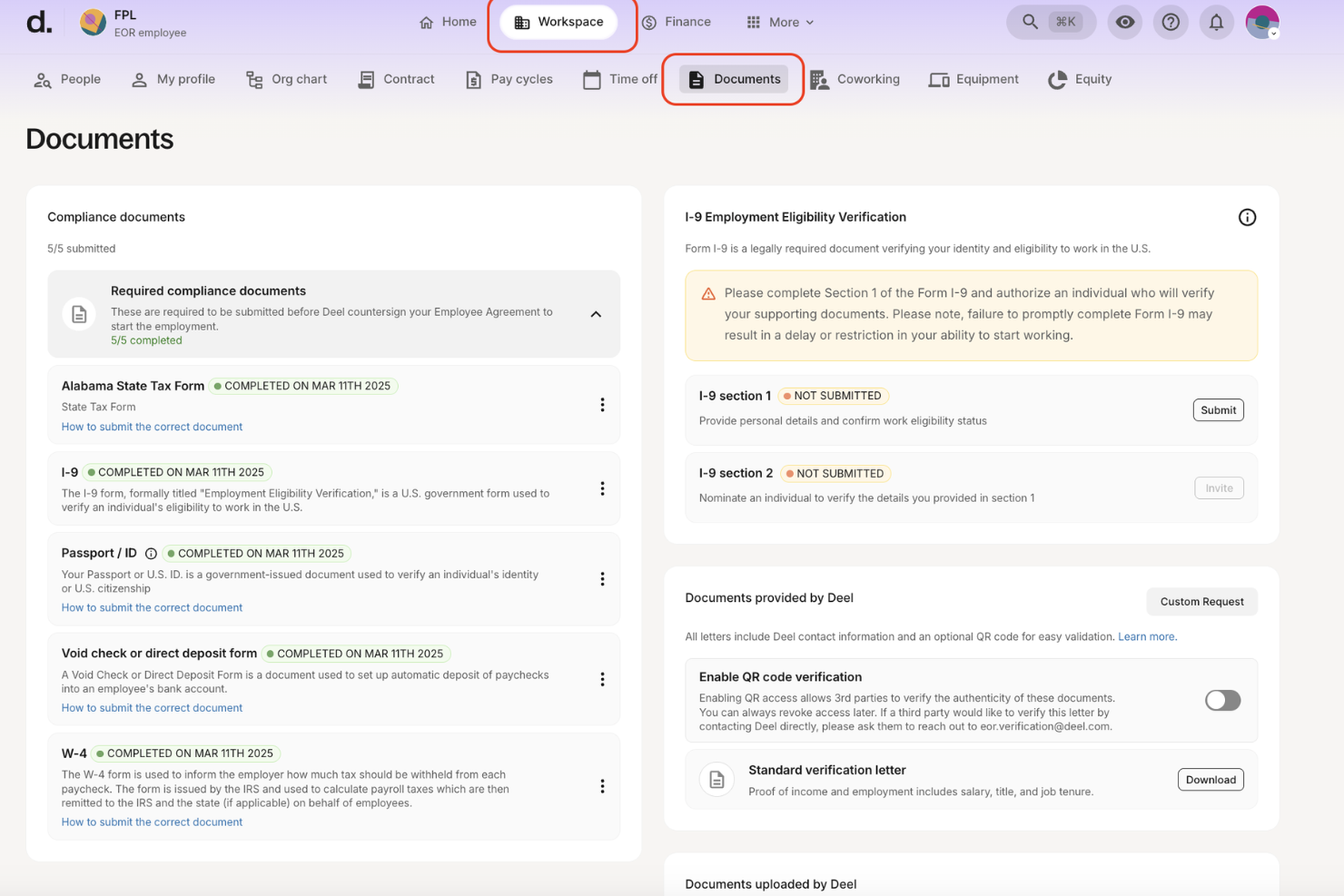
Deel is best suited for companies managing policies across global entities and multiple countries where employment rules change frequently. It helps HR and legal teams enforce compliant contracts, payroll rules, and worker policies by automatically applying country-specific labor requirements.
Why I Picked Deel
I picked Deel because it helps you stay compliant in real time rather than reacting after laws change. Deel monitors country-specific employment regulations and applies them directly to contracts, payroll, and worker classifications, so your policies reflect current legal requirements.
Its localized contract templates support consistent policy enforcement while accounting for regional labor laws. I also like that Deel maintains audit-ready records for contracts, payroll, and tax compliance, which simplifies internal reviews and external audits. For global teams, this removes much of the manual policy tracking that typically falls on HR and legal.
Deel Key Features
Here are some key features worth highlighting:
- Global Contract Templates: Create locally compliant employment agreements tailored to each country.
- Audit Trails & Compliance Records: Maintain documented proof of policy enforcement for payroll and employment actions.
- Worker Classification Controls: Reduce misclassification risk with built-in contractor vs. employee safeguards.
- Country-Specific Payroll Rules: Apply local tax, benefits, and statutory deductions automatically.
Deel Integrations
Integrations include QuickBooks, Xero, NetSuite, BambooHR, Bob, HiBob, Expensify, Greenhouse, Slack, and Google Workspace.
Pros and Cons
Pros:
- Reduces misclassification risk with built-in worker classification tools
- Maintains audit-ready compliance records for HR and legal teams
- Applies real-time labor law updates directly to contracts and payroll
Cons:
- Complex to set up for small teams
- Limited to HR use cases
New Product Updates from Deel HR

Deel Expands Stablecoin Wallet to 80+ Countries
Deel expands its Stablecoin Wallet to 80+ countries with dollar-backed balances and optional rewards. This gives eligible contractors more ways to hold and manage earnings inside Deel. For more information, visit Deel’s official site.
 .
.

Mitratech PolicyHub is a policy management software platform that centralizes policy creation, review, distribution, tracking, and compliance reporting for organizations needing structured policy oversight.
Who Is Mitratech PolicyHub Best For?
Mitratech PolicyHub is a good fit for compliance, legal, and risk teams in mid-size to enterprise organizations that need structured, auditable policy management across departments.
Why I Picked Mitratech PolicyHub
Mitratech PolicyHub earns its spot on my shortlist because of how thoroughly it automates the policy lifecycle from end to end. I particularly like the automated review and approval workflows, which replace manual follow-ups with triggered notifications that keep policies moving through each stage without delays. The intelligent distribution engine is another feature I find genuinely useful—it routes each policy to the right employees based on their role or location, including in the correct language, so nothing gets sent to the wrong audience. On top of that, the built-in audit trail captures every action across the lifecycle, which makes responding to regulators or auditors far less stressful.
Mitratech PolicyHub Key Features
- Knowledge assessments: Build and deliver quizzes tied directly to specific policies to test whether employees have understood the content they've attested to.
- Compliance reporting: Generate assurance reports on policy completion and attestation status for leadership, boards, and regulators.
- Behavior analysis tools: Track whether policies are producing measurable changes in employee behavior and flag areas that require further action.
- Flexible deployment options: Choose between SaaS or on-premises deployment depending on your organization's infrastructure and data requirements.
Mitratech PolicyHub Integrations
Native integrations are not listed. An API is available for custom integrations.
Pros and Cons
Pros:
- Detailed audit trails for compliance evidence
- Tracks who read and acknowledged each policy
- Automates policy distribution to correct audiences
Cons:
- Some users find reporting capabilities limited compared to full-blown GRC suites
- Limited flexibility in mixed-media documents or attachments

SixFifty
Best for employment law compliance
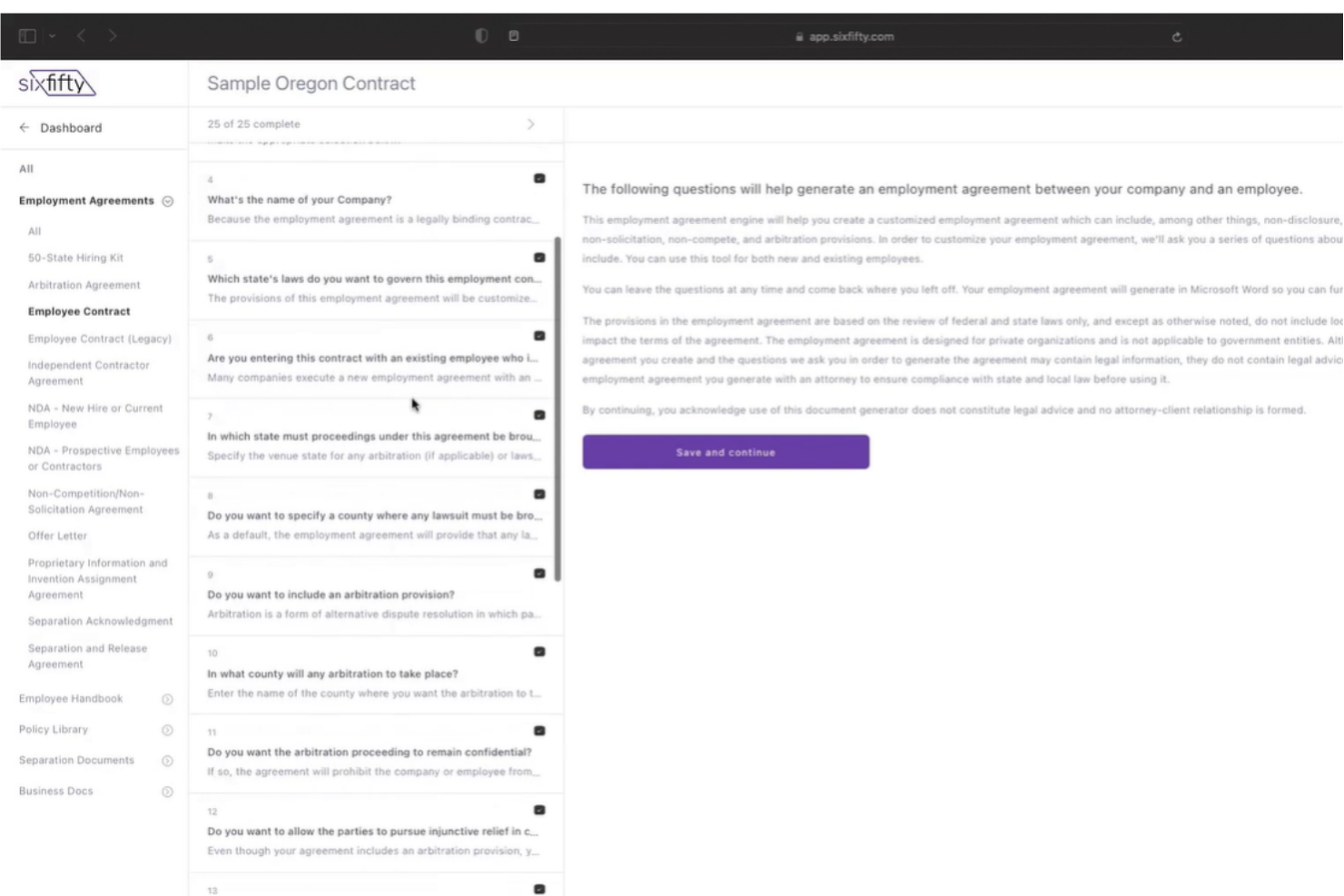
SixFifty is a policy management software platform that automates the creation, customization, and management of employment policies with built-in legal compliance tools.
Who Is SixFifty Best For?
SixFifty is a strong fit for HR and legal teams that need to build and maintain employment policies across multiple states or jurisdictions.
Why I Picked SixFifty
I included SixFifty on my shortlist because it's built specifically around employment law compliance rather than just document storage. I particularly like the AI-powered legal updates feature, which lets my team merge attorney-drafted changes directly into existing policies as laws shift at the federal, state, and local level. The guided document builder asks targeted questions about your business and generates jurisdiction-specific policies for hiring, handbooks, and separation—covering all 50 states and major city and county localities.
SixFifty Key Features
- Employment law database: Access a searchable database of federal, state, and local U.S. employment laws, created and maintained by SixFifty's in-house legal team.
- Online text editor: Draft, format, and collaborate on employment documents directly within the platform using a built-in editor.
- eSignature: Send, sign, and store employment documents digitally without printing, scanning, or manual signature collection.
- Employee portals: Give each employee a dedicated portal to access handbooks and labor law posters, track activity, and collect signatures.
SixFifty Integrations
Integrations include Greenhouse, BambooHR, Rippling, Workday, Hibob, UKG, Slack, and Microsoft Teams. An API is available for custom integrations.
Pros and Cons
Pros:
- Comprehensive resource library
- Document marketplace suitable for all businesses
- Great for distributed teams
Cons:
- Converting standard documents to specific formats could be easier
- Standard documents can be lengthy

Best for customized policy manuals
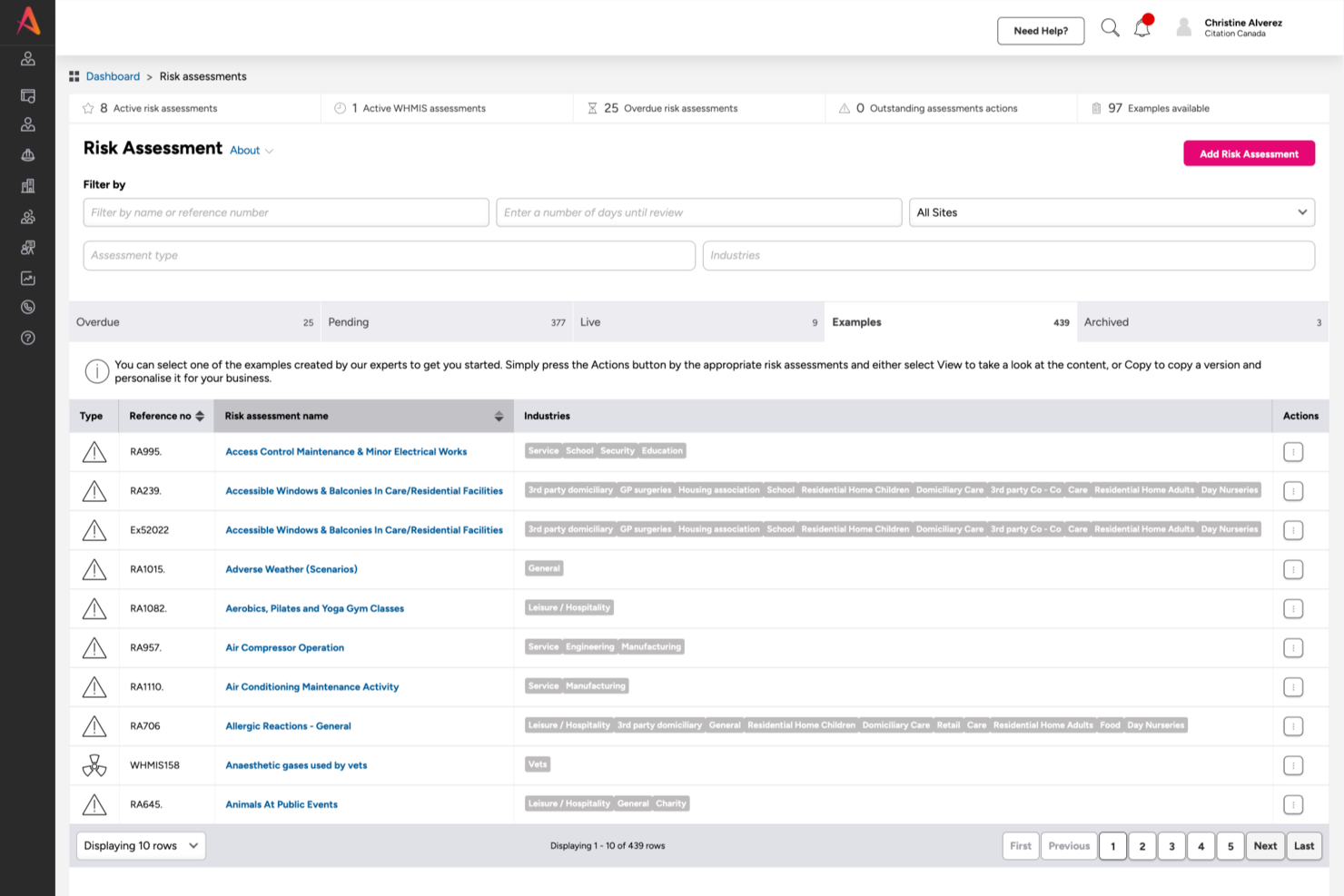
Citation Canada is a policy management software platform for Canadian organizations that provides custom policy manual creation, HR document management, and compliance resources.
Who Is Citation Canada Best For?
Citation Canada is a strong fit for HR professionals and small to mid-sized Canadian businesses that need locally compliant, jurisdiction-specific HR policies and documentation.
Why I Picked Citation Canada
I picked Citation Canada because its Policy Manual Wizard builds a compliant, organization-specific manual from scratch. Instead of handing you a blank template, it guides you through a question-and-answer process that generates a tailored manual based on your organization's structure and needs. I also like that you can upload pre-existing documents and fold them directly into the manual, so you're not starting over if you already have policies in place. The library of over 300 expert-backed, jurisdiction-specific templates means you're not guessing at what's legislatively required—whether you're operating in Ontario, British Columbia, or across multiple provinces.
Citation Canada Key Features
- Compliance Centre: An interactive hub within Atlas that lets you track legislative updates across all 14 Canadian jurisdictions and add key compliance dates directly to your calendar.
- Cloud-based document management: Store, organize, and share HR documents with employees through a centralized, cloud-based library accessible from within the platform.
- Automated compliance alerts: Get notified automatically when HR legislation changes, so your policies stay current without manual monitoring.
- Live HR advice: Access on-demand support from in-house HR advisors for guidance on policy questions, compliance issues, and people management challenges.
Citation Canada Integrations
Native integrations are not listed. An API is available for custom integrations.
Pros and Cons
Pros:
- Centralized document storage for teams
- Canadian compliance content kept up to date
- Customizable policy manuals for different industries
Cons:
- Less suitable for highly complex enterprises
- Primarily focused on Canadian regulations

Workiva
Best for cloud collaboration

Workiva is a cloud-based policy management platform that brings together document management, workflow automation, collaboration, and compliance tracking for organizations managing policies and procedures.
Who Is Workiva Best For?
Workiva is a strong fit for enterprise teams in regulated industries like finance, healthcare, and energy that need a centralized platform for managing policies and compliance documentation.
Why I Picked Workiva
Workiva earns its spot on my shortlist because of how well its cloud collaboration features hold up when multiple teams are working on the same policy at once. I like that you can have policy owners, legal reviewers, and compliance leads all working in the same document simultaneously, with in-app comments and authorship indicators keeping everyone's contributions visible. The granular role-based permissions mean I can control exactly who can edit, review, or simply view a policy—without the version confusion that comes from emailing drafts back and forth. The real-time status dashboards also let me track where each policy sits in the review and attestation cycle without chasing anyone down.
Workiva Key Features
- Policy mapping: Link policies directly to risks, controls, and regulatory frameworks to surface relationships across your GRC ecosystem.
- Revision history and blacklines: Access a full version history and generate blackline comparisons at any time to track exactly what changed between policy drafts.
- Automated workflows: Use low-code, no-code workflow tools to assign tasks, send reminders, and manage policy approvals without manual follow-up.
- Workiva AI: Use embedded AI to draft policy narratives, identify control gaps, and surface compliance issues across your policy library.
Workiva Integrations
Workiva offers native integrations with Salesforce, Workday, Oracle, SAP, ServiceNow, and has native integrations across the Microsoft ecosystem, including Microsoft 365 and Azure. An API is available for custom integrations.
Pros and Cons
Pros:
- Supports real-time collaboration without sacrificing version control
- Strong audit trails for compliance and regulatory reviews
- Searchable notes and checklists for easy communication
Cons:
- Limited flexibility in certain templates
- Some features require advanced technical knowledge
DocTract
Best for the healthcare industry

DocTract is a policy management software designed for the healthcare industry, providing tools for document control and compliance. It helps healthcare providers ensure policies are up-to-date and accessible to all staff members.
Why I picked DocTract: It offers specialized features for healthcare compliance, such as automated document approval workflows and version control. The software ensures that your team can easily access the latest policy versions. Notifications and reminders help keep everyone informed about policy updates. Additionally, it offers customizable templates to create documents that meet specific healthcare standards.
Standout features & integrations:
Features include automated approval workflows that streamline the policy creation process. The software offers version control, ensuring your team always has access to the latest documents. Notifications and reminders keep your team informed about any policy updates or changes.
Integrations include Microsoft Office 365, SharePoint, and Microsoft Teams.
Pros and Cons
Pros:
- Provides notifications and reminders
- Effective version control
- Automated approval workflows
Cons:
- Not highly customizable
- Limited to healthcare industry
Best for step-by-step policy guidance

Oracle HCM Cloud is an HR management platform that includes policy management tools for creating, distributing, and tracking organizational policies within a unified system.
Who Is Oracle HCM Cloud Best For?
Oracle HCM Cloud is a strong fit for large enterprises that need to manage complex HR policies across multiple departments, regions, or regulatory environments.
Why I Picked Oracle HCM Cloud
Oracle HCM Cloud earns its spot on my shortlist because of its Employment Lifecycle Policy Advisor, an AI agent that delivers step-by-step guidance on HR policies across the full employee lifecycle. I like that it pulls answers directly from your organization's own policy documents, so managers get responses grounded in your actual procedures—not generic advice. When a manager is navigating something like an internal transfer or a probation period concern, the advisor walks them through the exact steps required. On top of that, Oracle Guided Learning embeds role-based, in-application guides directly into the HCM interface, so HR teams and managers can follow policy-driven workflows without ever leaving the platform.
Oracle HCM Cloud Key Features
- Advanced HCM Controls: Continuously monitors user activity and HCM configurations to detect policy violations, flagging anomalies across payroll, compensation, and personal data.
- Experience Design Studio: Lets HR teams configure workflows and data validation rules based on company policies and local legislative requirements, without any coding.
- Absence management: Tracks and manages employee leave across global jurisdictions, linking absence data directly to payroll and workforce planning.
- HR Help Desk: Routes employee HR inquiries and complex case management requests to the right HR person, with built-in service request tracking and trend analysis.
Oracle HCM Cloud Integrations
Oracle HCM Cloud offers native integrations with Oracle ERP Cloud, Oracle Payroll, Oracle Recruiting, and Oracle Learning, and provides an API for custom integrations. It also supports integrations with third-party systems through Oracle Integration Cloud.
Pros and Cons
Pros:
- Global policy enforcement across regions, roles, and jurisdictions
- Strong controls for approvals, access, and segregation of duties
- Step-by-step policy guidance embedded directly into workflows
Cons:
- Some integration challenges with non-Oracle systems
- Advanced controls module may require additional setup or licence

Workday
Best for global HR policy enforcement

Workday is a cloud-based policy management platform that centralizes policy documentation, automates compliance workflows, and connects policy controls with HR and payroll systems.
Who Is Workday Best For?
Workday is a strong fit for large enterprises managing HR policies across multiple countries and regulatory environments.
Why I Picked Workday
Workday is on my shortlist because global HR policy enforcement is built into its core architecture. I value the global compliance module, which uses a "global-at-the-core, manage locally" approach—meaning your organization can operate across multiple countries while applying localized policy configurations without maintaining separate systems for each region. That's a real differentiator when you're dealing with regulations like GDPR or ACA across different jurisdictions simultaneously. Workday releases regulatory updates to all customers on a single codeline, so when a new compliance requirement appears in a market where you operate, your policies stay current without a costly upgrade cycle.
Workday Key Features
- Organizational management: Model org structures, manage reorgs, and handle M&A activity within the same system as your HR and policy data.
- Pay transparency tools: Built-in pay gap analysis and AI-powered guidance to help HR teams navigate global pay transparency regulations.
- HR service delivery: AI-powered case management that routes employee policy questions and HR requests without manual triage.
- Benefits management: Centralized benefits plan configuration and communications, connected directly to employee records in the same platform.
Workday Integrations
Integrations include Accu-Time Systems, Adobe Acrobat Sign, ADP, Alight Solutions, Amazon Web Services (AWS), Beamery, DocuSign, Greenhouse, Guideline, Hired, Tipalti, and Vertex.
Pros and Cons
Pros:
- Integrated talent management ties policy to development
- Strong global compliance capabilities for multinational teams
- Centralized HR data supports policy visibility
Cons:
- Some users find navigation and document retrieval confusing
- Can be overly complex for simpler policy needs
VComply
Best for quick implementation
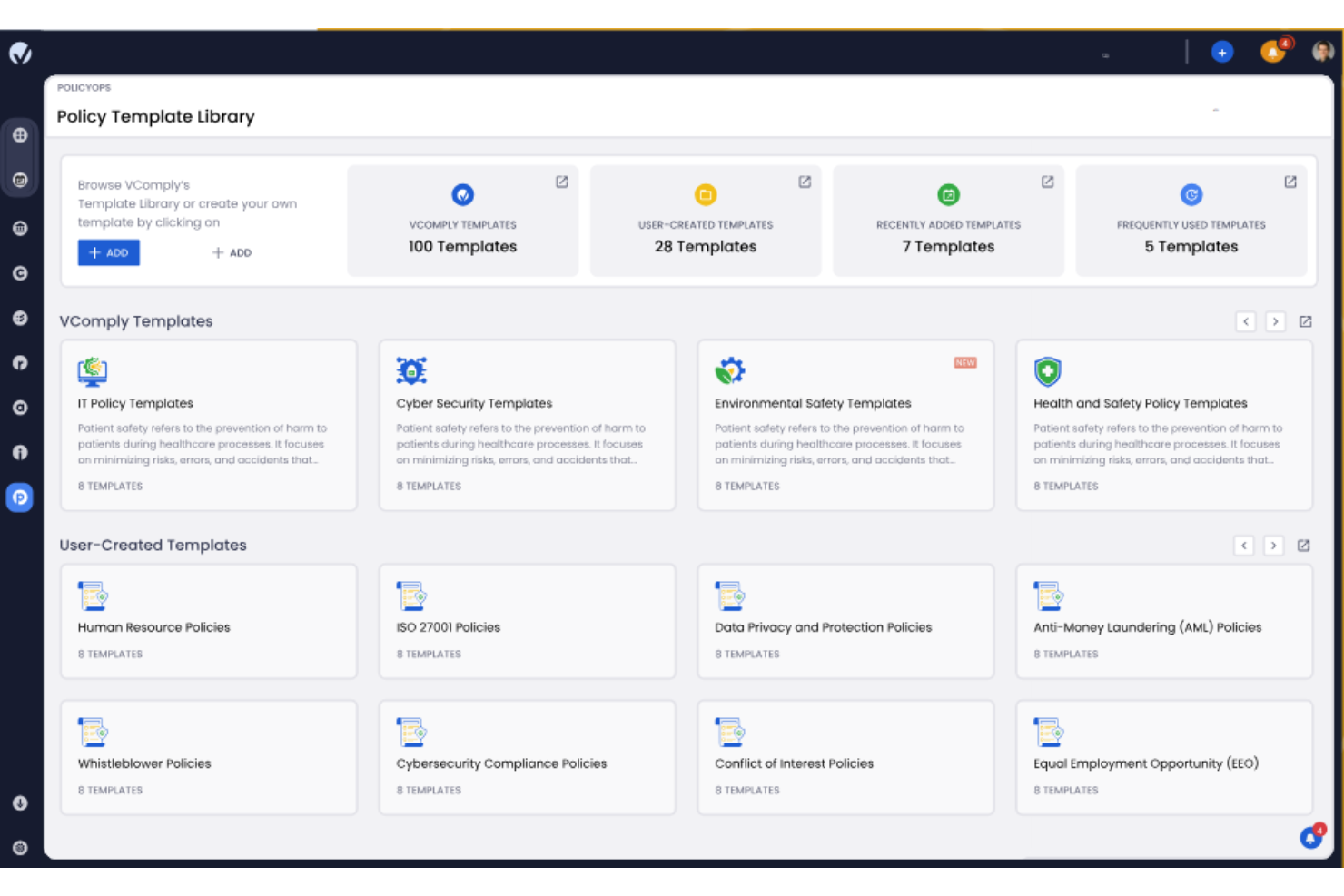
VComply is a policy management platform that centralizes policy creation, distribution, version control, and compliance tracking for organizations managing governance and regulatory requirements.
Who Is VComply Best For?
VComply is a good fit for compliance, risk, and legal teams in mid-sized to enterprise organizations that need a structured policy management system without a lengthy setup process.
Why I Picked VComply
VComply is on my shortlist because it focuses on time-to-value. The platform advertises a structured 30-day implementation path with defined milestones at Day 1, 15, 25, and 30—so your team knows what "getting started" looks like. I also like the pre-built template library, which lets you skip the blank-page problem and start drafting compliant policies from day one. The AI-assisted drafting tool, Paula C., helps teams generate policy content that's already aligned with internal standards and regulatory requirements, which reduces back-and-forth during the review cycle.
VComply Key Features
- Version control: Automatically tracks and stores every policy revision, so you can view the full edit history or revert to a previous version at any time.
- Access control: Restricts policy visibility and editing rights based on roles, teams, or departments to maintain policy integrity across the organization.
- Audit logs: Logs all user activity and policy changes with timestamps, giving you a traceable record for internal reviews or external audits.
- Compliance calendar: Schedules and tracks policy review deadlines, with reminders that sync to Google, iOS, or Outlook Calendar.
VComply Integrations
VComply offers native integrations with Google Workspace, Microsoft 365, and Slack. An API is available for custom integrations.
Pros and Cons
Pros:
- Role-based access control for better oversight
- Supports multi-location compliance programs
- Centralized policy and document management
Cons:
- Complex setup for advanced modules
- Limited offline access options
MetricStream
Best for large enterprises

MetricStream is a policy management software platform that centralizes policy creation, distribution, version control, and compliance tracking for organizations with complex governance requirements.
Who Is MetricStream Best For?
MetricStream is a strong fit for large enterprises in regulated industries like financial services, healthcare, and energy that need to manage policies across complex organizational structures.
Why I Picked MetricStream
MetricStream earns its spot on my shortlist because of how well it handles policy management at enterprise scale. I like that it connects policies directly to regulations, risks, and controls in a many-to-many mapping structure—so when a regulation changes, you can immediately see which policies are affected across the entire organization. For a large enterprise managing hundreds of policies across multiple business units, that kind of traceability is hard to replicate manually. I also find the NLP-based smart search genuinely useful: employees can surface the right policy from an intranet widget or chatbot without ever logging into the GRC platform directly, which drives real adoption at the front line.
MetricStream Key Features
- Policy attestation management: Send automated email notifications to employees for policy acknowledgment, with support for electronic signatures or checkboxes to confirm attestation.
- Policy exception workflows: Let users raise exception requests directly from the policy portal, specifying the reason and duration, with configurable workflows to track and manage each exception.
- Section-level review and approval routing: Route individual sections of a policy to different reviewers simultaneously, with multi-user collaboration and in-platform commenting.
- Real-time policy dashboards: View graphical dashboards and drill-down reports covering policy status, audit history, compliance links, and associated risks and controls.
MetricStream Integrations
Integrations include Amazon Web Services (AWS) Inspector, Aqua Security, Atlassian Jira, BMC Remedy ITSM, Burp Suite Enterprise, Checkmarx, Cherwell Service Management, Claroty, CrowdStrike Falcon, Edgescan, GitHub, and HCL AppScan.
Pros and Cons
Pros:
- Automated policy workflows
- Centralized policy storage
- Supports detailed risk assessments
Cons:
- Can be resource-intensive
- Complex implementation process
Other Policy Management Software
Here are some additional policy management software options that didn’t make it onto my shortlist, but are still worth checking out:
- NAVEX One PolicyTech
For GRC compliance management
- LogicGate Risk Cloud
For risk management
- ConvergePoint
For SharePoint integration
- PolicyPro
For Canadian compliance
- ComplianceBridge
For small businesses
- EMP Trust HR
For managing HR policies
- Xoralia
For document automation
- Mitratech Alyne
For legal teams
- ClearPolicy
For legally compliant e-signatures
- Aptien
For small teams
- SixFifty Employee Handbook
For employee handbooks
- Onspring
For customizable workflows
- Vanta
For automated compliance
- RLDatix
For healthcare compliance
- LogicManager
For risk alignment
- PowerDMS
For public safety agencies
- Author-it
For document collaboration


How I Evaluate Policy Management Software
I split my evaluation into baseline requirements—like version-controlled policy libraries and attestation tracking—and differentiators that separate the best tools from the rest.
Core Functionality (Table Stakes For This List)
When I'm selecting tools for my list, I rank each one on a scale from 0 (does not offer the functionality) to 5 (excels in this area) for each core functionality listed below. Then, I calculate the tool's total score into a percentage. Each tool needs to achieve a minimum total score of 65% to be considered for inclusion.
- Centralized Policy Repository: I look for a searchable, organized library where HR teams can store handbooks, SOPs, and codes of conduct with role-based access controls.
- Policy Distribution & Attestation: Each tool should let you push policies to specific employee groups and capture digital acknowledgments, like onboarding new hires with a remote work policy.
- Version Control & Audit Trail: I check whether the platform tracks every revision, editor, and timestamp so your team can pull a full change history during an internal audit.
- Approval Workflows: Multi-step review routing matters here, such as sending a revised PTO policy through an HR manager, legal review, and executive sign-off before publishing.
- Compliance & Regulatory Alignment: The tool should offer templates or tagging aligned with HR-relevant regulations, helping teams map policies to requirements like workplace safety or data privacy laws.
- Automated Review Reminders: I evaluate whether the platform triggers notifications when policies are approaching their review date, so nothing sits outdated for months without anyone noticing.
Once I have a list of tools that meet the criteria, I consider what sets each platform apart.
Differentiating Factors (What Sets Vendors Apart)
Here's how I compare and contrast different vendors:
Standout Features
A policy analytics dashboard gives you real visibility into acknowledgment rates and overdue attestations across teams, which is especially useful when rolling out updated harassment or safety policies company-wide. I also look for an employee self-service portal where staff can search and reference policies on their own—this cuts down on repetitive HR inquiries. Integrated policy training takes things further by embedding quizzes or knowledge checks into the attestation flow, confirming understanding rather than just collecting a signature.
Beyond Features
HRIS integrations matter a lot here. A policy tool that syncs with platforms like BambooHR or Workday can auto-enroll new hires into the right policy acknowledgment workflows without manual HR intervention. I also evaluate security certifications like SOC 2 Type II and GDPR compliance, since these platforms store sensitive employee data. Scalability is another factor I consider—whether the tool supports multi-entity structures, because an HR team managing policies across several office locations needs jurisdiction-specific handbooks without juggling separate systems.
How to Choose Policy Management Software
It’s easy to get bogged down in long feature lists and complex pricing structures. To help you stay focused as you work through your unique software selection process, here’s a list of factors to keep top-of-mind:
| Factor | What to Consider |
| Scalability | Ensure the software can grow with your organization. Consider whether it can handle an expanding number of users and policies as your team or company expands. |
| Integrations | Check if the software integrates with tools you already use, like HR systems or document management platforms, to streamline your workflow and data sharing. |
| Customizability | Look for options to tailor the software to suit your specific needs. This includes customizing workflows, templates, and user permissions to fit your processes. |
| Ease of Use | Evaluate whether the software is intuitive and easy to learn for your team. A user-friendly interface can reduce training time and improve adoption rates. |
| Budget | Compare the cost against your budget and the features offered. Consider long-term costs, including subscription fees and any additional charges for support. |
| Security Safeguards | Verify that the software has robust security features to protect sensitive data. Look for encryption, access controls, and compliance with data regulations. |
| Support | Investigate the level of customer support available. Check for 24/7 support, dedicated account managers, and resources like a knowledge base or community forums. |
| Compliance | Ensure the software helps you meet industry-specific compliance standards. It should offer features like audit trails and reporting to support your compliance efforts. |
Trends in Policy Management Software
During my research, I sourced countless product updates, press releases, and release logs from different policy management software vendors. Here are some of the emerging trends I’m keeping an eye on:
- AI-driven insights: More vendors are using AI to provide insights into policy effectiveness and compliance risks. This helps users identify patterns and areas for improvement. For example, some tools analyze policy usage data to suggest optimizations.
- Enhanced user engagement: Vendors are focusing on features that boost user engagement with policies, like interactive policy training modules and quizzes. These tools help ensure that employees understand and comply with policies.
- Dynamic policy updates: Some software now supports dynamic updates that automatically adjust policies based on regulatory changes. This ensures compliance without manual intervention, saving time for compliance teams.
- Data privacy compliance: As data regulations tighten, software is evolving to include features that help manage data privacy compliance. Tools are adding functionalities like data mapping and privacy impact assessments to address these needs.
- Cloud-native solutions: More vendors are offering cloud-native solutions that provide scalability and remote access. This trend supports businesses with distributed teams and those looking to reduce on-premise infrastructure costs.
By investing in a policy management platform that capitalizes on these trends, you’ll get the best ROI out of your software purchase.
What is Policy Management Software?
Policy management software is a digital tool that helps HR teams, compliance officers, and risk managers create, distribute, and track company policies in one centralized system.
It’s designed to reduce manual admin, ensure regulatory compliance, and make it easier for employees to access and acknowledge the latest policies—so nothing falls through the cracks.
Features of Policy Management Software
When selecting policy management software, keep an eye out for the following key features:
- Centralized document repository: Policy management software provides a single, secure location to store, organize, and manage all company policies. This ensures employees always access the most current version and eliminates confusion caused by scattered files or outdated documents.
- Version control: Built-in version control tracks every policy update, showing what changed, when it changed, and who made the edit. This keeps documentation audit-ready and prevents uncertainty over which policy is in effect.
- Automated notifications: Automated alerts notify employees and stakeholders when new policies are published, existing policies are updated, or reviews are due—ensuring timely awareness and reducing missed communications.
- Access permissions: Granular permission controls determine who can view, edit, approve, or publish policies. This protects sensitive information and ensures governance over policy changes.
- Policy acknowledgment tracking: Acknowledgment tools record when employees read and confirm understanding of policies. This creates clear audit trails and reduces compliance risk by proving policy distribution and acceptance.
- Workflow automation: Automated workflows streamline policy creation, review, approval, and publication. This removes manual handoffs, reduces email back-and-forth, and accelerates policy rollout.
- Compliance reporting: Reporting dashboards show policy status, acknowledgment rates, review cycles, and overdue actions. These reports are critical during audits, regulatory reviews, or internal compliance checks.
- Customizable templates: Pre-built and customizable templates allow teams to quickly create consistent, professional policies aligned with organizational standards and regulatory requirements.
Common Policy Management Software AI Features
Modern policy management platforms increasingly incorporate AI to improve accuracy, compliance, and efficiency, for example:
- AI-powered policy classification: AI automatically categorizes policies by type, department, risk level, or regulatory requirement—making large policy libraries easier to manage and search.
- Intelligent version comparison: AI highlights meaningful changes between policy versions, summarizing what was updated so reviewers and employees can quickly understand what’s new.
- Automated compliance monitoring: AI tracks regulatory updates and flags policies that may need review or revision when laws, standards, or industry regulations change.
- Smart acknowledgment reminders: AI identifies employees who haven’t acknowledged policies and sends targeted reminders based on role, department, or risk exposure.
- Natural language search: AI-powered search allows users to find relevant policies using plain-language questions instead of exact document titles or keywords.
- Policy sentiment analysis: AI analyzes employee feedback, comments, or acknowledgment patterns to identify policies that may be unclear, frequently misunderstood, or generating resistance.
- Automated policy drafting assistance: AI helps generate initial policy drafts or recommended language based on templates, regulatory frameworks, or past policies—reducing drafting time.
- Risk prioritization insights: AI evaluates which policies carry the highest compliance or operational risk and surfaces them for priority review or enforcement.
Benefits of Policy Management Software
Implementing policy management software provides several benefits for your team and your business. Here are a few you can look forward to:
- Improved compliance: Helps ensure adherence to regulations through automated reminders and dynamic updates.
- Time savings: Reduces manual tasks with features like automated workflows and AI-driven insights, freeing up your team for more strategic work.
- Enhanced transparency: Offers real-time analytics and centralized storage, making it easy to track policy usage and access documents.
- Better user engagement: Engages employees with interactive training modules and multilingual support, improving understanding and compliance.
- Reduced risk: Mitigates compliance risks with version control and data privacy tools, safeguarding your organization.
- Increased efficiency: Streamlines policy management processes with customizable workflows and centralized policy storage.
- Cost-effectiveness: Provides a return on investment by minimizing errors and ensuring policies are consistently followed.
Costs & Pricing of Policy Management Software
Selecting policy management software requires an understanding of the different types of plans and pricing models that exist. Typically, costs vary based on features, team size, add-ons, and more. The table below summarizes common plans, their average prices, and the typical features they include to aid your decision making process.
Plan Comparison Table for Policy Management Software
| Plan Type | Average Price | Common Features |
| Free Plan | $0 | Basic policy creation, limited storage, and email support. |
| Personal Plan | $5-$25 per user/month | Policy creation and distribution, basic analytics, and version control. |
| Business Plan | $30-$60 per user/month | Advanced analytics, customizable workflows, and automated reminders. |
| Enterprise Plan | $70-$100/ user/month | Multilingual support, data privacy tools, integration options, and premium support. |
FAQs About Policy Management Software
Here are some answers to common questions you may have about policy management software:
Can we differentiate between levels of access?
Yes, most policy management software lets you set different access levels for your team. You can control who can read, edit, or approve specific HR policies, which keeps sensitive employee information secure. Granular permissions help maintain compliance by ensuring the right people have the right access at every stage of the policy lifecycle.
Is revision management or version control possible?
Yes, revision management and version control are standard in most policy management tools. You can track edits to employee handbooks, procedures, and other documents, always knowing who made changes and when. Audit trails help you meet HR compliance requirements and keep everyone aligned on the most recent policy versions.
Can I create custom workflows for policy management?
Yes, many platforms let you design custom workflows for policy creation, review, approval, and distribution. You can build approval chains that match your internal processes, making it easier to collaborate on updates and ensure all required parties review new or changed policies.
How does policy management software support compliance tracking?
Policy management software supports HR compliance by automating reminders and maintaining audit logs of who’s reviewed or accepted new policies. These systems help you monitor ongoing regulatory requirements and track which employees have completed necessary training or acknowledgments.
Compliance tracking is vital for reducing risks and maintaining organizational standards.
How do policy management tools help HR teams ensure employee acknowledgment of policies?
Policy management software typically includes acknowledgment tracking features. You can request employees to electronically sign or confirm they’ve read an updated policy, get real-time acknowledgment reporting, and even prompt follow-up reminders. This helps HR document compliance for audits or internal reviews.
How secure is employee data in a policy management system?
Employee data is usually protected by encryption, access controls, and compliance with data privacy standards like GDPR. Leading policy management platforms offer secure document storage and user authentication, so only authorized HR staff and employees can view or update sensitive documents.
Is it possible to automate policy reviews or expiration reminders in policy management software?
Yes, most platforms let you schedule automated reminders for policy reviews or expirations. HR managers can set up alerts for regular policy checks, making sure nothing goes out of date and helping your team keep up with legal or organizational changes.
What should I consider when choosing policy management software for a growing HR team?
Look for a tool that’s easy to scale as your team and company grow. Choose software offering flexible user roles, customizable workflows, strong integration capabilities, and straightforward onboarding. Robust support and training resources will help new HR team members adopt the system quickly as headcount increases.
What kind of reporting capabilities are available?
Most policy management platforms offer reporting tools that provide insights into policy compliance and effectiveness. These tools generate reports on user engagement, policy acknowledgments, and compliance status. Analyzing this data regularly can help you identify areas for improvement and make informed decisions.
How easy is it to use policy management software?
The ease of use varies by software, but many offer intuitive interfaces designed to support all skill levels. Look for features like drag-and-drop functionality and customizable dashboards. These make it simpler for your team to navigate and manage policies efficiently. User-friendly design reduces training time and improves adoption.