

10 Best Pre-Employment Testing Software Reviewed For 2026

10 Best Pre-Employment Testing Software List


Finding the right candidates can be tough. You want to be sure you're hiring the best fit for your team. That's where pre-employment testing software comes in. It helps you assess skills and fit before making that crucial decision.
In my experience, these tools save time and reduce the guesswork. I've reviewed and tested various options to bring you the best on the market. You can trust that I've done the homework so you don't have to.
In this article, I'll share my top picks for pre-employment testing software. You'll get insights into features, ease of use, and who they're best suited for. Let's make your hiring process a bit easier.
Why Trust Our Software Recommendations
Our team has been testing and reviewing software since 2012. As HR experts ourselves, we know how difficult—and important—it is to choose the right software.
For this guide, we evaluated tools using hands-on testing and independent research, scoring tools using our selection criteria. We also draw on insights from industry thought leaders and practicing HR experts.
Our reviews reflect our human editorial judgment, not a sales pitch.
Expert reviewers:
Pre-Employment Testing Software Comparison Table
The table below compares pricing details for my top pre-employment testing software selections.
| Tool | Best For | Trial Info | Price | ||
|---|---|---|---|---|---|
| 1 | Best for auto-scored skill tests with real job simulations | Free trial available | From $150/month (billed annually) | Website | |
| 2 | Best for cheat-proof online assessments | 7-day free trial + free demo available | From $35/month (billed annually) | Website | |
| 3 | Best with custom benchmarking options | 7-day free trial | From $195/month | Website | |
| 4 | Best for SMB hiring needs | Free demo available | From $199 | Website | |
| 5 | Best for predictive behavioral assessments | Free demo available | From $335/month (billed annually) | Website | |
| 6 | Best for its candidate interview portals and ease of interview submission | 15-day free trial | From $75/month | Website | |
| 7 | Customizable assessment software with AI grading | Free trial and free demo available | From $109 USD/month | Website | |
| 8 | Best for industry and role-specific assessments | Free demo available | Pricing upon request | Website | |
| 9 | Comprehensive, AI-powered skills assessment software with digital proctoring capabilities | 7-day free trial + free demo available | Pricing upon request | Website | |
| 10 | Well-rounded online assessment tool with advanced security and digital proctoring features | Request a free demo | Pricing upon request | Website |
Best Pre-Employment Testing Software Reviews
Below are my detailed summaries of the best pre-employment testing software that made it onto my shortlist. My reviews offer a detailed look at the key features, pros & cons, integrations, and ideal use cases of each tool to help you find the best one for you.
Best for auto-scored skill tests with real job simulations
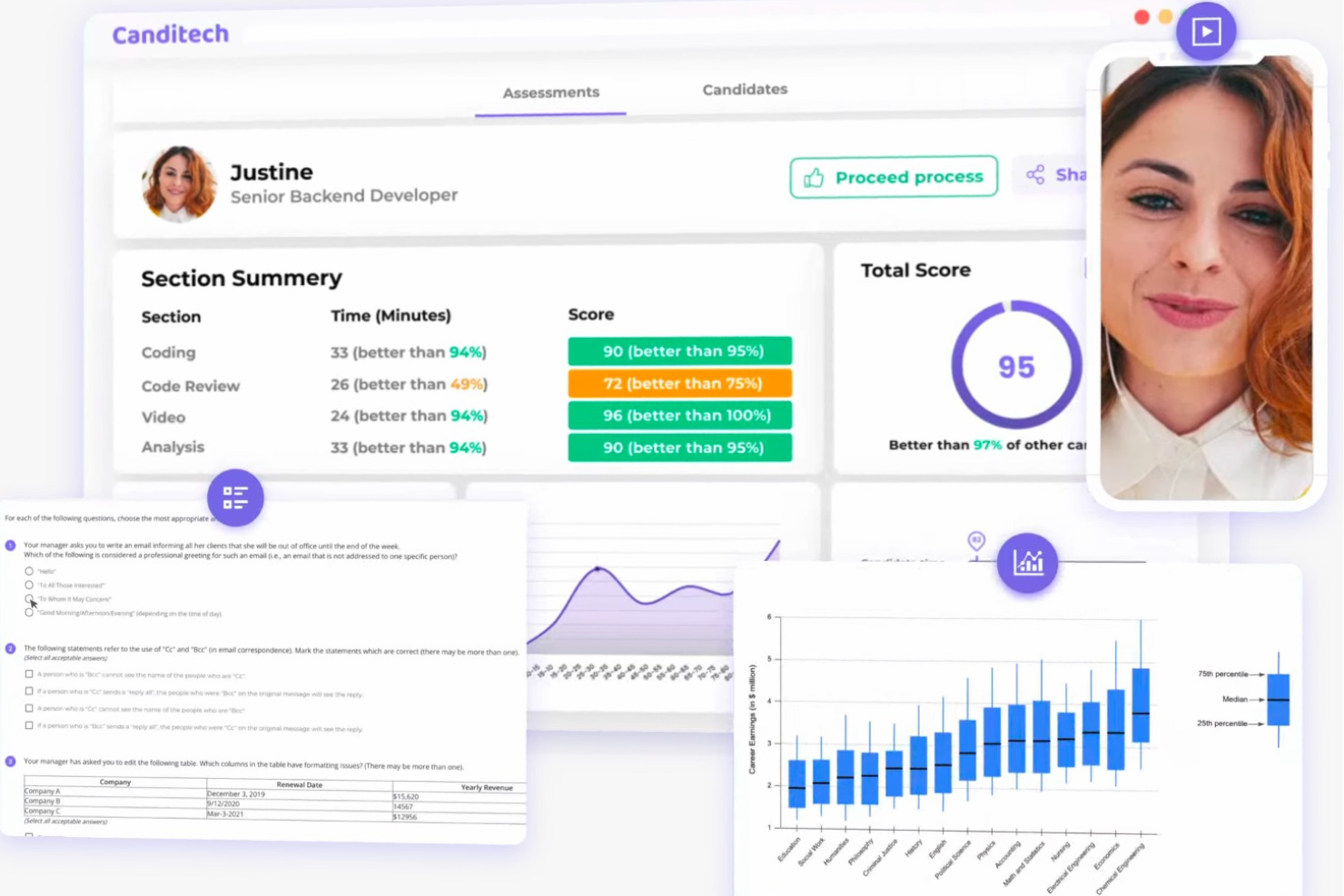
Canditech is a pre-employment assessment platform that supports objective hiring decisions through job-simulation assessments. It evaluates technical and soft skills alongside AI fluency, including ChatGPT integration and an AI skills library applicable across roles. The platform provides a structured view of each candidate’s abilities, treating AI proficiency as a core workforce skill.
Canditech stands out as a pre-employment testing software with customizable assessment tools. It supports multiple question types, including open-text, video, multiple choice, Google Sheets, Excel, coding, ChatGPT, and SQL. AI auto-scoring and an AI Assessment Builder allow hiring teams to generate role-specific assessments from a job description or a link. Cheating-prevention features include ChatGPT detection, alongside one-way video interviews and WhatsApp and SMS recruitment chatbots.
Integrations span over various ATS platforms, including Workday, SAP, iCIMS, ADP, SmartRecruiters, Greenhouse, Lever, Oracle, Jobvite, and JazzHR.
Pricing begins from $45 per month, billed annually, with a free demo available.
Best for cheat-proof online assessments
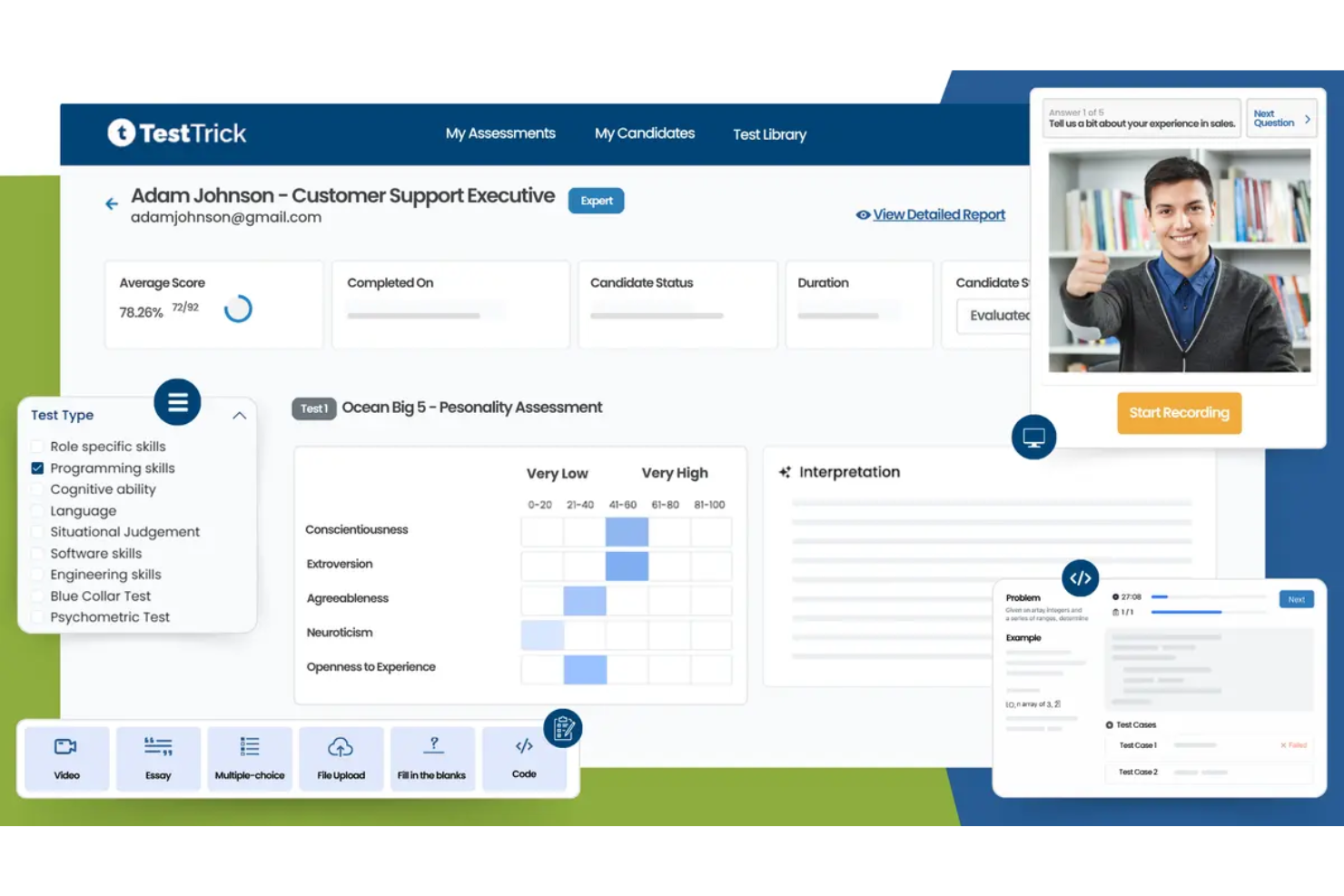
TestTrick is a pre-employment testing platform that offers a 500+ test library, AI-powered proctoring, coding assessments, psychometric evaluations, and one-way video interviews to help you screen and assess candidates before hiring.
Who Is TestTrick Best For?
TestTrick is a good fit for recruiters and HR teams at growing companies that need a scalable, structured way to assess candidates across technical, cognitive, and behavioral dimensions.
Why I Picked TestTrick
I've included TestTrick in my top picks because its anti-cheating toolset goes well beyond a basic browser lockdown. What I find most useful is the combination of AI-based face detection and dual screen detection: the system flags impersonation in real time and catches candidates who try to pull answers from a second monitor. For coding assessments specifically, code paste detection logs any attempt to import pre-written solutions, so you're evaluating what a candidate can actually write, not what they found online.
TestTrick Key Features
- 500+ test library: Pre-built assessments covering cognitive ability, psychometrics, language skills, and role-specific technical topics.
- Custom test builder: Build assessments using MCQ, coding, essay, video response, and file upload question types.
- One-way video interviews: Send async video questions to candidates and score responses manually or with AI assistance.
- Automated scoring: AI-ranked scorecards are generated for each candidate immediately after test completion.
TestTrick Integrations
TestTrick offers native ATS integrations with Greenhouse, Lever, Manatal, Workday, Jobvite, and more, syncing scores, reports, and candidate data directly into your hiring workflow. An API is also available for custom integrations.
Pros and Cons
Pros:
- Async video interviews replace live scheduling
- 500+ pre-built role-specific test library
- AI proctoring catches cheating without invigilators
Cons:
- Dated interface could use a refresh
- Limited to English and Spanish only

Best with custom benchmarking options
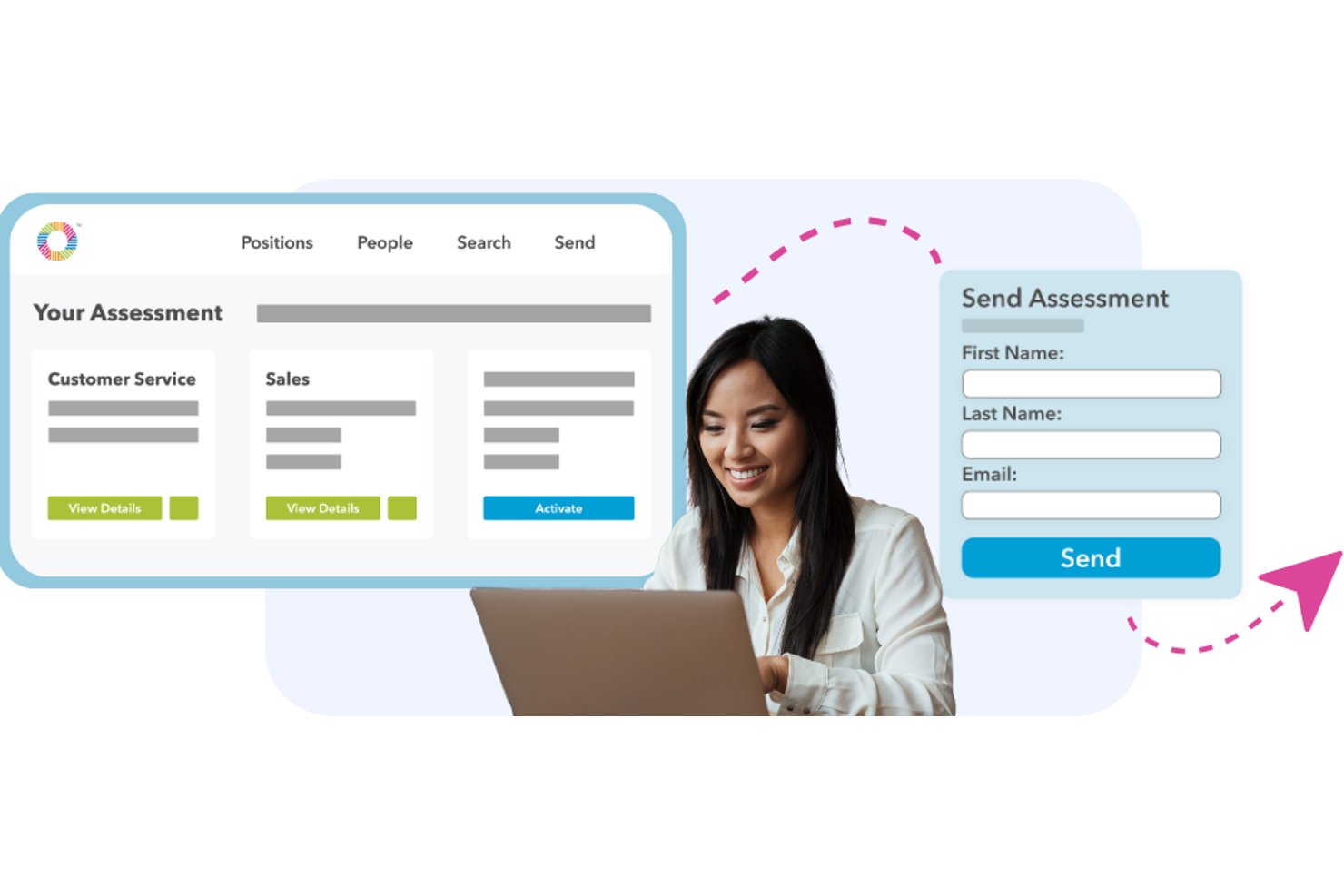
Prevue Assessments is a pre-employment testing platform that combines aptitude, personality, motivations, culture, and skills assessments to help hiring teams evaluate and compare candidates before making offers.
Who Is Prevue Assessments Best For?
It's a strong fit for HR teams at small to mid-sized organizations that hire across multiple role types and want a structured, data-driven way to compare candidates.
Why I Picked Prevue Assessments
Prevue Assessments is one of my top picks because I love how the benchmarking system works in practice. I can test a group of top performers in a specific role and use their results to generate a custom benchmark profile, so every new candidate gets measured against what "great" actually looks like in that position. The Job-Fit, Team-Fit, and Work-Fit reports make that comparison tangible and specific, not just a raw score sitting without context.
Prevue Assessments Key Features
- Aptitude testing: Measure candidates' cognitive ability, numerical reasoning, and spatial skills with validated assessments.
- Personality assessment: Evaluate 13 work-related personality traits to understand behavioral tendencies and workplace style.
- Culture fit assessment: Analyze alignment between a candidate’s values and your organization’s unique culture across 40 value dimensions.
- Applicant tracking system integration: Connect natively with ATS platforms like ADP, UKG, and Paylocity for streamlined hiring workflows.
Prevue Assessments Integrations
Prevue Assessments offers native integrations with ADP Workforce Now, ADP Next Gen HCM, UKG Ready, UKG Pro, isolved Talent Acquisition, iCIMS Hire, Paylocity, and Pinpoint. An API is available for custom integrations.
Pros and Cons
Pros:
- Generates structured interview guides from results
- Covers aptitude, personality, and culture fit
- Custom benchmarks built from your top performers
Cons:
- Smaller test library than enterprise competitors
- Limited proctoring compared to dedicated testing platforms

Best for SMB hiring needs
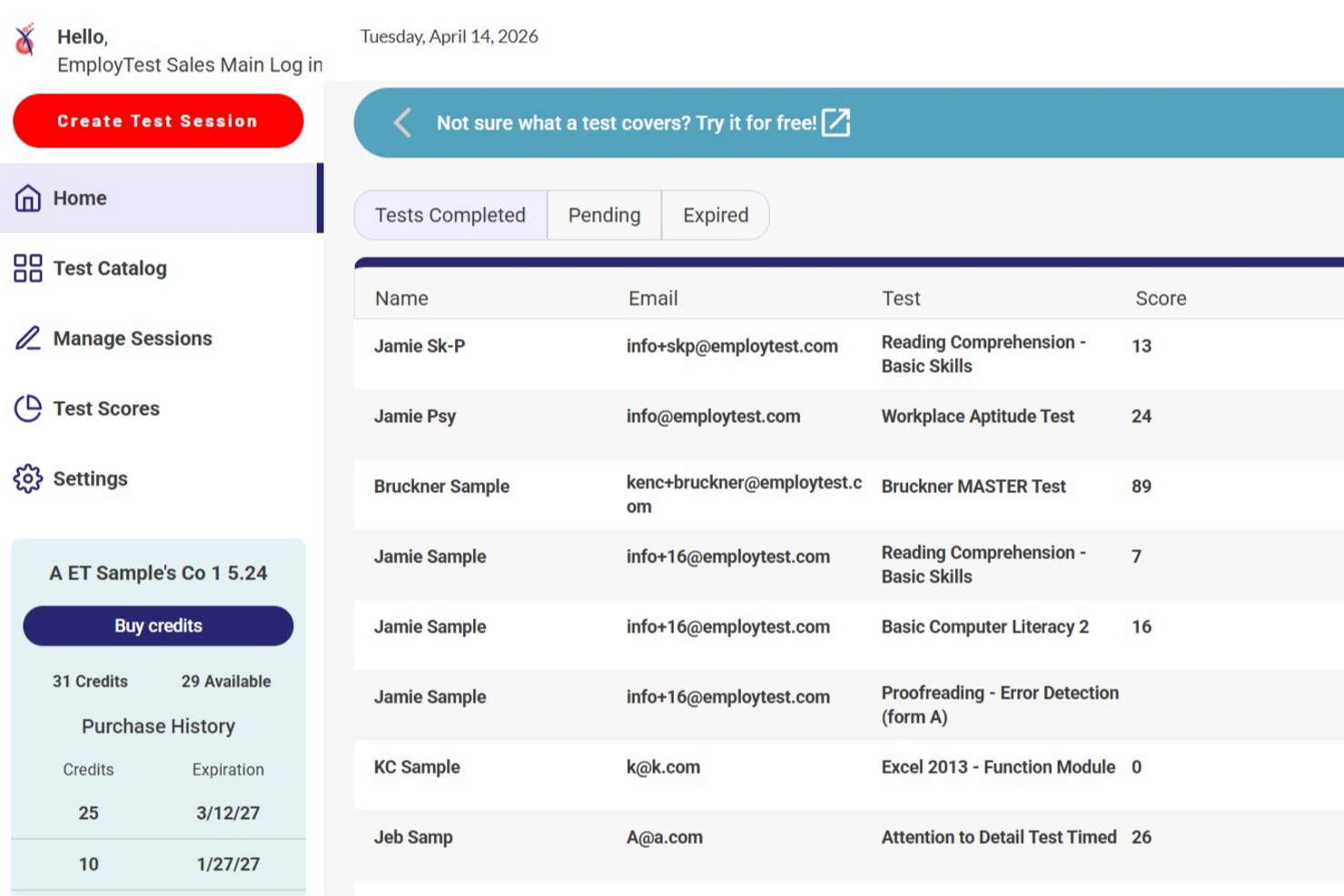
EmployTest is a pre employment testing platform that offers job-specific skills assessments, cognitive aptitude tests, and interactive simulations for evaluating candidates across a wide range of roles.
Who Is EmployTest Best For?
EmployTest suits HR teams and hiring managers in SMBs who need job-specific skills and aptitude testing for candidates.
Why I Picked EmployTest
I’ve included EmployTest in my top picks because its interactive Microsoft Office skills simulations let me see exactly how candidates perform real tasks in Word, Excel, and PowerPoint. My team uses these simulations to assess practical skills like formatting documents, creating formulas, and building presentations. I like that the simulations mirror the actual Office environment, so we get a clear sense of each candidate’s proficiency.
EmployTest Key Features
- Job-specific test library: Access hundreds of pre-built assessments for roles in administration, IT, healthcare, and more.
- Microsoft Office skills simulations: Use interactive simulations to evaluate real-world proficiency in Word, Excel, and PowerPoint.
- Behavioral and personality assessments: Screen candidates with validated tools for workplace fit and soft skills.
- Custom test creation: Build your own assessments by combining questions from the library or adding your own content.
EmployTest Integrations
Native integrations are not clearly documented. EmployTest offers an API for custom integrations.
Pros and Cons
Pros:
- Behavioral and personality assessments included
- Wide range of job-specific test libraries
- Live US-based phone support for users
Cons:
- No mobile app for candidate testing
- Reporting lacks advanced analytics features

SparkHire combines predictive behavioral assessments with one-way video interviewing, giving HR teams a structured way to evaluate candidate fit and communication skills before live interviews take place. The platform uses behavioral competency mapping and role-fit scoring to help hiring teams assess candidates consistently throughout the hiring process.
Who is SparkHire Best For?
SparkHire is a good fit for HR teams and recruiters that need a structured way to evaluate behavioral fit for customer-facing, sales, service, or management roles.
Why I Picked SparkHire
I picked SparkHire because it evaluates candidates against role-specific behavioral competencies while also allowing recruiters to review one-way video responses in the same workflow. The platform provides role-fit, motivation, and competency scoring in a format that is easy for hiring teams to interpret without specialist training.
SparkHire Key Features
Some other features that make SparkHire useful for pre employment testing software include:
- Predictive behavioral assessments: Candidates complete assessments mapped to behavioral competencies defined for the role.
- Role-fit and competency scoring: Recruiters receive scoring for overall fit, motivation, and individual competencies in a single report.
- One-way video interviewing: Candidates can complete structured video responses asynchronously for consistent early-stage evaluation.
- Automated candidate reminders: Email and SMS reminders help improve assessment completion rates.
SparkHire Integrations
Integrations include Greenhouse, Lever, Workable, JazzHR, JobAdder, ApplicantStack, AkkenCloud, BambooHR, iCIMS, and SmartRecruiters.
Pros and Cons
Pros:
- Candidate self-scheduling reduces recruiter workload.
- Automatic time zone syncing for global candidates.
- Supports one-way and live video interviews.
Cons:
- Requires separate tools for written assessments.
- Limited reporting customization for interview analytics.
Willo
Best for its candidate interview portals and ease of interview submission

Willo is a user-friendly and flexible video interview software that enables businesses to conduct pre-employment testing and evaluate potential staff remotely. Recruiting teams can remotely capture candidate interviews, share their video responses, and collaborate with other departments and stakeholders to assess genuine responses from interested participants through engagements and asynchronous video communications.
Businesses and recruitment agencies can leverage the software for finding and remotely meeting candidates at scale, as well as for hiring top graduate talent. They can also use the software for training new hires, online learning, user-generated video content creation, as well as for employee and customer communications.
Willo enables you to take advantage of video interviews to discover potential talent and evaluate candidates faster and more conveniently. Candidates can answer interview questions through a link that is provided by the interviewer, which will take them to the interview landing page. Candidates can participate in video interviews through their web browser, without the need to install plug-ins or additional applications.
The software is equipped with a variety of collaboration features, including tools for editing and sharing video interviews and messages. It also supports the editing and sharing of user-generated video content and training videos, all from a centralized dashboard. Additionally, the video interview solution implements enterprise-grade data encryption, GDPR-compliant security protocols, and multi-factor authentication to ensure the protection of all sensitive data.

Vervoe
Customizable assessment software with AI grading
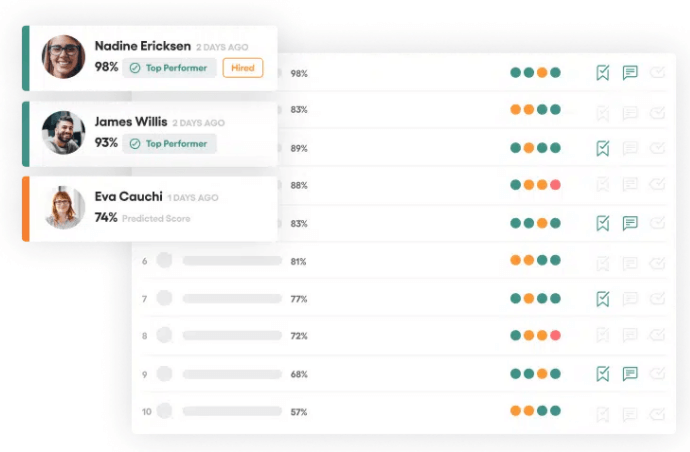
Vervoe’s system comes pre-loaded with 300 pre-employment assessment test templates designed by leading industrial and organizational (I/O) psychologists. These can be used as is, or easily customized with your own questions, or additional items from their bank of 300,000 questions. For technical positions, their platform includes challenges in 8 common coding languages. They also boast strong assessment capabilities for other industries such as marketing and advertising, customer service, retail, healthcare, and call-center recruiting. To ensure candidates are the right fit, hiring teams can use their Customer Service Simulator to develop simulations of what each role is actually like, to see how applicants cope.
System admins have the ability to customize the candidate experience through Vervoe by including a video introduction that welcomes candidates, introduces their company and provides instructions prior to the actual skill testing. As skill tests are completed, Vervoe uses AI to score and rank candidate results in real-time. Top performers are automatically moved to the top of the results dashboard and identified with trophies and badges highlighting their top skills. Hiring managers can use the platform to compare top applicants side-by-side to support decision-making. Once users mark a candidate as ‘hired’ this further enhances the machine learning algorithm for assessing future candidates.
Vervoe integrates with other popular recruiting and workflow tools such as Greenhouse, PageUp, SmartRecruiters, Zapier, and others. Their API also allows for additional integrations customizations.
Pricing for Vervoe starts at $109 USD/month. A free demo and free trial can also be requested through their website.
eSkill
Best for industry and role-specific assessments

eSkill is a pre-employment testing platform that helps organizations assess candidates' skills and suitability for various roles. By offering a range of customizable assessments, eSkill enables employers to make informed hiring decisions.
I chose eSkill for its extensive test library, which includes over 800 job- and subject-based assessments. This variety allows your team to select tests that align closely with specific job requirements across various industries, ensuring candidates are evaluated on relevant skills. Additionally, eSkill offers advanced simulations, such as MS Office, chat, and multitasking exercises, enabling you to observe how applicants perform tasks they would encounter in their roles.
I also like that you have the ability to create customized assessments by selecting questions from multiple tests and adding your own content. This flexibility ensures that evaluations are tailored to your organization's unique needs, providing a more accurate measure of a candidate's capabilities. Furthermore, eSkill's platform includes behavioral assessments to help identify candidates who not only have the right skills but also fit well with your company culture.
Some integrations include Paylocity, iCIMS, Workday, UKG Pro, Bullhorn, Avionte BOLD, Jobvite, SAP SuccessFactors, ApplicantPro, Greenhouse, and Taleo.

iMocha
Comprehensive, AI-powered skills assessment software with digital proctoring capabilities
With over 2,500 skill tests in their library, iMocha is a comprehensive pre-employment testing option for a wide range of industries with technical needs. Beyond all the classic programming languages, users can also initiate tests for other programs like the full Adobe suite, Amazon-specific portals, cybersecurity risk management, specific enterprise-level software systems (like SAP, Salesforce and the full Microsoft suite) and many other applications.
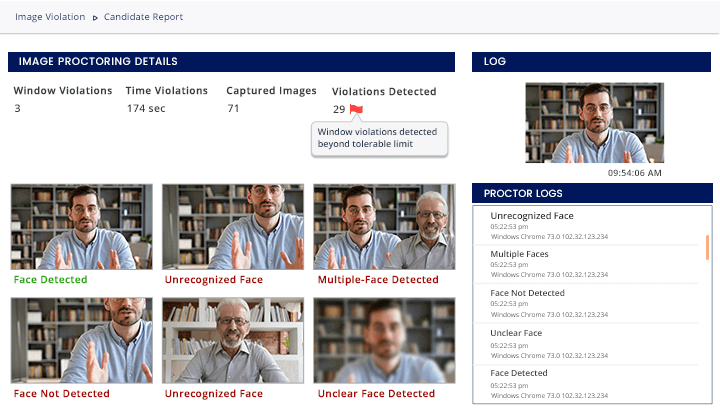
To ensure diversity, equity and inclusion (DEI) among candidates, their bias-free assessment report focuses exclusively on skill-based analyses, while anonymizing other candidate details for more objective comparisons. Their AI-powered system also proctors assessments through real-time images, audio, and video, ensuring that answers are 100% authentic. This type of digital automation makes it a natural fit for virtual campus hiring drives or assessing other remote candidates. To further support university recruitment, iMocha also assesses the job-readiness of graduates with tips for skill gaps they need to address.
iMocha integrates with popular ATS software including Greenhouse, Jobvite, iCIMS, SmartRecruiters, Level, and Taleo.
Pricing details for iMocha are only available upon request, but a free trial and free demo can be requested through their website.

Talview
Well-rounded online assessment tool with advanced security and digital proctoring features
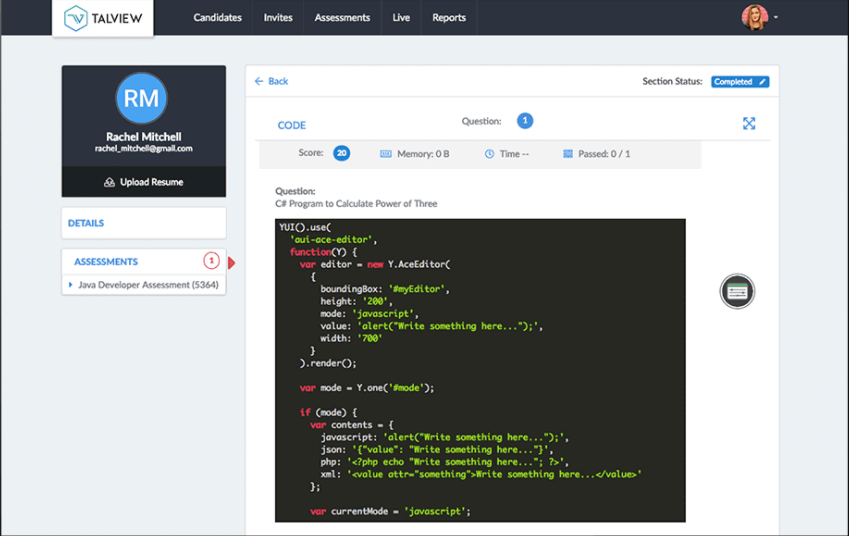
Talview’s online assessment platform covers four main styles of testing: an essay test, typing test, online coding tests, and advanced STEM (science, technology, engineering and mathematics) tests. Their programming/coding assessments are available in 52 programming languages including Java, Ruby, Python and many others. They’re a useful tool for pre-screening large volumes of technical applicants—such as university students—ensuring you only spend time interviewing the top talent in the group.
Their security features are noteworthy, and stand out against other testing providers in this list. Tests are completed within their Talview Secure Browser which locks down access to other system resources like applications, other web tabs, or offline information when an assessment is underway. Remote cognitive proctoring automatically monitors for fraudulent activity via video, flags any suspicious activities, and warns or blocks candidates who appear to be cheating. They also have a 360° Test Environment Check feature that prompts candidates to visually verify elements of their exam room before initiating the test, including their table/desk, ceiling, floor, and the absence of earphones, plus a 360 degree video capture of the entire room.
Talview integrates with several other software providers including Blackboard, Canvas, Moodle, and TalentLMS.
Pricing details for Talview are only available upon request, though you can request a free demo through their website.
Other Pre-Employment Testing Software
Here are some additional pre-employment testing software options that didn’t make it onto my shortlist, but are still worth checking out:
- Wild Noodle
AI-powered online programming assessment test for recruiters hiring for technical positions
- Unnanu Hire
For creating custom tests
- TestGorilla
Affordable testing software with deep test library, including language proficiency tests
- Criteria
Well-rounded psychometric testing platform including game-based assessments
- Mercer Mettl Assessments
Advanced talent and coding assessment platform with hackathon hosting feature, well-suited for campus recruiting
- Qualified
Technical coding assessment platform with revealing code playback feature for deeper programmer insights
- The Hire Talent
Easy-to-use pre-employment testing tool with detailed candidate performance reports
- Woven
Sophisticated engineering assessment platform focused on architecture, systems design, and debugging
- HR Avatar
User-friendly pre-employment testing software with 2D job simulations to maximize candidate engagement
- Resource Associates
Straightforward pre-employment testing provider with a comprehensive test library and “on demand” pricing


How I Evaluate Pre-Employment Testing Software
I split my evaluation into two layers: the baseline capabilities a tool must have—validated assessments, anti-cheating, and ATS integration—and the differentiators that set the best platforms apart.
Core Functionality (Table Stakes For This List)
When I'm selecting tools for my list, I rank each one on a scale from 0 (does not offer the functionality) to 5 (excels in this area) for each core functionality listed below. Then, I calculate the tool's total score into a percentage. Each tool needs to achieve a minimum total score of 65% to be considered for inclusion.
- Assessment Library: I check the breadth and depth of pre-built tests across cognitive ability, personality, situational judgment, and role-specific skills like data entry or coding.
- Custom Test Builder: Whether you're hiring nurses or sales reps, I look for flexible test creation with varied question types, custom scoring, and branching logic.
- Candidate Scoring & Ranking: I evaluate how each platform scores and ranks candidates against benchmarks, including percentile comparisons and role-fit indicators.
- Anti-Cheating Safeguards: Features like question randomization, browser lockdown, webcam proctoring, and plagiarism detection all factor into how I assess test integrity.
- ATS Integration: I look at native integrations with platforms like Greenhouse, Lever, Workable, and iCIMS, plus whether open APIs support custom workflows.
- Bias & Validity Compliance: Published validity studies, adverse impact analyses, and documented alignment with EEOC, GDPR, and other regional hiring regulations are what I check for here.
Once I have a list of tools that meet the criteria, I consider what sets each platform apart.
Differentiating Factors (What Sets Vendors Apart)
Here's how I compare and contrast different vendors:
Standout Features
Realistic job simulations are a big differentiator. Platforms that offer coding sandboxes, typing tasks, or day-in-the-life scenarios give you a much clearer picture of on-the-job performance than multiple-choice tests alone. I also evaluate candidate experience tools like mobile-friendly assessments, branded portals, and automated feedback, which help reduce drop-off during high-volume hiring. AI-powered insights add another layer, surfacing talent patterns and predicting job fit in ways manual scoring can't match.
Beyond Features
Scientific rigor matters. I look for vendors that involve industrial-organizational psychologists in test design and publish validity and adverse impact data you can actually review. Scalability is another key factor—a platform that works for a 50-person startup hiring a handful of roles per quarter needs to perform just as well for an enterprise running 10,000 candidates through assessments each month. For teams hiring across borders, I also evaluate multi-language test delivery and localized normative benchmarks, since a cognitive ability test normed only for one region won't give you accurate results elsewhere.
How to Choose Pre-Employment Testing Software
It’s easy to get bogged down in long feature lists and complex pricing structures. To help you stay focused as you work through your unique software selection process, here’s a checklist of factors to keep in mind:
| Factor | What to Consider |
|---|---|
| Scalability | Will the software grow with your team? Check if it can handle increased candidate volumes and expanding test requirements without performance issues. |
| Integrations | Does it work with your current tools? Ensure it integrates seamlessly with your ATS, HRIS, or other systems to avoid data silos and extra manual work. |
| Customizability | Can you tailor tests to your needs? Look for options to customize assessments to match specific job roles and company culture, avoiding one-size-fits-all solutions. |
| Ease of use | Is it user-friendly for everyone? Consider the learning curve for both your team and candidates. A simple interface can reduce training time and increase adoption. |
| Implementation and onboarding | How quickly can you get started? Evaluate the time and resources required for setup and training. Look for providers offering support materials like tutorials and customer service. |
| Cost | Is it within your budget? Compare pricing structures and consider long-term costs, including potential add-ons or upgrades. Look for transparency in pricing. |
| Security safeguards | How secure is your data? Assess the software’s security measures, including data encryption and compliance with relevant regulations to protect sensitive candidate information. |
What Is Pre-Employment Testing Software?
Pre-employment testing software is a tool used to evaluate candidates' skills, abilities, and fit for a role before hiring. HR professionals, recruiters, and hiring managers typically use these tools to make informed hiring decisions and reduce bias. Customizable tests, integration with ATS, and reporting capabilities help with candidate assessment accuracy and efficiency. Overall, these tools save time and help ensure you hire the right person for the job.
Features
When selecting pre-employment testing software, keep an eye out for the following key features:
- Customizable tests: Allows you to tailor assessments to match specific job roles and company needs, ensuring relevance and accuracy.
- Integration with ATS: Ensures smooth data flow between systems, reducing manual entry and potential errors.
- Reporting and analytics: Provides insights into candidate performance and helps in making data-driven hiring decisions.
- Multi-language support: Enables you to assess candidates from diverse linguistic backgrounds, broadening your talent pool.
- AI-driven test customization: Uses artificial intelligence to create more relevant and challenging assessments based on specific criteria.
- Video interview capabilities: Offers a platform for remote interviews, saving time and resources during the hiring process.
- Fraud detection: Identifies inconsistencies or dishonest practices in test-taking, improving the integrity of the hiring process.
- Mobile functionality: Allows candidates to complete assessments on various devices, offering flexibility and convenience.
- Real-time feedback: Provides immediate responses to candidates, enhancing their experience and engagement.
- Accessibility options: Ensures the platform is usable by individuals with disabilities, promoting inclusivity and compliance.
Benefits
Implementing pre-employment testing software provides several benefits for your team and your business. Here are a few you can look forward to:
- Improved hiring accuracy: Customizable tests and reporting help ensure you select candidates who truly fit the role.
- Time savings: Integration with ATS and automated processes reduce time spent on manual tasks and speed up the hiring process.
- Bias reduction: Standardized assessments and AI-driven customization minimize personal biases in candidate evaluation.
- Enhanced candidate experience: Features like real-time feedback and mobile functionality make the process more engaging and accessible.
- Cost efficiency: By improving hiring accuracy and reducing turnover, these tools help save money in the long run.
- Diverse talent pool: Multi-language support and accessibility options open up opportunities to a wider range of candidates.
- Data-driven decisions: Analytics and reporting features provide insights that support informed decision-making.
Costs & Pricing
Selecting pre-employment testing software requires an understanding of the various pricing models and plans available. Costs vary based on features, team size, add-ons, and more. The table below summarizes common plans, their average prices, and typical features included in pre-employment testing software solutions:
Plan Comparison Table for Pre-Employment Testing Software
| Plan Type | Average Price | Common Features |
|---|---|---|
| Free Plan | $0 | Limited test customization, basic reporting, and standard support. |
| Personal Plan | $10-$30/user/month | Customizable tests, integration with ATS, and basic analytics. |
| Business Plan | $30-$60/user/month | Advanced analytics, multi-language support, and enhanced customer support. |
| Enterprise Plan | $60-$100/user/month | AI-driven customization, dedicated account manager, and comprehensive security. |
Pre-Employment Testing Software FAQs
Here are some answers to common questions about pre-employment testing software:
What types of tests can you create with pre-employment testing software?
You can create various types of tests, including cognitive ability, personality, technical skills, and language proficiency tests. These tools often offer templates and customizable options, allowing you to tailor tests to specific job roles. This flexibility helps you assess candidates’ capabilities and fit for your company’s unique needs.
Can pre-employment testing software predict job performance?
You can use testing software to get some indication of how well a candidate might perform, but it’s not a guaranteed predictor. Validity — whether the test measures what it intends to and correlates with actual job outcomes — is the measure here. So while the software gives you useful data, you should still treat it as one element of the hiring decision, not the sole decision-maker.
What are the risks of bias in pre-employment testing software?
Bias can creep in if the tests are not designed or administered fairly, or if they disadvantage specific groups of candidates. It’s important that the software uses assessments that are inclusive and that you review whether certain groups consistently score lower. Addressing bias means monitoring outcomes and making sure the tool aligns with your organisation’s diversity and fairness standards.
Are there common time-frames for tests produced by pre-employment testing software?
Yes — most assessments via these tools are designed to be compact and efficient. While durations vary depending on the role, many run in under an hour, sometimes considerably less. Longer tests are possible for senior roles, but for many roles the aim is to minimise candidate fatigue and drop-out.