
10 Best Productivity Tracking Software Shortlist
Here's my pick of the 10 best software from the 26 tools reviewed.


Tracking productivity is a common challenge for HR professionals. Keeping your team on track while juggling countless tasks can feel overwhelming. Productivity tracking software offers a way to manage this chaos, helping you focus on what truly matters.
I've delved into the world of productivity tracking tools to bring you an unbiased review of the best options out there. In my experience, choosing the right software can transform how your team operates, making your job easier.
In this article, I'll guide you through my top picks, highlighting features and benefits that align with your needs. You'll find insights to help you make an informed decision, ensuring your team stays efficient and productive.
Why Trust Our Software Reviews
Best Productivity Tracking Software Summary
This comparison chart summarizes pricing details for my top productivity tracking software selections to help you find the best one for your budget and business needs.
| Tool | Best For | Trial Info | Price | ||
|---|---|---|---|---|---|
| 1 | Best productivity tracking software for automated and simple time mapping | Free 7-day trial | From $6.40/seat/month (billed annually) | Website | |
| 2 | Best for refocusing teams on high-impact work | 14-day free trial + free plan + free demo available | From $10/user/month (billed annually) | Website | |
| 3 | Best productivity tracking software with activity monitoring | Free 10-day trial + free demo available | From $6.49/user/month (billed annually) | Website | |
| 4 | Best for presenting work patterns | Free demo available | From $19.99/user/month | Website | |
| 5 | Best for visual work verification | Free 14-day trial + free demo available | From $4.99/seat/month (billed annually) | Website | |
| 6 | Best for detailed reporting | Free plan + free trial available | From $6/user/month (billed annually) | Website | |
| 7 | Best for real-time activity monitoring | Free trial available | From $6.67/user/month (billed annually) | Website | |
| 8 | Best productivity tracking software for comprehensive insights on employee efficiency levels | Free 21-day trial + free plan for up to 3 users | From $7/seat/month | Website | |
| 9 | Best productivity tracking software for garnering real-time productivity analytics | Free trial available | From $6.99/user/month | Website | |
| 10 | Best for advanced user behavior analytics | Free trial + free demo available | From $14/user/month (billed annually) | Website |


-

Checkr
Visit WebsiteThis is an aggregated rating for this tool including ratings from Crozdesk users and ratings from other sites.4.5 -
Kudoboard
Visit WebsiteThis is an aggregated rating for this tool including ratings from Crozdesk users and ratings from other sites.4.8 -
Native Teams
Visit WebsiteThis is an aggregated rating for this tool including ratings from Crozdesk users and ratings from other sites.4.9





Best Productivity Tracking Software
Here’s a brief description of each productivity tracking software that showcases each system’s best use case, their noteworthy features, and some pros & cons. I’ve also included screenshots to give you a snapshot of their user interface.
Best productivity tracking software for automated and simple time mapping

Insightful lives up to its name, with the tool promising to deliver several project-related insights and employee productivity attributes. Many small businesses rely on Insightful for spiking productivity and tracking employee efficiency.
Why I picked Insightful: I like Insightful primarily because of the automated time mapping feature. By implementing automatic time data mapping, insightful delivers accurate project insights that eliminate human error. Insightful provides you with a comprehensive view of the time spent by your employees at distinct stages of a project. The tool also offers precise statistics to help you better justify your projects' budgets and billable hours.
Proof of work is another challenge for employers hiring freelancers or contractors who invoice against billable hours. Insightful implements a real-time monitoring method that gives a snapshot of employees' website and app usage. Additionally, you can personally label apps and websites that are productive for your project or organization.
Insightful Standout Features and Integrations
Features include automated screenshots, verified attendance, automated time entries mapping, attendance tracking, historical timekeeping, productivity labeling, and different logins for clients, managers, and employees.
Integrations include 5+ tools like Data Studio, IBM Cognos Analytics, Looker, Power BI, Slack, Tableau, and others.
Pros and Cons
Pros:
- User-friendly user interface
- Screenshots depicting window changes
- Includes a REST-based API for custom integrations
Cons:
- Occasional automation bugs
- Can't delete users in some cases

ActivTrak is a productivity tracking platform that helps you understand how work happens across your organization. It captures digital activity data to show where time goes, how teams perform, and where efficiency can improve.
Why I picked ActivTrak: I picked ActivTrak because it helps you see what’s driving performance without crossing privacy boundaries. It tracks productive, unproductive, and offline work so you can spot gaps and improvement opportunities. You can benchmark individual and team productivity against organizational averages to see where focus or coaching is needed.
The platform also highlights low-value activities so teams can refocus on tasks that deliver results. With its performance insights and burnout prevention tools, you can balance workloads and keep your team’s energy steady.
Standout features & integrations:
Features include productivity performance tracking that breaks down time spent on different activity types, helping you pinpoint inefficiencies and improvement areas. Another useful tool is schedule optimization, which uses attendance data to ensure consistent coverage and prevent missed shifts, keeping operations running smoothly.
Integrations include Microsoft Outlook, Google Calendar, Salesforce, Microsoft Teams, Slack, ServiceNow, Zendesk, Zoom, Microsoft Viva, Lattice, Qualtrics, and Jira Software.
Pros and Cons
Pros:
- Detailed breakdown of productive vs. unproductive time
- Helps detect burnout before it impacts output
- Benchmarking makes performance comparisons easier
Cons:
- Limited customization of dashboard layouts
- No built-in payroll or HR tools

Monitask is a productivity tracking software that helps companies monitor and manage their employees' time and efforts. It offers features such as time tracking, online timesheets, computer monitoring, remote employee monitoring, and employee attendance tracking.
Why I picked Monitask: I chose Monitask because of its comprehensive activity monitoring and detailed productivity analysis features. Monitask's ability to track mouse clicks, keystrokes, and onscreen tasks, alongside its screenshot functionality, offers an in-depth view of employee activities throughout the workday. Additionally, Monitask's time-tracking capabilities ensure that every minute spent on work tasks is accounted for, providing accurate data for performance evaluations and project management
The platform also has a real-time dashboard and automatic report generation to simplify the process of monitoring employee performance and identifying areas for improvement. These features, combined with the ability to customize settings for different team members, make Monitask a versatile tool for enhancing productivity and optimizing business processes.
Monitask Standout Features and Integrations
Features include automatic time tracking, proof-of-work screenshots, website logging, productivity scores, project and task tracking, attendance tracking, summaries and custom reports, software usage tracking, GDPR Compliance, and more.
Integrations include Slack, Trello, Asana, Google Sheets, Jira, ClickUp, Microsoft Dynamics 365 CRM, Zapier, and more.
Pros and Cons
Pros:
- Reports on employee productivity
- Available for multiple operating systems
- Tracks time on different tasks
Cons:
- Navigating the platform can be confusing at first
- No mobile app available

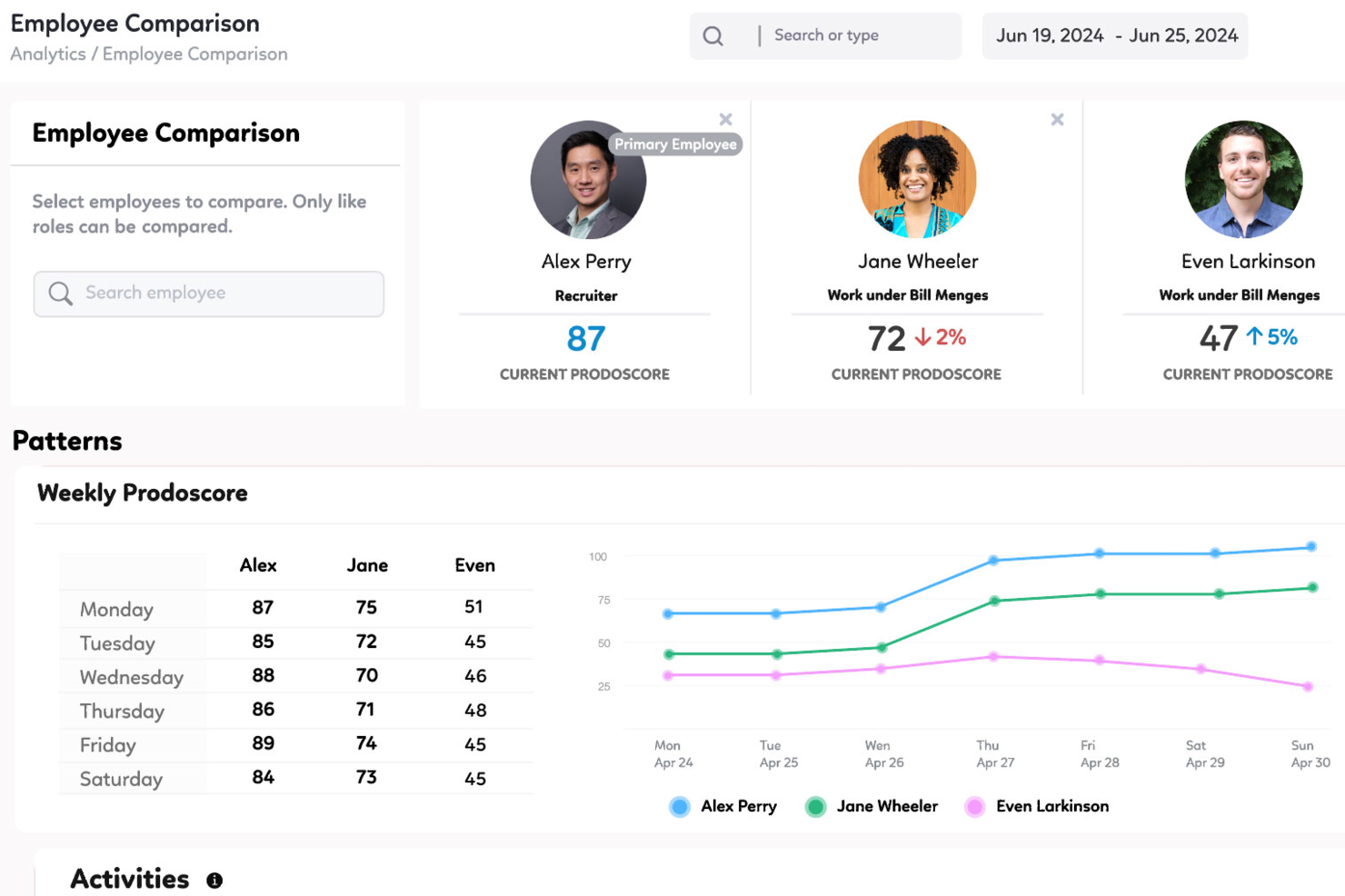
For businesses that want to get more out of their teams, Prodoscore offers a practical way to turn employee activity data into insights you can actually use. It focuses on real-time productivity metrics without crossing privacy lines, making it a good fit for remote and hybrid work environments. By clarifying how work really gets done, Prodoscore helps you make informed decisions that support stronger performance.
Why I Picked Prodoscore
I picked Prodoscore because it delivers real-time visibility into employee productivity through AI-driven analytics. It stands out for pulling data from multiple business tools and presenting it in a way that clearly shows work patterns. This makes it easier to recognize high performers and identify where others may need support. By providing objective metrics without tracking hours, Prodoscore lets you make data-driven management decisions while respecting employee privacy.
Prodoscore Key Features
In addition to its core analytics capabilities, Prodoscore offers several other features that enhance its utility as a productivity tracking tool.
- Deep API Integrations: Connects seamlessly with various business applications to aggregate data for a comprehensive productivity view.
- Browser Extension: Captures usage statistics for web-based applications, providing deeper insights into daily activities.
- Desktop Agent: Monitors application usage on desktop computers, adding another layer of data for productivity analysis.
- ProdoAI: Leverages artificial intelligence to offer predictive insights and coaching recommendations for performance improvement.
Prodoscore Integrations
Integrations include Google Workspace, Microsoft 365, Salesforce, Slack, Zoom, HubSpot, RingCentral, Cisco Webex, Dropbox, and QuickBooks.
Pros and Cons
Pros:
- AI-driven insights for proactive coaching
- Deep integrations across core business tools
- Objective productivity metrics without surveillance
Cons:
- Pricing not publicly disclosed
- No real-time screen monitoring

Hubstaff is a versatile time tracking and productivity monitoring tool that caters to teams of any size, whether you're a solo entrepreneur or part of a large organization. Its primary goal is to enhance productivity by providing insights into how time is spent across various projects and tasks.
Why I picked Hubstaff: One of the key features that stands out to me is its activity monitoring capability. The software measures keyboard and mouse usage to determine activity levels, offering a quantifiable way to assess engagement during work hours. This data helps managers identify patterns, allocate resources effectively, and address potential productivity issues.
Another notable feature is Hubstaff's optional screenshot functionality. Managers can configure the software to take periodic screenshots of employees' screens, providing visual confirmation of work being performed. This feature can be customized to blur sensitive information, balancing oversight with privacy considerations.
Hubstaff Standout Features and Integrations
Features include time tracking, timesheets, attendance management, reporting, payroll, expenses and invoicing, GPS time tracking, project cost management, employee scheduling, overtime tracker, billing and invoicing, and workforce analytics.
Integrations include Jira, Slack, Asana, Trello, QuickBooks, Salesforce, GitHub, PayPal, FreshBooks, ClickUp, monday.com, and Zendesk.
Pros and Cons
Pros:
- Chrome extension
- Productivity line charts
- Automated reports
Cons:
- User interface navigation is a little tricky
- Occasional data mismatch between calculated time in employee and admin panels
New Product Updates from Hubstaff

Hubstaff Enhances Productivity and Team Management Features
Hubstaff’s latest updates introduce new tools to simplify workforce management and improve visibility into team productivity. Highlights include the new Insights Timeline, manual time approval, enhanced reports, and smarter activity detection. For more information, visit Hubstaff's official site.
 .
.

actiTIME is a time-tracking software that helps businesses manage projects, teams, and clients in one place. It enables your team to log work hours, track leave time, and monitor project progress.
Why I picked actiTIME: One reason I chose actiTIME is its comprehensive reporting capabilities. You can generate detailed reports on time distribution across clients and assignments, monitor individual and team productivity trends, and assess project costs. These insights allow you to identify profitable projects and make data-driven decisions to enhance efficiency.
Another notable feature is actiTIME's task and project management tools. You can set task estimates, deadlines, and statuses to keep your projects on track. The Kanban board view provides a clear picture of work progress, helping your team stay organized and focused. This structured approach to task management contributes to improved productivity and timely project completion.
actiTIME Standout Features and Integrations
Features include weekly timesheet, calendar view, overtime calculation, timesheet locking, timesheet approval, email notifications, custom workflows, data export, user permissions, workload management, task assignments, and custom fields.
Integrations include actiPLANS, QuickBooks, Zapier, GitHub, Salesforce, Jira, Trello, Outlook, Evernote, Todoist, Bamboo HR, and Google Calendar.
Pros and Cons
Pros:
- Mobile app facilitates time tracking on the go
- Detailed reporting capabilities for productivity analysis
- Comprehensive time and project tracking features
Cons:
- Initial setup and customization can be time-consuming
- Limited integration options compared to competitors
New Product Updates from actiTIME

actiTIME's Enhanced Custom Field Imports and Timesheet Settings
actiTIME enhances project setup and daily tracking with new custom fields import and refined timesheet & calendar settings. These updates help you keep all your task data in sync and view your workday the way you want. For more information, visit actiTIME's official site.
 .
.

Controlio is a cloud-based productivity tracking and employee monitoring tool designed to help organizations measure, analyze, and improve workforce performance. It captures activity data from desktops to provide detailed insights into productivity levels, app and web usage, and work habits across in-office, remote, and hybrid teams.
Why I picked Controlio: I picked Controlio because it provides real-time visibility into employee activities, helping you identify which tasks and applications contribute most to productivity. Its productivity scoring system automatically categorizes time spent on different apps and websites, allowing you to spot both productive and distracting behaviors. I also like that Controlio supports continuous screen recording and live session viewing, which makes it easier to verify work progress and maintain accountability.
For distributed teams, this combination of tracking, scoring, and surveillance offers a complete picture of how work happens day-to-day.
Controlio standout features and integrations:
Features include productivity scoring that rates users and departments based on time spent on productive and distracting activities, real-time surveillance for monitoring desktops live, and continuous screen recording that captures user screens for later review. The software also supports detailed behavior analytics, time distribution insights, and compliance with data protection standards like GDPR and HIPAA, ensuring responsible monitoring practices.
Integrations are not currently listed by Controllo.
Pros and Cons
Pros:
- Tracks productive and distracting activities
- Offers continuous screen recording
- Complies with GDPR and HIPAA
Cons:
- Limited search in recorded data
- Continuous video may raise privacy concerns

Traqq
Best productivity tracking software for comprehensive insights on employee efficiency levels

Traqq enables businesses to retrospect and analyze internal processes. With Traqq, your teams unlock a new dimension in understanding various aspects of work productivity. As a result, you can conduct root cause analysis of low productivity times and quickly implement a workaround to boost efficiency.
Why I picked Traqq: I love how the developers at Traqq have created a simple yet comprehensive productivity tracking software. The activity levels generated on the Traqq dashboard have an interesting algorithm. The tool tracks your employees’ keyboard clicks and mouse movements. Consequently, the activity page populates your employees’ daily activity in different coloured blocks depicting sessions of low, average, and high activity levels.
Traqq detects and reports websites and apps on which your employees spend over 10 seconds. As a result, you can get a quick overview of what distracts your employees. Traqq also takes random screenshots at 10-minute intervals and uploads them to a secure online storage space.
Traqq Standout Features and Integrations
Features include application and URL tracking, activity level generation, desktop screenshots, desktop screen recording, idle time and attendance tracking, team management, analysis and reporting, and others.
Integration details are currently not available.
Pros and Cons
Pros:
- Accurate employee tracking
- Screenshot-taking can be paused
- Automation of email reports (daily/weekly)
Cons:
- No support for foreign languages
- No support for third-party integrations

We360.ai
Best productivity tracking software for garnering real-time productivity analytics

We360.ai started in Q4 of 2020 and has made significant strides in productivity-tracking software. The software offers many tools, including project management, tracking productivity logs, and real-time analytics.
Why I picked We360.ai: I'm particularly interested in the real-time productivity analytics that We360.ai offers. We360.ai gives you live statistics about your employees' activities: what applications they use, their usage duration, and their availability status. It's like a live stream of your employees' online activities.
Additionally, We360.ai has a nifty leave management system that tracks employee leaves, aiding with payroll processing. As a result, you can easily track, approve, or reject leave requests. The Health360 segment of We360.ai helps you manage your employees' well-being. You can swiftly analyze which employees are overworking or underworking and then intelligently shift workloads.
We360.ai Standout Features and Integrations
Features include real-time analytics, desktop screenshots, a time tracking app, leave management, user data import, CSV report export, cross-OS compatibility, automated attendance, domain blocking, a mobile application for admins, and task & project management tools.
Integrations include 10+ tools like Asana, ClickUp, GitHub, Google Calendar, Insightly, Jira, PayPal, Slack, Trello, Zapier, Zendesk, and others.
Pros and Cons
Pros:
- There is an option for a Lifetime Deal (LTD)
- Free and detailed live training
- Dedicated account manager
Cons:
- Issues with bulk downloading screenshots
- The monthly plan requires a minimum of 10 users


Teramind is a user behavior analytics software platform designed for businesses across various industries, with features focusing on cybersecurity, compliance management, and employee productivity.
Why I picked Teramind: Teramind's productivity tracking software gives you detailed insights into how your team spends their time at work. With behavior analysis, you can see patterns in user actions, helping to spot inefficiencies and refine workflows. The data telemetry feature collects user activity information without being intrusive, showing where time is well-spent or wasted.
Another useful feature is AI-driven predictive analytics, which spots potential productivity bottlenecks before they become serious issues. The software also helps with insider threat monitoring, alerting you to any suspicious activities to manage risks and keep your work environment secure. For hybrid teams, Teramind supports compliance management, ensuring all activities align with company policies.
Teramind Standout Features and Integrations
Features include keystroke logging, screen recording, file transfer tracking, email monitoring, instant message tracking, social media activity monitoring, print job tracking, clipboard monitoring, network activity monitoring, application usage tracking, and website usage tracking.
Integrations include Google Cloud BigQuery, Splunk Cloud Platform, Jira, Zendesk, Redmine, Microsoft Power BI, IBM Security QRadar, LogRhythm, ArcSight, McAfee Business Protection, Microsoft Entra ID, and ServiceNow.
Pros and Cons
Pros:
- Detailed user behavior analytics to detect anomalies
- Real-time alerts and automated responses to policy violations
- Supports both cloud-based and on-premises deployments
Cons:
- Minimum of 5 seats
- Limited support for mobile device monitoring
New Product Updates from Teramind

Teramind Enhances Tracking Flexibility, Mac Parity, and Security Controls
Teramind introduces flexible monitoring configuration, expanded Mac agent capabilities, and stronger security and data protection controls. These updates give organizations more precise tracking, improved cross-platform monitoring, and tighter privacy-focused security. For more information, visit Teramind’s official site.
 .
.Other Productivity Tracking Software
Here are a few other options worth mentioning that didn’t make the best productivity tracking software list:
- Guru
For enterprise AI knowledge search
- EmailAnalytics
Productivity tracking software for charting email trends and improving email response rates
- DeskTrack
Productivity tracking software for setting time-bound restrictions to applications
- Height
Productivity tracking for project, task, and workflow management
- ClickUp
Productivity tracking software for automating sales processes and managing accounts
- monday.com
Productivity tracking software for codeless automation of manual and repetitive tasks
- WebWork Time Tracker
For AI-powered productivity reports
- Peoplebox.ai
Productivity tracking software for implementing automated engagement surveys
- Wrike
Productivity tracking software for monitoring team progress and identifying potential roadblocks
- Time Doctor
Productivity tracking software for business process outsourcing and organizations with offshore functions
- Keepactive
Productivity tracking software with keystroke logging features
- DeskTime
Productivity tracking software to identify employees experiencing burnout
- Profit.co
Productivity tracking software for aligning with organization-wide objectives and key results (OKRs)
- Hive
Productivity tracking software for visualizing progress made towards pre-defined goals
- Veriato
Productivity tracking software for tracking idle time of work-from-home employees and remote teams
- Qbserve
Productivity tracking software for organizations using macOS


Productivity Tracking Software Selection Criteria
When selecting the best productivity tracking software to include in this list, I considered common buyer needs and pain points like time management and integration with existing tools. I also used the following framework to keep my evaluation structured and fair:
Core Functionality (25% of total score)
To be considered for inclusion in this list, each solution had to fulfill these common use cases:
- Time tracking
- Task management
- Reporting and analytics
- Integration with other tools
- User management
Additional Standout Features (25% of total score)
To help further narrow down the competition, I also looked for unique features, such as:
- Customizable dashboards
- Real-time collaboration
- Automated alerts and reminders
- Mobile app availability
- AI-driven insights
Usability (10% of total score)
To get a sense of the usability of each system, I considered the following:
- Intuitive interface
- Ease of navigation
- Clear instructions and help guides
- Minimal learning curve
- Aesthetic design
Onboarding (10% of total score)
To evaluate the onboarding experience for each platform, I considered the following:
- Availability of training videos
- Interactive product tours
- Access to templates
- Support through chatbots
- Webinars and live demos
Customer Support (10% of total score)
To assess each software provider’s customer support services, I considered the following:
- 24/7 support availability
- Response time to inquiries
- Access to a knowledge base
- Availability of live chat
- Personalized support options
Value For Money (10% of total score)
To evaluate the value for money of each platform, I considered the following:
- Competitive pricing
- Availability of free trial
- Flexible subscription plans
- Discounts for annual payments
- Feature set relative to price
Customer Reviews (10% of total score)
To get a sense of overall customer satisfaction, I considered the following when reading customer reviews:
- User satisfaction ratings
- Feedback on functionality
- Comments on ease of use
- Reports on customer support experiences
- Overall recommendation rate
How to Choose Productivity Tracking Software
It’s easy to get bogged down in long feature lists and complex pricing structures. To help you stay focused as you work through your unique software selection process, here’s a checklist of factors to keep in mind:
| Factor | What to Consider |
|---|---|
| Scalability | Can the software grow with your team? Consider future needs and whether the tool can handle increased users or data without a hitch. |
| Integrations | Does it connect with tools you already use? Look for seamless integration with your existing systems to avoid workflow disruptions. |
| Customizability | Can you tailor the software to fit your processes? Look for options to adjust settings, views, and reports to match your unique needs. |
| Ease of use | Will your team adopt it quickly? Consider the learning curve and how intuitive the interface is for everyday users. |
| Implementation and onboarding | How smooth is the setup process? Evaluate the time and resources needed for rollout, training, and getting your team up to speed. |
| Cost | Is it within your budget? Compare pricing plans, hidden fees, and whether features match the price. Consider long-term costs as your team grows. |
| Security safeguards | How does it protect your data? Ensure the tool meets security standards like encryption and access controls to keep information safe. |
| Support availability | Can you get help when needed? Check if there's 24/7 support, live chat, or dedicated account managers to assist your team. |
What Is Productivity Tracking Software?
Productivity tracking software is a tool that helps monitor and manage time spent on tasks and projects. Professionals like managers, remote workers, and freelancers use these tools to boost efficiency and track progress. Time tracking, task management, and reporting features help with staying organized and identifying productivity patterns. Overall, these tools offer valuable insights into work habits and help optimize daily routines.
Features
When selecting productivity tracking software, keep an eye out for the following key features:
- Time tracking: Allows users to log hours spent on tasks, helping analyze productivity and manage time effectively.
- Task management: Organizes tasks and projects in one place, making it easier to prioritize and track progress.
- Reporting and analytics: Provides insights into work patterns and productivity trends, aiding in data-driven decision-making.
- Integrations: Connects with other tools and platforms to ensure a seamless workflow across different systems.
- Customizable dashboards: Offers tailored views and reports to match individual or team preferences and needs.
- Mobile app availability: Enables users to track and manage tasks on-the-go, enhancing flexibility and accessibility.
- Automated alerts and reminders: Keeps users informed of deadlines and important tasks, reducing the risk of oversights.
- User management: Allows administrators to control access and monitor activity, ensuring secure and efficient operations.
- AI-driven insights: Uses artificial intelligence to provide personalized recommendations and productivity tips.
- Security safeguards: Ensures that data is protected with encryption and access controls, maintaining privacy and security.
Benefits
Implementing productivity tracking software provides several benefits for your team and your business. Here are a few you can look forward to:
- Improved time management: By tracking hours spent on tasks, teams can identify time sinks and optimize schedules.
- Enhanced focus: Task management features help prioritize work, reducing distractions and increasing concentration.
- Data-driven decisions: Reporting and analytics provide insights that support informed decision-making and strategic planning.
- Increased accountability: Automated alerts and reminders ensure deadlines are met, holding team members accountable.
- Better collaboration: Integrations with other tools foster a connected workflow, enhancing team coordination and communication.
- Flexibility and accessibility: Mobile app availability lets team members manage tasks from anywhere, accommodating remote or hybrid work setups.
- Secure operations: Security safeguards protect sensitive information, ensuring privacy and compliance with data regulations.
Costs & Pricing
Selecting productivity tracking software requires an understanding of the various pricing models and plans available. Costs vary based on features, team size, add-ons, and more. The table below summarizes common plans, their average prices, and typical features included in productivity tracking software solutions:
Plan Comparison Table for Productivity Tracking Software
| Plan Type | Average Price | Common Features |
|---|---|---|
| Free Plan | $0 | Basic time tracking, task management, and limited reporting. |
| Personal Plan | $5-$15/user/month | Advanced time tracking, customizable dashboards, and mobile app access. |
| Business Plan | $20-$50/user/month | Team collaboration tools, integrations with other software, and enhanced security. |
| Enterprise Plan | $60+/user/month | Customizable features, dedicated support, and comprehensive analytics. |
FAQs
Can productivity tracking software invade privacy?
Yes, productivity tracking software can raise privacy concerns if not used responsibly. It’s important to choose tools that allow customization of privacy settings and clear communication with your team about what data is being tracked. Look for software that offers transparent data usage policies and provides options for users to control their own data. Ensuring your team understands and consents to the tracking process can help mitigate privacy issues.
Is productivity tracking software suitable for remote teams?
Yes, productivity tracking software is particularly useful for remote teams. It helps manage tasks and track time without being physically present, allowing for better coordination and accountability. With features like time tracking and task management, remote teams can stay organized and connected. Many tools offer mobile apps and cloud-based access, making it easy for remote workers to log their activities and collaborate with team members from anywhere.
What’s Next:
If you're in the process of researching productivity tracking software, connect with a SoftwareSelect advisor for free recommendations.
You fill out a form and have a quick chat where they get into the specifics of your needs. Then you'll get a shortlist of software to review. They'll even support you through the entire buying process, including price negotiations.