

10 Best Global Payroll Software For Small Businesses In 2026

Best Global Payroll Software For Small Businesses Shortlist


Global payroll software for small businesses helps you manage employee payments, taxes, and compliance across multiple countries from one system. If you’re expanding your team worldwide or juggling international contractors, the stakes are high, errors can cost you time, money, and trust. In this guide, you’ll find the best global payroll tools, each picked for their reliability and ability to meet the unique challenges small businesses face, so you can pay your people with confidence wherever they work.
Why Trust Our Software Recommendations
Our team has been testing and reviewing software since 2012. As HR experts ourselves, we know how difficult—and important—it is to choose the right software.
For this guide, we evaluated tools using hands-on testing and independent research, scoring tools using our selection criteria. We also draw on insights from industry thought leaders and practicing HR experts.
Our reviews reflect our human editorial judgment, not a sales pitch.
Expert reviewers:
Comparison Table: Global Payroll Software For Small Businesses
This comparison table summarizes pricing details for my top global payroll software for small businesses selections.
| Tool | Best For | Trial Info | Price | ||
|---|---|---|---|---|---|
| 1 | Best for $1M compliance indemnification per worker | Free demo available | From $199/employee/month | Website | |
| 2 | Best for fast multi-country payroll setup | Free demo available | From $29/user/month | Website | |
| 3 | Best for payroll with automatic tax filing | Free demo available | From $49/month + $6/month/user | Website | |
| 4 | Best for scalability across new hiring countries | Free demo available | From $459/employee/month (billed annually) | Website | |
| 5 | Best for rapid onboarding in 180+ countries | Free demo available | From $599/employee/month | Website | |
| 6 | Best for unified HR and IT payroll management | Free demo available | Upon request | Website | |
| 7 | Best for in-country tax compliance coverage | Free demo available | From $599/employee/month | Website | |
| 8 | Best for centralized team payroll administration | Free demo available | From $399/user/month | Website | |
| 9 | Best for automated contractor and employee payouts | Free demo available | From $699/employee/month | Website | |
| 10 | Best for unified payroll management | Free demo available | From €19/employee/month | Website |


Best Global Payroll Software For Small Businesses Reviews
Below are my detailed summaries of the best global payroll software for small businesses that made it onto my shortlist. My reviews offer a detailed look at the features, pricing, and best use cases of each platform to help you find the best one for you.

Best for $1M compliance indemnification per worker
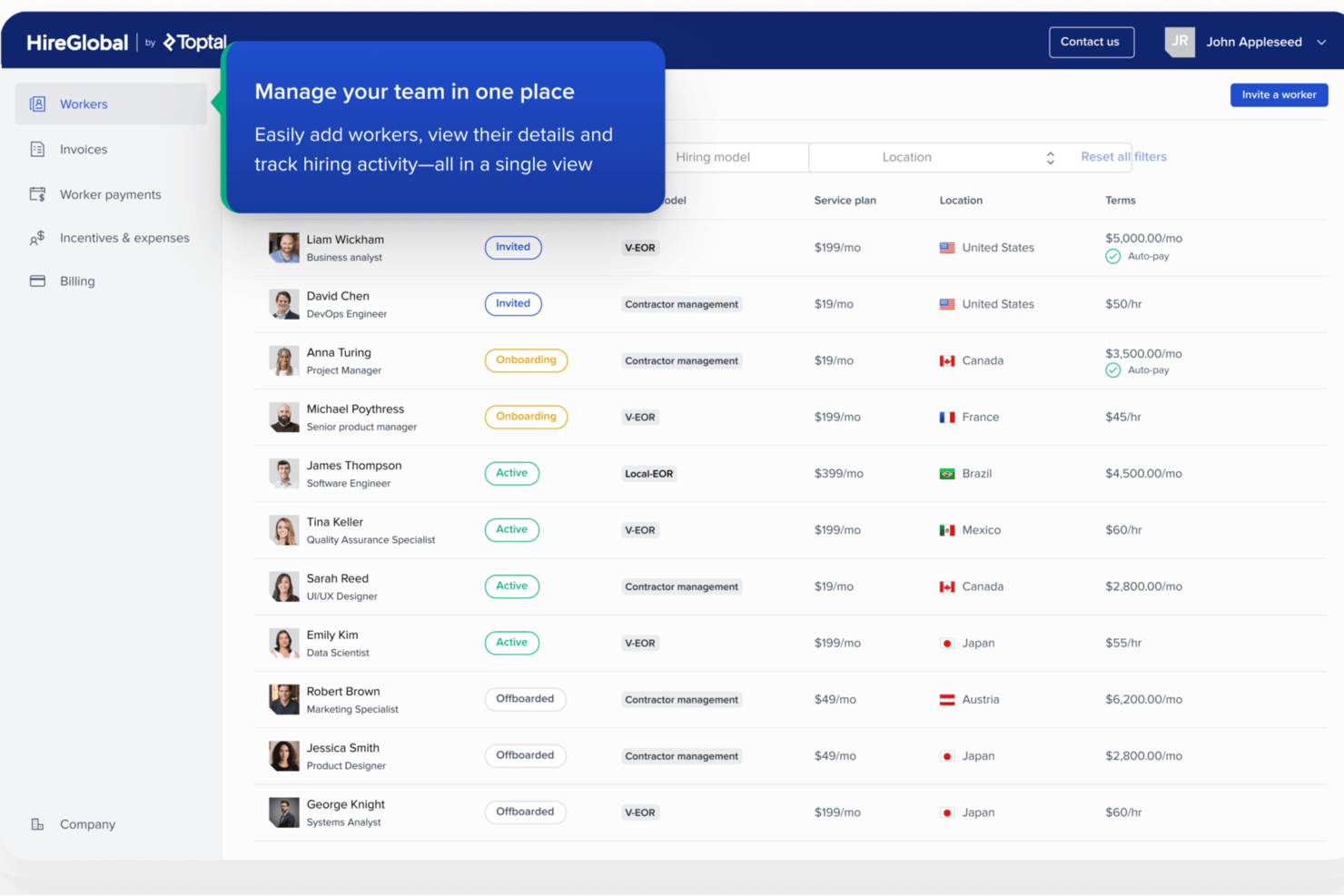
HireGlobal is a global payroll and workforce management platform that combines contractor management, agent of record, virtual employer of record, and traditional EOR services to help small businesses hire, onboard, and pay workers across 180+ countries.
Who Is HireGlobal Best For?
HireGlobal is a strong fit for small businesses and startups hiring international contractors or employees without the budget or need for a local legal entity.
Why I Picked HireGlobal
HireGlobal earns its spot on my shortlist because no other platform I've reviewed offers automatic $1M indemnification per worker through its Virtual Employer of Record model. I like that the coverage kicks in as soon as you add a worker, with no extra cost or paperwork. The Agent of Record tier also adds misclassification protection for contractors, which is a real gap that most small business payroll tools leave unaddressed.
HireGlobal Key Features
- HRIS and workforce dashboard: Manage hiring, payroll, benefits, and compliance for global teams in one system.
- Multi-currency payment processing: Pay workers in 50+ currencies across 180+ countries from a single invoice.
- Integrated background checks: Run international background checks for new hires directly within the platform.
- SOC 2 compliant security architecture: Protect sensitive business and employee data with advanced encryption and strict data isolation.
HireGlobal Integrations
HireGlobal offers a native integration with TopTracker for time tracking, invoice approval, and workforce payments. Native integrations with other third-party apps are not clearly documented.
Pros and Cons
Pros:
- Covers contractors and employees in 180+ countries
- No deposit or setup fees required
- $1M indemnification per worker included
Cons:
- Relatively new platform with limited user reviews
- EOR coverage relies on partner entities
Best for fast multi-country payroll setup

Deel Payroll is a global payroll platform that lets you run payroll for employees and contractors across multiple countries, with a choice between self-serve or fully managed payroll by country.
Who Is Deel Payroll Best For?
Deel Payroll is a strong fit for small businesses that are hiring internationally and need to get payroll running in new countries quickly.
Why I Picked Deel Payroll
I picked Deel Payroll as one of the best because of how fast it gets you up and running across multiple countries. SMBs can go live in as little as 1–2 weeks using guided country onboarding with clear timelines, which I find genuinely impressive for international payroll. I also like the Payroll Connect feature, which lets you view Deel-run payroll and third-party providers side by side in one dashboard, so you're not forced to migrate everything at once. On top of that, built-in AI flags anomalies and missing data before payroll runs, catching issues early instead of after approval.
Deel Payroll Key Services
- Built-in compliance automation: Local tax rules, statutory requirements, and filings are applied automatically before each payroll run.
- Multi-currency payouts: Approve payroll once and Deel handles FX and local payment rails, including optional crypto payouts where supported.
- Multi-worker-type support: Run payroll for employees, contractors, EOR, and PEO workers with consolidated reporting across all types.
- 24/7 support channels: Access support via email, phone, live chat, Slack, and Microsoft Teams at any time.
Deel Payroll Integrations
Deel offers native integrations with QuickBooks, Xero, BambooHR, Expensify, NetSuite, Sage Intacct, Greenhouse, Workday, SAP, and SAP S/4HANA. An API is also available for custom integrations with your internal tools and systems.
Pros and Cons
Pros:
- Consolidates employees and contractors in one view
- Automates local tax filings per country
- Covers 150+ countries from one platform
Cons:
- Withdrawal fees apply in some regions
- Mobile app slower than web platform

Gusto
Best for payroll with automatic tax filing
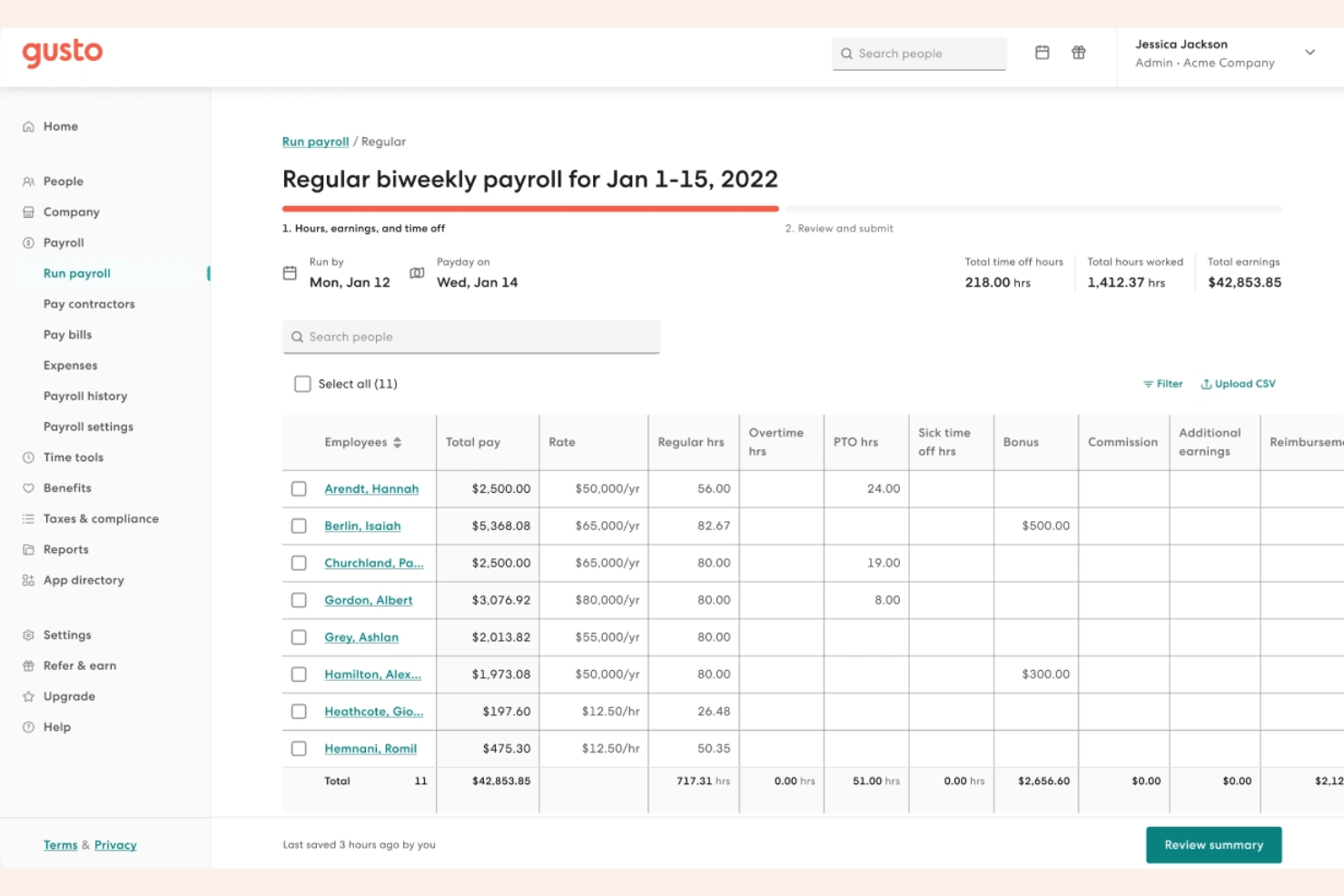
Payroll-first and built for small businesses, Gusto covers US employee payroll across all 50 states, international contractor payments in 120+ countries, benefits administration, and automated tax filing.
Who Is Gusto Best For?
Gusto is a natural fit for small business owners and solo HR managers who run payroll themselves and need tax compliance handled without a dedicated finance team.
Why I Picked Gusto
Gusto earns its spot on my shortlist because automatic tax filing goes deeper than most small business owners expect. I like that it handles year-end W-2 and 1099 generation automatically, so there's no scramble in January. I also find the state tax registration assistance genuinely useful when a business hires its first employee in a new state, since Gusto can manage that registration process directly.
Gusto Key Services
- AutoPilot: Schedule payroll to run automatically on a recurring cadence without triggering it manually each cycle.
- Benefits administration: Manage health, dental, and vision insurance enrollment alongside payroll in one place.
- Time and attendance tracking: Employees log hours directly in Gusto, which sync automatically to payroll calculations.
- Gusto Wallet: Employees get a Gusto-branded app to manage pay, set savings goals, and access earned wages.
Gusto Integrations
Gusto offers 150+ integrations through its App Directory, including QuickBooks Online, Xero, FreshBooks, Google Workspace, Guideline, Homebase, Microsoft 365, Checkr, and Sage Intacct.
Pros and Cons
Pros:
- Unlimited payroll runs on every plan
- Contractor payments in 120+ countries
- Automated federal, state, and local tax filing
Cons:
- Rehired employee settings don't auto-reset
- Full-time global hiring requires a separate add-on
New Product Updates from Gusto
Gusto Adds Solo Advisory Tools and Mobile Money Features
Gusto adds Solo S-Corp Advisory Tools and Gusto Money on Mobile for tax guidance, invoicing, and bill payments. These updates help accountants advise solopreneurs and let users manage business finances from their phones. For more information, visit Gusto’s official site.
Best for scalability across new hiring countries
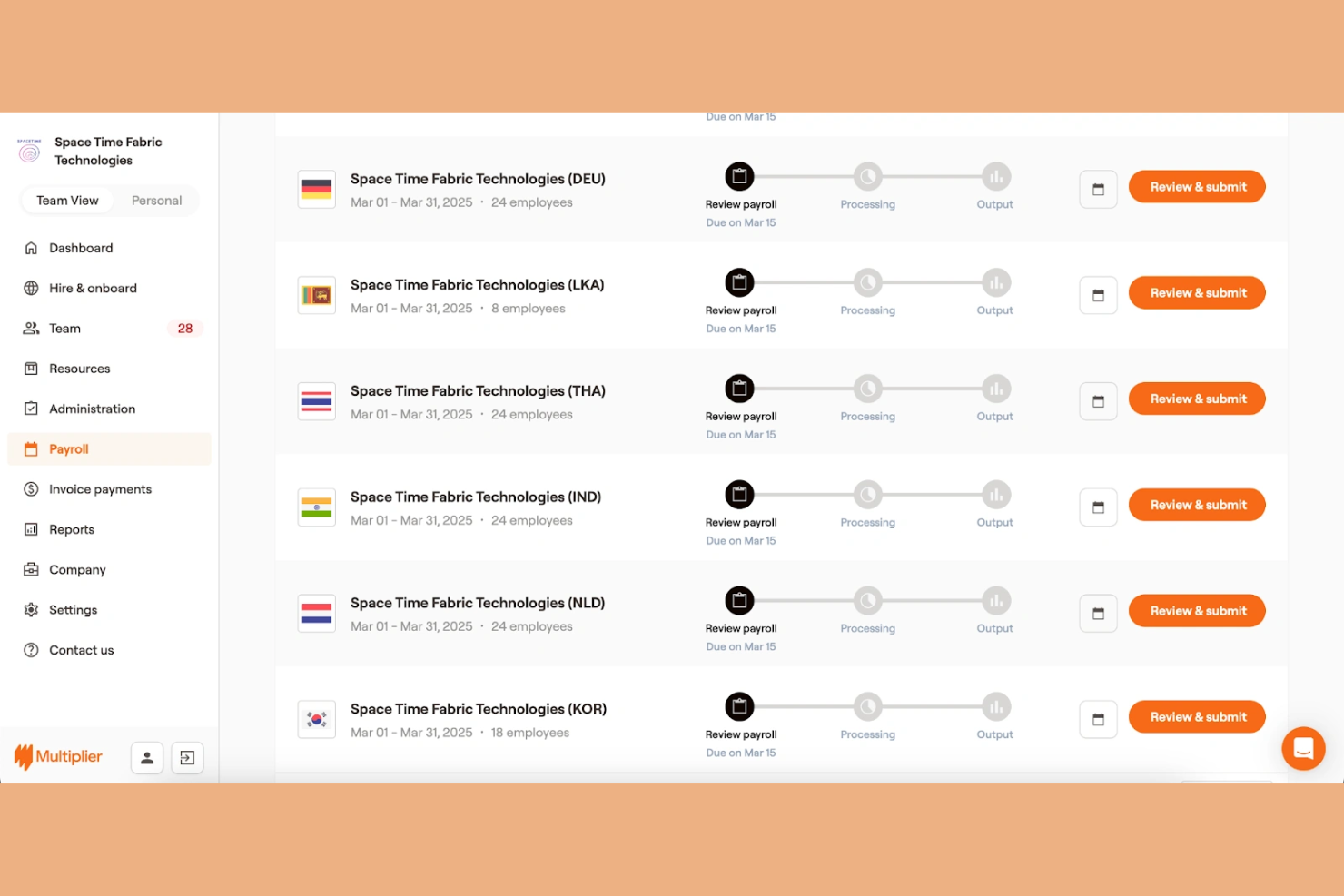
Multiplier is a multi-country payroll platform that lets companies with existing legal entities run, centralize, and manage payroll across 150+ countries from a single system.
Who Is Multiplier Best For?
Multiplier is a strong fit for fast-growing small businesses that are actively expanding into new markets and need to add payroll in new countries without rebuilding their setup each time.
Why I Picked Multiplier
I picked Multiplier as one of the best because of how well it handles adding new countries without rebuilding your payroll setup from scratch. Its built-in compliance engine automatically calculates taxes, social contributions, and statutory deductions for each new country you enter, so there's no need to source a local vendor every time you expand. I also like the consolidated reporting across all entities, which lets my team track headcount, payroll costs, and pay cycles by country from one view.
Multiplier Key Services
- Payslip management: Automatically generate and distribute localized payslips to employees in each country after every pay cycle.
- Expense tracking: Review, approve, and incorporate employee expense claims directly into payroll before each cycle closes.
- Payroll adjustments: Automatically adjust pay for time off, mid-cycle changes, or expense reimbursements without manual recalculation.
- Multi-currency salary disbursement: Pay employees in 120+ local currencies via bank transfer, direct debit, or crypto in a single instruction.
Multiplier Integrations
Multiplier integrates with BambooHR, Workday, and more. It also offers a public API for custom connections.
Pros and Cons
Pros:
- Covers 150+ countries from owned legal entities
- Supports ESOP issuance for global employees
- Auto-generates localized employment contracts per country
Cons:
- FX markups reported above industry norms
- No weekend support for payroll issues
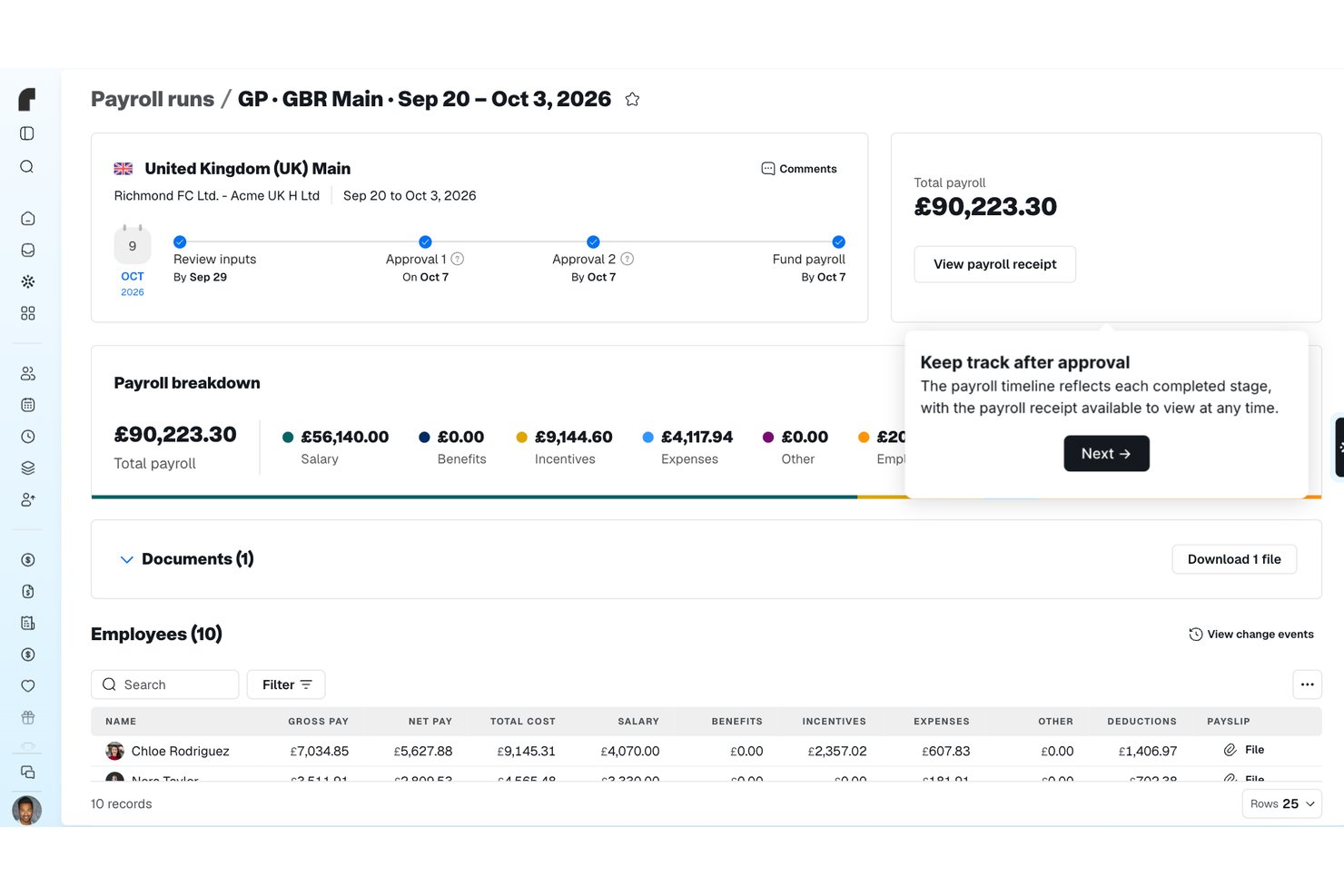
G-P
Best for rapid onboarding in 180+ countries
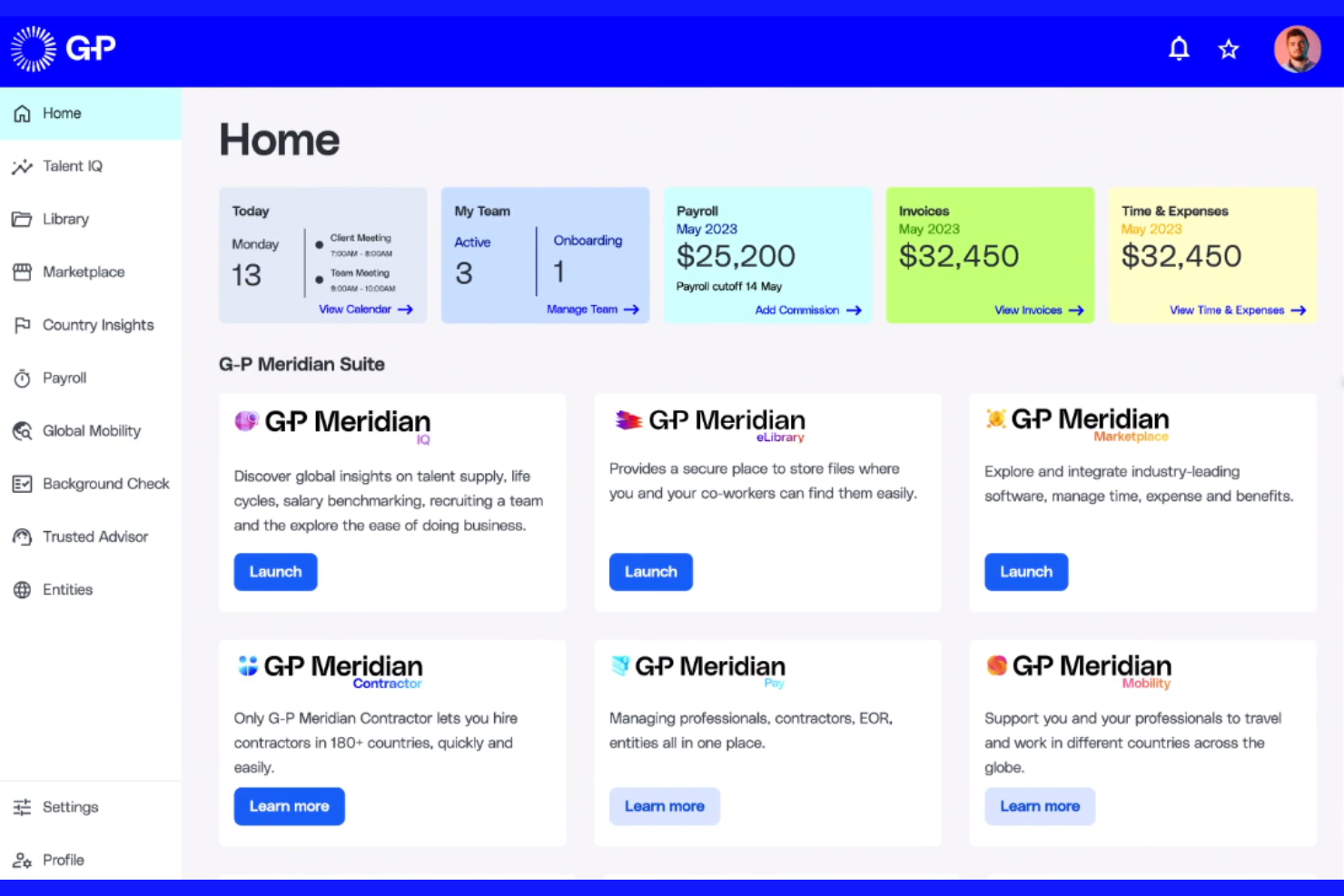
G-P is an employer of record (EOR) and global payroll platform that handles hiring, onboarding, compliance, payroll, and contractor payments across 180+ countries—all without requiring your business to set up legal entities.
Who Is G-P Best For?
G-P is a strong fit for small businesses hiring their first international employees and needing compliant onboarding without setting up local entities.
Why I Picked G-P
I've included G-P in my top picks because its Employment Contract Generator (ECG) stands out for small businesses moving fast. It auto-generates locally compliant contracts in minutes, covering country-specific labor laws, so there's no scrambling to get legal sign-off before an offer goes out. I also like that G-P operates through owned legal entities in 180+ countries, which means onboarding a new hire in, say, Brazil or Germany doesn't require your business to set up a local entity first.
G-P Key Services
- Background checks: Run pre-hire background checks directly within the platform to verify candidate history before extending an offer.
- Global payroll management: Process payroll for both full-time employees and contractors across countries through G-P's built-in compliant payroll infrastructure.
- Employer burden calculator: Get a cost breakdown of hiring in a specific country before committing, so you can plan headcount spend across borders.
- Employee Assistance Program (EAP): Provide international employees access to wellbeing support through G-P's built-in EAP, covering mental health and other personal assistance services.
G-P Integrations
G-P offers native integrations with ADP TotalSource, ADP Workforce Now, Sage Intacct, Paylocity, BambooHR, Personio, TriNet, UKG, Workday, SAP SuccessFactors, Greenhouse, and HiBob. An API is also available for custom integrations.
Pros and Cons
Pros:
- Locally competitive benefits beyond statutory minimums
- AI compliance advisor answers HR questions
- Owned legal entities in 180+ countries
Cons:
- Lacks built-in performance management tools
- No self-serve contract or onboarding flow

Rippling
Best for unified HR and IT payroll management
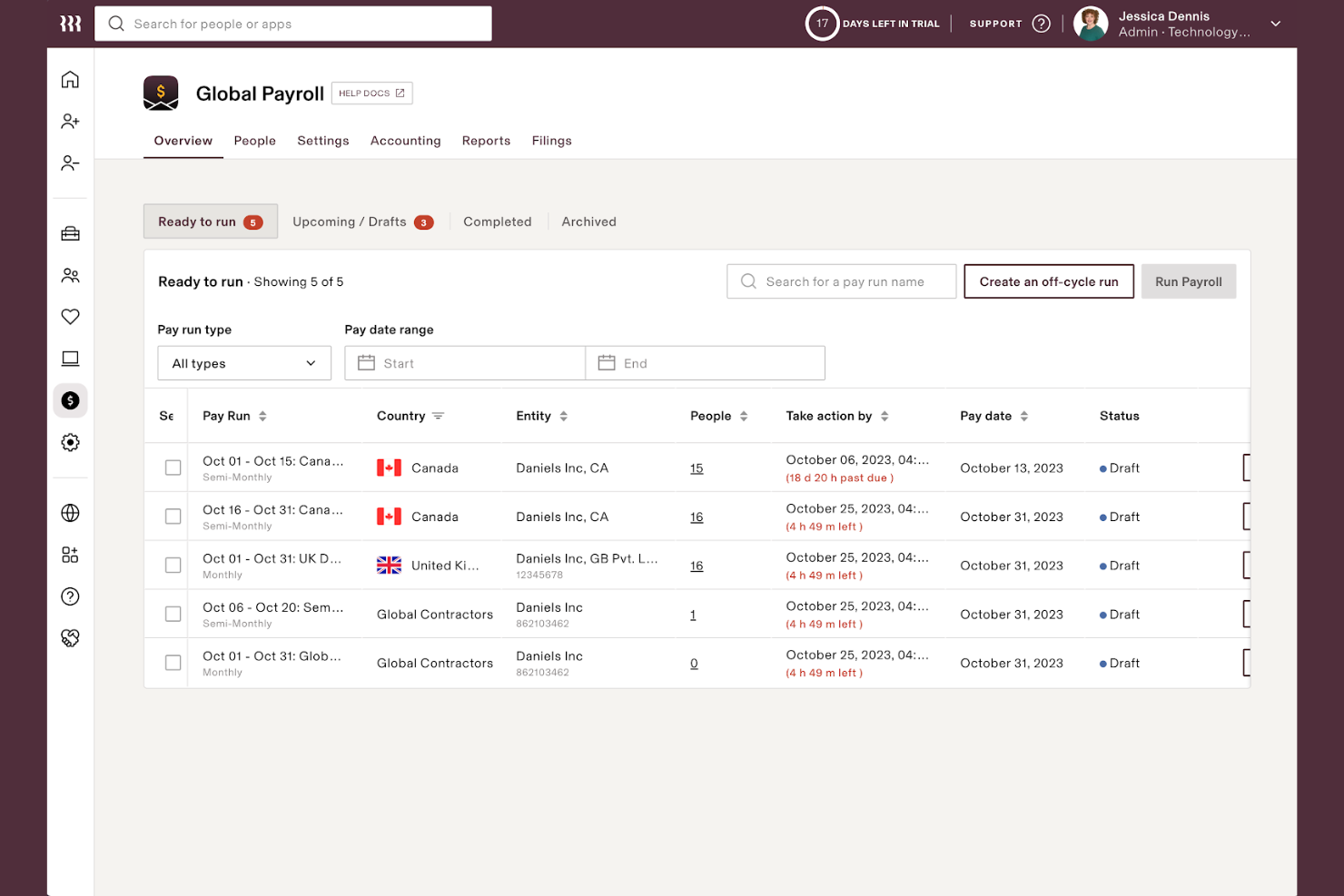
Rippling is a payroll platform that connects HR, IT, and finance data into a single system, letting you run payroll for employees and contractors while automating tax calculations, filings, and compliance across the US and globally.
Who Is Rippling Best For?
Rippling is a strong fit for tech-forward small businesses that manage both people and devices, and want HR, IT, and payroll running from one connected system.
Why I Picked Rippling
I've included Rippling in my top picks because no other payroll tool connects HR and IT data the way it does. When you onboard a new hire, Rippling simultaneously sets up their payroll, provisions their laptop, and grants app access, all from one workflow. I also like how HR changes like salary updates or benefits elections flow directly into payroll without any manual re-entry. For small businesses running lean, that kind of automation across departments cuts a real category of busywork that most payroll tools simply don't touch.
Rippling Key Services
- Global payroll processing: Run payroll for employees in 50+ countries, with local currency payments and country-specific compliance built in.
- Off-cycle payroll runs: Process one-off payments outside your regular pay schedule for bonuses, corrections, or terminations.
- Time and attendance tracking: Pull hours directly from Rippling's time tracking into payroll to calculate pay without manual data entry.
- Custom payroll reports: Build reports using filters like department, location, or pay type to break down payroll costs across your workforce.
Rippling Integrations
Rippling offers 600+ integrations through its App Shop, including GitHub, Carta, HubSpot, Slack, Checkr, Google Workspace, Zoom, Salesforce, and Microsoft 365. Accounting integrations include QuickBooks Online, Xero, NetSuite, and Sage Intacct. An API is available for building custom integrations.
Pros and Cons
Pros:
- Runs native payroll in 90+ countries
- Includes tax penalty reimbursement guarantee
- Payroll runs complete in about 90 seconds
Cons:
- Support restricted to admin users only
- Modular pricing makes total cost unclear
New Product Updates from Rippling

Rippling Expands Automated Compliance With AI Workflows
Rippling expands Automated Compliance with multi-framework support, AI workflows, an audit portal, and trust centers. These updates help GRC teams manage compliance work and audits. For more information, visit Rippling’s official site.

Remote
Best for in-country tax compliance coverage
Remote is a global payroll platform that runs in-house payroll across 100+ countries, handling local tax calculations, statutory payments, and compliance management for international teams.
Who Is Remote Best For?
Remote is a good fit for small businesses hiring in countries with complex tax obligations, where getting local compliance wrong carries real legal and financial risk.
Why I Picked Remote
Remote earns its spot as one of the best on my shortlist because it doesn't outsource payroll to third parties. It runs everything in-house, with on-the-ground country experts in 100+ locations handling local tax calculations, statutory payments, and compliance directly. I particularly like Remote Watchtower, which automatically flags regulatory and tax law changes that affect your business before they catch you off guard. For small businesses without a dedicated compliance team, that kind of proactive monitoring is genuinely hard to replicate on your own.
Remote Key Services
- Contractor payment management: Pay contractors in 200+ countries in local currencies without setting up local entities.
- Employee self-service portal: Employees can access payslips, update personal details, and submit expense claims directly in the platform.
- Payroll reporting dashboard: Generate consolidated reports across all pay runs, headcount, and costs by country.
- Expense reimbursement: Submit, approve, and process employee expense claims within the same payroll workflow.
Remote Integrations
Remote offers native integrations with BambooHR, Greenhouse, HiBob, Personio, QuickBooks, Xero, NetSuite, Slack, Workday, and Gusto, and it connects with Zapier. An API is also available at no extra cost for custom integrations.
Pros and Cons
Pros:
- Includes free HRIS with every payroll plan
- Flags regulatory changes before they affect payroll
- Owns legal entities in every supported country
Cons:
- Cross-country reporting lacks drill-down detail
- No dedicated account manager by default

Playroll
Best for centralized team payroll administration

Playroll is a global employment platform that handles EOR services, contractor management, global payroll processing, and payroll analytics across 180+ countries from a single dashboard.
Who Is Playroll Best For?
Playroll is a good fit for small businesses hiring across multiple countries who want one place to manage payroll for both employees and contractors.
Why I Picked Playroll
I picked Playroll because its centralized dashboard genuinely earns the claim of "centralized team payroll administration." You can process in-country payroll, run contractor payments in local currencies, and track multi-vendor payroll data all from one place. What I find especially useful is the Payroll Analytics module, which pulls data from multiple payroll vendors and runs built-in variance analysis to flag errors before a run is approved. For small businesses managing payroll across several countries without a dedicated ops team, that automated reconciliation and approval workflow removes a real source of risk.
Playroll Key Services
- Employee portal: Employees access payslips, submit expense claims, and request time off directly through their own self-service portal.
- Local benefits administration: Configure country-specific benefits packages, including health insurance, retirement plans, and statutory entitlements, per employee location.
- Contractor misclassification audit: Built-in misclassification checks automatically assess contractor relationships to flag compliance risk before it becomes a legal issue.
- Compliant contract generation: Create locally reviewed employment contracts in around five minutes, with built-in IP protection and legally vetted terms by country.
Playroll Integrations
Playroll offers native integrations with BambooHR, HiBob, and Expensify. It also has an Open API for custom workflows.
Pros and Cons
Pros:
- Multi-entity payroll with automated variance detection
- Dedicated support managers for employers and employees
- Strong coverage in Africa and Middle East
Cons:
- Limited flexibility to customize employment contracts
- Payroll reporting lacks depth and flexibility

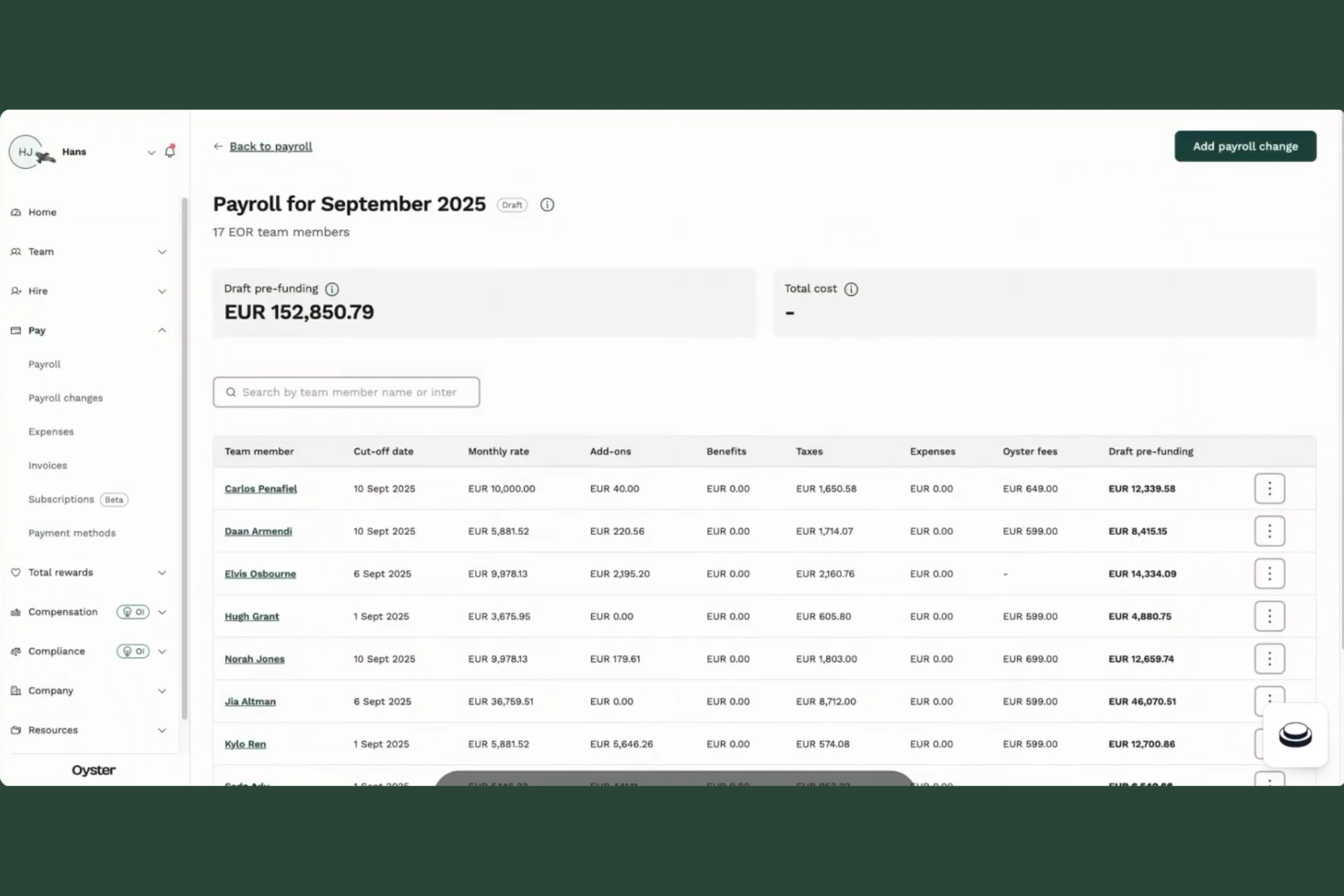
Oyster is an employer of record (EOR) and global payroll platform that handles hiring, paying, and managing full-time employees and contractors across 180+ countries without requiring local entity setup.
Who Is Oyster Best For?
Oyster is a strong fit for small businesses hiring their first international employees or contractors and needing compliant payouts without setting up a local entity.
Why I Picked Oyster
I've included Oyster in my top picks because of how it handles payouts for both contractors and full-time employees in one place, without needing separate tools or workarounds. I especially like the automated invoicing feature: contractors submit invoices, and Oyster processes payments in 120+ currencies on a set schedule, so nothing falls through the cracks. The misclassification analyzer is also genuinely useful, letting you assess whether a worker should be classified as a contractor or employee before you make a costly hiring mistake.
Oyster Key Services
- Localized employment contracts: Generate country-specific employment contracts that reflect local labor laws, without needing a legal team on the ground.
- Benefits administration: Offer and manage locally relevant benefits packages to full-time employees across different countries from a single dashboard.
- Guided onboarding workflows: Step-by-step onboarding checklists ensure new hires complete the right documentation for their specific country.
- Time off management: Track and approve leave requests based on country-specific public holidays and statutory entitlements.
Oyster Integrations
Oyster offers native integrations with BambooHR, HiBob, Personio, Factorial, Lucca, ADP Workforce Now, Greenhouse, Workable, TeamTailor, QuickBooks Online, Xero, Concur, Carta, Slack, and Okta. It also connects with Zapier and has an API for custom integrations.
Pros and Cons
Pros:
- Onboards new hires in as few as 48 hours
- Pays in local currencies across 120+ countries
- Built-in misclassification protection for contractors
Cons:
- APAC support routes through third-party partners
- Payroll reporting lacks advanced customization options

Lano is a global payroll and EOR platform that centralizes multi-country payroll processing, contractor management, cross-border payments, and compliance across 170+ countries into one system.
Who Is Lano Best For?
Lano is a strong fit for small businesses building remote-first or distributed teams across multiple countries who need payroll, EOR, and contractor management in one place.
Why I Picked Lano
I picked Lano as one of the best because its payroll consolidation layer genuinely sets it apart. Unlike platforms that require you to replace your existing local payroll providers, Lano lets you keep them and pull all their data into one centralized hub, standardizing gross-to-net reporting across every country. I also like that HRIS changes sync automatically into payroll across all countries, reducing manual input when headcount shifts. The built-in anomaly detection flags errors between payroll inputs and payslips before approval, which saves small teams from costly manual checks.
Lano Key Services
- Localized contract generation: Lano produces country-specific contracts for contractors that align with local legal requirements, so you can onboard international talent without sourcing legal templates separately.
- Lano Wallet: A built-in multi-currency digital wallet that lets you top up once and pay employees or contractors across 170+ countries in 28 currencies from a single dashboard.
- Contractor-to-employee conversion: Lano supports converting contractors directly to full-time employees within the platform, removing the need to restart onboarding when working relationships change.
- Real-time payroll reporting: A reporting module that surfaces live payroll data across all countries and currencies, giving you a current view of global workforce costs without manual data pulls.
Lano Integrations
Lano offers native integrations through its marketplace with HRIS and business tools including HiBob, Workday, Personio, SAP, QuickBooks, Xero, Salesforce, DocuSign, Jira, and Microsoft Dynamics 365. It also supports custom integrations through Kombo and Merge, and provides a REST API for connecting to HRIS, ERP, and finance systems.
Pros and Cons
Pros:
- Strong European payroll and compliance expertise
- Modular setup adapts as you scale
- Consolidates multi-country payroll into one dashboard
Cons:
- Invoicing delays reported by some users
- Relies entirely on third-party local partners
Other Global Payroll Software for Small Businesses
Here are some additional global payroll software for small businesses options that didn’t make it onto my shortlist, but are still worth checking out:
- Justworks
For payroll with built-in benefits management
- Papaya Global
For consolidated workforce payments
- RemoFirst
For quick employee onboarding worldwide
- RemotePeople
For payroll with on-demand expert support
- Borderless AI
For AI-powered payroll data insights
- Payoneer Workforce Management
For managing distributed teams’ pay cycles
- Native Teams
For running multi-currency payrolls
- Pebl
For pay management with automated payslips
- WorkMotion
For custom approval workflows in payroll
- GoGlobal
For easy payroll in emerging markets


How I Evaluate Global Payroll Software for Small Businesses
I split my evaluation of the best global payroll service providers into baseline requirements—like whether a platform can run compliant payroll across five countries—and differentiating factors that matter most to small teams.
Core Functionality (Table Stakes For This List)
When I'm selecting tools for my list, I rank each one on a scale from 0 (does not offer the functionality) to 5 (excels in this area) for each core functionality listed below. Then, I calculate the tool's total score into a percentage. Each tool needs to achieve a minimum total score of 65% to be considered for inclusion.
- Multi-country payroll processing: I look at how many countries a platform supports natively versus through partners, since partner-reliant setups can slow down pay runs.
- Tax and statutory compliance: Each country has unique withholding rules and filing deadlines, so I check whether the platform automates calculations and submissions.
- Multi-currency payments: I evaluate whether the tool handles FX conversion automatically and supports paying team members in their local currency without manual workarounds.
- Contractor support: Small teams often hire contractors before full-time staff abroad, so I look for compliant agreements and payouts across countries.
- EOR or entity options: For businesses without foreign subsidiaries, I check whether the vendor offers EOR services and how many countries they cover.
- SMB-friendly pricing: I look for transparent per-employee pricing, low or no minimums, and onboarding that doesn't require a dedicated implementation team.
Once I have a list of tools that meet this criteria, I consider what sets each platform apart.
Differentiating Factors (What Sets Vendors Apart)
Here's how I compare and contrast different vendors:
Standout Features
EOR services are a big differentiator. I look at how many countries a vendor covers with owned entities versus partner networks, since this directly affects how quickly you can bring on a new hire. Automated tax filing is another area where vendors vary widely—some handle in-country registration and remittance end to end, while others leave filings to you. I also evaluate contractor management tools, especially mass payout capabilities and country-specific contract generation, since small businesses often rely on a mix of employees and contractors as they scale internationally.
Beyond Features
Pricing transparency matters a lot for small businesses. I check whether vendors clearly break out per-employee, EOR, and contractor fees—or bury FX markups and off-cycle payroll charges in the fine print. Compliance depth is another key factor. I look for vendors with in-house legal and tax experts who proactively update contracts and tax tables when local laws change, rather than relying on generic templates. I also evaluate whether country coverage includes both EOR and payroll-only options, so you're not paying for EOR in countries where you already have an entity.
How to Choose Global Payroll Software for Small Businesses
It’s easy to get bogged down in long feature lists and complex pricing structures. To help you stay focused as you work through your unique software selection process, here’s a checklist of factors to keep in mind:
| Factor | What to Consider |
|---|---|
| Scalability | Will the platform handle additional headcount, currencies, or new countries if your business grows or expands in the next 1–2 years? |
| Integrations | Does it connect natively to your accounting, HRIS, expense tracking, or time-keeping tools to reduce duplicate data entry and errors? |
| Customizability | Can you tailor reporting, approval flows, and user roles to match how your business operates today and adapts over time? |
| Ease of use | Is the platform intuitive for your HR/finance team? How long will it take to process a typical monthly payroll run? |
| Implementation and onboarding | How quickly can you go live? What level of support, training, or documentation will your team need to get started? |
| Cost | Is pricing simple and clear per worker, or are there hidden fees for FX, off-cycle runs, or minimum commitments? |
| Security safeguards | What data security standards and certifications does the provider maintain to safeguard sensitive worker and payroll data? |
| Compliance requirements | How does the vendor handle changing local payroll, tax, and contract laws? Is there a clear process for compliance updates? |
What Are Global Payroll Software for Small Businesses?
Global payroll software for small businesses are platforms that help you manage payroll, taxes, and compliance for employees and contractors across multiple countries. These tools automate wage calculations, file taxes, and support international hiring through a unified platform designed for smaller organizations.
Many solutions combine full-service payroll, HR services, and employer support in one system, while some also offer professional employer organization (PEO) services for businesses expanding globally.
Global Payroll vs Domestic Payroll
Choosing between domestic and global payroll isn’t about headcount, it’s about complexity. You can manage payroll for 500 employees in one country with a domestic payroll system. Paying 20 employees across five countries is a completely different challenge. That’s where global payroll software starts to make sense. Here’s how domestic and global payroll compare across the areas that matter most as your business grows internationally.
| Decision Area | Domestic Payroll | Global Payroll |
|---|---|---|
| Compliance Responsibility | Manage one country’s payroll legislation | Manage country-specific tax, social security, and statutory requirements from one platform |
| Operational Complexity | Straightforward with a single workforce | Built to handle different pay cycles, currencies, and local regulations simultaneously |
| Payroll Visibility | Separate reports by country or provider | Consolidated reporting across your international workforce |
| Growth Readiness | Works well until international hiring begins | Supports expansion without replacing your payroll infrastructure |
| Vendor Management | May require additional local providers as you expand | One provider can support payroll across multiple countries |
| Best Fit | Businesses operating in one market | Businesses hiring or planning to hire internationally |
When Domestic Payroll Is Enough
If your entire workforce is based in one country, domestic payroll software will usually cover everything you need, including payroll calculations, tax withholding, statutory deductions, and local reporting. I wouldn’t introduce a global payroll platform until your hiring plans extend beyond a single jurisdiction.
When It’s Time to Switch to Global Payroll
The transition usually happens when payroll becomes harder to manage than hiring. If you’re paying employees in multiple countries, working with different local providers, or consolidating payroll data manually, it’s worth moving to software built for global payroll. At that point, I’d prioritize country coverage, centralized reporting, and automated compliance updates over additional HR features.
Global Payroll Checklist for Small Businesses
Global payroll software isn’t the right fit for every business. Before you invest in a platform, ask yourself the questions below. If you check several boxes, you’re likely at the stage where global payroll software starts delivering real value.
| ✓ | Ask Yourself… |
|---|---|
| ✓ | Are you paying employees or contractors in more than one country? Once payroll spans multiple jurisdictions, you’ll need to manage different tax rules, statutory deductions, and reporting requirements. |
| ✓ | Are you working with multiple payroll providers? Managing separate vendors often means reconciling different payroll reports, processes, and deadlines every pay cycle. |
| ✓ | Are you processing payroll in multiple currencies? Paying employees globally requires more than currency conversion. Your payroll platform should also calculate local deductions and statutory contributions correctly. |
| ✓ | Is payroll data consolidated manually each month? Exporting reports from multiple systems becomes harder to manage as headcount and country coverage grow. |
| ✓ | Are you spending more time checking compliance than running payroll? If you’re manually tracking tax rates, statutory changes, or filing deadlines, it’s usually a sign you’ve outgrown your current process. |
| ✓ | Are you planning to expand into new countries this year? Choosing software with broader country coverage now is often easier than migrating payroll platforms later. |
| ✓ | Are finance and HR using different payroll data sources? A single source of payroll data makes reconciliation, reporting, and workforce planning much easier. |
How to Scale Global Payroll as a Small Business
Scaling global payroll isn’t about processing a higher volume of payroll. It’s about keeping payroll consistent as your business expands into new countries, hires different types of workers, and introduces more local compliance requirements. The right software should support that growth without forcing your HR and finance teams to rebuild their payroll process every time you enter a new market.
Common Global Payroll Challenges (and How Software Solves Them)
- Standardizing payroll across countries: Every country has its own payroll rules, but your payroll process shouldn’t feel different every month. Global payroll software gives your team one consistent way to run payroll, regardless of location.
- Maintaining visibility as headcount grows: Payroll becomes harder to oversee when employee data lives across multiple providers or spreadsheets. Consolidated reporting gives HR and finance one view of payroll costs across the business.
- Reducing reliance on manual processes: Manual approvals, spreadsheet calculations, and disconnected workflows become harder to manage as international headcount grows. Software with automated payroll workflows reduces those handoffs.
- Supporting business expansion without rebuilding payroll: Entering a new country shouldn’t mean finding another payroll vendor or redesigning your payroll process. I’d prioritize platforms that let you add countries without changing how your team works.
Features of Global Payroll Software for Small Businesses
When selecting global payroll software for small businesses, keep an eye out for the following key features:
- Multi-country payroll processing: Calculate and run payroll across different countries, automatically applying each location’s wage laws and tax rates.
- Automated tax compliance: Handle in-country tax withholdings, filings, and remittance to avoid costly errors and maintain good standing with local authorities.
- Multi-currency payments: Pay employees and contractors in their local currencies, including automatic foreign exchange conversion and transparent FX rates.
- Employer of Record (EOR) support: Let you hire and pay staff in countries where you don’t own a legal entity, reducing administrative complexity.
- International contractor payments: Make compliant payments to contractors worldwide with proper contract templates, payment tracking, and reporting.
- Centralized reporting dashboard: Consolidate payroll, tax, benefits, and payment data from multiple countries into one easy-to-navigate dashboard.
- Localized benefits administration: Offer compliant benefits packages—including health insurance and statutory leave—tailored to each country you operate in.
- Employee self-service portal: Empower global staff to securely access payslips, tax documents, and personal information online.
- Data security and privacy controls: Protect sensitive payroll and employee data with encryption, access controls, and compliance with international privacy standards.
Benefits of Global Payroll Software for Small Businesses
Implementing global payroll software for small businesses provides several benefits for your team and your business. Here are a few you can look forward to:
- Simplified global compliance: Automated tax calculations, filings, and updates reduce compliance risk in every country where you hire.
- Faster international onboarding: EOR support and contractor management allow you to add international talent without legal entity setup.
- Accurate, on-time payments: Built-in multi-currency payroll processing ensures employees and contractors receive correct payments on schedule.
- Centralized payroll visibility: Dashboard reporting gives your team a clear, real-time view of payroll activity across all countries.
- Reduced administrative burden: Automation of tax, currency conversion, and filings lets small teams manage global payroll without extra HR headcount.
- Improved employee experience: Employee self-service portals give staff instant access to payslips, tax documents, and benefit details.
- Cost predictability: Transparent pricing and reduced manual errors help you control payroll costs as your business expands globally.
Costs and Pricing of Global Payroll Software for Small Businesses
Selecting global payroll software for small businesses requires an understanding of the various pricing models and plans available. Costs vary based on features, team size, add-ons, and more. The table below summarizes common plans, their average prices, and typical features included in global payroll software for small businesses solutions:
Plan Comparison Table for Global Payroll Software for Small Businesses
| Plan Type | Average Price | Common Features |
|---|---|---|
| Free Plan | $0 | Basic payroll processing, limited country support, self-service onboarding, and basic reporting. |
| Personal Plan | $20-$40/user/month | Multi-country payroll, tax compliance tools, payment in local currencies, and standard support. |
| Business Plan | $40-$80/user/month | Automated tax filings, EOR services, contractor payments, integrations, and localized benefits administration. |
| Enterprise Plan | $80+/user/month | Custom country coverage, advanced reporting, dedicated account manager, API access, and tailored onboarding. |
Hidden Costs to Watch For
The monthly subscription is only part of what you’ll pay for global payroll software. Before choosing a provider, I’d look closely at the costs that tend to appear as your business grows or expands into new countries.
- Implementation fees: Some providers charge separately for onboarding, payroll configuration, or migrating employee data.
- Country expansion costs: Adding payroll in a new country may involve additional setup fees or higher monthly pricing.
- Currency conversion fees: If you’re paying employees in multiple currencies, exchange rate markups or foreign transaction fees can increase payroll costs.
- Premium support plans: Dedicated payroll specialists, faster response times, or implementation support may only be available on higher-tier plans.
- Additional platform modules: Features like time tracking, HRIS, expense management, or benefits administration may require separate subscriptions.
- Off-cycle payroll runs: Correcting payroll mistakes or processing one-off payments can incur additional charges with some providers.
Ask for a full breakdown of implementation, country expansion, support, and transaction costs before signing a contract. The monthly subscription rarely reflects the total cost of running global payroll.
Global Payroll Software for Small Businesses FAQs
Here are some answers to common questions about global payroll software for small businesses:
How does global payroll software handle different tax laws across countries?
Global payroll software automatically applies each country’s tax rates and filing rules, updating calculations when regulations change. This helps your business stay compliant and reduces manual research or filing mistakes.
Can small businesses use global payroll software without a local legal entity?
Yes, many platforms offer Employer of Record (EOR) services. A small business EOR lets you hire and pay workers in countries where you don’t have an entity, handling compliance and contracts on your behalf.
Does global payroll software support paying contractors as well as employees?
Yes, most solutions let you manage both employees and international contractors within one platform. You can create proper contracts, send mass payouts, and keep all records organized for easy reporting.
What integrations should I look for with global payroll software?
Look for direct integrations with accounting tools like QuickBooks or Xero, HRIS systems, and expense management platforms. This reduces manual entry and helps sync payroll data with your financial reports.
How quickly can a small business implement global payroll software?
Implementation timelines vary, but many providers offer dedicated onboarding specialists. Small teams often go live within a few weeks if documents and data are ready upfront.
Is employee data secure in global payroll software platforms?
Yes, most reputable platforms use encryption, access controls, and compliance with international data privacy standards to keep employee information secure. Always confirm the provider’s certifications and privacy policies during your evaluation.