



Rippling vs. Remote: Comparison & Expert Reviews for 2026



Hiring across borders should create opportunities, not administrative headaches. The right EOR can keep compliance, payroll, and employee experience running smoothly as your team expands globally.
Feeling overwhelmed by the global hiring puzzle? If you're weighing Rippling vs. Remote for employer of record services, you know the stakes: trust, compliance, and great employee experience, all without drowning in paperwork. Maybe you're after smoother processes, top-notch security, or a platform that just works for your team no matter where people work.
In this article, you'll get a side-by-side look at both options, including pros and cons, specific use cases, pricing, security, and usability. By the end, I think you'll have clarity on which platform meets your needs and how each one fits into your hiring strategy.
Rippling vs. Remote: An Overview
Rippling
Remote
Why Trust Our Software Recommendations
Our team has been testing and reviewing software since 2012. As HR experts ourselves, we know how difficult—and important—it is to choose the right software.
For this guide, we evaluated tools using hands-on testing and independent research, scoring tools using our selection criteria. We also draw on insights from industry thought leaders and practicing HR experts.
Our reviews reflect our human editorial judgment, not a sales pitch.
Expert reviewers:
Rippling vs. Remote Pricing Comparison
| Rippling | Remote | |
|---|---|---|
| Free Trial | Free demo available | Free demo available |
| Pricing | Pricing upon request | From $699/user/month |
Rippling vs. Remote Pricing & Hidden Costs
Rippling runs a modular model. You buy the core platform, then add the HR, IT, finance, or global pieces you actually want, which keeps the entry price low and makes the total harder to predict as the list grows. It also doesn’t publish an employer of record rate at all, so that number only arrives by quote. Remote publishes a single per-employee employer of record price openly, discounts it for annual billing, and charges nothing for setup, onboarding, or offboarding. So this isn’t really modular against flat. It’s a quote you have to request against a number you can read off a web page.
To choose the right vendor, map not just your current headcount and locations but your likely expansion plans. With Rippling, get the platform fee and every module you’ll realistically need priced together, because the entry rate covers less than it first appears to. With Remote, confirm what falls outside the flat rate, particularly entity setup, US PEO hiring, and contractor of record, which are sold as their own products. Ask both for an itemized contract so you’re comparing like for like rather than headline against headline.
Rippling vs. Remote Feature Comparison
| Rippling | Remote | |
|---|---|---|
| API | ||
| Application Tracking | ||
| Batch Permissions & Access | ||
| Compliance Tracking | ||
| Data Export | ||
| Data Import | ||
| Data Visualization | ||
| Employee Database | ||
| Employee Onboarding | ||
| Employee Training | ||
| External Integrations | ||
| Multi-User | ||
| Notifications | ||
| Payroll | ||
| Scheduling | ||
| Timesheets |
Rippling vs. Remote Integrations
| Integration | Rippling | Remote |
|---|---|---|
| Slack | ✅ | ✅ |
| QuickBooks | ✅ | ✅ |
| Xero | ✅ | ✅ |
| BambooHR | ✅ | ✅ |
| Workday | ✅ | ✅ |
| Greenhouse | ✅ | ✅ |
| DocuSign | ✅ | ❌ |
| Lever | ✅ | ❌ |
| API | ✅ | ✅ |
| Zapier | ✅ | ✅ |
| Sage Intacct | ✅ | ❌ |
On paper this looks lopsided, and the headline count really does favor Rippling by a wide margin. Look at what the connections actually do and the picture shifts. Rippling is the system of record, so most of its catalog is single sign-on, account provisioning, and license management, which is why its link to a rival HRIS amounts to password handling rather than a data sync. Remote isn’t the system of record, so its integrations exist to push employment and payroll data into the HRIS, accounting, and equity tools you already run. Both publish an API, though Rippling sells access to its own as a package. The useful question isn’t who has more, but which direction you need data to travel.
Rippling vs. Remote Security, Compliance & Reliability
| Factor | Rippling | Remote |
|---|---|---|
| Data Privacy | Strict access controls, GDPR and CCPA compliance, and audited infrastructure, with data housed in US-based data centers. | GDPR compliant, with encryption in transit, a documented key management policy, and least-privilege administrative access. |
| Regulatory Compliance | Policy guardrails built into the product itself, kept current by local compliance experts. | In-house legal and payroll teams in its operating markets, with relevant law changes surfaced in-platform. |
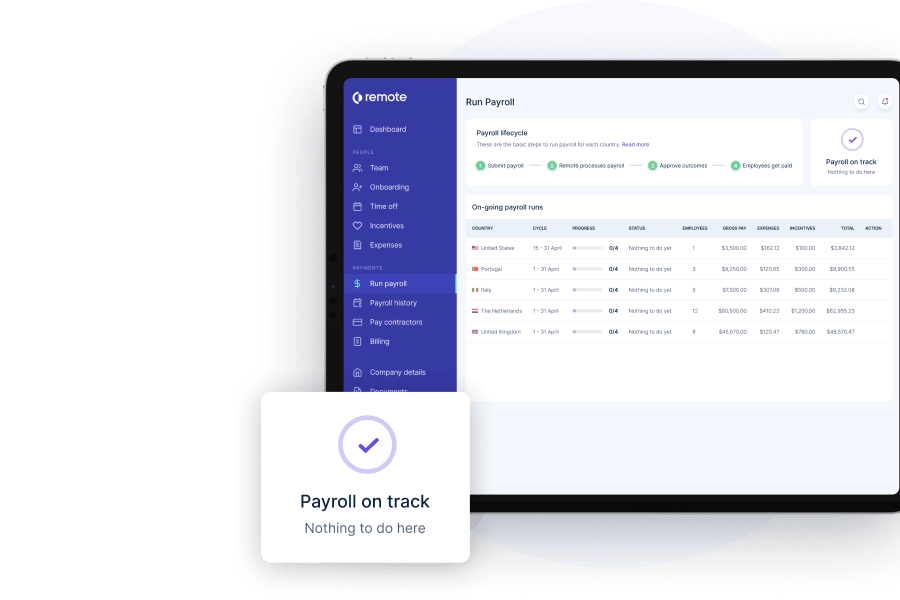
| Payroll Accuracy | Features automated, rules-based payroll workflows, audit logs, and proactive error flagging for every pay run. | Runs multi-country payroll with automated calculations and real-time compliance checks to reduce payroll errors. |
| Uptime & Reliability | Continuous threat monitoring, a web application firewall, regular penetration testing, and a bug bounty program. | Built for high availability, with continuous infrastructure monitoring, automated alerting, and tested disaster recovery. |
| Certifications | SOC 1, SOC 2, and SOC 3 audited, ISO certified for information security, personal data, and AI governance, with higher-tier cloud security validation. | ISO 27001 certified and SOC 2 Type 2 audited, with cloud security accreditation and a financial resilience addendum. |
Rippling has the deeper certification stack here, and it isn’t close. Alongside the audit reports and ISO information security certification both vendors hold, it adds standards covering personal information handling and AI governance, a higher tier of cloud security validation, published penetration testing, and a bug bounty program. Remote answers with its own ISO certification, SOC 2 auditing, cloud security accreditation, and a financial resilience addendum for regulated buyers, plus uncapped indemnity behind employer of record work that Rippling doesn’t match. One practical note for European buyers: Rippling houses data in US-based data centers, which is worth raising early if data location matters to your legal team.
Rippling vs. Remote Ease of Use
| Factor | Rippling | Remote |
|---|---|---|
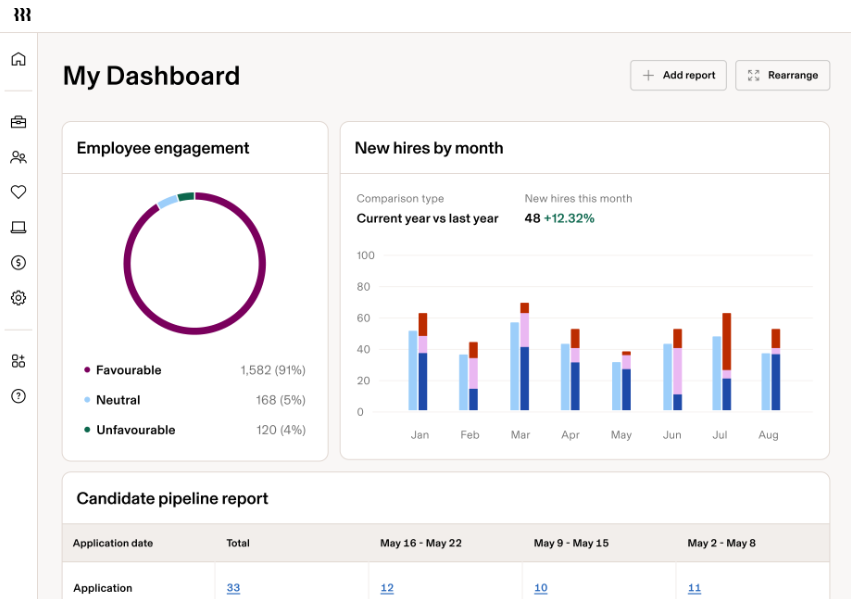
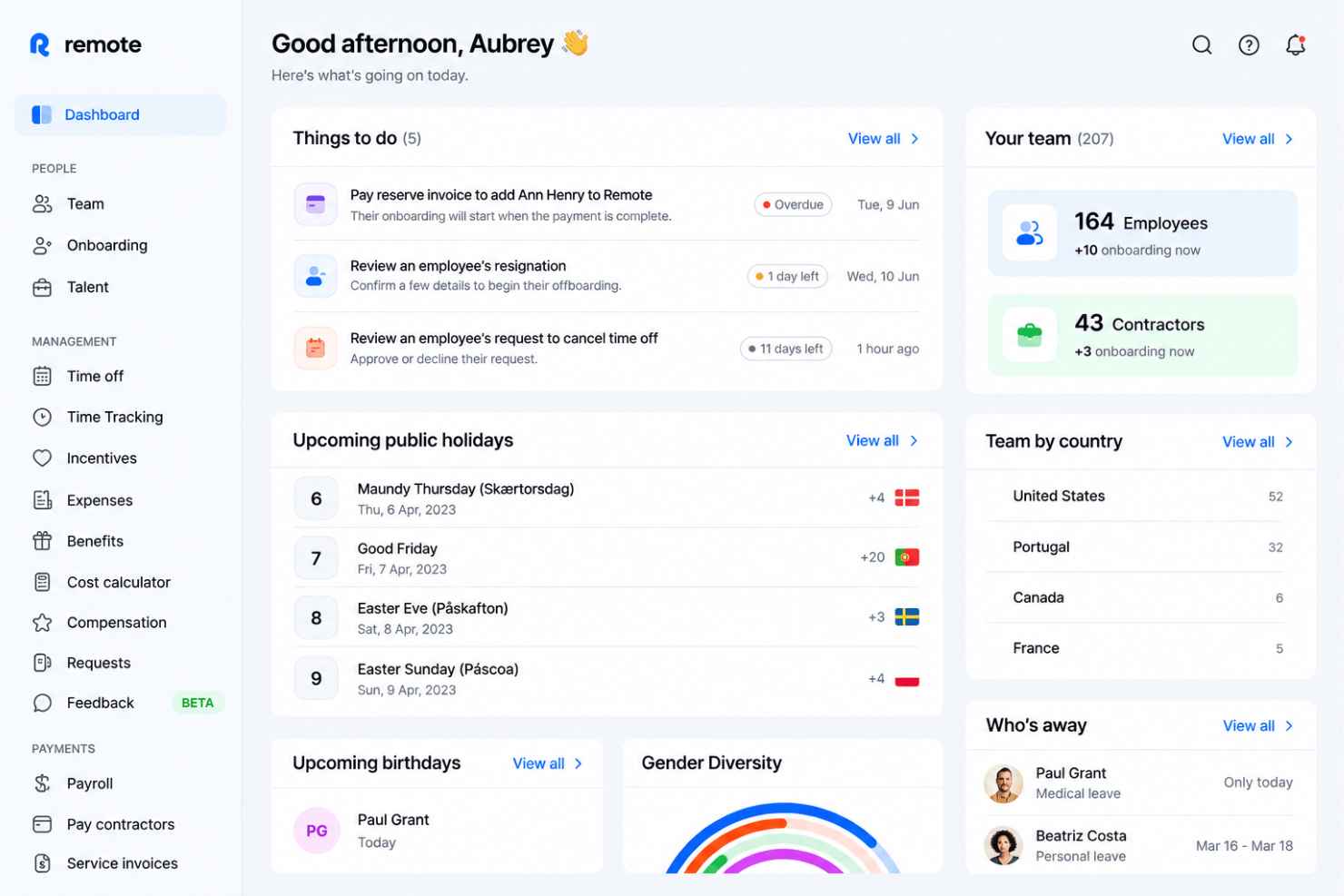
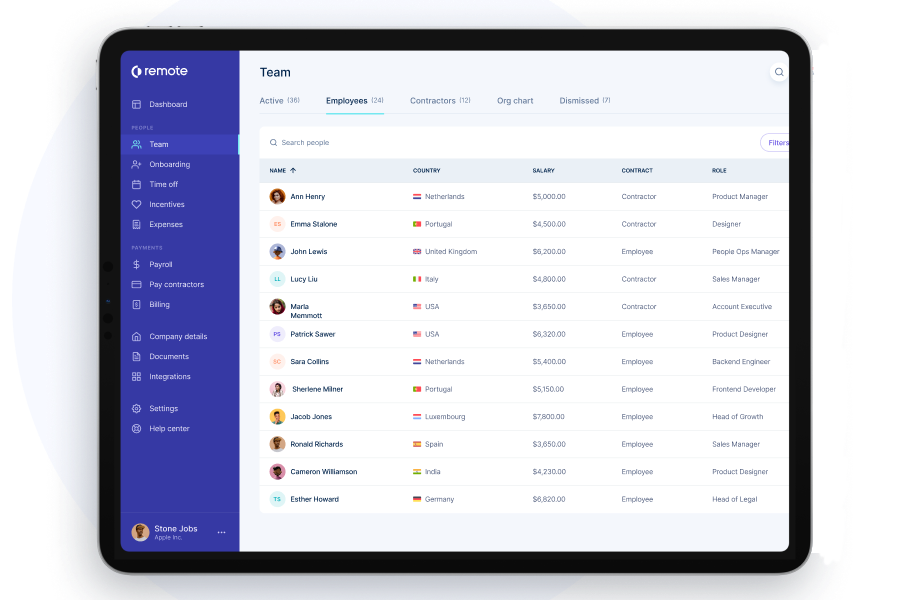
| User Interface | Clean, modern dashboard with customizable modules that help you see the data you want fast. | Simple, clean interface that guides you step-by-step but is less customizable than Rippling. |
| Onboarding Flow | Guided setup and automated checklists, with accounts, devices, and benefits provisioned off the same employee record. | Straightforward onboarding with clear prompts and a dedicated specialist on EOR plans, though it can feel basic for complex organizations. |
| Setup Difficulty | Modular design means some setup is required, but workflow wizards reduce headaches. | Setup is straightforward and minimal, focused on getting you running in new countries fast. |
| Support Access | Live chat and on-demand help articles, with fast first responses from advisors experienced in local HR. | Email and chat support routed to in-house legal, payroll, and HR specialists who know global employment. |
Both are quick, in different ways. Rippling onboards in minutes and provisions accounts, devices, and benefits off the same employee record, which is a real time saver if you’ve bought into the whole suite. It also answers support requests fast, staffed by advisors with genuine local HR experience. Remote is lighter to start simply because there’s less to configure, and it assigns an onboarding specialist on employer of record plans. I think Rippling rewards the team willing to invest in setup, while Remote suits the team that wants to hire in a new country this week and worry about tooling later.
Rippling vs Remote: Pros & Cons
Rippling
- Automates simple and complex tasks across departments with an intuitive Workflow Studio.
- The platform is highly scalable with add-on modules, making it ideal for growing businesses.
- Tons of integration options (650+), so that all your systems can be connected and centralized in one platform.
- Custom reporting and workflows may not be included with base modules.
- May be overly comprehensive for simpler operations with limited HR tasks or few employees.
- While modular, costs can add up quickly as you activate more capabilities.
Remote
- Owns local entities in every covered country.
- Fast onboarding and clear employment contracts.
- Transparent, flat monthly pricing structure.
- Limited on-demand support for smaller teams.
- Not built to replace a full HRIS.
- Payroll setup can face country-specific delays.
Best Use Cases for Rippling and Remote
Rippling
- Tech Companies Rippling's automation and integration capabilities suit the fast-paced, tech-driven environment your company thrives in.
- Small to Large Enterprises The platform scales well for small, medium, and large enterprises, handling growing operations, from simple to complex, across multiple geographies.
- HR Departments Rippling centralizes and automates HR functions, like onboarding, benefits administration, learning and development, time and attendance tracking, and recruiting.
- Remote Teams If your team works remotely, Rippling's cloud-based access keeps everyone connected and informed. With the IT add-on, you can even manage remote devices (e.g., automate device management, provisioning, and identity and access management).
- Finance Departments Rippling provides a full, in-house Finance suite with spend management, travel, bill pay and corporate cards. It also integrates payroll with other financial systems, streamlining financial workflows.
- Global Enterprises If your business spans multiple regions, Rippling's extensive reporting tools, global payroll, global hiring (EOR), and contractor management help manage diverse teams effectively.
Remote
- Global Tech Startups Remote makes it easy to hire and onboard talent in multiple countries, reducing the legal and payroll barriers that fast-growing tech startups face.
- Small HR Teams With automated workflows and a self-serve portal, HR teams with limited resources can manage contracts, payroll, and compliance without manual oversight.
- Remote-First Companies Remote’s international payroll, contract setup, and benefits administration all support a fully distributed workforce needing reliable local compliance.
- VC-Backed Scaleups The flat pricing, transparent cost calculator, and bulk action API let VC-backed growth companies budget and expand into new markets confidently.
- Professional Services Firms Companies hiring contractors and employees across regions can centralize document management and payments for smooth cross-border operations.
- Product-Led SaaS SaaS companies expanding overseas need strong HR integrations and fast onboarding, which Remote’s API and partner connectors deliver.
Who Should Use Rippling, and Who Should Use Remote?
Rippling is great for organizations of all sizes with simple to complex HR needs. If you like the idea of starting small, say with HR management, and then scaling as your company grows, Rippling's add-on IT and Spend modules make it easy for you to do so. Because the platform is also built around automation, Rippling would also be ideal for you if you want to spend less time on repetitive tasks and more time on strategic initiatives.
Remote is well-known for its global employment platform, so it's ideal if your main focus is expanding globally with compliance in mind. Their EOR capabilities have been around a few years longer than Rippling, and they own their entities in a few more countries than Rippling. That said, Remote has expanded into other areas, offering HR management (HRIS, performance management, benefits management, etc.) and a recruitment module, though they provide far less breadth and customization than Rippling's platform.
Overall, if your team is looking for solid global employment, payroll, compliance tracking, and basic HR management, either platform would be a great choice. It all comes down to how much granular control, automation, and platform customization your company requires.
Differences Between Rippling and Remote
| Rippling | Remote | |
|---|---|---|
| Automation | Excels in automation, streamlining simple and complex HR tasks for businesses of any size. | Focuses on simplifying global payroll and compliance without heavy automation. |
| Customization | Deeper workflow customization, through the Workflow Studio, allowing you to integrate processes across departments. | Fewer platform and workflow customization options. Focuses more on giving you what you need out-of-the-box without tons of configuration. |
| Feature Depth | Has deeply developed functions outside of global employment, including device management, finance and spend management, and learning management. | Core focus was EOR for a long time, but has recently expanded into other key HR management functions (HRIS, benefits, performance, recruitment). As this expansion is newer, it lacks deeper features like learning management and expense management. |
| Integrations | Offers far more integration options, with 650+ options. Has an API and connects to Zapier. | Limited native integration options in comparison (24+), but it has an API and connects with Zapier to make up for it. |
| Pricing | Offers a modular pricing structure, letting you pay for the specific services you need. | Provides per-employee-per-month or per-month pricing depending on the suite you choose. |
| Visit RipplingOpens new window | Visit RemoteOpens new window |
Similarities Between Rippling and Remote
| Customer Support | Both companies offer customer support to help you navigate their systems, with personalized guidance and self-service resources. |
|---|---|
| Data Security | The platforms prioritize data security, using encryption to protect sensitive information and ensure your team's data is safe and compliant. |
| Payroll | Rippling and Remote offer global payroll solutions, ensuring your team receives accurate and timely payments, with Rippling providing additional automation options. |
| Scalability | Both solutions are scalable, allowing your business to grow without needing to switch platforms. |
| User-Friendly Design | Both provide modern, user-friendly interfaces for anyone of any technical ability to adopt quickly. |
| Visit RipplingOpens new window Visit RemoteOpens new window | |