Tribeloo Review 2026: Pros, Cons, Features, and Pricing


Tribeloo is a hot desk booking software built for hybrid teams that need to coordinate in-office days and desk reservations in one place. It lets employees see where teammates are sitting and plan around who's coming in, which makes it more than just a space scheduling tool. If you're deciding between Tribeloo and something like Skedda, Tribeloo is the stronger fit when team visibility and colleague coordination matter as much as the booking itself—Skedda handles space management well, but it doesn't prioritize that layer of people-focused planning.
Tribeloo Evaluation Summary
- From €3.00/resource/month (billed annually)
- 30-day free trial + free demo available
Why Trust Our Software Reviews
We’ve been testing and reviewing HR software systems since 2019. As HR experts ourselves, we know how critical and difficult it is to make the right decision when selecting software.
We invest in deep research to help our audience make better software purchasing decisions. We’ve tested more than 2,000 tools for different HR management use cases and written over 1,000 comprehensive software reviews. Learn how we stay transparent & our software review methodology.
Tribeloo Overview
In my view, Tribeloo excels for HR teams that want an easy-to-use interface, quick onboarding, and strong workplace analytics without overcomplicating desk management. Its integrations with Outlook and Google Workspace make booking frictionless, and its flexible pricing is a plus for growing teams.
Some advanced customization and reporting options are a bit limited versus more complex tools, but for businesses wanting fast, collaborative hot desk rollouts or hybrid setups, I’d choose Tribeloo for its simplicity, clear support, and dependable features.
pros
-
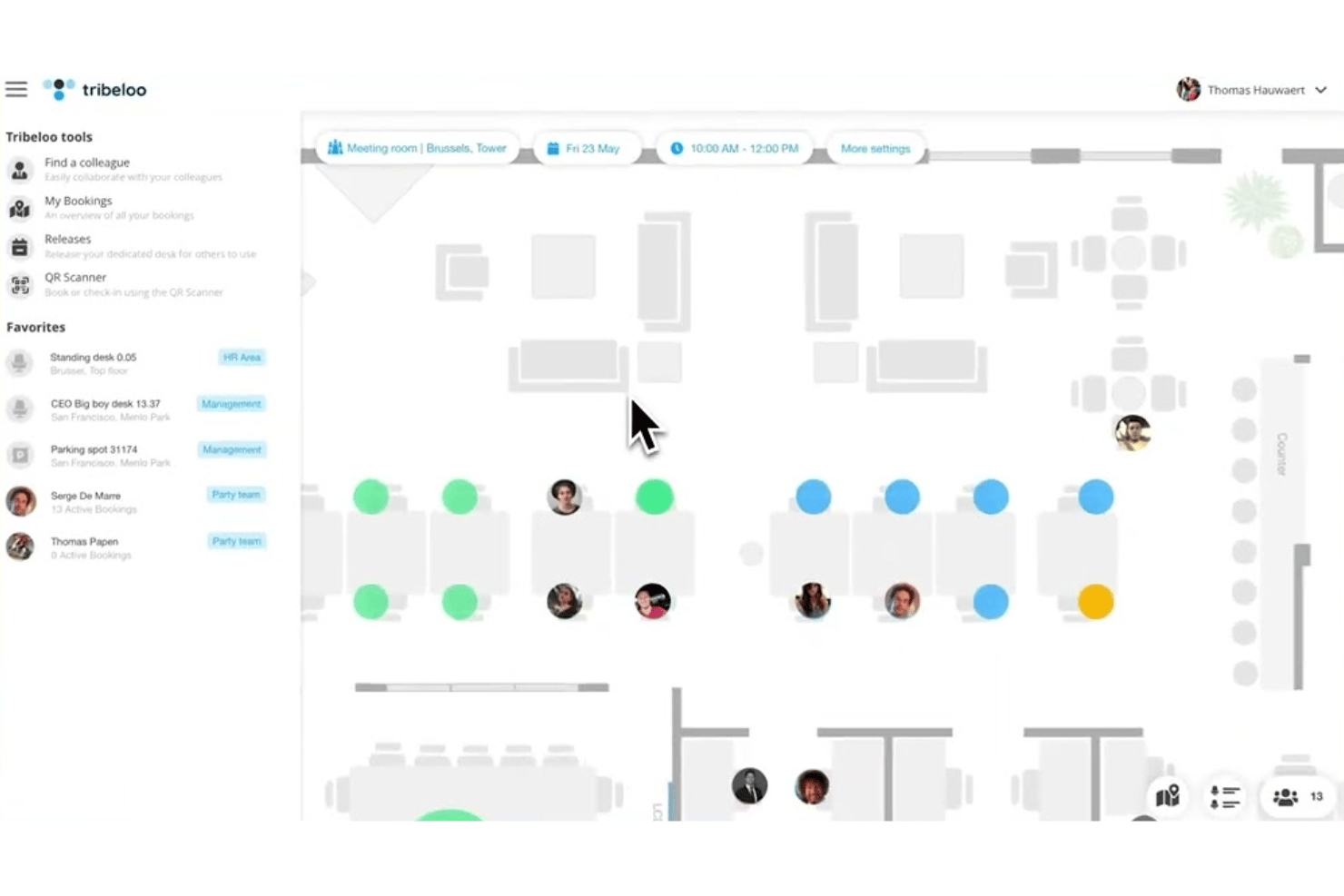
Office floor plans are visually easy to manage and update.
-
Mobile app makes booking and check-in smooth for users.
-
Real-time desk and meeting room availability promotes transparency.
cons
-
Admin reporting lacks some advanced usage analytics features.
-
Limited multi-location management for global organizations.
-
No built-in visitor management or guest access tools.
-

Justworks
Visit WebsiteThis rating combines scores from multiple user review sites to reflect overall customer sentiment about the product.4.6 -
Paycom
Visit WebsiteThis rating combines scores from multiple user review sites to reflect overall customer sentiment about the product.4.3 -
HiBob
Visit WebsiteThis rating combines scores from multiple user review sites to reflect overall customer sentiment about the product.4.5





How We Test & Score Our Tools
We’ve spent years building, refining, and improving our software testing and scoring system. The rubric is designed to capture the nuances of software selection and what makes a tool effective, focusing on critical aspects of the decision-making process.
Below, you can see exactly how our testing and scoring works across seven criteria. It allows us to provide an unbiased evaluation of the software based on core functionality, standout features, ease of use, onboarding, customer support, integrations, customer reviews, and value for money.
Core Functionality (25% of final score)
The starting point of our evaluation is always the core functionality of the tool. Does it have the basic features and functions that a user would expect to see? Are any of those core features locked to higher-tiered pricing plans? At its core, we expect a tool to stand up against the baseline capabilities of its competitors.
Standout Features (25% of final score)
Next, we evaluate uncommon standout features that go above and beyond the core functionality typically found in tools of its kind. A high score reflects specialized or unique features that make the product faster, more efficient, or offer additional value to the user.
We also evaluate how easy it is to integrate with other tools typically found in the tech stack to expand the functionality and utility of the software. Tools offering plentiful native integrations, 3rd party connections, and API access to build custom integrations score best.
Ease of Use (10% of final score)
We consider how quick and easy it is to execute the tasks defined in the core functionality using the tool. High scoring software is well designed, intuitive to use, offers mobile apps, provides templates, and makes relatively complex tasks seem simple.
Onboarding (10% of final score)
We know how important rapid team adoption is for a new platform, so we evaluate how easy it is to learn and use a tool with minimal training. We evaluate how quickly a team member can get set up and start using the tool with no experience. High scoring solutions indicate little or no support is required.
Customer Support (10% of final score)
We review how quick and easy it is to get unstuck and find help by phone, live chat, or knowledge base. Tools and companies that provide real-time support score best, while chatbots score worst.
Customer Reviews (10% of final score)
Beyond our own testing and evaluation, we consider the net promoter score from current and past customers. We review their likelihood, given the option, to choose the tool again for the core functionality. A high scoring software reflects a high net promoter score from current or past customers.
Value for Money (10% of final score)
Lastly, in consideration of all the other criteria, we review the average price of entry level plans against the core features and consider the value of the other evaluation criteria. Software that delivers more, for less, will score higher.
Core Features
Interactive Floor Plan Booking
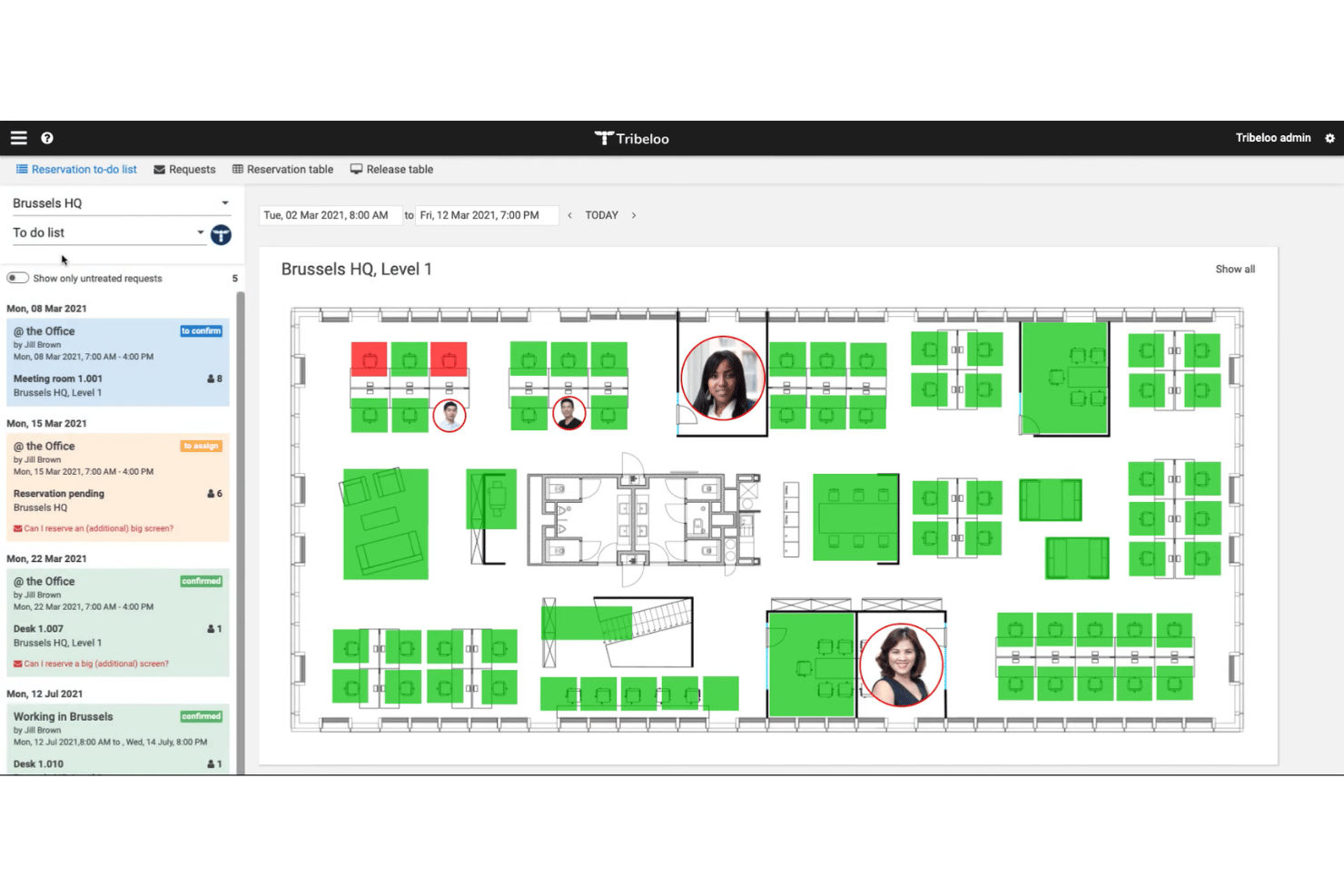
Select and book your desk directly from a visual office map. See exactly which seats are available in real time.
Mobile App Desk Reservations
Reserve, modify, and check in to desks on the go with Tribeloo’s mobile app. This supports hybrid teams and makes desk booking accessible from anywhere.
Meeting Room Scheduling
Book meeting rooms along with desks using a unified platform. Avoid double-booking and coordinate space for collaborative work.
Automated Check-In and Release
Desks automatically release if users don’t check in on time. This ensures efficient use and reduces unused bookings.
Workspace Scheduling Rules
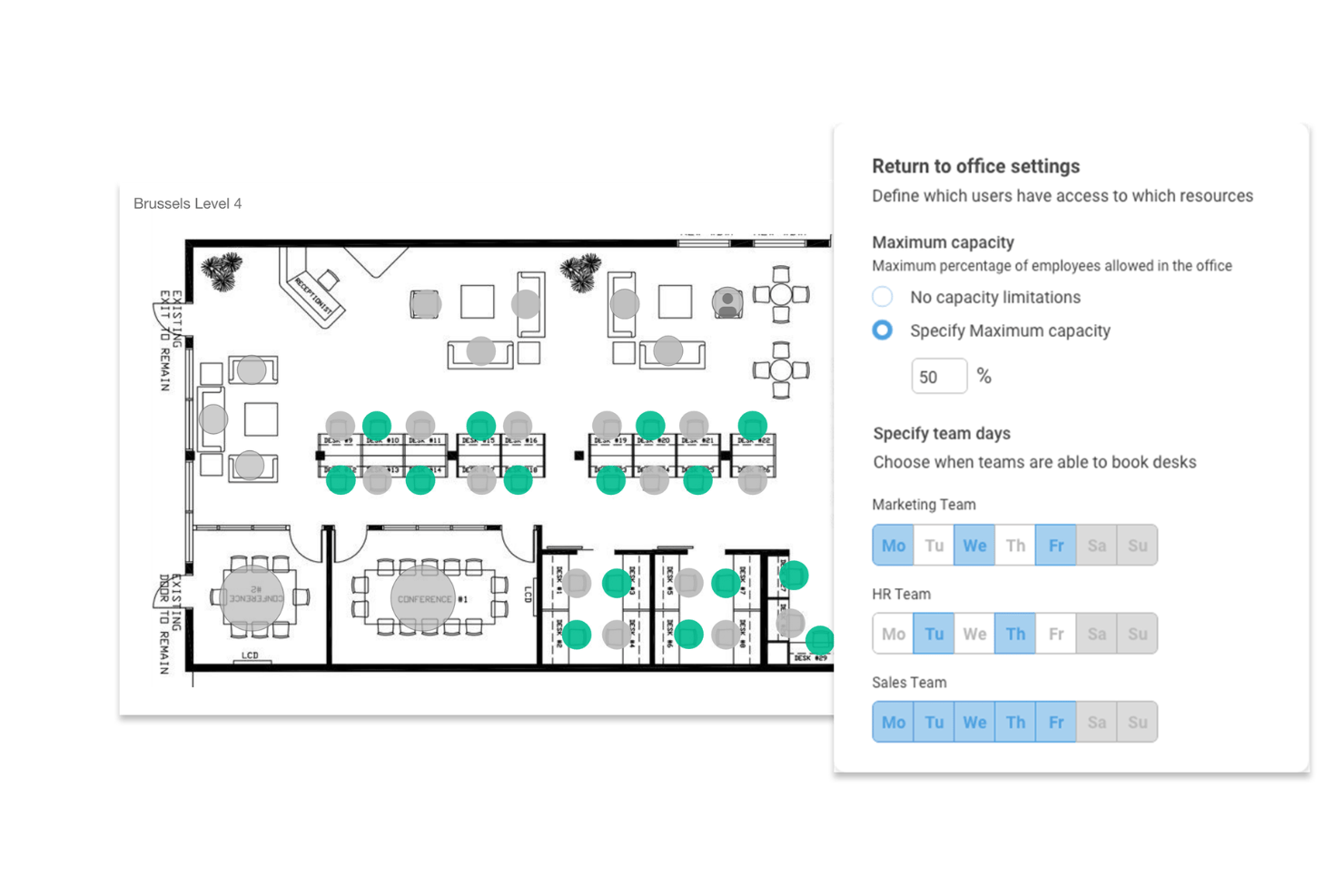
Set booking policies for neighborhoods, teams, or individuals. Control access by day, location, or assigned team to match your company’s hybrid work style.
Occupancy Analytics Dashboard
Track space usage, desk occupancy, and booking trends in a central dashboard. Learn which workplace zones are busiest to guide future planning.
Ease of Use
Tribeloo stands out for its user-friendliness, with visual floor plans, fast mobile bookings, and an intuitive check-in process. HR teams and employees will appreciate how easy it is to reserve, find colleagues, or manage spaces without training.
Users often highlight the clean interface and minimal steps needed to complete any booking or scheduling task.
Integrations
Tribeloo integrates with Microsoft Outlook, Google Calendar, Microsoft Teams, Azure Active Directory, Slack, Okta, Google Workspace, Zapier, Office 365, and Microsoft Exchange.
Tribeloo also offers an open API for custom integrations and connects with third-party integration tools.
Tribeloo Specs
- Access Management
- API
- Appointment Scheduling
- Batch Permissions & Access
- Calendar Management
- Chat
- Click-to-Dial
- Contact Management
- Custom Data Forms
- Custom Reports
- Customer Management
- Dashboard
- Dashboards
- Data Export
- Data Import
- Data Visualization
- Email Integration
- External Integrations
- Forecasting
- Google Apps Integration
- Lead Management
- Map Visualization
- Marketing Automation
- Mobile App
- Multi-User
- Notifications
- Resource Management
- Scheduling
- Self-service Portal
- Workflow Management